
Harry Sit's Blog, page 21
February 22, 2022
When TurboTax and H&R Block Give the Wrong ACA Subsidy
[Updated on February 22, 2022 with a different example.]
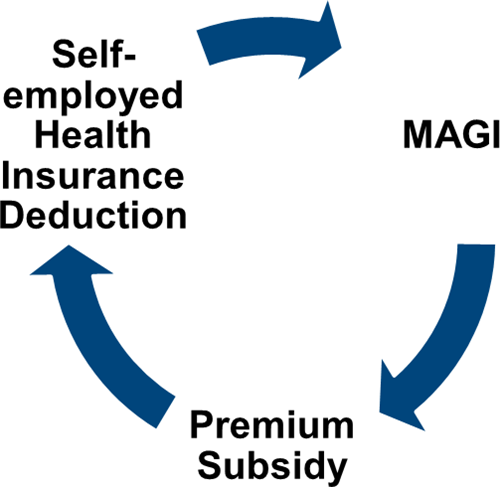
When you’re self-employed, you can deduct your health insurance premium on your tax return. When you buy health insurance through the ACA healthcare marketplace, you can also get a premium subsidy when your income qualifies. The circular relationship between the self-employed health insurance deduction and the premium tax credit creates an interesting math problem.
 Tax Software
After the IRS provided an iterative method for this math problem (see IRS Guidance On Circular Reference in ACA Premium Subsidy and Deduction), tax software vendors such as TurboTax and H&R Block implemented the calculation in their software. It solved the problem for most people. For a step-by-step walkthrough of how to make the software calculate the subsidy and the deduction, please see Self-Employed ACA Health Insurance Subsidy and Deduction In TurboTax and Self-Employed ACA Health Insurance Subsidy and Deduction In H&R Block Tax Software.
However, the calculation in the software still doesn’t work for everyone. Sometimes your specific numbers throw the software out of whack when the same software works perfectly fine with other numbers for other people. Worse yet, the software doesn’t warn you that its calculation is wrong. If you don’t know it’s wrong, you may miss out on large tax credits and deductions!
Here’s a simple example for which TurboTax and H&R Block tax software gives the wrong calculation:
Diane, single, earned $45,000 in self-employment income after all business expenses. She didn’t have any other income or deductions. After subtracting one-half of the self-employment tax, Diane’s MAGI before health insurance was $41,821. As a Texas resident, Diane paid $498/month for a health plan from the ACA healthcare marketplace ($5,976 total). The Second Lowest Cost Silver Plan in her zip code cost $600/month ($7,200 total). Diane received no advance subsidy from the ACA healthcare marketplace.
TurboTax calculated $810 in self-employed health insurance deduction (Schedule 1, Line 17) and $4,522 in premium tax credit (Form 8962, Line 24). We know this result makes no sense because Diane should be able to deduct the full amount not covered by the premium tax credit. Diane paid $5,976. If she receives $4,522 in premium tax credit, she should be able to deduct $5,976 – $4,522 = $1,454, not just $810.
In other words, this equation should hold true:
Self-Employed Health Insurance Deduction + Premium Tax Credit = Unsubsidized Health Insurance Premium (including any dental and vision premiums)
You know the tax software is giving you wrong numbers when the numbers fail the equation (except for a small difference due to rounding).
H&R Block tax software does better than TurboTax in this case. It calculates $1,378 in self-employed health insurance deduction (Schedule 1, Line 17) and $4,612 in premium tax credit (Form 8962, Line 24). This is a little too generous. Diane only paid $5,976 for her health policy but she’s getting $1,378 + $4,612 = $5,990 in tax deduction and tax credit.
A Better CalculatorMathematician Sam Ferguson first heard of this problem from a self-employed Uber driver when he was a Ph.D. student at NYU. He studied the math angles and found out why the calculation didn’t work in all cases. He wrote an alternative method in his paper Obamacare and a Fix for the IRS Iteration. When he spoke to the person in charge at the IRS, the IRS personnel acknowledged the problem but they didn’t treat it as a high priority when the existing method already worked for most people, just not for the edge cases.
Dr. Ferguson developed an online calculator with a software engineer. He authorized me to host it and keep it updated. Here’s the link:
You get these results when you run the same numbers using the better calculator:
CalculatorTurboTaxH&R BlockTax Deduction$1,375$810$1,378Subsidy$4,601$4,522$4,612
Appropriate subsidy amount: 4,601
With this subsidy, your net health insurance cost to be deducted on your tax return is: 5,976 – 4,601 = 1,375
With this net health insurance cost, your modified adjusted gross income is: 41,821 -1,375 = 40,446
If Diane simply goes with the wrong numbers from TurboTax, she will miss $79 in tax credit plus another $565 in tax deduction.
Overriding Tax SoftwareAfter getting the correct numbers from the calculator, you still need to find a way to have your tax software use those numbers. I couldn’t figure out how to override the wrong numbers in TurboTax Deluxe downloaded software. I’m not sure whether a different edition allows manual entries. I was able to figure out how to override in H&R Block software. If you use TurboTax and you run into this problem, consider switching to H&R Block software.
Although the H&R Block software is close enough for our example that it doesn’t need overriding, I’m showing you how to override H&R Block software in case its calculation is off by a larger amount for a different set of numbers. Overriding may prevent you from e-filing, but the inconvenience of having to file your return by mail sure beats missing out on a large deduction or tax credit.
In H&R Block downloaded software, click on Forms on the top, and then find “Self-Employed Health Insurance” in the forms list.
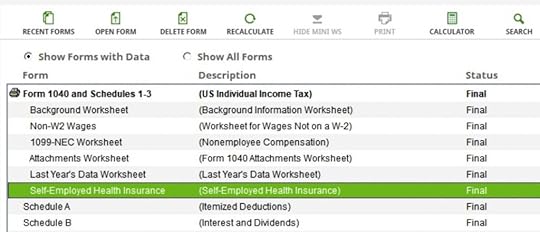
Double-click to open that form. Scroll down to Part VI. Right-click on Box a1 and click on Override. This will allow you to enter your manually calculated deduction.
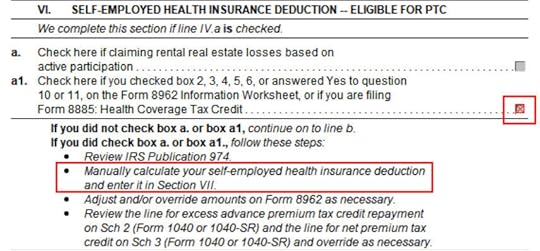
Scroll further down to Part VII. Right-click on Box a and click on Override. Enter the deduction from the online calculator in the box below (in our example, $1,375).

Close this form. Find Form 8962 in the forms list.

Double-click to open Form 8962. Scroll down to Line 11. If the number in column E is different than the number from the online calculator, right-click on Line 11 column E and click on Override. Enter your manually calculated subsidy (in our example, $1,398). If you must use monthly numbers in Lines 12-23 as opposed to the annual totals in Line 11, do the override in Lines 12-23 column E.
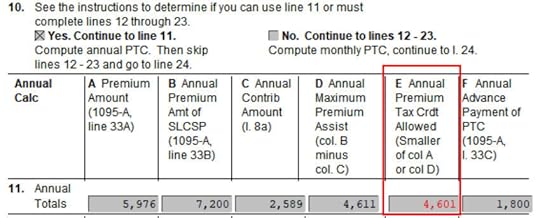
That’ll do it. You should double-check that your Schedule 1 Line 17 shows the correct deduction and your Form 8962 Line 24 shows the correct subsidy.
Learn the Nuts and Bolts I put everything I use to manage my money in a book. My Financial Toolbox guides you to a clear course of action.Read Reviews
The post When TurboTax and H&R Block Give the Wrong ACA Subsidy appeared first on The Finance Buff.


February 21, 2022
2021 Self-Employed ACA Health Insurance In H&R Block Software
Updated on February 21, 2022, with updated screenshots from H&R Block software for tax year 2021. If you use other tax software, see:
Self-Employed ACA Health Insurance Subsidy and Deduction In TurboTaxMany self-employed business owners buy health insurance from the Affordable Care Act (ACA) healthcare marketplace. Self-employed health insurance premiums are tax-deductible. When your income is low enough, you can also receive a subsidy in the form of a premium tax credit. The tax deduction and the subsidy form a circular relationship. The math is difficult to do by hand but tax software easily handles it for most people.
Use H&R Block Downloaded SoftwareThe screenshots below are taken from H&R Block downloaded software. The downloaded software is way better than online software. If you haven’t paid for your H&R Block Online filing yet, consider buying H&R Block download software from Amazon, Walmart, Newegg, and many other places. If you’re already too far in entering your data into H&R Block Online, make this your last year of using H&R Block Online. Switch over to H&R Block download software next year.
Self-Employed Health InsuranceI’m using this scenario as an example:
You are single, self-employed, with no dependent. You had health insurance from the ACA healthcare marketplace for all 12 months in the year. The second lowest cost Silver plan was $600/month. The full unsubsidized premium for the plan you chose was $500/month. Based on your estimated income, you got a $150/month advance credit. You paid net $350/month out of pocket. After deducting your business expenses, your income from self-employment was $45,000 for the year. You don’t have any other income or deductions.
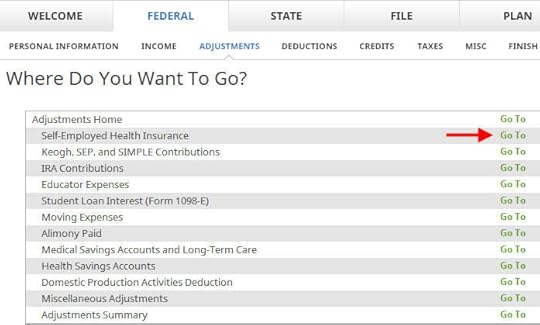
Go to Federal -> Adjustments -> Self-Employed Health Insurance.
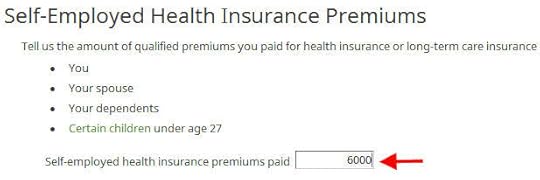
Enter the full unsubsidized premiums for your health insurance in the year. You find this number on the 1095-A form you receive from the ACA healthcare marketplace (line 33, column A). Include both what you paid out of pocket and the advance premium credit paid by the healthcare marketplace. You will reconcile the advance credit later.
If you also paid premiums for dental and vision insurance, add those as well. We don’t have dental and vision premiums in our example.
Right now it says 100% of your premium is deductible. It’ll change after you enter more information from your 1095-A form.
Enter 1095-A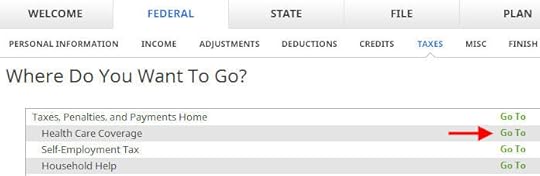
Go to Federal -> Taxes -> Health Care Coverage.
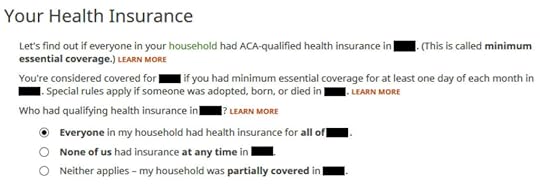
Everyone had insurance in our example.
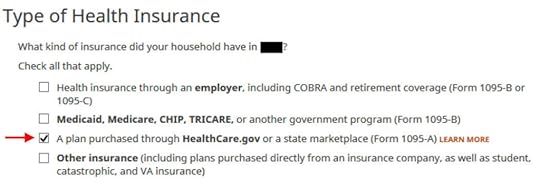
Check the box for a plan from the ACA healthcare marketplace.
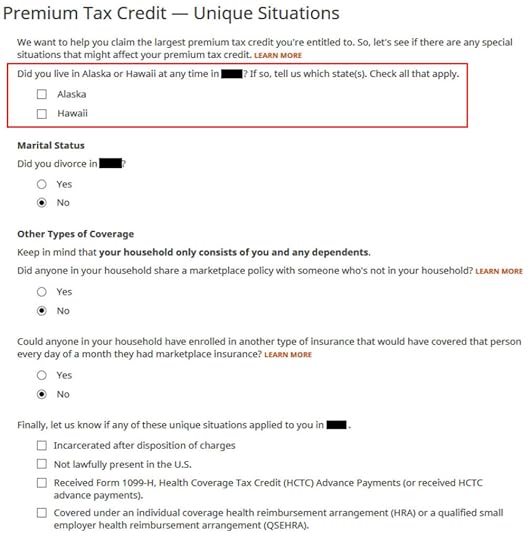
We don’t have any of these unique situations here. Check the box for Alaska or Hawaii if you lived there.
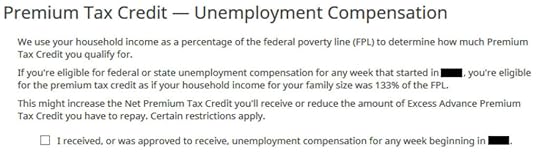
This is a special deal in only 2020 and 2021. If you received unemployment compensation for only one week in the year, you get free (or nearly free) health insurance for the entire year. We didn’t receive unemployment.
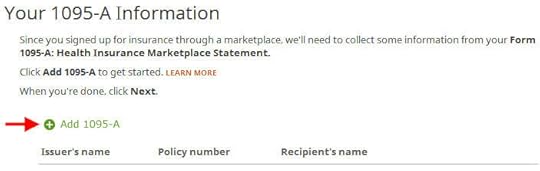
We need to add the 1095-A from the ACA healthcare marketplace.
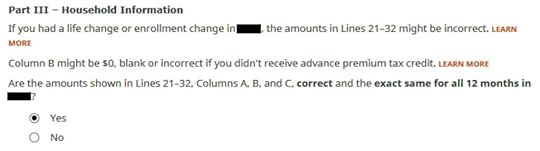
Enter the information as requested. Scroll down to Part III. The numbers on our 1095-A are the same for all 12 months and correct in our example. If you have different numbers for some months, choose ‘No’ and enter the month-by-month numbers from your Form 1095-A.
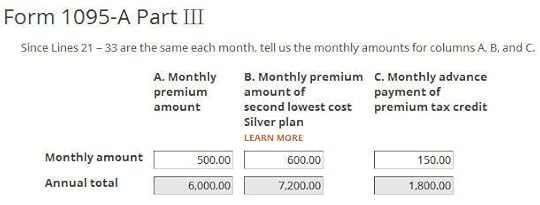
Enter the monthly amounts from the 1095-A. The full unsubsidized premium was $500/month. The full unsubsidized premium for the second lowest cost Silver plan was $600/month. The ACA healthcare marketplace paid $150/month in advance subsidy to the insurance company on our behalf.
We only have one 1095-A form in our example. If you have more than one, repeat and add them all.
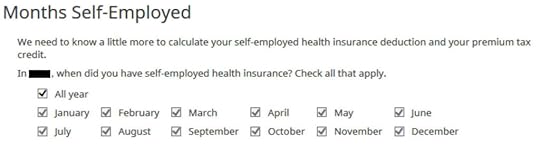
Which months you were self-employed determines how much counts as deductible self-employed health insurance. We were self-employed in all 12 months in our example.
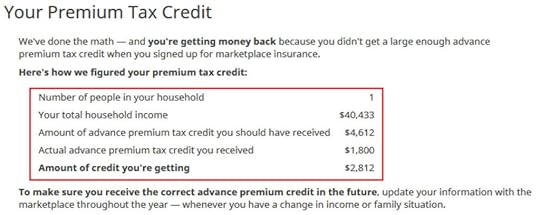
The software crunches the numbers. It says we are eligible for more premium tax credit than the advance subsidy the ACA healthcare marketplace already paid to the insurance company.
Self-Employed Health Insurance DeductionWe’re eligible for a tax deduction on the amount not covered by the re-calculated premium tax credit.
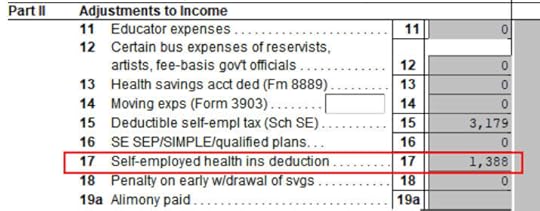
You can verify how much you are receiving a tax deduction. Click on Forms at the top. Double-click on Form 1040 and Schedules 1-3. Scroll down to Schedule 1 and look at line 17. That’s your self-employed health insurance deduction.
Premium Tax Credit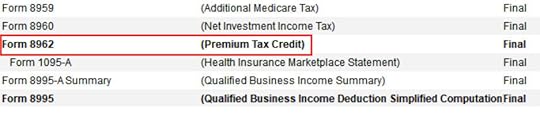
Close Form 1040 and Schedules 1-3 and find Form 8962 in the forms list. Double-click on it.

Scroll down to Line 24 on Form 8962. That’s our premium tax credit based on our actual income. Because we received less in advance subsidy, we’re getting the difference in our tax refund. If you received more in advance subsidy, you’ll have to pay back the difference (subject to a cap, see Cap On Paying Back ACA Health Insurance Subsidy Premium Tax Credit).
$1,388 in self-employed health insurance deduction plus $4,612 in premium tax credit equals $6,000. That’s the total unsubsidized premium for our health insurance (plus any dental and vision insurance premium, which we didn’t have in our example). The numbers add up!
The software figured out the split between the tax deduction and the tax credit. It also matched the result from TurboTax for the same example. This is where software does its best. If you take this to a tax professional, they will have to use their software to calculate the split anyway. I bet they are not able to do it by hand.
Edge CasesTax software works for most cases but it doesn’t work for everyone. You know you’re running into one of the edge cases for which the tax software doesn’t work when the numbers from the software fail this equation (except for a small difference due to rounding):
Self-Employed Health Insurance Deduction + Premium Tax Credit = Unsubsidized Health Insurance Premium (including any dental and vision premiums)
When this happens, you need a better calculator. See When TurboTax and H&R Block Give Self-Employed Wrong ACA Subsidy.
Learn the Nuts and Bolts
I put everything I use to manage my money in a book. My Financial Toolbox guides you to a clear course of action.Read ReviewsThe post 2021 Self-Employed ACA Health Insurance In H&R Block Software appeared first on The Finance Buff.
2021 Foreign Tax Credit Form 1116 in TurboTax and H&R Block
When mutual funds and/or ETFs that invest in foreign countries receive dividends or interest, they have to pay taxes to those countries. After the end of the year, these mutual funds and/or ETFs report to your broker how much they paid in foreign taxes on your behalf. When you invest in these mutual funds and/or ETFs outside a tax-advantaged account, your broker will report to you the total foreign taxes you paid through all your funds and/or ETFs. The IRS allows a tax credit for the taxes you paid indirectly to foreign countries.
The foreign taxes paid is reported in Box 7 on the 1099-DIV form you receive from your broker. It’s easy to handle when the total foreign taxes paid from all your 1099-DIV forms is no more than a certain amount — $300 for single, $600 for married filing jointly. You enter the 1099-DIV forms into your tax software and the software will automatically put the total on your tax form (Schedule 3, Line 1).
When your total foreign taxes paid from all your 1099-DIV forms is over the $300/$600 threshold, you’ll need to include a Form 1116 in your tax return. I’ll show you how to do this in TurboTax and H&R Block software.
Table of ContentsTurboTaxEnter 1099-DIVForeign TaxesVerify on Schedule 3H&R Block SoftwareEnter 1099-DIVForeign Tax CreditVerify on Schedule 3SummaryI start with TurboTax. Please jump to the next section if you use H&R Block software.
TurboTaxThe screenshots below came from TurboTax Deluxe downloaded software. The downloaded software is way better than online software. If you haven’t paid for your TurboTax Online filing yet, you can buy TurboTax download from Amazon, Costco, Walmart, and many other places and switch from TurboTax Online to TurboTax download.
I’ll use this simple scenario as an example:
Enter 1099-DIVYou received a 1099-DIV from your broker. Box 7 “Foreign Tax Paid” on the 1099-DIV shows $700. 100% of this $700 came from a mutual fund or ETF. You only have this one 1099-DIV that has a number in Box 7.
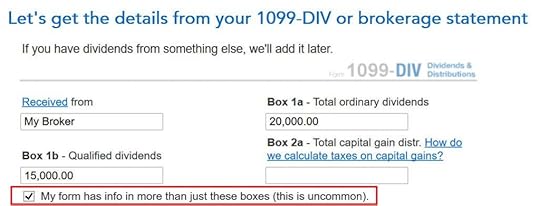
If you’re entering your 1099-DIV manually, you have to check a box on the 1099-DIV entry screen to reveal the additional input fields. Then you put the foreign tax paid number into Box 7. If you imported your 1099’s, double-check that all the numbers from the import match your downloaded copy.
After you enter the 1099-DIV, TurboTax says nothing about exceeding the $300/$600 threshold or needing a Form 1116. You continue with the rest of your entries as usual.
Foreign Taxes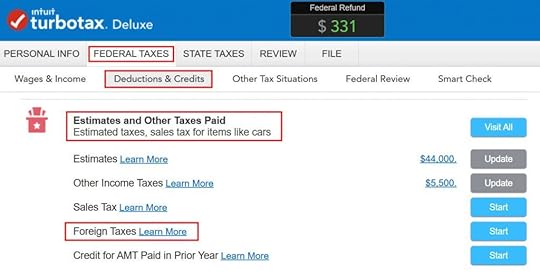
At a much later point, TurboTax will ask you about the foreign tax paid under Deductions & Credits -> Estimates and Other Taxes Paid -> Foreign Taxes.
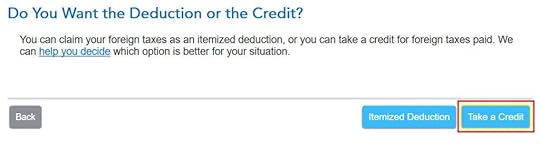
After a brief introduction, the first question is whether you’d like to take a tax deduction or a tax credit. The “help you decide” popup says in general you’re better off taking the credit. So click on “Take a Credit.”
TurboTax isn’t ready with Foreign Tax Credit for the 2021 tax year yet as I wrote this. The following screenshots came from last year. I’ll replace them when TurboTax is ready.
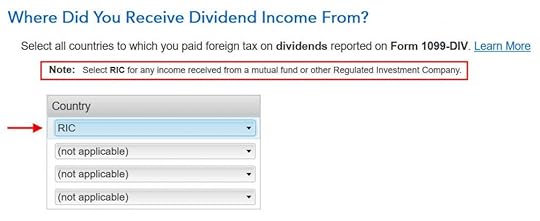
Next, TurboTax asks you which countries you received dividend income from. A small note says select RIC for any income received from a mutual fund or other Regulated Investment Company. U.S.-based mutual funds and ETFs fall into this category. RIC is the first item in the country dropdown.
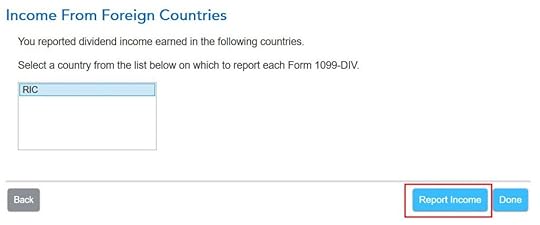
Then you report income received from country “RIC.” Click on Report Income.
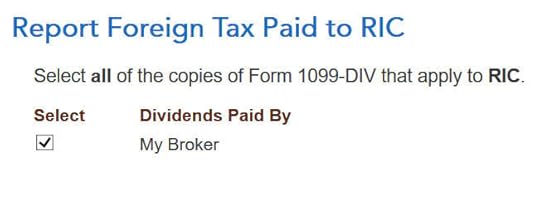
Now you say foreign tax paid from which 1099-DIVs were paid to country RIC. If all your foreign taxes paid were from mutual funds and/or ETFs, select all your 1099-DIV’s that have a number in Box 7.

TurboTax asks you how much of the income reported on your 1099-DIV was from foreign countries. This information isn’t on the 1099-DIV itself. Your broker may have included supplemental information with the 1099-DIV. For instance, Fidelity provides the breakdown of total foreign income in its 1099 package.
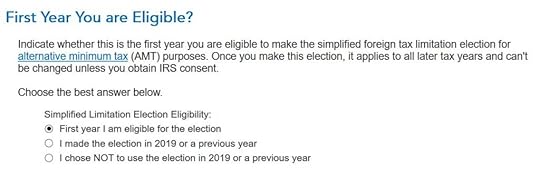
Now it asks you about a “simplified foreign tax limitation election.” If this is the first year you encounter this, choose the first option. If you remember you did this before, choose the second option.
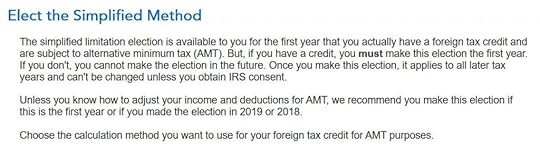
TurboTax suggests you should elect the simplified method. Click on Elect Simplified Calculation.
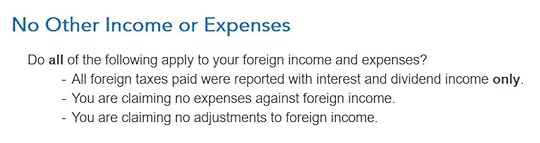
We don’t have any other foreign income or expenses. Click on Yes.
TurboTax auto-filled these. No changes are necessary for us.

We don’t have any carryover from previous years. A carryover is created when you paid more in foreign tax than the tax credit you’re allowed. Your leftover foreign tax paid is carried over to the following year.

After going through all these, we’re getting 100% credit for the $700 foreign tax paid. Woo-hoo!
Verify on Schedule 3
You can verify that you’re getting the foreign tax credit by clicking on Forms on the top right. Find Schedule 3 in the left navigation pane and look at the number on Line 1. You can also look at Form 1116. It looks awfully complicated.
H&R Block SoftwareThe following screenshots came from H&R Block downloaded software. The downloaded software is way better than online software. If you haven’t paid for your H&R Block Online filing yet, consider buying H&R Block download software from Amazon, Walmart, Newegg, and many other places. If you’re already too far in entering your data into H&R Block Online, make this your last year of using H&R Block Online. Switch over to H&R Block download software next year.
I’ll use the same example:
Enter 1099-DIVYou received a 1099-DIV from your broker. Box 7 “Foreign Tax Paid” on the 1099-DIV shows $700. 100% of this $700 came from a mutual fund or ETF. You only have this one 1099-DIV that has a number in Box 7.
If you’re entering the 1099-DIV form manually, type the numbers as shown on your form. If you import, double-check the import to make sure all the numbers match your downloaded copy. H&R Block doesn’t say anything about the foreign tax paid or needing a Form 1116 after you enter the 1099-DIV. Just continue with your other entries.
Foreign Tax Credit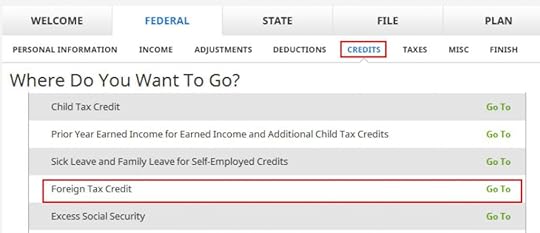
It’ll come up much later in the Credits section under Foreign Tax Credit.
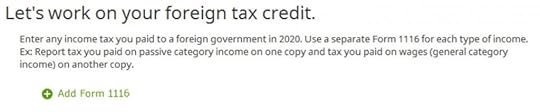
Click on Add Form 1116.
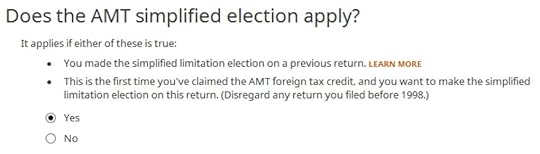
If this is the first year you’re claiming the Foreign Tax Credit, H&R Block software asks upfront about the simplified election. Select Yes for the simplified election.

Dividend income falls under passive income.
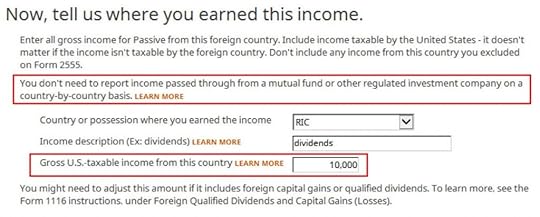
The “learn more” popup says you should choose “RIC” as the country when your foreign income came through mutual funds and/or ETFs. “RIC” is the last item in the country dropdown. You get the foreign income from the supplemental information in your 1099 package from your broker. If you have multiple 1099-DIV’s that reported foreign tax paid in Box 7, you’ll have to add up the foreign income numbers from the respective supplemental information.
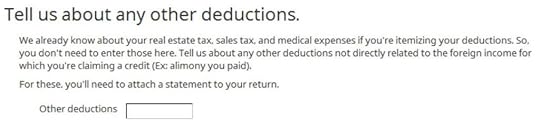
We leave this blank because we don’t have any other deductions either.
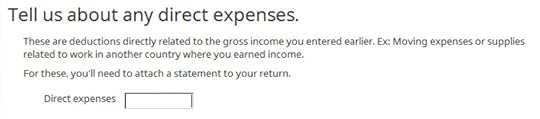
We don’t have any direct expenses either.

We have no losses to adjust.
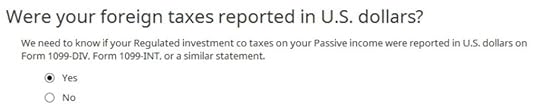
Yes, our 1099-DIV was reported in U.S. dollars.
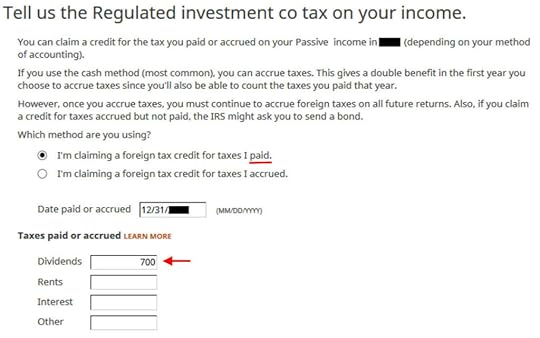
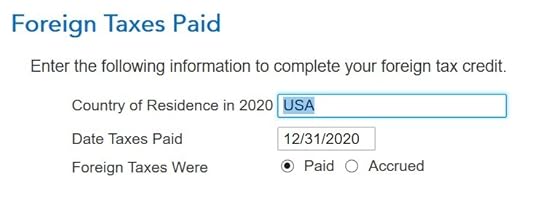
I chose the simpler “paid” method. Enter the end of the year as the date paid. Enter the total foreign tax paid into the Dividends box. If you have multiple 1099-DIV’s that reported foreign tax paid in Box 7, you’ll have to add up those numbers yourself. I wish the software should’ve done the math and auto-populated this field.
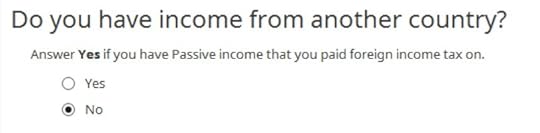
All our foreign taxes paid were through mutual funds and ETFs. RIC is the only country to use. We don’t have foreign income from any other countries.
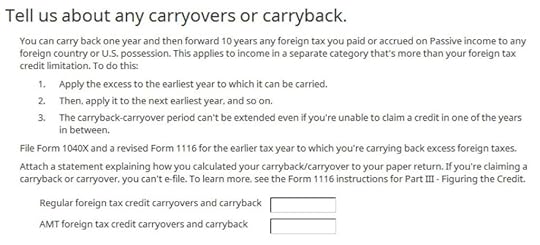
We don’t have any carryover or carryback.
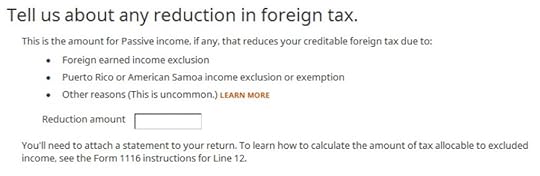
We don’t have any reduction either.
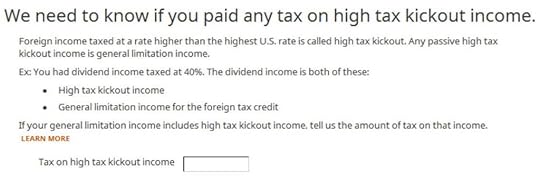
We don’t know what the foreign tax rate was. We’re leaving this blank.

We don’t know how to adjust. We’re leaving it blank again.

This is getting ridiculous. All I want is to get the foreign tax credit!
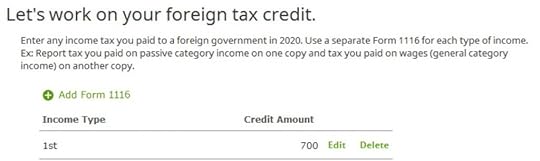
We’re finally done with one Form 1116. Are we getting the credit?
Verify on Schedule 3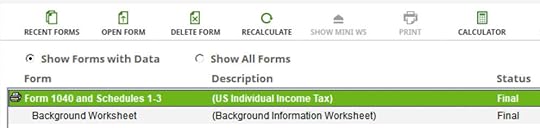
Click on Forms on the top. Double-click on Form 1040 and Schedules 1-3.
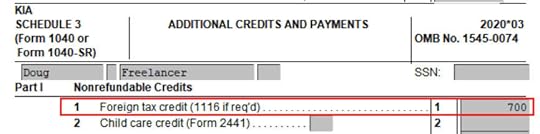
Scroll down to Schedule 3. Line 1 shows our foreign tax credit. You can also look at Form 1116. It looks awfully complicated.
SummaryBoth TurboTax and H&R Block software work when your total foreign taxes paid exceeds the $300/$600 threshold that requires a Form 1116. Either way, you’ll have to gather the foreign income from the 1099 supplemental information from your brokers. After it’s all said and done, you’re getting a tax credit for taxes you paid to foreign countries through your mutual funds and/or ETFs.
TurboTax is more integrated with the 1099-DIV forms you already entered. H&R Block asks you to add up the foreign tax numbers yourself. Because you have to add up the foreign income anyway, you can add up the foreign tax numbers at the same time. H&R Block software also asks a number of questions that don’t apply to our simple scenario. It’s easy to click through those once you know they don’t apply.
Learn the Nuts and Bolts
I put everything I use to manage my money in a book. My Financial Toolbox guides you to a clear course of action.Read ReviewsThe post 2021 Foreign Tax Credit Form 1116 in TurboTax and H&R Block appeared first on The Finance Buff.
February 8, 2022
Backdoor Roth: Planned vs Unplanned
How to do the backdoor Roth and how to report it on the tax return are popular topics on this blog. Many people are doing the backdoor Roth pre-planned. They know their income is too high for contributing directly to their Roth IRA. So they do it indirectly through the backdoor. By following the complete how-to, they are able to make it tax-free and really easy to report on their tax return, whether they use TurboTax, H&R Block, or FreeTaxUSA.
Table of ContentsUnplanned Backdoor RothPro Rata RuleTax Return ConfusionHide Pre-Tax IRAsSplit Tax ReportingCatch UpUnplanned Backdoor RothMany others find themselves doing it unplanned. They contributed to their Roth IRA but they found out their income was too high only when they did their taxes. The tax software or their tax preparer told them they weren’t eligible to contribute to their Roth IRA for the previous year.
Then they learned that they could recharacterize their Roth IRA contribution as a Traditional IRA contribution — or if they haven’t yet contributed, just contribute to the Traditional IRA for the previous year — and then convert it to Roth. So they did. This made it an unplanned backdoor Roth.
As with many things in life, it’s much better to be proactive and do it planned as opposed to being reactive and doing it unplanned. There are some pitfalls in doing the backdoor Roth unplanned.
Pro Rata RuleFirst, there is that pro-rata rule. If you have other traditional, SEP, or SIMPLE IRAs, sometimes coming from a rollover from a previous 401k or 403b, the unplanned backdoor Roth will make you pay taxes at today’s high tax rate as if you converted some pre-tax money unless you “hide” those pre-tax IRAs.
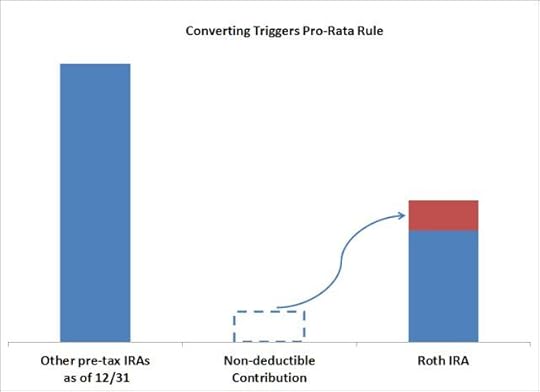
The customer service rep at your IRA provider doesn’t know whether you have other IRAs. You could contribute or recharacterize to traditional and then convert, but it doesn’t necessarily mean you will owe zero taxes from doing so. That’s a big reason for not taking tax advice from customer service reps.
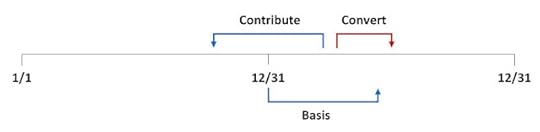
Tax Return ConfusionThen there is confusion from contributing *for* one year and converting *during* a different year.
When you are proactive, you can contribute for the current year and convert within the same year. It will make it clean and easy to report on your tax return.
When you are reactive, by the time you realize your income is too high, it’s already after December 31. You end up converting during the following year. Even when the conversion is tax-free because you don’t have other IRAs, you still have to deal with splitting the tax reporting in two different years. All the questions and confusion on how to report backdoor Roth come from this camp.
What should you do if you did an unplanned backdoor Roth?
Hide Pre-Tax IRAsIt would’ve been better to “hide” your other IRAs before you converted, but since you already converted, now it’s time to catch up on moving those pre-tax IRAs out of the way. If you leave the pre-tax IRAs alone to the end of the year in which you converted, you will trigger the pro-rata rule. So don’t wait.
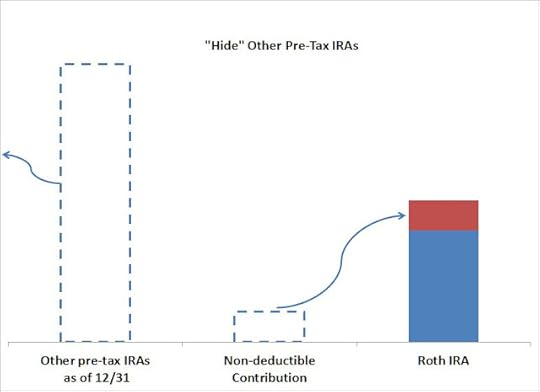
Roll over your other pre-tax Traditional, SEP, and SIMPLE IRAs to a workplace retirement plan. Most employer plans accept incoming rollovers from pre-tax IRAs.
Split Tax ReportingWhen you contribute *for* one year and convert *during* a different year, you will have to split the tax reporting into two different years. You report the contribution on the tax return for the first year. You report the basis carried over from the first year and your conversion on the tax return for the second year. You will have to remember. The confusion is your penalty for doing it unplanned.
 Catch Up
You were already caught by an unplanned backdoor Roth in one year. Don’t let it happen again. If there is any chance that your income may be too high again this year, resolve that you will be proactive and do a planned backdoor Roth from this year forward. When in doubt, do the planned backdoor. Don’t wait until next year.
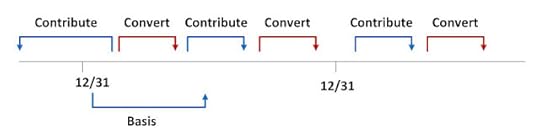
After you contribute or recharacterize your contribution to the Traditional IRA for the prior year, also contribute to the Traditional IRA for the current year. Convert twice or simply convert both together. This way you break out of the cycle of doing it after the fact. It will be smooth next year.
Learn the Nuts and Bolts
I put everything I use to manage my money in a book. My Financial Toolbox guides you to a clear course of action.Read ReviewsThe post Backdoor Roth: Planned vs Unplanned appeared first on The Finance Buff.
February 7, 2022
Long Box Spread Trade vs Buying Treasury Note or CD
We looked at the short box spread as an alternative to securities-based lending in the previous post. This time we look at its mirror image: the long box spread. Once again, this post is more on the “advanced” side of things. It’s totally optional. Please feel free to skip it if you prefer to stick with safety in the mainstream.
Table of ContentsLong Box SpreadHow Does It Help?What Are the Downsides?How To Do It at FidelityLong Box SpreadA long box spread is also a specifically constructed set of four option holdings, which are typically implemented on a market index. When you buy (“long”) a box spread, you —
(a) pay a sum of cash upfront; and
(b) are guaranteed to receive a known larger sum on a specific date in the future.
When you pay upfront for a guaranteed larger sum on a future date, you’re effectively lending at a fixed rate for a fixed term. The difference between the amount you pay and the amount you will receive in the future is your effective interest income for giving the cash upfront.
How Does It Help?If you want a guaranteed return for a fixed term, you can already buy a Treasury note or a CD. A long box spread gives you a slightly higher yield than buying a Treasury note or a CD.
Slightly Higher YieldAs we learned from the previous post on the short box spread, the implied interest rate in a box spread trade is about 0.3% – 0.5% above the Treasury yield of a comparable term. Brokers also sell brokered CDs. The best yields on a one-year or two-year brokered CD sold through Fidelity and Vanguard at this time are worse than the Treasury yields.
You’re getting paid a small premium over the Treasury yield when you hold a long box spread. The going rate is about 1.0% per year for one year and 1.6% per year for two years at this time.
Low Credit RiskEven though your money initially goes to the market participant that sold the box spread to you, you’re not relying on their goodwill to be paid back. You’re paid back by the options exchange through your broker when the options expire. The options exchange debits the other party’s broker. If the other party can’t come up with the money, their broker will go after them by selling their investments. It’s not your worry.
No New AccountsAccording to depositaccounts.com, the best yield on a two-year CD at this moment is 1.19%, which is offered by a credit union in Wyoming. When you buy a long box spread, you’re getting a higher effective yield than that CD special using money in your brokerage account. You don’t have to open new accounts with banks and credit unions all over the place.
Favorable Tax TreatmentYour effective interest income in a long box spread is an investment gain in Section 1256 contracts, which is treated as 60% long-term gain and 40% short-term gain, whereas your interest from a CD is 100% ordinary income.
A higher yield, the convenience of staying in your brokerage account, plus a favorable tax treatment make it attractive to buy a long box spread.
What Are the Downsides?The biggest downside in a long box spread trade is the same as in a short box spread trade: the risk of screwing up when you enter your order. If you accidentally make a mistake, you may turn a small guaranteed gain into a big loss.
Rule #1 if you’re going to venture into box spreads: Don’t screw up.
Another downside is liquidity. If you want your money back sooner, you’d have to sell your long box spread, which isn’t nearly as liquid as a Treasury note.
How To Do It at FidelityIf you fully understand what you’re doing and you’re super careful, here’s an example of how to do a long box spread at Fidelity. It may be similar at other brokers.
Four LegsAs in doing a short box spread trade, you need to be approved for options trading Level 3.

Choose “Options” in the Trade popup.

Enter “.SPX” in the symbol field. This is for the S&P 500 index. Again, we use the S&P 500 index (SPX) as opposed to the S&P 500 ETF (SPY) because SPX options can’t be exercised early whereas SPY options can be. Your box will be knocked out of balance if one of your legs is exercised early.
Click on “Spread” as the options strategy. You automatically get two legs. Click on “Add Leg” twice to add two more legs.
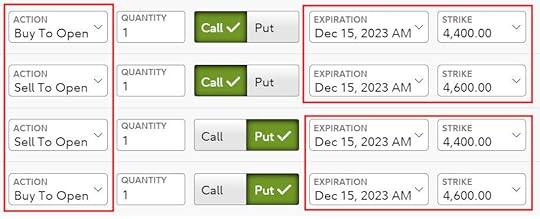
Click on the “Call” toggle for the first two legs and the “Put” toggle for the next two legs.
Select Action in this sequence for a long box spread, which is the opposite of a short box spread:
Buy To OpenSell To OpenSell to OpenBuy to OpenRemember for a long box spread: Buy – Sell – Sell – Buy.
Set the expiration to the same date for all four legs. This is the date you will get paid back.
Choose strike prices around the current index value (4,400 to 4,600 in the screenshot when the index was around 4,500). The gap between the strike prices times 100 is the amount you’ll be paid back. If you have $20,000 to invest, make the gap 200 wide. The strike prices go from low to high in your two calls and two puts. Match the two spreads exactly between your two calls and two puts. Finally, enter the same quantity for all four legs.
When you need to invest $40,000, you can choose a spread of 400 (for example 4,300 to 4,700) with a quantity of 1 or you can choose a spread of 200 (for example 4,400 to 4,600) with a quantity of 2. All else being equal, a smaller quantity with a larger spread saves a small amount of money on commissions and fees but a larger quantity with a smaller spread may be easier to execute. The commissions and fees at Fidelity are $2.68 for each set of four legs at a quantity of 1 ($0.67 per leg).
Limit PriceNow you need to enter a limit price for your four legs. Look up recent trades on boxtrades.com. Boxtrades.com gives you a target price when you enter the desired yield.
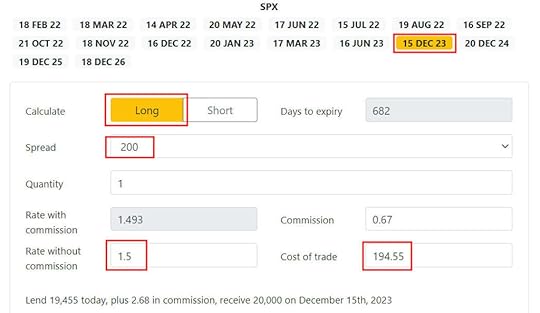
This screenshot shows when you’re willing to accept a yield of 1.5% per year for a spread of 200 until December 15, 2023, you should enter a limit price of 194.55.

Make sure the order type is Net Debit. You’re offering to pay someone in the market $19,455 now for you to receive $20,000 on December 15, 2023. You’ll pay $19,455 + $2.68 = $19,457.68 after commissions and fees.
ExecutionAfter you place the order, you wait to see if someone accepts your offer. Your four-leg option trade is offered as a full package. It’s not possible for someone to pick it apart and accept some legs of your trade but not the others.
It may take some time for your trade to execute. If no one is interested after an hour, you may need to raise the offering price (pay more and receive a lower effective yield). Or you can try it on another day if you aren’t in a hurry. Again, you can calculate the effective yield for your new higher price at boxtrades.com.
After ExecutionIf your order is filled, you’ll pay a sum of cash in your account. You’ll also have four option positions in your holdings. These option positions added together have a net positive value. They will turn into the predictable positive cash credit when you hold them to the expiration date. You’re effectively paid back at that point.
Ignore Values in the EveningThe values of the option positions will fluctuate with the market even though they will converge to the predictable value on the expiration date. The prices used to calculate their values are especially wild when the market is closed. You’ll have to learn to ignore the account balance you see in the off-hours.
Don’t be alarmed when you see your balance drop by a huge sum in the evening. They’ll return to more reasonable values when the market is open.
Mark-to-Market Gain/Loss for TaxesThe year-end 1099 form you receive from the broker will include entries for your Section 1256 gain or loss. Enter the 1099 form as-is into your tax software. The tax software will handle it with the proper tax treatment.
***
A long box spread can be a good alternative to buying a Treasury note or a CD when you execute it correctly. You must be super careful not to screw up in placing your order. Don’t do it if there’s any slight chance you’ll make a mistake. The loss from your mistake can be many times your potential gain from a slightly higher yield. It’s perfectly valid to avoid the possible disaster and only stick with safety in the mainstream.
Learn the Nuts and Bolts
I put everything I use to manage my money in a book. My Financial Toolbox guides you to a clear course of action.Read ReviewsThe post Long Box Spread Trade vs Buying Treasury Note or CD appeared first on The Finance Buff.
February 6, 2022
2021 Self-Employed ACA Health Insurance Deduction In TurboTax
Updated on February 6, 2022, with new screenshots from TurboTax Deluxe downloaded software for the 2021 tax year. If you use other tax software, see:
2021 Self-Employed ACA Health Insurance In H&R Block SoftwareMany self-employed business owners buy health insurance through the ACA healthcare marketplace (healthcare.gov or a state-specific exchange). If your estimated income qualifies for a subsidy, the marketplace will pay part of the premium directly to the insurance company.
However, the advance subsidy is only an estimate based on the income estimate you provided when you signed up. As self-employed people know full well, the actual income from self-employment can vary greatly from year to year. After the year is over, you have to square up and calculate the actual subsidy you really qualify for. If your business didn’t do as well as you anticipated, you may qualify for a higher subsidy. If you had a great year, you may have to pay back some of it.
If you’re self-employed, you also qualify for a tax deduction for the health insurance premium. If you qualify for both a subsidy and a deduction, they form a circular relationship. The IRS prescribed a method to calculate the split between the subsidy and the deduction. It’s difficult to calculate by hand but tax software will take care of it for most people.
Use TurboTax DownloadThe screenshots below are from TurboTax Deluxe downloaded software. The downloaded software is way better than online software. If you haven’t paid for your TurboTax Online filing yet, you can buy TurboTax download from Amazon, Costco, Walmart, and many other places and switch from TurboTax Online to TurboTax download.
We will use this scenario as an example:
Enter 1095-AYou are single, self-employed, with no dependent. You had health insurance through the ACA healthcare marketplace for all 12 months in the year. The full unsubsidized preimium for the second lowest cost Silver plan was $600/month. The full unsubsidized premium for the plan you chose was $500/month. Based on your estimated income, you got a $150/month advance credit. You paid net $350/month. After deducting your business expenses, your income from self-employment was $45,000 for the year. You don’t have any other income or deductions.
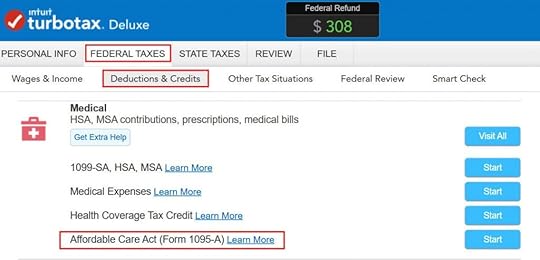
Go to Federal Taxes -> Deductions & Credits. Scroll down and find Affordable Care Act (Form 1095-A) under Medical.
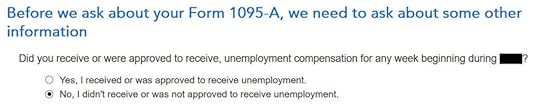
This is a special deal only for 2020 and 2021. If you received unemployment benefits for one week, you get free (or nearly free) health insurance for the full year. We didn’t receive unemployment in our example.
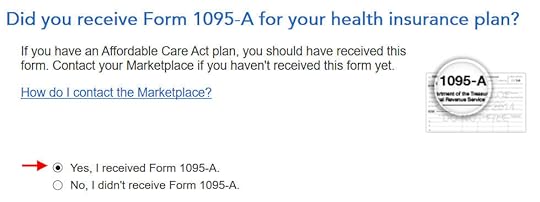
You should have a Form 1095-A from the healthcare marketplace. If you didn’t get it in the mail, log in to your online account and look for a document download.
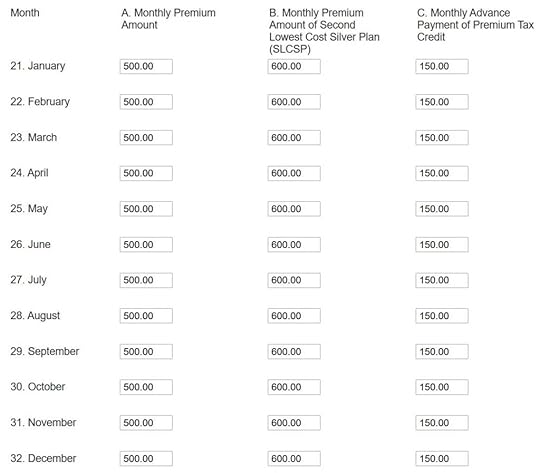
Enter the month-by-month numbers from your Form 1095-A. It’s tedious to repeat for all 12 months but you have to do it. The first column is the full unsubsidized monthly premium for your plan. The middle column is the full unsubsidized premium of the second lowest cost Silver plan, which is used to calculate your subsidy. The last column is the advance subsidy the ACA exchange already paid on your behalf to the insurance company.
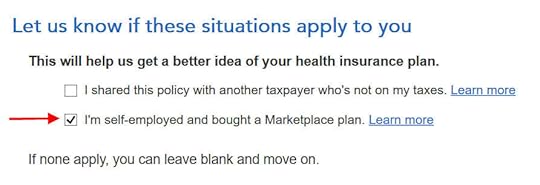
This is important but easy to miss. Even though TurboTax knows you’re self-employed and you have the 1095-A form from the ACA healthcare marketplace, you still must check this box.
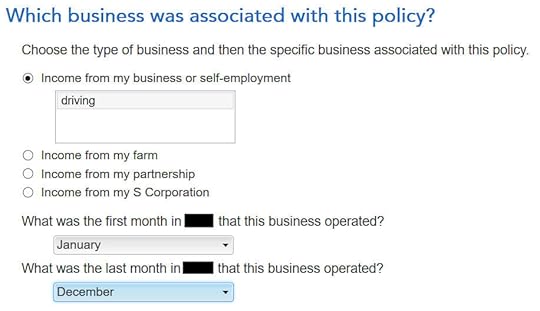
Associate the health insurance with your self-employment and say during which months it applied.
If you have more than one Form 1095-A, repeat and add them all. We only have one in our example.
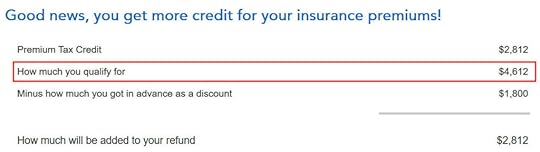
TurboTax crunches the numbers in a split second. It says we’re eligible for more tax credit than the ACA healthcare marketplace already paid directly to the insurance company. We’ll get the difference in our tax refund. If you qualify for less subsidy than the advance already paid, you’ll pay back the difference, subject to a cap (see Cap On Paying Back ACA Health Insurance Subsidy Premium Tax Credit).
Self-Employed Health Insurance DeductionWe’re also eligible for a tax deduction for the portion not covered by the premium tax credit.

To see your self-employed health insurance deduction, click on Forms on the top right. Find Schedule 1 in the left navigation pane. Look at Line 17. It shows we’re getting a $1,388 tax deduction for self-employed health insurance.
Premium Tax Credit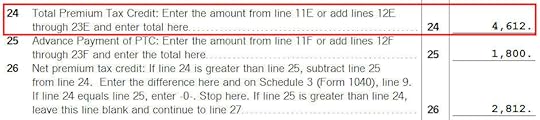
To see the subsidy you qualify for based on your actual income, find Form 8962 in the forms list navigation pane. Scroll down and look at Line 24. When you’re done looking for the form, click on Step-by-Step on the top right to get back to the interview.
$1,388 in self-employed health insurance tax deduction plus $4,612 in premium tax credit equals $6,000 ($500/month), which is the full unsubsidized premium for our health plan (plus any dental and vision insurance premium, which we didn’t have in our example). The numbers add up! TurboTax figured out the split between the tax deduction and the tax credit. It also matched the result from H&R Block software for the same example.
Edge CasesTurboTax works for most cases but it doesn’t work for everyone. You know you’re running into one of the edge cases for which the software doesn’t work when the numbers from the software fail this equation (except for a small difference due to rounding):
Self-Employed Health Insurance Deduction + Premium Tax Credit = Unsubsidized Health Insurance Premium (including any dental and vision premiums)
When this happens, you need a better calculator. See When TurboTax and H&R Block Give Self-Employed Wrong ACA Subsidy.
Learn the Nuts and Bolts
I put everything I use to manage my money in a book. My Financial Toolbox guides you to a clear course of action.Read ReviewsThe post 2021 Self-Employed ACA Health Insurance Deduction In TurboTax appeared first on The Finance Buff.
February 4, 2022
How to Report 2021 Backdoor Roth in H&R Block Tax Software
Updated on February 4, 2022, with updated screenshots from H&R Block software for tax year 2021. If you use other tax software, see:
How To Report Backdoor Roth In TurboTaxHow to Report Backdoor Roth In FreeTaxUSAIf you did a Backdoor Roth, which involves making a non-deductible contribution to a Traditional IRA and then converting from the Traditional IRA to a Roth IRA, you need to report both the contribution and the conversion in the tax software. For more information on Backdoor Roth, please read Backdoor Roth: A Complete How-To and Make Backdoor Roth Easy On Your Tax Return.
Table of ContentsWhat To ReportUse H&R Block Download SoftwareConvert Traditional IRA to RothNon-Deductible Contribution to Traditional IRATaxable Income from Backdoor RothTroubleshootingWhat To ReportYou report on the tax return your contribution to a traditional IRA *for* that year and your conversion to Roth *during* that year.
For example, when you are doing your tax return for year X, you report the contribution you made *for* year X, whether you actually did it in year X or between January 1 and April 15 of the following year. You also report your converting to Roth *during* year X, whether the money was contributed for year X, the year before, or any previous years.
Therefore a contribution made during the following year for year X goes on the tax return for year X. A conversion done during year Y after you made a contribution for year X goes on the tax return for year Y.
You do yourself a big favor and avoid a lot of confusion by doing your contribution for the current year and finishing your conversion during the same year. I called this a “planned” Backdoor Roth — you’re doing it deliberately.
Don’t wait until the following year to contribute for the previous year. Contribute for year X in year X and convert it during year X. Contribute for year Y in year Y and convert it during year Y. This way everything is clean and neat.
If you are already off by one year, catch up. Contribute for both the previous year and the current year, then convert the sum during the same year. See Make Backdoor Roth Easy On Your Tax Return.
Use H&R Block Download SoftwareThe screenshots below are taken from H&R Block Deluxe downloaded software. The downloaded software is way better than online software. If you haven’t paid for your H&R Block Online filing yet, consider buying H&R Block download software from Amazon, Walmart, Newegg, and many other places. If you’re already too far in entering your data into H&R Block Online, make this your last year of using H&R Block Online. Switch over to H&R Block download software next year.
Here’s the scenario we’ll use as an example:
You contributed $6,000 to a traditional IRA in 2021 for 2021. Your income is too high to claim a deduction for the contribution. By the time you converted it to Roth IRA, also in 2021, the value grew to $6,200. You have no other traditional, SEP, or SIMPLE IRA after you converted your traditional IRA to Roth. You did not roll over any pre-tax money from a retirement plan to a traditional IRA after you completed the conversion.
If your scenario is different, you’ll have to make some adjustments to the screens shown here.
Before we start, suppose this is what H&R Block software shows:
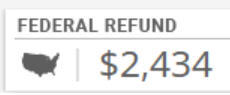
We will compare the results after we enter the Backdoor Roth.
Convert Traditional IRA to RothIncome comes before deductions on the tax form. Tax software also organizes this way. Even though you contributed before you converted, the software makes you enter the income first.
Enter 1099-RWhen you convert the Traditional IRA to Roth, you receive a 1099-R for that year. Complete this section only if you converted *during* the year for which you are doing the tax return. If you only contributed for the year in question but didn’t convert until the following year, skip all the way to the next section heading “Non-Deductible Contribution to Traditional IRA.”
In this example, we assume by the time you converted, the money in the Traditional IRA had grown from $6,000 to $6,200.
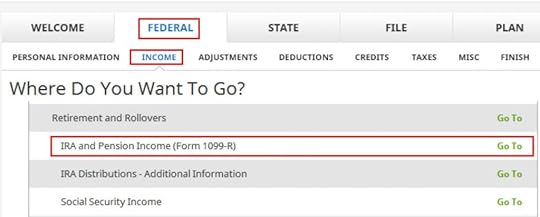
Click on Federal -> Income. Scroll down and find IRA and Pension Income (Form 1099-R). Click on “Go To.”
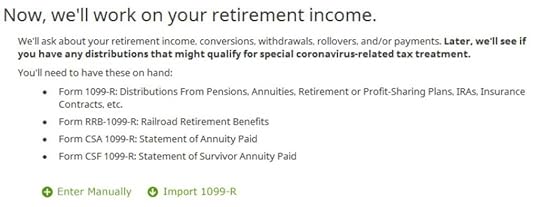
Click on Import 1099-R if you’d like. I show manual entries with “Enter Manually” here.
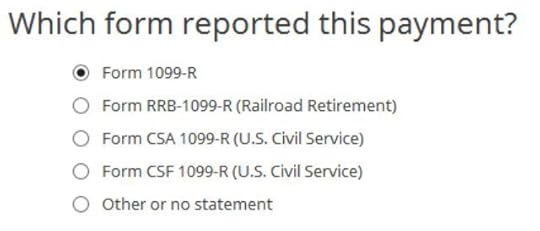
Just a regular 1099-R.
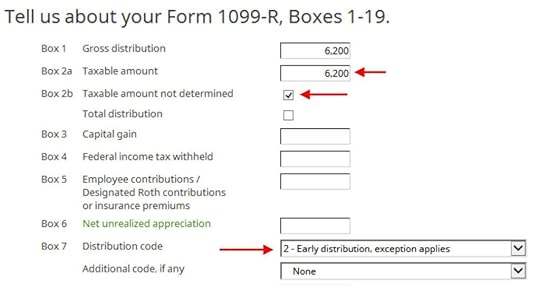
If you imported your 1099-R, double-check to make sure the import exactly matches the copy you received. If you enter your 1099-R manually, be sure to enter everything on the form exactly. Box 1 shows the amount converted to Roth IRA. It’s normal to have the same amount as the taxable amount in Box 2a when Box 2b is checked saying “taxable amount not determined.” Pay attention to the distribution code in Box 7. My 1099-R has the code 2.
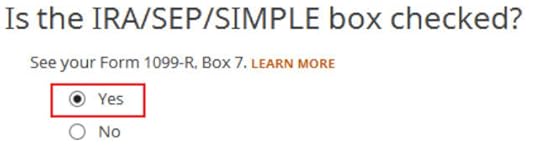
My 1099-R had the IRA/SEP/SIMPLE box checked.
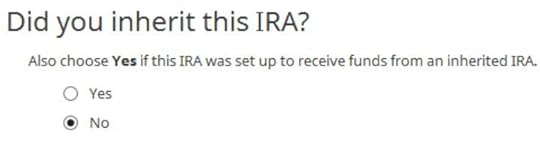
Did not inherit.
Converted to Roth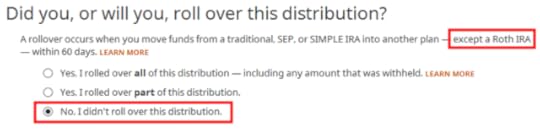
This is a very important question. Read carefully. Answer No, because you converted, not rolled over.

Now answer Yes, you converted.
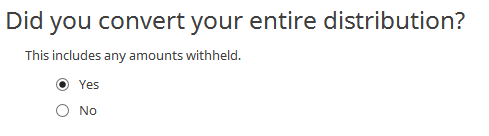
We converted all of it in our example.
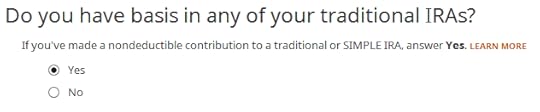
Answer Yes because you made a nondeductible contribution to a traditional IRA.
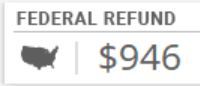
The refund in progress drops a lot at this point. We went from a $2,434 refund to $946. Don’t panic. It’s normal and only temporary. It will come back up after we complete the section for IRA contributions.
You are done with one 1099-R. Repeat the above if you have another 1099-R. If you’re married and both of you did a Backdoor Roth, pay attention to whose 1099-R it is when you enter the second one. You’ll have problems if you assign both 1099-R’s to the same person when they belong to each spouse. Click on Finished when you are done with all the 1099-Rs.
Additional Questions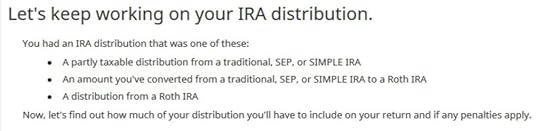
A few more questions.
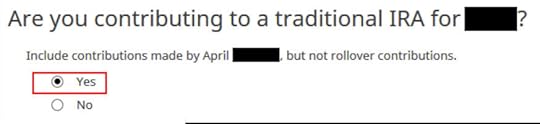
Answer Yes because you contributed to a Traditional IRA for the year.

Will wait.
Non-Deductible Contribution to Traditional IRANow we enter the non-deductible contribution to the Traditional IRA *for* the year in question. Complete this part whether you contributed in the same year or you did it or are planning to do it in the following year between January 1 and April 15.
If your contribution during the year in question was for the previous year, make sure you entered it on your previous tax return. If not, fix your previous return first.
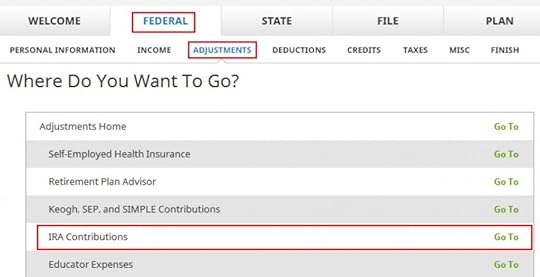
Click on Federal -> Adjustments. Find IRA Contributions. Click on “Go To.”

Wrong tense but answer “Yes” because you contributed to an IRA for the year in question.

Check the box for Traditional IRA if you contributed directly to a Traditional IRA. If you originally contributed to a Roth IRA and then you recharacterized the contributions as traditional contributions, check the Roth IRA boxes here and then answer yes when it asks you whether you recharacterized.
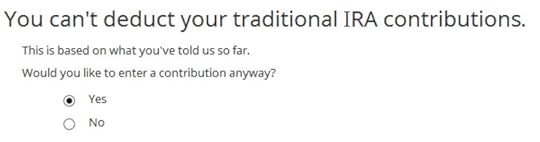
You know you don’t get a deduction due to income. Enter anyway.

Enter your contribution amount. We contributed $6,000 in our example.

This is important. Answer No if you contributed to a Traditional IRA and converted to Roth. Answer Yes if you originally contributed to a Roth IRA, recharactered it to Traditional, and then converted.
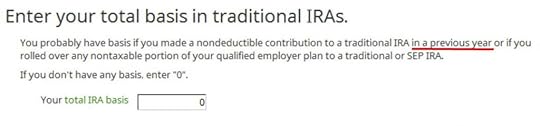
If you did a clean “planned” backdoor Roth and you started fresh each year, enter zero. If you contributed non-deductible for previous years (regardless of when), enter the number on line 14 of your Form 8606 from last year.
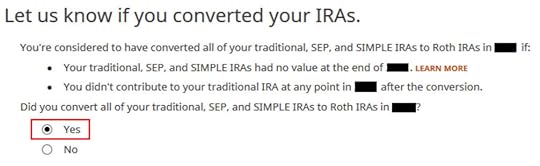
This is another important question. Read carefully. If you are doing it the easy way, as in our example, answer “Yes” — you converted all. If you are doing it the hard way in offset years — contributing for year X in the following year and converting during the following year — answer “No” and you will see some more questions.
If you already did it the hard way, please, please, please do yourself a big favor and do it the easy way next year. See Make Backdoor Roth Easy On Your Tax Return.
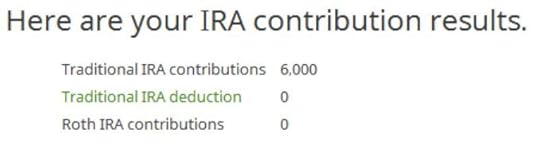
A summary of your contributions. 0 in Traditional IRA deduction means it’s nondeductible. Click on Next. Repeat for your spouse if both of you did a Backdoor Roth.
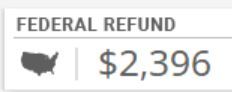
We are done entering the nondeductible contribution to the Traditional IRA. Now the refund in progress should go back up. It was a refund of $2,434 when we first started. Now it’s a refund of $2,396. The difference of $38 is due to the tax on the extra $200 earned before the Roth conversion.
If you only contributed *for* last year but you didn’t convert until the following year, remember to come back next year to finish the conversion part.
Taxable Income from Backdoor RothAfter going through all these, let’s confirm how you’re taxed on the Backdoor Roth.
Click on Forms on the top and open Form 1040 and Schedules 1-3. Click on Hide Mini WS. Scroll down to lines 4a and 4b.

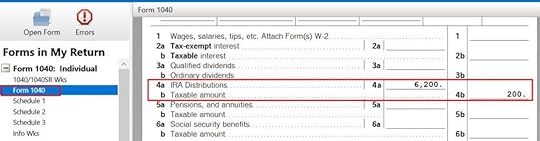
It shows $6,200 in IRA distributions, $198 of which is taxable. The taxable income came out to $198, not $200, due to some rounding in the calculation. If you are married filing jointly and both of you did a backdoor Roth, the numbers here will show double.
Tah-Dah! You got money into a Roth IRA through the backdoor when you aren’t eligible to contribute to it directly. You will pay tax on a small amount in earnings if you waited between contributions and conversion. That’s negligible relative to the benefit of having tax-free growth on your contributions for many years.
TroubleshootingIf you followed the steps and you are not getting the expected results, here are a few things to check.
Fresh StartIt’s best to follow the steps fresh in one pass. If you already went back and forth with different answers before you found this guide, some of your previous answers may be stuck somewhere you no longer see. You can delete them and start over.
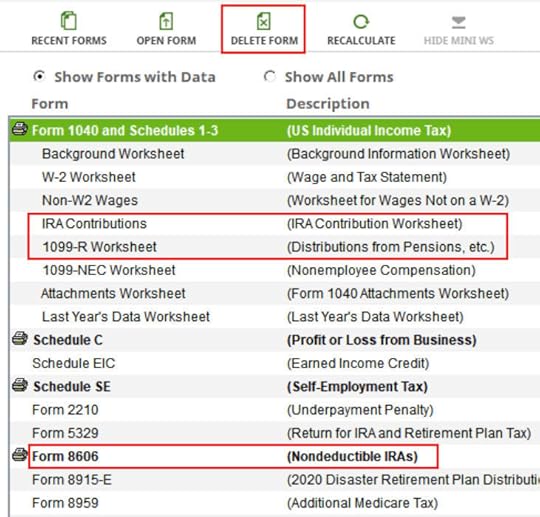
Click on Forms and delete IRA Contributions Worksheet, 1099-R Worksheet and Form 8606. Then start over by following the steps here.
W-2 Box 13Make sure the “Retirement plan” box in Box 13 of the W-2 you entered into the software matches your actual W-2. If you are married and both of you have a W-2, make sure your entries for both W-2’s match the actual forms you received.
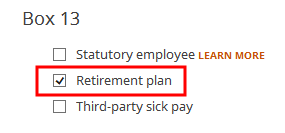
When you are not covered by a retirement plan at work, such as a 401k or 403b plan, your Traditional IRA contribution may be deductible, which also makes your Roth conversion taxable.
Self vs SpouseIf you are married, make sure you don’t have the 1099-R and the IRA contribution mixed up between yourself and your spouse. If you inadvertently assigned two 1099-Rs to one person instead of one for you and one for your spouse, the second 1099-R will not match up with a Traditional IRA contribution made by a spouse. If you entered a 1099-R for both yourself and your spouse but you only entered one Traditional IRA contribution, you will be taxed on one 1099-R.
Learn the Nuts and Bolts
I put everything I use to manage my money in a book. My Financial Toolbox guides you to a clear course of action.Read ReviewsThe post How to Report 2021 Backdoor Roth in H&R Block Tax Software appeared first on The Finance Buff.
How To Report 2021 Backdoor Roth In TurboTax (Updated)
Updated on February 4, 2022, with new screenshots from TurboTax Deluxe downloaded software. If you use other tax software, see:
How To Report Backdoor Roth In H&R Block SoftwareHow to Report Backdoor Roth In FreeTaxUSAIf you did a Backdoor Roth, which involves making a non-deductible contribution to a Traditional IRA and then converting from the Traditional IRA to a Roth IRA, you need to report both the contribution and the conversion in the tax software. For more information on Backdoor Roth, see Backdoor Roth: A Complete How-To.
Table of ContentsWhat To ReportUse TurboTax DownloadConvert Traditional IRA to RothNon-Deductible Contribution to Traditional IRATaxable Income from Backdoor RothTroubleshootingWhat To ReportYou report on the tax return your contribution to a Traditional IRA *for* that year and your conversion to Roth *during* that year.
For example, when you are doing your tax return for year X, you report the contribution you made *for* year X, whether you actually did it during year X or between January 1 and April 15 of the following year. You also report your conversion to Roth *during* year X, whether the contribution was made for year X, the year before, or any previous years.
Therefore a contribution made during the following year for year X goes on the tax return for year X. A conversion done during year Y after you made a contribution for year X goes on the tax return for year Y.
You do yourself a big favor and avoid a lot of confusion by doing your contribution for the current year and finish your conversion in the same year. I called this a “planned” Backdoor Roth — you’re doing it deliberately. Don’t wait until the following year to contribute for the previous year. Contribute for year X in year X and convert it during year X. Contribute for year Y in year Y and convert it during year Y. This way everything is clean and neat.
If you are already off by one year, catch up. Contribute for both the previous year and the current year, then convert the sum during the same year. See Make Backdoor Roth Easy On Your Tax Return.
Use TurboTax DownloadThe screenshots below are from TurboTax Deluxe downloaded software. The downloaded software is way better than online software. If you haven’t paid for your TurboTax Online filing yet, you can buy TurboTax download from Amazon, Costco, Walmart, and many other places and switch from TurboTax Online to TurboTax download.
Here’s the planned Backdoor Roth scenario we will use as an example:
You contributed $6,000 to a traditional IRA in 2021 for 2021. Your income is too high to claim a deduction for the contribution. By the time you converted it to Roth IRA, also in 2021, the value grew to $6,200. You have no other traditional, SEP, or SIMPLE IRA after you converted your traditional IRA to Roth. You did not roll over any pre-tax money from a retirement plan to a traditional IRA after you completed the conversion.
If your scenario is different, you will have to make some adjustments to the screens shown here.
Before we start, suppose this is what TurboTax shows:
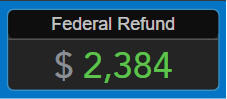
We will compare the results after we enter the Backdoor Roth.
Convert Traditional IRA to RothThe tax software works on income items first. Even though the conversion happened after the contribution, we enter the conversion first.
When you convert from Traditional IRA to Roth, you will receive a 1099-R form. Complete this section only if you converted *during* the year for which you are doing the tax return. If you only converted during the following year, you won’t have a 1099-R until next January. Skip this section and wait until the next year.
In our example, we assume by the time you converted, the money in the Traditional IRA had grown from $6,000 to $6,200.
Enter 1099-R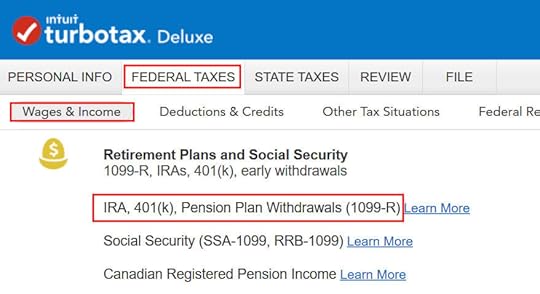
Go to Federal Taxes -> Wages & Income -> IRA, 401(k), Pension Plan Withdrawals (1099-R).
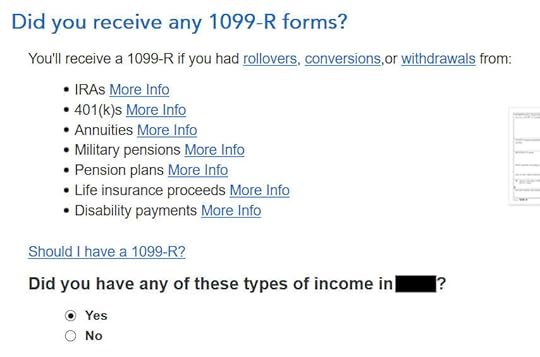
As you work through the interview, you will eventually come to the point to enter the 1099-R. Select Yes, you have this type of income. Import the 1099-R if you’d like. I’m choosing to type it myself.
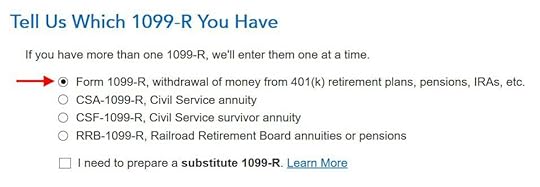
Just the regular 1099-R.
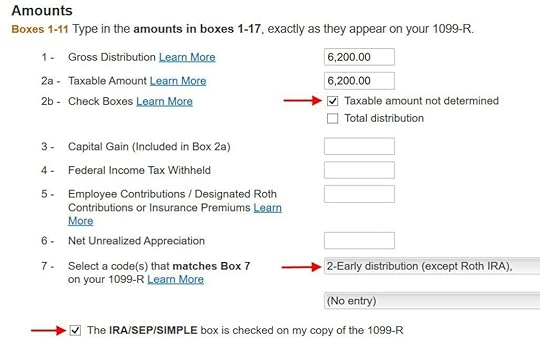
Box 1 shows the amount converted to Roth IRA. It’s normal to have the same amount as the taxable amount in Box 2a when Box 2b is checked saying “taxable amount not determined.” Pay attention to the code in Box 7 and the IRA/SEP/SIMPLE box. Make sure your entry matches your 1099-R exactly.

You get this Good News, but …
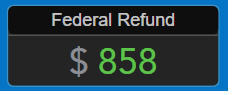
Your refund in progress drops a lot. We went from $2,384 down to $858. Don’t panic. It’s normal and temporary.
Converted to Roth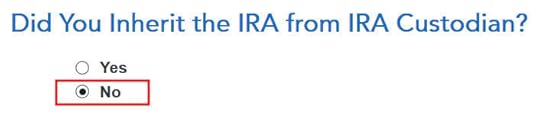
Didn’t inherit it.
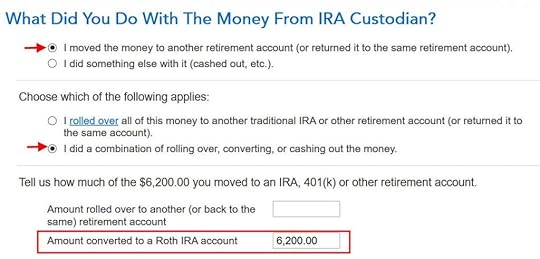
First click on “I moved …” then click on “I did a combination …” Enter the amount converted in the box. Don’t choose the “I rolled over …” option. A Roth conversion is not a rollover.
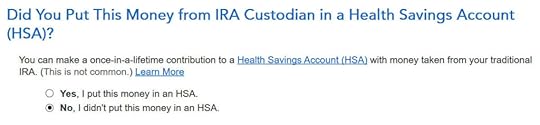
No, you didn’t put the money in an HSA.
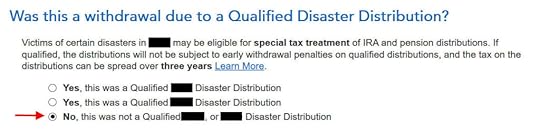
Not due to a disaster.
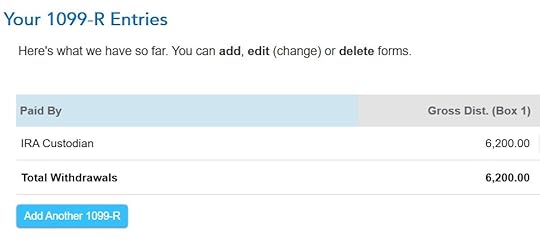
You get a summary of your 1099-R’s. Repeat the previous steps to add another if you have more than one. If you’re married and both of you did a Backdoor Roth, enter the 1099-R for both of you, but pay attention to select whose 1099-R it is. Don’t accidentally assign two 1099-R’s to the same person.
Basis and End-of-Year Values
Didn’t take any disaster distribution.
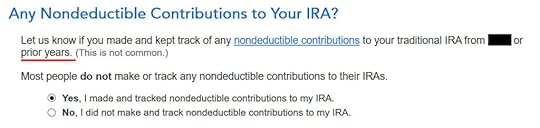
Here it’s asking about the prior year carryover. When you’re doing a clean “planned” Backdoor Roth as in our example — contribute for year X in year X and convert before the end of year X — you can answer No here. If you contributed for the previous year between January 1 and April 15 during year X, answer Yes here.

If you answered Yes to the previous question and you did your previous year’s return correctly also in TurboTax, your basis from the previous year will show up here. If you did your previous year’s tax return wrong, fix your previous return first.
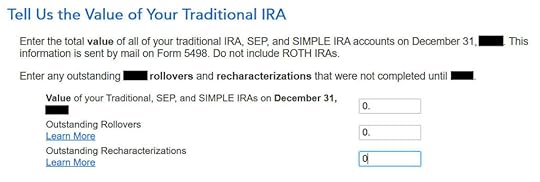
Enter the values at the end of the year. We don’t have anything in traditional, SEP, or SIMPLE IRAs after we converted it all.
That’s it so far on the income side. Continue with other income items. The refund in progress is still temporarily depressed. Don’t worry. It will change.
Non-Deductible Contribution to Traditional IRANow we enter the non-deductible contribution to a Traditional IRA *for* the year we are doing the tax return.
Complete this part whether you contributed before December 31 or you did it or are planning to do it in the following year between January 1 and April 15. If your contribution during the year in question was for the year before, make sure you entered it on the previous tax return. If not, fix your previous return first.
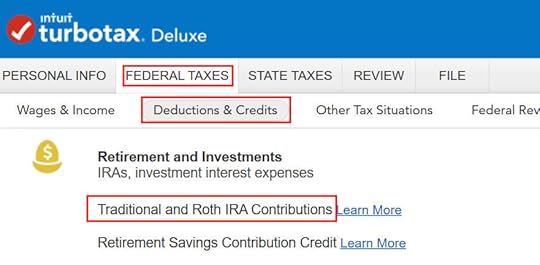
Go to Federal Taxes -> Deductions & Credits -> Traditional and Roth IRA Contributions.
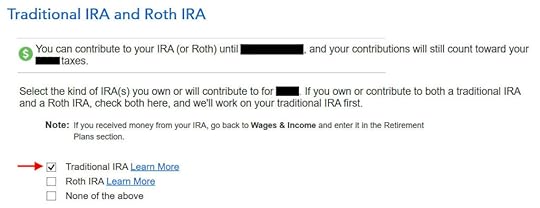
Because we did a clean “planned” Backdoor Roth, we check the box for Traditional IRA. If you did a detour when you first contributed to a Roth IRA before you realized your income is too high and you recharacterized the contribution as to a Traditional IRA, check the box for Roth IRA and answer the questions accordingly.
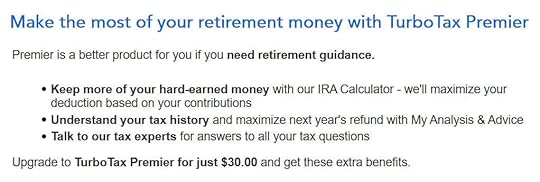
TurboTax offers an upgrade but we choose to stay in TurboTax Deluxe.

We already checked the box for Traditional but TurboTax just wants to make sure.

It was NOT a repayment of a retirement distribution.
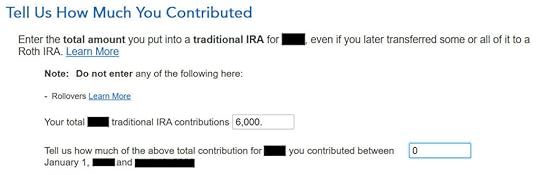
Enter the contribution amount. Because we contributed for year X in year X, we put zero in the second box. If you contributed for the previous year between January 1 and April, enter the contribution in both boxes.
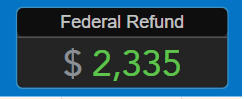
Right away our federal refund in progress goes back up! We started with $2,384. It went down to $858. Now it comes back to $2,335. The $49 difference is because we have to pay tax on the $200 in earnings when we contributed $6,000 and converted $6,200. If you had less in earnings, your refund numbers would be closer still.
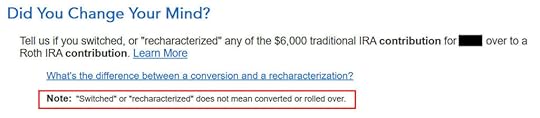
This is a critical question. Answer “No.” You converted the money, not switched or recharacterized.

You may not get this question if you already entered your W-2 and it has Box 13 for the retirement coverage checked. Answer yes if you’re covered by a retirement plan but the box on your W-2 wasn’t checked.

No excess contribution.
Same question we saw before. For a clean “planned” Backdoor Roth, we can answer No. If you made non-deductible contribution for previous years, answer Yes.
Total basis through the previous year. If you did your taxes correctly on TurboTax last year, TurboTax transfers the number here. If you made non-deductible contributions for previous years (regardless of when), enter the number on line 14 of your Form 8606 from last year.
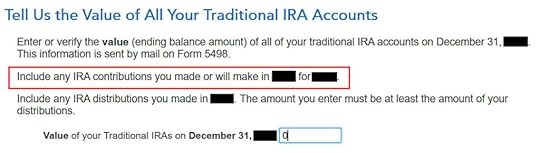
Because we did a clean “planned” Backdoor Roth, we don’t have anything left after we converted everything before the end of the same year.

Income too high, we know. That’s why we did the Backdoor Roth.
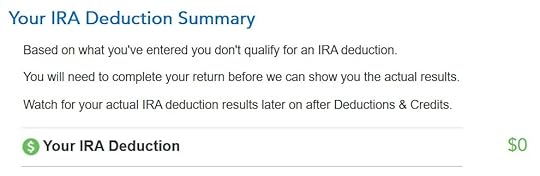
The IRA deduction summary shows $0 deduction, which is expected.
Taxable Income from Backdoor RothAfter going through all these, would you like to see how you are taxed on the Backdoor Roth?
Click on Forms on the top right.
Find Form 1040 in the left navigation panel. Scroll up or down on the right to find lines 4a and 4b. They show a $6,200 distribution from the IRA and only $200 of the $6,200 is taxable. That’s the earning between the time you contributed to your Traditional IRA and the time you converted it to Roth.
When you’re done examining the form, click on Step-by-Step on the top right to go back to the interview.
Tah-Dah! You got money into a Roth IRA through the backdoor when you aren’t eligible for contributing to it directly. That’s why it’s called a Backdoor Roth. You will pay tax on a small amount in earnings if you waited between contributions and conversion. That’s negligible relative to the benefit of having tax-free growth on your contributions for many years.
TroubleshootingIf you followed the steps and you are not getting the expected results, here are a few things to check.
Fresh StartIt’s best to follow the steps fresh in one pass. If you already went back and forth with different answers before you found this guide, some of your previous answers may be stuck somewhere you no longer see. You can delete them and start over.
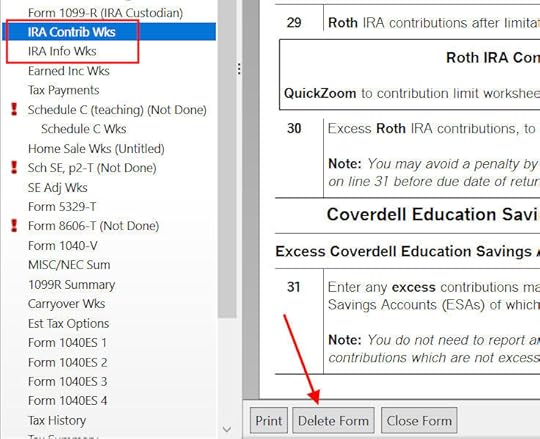
Click on Forms on the top right.
Find “IRA Contrib Wks” and “IRA Info Wks” in the left navigation pane and click on “Delete Form” to delete them. Then you can start over following the steps above.
 W-2 Box 13
Make sure the Retirement Plan box in Box 13 of the W-2 you entered into the software matches your actual W-2. If you are married and both of you have a W-2, make sure your entries for both W-2’s match the actual forms you received.
When you are not covered by a retirement plan at work, such as a 401k or 403b plan, your Traditional IRA contribution may be deductible, which also makes your Roth conversion taxable.
Self vs SpouseIf you are married, make sure you don’t have the 1099-R and IRA contribution mixed up between yourself and your spouse. If you inadvertently entered two 1099-Rs issued to you instead of one for you and one for your spouse, the second 1099-R to you will not match up with a Traditional IRA contribution made by your spouse. If you entered a 1099-R for both yourself and your spouse but you only entered one Traditional IRA contribution, you will be taxed on one 1099-R.
Learn the Nuts and Bolts
I put everything I use to manage my money in a book. My Financial Toolbox guides you to a clear course of action.Read ReviewsThe post How To Report 2021 Backdoor Roth In TurboTax (Updated) appeared first on The Finance Buff.
February 2, 2022
Short Box Spread Trade vs Margin Loan: How It Works at Fidelity
Today’s post is more on the “advanced” side. It’s completely optional in managing one’s finance and investments. Please feel free to skip it if you prefer to stick with safety in the mainstream.
The beginning of a new year creates a large demand for cash. I needed cash to contribute to our IRAs and HSA and to buy I Bonds in multiple accounts. I could sell from our brokerage account to generate cash but both stocks and bonds weren’t doing too well in January. I thought of tapping security-based lending for cash before I read this blog post from Karsten on Early Retirement Now: Low-Cost Leverage: The “Box Spread” Trade. I decided to look into it and see how it works.
Table of ContentsWhat Is a Box SpreadShort Box SpreadHow Does It Help?What Are the Downsides?How Much Can You Borrow?How to Do It at FidelityWhat Is a Box SpreadA box spread is a specifically constructed option trade with a guaranteed outcome on a preset date no matter how the underlying market moves. The trade is typically implemented as options on a stock index such as the S&P 500 index (SPX) because options on the S&P 500 index can’t be exercised early (“cash-settled European options”). This guarantees a predictable result on the option expiration date.
You can either sell (“short”) a box spread or buy (“long”) a box spread. We only look at the short box spread in this post. We’ll look at the long box spread in the next post.
Short Box SpreadWhen you sell (“short”) a box spread, you —
(a) receive a sum of cash upfront; and
(b) are guaranteed to lose a known larger sum on a specified future date.
When you receive cash up front and you must lose a larger sum on a future date, you’re effectively taking out a loan with a balloon payment at the end. The difference between the amount you receive and the amount you must pay back in the future is your effective interest payment for having the cash upfront.
How Does It Help?Getting your effective loan from selling a box spread helps because the implied interest rate is quite low. It’s also independent of the broker you use.
Low Fixed RateThe effective interest rate from a short box spread is about 0.3% – 0.5% above the Treasury yield of a comparable term. According to a helpful website boxtrades.com, the current effective interest rates as I’m writing this are about 1.0% per year for one year and 1.5% per year for two years.
The implied interest rate is also fixed for the term whereas the interest rates in securities-based lending programs are typically variable rates. As the Fed raises the short-term interest rate, those variable rates will likely go up in tandem. If you do a short box spread that expires in two years, you’ll have the 1.5% rate guaranteed for two years.
Use Any BrokerYou’re getting the money from the market participants when you sell a box spread. Your broker doesn’t control your effective interest rate. The broker only receives a small commission for facilitating the trade.
You don’t have to transfer your account to Interactive Brokers only to access their low margin rates. You don’t have to have a large balance with your broker and beg for an unpublished rate in their securities-based lending program. You can still do it even if you use Vanguard, which doesn’t offer special low margin rates or a separate securities-based lending program.
Favorable Tax TreatmentAnother advantage of a short box spread is that the effective interest payment is an investment loss in Section 1256 contracts, which is treated as 60% long-term loss and 40% short-term loss. The investment loss can offset your capital gains. You don’t have to itemize deductions to use your investment loss.
If you borrow from a securities-based lending program, the interest is often effectively not tax-deductible when you don’t itemize deductions.
What Are the Downsides?The biggest downside is that you may make a mistake in entering the trade and screw it up. If you accidentally choose the wrong direction (buy versus sell), the wrong strike price, or the wrong expiration date for one part of your four option legs, your trade as a whole won’t guarantee that you’ll only lose a set amount on a set date. The sky is the limit if you screw up.
If you already have a low interest rate from your broker and you don’t mind that the rate is variable, getting a loan from your broker is much simpler and less error-prone.
Rule #1 if you’re going to venture into box spreads: Don’t screw up. I don’t blame you if you decide not to do the box spread simply to avoid possible screwups.
Another downside that comes with the fixed rate is the fixed term. The date you must pay it back is fixed after you execute the trade. If you’d like to pay it back sooner, you’ll have to buy back your box spread, which will be subject to the market condition at that time. If you’d like to pay it back later, you’ll have to sell another box spread with a later expiration date.
If you borrow and pay back frequently for the short term, it’s more convenient to use a securities-based lending program. The variable rate doesn’t matter much in the short term. If you borrow a large sum for a long period of time, a short box spread can get you a low fixed rate for a fixed term.
How Much Can You Borrow?The amount you can borrow doesn’t change between securities-based lending and selling a box spread.
Although your broker isn’t coming up with the money for your effective loan, they aren’t going to let you get into a position such that your other investments can’t cover the required balloon payment when the options expire. You’re still subject to the same margin requirements. If the values of your other investments drop in a crash, your broker can still sell them at the bottom to meet margin requirements.
Treat selling box spreads the same as borrowing from securities-based lending. Don’t go overboard. Limit your borrowing to no more than a small percentage of your account value. Borrow for the shortest term you need. Repay as soon as you can.
How to Do It at FidelityIf you decide to sell a box spread, here’s an example of how to do it at Fidelity. It may be similar at other brokers.
First, you need to apply for options trading in your taxable account. Fidelity categorizes options trading into five levels by the risks. You need to apply for Level 3 or above. Applying for Level 3 options trading also automatically applies for margin. Your investment objective in the application must be Growth or above.
Four LegsYou’ll be able to enter option trades on an index after your account is approved for options trading Level 3.
Choose “Options” in the Trade popup.
Enter “.SPX” in the symbol field. This is for the S&P 500 index. We use the S&P 500 index (SPX) as opposed to the S&P 500 ETF (SPY) because SPX options can’t be exercised early, whereas SPY options can be. Your box will be knocked out of balance if one of your legs is exercised early.
Click on “Spread” as the options strategy. You automatically get two legs. Click on “Add Leg” twice to add two more legs.
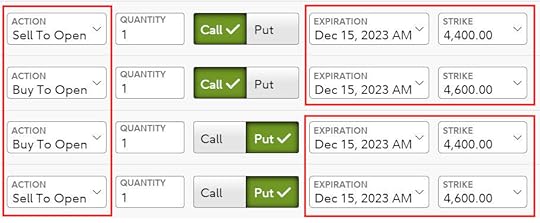
Click on the “Call” button for the first two legs and the “Put” button for the next two legs.
Select Action in this sequence for your four legs:
Sell To OpenBuy To OpenBuy to OpenSell to OpenRemember: Sell – Buy – Buy – Sell.
Set the expiration to the same date for all four legs. This is the date you will effectively pay back the loan.
Choose a spread around the current index value for the strike price (4,400 to 4,600 in the screenshot when the index was around 4,500). The size of the spread times 100 is the amount of your effective loan. If you need to borrow $20,000, make the spread 200 wide. The spread goes from low to high in your two calls and two puts. Match the two spreads exactly between your two calls and two puts. Finally, enter the same quantity for all four legs.
When you need to borrow $40,000, you can choose a spread of 400 (for example 4,300 to 4,700) with a quantity of 1 or you can choose a spread of 200 with a quantity of 2. All else being equal, a smaller quantity with a larger spread saves a small amount of money on commissions but a larger quantity with a smaller spread may be easier to execute. The commission at Fidelity is $2.68 for each set of four legs at a quantity of 1.
Limit PriceNow you need to enter a limit price for your order. Look up recent trades on boxtrades.com. Boxtrades.com gives you a target price when you enter a desired APR.
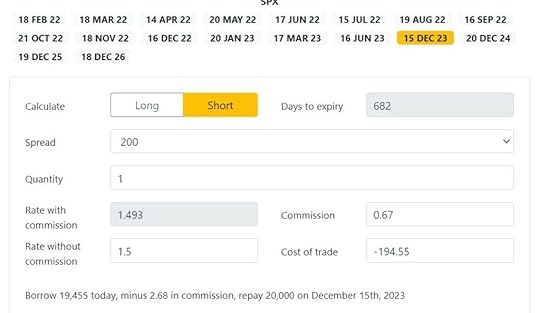
This screenshot shows when you’re willing to pay 1.5% APR for a spread of 200 until December 15, 2023, you should enter a limit price of 194.55.

Make sure the order type is Net Credit. You’re asking someone in the market to pay you $19,455 now for you to pay back $20,000 on December 15, 2023.
ExecutionAfter you place the order, you wait to see if someone takes your offer. Your four-leg option trade is offered as a full package. It’s not possible for someone to pick it apart and accept some legs of your trade but not the others.
It may take some time for your trade to execute. If no one is interested after an hour, you may need to lower the offering price (receive less, a higher effective APR). Or you can try another day if you aren’t in a hurry. Again, you can calculate the effective APR for your new lower price at boxtrades.com.
After ExecutionIf your order is filled, you’ll receive a sum of cash in your account. You can do whatever you want with this cash including withdrawing from your account for your cash needs.
You’ll also have four option positions in your holdings. These option positions added together have a net negative value. They will turn into the predictable negative cash debit when you hold them to the expiration date. When you put cash back into your account before the expiration date, your cash will be used to offset the debit. You effectively pay off your loan at that point.
Ignore Values in the EveningThe values of the option positions will fluctuate with the market even though they will converge to the predictable value on the expiration date. The prices used to calculate their values are especially wild when the market is closed. You’ll have to learn to ignore the account balance you see in the off-hours.
Don’t be alarmed when you see your balance drop by a huge sum in the evening. They’ll be back to more reasonable values when the market is open.
Mark-to-Market Gain/Loss for TaxesThe year-end 1099 form you receive from the broker will include entries for your Section 1256 gain or loss. Enter the 1099 form as-is into your tax software. The tax software will handle it with the proper tax treatment.
***
A short box spread can be a good alternative to securities-based lending when you execute it correctly. This is especially helpful when you can’t get a good rate from your broker. You must be super careful not to screw up in placing your order. Don’t do it if there’s any slight chance you’ll make a mistake. The loss from your mistake can be many times your potential gain from having a low-interest loan.
Learn the Nuts and Bolts
I put everything I use to manage my money in a book. My Financial Toolbox guides you to a clear course of action.Read ReviewsThe post Short Box Spread Trade vs Margin Loan: How It Works at Fidelity appeared first on The Finance Buff.
TurboTax 2021 CARES Act 2.0 $600 Charity Donation Deduction
From the previous posts, we know that in 2021, even if you take the standard deduction you can still deduct up to $600 in cash donations to charities (up to $300 for single or married filing separately). See 2021 $300 Charity Deduction For Non-Itemizers $600 Married. However, finding the place to get this deduction in TurboTax requires some patience.
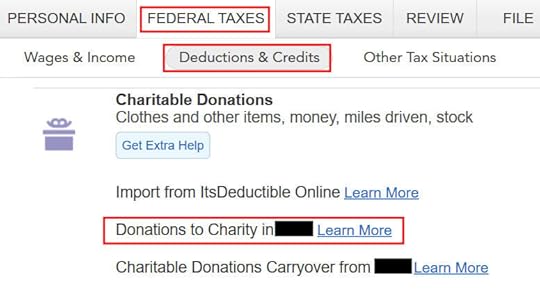
TurboTaxTurboTax has a place to enter charity donations as you would expect. It’s under Federal Taxes -> Deductions & Credits -> Charitable Donations. So far so good.
It’s also straightforward to enter the donations. You arrive at this summary after you enter all the details. In our example, the taxpayer donated $700 cash to a favorite charity.
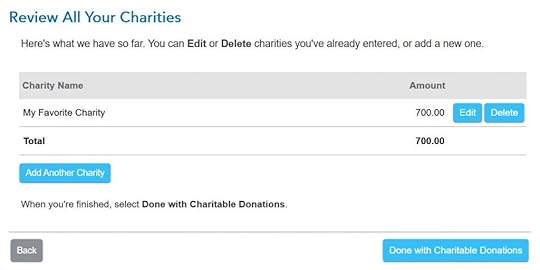
However, your refund number doesn’t change after you click on “Done with Charitable Donations.” It’s as if you’re not getting the deduction for your donations. In our example, the refund was $3,836 before we started, and it was still $3,836 when we were done with charitable donations.
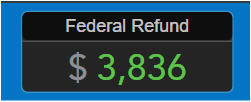
TurboTax continues to ask you about other deductions. After you’re done with all the deductions, TurboTax will do an analysis at that point.
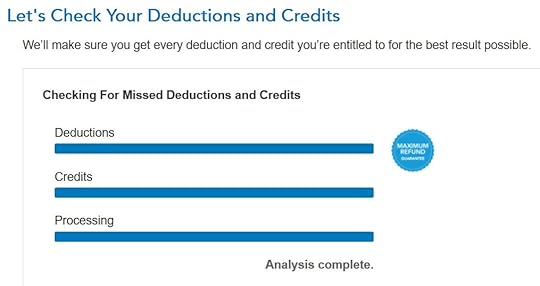
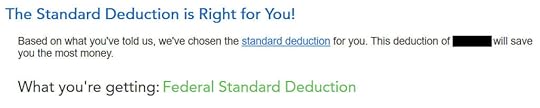
TurboTax double-checks some items until it concludes that you should take the standard deduction.
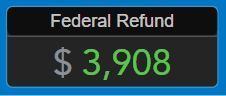
And now the refund number will change. It was $3,836. Now it’s $3,908. We’re getting $72 for the donations.
So if you don’t see your refund change after you enter your donations, be patient. Keep going, going, and going. Eventually, you will reach the place where TurboTax recognizes that you’re taking the standard deduction and you’re entitled to the $300 or $600 deduction for your donations to charity.
H&R Block SoftwareIt’s much more straightforward to do this in the H&R Block software. The H&R Block software assumes you’ll take the standard deduction until it sees enough deductions worth itemizing. It’s a good assumption to make because close to 90% of all taxpayers take the standard deduction. As soon as you enter the charity donations in H&R Block software, the refund number will change.
TurboTax doesn’t assume. It tries to demonstrate it’s thorough and it’s doing the heavy lifting of giving you the maximum deductions. After a song and dance, you end up with the standard deduction anyway. I think the approach in the H&R Block software works better, but TurboTax’s convoluted way creates good materials for blog posts. 
I put everything I use to manage my money in a book. My Financial Toolbox guides you to a clear course of action.Read ReviewsThe post TurboTax 2021 CARES Act 2.0 $600 Charity Donation Deduction appeared first on The Finance Buff.
Harry Sit's Blog

- Harry Sit's profile
- 1 follower

