
Harry Sit's Blog, page 11
January 28, 2024
How To Enter 2023 ESPP Sales In TurboTax: Adjust Cost Basis
[Updated on January 28, 2024 with screenshots from TurboTax for 2023 tax filing.]
If your employer offers an Employee Stock Purchase Program (ESPP), you should max it out. You come out ahead even if you sell the shares as soon as you can. See Employee Stock Purchase Plan (ESPP) Is a Fantastic Deal.
After you sell the shares from the ESPP, part of the income will be included on your W-2. However, the 1099-B form you receive from the broker still reflects your discounted purchase price. This post shows you how to make the necessary adjustment on your tax return using TurboTax.
Don’t pay tax twice!
If you use other tax software, please read:
How to Report ESPP Sales in H&R Block SoftwareHow to Report ESPP Sales in FreeTaxUSAIf you’re looking for a guide on doing taxes on RSU sales, please read Restricted Stock Units (RSU) and TurboTax: Net Issuance.
Table of ContentsWhen to Report1099-B From BrokerUse TurboTax DownloadEnter 1099-BCorrect Cost BasisVerify on Schedule DWhen to ReportBefore you begin, be sure to understand when you need to report. You report when you sell the shares you bought under your ESPP. If you only bought shares but you didn’t sell during the tax year, there’s nothing to report yet.
Wait until you sell, but write down the full per-share price (before the discount) when you bought. If you purchased multiple times, write down for each purchase:
The purchase dateThe closing price on the grant dateThe closing price on the purchase dateThe number of shares you boughtThis information is very important when you sell.
Let’s use this example:
You bought 1,000 shares under your ESPP on 9/30/20xx. The closing price on the purchase date was $12 per share. The closing price on the grant date six months before was $10 per share. You bought at $8.50 per share with the discount.
You would write down:
Grant Date4/1/20xxMarket Price on the Grant Date$10 per sharePurchase Date9/30/20xxMarket Price on the Purchase Date$12 per shareShares Purchased1,000Discounted Price$8.50 per shareKeep this information until you sell.
1099-B From BrokerWhen you sell, you will receive a 1099-B form from the broker in the following year. You will report your gain or loss using this 1099-B form and the information you accumulated for each purchase.
Let’s continue our example:
You sold 1,000 shares from your purchase above on 10/5/20xx at $11.95 per share. After commission and fees, you netted $11,925. You received a 1099-B form from your broker showing a sales proceed of $11,925 in the following year. The 1099-B form shows the cost basis as $8,500, which reflects your discounted purchase price.
Because you didn’t hold it for two years after the grant date and one year after the purchase date, your sale was a “disqualifying disposition.” The discount is added as income to your W-2. This raises your cost basis. If you just accept the 1099-B as-is, you will be double-taxed!
Now let’s account for it in TurboTax.
Use TurboTax DownloadThe screenshots below are from TurboTax Deluxe downloaded software. The downloaded software is way better than online software. If you haven’t paid for your TurboTax Online filing yet, you can buy TurboTax downloaded software from Amazon, Costco, Walmart, and many other places and switch from TurboTax Online to TurboTax download (see instructions for how to make the switch from TurboTax).
Enter 1099-B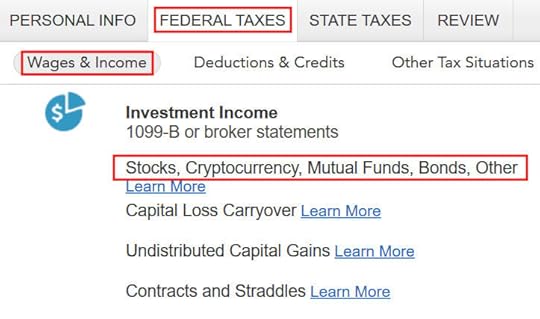
Go to “Federal Taxes” -> “Wages & Income” -> “Investment Income” and find “Stocks, Cryptocurrency, Mutual Funds, Bonds, Other.”
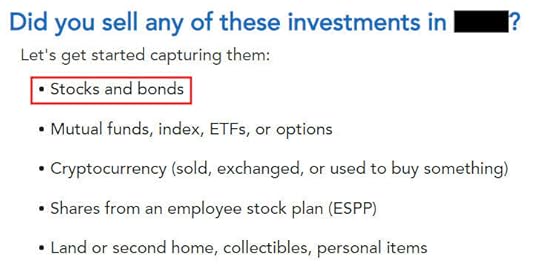
Answer “Yes” because you sold stocks.
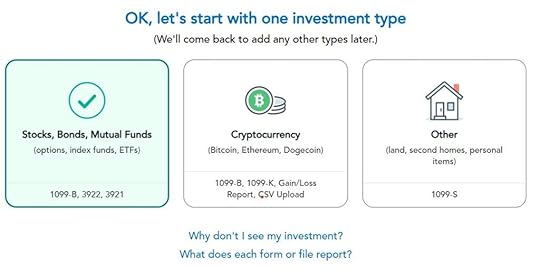
Choose “Stocks, Bonds, Mutual Funds” as the type of investments you sold.

Import your 1099-B if you’d like. I’ll skip import and continue manually.
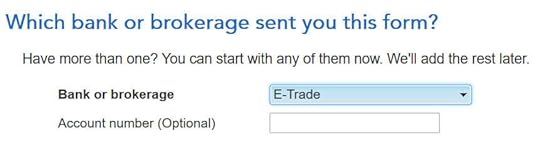
Select or enter the financial institution. Suppose it’s E*Trade.
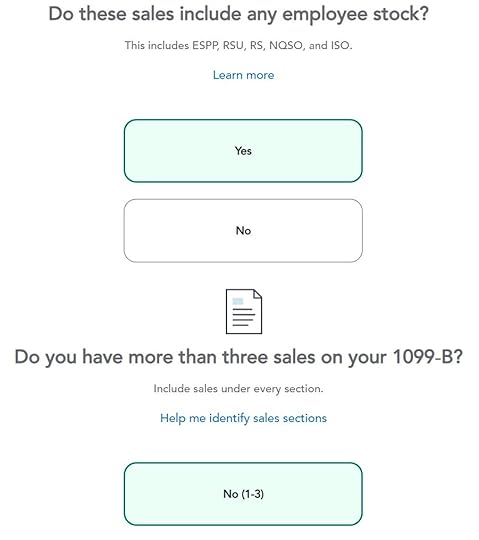
The sales included employee stock. Suppose we only had one sale.
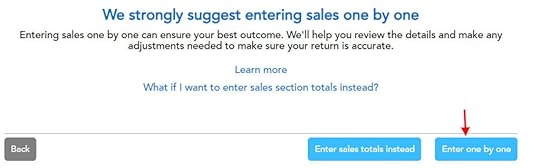
TurboTax strongly suggests entering sales one by one. We’ll go with that suggestion.
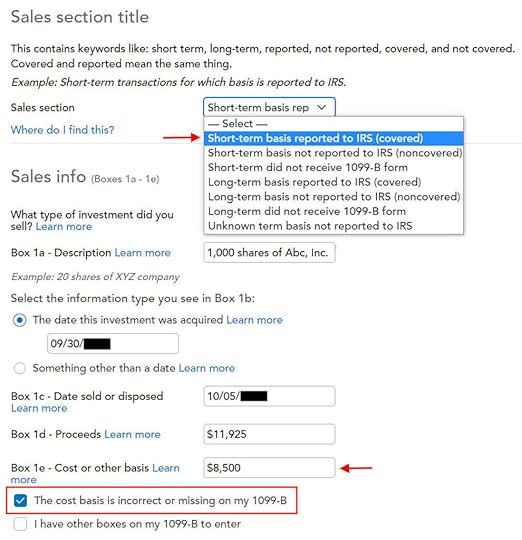
Fill in the boxes from your 1099-B form. Look carefully at which category the sale belongs to on your 1099-B form (short-term or long-term, basis reported to the IRS or not). It was “short-term, basis reported to the IRS” on my form. It could be a different one on your form.
The cost basis on your 1099-B was reported to the IRS but it was too low. Don’t change it in Box 1e directly but check the box “The cost basis is incorrect or missing on my 1099-B.”
Correct Cost Basis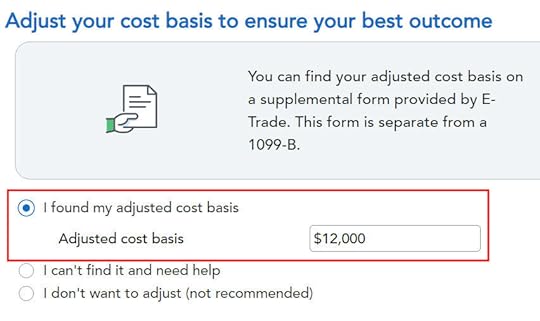
Enter your purchase cost plus the amount added to your W-2. When you did a “disqualifying disposition” your cost basis was the full value of the shares on the date of the purchase. The market price was $12 per share when you purchased those 1,000 shares at $8.50 per share. Your employer added the $3,500 discount as income to your W-2. Therefore your true basis is $8,500 + $3,500 = $12,000.
If you didn’t sell all the shares purchased in that batch, multiply the number of shares you sold by the discount price on the date of purchase and add the discount included on your W-2. For example, if you sold only 500 shares and your employer added $1,750 to your W-2, your corrected cost basis is:
$8.50 * 500 + $1,750 = $6,000
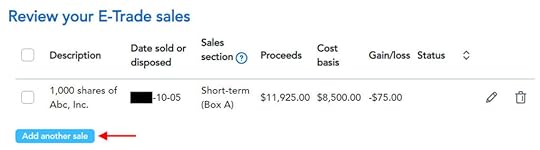
You get a summary of the sales you entered. Repeat if you have more sales to enter. We only had one sale in our example.
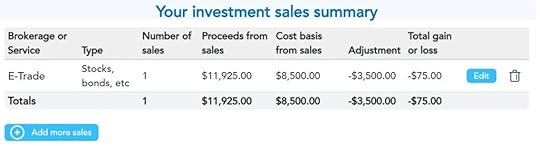
You get a summary of your net gain and loss. We have a net loss because we received less money after selling the shares and paying the commission and fees than our discounted purchase plus the income added to our W-2.
Verify on Schedule DWe can verify that the adjustment makes it all the way to the tax form. Click on “Forms” at the top right.

Find “Schedule D” in the left navigation pane.
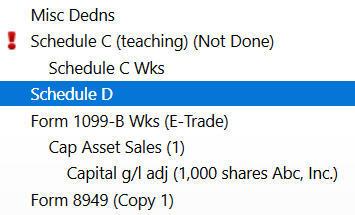
Scroll up or down to find line 1b, 2, 3, 8b, 9, or 10 depending on the sale category on your 1099-B form.
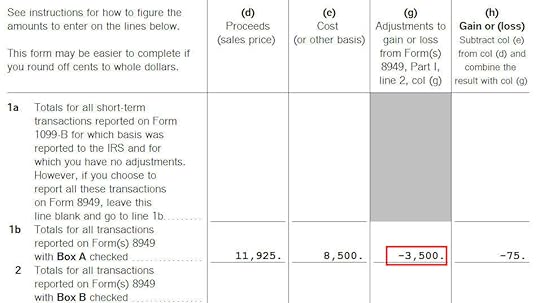
You see the negative adjustment in column (g). If you didn’t make the adjustment and you just accepted the 1099-B as-is, you will pay capital gains tax again on the $3,500 discount you are already paying taxes through your W-2. Remember to make the adjustment!
Learn the Nuts and Bolts I put everything I use to manage my money in a book. My Financial Toolbox guides you to a clear course of action.Read Reviews
The post How To Enter 2023 ESPP Sales In TurboTax: Adjust Cost Basis appeared first on The Finance Buff.


How To Report 2023 Mega Backdoor Roth In H&R Block (Updated)
[Updated on January 16, 2024 with screenshots from H&R Block tax software for 2023 tax filing.]
A Mega Backdoor Roth is different from a regular Backdoor Roth. It’s done by making non-Roth after-tax contributions to a 401k-type plan and then moving it to the Roth account within the 401k-type plan or taking the money out (with earnings) to a Roth IRA.
It’s a great way to put additional money into a Roth account without having to pay much additional tax. Not all plans allow non-Roth after-tax contributions but some estimated that 40% of people can do it.
Suppose you did a Mega Backdoor Roth last year. You should have received a 1099-R form from your 401k plan provider. You’ll need to account for it on your tax return. Here’s how to do it in H&R Block tax software.
Table of ContentsUse H&R Block DownloadWithin the Plan Or To Roth IRA1099-R EntriesRollover DestinationVerify on Form 1040Use H&R Block DownloadThe screenshots in this post are from H&R Block Deluxe downloaded software. The downloaded software is both less expensive and more powerful than the online version. A user reported getting an error from the online version of H&R Block in comment #8. The H&R Block downloaded software doesn’t give that error.
If you haven’t paid for your H&R Block online filing yet, you can buy H&R Block downloaded software from Amazon, Walmart, Newegg, or Office Depot and switch to the downloaded software. If you’re already too far along with your entries, make this your last year of using the online version and switch to the downloaded version next year.
If you use other software, please read:
How to Report Mega Backdoor Roth in TurboTax How to Report Mega Backdoor Roth in FreeTaxUSAWithin the Plan Or To Roth IRAYou can do the mega backdoor Roth in two ways — convert within the plan or withdraw to a Roth IRA. Converting within the plan is much easier, and many plans automate the process. Transferring to a Roth IRA also works. See the previous post Mega Backdoor Roth: Convert Within Plan or Out to Roth IRA?
Here’s the scenario we’ll use as an example:
You contributed $10,000 as non-Roth after-tax contributions to your 401(k). By the time you converted the money to the Roth account within the plan or transferred it to your Roth IRA, your contributions earned $200. You converted $10,200 to your Roth account.
I’m using 401(k) as a shorthand. It works the same in a 403(b). Here are the entries into H&R Block software.
1099-R Entries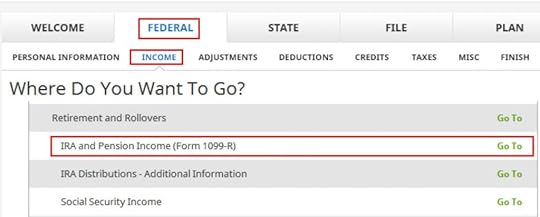
Go to Federal -> Income -> IRA and Pension Income (Form 1099-R). You can import the 1099-R or enter it manually. I’m showing manual entries.
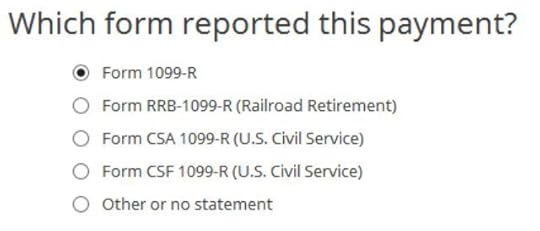
Our 1099-R is a normal 1099-R. Enter the numbers from your 1099-R as-is. Ours looks like this:
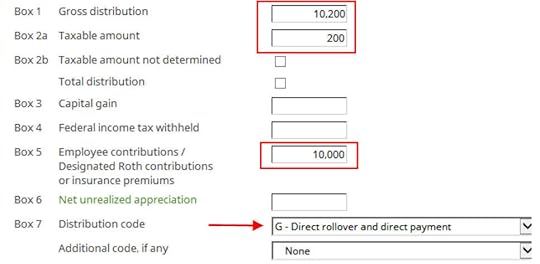
The gross amount converted to the Roth account shows up in Box 1. The earnings are in Box 2a. If you didn’t have earnings in your rollover, Box 2a is zero. “Taxable Amount Not Determined” under Box 2b is left unchecked. The amount of your non-Roth after-tax contributions shows in Box 5. Box 7 has code G.
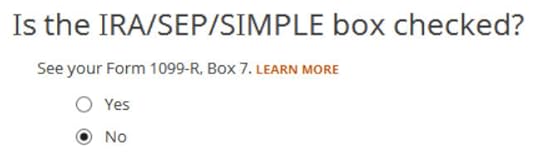
The IRA/SEP/SIMPLE box in Box 7 on your 1099-R should NOT be checked.
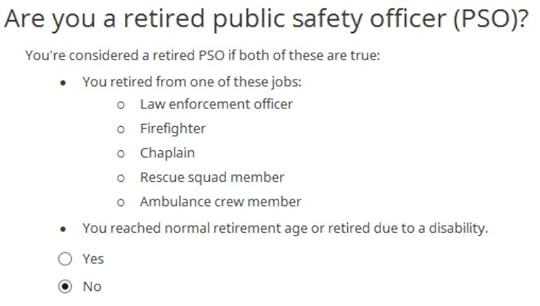
We’re not a retired public safety officer.
Rollover Destination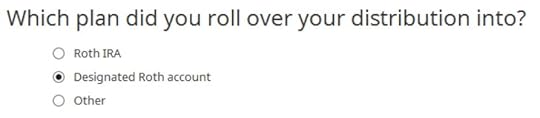
The Roth 401k account is officially a “designated Roth account” in the plan. Choose “Designated Roth account” if you converted within the plan. Choose “Roth IRA” if you took the money out of the plan to your Roth IRA.
That’s it. It’s as simple as that.
Verify on Form 1040Now we verify we’re taxed only on the $200 in earnings, and not on the $10,000 non-Roth after-tax contributions.
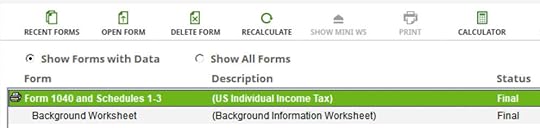
Click on “Forms” in the top menu bar. Double-click on “Form 1040 and Schedules 1-3” in the forms list.

Scroll down to find Line 5. The gross amount transferred to the Roth account shows on Line 5a. Line 5b shows you’re taxed only on the earnings. If you didn’t have earnings, Line 5b will be zero.
When you’re done looking at the form, close the forms window to get back to the interview.
Learn the Nuts and Bolts
I put everything I use to manage my money in a book. My Financial Toolbox guides you to a clear course of action.Read ReviewsThe post How To Report 2023 Mega Backdoor Roth In H&R Block (Updated) appeared first on The Finance Buff.
How to Report 2023 Backdoor Roth In FreeTaxUSA (Updated)
[Updated on January 28, 2024 with screenshots from FreeTaxUSA for 2023 tax filing.]
TurboTax and H&R Block are the two major tax software for filing personal tax returns. A low-cost alternative to TurboTax and H&R Block software is FreeTaxUSA. FreeTaxUSA isn’t only for simple returns. It can still handle more complex transactions, such as the Backdoor Roth.
Just as a refresher, a Backdoor Roth involves making a non-deductible contribution to a Traditional IRA followed by converting from the Traditional IRA to a Roth IRA. Both the contribution and the conversion need to be reported in the tax software. For more information on Backdoor Roth, please read Backdoor Roth: A Complete How-To.
Table of ContentsWhat To ReportConvert From Traditional IRA to RothTraditional IRA ContributionTaxable Income from Backdoor RothTroubleshootingWhat To ReportYou report on the tax return your contribution to a Traditional IRA *for* that year, and you report the conversion to Roth *during* that year.
For example, when you are doing your tax return for year X, you report the contribution you made *for* year X, whether you actually did it during year X or the following year between January 1 and April 15. You also report the conversion to Roth *during* year X, whether the contribution was made for year X, the year before, or any previous years. Therefore a contribution made during the following year for year X goes on the tax return for year X. A conversion done during year Y after you made a contribution for year X goes on the tax return for year Y.
You do yourself a big favor and avoid a lot of confusion by doing your contribution for the current year and finishing your conversion in the same year. I called this a “planned” Backdoor Roth — you’re doing it deliberately. Don’t wait until the following year to contribute for the previous year. Contribute for year X in year X and convert it during year X. Contribute for year Y in year Y and convert it during year Y. This way everything is clean and neat.
If you are already off by one year, catch up. Contribute for both the previous year and the current year, then convert the sum during the same year. See Make Backdoor Roth Easy On Your Tax Return.
Here’s the scenario we’ll use as an example:
You contributed $6,500 to a traditional IRA in 2023 for 2023. Your income is too high to claim a deduction for the contribution. By the time you converted it to Roth IRA, also in 2023, the value grew to $6,700. You have no other traditional, SEP, or SIMPLE IRA after you converted your traditional IRA to Roth. You did not roll over any pre-tax money from a retirement plan to a traditional IRA after you completed the conversion.
If your scenario is different, you will have to make some adjustments to the screens shown here.
Before we start, suppose this is what FreeTaxUSA shows:
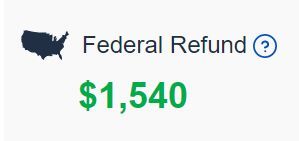
We’ll compare the results after we enter the Backdoor Roth.
Convert From Traditional IRA to RothThe tax software works on income items first. Even though the conversion happened after the contribution, we enter the conversion first.
When you convert from a Traditional IRA to a Roth IRA, you will receive a 1099-R. Complete this section only if you converted *during* the year for which you are doing the tax return. If you only converted during the following year and you don’t have a 1099-R yet, skip to the next section: Traditional IRA Contribution. You’ll complete this section next year.
In our example, by the time you converted, the money in the Traditional IRA had grown from $6,500 to $6,700.
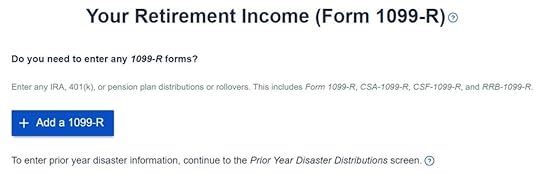
Click on “Add a 1099-R” when it asks you about the 1099-R.
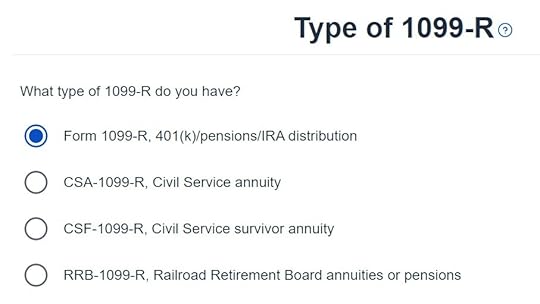
It’s just a regular 1099-R.
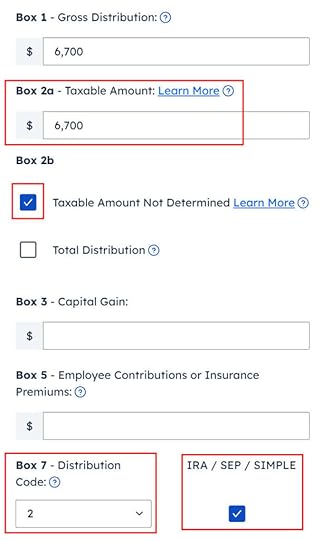
Enter the 1099-R exactly as you have it. Pay attention to the code in Box 7 and the checkboxes. It’s normal to have the same amount as the taxable amount in Box 2a, when Box 2b is checked saying “taxable amount not determined.” Pay attention to the distribution code in Box 7. My 1099-R has code 2, and the IRA/SEP/SIMPLE box is also checked.
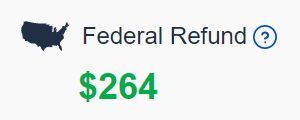
Right after you enter the 1099-R, you will see the refund number drop. Here we went from a $1,540 refund to $264. Don’t panic. It’s normal and temporary. The refund number will come up when we finish everything.

It’s not an inherited IRA.
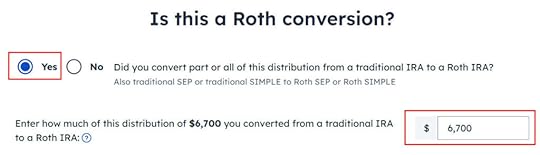
It asks you about Roth conversion. Answer Yes to conversion and enter the converted amount. This whole 1099-R is the result of a Roth conversion.
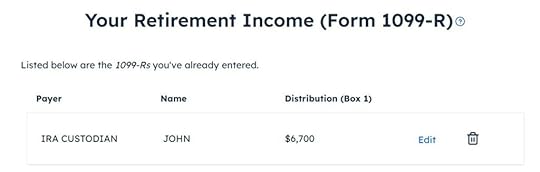
You are done with this 1099-R. Repeat if you have another 1099-R. If you’re married and both of you did a Backdoor Roth, pay attention to whose 1099-R it is when you enter the second one. You’ll have problems if you assign both 1099-R’s to the same person when they belong to each spouse.
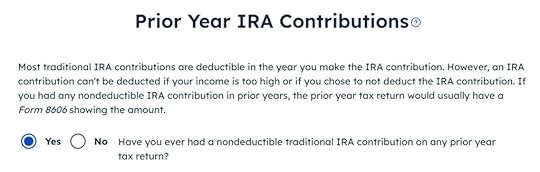
It asks you about the basis carried over from previous years. If you did a clean “planned” backdoor Roth every year, you can answer “No.” If you have gone back and forth before you found this guide, some of your previous answers may be stuck. Answering “Yes” here will give you a chance to review and correct them. If you have a number on line 14 of Form 8606 from your previous year’s tax return, answer Yes and enter it.
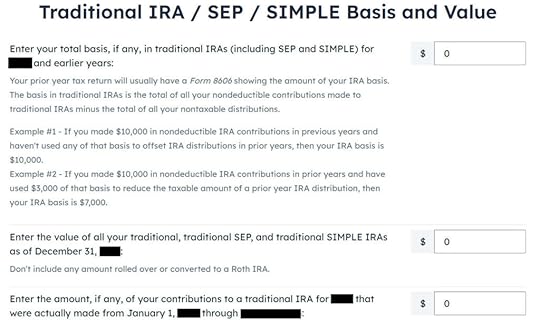
The values should be all 0 if you did a “clean” planned backdoor Roth.

We didn’t take any disaster distribution.
Now continue with all other income items until you are done with income. Your refund meter is still lower than it should be, but it will change soon.
Traditional IRA Contribution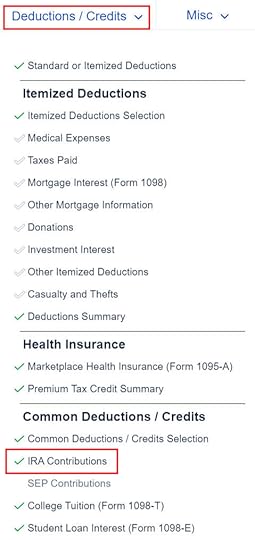
Find the IRA Contributions section under the “Deductions / Credits” menu.
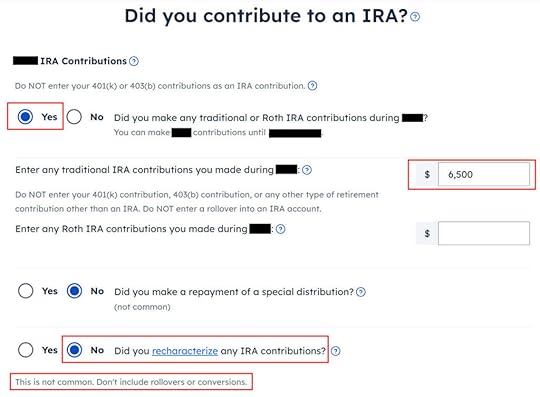
Answer Yes to the first question and enter your contribution. Leave the answer to “Did you recharacterize” at No. In our example, you contributed $6,500 directly to a Traditional IRA. If you originally contributed to a Roth IRA and then you recharacterized the contribution as traditional contributions, enter the amount in the Roth IRA box and choose Yes below when it asks you whether you recharacterized.
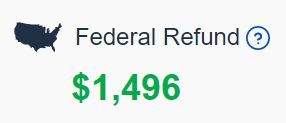
Your refund number goes up again! It was a refund of $1,540 before we started. It went down a lot and now it’s back to $1,496. The $44 difference is due to paying tax on the $200 earnings before we converted to Roth.

We didn’t contribute to a SEP, SIMPLE, or solo 401k plan in this example. Answer Yes if you did.
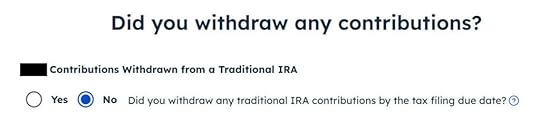
Withdraw means pulling money out of a Traditional IRA back to your checking account. Converting to Roth is not a withdrawal. Answer ‘No‘ here.
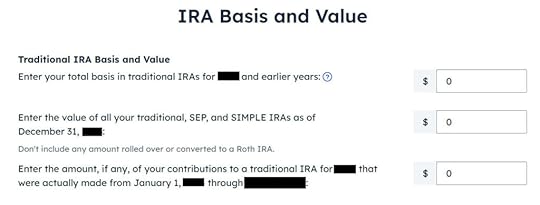
All values are zero when you did a “clean” planned Backdoor Roth.
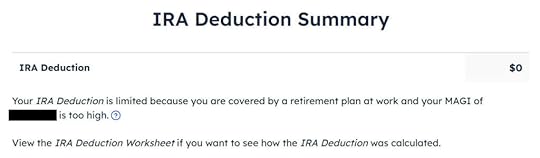
It tells us we don’t get a deduction because our income was too high. We know. That’s why we did the Backdoor Roth.
If you only contributed *for* last year but you didn’t convert until the following year, remember to come back next year to finish the conversion part.
Taxable Income from Backdoor RothAfter going through all these, let’s confirm how you’re taxed on the Backdoor Roth. Click on the three dots on the top right above the IRA Deduction Summary and then click on “Preview Return.”
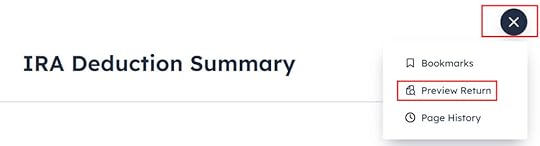
Look for Line 4 in Form 1040.

It shows $6,700 in IRA distributions in line 4a and only $200 is taxable in line 4b. If you are married filing jointly and both of you did a backdoor Roth, the numbers here will show double.
Tah-Dah! You put money into a Roth IRA through the backdoor when you aren’t eligible to contribute to it directly. You pay tax on a small amount of earnings if you waited between contributions and conversion. That’s negligible relative to the benefit of having tax-free growth on your contributions for many years.
TroubleshootingIf you followed the steps and you are not getting the expected results, here are a few things to check.
W-2 Box 13Make sure the “Retirement plan” box in Box 13 of the W-2 you entered into the software matches your actual W-2. If you are married and both of you have a W-2, make sure your entries for both W-2’s match the actual forms you received.
When you are not covered by a retirement plan at work, such as a 401k or 403b plan, your Traditional IRA contribution may be deductible, which also makes your Roth conversion taxable.
Self vs SpouseIf you are married, make sure you don’t have the 1099-R and the IRA contribution mixed up between yourself and your spouse. If you inadvertently assigned two 1099-Rs to one person instead of one for you and one for your spouse, the second 1099-R will not match up with a Traditional IRA contribution made by a spouse. If you entered a 1099-R for both yourself and your spouse but you only entered one Traditional IRA contribution, you will be taxed on one 1099-R.
Learn the Nuts and Bolts
I put everything I use to manage my money in a book. My Financial Toolbox guides you to a clear course of action.Read ReviewsThe post How to Report 2023 Backdoor Roth In FreeTaxUSA (Updated) appeared first on The Finance Buff.
How to Report 2023 Backdoor Roth in H&R Block Tax Software
Updated on January 28, 2024, with updated screenshots from H&R Block software for 2023 tax filing. If you use other tax software, see:
How To Report Backdoor Roth In TurboTaxHow to Report Backdoor Roth In FreeTaxUSAIf you did a Backdoor Roth, which involves making a non-deductible contribution to a Traditional IRA and then converting from the Traditional IRA to a Roth IRA, you need to report both the contribution and the conversion in the tax software. For more information on Backdoor Roth, please read Backdoor Roth: A Complete How-To and Make Backdoor Roth Easy On Your Tax Return.
Table of ContentsWhat To ReportUse H&R Block Download SoftwareConvert Traditional IRA to RothEnter 1099-RConverted to RothAdditional QuestionsNon-Deductible Contribution to Traditional IRAIRA ContributionConversion Isn’t RecharacterizationBasis From Previous YearPro-Rata RuleTaxable Income from Backdoor RothTroubleshootingFresh StartCovered by Retirement PlanSelf vs SpouseWhat To ReportYou report on the tax return your contribution to a traditional IRA *for* that year, and you report your conversion to Roth *during* that year.
For example, when you are doing your tax return for year X, you report the contribution you made *for* year X, whether you actually did it in year X or in the following year between January 1 and April 15. You also report your converting to Roth *during* year X, whether the money was contributed for year X, the year before, or any previous years.
Therefore a contribution made during the following year for year X goes on the tax return for year X. A conversion done during year Y after you made a contribution for year X goes on the tax return for year Y.
You do yourself a big favor and avoid a lot of confusion by doing your contribution for the current year and finishing your conversion during the same year. I called this a “planned” Backdoor Roth — you’re doing it deliberately.
Don’t wait until the following year to contribute for the previous year. Contribute for year X in year X and convert it during year X. Contribute for year Y in year Y and convert it during year Y. This way everything is clean and neat.
If you are already off by one year, catch up. Contribute for both the previous year and the current year, then convert the sum during the same year. See Make Backdoor Roth Easy On Your Tax Return.
Use H&R Block Download SoftwareThe screenshots below are taken from H&R Block Deluxe downloaded software. The downloaded software is way better than online software. If you haven’t paid for your H&R Block Online filing yet, consider buying H&R Block download software from Amazon, Walmart, Newegg, and many other places. If you’re already too far in entering your data into H&R Block Online, make this your last year of using H&R Block Online. Switch over to H&R Block download software next year.
Here’s the scenario we’ll use as an example:
You contributed $6,500 to a traditional IRA in 2023 for 2023. Your income is too high to claim a deduction for the contribution. By the time you converted it to Roth IRA, also in 2023, the value grew to $6,700. You have no other traditional, SEP, or SIMPLE IRA after you converted your traditional IRA to Roth. You did not roll over any pre-tax money from a retirement plan to a traditional IRA after you completed the conversion.
If your scenario is different, you’ll have to make some adjustments to the screens shown here.
Before we start, suppose this is what H&R Block software shows:
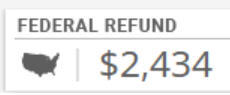
We will compare the results after we enter the Backdoor Roth.
Convert Traditional IRA to RothIncome comes before deductions on the tax form. Tax software is also organized this way. Even though you contributed before you converted, the software makes you enter the income first.
Enter 1099-RWhen you convert the Traditional IRA to Roth, you receive a 1099-R for that year. Complete this section only if you converted *during* the year for which you are doing the tax return. If you only contributed for the year in question but didn’t convert until the following year, skip all the way to the next section Non-Deductible Contribution to Traditional IRA.
In this example, we assume by the time you converted, the money in the Traditional IRA had grown from $6,500 to $6,700.
Click on Federal -> Income. Scroll down and find IRA and Pension Income (Form 1099-R). Click on “Go To.”
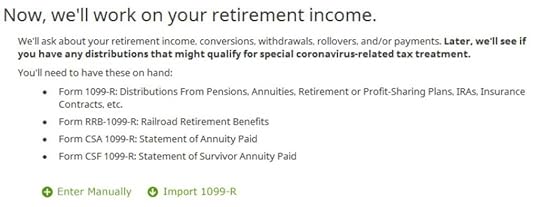
Click on Import 1099-R if you’d like. I show manual entries with “Enter Manually” here.
Just a regular 1099-R.
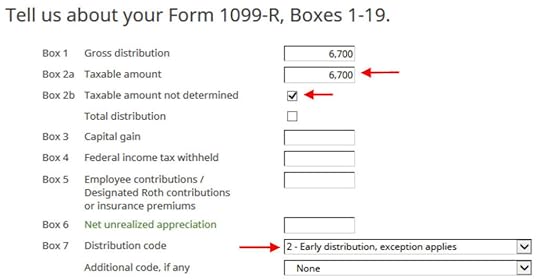
If you imported your 1099-R, double-check to make sure the import exactly matches the copy you received. If you enter your 1099-R manually, be sure to enter everything on the form exactly. Box 1 shows the amount converted to the Roth IRA. It’s normal to have the same amount as the taxable amount in Box 2a when Box 2b is checked saying “taxable amount not determined.” Pay attention to the distribution code in Box 7. My 1099-R has code 2.
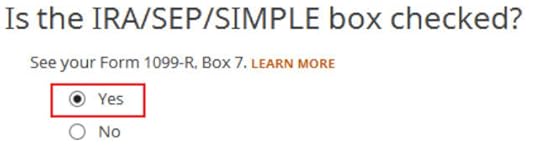
My 1099-R had the IRA/SEP/SIMPLE box checked.
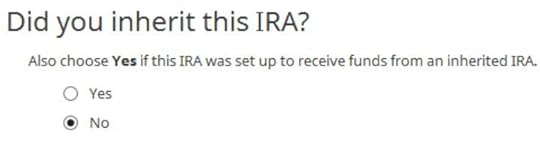
Did not inherit.
Converted to Roth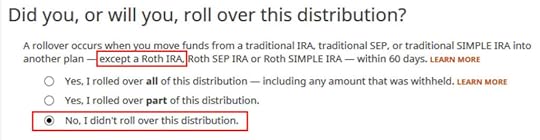
This is a very important question. Read carefully. Answer No, because you converted, not rolled over.
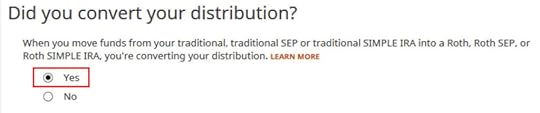
Now answer Yes, you converted.
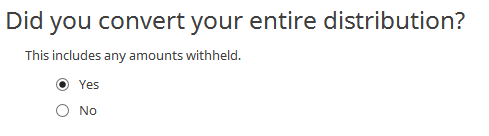
We converted all of it in our example.
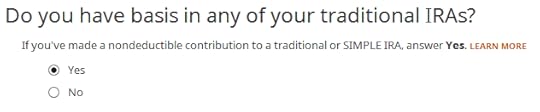
Answer Yes because you made a nondeductible contribution to a traditional IRA.
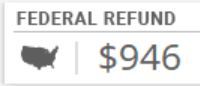
The refund in progress drops a lot at this point. We went from a $2,434 refund to $946. Don’t panic. It’s normal and only temporary. It will come back up after we complete the section for IRA contributions.
You are done with one 1099-R. Repeat the above if you have another 1099-R. If you’re married and both of you did a Backdoor Roth, pay attention to whose 1099-R it is when you enter the second one. You’ll have problems if you assign both 1099-R’s to the same person when they belong to each spouse. Click on Finished when you are done with all the 1099-Rs.
Additional Questions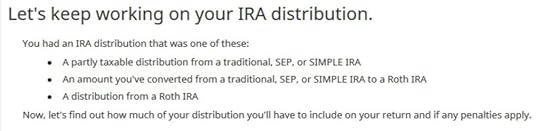
A few more questions.
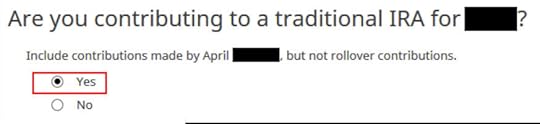
Answer Yes because you contributed to a Traditional IRA for the year.

We will wait.
Non-Deductible Contribution to Traditional IRANow we enter the non-deductible contribution to the Traditional IRA *for* the year in question. Complete this part whether you contributed in the same year or you did it or are planning to do it in the following year between January 1 and April 15.
If your contribution during the year in question was for the previous year, make sure you entered it on your previous tax return. If not, fix your previous return first.
IRA Contribution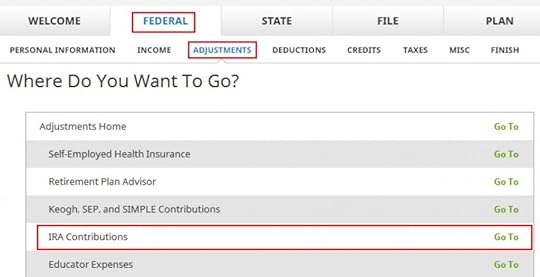
Click on Federal -> Adjustments. Find IRA Contributions. Click on “Go To.”

Wrong tense but answer “Yes” because you contributed to an IRA for the year in question.

Check the box for Traditional IRA if you contributed directly to a Traditional IRA. If you originally contributed to a Roth IRA and then you recharacterized the contributions as traditional contributions, check the Roth IRA boxes here and then answer yes when it asks you whether you recharacterized.
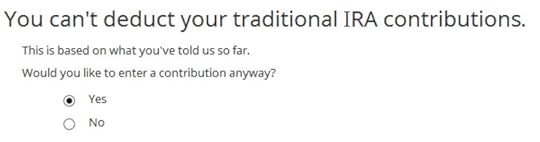
You know you don’t get a deduction due to income. Enter anyway.

Enter your contribution amount. We contributed $6,500 in our example.
Conversion Isn’t Recharacterization
This is important. Answer No because you didn’t recharacterize. You converted to Roth.
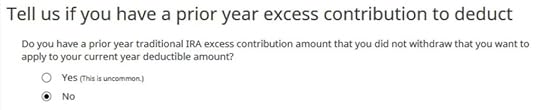
We don’t have any excess contribution.
Basis From Previous Year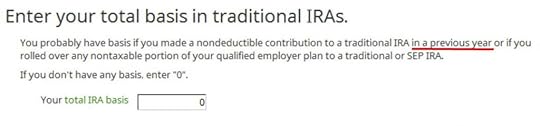
If you did a clean “planned” backdoor Roth and you started fresh each year, enter zero. If you contributed non-deductible for previous years (regardless of when), enter the number on line 14 of your Form 8606 from last year.
Pro-Rata Rule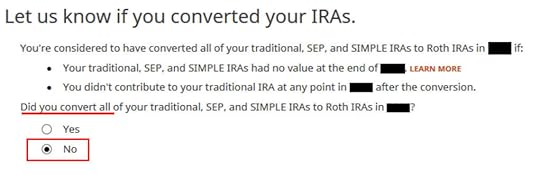
This is another important question. If you are doing it the easy way as in our example, technically you can answer Yes and skip some questions. The safer bet is to answer No and go through the follow-up questions. If you’ve been going through these screens back and forth, you may have put in some incorrect answers in a previous round. You will have a chance to review and correct those answers only if you answer No.
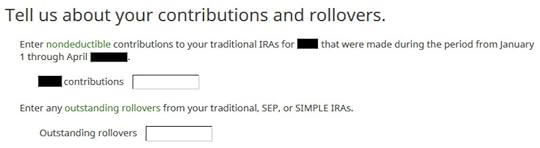
In a clean planned backdoor Roth, you contribute for year X during year X. Leave the boxes blank. If you didn’t know better and you contributed for the previous year after January 1, enter the amount in the first box. If you already did it the hard way for the previous year, please, please, please do yourself a big favor and do it the easy way this year. See Make Backdoor Roth Easy On Your Tax Return.
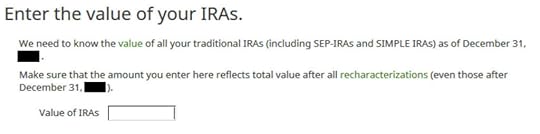
The box should be blank when you do a clean planned backdoor Roth. If you have other Traditional, SEP, or SIMPLE IRAs, add up the balances from your year-end statements and put the value here. The software will apply the pro-rata rule.
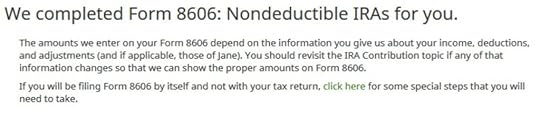
That’s great. We’re expecting it.
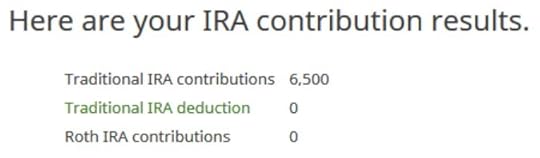
A summary of your contributions. 0 in Traditional IRA deduction means it’s nondeductible. Click on Next. Repeat for your spouse if both of you did a Backdoor Roth.
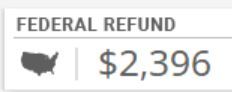
We are done entering the non-deductible contribution to the Traditional IRA. Now the refund in progress should go back up. It was a refund of $2,434 when we first started. Now it’s a refund of $2,396. The difference of $38 is due to the tax on the extra $200 earned before the Roth conversion.
If you only contributed *for* last year but you didn’t convert until the following year, remember to come back next year to finish the conversion part.
Taxable Income from Backdoor RothAfter going through all these, let’s confirm how you’re taxed on the Backdoor Roth.
Click on Forms on the top and open Form 1040 and Schedules 1-3. Click on Hide Mini WS. Scroll down to lines 4a and 4b.

It shows $6,700 in IRA distributions, $201 of which is taxable. The taxable income came out to $201, not $200, due to some rounding in the calculation. If you are married filing jointly and both of you did a backdoor Roth, the numbers here will show double.
Tah-Dah! You put money into a Roth IRA through the backdoor when you aren’t eligible to contribute to it directly. You will pay tax on a small amount in earnings if you waited between contributions and conversion. That’s negligible relative to the benefit of having tax-free growth on your contributions for many years.
TroubleshootingIf you followed the steps and you are not getting the expected results, here are a few things to check.
Fresh StartIt’s best to follow the steps fresh in one pass. If you already went back and forth with different answers before you found this guide, some of your previous answers may be stuck somewhere you no longer see. You can delete them and start over.
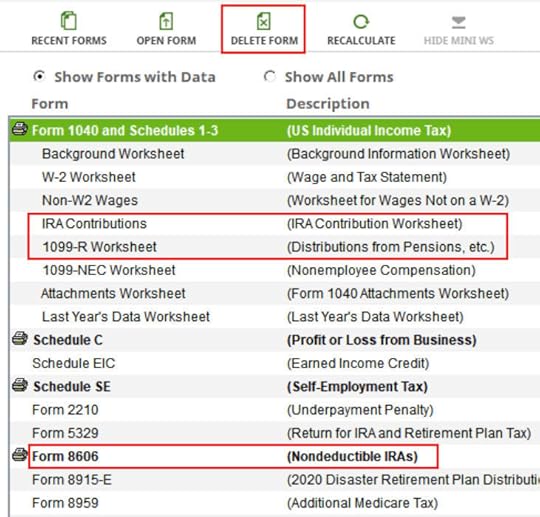
Click on Forms and delete IRA Contributions Worksheet, 1099-R Worksheet, and Form 8606. Then start over by following the steps here.
Covered by Retirement PlanMake sure the “Retirement plan” box in Box 13 of the W-2 you entered into the software matches your actual W-2. If you are married and both of you have a W-2, make sure your entries for both W-2’s match the actual forms you received.
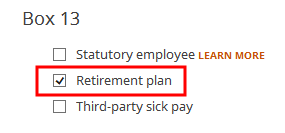
When you are not covered by a retirement plan at work, such as a 401k or 403b plan, your Traditional IRA contribution may be deductible, which also makes your Roth conversion taxable.
Self vs SpouseIf you are married, make sure you don’t have the 1099-R and the IRA contribution mixed up between yourself and your spouse. If you inadvertently assigned two 1099-Rs to one person instead of one for you and one for your spouse, the second 1099-R will not match up with a Traditional IRA contribution made by a spouse. If you entered a 1099-R for both yourself and your spouse but you only entered one Traditional IRA contribution, you will be taxed on one 1099-R.
Learn the Nuts and Bolts
I put everything I use to manage my money in a book. My Financial Toolbox guides you to a clear course of action.Read ReviewsThe post How to Report 2023 Backdoor Roth in H&R Block Tax Software appeared first on The Finance Buff.
How To Enter 2023 Mega Backdoor Roth in TurboTax (Updated)
[Updated on January 28, 2024 with screenshots from TurboTax for 2023 tax filing.]
A Mega Backdoor Roth means making non-Roth after-tax contributions to a 401k-type plan and then moving it to the Roth account within the plan or taking the money out (with earnings) to a Roth IRA.
It’s a great way to put additional money into a Roth account without having to pay much additional tax. Not all plans allow non-Roth after-tax contributions but some estimated that 40% of people can do it.
Suppose your plan allows it and you executed a Mega Backdoor Roth. You will receive a 1099-R from the plan in the following year. You will need to account for it on your tax return. Here’s how to do it in TurboTax.
Table of ContentsUse Downloaded SoftwareWithin the Plan Or To Roth IRA1099-R EntriesRollover DestinationAfter-Tax ContributionsVerify on Form 1040Use Downloaded SoftwareYou should do it in TurboTax Deluxe downloaded software. The downloaded software is both less expensive and more powerful than online software. If you haven’t paid for your TurboTax Online filing yet, you can buy TurboTax from Amazon or Costco and switch from TurboTax Online to TurboTax download (see instructions for how to make the switch from TurboTax).
If you use other tax software, please see:
How To Enter Mega Backdoor Roth In H&R Block Tax Software or How To Enter Mega Backdoor Roth in FreeTaxUSAWithin the Plan Or To Roth IRAYou can do the Mega Backdoor Roth in two ways — convert within the plan or withdraw to a Roth IRA. Converting within the plan is much easier, and many plans automate this process. Transferring to a Roth IRA also works. See the previous post Mega Backdoor Roth: Convert Within Plan or Out to Roth IRA?
Here’s the scenario we’ll use as an example:
You contributed $10,000 as non-Roth after-tax contributions to your 401(k). By the time the money was converted to the Roth account within the plan or transferred to your Roth IRA, your contributions earned $200. You converted $10,200 to your Roth account.
I’m using 401(k) as a shorthand. It works the same in a 403(b). Now the entries into TurboTax.
1099-R Entries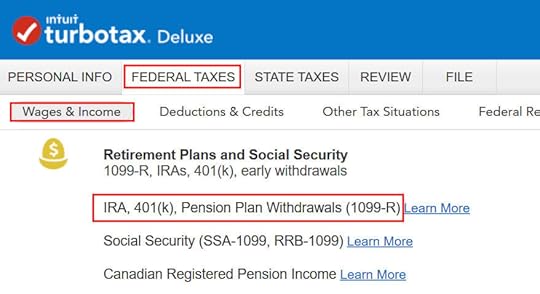
Go to Federal Taxes -> Wages & Income -> IRA, 401(k), Pension Plan Withdrawals (1099-R).
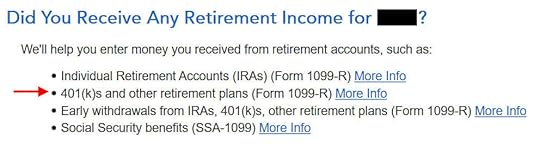
When you come to the Retirement Income section, answer Yes because you received a 1099-R from your 401(k) plan.
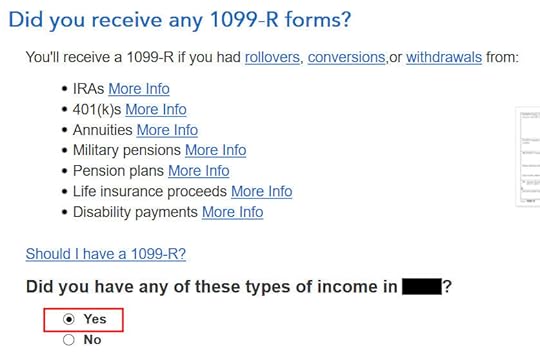
Yes, you received a 1099-R form. Import the 1099-R if you’d like. I’m typing it myself here.
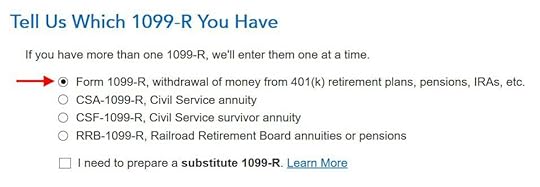
You have a normal 1099-R.
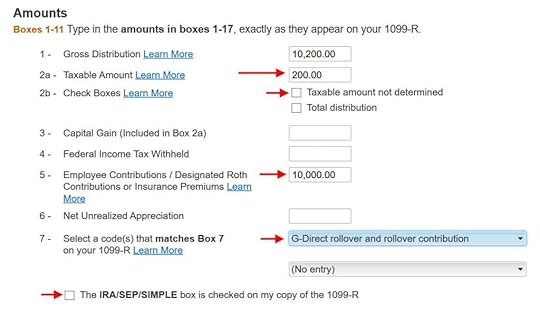
If you import the 1099-R, check the import carefully to make sure it matches your copy exactly. If you type the 1099-R, be sure to type it exactly.
The earnings portion should be in Box 2a. Box 2b “Taxable amount not determined” should NOT be checked. The non-Roth after-tax contributions (the “principal”) should be in Box 5. Box 7 should show a code G. Finally, the box “The IRA/SEP/SIMPLE box is checked on my copy of the 1099-R” should NOT be checked.
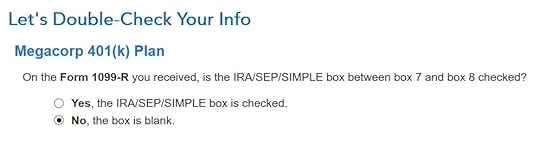
TurboTax wants to make sure the IRA/SEP/SIMPLE checkbox is not checked.
Rollover Destination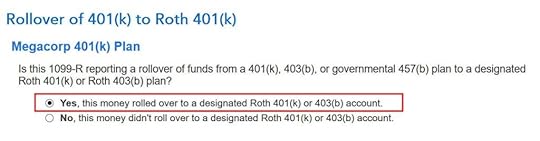
If you converted to Roth within the plan, answer Yes here. If you took the money out of the plan to a Roth IRA, answer No.
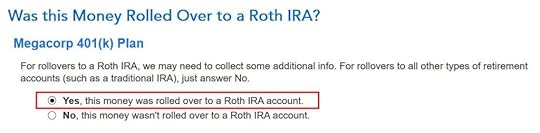
If you answered “No” to the previous question, confirm that the money went to a Roth IRA.
After-Tax Contributions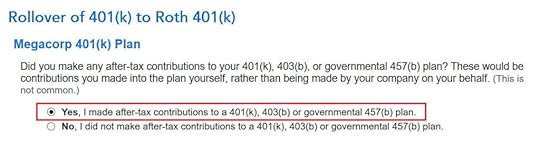
Answer Yes to confirm that you made non-Roth after-tax contributions to your plan.
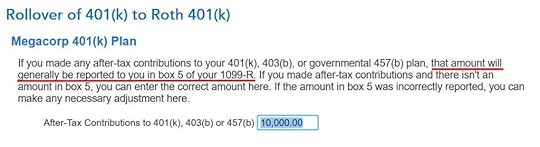
TurboTax pulls up the amount of your non-Roth after-tax contributions from Box 5 of your 1099-R. If your 1099-R isn’t correct, you should work with your 401(k) administrator to have it corrected.
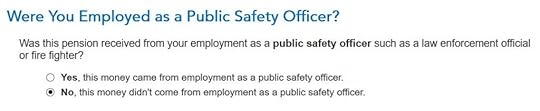
Not a public safety officer, unless you actually are one.
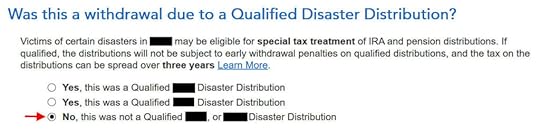
Not due to a disaster.
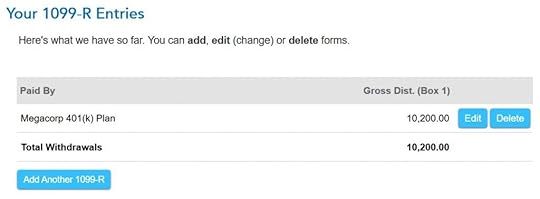
The summary shows your 1099-R entries. Repeat and add any additional 1099-Rs you may have.
Verify on Form 1040Now let’s confirm you’re only paying tax on the $200 earnings, not on your $10,000 non-Roth after-tax contributions.
Click on Forms on the top right.
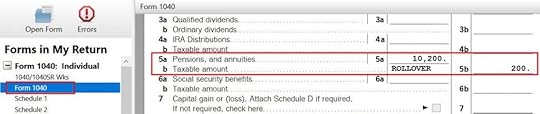
Find “Form 1040” in the left navigation pane. Scroll up or down in the right pane to lines 5a and 5b. Line 5a includes the $10,200 gross distribution amount. Line 5b only includes the $200 taxable amount.
With a Mega Backdoor Roth, you put an extra $10k into your Roth account. After paying tax on this $200, the future earnings on the $10,200 will be tax-free.

When you’re done examining the form, click on Step-by-Step on the top right to get back to the interview.
Learn the Nuts and Bolts
I put everything I use to manage my money in a book. My Financial Toolbox guides you to a clear course of action.Read ReviewsThe post How To Enter 2023 Mega Backdoor Roth in TurboTax (Updated) appeared first on The Finance Buff.
How To Report 2023 Backdoor Roth In TurboTax (Updated)
Updated on January 28, 2024 with updated screenshots from TurboTax Deluxe downloaded software. If you use other tax software, see:
How To Report Backdoor Roth In H&R Block SoftwareHow to Report Backdoor Roth In FreeTaxUSAIf you did a Backdoor Roth, which involves making a non-deductible contribution to a Traditional IRA and then converting from the Traditional IRA to a Roth IRA, you need to report both the contribution and the conversion in the tax software. For more information on Backdoor Roth, see Backdoor Roth: A Complete How-To.
Table of ContentsWhat To ReportUse TurboTax DownloadConvert Traditional IRA to RothNon-Deductible Contribution to Traditional IRATaxable Income from Backdoor RothTroubleshootingWhat To ReportYou report on the tax return your contribution to a Traditional IRA *for* that year, and you also report your conversion to Roth *during* that year.
For example, when you are doing your tax return for year X, you report the contribution you made *for* year X, whether you actually did it during year X or the following year between January 1 and April 15. You also report your conversion to Roth *during* year X, whether the contribution was made for year X, the year before, or any previous years.
Therefore a contribution made during the following year for year X goes on the tax return for year X. A conversion done during year Y after you made a contribution for year X goes on the tax return for year Y.
You do yourself a big favor and avoid a lot of confusion by doing your contribution for the current year and finishing your conversion in the same year. I called this a “planned” Backdoor Roth — you’re doing it deliberately. Don’t wait until the following year to contribute for the previous year. Contribute for year X in year X and convert it during year X. Contribute for year Y in year Y and convert it during year Y. This way everything is clean and neat.
If you are already off by one year, catch up. Contribute for both the previous year and the current year, then convert the sum during the same year. See Make Backdoor Roth Easy On Your Tax Return.
Use TurboTax DownloadThe screenshots below are from TurboTax Deluxe downloaded software. The downloaded software is way better than online software. If you haven’t paid for your TurboTax Online filing yet, you can buy TurboTax download from Amazon, Costco, Walmart, and many other places and switch from TurboTax Online to TurboTax download (see instructions for how to make the switch from TurboTax).
Here’s the planned Backdoor Roth scenario we will use as an example:
You contributed $6,500 to a traditional IRA in 2023 for 2023. Your income is too high to claim a deduction for the contribution. By the time you converted it to Roth IRA, also in 2023, the value grew to $6,700. You have no other traditional, SEP, or SIMPLE IRA after you converted your traditional IRA to Roth. You did not roll over any pre-tax money from a retirement plan to a traditional IRA after you completed the conversion.
If your scenario is different, you will have to make some adjustments to the screens shown here.
Before we start, suppose this is what TurboTax shows:
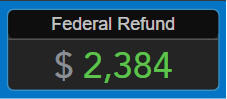
We will compare the results after we enter the Backdoor Roth.
Convert Traditional IRA to RothThe tax software works on income items first. Even though the conversion happened after the contribution, we enter the conversion first.
When you convert from a Traditional IRA to a Roth IRA, you will receive a 1099-R form. Complete this section only if you converted *during* the year for which you are doing the tax return. If you only converted during the following year, you won’t have a 1099-R until next January. Skip all the way to the next section: Non-deductible contribution to Traditional IRA.
In our example, we assume by the time you converted, the money in the Traditional IRA had grown from $6,500 to $6,700.
Enter 1099-RGo to Federal Taxes -> Wages & Income -> IRA, 401(k), Pension Plan Withdrawals (1099-R).
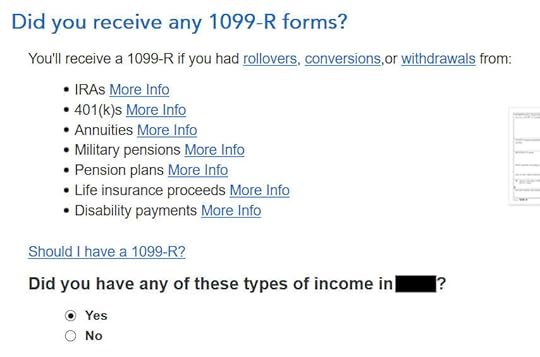
As you work through the interview, you will eventually come to the point of entering the 1099-R. Select Yes, you have this type of income. Import the 1099-R if you’d like. I’m choosing to type it myself.
Just the regular 1099-R.
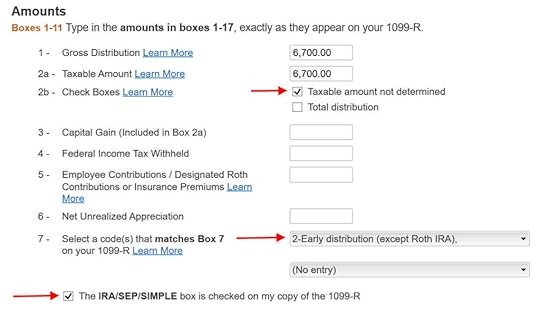
Box 1 shows the amount converted to the Roth IRA. It’s normal to have the same amount as the taxable amount in Box 2a when Box 2b is checked saying “taxable amount not determined.” Pay attention to the code in Box 7 and the IRA/SEP/SIMPLE box. Make sure your entry matches your 1099-R exactly.

You get this Good News, but …
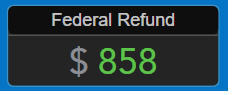
Your refund in progress drops a lot. We went from $2,384 down to $858. Don’t panic. It’s normal and temporary.
Converted to Roth
Didn’t inherit it.
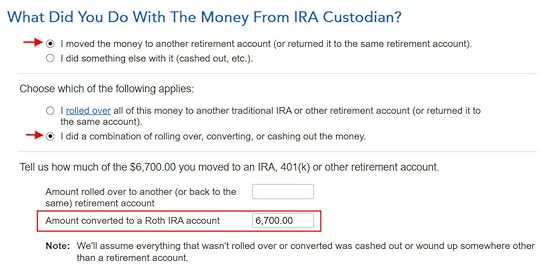
First click on “I moved …” then click on “I did a combination …” Enter the amount converted in the box. Don’t choose the “I rolled over …” option. A Roth conversion is not a rollover.
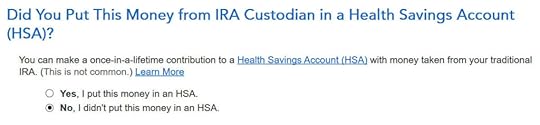
No, you didn’t put the money in an HSA.

Not due to a disaster.
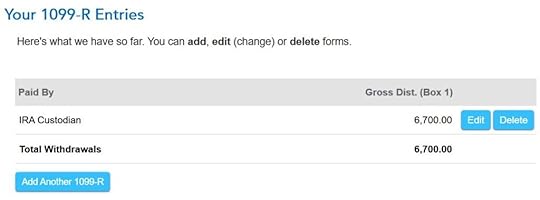
You get a summary of your 1099-R’s. Repeat the previous steps to add another if you have more than one. If you’re married and both of you did a Backdoor Roth, enter the 1099-R for both of you, but pay attention to select whose 1099-R it is. Don’t accidentally assign two 1099-R’s to the same person.
Basis and End-of-Year Values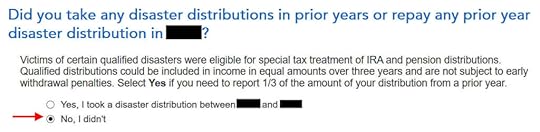
Didn’t take or repay any disaster distribution.
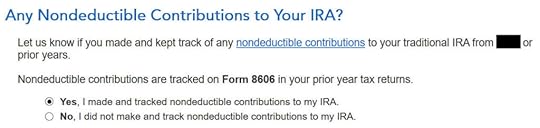
Here it’s asking about the prior year carryover. When you’re doing a clean “planned” Backdoor Roth as in our example — contribute for year X in year X and convert before the end of year X — you can answer No here. If you contributed for the previous year between January 1 and April 15 during year X, answer Yes here.

If you answered Yes to the previous question and you did your previous year’s return correctly also in TurboTax, your basis from the previous year will show up here. If you did your previous year’s tax return wrong, fix your previous return first.
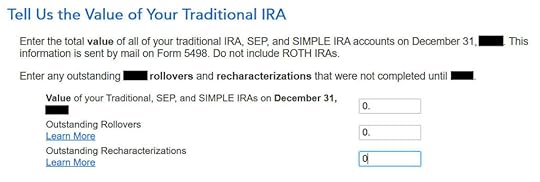
Enter the values at the end of the year. We don’t have anything in traditional, SEP, or SIMPLE IRAs after we converted it all.
That’s it so far on the income side. Continue with other income items. The refund in progress is still temporarily depressed. Don’t worry. It will change.
Non-Deductible Contribution to Traditional IRANow we enter the non-deductible contribution to a Traditional IRA *for* the year we are doing the tax return.
Complete this part whether you contributed before December 31 or you did it or are planning to do it in the following year between January 1 and April 15. If your contribution during the year in question was for the year before, make sure you entered it on the previous tax return. If not, fix your previous return first.
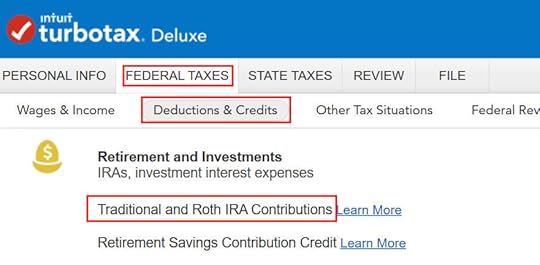
Go to Federal Taxes -> Deductions & Credits -> Traditional and Roth IRA Contributions.
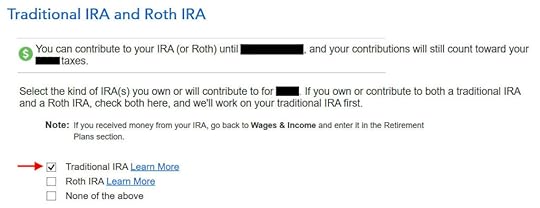
Because we did a clean “planned” Backdoor Roth, we check the box for Traditional IRA. If you did a detour when you first contributed to a Roth IRA before you realized your income is too high and you recharacterized the contribution as to a Traditional IRA, check the box for Roth IRA and answer the questions accordingly.
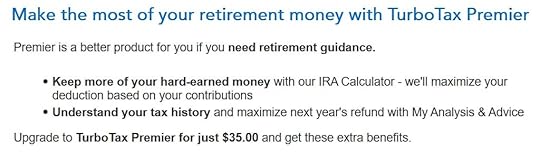
TurboTax offers an upgrade but we choose to continue in TurboTax Deluxe.

We already checked the box for Traditional but TurboTax just wants to make sure. Answer Yes here.

It was not a repayment of a retirement distribution.
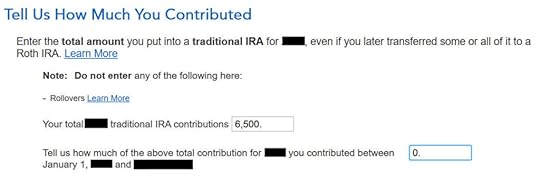
Enter the contribution amount. Because we contributed for year X in year X, we put zero in the second box. If you contributed for the previous year between January 1 and April, enter the contribution in both boxes.
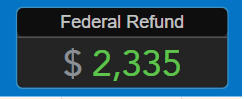
Right away our federal refund in progress goes back up! We started with $2,384. It went down to $858. Now it comes back to $2,335. The $49 difference is because we have to pay tax on the $200 in earnings when we contributed $6,500 and converted $6,700. If you had less earnings, your refund numbers would be closer still.
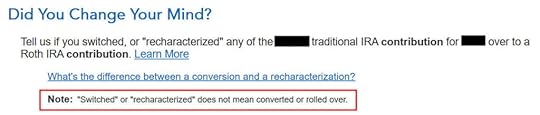
This is a critical question. Answer “No.” You converted the money, not switched or recharacterized.

You may not get this question if you already entered your W-2 and it has Box 13 for the retirement coverage checked. Answer yes if you’re covered by a retirement plan but the box on your W-2 wasn’t checked.

No excess contribution.
Same question we saw before. For a clean “planned” Backdoor Roth, we can answer No. If you made non-deductible contribution for previous years, answer Yes.
Total basis through the previous year. If you did your taxes correctly on TurboTax last year, TurboTax transfers the number here. If you made non-deductible contributions for previous years (regardless of when), enter the number on line 14 of your Form 8606 from last year.
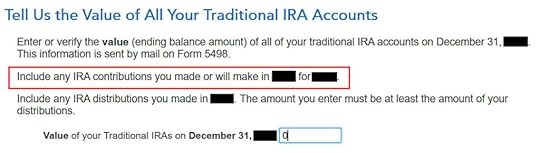
Because we did a clean “planned” Backdoor Roth, we don’t have anything left after we converted everything before the end of the same year.

Income too high. We know. That’s why we did the Backdoor Roth.
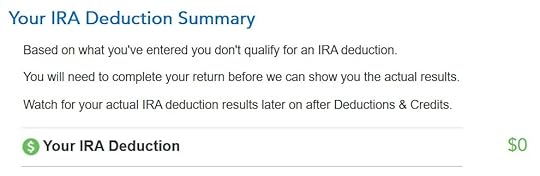
The IRA deduction summary shows $0 deduction, which is expected.
Taxable Income from Backdoor RothAfter going through all these, would you like to see how you are taxed on the Backdoor Roth?
Click on Forms on the top right.
Find Form 1040 in the left navigation panel. Scroll up or down on the right to find lines 4a and 4b. They show a $6,200 distribution from the IRA and only $200 of the $6,200 is taxable. That’s the earning between the time you contributed to your Traditional IRA and the time you converted it to Roth.
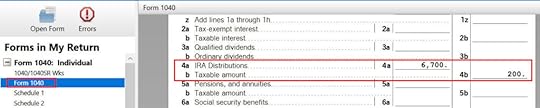
When you’re done examining the form, click on Step-by-Step on the top right to go back to the interview.
Tah-Dah! You put money into a Roth IRA through the backdoor when you aren’t eligible to contribute to it directly. That’s why it’s called a Backdoor Roth. You pay tax on a small amount in earnings if you waited between contributions and conversion. That’s negligible relative to the benefit of having tax-free growth on your contributions for many years.
TroubleshootingIf you followed the steps and you are not getting the expected results, here are a few things to check.
Fresh StartIt’s best to follow the steps fresh in one pass. If you already went back and forth with different answers before you found this guide, some of your previous answers may be stuck somewhere you no longer see. You can delete them and start over.
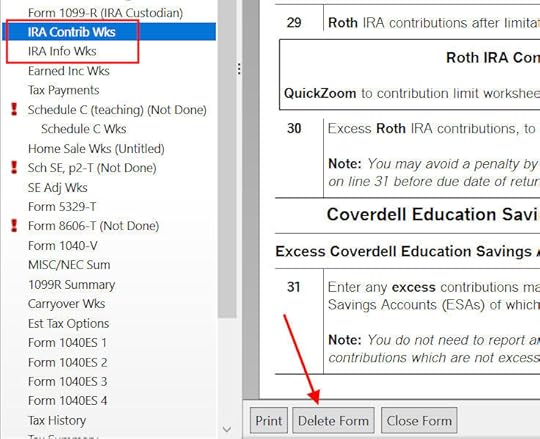
Click on Forms on the top right.
Find “IRA Contrib Wks” and “IRA Info Wks” in the left navigation pane and click on “Delete Form” to delete them. Then you can start over by following the steps above.
 W-2 Box 13
Make sure the Retirement Plan box in Box 13 of the W-2 you entered into the software matches your actual W-2. If you are married and both of you have a W-2, make sure your entries for both W-2’s match the actual forms you received.
When you are not covered by a retirement plan at work, such as a 401k or 403b plan, your Traditional IRA contribution may be deductible, which also makes your Roth conversion taxable.
Self vs SpouseIf you are married, make sure you don’t have the 1099-R and IRA contribution mixed up between yourself and your spouse. If you inadvertently entered two 1099-Rs issued to you instead of one for you and one for your spouse, the second 1099-R to you will not match up with a Traditional IRA contribution made by your spouse. If you entered a 1099-R for both yourself and your spouse but you only entered one Traditional IRA contribution, you will be taxed on one 1099-R.
Learn the Nuts and Bolts
I put everything I use to manage my money in a book. My Financial Toolbox guides you to a clear course of action.Read ReviewsThe post How To Report 2023 Backdoor Roth In TurboTax (Updated) appeared first on The Finance Buff.
January 21, 2024
Beyond the Numbers: a Closer Look at Renting By Choice
When the question of whether one should buy or rent a home comes up, the usual answer is “Run the numbers.” A good tool for running the numbers is the Buy-or-Rent Calculator from The New York Times.
This calculator thoroughly takes into account the price of the home, how long you’ll stay in the home, mortgage rate, down payment, home price growth rate, rent growth rate, investment return, inflation, property tax, the tax rate, closing costs, maintenance costs, insurance, utilities, and HOA fees. It calculates a rent-equivalent number. If you can rent a similar home for less than this number, then renting is better.
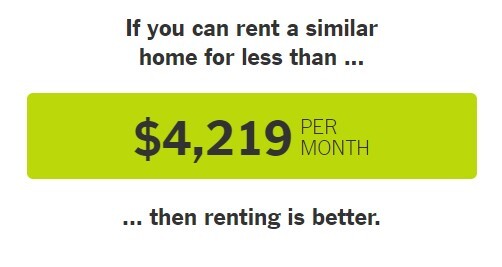
The Daily podcast from The New York Times put out this episode recently: Should You Rent or Buy? The New Math. The gist of it is that the double-whammy of higher home prices and higher mortgage rates has made renting more favorable than buying. Here’s a shorter interview with the same author on PBS NewsHour:
Why renting over buying might be the favored choice in today’s real estate landscapeMost people saying that renting is better than buying aren’t renters themselves. They only talk about renting in the abstract when they don’t have real-world experience in renting these days. I rented in the last four years before I became a homeowner again last month (I owned a home for 18 years before renting). My experience from four years of renting tells me that a buy-or-rent calculator should be the last step you take when you explore whether you should buy or rent, not the first step. Only running the numbers misses a big part of the picture in buying versus renting.
Here are 9 things I learned in real life that a buy-or-rent calculator doesn’t tell you.
Table of Contents1. You have fewer choices when you rent.2. Just because you see a listing doesn’t mean you get to rent it.3. Just because you have pristine financials and a great credit score doesn’t mean you’ll get the rental.4. Homes for rent are in general of lower quality than homes for sale.5. You have to ask for permission in how you live.6. Renting doesn’t mean maintenance-free.7. You don’t necessarily get to renew even if you’re a good tenant.8. Your rent can increase a lot on renewal.9. Renting is less flexible than you think.1. You have fewer choices when you rent.This was the first surprise when I tried to rent. It may be different if you’re renting an apartment but I can only comment on renting versus buying single-family houses and townhouses because I was only in that world. You don’t need a calculator to tell you that renting a one-bedroom apartment costs less than buying a three-bedroom house.
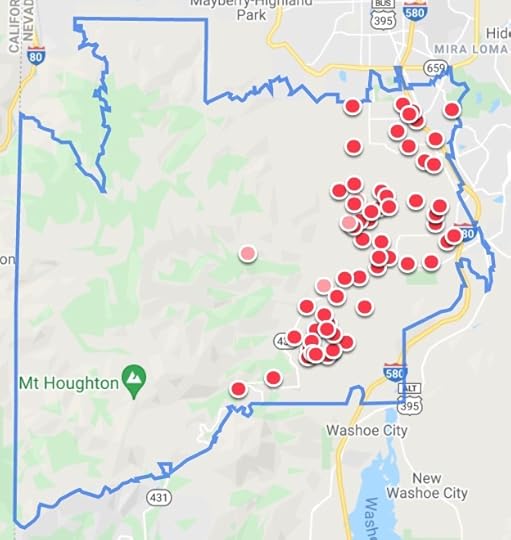
These two maps from Zillow show homes listed for rent (excluding apartments) and homes listed for sale in my previous zip code in 2021:
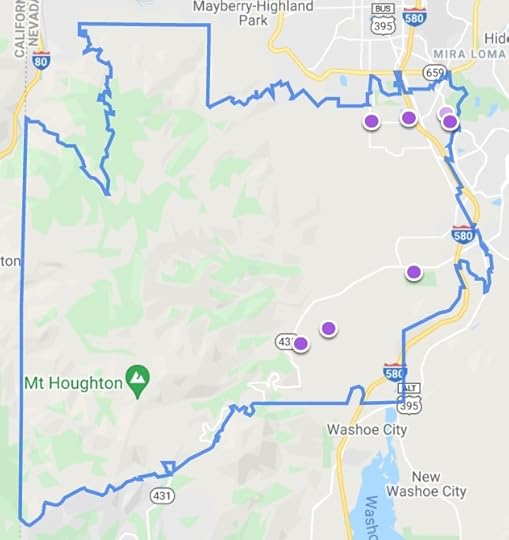
The two maps below show homes listed for rent and homes listed for sale in my current zip code in 2024:
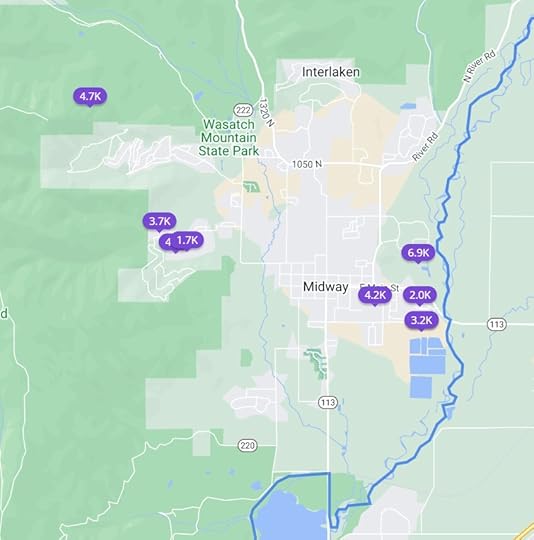
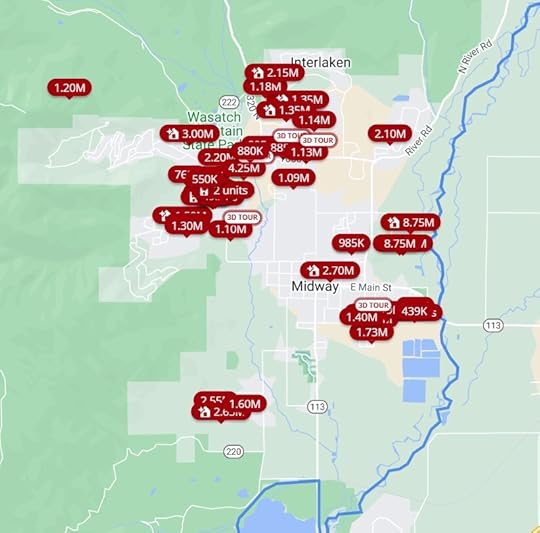
Different times, different places, same story. Before considering prices, sizes, or desirability, you start with fewer choices when you try to rent.
Look at the map from Zillow in both ways for your area. Is it any different?
2. Just because you see a listing doesn’t mean you get to rent it.Renting a home isn’t like buying something from a store. Just because you see a listing and you’re OK with the asking rent doesn’t mean you get to rent it. You can only apply to rent it. The owner decides whether to rent it to you. Rightly or wrongly, the owner can insert personal preferences in picking the tenant.
Owners aren’t supposed to discriminate but as long as they don’t say it aloud, you can’t do anything when an owner discriminates against you because you’re young or old, male or female, single or married, because you have kids or dogs, or for a multitude of other reasons.
When I was looking for rentals in another city, someone refused to show me the home before a local person saw it first even though I was willing to drive over to see it. Maybe she was burned by an out-of-town renter before. I was guilty by association.
There’s less prejudice and discrimination when you try to buy a home because buying is a one-time transaction. The seller is gone after you buy it. Renting is an ongoing relationship between the owner and the tenant. The owner cares deeply about what you do after you rent it. If the owner suspects you’ll do something he or she doesn’t like because you’re young or old, male or female, single or married, you have kids or dogs, etc., etc., the owner will choose to rent it to someone else.
3. Just because you have pristine financials and a great credit score doesn’t mean you’ll get the rental.Even if the owner doesn’t discriminate, he or she only needs a good tenant. The owner isn’t running a contest to see who has the strongest financials.
I once applied for a rental and the owner didn’t even look at my application. He said he received 30 applications in a few hours, found one acceptable after reading several, and discarded the rest. Continuing to review all 30 applications would’ve been a waste of his time.
After learning that lesson, I applied for the next rental minutes after Zillow sent me the alert of a new listing. I paid the $50 non-refundable application fee with complete documentation of my financials right away. That was how I got the rental.
When I gave my notice to vacate this rental two years later, the property manager listed it for rent on Zillow on a Saturday evening. By the following Monday, they already lined up 8 showings for Tuesday afternoon. I received another slew of texts on Tuesday morning saying that they canceled 7 out of the 8 showings because one of the 8 signed the lease already without seeing the rental.
The other 7 renters may have stronger financials than the one who signed but they still lost out because they weren’t aggressive enough.
The buy-or-rent calculator showing that it’s better to rent is irrelevant if you don’t actually get the opportunity to rent.
4. Homes for rent are in general of lower quality than homes for sale.The best ROI in rentals comes from renting cheap homes for not-as-cheap rents. Renters as a whole have lower incomes than buyers. These factors make it rare to see good-quality homes for rent. Good-quality homes for rent are also taken away by the rise of Airbnb and VRBO. Most of the remaining homes offered as long-term rentals don’t look that great.
A home also deteriorates over time after it becomes a rental. You’ve heard of the saying that nobody washes a rental car. The owner doesn’t keep it up because renters don’t have an incentive to take good care of it. Some homes for sale specifically advertise that they have never been a rental.
The owner of my last rental home didn’t do much maintenance when I rented it. When the dishwasher broke, the owner replaced it with a $300 dishwasher, which was the cheapest you could find at The Home Depot. The dishwasher worked but I bet she wouldn’t have chosen that one if the home weren’t a rental. Doing much beyond the bare minimum isn’t worth the investment to the owner, which is understandable but this contributes to the lower quality of rentals.
5. You have to ask for permission in how you live.You acted fast and you got the rental. You don’t mind its lower quality. You just pay the rent and live your life, right?
Remember that buying is a transaction and renting is a relationship. The relationship means you need permission from the owner in how you live when you rent.
Here are some terms of the lease for my last rental:
Occupancy by guests remaining over three consecutive days or more than five days in any calendar quarter will be considered to be a violation of this provision unless prior written consent is given by Owner. Owner may restrict any guest for any or no reason.
Resident is required to get approval for any companion or service animal PRIOR to the animal coming onto the Premises. Failure to obtain prior approval is a significant violation of this agreement which shall allow for immediate eviction.
Your sister is coming to visit you and she has a dog? She doesn’t have a dog but you want her to stay with you for 4 days? Ask for approval from the owner, please.
Reject these terms and negotiate? Forget about it. See 1 through 3.
6. Renting doesn’t mean maintenance-free.If you think all maintenance is the owner’s responsibility when you rent, think again. From my last lease:
Resident shall be responsible to maintain the Premises including the exterior. It shall be the specific responsibility of Resident to maintain the sprinkling system and to care for and maintain the lawn and landscaping. This shall include but is not limited to; weeding, watering, mowing, edging, fertilizing, and anything else necessary to maintain the landscaping. In the event Resident fails to maintain the lawn and landscaping, Owner in its sole discretion may cause such to be maintained and shall be entitled to reimbursement from Resident for the costs incurred in such maintenance. Tenant shall be responsible for normal daily maintenance of the Premises and to keep the Premises clean and orderly. Other such maintenance may be assigned to Resident by Owner through the Rules and Regulations or by other written agreement. All costs of such maintenance shall be the responsibility of Residents.
Yes, you can hire lawn service but it’s still your responsibility to maintain the lawn and landscaping.
7. You don’t necessarily get to renew even if you’re a good tenant.A typical lease term is one year. If the buy-or-rent calculator continues to say it’s better to rent and you’d like to continue, you still don’t necessarily get to renew the lease for another year.
Renting is a relationship. The other party in the relationship has to agree to continue the relationship. The owner may decide to sell, turn it into a short-term rental, rent it to a family member or a friend, or make it his or her primary or secondary home. It doesn’t matter how good a tenant you are.
The owner of our first rental notified us in the middle of the year that he wouldn’t renew the lease because he wanted to move into it. He was kind enough to give us notice six months before the lease expiration and he waived the early termination charge if we moved out sooner. Had he strictly gone by the terms of the lease, he only needed to give us notice 30 days before the end of the lease term and we would’ve had to scramble to find a new place in 30 days.
A buy-or-rent calculator implicitly assumes that you can always renew or you can always find another equivalent rental. The real world doesn’t work like that.
8. Your rent can increase a lot on renewal.The New York Times buy-or-rent calculator has an input for the rent growth rate. It defaults to 2.5% per year. If the owner offers you to renew the lease, there’s no limit to how much the rent can increase absent local rent control laws.
The renewal I was offered in the second year of my last rental went up by 25%, not 2.5%. The owner threw me a bone and lowered it to 23% when I begged for mercy. If I didn’t accept the renewal, my only choice was to find another place in 30 days.
Hiring movers would’ve eaten up a large part of any savings assuming I was able to get a less expensive rental in 30 days. That also doesn’t count the hassle of packing, unpacking, and disruptions to life. I relented and renewed for a 23% increase.
If you move every time you have an unreasonable rent increase, you’ll be tired of it very soon. The unreasonable rent increase will look quite reasonable when your family asks you why you’re moving again. It’s rational for the owner to charge a premium for renewals because you get to avoid moving when you renew.
After we vacated the rental, it was listed for rent at a much lower rent than we were paying. New tenants don’t pay the renewal premium because they’re moving anyway.
9. Renting is less flexible than you think.Flexibility is touted as a major benefit of renting. If something comes up in your life, you can just leave. It’s true when it happens close to the time of lease expiration but the owner isn’t obligated to let you out of the lease at other times. You don’t get to break the lease for only one extra month of rent.
From my last lease again:
If Resident vacates prior to the end of the initial term, all future rents under this Agreement shall accelerate and become immediately due.
If you must move two months into a one-year lease, paying rent for another 10 months isn’t much less than paying the transaction cost of selling a home. You don’t have the right to sub-lease when you rent.
Some leases automatically become month-to-month after one year. That’s not always the case. If the owner only wants 12-month renewals, moving is your only choice even though you know you’ll have to move again in two months.
***
Buying versus renting is much more about the price but a buy-or-rent calculator only tells you about the price. Consider these other factors before you jump into the buy-or-rent calculator.
Did I just have bad luck and run into unreasonable rentals? I doubt it. Basic economics says that lower-priced products see a higher demand. The higher demand creeps into non-price factors such as low availability, discrimination by some owners because they can, a large number of renters chasing after a small number of rentals, lower quality, and onerous lease terms.
A buy-or-rent calculator implicitly assumes a fantasy world in which rentals of equal quality to homes for sale are abundantly available, you get to rent a home of your choice as long as your financials qualify, you can renew for as long as you want for a reasonable increase in rent, and the lease terms are flexible and accommodating to you. If that’s the case in your area, great, run the numbers using the buy-or-rent calculator. Otherwise, not so fast.
Renting by choice looks good on paper but it gets messy in real life. Renting isn’t like buying regardless of the price. Buying is a transaction. Renting is a relationship. I’m happy to be a homeowner again and out of my renting relationship.
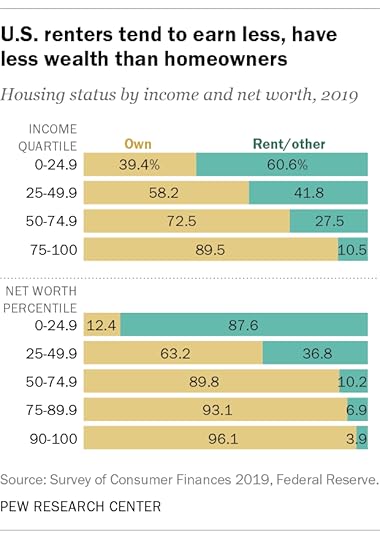
Buying may be more expensive (or it may not be) but price isn’t everything. According to a report by Pew Research Center, 90% of people in the top income quartile and 90% of people in the top half in net worth own their homes. Close to 40% of all homes in the U.S. don’t have a mortgage. People who own their homes free-and-clear don’t sell their homes to become renters when the buy-or-rent calculator says it’s better to rent because they know to look beyond the numbers.
I put everything I use to manage my money in a book. My Financial Toolbox guides you to a clear course of action.Read ReviewsThe post Beyond the Numbers: a Closer Look at Renting By Choice appeared first on The Finance Buff.
January 13, 2024
2023 2024 2025 Federal Poverty Levels (FPL) for ACA Health Insurance
People who don’t have health insurance from an employer plan can buy health insurance from a marketplace under the Affordable Care Act (ACA), also known as Obamacare. The monthly premiums are made affordable by a premium subsidy in the form of a tax credit calculated off of your household income relative to the Federal Poverty Level (FPL), also known as the federal poverty line, federal poverty guidelines, or HHS poverty guidelines.
The premium subsidy goes by a sliding scale. The higher your income relative to the FPL for your household size, the lower your premium subsidy is.
Modified Adjusted Gross Income (MAGI)The income to compare against the FPL is the Modified Adjusted Gross Income (MAGI) for your household. It doesn’t matter how many family members in your household need coverage from the ACA health insurance.
There are many different definitions of MAGI in the tax code. MAGI for ACA health insurance is basically your Adjusted Gross Income (AGI) plus tax-exempt muni bond interest and untaxed Social Security benefits.
These incomes are included in your AGI, and therefore increase your MAGI for ACA health insurance:
Wages, salaries, tips, and other employment incomeBusiness incomeIncome from real estate rentalsUnemployment benefitsPension and withdrawals from pre-tax IRAs or annuitiesSocial Security benefitsInterest, dividends, and capital gainsThese above-the-line deductions are removed from your AGI and therefore reduce your MAGI for ACA health insurance:
Pre-tax contributions to workplace retirement plans (pension, 401k, 403b, 457, etc.)Deductible contributions to Traditional IRAsHSA contributionsSelf-employment health insurance deductionOne-half of the self-employment taxPre-tax contributions to self-employment retirement plans (solo 401k, SEP-IRA, etc.)Student loan interest deductionEarly withdrawal penalties on CDsEducator expensesIn addition, these items aren’t in the AGI but are added back to your MAGI for ACA health insurance:
Untaxed Social Security benefits (see Calculator: How Much of My Social Security Benefits Is Taxable?)Tax-exempt interest from muni bondsThe Maximum IncomeBefore 2021, you qualified for the premium subsidy only if your MAGI was at 400% of the Federal Poverty Level (FPL) or below. You would lose all the subsidy if your MAGI went above 400% of FPL even by $1. You would have to pay back all the premium subsidy you already received when you file your tax return with the IRS. This was known as the ACA subsidy cliff.
The law changed in 2021, which turned the sharp cliff into a gradual slope. The Inflation Reduction Act extended the change through 2025. You still qualify for a premium subsidy now if your income goes over 400% of FPL. You just qualify for a lower amount as your income goes up. See ACA Health Insurance Premium Subsidy Slope.
This gradual slope only applies through 2025. The ACA subsidy cliff is scheduled to return in 2026.
In order to see how much you qualify for the premium subsidy, you have to know where the FPL is.
The Minimum IncomeIn addition to the maximum income to receive the premium subsidy, there’s also a minimum income to get accepted by the ACA marketplace. If your estimated income is too low, the ACA marketplace won’t accept you. They’ll send you to Medicaid instead.
The minimum income is 138% of FPL in states that expanded Medicaid, which is the case in most states and the District of Columbia. In states that didn’t expand Medicaid, the minimum income is 100% of FPL. According to a map from KFF, these states haven’t expanded Medicaid:
WyomingWisconsinKansasTexasTennesseeSouth CarolinaMississippiAlabamaGeorgiaFlordiaHowever, unlike the maximum income, the minimum income is only evaluated at the time of open enrollment (or special enrollment), not at the time when you file your tax return with the IRS.
If your estimated income at the time of enrollment is below the minimum, the ACA marketplace won’t accept you, and they will refer you to Medicaid. If your estimated income at the time of enrollment is above the minimum and they accepted you, but your income for the year ended up below the minimum due to unforeseen circumstances, as long as you made the original estimate in good faith, you are not required to pay back the premium subsidy you already received.
The FPL NumbersHere are the FPL numbers for coverage in 2023, 2024, and 2025. They increase with inflation every year in January. These are applied with a one-year lag. Your eligibility for a premium subsidy for 2024 is based on the FPL numbers announced in 2023. The new numbers announced in 2024 will be used for coverage in 2025.
There are three sets of numbers. FPLs are higher in Alaska and Hawaii than in the lower 48 states and Washington DC.
48 Contiguous States and Washington DCHousehold Size2023 coverage2024 coverage2025 coverage1$13,590$14,580$15,0602$18,310$19,720$20,4403$23,030$24,860$25,8204$27,750$30,000$31,2005$32,470$35,140$36,5806$37,190$40,280$41,9607$41,910$45,420$47,3408$46,630$50,560$52,720moreadd $4,720 eachadd $5,140 eachadd $5,380 eachAlaskaHousehold Size2023 coverage2024 coverage2025 coverage1$16,990$18,210$18,8102$22,890$24,640$25,5403$28,790$31,070$32,2704$34,690$37,500$39,0005$40,590$43,930$45,7306$46,490$50,360$52,4607$52,390$56,790$59,1908$58,290$63,220$65,920moreadd $5,900 eachadd $6,430 eachadd $6,730 eachHawaiiHousehold Size2023 coverage2024 coverage2025 coverage1$15,630$16,770$17,3102$21,060$22,680$23,5003$26,490$28,590$29,6904$31,920$34,500$35,8805$37,350$40,410$42,0706$42,780$46,320$48,2607$48,210$52,230$54,4508$53,640$58,140$60,640moreadd $5,430 eachadd $5,910 eachadd $6,190 eachSource:
U.S. Department of Health and Human Services, notice 2022-01166U.S. Department of Health and Human Services, notice 2023-00885U.S. Department of Health and Human Services, coming soonThe Applicable PercentagesThe FPL numbers determine one aspect of your eligibility for the premium subsidy. How much you are expected to pay when you qualify for the premium subsidy is also determined by a sliding scale called the Applicable Percentages.
The lower your MAGI is relative to the FPL for your household size, the lower you’re expected to pay as a percentage of your MAGI. This table shows the applicable percentages through 2025:
Income2022 – 2025< 133% FPL0%< 150% FPL0%< 200% FPL0% – 2%< 250% FPL2% – 4%< 300% FPL4% – 6%<= 400% FPL6% – 8.5%> 400% FPL8.5%We cover it in more detail in ACA Health Insurance Premium Tax Credit Percentages.
Plan ChoiceThe ACA marketplace offers many different plan options. They’re categorized into Bronze plans, Silver plans, Gold plans, and Platinum plans. Multiplying your MAGI by the applicable percentage determines your premium contributions toward a benchmark plan — the Second Lowest Cost Silver Plan.
You’ll pay more if you choose a more expensive plan. The annual premium you’ll pay for the plan of your choice will be:
MAGI * applicable percentage + (annual premium for the plan chosen – annual premium for the Second Lowest Cost Silver Plan)
You’ll pay less if you choose a less expensive Bronze plan.
When your MAGI is lower than 250% of FPL, in addition to having a lower applicable percentage, you also qualify for cost-sharing reductions, which lower your co-pays and out-of-pocket maximum. We cover it in more detail in Cost-Sharing Subsidy Under ACA Health Insurance.
Learn the Nuts and Bolts
I put everything I use to manage my money in a book. My Financial Toolbox guides you to a clear course of action.Read ReviewsThe post 2023 2024 2025 Federal Poverty Levels (FPL) for ACA Health Insurance appeared first on The Finance Buff.
January 9, 2024
File FinCEN BOI Report for Your LLC or S-Corp
Attention self-employed individuals and rental property owners, if you have an LLC, S-Corp, partnership, C-Corp, or other state-registered entity, your entity has a new federal reporting requirement starting on January 1, 2024.
It’s called the FinCEN Beneficial Ownership Information (BOI) report. This report is mandated by the Corporate Transparency Act passed by Congress in 2021. Basically your state-registered entity must tell the federal government who’s behind that entity.
Filing the report itself isn’t too difficult only if you know you must do it. Not filing the report by the deadline can incur civil penalties of up to $500 per day (!) or up to two years of prison time.
Who Must File the ReportMost small LLCs, S-Corps, partnerships, C-Corps, or other state-registered entities must file the report. Some entities are exempt but you should assume that your entity must report unless you see a clear exemption in the Small Entity Compliance Guide.
Sole proprietorships with only a DBA don’t need to file the report. From the FAQs:
When to File the Report
C. 6. Is a sole proprietorship a reporting company?
No, unless a sole proprietorship was created (or, if a foreign sole proprietorship, registered to do business) in the United States by filing a document with a secretary of state or similar office. An entity is a reporting company only if it was created (or, if a foreign company, registered to do business) in the United States by filing such a document. Filing a document with a government agency to obtain (1) an IRS employer identification number, (2) a fictitious business name, or (3) a professional or occupational license does not create a new entity, and therefore does not make a sole proprietorship filing such a document a reporting company.
Existing entities created before January 1, 2024 must file the report by January 1, 2025. Because it’s easy to forget and the penalties are heavy if you don’t do it, you should file the report ASAP.
A new entity formed in 2024 must file the report within 90 days of its formation. If you form a new entity after January 1, 2025, the new entity must file the report within 30 days of its formation.
After you file the initial report, you don’t have to do it every year. The entity must file an updated report within 30 days only when the previously reported information changes. This includes when the company or a reported beneficial owner moves or gets a new driver’s license or passport.
How to File the ReportYou file the report electronically with the Financial Crimes Enforcement Network (FinCEN), which is a bureau of the U.S. Department of the Treasury. You can submit a filled-out PDF file or use FinCEN’s online form.
There’s no fee for filing the report.
Go to FinCEN’s BOI E-Filing System. Either button will get you started.
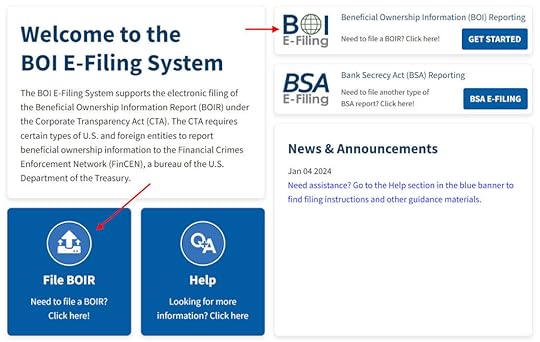 What’s In the Report
The report itself is quite straightforward. It’s basically the company’s name, address, tax ID, and each beneficial owner’s name, address, date of birth, driver’s license or passport number, and an image of the driver’s license or passport.
A beneficial owner doesn’t necessarily have to have ownership in the company. Senior officers with substantial control must also be included even if they don’t have ownership.
The information filed in the report won’t be made available to the general public.
Each entity files a report separately. If you have multiple entities, you can obtain a FinCEN ID with your personal information and reference the FinCEN ID in each entity’s report without having to repeat your personal information in each report. This also makes it easier to update the information when you move or get a new driver’s license or passport.
For More InformationPlease read FinCEN’s BOI Small Entity Compliance Guide.
***
The most important thing about this FinCEN BOI report is to know that your LLC or S-Corp is required to file the report. Filing the report only takes 15 minutes. As with any other law, not knowing the law’s existence doesn’t get you out of a penalty. I would much prefer not to have this chore but it is what it is. If you have an LLC, S-Corp, or other state-registered entity, presumably you have a good reason to have it. This new reporting requirement has just become a part of the deal.
Learn the Nuts and Bolts
I put everything I use to manage my money in a book. My Financial Toolbox guides you to a clear course of action.Read ReviewsThe post File FinCEN BOI Report for Your LLC or S-Corp appeared first on The Finance Buff.
December 19, 2023
Fidelity Private Client Group But No Free TurboTax, What to Do?
Fidelity chooses to give a selected group of customers free TurboTax Premier every year. If you’re selected and you use the link in the special offer to TurboTax’s website, the online version of TurboTax Premier is free and the download version costs only $5 (plus tax in some states).
Where to Find the OfferFidelity doesn’t email or otherwise alert you that you have this offer. If you’ve been selected to receive the offer, you’ll see it appear on the All Accounts -> Summary tab after you log in to Fidelity’s website.
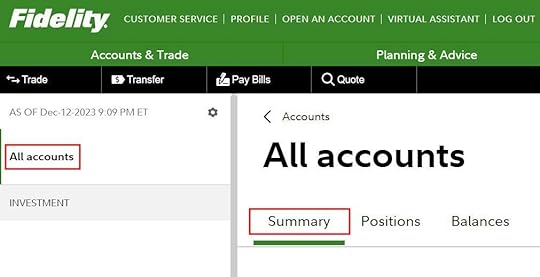
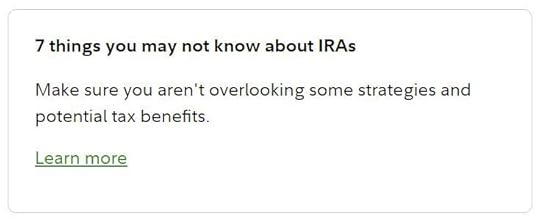
The All Accounts -> Summary tab usually displays some informational and marketing “cards” such as this one:
You’ll see a card with the free/$5 TurboTax offer among these other cards on the All Accounts -> Summary tab if you’ve been selected to receive the offer. Be sure to scroll down and look for it.
Buy the DownloadIf you have the offer, buying the downloaded version of TurboTax Premier for $5 is a better deal than using the online version for free. I explained why that’s the case in Tax Software: Buy the Download, Not the Online Service. If you used TurboTax Online last year, the downloaded software can import last year’s data from TurboTax Online.
The downloaded version also has the useful What-If Worksheet for tax planning, which isn’t available in the online version. See Tax Planning with TurboTax What-If Worksheet: Roth Conversion.
The downloaded software charges a fee for state e-file (federal e-file is free) but you can e-file for free on the state revenue agency’s website in many states. See Free E-File State Tax Return Directly on the State’s Website.
Selection CriteriaIf you don’t see the offer for free/$5 TurboTax on the All Accounts -> Summary tab after you log in to Fidelity’s website, that means Fidelity’s algorithm didn’t choose you. Which customers Fidelity chooses to offer the free/$5 TurboTax is always unclear.
Having large accounts probably helps but it doesn’t guarantee it. Some people with 5-figure accounts get the offer and some people with 7-figure accounts don’t get it.
Being in the “Private Client Group” and having an assigned advisor may help but it doesn’t guarantee it either. Some people receive the offer without an assigned advisor or the Private Client Group status and some people still don’t get the offer even though they have the Private Client Group status and an assigned advisor.
Having a taxable account isn’t required either. Some people get the offer with only retirement accounts and some people with a large taxable account still don’t get it.
There’s quite a degree of randomness and mystery in who gets the free TurboTax offer and who doesn’t.
Not Chosen, What to Do?I have a large taxable account with Fidelity, I’m in the Private Client Group, and I have an assigned advisor, but I never received the free TurboTax offer. Not last year, not this year, never. If you’re like me and you think you have all the reasons to get the free TurboTax offer but you don’t see it on the All Accounts -> Summary tab, what now?
Check Spouse’s LoginIf you’re married and your spouse has a separate login, ask him or her to check under his or her login. Sometimes one spouse has the offer and the other doesn’t.
Unfortunately my wife doesn’t get the offer either.
WaitNot everyone sees the offer at the same time. Some people see it in mid-December and some people see it in January. If you don’t see the offer, it may still show up at a later time.
Ask Your AdvisorIf you have an assigned advisor, he or she has no control over who gets the free TurboTax offer or when the offer shows up for you but your advisor may have some discretionary client relationship budget. Some advisors will tell you to buy the software yourself and they’ll reimburse you when you send them the receipt.
It’s up to you whether you want to pursue this with your advisor.
Ask a Friend or FamilyIf someone has the free TurboTax offer from Fidelity, they may not use TurboTax because they use an accountant or tax preparer or they prefer some other software.
If a friend or a family member has the offer but they won’t use TurboTax, you can use their link to buy it. After they log in to Fidelity and click on the offer, you use their computer to log in to your TurboTax account to buy it.
Buy It From AmazonWhile it’s great to get TurboTax for $5, it isn’t that expensive when you buy it without the special offer. Amazon typically puts TurboTax on sale between Christmas and New Year’s Day. The Deluxe + State edition, which is sufficient for most people, usually sells for $35-40 at that time.
I buy the Deluxe (federal-only) edition for under $30 because my state tax is dead simple. I file the state tax directly on the state tax department’s website for free with only three numbers from the federal return.
I go this route every year. Fidelity doesn’t owe me a $5 TurboTax. I’ll take it if they choose to give it to me but I’ll just buy it on my own when they don’t.
Learn the Nuts and Bolts
I put everything I use to manage my money in a book. My Financial Toolbox guides you to a clear course of action.Read ReviewsThe post Fidelity Private Client Group But No Free TurboTax, What to Do? appeared first on The Finance Buff.
Harry Sit's Blog

- Harry Sit's profile
- 1 follower

