Harmony Evans's Blog, page 565
January 19, 2024
Creepy Biden Gives Marriage Advice: Pick a Family with Five Sisters Or More…That Way One of Them Always Loves You (VIDEO) | The Gateway Pundit
Joe Biden on Friday welcomed mayors attending the US Conference of Mayors Winter Meeting to the East Room at the White House.
Biden incoherently slurred his way through a speech to the mayors. He also started shouting out of nowhere.
WATCH:
WHY IS BIDEN YELLING SO MUCH?
The man is NOT well. pic.twitter.com/k2zgdm7vyA
— RNC Research (@RNCResearch) January 19, 2024
At one point Biden threatened millions of Trump supporters, but he bungled that too.
“I love people who say, ‘THE BLOOD OF LIBERTY.’ Or, excuse me, ‘the tree of liberty is watered with the blood of patriots!’ Well, guess what, man. I didn’t see a whole lot of patriots that are out there walking around making sure that we have these weapons and if you really want to worry about the government, you need an F-16! [fighter jet]”
Biden also gave some creepy marriage advice.
“I tell every young man that’s telling me, ‘I’m thinking of getting married. You have any advice?’ I said, ‘Yeah, pick a family with five sisters or more,’” Biden said slurring his words. “That way one of them always loves you!”
WATCH:
BIDEN (slurring): “I tell every young man that’s telling me, ‘I’m thinking of getting married. You have any advice?’ I said, ‘Yeah, pick a family with five sisters or more.'” pic.twitter.com/IiEiqmIWnc
— RNC Research (@RNCResearch) January 19, 2024
The post Creepy Biden Gives Marriage Advice: Pick a Family with Five Sisters Or More…That Way One of Them Always Loves You (VIDEO) | The Gateway Pundit appeared first on Harmony Evans.


Tekken 8 colorblind filter removed amidst seizure fears
In an attempt to bring Tekken 8 to as many people as possible, developers Bandai Namco inadvertently introduced a potentially dangerous filter in their accessibility options. The game’s director, Katushiro Harada, has announced that changes will be coming to accessibility options to minimize the risk, reports PC Gamer.
@Harada_TEKKEN you urgently need to remove one of your filters (the striped one), it cannot be present at launch as it may hospitalise players (or worse), in the same way as the infamous Pokémon episode.
— Ian Hamilton (@ianhamilton_) December 27, 2023
The concern was that the striped filter could induce seizures in users with photosensitivity. Users also reported migraines arising from watching a clip of the game with the striped filter active.
Harada took to Twitter/X after a clip of the filter went viral to say that people were taking the filter out of context and that there are a lot of customizable options that had been used to create the effect seen in the original Twitter post. “These color vision options are a rare part of the fighting game genre, but they are still being researched and we intend to expand on them in the future.”
Speaking at the Tekken World Tour 2023 Finals, Harada said “Many people have been talking about the accessibility features in the demo for Tekken 8. That was just a work in progress, so we’ve actually tweaked that quite a bit to try to address some of the issues and to make sure it works better for a wider variety of people.”
It is unclear at this time whether these tweaks are going to be part of Tekken 8 when it launches or whether this will come in a future update, but it is a step in the right direction. Accessibility is a relatively new concern for game developers and the fact that the developers of a huge game franchise like Tekken are taking it seriously and trying to get it right is encouraging for many.
In 2020 Cyberpunk 2077 contained flashing lights and imagery that could trigger seizures in people with photosensitive epilepsy. After several gamers reported suffering seizures, developer CD Projekt Red apologized and quickly released a software update with a new warning, removed or reduced the flashing effects, and told gamers to be mindful of their health.
While most games don’t require warnings about photosensitive epilepsy risks, Cyberpunk 2077 demonstrated that rapid red-and-white flashing visual effects can directly endanger a small portion of the gaming community.
Featured image credit: Bandai Namco
 Ali Rees Freelance journalist
 Ali Rees is a freelance writer based in the UK. They have worked as a data and analytics consultant, a software tester, and a digital marketing and SEO specialist.
They have been a keen gamer and tech enthusiast since their childhood in are currently the Gaming and Tech editor at Brig Newspaper. They also have a Substack where they review short video games.
During the pandemic, Ali turned their hand to live streaming and is a fan of Twitch. When not writing, Ali enjoys playing video and board games, live music, and reading. They have two cats and both of them are idiots.
The post Tekken 8 colorblind filter removed amidst seizure fears appeared first on Harmony Evans.
How to find someone on Instagram
Finding people on Instagram is usually quite straightforward. Simply head to the search bar and enter their name or . But what if your friend has a common name, or you’re not sure of their last name? In case you’re unsure whether your friend is in your following list and you’re looking to connect, here’s a quick guide on how to find someone on Instagram.
THE SHORT ANSWER
To find someone on Instagram, connect your Instagram and Facebook accounts. After that, go to your Instagram profile and press the magnifying glass-shaped icon<open the Search button<enter the user’s name.
KEY SECTIONS
How to find someone on Instagram using searchThe simplest way to find somebody on Instagram is to use the search function. This, of course, requires you to know their name or Instagram .
Tap the magnifying glass-shaped icon on the bottom of your home page.Open the Search button on the search bar.Enter the user’s name in the search bar.Tap the magnifying glass-shaped icon Open the “Search” button
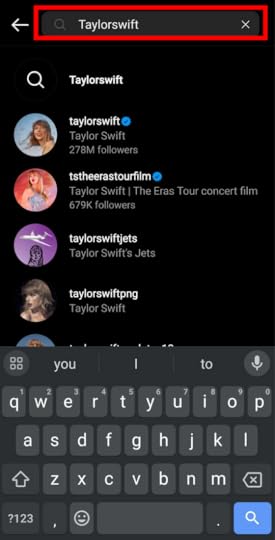 Enter user’s name How to find contacts on Instagram
Other methods to find people on Instagram require you to know them already. If the user is part of your contacts list on your smartphone, you can sync your contacts with Instagram.
Tap on the hamburger icon (≡) on your profile.In the Menu, tap on Settings.After that, select on Follow and invite friends. Tap on the hamburger icon
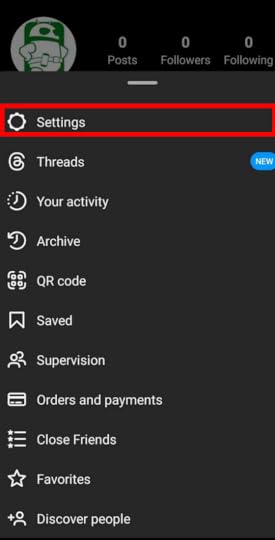 Tap on “Settings”
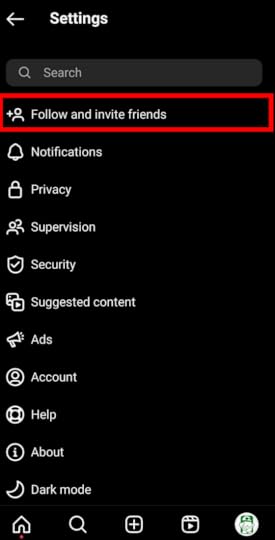 Select on “Follow and invite friends”In Follow and invite friends, tap the Follow contacts button.Allow the app to access your device’s contacts list to sync your contacts with Instagram.A text of Contacts connected will display after you have connected.
 Tap the “Follow contacts” button
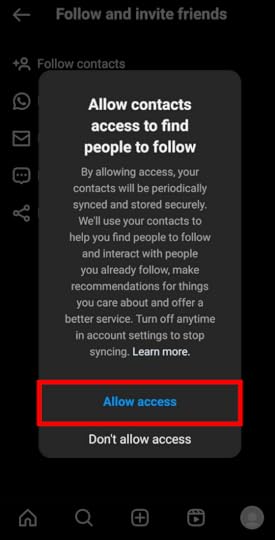 Allow the app to access your device’s contacts list
 A text of “Contacts connected” will displayHow to find Facebook friends on Instagram
This method only works if you have your Facebook and Instagram accounts connected already.
Tap on the heart-shaped notifications icon on the top of your home pageIn the notifications, scroll down at the end until you find See all suggestions.A new page titled Discover People will pop up. Here, you can see all the people from your Facebook account, as well as those followed by your friends. Tap on the heart-shaped notifications icon
 Scroll down at the end until you find “See all suggestions”
 A new page titled “Discover People” will pop upFAQsHow do I find someone on Instagram without an account?
You can typically find larger Instagram accounts online. For example, businesses, celebrities, and professional athletes often have their Instagram accounts linked to their Google bios.
If you need a more specific link to someone’s Instagram, you may need to contact that person directly.
Comments
Source link
The post How to find someone on Instagram appeared first on Harmony Evans.
Travel Benefits of Having a Psychiatric Service Dog
Psychiatric service dogs (PSD) are necessary companions for many individuals, and there are several important benefits to traveling with your PSD. For many people, having their psychiatric service dog at their side allows them to travel with easy access to the support they need for relief of certain symptoms.
Here are a few benefits of having a psychiatric service dog with you while traveling.
What Is a Psychiatric Service Dog?A psychiatric service dog is a type of service dog that is trained specifically to help individuals with psychiatric disabilities or mental health conditions, such as PTSD, OCD, anxiety, or depression.
These dogs can be trained by their owner or with a professional trainer to complete a variety of tasks for their owners, such as bringing medication and water, reminding their owners of a routine, opening and closing doors, protecting their owner’s back in public, calming down panic attacks, and guiding their owners to safe or quiet spaces.
For many individuals, their psychiatric service dog is essential to going about their day as smoothly as possible. When it comes to traveling, your PSD can continue their work for you as you travel so that you don’t need to worry about dealing with the symptoms of your disability alone.
Benefits of Traveling With Your Psychiatric Service DogPsychiatric Service Dog on a trainThere are a few different benefits to traveling with your PSD. We list the most important benefits of traveling with a psychiatric service dog below.
Symptom Relief While You TravelOne of the biggest benefits of traveling with your psychiatric service dog is having access to the benefits that your PSD brings for the duration of your travel. Psychiatric service dogs are granted federally protected access rights like other service animals, and you will be able to have them with you in nearly any hotel, airplane, or business that you need to visit while traveling.
This allows you the equal opportunity to make the most of your travel without worrying about symptom relief or maintaining your daily routine with the help of your PSD.
Air Cabin Travel BenefitsAir cabin travel benefits are what most people think of when it comes to traveling with a service animal. The Air Carrier Access Act allows individuals with service dogs, such as psychiatric service dogs, to bring their animals into the cabin with them.
It’s essential if you are planning air travel with your PSD that you fill out the proper forms and check any customs requirements for the areas you are traveling to ahead of time to ensure that your psychiatric service dog doesn’t need to leave your side.
Register your service animal for easy travelingRegister your service animal, emotional support animal, or apply for a letter from a licensed mental health professional for housing with US Service Animals.
Benefits include:
– Registration is valid for the lifetime of your animal.
– Your service animal or emotional support animal will be placed in the official US Service and Support Animal Registry Database.
– Get access to their legal team.
Save 15% on your Emotional Support Animal Registration with coupon code: ESAImpact15
Register your pet now.
A notable federally protected access right for individuals with service animals is not having to pay pet fees or adhere to specific pet restrictions while traveling. This means that an airline cannot charge you for having your PSD in the cabin, nor will you be required to pay hotel fees if you stay with your psychiatric service dog.
Keep in mind, though, that if your PSD damages any property you are staying in, it can still be legal to hold you financially responsible for any associated fees.
Related: How to Find Pet-Friendly Accommodation
What May I Be Asked About My PSD? Travel Benefits of Having a Psychiatric Service Dog
You may be asked specific questions about your dog when you bring your psychiatric service dog with you during your travel. Only two questions are allowable under the Americans with Disabilities Act (ADA):
Is this dog a service animal?What tasks or services is this animal trained to perform?You do not need to elaborate about your psychiatric service dog, and you are not required to show proof in the form of paperwork, IDS, registrations, or asking your dog to perform certain tasks. Any individual asking these things of you is in violation of the ADA.
How Do I Prepare My PSD for Traveling?Preparing your psychiatric service dog for travel is essential, as you want your dog to be comfortable while they accompany you wherever you need to go. If you are planning to take a flight with your PSD, you should allow your dog to use the bathroom ahead of time and give them some exercise to expend any energy.
Once your dog is in working mode, make sure they are totally focused on you. Be certain to listen to any airport or public transport officials for directions on how to bring your dog with you every step of the way.
Related read: Top Tips for Traveling With Your Dog
Can My PSD Be Turned Away When Traveling?Your psychiatric service dog may be turned away in limited circumstances. Typically, only when your dog is out of control, destructive, or dangerous will they not be allowed to travel with you.
It’s important to ensure that your PSD is fully trained and ready to accompany you for travel so that you avoid any potentially negative encounters.
Benefiting From Travel With Your Service AnimalTraveling with your psychiatric service dog has many benefits, including no pet fees or restrictions, and symptom relief while you travel.
If you know that you want to bring your PSD during your next vacation or business trip, ensure that they are properly prepared for the task and that you meet any pre-travel requirements with airlines, hotels, or other forms of transportation.
!function(f,b,e,v,n,t,s){if(f.fbq)return;n=f.fbq=function(){n.callMethod?n.callMethod.apply(n,arguments):n.queue.push(arguments)};if(!f._fbq)f._fbq=n;n.push=n;n.loaded=!0;n.version='2.0';n.queue=[];t=b.createElement(e);t.async=!0;t.src=v;s=b.getElementsByTagName(e)[0];s.parentNode.insertBefore(t,s)}(window, document,'script','https://connect.facebook.net/en_US/fb...', '819570121508305');fbq('track', 'PageView');
Source link
The post Travel Benefits of Having a Psychiatric Service Dog appeared first on Harmony Evans.
OP-ED: The Struggling US Economy | The Gateway Pundit
The Washington Post recently published an article titled, “The economy is improving under Biden. But many voters aren’t giving him credit.” The Post credited six writers on the story’s byline. Six writers to compose an article that hypothesizes the economy is doing great, but voters are too stupid to realize how well things are?
This is what happens when people whose entire world revolves around the dinner parties of the Washington elite try to understand working-class Americans.
An examination of the data below the headlines shows that Americans continue to struggle under America’s economy and Biden’s self-named Bidenomics.
In December 2023, the inflation rate was 3.4%, as measured by the consumer price index. Television pundits and government spokespeople celebrated, pointing out that in December 2022, the inflation rate was at 6.4%, and thus inflation is under control.
This is a flawed argument that only holds water in the Washington, D.C. bubble. Inflation is not decreasing; the rate of increase is slowing.
Washington bureaucrats make the same false argument when discussing budget cuts, citing the reduction in the growth of spending as cost reductions, which they are not.
The fact is that compared to December 2021, inflation is up nearly 10%. And, while the rate of inflation growth has fallen significantly since its high of 9.1% in June 2022, compared to January 2021, prices are up more than 17.5%.
When one examines the “basket of needs,” those household expenses that must be incurred in order to live: food, shelter, and energy, inflation is not just bad, it is devastating.
This is especially true for low-income Americans for whom these expenses represent a greater percentage of income than for those who are more financially secure.
Per Fox Business, since the start of 2021, food prices are up 33.7%, shelter costs are up 18.7%, and energy prices are up a staggering 32.8%.
To put this into perspective, the typical American household must spend “an additional $11,434” annually just to maintain the same standard of living they enjoyed in January 2021.”
These inflation numbers are more than just statistics. The impact on working Americans is catastrophic.
The Federal Reserve Bank of New York reports that total household debt is at a record $17.29 trillion, while credit card debt is also at record highs, topping $1.2 trillion.
Sadly, working Americans are not incurring debt to buy new televisions and vacations, they are incurring debt to purchase food and to pay their utility bills, incurring 25% interest at the same time.
As their debt levels increase, working Americans are struggling to stay current on their bills.
Per the Philadelphia Federal Reserve, roughly 10% of credit-card borrowers owe more than $5,000. Between July 1 and September 30, 2023, nearly 30% of Americans in the one hundred largest metro areas were “at least 30 days behind on at least one debt payment,” which includes credit cards, auto loans, personal loans, mortgages, and student loans.
Forty percent of the 22 million Americans who had to begin repaying student loans in October of 2023 have yet to make their first payment.
Other microeconomic factors are also signaling trouble for the U.S. economy.
Approximately 45,000 home purchase agreements fell through in November 2023, nearly 17% of homes that had gone under contract that month, the highest percentage in the history of Redfin’s survey of home sales.
Even economic data that appears to be good news at the macro level signal trouble at the micro level.
The December jobs report showed that employers added 216,000, beating expectations, and the unemployment rate held at 3.7%. But the lion’s share of the growth came from a growing federal government, which added 52,000 jobs (don’t we want the government to shrink, not grow), and from low-paying jobs in the health care industry.
The workforce participation rate fell to 62.5% as more than 680,000 people left the workforce.
So while people insulated by the Washington, D.C. bubble feel no pain, working Americans are struggling, and they are blaming the president.
Per an ABC/Ipsos poll, only 33 percent of Americans approved of the job President Biden is doing, a decrease from his previous low of 37%. The president’s disapproval rating is at 58%.
He does worse on the economy, with 43 percent of Americans saying they are not as well off since Biden took office.
The president will have to pivot away from Bidenomics if he hopes to reinvigorate his reelection hopes.
Unfortunately for him, there is little he can point to that will excite the electorate. He polls worse on the border than he does on the economy. The world is experiencing two major wars, and American shipping is now under attack in the Red Sea.
Perhaps this explains why Biden recently gave a speech at Valley Forge, where he focused not on the economy and Bidenomics, but on former President Trump and Biden’s belief that Trump poses a threat to democracy.
Unfortunately for the President, the infamous words of Clinton advisor, James Carville, still ring true, “it’s the economy, stupid.”
Jim Nelles is a supply chain consultant based in Chicago, IL. He has served as a Chief Procurement Officer, Chief Supply Chain Officer, and a Chief Operations Officer for multiple companies. Jim served his country as a Naval Officer after attending college on an NROTC scholarship. He has a BA from Northwestern University in Economics and French as well as a Masters in Management from the JL Kellogg Graduate School of Business.
Source link
The post OP-ED: The Struggling US Economy | The Gateway Pundit appeared first on Harmony Evans.
Indian IT giants HCL, Infosys, TCS and Wipro prosper on demand for AI
Indian IT giants HCL, Infosys, TCS and Wipro reported strong financial results in their latest quarterly earnings, fueled largely by rising demand for artificial intelligence (AI) technology.
Though hiring remained slow, revenue and margins grew substantially across India’s ‘big four’- HCL’s revenue rose 5.3% to $3.41 billion; Infosys increased margins by 0.1% to $4.66 billion; TCS grew revenues by 2.9% to $7.28 billion.
Despite a 6.9% decline to $2.66 billion for Wipro, its CEO Thierry Delaporte struck an upbeat tone, stating “It’s been a strong performance this quarter and it gives us good optimism for the quarters to come.”
“Viral” AI for business strategyOn the upward curve, AI is a dominant feature contributing to the outlook on the future.
“Almost every discussion with clients involves some element of Generative AI,” said Infosys CEO Salil Parekh, while his HCL counterpart C Vijakumar revealed his firm had 30 wins on their books in Gen-AI projects.
That sentiment was further endorsed by Wipro’s Delaporte who commented, “AI is now moving from the curiosity and experimentation stage to becoming vital, I was going to say viral as well, to business strategy. In fact, we can confidently say that every long-term large deal now has an AI component.”
TCS also declared “AI.Cloud led the demand among Service Lines with strong momentum sustaining for Cloud migrations and increasing interest among customers for AI and Generative AI,” in a powerful indicator of the importance of AI for India’s leading businesses.
On staffing levels, HCL stood apart as the only one of the four firms to increase its numbers. Over the quarter, they recorded an added 3617 to their headcount, up 1.6% whilst the rest saw a decline, contributing to a total loss of 12,637 employees for the ‘big four’, collectively.
The automotive and aerospace industries were highlighted as key markets targeted for growth, with AI remaining a dominant trend leading to investment and returns.
Featured image: Pexels
 Graeme Hanna Freelance Writer
 Graeme Hanna is a full-time, freelance writer with significant experience in online news as well as content writing.
Since January 2021, he has contributed as a football and news writer for several mainstream UK titles including The Glasgow Times, Rangers Review, Manchester Evening News, MyLondon, Give Me Sport, and the Belfast News Letter.
Graeme has worked across several briefs including news and feature writing in addition to other significant work experience in professional services. Now a contributing news writer at ReadWrite.com, he is involved with pitching relevant content for publication as well as writing engaging tech news stories.
Source link
The post Indian IT giants HCL, Infosys, TCS and Wipro prosper on demand for AI appeared first on Harmony Evans.
Just got a new Xbox Series X/S? Here’s what you should do first.
Adamya Sharma / Android Authority
So, after waiting for what feels like forever, you finally got a new Xbox Series X or Series S. Maybe it was a Christmas present or a special gift to yourself this holiday season. Regardless, congratulations on getting your hands on the sought-after console! You’re in for more hours of fun than you can probably count. But where do you start?
We compiled this quick guide for new Xbox owners to get their game systems up and running. Surely, you’re biting at the nail to hop into some next-gen gaming, so let’s get started!
Save your Xbox games to the cloud
Ryan-Thomas Shaw / Android Authority
Xbox Series S (above) and Xbox One S (below)
If you upgrade from an Xbox One console, there’s one critical step before you unplug it and shove it in a closet somewhere to be forgotten. Those without a last-gen Xbox can skip ahead to the next section.
One of the best things about Microsoft’s approach is its focus on backward compatibility. You can play almost any game from all previous generations of Xbox, but that doesn’t mean your save data goes along with it.
Sign into Xbox Live to sync your saved data with the cloud.
You should save any games you plan to continue playing to the cloud unless you want to start over. The good news is this happens automatically when connected to Xbox Live. Your saved data syncs every time you leave a game. You don’t even need an Xbox Live Gold subscription.
If, for whatever reason, you haven’t had your console connected to the internet, connect it one more time and boot up your games, just in case. You can also check (or delete) your cloud saves from the home menu. Navigate to My Games & Apps, press the menu button on your controller, then select Manage Game & add-ons. You can see all saved data by ticking the Saved data box.
Set up and update your Xbox
Adamya Sharma / Android Authority
Suppose you haven’t set up your console before reading this; kudos to your patience. But now is the time to open the box and plug everything in. Once connected, the console must be updated before you can use it. Depending on your internet speed, that may take a few hours.
Before you plug it in, you should take a moment to figure out where the console will live. You can plop it on the ground and call it good, but that’s just asking for damage from dust, spills, or overzealous pets.
The Xbox Series X and S can be placed horizontally or vertically, but the fans need space to breathe. Microsoft recommends leaving four to six inches of clearance on each side (including the top). You should also avoid putting other objects on or near the console itself. Enclosed cabinets are also a big no-no.
The easiest way to set up your new Xbox is with the Xbox app on Android and iOS.
It’s also worth noting that you should use the 2-meter Ultra High-Speed HDMI cable included in the box. This cable is required for 4K 120fps output on the Xbox Series X. Using a non-certified Ultra High-Speed HDMI cable may lead to worse video performance. The Xbox Series S is less demanding and uses a standard High-Speed HDMI cable, which is easier to replace in a pinch.
Once everything is plugged in, the easiest way to get the console ready is with the Xbox app for Android or iOS. Follow the instructions on the app and your new Xbox console, and you’ll be finished in no time. Or rather, updating your console in no time. Use that time to read the rest of this guide!
Adjust your TV and display settings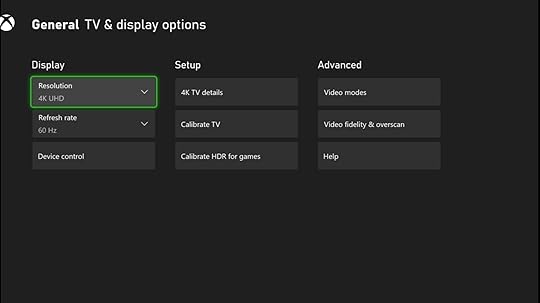
The new Xbox consoles can deliver incredible visuals, but only if your TV (or monitor) can handle them. Depending on the make and model, you may need to adjust your TV settings to accommodate higher resolutions, framerates, or even special features like HDR. If your TV has an HDMI 2.1 port, take advantage of that to get the best performance.
Fortunately, the Xbox makes it easy to see what you’re working with. Navigate to the TV & Display options in the settings, choose 4K TV details, and see what is currently possible with your TV. From there, you must check your Xbox and TV settings for optimal visual performance.
Get some Xbox games
You’ll need some next-gen games to get the most out of your next-gen hardware. Heavy hitters like Halo Infinite and Battlefield 2042 have landed recently, and there’s still more to come. Check out the best of them (and what’s coming soon) in the article below.
If you have no idea where to start, Xbox Game Pass Ultimate remains one of the best deals in gaming. For $17 a month, you gain access to over 100 triple-A games from Microsoft’s first-party studios, EA, and others, and a Xbox Game Pass Core subscription to play your favorite games online with friends.
The selection is vast, covering the best of the Xbox One era. Plus, all future Microsoft titles are added on day one. It’s already an unbeatable deal for console gamers, and the value keeps growing. If you don’t need the game library, you’ll still need Xbox Game Pass Core to play online, which costs $9.99 monthly.

Xbox Game Pass
Tons of games for one low price
You can give the gamer in your life access to over 200 Xbox One games with a monthly subscription to Xbox Game Pass. The great games include old classics and modern blockbusters.
Xbox Game Pass Ultimate
Xbox Live Gold and over 100 high-quality games for one low monthly price.
Joining Xbox Game Pass Ultimate will upgrade your remaining Xbox Live Gold or Xbox Game Pass for Console or Xbox Game Pass for PC time into Xbox Game Pass Ultimate for the same amount of time, up to 36 months.
Install your favorite streaming apps
Edgar Cervantes / Android Authority
Microsoft has long wanted its consoles to be a one-stop shop for all your entertainment needs. Now that streaming is the primary form of entertainment for many households, that dream can finally come true.
It’s also worth noting that although the Xbox Series S does not support 4K output for games, it does for streaming content. Rest assured that you can enjoy 4K HDR content on both variants of the new Xbox consoles!
Grab a second controller and other accessories
Oliver Cragg / Android Authority
There are several accessories to elevate your Xbox gaming experience. Couch co-op is one of the defining features of console gaming, but you’ll need a second controller if you want your friends and family to get in on the action. You’ve got a few options, starting with the standard Xbox Wireless controller, which costs about $60.
But if you can afford it, it’s worth shelling out the extra money for an Xbox Elite Controller Series 2. It’s the ultimate customizable controller, allowing you to change the thumbsticks, triggers, and rear paddles to suit your preferences. Leave the standard controller for your player two! And grab a Play and Charge kit so you don’t have to keep buying batteries.
The new Xbox Series X comes with 1TB of onboard storage, but eventually, you’ll need to invest more. There, you’ve got two main options. The first is the official Seagate expansion card, which adds a whopping 1TB of storage that matches the speed of the built-in SSD. An external HDD will give you a cheaper storage boost without incredible load times if that’s too pricey.
FAQsCan I put my Xbox Series X in a cabinet?No, you should not put your Xbox Series X or S in an enclosed cabinet. Instead, place it on a shelf or counter with an open space where it can breathe.
Is the Xbox One Elite Controller Series 2 worth it?The Xbox Elite Series 2 allows players to tailor the controller to their playstyle with interchangeable thumbsticks and paddle shapes. It is worth the investment for competitive gamers to gain an extra edge, especially if you can find it on sale.
How much internal storage does the Xbox Series X and S have?The Xbox Series X includes a 1TB SSD, while the Xbox Series S has 512GB of storage. However, the actual storage space is only 802GB and 364GB due to system files, respectively.
What is the new Xbox called 2023?The latest Xbox consoles are the Xbox Series X and Xbox Series S.
Comments
Source link
The post Just got a new Xbox Series X/S? Here’s what you should do first. appeared first on Harmony Evans.
Thousands of Schools at Risk of Closing Due to Massive Drop in Enrollment | The Gateway Pundit
Thousands of schools in the United States are at risk of closure due to a severe drop in enrollment in recent years.
The pandemic was one of the worst things to happen to public education in years and the teacher unions and Democrats made it even worse by repeatedly postponing the reopening of schools. Many parents were also horrified to discover the woke content that is being taught.
Across the country, people found alternatives in home schooling, private schools and charter schools.
FOX News reports:
Thousands of schools risk closure due to ‘massive’ enrollment loss: new report
A new report shows that thousands of school districts risk closure due to “massive” enrollment loss.
The warning stems from an analysis of national enrollment data by the Brookings Institution and some reporting from The 74.
Their analysis came after Brookings researchers found a decline in elementary and middle school enrollment, a one-fifth loss of their enrollment.
“Enrollment declines are everywhere,” Brookings Institution fellow Sofoklis Goulas said. The report also noted Jackson Public Schools voted to close 11 schools and merge two of them. Some of these schools saw a loss of 30% or more of their students since 2018.
Plenty of school districts saw decreases similar to that of Jackson Public Schools, the report states, and that number more than doubled between 2019 and 2021.
The report explained further that the decline is projected to continue throughout the decade and that Oregon, New Mexico and West Virginia are among the states expected to see an enrollment decline “at least another 10%.”
It’s happening all over.
Democrats and the Democrat teachers unions are totally destroying education in Colorado.#copolitics
Colorado public school enrollment is still declining, hitting decade-low numbers https://t.co/fG0hpruKmP
— Mr T 2 (@GovtsTheProblem) January 18, 2024
Virginia school enrollment projected to drop faster than expected, with biggest declines in Northern Virginia
“More than 1/4 of the … decline will come from Fairfax County, which is currently losing population for the first time since the 1820s.”https://t.co/zTqHJBqnrx
— Fairfax County Parents Association (@FFXParentsAssoc) January 18, 2024
Sayville’s state aid is going down because Sayville’s enrollment has already been going down.
Now would be a great time to hear from NY Republicans how they’d reduce school costs and unfunded mandates instead of endlessly juicing taxpayers for more school aid. https://t.co/K1tuNGGyH9 pic.twitter.com/MYHmkzAtLW
— Ken Girardin (@PolicyEngineer) January 19, 2024
THOUSANDS OF SCHOOLS ACROSS THE COUNTRY AT RISK OF CLOSING (MSN)
In California, more than 1,400 schools have seen a 20% or more drop in enrollment. Factors include parents moving children to private or charter schools along with demographic changes, including declining birth… pic.twitter.com/zFtTggXEL8
— FXHedge (@Fxhedgers) January 13, 2024
The landscape of American education has completely changed and is probably never going back to what it was.
The post Thousands of Schools at Risk of Closing Due to Massive Drop in Enrollment | The Gateway Pundit appeared first on Harmony Evans.
Xbox Game Pass: Hitman 3 leaving soon, last chance for free play
Xbox Games Pass is a way for subscribers to play certain titles for free, but one game won’t be available for much longer.
Although the Xbox Games Pass roster is updated each month with new options, some games stay on there for much longer than a few weeks, offering players enough time to play them through in full. One such title is Hitman: World of Assassination, the third in the Hitman series.
The assassin-themed game has been on Xbox Games Pass since the beginning of January 2022, making it over 12 months on the platform. However, that time is now coming to an end, with it leaving the line-up of free titles at the end of the month.
Considering Hitman: World of Assassination is around 24 hours in total, and as long as 171 hours if you want to complete every side quest and achievement, you’ll want to start playing it soon if you want to complete it for free.
How to play Hitman: World of Assassination for free on Xbox Game PassYou’ll need to sign up for the Xbox Games Pass subscription via the ‘Memberships’ tab in the Xbox Store before you can access the Xbox Games Pass roster. From there, your Game Pass Ultimate or Console membership will enable you to begin downloading console titles like Hitman: World of Assassination.
With cloud gaming, you don’t even need to download the game to start playing, so long as you have a strong internet connection. You can find a number of items on your Xbox home screen or search directly within the Xbox Store.
Hitman: World of Assassination brings a new freedom to the trilogy through its sandbox-style format, meaning the main avatar Agent 47 can take out targets through a wide variety of methods, from simple silenced pistol shots to much goofier techniques. The wilder your imagination, the crazier your eliminations can get.
Featured image: IO Interactive
 Rachael Davis Freelance Journalist
 Rachael Davies
has spent six years reporting on tech and entertainment, writing for publications like the Evening Standard, Huffington Post, Dazed, and more. From niche topics like the latest gaming mods to consumer-faced guides on the latest tech, she puts her MA in Convergent Journalism to work, following avenues guided by a variety of interests. As well as writing, she also has experience in editing as the UK Editor of The Mary Sue , as well as speaking on the important of SEO in journalism at the Student Press Association National Conference. You can find her full portfolio over on Muck Rack or follow her on social media on X.
The post Xbox Game Pass: Hitman 3 leaving soon, last chance for free play appeared first on Harmony Evans.
How to transfer data to a new Android phone
Switching to a new phone is fun and exciting but can be tedious if you have many apps and a lot of data to transfer over to the new device. Luckily, some excellent cloud storage services can make it quick and easy to transfer files, settings, and app data from an older phone with just a tap. Here’s how to transfer data to a new Android phone.
QUICK ANSWER
To transfer data to a new Android phone, you will need to first back up the data on your older phone using services like Google One. Go to Settings > Google > All services > Backup and enable Backup by Google One. When setting up the new phone, select Restore from the cloud. Sign in to the same Google account, select the most recent backup, and tap Restore.
JUMP TO KEY SECTIONS
Editor’s note: We’ve assembled these instructions using a Google Pixel 7 running Android 14. Some menus may be different depending on your device and software version.
How to backup your Android data to cloud storageEdgar Cervantes / Android Authority
Backup to Google OneGoogle has different apps to back up documents, photos, and messages, so the experience is quite fragmented. Instead, you can use Google One, which is more all-encompassing and makes transferring data to a new Android phone a little easier. It can also transfer settings and other elements from your phone, so it’s quite convenient.
Google One provides 15GB of free data to backup apps and app data, photos and videos, SMS and MMS messages, call history, device settings, and Google account data. If you need more data, you can always sign up for paid plans that start at $1.99 per month (or $19.99 annually) for 100GB of storage.
How to enable Backup by Google One:Launch the Settings app.Go into Google.Tap on the All services tab.Hit Backup.Enable Backup by Google One.Scroll down and select Google Account data.Enable everything you want to backup.Go back to the Backup options and tap on Back up now.Now, you can restore these backups whenever you are setting up a new phone, as long as you’re using the same Google account. You get the option to do this during the initial set-up.
Backup to Google DriveGoogle Drive does the trick if you only want to back up and transfer important files from your phone. If you don’t already have the app, you can download it from the Google Play Store. Then, follow the steps below to manually upload any files you want to store.
How to upload files to Google Drive:Launch Google Drive.Tap on the + New button.Select Upload.Long-press on a file to get the option to select multiple files and tap Select at the top right. If you want to upload a single file, just tap on it.Backup to Google PhotosGoing even more specific, Google Photos will let you back up photos, videos, screenshots, and other images.
How to backup in Google Photos:Launch Google Photos.Tap on your profile icon, in the top-right corner.Select Photos settings.Go into Backup.Toggle on Backup.Scroll down and you can select the Backup quality, Mobile data usage, and more.Do I need to back up files separately on Google One, Drive, and Photos?If you’re looking to transfer data to another phone, Google One is your best option. The Google One backup also includes photos, videos, and Drive. Remember that your Google data (free or from a paid plan) is shared across all three apps.
Other cloud backup optionsBacking up your data using Google One and other Google apps is best if you’re transferring to a new phone from another brand. However, OEMs have their own backup and cloud storage solutions if your new phone is from the same company. You can use your Samsung, OnePlus, or Xiaomi accounts to back up and transfer data. Using OEM backup options help when it comes to transferring phone data like settings, contacts, messages, apps, and more.
You can also use third-party cloud storage services if you only want to back up specific files, photos, videos, and documents. OneDrive, Amazon Photos, and Dropbox are all excellent options, but you will likely require premium plans to get more data. If you don’t want to spend on premium plans, you can split your files across different free cloud storage apps. It’s definitely a hassle, but you won’t pay any money.
Backing up app data
Edgar Cervantes / Android Authority
Google One is great for saving Google app data and a few others, but you’ll have to go through some extra steps for some third-party apps. The good news is that with most apps and games, you can sync the app data with an account. So if you sync your data with a game account, you can restore it on a new phone when you sign in to the same account. Remember that most game apps require that you specifically enable this feature. Make sure that you do this before erasing your old phone.
Your social media apps are similarly linked to an account. So you don’t need to back up any specific app data. Google One and OEM backups might even retain the app login information to make it easier to get into on your new phone. Some messaging apps, like WhatsApp and Signal, have their own backup option, though.
How to transfer cloud data to a new Android phoneNow that you’ve backed up all your data, it’s time to transfer it to a new phone. You should be able to restore your data as soon as you turn on your new Android phone.
How to restore Google One backup on a new device:Tap Start and go through the Android initial set-up process.Connect to a Wi-Fi network, as restoring the backup will use a lot of data.When you get the Copy apps & data page, press Next.Select Can’t use old device.Sign into your Google account. Make sure it’s the same one you used for the backup.Select the backup.You can choose what apps, files, and data you want to transfer to the new phone and tap Restore.If you’ve signed in with the same account, your photos, videos, and files will be available on Google Photos and Google Drive. Sign in to the app account and sync your data on the new phone for games and other apps.
How to create and restore data from a manual backup on your Android phoneIf you don’t want to use cloud storage services to transfer data to a new phone, you can do so manually. This can be done by saving your data on a computer. Check out our guide on how to back up your Android phone to find the step-by-step instructions to back up your Android files on Windows and a Mac. You can restore the files on your new phone by going through the same process but the other way around.
FAQsWhy can’t I restore data from a Google backup?You might not be able to restore data from a backup if you are transferring to a phone that runs an older version of Android. Google assumes that you are upgrading, so you won’t be able to restore data from an Android 13 phone to one running Android 11.
Why can’t I find my Google backup?If you turn off Google One backup, you might lose your older backups as well. Google will also erase your backup data if you haven’t used your device in 57 days.
Comments
Source link
The post How to transfer data to a new Android phone appeared first on Harmony Evans.