
Darcy Pattison's Blog, page 24
March 24, 2014
Author Website Tech: Search Engine Optimization
 A Tale of Two Kates: Examples of Very Different, but Effective ABOUT Author Pages
The last, of course, is the title of the post I wrote on ABOUT pages. In writing titles, think about a long list of titles and what will make yours stand out.
Specific. Be specific. I reference two authors named Kate and that intrigues.
Numbers. Titles with numbers often get better results.
Adjectives. “creative, intriguing” will pull in more readers.
How To. Promising to explain something is important to readers, especially is you pull off the explanation well.
You know that comment you always get from editors on the rejection letters? “. . this manuscript just didn’t stand out in today’s crowded market. . .” Think of search engines as that crowded marketplace and your title as a log line or the briefest elevator pitch (you only get 100 characters or so). Make the title snappy.
And–after you’ve got everything set up and you want a couple more tasks to do, study SEO. The year I did that, I doubled my website’s traffic. It’s that important. But you’ve got time to get everything set up right before you have to stress out over this. Just know that SEO is in your future.


Author Website Tech: Checklist #2
Last time: Author Website Planning Checklist
Where on your website did you include these things? List all the appropriate page(s). Can you add something now?
Exclusive unpublished writing: ______________________
Author Schedules: ________________________________
Author’s Literary Tastes:___________________________
Insider Information: _______________________________
Freebies: ________________________________________
Regular Contact: __________________________________
Contests, puzzles, teacher’s guides, book club discussion guides, puzzles, playlists, coloring pages, etc.__________________________________
In other words–don’t launch before you are ready! Take the time to get it right before you let the world know that your website is live!
March 23, 2014
March 22, 2014
Author Website Tech: Checklist #1
Home page, or easy to find?
PET PEEVES: Why Readers Hate an Author’s Website
DearAuthor.com has a great post on the Top Ten Peeves From Booksellers and Readers about Author Websites. I’ve summarized the list, but you should read the whole article. Insightful.
No printable list of your books.
No ISBNs.
Series not identified and books not put into a series list.
No contact author on front page
Having to hunt for most recent releases.
No list of future releases.
No list of awards.
No links to order.
Not friendly.
Nothing to bring the reader back.
How are you doing? Is your website stacking up? What’s the hardest/easiest thing you’ve done on your site this month? What would you add to this checklist?
March 21, 2014
Author Website Content: First Blog Posts
schedule the posts for a future date. By now, you’ve forgotten, so I’ll remind you: we set the blog/website to NO-Indexing by search engines. You can change this at any time, but you may want to wait until you’ve got everything set up. If you do want to change it, go to Settings/Reading and UnCheck the box that says, “Discourage search engines from indexing this site.” As soon as you do that, search engines will start looking over your site. Be sure you’re ready! We just have another week of writing posts and tweaking technical stuff, so be patient, if you can. Just write and schedule the posts and plan for a Big Launch of your site.
March 20, 2014
Author Website Tech: Posts
.goodreadsGiveawayWidget { color: #555; font-family: georgia, serif; font-weight: normal; text-align: left; font-size: 14px;
font-style: normal; background: white; }
.goodreadsGiveawayWidget img { padding: 0 !important; margin: 0 !important; }
.goodreadsGiveawayWidget a { padding: 0 !important; margin: 0; color: #660; text-decoration: none; }
.goodreadsGiveawayWidget a:visted { color: #660; text-decoration: none; }
.goodreadsGiveawayWidget a:hover { color: #660; text-decoration: underline !important; }
.goodreadsGiveawayWidget p { margin: 0 0 .5em !important; padding: 0; }
.goodreadsGiveawayWidgetEnterLink { display: block; width: 150px; margin: 10px auto 0 !important; padding: 0px 5px !important;
text-align: center; line-height: 1.8em; color: #222; font-size: 14px; font-weight: bold;
border: 1px solid #6A6454; border-radius: 5px; font-family:arial,verdana,helvetica,sans-serif;
background-image:url(https://www.goodreads.com/images/layo... background-repeat: repeat-x; background-color:#BBB596;
outline: 0; white-space: nowrap;
}
.goodreadsGiveawayWidgetEnterLink:hover { background-image:url(https://www.goodreads.com/images/layo...
color: black; text-decoration: none; cursor: pointer;
}
Goodreads Book Giveaway
Abayomi, the Brazilian Puma
by Darcy Pattison
Giveaway ends March 21, 2014.
See the giveaway details
at Goodreads.
Enter to win
How to Add a Post to WordPress
It’s time to start on your blog by using WordPress Posts. Here’s the information from the WordPress Codex, the first place you should look for info.
If you’ve written a page, it’s essentially the same. You use the same editing screen.
Here are a couple other tips:
Kitchen Sink. In the editing screen, you should see a full set of formatting options for your text. If you don’t see two rows, click on the last item in the top row. When you hover over it, it says, “Show the Kitchen Sink.” Click this and you’ll see more formatting options.
Click on the last item in the top row to reveal the Kitchen Sink.
Schedule the Publication of a Post. You can write posts ahead and schedule when you want them to appear with the Publishing options. You can Preview the Draft, Save the Draft or Schedule it. I often write a couple days ahead and schedule the post to go live at a certain time on a certain day. One caution. Just because you’ve set up a time for it publish–as in the image–does not mean you have published it! You have to click on the SCHEDULE button to actually publish and post.
Import. If you need to import posts from another blog, click on Tools/Import for options and instructions.
Categories. As you add posts in the next few days, you’ll also want to think about the Categories of posts. 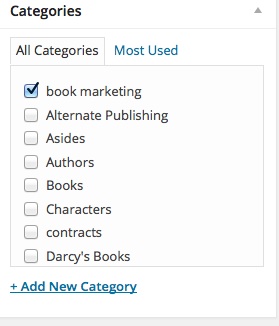 The editing page displays a list of categories you’ve used before. When you first set this up, though, you’ll want to go to Posts/Categories. On that page, you can set up the categories as you wish. Be especially careful with the category slugs, or the way a category is listed in a URL. For example, this post in under the category of Book Marketing, but the slug for the category is “marketing.” I want to keep the slugs as short as possible so they aren’t a pain for my readers to type in. See more about Categories on the WordPress Codex.
Menus. It’s also time to revisit your Menu and make sure it shows the Categories you want visitors to see first. Go to Appearance/Menu and set it up as you wish. Here’s WordPress’s Guide to Menus.
It may seem tedious to worry about categories and menus when you are ready to write that blog. But believe me, if you get the skeleton down, the blog will stand up straighter and look smarter.
Tomorrow? You’ll write blog posts and write blog posts and write blog posts. Make sure your blog is ready.
March 19, 2014
Author Website Content: Blog
.goodreadsGiveawayWidget { color: #555; font-family: georgia, serif; font-weight: normal; text-align: left; font-size: 14px;
font-style: normal; background: white; }
.goodreadsGiveawayWidget img { padding: 0 !important; margin: 0 !important; }
.goodreadsGiveawayWidget a { padding: 0 !important; margin: 0; color: #660; text-decoration: none; }
.goodreadsGiveawayWidget a:visted { color: #660; text-decoration: none; }
.goodreadsGiveawayWidget a:hover { color: #660; text-decoration: underline !important; }
.goodreadsGiveawayWidget p { margin: 0 0 .5em !important; padding: 0; }
.goodreadsGiveawayWidgetEnterLink { display: block; width: 150px; margin: 10px auto 0 !important; padding: 0px 5px !important;
text-align: center; line-height: 1.8em; color: #222; font-size: 14px; font-weight: bold;
border: 1px solid #6A6454; border-radius: 5px; font-family:arial,verdana,helvetica,sans-serif;
background-image:url(https://www.goodreads.com/images/layo... background-repeat: repeat-x; background-color:#BBB596;
outline: 0; white-space: nowrap;
}
.goodreadsGiveawayWidgetEnterLink:hover { background-image:url(https://www.goodreads.com/images/layo...
color: black; text-decoration: none; cursor: pointer;
}
Goodreads Book Giveaway
Abayomi, the Brazilian Puma
by Darcy Pattison
Giveaway ends March 21, 2014.
See the giveaway details
at Goodreads.
Enter to win
This month-long series of blog posts will explain author websites and offer tips and writing strategies for an effective author website. It alternates between a day of technical information and a day of writing content. By the end of the month, you should have a basic author website up and functioning. The Table of Contents lists the topics, but individual posts will not go live until the date listed. The Author Website Resource Page offers links to tools, services, software and more.
Should You Add a Blog to Your Author Site?
We’ve talked so far about doing an Author Website through WordPress. Now that you’ve built the thing, you need to decide if you will add a blog or not.
No, I don’t want a blog
First, let me quickly says that you do NOT have to have a blog. It’s just an option.
Blogging requires a commitment to writing that can be a strain on writing projects, family time and other time commitments. I’m not worried–really, I’m not–about whether or not you can find enough to write about. That’s the easy part. Time is the hard thing to find. If you commit to writing a blog the most important rule is this: be consistent in posting. You can NOT post just once or twice a month. Instead, just update your website. Or post on Facebook, Twitter or a social network. Don’t waste your time and your readers time by starting something you can’t keep up with.
Embrace uncertainty. On the other hand, when I started blogging six years ago, it was with uncertainty. Would I like blogging? Would I draw in any readers? Would I find topics to write about? And so on. I made a commitment to TRY. And here we are. You can do the same.
OK, I’ll try a blog!
Great! You will find an audience beyond your usual boundaries.
You will find topics that fascinate you and you want to delve into deeply. You will have a platform for doing that.
You will find the blog a task-master that you both love and hate.
You will find your audience to be an amazing group of people.
And when your first book/next book comes out, you’ll find people cheering for you. (Here’s my latest novel. Thanks for caring!)
You don’t blog to sell books. You blog to make friends.
What will you write about?
As I look around the blogosphere, I find bloggers using different strategies for content.
Up-to-date news. One strategy for blogging is to keep your ears to the ground and as soon as you hear something, you blog about it in depth. Did Facebook just update it’s home page? Provide the killer tutorial on it before anyone else. As I am writing this, I got an email that Barnes & Noble’s Nook Press is going international. If I cared about the hottest publishing news, I would jump on this!
Names. I once read about a small-town newspaper publisher who saturated the market with a single strategy: publish as many names as possible. When a baseball team played, the newspaper listed the name of every single team member. And the managers. And the coaches. Of course, people bought the newspaper to see their name in print. Cynthia Leitich Smith’s Cynsations blog uses this strategy by listing everyone’s good news, interviews with almost everyone in children’s literature and generally spreading the love.
Teaching. This blog, Fiction Notes, is about observing my own struggles and the struggles of my friends and colleagues and writing about how to solve problems. In a word, I teach. (My friend says that I can’t NOT teach; she’s right.)
Diary. Some people live a transparent life online and don’t mind the glass walls. If that’s for you, you’ll find many who’ll take the trip with you.
Thoughtful or thought-provoking analysis. Maybe you only want to post once a week, but you want it to be a longer, more thoughtful piece. That would be great. Don’t think you must post daily. But be consistent. On Thursday, I look forward to reading Kristine Kathryn Rusch‘s thoughtful posts about the publishing industry. I don’t have to agree with everything she says to look forward to the posts, because they always make me think. For example, a thoughtful person could write an interesting post about the Children’s Book Council 7th Annual Children’s Choice Book Awards. One of the awards is for the Author of the Year; the five nominees are always based on best-seller lists. The controversy this year is that Rush Limbaugh’s book, Rush Revere and the First Patriots: Time-Travel Adventures With Exceptional Americans, is a best-seller, which put him on the list for Author of the Year. A thoughtful or thought-provoking blogger could write about this in depth. Lots of issues to delve into there! (Should children’s book awards be based on best-seller lists? How easy is it to manipulate best selling lists? If we reject the bestseller list as a starting point for awards, where SHOULD we start?) This isn’t something I would do on my blog; I avoid the controversial. But if you’re up for it. . .
Topics for which you have a passion. Maybe you don’t want to blog about books, publishing, or other authors. One author friend is interested in true stories of ghosts. Since she writes mysteries, it sounds like a great topic for a blog! She could interview people who have seen a ghost, joke about ghostbusters, include photos of ghosts (NOT!) and so on. What’s your passion? Bulldogs? Kidnapped kids and how they survive? Whatever your passion, it’s fine–no, it’s GREAT–for an author blog to take off on a tangent. You’ll find readers beyond your books and that’s not such a bad thing.
Photos, video or audio. Maybe you are a cartoonist and can provide a humorous 3-panel cartoon daily. Maybe your hobby is photoshopping dog portraits. Great. Just post one picture a day. Or post one a week and explain how you photoshopped it. Use YouTube and pull the videos into your blog. Or do a podcast. There may be platforms that are better for each of these areas (For video, you need a YouTube Channel.), but they can also feed into a blog.
Your Ideas. You may have another strategy for writing a blog. Please share it!
Notice: These strategies are about giving an audience something interesting to read. Entertain. Inform. Persuade. Provoke. It’s not about you. It’s about your readers. What type of content can you write about that others would want to read on a consistent basis?
It’s time. Decide. Will you try a blog or just stick with your author website?
March 18, 2014
Author Website Tech: Affiliates to Sell Your Books
.goodreadsGiveawayWidget { color: #555; font-family: georgia, serif; font-weight: normal; text-align: left; font-size: 14px;
font-style: normal; background: white; }
.goodreadsGiveawayWidget img { padding: 0 !important; margin: 0 !important; }
.goodreadsGiveawayWidget a { padding: 0 !important; margin: 0; color: #660; text-decoration: none; }
.goodreadsGiveawayWidget a:visted { color: #660; text-decoration: none; }
.goodreadsGiveawayWidget a:hover { color: #660; text-decoration: underline !important; }
.goodreadsGiveawayWidget p { margin: 0 0 .5em !important; padding: 0; }
.goodreadsGiveawayWidgetEnterLink { display: block; width: 150px; margin: 10px auto 0 !important; padding: 0px 5px !important;
text-align: center; line-height: 1.8em; color: #222; font-size: 14px; font-weight: bold;
border: 1px solid #6A6454; border-radius: 5px; font-family:arial,verdana,helvetica,sans-serif;
background-image:url(https://www.goodreads.com/images/layo... background-repeat: repeat-x; background-color:#BBB596;
outline: 0; white-space: nowrap;
}
.goodreadsGiveawayWidgetEnterLink:hover { background-image:url(https://www.goodreads.com/images/layo...
color: black; text-decoration: none; cursor: pointer;
}
Goodreads Book Giveaway
Abayomi, the Brazilian Puma
by Darcy Pattison
Giveaway ends March 21, 2014.
See the giveaway details
at Goodreads.
Enter to win
This month-long series of blog posts will explain author websites and offer tips and writing strategies for an effective author website. It alternates between a day of technical information and a day of writing content. By the end of the month, you should have a basic author website up and functioning. The Table of Contents lists the topics, but individual posts will not go live until the date listed. The Author Website Resource Page offers links to tools, services, software and more.
Help Your Fans Buy Your Books
We’ve been emphasizing all month the 2008 Codex study that explains why readers want to come back to an author’s website. One thing that is NOT on the list is links to buy your books. But you should definitely provide these.
Call to Action. When businesses advertise, they emphasize the importance of a Call to Action. This is when you ask your reader to DO something. Every page on your site should have a Call To Action (CTA). Buy my book. Download a sample chapter. Download coloring pages. Read this unpublished story. And so on.
Decide what you want a reader to DO when they come to a certain page. And then make the CTA a bold, bright and clickable button. Or use a larger font or interesting color. For interesting buttons, try DaButtonFactory.com or other similar free sites that let you customize the text, colors, style and size.
Affiliate Book Sales
Where would you like to send readers to buy your books? Some online bookstores offer a commission when you send readers to their site. The percentage varies from program to program and often the more referrals you send to a site, the higher the percentage. You’ll need to read the terms and conditions of each affiliate program to understand if it fits your needs. Here’s three affiliate to start with.
Amazon affiliate: http://affiliate-program.amazon.com. The grand-daddy of affiliate programs, Amazon.com offers affiliate sales on books and everything else they offer for sale. Not available if you live in Arkansas, Colorado, Maine, Minnesota, Missouri, or Rhode Island.
The IndieBound program allows you to link to any Independent Bookstore and earn a commission on referrals. Indie bookstores use the Kobo ebook reader, and you can link to ebooks through the IndieBound program, too.
Powell’s affiliate: Oregon’s huge independent bookstore also runs an affiliate program.
Other online bookstores offer affiliates and it makes sense to look around for one that maktches your book’s niche.
NOTE: If you use affiliate links, you’ll need to go back to your Privacy Page and indicate this.
If you are linking to affiliates to create a secondary income, also consider this:
Readers want to know Author’s Literary Tastes. Readers want lists of the author’s favorite writers and recommended books. Younger fans are also more interested in knowing about their favorite authors’ book, music, and movie recommendations. You could create recommended lists of books, music, movies and so on, and add affiliate links. Link to your own books, of course. But don’t be shy about listing your Top 10 Favorite Mysteries of the Year. Or anything else that reflects your literary tastes.
To make the process easy, Search for plugins that make it simple to add the affiliate codes to your site.
Plugins to Sell Your Books Yourself
When we talked about WordPress Plugins, I mentioned that there are times you may want to sell books from your site. Epubs and pdfs are easy enough because you only have to deliver a digital file. This article summarizes WordPress Plugins that make this simple. On the other hand, this Smashing Magazine article summarizes five shopping cart services that work well within your WordPress.
Of course, I have to add a CTA to this page, to practice what I preach! Even if you don’t want to buy, click below to see how the Gumroad shopping cart works. Did you also notice that I added a button to the Author Website Resources link above? It’s a button from DaButtonFactory.com
Buy two ebooks for the low price of $1.99
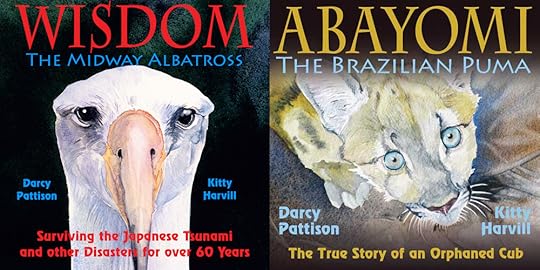 Get these 2 ebooks, WISDOM and ABAYOMI, for $1.99:
During checkout, use this coupon code: tsunami14
Buy Wisdom + Abayomi EPub Bundle
Buy Wisdom + Abayomi Kindle Bundle
NOTE: This bundle is available in two versions: Kindle and ePub for all other ebook readers. For information on reading on your Kindle read this tutorial.
March 17, 2014
Author Website Content: Pages
.goodreadsGiveawayWidget { color: #555; font-family: georgia, serif; font-weight: normal; text-align: left; font-size: 14px;
font-style: normal; background: white; }
.goodreadsGiveawayWidget img { padding: 0 !important; margin: 0 !important; }
.goodreadsGiveawayWidget a { padding: 0 !important; margin: 0; color: #660; text-decoration: none; }
.goodreadsGiveawayWidget a:visted { color: #660; text-decoration: none; }
.goodreadsGiveawayWidget a:hover { color: #660; text-decoration: underline !important; }
.goodreadsGiveawayWidget p { margin: 0 0 .5em !important; padding: 0; }
.goodreadsGiveawayWidgetEnterLink { display: block; width: 150px; margin: 10px auto 0 !important; padding: 0px 5px !important;
text-align: center; line-height: 1.8em; color: #222; font-size: 14px; font-weight: bold;
border: 1px solid #6A6454; border-radius: 5px; font-family:arial,verdana,helvetica,sans-serif;
background-image:url(https://www.goodreads.com/images/layo... background-repeat: repeat-x; background-color:#BBB596;
outline: 0; white-space: nowrap;
}
.goodreadsGiveawayWidgetEnterLink:hover { background-image:url(https://www.goodreads.com/images/layo...
color: black; text-decoration: none; cursor: pointer;
}
Goodreads Book Giveaway
Abayomi, the Brazilian Puma
by Darcy Pattison
Giveaway ends March 21, 2014.
See the giveaway details
at Goodreads.
Enter to win
This month-long series of blog posts will explain author websites and offer tips and writing strategies for an effective author website. It alternates between a day of technical information and a day of writing content. By the end of the month, you should have a basic author website up and functioning. The Table of Contents lists the topics, but individual posts will not go live until the date listed. The Author Website Resource Page offers links to tools, services, software and more.
Transferring Pages to WordPress
This is an exciting day. So far, you’ve written pages for ABOUT, BOOKS, NEWS, CONTACT, and PRIVACY. It’s time to get them on the site. Remember that WordPress is a Content Management System and uses two types of content, pages and posts. Posts are organized in reverse chronological order for the blog; Pages are static pages that don’t change and operate much like a website.
WordPress has extensive documentation on how to use the software in the WordPress Codex. Believe me, the Codex is your friend. Any questions, go there first.
Here are Codex instructions on:
How to Write a Post.
How to Write a page.
Remember, we’ve asked search engines not to index the site yet, so there won’t be any traffic until we change that setting. You can’t break the software. It’s time to add your Pages to your site.
Click on Pages/AddNew. Cut and paste your pages into the editor and tweak until it looks right. This will take some time, so keep at it until you’ve got the basic Pages done. Then, add one more Page: Label this one, BLOG, and leave it empty with no content. Then, you’ll have a couple tasks to do.
Set Home Page on Settings. First, you’ll want to set the HOME Page. Go to Settings/Reading. The default is for your latest post (blog post) to be the front page of your site. You can still leave it that way, if you like, but if you wrote a great HOME page, you’ll want to select it.
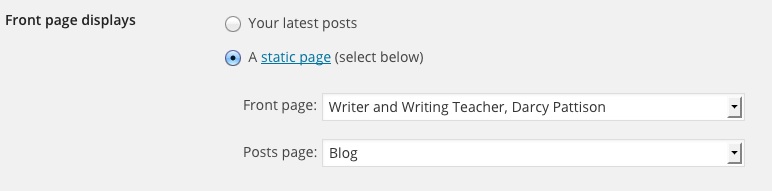
Set your HOME Page and your BLOG page. Click to enlarge.
Select a STATIC PAGE and from the drop down menu, select your HOME Page.
For the blog, choose the BLOG Page.
Be sure to SAVE CHANGES at the bottom.
Now, when you look at your website (FamousAuthorWebsite.com), you should see your home page.
MENU:Navigating Around Your Site
Great. But how do you get to the Pages? To do that, you must set up a custom Menu that will let your readers navigate through the site. Go to Appearance/Menus. Because themes operate differently in how they use a menu, you may have to read the documentation for your theme or search for a tutorial for your theme + menu. Here is WordPress’s basic instructions on menus. And here’s a video about WordPress menus.
)
If you can’t see this video, click here.
Note that you can create various menus and use Widgets to add a custom menu where you want. On my HOME Page and on the sidebar of Fiction Notes, I use a Custom Menu in a Widget to add navigation entitled, “NEW? START HERE.” It links to other series of posts that are pillars of the site. When and where would you use a Custom Menu? Maybe for your books?
March 16, 2014
Author Website Tech: Statistics
.goodreadsGiveawayWidget { color: #555; font-family: georgia, serif; font-weight: normal; text-align: left; font-size: 14px;
font-style: normal; background: white; }
.goodreadsGiveawayWidget img { padding: 0 !important; margin: 0 !important; }
.goodreadsGiveawayWidget a { padding: 0 !important; margin: 0; color: #660; text-decoration: none; }
.goodreadsGiveawayWidget a:visted { color: #660; text-decoration: none; }
.goodreadsGiveawayWidget a:hover { color: #660; text-decoration: underline !important; }
.goodreadsGiveawayWidget p { margin: 0 0 .5em !important; padding: 0; }
.goodreadsGiveawayWidgetEnterLink { display: block; width: 150px; margin: 10px auto 0 !important; padding: 0px 5px !important;
text-align: center; line-height: 1.8em; color: #222; font-size: 14px; font-weight: bold;
border: 1px solid #6A6454; border-radius: 5px; font-family:arial,verdana,helvetica,sans-serif;
background-image:url(https://www.goodreads.com/images/layo... background-repeat: repeat-x; background-color:#BBB596;
outline: 0; white-space: nowrap;
}
.goodreadsGiveawayWidgetEnterLink:hover { background-image:url(https://www.goodreads.com/images/layo...
color: black; text-decoration: none; cursor: pointer;
}
Goodreads Book Giveaway
Abayomi, the Brazilian Puma
by Darcy Pattison
Giveaway ends March 21, 2014.
See the giveaway details
at Goodreads.
Enter to win
This month-long series of blog posts will explain author websites and offer tips and writing strategies for an effective author website. It alternates between a day of technical information and a day of writing content. By the end of the month, you should have a basic author website up and functioning. The Table of Contents lists the topics, but individual posts will not go live until the date listed. The Author Website Resource Page offers links to tools, services, software and more.
Track the Growth of Your Author Website
You’ve gone to a lot of trouble to set up a website. Don’t you want to know how many visitors the site gets? You can find out this and much more by the use of a statistics and analytical package. And fortunately, WordPress makes this easy with a couple plugins.
Statcounter. Statcounter is a simple, easy to understand statistics and analytics package that records information in real time. You don’t have to wait until tomorrow to see what traffic is like today. I like this one because of its simplicity. First search Plugins/AddNew/Statcounter. Install and activate the plugin. Go to Statcounter.com and set up an account. Follow their instructions for configuring the plugin with your account information. Sit back and watch the numbers roll in!
Besides general numbers, I especially like to look at the Visitor Paths.This tells me what websites a visitor sees in what order. And I love to look at the Recent Visitor Map, which shows the location of your visitors. Or, look at Country/State/City/ISP. Today (the day I wrote this post) 62.5% of my visitors were from the US, and people from 35 different countries visited this site. Notice that there are NO personally identifiable bits of information here, so the Privacy Policy is still accurate.
Note that I have a free account, which means: Each projects comes with lifetime summary stats as well as a free log size of 500, i.e. a detailed analysis of the last 500 pageloads on your website. When your log is full, it continues to operate; the oldest entry is replaced with the newest entry that comes in. So, that number (62.5% of recent visitors are from the US) only refers to the last 500 visitors to my site. Statcounter is real time and as the globe turns, you can see the progress of daylight across the globe by looking at your visitors locations! Cool, huh?a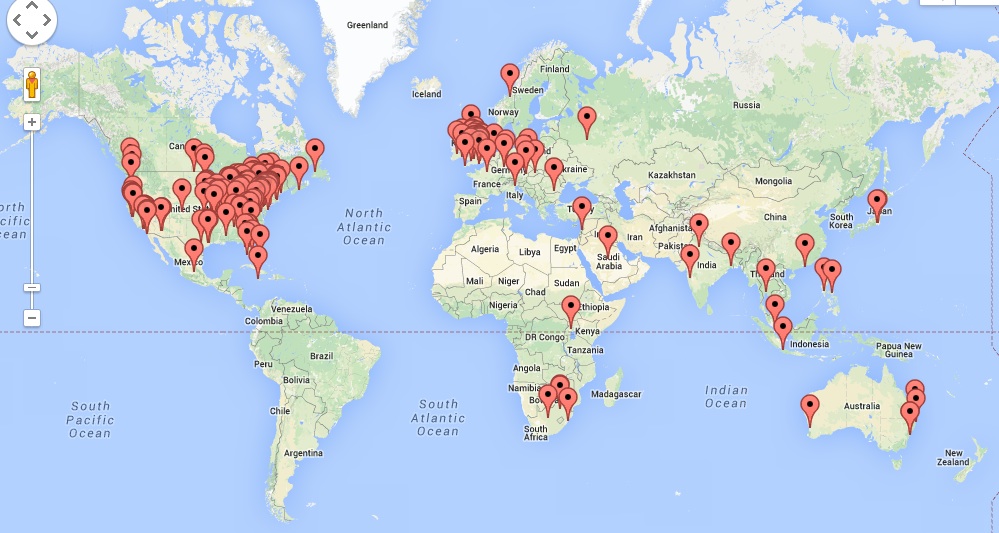
Location of visitors to Fiction Notes. Click to enlarge.
Google Analytics. Another common option for website statistics is Google Analytics, and it’s a free powerhouse. You should set this up, but it might take a year or two to learn the ins and outs; in fact, I’m still learning. Yes, of course, there are WordPress Plugins for this. Search Plugins/AddNew/Google Analytics to find a couple dozen plugins. Some will only add in the required code, but some add bells and whistles. Try out a couple until you find something you’re comfortable with. Sign up with Google Analytics and follow their directions and tutorials to get everything set up.
Do you need both stat programs? Here’s the dirty little secret about stat programs: they never agree. Your CPanel may be set up with server stats, which will differ from both of these programs. Generally, they will be close, but there are all sorts of reasons why they may not agree. When I set up my account seven years ago, Statcounter was the only program that recorded information in real time; Google Analytics only added that feature recently. I could probably go with just Google Analytics, but it’s so complicated–complete and wonderful, but complicated–that I still stick with Statcounter for simplicity. When I really need to dig into stats, though, to figure out something about my traffic, I rely on Google Analytics. For me, it’s a win-win to use both. But you don’t have to! There are many other stat programs, too, so find what works best for your website and your needs.
The best thing about stats? You can track the growth of your website from just a few visitors the first month to that first exciting day of 100 visitors and onward and upward to 1000 a day or more.


