
Darcy Pattison's Blog, page 25
March 15, 2014
Author Website Content: Privacy Page
.goodreadsGiveawayWidget { color: #555; font-family: georgia, serif; font-weight: normal; text-align: left; font-size: 14px;
font-style: normal; background: white; }
.goodreadsGiveawayWidget img { padding: 0 !important; margin: 0 !important; }
.goodreadsGiveawayWidget a { padding: 0 !important; margin: 0; color: #660; text-decoration: none; }
.goodreadsGiveawayWidget a:visted { color: #660; text-decoration: none; }
.goodreadsGiveawayWidget a:hover { color: #660; text-decoration: underline !important; }
.goodreadsGiveawayWidget p { margin: 0 0 .5em !important; padding: 0; }
.goodreadsGiveawayWidgetEnterLink { display: block; width: 150px; margin: 10px auto 0 !important; padding: 0px 5px !important;
text-align: center; line-height: 1.8em; color: #222; font-size: 14px; font-weight: bold;
border: 1px solid #6A6454; border-radius: 5px; font-family:arial,verdana,helvetica,sans-serif;
background-image:url(https://www.goodreads.com/images/layo... background-repeat: repeat-x; background-color:#BBB596;
outline: 0; white-space: nowrap;
}
.goodreadsGiveawayWidgetEnterLink:hover { background-image:url(https://www.goodreads.com/images/layo...
color: black; text-decoration: none; cursor: pointer;
}
Goodreads Book Giveaway
Abayomi, the Brazilian Puma
by Darcy Pattison
Giveaway ends March 21, 2014.
See the giveaway details
at Goodreads.
Enter to win
This month-long series of blog posts will explain author websites and offer tips and writing strategies for an effective author website. It alternates between a day of technical information and a day of writing content. By the end of the month, you should have a basic author website up and functioning. The Table of Contents lists the topics, but individual posts will not go live until the date listed. The Author Website Resource Page offers links to tools, services, software and more.
Legal Issues for Websites

A Privacy Policy is important because you must disclose on your site what types of information you collect and how you use it. This especially applies if you write for children because you must comply with the COPPA regulations, the Children’s Online Privacy Protection Rule (See the government site here.)
COPPA applies only to those Web sites and online services that collect, use, or disclose personal information from children. However, the FTC recommends that all Web sites and online services – particularly those directed to children – post privacy policies online so visitors can easily learn about the operator’s information practices. From COPPA FAQ
More COPPA Compliance information.
It’s a good policy to provide a privacy policy and it’s simple to do. Once done, you can forget about it.
NOTE: I am not a lawyer and this does not constitute legal advice!
There are a couple ways that website owners often use to generate a Privacy Policy.
Form Generator Services: Some services ask you questions about how you operate your site and then generate a policy. Here are two examples: FreePrivacyPolicy.com
SERP Rank Privacy Policy Generator
WordPress Plugins:
Please Search Plugins/AddNew for up-to-date plugins that generate privacy policies and choose the one that fits your situation best. Here is one example: Auto Terms of Service and Privacy Policy.
If you offer a service or sell something from your site, you may also need a Terms of Service policy page, which explains the rules of offering and using the service. Again, look for WordPress Plugins, or contact a lawyer for appropriate legal advice.
After you create your Privacy Policy and/or Terms of Service, save them to upload as a Page later. But think about how you will link to these pages. Usually, links must be in a prominent place on site, but most people don’t want this in the Main Menu. A common area for linking to the Privacy Policy or the TOS is the footer. Footer Putter plugin allows you to place the links to your privacy policy in the footer of your page. Search Plugins/AddNew to find other options and make a decision about works best for your website.


March 14, 2014
Author Website Tech: Themes
.goodreadsGiveawayWidget { color: #555; font-family: georgia, serif; font-weight: normal; text-align: left; font-size: 14px;
font-style: normal; background: white; }
.goodreadsGiveawayWidget img { padding: 0 !important; margin: 0 !important; }
.goodreadsGiveawayWidget a { padding: 0 !important; margin: 0; color: #660; text-decoration: none; }
.goodreadsGiveawayWidget a:visted { color: #660; text-decoration: none; }
.goodreadsGiveawayWidget a:hover { color: #660; text-decoration: underline !important; }
.goodreadsGiveawayWidget p { margin: 0 0 .5em !important; padding: 0; }
.goodreadsGiveawayWidgetEnterLink { display: block; width: 150px; margin: 10px auto 0 !important; padding: 0px 5px !important;
text-align: center; line-height: 1.8em; color: #222; font-size: 14px; font-weight: bold;
border: 1px solid #6A6454; border-radius: 5px; font-family:arial,verdana,helvetica,sans-serif;
background-image:url(https://www.goodreads.com/images/layo... background-repeat: repeat-x; background-color:#BBB596;
outline: 0; white-space: nowrap;
}
.goodreadsGiveawayWidgetEnterLink:hover { background-image:url(https://www.goodreads.com/images/layo...
color: black; text-decoration: none; cursor: pointer;
}
Goodreads Book Giveaway
Abayomi, the Brazilian Puma
by Darcy Pattison
Giveaway ends March 21, 2014.
See the giveaway details
at Goodreads.
Enter to win
This month-long series of blog posts will explain author websites and offer tips and writing strategies for an effective author website. It alternates between a day of technical information and a day of writing content. By the end of the month, you should have a basic author website up and functioning. The Table of Contents lists the topics, but individual posts will not go live until the date listed. The Author Website Resource Page offers links to tools, services, software and more.
What Does Your Site Look Like?
It’s time to think about how your site looks. Finally, you say. I know. We SEE websites all the time and don’t think about the back end. But the time you’ve spent on the back end will make the site functional.
Websites are a work in progress, and as such, the theme you choose today, you will change in a year or two. Don’t stress out about whether you choose a free or premium theme at first I believe the most important thing is to dive in and then do continual incremental changes to your site. Some will argue that you should purchase a Premium theme or hire a high-priced web designer. I argue that you should get content up on your site and then prettify it as you can. Tinkering is good.
But for those of you who are visual first, you can certainly explore a web designer, a Premium theme, or hiring someone from Odesk.com or Elance.com.
FREE
From the web: Go to http://wordpress.org/themes/ to study the various free themes possible. Or log into your WordPress as described next to see a preview of how the theme would look on your site.
To load a free theme, log into your WordPress dashboard. Click on Appearance/Themes. You’ll see a list of themes already downloaded and ready for use on your site. At the top are two tabs, Manage Themes and Install Themes.
Click on Install Themes to find a search engine. You can choose the colors and features that you prefer, and you can add a keyword. If your work revolves around nature and science, for example, you might want to search for Animals or Forests.
Unless there’s a perfect keyword for your work, though, you should search for “Responsive.” A responsive site is one that adapts easily to the different size screens on smart phones, tablets and desktop computers. Finding a theme that bills itself as responsive isn’t a magic bullet, because there are different ways to approach the responsive issue. Still, mobile devices proliferate and it’s wise to plan for them.
The search results will show thumbnails of the home pages of different themes. Below each thumbnail are three links:
Click Install Now, if you want to try this theme on your site.
Click Preview to see what the theme looks like. In order to keep everything consistent and easy to compare, website designers are required to use the same filler material for these previews. Also, any image you see can be changed and customized. You’re really looking for the general layout: how big and where are sidebars positioned? How big is the site name and how much white space is around it? EVERYTHING can be customized from photos to background colors to the fonts used. What you see on the preview is just a suggestion from the designer. Still, you’ll probably go with these designer choices at first, so pay attention to the decisions the designer made, while understanding that it is ultimately in your control.
Also, most themes allow for drastic color changes, from white to black backgrounds, to any color you can imagine. Try to overlook all of these “pretty” issues to the bones and structure of the site. Imagine your information slotted into the structure—does it look like you want?
Click Details to find out more, including the name of the designer and a link to their website, screen shots and compatibility issues.
Have fun playing around and looking at possible themes. When you find one you like, Install Now. Install a dozen themes, if you like. You can delete them later when you decide on the perfect one.
TRY OUT THEMES ON YOUR SITE
When you have several options on your site, go back to the Manage Themes tab. Try the Live Previews for each theme. This time, instead of the canned content, it will show you the site with your own content. When you find the theme you like, Click Activate. Most WordPress themes allow you to Customize in some way, so click on the theme’s options and try it out.
I often go back and forth between several themes before I decide on one I like. There are no rights or wrongs, only preferences. You’ll be writing content for a couple weeks before the site goes live, so play around and change the themes every day if you like, till you find one that sticks.
PREMIUM
For a Premium Theme option, you will go to websites such as Themeforest.net that offer Premium themes and look around till you find the perfect theme and purchase it. On your website’s dashboard, click on Appearance/Themes/Install/Upload. Follow the instructions to upload and then go back to Manage Themes to activate the theme. Customize as allowed.
Tweak
Most themes today come with a variety of options for customization. Usually, you can change fonts, colors, location of sidebars and much more. Take advantage of these options and play around. Try out a couple different photos. If you can’t customize it enough yourself, hire someone from Odesk.com or Elance.com. Starting with a pre-designed theme will cut down the amount of work needed and save money.
Hire a Designer
If you can’t find a theme you like, or you want a custom theme, then look for a good website designer. This is the right time to do this because you’ve already written much of the material for your site and have a much better idea of what you want from an Author Website.
And when you get it just right–post the URL below. I’d love to see your FamousAuthorWebsite!
March 13, 2014
Author Webiste Content: CONTACT page
READ A SAMPLE CHAPTER
.goodreadsGiveawayWidget { color: #555; font-family: georgia, serif; font-weight: normal; text-align: left; font-size: 14px;
font-style: normal; background: white; }
.goodreadsGiveawayWidget img { padding: 0 !important; margin: 0 !important; }
.goodreadsGiveawayWidget a { padding: 0 !important; margin: 0; color: #660; text-decoration: none; }
.goodreadsGiveawayWidget a:visted { color: #660; text-decoration: none; }
.goodreadsGiveawayWidget a:hover { color: #660; text-decoration: underline !important; }
.goodreadsGiveawayWidget p { margin: 0 0 .5em !important; padding: 0; }
.goodreadsGiveawayWidgetEnterLink { display: block; width: 150px; margin: 10px auto 0 !important; padding: 0px 5px !important;
text-align: center; line-height: 1.8em; color: #222; font-size: 14px; font-weight: bold;
border: 1px solid #6A6454; border-radius: 5px; font-family:arial,verdana,helvetica,sans-serif;
background-image:url(https://www.goodreads.com/images/layo... background-repeat: repeat-x; background-color:#BBB596;
outline: 0; white-space: nowrap;
}
.goodreadsGiveawayWidgetEnterLink:hover { background-image:url(https://www.goodreads.com/images/layo...
color: black; text-decoration: none; cursor: pointer;
}
Goodreads Book Giveaway
The Girl, the Gypsy and the Gargoyle
by Darcy Pattison
Giveaway ends March 21, 2014.
See the giveaway details
at Goodreads.
Enter to win
This month-long series of blog posts will explain author websites and offer tips and writing strategies for an effective author website. It alternates between a day of technical information and a day of writing content. By the end of the month, you should have a basic author website up and functioning. The Table of Contents lists the topics, but individual posts will not go live until the date listed. The Author Website Resource Page offers links to tools, services, software and more.
Yes, I Want to Talk with My Readers and Fans!
You are going to all the trouble of putting up an Author Website so readers can find you. PLEASE make it easy for them to have a conversation with you. You need to decide how you want people to contact you. Do you want to connect on a social media platform ONLY? That may sound ideal, but what if your reader doesn’t use this platform or that one. Do you make them come to you, or do you make it simple for them? Of course, I think you should make it simple for them and provide an email address.
Do you want them to email you directly or use a contact form? It’s personal preference. I’ve never had problems with having my email on the site, but you may not want to do that. Fortunately, there are simple, easy ways to provide contact info.
Social Media Links
To provide social media links, either find a theme that provides them as part of the design or use a WordPress plugin.
The theme I use on this site is WPAttorney and it includes those icons you see at the top of the page and a way to link each to my various social media pages. There were more options than you see, I just used the ones I needed.
Here’s a list of 10 social media plugins and another list of 8 recommended plugins.
Email link
You can also use the linking icon on the editor of your WordPress post/page. It’s the small chain icon. Just add this as a link: Mailto:Famous@FamousAuthorWebsite.com (Of course, fill in your email address!).
Put this text link where ever you like.
Contact Forms Plugins
For those who prefer not to have direct mail links, you can use a contact form. This presents a form that readers fill in with their contact information and a message. The Contact Form plugin then emails you the info and you can respond as you like. Contact Form 7 by Takayuki Miyoshi is often mentioned as a strong candidate for this function. Search for it in Plugins/AddNew.
Do you Need a Separate Contact Page?
On this site, I’ve chosen to include the social media icons at the top of every page/post. Do I need a separate Contact Page? I decided not to do that. I include contact info on the ABOUT page, and those persistent icons, and feel that’s enough. But you might want a separate page with its own link on the HOME page. For example, if you do school visits or lots of speaking, you may want to explain your services and provide contact information in that context. You’ll need to decide how and where to put CONTACT links, but I highly recommend that you put them somewhere! And don’t make readers hunt for it.
How do you like readers to contact you? Social media–what platform? Email? Contact form? Or have you found a different way? You can Tweet me @FictionNotes! Or use the icons at the top of the page to connect on YOUR favorite platform. Of course, commenting on this blog is also contacting me. I’d love to hear what you’re doing with your Author Website.
March 12, 2014
Author Website Tech: WordPress Plugins
READ A SAMPLE CHAPTER
.goodreadsGiveawayWidget { color: #555; font-family: georgia, serif; font-weight: normal; text-align: left; font-size: 14px;
font-style: normal; background: white; }
.goodreadsGiveawayWidget img { padding: 0 !important; margin: 0 !important; }
.goodreadsGiveawayWidget a { padding: 0 !important; margin: 0; color: #660; text-decoration: none; }
.goodreadsGiveawayWidget a:visted { color: #660; text-decoration: none; }
.goodreadsGiveawayWidget a:hover { color: #660; text-decoration: underline !important; }
.goodreadsGiveawayWidget p { margin: 0 0 .5em !important; padding: 0; }
.goodreadsGiveawayWidgetEnterLink { display: block; width: 150px; margin: 10px auto 0 !important; padding: 0px 5px !important;
text-align: center; line-height: 1.8em; color: #222; font-size: 14px; font-weight: bold;
border: 1px solid #6A6454; border-radius: 5px; font-family:arial,verdana,helvetica,sans-serif;
background-image:url(https://www.goodreads.com/images/layo... background-repeat: repeat-x; background-color:#BBB596;
outline: 0; white-space: nowrap;
}
.goodreadsGiveawayWidgetEnterLink:hover { background-image:url(https://www.goodreads.com/images/layo...
color: black; text-decoration: none; cursor: pointer;
}
Goodreads Book Giveaway
The Girl, the Gypsy and the Gargoyle
by Darcy Pattison
Giveaway ends March 21, 2014.
See the giveaway details
at Goodreads.
Enter to win
This month-long series of blog posts will explain author websites and offer tips and writing strategies for an effective author website. It alternates between a day of technical information and a day of writing content. By the end of the month, you should have a basic author website up and functioning. The Table of Contents lists the topics, but individual posts will not go live until the date listed. The Author Website Resource Page offers links to tools, services, software and more.
Customize Your WordPress Site with Plugins
WordPress is a content management system (CMS), which is run on php, a kind of computer programming language. One of the strengths of WordPress is that it can be customized by adding bits of code here and there. We commonly call these bits of code, plugins.
Plugins can control things on your site such as security issues, broadcasting issues, and layout and design issues. Any place you can put a piece of code, someone has figured to do it. You do NOT have to code things yourself—Hallelujah! You just need to find a great plugin.
Sometimes, the plugins also add widgets. Widgets are special bits of code that allow you to place something in a certain position on your website. For example, a widget can add a menu to the header, the sidebar or the footer.
Let’s look at some basic plugins that EVERY site should use:
Akismet: Stop Comment Spamming
Akismet. One of the hardest things to control about a website or blog is the amount of spam comments that you will receive. Fortunately, the Akismet plugin zaps most spam.
In the left-hand column, click on Plugins/Installed Plugins.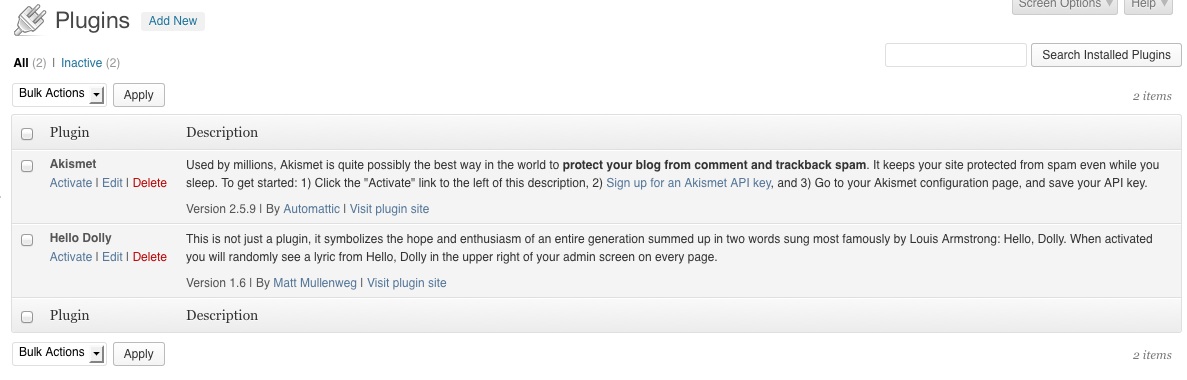
Preinstalled Plugins
You’ll see that two plugins are preinstalled.
I usually delete or ignore the Hello, Dolly plugin.
Click Activate on the Akismet plugin.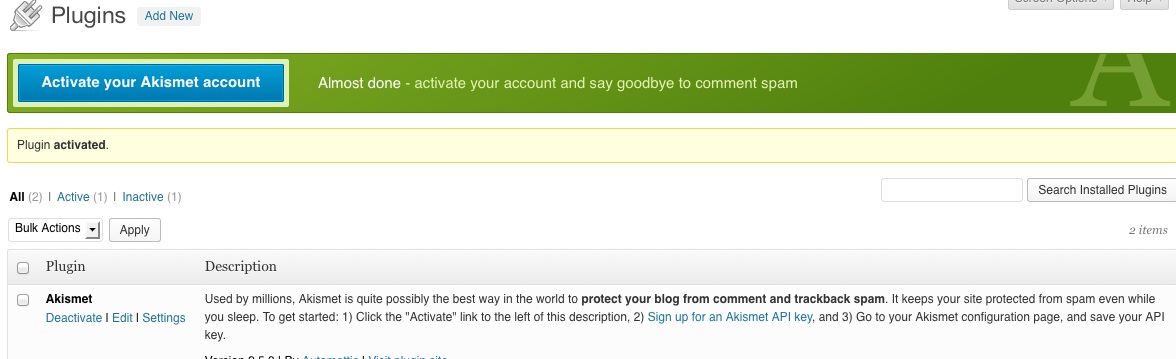
Akismet Activated
You’ll get an Akismet Activated screen. Click on “Activate your akismet account.”
Then click on “Create a new Akismet Key.”
This will take you to the WordPress/Akismet site. Follow their instructions on how to set up an account and create a key. For a personal site, you can choose how much to pay, even choosing free. For a single professional site, it is $59/year and well worth it! This is the biggest cost you will have besides your hosting company, but I highly recommend it. Follow their directions for fully activating Akismet.
Now you can rest easy that your Author Website won’t be the victim of many spam comments.
You’ve successfully activated one plug-in! It’s time to look at a range of other plugins for your site. Remember that you can add or delete plugins at any time, as needed. It’s fine to experiment with a plug-in and later decide you don’t like it.
Other Recommended Plugins
Everyone wants to weigh in on the most important WordPress plugins. Use a search engine and be overwhelmed!
Here, I’ll talk about the basic plugins that I think are essential for all WordPress sites. Then I’ll focus on an Author Website and list plugins that you may find helpful.
You can find available plugins by clicking Plugins (left sidebar)/Add New and then searching for what you need. You will often find several plugins that address the same function. It’s fine to download several and activate/deactivate them one at a time to see what exactly they do. The descriptions provided and the ratings are helpful; but nothing compares to actually putting them to use on YOUR Author Website. Once you decide against a plugin, though, delete it so it doesn’t clutter up your site and to reduce security risks.
Basic, Essential Plugins:
These are examples of plugins in some crucial areas; find them by searching the Plugin List (Plugins (left sidebar)/Add New ) . Be sure to follow directions for setting up these plugins.
Add Meta Tags by Notaras. This simple plug-in adds metatags to your website, which means that search engines can find you easily.
Yet Another Related Posts Plugin. This puts related posts in a neat table at the bottom of your post. It’s a good way to encourage readers to read more pages on your site.
Shareaholic | share buttons, analytics, related content by Sharaholic provides social media icons to add to your site.
WP-DB Backup (WordPress Database Backup) by Austin Matzko emails you a backup file of your site. Really, you don’t want to be without this one.
Strictly Google Sitemap by Rob Reid. This creates a Google compliant XML file so that the search engine can catalog your site easier.
Start with simple plugins and add more as you need to. It’s easy to install and customize most plugins—and equally easy to deactivate and replace them with something better. Take the long approach on this and start with just a few and add a plugin when you think you need something better.
Other Interesting Plugins
Full Tiles Gallery. You know how all your books are different sizes and if you want to create a gallery of the book covers, they never fit right? Here’s the simple answer. At the time of writing, it’s $14. You can see it in action here. YouTube Tutorial on Final Gallery.
Book Sales. If you want to sell ebooks from your site, this article summarizes WordPress Plugins that make this simple. On the other hand, this Smashing Magazine article summarizes five shopping cart services that work well within your WordPress.
Customizing your WordPress installation is important–but time consuming. Take it slow and add plugins as you go. Prioritize what capabilities you need and do those plugins first. Add the rest as you have time.
What plugins do you consider to be essential?
March 11, 2014
Author Website Content: Home Page
READ A SAMPLE CHAPTER
.goodreadsGiveawayWidget { color: #555; font-family: georgia, serif; font-weight: normal; text-align: left; font-size: 14px;
font-style: normal; background: white; }
.goodreadsGiveawayWidget img { padding: 0 !important; margin: 0 !important; }
.goodreadsGiveawayWidget a { padding: 0 !important; margin: 0; color: #660; text-decoration: none; }
.goodreadsGiveawayWidget a:visted { color: #660; text-decoration: none; }
.goodreadsGiveawayWidget a:hover { color: #660; text-decoration: underline !important; }
.goodreadsGiveawayWidget p { margin: 0 0 .5em !important; padding: 0; }
.goodreadsGiveawayWidgetEnterLink { display: block; width: 150px; margin: 10px auto 0 !important; padding: 0px 5px !important;
text-align: center; line-height: 1.8em; color: #222; font-size: 14px; font-weight: bold;
border: 1px solid #6A6454; border-radius: 5px; font-family:arial,verdana,helvetica,sans-serif;
background-image:url(https://www.goodreads.com/images/layo... background-repeat: repeat-x; background-color:#BBB596;
outline: 0; white-space: nowrap;
}
.goodreadsGiveawayWidgetEnterLink:hover { background-image:url(https://www.goodreads.com/images/layo...
color: black; text-decoration: none; cursor: pointer;
}
Goodreads Book Giveaway
The Girl, the Gypsy and the Gargoyle
by Darcy Pattison
Giveaway ends March 21, 2014.
See the giveaway details
at Goodreads.
Enter to win
This month-long series of blog posts will explain author websites and offer tips and writing strategies for an effective author website. It alternates between a day of technical information and a day of writing content. By the end of the month, you should have a basic author website up and functioning. The Table of Contents lists the topics, but individual posts will not go live until the date listed. The Author Website Resource Page offers links to tools, services, software and more.
3 Questions Your Author Website Home Page MUST Answer in 5-seconds Flat
When a reader comes to your website you have 5 seconds to hook them. (Sounds like writing a novel, doesn’t it? The same fiction writing skills you use there will help you on your HOME Page.)
Readers have three questions you must answer in 5-seconds flat.
Where am I?
The site must clearly identify that this is your site. Your name and a headshot will help. If a reader is sorta fuzzy about exactly what you write, or who you are, make sure this is clear. You can do this with a simple tag:
Children’s book author, Darcy Pattison.
Fiction Writing Teacher, Darcy Pattison
Famous Author, Darcy Pattison
Writer and Writing Teacher, Darcy Pattison
You’ll think of several possibilities, of course, but must choose one. You can change this at any time, but I recommend searching for and trying out tags until you find the one that sticks for you. It becomes part of your “branding” as an author. The tagline for your site (which you set up in the back end of the site and can change at any time) can also give this info.
What Can I Do Here?
Information, photos and links should immediately tell readers what they can DO on your site.
Do you want them to read your blog? Include one of the built-in widgets that lists the most recent posts, or perhaps the categories of those posts. Your site’s navigation should clearly tell people where to go to find different types of information.
Where Can I Find the Information That I Want?
Your Navigation will be vitally important on your HOME Page. How do people find what they want? What will you Name each of the main sections of your site? We’ve called them NEWS, ABOUT and BOOKS, but you are free to name them anything you want. Just make sure the navigation links are short, so they fit onto the navigation bar easily, and very clear. ABOUT is a standard page name for a biography page. NEWS makes sense, but you could also call it SCHEUDLE, or INSIDER INFO, depending on what you want.
To create Categories and Menus, please refer to the WordPress Codex or look on YouTube for tutorials like this one:
If you can’t see this video, click here.
NOTES: As you start to customize your site, it becomes impossible for me to give you exact directions. There are too many options, all of them right for certain people, depending on your needs, your work, and your vision for your website. Here are four strategies to find the exact info you need:
Search for a Plugin: Someone else surely wanted to do the same thing you did! And they wrote a plugin. The search engine for the plugins, though, is clunky. Often, I know what I want and can’t find it because you must know the exact name of the plugin you want. Instead, I use a search engine to locate information about a plugin and when I know an exact name, then I’ll go to the Plugin Installation and try to add something. Doing this, you may wind up with paid plugins and you’ll have to weigh the benefits against the cost.
Search for a Tutorial: Someone has suggested that 25% of websites worldwide currently run on WordPress. Regardless of the accuracy of this statistic, it’s true that there are tons of tutorials for almost anything you need done on WordPress. If you like visual learning, search YouTube and you’ll likely find what you need. Otherwise, use your favorite search engine and search for “Tutorial + XXXX,” where XXXX is the subject of the tutorial you need.
Search the http://codex.wordpress.org WordPress Codex: The codex has many of the answers you’ll need. Try there first.
Hire a Coder: If all else fails and you can find nothing, you can always hire a coder from places like Elance and Odesk.
Circling Back to Themes: What Will Your Site LOOK Like?
What you’ve done so far is organize information on your website and set up a basic WordPress installation. When setting up a website, some people suggest you do a “wireframe,” or a drawing of what you want on each page and how the pages will connect. Wireframes especially refers to the layout of a webpage that will help you accomplish a goal. That’s what you are doing here except on a sitewide level; you’re deciding what to emphasize and how to best accomplish a goal. Now that you have a good idea of what’s on your site, you can go back and re-evaluate themes that you’ve looked at. Can you easily fit everything into the site? If it’s not easy to do, then look for other themes. You want this to be simple! Definitely, NOT complicated!
As before, let’s refer back to the 2008 Codex study that discusses what would bring readers back to your site, and see how their needs might fit into the HOME Page.
For the HOME PAGE, you have lots of decision to make. By now, you should have slotted at least some of this information onto other pages of your site. The question here is what to put on the HOME Page and what to link to directly from the HOME Page. You don’t want the site to look scattered and unfocused; on the other hand, you don’t want readers to get lost. Think about which of these you might want on YOUR site and which can go on other pages.
Search Box. Because there’s no way to fully anticipate what a reader will want, make sure you include a Search Box on your home page. This is one of the Default Widgets (Appearance/Widgets) that you can drag and drop onto a position of your Home Page. In fact, I make sure there’s a Search Box on every page of my site, but you at least need it on the HOME Page.
Exclusive, unpublished writing. We’ve mentioned short stories, blog posts, essays or other writing that might interest your readers. On the HOME Page, you will definitely want a link to you blog, if you have one. How else might you include a link to exclusive, unpublished writing?
Author Schedules. Is there any way that a fan could meet-up, get a signed book, watch you speak, etc.? How will you address this on the HOME Page? What links–if any–make sense. Did you include this information on your NEWS Page? Or do you want to include some sort of calendar that lists your speaking schedule? If you speak a lot, there are many WordPress Calendar plugins which allow you to list details in a central place and then add it to various places using a widget. Do you need this?
Author’s Literary Tastes. Readers want lists of the author’s favorite writers and recommended books. Younger fans are also more interested in knowing about their favorite authors’ book, music, and movie recommendations. How can you include this on the HOME Page? Or will you put this on the ABOUT Page?
I’ve mentioned GoodReads widgets before because it automates the process of telling people what you are reading. If you use other sites or software to track this, then look for WordPress plugins to add this someway. You will also want to look for plugins to share your social media sites, Pinterest boards, and so on.
Insider Information. 36% of readers (especially men) want “insider” tidbits. YOU know why you killed off that mother in chapter three; explain that to the readers on your website. Most authors will include this information on the page for a certain book. But you can hint on the HOME page that this is available. The HOME Page is definitely not the place to put in-depth details. How can you hint at what you’ve included later, so readers know if they want to read more?
Freebies. Do you plan to provide downloadable extras like icons and sample chapters? How and where will you hint at this on the HOME Page? What links are possible? What links do you think are best?
Regular contact. You probably want a newsletter signup on the front page! This should be one of your main goals, to build your mailing list. These are people who say they WANT to hear from you, so put this somewhere up front and central. We’ll cover it more in detail later, but I use Mailchimp for my newsletters.
Fans under the age of 35 love contests, puzzles, and games, with prizes like autographed copies of books. As with freebies above, decide how to let your readers know that you’ve got extra stuff and decide How and Where you’ll link to this.
No Clutter, Please
You don’t want lots of clutter on your HOME Page. But you’ve got lots to offer. You’ll need to decide How and Where on this page you’ll link to your offerings. How often will you update the site? Will you use text or images to link to various things?
Decisions, decisions, decisions. Get this as right as you can at this point and come back to tweak as you develop the site more. The HOME Page is very important. But remember that often readers will enter your site through a specific link to a specific page. Deep-links to a specific page will represent about half of your site’s traffic. The rest will hit this HOME page, so make it as useful and attractive as possible. But, don’t stress out over it. Make the wisest decision you can right now and come back later to tweak.
March 10, 2014
Author Website Tech: WordPress Installation and Setup
READ A SAMPLE CHAPTER
.goodreadsGiveawayWidget { color: #555; font-family: georgia, serif; font-weight: normal; text-align: left; font-size: 14px;
font-style: normal; background: white; }
.goodreadsGiveawayWidget img { padding: 0 !important; margin: 0 !important; }
.goodreadsGiveawayWidget a { padding: 0 !important; margin: 0; color: #660; text-decoration: none; }
.goodreadsGiveawayWidget a:visted { color: #660; text-decoration: none; }
.goodreadsGiveawayWidget a:hover { color: #660; text-decoration: underline !important; }
.goodreadsGiveawayWidget p { margin: 0 0 .5em !important; padding: 0; }
.goodreadsGiveawayWidgetEnterLink { display: block; width: 150px; margin: 10px auto 0 !important; padding: 0px 5px !important;
text-align: center; line-height: 1.8em; color: #222; font-size: 14px; font-weight: bold;
border: 1px solid #6A6454; border-radius: 5px; font-family:arial,verdana,helvetica,sans-serif;
background-image:url(https://www.goodreads.com/images/layo... background-repeat: repeat-x; background-color:#BBB596;
outline: 0; white-space: nowrap;
}
.goodreadsGiveawayWidgetEnterLink:hover { background-image:url(https://www.goodreads.com/images/layo...
color: black; text-decoration: none; cursor: pointer;
}
Goodreads Book Giveaway
The Girl, the Gypsy and the Gargoyle
by Darcy Pattison
Giveaway ends March 21, 2014.
See the giveaway details
at Goodreads.
Enter to win
This month-long series of blog posts will explain author websites and offer tips and writing strategies for an effective author website. It alternates between a day of technical information and a day of writing content. By the end of the month, you should have a basic author website up and functioning. The Table of Contents lists the topics, but individual posts will not go live until the date listed. The Author Website Resource Page offers links to tools, services, software and more.
Install WordPress on Your Site
It’s time to install Your WordPress site.
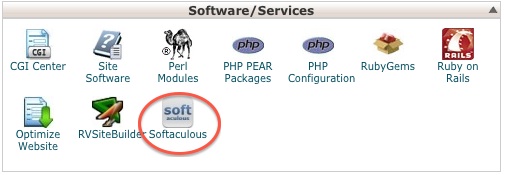
Login to your CPanel. Choose Softaculous and then choose to install WordPress onto your site.
There are three places where you need to be careful about settings when you set up your WordPress:
Directory: The program will automatically fill in something here, but most people will want to want to put the WordPress installation in the main directory. So, leave this blank. You cannot undo this later; the only way to correct it is to delete the WordPress installation and reinstall it. So, make a wise decision here.
Database Name: Let the software fill this in automatically.
Admin Name: This is the name with which you will login. Be sure to set the name/password and contact email with appropriate settings, because the admin name can’t be changed either. You can add yourself as a user, but it’s far easier to set this up right the first time.
Don’t worry about the Advanced settings. You can add an email at the bottom and the program will email you the details of the installation.
Click Install and let the program work.
Now, log out of the CPanel and then log into your WordPress site at this address:
http://FamousAuthorWebsite.com/wp-admin
(Change “FamousAuthorWebsite” to the name of your domain; use the login name and password that you created when you installed the program.)
NOTE: As of 2013, WordPress is set up to do automatic updates as new versions are released. You don’t have to do anything, the program just does it for you. If you get an email notice that your site has updated, just check and make sure everything looks fine. It probably will. And then, go on with life. If the backend of your WordPress tells you that you need to update WordPress, do that now.
————-
Setting up the WordPress Backend
Here’s what the default site will look like:
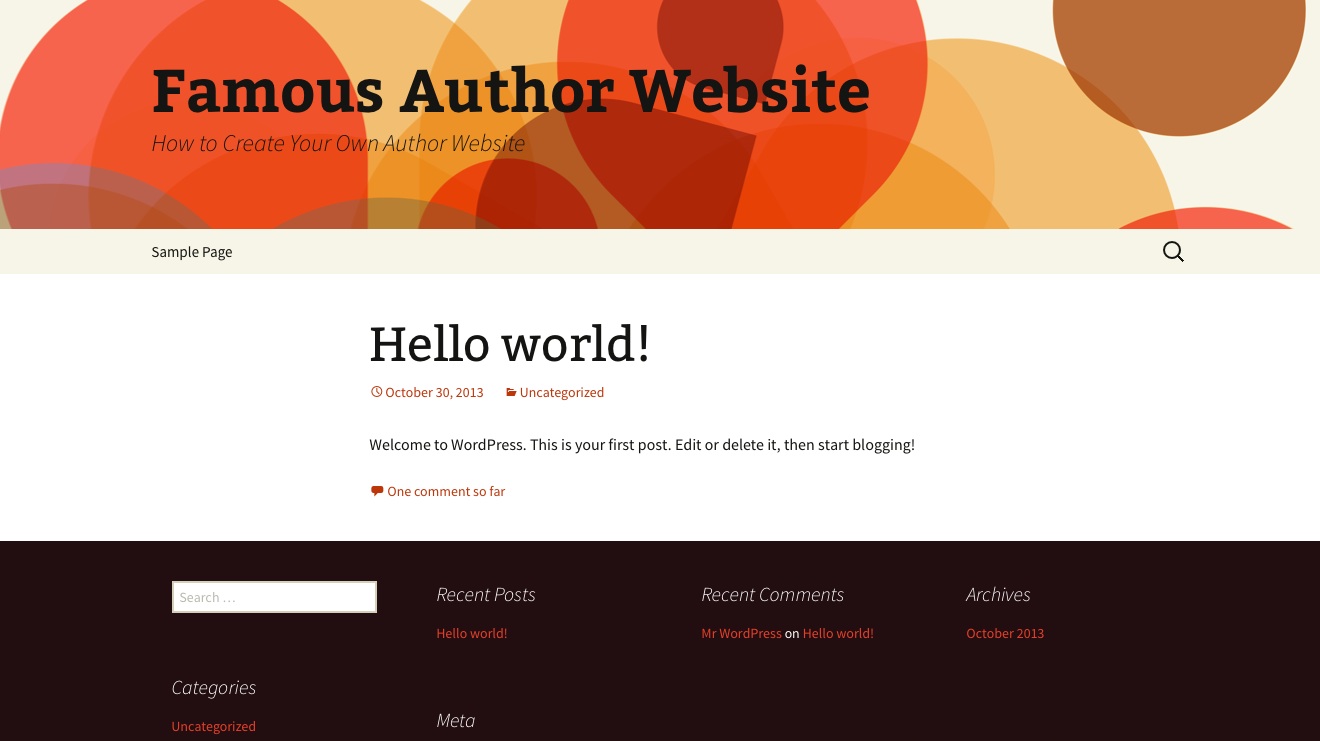
Don’t worry, yet, about how it looks. First you want everything under the hood to work right. So, there are some setting you should take care of first.
Here’s what the Dashboard will look like the first time you log in: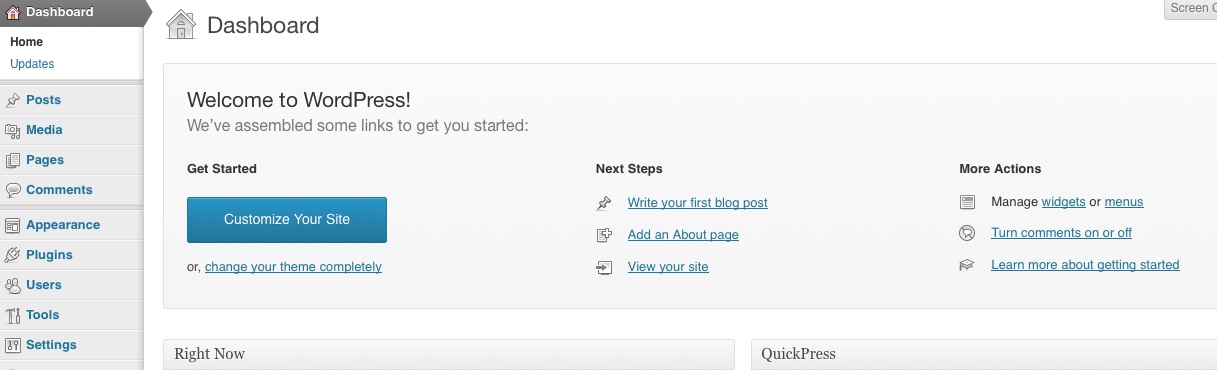
It has suggestions on how to get started and you can play around with that if you want. But first, you’ll want to take care of some basic settings. On the left-hand column, click on Settings.
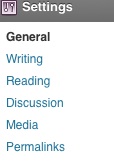
GENERAL
Here is where you can change the name of your site and tagline.
You won’t need to change anything on the WordPress Address, SiteAddress.
Here is where you can change the administrator’s email address, if needed.
For now, leave UNchecked, “Anyone can register.”
For now, leave the New User Default Role as “subscriber”
Change the time zone, date format, time format and week starts on to your preferences.
READING
Right now, while you are playing around with the site design and such, you probably don’t want search engines to find you! It’s sort alike someone seeing you in your underwear.
For Search Engine Visibility, check the box for “Discourage search engines from indexing this site”
(NOTE: if you forget to switch this back after you’ve got it all set up, your site won’t get much traffic. I’ll remind you, but be forewarned that this is a very important step in your website’s launch.)
PERMALINKS
The default is for WordPress to assign each post a number, something like this: www.FamousAuthorWebsite/?128 . But that sort of URL is hard to follow. I usually click on Post Name; then click save. That means your post URL’s will be “pretty” and easy to follow, something like this: http://FamousAuthorWebsite.com/famous...
That’s enough for now. We’ll come back later and change a couple other things. But that’s all for now.
PAGES V. POSTS
This is also a good time to look around the back end of the site, because this is where you’ll spend a lot of time writing content for the site. First, an explanation of Pages and Posts.
WordPress is a content management system (CMS). It consists of a database and a template and it generates webpages on the fly. When someone comes to your site, the template says, “Hey, Database. I need information to slot into these places.” The database provides the information and the program/template generate the page immediately.
This is very different from the old html sites of a decade ago, which had a discrete file for each page. If you wanted to change the logo on a 100-page site, you had to change 100 pages.
Now, the template has a slot for the logo and there’s one place in the database that it is located. You simply change that one piece of the database and the template updates it on the fly in all 100 pages. Using a CMS saves lots of time!
Note: Techies will find this explanation simplistic and it is. But it’s enough info to help you understand what WordPress does and to get started!
WordPress organizes its templates/database into two separate sections, posts and pages.
Posts. WordPress posts are displayed in reverse chronological order, in other words, as a blog. The most recent post is on top and it goes backward from there.
Pages. These are static pages that are displayed where you tell them to display. In other words, pages act more like a traditional website. If you only use pages, then you must add menus to tell people what is available on the site and how they can get to it.
In reality, most people blend posts and pages into a website/blog for their author website. We’ll talk about the settings for that later. For now, just look around and see what’s there.
Assignment: Write a Page and a Post
I know, I know. You are anxious to “fix” how your site looks. Be patient a little while longer. We still have a couple more things to do. If you really want to get started on How the Site Looks, then transfer a couple of the pages you’ve written to your WordPress site; we’ll spend a couple days next week doing this formally, but if you want to get started now, go on. Fixing the theme will be easier if you have a couple of posts and a couple pages to look at. So, spend that extra energy and write a couple.
WordPress has extensive documentation on how to use the software in the WordPress Codex (http://codex.wordpress.org) . Believe me, the Codex is your friend. Any questions, go there first.
Here are Codex instructions on:
How to Write a Post: http://codex.wordpress.org/Writing_Posts
How to Write a page: http://codex.wordpress.org/Pages
Write a couple pages and a couple posts. Don’t worry. We’ve asked search engines not to index the site yet, so there won’t be any traffic until we change that setting. You can’t break the software and you don’t need to worry about “dumb” posts. Just do something for now and get comfortable with the software.
TIP: Show the Kitchen Sink When you are editing a post or page in the WordPress editing screen, you can easily format the text. By default, there are only a few options and your editing choices look like this:
Hover the cursor over the last option on this editing bar and it will say Kitchen Sink. If you click on it, the Kitchen Sink reveals many more choices for editing your text.

If you know html code, you can also edit in text mode, which means you are writing html code.
Have fun playing around with posts, pages and editing. If you’re still looking around for themes for your site, use the Resource Page.
March 9, 2014
Author Website Content: News
READ A SAMPLE CHAPTER
.goodreadsGiveawayWidget { color: #555; font-family: georgia, serif; font-weight: normal; text-align: left; font-size: 14px;
font-style: normal; background: white; }
.goodreadsGiveawayWidget img { padding: 0 !important; margin: 0 !important; }
.goodreadsGiveawayWidget a { padding: 0 !important; margin: 0; color: #660; text-decoration: none; }
.goodreadsGiveawayWidget a:visted { color: #660; text-decoration: none; }
.goodreadsGiveawayWidget a:hover { color: #660; text-decoration: underline !important; }
.goodreadsGiveawayWidget p { margin: 0 0 .5em !important; padding: 0; }
.goodreadsGiveawayWidgetEnterLink { display: block; width: 150px; margin: 10px auto 0 !important; padding: 0px 5px !important;
text-align: center; line-height: 1.8em; color: #222; font-size: 14px; font-weight: bold;
border: 1px solid #6A6454; border-radius: 5px; font-family:arial,verdana,helvetica,sans-serif;
background-image:url(https://www.goodreads.com/images/layo... background-repeat: repeat-x; background-color:#BBB596;
outline: 0; white-space: nowrap;
}
.goodreadsGiveawayWidgetEnterLink:hover { background-image:url(https://www.goodreads.com/images/layo...
color: black; text-decoration: none; cursor: pointer;
}
Goodreads Book Giveaway
The Girl, the Gypsy and the Gargoyle
by Darcy Pattison
Giveaway ends March 21, 2014.
See the giveaway details
at Goodreads.
Enter to win
This month-long series of blog posts will explain author websites and offer tips and writing strategies for an effective author website. It alternates between a day of technical information and a day of writing content. By the end of the month, you should have a basic author website up and functioning. The Table of Contents lists the topics, but individual posts will not go live until the date listed. The Author Website Resource Page offers links to tools, services, software and more.
What to Include on Your News Page
As you set up your Author Website, it’s a good idea to refer back to the 2008 Codex study that discusses what would bring readers back to your site. To recap, readers want:
Exclusive, unpublished writing. 43% of survey respondents said they return regularly for exclusive content. This could include related short stories, but might also include a short essay on your cats. An interesting blog could do this, as well.
Author Schedules. 36% want to know the author’s schedule of tours, book signings, and area appearances. In other words, is there any way that a fan could meet-up, get a signed book, watch you speak, etc.
Author’s Literary Tastes. Readers want lists of the author’s favorite writers and recommended books. Younger fans are also more interested in knowing about their favorite authors’ book, music, and movie recommendations.
Insider Information. 36% of readers (especially men) want “insider” tidbits. YOU know why you killed off that mother in chapter three; explain that to the readers on your website. Include things such as: Background info–where and how you did research; important inspirations for the story; your biggest struggles and biggest successes as you wrote this book.
Freebies. 33% want downloadable extras like icons and sample chapters.
Regular contact. 33% of readers want weekly e-mail news bulletins with updates on tours, reviews, and books in progress.
Fans under the age of 35: contests, puzzles, and games, with prizes like autographed copies of books.
Your career isn’t static; instead, it is constantly changing. But you don’t want to have to update the website every day or every week. That takes too much time away from your work! Updating a single page, though, when you have News is easy and should be a priority–even before you post on Facebook, update this page. Today, we’ll write the beginnings of a News Page where you will announce anything new and interesting in your career. By the way, you’re still just writing these pages in a wordprocessor; later, we’ll transfer what you wrote to your website.
What is Newsworthy? Think about what goes into a daily newspaper, or your favorite online news outlet? Articles need to be timely, interesting and/or important, detailed and accurate.
Timely: Let me reiterate: before you update your Facebook status with your News, post it here first! Your News Page should be the first place a fan looks for information on your latest book, where you’ll speak and so on.
Interesting/Important: Is it Newsworthy that you finished a first draft of your next novel? It’s your call. Personally, I’d put that on my Facebook status or Tweet it, but not put it here. When the novel sells or on it’s launch date, I’d post here. Unless you are J.K. Rowling the news of a first draft of a novel would never make the first page of a local newspaper. In other words, think about what is important enough to include here and how you plan to post information on this and other social media outlets. Create some guidelines for yourself and then stick with them.
Detailed and accurate. If you post that you have a new book coming out, people want details. Title, subtitle, ISBN, release date, publisher and so on. This is the place to be factual and accurate.
What to Include on a NEWS Page
Over the lifetime of an author’s career, there are many newsworthy moments. Let’s see how they might slot into the categories that the Codex study says will bring readers back to your site.
AUTHOR SCHEDULE:
Speaking Schedule. Yes! Readers want to meet you. If you travel to speak, make sure to list your schedule on the News Page.
AUTHOR’S LITERARY TASTES:
Goodreads updates. I wouldn’t post on a News Page that you read and reviewed a novel. But if you want, you could use a Goodreads Widget on this page.
Your recommendations. On the other hand, you could run a book club or post music playlists that help you write. Remember that readers want to know what you like; they want your recommendations. If you find a creative way to do this, add it to the News Page.
INSIDER INFORMATION:
Book releases. For sure, include a notice about any new releases. Sneak previews, early announcement, advance reader copies–anything you can include to make this Insider Info makes it even better.
Awards. Recognition for your work is a thrill, so share it here with those who care about you the most.
Interviews. When someone interviews you, please include a link here. People wanting to quote you will be glad you did.
YouTube videos or relevant posts on other sites. Likewise, any publicity on other sites should be included here.
FREEBIES & GAMES, CONTESTS, PUZZLES:
Samples and Freebies. Anytime you post sample chapters, free coloring pages, Facebook quizzes or games and so on, include a link on the News Page.
EXCLUSIVE, UNPUBLISHED WRITING:
Do you post other places? Guest posts, pro bono work, or just a free story for Christmas–any time you make exclusive, unpublished writing available, post a link on the News Page.
Date Your Entries
Remember the advice above to be timely? People want to see your career unfolding before them. That means you should date each entry. On my News Page, I have started dividing it by year and within a year, I add the most recent material on top. Decide now how you will organize the entries chronologically.
A couple last things: this is not the place to be shy. Toot your own horn! You can do this and no one will think you are bragging because this is the right place to do it. Just present the information as facts, without lots of hype, and it will be well-received.
Notice also that you’ll need to make choices: if you use a GoodReads widget on your website, where will you place it? It could probably go a couple different places, either on the ABOUT page or the NEWS page. Info about a new title will go several places: on it’s own page, on the News Page, on the About Page, and maybe other pages, as you wish. Think about the structure of your website and what you want to go where. Making these decisions NOW, before the site goes live will make it immensely easier later–and much easier to keep updated.
What information would YOU share on a News Page? What would you NOT share on a News Page? Why?
March 8, 2014
Author Website Tech: Professional Email
READ A SAMPLE CHAPTER
.goodreadsGiveawayWidget { color: #555; font-family: georgia, serif; font-weight: normal; text-align: left; font-size: 14px;
font-style: normal; background: white; }
.goodreadsGiveawayWidget img { padding: 0 !important; margin: 0 !important; }
.goodreadsGiveawayWidget a { padding: 0 !important; margin: 0; color: #660; text-decoration: none; }
.goodreadsGiveawayWidget a:visted { color: #660; text-decoration: none; }
.goodreadsGiveawayWidget a:hover { color: #660; text-decoration: underline !important; }
.goodreadsGiveawayWidget p { margin: 0 0 .5em !important; padding: 0; }
.goodreadsGiveawayWidgetEnterLink { display: block; width: 150px; margin: 10px auto 0 !important; padding: 0px 5px !important;
text-align: center; line-height: 1.8em; color: #222; font-size: 14px; font-weight: bold;
border: 1px solid #6A6454; border-radius: 5px; font-family:arial,verdana,helvetica,sans-serif;
background-image:url(https://www.goodreads.com/images/layo... background-repeat: repeat-x; background-color:#BBB596;
outline: 0; white-space: nowrap;
}
.goodreadsGiveawayWidgetEnterLink:hover { background-image:url(https://www.goodreads.com/images/layo...
color: black; text-decoration: none; cursor: pointer;
}
Goodreads Book Giveaway
The Girl, the Gypsy and the Gargoyle
by Darcy Pattison
Giveaway ends March 21, 2014.
See the giveaway details
at Goodreads.
Enter to win
This month-long series of blog posts will explain author websites and offer tips and writing strategies for an effective author website. It alternates between a day of technical information and a day of writing content. By the end of the month, you should have a basic author website up and functioning. The Table of Contents lists the topics, but individual posts will not go live until the date listed. The Author Website Resource Page offers links to tools, services, software and more.
GMail v. Domain Mail
Some authors today use Gmail exclusively and in many ways, this is considered a professional email address. However, your email is more memorable if it comes through your domain. Famous@FamousAuthorWebsite.com or Darcy@darcypattison.com. It is the best professional email possible because no one will ever be confused about the person to which the mail is sent. I am the only Darcy at DarcyPattison.com. There are no wonky things to remember, no strings of odd numbers, etc. Now that you have your own domain, you can set up as many email accounts as you want to keep track of.
Disadvantage. The biggest disadvantage to an email address through your domain is that it’s a bit cumbersome to set up on email clients. CPanel makes it as easy as possible, but you’ll still need to become familiar with a couple settings to make it easy on Outlook, Thunderbird, or your smart phone. It’s not hard; it’s just unfamiliar and a few extra steps. For me, the advantages outweigh the difficulties of the learning curve. If you choose to access your domain email through the web, the programs aren’t as pretty or as powerful as Gmail.
Fortunately, there’s another option possible, too, forward your domain emails to your Gmail account. See this article which includes screen shots about your options.
How to Set Up an Email Account on Your Domain
1) Log in to your CPanel.
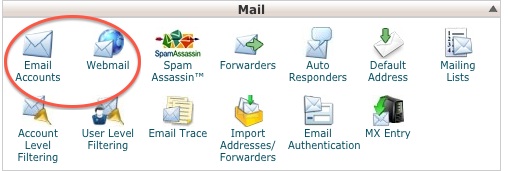
2) Under mail, click on the Email Accounts.
3. Fill in the blanks to create an email.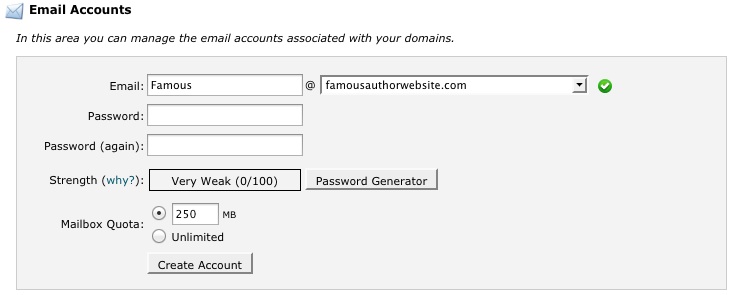
Now, go back to the Home page of the CPanel. This time, click on Webmail and find a screen that tells you how to access the email. Click on “Go to Secure Webmail Login.”
By default, you will have three web-based options for managing your emails.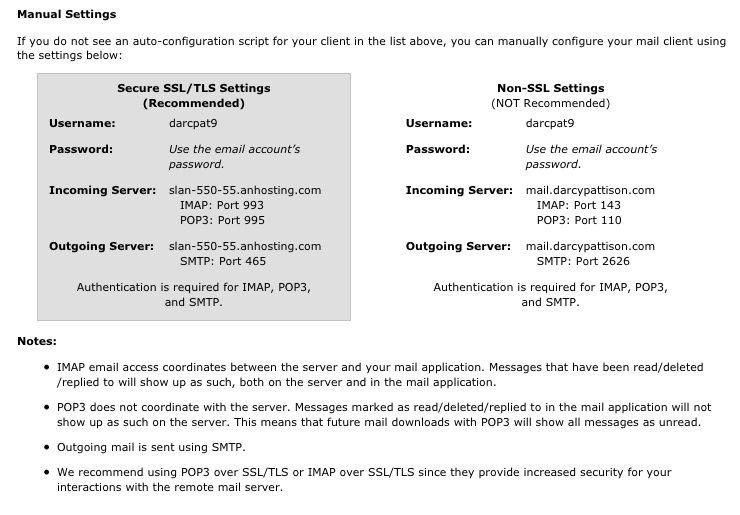
You should take some time looking around these options. They are the backup for any email client you may have and, as clunky as they might seem, they are a lifesaver if all other options fail.
TIP: You can access this at any time from the Internet by typing in your domain, plus :2096. http://FamousAuthorWebsite.com:2096. This will give you a login/password screen.
Accessing Email Through Email Clients and Smart Phones
Now, you’ll want to set up everything else to receive email from your domain email. Fortunately, CPanel tries to make this very easy.
Click on Configure Mail Client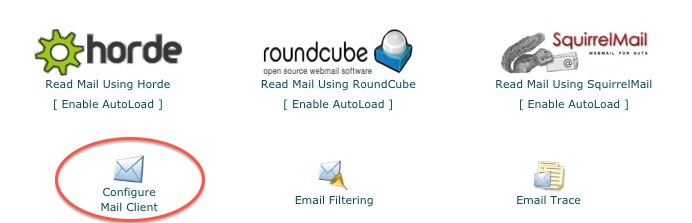
Here, you’ll find instructions on how to set up your Email Client
You’ll want to access your email as an IMAP (Internet Message Access Protocol) account; this type account downloads messages to your computer or device from your server but DOES NOT delete them from the server. You can go back and find them later as needed. I don’t recommend using a POP3 (Post Office Protocol) account because when you download a message to your computer or device, it deletes the message from the server.
That’s it. Take time to set up the email account everywhere you need to: desktop, tablets, phones, etc. You’ll may have to look up tutorials for a specific device, since I can’t anticipate every device my readers might own! But this is a common question and the tutorials will be easy to find.
Congratulations! You can now start using your new email account for all your business emails!
Meanwhile–you’re still on a quest for the perfect theme for your site. Click around on these lists of authors to see what others are doing on their websites.
Society of Children’s Bookwriters and Illustrators (SCBWI.org) Speaker’s Bureau
Romance Writers
Alliance of Independent Authors
Author’s Guild
What surprised you the most when you looked at other author websites?
March 7, 2014
Author Website Content: BOOKS Page
READ A SAMPLE CHAPTER
.goodreadsGiveawayWidget { color: #555; font-family: georgia, serif; font-weight: normal; text-align: left; font-size: 14px;
font-style: normal; background: white; }
.goodreadsGiveawayWidget img { padding: 0 !important; margin: 0 !important; }
.goodreadsGiveawayWidget a { padding: 0 !important; margin: 0; color: #660; text-decoration: none; }
.goodreadsGiveawayWidget a:visted { color: #660; text-decoration: none; }
.goodreadsGiveawayWidget a:hover { color: #660; text-decoration: underline !important; }
.goodreadsGiveawayWidget p { margin: 0 0 .5em !important; padding: 0; }
.goodreadsGiveawayWidgetEnterLink { display: block; width: 150px; margin: 10px auto 0 !important; padding: 0px 5px !important;
text-align: center; line-height: 1.8em; color: #222; font-size: 14px; font-weight: bold;
border: 1px solid #6A6454; border-radius: 5px; font-family:arial,verdana,helvetica,sans-serif;
background-image:url(https://www.goodreads.com/images/layo... background-repeat: repeat-x; background-color:#BBB596;
outline: 0; white-space: nowrap;
}
.goodreadsGiveawayWidgetEnterLink:hover { background-image:url(https://www.goodreads.com/images/layo...
color: black; text-decoration: none; cursor: pointer;
}
Goodreads Book Giveaway
The Girl, the Gypsy and the Gargoyle
by Darcy Pattison
Giveaway ends March 21, 2014.
See the giveaway details
at Goodreads.
Enter to win
This month-long series of blog posts will explain author websites and offer tips and writing strategies for an effective author website. It alternates between a day of technical information and a day of writing content. By the end of the month, you should have a basic author website up and functioning. The Table of Contents lists the topics, but individual posts will not go live until the date listed. The Author Website Resource Page offers links to tools, services, software and more.
Write Your BOOKS Page(s)
As an author, it’s important to tell people about your books and publications. The BOOKS page features your books, no surprise. But what–specifically–do readers want to know? Because you haven’t got the site up yet, just write this in your favorite software and save till later.
Newly Released. Find some way to highlight new titles. These are exciting times for a reader and fan when they find out you have a new title! Keep them happy by putting new books up front and center. You’ll want to play with your page’s layout to make this stand out. You may also want to consider putting this information on the Home Page somewhere. Exciting news like this could go in several places on your site (HOME, NEWS, BOOKS, ABOUT), so consider where and how you might highlight it.
Book List. On the list of your books, include title, subtitle, ISBN(s), versions it is availble in (Paperback, hardcover, library, audio, ebook, pdf, etc.), synopsis, awards, reviews. Besides all that “metadata,” include a photo of the book cover. All of this needs to be neatly organized and displayed. Do you doubt the importance of this information? Metadata expert Renée Register says, “Online bookselling exposed the metadata and moved it to the heart of the book shopping experience.” Neglect these details at your own risk!
Call to Action. Yes, ask people to read your book. Marketers know that asking for the sale is crucial to closing a deal. You must provide a “call to action,” a link to a sales page, links to a sample chapter, or invitation to see you speak somewhere. Or you may want to ask people to sign up for your newsletter. Without the Call to Action, your page is worthless. Later, when we actually set up the book pages, we’ll look at WordPress plugins that might be helpful here.
Here’s a sample Call to Action!
Join me in August, 2014 the Boston area for a one-day workshop, BUILD YOUR AUTHOR WEBSITE. I’ll also be teaching a Novel Revision Retreat and a one-day Picture Book Workshop. Get the details here.
Downloadable List. Librarians and teachers often want a printable book list with a bio, so be sure to add a .docx or .pdf version with a link to download (and keep it updated).
Keeping series in order. Often a fan will look for information on the sequence of books in a series. What title is the first one? Second one? And so on. Sometimes, there’s a discussion about reading a series in the order they were published, or in chronological order within the world of the stories, or the order in which they were written. You can satisfy the curious reader by providing all three series orders, if you like. But give them some sort of ordered list to keep them happy.
Forthcoming books. It’s never too early to get readers excited about your next book. As soon as you can get your next book(s) listed on your BOOKS page. It’s always fun to do blog posts of cover reveals, to offer advance copies or free sample chapters. Remember that your readers want to know this information! You are giving them exactly what they want.
Give Readers What They Want
Let’s remind ourselves of what readers want when they visit an author website:
Exclusive, unpublished writing. 43% of survey respondents said they return regularly for exclusive content.
Insider Information. 36% of readers (especially men) want “insider” tidbits.
Freebies. 33% want downloadable extras like icons and sample chapters.
Fans under the age of 35: contests, puzzles, and games, with prizes like autographed copies of books.How can you implement some of these things on the BOOKS Page? Some of these could go on a NEWS Page, too—you’ll have to decide if you want the content in just one place or in multiple places.
Sample Chapters. When a reader flips through a book in a physical book store, they read through the first couples pages (well, maybe just the first couple paragraph, or even just the first paragraph.) If they make it through that much, they are more likely to buy the book. Give readers what they want: Sample Chapters or excerpts. You could do this by putting the chapter on the site, providing a free pdf download, or creating an epub that is free. Which ever you choose, sample chapters are important to include here.
Free Books. Some writers/publishers offer free books for a week: WMG Publishing offers a Novel Tuesday and Free Fiction Friday. They limit some of these offerings to a single week–which is brilliant because if you’re a fan, you’ve got to visit their site weekly.
Exclusive Content: Readers also want exclusive content, not found anywhere else. If they can find the information/content somewhere else, why would they bother to come to your site? No reason! This could be Out-takes from the book, or related short stories. For example, I wrote a Prologue to one book and decided that it didn’t need to be include in the book itself. That Prologue will go up on the book page with an explanation of how it fit into the writing of the story: read it here.
Do you have outtakes, favorite chapters that didn’t make it into the book? Think about the extras provided on DVD these days: deleted scenes, exclusive interviews, in-depth look at a character’s background and how the actor/actress portrays him/her, a discussion of costumes or make-up, and so on. Your fans are interested in these types of things, too.
Insider Information: If your stories appeal to men, they especially want insider info. Background information, where and how you did research, inspirations for your story, your biggest struggles and biggest successes as you wrote this story, etc. Anything that gives the reader insider info is great.
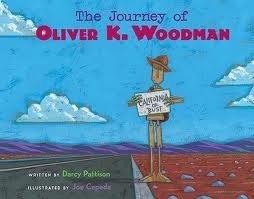 My picture book, THE JOURNEY OF OLIVER K. WOODMAN, has an interested “Easter egg.” The illustrator, Joe Cepeda, does a self-portrait in many of his books. Look for him on the Utah 4th of July parade. He’s behind the convertible wearing an orange shirt; on his shoulder is his son waving an American flag; next to him in a green shirt is his wife.
Coloring sheets, book trailers, puzzles, games, teacher’s guides. Anything extra you offer is icing on the cake! For my book, PRAIRIE STORMS, I created several book trailers while working with kids and they are on the book’s page. There’s also a value-added book trailer.
“Sounds of the Prairie” Book Trailer:
A dog says, “Bow Wow.” A cat says, “Meow.”
A groundhog says, “???”
A skunk says, “???”
In fact, few people have heard a skunk or groundhog. But you can hear them now!
Listen to the sounds made by these prairie animals.
If you can’t see this video, click here. Buy Prairie Storms here.
EXTRAS
Once you have the basic page set up, you can also add a CURRENT RELEASE and COMING SOON pages, if you want. If you’re committed to keeping these up to date!
I Don’t Have Any Books Yet
What if you don’t have any books yet? Do you have any publications? If so, list the most important and most recognizable of those. If not, why not offer a sample of your writing? That’s what Ruth McNally Bradshaw and Greg Pincus did–and they got contracts. If that’s not for you, then think about what else readers want that you could put here. For example, readers and fans want to know your literary tastes. You could start a book club, post reviews, list your Top 10 Favorite books, or something similar. Be creative and make it fun. Update often, so readers come back. Don’t ignore this page! Make it something that will connect with your audience in some way.
Leave a comment with a link to a great BOOKS Page. What is different or exciting about this page? How does this example help others understand what to put on their own BOOKS Page?
March 6, 2014
Author Website Tech: CPanel Basics
READ A SAMPLE CHAPTER
.goodreadsGiveawayWidget { color: #555; font-family: georgia, serif; font-weight: normal; text-align: left; font-size: 14px;
font-style: normal; background: white; }
.goodreadsGiveawayWidget img { padding: 0 !important; margin: 0 !important; }
.goodreadsGiveawayWidget a { padding: 0 !important; margin: 0; color: #660; text-decoration: none; }
.goodreadsGiveawayWidget a:visted { color: #660; text-decoration: none; }
.goodreadsGiveawayWidget a:hover { color: #660; text-decoration: underline !important; }
.goodreadsGiveawayWidget p { margin: 0 0 .5em !important; padding: 0; }
.goodreadsGiveawayWidgetEnterLink { display: block; width: 150px; margin: 10px auto 0 !important; padding: 0px 5px !important;
text-align: center; line-height: 1.8em; color: #222; font-size: 14px; font-weight: bold;
border: 1px solid #6A6454; border-radius: 5px; font-family:arial,verdana,helvetica,sans-serif;
background-image:url(https://www.goodreads.com/images/layo... background-repeat: repeat-x; background-color:#BBB596;
outline: 0; white-space: nowrap;
}
.goodreadsGiveawayWidgetEnterLink:hover { background-image:url(https://www.goodreads.com/images/layo...
color: black; text-decoration: none; cursor: pointer;
}
Goodreads Book Giveaway
The Girl, the Gypsy and the Gargoyle
by Darcy Pattison
Giveaway ends March 21, 2014.
See the giveaway details
at Goodreads.
Enter to win
This month-long series of blog posts will explain author websites and offer tips and writing strategies for an effective author website. It alternates between a day of technical information and a day of writing content. By the end of the month, you should have a basic author website up and functioning. The Table of Contents lists the topics, but individual posts will not go live until the date listed. The Author Website Resource Page offers links to tools, services, software and more.
CPanel Dashbaord for Your Author Website
Seven years ago, when I first bought my domain and set it up with AnHosting.com, I was lost. I wandered around the Internet for a weekend, trying to figure things out–and crying, thinking I had made a big mistake. Fortunately, it’s much easier now, with loads of tutorials available.
First, most hosting companies will be using CPanel, which is a dashboard that allows you to control which programs are loaded onto your site. You’re going to love it.
For AnHosting, login easily this way: https://domain.com/cpanel
For Bluehost, login easily this way: https://login.BlueHost.com.
For other hosting companies, see their documentation for how to login.
Get Acquainted with the CPanel
Take a look around the CPanel, it is a powerful tool to manage your domain:
Tutorials and Wizards. Notice that at the top are tutorials and videos to help you use the CPanel. Support is abundant and free. Take the time to look through the tutorials and try out the Getting Started Wizard.
Tutorials and Getting Started Wizard. (Click to enlarge.)
Frequently Accesses Areas. To make it easy to find frequently used items, CPanel provides a special box on the left-hand side.
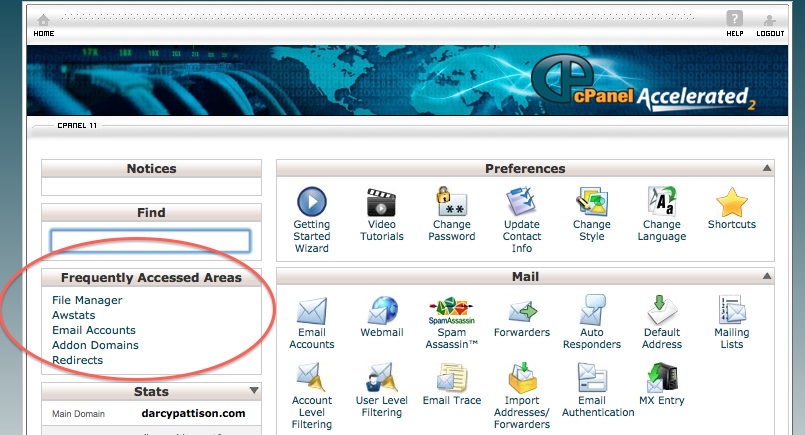
Frequently Accesses Areas of the CPanel. (Click to enlarge.)
The File Manager is like Mac’s Finder or PC’s Explore, the place where you will find all the files for your website(s). This is the heart of the site, the place where all your files reside. File Manager lets you locate, add, delete or modify files.
AWStats are statistics provided by the CPanel. You’ll want to know how many people visit your site. Usually, you’ll add outside programs to your website, but you can always come back here to access the server logs.
Email Accounts are those which go through your website. For example, mine is darcy@darcypattison.com (Email me and let me know what questions you have about author websites!) AddonDomain and ReDirects are intermediate to advanced skills, so don’t worry about them yet.
Scroll on down the CPanel page and you’ll see other options for setting and maintaining your Domain. I’ll just highlight a couple.
Databases. Many programs will require a database, including WordPress, but it’s handled automatically and you never have to mess with it. But CPanel gives you access, should the need arise.
Software and Services. The most useful function on the CPanel is the Softaculous. Take some time to look at all the programs that can be automatically added to your website through Softaculous. But wait to set up the WordPress, because there are some tricky settings that I’ll walk you through.
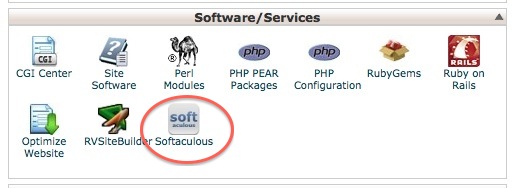
CPanel Software. Softaculous offers you the opportunity to install a wide variety of programs with a single click.
Join me in August, 2014 the Boston area for a one-day workshop, BUILD YOUR AUTHOR WEBSITE. I’ll also be teaching a Novel Revision Retreat and a one-day Picture Book Workshop. Get the details here.
Advanced. As it says, these are advanced functions. However notice that there is a button here to “Submit a Support Request.” If your hosting company supports this, it’s an easy way to get help.
You can’t break the website or the CPanel. Really. Click around and see what’s what. When you’re ready, we’ll set up email accounts and upload a WordPress installation to your site.
FAQS from BlueHost and AnHosting
AnHosting.com
Login for most domains: https://domain.com/cpanel
Information on CPanel
CPanel Demo
BlueHost.com
How to access BlueHost.com’s CPanel
Here’s a January, 2014 update on the BlueHost Dashbaord, including where to find the CPanel
If you can’t see this video, click here.
Use the Resource Page to Find Themes
Tech Assignment Reminder: You should be looking at WordPress themes (See the RESOURCE PAGE) which are the files that determine how your site looks. Also, check out other author websites to see what you like–and don’t like. One way to start is to go to a professional organization for authors and click through their membership links. You might want to start a Pinterest board of really great author websites to refer to as you build your site. Either way, it’s wise to take some time at the beginning here to look around and start to form an opinion about what works and what doesn’t, what you like or don’t like and truly wonderful sites you’d like to imitate. Remember, there are no rights or wrongs; there are only websites that help or hinder a career.
And take your time. You don’t need to decide on a theme for a week or two. While you CAN change themes often, you probably don’t want to. Branding a site with a certain look and feel brings back readers. It’s best to take a good look around before you settle for something.
Society of Children’s Bookwriters and Illustrators (SCBWI.org) Speaker’s Bureau
Romance Writers
Alliance of Independent Authors
Author’s Guild
I’d love to know what author websites you admire the most? Which do you–as a fan–visit the most often? What do you GO BACK for? That’s the real question–what will keep a fan coming back to your site?


