
Michael Lopp's Blog, page 46
February 9, 2014
Context Reports
I’ve been hating on status reports for a long time and it comes from my first knee-jerk reaction when my manager asked for one. My unspoken thought was, “Why, wait, what?” I didn’t understand big companies, I didn’t understand politics and bureaucracy, all I understood was that it felt like a waste of time to document the things I’d already done. I didn’t understand why.
After a couple of decades of preaching status report hate, they are still around. Leads are giving them clever new names, they are asking for them on wikis instead of email, but the core concept is there. Leaders at a distance are trying to measure what is going on and rather than figuring out why communications in their teams are breaking down, they flex their managerial muscle and dictate their terms: Each week, every week at the same time, please document what you’ve done, please explain what you’ll do next week, and if you want please note any concerns.
I would like to note a concern. Yes, I understand that humans don’t instinctively communicate well at scale, but as I noted elsewhere I believe email-based status reports are the clearest and best signs of managerial incompetence and laziness. I am concerned that in two decades of leadership, status reports are still around. We’ve invented innumerable new mediums of communication, but crap managers are still asking the team for information a good lead should be able to acquire via other productive and respectful means.
This morning I realized I might have a productive way to twist status reports into a useful exercise. Let’s call them context reports. A status report documents actions both completed and planned. A context report documents the reason why (and to a lesser extent how) you’re completing these actions and I suspect this information is far more useful to everyone involved. Let’s try it out by transforming common status report items into context report bullets.
Status: Interviewed Bob for the engineering positioning.
Context: Continued to interview candidates because our front-end engineering team is currently 1/3rd the size of our platform team which means we can’t put a well-designed face on most of the functionality we’re building.
Status: Closed and verified 23 bug reports.
Context: 70% of the 23 bugs I fixed this week were P0 and we’re two weeks from shipping which means there is no way we’re shipping.
Status: Met with the product management team.
Context: Twice a year meeting with product management team where they ask for what they can’t have, we say no, they promise resources they don’t have, and everyone gets frustrated.
My example statuses are deliberately bland and my example context is also deliberately snarky, but my point is the same: which gives everyone involved more value?
Context describes “the circumstances that form the setting for an event, statement, or idea, and in terms of which it be fully understood and assessed.” It’s more for you, the person saddled with capturing status, but if you’re required to build these reports, why not make an exercise where you are taking the time to understand why you do what you do?


February 6, 2014
Inbox Reboot
At some point in the last year there was too much email.
I’ve considered myself a competent manager of email and to-dos for much of my career, but the quantity of email that needed my attention exceeded a heretofore unknown ceiling and I began to understand how the smallest parts of my inbox policy could have a large affect on my reputation.
In this piece, I’ll explain the flawed system that worked nicely me for for decades, how I detected its failure, and the new system that I’ve built that is currently keeping me sane.
A PRE-EMPTIVE ASIDE TO THE GTD NERDS OUT THERE. Yes, I know David Allen wrote this phenomenal book 12 years ago that would have saved me a lot of pain, but as an engineer I am afflicted with a wonderful disease called “Not Invented Here.” This disease forces me to ignore the helpful advice of others. It requires me to often build my own tool when there are plenty of pre-existing tools already built. You may think this disease is inefficient, but I find it educational. If GTD is your life blood, you will likely find little value in the piece, so go read this amazing Nobel Prize acceptance speech.
Decades of Email
My email system has been simple by design. What I discovered over the years is that whenever I added unnecessary complexity to my process, I also tended to create more work than productivity. Years of following this simple design resulted in the following setup:
All mail is contained within my inbox folder. This should set off all sorts of alarms for you. Of course, you have too much email, Rands – it’s all in your inbox. Calm down. I’m a professional. The “every mail in my inbox” policy is accompanied by the following rules and assumptions:
Aggressive pruning of noise via mail rules. To increase the signal of my inbox, I’ve developed a set of mail rules that pull non-essential emails into sub-folders. Noisy mailing lists are a primary culprit. By pruning out the noise, the probability of an email in the inbox being useful is higher. This includes rules like:
Automated highlighting of important emails. With a good chunk of the noise removed from my inbox, important mails tend to have a small handful of similar characteristics, and these characteristics are captured in additional mail rules:
Mails from humans I care about.
Mails with me and only me in the To: line.
Mails with me in the To: or CC: line.
Within whatever email program I’m using, these types of mails are highlighted in some fashion so I can know at-a-glance that they are likely higher in priority.
The last two rules aren’t rules, but assumptions. My traditional inbox strategy made two large assumptions:
Search in mail works. With everything sitting in my inbox, search must work effortlessly. I must be able to remember, “Who said that thing about the thing?” and run a search and reliably find the appropriate email.
To-dos can be equally tracked in email and a productivity app. In hindsight, it seems like an obvious flaw, but I’ve always worked under the assumption that I can track a follow-up equally well within email (via flags or other tagging mechanism) as well as within my productivity system, which for years was Things until I recently moved to Asana. In general, smaller tasks that lacked subtasks would remain in email, whereas large tasks would land in the productivity system. More on this flawed assumption shortly.
For years this system has worked. You can look at those simple rules and assumptions and easily find structural and systematic flaws. But even with those flaws I’ve had a modicum of success in my career, and this flawed system kept track of important projects, kept me in touch with my teams, and kept me in the know for many years. Your system is likely better, fancier, and more efficient, but I had proof my system worked. Until last year.
The Little Things
First, an important word about priority. I use the following system to prioritize work in my head:
P0: Heinous. Must be handled immediately. Top of the list. Major repercussions if not resolved promptly.
P1: Important. Needs to be handled soon. Major repercussions if not resolved, but not heinously on fire.
P2: Somewhat important. Likely sans deadline. No one foaming at the mouth. Still needs to be finished in a reasonable amount of time. This is the majority of the work in the world.
P3: Nice to have. Someone somewhere needs this to be done, but if doesn’t happen, we’re likely ok.
With my rules and assumptions in place, my inbox routine was:
When I had time for email,
I would read everything that was unread, and,
If I could act on it immediately I would (mostly), but,
If the next step was too big for the moment, I would either move it to the productivity system or leave it in the inbox for future consideration.
There are three kinds of email:
Useless crap
Information for later use
Actionable in some fashion.
At my historical usual arrival rate of actionable mails per hour, this process works. Checking email every so often, I would use the unread flag as a means of understanding both whether I’d read the mail and where I needed to act on them. Actionable (read: easy) P0s and P1s were crushed. Larger high priority issues were often pushed to the productivity system for longer term tracking. Lower priority issues remained in the inbox for short-term handling. Rinse. Repeat. Mostly everything handled… for years.
At a substantively higher arrival rate of actionable mails, the system fails in both obvious and devious ways:
At a high rate of actionable email arrival, this system is unacceptably lossy because the inbox is growing at fast rate. P0 issues and P1 issues were mostly being handled (keyword: mostly – keep reading), but those P2 and P3 issues were dropping at an unacceptable rate. Does this mean I was prioritizing incorrectly? No. It was ok for a few of those P3s to drop and even some P2s, but when the majority of these fell through, the message I sent to the world was: lossy.
Search in mail is fine, it’s my brain that sucks. On top of the exploding inbox was the fact that I believed I could keep all of the state and context of my inbox in my head, and if I couldn’t, I’d search. Again, that works at a certain arrival rate, but when the inbox explosion occurred I was no longer really reading all the mails. Which meant I didn’t have context, and more and more often searched my inbox for things I didn’t know. Inefficient.
Unread doesn’t mean shit. In a time of inbox explosion, the unread flag doesn’t mean a thing. It’s the smallest piece of useless data. All it says is, You were here at some point and maybe you did something. I really don’t know. I would furiously get through my unread mail, chasing the fake goal of getting to zero unread messages… like it meant something. It doesn’t. Again, inefficiency.
It is the combination of all these unscalable flaws that is the most damning and obvious failure. As it became clear that my tried and true system was no longer working, I worked harder… using the same system. This meant that as the email continued to increase, I searched more – poorly. I started to try different tagging mechanisms. New folder and inbox strategies were adopted, then dropped, and all this thrash did was exacerbate the core problem: lossiness. What was a steady loss of P2s and P3s transformed into the loss of P0 and P1 issues, which leads us to the final rule:
Everyone knows when you drop a P0.
Inbox Close-to-Zero
As a leader, you define your reputation all the time. You’d like to think that you could choose the moments that define your reputation, but you don’t. They are always watching and learning. They are always updating their model regarding who you are and how you lead with each observable action, no matter how large or small.
Your inbox policy is full of observable action. How quickly does he respond? Did she read the whole mail? Who did they CC:? Why does he sign some mails, but not others?
Each micro-transaction I performed in my inbox had the ability to collectively affect my reputation as a leader. Worse was the realization that if P0s could fall through the cracks, how many P1, P2, and P3s did I drop? The answer is a painful “a lot.”
With these two punches to the stomach in mind, I rebooted my inbox during the holidays with these fixes. Some are essential and some are personal, but I believe all are valuable.
Anything more than ten or so emails in your inbox might as well be a bajillion. I now practice inbox Close-to-Zero. As each email arrives, I act if I need to and then I archive and if I can’t act immediately, I determine if I am likely to act today. If the answer is yes, I leave it in my inbox. If the answer is no, it moves to Asana and is then archived.
Stop hoarding. Start archiving For mails where I don’t need to act, I read the whole mail and move it to my archive folder. If I can’t read the whole mail, but need to, it stays in the inbox. Otherwise, the mail is sent to the archive. The goal with both this and the previous rule is to decrease cognitive load. I should be able to look at my inbox and have a good understanding of what is important today. Not yesterday, not a week ago, but today.
Use conversation/threaded view. I’ve turned this feature on and off in my various email clients over the years, mostly because of a perceived performance hit when it’s enabled, but it is now remains permanently on. With my aggressive archiving policy and piles’o’email, the conversation view gracefully brings back all the context I need when I invariable dig into my archive to refresh my memory.
A strict to-do transfer policy. As I alluded to above, the protocol by which a mail becomes a to-do is well defined. Just about everything that can’t be acted on immediately is placed in the to-do system, except for a short list of mail that I’ve planned to handle that day. If those mails exist at the end of the day, they are moved to Asana. No exceptions.
Small Heroic Acts of Efficiency
Your day as a leader is full of very small decisions. Speak up in that meeting? Embrace serendipity and talk to the random person in the hallway? Answer that email? These very small decisions collectively send signal to the company regarding who you are and what you believe. Your team is watching you – always – because you are their leader.
An efficient inbox policy doesn’t make you a good leader. In fact, it’s expected. Whether you like it or not, progress often stalls while they’re waiting for your response. You, as a leader, have the ability to create a huge amount of organizational consternation simply by not getting completely through your inbox efficiently on a daily basis.
As a nerd afflicted with “Not Invented Here” I like to architect and build systems from the ground up because I tell myself that I like to learn, but I’m often simply stubborn. Uh, I could build that. This stubbornness unfortunately often makes me beholden to the things I build because, well, I built them. As a leader, I need to willing to throw away cherished things that aren’t capable of evolving with me and I need to listen to the helpful advice others so I can better focus on getting shit done.
January 31, 2014
Killing Mental Friction
Brief productivity update. As I noted at the end the year, I moved from Things to Asana. After the initial excitement and eager eager that accompanies any new bright and shiny product, my Asana usage tanked. The issue? First, I was using it like I used Things and, second, I didn’t know Asana.
As I’ve written about before, my personal workflows are bereft of complexity because each sliver of complexity creates mental friction and aggregate excess mental friction is why I abandon tools. My initial Asana workflow was an exact mirror of Things – the reason, I didn’t want to reinvent my flow. After a week, it was clear from increasing that with Asana that I was forcing my square-peg workflow into a round product.
After several weeks of watching Asana slowly gather digital dust, I rebooted. First, I watched every single Asana video available. Oh, it all revolves around the inbox. Ok. Second, I became the master of all Asana keyboard shortcuts. This might well be a nerd thing, but part of the reason I knew Asana is built for me is they’re big on keyboard shortcuts and, for the nerd, the single biggest killer of mental friction is memorized keyboard shortcuts. Lastly, and as you’ll read in an accompanying forthcoming article, I reinvented and rebuilt my workflow in both my email client and Asana. Accompanied with a better understand of Asana’s features, this blank slate approach allowed me to build around Asana’s feature set. Two weeks later and this revamped workflow feels familiar and productive.
My workflow is a work in progress. I’m still experimenting, but, then again, so is Asana. This week they released a Calendar feature. I haven’t extensively used the feature, but I sleep better at night knowing my tools are actively thinking about how to grow and evolve with me.
January 25, 2014
Enhanced Presenter Display Options
I continue to cautiously use Keynote 6 as my primary presentation design tool. When possible, I also run my presentations off Keynote 6, but this is function of whether the venue will allow me to use my MacBook (usually) or, if not, whether they have Keynote 6 on their presentation machine (usually not).
While there are many other features still missing from Keynote 6, my biggest complaint has been the lobotomization of presenter display features. Specifically, Apple removed the ability to fully customize the presenter (not primary) display and, unfortunately, many presenters learn this when they’re up on stage running their first Keynote 6 presentation and they realize their configured presenter display – the display they use to keep the presentation in their head – has been reduced to a bare set of options where you can enable/display the current slide, next slide, presenter notes, the time, and the elapsed time.
For me, I often place most of my context in my presentation notes. These are notes the audience never sees, but I use to keep track of the narrative – especially when a talk is new. This means I usually make the presentation notes ginormous because that’s what I need to see. My actual slides are usually a couple of words or a photo, what I need is scalable presentation notes.
This is why the recent 6.1 Keynote update piqued my interest – “enhanced presenter display options”. Sweet. A quick scan of the different Mac sites out there revealed absolutely no detail regarding this feature. In fact, most of the sites uselessly parroted the “What’s new” section of Keynote 6; adding zero additional research of their own. Nice job.
Fortunately, I had Keynote 6 on a different machine so I was able to compare and contrast presenter display options and I’m sad to report the following. By enhanced presenter display options, I believe Apple has added the following to the presenter view… a button:

This button serves a single function. When presenting, it swaps the two (or more) displays that either show the slide view or the presenter view. Now, as a speaker, I can attest to the need of this button. It’s the first thing to go wrong with a presentation – the audience sees your speaker notes, but it’s a feature that has existed in Keynote for a long time: to swap the displays you hit the X key. This and a slew of other handy presenter display options are visible when you select the ? button above or select the ? in the toolbar above.
Not sure what annoys me the most: the useless description of the feature, the absence of any legit reporting on said useless feature, or the fact this really isn’t a feature. It’s a button.
January 24, 2014
A Conference Call in Real Life
While I believe we have to continue to figure out how to integrate remote folks into teams, this video hilariously captures so many of the little micro-annoyances of remote workers.
January 14, 2014
Crafting Purposefulness
Sally Kerrigan on A List Apart:
Because writing—that first leap into taking your idea and making it a Thing People Read—isn’t really about wording. It’s about thinking. And if you can tell the difference between an article that knows what it’s about and one that exists purely to sell ad space, then you’re pretty good at that already.
Start with something messy, get to the point, get an editor, and make it good. Kerrigan’s excellent advice finishes with one of my favorite lines in her piece, “This is what crafting purposefulness looks like.”
January 12, 2014
In 1915 Cadillac explains, “The Penalty of Leadership”
Via Daring Fireball:
The leader is assailed because he is a leader, and the effort to equal him is merely added proof of that leadership. Failing to equal or to excel, the follower seeks to depreciate and to destroy – but only confirms once more the superiority of that which he strives to supplant.
January 11, 2014
On Recruiting Engineers
… Engineers are tired of being spammed by recruiters and rarely respond to their emails.
January 10, 2014
Appreciated, but Never Seen
I’ve been collecting videos that represent views of professions and acts that I’ve appreciated from a far, but have never really seen:
Beer is a living breathing (creepy) thing:
Landing an Airbus 380 at SFO:
A camera on a hockey referee’s helmet:
And a football quarterback:
Front row seats for a NASCAR crash:
And jumping from a very high spot:
January 7, 2014
A Story Briefly Told
Sometime during the Christmas of 1993, my wife scared the shit out of me in my office. She achieved this by walking up behind me and putting her hands on my shoulders while I was playing Myst for the first time. I no longer recall where I was in the game, what I remember was I was deeply lost in the evolving narrative of the game – I was on this island, strange events were occurring, and I was trying to figure them out before… before what? I don’t know what was going to happen – I was freaked out and more so than when my wife’s hands landed on my shoulders and I leaped out of my chair.
In 1993, Myst was a technological feat. It was effortless blend of pre-rendered images with just enough Quicktime video to give you the impression the world was alive. The arrival of Myst drove adoption for the then-nascent CD-ROMs, but while the technology was amazing, what cemented Myst in my memory was how I became engrossed in a story that was barely being told. It was being experienced.
The reason I’ve been think about this is because sometime during the Christmas of 2013, my wife scared the shit out of me again. She achieved this by simply rolling over in our bed while I was playing The Room 2. The Room and The Room 2 are iPad games. The premise of the first game is extremely simple: you’re in a dark room and there is a safe. On top of the safe, is a note, some books, and a smaller chest. Your goal: via puzzles find the narrative.
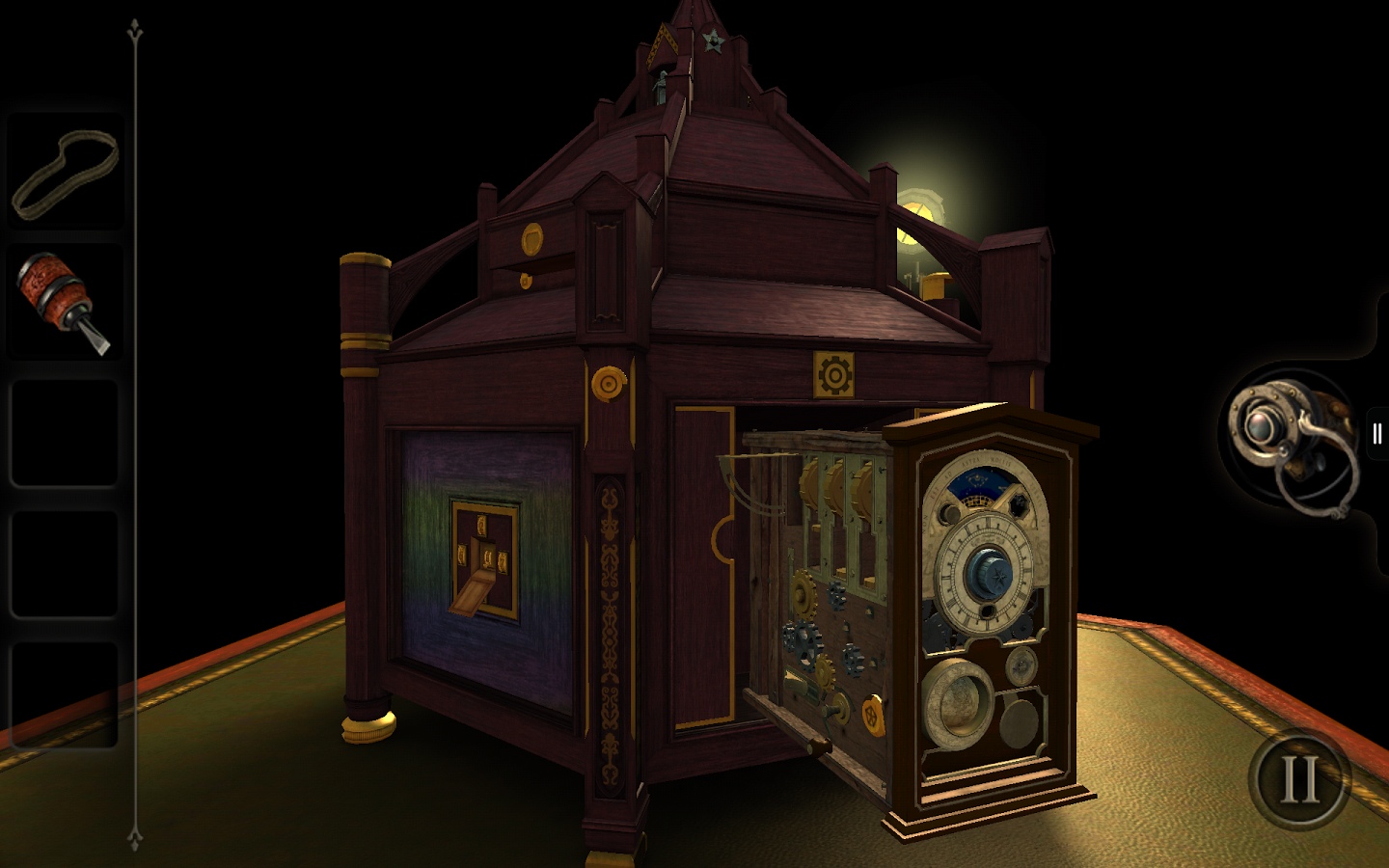
The puzzles are not complex. You’re going to figure them out by paying attention, noticing details, and experiment. Again, what drives the game, like Myst, is the evolving narrative – what the hell is going on here? Unlike Myst, The Room began on a smaller scale, but with vastly better technology at it’s disposal. If you think there are no truly great iPad games that show off the hardware and the touch interface: you are wrong and for a mere $.99 you can correct this misconception. But to understand how my wife freaked me out, it’s going to cost you another $4.99
See, the success of The Room allowed developer Fireproof Games to evolve the story in the sequel. There are many rooms with many different kinds of puzzles and in an effort to keep this brief review spoiler-free – there is something else. It’s a thing which is hinted at, it’s hiding in the shadows, and while you might never see it, it’s going to freak you out.
Michael Lopp's Blog

- Michael Lopp's profile
- 144 followers

