Michael Hyatt's Blog, page 174
March 11, 2013
How to Do More of What You Love and Less of What You Don’t


Do you have a long-term delegation strategy? This is the secret to moving more into “the zone” and getting out of those activities you don’t enjoy or don’t do well.

Recently, I recorded two podcasts on the subject of delegation. The first dealt with the principles of delegation. The second suggested how you might delegate even if you don’t have a staff.
In these podcasts I suggested the primary reason to delegate is that non-delegation doesn’t scale. It is not sustainable. This is why so many people feel overworked, overwhelmed, and burned out.
But there is an even more important reason to delegate:
To enable you to focus on what you do best in order to maximize your impact.
I touched on this at the end of the first podcast, but I want to elaborate here. I think this is something we all need to think through as leaders if we are going to be effective in our roles.
Here’s the way I think about it. I do some things well and some things not so well. The same is true for you. If you try to be the jack of all trades, you will likely be master of none.
When I am operating in my strengths zone, I am happy and productive. The quality of my work goes up, and I increase my impact. Equally important, I leave space for my team members to make their greatest contributions.
Conversely, when I don’t do this, I am stressed and unproductive. I run out of margin. As a result, the quality of my work suffers. And, I deprive others of making their best contributions. They don’t get the opportunity to express their strengths.
If we are going to stay focused and become even more effective, we have to have a delegation strategy. Mine consists of three components.
Identify your strengths. My greatest strengths are in writing, speaking, and being the spokesperson for my brand. It is, frankly, a very narrow range of activities. What are your strengths? If you had to limit these to two or three, what would they be?
Offload everything else. This can’t usually happen immediately. It’s taken me almost two years, and I am still not done.When I started my entrepreneurial adventure I was devoting more than half my available work hours to administrative activities. This included things like:
Reading and responding to e-mail
Managing my calendar
Booking appointments
Making travel arrangements
Paying the bills
Collecting money
Negotiating contracts
Writing sales copy
Researching vendors
Designing marketing materials
And the list goes on. The point is I was doing a lot of stuff others could have done and done them better than I could.
Once I realized this, I began slowly hiring part-time assistants to help me. I started by giving up the stuff either I wasn’t good at or didn’t enjoy doing.
Each time I confronted a task, I asked, Is this something someone else can do or is it something only I can do?
As a result of this process, I have hired the following people in roughly this order:
A web developer to handle all the technical details of my blog, set up new modules I wanted to add (e.g., e-commerce), and to write custom code for components we couldn’t find elsewhere.
A virtual executive assistant to read and filter e-mail, manage my calendar and schedule appointments, make my travel arrangements, and handle other projects as assigned.
A bookkeeper to pay bills, invoice clients, process payments, balance accounts, and provide various financial reports. This person also handles all my personal finances.
A booking agent to pitch me to event planners, answer questions related to my speaking, negotiate speaking fees and travel reimbursements, and collect the money.
Managers (in my case, I have two) to manage my career, advise me on strategy, and oversee everyone and everything else.
A graphic designer to create the graphics we use for new products and marketing materials.
This year, I have added some additional team members to support Platform University, including an overall project director, a video producer, and a customer support rep.
Interestingly, not one of these people is a paid employee. They are all independent contractors with other clients. Some work a few hours a week; some up to 20. But nobody is full-time, other than me.
If you were going to add people, who would you add first? second? and so on? Personally, I don’t think the resources show up until you get clear on what you need. (You might want to re-read that sentence again.)
Get even more focused. Once I had the basic positions in place, I started asking myself, Are there aspects of my strengths that could be delegated to others? As I said, writing, speaking, and being the spokesperson for my brand are my strengths. But are their aspects of these activities others could do, so I can focus on those aspects only I can do.
I started by deconstructing my creative process. I discovered each project, whether it’s a blog post, a podcast, a book, a speech, a video segment, or a screencast, has four phases:
Phase 1: Researching the content
Phase 2: Creating the content
Phase 3: Packaging the content
Phase 4: Promoting the content
For me, the most obvious candidate for delegation was Phase #3. For a podcast, for example, packaging involves editing and “sweeting” the audio, generating the final audio file, adding the MP3 tags, uploading the file to my media server, creating the show notes (i.e., a blog post), and scheduling the post.
I can do all this, of course—in fact, I did it all for the first year—but so can many other people. The problem is I could use this time for researching and creating new content. Packaging is not the best and highest use of my strengths.
As a result, in January I hired a podcast producer. Now I simply upload the recorded but unedited files to Dropbox, and he takes it from there. This has saved me roughly a half a day a week. It’s one of the best decisions I have made.
Similarly, I just adopted the same basic model for my blog posts. I focus on research and creation of the content. Once I have finished writing my post in ByWord, I save it and upload it to Dropbox. My editor takes it from there.
She copy-edits and proof-reads the post, inserts related links, finds a relevant photo, formats the HTML, adds the metadata, optimizes the post for SEO, and schedules it for publication.
I am still handling the promotion of my content (i.e., Phase 4 above) via my social media channels, but I plan to delegate this sometime this year as well. Eventually, I also want to delegate some portion of the research (i.e., Phase 1).
Again, the point is to allow me to achieve a narrower field of focus, so I can be more productive and happy doing what I do best and adding the most value possible.
What about you? How could you get even more focused? You might want to deconstruct your strengths into their logical phases or components. Are their aspects of your strengths you could eventually delegate?
The one real limitation you and I face in leadership is our time. It is truly a finite resource. We can’t buy or borrow more of it—unless we delegate. To do this effectively, we need a long-term delegation strategy. This will enable us to maximize our strengths and increase our impact.
Question: What is your long-term delegation strategy? You can leave a comment by clicking here.








March 8, 2013
3 Ways to Make Your Products Remarkable
At the Launch Conference a few months ago, I had the opportunity to sit down with New York Times bestselling author, Lysa TerKeurst and interview her about her concept of “Remarkable Marketing.” What she had to say is applicable to anyone who is trying to get their message heard.
If you can’t see this video in your RSS reader or email, then click here.
According to Lysa, the most important thing you can do in marketing is create powerful conversations around your product or service. In other words, make your products remark-able.
How do you do this? She suggests three ways:
Identify the felt need. The time to consider the marketing is in the concept phase. At this point, you must study your tribe and their felt needs. A felt need is either the question they are asking or the problem they want solved.
Formulate a promise. This is the answer to their question or the solution to their need. Your job as a marketer is not to answer every question or solve every problem. You have to limit your focus to the questions and problems they have.
Focus on your value. No one is looking to buy your products per se. Instead, they are looking to get their needs met. As marketers, that means you have to frame your product as the answer to their question or the solution to their problem.
From this three-step process comes a series of value statements. Here are a few examples from Lysa’s newest book, Unglued, which is also a New York Times bestseller:
Know with confidence how to resolve conflict in your important relationships.
Find peace in your most difficult relationships as you learn to be honest but kind when offended.
Identify what type of reactor you are and how to significantly improve your communication.
Respond with no regrets by managing your tendencies to stuff, explode, or react somewhere in between.
Gain a deep sense of calm by responding to situations out of your control without acting out of control.
According to Lysa, these “value statements” should appear on the product, in our marketing copy, and whenever we have the opportunity to talk with our prospects.
While Lysa primarily talks about marketing a book, the principles apply to any product or service.
She goes on to talk about the importance of taking control over what you can control and not fretting over the rest. Making our products remark-able is one of the best ways to do just that.
Question: What makes your product or service remark-able? You can leave a comment by clicking here.



March 6, 2013
#044: How to Overcome the Resistance [Podcast]
In this episode, I talk about how to overcome the Resistance. Steven Pressfield coined this phrase to describe that invisible, destructive force that opposes you any time you try to start a new project or make an improvement in any area of your life.

I spoke on this topic at the recent Platform Conference, and the response was tremendous. So I wanted to share some practical counter-measures for dealing with the Resistance in your own life and work.
Click to Listen
Podcast: Subscribe in iTunes | Play in browser | Download
In order to deal with the Resistance, you have to first understand what it is. It has four attributes.
Attribute #1: It is invisible.
Attribute #2: It is internal.
Attribute #3: It is insidious.
Attribute #4: It is infallible.
But what can you do about it?
You can only defeat the Resistance by understanding its three primary strategies and applying appropriate countermeasures.
Strategy #1: Fear. The typical response to this strategy is procrastination.
The countermeasure is to START.
Strategy #2: Uncertainty. The typical response is distraction.
The countermeasure is to FOCUS.
Strategy #3: Doubt. This usually occurs at the end of a project, and the typical response is to quit and leave the work unfinished.
The countermeasure is to FINISH.
Defeating the Resistance is essential to your growth, but more importantly it is essential to your transformation. Who you are becoming is more important than what you are doing.
Listener Questions
Jeff Sanders asked, “How do you keep your own creativity from becoming another form of the Resistance?”
Jen McDonough asked, “What kinds of outside things do you bring into your life to help fight the resistance?
Joanna Holman asked, “How do you know what you are facing is Resistance rather than a sign that what you are doing is not the right thing for you or you are doing too much and need to back off?”
Marc Schelske asked, “What has helped you to stop the cycle of perfectionism and get the product out the door?”
Sue Detweiler asked, “What are ways that we personally create Resistance and sabotage our own progress?”
Travis Dommert asked, “How does the Resistance work in the presence of a group?”
Special Announcements
I want to remind you about my 21-session audio course, entitled “Get Published.” It’s everything I learned about publishing in my thirty years in the publishing industry, most recently CEO of Thomas Nelson, a literary agent, and two-time New York Times bestselling author.
If you’ve ever thought about writing a book but don’t know where to start, or if you already have a book but want to do everything you can to make the biggest splash you can in the marketplace, this course is for you.
Platform University continues to do amazingly well. Yesterday, we posted a killer Master Class with Jeff Goins. It’s all about “Going Pro.”
Jeff has just recently done this with his own platform. It is now supporting him full-time, and he explains in the class how he did it in only two years.
In my next podcast, I’ll be taking you “Inside My Toolbox.” I’m going to share with you all the tools I use on a daily basis.
If you have a question on this subject, please leave me a voicemail message. This is a terrific way to cross-promote YOUR blog or website, because I will link to it, just like I did with the callers in this episode.
Episode Resources
In this episode I mentioned several resources, including:
Book: The War of Art by Steven Pressfield
Book: Do the Work by Steven Pressfield
Book: A Million Miles in a Thousand Years by Donald Miller
Book: The Dip: A Little Book That Teaches You When to Quit (and When to Stick) by Seth Godin
Course: Get Published
Membership: Platform University
Podcast: Episode 28, “Reengineer Your Morning Ritual”
Software: Evernote
Quote: W.H. Murray on Commitment
Show Transcript
You can download a complete, word-for-word transcript of this episode here, courtesy of Ginger Schell, a professional transcriptionist, who handles all my transcription needs.
Subscription Links
If you have enjoyed this podcast, please subscribe:

iTunes

Zune

RSS
Your Feedback
If you have an idea for a podcast you would like to see or a question about an upcoming episode, e-mail me.
Also, if you enjoyed the show, please rate it on iTunes and write a brief review. That would help tremendously in getting the word out! Thanks.
Question: How has the Resistance shown up in your life? What have you learned about it? You can leave a comment by clicking here.


044: How to Overcome the Resistance [Podcast]
In this episode, I talk about how to overcome the Resistance. Steven Pressfield coined this phrase to describe that invisible, destructive force that opposes you any time you try to start a new project or make an improvement in any area of your life.
I spoke on this topic at the recent Platform Conference, and the response was tremendous. So I wanted to share some practical counter-measures for dealing with the Resistance in your own life and work.
Click to Listen
Podcast: Subscribe in iTunes | Play in browser | Download
In order to deal with the Resistance, you have to first understand what it is. It has four attributes.
Attribute #1: It is invisible.
Attribute #2: It is internal.
Attribute #3: It is insidious.
Attribute #4: It is infallible.
But what can you do about it?
You can only defeat the Resistance by understanding its three primary strategies and applying appropriate countermeasures.
Strategy #1: Fear. The typical response to this strategy is procrastination.
The countermeasure is to START.
Strategy #2: Uncertainty. The typical response is distraction.
The countermeasure is to FOCUS.
Strategy #3: Doubt. This usually occurs at the end of a project, and the typical response is to quit and leave the work unfinished.
The countermeasure is to FINISH.
Defeating the Resistance is essential to your growth, but more importantly it is essential to your transformation. Who you are becoming is more important than what you are doing.
Listener Questions
Jeff Sanders asked, “How do you keep your own creativity from becoming another form of the Resistance?”
Jen McDonough asked, “What kinds of outside things do you bring into your life to help fight the resistance?
Joanna Holman asked, “How do you know what you are facing is Resistance rather than a sign that what you are doing is not the right thing for you or you are doing too much and need to back off?”
Marc Schelske asked, “What has helped you to stop the cycle of perfectionism and get the product out the door?”
Sue Detweiler asked, “What are ways that we personally create Resistance and sabotage our own progress?”
Travis Dommert asked, “How does the Resistance work in the presence of a group?”
Special Announcements
I want to remind you about my 21-session audio course, entitled “Get Published.” It’s everything I learned about publishing in my thirty years in the publishing industry, most recently CEO of Thomas Nelson, a literary agent, and two-time New York Times bestselling author.
If you’ve ever thought about writing a book but don’t know where to start, or if you already have a book but want to do everything you can to make the biggest splash you can in the marketplace, this course is for you.
Platform University continues to do amazingly well. Yesterday, we posted a killer Master Class with Jeff Goins. It’s all about “Going Pro.”
Jeff has just recently done this with his own platform. It is now supporting him full-time, and he explains in the class how he did it in only two years.
In my next podcast, I’ll be taking you “Inside My Toolbox.” I’m going to share with you all the tools I use on a daily basis.
If you have a question on this subject, please leave me a voicemail message. This is a terrific way to cross-promote YOUR blog or website, because I will link to it, just like I did with the callers in this episode.
Episode Resources
In this episode I mentioned several resources, including:
Book: The War of Art by Steven Pressfield
Book: Do the Work by Steven Pressfield
Book: A Million Miles in a Thousand Years by Donald Miller
Book: The Dip: A Little Book That Teaches You When to Quit (and When to Stick) by Seth Godin
Course: Get Published
Membership: Platform University
Podcast: Episode 28, “Reengineer Your Morning Ritual”
Software: Evernote
Quote: W.H. Murray on Commitment
Show Transcript
You can download a complete, word-for-word transcript of this episode here, courtesy of Ginger Schell, a professional transcriptionist, who handles all my transcription needs.
Subscription Links
If you have enjoyed this podcast, please subscribe:
iTunes
Zune
RSS
Your Feedback
If you have an idea for a podcast you would like to see or a question about an upcoming episode, e-mail me.
Also, if you enjoyed the show, please rate it on iTunes and write a brief review. That would help tremendously in getting the word out! Thanks.
Question: How has the Resistance shown up in your life? What have you learned about it? You can leave a comment by clicking here.
March 5, 2013
TMBA Annual Convention [Event]

The Annual TMBA Convention is the largest and oldest mortgage banking event in the country. In addition to me, other keynote speakers include John C. Maxwell, Steve Harney, and Michael Maher.
Date:
May 21, 2013
Time:
11:00 a.m.
Event:
TMBA Annual Convention
Topic:
Platform: Get Noticed in a Noisy World
Sponsor:
Texas Mortgage Bankers Association
Venue:
Hyatt Regency Lost Pines Resort
Location:
Lost Pines, TX
Public:
Private
Registration:
Click here to register.



The Ultimate Sales Machine [Book]

The Ultimate Sales Machine by Chet Holmes (New York City: Portfolio Trade, 2006)
How could I have made it this far in my career without reading this book? I have not yet finished it, but, so far, I am finding it amazing. Make no mistake: this book is not just about sales. It is about life and an approach to running a business that is different than anything I have ever read. I can see why Tony Robbins partnered with him. (Sadly, Chet died of leukemia in 2012.)



March 4, 2013
The Fastest, Cheapest Way to Learn Evernote
I am an Evernote junkie. I use it everyday. It is a major part of my workflow. In fact, I have written twelve blog posts about it.

But often people are overwhelmed by it. They aren’t quite sure where to begin. I always recommend that they read a copy of Brett Kelly’s awesome e-book, Evernote Essentials.
Brett just released Version 3 a few weeks ago. It is completely updated to correspond with the most recent updates to the Evernote interface.
Here are a few ways in which Brett improved on an already invaluable tool:
This is an almost complete re-write. In fact, it is nearly twice as long as the previous version.
Brett included several new use-cases (e.g., Evernote for parents and travelers).
He added several new chapters, including, “How to go Paperless with Evernote,” “Import/Export,” and “Writing your History Book.”
He added lots of tips for power-users.
He re-designed the-ebook from the ground up.
He removed chapters that likely wouldn’t be of interest to a more general audience (e.g., “Evernote for Programmers”).
What’s the same? Brett’s direct, easy-to-understand style. There are lots of screenshots to help you understand the program and get the most out of it.
Whether your new to Evernote or a power-user, Evernote Essentials, Version 3 has something for everyone. While it might seem expensive at $29.00, it’s a bargain compared to the time it would take you to learn this stuff on your own.
This is the fastest, cheapest way I know of to get up-to-speed on Evernote. I highly recommend it. If you don’t agree, Brett offers a 100% money-back guarantee.
Question: How has Evernote helped you in your business or personal life? You can leave a comment by clicking here.



March 2, 2013
A Wow Example: Ad for New Dodge Dart [Video]
The first section in my book, Platform: Get Noticed in a Noisy World , is called “Start with Wow.” I am always looking for examples I can use in my writing and speaking. Last week, I stumbled on this awesome ad about the Dodge Dart. I don’t know anything about the car itself, but the ad is certainly wow.



February 27, 2013
#043: How to Delegate Even If You Don’t Have a Staff [Podcast]
Delegation truly is a fine art and a necessary skill. In this episode, I talk about how you can delegate even if you don’t have a staff.

Whenever I write or speak on the topic of delegation, I always get a question from someone who says, “But what if you don’t have a staff? How can you delegate?” As you increase your impact in the world, you will, inevitably, encounter situations where delegation is not only helpful but essential to growth.
Click to Listen
Podcast: Subscribe in iTunes | Play in browser | Download
This episode is Part 2 of Episode 42: The Fine Art of Delegation. Before proceeding, it would be beneficial for you to go back and reexamine some important principles covered in that episode.
In this episode I want to recommend seven strategies for those who want to delegate but don’t have anyone to whom you can delegate.
Strategy #1: Triage your “To-Do List.”
Strategy #2: Use technology more effectively.
Strategy #3: Negotiate out of previous assignments.
Strategy #4: Ask for volunteer help.
Strategy #5: Use variable cost alternatives.
Strategy #6: Appeal for more resources.
Strategy #7: Muster the courage to say no.
I know this just scratches the surface, but I firmly believe in the principle that “he who is faithful in little is also faithful in much” (see Luke 16:10). If you are a good steward with what you have been given, you will eventually be given more.
Listener Questions
Celeste Vaughn asked, “How do you know when it’s time to let go and trust someone else to do the job right?”
Daniel J. Lewis asked, “How can I ensure quality control when I am delegating tasks to volunteers who may not have much experience with the tools and techniques I need them to use?”
Dr. Bill Dyment asked, “When it comes to social media, what portion can you delegate to others and what part should you continue to do yourself?”
Gary Morland asked, “How do you track and follow-up on tasks you delegate?”
Jeremiah Crane asked, “How do I get my supervisor to delegate more important work to me without coming across as power hungry?”
Julie Sunne asked, “What kinds of business-related tasks can I delegate to my teen children?”
Paul Jolicoeur asked, “When do you know it’s time to delegate a task to someone else to free you up for new opportunities?”
Phil Darke asked, “How do you demand excellence from those to whom you delegate and not appear to be micromanaging them in the process?”
Richella Parham asked, “How do you decide whether a task should be delegated or simply eliminated?”
Samson Varughese asked, “How do I keep from trusting too much and not exercising enough oversight?”
Victor H. Manzanilla asked, “What is the best way to get your boss to trust you more and advance you through the five levels of delegation?”
Special Announcements
We have just opened registration for the Launch Conference, April 8–11, 2013 at the beautiful WinShape Retreat Center in Rome Georgia. Whether you are a professional speaker—or just want to be—this conference will teach you how to start where you are and take your business to the next level
Platform University continues to do well. We migrated to a different server this past weekend in order to solve some of the technical problems some of our members were experiencing.
Last week, we posted the first “Backstage Pass” video, where I took our members on a tour of my home office and my new downtown office. I explained how I carefully designed these environments to maximize my creativity and productivity. I shared my tools and the rationale of why I do what I do.
Yesterday, we posted the first “Member Makeover.” We picked one member, and then I recorded a screencast of me walking through the various components of their platform and offering suggestions for how they could improve and see immediate results.
If you are serious about building a platform, please check out Platform University. It’s only $25.00 a month—less than a dollar a day. I don’t know of a faster, cheaper way to launch your platform or take it to the next level
My next podcast will be on the topic of “How to Overcome the Resistance.” If you have a question on this subject, please leave me a voicemail message. This is a terrific way to cross-promote your blog or website, because I will link to it, just like I did with the callers in this episode.
Episode Resources
In this episode I mentioned several resources, including:
Book: The 4-Hour Workweek by Timothy Ferriss
Company: eaHELP.com
Conference: The Launch Conference
Membership: Platform University
Podcast: The Fine Art of Delegation (Episode 42)
Podcast: How To Say No Without Feeling Guilty (Episode 27)
Podcast: The Busy Mom’s Survival Guide
Post: How To Get Your Boss To Say “Yes,” Part 1
Post: How To Get Your Boss To Say “Yes,” Part 2
Post: How To Get Your Boss To Say “Yes,” Part 3
Software: Nozbe
Software: Evernote
Software: SocialOomph.com
Software: BufferApp.com
Website: Goat Milk Stuff
Show Transcript
You can download a complete, word-for-word transcript of this episode here, courtesy of Ginger Schell, a professional transcriptionist, who handles all my transcription needs.
Subscription Links
If you have enjoyed this podcast, please subscribe:
iTunes
Zune
RSS
Your Feedback
If you have an idea for a podcast you would like to see or a question about an upcoming episode, e-mail me.
Also, if you enjoyed the show, please rate it on iTunes and write a brief review. That would help tremendously in getting the word out! Thanks.
Question: What other questions do you have about delegation? You can leave a comment by clicking here.



February 23, 2013
How to Launch a Self-Hosted WordPress Blog in 20 Minutes or Less [Screencast, v. 2.0]
I first posted this screencast seven months ago. Since that time, almost two thousand people have used it to launch their own self-hosted WordPress blog. However, since Bluehost has changed some of their screens, I decided to update the screencast. Welcome to version 2.0. Enjoy!
The easiest way to build a platform in today’s world is to start a blog. While you can do this with free hosted options like WordPress.com, TypePad.com, and Blogger.com, you will get the most control by using self-hosted WordPress. This is what most serious bloggers use. It is what I use here at MichaelHyatt.com.
If you can’t see this video in your RSS reader or email, then click here.
However, this is where many people get stuck. They assume that the process of setting up a hosting service and installing WordPress is complicated and time-consuming. It’s not.(By the way, if you are not sure about the difference between hosted and self-hosted WordPress, check out this helpful infographic.)
In the video above, I show you how to setup your blog in twenty minutes or less. As a bonus, I explain to you how to write and publish your first blog post. If you don’t need this information yourself, perhaps you know someone who does. Please feel free to pass along the link to this post.
The good news is that you won’t need any technical expertise to setup your blog. This tutorial is simple. I walk you through the process, once click at a time.
If you prefer to read about the process rather than watch a video, you can do that too. I have written down all the steps here. This will also save you the trouble of taking notes as you watch the video.
Please understand: you can get everything you need just by watching the video above. The written material below is optional.
You can launch your blog by following these seven steps:
Gather your resources. To set up a self-hosted WordPress blog, you will need:
A domain name
A credit card
20 minutes (give or take)
It’s easier if you haven’t already registered your domain. It’s also cheaper. I will show you how to get one for free, using the service I recommend in Step #2.
However, if you have already registered your domain, no sweat. You will simply need to add an additional step. I will explain the process at the end of this post.
Set up a hosting account. This is where your blog will “live.” This is a server in the cloud (i.e., a remote computer), where you will rent space to install the WordPress software and manage your blog. It’s far easier than it sounds. Stay with me.
There are a hundreds of hosting services available—perhaps thousands. However, based on my experience and research, I recommend BlueHost. I believe it is the best option for most people for the following seven reasons:
Reason #1: Support. BlueHost has great 24–7 support via phone, e-mail, or chat. I have personally used it a few times and found the support staff to be courteous, professional, and helpful.
Reason #2: Reliability. BlueHost is super reliable. It boasts an uptime average of 99.9%. That’s about as good as it gets.
Reason #3: Ease of Use. BlueHost is super easy-to-use (as you can witness in the above video). In fact, shockingly so. They have worked hard to make it simple for non-geeks.
Reason #4: WordPress. Interestingly, WordPress itself only officially recommends three hosting services. BlueHost is number one. It hosts over 850,000 WordPress blogs.
Reason #5: No Limits. BlueHost offers unlimited disk space, unlimited bandwidth, unlimited domains (i.e., you can host multiple blogs or sites on one account), and unlimited e-mail accounts.
Reason #6: Affordability. BlueHost is inexpensive—about $4.95 to $6.95 a month, depending on which plan you select. The longer you are willing to commit, the cheaper it is.
Note: BlueHost is now offering a special for my readers for $3.95 a month. This is honestly a steal. Get it while you can. But be sure to use one of the links in this post to get this special offer.
Reason #7: Values. In its Terms of Service (see Section 10.03, BlueHost prohibits pornography, nudity, and other adult content. It strictly enforces this standard and deletes sites that violate it. Personally, I don’t want my blog sitting on the same server as some pornographer. If you feel the same way, you may be surprised to know that almost all of the most popular hosting services allow pornography on their servers.
Note: I am a BlueHost affiliate, which means the company pays me a commission every time someone signs up via one of my links. But this didn’t influence my recommendation, because all hosting services have similar programs. I recommend BlueHost because I honestly believe they offer the best hosting available.
You should also know that I do not use BlueHost for MichaelHyatt.com. My site is too big and complicated. It requires a dedicated server with a mirrored backup. However, I have my other sites on BlueHost, as do several of my family members and friends. BlueHost specializes in shared servers and it is the right choice for 95% of bloggers.
By the way, BlueHost offers a thirty-day, money-back guarantee, which is written into their Terms of Service. I have personally tested this and got my money back within a few hours. So there’s really no risk on your part.
Okay, so if you are still with me, go to the BlueHost home page. Click on the Sign Up Now button.
Now you need to decide whether you need a domain name or you already have a domain name. I’m going to assume that you haven’t previously registered a domain, using some other domain registration service (e.g., GoDaddy.com). If you have, I will explain what to do at the end of this post.
Now enter your domain name in the left-most box, choose the appropriate extension (com, net, biz, whatever) and click on the Next button.
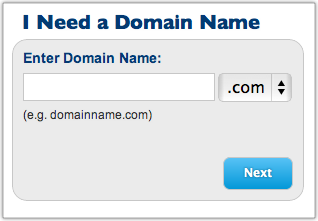
Fill in your account information and then scroll down to select your package. As you can see, the prices range from $4.95 to $6.95 per month. It all depends on the length of your commitment.
Note: BlueHost is now offering a special for my readers for $3.95 a month. This is honestly a steal. Get it while you can. But be sure to use one of the links in this post to get this special offer.
Keep in mind, you will be required to pay the annual rate in advance. That’s how BlueHost is able to offer these super low prices. Here’s the math:
12 months at $5.95 per month is $71.40 per year and $71.40 upfront.
24 months at $4.95 per month is $59.40 per year and $118.80 upfront.
36 months at $3.95 per month is $47.4 per year and $142.20 upfront.
I would not sign up for any of the other services listed on this screen, but that’s up to you.
Now enter your billing information. Confirm that you have read and agree with BlueHost’s Terms of Service, and then click on the Next button. The system will now verify your credit card information.
BlueHost will next ask you to “Select the Upgrades that Best Suit Your Needs.” I would skip all of these. Click the Complete button at the bottom of the page.
Now you need to choose a password for your account. Click on the Create your password link:
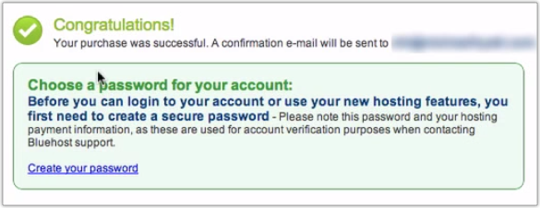
Use the Password Generator option to create a strong, difficult-to-hack password. Copy this to the clipboard by pressing Command-C if you are on a Mac or Control-C if you are on a PC. Now click the Paste button to paste the password into the appropriate fields. The click the Create button. This creates your new BlueHost account.
Then you will be asked to login to your domain. Use the password you just selected. Since you previously copied it to the clipboard, you can paste it with Command-V on the Mac or Control-V on the PC. Now click on Login.
You may have to click through another upgrade offer. Feel free to decline by kicking on the “No thanks” link and proceed to the next screen.
Now you should be at the cPanel (short for ”Control Panel”). Dismiss the “Need Help Getting Started?” dialing box.
Step 3: Install WordPress. Don’t be intimidated by this step—it’s amazingly simple. The process used to be complicated, and you had to be a semi-geek to pull it off. But BlueHost now makes it super-simple. Trust me, anyone can do this.
Scroll down the page to ”Site Builders.” Click on the WordPress logo (or the link next to it) and wait for the new page to load. You should now be looking at a page full of ”scripts.” Again, don’t get overwhelmed. Simply click on the ”WordPress” logo under “Blogs.”
This will take you to a new page. Click on the Install button. This will take you to the WordPress installation screen. It contains four steps:
Step 1: Installation Preferences. By default, BlueHost will select the most current, stable version. That’s what you want, so leave it as is. In the field where it says, “Where would you like WordPress installed?” just leave it blank. This is really for people who already have a website and are installing WordPress on top of it.
Step 2: Advanced Options. Give your site a new name. Then click on the link for more options. Give yourself a username and password. (Also, copy the password to the clipboard.) I would make it something other than “Admin.” Make sure you have selected “Automatically create a new database.”
Step 3: Select Plugins and Themes. I would uncheck all of these. You can reselect them later if you need to.
Step 4: Read the Legal Information. Check the box that says you have read the terms and conditions of BlueHost’s licensing agreement.
Now click on the Complete button. You might get an error message here that warns you the directory exists and you are about to overwrite the files in it. Don’t be alarmed. This is for those people who are installing WordPress on a site that is already live.
You can simply click the checkbox acknowledging that the directory exists and acknowledging that you understand this action will overwrite whatever files might be there. You might also have to deselect the Plugins and Themes again. Again click, the Complete button.
BlueHost will tell you it is installing WordPress. (You should see a progress meter.) When it is done, you will get a screen with your Blog URL, Login URL, username, and password. BlueHost will also e-mail this information to you, but I like to have a backup. I would write it down or take a screenshot. Also, copy the password to the clipboard.
You’re making great progress! Now things will speed up considerably.
Step 4: Load your new blog. Simply click on the blog URL address. Your new blog should load in a new browser tab.
As you can see, there’s nothing very fancy here. WordPress uses a very generic theme by default. But that’s the beauty of WordPress. There are thousands of themes available. I will recommend a few in a minute.
Step 5: Log into WordPress. While you’re still on your blog’s home page, scroll down to the Login link in the lower right-hand side of the sidebar. Click on the link.
You should now be looking at your WordPress login page.
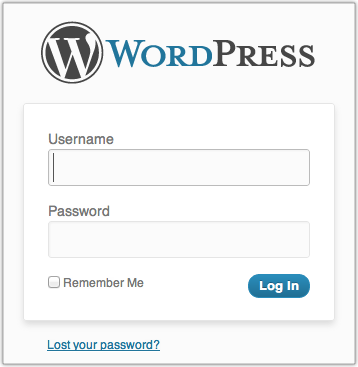
Now enter your username and password. (Remember, you wrote these down in Step 3.) You will soon see a welcome screen. For now, click Dismiss.
You are now looking at the WordPress “Dashboard.” Sometimes, bloggers refer to this as the WordPress back-end. The front-end is what your readers see—your normal blog site. The back-end is what you see—how you control what appears on the front-end.
Step 6: Write your first post. Click on the Posts | Add New option in the left-hand side menu. You should now see the New Post screen.
Enter the title of your post, perhaps something like, “Welcome to My Blog.” (I know, clever, right?)
Now write your first post in the field directly below the title. Perhaps you could explain why you are starting your blog, the topics you plan to write about, and how often you intend to post.
Now click the Publish button. This literally publishes your post for the world to see. You can click on the Preview Changes button to see it.
Congratulations! You have just published your first post on your very own self-hosted WordPress blog.
Step 7: Bookmark your blog. You’ll want to come back to your blog on a regular basis, so it’s a good idea to bookmark the two main pages: the front-end and the WordPress back-end.
In case, you have already closed the page to the back-end, you can re-open it by going to: http://[the name of your blog]/wp-admin.
If you have followed my instructions, you now have your very own self-hosted WordPress blog. Pretty exciting, huh?
The next step is to install a theme. There are literally thousands of free ones available. However, I recommend a premium theme (i.e., one you pay for) because you will usually get a better design and more features. Some of my favorites include:
WooThemes.com
ElegantThemes.com
StudioPress.com
DIYThemes.com
If you want to learn more about WordPress, I recommend WP101.com. This is a tutorial site with hundreds of videos on every aspect of WordPress.
If you know someone else who could benefit from this information, please pass along the link to this post. If you would like to embed the screencast in your own blog, please feel free to do so. You can find the video on both Vimeo and YouTube.
Optional: What if you have already registered your domain name on another service? No big deal. The first thing you will need to do is to point your domain name to the BlueHost servers. This will vary depending on where you registered it. BlueHost describes the process .
For example, at GoDaddy, where I have some domains registered, you log in, then go to Domains | Domain Management screen:
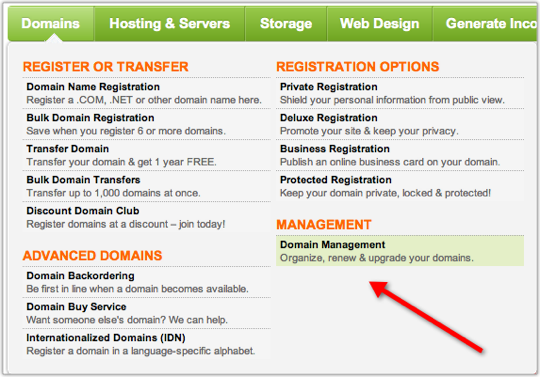
Now click on the domain name you want to point to BlueHost. You should now be looking at the “Domain Details” page. Scroll down to the bottom, left-hand side of the page. You should see a section called “Nameservers”:
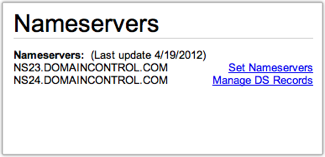
Click on Set Nameservers. A new screen should pop-up.
Enter ns1.bluehost.com in the field for Nameserver 1.
Enter ns2.bluehost.com in the field for Nameserver 2.
Click OK. That’s it. Now log out. It typically takes 24–48 hours for these changes to take effect. You might get lucky, and it will start working in an hour or two.
Please note: BlueHost or your Registrar (the company from whom you bought your domain) may change their procedures from time to time. If you have any problems, please check with them. I do not provide technical support for this process.
Once you have done this, you can begin the process of setting up your WordPress blog. In Step #2, after you click Sign Up Now, you will need to enter your domain name in the right-most box that says, “I Have a Domain Name.”
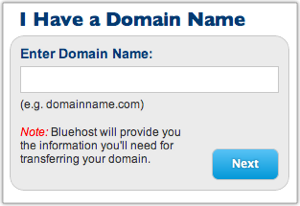
Now click the next button. Everything else should be the same. If you get stuck, you may need to wait for the change in your Nameservers to take effect before proceeding. Be patient.
Question: What questions do you have about the process of setting up your blog? You can leave a comment by clicking here.