Brian Meert's Blog, page 76
February 10, 2020
7 Benefits of Using Facebook Advertising for Your Business

FEB. 10, 2020
 Tobias Dziuba / Pexels
With almost 2.5 billion monthly active users, Facebook is one of the most popular social networks in the world. However, some businesses don’t realize that Facebook is also one of the largest social media advertising platforms. If optimized wisely, Facebook ads can do wonders for your business. If you’re not leveraging the benefits of Facebook advertising yet, you’re surely missing out on many business opportunities.
You should advertise on Facebook, especially in the year 2020. Here are the reasons why.
1. Facebook Advertising Is Effective
Started as a student-only social-networking service in 2004, Facebook has become a significant part of people’s lives today. Considering the number of its daily active users, this trend does not seem to change soon. According to Facebook, the company has been continuously seeing an increase in its advertising revenue year after year, proof that businesses are finding Facebook ads effective. It’s not a surprise that businesses invest in Facebook ads, especially when Facebook users are also active buyers. In a survey, 44% of consumers admitted that Facebook influences their shopping decisions.
2. Facebook Provides Advanced Targeting Tools
One of the major advantages of Facebook advertising is its wide range of targeting and retargeting options that allow you to reach your prospective customers. Facebook allows you to advertise to an audience based on location, age, behavior, and interests. Therefore, your ads are shown to people who have the potential to buy your product or service.

Facebook gives adequate flexibility when it comes to creating ads, which are so customizable that you can create advertisements that best reflect your business. The platform allows you to choose the type of ad, target audience, and budget. Additionally, you can customize your ad campaign according to your marketing goals, whether you want to grow your page likes, website clicks, or improve post engagement. Facebook has even been used for political campaigns, due to its precise targeting. Candidates run Facebook political ads to influence targeted voters.
3. Facebook Advertising Is Budget Friendly
In comparison to traditional marketing, Facebook advertising is cheaper. You can advertise your product to 1,000 people for $5 to $8 if the campaign is done well. In traditional advertising, you might have to pay up to $50 to show your business to the same amount of people.
If you are wondering how much it costs to advertise on Facebook, visit the Facebook for Business page.
4. Facebook Users Are Engaged
Customer engagement plays a significant role in the success of an online business. Not only does it build trust, but it also maintains the interest of your customers toward your product or service. However, pictures and texts alone may not generate the engagement you need. If that is the case, there are plenty of other ways you can engage your audience on Facebook. For instance, you can get a Messenger bot to improve your communication with customers, post live videos, or leverage Facebook groups.
5. Facebook Provides Free Analytics
 Lukas / Pexels
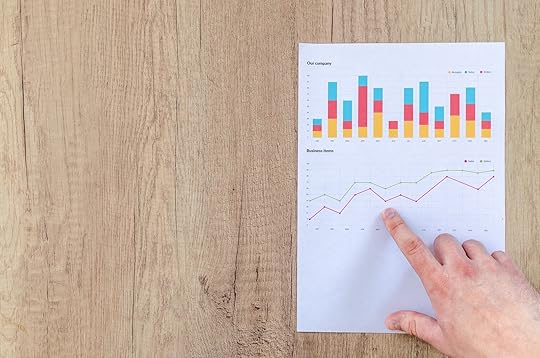
Facebook gives you comprehensive report and analytics on the performance of your ad campaigns. The reports are updated in real time, so you can immediately see what is and isn’t working as soon as your campaigns run.
You can view your social metrics and conversion rates within Ads Manager. You will see numbers on page likes, post engagement, weekly reach, performance, and more. When you have access to such data, you can easily adjust your Facebook ads based on what’s required. Facebook offers you so much flexibility when it comes to tracking the progress of ad campaigns. Since you can track and measure even small details, you can better plan your strategies.
6. Facebook Provides Effective Remarketing Tools
Over the past few years, Facebook has evolved into a robust marketing machine, through which any business can extend its reach. Facebook remarketing is one of the most excellent ways to reach visitors who saw your products or services in the past, who are still in the awareness stage.
Suppose a person sees your product on Facebook or your site. He looks at your product and goes further without making a purchase, even though he had a little interest. Remarketing helps you show your product again to that person in the future. Maybe you can give a better price or exciting offer this time, improving your chance of converting that lead.
This is why Facebook remarketing is effective:
Because Facebook is a recreational platform, people use it during their downtime. It means you can remarket your product when they’re entirely available.You can integrate the Facebook Pixel on your website to help you target a specific audience. For example, you can show your ads to people who visited your website for a certain amount of time.Facebook drives higher conversions comparatively. Because your business becomes more recognizable on Facebook, the chances of converting your target audience increases.
7. Facebook Offers Custom Calls to Action
Another great advantage of Facebook advertising is its custom call-to-actions (CTAs) that can help you improve your conversion rates. A call-to-action button enables you to give your potential customer explicit instructions on what exactly you want them to do, such as signing up for a subscription, watching a video, or using an app. CTAs certainly make a big difference in the performance of your ads. According to a report by Ad Roll, adding CTAs to your Facebook page can increase CTR rates by up to 285%.
Facebook currently offers the following CTAs:
Book NowContact UsPlay GameSign UpDownloadLearn moreUse AppWatch Video
Final Words
Facebook advertising has become a popular method for businesses to grow their brand awareness, sales, and leads. The list of Facebook advertising benefits are numerous. However, you can leverage Facebook ads to fullest only when you know how to run your ad campaigns correctly. If you are not sure how to get the maximum benefits out of Facebook advertising, it is advisable to work with an agency that specializes in Facebook ads.
Written by Roman Daneghyan
The post 7 Benefits of Using Facebook Advertising for Your Business appeared first on AdvertiseMint.


February 6, 2020
New Instagram Sorting Feature Shows Who Appears on Your Feed the Most

FEB. 6, 2020


Seeing John Smith’s thirst trap is amusing the first, second, and third time you see it on your Instagram feed. Seeing it multiple times a day every day, however, can become a nuisance.
A new Instagram feature called “Categories” allows you to moderate the visibility of your followers. It shows you the people you see the most often on your feed and the followers you interact with the least within the past 90 days. You can access this feature by going to the Following list on your profile.

When clicking one of the categories, you are given options to control how often you see the posts of a certain follower. You can choose to receive notifications when a follower posts an image, video, or live Story or mute followers you see too often on your feed. For live videos, you can further make adjustments to the way you receive notifications by choosing to receive all, some (only those that the algorithm determines to be of interest to you), or none.
Instagram already has a sorting feature in place, one that has been part of the app for some months. It allows you to rearrange your followers according to the earliest followed or the latest followed. This latest addition helps you find your most valued followers and decide whether you want to see more of your cherished accounts or less of your not-so-beloved followers.
Categories is not yet available to all users. Some may have it while some may not.
And now, a brief tutorial on how to organize and manage your followers.
How to See Who Appears on Your Instagram Feed the Most
Step 1: Go to the Following list on your profile.

Step 2: Click “Least Interacted With.”
How to See Instagram Accounts You Interact with the Least
Step 1: Go to the Following list on your profile.

Step 2: Click “Most Shown in Feed.”
How to Sort Instagram Following from Recent to Latest
Step 1: Go to the Following list on your profile.

Step 2: Click the arrows next to “Sort by Default.”

Step 3: Choose to sort by latest followed or earliest followed.

How to Mute or Restrict Instagram Accounts
Step 1: Go to an Instagram account you follow.
Step 2: Click “Following” tab under account bio.

Step 2: Click “Mute.” Mute posts, stories, or both.

To restrict an Instagram account, follow steps 1 to 2, and click “Restrict Account.” When restricting an account, you prevent that user’s comments from appearing on your posts and their messages from appearing in Direct without your permission.
How to Receive Notifications When Specific Instagram Accounts Post
Step 1: Go to the Following list on your profile.
Step 2: Click “Least Interacted With” or “Most Shown in Feed.”

Step 2: Choose to see notifications for images and videos or live Stories.

By Anne Felicitas, editor
The post New Instagram Sorting Feature Shows Who Appears on Your Feed the Most appeared first on AdvertiseMint.
February 5, 2020
(Updated Feb. 5, 2020) Top Perks of Audience Network’s In-Stream Video as Placement in Reach and Frequency Buying

Update FEB. 5, 2020: Facebook shuts down Audience Network web and in-stream placements.
Today Facebook announced that it will no longer offer the Audience Network web and in-stream placements starting April 11.
In the announcement, the social media company cited demand as the reason for this change. Facebook says, “We see growing demand from partners, which is in other formats across mobile apps.”
Facebook warns advertisers that their ad results may fluctuate between today and April 11. The company also says it will stop responding to bid and ad requests for web and in-stream placements.
Facebook outlines the next steps for advertisers in preparing for this change:
If using demand partners or a mediation platform, remove Audience Network from the setup
Remove Audience Network from waterfall and bidding integrations
Remove all web and in-stream ad placements
Contact integration partner about the web and in-stream placement phase out
Account holders will still be able to access their data and reports 6 months after April 11. They can also still access their Monetization Manager accounts.
Those with pending final payments will receive them on the 22nd of the month.
November 2, 2017
Anna Hubbel
Attention advertisers who use in-stream video: Facebook has heard your cries. Facebook recently announced that Audience Network in-stream video is now available as a placement for reach and frequency campaigns.
Advertisers can now use #AudienceNetwork in-stream #video as placement in #reach and #frequency buying. #digitaladvertising
Click To Tweet
Audience Network In-Stream Video
With Audience Network in-stream video, advertisers receive the following perks:
Longer video view duration-Gain longer durations of ad views that last up to 15 seconds.
Higher completed views per impression-According to Facebook, Audience Network has a view completion rate of 75 percent for in-stream video ad impressions.
More in-stream ads delivered with the sound on-Facebook says 93 percent of Audience Network in-stream videos are delivered with the sound on, which better captures the viewer’s attention.
This latest update, according to Facebook, allows advertisers to use the automatic placements functionality to reach more viewers in reach and frequency campaigns using in-stream video.
Audience Network’s category exclusions and block lists are also applicable for such in-stream video campaigns.
Learn more about Facebook’s in-stream video ad options.
The post (Updated Feb. 5, 2020) Top Perks of Audience Network’s In-Stream Video as Placement in Reach and Frequency Buying appeared first on AdvertiseMint.
February 3, 2020
How to Run Facebook Political Ads

FEB. 3, 2020
 Element5 Digital / Unsplash
Millions of people in the United States use Facebook to connect and share ideas, so it’s the perfect platform to spread the word about a political candidate. As the 2020 election quickly approaches, now is a great time to start planning a digital strategy for your political campaign. Here you’ll learn how to run Facebook political ads and get your message out to the people who need to see it the most.
Getting Started
The first thing you’ll need is a Facebook page, the account from which you will run political ads. When you create a page within Facebook, you’ll be given the option to choose a category for the page. You can choose “Politician” or “Political Organization” to let people know what kind of page this is. Once your page is up and running, you’ll need a profile picture, a cover photo, and maybe even a video pinned to the top of your feed. Adding these assets can make the page more attractive to the audience, and they can help you seem more authentic and in-touch with the people you’re communicating with.

You’ll need to set up Facebook Business Manager to manage all aspects of your page. You’ll also need a budget to run advertisements and a credit card to pay for the ads. Once you have these basics out of the way, it’s time to build your campaign from the ground up to make sure it’s effective at reaching people.
Targeting the Right Audience
You want to make sure that your Facebook political ads are getting in front of the right eyes. Facebook lets you target audiences based on certain demographics, such as age, gender, interests, and location. It’s best to narrow down your audience by location first because it’s likely that you only want people in your district to see your political ads. You can target your entire district or parts of it.

After you’ve narrowed down the location, it can be helpful to target people based on their interests. For example, you can target individuals who have said they are interested in politics or issues that are at the forefront of your campaign, such as education or the environment. You can also target those who have expressed an interest in the political candidate of your campaign. You can create different ads for different demographics and test different ad content between different groups to see what is most effective at getting people to click on your ad.

In addition to the interest, behavioral, and demographic audience you build, you can also create a Lookalike Audience using the contact list you upload. A Lookalike audience is similar to audiences you’ve targeted in the past but has a wider reach. You can also target visitors to your website, your own personal database of voters, and people who have engaged with you on Facebook in the past.
Creating an Effective Ad
Once you have found the perfect audience to target with your Facebook political ads, it’s important to make sure your message is clear and concise. When building an ad in Facebook Ads Manager, you can pick an objective for your ad campaign. This is an important step, as it can help Facebook optimize how it delivers your ads.
You’ll likely choose two of these objectives, brand awareness (getting your ad in front of as many people as possible) or traffic (getting people to visit your website). Depending on which of these makes the most sense for your campaign at the moment, Facebook will take a different strategy towards delivering your ads.

Facebook does a lot of the legwork when it comes to creating an ad, but you still have a few things to think about when it comes to your messaging. You have to think about exactly what you want to say and how to say it in a short and direct way. You’ll have to think of a headline and a few short words that explain your message. You also want to choose an image that catches peoples’ eyes as they’re scrolling through their News Feed. You only have a few seconds to make an impact, so be sure to choose your words and images wisely. If you have a post on your page’s newsfeed that’s performing well, you can choose to turn this into an ad.
You’ll also most likely want to include a call to action. This instructs the person viewing the ad what step to take next, such as visiting your website to learn more. Including a simple call to action can increase your click-through rate (the number of people who click on your ad). You can include this call-to-action as a text or button.
Tracking Your Performance
Once your ad has been up and running for a while, it’s time to examine whether or not it has been doing its job. Here are some metrics to keep an eye on:
Click-through rate (CTR). If a lot of people are clicking on your ad then dropping off after they get to your website, it’s likely that your ad is great (after all, it got them to click), but they aren’t sure what to do when they get to your site. It can be helpful to create a landing page on your site that will tell them what to do next. Conversion rate. This is the rate at which your ad visitor did what you wanted them to, such as donating or signing up for your email list. Cost per acquisition (CPA) . This number is calculated by dividing the amount of money you spent on an ad campaign by the number of conversions you received.
Once you know these statistics, you can start to figure out whether your ad is working in the way you need it to. The great thing about Facebook political ads is that you can learn from experience along the way and keep building better ads. Even if you don’t get great results from the start, don’t get discouraged. Your message is important to voters, and it’s worth the effort to spread the word.
Tips for Running Facebook Political Ads
The Government and Politics on Facebook group shared a series of live videos that offered useful advice to candidates on how to run successful Facebook political ads. This article shares the tips that the Facebook team shared in the last video of the series so you can jumpstart your campaign for the 2020 US election.
Use Candidate Videos
For midterm elections, Facebook released a new feature that helps you reach your constituents. You can create 20-second candidate videos that share your message and explain your political views. Anyone from governor to city council candidates, excluding assessor and judicial races, can upload candidate videos. Facebook provides appropriate, election-relevant questions you should answer.
To upload a candidate video, simply navigate to your Facebook page and go to Publishing Tools. Select Political Content, then upload your video. When you publish a candidate video, you can view it under the “Broadcasts” tab if you’re a page admin. Your audience will see the video in their News Feeds.
Candidates can create and upload videos in the days leading up to the election. If both candidates in a race upload videos, users will see them side by side.
If you’re unsure how to make a candidate video, you can find the Video Creation Tool Kit in Ads Manager. You need a few different images, either of yourself or your cause. You can then add text overlay. The tool kit allows you to create a video using one of three template options for mobile-optimized videos.
Optimize Your Video for Mobile
 Photo courtesy of Snapchat
You want to optimize your video for mobile because most users look at their social media content on mobile devices. Video that is appropriately optimized for mobile screens has the following characteristics:
Square or vertical format. This ensures that the video takes up as much space as possible in someone’s mobile News Feed. It helps to film content vertically before uploading it.Text overlay. Make sure the video still makes sense if someone watches it without sound.Front-loaded content. The main point or message of your video should be clear within the first few seconds.15 seconds in length. Videos that are 15 seconds or less are ideal for users’ mobile lifestyles.
Optimize Your Ad Delivery
Because Facebook and Instagram are competitive spaces for advertising, getting your political ads out there can be challenging. There are three key ways to optimize your ad delivery:
Broaden your audience. Make your audience as large as possible to reach more people.Look at your bid cap. Having a high bid cap helps with delivery, so consider increasing it. Facebook uses an auction-based system for buying ads. A cap tells the system the highest amount you’re willing to pay for your campaign’s objective. For political and issue ads leading up to an election, it is better to manually, rather than automatically, set a bid cap because it tells Facebook’s system exactly how important it is to get your ads out there.Open up your placements. Use ad placements for Facebook News Feed, Instagram feed, and Instagram Stories to reach more users.
You can pay for ads either through bidding, as previously mentioned, or reach and frequency. Reach and frequency is an option if you have at least 200,000 people in your audience. It allows you to lock in the price you pay. In contrast, with bidding, you don’t know exactly how much you will end up paying. You are bidding on the action you’re optimizing for, such as video views.
Post Often as Election Day Approaches
 Photo Reutuers/Danny Moloshok
Normally, Facebook recommends posting three to four times a day. However, in the days leading up to an election, Facebook says that you should share organic posts as many times as you want to reach more constituents.
For political and issue ads, keep in mind that they can take up to 72 hours to be approved. You don’t want to wait too long to submit your ads to publish them before election day.
Schedule Organic Content Cautiously
Although you want to schedule ads well in advance, you need to be more cautious about scheduling organic content. If you schedule a political or issue post, breaking news could make the information in your scheduled post irrelevant or even insensitive.
For candidate videos, since the feature is still relatively new, you should publish them right away after upload.
Submit Ads in Advance
Facebook requires authorization for political ads. Disclaimers also require approval. It takes up to 24 hours to get disclaimers approved, so you should submit or update your disclaimers a few days in advance. Disclaimers should comply with Facebook’s Community Standards. URLs, phone numbers, and acronyms are not allowed in disclaimers, so keep those out to make the approval process go quicker. You do not need authorization to publish candidate videos.
Use the Reach Objective

To reach as many constituents as possible before election day, use Facebook’s reach objective. This objective tells Facebook that reach is the most important goal to you and will keep this in mind when delivering your ad.
Once you launch a reach campaign, you can’t go back and adjust your frequency. Make sure your frequency (i.e. how many times you want your ad to appear to members of your audience) is set before launching. In the days leading up to an election, Facebook recommends setting a high frequency cap.
Use the Issues Tab
The Issues tab is a space on Facebook where you can spend more time in a written format telling constituents about your platform and stance on certain issues. If you want to elaborate on a message from your candidate video, you can do so in the Issues tab. Use it to clearly communicate to voters what you believe in.
Go Live
Facebook Live allows you to communicate with constituents in real time. Live video should be varied, relevant, timely, and authentic.
To generate hype for your live broadcast, post about your plans to go live the day before or send an email blast to get the word out. You should also start the live stream at the exact time you say you will; otherwise you risk losing your audience’s interest.
Opt into All Available Placements
The more ad placements you have, the more people you will reach. Available placements include Facebook and Instagram feeds, Facebook in-stream, and Instagram Stories. When setting up your ad, specify that you want it delivered for each placement.
Vary the Type of Organic Content You Post
To keep your constituents interested, offer a variety of content in your organic posts. Mix it up between video, links, photos, and live video. The diversity will add value to the content you share.
Social media is a major player in politics these days. The more prepared you are for the next election, the better your chances at delivering valuable, high-quality content that will get voters’ attention. Start brainstorming your creative and logistical Facebook strategies now. When the 2020 election comes around, you’ll be happy you did.
By Anna Hubbel and Rachel Horvath
The post How to Run Facebook Political Ads appeared first on AdvertiseMint.
January 30, 2020
Gavin McGarry on Agency Best Practices and the Future of Social Media
JAN. 30, 2020
Gavin McGarry, founder and CEO of Jumpwire Media, has quite the experience in social media marketing—more than 15 years, to be exact. Having worked with big clients such as Red Bull, Sony, and Yahoo, McGarry had a lot to say—understandably—about agencies and the state of social media in his podcast interview with AdvertiseMint CEO, Brian Meert.
It’s no secret—or perhaps it is, to those who haven’t worked in the industry—that running a social media agency requires hard work. McGarry describes the business as “a race to the bottom,” in which people are unwilling to spend and recognize that social media marketing is difficult to do. But the struggle doesn’t end there. Not only do marketers scramble to catch up to the perpetually changing systems of social media platforms, but they must also meet the high (and often unrealistic) expectations of their clients: do more on a limited budget.
Agency Best Practices
As McGarry illustrates, social media marketing is no easy job, but he provides a few tips that may help some agency owners along the way.
Spending a Budget
During the interview with Meert, McGarry was given a project: spend a $20,000 budget. McGarry responds with a plan: crawl, walk, run data, strategy, and implementation.
First, McGarry would spend $5,000 to $7,000 in analysis, which includes auditing social media and SEO. Next, he would spend $5,000 on testing and the remaining $10,000 on fixing problems with the campaign, which may include redoing a website.
“At the end of that,” says McGarry, “you should know exactly how much you need to spend to acquire new customers that are going to generate an increase in your business.”
Agency Necessities
McGarry also gave insight into what he believes are agency necessities: narrative and measurement: When pitching to clients, the agency must know how it will tell the brand’s story, how it will build trust with customers, and how those tactics will lead to sales. McGarry then emphasizes the importance of measurement, showing clients how the agency is meeting its goals.
“Those are two things that if we can’t do those for you, we shouldn’t be in business.”
Facebook Advertising Costs
When marketers say Facebook wants to take their money, they aren’t being hyperbolic. McGarry shares his experience with Facebook’s charging methods:
“We had a product, and we sold it for $49, and it cost us [to buy the Facebook ad] 10 bucks. Then we increased the product up to $127, and all of a sudden our costs went from $10 to $40 per acquisition.”
When McGarry reduced the price, Facebook charged less, dropping the cost to $15.
“What we figured out is that Facebook knows the price you’re selling stuff for and charges you what they think you can take for that price.”
This experience, says McGarry, illustrates a harsh reality: To be part of Facebook advertising, one must pay to play.
A Beacon of Trust
The United States is a country of bounty, a place where consumers are given numerous choices in whatever product or service they plan to purchase. Although this may seem like paradise, the tyranny of choice has worn down consumers—they are now too afraid to make a decision, lest they choose the wrong one. McGarry explains how this fear affects consumers’ decision-making:
That’s where we are right now. People have so much choice that they’re looking for influencers, anything that can help them make a decision. All we do all day is make decisions, and we are worried about making the wrong decision, especially when we’re spending money.”
Because consumers rely on recommendations—whether from friends, family, or influencers—to inform their shopping decisions, it’s important that brands present themselves as trustworthy.
“If we can find ways to help with trust and help with curation so that people are making decisions every single time, the right decisions, I think that we’re on our way to helping people cope with social media.”
Social Media 2020 Predictions
McGarry concludes his interview with Meert by sharing his views on the future of social media. He lists a few to watch for, including Instagram’s selling capabilities (currently, Instagram offers the ability to shop from a post), Tik Tok’s growth, video shopping developments (click on an item from a video to purchase), better AI for videos (recognize any object in a video), and more creative tools for marketers.
He also shares his thoughts on the future of agencies, emphasizing the importance of knowledge:
You [business owners] can go and do it [social media marketing] yourself, but you’re going to fail. My experience has been that many of the times you have to make significant adjustments that still require human brain power. And that is where the future of everything is going: You’re still gonna need the humans—we’re now knowledge workers.”
At a time when many social media platforms are available to business owners, businesses must leverage the power of choice. In other words, diversify, as one would with investments. If one investment was to fail, at least not all will be lost. McGarry shares his experience with a client who refused to diversify:
“We had a client that was only on Facebook. We told them that they need to diversify to Instagram, to Twitter, to get an email campaign going. Guess what? They posted some bad content. They were banned from Facebook for three months. Destroyed their business.”
McGarry’s final predictions come contrary to popular belief. Mobile, he says, will not dominate other devices, such as TV and desktops. He points to the difficulty of purchasing from mobile devices as an example. Rather than from a smartphone, shoppers usually purchase from desktop devices.
Predictions are predictions. There’s no telling what will come true and what won’t. What does the future hold? As McGarry so frankly puts it, no one really knows.
By Anne Felicitas, editor
The post Gavin McGarry on Agency Best Practices and the Future of Social Media appeared first on AdvertiseMint.
January 29, 2020
Facebook’s Off Activity Tool Now Available to Users Worldwide

JAN. 29, 2020
 Tim Bennet / Unsplash
Facebook is rolling out Off Activity to users worldwide, says a report by TechCrunch. The tool allows users to view the information businesses share with the social media company, clear activity history from their accounts, prevent Facebook from saving activity history, and download off-activity details.
Mark Zuckerberg first announced the development of the Off Activity Tool, then called “Clear History,” at the F8 conference back in 2018. The tool rolled out to select countries a year later.
How Off Activity Works
Facebook advertising offers a selection of tools that help marketers run promotions on the social media platform. One of those tools is ad targeting, which uses a set criteria to determine who should see the ads. Targeting uses customer information, such as phone number, interests, location, and website activity, to find and serve ads to a relevant audience.
Although Facebook exchanges information with businesses for targeting purposes, the social media company says in a Facebook Help article that it does not sell information to data brokers or gather sensitive personal details about their users:
We don’t sell your information to anyone. We prohibit businesses or organizations to share sensitive information with us, such as health and financial information, your date of birth and passwords. If we determine that a business or an organization is violating our terms, we will take action against that business or organization.”
Off Activity allows users to purge their information from their Facebook profiles, preventing businesses from showing ads based on their Facebook and online activities. The social media company, in its announcement of the Off Activity rollout back in 2019, says clearing off-activity applies to Facebook, Instagram, and Messenger:
If you clear your off-Facebook activity, we’ll remove your identifying information from the data that apps and websites choose to send us. We won’t know which websites you visited or what you did there, and we won’t use any of the data you disconnect to target ads to you on Facebook, Instagram, or Messenger.”
In the same 2019 announcement, Facebook said it took months of research to develop the tool, bringing in the advice of privacy advocates, policymakers, advertisers, and industry groups.
How to Use Facebook’s Off Activity Tool
Users can access Off Activity by going to their settings, clicking “Your Facebook Information” from the left-column menu, and clicking “View” on the Off Activity tab from the right side of the screen.
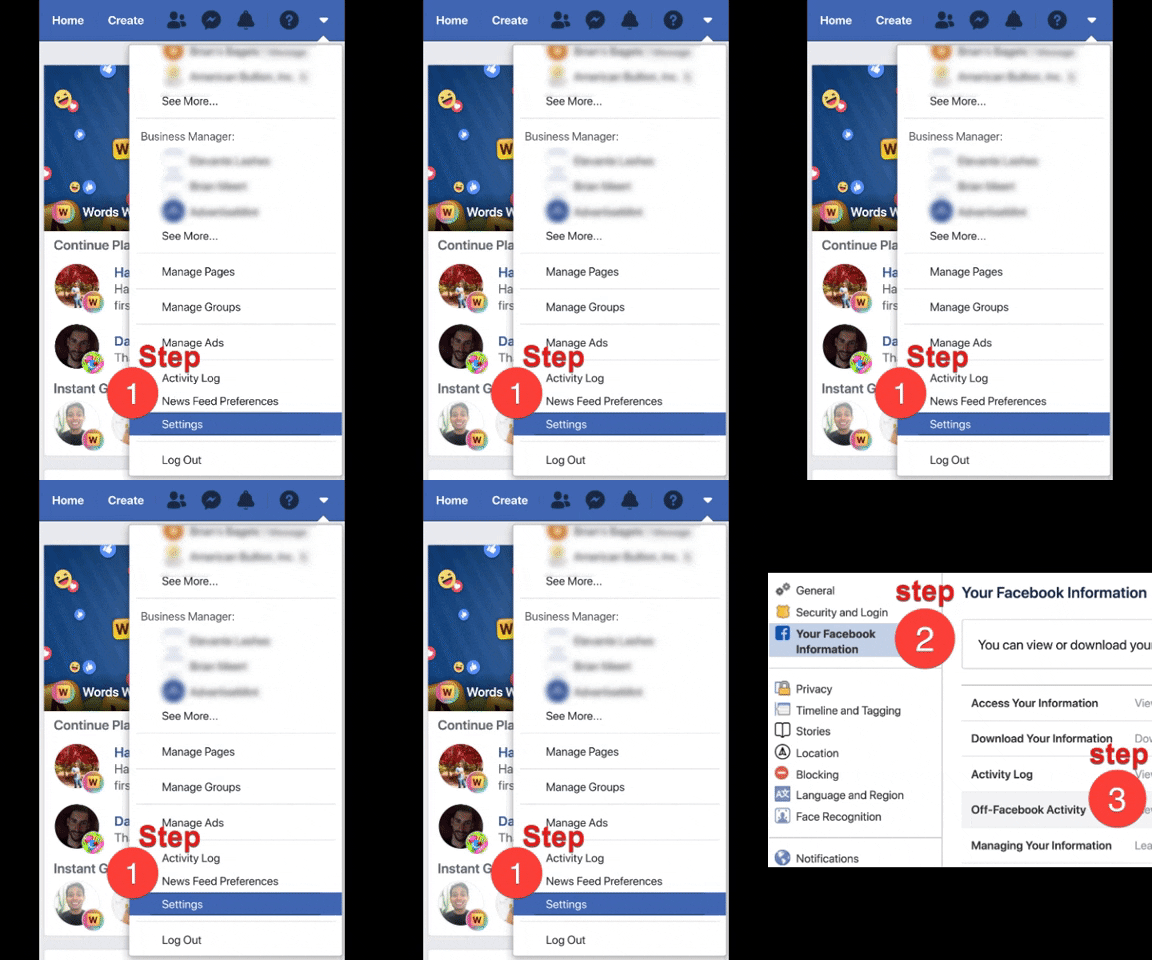 Facebook Off Activity is accessible from Settings.
 The page offers information including
How Facebook received activity information, whether that’s through the Facebook pixel, SDK, or LoginThe number of interactions Facebook received, including opening the app, logging into the app, viewing content, and searching for an itemThe activity from apps and websites that uses Facebook loginActivity from data service providers and marketers
The Off Activity page also offers several actions:
Manage off-Facebook activityClear historyAccess or download informationManage future activity
 Facebook Off Activity provides a list of actions.
With the option to manage off-Facebook activity, users can view the information businesses have shared with Facebook. To access this tool, they must re-enter their passwords. Once in the page, they can view the apps and websites with record of their activity, read more details about the information stored, and clear the activity history.
Users can also view a record of their Facebook activities by clicking the “Access Your Information” link from the right side of the screen. To download that information, which includes Messenger exchanges, Story posts, and payment history, they must click on the “Download Your Information” link. Accessing and downloading information does not require password re-entry.
Users can also prevent Facebook from storing their online activity by clicking on the “Manage Future Activity” link.
 Disabling Off-Facebook Activity prevents Facebook from storing information on users.
Facebook and Accountability
Facebook has been under scrutiny for the past several years. It had to answer for the fake Russian ads that proliferated within the platform during the 2016 US presidential election. Its CEO, Mark Zuckerberg, was called to appear before Congress after the data of 87 million Facebook users were compromised in the Cambridge Analytica Scandal of 2018. The social media company has implemented security measures since the first offense, rolling out the Ad Library, “Why am I seeing this ad?” tool, and Special Ad Category. Off-Activity is one of a slew of changes rolled out to protect users’ privacy.
By Anne Felicitas, editor
The post Facebook’s Off Activity Tool Now Available to Users Worldwide appeared first on AdvertiseMint.
January 27, 2020
19 Ways to Make Your Video Go Viral with Tony Adkins, “Dancing Doctor”

JAN. 27, 2020

Every digital marketer wants to go viral, to hear the incessant ping! of notifications as comment upon comment, share upon share, propel a video to meteoric stardom. This is one experience Tony Adkins—also known as the “Dancing Doctor”—shares with AdvertiseMint CEO, Brian Meert, in an episode of Duke of Digital.
Adkins became a quasi-celebrity after his dance video with a patient went viral. The Facebook video, which has garnered millions of views, caught the attention of major news outlets, including Good Morning America, Access Hollywood, and Australia Morning News. Although there’s no single secret formula to going viral, there’s much to learn from Adkins’ story.
Lesson 1: Never Turn Down an Opportunity
Adkins never intended to go viral. In fact, his patient’s mother was the one who recorded and shared the video on Facebook. None foresaw the attention it would draw. Had Adkins refused the recording or had the patient’s mother kept the video out of public eyes, Adkins never would have gone viral.
Lesson 2: Expand Your Social Media Accounts
When the Facebook video went viral, Adkins started receiving an outpour of friend requests, hitting the 5,000 limit. He then created a Facebook page where he could connect and build his followers, which has reached a number of 2.1 million to date. Without a Facebook page, Adkins wouldn’t have grown his followers, and he wouldn’t have had a place to post all of his future dancing videos.
Lesson 3: Post on the Right Social Platforms
Of course, for his videos to reach the right audience, he must post on the right social media platforms. Videos targeting younger users will perform well on Instagram while those that target an older age group will perform well on Facebook. For Adkins, he posts content to both, with Facebook as his most successful platform. Adkins did note that Instagram users are harder to convert into followers than Facebook users.
Lesson 4: Create an Entertaining, Authentic, and Unique Video
Tony Adkins dances with a patient for epilepsy awareness. Video courtesy of Tony Adkins.
Adkins’ video went viral within a matter of hours, and it’s not surprising why. His relentlessly cheerful disposition, authenticity, and goofy dance moves draw viewers in, making them feel happier. The video also shows something unusual: a professional in white coat, dancing carelessly in an otherwise gloomy hospital. The video captures an all-around good time, and viewers couldn’t resist that.
Lesson 5: Create Videos That Follow a Hot Trend
Once Adkins’ video had gone viral, his discerning wife advised him to create another. This time he responded to a dance challenge: hopping out of a slowly moving car and dancing to Drake’s “In My Feelings.” Because Adkins responded to an internet craze, his video went viral, garnering more than 600,000 views.
Lesson 6: Don’t Stop the Haters
With great popularity comes great haters. Like many viral internet personalities, Adkins wasn’t immune to criticism. In television appearances, show hosts referred to him as “doc” (hence the nickname “Dancing Doctor”) rather than his official job title, physician assistant. Despite Adkins’ corrections, hosts persisted in calling him “Doc.” Viewers expressed their displeasure online by leaving hateful comments. Still, negative comments are comments nonetheless, and this type of engagement is exactly the right ingredient in making a video go viral.
Lesson 7: Take Partnerships
Not only did Adkins’ video spread to people’s News Feeds, but it was also circulated within Facebook groups, where the CEO of the Children’s Hospital of Orange County (Adkins’ employer) saw his video. This discovery led to a partnership with the marketing department, and soon Adkins was dancing with consenting patients once a week.
Lesson 8: Don’t Force It
The desire to go viral may compel people to create inauthentic videos, such as the ones with “good samaritans” giving bags full of groceries to the homeless. Adkins’ dance was neither for the camera nor for popularity. It was for his patient diagnosed with leukemia. News of such gravity would bring anyone’s mood down, and Adkins was eager to brighten the young boy’s spirits. Going viral happened by pure chance. It’s his authenticity that drew people’s attention.
Lesson 9: Stick with a Theme
Dancing is Adkins’ passion, and he sticks with it. After all, he wouldn’t be the Dancing Doctor if he decided to make cooking videos. Rather than producing content contrary to his personal brand, he continues to create dance videos. It works for him, and his followers expect nothing less.
No one can predict which video will go viral, if at all. Going viral almost always happens purely by chance. If there’s one thing to learn from Adkins’ story, it’s this: Don’t try too hard to go viral, and if you do, enjoy it and have fun.
Ten More Ways to Make Your Videos Go Viral

By Anne Felicitas, editor
The post 19 Ways to Make Your Video Go Viral with Tony Adkins, “Dancing Doctor” appeared first on AdvertiseMint.
January 24, 2020
A List of Apps and Companies Facebook Owns

JAN 24, 2020
 Rami Al Zayat / Unsplash
There’s no question that Facebook is the largest social media platform in the world. The highly popular network boasts more than two billion monthly active users, which is almost a third of the world’s population.
The social media giant has been under much scrutiny as of late. Many are claiming Facebook is a monopoly. In a recent anti-trust lawsuit, plaintiffs claim the tech giant removed outside apps from its platform that it viewed as potential competitors and “coerced” developers to share their user data. This somewhat aggressive strategy has helped Facebook acquire other apps and increase revenue.
This post explores some of the top brands and apps Facebook owns or has owned in the past few years.
1. Instagram
On April 9, 2012, Facebook purchased Instagram for $1 billion. By the next year, Instagram began making money through advertisements. Now it’s worth about $100 billion, with more than one billion monthly active users.
There’s no doubt Instagram will continue to be the go-to app for sharing photos and videos, connecting with followers, checking on popular brands, and researching various products and services. Some experts say that the platform will start focusing more on IGTV, which is a key feature that allows users to share long-form videos.
2. WhatsApp
Facebook bought WhatsApp for $19 billion on February 19, 2014. On the app, users can make calls and send text messages to other users for free. Today, WhatsApp is the most popular messaging platform, even surpassing Facebook Messenger, with more than 1.5 billion monthly active users. By 2020, WhatsApp’s revenue is estimated to be as high as five billion dollars.
In the near future, Facebook plans to bring ads to the platform to generate even more revenue. This is good for companies, but not so for users. The new change could disrupt their experience.
3. Oculus VR
On March 25, 2014, Facebook acquired Oculus VR—one of the leaders in the VR technology space—for $2.3 billion in cash and stock. Oculus Rift, a VR gaming headset, is the company’s best-known development. Well-known gaming company, ZeniMax, filed a lawsuit against Facebook and received $250 million in damages. The claim stated that Oculus Rift was built based on stolen code and research.
This setback didn’t stop Facebook and Oculus from releasing yet another VR headset, Oculus Quest, the first all-in-one gaming system for VR. Acquiring Oculus was indeed a smart move for Facebook. Demand for VR is only going to increase, and Oculus is just getting started.
4. FriendFeed
On August 10, 2009, Facebook bought FriendFeed for $47.5 million in cash and stock. During its operation, FriendFeed helped users follow trending topics on social media platforms without checking every online media service they used.
However, as years passed, the number of people using FriendFeed declined. This is likely due to the boom in social media apps. Now users can just log in and out of each platform they use with just the click of a button. FriendFeed finally shut down in 2015, but its influences, including News Feed, still remain in Facebook’s current UI.
5. Masquerade (MSQRD)
In 2016, Facebook purchased MSQRD at an undisclosed amount. MSQRD allows users to customize their selfies by placing different effects on videos in real time. Before making the sale, owners of MSQRD stipulated that the app continue to live in the app store and that Facebook release frequent updates to users.
Shortly after the acquisition in March 2016, MSQRD’s monthly active users spiked to more than 40 million, but by October, the app only had approximately one million monthly active users. As a result, MSQRD began to fall in the app store rankings and stopped receiving software updates and new filters. Yet, Facebook started integrating the app’s features into its own products.
Although MSQRD hasn’t been updated since 2016, the app is still available for download in both iOS and Android app stores. Going forward, Facebook’s intentions for MSQRD remain unclear.
6. Poke
In 2012, Facebook released a standalone app called Poke, not be confused with Facebook’s original poke, which users used to virtually “poke” their friends on the platform. The Poke app allowed people to send photos, videos, and pokes to their friends. This media would disappear after a few seconds if users didn’t keep their finger on the screen. If this sounds familiar to you, that’s because Snapchat works the same way.
In the spring of 2014, Facebook removed the app from the iOS store because it didn’t gain the traction its creators expected. It likely failed for a variety of reasons, including its lack of privacy, with the app being too “open” to the public.
7. Slingshot
Facebook made another attempt at conquering Snapchat with its release of Slingshot in 2014. The app allows users to send and decorate images and videos with colorful drawings and captions. Unlike in Snapchat, where users can view messages as soon as they receive them, Slingshot prevented users from viewing an incoming “shot” unless they sent a shot back to the sender.
Just months after Slingshot’s launch, Facebook removed this unique feature from the app, making it just another Snapchat copy. The app eventually sank down the charts.
8. Flash
In 2016, Facebook released another Snapchat clone, but only this time, it was specifically for emerging markets with scarce Wi-Fi and weak connectivity. Since Snapchat was winning over American teens, Facebook wanted to try beating its competitor to places including Brazil, Indonesia, and India.
Developers hoped that by providing features similar to Snapchat that use less data and storage, teens in emerging markets would choose Flash and no longer use Snapchat. Flash didn’t produce the results Facebook had hoped. Snapchat continues to dominate the ephemeral photo- and video-sharing game.
9. Lasso
Back in 2018, Facebook released a Tik Tok competitor called Lasso, which functions similarly to the former app. Lasso, available to iOS and Android devices, allows users to create and post lip-synching videos. To reach a wider audience, users can also add hashtags and simultaneously post to Facebook and Instagram Stories.
Lasso was created to compete against teen-favored app Tik Tok at a time when Facebook was losing younger users. To date, Tik Tok is still more popular than Lasso. Its usage will likely increase in the years to come.
As time goes on, Facebook will continue to look for ways to build revenue by purchasing a diverse selection of apps and companies in a variety of industries and launching its own unique creations.
Written by Britney Sanders
The post A List of Apps and Companies Facebook Owns appeared first on AdvertiseMint.
January 20, 2020
How Experiential Marketing Can Grow Your Business

JAN. 20, 2020
The Duke returns with special guest Peter Abraham, founder of the Los Angeles-based marketing agency, Abraham Content Marketing Studio. Abraham is a storytelling expert specializing in social, experiential, and television campaigns for a wide variety of well-known brands, including Lululemon and Nike.
Although he has pursued marketing for several years, Abraham, who extensively studied film during his undergraduate years at UCLA, didn’t begin his career as a marketer until 15 years later, a time he spent crafting television commercials. When he transitioned to marketing and built his own business, Abraham found an alcove in the industry in which he excelled: experiential marketing.
To novice listeners, Abraham provides a simple definition of experiential marketing.
“The way I think of experiential marketing is really just a real-life engagement. It could be a live event; it could be a trade show booth; it could be a community meet up somewhere.”
Although digital—email, social media, online—has been a popular option for digital advertisers, its existence makes experiential marketing even more important, especially when mobile phones and desktop devices have drawn individuals inward, rather than connecting with the world outside digital screens.
“We’re all still humans,” says Abraham on the importance of experiential marketing. “We all still want human contact and so the more pervasive digital gets, the more important experiential is. It doesn’t mean to the exclusion of digital, but I think it’s a really important component not only for brands but in life.”
Making a Successful Experiential Marketing Campaign
Abraham recommends creating an experiential campaign with a point of view. This, he says, makes creating strategies an easier task. He points to Red Bull as an example, which focuses its brand image and campaigns on action sports, using content and experiential marketing to amplify that idea. Abraham also recommends solving consumers’ pain points. He points again to Red Bull’s solution of providing entertainment to consumers, such as sponsoring music and sports events.
 Peter Abraham is the founder of Abraham Content Marketing Studio. He specializes in storytelling, running experiential, social media, and television campaigns.
 Marketers should not conflate marketing events with stunts. Abraham makes a distinction between the two: a stunt, unlike a marketing event, doesn’t provide lasting value or solutions to consumers’ pain points. Of course, that doesn’t mean all stunts don’t succeed. Abraham points to the Ice Bucket Challenge, created in 2014 to raise funds and awareness for amyotrophic lateral sclerosis, or ALS. Although the challenge was a success, it didn’t provide lasting value.
“The Ice Bucket Challenge raised one-hundred million for ALS. That was great, but I’ll bet you the next year they raised five-hundred. They were back down to five-hundred thousand because it didn’t have lasting value necessarily.”
Creating a Budget for Experiential Marketing
When pressed for a budget, Abraham gives an honest answer: There isn’t a single strategy that works.
“There’s no one secret formula for a brand. ‘Hey, thirty percent of your marketing budget should go into experiential.’ You can’t really say that.”
However, before funneling money into experiential marketing, Abraham recommends a full analysis of marketing strategies. For experiential marketing campaigns to succeed, the marketer must have a variety of different strategies. For example, a marketing event must be promoted to raise awareness, and that may require the help of social media, email newsletters, or blogs.
Measuring the Results of Marketing Events
Unlike the results of digital campaigns, which can be measured in a week-by-week basis, experiential marketing doesn’t have a clear measurable metric. According to Abraham, experiential campaigns must be measured year by year; its success by instincts.
“If you feel like it’s working, it is probably worth expanding at some level.”
Abraham ends the podcast with one final advice:
“Tell us what you stand for and who you are. It’s always better for brands to appeal to a small group of people and be super relevant for them than try and be all things to all people.”
To hear more tips about experiential marketing, listen to the latest episode of Duke of Digital.
By Anne Felicitas, editor
The post How Experiential Marketing Can Grow Your Business appeared first on AdvertiseMint.
January 15, 2020
What Is Cost Per Click? A User’s Guide to Facebook Advertising

JAN. 15, 2020
 John Moeses Bauan / Unsplash
Facebook offers one of the largest and most effective platforms for digital advertising, allowing marketers to leverage nearly 1.62 billion daily users for their benefit. Well-deployed Facebook ad campaigns build brand awareness, solidify existing customer relationships, increase conversion rates, and help you stay one step ahead of your competitors.
To build an effective Facebook ad campaign, you must first define your goals and your audience, then craft the best approach within your spending budget. Just as important, you must make a decision about the best ad delivery system. This will relate directly to your campaign goals — for instance, to generate video views, website clicks, or conversions.
Your delivery system will also directly affect the choice you have in terms of how Facebook charges you for your ad. One of the most common approaches involves charging you every time somebody clicks on your ad. The metric known as cost per click (CPC) is essential for analyzing how effectively this type of ad campaign is proceeding.
This article takes a closer look at CPC — what it is, how it is used, and what its relative merits are compared to other payment methods and performance metrics.
Facebook Cost Per Click
The confusing thing about cost per click is that the term is used in two related yet different ways. On the one hand, according to Facebook’s own usage, CPC designates a particular billing method. On the other hand, CPC is used as a performance metric to analyze many types of Facebook ad campaigns, not just those that use a per-click billing method.
CPC as Billing Method
Those who select CPC will only be charged for their ads when a user clicks on the ad. A click may encompass a number of different ad objectives, including all of the following:
Clicks that redirect to another websiteClicks that cause an app to installClicks that open videos or other media on another websiteClicks that lead to Facebook Instant Experience ads
In this regard, CPC must be understood in opposition to the other billing methods such as paying per thousand impressions (each time somebody views your ad), paying per likes, or paying per specific result other than clicks.
The principal benefit of CPC as a billing method is actionable focus. You are specifically targeting only those users who choose to engage with your ad, rather than paying for impressions that may or may not yield results. Meanwhile, since you are only paying for clicks, all of the impressions your ad gets will be free.
CPC as Performance Metric
CPC as a performance metric provides you with vital information about how much your Facebook ad campaign is costing you. At first this might sound somewhat confusing, since you likely already know your precise daily advertising budget. The key thing to understand here is Facebook does not use a set payment structure. Instead, Facebook uses a bidding system in which advertisers compete against one another for ad space. During certain times of the year — most notably, the holiday season — competition increases, and the average price of ads goes up correspondingly. Likewise, numerous other factors influence ad costs, including
Time of the week or dayIndustryAd relevance scoreTarget audienceBid strategy
CPC provides a vital metric for understanding just how far your marketing budget is going, measuring the average amount you paid per ad click during any given span of time. And because clicks are recorded no matter what billing option you use, you can analyze your CPC even if you aren’t actually paying per click.
Likewise, businesses who select a per-click billing method can analyze their results in terms of other metrics as well. For instance, if your daily budget is $10, and your ad receives 100 likes per day, then you know that your cost per like (CPL) would amount to $0.10. In the same way, you can determine your CPM (cost per thousand impressions), CPV (cost per view of video ad), and CTR (click-through rate).
CTR is another particularly helpful metric, one that is derived using both your CPM and your CPC. Simply put, your click-through rate is the number of clicks divided by the number of impressions. This tells you the overall percentage of viewers who ended up clicking on your ad. CTR has a large role to play when it comes to increasing engagement through ad optimization.
CPC Benchmarks
The bottom line when it comes to Facebook ads is that they will always exhibit a high degree of variability when it comes to cost. Yet businesses need to have some idea about how much each click will cost, since that number in turn directly affects how many clicks your chosen budget will afford you.
To get a better picture of what kind of CPC results to expect, companies must consult industry benchmarks — that is, data sets that break down Facebook ad trends, usually in a quarter-by-quarter fashion. For instance, according to one benchmark report, the first quarter of 2019 saw a median CPC of $0.63 for Facebook News Feed ads.
Bear in mind, however, that that piece represents the average CPC across all industries. As a result, it likely isn’t the best piece of information to base your quarterly goals and expectations, since CPC can vary greatly from industry to industry. Generally speaking, more engageable industries — think food and drink or pets and animals — tend to have significantly lower CPCs than industries, such as finance or telecommunications.
Lowering Your CPC
A common question advertisers ask is what they can do to lower their CPC, and hence get more from their marketing budget. One good place to start is your bid amount. Facebook gives you two options in this regard: automatic and manual. Automatic allows Facebook to algorithmically determine the maximum CPC you should pay.
While automatic bidding works well in many cases, it sometimes means you may end up paying more than you want for ads. If you choose the manual option, you can specify the maximum bid amount you are willing to pay under any circumstances, which may help you achieve a slightly lower average CPC.
Also keep in mind that Facebook grades ads based on both quality and relevance. Higher quality and more relevant ads tend to enjoy better exposure and lower prices. Therefore, content creation should always be a high priority when crafting an ad campaign.
By Evan Miller
The post What Is Cost Per Click? A User’s Guide to Facebook Advertising appeared first on AdvertiseMint.