Brian Meert's Blog, page 67
August 10, 2020
The Ultimate Guide to Facebook Retargeting for Your Ecommerce Store

AUG. 10, 2020

Rawpixel
Have you ever browsed an online store, perhaps even putting items in your shopping cart, but not made a purchase? Did you notice that shortly afterward, you were seeing advertisements for that store on your social media feeds?
If so, you’ve been on the receiving end of retargeted advertising. In this guide, we’ll look at Facebook retargeting and how to use it to increase sales for your ecommerce store. Let’s get started.
What Is Retargeting?
Retargeted advertising, or simply retargeting, is a form of advertising in which messages are delivered to audience segments based on previous actions, for example visiting your store. The reasoning: If a person has previously visited your store, browsed your products, or perhaps put items in their carts, they’re much warmer leads than someone who has never heard of your brand before.
Why Should You Do Retargeted Advertising?
Retargeting is a popular strategy because it works. Not convinced? Consider these statistics:
According to Criteo, website visitors who are retargeted are 43% more likely to convert.
The average click-through rate (CTR) for a retargeted ad is around 0.7%, according to Wishpond. For a display ad, it’s 0.07%.
Wordstream found that the more times a prospective customer sees the ad, the more likely they are to convert.
Jack Paxton, co-founder of VYPER, says, “After spending millions of dollars on Facebook ads in 2020, so far we have a four times better return on ad spend (ROAS) on retargeting ads compared to prospecting. If you are just getting started, create your remarketing campaigns before anything else.”
With numbers like that, no one can deny the effectiveness of retargeted advertising. This article shows you why you should be retargeting on Facebook and how to get started.
How Does Facebook Retargeting Work?
Here’s how Facebook retargeting works: You insert a little bit of code called a Facebook Pixel into the header of your website. The Pixel tracks the actions visitors take on your website. Importantly, it associates those actions with specific individuals so you know who to retarget later.
A customer interacts with your company online. Perhaps he or she visits your ecommerce store, browses around, and maybe even puts items in her shopping cart — but she does not make a purchase. She leaves and visits other sites, including Facebook.
You then use your Pixel to define an audience for your Facebook ad. Unlike a standard Facebook ad, where you might segment your audience by demographic details or interests, with a retargeted ad you can segment according to who interacted with a particular page on your website.

Now that you know how Facebook retargeting works, let’s go through the process of setting it up step by step.
How to Get Started
Facebook retargeting is simpler than it seems, and you don’t need to be a web expert or know how to code. Follow these steps to get your first campaign up and running.
Get a Facebook Pixel
Before you do anything else, you need to get your Facebook Custom Audiences Pixel — that little piece of code that does all the tracking for you. Here’s how you do it:
Set up a Facebook Business account, if you don’t have one already. Set yourself as the administrator. You can also set other team members as administrators, if you wish.
Go into Business Manager and click “Business Settings.”
Click on your business and then “Data sources.”
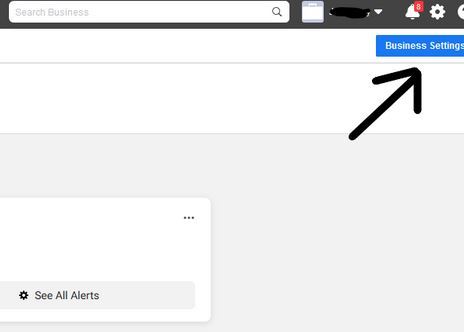
Select “Pixels” then click the plus button to add a Pixel.

Give your Pixel a name. At this stage, you can also enter your website URL, and Facebook will check whether your website was set up with one of its retargeting partners (this makes integrating the pixel easier) then click “Continue.”

Choose “Add code using a partner integration” if you use an ecommerce tool or CMS with a Facebook integration. If not, choose “Manually add pixel code to the website.” Choose “Email instructions to a developer” if your Web Developer is doing the next step for you.
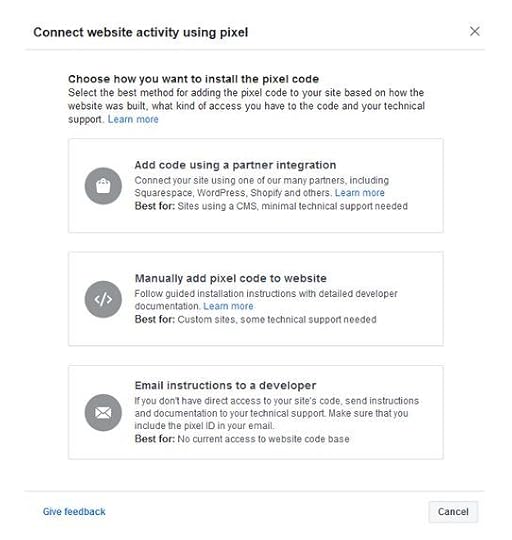
From there, follow the instructions to add your pixel using your integration, or insert it into the backend of your website if you have a basic understanding of coding. If not, ask your Web Developer to do it for you or use a plugin like PixelYourSite.
Once you’ve got that bit sorted out, you’re ready to get started with your retargeting campaign.
Define Your Audience
A Custom Audience is a group of people you’ll market to based on specific parameters. In the case of retargeted advertising, these parameters will be actions taken on your website.
Some of the Custom Audience types you might want to consider for the purposes of retargeting include:
Existing customers. The marketing cliché that it’s easier and cheaper to keep a customer than to attract a new one is true. By targeting those who have purchased from you before, you will enjoy a much higher conversion rate than from targeting new prospects.
Cart abandoners. Cart abandonment refers to putting things in your virtual shopping cart but not completing the purchase. According to Sleeknote, abandoned cart retargeting can send 26% of those people back to your site.
Previous site visitors. These people didn’t buy or put things in their shopping carts, but they were still interested enough to spend time browsing your store.
The audience you choose will depend on the goals of your campaign. You can also try retargeting to a variety of Custom Audiences and see which segments see the best results.
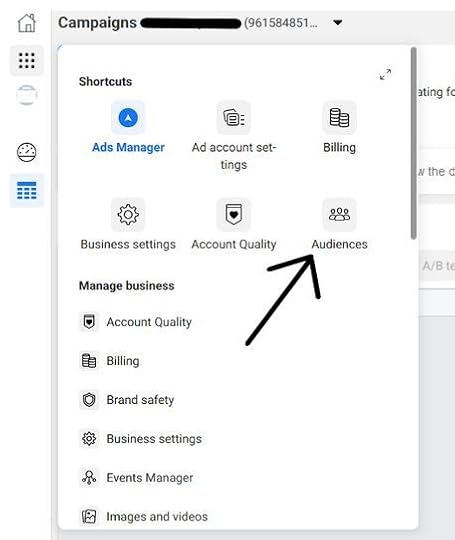
To create a Custom Audience, go to “Audiences” in your Ads Manager on Facebook, click “Create audience,” and select “Custom Audience.”
Choose “Website” under the “Use your sources” header:
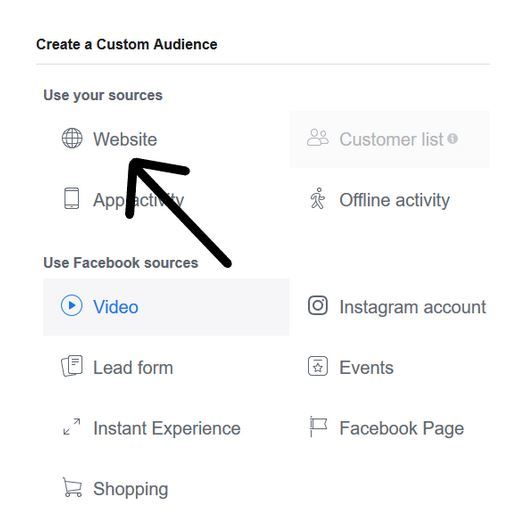
Finally, set your parameters in the rule section and give your Custom Audience a descriptive name. Once you’ve created your Custom Audience, you can select it during the ad-creation process.
How to Create the Perfect Retargeting Ad
Now that you’re ready to create your ad, let’s look at how to make it really stand out. Statistics suggest that the average adult sees hundreds, if not thousands, of advertisements per day. They are everywhere — on our billboards, television screens, smartphones and, of course, our social media feeds.
So if your retargeted ad is going to work, you need to find a way to cut through all that noise and make your prospective customers sit up and take notice. Here are a few of the strategies that I, and other experts, recommend.
Use Dynamic Product Ads
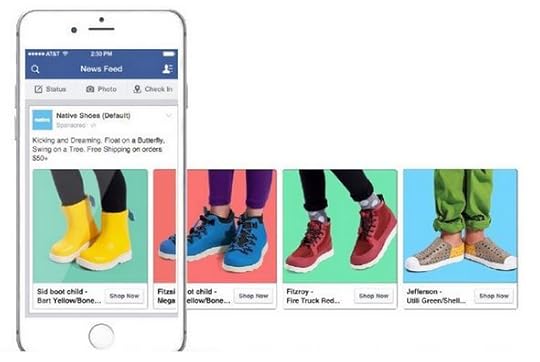
Dynamic Product Ads are fantastic for ecommerce store owners. You can choose to target customers based on three specific behaviors: viewing a product, adding it to cart, or making a purchase. Dynamic Product Ads display product pages that your customers have indicated an interest in based on these behaviors.
Here’s an example of a Dynamic Product Ad for retargeting:
 Source: KlientBoost
Setting up a Dynamic Product Ad requires going through a few steps to get it set up, but once it’s live, you can leave it alone to do its thing. Here’s how you do it.
First, upload your product catalog to Facebook through your Business Manager using the “Prct Catalogs” button listed under “Assets.”
Once you’ve uploaded your catalog, you’ll need to create a product feed. This is a spreadsheet listing all your product details and can be divided into different categories if you wish (e.g., a clothing retailer might create separate product feeds for men’s, women’s, and children’s apparel.) You’ll need to follow the formatting guidelines so your product feed works correctly. Many ecommerce platforms come with a built-in product feed functionality to make this part easier for you. Finally, connect your Pixel to your catalog using the Catalog Manager.
You can now create a Dynamic Ad template using Ads Manager, choosing whether you want to display a single product or multiple products at once. At this stage, you’ll also select your Custom Audience, which we walked through a moment ago, and decide which customer behaviors you want to target. You only need one template to target customers on desktop, mobile, and tablet, and once you’ve set your parameters, your ad runs automatically.
Offer a Lead Magnet
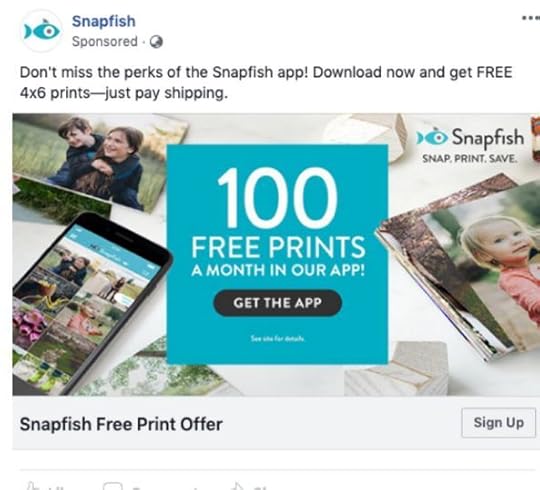
A lead magnet is something you offer to your audience for free to entice them back to your website. What you offer will depend on the nature of your store and what you sell, but possible offers include discount codes, e-books or guides, product-matching quizzes, and free shipping. Make the offer prominent in your ad, and make sure you emphasize the value it offers to the customer.
Here’s an example from photography company Snapfish:
 Source: ShortStack
Notice how the free offer is placed front and center in the ad. It might seem counter intuitive to generate sales by giving things away for free, but lead magnets are actually one of the most consistently successful sales strategies.
Just make sure you choose something that is relevant to your business and appealing to your target audience.
Announce New Launches
Chances are, if a prospective customer was interested enough to visit your store, they might like to know about new product launches. Make sure previous customers and website visitors are the first to know about new releases by using retargeted ads to draw them back to your site.
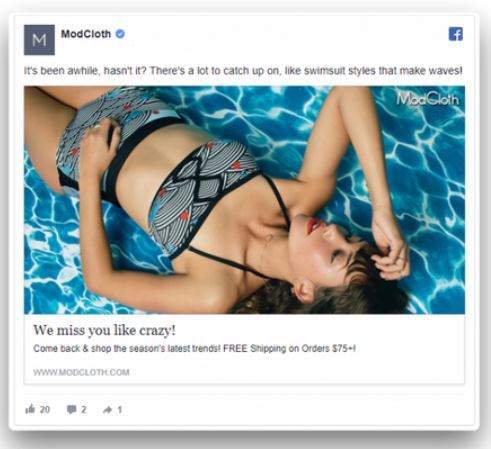
Here’s an example from online fashion store, Modcloth:
 Source: Connectio
This type of ad serves to remind customers that they haven’t visited your site in a while and nudges them to take a look at your new releases. Notice the informal tone that speaks directly to the customer as though they were a friend. Combined with the “free shipping” lead magnet, this makes for a high-converting ad.
Cross-Sell and Upsell
Cross-selling and upselling is perfect for retargeting customers who have already bought from your store. The trick is to retarget buyers with products that make sense and work together with their original purchase.
Did they buy a summer dress? You could retarget them with the perfect pair of shoes to go with it. Did they buy a new computer? Why not upsell your newest keyboard-and-mouse combo?
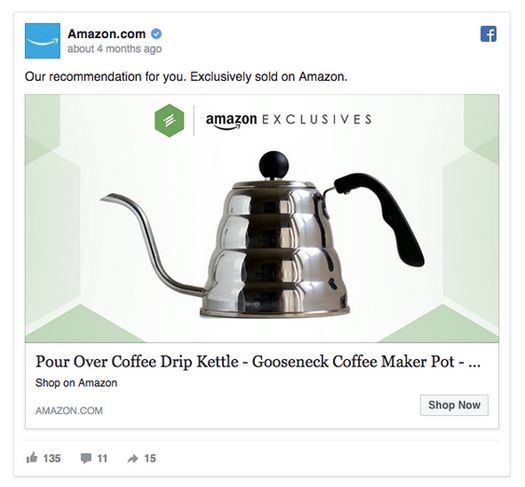
Here’s an example. This Amazon ad for a coffee pot could be targeted toward people who recently purchased coffee beans:
Source: Facebook
The personalized language of “our recommendation for you” builds a connection between the customer and the brand and shows that the customer understands the buyer’s needs and purchasing habits.
Promotions and Discounts
Everyone loves saving money. Retargeting customers who visit your site but didn’t buy and offering them a special deal or discount is a highly effective strategy. It works particularly well if you focus on those who got as far as putting items in their carts and then abandoned them.
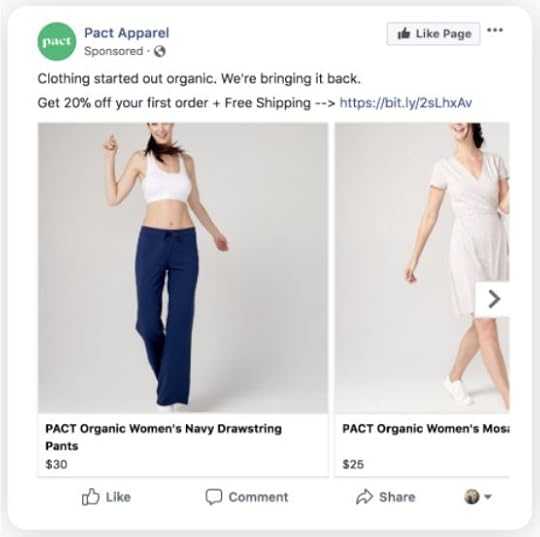 Source: ClickZ
In this example, clothing retailer PACT Apparel targets customers who abandoned their carts and offers a 20% discount. You can take it one step further and introduce a limited-time offer, which creates a sense of fear of missing out (FOMO) and drives the customer to click the “Buy now” button sooner.
Going Live
Now that you’ve decided on the format of your ad, written the perfect copy, and set your audience parameters, you’re almost ready to go!
Set Your Budget
The beauty of Facebook advertising is you can control exactly how much you spend. Choose your maximum daily budget and how long you want your campaign to run.
You don’t need a huge budget to make Facebook retargeting work for you. You can start from as low as three to five dollars per day and see results, as long as your audience is well-defined and your ad correctly configured.
When you’re starting out, I recommend dedicating a small budget to several campaigns, which will allow you to test out different parameters and formats to see what works best.
Monitor, Track, Adjust
Marketers often refer to social media advertising as “set and forget” because it runs itself once you have set it up. However, you will only succeed if you clearly define your goals and keep track of how you’re doing. Therefore, it’s essential to monitor your campaign at every stage.
Use Facebook’s Ad Manager reports to track metrics such as engagements, click-through rate, and conversions. And, of course, analyze your sales figures against your ad dates. Did you see an uptick in revenue? If so, great! If not, adjust accordingly.
If you’re running multiple campaigns, compare and contrast to assess which strategies work and which do not.
Finally, don’t be afraid to change things that aren’t working. You can tweak your budget, amend your formatting, change your audience parameters, and even stop an ad entirely if you aren’t seeing the results you wanted. Social media advertising is a skill, so don’t worry if it takes time to learn all the tricks and get it right.
Scaling Your Retargeting Strategy
When you’ve found the retargeting strategies that work for your store, you need to start scaling your efforts if you want to see maximum results. Here are some ways to scale your Facebook retargeting:
Increase your budget. If your ads are working, a higher budget means more eyes will see them.
Fine-tune your messaging to be as specific as possible. Ads that feel highly personalized will convert better than generic ads every time.
Segment your audience. By segmenting your audience further using highly specific interests and behaviors, you can better deliver those perfectly targeted ads.
Add a special offer or bonus. Free shipping or a freebie will entice more sales.
Add more products or product categories to your campaign.
There’s an in-built limit to how far you can scale a retargeting campaign alone as it is based on the volume of traffic your site or store receives. Therefore, along with scaling your efforts using the strategies suggested above, you should also focus on maximizing conversions and increasing your site traffic.
Therefore, if you see fewer conversions than you’d like, or they drop off after an initial spike, it’s time to tweak your ad. Are your product photos clear and professional? Is your copy quite right? Do you have a compelling offer or lead magnet to entice people to click that button?
Consistently working to drive more traffic to your site is something online retailers and ecommerce store owners should be doing anyway. Focus on Search Engine Optimization (SEO), implement or increase pay-per-click marketing efforts, and work on scaling both your organic and paid social media traffic. As your site traffic increases, your retargeting can naturally scale alongside it.
Conclusion
The data proves that retargeting works. It’s one of the best ways to capture sales from those people who were interested enough to visit your site but not quite ready to buy.
It takes practice and perseverance to get it right. But given the enormous numbers of people who use Facebook, it is a strategy that ecommerce store owners need to get to grips with if they want to maximize sales.
I hope these tips have been helpful and will guide you through the process of setting up your first retargeted ad on Facebook.
Here’s to more sales than ever!
By Jimmy Rodriguez


August 7, 2020
6 Essential Skills Every Social Media Manager Should Have

AUG. 6, 2020
 Nghia Nguyen/Unsplash
Social media has become an integral part of every digital marketing strategy. With more than 3.8 billion people using social media, businesses can no longer ignore social media marketing.
Because of social media growth, the demand for social media managers is increasing. Business owners are looking for professionals who can not only handle their social accounts but also help them improve their social media marketing game.
Let’s take a look at the top six skills that can help you land your dream job as a social media manager.
1. Writing and Speaking Proficiency
Since social networks are all about communicating with people, expressing views, and sharing updates, you must be proficient in writing and speaking.
As a social media manager, you have to ensure all the posts you publish reflect your company’s personality and meet your audience’s intent. You also need to fit captivating stories in your posts to increase engagement. To enhance your writing skills, read guides related to copywriting and social media content creation.
With the rise in videos, you also need to be confident, especially when going live on social media. Facebook and Instagram Live are increasing in popularity, primarily because they allow customers to engage with brands in real time. Having good public speaking skills will help you present your ideas, answer customer queries, and chat with your followers.
Here are some tips to enhance your public speaking skills:
For recorded videos, memorize a script.
For live videos, rather than writing a script, plan the topics you’re going to cover.
Focus on your skills and hone them. For example, if you have a great sense of humor, use it to your advantage to make your live videos hilarious and engaging.
At the start of your video, give your viewers a sneak peek into what they can expect. This will keep them hooked, boosting your confidence.
If your mind suddenly goes blank during the video, pause for a few seconds, take a deep breath or drink water, then continue.
Practice before going live on social media. This way, you will be better at speaking in front of the camera and your audience.
2. In-Depth Understanding of Consumer Behavior
Consumer behavior refers to the study of your ideal customers to understand how they select and use a product or service. You need to determine your target audience’s behavior to capitalize and use it to your advantage.
Here are some questions that can help you better understand consumers:
Which alternative products or services do they think about?
How do they choose products? What factors affect their buying decision?
Does the environment (culture, media, etc.) influence them?
Do marketing campaigns influence them?
As for the factors that influence consumer behavior, they include:
Personal factors: A person’s interest has a direct influence on his or her behavior. Demographics such as age, culture, gender, and profession also have an impact.
Psychological factors: Everybody responds to a marketing campaign based on his or her perception of the brand or the item advertised.
Social factors: Social class, income, education level, family, friends’ suggestions, and peer groups also influence consumer behavior.
While understanding consumer behavior might sound easy, it’s not, especially when you have thousands of customers talking about your product or company on social media.
It’s recommended that you complete a degree that teaches consumer behavior, so you’re better positioned to gather actionable insights and fuel your social media marketing campaign. Another benefit of earning a degree is the opportunity to learn interactive marketing and business policies and strengthen your critical thinking and creative analysis abilities.
3. Ability to Quickly Adapt to Trends
Being able to adapt is yet another important skill for a social media manager to hone. Social media is probably one of the first places where changing trends are observed.
To adapt to trends, you first need to discover them. Here’s how you can find trends in two easy steps:
Use social media to learn more about your customers. Determine the “what” in social media posts. What posts are people attracted to? What kind of posts are people sharing? Those are your customer’s interests.
Understand the “why” behind it. Why are customers sharing certain posts? This will help you understand the underlying causes of those trends.
There’s not one defined way to adapt to trends. Look at what your competitors are doing, how they are reacting to trends, and what responses they are receiving. Experiment with various strategies to find what works best for your business then create a customized plan to outdo them. Keep an eye on your data and customer feedback to determine if your tactics are working or if they need improvement.
4. Ability to Build Digital Relationships
Building a digital relationship with your target audience is one of the most vital skills that every social media manager must possess.
Consumers are getting increasingly comfortable with interacting with brands on social media. In fact, 82% of millennials use social media to engage with brands and so do 65% of customers from other generations. Meanwhile 78% of people say their buying decisions are influenced by companies’ social media posts.
Some key points to remember when building digital relationships:
Listen Before You Speak
Offer value to your customers with each message or content you post. To do this, you need to first listen to what they are expecting from you then offer them customized solutions to solve their problems. Also, create tailored content for your target audience. The more your content is audience-centered, the more valuable your customers will feel.
Provide an Instant Response
According to a report, 32% of consumers who reach out to brands on social media expect a response within 30 minutes.
While it might not be possible for you, alone, to respond to each query within 30 minutes, make sure your team knows the right way to reply to customers’ issues. If their inquiries are not handled professionally, you might lose them.
Personalize Your Conversation
Don’t always throw automated or scripted messages at your customers. Here are some ways to personalize your conversation in social media:
Use the customer’s first name while addressing him or her.
Sign off with your name.
Always maintain a friendly tone to show you’re there to help them.
5. Empathetic Approach to Social Media Marketing
Empathy is all about showing customers that you understand and care about them. As the face of your company on social media, you need to have an empathetic approach to marketing. Some ways to help you build the empathetic approach include:
Creating a Content Plan
When creating content for social media, ensure that they are customer-centered. One of the best ways to create a content plan is by listing all the problems your ideal customers have on one side of your paper and then list all your brand’s expertise on the other.
Identify areas where your customers’ problems and your expertise intersect. Brainstorm content ideas around those topics. To ensure your posts are not self-oriented or promotional, make sure to highlight what’s in it for the customers.
Showing Your Human Side
Sixty-five percent of consumers say they are more loyal to brands they felt a human connection with. Although you can’t meet your customers face-to-face, you can do your best to show your human side.
Here’s how you can do it:
Share stories and backstage pictures, showing your humorous side.
Consider posting something that appeals to both logic and emotion.
Engage in discussions revolving around your industry, even where you’re not mentioned.
Catering Posts to Target Audience
What works for one social media platform might not work for another. Each network has its own set of audience. For example, Instagram attracts millennials while Facebook mostly attracts the older generation. Therefore, it is essential to ensure your posts and messaging appeal to your audience on the platform you publish. This way, more customers will be able to connect with your brand on a personal level.
6. Ability to Use Analytics to Drive Better Results
Data analysis is one of the must-have skills for social media managers. Analytics has two different meanings, depending on where it is used. For social media, analytics refers to likes, comments, shares, and mentions. For business metrics, it means traffic, leads, conversions, and revenue.
As a social media manager, you must understand both types of analytics and tie them together to analyze the company’s social media performance against business goals.
You should also be capable of using data to create new campaigns to accomplish your social media goals. For example, you should determine which ads or posts are performing better than others by looking at the data then capitalizing on them to drive more revenue.
Understanding Both Qualitative and Quantitative Data
Qualitative data is non-statistical. It is categorized based on attributes, characteristics, or other identifiers. It includes understanding the thoughts and feelings of consumers behind their social media posts or messages.
Using qualitative data, you can create tailored campaigns to micro-target unique audiences and increase engagement.
Quantitative data, on the other hand, is about numeric variables. For example, the number of likes, comments, and shares you receive on social media. Quantitative data helps ensure whether you are going in the right direction with qualitative analysis or not.
Both combined give a 360-degree view of your social performance.
Using Data Analysis Tools
Being a social media manager, you must know how to use data analysis tools. You might be wondering, there are tons of different tools, and it is not possible to learn each one. But, most of them provide similar types of data. All you need to know is which data to look for and how to use it.
Reporting on Social Performance
As a part of your job, you will have to report on social performance every month or quarter. Reporting does not mean focusing solely on numbers. It also includes identifying trends and creating recommendations and a plan of action.
Analytics gives you a solid foundation to support your decisions and show why you created the plan.
Conclusion
If you are not proficient in each skill mentioned above, strive to improve in every area. If you already excel in all the six abilities, congrats, but you still have work to do. Remember, a career in social media is a path of continuous learning and honing your skills.
By Joydeep Bhattacharya
August 5, 2020
TikTok Copycat Instagram Reels Now Available to Select Countries

JUL. 5, 2020
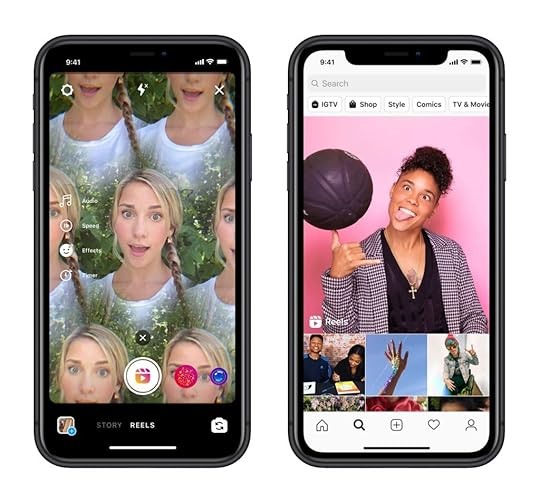 Image courtesy of Instagram.com
Today Instagram announced an addition to its 20-year-old app: Reels.
The new feature, available only to select countries, allows users to create a string of 15-minute videos, set to a track from Instagram’s music library. Users can also use their original sound, record hands-free, apply AR effects, and share their videos to Explore.
Sounds familiar?
Reels has been labeled a TikTok competitor, and for good reason. Looking at the eerie similarities, it’s likely many of Reels’ features were inspired by the Chinese-owned app.
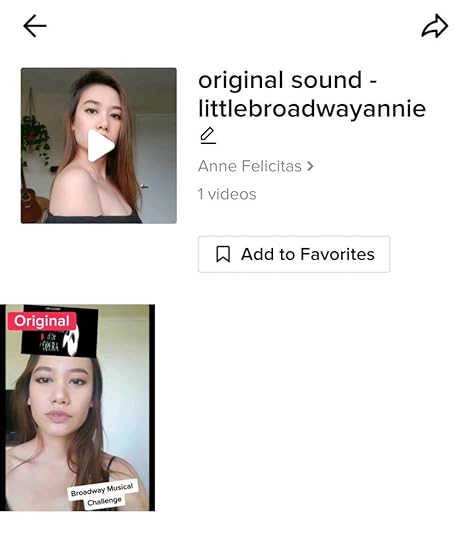
Take the audio feature, for example. With this feature, users can not only select music to go along with their videos, but they can also record an original sound, which remains on Instagram’s library for public use.
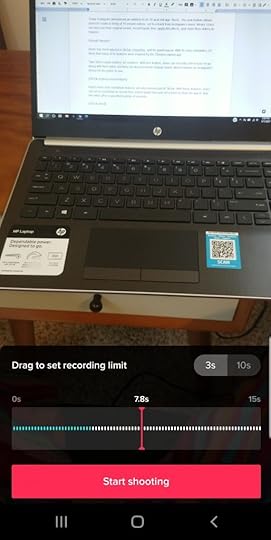
Reel’s timer and countdown features are also reminiscent of TikTok. With these features, users can set a countdown to record their videos hands-free and set a timer to automatically stop the recording after a specified number of seconds.
Instagram Reels is no doubt a TikTok clone, and for those skeptical — remember, this isn’t the first time the social media company has attempted to eliminate a competitor through imitation. The now beloved Instagram Stories is (quite obviously) an (albeit better) knockoff of Snapchat.
The release of Reels comes at an opportune time: Currently, there are talks of banning TikTok in the U.S., and should those plans come through, Instagram Reels could be a fitting replacement.
By Anne Felicitas
August 3, 2020
7 Surefire Ways to Sell without Being Too Salesy

AUG. 3, 2020
 Artem Beliaikin / Pexels
Today we live in an amazing world where people can get whatever they want, and they often have several options for where they can get it. No wonder businesses spend an incredible amount of resources on marketing. However, overdoing it may result in consumers feeling manipulated and walking away. How do you not sound salesy while convincing your prospects to use your product or services?
1. Relate to Customers’ Pain
Consumers are ready to pay for a remedy to their pain points. Before you sell anything, you have to identify your customers’ needs and the ways your product or service is going to help them. Use the data from your support and sales teams, study market survey reports, and establish communication channels with your audience. Get in touch with those who are already using your products and ask what you could do better.
Next, you can use this information to give actionable tips on how to use your product. Highlight your product’s unique features and quality. Give only the necessary information so that your customer isn’t bored. Yet, make sure to put together a helpful knowledge base where you list the advanced specifications for the inquiring minds.
2. Use Content to Educate Consumers
A blog is a powerful way to show that you are an expert in your industry, building trust around your company without sounding too salesy. Here, you can delve into in-depth explanations, share specific benefits of your product, talk about trends, post interviews with professionals, or give how-to tips. With social media marketing involved, a blog starts a conversation and attracts potential prospects.
Keep in mind that because readers are busy and fed up with lots of low-quality content, they tend to skim. A good way to make your texts easier to digest is by using visuals. The 2019 study from Venngage shows that original graphics, like illustrations and infographics, worked best for most content marketers, so experiment and see what your audience prefers.
3. Develop a Keep-in-Touch Strategy
People talk. They discuss numerous things and your company, too. If they talk about your company, they might as well start a dialogue with it. Monitor what’s being said about your brand and product and engage in the conversation. Here’s what you can do to set a relationship with your audience:
Repost their relevant content and thank them.
Offer something sweet (a discount, freebie, sample) every now and then.
Help them with a valuable tip on something they have trouble with.
Respond to complaints.
A good way is to ask open-ended questions that lead to a discussion. After all, if your prospects do the talking, you have no chance of seeming salesy or pushy. Look how Glocier finds what’s on its audience’s mind and handles a follower’s inquiry on Instagram:

4. Prioritize Your Customers’ Security
There’s just one thing that all customers want from all businesses: They want a guarantee that they will benefit from the purchase. If there is the slightest sign that they may regret having bought from you, they won’t do it, leaving you with no sales. That means you have to prove to your audience that they will enjoy using your product. Here are the basic guarantees every reliable provider has on his or her website:
Money-back policy
Return policy
Safe payment systems
Security badges
In addition, the statistics by GetVoIP shows that more than half of customers believe that automated systems can harm their personal data safety. So, make sure you have balanced out the issues of comfort for your customer service agents and your clients’ security needs.
5. Revise Your Email List
Building an email list takes time and effort. Make sure you only have those members in your list that gave their permission to receive your marketing emails. If you haven’t sent anything for a while, chances are your list has gone stale. So you’ll want to try to reactivate sleeping contacts and get those inactive clients back before you market anything to them.
Next, take time to get to know your audience and create catchy initial emails to send to prospects that don’t sound salesy. Especially in those first emails, make sure that subject lines hint to your readers about what’s inside rather than push them to open the email.
Using a conversational approach to copywriting is a good way to make your copy sound less salesy and remove distrust.
6. Let Them Try Your Product for Free
This tip is not for every business. However, letting consumers get a sneak peek into what your product or service can do for them is a surefire way to not sound salesy while increasing awareness. If your product or service is eligible for free sampling, you may
Send a sample to a limited number of people and ask them for a review that will later go on your website.
Offer your samples to an influencer to spread awareness and bring prospects to your page.
Use events to distribute free samples to spur interest and make prospects search for you.
Keep in mind that customers tend to trust their own research rather than a salesperson’s. So, your task is to provide them with enough information by creating a strong social selling strategy.
7. Go Steady
Prepare your audience for purchase using a step-by-step launch strategy. By portioning out the information, you reduce the level of salesy, but do not let your customers forget about you. Here is the basic sequence to build awareness about your product or company:
Educate your target audience about issues, popular solutions, and effective methods. Mention your product and how helpful it is in each described issue.
Announce the most widespread pains and discreetly indicate how your product can alleviate them.
Tease your product with an appealing visual and strong message.
You are ready to launch.
While your product is already on the market, remember to continue educating your audience about it, explore your clients’ pain points, and adjust your sales pitches.
There you have it. In order to succeed, you need to tweak your perception of yourself from a provider to a consultant. Consumers don’t need things anymore, they need solutions. This approach will take time, but it will gain trust from your prospects, which proves to be much more effective in the long run.
By Lidia Bondarenko
July 29, 2020
How to Use Live Videos to Grow Your Business

JUL. 29, 2020
 Nathan Dumlao /Unsplash
In today’s digital era, where social media has dominated the digital landscape, live streaming is one marketing tool that has helped businesses gain more exposure while generating more leads and sales. Many businesses are inclining more toward social media platforms, like Facebook, Twitter, and Instagram to reach a large user base without any geographical boundaries. To survive in the competitive business space, you need to differentiate yourself in the market — that is where live streaming can help you.
If you are running a business that relies on people being at your physical location, you probably experienced a challenge in taking your business forward during the current coronavirus pandemic. Local businesses are seeing a dramatic decline in sales. In this situation, you may be thinking about what to do to save your business. The current pandemic is causing a significant rise in the use of live streaming tools by both individuals and businesses for different purposes. Leveraging live streaming for business purposes is a realistic way to future-proof your business and ensure you gain a competitive advantage in the industry.
Benefits of Using Live Streaming for Your Business
Live streaming offers a sense of excitement for your target audience. They make your customers feel inclusive and exclusive at the same time. Besides broadcasting live, you have the opportunity to interconnect and promote your live videos later on social platforms.
Your viewers would be pleased to watch the richer content your live videos can produce, especially if you allow your audience to submit questions and interact with your brand. Live streaming has an unlimited range, and it opens up the possibility for a global audience to participate regardless of any geographical limitations.
So, what are the other benefits of live streaming for businesses? Let’s look into it.
Audience Growth
The internet is a large place, and reaching out to a global audience is no easy task. Although marketing can help you grow your audience base, not all strategies are effective in crossing geographical boundaries; whereas, live streaming is capable of achieving it.
Live videos help you reach customers who otherwise wouldn’t participate in interacting with your brand. Due to its real and authentic nature, live videos definitely get an advantage over pre-produced videos.
Unique Interaction with Viewers
You can interact with viewers without any limits during live broadcasts, unlike other marketing tools. Live streaming establishes a personal connection your audience and gives your audience a personal experience with your brand.
In the past, businesses were impersonal and didn’t employ strategies to captivate the interest of their audience on a deeper level. However, the audience of today and its preferences have completely changed, and it becomes important for brands to personally connect with their audience to grow their business. The audience of today loves to know the business and the team behind it. Live streaming is a perfect way to do that, by showcasing the real side of your brand to your customers. Moreover, social live streaming platforms are now coming up with many important features that make it convenient for businesses to go live.
More Engagement
There is no better way to interact with your customers than interacting with them live. The real-time interaction facilitates a conversation with your audience, which is the next best choice to personal interaction, but much scalable than that. The live aspect also pushes your customers to engage personally with your content. During live broadcasts, viewers want to be a part of it, and they are more likely to share it, too, with their peers and friends.
More Trust
Building trust is one of the critical success factors of every business. Your customers will only prefer to do business with you if they have trust in your brand. The interactive feature of live streaming allows customers to create a connection with you. If they like what they see, the connection will help build trust. Another benefit of live broadcasting is the freedom it offers. There are no limitations. You can choose the time to go live, based on your convenience, and the topic. The content can be educational, commercial, promotional — the possibilities are limitless.
More Content for Marketing
If you want to create more content for marketing purposes, you can choose to repurpose your live videos afterward. Once your live broadcast is finished, you can share it with social platforms as on-demand videos, which increases the exposure and reach further.
However, not all live videos can be repurposed in the same way. For example, if you are running a live product demo with a promotion, it might be beneficial even if you repurpose it. But, if you edit it, the product demo can be an educational piece that can benefit your audience, even long after your live stream ends.
How to Use Live Streaming to Grow Your Business
Now that you know the advantages of live videos, let’s look into examples, live streaming trends, and ways to use live streaming to grow your business.
Promote Product and Brand
You can use live streaming to showcase a product update, product release, or exclusive behind-the-scenes clip to your users. For example, if you own a fashion brand, you can give your customers a glimpse of your new product collection and demo.
Generally, customers are used to watching post-production and edited content. If you can make your live videos more interesting and engaging, it can help with your brand and product promotion. For instance, Vogue conducted a live broadcast during the Met Gala to show the behind the scenes footage, which earned a lot of views and engagement.
Engage with Live Blogging
Live blogging offers a great level of engagement with your brand as readers ask questions about the blog and express their feedback. You can use live streaming to continue the conversation with your readers in real time. For example, if you are doing a product review, you can broadcast live as a continuation to answer customer’s questions. When professionally using live streaming, you also need to ensure that you cover the essentials and best practices for better results.
Deliver Brand Presentations
If you are looking for effective ways to deliver brand presentations, there is no other way than live streaming. It helps you answer customer questions live as they view your product presentation. If you are conducting a small- or big-scale event, you can stream your presentation then go backstage and respond to the questions of your followers. Conducting live streaming of such events is a great way to activate your social media following. When you are live streaming, understanding how to set up live streaming events on a big scale can help, as it requires multiple cameras and a professional setup.
Broadcast Special Sessions and Seasonal Offers
By announcing special offers on special days in real time, your business gains a lucrative opportunity to bring in quality traffic to your website and social media. A simple social media post may just engage your viewers for a very short time, but a live video can increase the reach of your message. For example, Dunkin Donuts live broadcasted a tour of its test kitchen on Valentine’s day, along with a big announcement.
Conclusion
Compared to content marketing strategies, live streaming is one of the cost-efficient options out there. With live streaming, there are lots of possibilities to explore, and your customers will appreciate the effort. Regardless of the content you create, you must focus on your live streaming strategy to build a personal relationship with your existing and potential customers. Once you test different strategies, continue with what gives you a better performance in live streaming platforms, and ditch what doesn’t perform better. Happy live streaming!
How to Become a Digital Marketing Specialist

JUL. 27, 2020
 Bruce Mars / Unsplash
Digital marketing is all about leveraging all digital channels, such as SEO, PPC, social media, and content marketing to promote businesses and their goods and services to customers. The main job digital marketing establishes through online marketing strategies is to inform, attract, and convert. The digital marketing industry is growing rapidly, and it is a field in need of skilled professionals.
Whether you’re a beginner or you have some marketing experience, becoming a digital marketing specialist demands you to have these specialized skills:
Customer service
Marketing
Strategy
Planning
Time management
Problem solving
Analytics
Creativity
Presentation
Knowledge of all key marketing areas
Social skills
Industry-news tracking
Ability to quickly create a social presence
These are some of the skills a digital marketing specialist should have, but it is not necessary to have all of them. Some skills can be developed gradually with experience in this field.
Understanding the Role
To become a digital marketing specialist, you need to be familiar with the roles and goals you will be handling. You will have to indirectly promote company products or services, increase brand awareness, and drive prospects to conversions. Instead of using traditional marketing channels, digital marketing specialists need to effectively communicate through appropriate technology platforms. A digital marketing specialist must handle the following duties:
Perform consumer research
Acquire knowledge about consumer trends and demands
Evaluate the needs of the consumer market
Understand how and where to implement business strategies
Initiate effective marketing campaigns online
Translate business goals into successful marketing campaigns
Evaluate and analyze results
Discover other ways of reaching customers
A digital marketing specialist should also have a wide knowledge of SEO, Google Analytics, content marketing, email marketing, PPC, and Google Ads. If you know how to use these marketing tools, make a strategy first and start applying strategies in areas where it suits best. You must also possess knowledge in all the marketing strategies that will help you become a digital marketing expert. If you don’t have knowledge in any of the above-mentioned areas, getting complete training will help you brush up your skills and gain new ones.
Choosing an Area of Specialization
As a digital marketing specialist, you have a list of options on what you can specialize in.
SEO and Content Writing
To become a digital marketing specialist, you must understand the basics of digital marketing. Search engine optimization, or SEO, is the area where you can start from scratch, where you can generate leads and conversions through organic traffic. It is differentiated as on-page and off-page SEO. On-page SEO is all about the activities you do within your website while off-page SEO involves all the activities outside your website, such as link building. These days the demand for skilled SEO experts is high. Therefore, you need to stay up to date with market variations.
SEO and content marketing are closely related. You can achieve good search rankings only through good quality content. It takes diligence, expertise, and time to rank high in search engine results. Analytics will help you track the performance of your content, and based on your search preference, you must change and improve your content strategy to rank higher.
If you think that you can manage both of these areas intelligently and creatively, choose this area of expertise.
Social Media Marketing
Social Media is one of the most preferred platforms for most human beings. If you think you can skillfully handle social media by engaging with your followers, attracting new customers, and maintaining existing ones by generating, sharing, and updating content, choose social media as your specialization.
You can use social media to target either a specific or a large number of audiences. Demographics and target audience selection all depend on the type of business you’re dealing with. A digital marketing specialist must learn the most advanced techniques and always try to protect a brand’s online reputation.
PPC Specialist
To become a PPC specialist, you must first learn the art of PPC (pay per click) and paid search. There are different search engines that offer you paid search campaigns, including Google Ads (previously known as Google AdWords), which is the most popular. As a PPC specialist, you must learn how to generate paid traffic using various PPC marketing campaigns and channels. Google offers certification for different channels and platforms. Learn and earn a certification from Google to become a PPC specialist.
Google Analytics Specialist
Google Analytics is the most critical digital marketing area, which requires average intelligence to understand but creativity to plan a strategy. Google Analytics is where you can track all the activities happening on your website. It also enables you to track your customers’ and visitors’ behavior. It will help you make relevant decisions regarding the best suited digital marketing strategy and channel for your client’s business.
Google Analytics helps you track and analyze reports of all the strategies and goals you have set and established. Therefore, learning Google Analytics or understanding it with the help of an expert will help you become a valuable digital marketing specialist for your client’s business.
Stay Updated and Keep Learning
Your journey as a digital marketing specialist never stops. You need to stay updated to move against the tide. The changes in the digital marketing industry are never-ending and continuous. Therefore, if you want to be a digital marketing specialist, never stop learning. This is also one of the reasons why being a digital marketing professional is challenging and at the same time interesting. If you like all these things, simply go ahead!
If you’re ready to become an expert in the digital marketing field, you must study the best digital marketing tips that will help you improve your career as a digital marketer.
By Sharafudheen Mangalad
July 27, 2020
How to Track the Right Content Marketing KPIs for Your Marketing Goals [Infographic]

JUL. 22, 2020
Most businesses today have a content marketing strategy in place. Done right, content marketing can help you increase brand awareness, generate leads, boost sales, and elevate your business.
Is your content marketing strategy really working? You won’t know until you measure the results of your campaign. Tracking the right KPIs (key performance indicators) allows you to see what’s working, what isn’t, and what can be altered.
Start by Defining Your Content Marketing Goals
Oftentimes, marketers post content and jump to measurement without being clear about what they wish to accomplish. This can lead to a waste of resources and skewed results. To make the most of your content marketing strategy, you should identify your goals and then tie them with relevant KPIs. Here are two goals content marketing can help you accomplish.
1. Brand Awareness
Brand awareness represents how familiar your target audience is with your brand. An engaging content marketing strategy can increase brand awareness, subsequently leading more people to buy from you. If this is one of your goals, here are several KPIs you can track.
Article views: In addition to looking at the number of article views, you can also understand traffic source, average session duration, and bounce rate for each article.Audience engagement: If people share or leave a comment, it means they genuinely like your content. The more they engage, the more likely they’ll remember your brand.Inbound links: Gaining high-quality backlinks can help you climb up the SERPs faster. Good quality content will be more likely to gain backlinks.
2. Boost Sales
The end goal of most content marketing strategies is to improve the brand’s bottom line. If you want to track your campaign’s success in this regard, you can track the following KPIs:
Conversion rates: Quality content can build trust, educate your target audience, and subsequently convert leads into customers. In addition to your content’s conversation rate, you can take a look at which pieces of content are driving more sales.Length of the sales cycle: The goal is not just to increase revenue but also to do this as quickly as possible. A good idea is to identify channels that help close sales faster.
Be Creative — Don’t Restrict Yourself to the Common KPIs
The KPIs you must track largely depend on your goals and your strategy. While the above-mentioned KPIs are a great place to start, you shouldn’t limit yourself to those. Some of the hard-to-track KPIs could be hoarding some of the most insightful information.
Keep Updating Your KPIs
Establishing content marketing KPIs is not a one-time event. Every time your goals or your strategies change, the KPIs must be updated, too. Besides, the world of content is changing every day, so revisiting the KPIs you once established is always a good idea. All that being said, creating good content is not as simple as it seems. If you find yourself struggling to curate content that converts, know that you’re not alone.
You can always leverage a content marketing platform and improve your strategy. To learn more about content marketing KPIs, check out the infographic below.
 Image Courtesy: shanebarker.com
 Written by Shane Barker
July 24, 2020
Using YouTube Keywords to Get to the Top of Search Results
JUL. 24, 2020
 Christian Wiedger / Unsplash
No self-proclaimed serious content creator uploads videos on YouTube just for his or her own entertainment. People and brands create videos because they want others to watch ― they aim to grow a community or boost their marketing strategies, among other things.
But let’s face it: It’s not easy to take your video content up to where it can be seen, to the first results on YouTube searches. You know that people don’t scroll very far down when they’re looking for a video to watch, so you need to make it your goal to ensure that the content is right up there, where they’re looking for. To do that, you’ll need a good keyword strategy.
This is a list of the secrets that professional video companies use to get their videos to the top 10 results of YouTube searches ― use them wisely, and you’ll be part of this select club as well.
Know Your Basics : Short vs. Long-Tail Keywords
You’re probably familiar with these concepts, but let’s break them down just in case. A keyword is a word that defines the main theme of the content in a post or, in this case, a video. They’re used as a way to identify the topic of the video so that when people look for said subject online, that video is listed as one of the results.
A long-tail keyword is a longer phrase that presents a more specific match of what a person is searching for. For example, a regular keyword for a gardening vlog could be “plants,” and a long-tail keyword for that could be “best types of plants for indoor gardening.” Notice the difference?
Now that we’ve established that, let’s talk about how to choose and where to find the right keywords for your YouTube videos.
Choose the Right Keywords
To find the keywords that best represent your content, you need to learn which phrases people are using for their online searches. As you may know, YouTube is owned by Google, and both platforms are search engines (yes, YouTube as well), so a great place to start your research is on Google.
Google Trends
Google has a lot of free marketing tools, and one of them is exactly what you need right now: A tool called Google Trends, which shows how frequently a specific term is entered into the search box of the platform. You can use it for YouTube as well, by switching on the drop-down menu from “Web Search” to “YouTube Search.” It’s that easy!

With Google Trends, you can also compare how much a particular search term has been used in a given period, which can help you analyze whether the keyword in question is rising in popularity, and if it’s more demanded around a specific event or season.

Now, Pick the Best Long-Tail Keywords
Google Trends is great to find regular keywords, but after you’ve done that, you’ll need to refine your strategy and choose the right long-tail keywords. The reason is, usually, generic keywords are extremely popular, and it can be hard to rank your video when there’s too much competition. So, you can start by positioning a long-tail keyword that includes your main keyword, reducing your field of action to precisely the kind of people you’re looking to reach.
With long-tail keywords, you face much less competition in SERP, and you have more chances of being among the top results. The best part: You can find the best long-tail keywords directly on YouTube.
Trending Videos
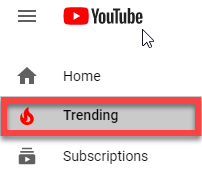
Do you often check which trending videos are related to your niche? This will help you find the keywords that people are using so you can implement them. Of course, you don’t have to use the same ones. Instead, look at the main keywords that featured videos are using and adjust them to create your own long-tail keywords, more closely related to your audience’s interests. You can find trending YouTube videos from the left-column bar.
Search Suggestions
If you’ve ever searched anything on YouTube, you’ve seen how the platform suggests certain terms that autocomplete your search for you. That’s a goldmine for long-tail keywords. For example, a search for “Explainer videos” suggests “Explainer videos for business,” “Explainer videos examples,” “Explainer videos for education.”

If you’re looking to position yourself on that niche, you’ll find that using one of those suggested phrases will perform much better than using the main keyword you originally entered on the search form.
Put Your Keywords into Action
Now that you’ve settled on your regular and long-tail keywords, it’s time to use them. Start with the basics by including your long-tail keyword in the title of your video. It needs to be placed naturally, so make sure to find a nice, catchy title that contains the keyword without feeling forced.
Another part of this is to write a good description for your video. It should be informative, concise, and it should also naturally include your keywords. Don’t even think about writing a mere list of keywords on the description because it looks robotic, and it will repel more than attract people.
You can also add up to 15 hashtags on YouTube, with different variations of your keywords. Make sure that you don’t overdo it, though, because YouTube will penalize you for that by rendering all your hashtags useless.
Last but not least, don’t forget to upload a transcript along with your video. Transcripts are .txt files in which you type what is being said on the video, and YouTube converts them to captions. It’s an easy way to help your videos get more views, as plenty of people watch videos when they’re in public and prefer not to turn on the audio. It also contributes to making your content more inclusive for people with hearing impairments or that speak English as a second language.
It’s also useful from a strategic perspective because search engines can’t listen to your video’s audio to find relevant keywords, but they can read the transcripts that you upload. So, by including a transcript, you’re also adding more keywords that will be detected by the algorithm.
Let’s Wrap It Up!
As we established earlier, brands and influencers are spending valuable time and resources to create video content, so it needs to be seen. Choosing the right keywords is essential to achieving that kind of visibility every content creator is hoping for.
Make sure to choose the best keywords to make your video shine, and when you’ve done that, narrow your selection and find the best long-tail keywords. After that, the only thing missing is to naturally introduce these phrases on your video’s title, description, subtitles, and tags.
By following these tips, you’ll be on the right track to making your video as searchable as it can be. Buckle up and get ready to shine on YouTube!
By Victor Blasco
July 22, 2020
5 Ways to Optimize Your Website for Lead Generation

JUL. 22, 2020

Halacious / Unsplash
It’s no secret that lead generation is the key to boosting your sales and growing your bottom line. One of the best ways to capture new leads is through your website, of course. But what are some of the best ways to ensure your website is optimized for lead generation?
During the dawn of the internet era, business websites had it easy. They could simply add a colorful button with a call-to-action phrase, such as “Click here to get started!”, and watch as the leads come in. But in today’s world of internet marketing, it might take a little more time and strategy to effectively generate new leads on a consistent basis.
Below, you’ll find out more about why generating leads on your website is so powerful, as well as the five best ways to optimize your website for lead generation.
How Does Lead Generation Work On A Website?
An extensive research project performed by Marketo shows that just 4% of new website visitors are actually ready to buy something. However, when you have a website that employs several lead generation strategies, you can significantly increase that 4% figure.
Why is lead generation so important on a website?
If you’re in the business of selling to your customers, your interaction with them starts on your website. It is likely one of the first places a potential customer will visit to find out more about you before making any buying decisions. As a company, it is your goal to gain that visitor’s interest and capture them as a lead before they leave your website.
The easiest and most basic form of lead capturing is through a CTA or a call-to-action. This is something we mentioned earlier with our example phrase, “Click here to get started.” This is a simple command usually in the form of a button or a sign-up sheet that persuades someone to sign up for a newsletter or enter their email address to stay apprised of deals and discounts.

Once they do that, you have successfully captured a lead!
Why stop there? Below are five of the best ways to optimize your website for increased lead generation.
1. Make a Landing Page
A landing page is a page on your website specifically designed to capture and convert leads. Rather than arriving on the homepage of your website, a visitor will first find themselves on a landing page. This landing page will have some kind of form or info box where visitors can enter their information (such as an email address or phone number) in exchange for a deal you are offering them.

Have you ever visited an e-commerce website, and upon entry seen an offer for a “new visitor” discount? All you need to do is enter your email address and click the button. Then you will receive the promised discount or promo code that will convince you to shop with them if you were on the fence about it before.
In fact, it’s a good idea to make multiple landing pages. A HubSpot survey shows that companies with more than 30 landing pages have generated seven times more leads than websites with only one or two landing pages.
2. Automate Emails
This strategy is a great follow-up to the landing page. Once visitors entered their email addresses in exchange for an offer or deal, you can set up your email system to automatically send them a “thank you for joining” message. This is also known as a kickback email.
This is proven to more than double the rates of engagement between newly converted leads and sales staff. The thank-you email shows potential customers that you have taken the time to address them personally, and you value their input. Remember to include a powerful CTA in this email!
What are some good CTAs? Here are some examples:
Click Here to Get StartedTry Us Out For Free!Subscribe and Get Updates
Keep it short and to the point, and your visitors will likely respond.
3. Add More Forms
Sign-up forms are quick and easy ways to generate new leads. The areas of your website with heavy traffic are wasted if you aren’t using them as a way to capture all of those individuals who come through.
This is a good opportunity to conduct a thorough study of your website to determine which pages have the most traffic. Where do you get most of your lead generation or outreach from? It may be from a page you usually don’t pay any attention to.
Wherever the heavy traffic is, make sure that area of your website is doing everything in its power to generate and nurture those visitors to leads. Add forms that ask for more contact information, and make sure that each page is consistent in terms of information and style.
4. Offer Free Downloads or Info
Encourage visitors to take a look at your blog or news update section of your website. There, you can offer exclusive downloads to e-books or whitepapers offering helpful information. This is an especially good strategy if you are a service or information-driven company, offering advice or help from experts in your field.

Giving visitors a chance to access some of your expertise for free is an opportunity too good for them to pass up. In certain blog posts, or on certain web pages, you can include download offers to information or solutions your visitors may be looking for.
Giving them a little bit for free will encourage them to come back and get a lot more for a price they will willingly pay.
5. Never Stop Nurturing
Another HubSpot study on email marketing proves the importance of nurturing leads via email communication. From the moment you send out that automated thank-you message, make sure they continue to be aware that you haven’t forgotten about them.
Keep sending them emails that include content they will want to see. Add exclusive content or free information that your leads will only be able to see if they sign up for your emails.
Make sure each lead is given tailored information that matches their interests. Email them often, but not too often, or else they may start to get annoyed. Make it short and sweet, get to the point, and offer them something wonderful. Then sit back and watch as the leads pour in!
Boost Your Lead Generation Tactics on Your Own Website
Your website is the best place to convert and nurture leads. While most of your traffic may funnel in from your social media profiles, it’s important to ensure that this traffic doesn’t leave before giving you some of their contact information. That way, you can continue to offer them deals and exclusive information that will entice them to stick with you for the long run.
These strategies take some time to develop, and they must always be updated to stay consistent with current trends. It may seem like an exhausting task, but the amount of leads you’ll gain (which translates into bigger sales) is all worth it.
By Dan Stevens
July 20, 2020
How to Create an Engaging Facebook Post

JUL. 20, 2020

Erik Mclean / Unsplash
Since its original launch back in 2004, Facebook has grown into a social media giant with 2.6 billion active users worldwide. The company’s mission statement is to “bring the world closer together,” and indeed the platform connects people from all parts of the world, building a global community. Yet, what Facebook has also been doing all this time is bringing customers and businesses closer together.
Your Facebook page is a powerful business tool that can help you drive results by connecting with customers and promoting products and offerings. Every effective Facebook strategy starts with creating an engaging post.
In this article, you will discover 10 tips that will help you create engaging posts that improve your overall Facebook marketing efforts.
1. Always Include a Strong Call to Action
The first thing you should do before writing your post is identifying your objectives. What are you trying to achieve by writing a post? Are you trying to invite more users to your website, build awareness, or get more people to attend an event?
Identifying and understanding your goals and objectives is important because it will help you create relevant call to actions (CTAs). For example, if you’re posting an article, you can include a “check it out” call to action or “read now” call to action. If you’re boosting your organic post, Facebook enables you to incorporate different types of CTA buttons. For example, if your post aims to promote an event, you can place a “Get Directions” button to help your audience find the location where the event takes place.
Additionally, CTAs enable your Facebook audience to engage with your content. This includes liking, sharing, commenting, and redirecting to your website.
2. Share Relevant Visuals
To reach your audience on Facebook, your posts must include strong visuals. In fact, studies show that Facebook posts with visuals gain more than double the engagement than regular text posts. Moreover, visuals are more likely to be remembered and shared by users.
Here are some tips that will help you choose the right visuals for your Facebook post:
All visuals must be relevant and high quality. Use visuals illustrating how other customers use your products. Include social proof (e.g. user-generated content). Use visuals that illustrate the benefits of your products. Make sure to format videos to fit Facebook’s timeline.
3. Share Relevant Industry News
Facebook is the best platform for sharing top-of-funnel content, such as relevant industry news, articles, and updates. By sharing recent and relevant stories, you can gradually nurture prospective leads into paying customers.
Curate a post summarizing a relevant story from the news. Make sure to use reliable sources and include a citation by embedding a link. Encourage users to share their opinions on the topic in the comments section. This way, you’ll keep your followers updated and engaged.
Here’s a great example of how to share articles that are relevant to followers.
 Victoria Belle / Facebook Business
4. Share Behind-the-Scenes Content
Sharing behind-the-scenes content is a way to build transparency and help your Facebook audience trust you. The idea of showing how you create your products goes back to customers gravitating towards businesses that they feel like they know.
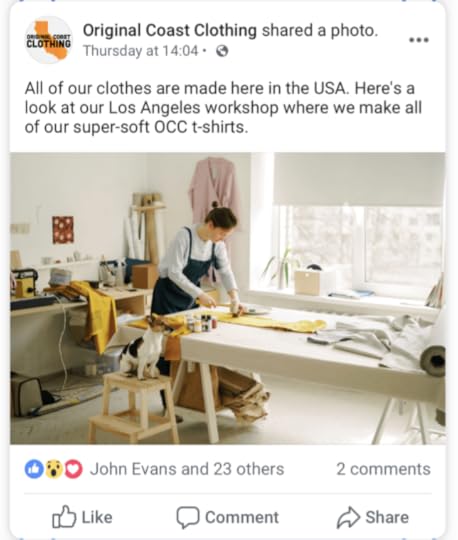
Capture the product development and manufacturing processes on camera and share the pictures with an engaging narrative describing the process. Alternatively, you can use Facebook posts to emphasize the benefits of your production. For example, you can share a picture of the manufacturing process and tell your audience about how you only use sustainable materials and why it’s important.
Here’s a great example shared by Facebook.
 Original Coast Clothing / Facebook Business
5. Feature Your Employees
Customers love looking behind the scenes of business production. Allow your Facebook followers to learn how your business operates by inviting them to meet your team members.
Introducing your employees in your posts is an amazing way to boost brand awareness and engagement. Also, it is a thoughtful investment in future sales because customers gravitate towards companies they feel like they know, and what better way to get to know your brand than by getting to know your team members?
There are multiple ways to feature employees on Facebook. If it is consistent with your brand’s tone of voice, you can share a spontaneous picture of your team member with a funny caption. Also, you can use Facebook posts to introduce your new team members to your followers, like so:
 Facebook / Facebook Business
Alternatively, you can give a shout out to different employees from time to time. For example, you can post a picture of your team members receiving awards. You can also create a post about the employee of the month. Either way, you will show appreciation to your team members while engaging your Facebook audience.
6. Encourage Communication
By sharing posts that encourage communication, you can stay in touch with your audience and boost engagement. There is no better way to inspire communication than asking an interesting question. A good question will prompt users to answer, kicking off an active comment thread. Here are some question ideas for you to get started:
What’s your favorite [color/product/summer activity]? How do you [complete this action]?Why do you [prefer this brand/product]?Do you agree with [a famous person’s saying]? Which product do you like better?
“You can ask questions to gather customer feedback,” says Jared Williams, director of marketing at Essay Tigers. “For example, you can ask users to share their opinion on your recent marketing campaign or ask them what type of content they prefer better.”
This example shared by Facebook illustrates how to ask a question that prompts communication.
 Global Voyage Air / Facebook Business
7. Share Surveys, Polls, and Quizzes
Interactive content can drive substantial engagement, especially if it’s aimed to gather opinion. That’s why sharing surveys, polls, and quizzes on your Facebook page has the potential to boost engagement.
When developing your survey, poll, or quiz, focus on the topics that are relevant to your followers. Here’s a great example by Ben & Jerry’s. The company is known not only for its delicious ice cream but also for acting on social issues, such as climate change, racial injustice, LGBTQ rights, and voting accessibility.
 Ben & Jerry’s / Facebook
8. Encourage User-Generated Content (UGC)
User-generated content (UGC) refers to any brand- or product-related content created and published by social media users. UGC is a free marketing tool that depends entirely on how users are willing to share their take on your brand with their followers. It is an effective strategy to boost user engagement on Facebook, build trust, and expand your brand’s reach.
If you want to leverage UGC content in your Facebook posts, you first need to find a way to encourage and collect user-generated pieces. One way to do so is by running Facebook giveaways and contests.
9. Run Facebook Contests
To host a Facebook contest, the first thing you should do is create a post describing the rules, entering requirements, deadlines, and the prize. For example, you can ask participants to share a picture of your product in an interesting place with a branded hashtag. Then, you will need to choose the winner and award them with the prize. Running such a contest is a great way to collect pictures created by users (social proof) that you can later share in your posts.
Before running any contests on Facebook, make sure to read Facebook’s Pages, Groups, and Events Policies. There is a dedicated section that points out the rules of running contests and giveaways on Facebook.
Here’s a great contest example by Absolut:
 Absolut / Facebook
10. Employ Cause Marketing
Consumers are increasingly expecting brands to speak out and act on social issues. In fact, 72 percent of Americans say they feel it’s more important than ever that the brands they buy from reflect their values.
Facebook is a great platform for emphasizing your brand’s social mission and responsibility. Curate posts that explain the importance of social issues you’re addressing. Share relevant visuals to make the post even more compelling.
Final Thoughts
Following these tips will help you create engaging Facebook posts with a good mix of content types. Now, as you know how to write a killer Facebook post, the final thing you should do is keep an eye on performance. Use Facebook’s Page Insights to understand which elements of your marketing campaign resonate best with your audience. Knowing what works well and what needs improvement is essential for any effective Facebook campaign.
By Haley Osborne
The post How to Create an Engaging Facebook Post appeared first on AdvertiseMint.