Jason SurfrApp's Blog, page 28
September 22, 2014
Watch me build an online business (part five of a few more)
This is part five of in-depth look at the process I’m going through to create a new business. Did you miss part one, part two, part three, or part four?
I have to say, I’ve really enjoyed this process so far. Not only the building of a new business, but also sharing all the details, struggles, and thoughts publicly. From the responses I’ve received from folks on this email list and on social media, it seems you feel the same way too 
In a post I wrote a few months ago about superpowers I said something like “you know you’ve found your superpower when you find something you enjoy doing and that thing benefits other people.” Building businesses and sharing all the details about them (good or bad) might be my new favorite superpower. Through this five month process I’ve been thinking a lot about what I want to be doing next in life (that’s for another email).
What Have We Spent So Far?
Last week I talked about competitive pricing analysis, but I didn’t talk about our potential revenue or our expenses. I’m actually not interested in doing revenue projections and I’ll get to that in a bit. For now, I’d like to show you just how little we’ve spent building CreateYourOnlineCourse.com (CYOC):
$100: Five months of Basecamp Subscription ($20 per month)
$190: Five months of Heroku Subscription ($38 per month, this is a “techy thing” my co-founder Gerlando uses)
$20: SSL Certificate #1
$29.88 SSL Certificate #2
$10.87 NameCheap Domain Registration (CreateYourOnlineCourse)
$10.87 NameCheap Domain Registration (Another domain we registered that we don’t like, whoops!)
Free: MailChimp Account (anything under 2,000 subscribers is free)
Free: GitHub (issue/bug tracking thing)
Free: My simple design work on the pre-launch page
Total: $361.62
This is what’s called “bootstrapping” in the entrepreneurship world. We could easily spend a lot more money on a lot of other things, but we want to stay very lean. $361 and we almost have a fully functional product? Not. Too. Shabby.
Of course, there’s one caveat here and that’s our time. Gerlando has spent many hours building CYOC and I’ve spent a few hours marketing it (read: emailing friends & writing these emails).
That’s the beautiful thing about building your own business; you can pour your sweat equity into it and as long as you have some extra time and the right people working on it, you can save a ton of money.
Let’s Talk Revenue Projections
I want to clearly state my stance on revenue projections, so I’m going to use bold text to make sure you read it:
Making goals and revenue projections is a waste of time. You actually have to start doing something before those things matter*.
(*A did a recent podcast interview with James Altucher where I dive deeper into these thoughts.)
There are industry statistics that I’m sure I could find about the percentage of revenue projections that are actually correct. But I’m not going to waste any time looking for them because I know 99% of initial revenue projections are completely wrong.
Let me be clear, you can absolutely forecast revenue projections on an existingrevenue generating business, but not for a new business that’s sold zero product (also, existing revenue projections are usually wrong too… sorry, I had to add that).
Too many entrepreneurs spend unnecessary time projecting and forecasting revenue, when all that time could be spent getting actual customers and learning from their experiences using your product or service.
Revenue projections can also lead you down a troubled path. Why? Because you’ve set your expectations at a super high level, before ever getting your product to market. If you don’t meet or exceed your revenue projections you might think you’ve failed. That’s the worst possible mental state you can be in when launching a brand new business.
Yes, I want to know that the business I’m going to build is going to be a profitable venture, but I don’t need to do a bunch of revenue projections to figure that out. Here’s as far as the CYOC revenue projections go at this point:
Our monthly expenses: $72
Can we afford that without paying customers: Yes
Revenue projections = Done
But Jason, don’t you want to be swimming in money Scrooge McDuck style? Absolutely! But we’re not ready for lots of revenue. At this stage in the process, we’re focused more on building our minimum viable product and showing it to our first group of beta testers. That leads me to…
Initial Goal Setting
This topic came up along with revenue projections on Facebook and via email. Many people wanted to know what the goals of CYOC are and if they could help us meet them (which is awesome!). My issue with goals is that they’re a lot like revenue projections and that it’s a waste of time in the early stages of building a business.
Here’s the problem with goals: When you set them, you want to stick to them, sometimes to a fault.
I completely realize that I could make goals and adjust them daily/weekly/monthly, but at this point in the process, I’m wasting valuable time that could be spent making sure our product does the critical thing it needs to do (build beautiful online courses simply and easily).
That being said, I’m not completely ignoring goal setting because I do think have a couple loose-fitting goals can help you stay on track with launching and growing.
This is what our goals look like right now:
This week host a webinar and sell my Sponsorship Course on the CYOC platform
In the next week let 10 beta users in CYOC
In the next two weeks, get feedback from the first 10 users and adjust CYOC accordingly (adjusting based on user feedback will be an entirely separate topic)
In the next month, allow 20-30 users to start using CYOC
In the next six months, get to $10,000 in revenue per month
Those are our goals. Funny enough, I don’t even think Gerlando and I have even written them down like that anywhere yet (Hey Gerlando, look, our goals!).
I’m not going to hinge the success of CYOC on these goals either, these are just a bit of guidance at this point.
Don’t get me wrong, some people need initial goals to keep them on track and to keep them hitting milestones and deadlines. Lucky for me, this isn’t my first rodeo when it comes to building a business. I know how to keep things on track without worrying about concrete timelines.
Goal setting is different for everyone and if it’s helpful for you to stay on track, set more well-defined goals. Just don’t waste time constantly adjusting goals when you could be spending that time getting your business up and running. And make sure that if you don’t hit your initial goals you’re okay with that and you make changes and adapt (not give up!).
Inline Course Editor Update
Just last night I received an update from Gerlando on some new changes to the inline editor we’re using for CYOC. You may remember from Part Three I showed you what the course editor looked like and how it worked, but we’ve made a few more changes. Here’s a peek at the new simplified dashboard:
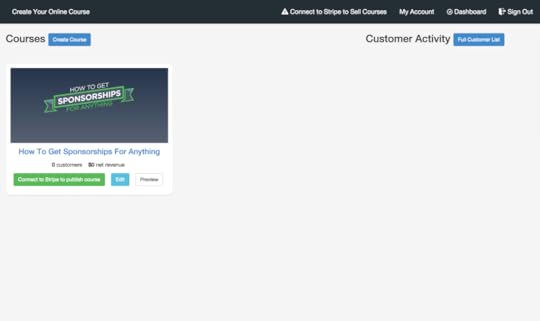
This week we’re working on tidying up a bunch of features. That includes custom domains, adding multiple videos per lesson, ease of adding lesson content (pasting text in from other sources), customer activity, and overall design of CYOC.
I’m really excited for how far CYOC has come and I know we’re getting really close to letting the first few beta testers use the app. As a friendly reminder, we’ll be accepting our first groups of users from our pre-launch list on CreateYourOnlineCourse.com (please only signup if you’re actually interested in building an online course).
To be continued next week…
Next week I’ll share feedback on using CYOC to sell my own course, feedback from a few friends who’ve seen the course, a fun idea I had about customer retention, and hopefully we’ll have invited a few beta testers in!
Want to receive the next update about this project directly in your email inbox? Fill out the email signup below this post or go here.


September 15, 2014
Watch me build an online business (part four of …?)
This is part four (of five/six?) of in-depth look at the process I’m going through to create a new business. Did you miss part one, part two, or part three?
Everything Changes
If you’ve ever built a business you know that almost nothing goes as planned. This was supposed to be the final blog post, but there will be at least one or two more posts after this one.
Originally I thought our project roadmap was going to line up perfectly with a four-part email/blog series. I’d send the first two emails (over two weeks) and by that point we’d have a working product that people would be beta testing. The beta testers would use the initial version of CreateYourOnlineCourse.com (CYOC) for a week and give us feedback. Then we would launch publicly and everything would be awesome!
Yeah, not so much.
Two weeks into these emails, we actually didn’t even have a fully-functioning version 1.0 product that we could use. That had nothing to do with the technical expertise of my co-founder Gerlando, it had to do with wanting to build a quality product that doesn’t settle for “good enough.”
Our initial launch roadmap has gone in the crapper and we’re adjusting and adapting. I was a little bummed by this, but then I realized all the deadlines I had set were completely self-imposed.
That’s the beauty of creating your own business, you can shift and move timelines around with almost no negative repercussions (you just have to wait a little longer to bring in revenue).
After this email goes out, we’re hoping to let 10 beta testers in to try CYOC this week. We know our course building platform is far from perfect, but we at least feel comfortable with the current version of the product. My hope is that over the next two weeks, we’ll get feedback from these beta testers and be able to apply it to make CYOC better and ready for more people to try it out (still not launching 100% publicly).
So with that, let’s talk about some other stuff, like slow growth and money!
Growing Slowly is Okay
If you know anything about me, you know I hate doing things slowly. When I get an idea, I want it done as quickly as possible. Sometimes that means cutting corners, sometimes that means ignoring sage advice, and sometimes that means launching a project way before it’s ready. These are not good things.
With CYOC, I’m happy with slow. Seems weird right? I know. Here’s why…
Gerlando and I could bust our butts to get a decent version of CYOC ready for public use. I could tell people how awesome CYOC is with some long sales page (thanks Conrad) and we could get 25-50 people to signup as paying users.
But what if they discover an issue we hadn’t thought of? What if we overlooked a critical feature? What if our server goes down?
We wouldn’t be angering just a few friends (beta testers), we’d anger 25-50 paying customers. These customers wouldn’t have a great first impression and would either want a refund or never tell anyone about CYOC.
I’ve mentioned it before, but I’ve learned a lot about starting a business from the book The Lean Startup (aff link). It’s a fantastic resource for understanding what it takes to create, build, and launch a business in a digital era.
I don’t want 25-50 unhappy users who want refunds. I want 10 people to tell me all the things we’re doing wrong, we’ll fix them, and then we’ll slowly let customers come on board and continue to get feedback and make CYOC better.
There might never be a big launch for CYOC and I’m totally fine with that. I’m less concerned with making a short-term monetary gain, and more interested in creating a great product that our small group of paying customers will help us market.
Pricing Against the Competition
We’ve come to realize there are a bunch of online course building platforms out there. There isn’t a standard way any of them price their products, but they do all include some variation of the following:
Monthly Fee
Transaction Fee (small % for each user that buys a course)
User Fee (very similar to transaction fee but just priced per user)
Course Fee (priced per how many courses you build)
Support Fee (ugh, ludicrous)
Custom Domain Fee
Those six options may not seem like a lot, but you’d be surprised at how quickly all that stuff adds up and how difficult it can be to understand. To prove my point, here’s a screenshot of a friend’s account in another course building platform

WHAT!?
Not only am I utterly confused by that “bill” but it also makes me realize how much simpler I want our pricing to be. Much, much simpler.
To make the most informed decision on how we should price CYOC, I took an example scenario and applied it to five other pricing models from our competition.
***
Example Scenario (for one month): Customer creates 1 Course, priced at $400, with 20 Paying Users, Custom Domain, and 3% for Stripe* Payments
***
What that customer would pay, based on our competitors’ pricing:
Competitor # 1 = $909 per month ($29 monthly fee, 8% transaction fees, 3% stripe fees, unlimited users and courses). $7,091 profit per month.
Competitor #2 = $689 per month ($129 monthly fee, 4% transaction fees, 3% stripe fees, one course, 50 users maximum). $7,311 profit per month.
Competitor #3 = $539 per month ($299 monthly fee, no transaction fees, 3% stripe fees, unlimited users and courses). $7,461 profit per month.
Competitor #4 = $339 per month ($99 monthly fee, no transaction fees, 3% stripe fees, 200 users, 1 course). $7,661 profit per month.
CYOC = $499 per month ($179 monthly fee**, 1% transaction fees, 3% stripe fees, unlimited users, unlimited courses). $7,501 profit per month.
*Stripe is a simple and awesome payment processor (think: taking credit cards online)
**We’re going to offer two tiers of pricing, which I’ll get to in a moment.
As you can see CYOC is the second least expensive option of the four competitors that easily share their pricing (you’d be shocked at how hard it is to find pricing from some companies). I will say that I spent 30 days using the cheapest option (Company #4) and the user experience was not great. They did offer solid customer support, but building a course (the core objective) was difficult and not simple at all. My grama could not have done it!
We did come up with different pricing ideas for CYOC before looking at our competition, but we’re still up in the air with our exact pricing tiers.
Our Tiered Pricing (as of now…)
With CYOC, we plan on offering two levels of pricing. Those levels reflect the two types of users we are targeting for our platform.
Pricing Option #1: $49 monthly fee, 5% transactions fees, 3% Stripe fees, unlimited courses, unlimited users, custom domain setup, and support.
The user that best fits this pricing option is someone who will probably not be signing up very many students each month and may have months when they don’t add new users. They’re probably someone like me who has a course they want to sell, but isn’t going to have hundreds of signups per month (more like 5-10 per month).
If we look at an example of 10 users buying a $400 course per month, here’s what a user could expect: $4,000 (revenue) – $369 (CYOC Stripe fees) = $3,631 (profit!)
If this user doesn’t have any new users the following month, they’d only pay $49.
Price Option #2: $179 monthly fee, 1% transactions fees, 3% Stripe fees, unlimited courses, unlimited users, custom domain setup, and support.
The user that best fits this pricing option is someone who will be launching more than one course a year and will likely sign up 25-50 (or more) users each month.
If we look at an example of 50 users buying a $400 course per month, here’s what a user could expect: $20,000 (revenue) – $979 (CYOC Stripe fees) = $19,021 (profit!)
I wrote “as of now…” in the title of this section because we’re still thinking about our pricing tiers. We want to keep it affordable, but we also want to run a profitable business that takes the guess work out of this stuff for our users.
Just like the roadmap for these emails changed, I wouldn’t be surprised if we switch up our current pricing model to best serve our potential customers. I’ll (obviously) keep you posted.
Current Struggle: SSL Certificates
One thing I wanted to mention before I wrap up this email is SSL Certificates. Right now, this is an issue we haven’t figured out.
If you don’t know what an SSL Certificate does, it’s what makes a site secure for payment processing. Anytime you see https://, that website uses an SSL Certificate.
SSL Certs (remember certs?) aren’t expensive, but we also want to handle this process for our users. Right now, if a user creates a course and doesn’t use a custom domain, we can do the SSL work for them with zero effort on their end (yay!). However, if someone does want custom domain for their course, which I know I do, it’s a messy process.
I don’t want a user to have to set up their own SSL Cert, even if that just means confirming something via email. I’d like to handle the process entirely without a user even knowing it happened.
I don’t have a big “ah ha, we figured it out” end to this section, I just wanted to share that this is our next big hurdle. And if anyone reading this has an idea of how we could handle all the SSL Cert setup for a custom domain, with no effort to our users, I’m all ears!
To be continued next week…
Next week I’m hoping to have some feedback to share from our first beta testers, thoughts on revenue projections, an update on the CYOC editor itself, and whatever else lands in our laps.
Want to receive the next update about this project directly in your email inbox? Fill out the email signup below this post or go here.
September 8, 2014
Watch me build an online business (part three of four)
This is part three (of four) of in-depth look at the process I’m going through to create a new business. Did you miss part one or part two?
Last week I introduced you to the co-founder (Gerlando) of this project. We talked about setting terms for that relationship and we also walked through project management stuff. Now, let’s dive into the actual thing we’re building!
The Name: CreateYourOnlineCourse.com (CYOC)
In one of our Basecamp discussions (or emails, I can’t remember) we tossed around a few ideas for the name of the project. There were a few cute names thrown around, but for a project like this it seemed important to have a good straight forward name. Enter: CreateYourOnlineCourse.com (CYOC).
I’ll be the first to admit it’s not a sexy name. It’s not a super memorable name. But I could spend hours working on naming the project, or I could spend the same amount of time trying to make it a great product that helps people (and makes money). The name can be changed whenever we want and for right now, I care more about building and growing than naming and marketing.
Creating a Simple “Coming Soon” Page
Instead of doing nothing with the website until launching the actual project, we decided to create an email capture page. That way, I can direct people who are interested in learning more about the project to sign up for the early access list. Many of you on this email list have probably seen this page because you’ve replied with interest.
I spent some time writing copy for the email capture page. I wanted to explain a few things very quickly:
CYOC would help someone create an online course (beautifully) in only a few minutes.
Creating online courses was a pain, especially if you didn’t have a web developer and designer at your disposal.
This was a pre-launch signup that would get first access.
Gerlando was kind enough to create a temporary page, but I added a little bit of design love to spice it up. Here’s the comparison of the two landing pages:
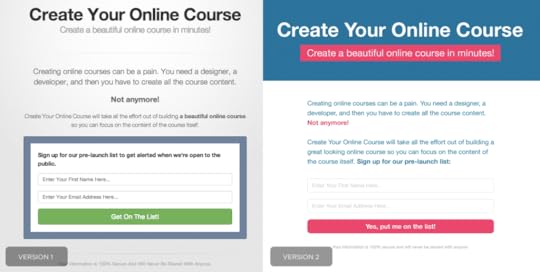
Gerlando signed us up for a new MailChimp account, invited my already existing MailChimp account to have access to it, and plugged in all the necessary form code to the landing page to make it work.
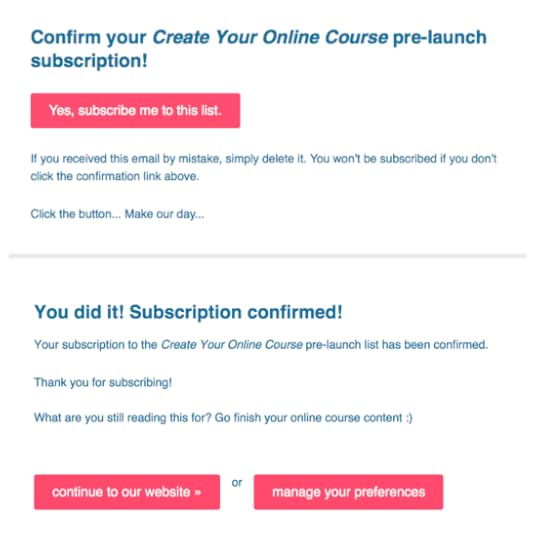
I spent all of five minutes customizing the colors and copy in the MailChimp form signup process (opt-in email, thank you page, final welcome email). I like adding just a bit of personality, even to the confirmation pages that most people ignore. Here’s an image that shows the different “Signup Forms” in MailChimp and how I’ve subtly customized them:
*NOTE* This isn’t a project I’m hoping to build a big pre-launch email list for, so please don’t feel like you need to subscribe unless you’re actually interested in creating an online course for something in the future.
Building Version 1 of CYOC
My initial course was built using WordPress. What that means is that I had to login to WordPress and navigate a hacked-together editor for my course. I used “Pages” for Lessons. Payment pages were coded pages in the “Theme Editor.” And “Users” were managed in the user dashboard. WordPress certainly isn’t the most difficult platform to use, but it’s not simple.
My goal for CYOC is that you don’t have to feel like you’re inside WordPress. I don’t want users of CYCO to feel like they have to understand a certain program or any type of development language (PHP, Javascript, etc). In the back of my mind I’ve been repeating this question over and over again:
“Could my [awesome] grandmother build an online course using CYOC?”
With that thinking in mind, we’re building a completely custom course builder. I don’t want a user to feel like things aren’t easy and intuitive. I also don’t want them to feel like they have to know some fancy Internet language or program.
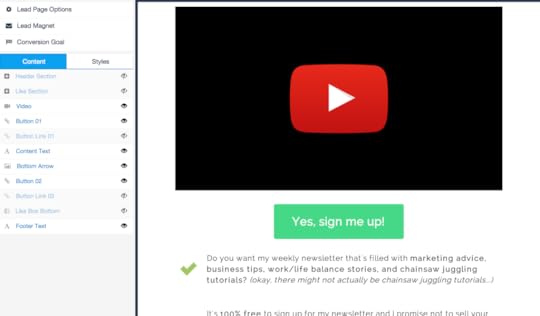
As we starting thinking about building CYOC, we based a lot of the usability of the course builder in CYOC on the structure used by LeadPages. If you’ve never used LeadPages before, it’s a great tool for building landing pages (like this one for a webinar on LeadPages [so meta]). Here’s a screenshot of what the editor looks like in LeadPages for one of their random pages:
So, with those thoughts in mind, Gerlando went to work. Below you’ll see an image of the first iteration of the course editor. Mind you, this has already completely changed, but I wanted to give you some perspective on where we started.
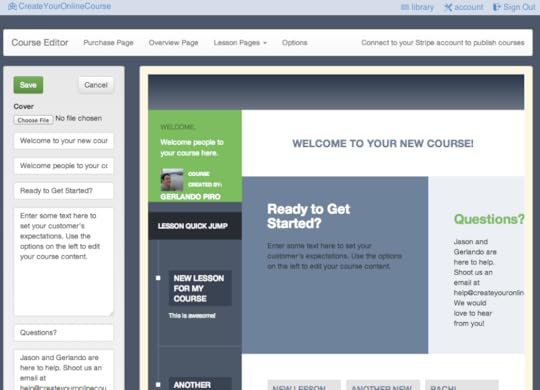
As you can see, we’re taking the EXACT course framework I built and building an editor on top of it. To keep things simple, we wanted to show a live preview on the right side of the editor that showed immediate changes made by using the editing tools (left side).
Gerlando did an excellent job building the first iteration of CYOC. You could easily change all the course content and colors/images using the editing tools and see it happen in real time.
While building the first editor, we discovered what features CYOC needed. Yes, we did make an initial feature list before building anything, but we also kind of winged it too. Here’s the feature set we think is critical for CYOC V1:
Course Dashboard and Editor
Lesson Dashboard and Editor
Payment Page(s) Dashboard & Editor (with unique URLs)
Style Editor (for course, lessons, and payment pages)
User Management Dashboard (see users, emails, date of signup, etc)
Email Dashboard & Editor (first email to new signups, forgot password email)
Stripe Integration (how authors will sell courses and make money)
Affiliate Links (let course authors help us market CYOC to new authors)
Custom URLs and Google Analytics
While this list doesn’t look too long (it’s only eight bullet points), it’s actually quite a bit of features for a first version.
Hitting a Bump in the Road
Over the past few weeks Gerlando has really kicked ass. He’s been sending me updates through Basecamp and Github, which typically include short videos (screenflow type stuff). I’ll review what he’s been working on and offer feedback and thoughts.
The small bump in the road is that I’ve way over-extended myself during this process. Ideally I would get back to Gerlando in a matter of minutes (or at least hours), but truthfully I’ve taken on too much other stuff and have a few messages I haven’t responded to from last week. Right now I know I’m holding CYOC back because I can’t give feedback quickly enough.
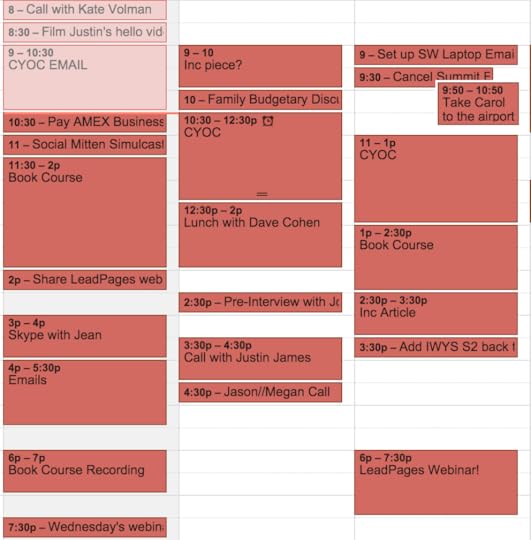
I wanted to share this part of the journey because I know I’m holding my own project back. I’m working to not overschedule myself and allow more time for CYOC. I often make the mistake of filling open gaps in my Google Calendar with catch-up phone calls and random busy work, when I should be filling it with CYOC. I’m keeping myself accountable by adding time on my calendar and sharing that with you guys (yay for public accountability!):
Building Version 2 of CYOC
We stuck with the left column editor / right column previewer for a few weeks. Then, out of no where, Gerlando surprised me with a brand new inline editor:
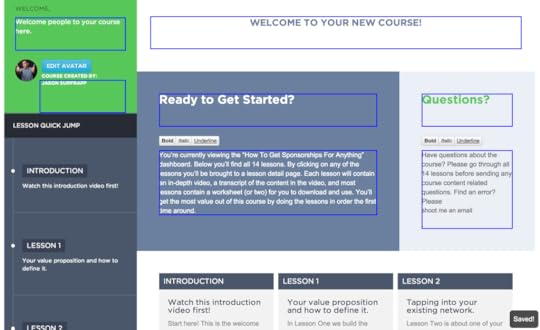
Whoa! Truthfully, I was totally blindsided by this change. My first thought was “Gerlando didn’t even talk to me about this huge change, WTF!?”
But then I took a minute and realized how smart of a decision this was on his part. My knee-jerk reaction was because of shock and fear. Before reaching out to Gerlando, I jumped into the new inline editor.
Wow.
This was brilliant! My thought now changed to “Gerlando, you’re a genius!”
Gerlando took a step back and noticed that the left column editor didn’t really need to exist. By building the editor inline with the course framework, it saved time and created a more seamless editing experience. Everything with a blue box around it is clickable and editable (even images!).
I’m proud of myself for not immediately emailing Gerlando with my first reaction. Often times we don’t take a minute to digest something, we just react. He had done something really awesome and I could have derailed that progress because of my own fear.
The inline editor has replaced our previous prehistoric editor on the Course Dashboard, Lesson Pages and Payment Pages. It doesn’t get much simpler than this!
To be continued next Monday…
Next week I’ll be sharing thoughts on pricing CYOC (with competition analysis), our initial launch plans to let people on board, and some other features we’re including.
Want to receive the next post about this project directly in your inbox? Fill out the email signup below this post or go here.
September 2, 2014
Watch me build an online business (part two of four)
This is part two (of four) of in-depth look at the process I’m going through to create a new business. Missed part one? Click here to read that.
Where we left off last week was that I had paid a developer ($1,800) to build my online course using WordPress. It certainly wasn’t perfect and super easy to use, but it would tide me over to launching something (taking some action is better than taking no action!).
Getting Feedback
Now that my course was finished it was time to get some feedback. I shared it with a few folks in my trust circle. I created login information for them and asked them to check it out and give me some feedback. These were the first people to see my online course outside of myself and my developer.
I sent the course to three people who I knew had created online courses before (using some of the platforms I had researched). I also sent it to three people who I knew were in the process of creating their own online courses. I asked them to be brutally honest with their thoughts and feedback.
The feedback from all six people was overwhelmingly similar and went something like this:
“Jason, this online course looks awesome. It’s so simple, easy to use, and I need to know what platform you used to create it? Is it WordPress? Custom made? I need it!”
And so you know I’m not just blowing proverbial smoke, here’s an actual email from one of the six people I emailed (thanks Clay!).
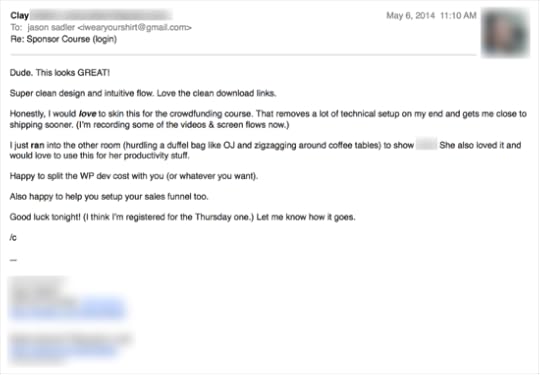
To be honest, that feedback was not at all what I expected when I sent off those emails. I wanted to know how the course looked, if the content was being showcased well, and what I should think about changing.
A little light bulb popped up above my head. DING! The course framework I had built for myself, the way I wanted to see an online course, was something other people were interested in.
Seeing the Business Opportunity
With the feedback from multiple people I saw an opportunity to take the course framework I’d built and turn it into a product other people could pay for and use. My idea was to build a subscription based service people could pay a monthly fee for and use (like Basecamp, Freshbooks, etc).
While there were plenty of other course frameworks available, I felt I could create a unique value proposition based on a few things:
My course would require absolutely zero technical knowledge.
You wouldn’t need a designer or developer to help you setup your course. No technical knowledge needed!
My course wouldn’t host your video content, you would do this elsewhere and drop in your embed code (I used Wistia for my course).
My course framework would be fully responsive (tablet and mobile friendly).
You would easily be able to set up multiple payment pages if you wanted to sell your course to different audiences for different prices.
If your course videos and transcripts were done ahead of time, you could create a fully functional course in less than 10 minutes. Yes. 10 minutes.
I would keep the pricing very affordable (something I’d be willing to pay).
Now this thinking is all well and good, but I’m not a developer, I haven’t ever created a subscription based product, and I had plenty of other things I needed to be doing with my time (mind you, I was getting ready to launch my first book).
Enter the Co-Founder
Earlier this year I attended Misfit Con (which I’ve written about previously many times) and chatted with my friend Gerlando. In passing he happened to mention he was looking to stretch his ‘developer legs’ a bit. He told me if I had any interesting projects that required development to reach out.
Luckily my subconscious remembered this information and as quickly as you can say “how the heck do you create a subscription based product?” I had typed and sent an email to Gerlando asking him if he wanted to join the project.
With a seductive subject line and a perfectly eloquent email, Gerlando was on board. Actually, the email I sent Gerlando was a lot of jumbled thoughts arranged in a bulleted list. Either way, it worked!
We traded a few emails back and forth and Gerlando was interested in combining forces with me to build this new business. He immediately started a Basecamp project for us so we could start tracking all our thoughts and whatnot about this new venture.
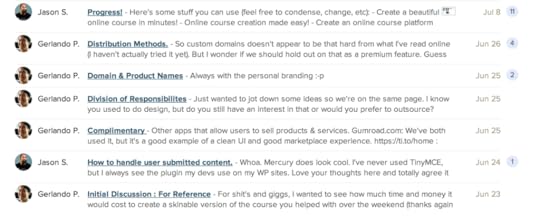
However, I did one important thing I always do before working with a potential business partner: Had a conversation about ownership of the company.
I’m an excitable entrepreneur, like any other, but I’ve also learned my lesson a handful of times over the years by working with people and not setting terms and expectations up front. I didn’t spend money on a lawyer or write up a fancy contract, I simply started a new Basecamp message and shared my thoughts about our future partnership. We agreed on a 50/50 split of the new company (name TBD). As far as expectations go, Gerlando would carry the technical load of the project and I would handle the planning, process, design, and marketing. Both in agreement of ownership and expectations, we said we’d do the business-y stuff later (become an LLC, set up a bank account, have boring contracts/paperwork written by people with law degrees).
More Project Organization
Being a developer, Gerlando also plugged us in to Github, where he could manage more of the technical side of the project. Features, errors, etc, were all placed in Github. Bigger picture thoughts and discussions about the project were handled in Basecamp.
*NOTE: I’d heard of Github, never used it. I’ll admit I was afraid it would be too technical for me. However, I wanted to make Gerlando happy so I jumped in and messed around. Fear is a funny thing huh? I almost asked not to use it before even trying it. After 3 minutes I had the hang of Github and was already responding to and submitting “issues” related to our project.
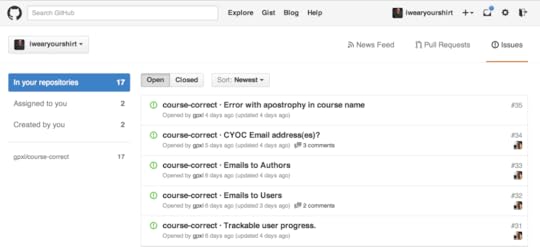
You may be wondering how many phone calls and Skype calls I’ve had up to this point with Gerlando. The answer to that is two. One Skype call and one phone call. Everything else has been handled through discussions in Basecamp and Github. I do have to give Gerlando credit for explaining to me on Skype that we’re building a SaaS (Service As A Software) product. And by “we” I obviously mean Gerlando.
I take time to share this part of the journey as I think it’s incredibly important to use a project management “software” to stay organized and efficient. Phone calls are great, but it’s not an efficient way to track the progress of building something. And while I’d love to impart some amazing advice about one project management platform that rules them all, we’re using Basecamp, Github, Skype, Phone Calls, Email, and Text Messages (and I’m sure Gerlando has a bunch of super techy stuff he’s using that he doesn’t show me).
To be continued next Monday…
Next week I’ll share the first iteration of the SaaS product we’re building, some hurdles we immediately faced, and how the first two pages of a book helped shift my focus on the project. Oh, and I might even tell you the name!
Want to get on my email list and receive the next post about this project directly in your inbox? Fill out the email signup below this post or go here.
August 25, 2014
Watch me build an online business
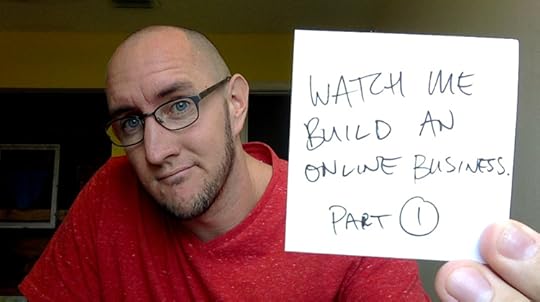
Over the next four weeks I’ll be sharing an in-depth look at the process I’m going through to create a new business.
This is Part One of a series of four blog posts I’ll be sharing that document and share my experience building a new business. Over the next four weeks I’ll send updates about this project to my email list first (and will also keep them documented here).
The Backstory
To start this story, we need to backtrack a few months…
In April I found myself staring at my laptop with nothing to do. Now, to say that is actually a bit silly because I had just finished writing my book and there was an incredible amount of stuff to do. However, that stuff wasn’t super actionable and until the book was printed, I had some free time on my hands.
With the confirmation that Treehouse was going to be the front cover sponsor of my book, my proverbial wheels got turning. I’d thought about creating a Skillshare course and I’d previously been approached about creating a marketing course on Udemy. All of these thoughts about micro-learning got me to ask myself this question:
If I was going to create an online course, what would the subject matter be? What skill could I effortlessly teach that people would get a lot of value from?
I decided to do some quick brainstorming. I grabbed my trusty Moleskine notebook and wrote down some ideas for courses I could teach. Those ideas ranged from marketing, creative thinking, email marketing, social media (only for a second though), and various other ideas. But none of them really excited me, nor did I think I could teach skills that were wildly unique to existing courses in those genres.
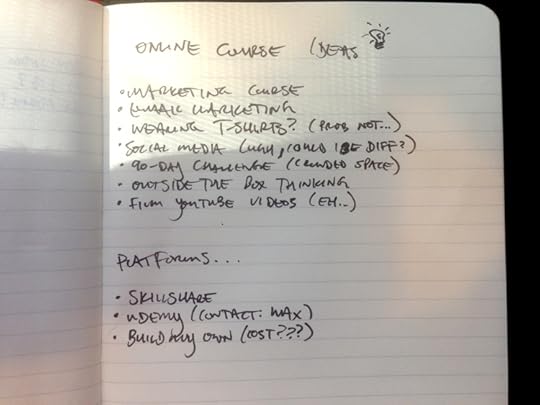
Then, I decided to do what I did when I was sitting down to write my book: Consume content.
While I was gearing up to write my book I read a book a week (sometimes two). I wanted to get inspired by other author’s writing tones, writing styles, and find thought-provoking content to potentially share. So, I applied this successful tactic to try to figure out my online course content. I started seeking out advertised courses in my Facebook News Feed. I started clicking links from friends who were promoting their online courses via Twitter. And the majority of that content came in the form of webinars.
I probably watched 20 webinars from people around the world, teaching and trying to sell their unique skills. If you’ve never watched a webinar, it’s the perfect tool to teach people something from an online course and then sell the course to that audience at the end of the webinar (I’ll get to this a bit later).
From watching all these webinars a few things became clear and one became not-so-clear:
People generally sucked at doing webinars (lack of enthusiasm, pace, timing, etc).
People’s webinars were horribly designed.
People most often shared great content that was actually informative and helpful.
There was a sales pitch in every single webinar I watched (only two of them didn’t sell courses, instead they sold books or consulting).
I still wasn’t clear on what my course (and webinar) would be about.
Next up I emailed a handful of people in my trust circle asking for their advice. I told them I wanted to create an online course but I was uncertain what the topic would be about. I sent a very simple email to eight people.
Of the eight that responded, only one really hit home with me and it said this:
“Jason, you’re the master at getting people to sponsor your projects. You didn’t go to school for that, so what can you teach people from your experience over the years? I think that’s your topic!”
I have done a great job of getting tons of different projects sponsored over the years. I could absolutely build a course around how I go about doing that (especially with the recent case study of getting 204 sponsors for my book). I will be able to teach people the system I’ve developed for landing sponsorships for my projects.
We’ve completed the backstory! That’s how the idea for my course came to be. I realize that was a lot of background on coming to that idea, but I wanted to share it as it’s important as we move forward in the chronicling of this new business I’m building and sharing with you.
*IMPORTANT NOTE: The online course is not the new business*
Discovering the Problem
This brings us to the part of this story where I discovered a problem while looking to build my first online course.
I started researching course building platforms. I found about six of them. They all varied in how they were set up, how they were priced, but one thing was evidently clear: None of them felt simple and easy to setup. I’m not a professional online course builder, but I understood I would make walkthrough videos and have written transcripts. I just wanted a well-designed platform to be able to plug that content into and then be able to share my course with the world.
The more research I did on the platforms, the more frustrating things became. Instead of offering me a simple framework to input course lessons and the content in them, it seemed like a lot of these course building businesses were trying to tell me how my course should be structured and built. It was overly complicated, and frankly, most of them were too expensive for someone like me who was just getting started with their first course.
So I decided to take matters into my own hands and attempt to build an online course that did exactly what I wanted.
Prototyping and Building Phase
Dusting off my graphic design degree and putting years of experience having websites built for my various projects, I decided to just try to design the exact platform I wanted to use for my course and then ask developers what they would charge to build it for me.
I opened up Photoshop, found a few color schemes I liked on dribbble, and gave myself four hours to create a course design. The resulting design was simple, clean, and would be fully responsive (meaning: it will look good on web, mobile, tablet, etc).
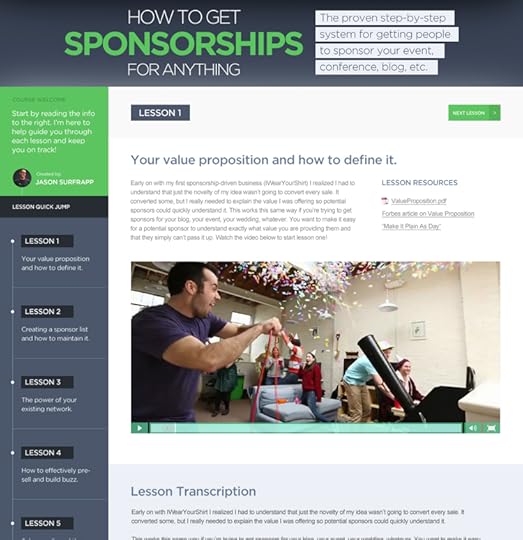
The design you see is exactly what I came up and what I wanted for my course. After completing the design, I also thought it could work for other people’s courses (already thinking ahead).
I emailed the design to three different developers. In the emails to those developers I asked them how long it would take to build my design into a functioning course, what backend platform they would use to make adding content easy for me, and how much it would cost.
After some back and forth I picked a developer. The course would be built on WordPress and would be completed in three weeks for $1,800. Knowing that I was going to try to sell my online course for around $500, that meant I only needed to sell a couple courses to be profitable. Sounded like a good deal to me!
Three weeks and a bunch of emails back-and-forth later I had a fully functioning course. I could input my video embed code. I could input and stylize my lesson transcripts. Everything was built behind a paywall and login system.
Since I was very familiar with WordPress, I didn’t mind the somewhat clunky way the developer had me add courses and course content. I also didn’t mind the way we set up payment pages, but I knew it wasn’t super optimal for me to be digging into the Theme Editor and actual PHP code (I’ve broken many a website before).
To be continued next Monday…
Next week I’ll share how I used my trust circle (again) to give me critical feedback and discover a business opportunity. You’ll also get to meet the co-founder of the new business!
Want to get on my email list and receive the next post about this project directly in your inbox? Fill out the email signup below this post or go here.
August 20, 2014
How having a trust circle can help you
I stumbled into having a trust circle in 2012. I had built relationships with people through social media, through attending conferences, to wearing t-shirts for them, and felt a certain level of trust with them. When the idea for BuyMyLastName appeared in my crazy marketing brain in August 2012, I knew exactly who to share it with first.
Building a trust circle is not difficult. These people are, most likely, already in your life and helping you. I find it important to establish the relationship with them ahead of time and let these people know you’d like to be able to count on them for honest and speedy feedback.
My trust circle is only 12 people, and each person I sent a very simple email asking if they’d be okay if I bounced ideas off them whenever they come to me. No one said “No” because the trust was already built. If you do find that people say “No” when building your own trust circle, don’t harbor any ill-will toward them, just move on to the next person. Your trust circle can be as little as three or four people and as many as twenty.
I expect my trust circle to do these four very important things:
1. Respond quickly. This is honestly the most important thing for my trust circle. Sometimes you get an idea and want to move on it quickly. These people are an email or text message away and they always respond swiftly.
2. Give me brutally honest feedback. My mom and my grandmother are not in my trust circle (as silly as that sounds). This is because they love me to death and will support any crazy thing I come up with. I purposely don’t have close friends or family in my trust circle. I have business acquaintances that I trust and respect. I want them to say, “Jason, this idea sucks. What about this…?”
3. Be more than just yes/no people. While I want quick and honest feedback, I also want more from their feedback than just a “yes” or a “no.” Your trust circle shouldn’t be people who are going to pat you on the back. They should be people who are going to massage your back for hours (not literally, well, okay maybe).
4. They’re in different industries. The people in my trust circle are best selling authors, entrepreneurs, artists, marketing coordinators, fashion designers, bloggers, and more. I love that they’re all different, because they all offer a unique perspective. It’s also a plus when they all think an idea is awesome.
Notice I didn’t say anything about buying, sharing, or offering any type of fulfillment with my mentors or trust circle. Your trust circle is brainpower. It’s feedback. It’s a group that has a diverse set of experience from which you can learn. You won’t build your trust circle overnight, but you also don’t need twelve people either.
In all likelihood, you have three or four business acquaintances right now (even through friends of friends) who would be willing to help you. Also, and this is important, you don’t need to tell these people they’re in your “trust circle.” That might weird some folks out. Instead, just let them know you’d love to have them on call for feedback and thoughts on your business (or life).
And one last thing: these people shouldn’t expect anything from you in return. Remember, this group is built completely on trust for you.
Why you need to build a trust circle
I stumbled into having a trust circle in 2012. I had built relationships with people through social media, through attending conferences, to wearing t-shirts for them, and felt a certain level of trust with them. When the idea for BuyMyLastName appeared in my crazy marketing brain in August 2012, I knew exactly who to share it with first.
Building a trust circle is not difficult. These people are, most likely, already in your life and helping you. I find it important to establish the relationship with them ahead of time and let these people know you’d like to be able to count on them for honest and speedy feedback.
My trust circle is only 12 people, and each person I sent a very simple email asking if they’d be okay if I bounced ideas off them whenever they come to me. No one said “No” because the trust was already built. If you do find that people say “No” when building your own trust circle, don’t harbor any ill-will toward them, just move on to the next person. Your trust circle can be as little as three or four people and as many as twenty.
I expect my trust circle to do these four very important things:
1. Respond quickly. This is honestly the most important thing for my trust circle. Sometimes you get an idea and want to move on it quickly. These people are an email or text message away and they always respond swiftly.
2. Give me brutally honest feedback. My mom and my grandmother are not in my trust circle (as silly as that sounds). This is because they love me to death and will support any crazy thing I come up with. I purposely don’t have close friends or family in my trust circle. I have business acquaintances that I trust and respect. I want them to say, “Jason, this idea sucks. What about this…?”
3. Be more than just yes/no people. While I want quick and honest feedback, I also want more from their feedback than just a “yes” or a “no.” Your trust circle shouldn’t be people who are going to pat you on the back. They should be people who are going to massage your back for hours (not literally, well, okay maybe).
4. They’re in different industries. The people in my trust circle are best selling authors, entrepreneurs, artists, marketing coordinators, fashion designers, bloggers, and more. I love that they’re all different, because they all offer a unique perspective. It’s also a plus when they all think an idea is awesome.
Notice I didn’t say anything about buying, sharing, or offering any type of fulfillment with my mentors or trust circle. Your trust circle is brainpower. It’s feedback. It’s a group that has a diverse set of experience from which you can learn. You won’t build your trust circle overnight, but you also don’t need twelve people either.
In all likelihood, you have three or four business acquaintances right now (even through friends of friends) who would be willing to help you. Also, and this is important, you don’t need to tell these people they’re in your “trust circle.” That might weird some folks out. Instead, just let them know you’d love to have them on call for feedback and thoughts on your business (or life).
And one last thing: these people shouldn’t expect anything from you in return. Remember, this group is built completely on trust for you.
August 18, 2014
How to think more creatively
Being able to think outside the box is a learnable skill. You just have to be willing to try new things.
Many people think you’re either a creative person or you’re not. While I agree that some people may be slightly more predisposed to thinking creatively than others, I think creativity is a muscle that can be exercised and improved upon. Here are six ways to stimulate creative thinking.
1. Consume content that’s way outside your comfort zone.
We all love reading about stuff in our industry, but typically this doesn’t boost creativity. If you’re lucky, it might help with motivation or inspiration. If you want to get your creative juices flowing, start consuming content you wouldn’t normally consume. Read blogs outside of your industry. Read books outside of your normal genre of choice. Heck, grab lunch with a complete stranger (just make sure their not a bad stranger).
2. Write a 500 word article with no topic whatsoever.
This is a fun exercise I use when I can’t seem to get my thoughts focused or come up with interesting ideas. I’ll open a blank document and just start typing. No headline, no topic, no editing, and most importantly no self-critiquing. I just let my fingers start typing and let my brain decide what words get written next. Usually I end up with some pretty weird and crazy stuff I’d never share, but I always feel a boost of creative energy afterwards.
3. Go see a movie in a movie theater.
Movies on the big scene are one of the last few places you can enjoy a complete sensory-captive experience. The giant bright screen. The sound-rumbling surround sound. The smell and taste of freshly popped popcorn. The somewhat uncomfortable seat with plastic armrests that don’t move. Whenever I leave a movie theater, my mind is always spinning with thoughts and ideas.
4. Take a phone call with someone you don’t know.
Hearing someone’s story that’s completely new to you can be an eye-opening and mind-expanding experience. Maybe you’ll learn something from them? Maybe they’ll give you a new perspective you’ve never heard about your stuff? Maybe they’ll drop knowledge bombs on you?
5. Eat differently.
There are studies upon studies that discuss how our diet affects the way we think. Want to start thinking differently? Start giving your body different (and healthier) fuel. You’d be shocked how much more creatively you can think and act when you eat a healthier diet.
6. Do the “No Bad Ideas Brainstorming” exercise.
Get at least one other person to join you for a 45-60 minute brainstorming session. No technology and no criticism whatsoever. Bring a topic or idea you want to brainstorm to the table, and just start riffing on it back and forth. Write down all your ideas (on actual paper) and don’t critique a single idea. It’s important to do this in person and to make absolutely sure you don’t have any negative energy or feedback throughout the process. You may end up with 100 horrible ideas, but I bet you’ll have one or two good ones. Plus, you’ll get better at this the more you do it.
You don’t have to be a creative thinker to be able to think outside the box, you just need to do more stuff that stimulates creative thinking. Even the most creative people need help getting inspired.
6 Ways to Boost Your Creative Thinking
Being able to think outside the box is a learnable skill. You just have to be willing to try new things.
Many people think you’re either a creative person or you’re not. While I agree that some people may be slightly more predisposed to thinking creatively than others, I think creativity is a muscle that can be exercised and improved upon. Here are six ways to stimulate creative thinking.
1. Consume content that’s way outside your comfort zone.
We all love reading about stuff in our industry, but typically this doesn’t boost creativity. If you’re lucky, it might help with motivation or inspiration. If you want to get your creative juices flowing, start consuming content you wouldn’t normally consume. Read blogs outside of your industry. Read books outside of your normal genre of choice. Heck, grab lunch with a complete stranger (just make sure their not a bad stranger).
2. Write a 500 word article with no topic whatsoever.
This is a fun exercise I use when I can’t seem to get my thoughts focused or come up with interesting ideas. I’ll open a blank document and just start typing. No headline, no topic, no editing, and most importantly no self-critiquing. I just let my fingers start typing and let my brain decide what words get written next. Usually I end up with some pretty weird and crazy stuff I’d never share, but I always feel a boost of creative energy afterwards.
3. Go see a movie in a movie theater.
Movies on the big scene are one of the last few places you can enjoy a complete sensory-captive experience. The giant bright screen. The sound-rumbling surround sound. The smell and taste of freshly popped popcorn. The somewhat uncomfortable seat with plastic armrests that don’t move. Whenever I leave a movie theater, my mind is always spinning with thoughts and ideas.
4. Take a phone call with someone you don’t know.
Hearing someone’s story that’s completely new to you can be an eye-opening and mind-expanding experience. Maybe you’ll learn something from them? Maybe they’ll give you a new perspective you’ve never heard about your stuff? Maybe they’ll drop knowledge bombs on you?
5. Eat differently.
There are studies upon studies that discuss how our diet affects the way we think. Want to start thinking differently? Start giving your body different (and healthier) fuel. You’d be shocked how much more creatively you can think and act when you eat a healthier diet.
6. Do the “No Bad Ideas Brainstorming” exercise.
Get at least one other person to join you for a 45-60 minute brainstorming session. No technology and no criticism whatsoever. Bring a topic or idea you want to brainstorm to the table, and just start riffing on it back and forth. Write down all your ideas (on actual paper) and don’t critique a single idea. It’s important to do this in person and to make absolutely sure you don’t have any negative energy or feedback throughout the process. You may end up with 100 horrible ideas, but I bet you’ll have one or two good ones. Plus, you’ll get better at this the more you do it.
You don’t have to be a creative thinker to be able to think outside the box, you just need to do more stuff that stimulates creative thinking. Even the most creative people need help getting inspired.
How to think outside the box
Being able to think outside the box is a learnable skill. You just have to be willing to try new things.
Many people think you’re either a creative person or you’re not. While I agree that some people may be slightly more predisposed to thinking creatively than others, I think creativity is a muscle that can be exercised and improved upon. Here are six ways to stimulate creative thinking.
1. Consume content that’s way outside your comfort zone.
We all love reading about stuff in our industry, but typically this doesn’t boost creativity. If you’re lucky, it might help with motivation or inspiration. If you want to get your creative juices flowing, start consuming content you wouldn’t normally consume. Read blogs outside of your industry. Read books outside of your normal genre of choice. Heck, grab lunch with a complete stranger (just make sure their not a bad stranger).
2. Write a 500 word article with no topic whatsoever.
This is a fun exercise I use when I can’t seem to get my thoughts focused or come up with interesting ideas. I’ll open a blank document and just start typing. No headline, no topic, no editing, and most importantly no self-critiquing. I just let my fingers start typing and let my brain decide what words get written next. Usually I end up with some pretty weird and crazy stuff I’d never share, but I always feel a boost of creative energy afterwards.
3. Go see a movie in a movie theater.
Movies on the big scene are one of the last few places you can enjoy a complete sensory-captive experience. The giant bright screen. The sound-rumbling surround sound. The smell and taste of freshly popped popcorn. The somewhat uncomfortable seat with plastic armrests that don’t move. Whenever I leave a movie theater, my mind is always spinning with thoughts and ideas.
4. Take a phone call with someone you don’t know.
Hearing someone’s story that’s completely new to you can be an eye-opening and mind-expanding experience. Maybe you’ll learn something from them? Maybe they’ll give you a new perspective you’ve never heard about your stuff? Maybe they’ll drop knowledge bombs on you?
5. Eat differently.
There are studies upon studies that discuss how our diet affects the way we think. Want to start thinking differently? Start giving your body different (and healthier) fuel. You’d be shocked how much more creatively you can think and act when you eat a healthier diet.
6. Do the “No Bad Ideas Brainstorming” exercise.
Get at least one other person to join you for a 45-60 minute brainstorming session. No technology and no criticism whatsoever. Bring a topic or idea you want to brainstorm to the table, and just start riffing on it back and forth. Write down all your ideas (on actual paper) and don’t critique a single idea. It’s important to do this in person and to make absolutely sure you don’t have any negative energy or feedback throughout the process. You may end up with 100 horrible ideas, but I bet you’ll have one or two good ones. Plus, you’ll get better at this the more you do it.
You don’t have to be a creative thinker to be able to think outside the box, you just need to do more stuff that stimulates creative thinking. Even the most creative people need help getting inspired.