Harmony Evans's Blog, page 741
July 27, 2023
Samsung Galaxy Z Flip 5 vs Motorola Razr 40 Ultra: Which foldable is best?
Samsung has revealed its updated Galaxy Z Flip 5 with big improvements compared to its predecessor, but how does it compare to the Motorola Razr 40 Ultra?
Samsung has made big strides with the Galaxy Z Flip 5‘s design compared to its predecessor, sporting a new hinge that provides a gapless close for the first time, a new large cover display, Snapdragon 8 Gen 2 for Galaxy power and more.
However, Motorola has come out all guns blazing with its foldable entry for 2023, the top-end Razr 40 Ultra. It not only sports a larger, faster cover display than the Z Flip 5 with more advanced functionality, but it has a larger foldable display with less visible crease and more.
We’ve thoroughly reviewed both the Samsung Galaxy Z Flip 5 and Motorola Razr 40 Ultra, and here are some of the biggest differences between the two to help you decide which is best for your needs.
You can do more with the Razr 40 Ultra’s cover screenWhen it comes to these two foldables, it really is the battle of the cover screen. Both have large external displays, new to their respective collections this year, though their implementations are slightly different – and it looks like Motorola has the upper hand.
The Samsung Galaxy Z Flip 5 has a large 3.4-inch AMOLED cover display, though it doesn’t quite stretch to all four corners of the external panel. Instead, the display is shaped a little like an upside-down folder, with the twin cameras sitting in the gap that’s created.
A quick double-tap brings the screen to life, allowing you to swipe through various Samsung-designed widgets for calendar, weather, voice recording, favourite contacts and more, as well as quick reply support with full QWERTY keyboard support that lets you reply to incoming texts without having to unfold the device. Very handy indeed.
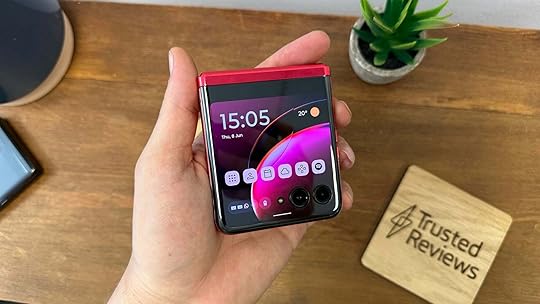
So then, why is the Motorola Razr 40 Ultra’s cover screen better? It’s not only larger and faster than Samsung’s option at an increased 3.6 inches and 120Hz, but it stretches much farther across the exterior panel, completely encompassing the twin cameras for a high-tech look. These twin cameras can sometimes get in the way depending on what you’re doing on the external display, mind.
The Razr can also reply to incoming messages via a full QWERTY keyboard, and it also has a bunch of widgets designed for the external display, just like the Flip 5.
The key difference is with app support; you can run any app you want on the Razr 40 Ultra’s cover display. They don’t all look great but a surprisingly vast number of apps worked just fine during our review period, allowing quick access to smart home apps, messaging apps and whatever else you want.
On the other hand, Samsung has only very limited support for apps on the Flip 5’s external display – and the option to turn it on is hidden away within the Labs section of the Settings app. From the Settings app, you can toggle on support for Messages, WhatsApp, YouTube, Netflix and Google Maps, but that’s about it.
The Samsung Galaxy Z Flip 5 is more powerfulOne area where the Samsung Galaxy Z Flip 5 excels is performance – not only compared to the Razr 40 Ultra but most smartphones on the market at the moment.
That’s because at the heart of the foldable lies the custom Snapdragon 8 Gen 2 for Galaxy exclusive to Samsung devices. Compared to the regular 8 Gen 2 in most flagships, the Galaxy variant has slightly boosted CPU clock speeds and an additional GPU core to really squeeze the most out of the chipset.
That’s paired with 8GB of RAM and either 256- or 512GB of UFS 4.0, which, when combined with the snappy 120Hz display, provides a rapid experience with nary a hint of stutter or lag in sight. It can handle gaming easily, though as with most foldables, it can get quite hot in longer sessions of high-end games like Call of Duty Mobile or Genshin Impact.
On the other hand, the Motorola Razr 40 Ultra sports the year-old Snapdragon 8 Plus Gen 1. It’s an admirable chipset that really improved battery efficiency compared to the Snapdragon 8 Gen 1 from early 2022, but it’s starting to show its age – in terms of benchmarks, at least.
That’s paired with 12GB of RAM and, unlike the Z Flip 5, only comes with 256GB of older UFS 3.1 storage, with no larger storage options available or a microSD card slot to expand it yourself down the road.
However, in real-world conditions, you’re likely to notice a difference in performance, with the Razr 40 Ultra feeling just as smooth and responsive as the Z Flip 5 in everyday use.
The Motorola Razr 40 Ultra has a larger, faster displayThe Motorola Razr 40 Ultra not only has the larger cover display of the two, but a larger foldable display too. Unfold the Razr 40 Ultra and you’ll find a whopping 6.9-inch AMOLED display with a super smooth 165Hz refresh rate and LTPO tech that allows it to drop down to as little as 1Hz to save battery life.
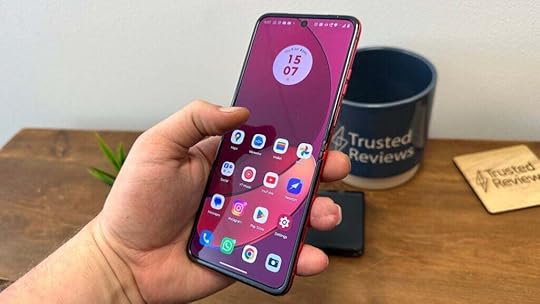 Image Credit (Trusted Reviews)
That’s impressive, but our reviewer did note that 165Hz was exclusive to games, with no way to force it throughout the OS for day-to-day scrolling. Otherwise, he loved the tall display and celebrated just how much of an improvement there is to the inner crease compared to other foldables, with only a slight, shallow dip in the display.
On the other hand, the Samsung Galaxy Z Flip 5 has a slightly shorter and narrower 6.7-inch Dynamic AMOLED 2X display with a 120Hz refresh rate that, like the Razr 40 Ultra, also supports LTPO tech. Our reviewer praised the overall quality of the display, with vivid colours and deep blacks that AMOLED tech is known for, though the crease is more noticeable than that of the Razr, with a slightly deeper central recess.
They both cost the same amount of moneyAs long as you can accept the premium price tag of the foldables, there isn’t any difference in price between them, removing one potential barrier from your buying decision.
They both start at £1049 with 256GB of storage as standard, though Samsung is currently offering fans that pre-order the Flip 5 directly the opportunity to upgrade to a 512GB variant completely free of charge. The Samsung Galaxy Z Flip 5 is set for release on 11 August, and the Motorola Razr 40 Ultra is available to buy now following release in June.
Source link
The post Samsung Galaxy Z Flip 5 vs Motorola Razr 40 Ultra: Which foldable is best? appeared first on Harmony Evans.


NYC Planning to House 1,000 Border Crossers in Mental Hospital Parking Lot | The Gateway Pundit
New York City is planning to house up to 1,000 migrants in the Creedmoor Psychiatric Hospital parking lot in Queens.
There are currently more migrants than homeless Americans in the city’s shelter system — and more are arriving each day.
The city plans to use the parking lot as a camp for adult men seeking asylum in the US.
“This center will provide not just a place to stay but also critical services to support these individuals on their journey,” Emergency Management Commissioner Zach Iscol said at a press conference, according to a report from Fox News.
Last week, Adams’ administration announced that it will be handing out flyers to migrants at the border, begging them to go elsewhere.
Over 90,000 border crossers have ended up in the Big Apple since last Spring, and Adams announced on Thursday that the city has “reached full capacity.”
To try to stop the flow of migrants, border crossers will be given a flyer that explains “housing in NYC is very expensive” and “the cost of food, transportation, and other necessities in NYC is the highest in the United States.”
Adams is also begging the federal government to do something about the massive migrant crisis.
While announcing the flyer, the mayor’s office said, “New York City is at capacity, having responded in the absence of state or federal action. In the coming days, the city will begin providing 60 days’ notice to adult asylum seekers to find alternative housing paired with intensified casework services to help adult asylum seekers explore other housing options and take the next step in their journey. Each asylum seeker given notice will have multiple touchpoints with case workers over their 60 days to discuss their options and plan their next steps.”
“New York City has done more than any other level of government to address this national crisis, providing shelter, food, services, and much more to more than 90,000 asylum seekers since last spring,” said Mayor Adams. “With more than 54,800 asylum seekers still currently in our care, this effort will intensify adult asylum seekers’ casework services over the next two months to help them take the next step on their journey and ensure we have a bed to place children and families at night. For more than a year now, New York City has responded to this crisis alone — we need our state and federal partners to step up.”
Source link
The post NYC Planning to House 1,000 Border Crossers in Mental Hospital Parking Lot | The Gateway Pundit appeared first on Harmony Evans.
Pocket assistant: ChatGPT comes to Android
OpenAI
On Tuesday, OpenAI released an official ChatGPT app for Android, now available in the Google Play Store in four countries: the US, India, Bangladesh, and Brazil, with more coming soon. As a client for OpenAI’s language model family, the GPT-3.5 and GPT-4 models run on the cloud and provide results to your Android device. It also integrates OpenAI’s Whisper model for speech recognition.
ChatGPT, launched in November, is a conversational AI language model interface. As an AI assistant, it can help with summarization, text composition, and analysis. OpenAI bills its use cases as a way to seek “instant answers,” “tailored advice,” “creative inspiration,” “professional input,” and “learning opportunities.”
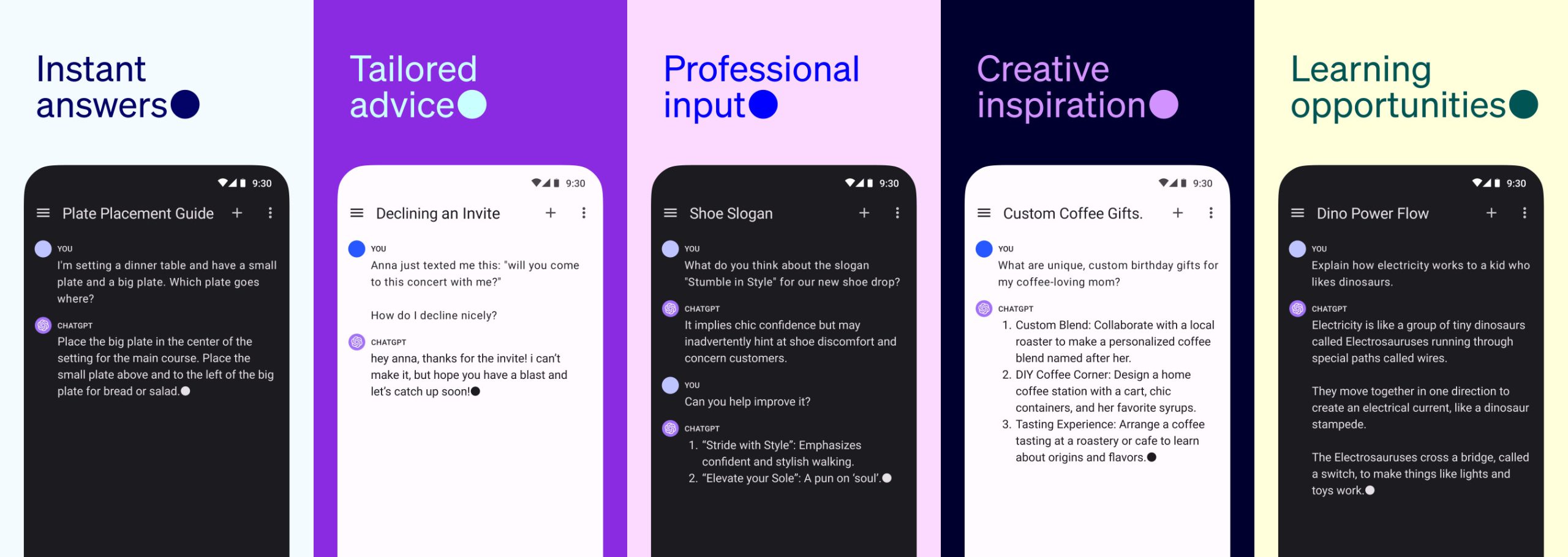 Enlarge / A series of images showing OpenAI’s proposed uses of the ChatGPT Android app, taken from the Google Play Store.
OpenAI
However, as we’ve noted in the past, ChatGPT is occasionally prone to confabulation (that is, making things up)—especially the GPT-3.5 model—so it’s not entirely trustworthy as a factual reference. It can come in handy as a way to analyze data you provide yourself, though, so long as you’re familiar with the subject matter and can validate the results.
AdvertisementLike the iOS version of the ChatGPT app, the Android version links to your existing ChatGPT account and can synchronize chat history between devices. It also supports ChatGPT Plus subscription account features, such as access to the GPT-4 language model and some Beta features like Custom Instructions.
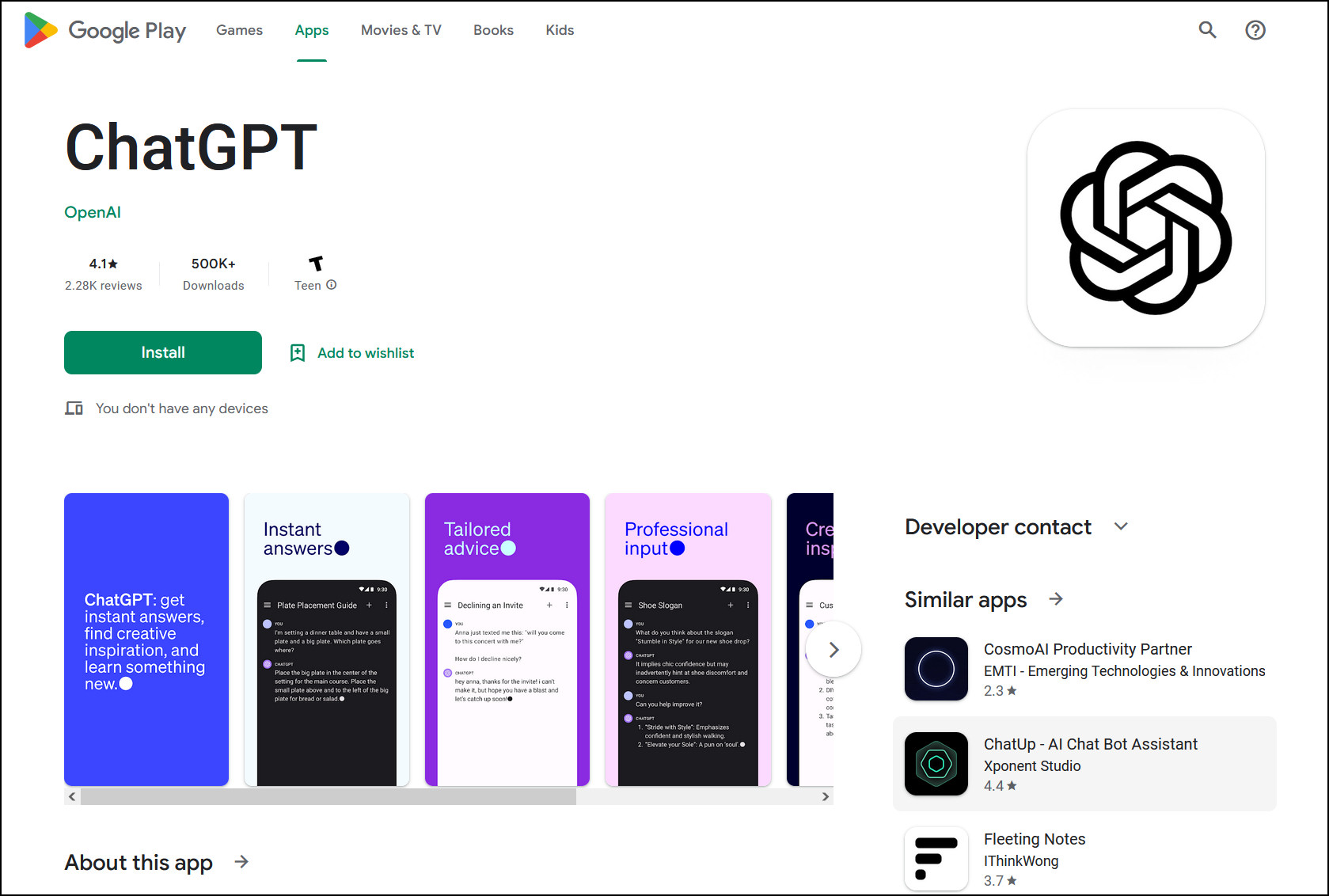 Enlarge / A screenshot of the ChatGPT app in the Google Play Store on July 26, 2023.
Ars Technica
Using the app feels similar to a text-messaging experience, with an input box at the bottom of the screen and a scrolling conversation history between you and ChatGPT taking up most of the app’s interface. At any time, users can quickly start new conversations by swiping the input bar to the right. History is available in a “three-dots” ellipses menu in the upper-right corner.
ChatGPT for Android requires Android 6.0 and up and has already racked up over 500,000 downloads, according to stats found on the Google Play Store. OpenAI plans to expand the ChatGPT Android rollout to more countries over the next week.
Source link
The post Pocket assistant: ChatGPT comes to Android appeared first on Harmony Evans.
Apple lets slip new iPhone 15 Pro action button
Apple has seemingly let slip confirmation that the iPhone 15 Pro will ditch the mute switch and replace it with a multi-functional action button.
It’s long been rumoured that the forthcoming iPhone 15 Pro will start doing away with physical buttons in favour of ‘taptic’ alternatives, starting with that iconic mute switch. But now we appear to have received confirmation straight from the horse’s mouth.
Apple released the fourth iOS 17 beta to developers earlier this week, which serves as a preview of the operating system that will ship with the iPhone 15 range. In amongst the code, MacRumors noticed a reference to a new Action button with nine potential functions that can be dictated by the user.
These nine functions are labeled as Accessibility, Shortcuts, Silent Mode, Camera, Flashlight, Focus, Magnifier, Translate, and Voice Memos.
While there’s no elaboration on what these terms mean, it doesn’t take a huge leap of imagination to see what this means. This is clearly a new contextual button that will offer instant access to popular tasks. The inclusion of Silent Mode pretty much seals the deal.
Besides the death of the mute switch, the iPhone 15 range is expected to see Apple transitioning away from its bespoke Lightning connector, and replacing it with the universal USB-C standard.
We’re also expecting the full range to adopt Apple’s Dynamic Island notch system, which debuted in the iPhone 14 Pro. The iPhone 15 family could also be in line for a slightly more rounded design after several successive generations of flat, angular phones.
Coming back to the iPhone 15 Pro specifically, aside from an action button there have been rumours that it might also adopt a new periscope lens camera, which would bolster its zooming chops.
Source link
The post Apple lets slip new iPhone 15 Pro action button appeared first on Harmony Evans.
Download the Samsung Galaxy Z Fold 5 wallpapers here
Ryan Haines / Android Authority
The Samsung Galaxy Z Fold 5 is one incredible device, but it certainly isn’t for everyone. For starters, it is one of the most expensive devices at $1,799. Luckily, you can download the Samsung Galaxy Z Fold 5 wallpapers for free and use them on any device.
These Galaxy Z Fold 5 wallpapers follow a similar design language to the wallpapers we’ve seen in other high-end Samsung devices lately. They have a black background and abstract shapes featuring colorful hues. This is likely to showcase the deep blacks and vibrant colors Samsung AMOLED screens are known for.
Are you ready to get the Galaxy Z Fold 5 wallpapers? These come courtesy of YTECHB.
Download the Samsung Galaxy Z Fold 5 wallpapersFirst, you should know the image previews below are compressed images optimized for better browsing. It’s not the best idea to save those and use them as wallpapers. Instead, use the button below them to download the full-sized, uncompressed wallpapers. This will ensure optimal image quality.
How to set wallpapers on other phonesAre you having difficulty figuring out how to use these wallpapers you just downloaded? Don’t worry. We can help with that too. Again, make sure you download the full-resolution images using the button above.
Either download them straight into your phone or use your favorite method to transfer the images to your phone. I like using Google Drive, but you can also email it to yourself, transfer it using a cable, etc. Once it’s on your device, follow the steps below.
Note: We formulated these steps using a Google Pixel 7 running Android 13 and an Apple iPhone 12 Mini running iOS 17. Some things may look slightly different, depending on your hardware and software version.
How to set a wallpaper on Android:Launch the Settings app.Go into Wallpaper & style.Hit Change wallpaper.Tap on My Photos.Select the image.Tap on Set wallpaper.Pick whether you want to set the wallpaper on the Lock screen or Home and lock screen.How to set a wallpaper on iPhone:Launch the Settings app.Go into Wallpaper.Tap on Add New Wallpaper.Go into Photos and select the wallpaper you want to set.Make your edits and hit Add.Hit Set as Wallpaper Pair.Are you liking these Samsung Galaxy Z Fold 5 wallpapers? If you’re not a fan, we have plenty of other guides with superb wallpapers. You can start with our post on the best default wallpapers from the most popular Android devices out there. We also have a list of the best Samsung wallpapers.
Comments
Source link
The post Download the Samsung Galaxy Z Fold 5 wallpapers here appeared first on Harmony Evans.
Karine Jean-Pierre Can’t Say How a Buyer of Hunter Biden’s Garbage Artwork Coincidentally Received Prestigious Commission Appointment by Joe Biden (VIDEO) | The Gateway Pundit
White House Press Secretary Karine Jean-Pierre couldn’t say how a buyer of Hunter Biden’s garbage artwork coincidentally received a prestigious commission appointment by Joe Biden.
Another Biden pay-to-play scheme revealed was revealed on Tuesday.
A major Democrat donor and Biden-appointed commissioner was revealed as a buyer of Hunter Biden’s garbage artwork.
Hunter’s artwork (photo below) ranges from $75,000 for works on paper to $500,000+ for large-scale paintings.
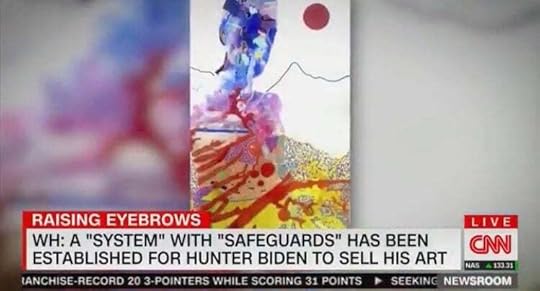
According to Business Insider, Hunter Biden learned the identity of at least two of his buyers – and one of the buyers got a favor from the Biden White House!
One buyer, identified as Los Angeles real estate investor and major Democrat donor, Elizabeth Hirsh Naftali, was appointed to a prestigious commission by Joe Biden.
According to Insider, in July 2022, 8 months after Hunter Biden’s art debuted in a SoHo gallery, Joe Biden appointed Naftali to the Commission for the Preservation of America’s Heritage Abroad.
It is unclear if the appointment occurred before or after Naftali purchased Hunter Biden’s art.
Additionally, Naftali has visited the Biden White House more than a dozen times and has met with senior advisors.
A reporter asked Karine Jean-Pierre about Naftali and the Bidens’ latest pay-to-play scheme.
KJP said she would “have to look into” how Naftali received a commission appointment by Joe Biden.
WATCH:
Jean-Pierre Says She’d ‘Have to Look Into’ How a Buyer of Hunter Biden’s ‘Artwork’ Coincidentally Also Received a Plum Commission Appointment by Joe Biden pic.twitter.com/R5GQXBcJNS
— Sean Hannity (@seanhannity) July 26, 2023
The post Karine Jean-Pierre Can’t Say How a Buyer of Hunter Biden’s Garbage Artwork Coincidentally Received Prestigious Commission Appointment by Joe Biden (VIDEO) | The Gateway Pundit appeared first on Harmony Evans.
Twitter commandeers @X username from man who had it since 2007
Getty Images | Chris Delmas
Elon Musk’s decision to rebrand Twitter as “X” wouldn’t be complete without a change to the company’s official Twitter account. The @X handle was already taken by a user who registered it over 16 years ago, but that wasn’t much of an obstacle—Twitter simply took over the username and offered its longtime owner some merchandise but no monetary compensation.
San Francisco-based photographer Gene X Hwang was @X on Twitter from March 2007 until yesterday. “They just took it essentially—kinda what I thought might happen,” Hwang told The Telegraph. “They did send an email saying it is the property of ‘x’ essentially.”
Hwang confirmed to Ars today that “there was no financial compensation” offered to him. The company offered “to switch the @x account and its history/followers etc to a new handle once I select one that is available,” Hwang told us. “They also offered some merch and to meet with the management team as well.”
Hwang said he doesn’t feel any “need to meet with the management since I am not sure what that convo would be really.” The meeting would probably be “awkward,” he said.
No plans to fight changeThe former @X account holder has no plans to fight the change, Hwang told Ars. “I am definitely not a legal expert and not sure what rights there are,” he wrote in an email, adding that “maybe there is something there but [I] don’t really wanna fight that kind of fight as I like to keep my life more simple.”
Hwang is still on Twitter with the new handle of @x12345678998765. “Alls well that ends well,” he tweeted last night. He told Ars that @x12345678998765 is the handle Twitter moved him to temporarily before he picks a new name.
Hwang said he “didn’t need to hear from Mr. Musk directly but it would have been nice to have gotten something for the account.” He views any compensation as “more of a nice-to-have/bonus” rather than a requirement, he said. “Maybe I should ask for the blue bird they are taking down from the [headquarters building] sign since it’s no longer Twitter any more, or a friend suggested asking for a Tesla Model X or a ride on SpaceX!” Hwang told us.
AdvertisementBefore the @X handle was taken away, Hwang said he would be willing to give it up in exchange for payment. “I’m kind of waiting to see what might happen,” and “I would be willing to part with the handle if they made an offer for it that made sense,” he told TechCrunch earlier this week. No one from Twitter reached out to him before the company rebranded as X, he also said.
Hwang was several years ago that he turned down offers as high as $40,000 because he didn’t think they were legitimate. “I really didn’t entertain any of them seriously,” he said at the time.
Twitter claims right to take any usernameTwitter’s official account was formerly @twitter, but the profile says, “This account is no longer active. Follow @x for updates.” The @X account is now populated with years worth of tweets that originally appeared on the @Twitter account, giving the impression that it was X all along.
Twitter says it can take over any username in its terms of service. “We may also remove or refuse to distribute any Content on the Services, limit distribution or visibility of any Content on the service, suspend or terminate users, and reclaim usernames without liability to you,” the Twitter terms say. That line was already in the Twitter terms before Musk bought the company.
Usernames can have a monetary value. The owner of @N, Naoki Hiroshima, that he’d “been offered as much as $50,000 for it” and that people “have tried to steal it.” One hacker was successful in taking control of @N, but Twitter later the handle to Hiroshima.
In January, a New York Times said that “Twitter has considered selling user names to generate new revenue as its owner, Elon Musk, tries to resuscitate the company’s business.” Under Musk, Twitter has also gotten more aggressive about purging accounts that seem to be inactive.
The post appeared first on Harmony Evans.
Samsung’s Cover Display Mistake Could Spell Trouble for the Z Flip 5
OPINION: Samsung’s Galaxy Z Flip 5 is official, and it heralds in plenty of changes for Samsung’s clamshell foldable both in terms of performance and the fundamental way you interact with the phone. But as handy as a new large cover display is, it’s curtailed by odd software limitations, meaning it’s not quite as capable as it could be.
The new 3.4-inch cover display, up from the piddly little 1.9-inch cover display from previous entries in the Z Flip line, is no longer just for reading notifications. The expansive folder-shaped display takes up much of the lid of the foldable, with the return of twin 12MP shooters nestled in the bottom right.
With much more screen real estate to play with, Samsung has developed a range of heavily customisable clock faces and plenty of widgets. These range from rather basic widgets, like Weather, Calendar, and shortcuts to favourite contacts, to more handy options like the Camera app and Google Stocks. A quick pinch of the display will reveal all your widgets, with a tap to bring them front and centre.
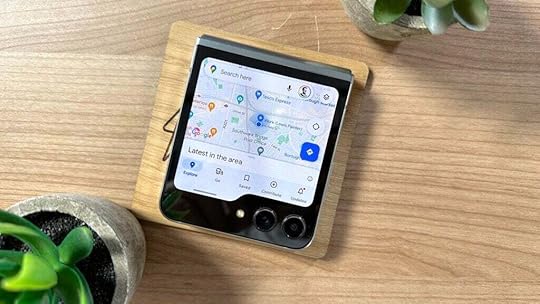 Image Credit (Trusted Reviews)
It’s not just about widgets though; you can use the large display as a viewfinder in the Camera app, allowing you to use the dual 12MP lenses to take high-quality selfies, and with full QWERTY keyboard support, you can even reply to incoming texts without having to unfold the device.
Don’t get me wrong; it’s not the first foldable to go down this route. The Oppo Find N2 Flip’s 3.26-inch display also boasts a range of widgets, as does the top-end Motorola Razr 40 Ultra’s 3.6-inch cover display, arguably the Z Flip 5’s biggest competitor. The problem is that Samsung just stops short of offering the perfect cover screen experience that the Motorola Razr 40 Ultra offers.
I’m talking about app support. Samsung claims that the Z Flip 5 can run apps on the cover display, and while this is technically true, it’s very limited. In fact, once you’ve found the option to enable the functionality buried deep within the Labs section of the Settings app, you’ll see that you can only enable a small handful of apps, including Messages, WhatsApp, Netflix and YouTube.
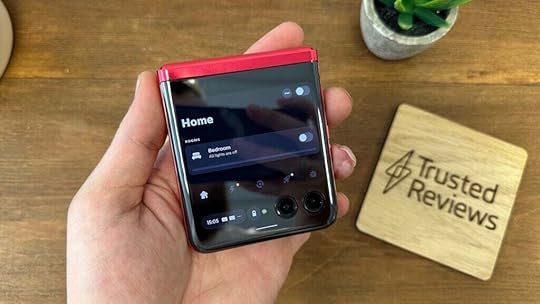 Image Credit (Trusted Reviews)
That would’ve been fine if the Razr 40 Ultra didn’t offer the option to run any app on the cover display you’d like. This further negates the need to unfold the phone for small tasks, as you can quickly adjust smart home controls, change the music you’re listening to or get a heads-up on who’s knocking at the front door from that cover display. Granted, not all apps work perfectly on the compact display, but a surprising number do.
It also means that I could tap on incoming notifications and open the app on the cover display – something not possible with the Z Flip 5, with the phone telling you to unfold the device to interact with most notifications.
The Razr 40 Ultra’s cover display also has more capable quick settings controls, allowing you not only to customise which quick settings appear on the lock screen but the ability to access their respective settings menus to connect to Wi-Fi or Bluetooth headphones, again without needing to unfold the device.
Small features like this make the cover display experience on the Razr 40 Ultra stand out from the rest, and it’s surprising to see it curtailed so much with the Z Flip 5, especially considering that, software aside, the two cover displays are incredibly similar.
It may not seem like a dealbreaker on the surface, but it’s a fundamental part of the clamshell experience in 2023, and simply put, the Z Flip 5’s cover display isn’t quite up to scratch. There’s always a chance this could change via a software update in the next few months, but I’m not holding out much hope.
Source link
The post Samsung’s Cover Display Mistake Could Spell Trouble for the Z Flip 5 appeared first on Harmony Evans.
Download the Samsung Galaxy Z Flip 5 wallpapers here
Ryan Haines / Android Authority
Z Flip 5
The Samsung Galaxy Z Flip 5 is a great foldable phone. Its flip design makes it portable and fun. It’s also a very capable handset, with powerful specs and an overall great experience. Surely, it’s not for everyone, but we know many of you would like to download the Samsung Galaxy Z Flip 5 wallpapers. Thanks to YTECHB, now you can!
While these follow a similar design to the Samsung Galaxy Z Fold 5 wallpapers, the Galaxy Z Flip 5 ones seem much more fun. They have a more “bubbly” look and seem to have more going on. They also have a black background and colorful abstract designs, likely to showcase what makes Samsung AMOLED screens stand out: deep blacks and vibrant colors.
Download the Samsung Galaxy Z Flip 5 wallpapersLet’s cover the basics first. It’s not a good idea to simply grab the previews below and set them as your wallpaper. These are for demonstration purposes only. The previews have been compressed and optimized to improve website performance. Access the button below the previews to download the full-size, uncompressed wallpapers.
How to set wallpapers on other phonesWe can help you figure out how to set your Samsung Galaxy Z Flip 5 wallpapers on other phones, if you have no experience in the matter. Don’t worry; the process is simple once you know where to go.
Again, make sure you download the full-resolution images using the button above. Either download them straight from your device or use transfer them using whichever method you prefer. I like using Google Drive, but you can email it to yourself, transfer it using a cable, etc. Follow the steps below once you’ve sent the wallpaper to your handset.
Note: We formulated these steps using a Google Pixel 7 running Android 13 and an Apple iPhone 12 Mini running iOS 17. Depending on your hardware and software version, some things may look slightly different.
How to set a wallpaper on Android:Launch the Settings app.Go into Wallpaper & style.Hit Change wallpaper.Tap on My Photos.Select the image.Tap on Set wallpaper.Pick whether you want to set the wallpaper on the Lock screen or Home and lock screen.How to set a wallpaper on iPhone:Launch the Settings app.Go into Wallpaper.Tap on Add New Wallpaper.Go into Photos and select the wallpaper you want to set.Make your edits and hit Add.Hit Set as Wallpaper Pair.Comments
Source link
The post Download the Samsung Galaxy Z Flip 5 wallpapers here appeared first on Harmony Evans.
Longevity-Boosting Chocolate Chunk Brownie Recipe
You never know what you’ll find when you go digging inside someone’s old recipe box, but one of the first treats you may encounter is a beloved ‘ol family brownie recipe. Fudgey, gooey, and nearly impossible to mess up—what’s not to love about an imperfectly perfect batch of brownies?
Nothing, which is why we’re sharing tricks for making brownies breakfast-friendly, and it starts and ends with a Blue Zones-inspired black bean chocolate chunk brownie recipe that’s packed with protein and antioxidants. (If you’re new to the Blue Zones, they’re the parts of the world where folks consistently live to be over 100 years old in good health—and beans happen to be a dietary staple in all of them.)
Ahead: How to make a batch of these bad bean-ilicious boys, plus why their ingredients can support healthy aging, and more delicious brownie recipes to try if these go stale. (Heads up: They won’t.)
What makes this longevity-boosting protein brownie recipe so enticing
This easy brownie recipe (originally inspired by The Balanced Blonde) features several ingredients commonly consumed in the Blue Zones that are essential for healthy aging. It’s dairy-free, gluten-free, and vegan, so it works for folks with various types of dietary restrictions, too.
Let’s dive right into what makes this recipe so darn good. The eight-ingredient recipe calls for the following foods: bananas, cocoa, agave, dry oats, dairy-free chocolate chips, almond butter, vanilla extract, and—the star of the show—black beans. A whole can of ‘em. Thanks to a heaping serving of black beans, these brownies are packed with protein (nearly 25 grams of protein, depending on the brand) and are beyond moist and rich—a win-win in our book.
Related Stories
Beans contain several key nutrients that are linked to healthy aging: They’re high in fiber, packed with many essential nutrients (folate, zinc, and potassium, to name a few), and they help promote a well-balanced microbiome. According to Blue Zones’ founder Dan Buettner, beans are a key component of most centenarian diets. Buettner has actually shared that eating a cup of beans daily could extend your life expectancy by four years.
According to Blue Zones’ founder Dan Buettner, beans are a key component of most centenarian diets. Buettner has actually shared that eating a cup of beans daily could extend your life expectancy by four years.
Another longevity-boosting component of this recipe is the cocoa. You may recall the legacy of Sister André, a French nun who lived to be 118 years old. When asked what her secret to living well beyond most, her response was: Eating chocolate and drinking wine regularly. (Love. Her. Vibe.) And while cheeky, there is research to back her claim that chocolate may be a key ingredient for boosting longevity. Indeed, research shows that cocoa can potentially help reduce your risk of heart disease, stroke, type 2 diabetes, and dementia. This is largely because it contains polyphenols, a powerful antioxidant.
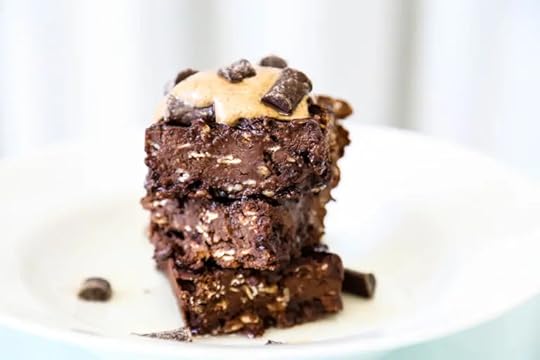 Photo: The Balanced Blonde
Yields 10 servings
Ingredients
15-ounces can black beans (drained and rinsed)
2 whole bananas
1/3 cup unsweetened cocoa (and/or cacao powder)
1/3 cup agave nectar
1/2 cup dry oats
1/2 cup dairy-free chocolate chips
1/2 cup almond butter (or your favorite nut butter)
1 Tsp vanilla extract
1. Preheat oven to 350ºF.
2. Grease an 8 x 8 pan and set aside. (It’s recommended to grease the pan with coconut oil spray.)
3. Combine all of the ingredients, except for the oats and chocolate chips, together, and blend in a high-speed blender or food processor.
4. Pour into a bowl and mix in the oats and chocolate chips.
5. Pour the batter into the greased pan and bake for 30 minutes or until a toothpick comes out clean when inserted in the center. Let cool before serving.
Even more protein-rich brownie recipe loveIf black bean brownies aren’t your scene, we get it. Beans in brownies can be hard to wrap our heads around. (But we strongly urge you not to knock it until you try it.) That said, now that we’re all in the mood for some gooey, fudgy brownies, we’ve got plenty more options for ya…that don’t involve beans.
For the easiest brownie recipe on the planet, try these three-ingredient peanut butter banana brownies (which are also anti-inflammatory). They’re as just as decadent as they are easy to prepare.
For a brownie recipe centered around heart health, try baking fudge brownies with extra virgin olive oil—it makes them ultra-moist and packed with monounsaturated fatty acids, which are well-known for their anti-inflammatory benefits. Time to crank up the oven, am I right?
Fudgy olive oil brownies coming right up:
Our editors independently select these products. Making a purchase through our links may earn Well+Good a commission.
Source link
The post Longevity-Boosting Chocolate Chunk Brownie Recipe appeared first on Harmony Evans.