Harmony Evans's Blog, page 740
July 28, 2023
AI is making our jobs harder, not easier
Artificial intelligence (AI) has been heralded as a game-changer with the potential to revolutionize the way we work. Bill Gates and other leaders in the technology industry have highlighted the benefits of AI in the workplace. The co-creator of Microsoft predicts that AI will primarily be used to make people more efficient at their jobs. Researchers at MIT found that using AI tools like ChatGPT increased productivity across the board, including in areas like resume writing, email etiquette, and financial analysis. This research provides evidence that AI tools can be helpful in professional settings.
The potential advantages of AI are clear, but actual applications have not always gone smoothly. Neil Clarke, editor and publisher of the science fiction and fantasy magazine Clarkesworld, saw a rise in submissions generated by artificial intelligence. Unfortunately, Clarke and his team’s workload was doubled rather than increased as a result of the AI-generated content. The sheer volume of AI-generated content can suffocate workers, requiring them to spend more time manually sorting through submissions, highlighting a significant challenge.
What Clarke went through is not unprecedented. Employees in a wide range of fields, from the aviation industry to the healthcare sector, have complained that they are being used as “guinea pigs” in the rush to adopt AI-powered technologies. Because these tools can’t always automate everything, workers are left with some stragglers. Therefore, people have to take on logistics work that machines can’t do. The use of AI has the potential to raise the tempo of work to a level never before seen. Many workers have found their workloads and stress levels increasing as a result of these difficulties.
OECD Secretary-General Mathias Cormann agrees that AI can enhance some aspects of job quality, but he also points out the costs and risks involved. Workers have reported an increase in the intensity of their work since the introduction of AI, despite the fact that it may increase productivity. Wages for workers who aren’t managers or AI specialists haven’t changed much either, suggesting that while productivity may increase, pay hasn’t. This prompts worries about the potential for wage inequality and the necessity of ensuring that workers reap the benefits of AI’s enhanced efficiency.
One sector that has become emblematic of the benefits and drawbacks of using AI is the media industry. Copywriting, advertising, and editorial work could be done more quickly and effectively with the help of AI tools. However, serious mistakes have already been made. After attempting to use an artificial intelligence tool to write stories, CNET was forced to issue significant corrections. When an AI-written article about Star Wars needed to be updated, it caused internal strife at Gizmodo. Both organizations, however, plan to keep using AI in their newsrooms despite the difficulties that have arisen. This shows an understanding of the potential benefits of AI, along with the acknowledgement that its implementation still needs work.
Workers’ participation in the AI implementation process is essential but often overlooked. According to Ivana Saula, research director of the International Association of Machinists and Aerospace Workers, the expertise of frontline workers is crucial to the smooth implementation of AI. When asked about the real-world applications of AI, employees have valuable insights that should be shared with their employers. Employers can better foster a collaborative and effective implementation process by actively involving workers and bridging the gap between management and frontline employees.
As the difficulties of implementing AI become clearer, work is being done to create AI tools that can help with the resulting increase in activity. To handle the influx of submissions, Neil Clarke and his team turned to detectors powered by artificial intelligence. Yet, they discovered that, especially for authors whose first language is not English, these tools were not reliable in identifying AI-generated content. Because of this, more progress in AI technology is needed to guarantee proper recognition and management of AI-generated content.
The use of AI in the workplace is just getting started, and despite the difficulties it faces, it has enormous potential. The implementation process must be fine-tuned, with special attention paid to minimizing negative side effects. When adopting AI technologies, businesses must think about how it will affect employee hours, job satisfaction, and compensation. Successful and long-lasting integration is possible, especially when employees are consulted and their knowledge is utilized. As AI develops further, it will become increasingly important to find a happy medium between maximizing productivity and protecting employees’ well-being.
In conclusion, Artificial intelligence (AI) has the potential to revolutionize the workplace by boosting productivity and efficiency. The truth, however, is more nuanced. Since the advent of AI technologies, many workers have faced difficulties such as increased workloads and quality concerns. While artificial intelligence tools have the potential to simplify processes and boost output quality, their introduction calls for cautious planning and employee buy-in. It is essential that we address these issues and find ways to harness the full potential of AI while ensuring the well-being of workers as we move forward into the future of AI in the workplace.
First reported on CNN
Frequently Asked QuestionsWhat is the potential of AI in the workplace?AI has the potential to revolutionize the workplace by boosting productivity and efficiency. It can be used to streamline processes, improve output quality, and enhance various aspects of job performance.
Has AI been successful in the workplace so far?While AI has shown promise in improving productivity and efficiency, there have been challenges in its implementation. Some workers have reported increased workloads, and there have been instances of AI-generated content leading to mistakes in the media industry.
What are the challenges of implementing AI in the workplace?One of the challenges is the sheer volume of AI-generated content, leading to increased workload for employees who have to manually sort through submissions. Additionally, some AI tools may not be reliable in identifying AI-generated content, leading to quality concerns.
What is the role of workers in the AI implementation process?Workers’ participation in the AI implementation process is essential but often overlooked. Their expertise and insights are crucial to the successful integration of AI in the workplace.
How can businesses ensure a successful integration of AI in the workplace?To ensure successful integration, businesses should carefully plan the implementation of AI technologies, considering how it will affect employee hours, job satisfaction, and compensation. They should also actively involve workers and utilize their knowledge in the process.
What is the future of AI in the workplace?The future of AI in the workplace holds great potential, but it requires fine-tuning and careful consideration of its impact on employees. Finding a balance between maximizing productivity and protecting employees’ well-being will be essential for successful long-term integration.
Featured Image Credit: Unsplash
John BoitnottJohn Boitnott is a news anchor at ReadWrite. Boitnott has worked at TV News Anchor, print, radio and Internet companies for 25 years. He’s an advisor at StartupGrind and has written for BusinessInsider, Fortune, NBC, Fast Company, Inc., Entrepreneur and Venturebeat. You can see his latest work on his blog, John Boitnott
Source link
The post AI is making our jobs harder, not easier appeared first on Harmony Evans.


HE’S SHOT: Joe Biden Shuffles Away After Losing Battle with Teleprompter at Truman Civil Rights Symposium (VIDEO) | The Gateway Pundit
Joe Biden on Thursday delivered remarks at the Truman Civil Rights Symposium at the National Archives Research Center.
80-year-old Joe Biden shuffled to the podium shortly after his corrupt Justice Department filed a superseding indictment with 3 additional charges against Trump in the classified documents case.
Biden barely made it through his speech before shuffling away.
He’s getting worse by the day.
“…And, I might add, the most diverse fighting fice!— force in the history of the world!” Biden said losing the battle with his teleprompter. “We have and always will have the strongest, toughest grating force, fighting force…”
WATCH:
BIDEN: “…and, I might add, the most diverse fighting fice!— force in the history of the world!” pic.twitter.com/HYzpPP2pqw
— RNC Research (@RNCResearch) July 28, 2023
Biden saluted the crowd after his rambling speech.
Notice Biden’s stiffened gait as he shuffles away from the lectern.
He’s completely shot.
VIDEO:
The post HE’S SHOT: Joe Biden Shuffles Away After Losing Battle with Teleprompter at Truman Civil Rights Symposium (VIDEO) | The Gateway Pundit appeared first on Harmony Evans.
Samsung Galaxy Watch 6 vs Apple Watch Series 8: Samsung or Apple?
The Samsung Galaxy Watch 6 comes in two variations, vanilla and classic, and uses Wear OS 4 powered by Samsung. But how does it compare to the Apple Watch Series 8?
Samsung has announced the latest addition to the Galaxy Watch series, taking over from the Galaxy Watch 5. This new wearable comes in two variations, standard and Classic, with the prices starting at £289 and £369, respectively.
Both models will be available to preorder from today and will go on sale on 11th August.
We haven’t had the chance to review the latest Galaxy Watch 6 just yet, but we did want to dive deep into how this wearable compares to one of the most popular smartwatches on the market, the Apple Watch Series 8.
Keep reading to find out all the key differences between these devices so you can decide which watch is best suited to you.
IP68 vs IPX6The Galaxy Watch 6 comes with a 5ATM and IP68 water and dust rating. The former allows the wearable to withstand pressure of up to 50 metres, with the latter giving it a good level of water and dust resistance. This means that the Galaxy Watch 6 can be used in shallow-water activities or be taken in the shower, but it cannot be used for deep dives.
The Apple Watch 8 is IPX6 and 5ATM rated. It is resistant to dust and the 5ATM rating means that it can be used for activities like swimming, but unlike its Apple Watch Ultra sibling, it cannot be used for diving.
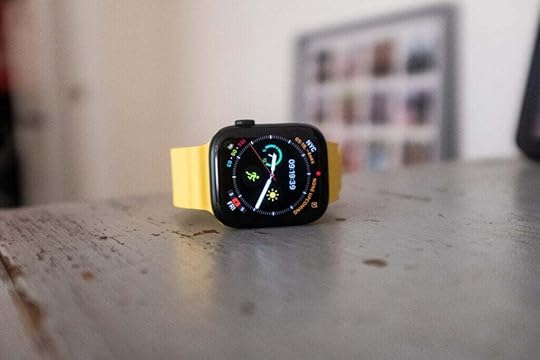 Image Credit (Trusted Reviews)Apple Watch Series 8 only works with iOS
 Anyone who owns an Apple Watch will know that it cannot be used with non-Apple handsets. The Apple Watch Series 8 can only be connected to an iPhone, limiting its use for Android lovers.
The Galaxy Watch 6 has followed this trend and is only compatible with devices running Android 10 or later.
Ultimately, this means that the phone you use will have a large impact on which smartwatch you can pair it with. The Galaxy Watch 6 works best with Samsung handsets, but you will be able to use it if you own other Android devices, like a Pixel 7 Pro or Honor 90.
Apple Watch Series 8 has a larger displayThe Apple Watch Series 8 comes in two screen sizes, 41mm and 45mm. Both feature Always-On Retina LTPO OLED displays and have up to 1000 nits of brightness, making them useable in bright environments. We felt that the display was bright, responsive and one of the best displays for a wearable device at this price point.
The Galaxy Watch 6 also has two display sizes, 40mm and 44mm. They are made from Sapphire Crystal and feature Always-On Super AMOLED technology. Samsung claims that the Galaxy Watch 6 comes with a 20% larger display than its predecessor and a 30% thinner bezel, which should make it feel more premium and give users more precision when interacting with the screen.
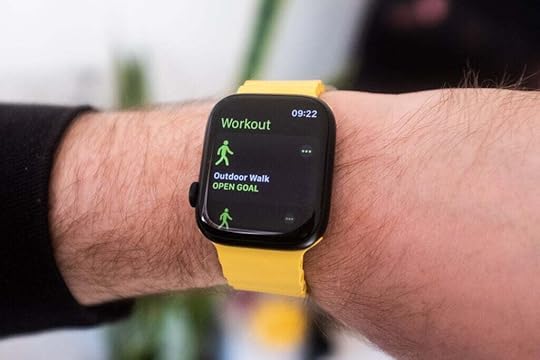 Image Credit (Trusted Reviews)Up to 40 hours of battery on the Galaxy Watch 6
Apple is not generally known for having the best battery life. The company claims that the Apple Watch Series 8 can last up to 18 hours, with our review claiming that it must be charged every one or two days, depending on use.
Samsung claims that the Galaxy Watch 6 can last up to 40 hours. The 40mm model comes with a 300mAh battery while the 44mm version comes with a 425mAh battery. We will have to wait until we review the Galaxy Watch 6 to get a conclusive idea of its battery life, but it seems likely that it will be able to outpace its Apple rival.
Source link
The post Samsung Galaxy Watch 6 vs Apple Watch Series 8: Samsung or Apple? appeared first on Harmony Evans.
How to open any app on Galaxy Z Flip 5’s cover screen
The Galaxy Z Flip 5 finally has a big, bad cover screen that Samsung is calling the Flex Window. It dwarfs the previous Galaxy Z Flip 4’s display and is just begging to be used with full-sized apps. However, the process is easier said than done in most cases and requires a little extra software. If you’ve been waiting for your chance to run Threads, Strava, or any other app on the cover screen, here’s how to do so using Good Lock on the Samsung Galaxy Z Flip 5.
QUICK ANSWER
In order to open most apps on your Galaxy Z Flip 5’s cover screen, you’ll have to install Good Lock from the Galaxy Store. After that, install MultiStar inside of Good Lock, select the I Heart Galaxy Foldable button, and tap the Launcher Widget. Now you can add your favorite apps to an app drawer widget on your Galaxy Z Flip 5’s cover screen.
JUMP TO KEY SECTIONS
Why do you need Good Lock?Ryan Haines / Android Authority
As mentioned above, Good Lock is the key (pun intended) to open just about any app on the Galaxy Z Flip 5’s Flex Window. It acts almost exactly like the cover screen app drawer on Motorola’s Razr Plus, allowing you to toggle apps in and out of the launcher as needed. While the Galaxy Z Flip 5 supports a select number of apps and widgets by default, Good Lock allows you to expand those horizons to include social media favorites like Instagram and music streaming go-to’s like Spotify.
How do you install Good Lock?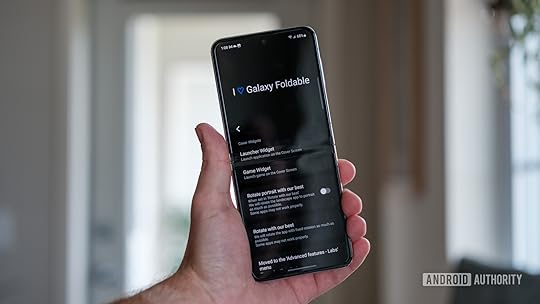
Ryan Haines / Android Authority
While Good Lock might seem like an extra hoop to jump through — because it kind of is — the process to install it is actually pretty simple. You’ll have to head to the Galaxy Store (not the Google Play Store) and follow these steps:
Search for and install Good Lock from the Galaxy Store.Open Good Lock from your app drawer.Scroll over to the Life Up tab and install MultiStar.From MultiStar, select the I Heart Galaxy Foldable button.Tap the Launcher Widget button.Add your apps to the Launcher Widget.If done correctly, your process should follow the screenshots in the gallery above. The good news is that there’s only one way to set up Good Lock, so there’s not much room to go astray.
Can you use any app with Good Lock?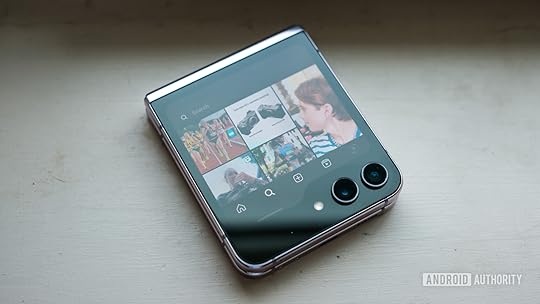
Ryan Haines / Android Authority
As far as we can tell, yes, Good Lock allows access to any app you have installed on your Samsung Galaxy Z Flip 5. How well that app adapts to the Flex Window’s layout, however, is another question. Samsung’s asymmetrical display means that most apps only take advantage of the rectangle above the cameras, while Motorola’s Razr Plus allows apps to use the entire display, often hiding some extra buttons behind the cameras. The benefit to Samsung’s setup is that you never have to toggle your display to access certain buttons, but the drawback is that you’re permanently packed into a smaller window.
To Samsung’s — or rather Good Lock’s — credit, Spotify seems to adapt better to the Galaxy Z Flip 5’s display as a full app than it does as a dedicated widget on the Motorola Razr Plus. It’s a bit easier to search for artists and playlists using the native interface, whereas the Razr Plus mainly directs you toward your recent artists.
Good Lock makes the Galaxy Z Flip 5 feel like the Razr Plus… with a few extra steps.
While Good Lock offers a mostly positive experience, there’s one notable exception that we’ve found: Google Wallet. If you want to skip Samsung’s mobile payment experience and use your trusty Google alternative, you’ll have to open up your Galaxy Z Flip 5. It’s not really a surprise that Samsung doesn’t want you jumping to a competitor’s payment platform, but it’s a bit of a headache for longtime Google Wallet users.
You’ll have to do quite a bit of experimenting in order to find the apps that work best, but at least Good Lock opens the door (or window) to the possibility.
Does Samsung Labs offer any apps?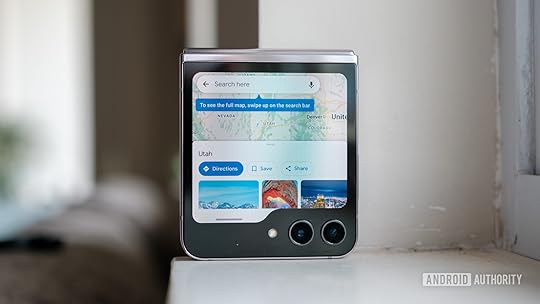
Ryan Haines / Android Authority
If you’ve been around the Galaxy ecosystem for a while, you already know that Samsung uses its Labs menu to offer early — sometimes imperfect — access to some of its latest features. It’s your one-stop shop for most of the Flex Mode settings and is the natural place for Samsung to put its optimized apps for the Galaxy Z Flip 5’s Flex Window. But if you already have to rely on Good Lock for access to your favorite apps, what does Labs bring to the table?
Well, in short, not too much. You can activate a launcher of optimized apps from the Labs menu, but it only supports a few selections like Google Messages, Google Maps, WhatsApp, YouTube, and Netflix. As if Samsung’s limited selection weren’t confusing enough, there’s no way to merge the Good Lock launcher with the Labs launcher, meaning that you either have to pick one over the other or live with two app drawers on your Flex Window.
FAQsDoes Samsung Good Lock drain your battery?No, at least not any faster than other apps. It functions the same as Samsung’s other Flex Window panels.
Why is Samsung Good Lock not available?Unfortunately, Samsung Good Lock is not available in all countries. We don’t have a reason for the limited availability, though Samsung did expand its supported countries at the end of 2022.
Is Samsung Good Lock safe?Yes. While Good Lock may not be a default Samsung app, it is backed by the company and is perfectly safe to install.
Does Samsung Good Lock slow down your phone?No. Samsung Good Lock runs like any other app, though it does allow for far more customization than the base One UI launcher.
Comments
Source link
The post How to open any app on Galaxy Z Flip 5’s cover screen appeared first on Harmony Evans.
Poll Finds Most Americans Don’t Think Sham Prosecutions of Trump Will Hurt His Chances in 2024 | The Gateway Pundit
New polling indicates that most Americans don’t believe that the endless prosecutions of Trump will hurt his election chances in 2024.
The Democrats have completely overplayed their hand on this. They have gone after Trump so many times that the public has become numb to all of it.
Despite their repeated attempts to claim that this is all about ‘our democracy’ no one is buying it.
Just the News reports:
Most voters don’t think prosecutions targeting Trump will harm 2024 chances: poll
Most voters do not think that former President Donald Trump’s chances of winning the 2024 election will be hurt by the multiple criminal cases he is being prosecuted in, according to a survey released Thursday.
While 35% of likely U.S. voters say that the prosecutions of Trump will harm his chances of winning the White House, 23% said they think it will help him, according to a Rasmussen Reports survey.
Nearly one-third, 32%, said they do not think Trump’s legal troubles will make much of a difference in his chances in the election while 10% said they were unsure.
The poll was conducted the week after Trump said the Justice Department told him he is a target in special counsel Jack Smith’s probe of the former president’s efforts to challenge the outcome of the 2020 election.
The Justice Department separately indicted Trump last month on 37 counts related to the handling of classified documents. He pleaded not guilty to all charges in June.
It has gotten to the point where Democrats just look desperate.
Most don’t think charges will stop Trump’s ‘reelection’ bid
55% said it will either help or won’t make a difference. Just 35% said it will hurt Trump @Rasmussen_Poll
Poll was 47% Biden 2020 voters, 43% Trump votershttps://t.co/adkD15jhbd pic.twitter.com/RlNGUjpxqu
— Paul Bedard (@SecretsBedard) July 27, 2023
Trump 2024: Most Voters Don’t Think Prosecutions Will Hurt
Thursday, July 27, 2023
Former President Trump is facing criminal prosecution in multiple cases..
More At Rasmussen Reports: https://t.co/SWmIE6jekC pic.twitter.com/KlqCTYQVwZ
— Rasmussen Reports (@Rasmussen_Poll) July 27, 2023
After all Democrats and the media have done, they have very little to show for it.
The post Poll Finds Most Americans Don’t Think Sham Prosecutions of Trump Will Hurt His Chances in 2024 | The Gateway Pundit appeared first on Harmony Evans.
The PS5 bundle has dropped below £400 for a limited time
That rumoured PS5 UK price cut becomes a reality thanks to Currys offering this LEGO Star Wars bundle for under £400.
The retailer is offering the Sony PS5 disc edition with LEGO Star Wars: The Skywalker Saga for just £399. That’s a saving of £80 on RRP of the console alone. Plus the free game, which is currently £18.99 at Currys.
Sony PS5 finally gets a huge price cut, but act fast
Right now you can get a PS5 Disc Edition with LEGO Star Wars for just £399. That’s a saving of almost £100 on the going rate.
CurrysTotal value: £497.99Just £399That’s by far the best deal we’ve seen on the PS5 to date, since it went on sale in late 2020. It’s even below the recommended price of the console, before Sony put it up a year ago.
It still has the same 825GB of storage and Blu-ray drive and it’s a brand new model, so there are certainly no strings attached here! Currys is also offering free next day delivery on the console.
We don’t know how long this offer is going to last, but we’re under the impression it’s going to be a ‘limited time only’ arrangement.
We got hints Sony was planning a summer price cut for the console, as it has in some European nations. Seemingly, it is coming to fruition with this PS5 offer. The rumour mill suggests Sony might be close to launching a slimmed down version of the console (aka a PS5 Slim) as it has often during the lifecycles of consoles. Whatever the reason, we’ll take the discount!
Adding LEGO Star Wars: The Skywalker Saga is quite the bonus too! It’s one of the most fun games you can hope to enjoy on the console. We gave it a 4.5 star review upon its release last year.
Our own Thomas Deehan wrote: “The sheer scope of Lego Star Wars: The Skywalker Saga is tough to comprehend, but it means that fans of the series (and Lego games in general) will have enough content to keep them engaged for quite some time. With fun, accessible gameplay, stunning graphics and incredible attention to detail, it’s hard to imagine a better homage to the Star Wars series than what Traveller’s Tales has achieved here.”
Source link
The post The PS5 bundle has dropped below £400 for a limited time appeared first on Harmony Evans.
July 27, 2023
The View’s Fake Conservative Insists Republicans Should Not Try to Impeach Joe Biden | The Gateway Pundit
Alyssa Farah Griffin functions as a supposed conservative voice on The View, but she constantly betrays herself by showing she is very much in line with the other, far left hosts on the show.
The latest example is her claiming that Republicans shouldn’t impeach Joe Biden.
She uses the exact same talking points that the Democrats use, claiming that there’s ‘no evidence’ of any wrongdoing on Biden’s part.
NewsBusters reports:
The View’s FAKE Conservative Demands House Ignore Evidence, Not Impeach Biden
As the reporting from New York Post journalist and MRC Bulldog Award winner Miranda Devine had exposed last Sunday, there seemed to be strong evidence that then-Vice President Joe Biden was deeply involved with his son Hunter Biden’s shady business dealings. But on Thursday, Alyssa Farah Griffin, the faux conservative of ABC’s The View, refused to take in any of that evidence while simultaneously demanding that House Republicans “put up or shut up” as she opposed impeaching Biden.
Farah Griffin made sure to let the audience know that “I stand by those remarks” from Wednesday where she gave a full-throated defense of President Biden and argued that he should not be impeached. “I got just dragged by the right-wing yesterday for saying ‘there is no reason to impeach Joe Biden,’” she whined.
Despite the evidence already out there, which was fueling the calls for an impeachment inquiry, Farah Griffin demanded someone present it to her, or as she put it “put up or shut up”
See the clip below:
“I stand by those remarks.”
Alyssa doubles down on saying Joe Biden should not be impeached for being directly involved in Hunter’s shady business dealings.
She falsely claims there is no evidence of Joe being involved.”I have not seen that! “
“Put up or shut up,” she demanded. pic.twitter.com/W8dcFTQdSE
— Nicholas Fondacaro (@NickFondacaro) July 27, 2023
Griffin tweeted this as well:
Joe Biden should not be impeached. One can strongly disagree w/his policies while also recognizing lowering the bar for impeachment of POTUS would be irrevocably damaging to our institutions. This will set the stage for every future POTUS to be dragged thru a show impeachment.
— Alyssa Farah Griffin (@Alyssafarah) July 26, 2023
Could she be any more obvious?
The post The View’s Fake Conservative Insists Republicans Should Not Try to Impeach Joe Biden | The Gateway Pundit appeared first on Harmony Evans.
Samsung Galaxy Z Fold 5 vs Google Pixel Fold: Which foldable is best?
Samsung’s latest big-screen foldable phone has been revealed and, in 2023, it’s got new competition. The Google Pixel Fold is now on the market to challenge the Samsung Galaxy Z Fold 5. Here’s how they compare.
Are you thinking it’s finally time to get a large-screen foldable? Well, as well as preparing your wallet for the exorbitant price, you’ve got to decide between quite a few devices that are now available. We’re focusing on Google and Samsung’s larger offerings but the likes of the Honor Magic Vs and smaller-screen foldables like the Galaxy Z Flip 5, Motorola Razr 40 Ultra and Oppo Find N2 Flip are skulking around.
But, if you’re set on choosing between the larger foldable phones from these two big brands, you’re in the right place. Samsung has just revealed the new Galaxy Z Fold 5, which we’ve had some hands-on time with, and we’ve fully reviewed the Google Pixel Fold. We won’t be mentioning price as a key battleground here, as both devices start at £1749. Interested in the rest of the big comparison points? Let’s dive in.
A tall foldable vs a wide foldableWhen deciding between these two foldables, a pivotal factor will be considering the shape of the device you’re after, as it impacts how it’ll feel to use it day-to-day, from the design itself to the style of displays.
The Samsung Galaxy Z Fold 5 offers a taller design overall, giving you a 6.2-inch 23.1:9 display on the outside and a 7.6-inch roughly 7:6 screen on the inside. By comparison, Google’s Pixel Fold gives you a 5.8-inch 17.4:9 panel on the outside and a 7.6-inch 6:5 display on the inside.
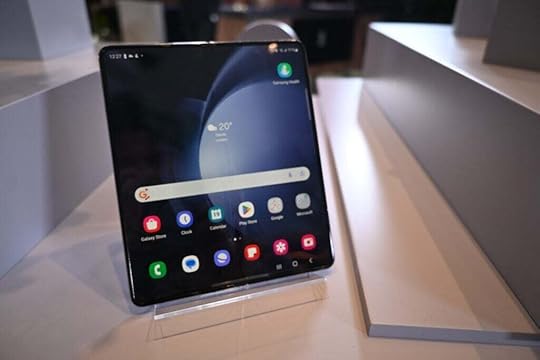 Samsung Galaxy Z Fold 5 – Image Credit (Trusted Reviews)
So what do these specs all mean? In our review of the Google Pixel Fold, our mobile editor Lewis Painter highlighted its shorter design and noted, “I found myself using the external display much more often than with other foldables.” The Pixel Fold’s outer display gives you a much more traditional phone experience than the wider Galaxy Z Fold 5.
However, the candybar-like shape of the Samsung foldable when folded does offer you a more compact-feeling experience, just like its almost identically designed predecessor. The taller inner Samsung display also affords an experience that better accommodates a multitasking experience, compared with the Pixel Fold’s wider screen presenting videos in less black-bar-laden fashion.
The Galaxy Z Fold 5 offers more powerYou’ll have to wait for our full review to get the complete lowdown on the Galaxy Z Fold 5 phone’s performance but things look promising, especially up against the Google Pixel Fold.
In our Google Pixel Fold review, we tested it up against the Motorola Razr 40 Ultra, a foldable sporting a Snapdragon 8+ Gen 1 chip. The results saw the Motorola phone comfortably top the Google Tensor G2-powered foldable.
Well, we’re expecting even more out of the Galaxy Z Fold 5, with it sporting the even more performant Snapdragon 8 Gen 2 for Galaxy SoC onboard. As such, Samsung should have the edge over Google on performance.
Google’s Pixel Fold offers 5x optical zoomSpec for spec, the camera comparison between the Pixel Fold and Galaxy Z Fold 5 is rather close. Google’s phone dons a 48MP main camera, 10.8MP telephoto and 10.8MP ultrawide. The Samsung offers a 50MP main camera, 10MP telephoto and 12MP ultrawide.
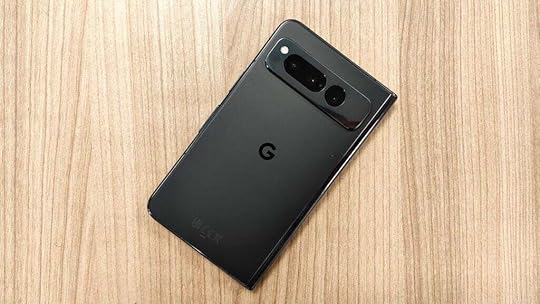 Google Pixel Fold – Image Credit (Trusted Reviews)
If the latter seems familiar, it’s because the new Galaxy Z Fold 5 features the same camera specs as its predecessor. We were impressed by both the camera capabilities of the Google Pixel Fold and the Galaxy Z Fold 4 so you won’t be getting a bad experience either way, even if neither matches the heights of regular flagship phones.
However, the Pixel Fold does top the Samsung on one key spec that may sway come. The telephoto lens on the Galaxy Z Fold 5 offers 3x optical zoom while the Pixel Fold brings 5x optical zoom – meaning Google’s phone may sway you if you’re a fan of extra crisp close-ups and detailed middle distance zoom shots.
The Pixel Fold is thinner, but the Galaxy Z Fold 5 is more refinedIf you’re shelling out the high cost of entry for a foldable, it is likely because you’ve been grabbed by the design. Well, Samsung, now at its fifth generation of folding phone, has a stronger grasp of the formula than Google – only on its first generation.
This is mainly reflected in the honed nature of Samsung’s latest foldable. The crease is visible but far from a significant distraction while there is no gap between the two halves of the phone when folded. Samsung is close to perfecting the foldable phone hardware formula.
On the other side of things, Google’s Pixel Fold doesn’t fully fold flat without some awkward encouragement and there is no way you’re missing that crease. However, Google has innovated in one direction that has Samsung beat. The Pixel Fold is just 5.8mm thin when unfolded compared with a thicker 6.1mm Galaxy Z Fold 5.
Source link
The post Samsung Galaxy Z Fold 5 vs Google Pixel Fold: Which foldable is best? appeared first on Harmony Evans.
Samsung Galaxy Z Fold 5 battery life and charging speed
Ryan Haines / Android Authority
For years, Samsung managed to maintain a comfortable lead in the foldable smartphone market. But in 2023, rival smartphone brands like Google and OPPO have finally started to challenge this dominance. Against this backdrop, Samsung has launched its latest Galaxy Z Fold 5 with a revamped hinge, slimmer design, and faster internals. But to most people, the day-to-day usability of a smartphone matters much more than the exterior. So in this article, let’s analyze the Galaxy Z Fold 5’s charging speeds and find out how long its 4,400mAh battery will last you.
QUICK ANSWERThe Galaxy Z Fold 5 retains the same 4,400mAh battery as the previous generation. It supports 25W charging via the USB Power Delivery PPS protocol. With the correct charger, we expect the phone to fully charge up within 85 minutes.
If you opt to skip the cable in favor of a wireless charger, the Galaxy Z Fold 5’s battery will take over two hours to fill up. Keep reading to know more.
JUMP TO KEY SECTIONS
Galaxy Z Fold 5 battery life and charging speed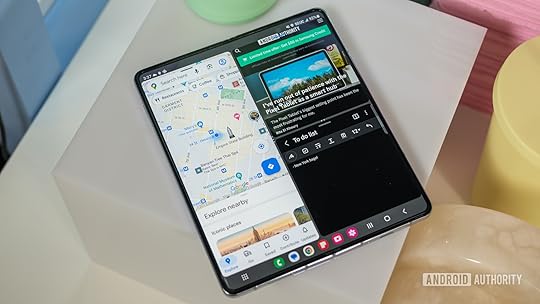
Ryan Haines / Android Authority
Samsung’s Galaxy Z Fold 5 retains the same battery capacity as last year’s Z Fold 4, which translates to a 4,400mAh battery. We’re still conducting our battery life tests for the full review, but we expect the same battery life as last year. That translates to approximately five and a half hours of screen-on time based on our review of the Galaxy Z Fold 4.
Similarly, if you were hoping for a revolution in charging speeds, you might have to wait as Samsung has maintained the status quo for yet another generation. If you’re starting with a completely drained Galaxy Z Fold 5, Samsung says that the 25W fast charging will help achieve 50% charge in just 30 minutes. That’s the same as last year’s Galaxy Z Fold 4. Moreover, the phone will stop accepting maximum power at some point in the charging cycle, stretching out the total time to well beyond an hour.
The Galaxy Z Fold 5 still only supports a maximum charging power of 25W.
On the bright side, Samsung continues to rely on the open USB Power Delivery PPS protocol for fast charging. Don’t be fooled by the Super Fast Charging moniker as it’s just Samsung’s way of saying USB PD PPS at 25W. If you already own a compatible charger from a different brand, you don’t have to buy another one. As is typically the case in the high-end smartphone market, Samsung doesn’t include an adapter in the box. We’ve rounded up a list of the best chargers for the Galaxy Z Fold 5, but Samsung’s first-party 25W adapter is a good starting point.
In terms of wireless charging, the Galaxy Z Fold 5 supports a maximum of 15W via the Qi standard. Maximum power draw doesn’t mean much for wireless charging, though, as heat will affect how long it will take to top up your device.
The Galaxy Z Fold 5 also supports reverse wireless charging at 4.5W. The feature can come in handy if you need to top-up your wireless earbuds or smartwatch, but it’s not practical for regular use.
How long does the Galaxy Z Fold 5 take to charge from 0 to 100?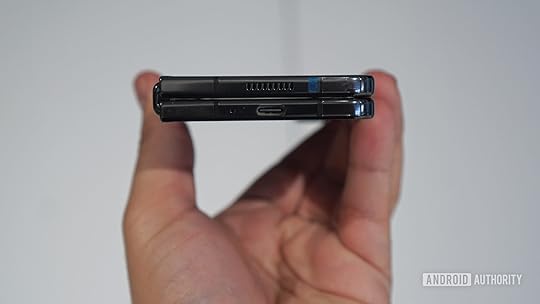
Hadlee Simons / Android Authority
We’ll test the Galaxy Z Fold 5’s charging speeds more thoroughly in our full review, but the capacity and charging power remain the same compared to last year. And based on our review of the Z Fold 4, that translates to a full charge within 85 minutes.
The Galaxy Z Fold 5 takes longer to charge than Samsung’s own S23 Ultra.
Even though Samsung’s flagship Galaxy S23 Ultra supports faster wired charging at 45W, the South Korean giant seems hesitant to push beyond 25W on the foldable. Our charging test of the S23 Ultra paired with a 45W USB PD PPS adapter found that a full charge takes just 57 minutes. So why hasn’t Samsung brought its fastest charging to the Galaxy Z Fold series yet? We’re not entirely sure, but it may have something to do with the challenging task of dissipating heat in the foldable’s narrower build.
If you forgo the cable in favor of wireless charging, expect to wait over two hours to fully charge up the Galaxy Z Fold 5. In warmer environments, the total charging time may even approach the three-hour mark. For this reason, we’d recommend looking at wireless chargers with integrated cooling fans for maximum compatibility.
Galaxy Z Fold 5 charging times vs. the competition: How does it hold up?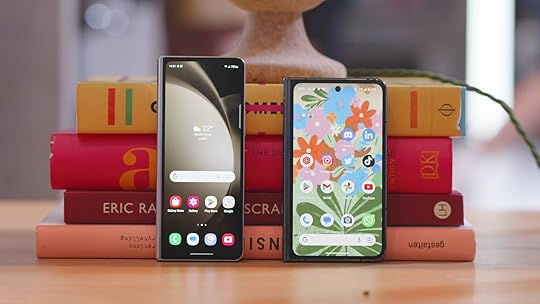
Damien Wilde / Android Authority
Even though Samsung’s premier foldable offers some cutting-edge technology, its charging setup is decidedly average in the context of the broader smartphone market. Luckily for Samsung, the company doesn’t have much to worry about in Western markets. That’s because dominant brands like Google and Apple aren’t pushing the fast-charging envelope much either.
The Pixel Fold, for example, doesn’t stray too far from Samsung with its 21W of peak charging power. You’d have to venture into lesser-known foldables like OPPO’s Find N2 and Huawei’s Mate X2 to get 67W and 66W of charging power, respectively. Here’s a quick look at how the Galaxy Z Fold 5’s charging setup compares to other smartphones in its class.
SmartphoneBattery capacityMaximum charging powerCharging timeSmartphoneGalaxy Z Fold 5
Battery capacity4,400 mAh
Maximum charging power25W
Charging time85 mins (expected)
SmartphoneGoogle Pixel Fold
Battery capacity4,800 mAh
Maximum charging power21W
Charging time90 mins
SmartphoneOppo Find N2
Battery capacity4,500 mAh
Maximum charging power67W SuperVOOC
Charging time40 mins
SmartphoneMotorola Razr Plus
Battery capacity3,800 mAh
Maximum charging power30W
Charging time80 mins
SmartphoneOnePlus 11
Battery capacity5,000 mAh
Maximum charging power80W
Charging time30 mins
Looking at the above table, it’s clear that Samsung’s top-of-the-line foldable could use a small bump in the charging department. The company’s own Galaxy S23 Plus can handle up to 45W, after all, which can fully charge up the battery within an hour. But overall, it’s a small nitpick in an otherwise stellar hardware package.
As for battery life, Samsung still maintains a small lead. Even though the Pixel Fold houses a larger 4,800mAh battery, its Tensor G2 SoC tends to drain the battery significantly more than the latest Snapdragon chip found in the Galaxy Z Fold 5. To that end, you can expect similar runtimes between the two phones if not a bit better on the Samsung foldable.
Comments
Source link
The post Samsung Galaxy Z Fold 5 battery life and charging speed appeared first on Harmony Evans.
Trump Is In Total Panic Mode And Trying To Deflect To Biden After New Felony Charges
Long-time Trump observers know that when Donald Trump tries to deflect attention elsewhere, things are really bad, and deflect is what Trump did after Jack Smith hit him with three new felony charges.
Trump posted on Truth Social, “Whatever happened to the Crooked Joe Biden Document’s case? He had 20 times more Boxes than I did, and he wasn’t covered by the Presidential Records Act. I was! When it first came out that Biden had all of these Docs, many Classified, almost everyone, including those on the Left, said, “there goes the case against Trump.” But they waited and waited, got failed prosecutor Deranged Jack Smith, and STRUCK – but did almost nothing on the REALLY BAD Biden Documents case, many stored in Chinatown!
Former Trump attorney Michael Cohen said that Trump was panicking before Smith added more felony charges to the classified documents case. Trump’s behavior on Truth Social appears to confirm Cohen’s insight.
The American people have seen this behavior before. After the Access Hollywood tape came out, Trump responded by shifting media attention to the Hillary Clinton email scandal. Jack Smith hits Trump with more charges, and Donald Trump responds by trying to shift the story to Joe Biden.
Trump didn’t try to defend his behavior. He didn’t have a reason or excuse. The former president tried to get the heat off of himself by turning the focus to Joe Biden. Fox News is following Trump’s lead, but no one should fall for this ruse outside the Republican Party.
Donald Trump is caught, and he is trying to change the subject.
Jason is the managing editor. He is also a White House Press Pool and a Congressional correspondent for PoliticusUSA. Jason has a Bachelor’s Degree in Political Science. His graduate work focused on public policy, with a specialization in social reform movements.
Awards and Professional Memberships
Member of the Society of Professional Journalists and The American Political Science Association
Source link
The post Trump Is In Total Panic Mode And Trying To Deflect To Biden After New Felony Charges appeared first on Harmony Evans.