Harmony Evans's Blog, page 649
October 27, 2023
‘Sanctuary City’ of New York Now Offering Illegal Immigrants Free One-Way Airplane Tickets to Leave | The Gateway Pundit
The supposed ‘sanctuary city’ of New York is now offering free one-way airplane tickets to illegal border crossers to convince them to go somewhere else.
All of that virtue signaling from Mayor Eric Adams went up in smoke pretty quickly, didn’t it?
Here’s an idea. How about flying them back to where they came from?
Axios reported:
NYC is offering migrants plane tickets to leave the city
New York City has started offering migrants airplane tickets to destinations of their choosing in response to an increase of asylum seekers arriving in the city.
Why it matters: More than 130,600 people seeking refuge from humanitarian crises around the world have arrived in New York City since 2022. Mayor Eric Adams (D) has warned that the city is running out of space and resources to house them.
City officials have recently discussed giving migrants tents and creating encampments in parks, like Central Park and Prospect Park, and other outdoor spaces, the Wall Street Journal reported this week.In recent weeks, the New York City Fire Department has closed multiple shelters for asylum seekers due to fire safety hazards, according to CBS News.Details: A spokesperson for Adam said on Friday the city has set up a “reticketing center” where migrants can secure a plane ticket.
Doesn’t this conflict with everything Adams has said in the past?
Pretty rude of a “sanctuary city” to encourage illegals there to leave. What’s up? https://t.co/JYoEVerCki
— Doug Powers (@ThePowersThatBe) October 28, 2023
Why are we giving illegal immigrants plane tickets to anywhere they want instead of deporting them? https://t.co/sodjhqQhG4
— Abigail Jackson (@abigailmarone) October 27, 2023
NYC got a big spoonful of their own policies that they vote for and completely flip flopped. https://t.co/2oLbBSCMaH
— MP (@MpPx111) October 27, 2023
What happened to all the sanctimonious lecturing from journalists about the poem on the Statue of Liberty? Do they even remember that?
The post ‘Sanctuary City’ of New York Now Offering Illegal Immigrants Free One-Way Airplane Tickets to Leave | The Gateway Pundit appeared first on Harmony Evans.


Republican Party of Virginia Takes the Gloves Off, Mails Out Thousands of Explicit Fliers About Democrat Susanna Gibson’s ‘HotWifeExperience’ Online Sex Scandal | The Gateway Pundit
This is brutal.
The Republican Party of Virginia took the gloves off and mailed out thousands of explicit fliers about Democrat Susanna Gibson’s online sex scandal two weeks before the election.
Susanna Gibson, the Democrat candidate running for Virginia’s House of Delegates against Republican David Owen, posted sex acts with her husband online dubbed “HotWifeExperience” – while soliciting ‘tips’ from their online audience.
Gibson’s online sex scandal may ruin the Democrats going into a high-stakes election where they are desperately fighting to win back the House.
The 40-year-old mother of 2 who is running for a seat in the 57th district in suburban Richmond, reportedly used a platform called Chaturbate to stream sex acts with her husband in exchange for ‘tokens.’
The Republican Party of Virginia mailed out thousands of fliers with direct quotes from Susanna Gibson’s X-rated videos: “I need, like, more tokens before I let him do that,” Gibson told her online audience referring to a specific sex act with her husband in an effort to solicit “tips.”
The envelopes warned residents: “Do not open if you are under the age of 18,″ and “Warning: Explicit material enclosed.”

Gibson’s sex scandal is spiraling out of control. Her poll numbers have plummeted more than 10 percentage points and Virginia Democrats have scrubbed their supporter for her.
Additionally, the poll found “more than 80%” voters have heard about Susanna Gibson’s online sex scandal.
The Gibson Campaign released this statement (courtesy of NBC12 Richmond):
“David Owen and the Virginia GOP are trying to distract voters from their extreme agenda to ban abortion, defund schools, and allow violent criminals to access weapons of war. Voters are tired of these desperate attacks, and they will not be fooled by them. From day one, Susanna has been focused on protecting reproductive freedom, fully funding our schools, and keeping our communities safe. Nothing will ever deter her commitment to our community.”
Republican Party of Virginia Chairman Rich Anderson statement (courtesy of NBC12 Richmond):
“As stated in the disclaimer, it came from the Republican Party of Virginia. Gibson’s campaign has falsely alleged that the videos of her publicly engaging in sexual activity on publicly accessible pornography websites were “leaked” by Republicans. In reality, the opposite is true. After revelation of her very public acts, polling now shows her to be 11 points behind her Republican opponent. Additionally, her running mates, Schuyler VanValkenburg and Rodney Willett, have not condemned her actions. The mail piece corrects her false statements using already-published mainstream media news accounts and Gibson’s own public words as documented via her videos.”
More on this story from NBC12 Richmond:
Source link
The post Republican Party of Virginia Takes the Gloves Off, Mails Out Thousands of Explicit Fliers About Democrat Susanna Gibson’s ‘HotWifeExperience’ Online Sex Scandal | The Gateway Pundit appeared first on Harmony Evans.
How to sync an Xbox controller
A games console will be as useful as an oversized paperweight if you don’t have a controller linked to it. With this in mind, syncing the Xbox controller to the Xbox Series X or Xbox Series S is one of the most important first steps you need to take.
The Xbox controller uses a wireless connection to the console, and doesn’t need to use a cable for the initial syncing. However, the process to sync up the controller isn’t too obvious, so we’ve decided to create this guide to help you out.
Below, we’ve created a step-by-step guide to sync an Xbox controller to your Xbox console. We’ve even included pictures to make the guide as easy to follow as possible.
What you’ll needXbox Series X or Xbox Series SXbox Wireless ControllerThe Short VersionPress the Xbox button on your controller to turn it onPress the sync button on your Xbox consoleHold the sync button on your Xbox controllerStep1Hold the Xbox button on your controller to turn it on
Find the Xbox logo button in the centre of the Xbox controller. Then press and hold down until the controller turns on and the logo starts to glow. If this doesn’t happen, you may need to add new batteries to the controller and try again.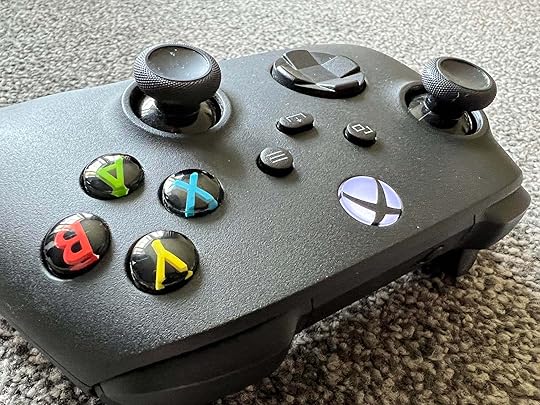
2Find and press the sync button on your Xbox console
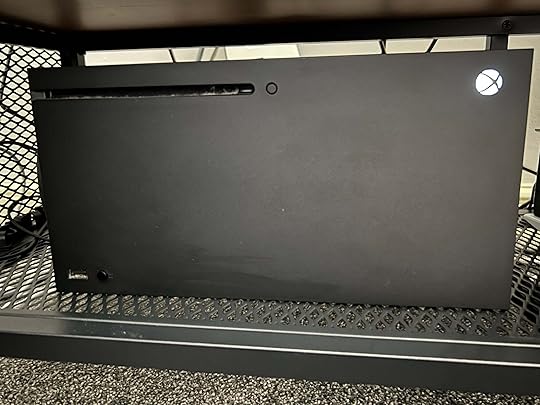
Position yourself in front of the Xbox and make sure it is turned on. On the Xbox Series X, there are two sets of extruding buttons, and you’re looking for the one that is next to the USB input port (in the bottom-left corner of our photo).
On the Xbox Series S, there is no disc tray, so there’s only one button next to the USB port, and this is the one you need. Press it and the console’s power button will start flashing, engaging pairing mode.
3Press the sync button on your Xbox controller

Now that the console is in pairing mode, you need to do the same thing on the controller. Look at the top of the Xbox Wireless Controller to find a sync button next to the USB-C port. Hold this button down until the controller power button flashes, just like the one seen on the console.
4Complete the sync process
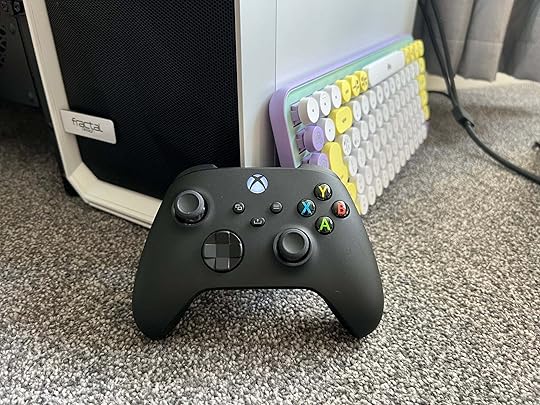
When both the controller and the console power lights are flashing, they will attempt to find each other using Bluetooth.
The process will be completed once the power light on the controller stops flashing and becomes static. If you want to connect a second controller, simply repeat the steps above.
You can repeat this process for any other controllers that you want to pair with your Xbox console.
How do I connect the Xbox controller to other devices?The process outlined above is also used when pairing an Xbox controller to a device that is not an Xbox console, such as a PC or an iPad for remote play. If you’re trying to connect it to another device, just make sure you find that device’s Bluetooth menu and make sure it’s on, so that the accessory can be found and paired.
Why is my Xbox controller flashing and not connecting?This likely means that you need new batteries for the controller. Alternatively, if you have a rechargeable battery pack, you’ll need to plug it into the Xbox console or power source.
Source link
The post How to sync an Xbox controller appeared first on Harmony Evans.
Google Photos Best Take: What is it, and how to use it
Capturing group pictures can be tricky, especially when your little one is blinking, not smiling, or looking away. Even a single mishap can ruin an ideal group shot. However, a new feature on the Google Pixel 8 series is here to solve this. This is where Google Photos Best Take comes into play to refine your group photos with minimal effort.
What is Google Photos Best Take, and how does it workGoogle Photos Best Take is part of new AI capabilities on the Pixel 8 series and is one of the best Pixel-exclusive features available. It’s an advanced version of Top Shot that uses several similar photos taken quickly and automatically creates a modified shot with everyone’s best expression. The aim is to enhance a photo and better define what you are trying to capture with slight expression alterations.
Best Take uses an on-device face detection algorithm to match up people’s faces across group shots taken in a short timeframe. It doesn’t pull up someone’s expressions from your old photos, as it may change the context of an image. Google Photos Best Take uses expressions from photos taken within a 10-second window.
Subwolfer face v1 Subwolfer face, uh, v2?!
You can rely on Best Take to pick an ideal expression or manually select another look from available facial expressions. Manual selection gives you complete control over your group shot outcome.
How to use Google Photos Best TakeNow that you know how Best Take functions, follow the steps below to test it.
Take a series of group photos with different facial expressions.Launch Google Photos and select a group photo you want to tweak.Tap Edit at the bottom and slide to the Tools menu.
 Select Best Take.Google Photos detects faces from a group photo and shows a small preview beneath.Tap on a person’s face and check available expressions at the bottom. Tap on an expression to apply it to a photo.Select Done to save changes.Is Google Photos Best Take available on older Pixel phones?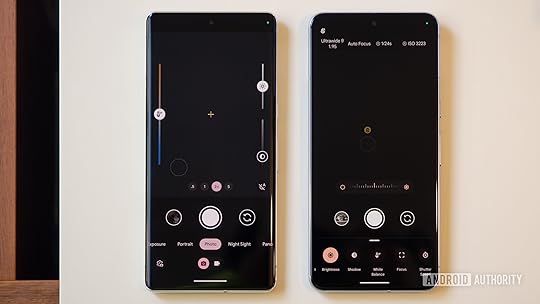
Rita El Khoury / Android Authority
Google Photos Best Take is exclusive to the Pixel 8 series. Looking at past trends, we won’t be surprised if Google releases Best Take on older Pixel phones, like the Pixel 7 series.
Is Google Photos Best Take coming to non-Pixel phones?Google is tight-lipped about Best Take’s availability on non-Pixel phones. Since it’s a part of Google Photos, it may come to non-Pixel phones via an app update. After all, Magic Eraser was exclusive to the Pixel 6 series at launch, and the add-on eventually made its way to non-Pixel phones.
Comments
Source link
The post Google Photos Best Take: What is it, and how to use it appeared first on Harmony Evans.
Georgia’s Lt. Governor Wants to Pay Teachers an Extra $10,000 to Carry Guns in Schools | The Gateway Pundit
Georgia’s Lt. Governor Burt Jones is proposing that teachers in the state be paid an extra $10,000 to carry guns in schools.
The idea is that this will prevent school shootings or at least give people in schools a fighting chance if a shooting occurs.
This has been suggested in other places in recent years and it’s not a bad idea. A shooter might think twice if they know staffers in a school are armed.
The Associated Press reports:
Georgia’s lieutenant governor wants to pay teachers $10,000 a year to carry guns at school
Georgia’s lieutenant governor said Wednesday that he wants to pay teachers $10,000 a year to encourage them to carry guns in schools.
Republican Lt. Gov. Burt Jones, speaking at Austin Road Elementary School in Winder on Wednesday, said he wants the state to spend more money on school safety, including paying for teachers and other non-officers to take firearms training, and paying teachers who hold a firearms training certificate an annual stipend.
His plan also calls for stricter standards for already-required school safety plans and boosting money the state gives schools to hire school resource officers with police certification. Salary and benefits for such officers can cost $80,000 or more.
“We feel like this is the best way to prepare faculty, but also prepare law enforcement and the system however we can,” Jones said, saying the state should be “proactive” to prevent shootings.
Former President Donald Trump and others have called for arming teachers, saying gun-free school zones are targets for armed assailants.
Jones is quite serious about this.
This proposed legislation builds on recent legislative reforms, enhances the security measures in our schools, and allows local school systems to decide if this program is right for their needs.
For more information, view the informational graphic below. #gapol pic.twitter.com/e248YG4sXO
— Lt. Governor Burt Jones (@LtGovJonesGA) October 25, 2023
Enough talk. It’s time for action.
Get the facts about my new legislative priority to protect our kids in the classroom
https://t.co/xL3D97MVY1
— Burt Jones (@burtjonesforga) October 25, 2023
The left will hate this idea but it makes perfect sense.
The post Georgia’s Lt. Governor Wants to Pay Teachers an Extra $10,000 to Carry Guns in Schools | The Gateway Pundit appeared first on Harmony Evans.
33 U.S. states sue Instagram and Facebook for addicting children
A massive lawsuit filed by 33 states accuses Meta Platforms Inc., the parent company of Facebook and Instagram, of knowingly designing its platforms to be addictive and harmful to children’s mental health. The lawsuit alleges that Meta’s motives are purely profit-driven and that the company has misled the public about the dangers of its platforms.
According to a recent ABC News report, the allegations stem from internal research leaked by whistleblower Frances Haugen in 2021, which found that 13.5% of teen girls said Instagram makes thoughts of suicide worse, and 17% said it exacerbates eating disorders. Despite being aware of these harms, Meta allegedly designed its platforms using manipulative features intended to maximize user engagement time, such as endless scrolling feeds and push notifications.
Crucially, the lawsuit claims that Meta routinely violates the Children’s Online Privacy Protection Act (COPPA) by collecting data on users under age 13 without parental consent. COPPA requires parental consent for collecting data on children under 13, but the suit alleges Meta has workarounds that allow children to bypass the age requirement.
The legal action was led by a bipartisan coalition of state attorneys general, indicating the breadth of concern around social media’s impact on youth mental health.New York Attorney General Letitia James said in a statement, “Meta has profited from children’s pain by intentionally designing its platforms with manipulative features that make children addicted to their platforms while lowering their self-esteem.”
California Attorney General Rob Bonta said, “Meta has been harming our children and teens, cultivating addiction to boost corporate profits. […] With today’s lawsuit, we are drawing the line.”
In response, Meta said it shares the attorneys general’s commitment to child safety and has introduced over 30 tools to support teens. However, it expressed disappointment that the attorney generals chose litigation over working collaboratively with the industry.
The lawsuit seeks financial restitution and asks the court to order Meta to cease practices that violate COPPA.While other social media platforms like TikTok and Snapchat have also faced scrutiny around youth mental health, this lawsuit currently focuses solely on Meta’s Instagram and Facebook.
With social media use nearly ubiquitous among U.S. teens, the lawsuit signifies a growing legal reckoning over tech’s responsibilities to its youngest users. “They’re the worst of the worst when it comes to using technology to addict teenagers to social media, all in the furtherance of putting profits over people,” said Washington D.C. Attorney General Brian Schwalb.
Featured Image Credit:
Radek ZielinskiRadek Zielinski is an experienced technology and financial journalist with a passion for cybersecurity and futurology.
Source link
The post 33 U.S. states sue Instagram and Facebook for addicting children appeared first on Harmony Evans.
What is NFC? Everything you need to know
Picking out a new phone can be a complicated process, especially if you’re not familiar with all the relevant specifications.
If you’ve been looking to buy a new handset recently, you may have noticed the term NFC popping up in the specs list. NFC is becoming more commonplace as the years go on, with almost every handset on the market touting the feature.
But what exactly is NFC? If you want to learn more about this popular software then make sure you keep reading, as we’re going to be running through what it is, how it works and which handsets include it.
What is NFC?NFC stands for Near-Field Communication and is a form of wireless communication that works over a distance of just 10cm or less via a radio frequency current. Using this form of communication, you can send or receive information between two compatible devices, or use a compatible device to read an NFC tag that is present on a passive device.
This tech is most commonly used when making contactless financial transactions with a compatible credit card or a compatible smartphone, however, there are a variety of other uses for NFC tags, from validating tickets for entry into a venue to accessing a menu at a restaurant.
NFC is most popular on handsets, but it’s started to make an appearance on even more devices. Wearables, smart rings and wireless earbuds have started to implement the technology, allowing users to make a payment using their Apple Watch SE 2 or Google Pixel Watch 2. In some instances, it can do a lot more, such as unlocking and starting compatible cars, opening doors and verifying the authenticity of certain items.
How do you use NFC?If you want to use the NFC feature on your smartphone, firstly make sure that it is indeed compatible, and then you can enable NFC to be able to use it.
On an Android device, you can enable NFC by going into your phone’s Settings app, scrolling to Connected devices, and toggling the NFC switch to On.
With an iPhone, you must give or deny specific apps the ability to use NFC rather than giving it system-wide approval. To do this, open your Settings app, select Privacy, choose the specific app you’d like to use and switch the NFC toggle to On.
 Image Credit (NFC Forum)
When your phone is able to use NFC, you can make use of compatible apps. The most common way to use NFC on your phone is by making contactless payments.
In order to do this, you can use services such as Apple Pay or Google Wallet, among other alternatives, and register your bank cards with them. Once complete, raise your phone to a contactless payment terminal and you can pay without even having to take your wallet out of your pocket.
To scan other NFC tags, if you have a compatible phone, you should be able to raise your phone to the active part of the tag within 1cm or so, and your device should recognise the tag and respond accordingly.
Is NFC secure?Since NFC is so straightforward to use and does not even involve any physical contact, some consumers are understandably concerned about the potential security pitfalls that it may engender.
Speaking to Trusted Reviews, Martin Jartelius, the CSO at Outpost24 gave us the following assessment:
“NFC is a collection of communication protocols, its security will depend on the implementation. NFC in and of itself does not authenticate devices or approve or validate transactions. To understand the risk, let’s use credit cards. Scandinavian banks are often relatively early in adopting risk-based approaches such as multi-factor authentications and more – and they have also taken a position when it comes to bank cards and NFC.
“NFC transactions are considered secure enough for a limited, pre-defined amount, of transactions between extended validations, meaning they will refuse an NFC-based transfer every now and then, and re-enable this only if a transaction using card and pin is made. They also only accept NFC-based transactions up to a given amount before demanding extended validation with PIN. This is due to the fact that the banks have determined the loss to fraud and attacks acceptable in this balanced trade-off, i.e. the technology is not perfectly safe, but it is safe enough to be used in a balanced manner.
“There are bad and good NFC-based implementations. Is it secure? No. Is it secure enough? Possibly, in the right setting, in a balanced model or with supporting controls.”
Can I turn off NFC?If you’re concerned about the security risks of using NFC on your handset, you can always disable it. If you’re using an Android device, you can enable NFC by going into your phone’s Settings app, scrolling to Connected devices, and toggling the NFC switch to Off.
On an iPhone, you cannot disable the functionality of NFC across your entire phone. Instead, you need to grant or deny access apps the ability to use NFC. This can be done by opening your Settings app, selecting Privacy, choosing the specific app to which you’d like to deny permission, and switching the NFC toggle to Off.
Do all smartphones have NFC?At the time of writing, almost every handset on the market comes with support for NFC. You may find that some older, low-budget handsets are lacking NFC, but overall, it’s become widespread in the mainstream market.
Every iPhone since the iPhone 6 comes with NFC, so you can rest easy knowing that the latest iPhone 15 line has support for contactless technology.
Most Android handsets come with NFC, especially if they launched within the last few years. If you want to check that your handset has NFC support, take a look at its specifications page on the relevant company’s website.
Source link
The post What is NFC? Everything you need to know appeared first on Harmony Evans.
VIDEO: Charlottesville Black History Museum Secretly Melts Historic Robert E. Lee Statue in Horrific Act of Cultural Erasure – Plans to Turn the Melted Mush into New Piece of “Public Art” | The Gateway Pundit
Credit: Washington Post
The Charlottesville Black History Museum has decided the best way to handle America’s history is to destroy it.
The Washington Post reported Thursday that the museum secretly made the choice to melt the historic Robert E. Lee statue, which was the subject of the white nationalist “Unite the Right” rally six years ago.
As the Post notes, groups with ties to and dedicated to defending the Confederacy had sued to stop the monument from being taken down. Most recently, they sought to stop Charlottesville from handing Lee over to the Black history museum, which proposed a plan to repurpose the metal.
The plaintiffs’ lawsuit recommended that the monument should remain intact or be turned into Civil War-style cannons. Alas, the museum prevailed and went forth with their plan to erase American history Saturday in a small Southern foundry outside Virginia.
The Post made the decision not to name the location because they feared violent retaliation.
The paper was able to capture exclusive video of the destruction of the statue. It was cut up into fragments and then placed into a 2,250 degree furnace.
WATCH:
The statue’s defenders more recently sought to block the city from handing over Lee to the Charlottesville’s Black history museum, which had proposed a plan to repurpose the metal. In a lawsuit, those plaintiffs suggested the monument should remain intact or be turned into Civil… pic.twitter.com/D80282TZYv
— The Washington Post (@washingtonpost) October 26, 2023
Charlottesville’s Robert E. Lee statue has met its end, in a 2,250-degree furnace.
The divisive Confederate monument, the focus of the deadly “Unite the Right” rally in 2017, was secretly melted down and will become a new piece of public art.
More on the process:… pic.twitter.com/XatZUfvku3
— The Washington Post (@washingtonpost) October 26, 2023
Participants gloated as they watched the statue melt.
“Well, they can’t put Humpty Dumpty back together again,” said Andrea Douglas, the museum’s executive director. “There will be no tape for that.”
“No cannons,” added Jalane Schmidt, a University of Virginia religious studies professor standing beside her.
The Charlottesville Black History Museum now plans to convert the melted mush into a new piece of “public art.” One would not be surprised if turns out to be woke garbage.
The historical statue of General Robert E. Lee was melted down in a furnace by the Black History Museum in Charlottesville
The melted mush will be used as a new piece of public art.pic.twitter.com/hcnmrvRJPx
— End Wokeness (@EndWokeness) October 26, 2023
One can also be sure this action will do absolutely nothing to heal racial tensions or improve the lives of the black population.
The post VIDEO: Charlottesville Black History Museum Secretly Melts Historic Robert E. Lee Statue in Horrific Act of Cultural Erasure – Plans to Turn the Melted Mush into New Piece of “Public Art” | The Gateway Pundit appeared first on Harmony Evans.
Growth Hacking App Features that You Must Add Within Your App
Like most entrepreneurs, You might require truly captivating your audience and looking for growth-hacking app features to maintain their interest. If that’s the case, this blog will help you; just read and take notes.
As a tech enthusiast and digital solutions provider, I understand it’s crucial and essential in your app growth process. So, without further ado, let’s find out what features we should incorporate that address their needs.
What Should You Know About Growth Hacking App Features that Fascinate UsersCreating an app that really fascinates users is like a much-needed toolkit — you need the right tools and expertise to use them. Here’s a playful take on what you should know:
Solving Real ProblemsThink of your app as the superhero cape for users, swooping in to rescue them from everyday hassles. Address their pain points, and you’ll be their hero.
Seamless User ExperienceImagine your app as a smooth dance partner, not one with two left feet. Users want it to feel natural and easy. Keep it simple, or they might exit the dance floor.
Visual AppealFirst impressions matter. Picture your app as a fashion model on a runway. Engaging visuals and aesthetics are your app’s runway attire—captivate users from the very start.
Adding ValueYour app should be the digital toolbox, offering solutions to their daily challenges. It should create a sense that your app makes their lives better.
Simplicity FactorSometimes, less might feel overwhelming and not attractive at all. Therefore, your focus should be to make difficult functions easier to use by simplifying them, like a technical documentation made into a comic book.
Stay Current on Growth Hacking FeaturesIt’s always been worth considering to keep up with industry shifts and user preferences to ensure your app remains relevant and fascinating, just like a thrilling surf ride.
10 Such Intriguing Growth Hacking App FeaturesThere is an implicit rivalry in the exciting world of app development to create apps that are more than merely useful; they must be utterly compelling and much more helpful then of competitors. Imagine finding an app that makes your life easier and makes you question how you ever got by without it.
So, without wasting our time, we’re about to uncover ten exceptionally captivating elements that can elevate an ordinary app to the extraordinary. These game-changers, from problem-solving tools to innovative surprises, are the keys to turning users into dedicated fans.
Stay tied with me as I will tell you what sets these apps apart from the crowd. We will examine the much sought-after “10 Such Intriguing growth-hacking app features.” Here, you’ll find everything you need to know about these fascinating features that make apps truly exceptional.
User Onboarding OptimizationUser onboarding is like a warm welcome to your app. Keep it simple, introduce features gradually, and offer interactive tutorials. Ensure navigation is clear, and provide positive feedback for exploration.
Push Notifications that ConvertThink of push notifications as friendly reminders. Personalize them, time them well, and make them clear and actionable. Let users control the frequency and experiment with A/B testing to see what works best.
In-App Referral ProgramsIn-app referral programs are like golden tickets. Offer irresistible rewards, keep the process simple, and be transparent about the benefits. Encourage users to refer friends and grow your app’s community.
Community ConnectionsImagine your app as a gathering place. Create user profiles, forums, and events. You can also focus on encouraging the creation of user-generated content to promote a feeling of connection and belonging in your app.
User Feedback and IterationListening to user feedback is like having a heart-to-heart conversation and fits as a growth hack in your app. It’s a valuable source of insight for improving your app. Offer various channels for feedback, making users feel heard. Respond promptly, acknowledging their input just as you nod in agreement during a chat. Embrace iterative updates as a way to continuously enhance your app based on user suggestions, like fine-tuning a beloved recipe to perfection.
Cross-Platform CompatibilityThink of your app as a versatile tool in a user’s toolbox. Cross-platform compatibility ensures your app is accessible to all, regardless of their device. Make transitions between platforms smooth, just like seamlessly switching between conversations. Design your app to adapt to different screens, offering users a comfortable experience, whether they’re on a phone or tablet.
Creative Content and VisualsVisual appeal is like the icing on the cake. This can be the perfect growth hacking app feature. Consider creating eye-catching visuals that tell stories or convey information, much like captivating illustrations in a book. Craft informative yet conversational content as if you’re chatting with a friend. Inject bursts of creativity into your visuals and content to keep users engaged, like adding unexpected twists to a familiar tale.
Nifty Night ModeNight mode is like dimming the lights for a cozy evening. It creates a comfortable ambiance for users in low-light conditions. Ensure it reduces brightness and adjusts colors for readability, like setting the mood lighting just right. Allow users to switch to night mode easily, as simple as flipping a light switch. It’s all about providing them a comfortable experience, day or night.
AI Insights GuruImagine having your own AI insights guru ready to offer wisdom and guidance. AI is no longer just strange; it has become a valuable tool for everyone. It can analyze data, spot trends, and offer insights to drive smarter decisions. Think of it as having a trusted advisor at your side, providing valuable insights without the need for complex jargon.
Voice-Activated MagicVoice-activated technology is like a touch of magic and can be a crucial growth hacking app feature in our everyday lives. It allows us to interact with devices seamlessly, just like casting a spell. Whether asking for directions, setting reminders, or playing music, voice-activated technology makes tasks feel effortless. It’s like having a genie ready to fulfill your wishes with just a spoken word.
Wrapping Up! Everything You Need to Know About Growth Hacking App FeaturesIn the realm of technology and innovation, we’ve explored the fascinating landscape of app development, optimization, and user engagement. From the art of user onboarding to the science of push notifications, from the warmth of community connections to the adaptability of cross-platform compatibility, we’ve uncovered the human touch that makes apps truly exceptional.
As I conclude this blog, know that the key to creating remarkable apps lies in understanding and empathizing with your users. It’s about crafting experiences that feel like a friendly conversation, not a user manual. It’s about building a community where users can connect and belong, just like a vibrant gathering of friends.
So, as you venture into the world of mobile app development (invictusstartechnology dot ae services) or seek to enhance your existing app, keep these insights in mind. Remember to keep things personal, welcome feedback with open arms, and keep pushing for ongoing improvements.
This way, you won’t just catch users’ interest — but you’ll make a meaningful mark in their digital journey. Here’s to crafting apps that truly connect with users’ hearts and minds. Cheers to a brighter, more engaging app future.
Inner Image and Featured Image Credit: Provided by the Author; Thank you!
 Zain Muhammad Director of Sales
As a seasoned tech professional, Zain brings 17+ years of business development and digitalization expertise to the table. A master of sales, marketing, and technology at Invictus Star Technology with hawk eye on the digital market. Zain thrives on taming challenges like a pro and showcasing his expertise through content.
Source link
The post Growth Hacking App Features that You Must Add Within Your App appeared first on Harmony Evans.
October 26, 2023
The best over-ear, on-ear and ANC pairs
Sony’s WF-1000XM5 knocks the previous holder of best true wireless (the WF-1000XM4), with a terrific, across the board performance.
The audio performance is an improvement on its predecessor in terms of detail and sharpness, the new Dynamic Driver X ushers in a more balanced performance across the frequency range. Low end depth does take a hit, but to our ears the WF-1000XM5 sound more detailed and clearer with its bass performance even though it loses a sense of fun.. The midrange is also better, much better at showcasing fine detail in music, while there have been gains with the high frequencies, which are sharper, clearer and more detailed.
Elsewhere, noise-cancelling performance is better, able to suppress voices and environmental noise better than than before, though the QuietComfort Earbuds II suppress sounds slightly better noise-cancelling performance, though in the Sony’s favour is that it cancels noises with a more natural tone. The transparency mode is clear and detailed, although the WF-1000XM4 sounds slightly clearer and more open to our ears.
Battery life is the same with 8 hours per earbuds and 24 in total with the charging case. Wireless performance is good in both AAC and LDAC playback modes, though it is less prone to stutter when streaming audio in AAC. There are too many features to list in this paragraph, but in terms of customisation, breadth, and convenience, no other true wireless is as comprehensive as the WF-1000XM5 in our mind.
Call quality is decent but has a tendency to leak in background noise whenever we spoke. We wouldn’t rate as being as good as the AirPods Pro 2 for call performance.
Finally, the design is smaller and lighter for a more favourable and comfortable fit, something that users felt was an issue with the XM4 model. The introduction of an extra small ear-tip size means more room to fit a wider range of ears.
Though it’s not perfect, and there are still areas where its rivals have a leg-up on them, in terms of overall performance, the Sony WF-1000XM5 still rank as our favourite true wireless.
Reviewer:
Kob Monney
Full Review:
Sony WF-1000XM5
Source link
The post The best over-ear, on-ear and ANC pairs appeared first on Harmony Evans.