Naomi Dathan's Blog, page 6
June 15, 2016
You Deserve Better
If you feel unwanted, be grateful for realizing and get the heck out of there.
You don’t have to love everything about yourself — no one does — but claim it all. All of it. If you have something you can change, change it. But either way, you’re a legit human being, so claim your space.
Be kind to people, even unkind or wrong people.
Don’t permit people to be unkind to you.
Take risks. Accept that you’ll make mistakes.
Don’t allow anyone to act like your mistakes are apocalyptic unless they actually are. Unless you actually, intentionally triggered a series of events that ended life as we know it, it’s literally not the end of the world. Learn what you can from it and move on.
Don’t accept unsolicited opinions about your life, unless it’s a judge and you’re in her courtroom.
Be gentle, even when you have to do the hard or honest thing. You just never regret being gentle.
If you feel fear, do listen to it. We have instincts for a reason, so don’t discount them. But practice distinguishing good fear (based on instincts or experience) from bad fear (fear of failure or disapproval).
Find your center. What’s right for me isn’t right for you. You’ll know when you find it — you’ll taste it. It will reverberate through your bones. You’ll know — “This is mine. This is for me.”
You are as entitled to air, shelter, safety, respect and human kindness as every other human born on this planet. Claim it.



May 11, 2016
Filemaker 15 is Here! Time to Panic?
I want to be like this:
But I’m more like this:
Each new version of Filemaker Pro brings wonderful new innovations . . . and questions. As a practice, I usually wait a month or so at least before updating. Who knows better than developers that bugs have a way of appearing after launch?
Really, though, my trepidation goes back to when I was a new developer. I was working in isolation in those days (not a great way to start), and I had just reached the point where I felt I was getting the “hang of” developing. Then the next version of Filemaker Pro was released.
It was over. I had just learned what I needed to know, and now all of those skills were obsolete. Nothing I had learned would apply to the newest version.
It was a ridiculous assumption. First, as exciting as new features are, the basics of databases are pretty static. Second, I’d embraced new versions of word processing and other software without blinking. Somehow, in every potential disaster movie, I expect to be Lady Liberty. My head is either being shot off by aliens, crumbling to the street surface or floating under water with dead bodies washing past my blank eyed stare.
So far, though, my head has stayed intact. Through multiple Filemaker Pro releases and updates, and lots of challenges along the way, I’ve still managed to survive. . . and you will too. So if you, like me, sometimes question your ability to adapt, take a deep breath and allow yourself to get excited
Because Filemaker Pro 15 is bringing us some COOL new innovations:
Soliant Consulting Looks at FileMaker 15


May 9, 2016
Back to Pause on Error: My Layouts Suck
In my very earliest days of Filemakering, I latched on to the idea of making Pretty, user-friendly interfaces. I’m a true believer, partly because for many years before I developed, I worked in various offices using various interfaces of various levels of eye-ball-bleeding unfriendliness.
Anyway, when I was still threatening to stab myself in the chest with cascading deletes and poison myself with cartesian joins, I already considered myself pretty good at layouts.
It’s true that users have thanked me for fixing their interfaces. I don’t junk up my layouts. I employ tool tips, group fields by purpose and organize by hierarchy. I’m all about the white space and consistency. Also, I like color. Sometimes too much color:
 WHAT??! It’s PRETTY!
On Monday at Pause on Error, I attended the What’s-His-Face?… session by Albert Harum-Alvarez from SmallCo. Albert is known as a layout guru.
He didn’t love my layouts.
He *sob* didn’t love my layouts.
I’m not one to let pride get in the way of my learning (usually) but truthfully it was a while before I “got” it. And I think I’ve really only “got” the tip of the iceberg, so let’s see if I can explain the flaw in my layout design.
My layouts are based on the logic of the solution I’ve just built. In the example above, most of those buttons represent a module or a process. My dashboards “think” exactly like my (also very pretty) relationship graphs.
Unfortunately, users don’t necessarily think this way, and they shouldn’t be required to.
Here are some notes from this session:
Even if the core of your interface is complex and rich, you may start out with the appealing and obvious. The extend to which your products come alive is the extent to which you can tell your story.
We like to see things as whole and complete — provide a sense of wholeness.
Questions to ask your app:
What is this? What kind of thing is it? Can I clearly make it out
Which one is it? Which individual? Can I identify it? Is it the one I’m looking for? Can the user spot the record they want easily?
What’s up with this thing? How is this thing doing right now? What should I do with it?
The 4 F’s: Fight, Feed, Flee, Mate. I wrote that, and literally do not remember what it means. I was too busy realizing how that last one started with F.
Provide name for the entity — clearly identifiable.
If these notes don’t make a ton of sense, it’s because I’m still pretty vague on the concept. I kind of “get” how my interfaces should be better, but I’m struggling how to explain it.
Something like: The user goes into the app for a reason. Let that reason be apparent. Instead of making her click to the thing she usually does, have it be in front of her. Let anything else be a logical progression from there.
This isn’t from Albert, but from my clumsy understanding: if you’ve got it right, then most of the time the user won’t have to go to another screen to do the thing that he does most of the time. He’s already there and it’s already spread before him.
If you want to know more (as in anything about this topic since I’ve conveyed no helpful information), Albert teaches the Design MasterClass, so check that out. Meantime, I’m going to go back and re-read the iOS Human Interface Guidelines.


May 7, 2016
Perform Extended Find
Chances are there’s some more official Filemakery term for this, but I’ve spent too little time with other developers to learn all the words. Except robust. God knows, you have to know the term robust if you’re going to be a developer.
I mentioned on Wednesday that I use global fields to allow users to search records. If you have your users searching via the data fields, you’ve got several problems. First, if their first search yields no results, then the search won’t automatically work the next time because there are no records present. Second, if your user starts in browse mode or accidentally finds herself in browse mode, she could accidentally alter existing data while trying to enter search criteria.
So I have two search mechanisms I use. First:

It’s a fuzzy clip, but I think you can make out the search bar. This is a trigger (on enter) field that quickly grabs the temp global value and searches likely fields like name, city or school.
But say the user needs to find all the male students at a certain school in third grade. They click on the magnifying glass to go to the Extended Search layout:

Still a little blurry, but I’d rather spend the time explaining than resolving the problem. Each field on this layout is a global temporary field: temp1g, temp2g, temp3g etc. There are no triggers on these fields, so the user can enter as many criteria as they want — and leave blank as many as they want.
For controlled values, use the same drop downs you did on the data fields. Only do this if you know the user won’t need to enter a range. In my example above, the user is not able to search for grades 1-4. The drop down limits him to a single grade.
This is most likely to be an issue with dates. You’ll probably never use a drop-down calendar in an extended search, because users usually need to enter date ranges. Unless you train them, they won’t intuitively know to use an elipsis for a range, so I always include a little explanation: 
Once the user is satisfied, they hit the “Go” button. Or “Search” or “Done.” Just FYI, the word “Robust” doesn’t actually work here, but no worries — you’ll have lots of opportunities to use it.
The resulting script should set variables for each field. If the field is empty, no worries; it just goes on to the next field. Then Find Mode, go to a data layout, set the fields and search. Here’s one of my scripts:

Pretty, right?
In answer to the questions I’m pretending you asked:
Why did I Enter Find Mode before going to the layout? Because, ugh: On Layout Enter triggered scripts can really mess with the script you’re running.
Too often, an Enter List View script Shows All (I don’t like), or searches and only shows Active records. In a search, you may need to see a specific found set, or in a Loop you’ll need to go back to the record you started on. they can Show All when you really needed your found set to stay the same.
Also, if you go into a complex layout for a find, your user may get to wait while records sort and calc and summary fields do their business all over your search before they even go into find mode.
Go into find mode first and skip that trip. Your user will never even see the change in context.
Why did I go to the detailed Form View instead of the List view where we ultimately end up? Because all of the things are in the detailed view. This allows us to build a list of records using criteria that didn’t fit in the list view. The user can still click on the individual records to see all the details.
______
You’ve just enabled your user to create quick, customized reports — now she’s back in list view, so she can just click the print icon and print only the records she selected.


May 4, 2016
Pause on Error: Darn it, I wish I’d Heard this Sooner
If you read my last blog, you know about my challenge with one of my current projects. Love the client. The database . . . not so much.
We’re in the process right now of moving the history to the static fields in the archive file, which is a massively time consuming process — just exporting each table takes forever. Once that’s done, I can rewrite the reports using the static values and unchanging, permanently captured opening and closing month end balances.
Sidenote: if for any reason you’re building a solution that includes month end values . . . please, for the love of GOD don’t make them continually recalculate. Save the values. As it is right now, if I want to look at a month end balance for one of their customers from, say, December 2014, I guarantee you the numbers will not match the ones they printed back then. This is bad.
The first session of Pause that I attended was lead by Vince Menanno of Beezwax. I mentioned the giant brains in attendance that week — my gosh, his alone would fill the hotel and the Heinen’s next door. The topic was auditing — tracking data changes.
If you’re not familiar with the concept, here are a couple of links to browse:
http://www.seedcode.com/filemaker-audit-log/
http://www.nightwing.com.au/FileMaker/demos8/demo809.html
Audit Logging in FileMaker from DB Services
Some take aways from the discussion:
get (modifiedfields) was a rabbit hole (I’ve been trying to use mod dates to capture records that have been altered, but just by exporting them, the dates update. So I will be importing them every month forever. The solution: the export script needs to include a step adding the current date to an ARCHIVED ON field. Then trigger clearing that field On Record Commit. Then I can just archive records with an empty field.
They explored Perform Script on Server, generating a long excel export on server and putting the file in a container that the user can export.
Using popovers improve the user experience when combined with transactions and perform script on server.
But this . . . this suggestion that was, as I said, practically a side note, is my love.
Build a data entry layout with all your calculations, Vince said, but make them global fields. Once the user commits, sweep up all that data, pop a new record in the and insert the values as static numbers.
Isn’t that brilliant? Isn’t that beautiful? The user never accesses the actual data. If the record isn’t completed, it’s never created at all. The calculated fields don’t get to live in your solution at all, weighing it down with all their pluses and minuses and gets.
I’ve been doing this for complex finds for a while — sending the user to a separate layout with global fields and grabbing those values as variables for a search. But it never crossed my mind to build the major part of the interface like that.
A single, far too complicated imo, layout is the primary user interface for my client’s big database. So as soon as I get a chance, guess what I’m going to be doing?


April 29, 2016
Pause on Error: The solution to a Really Big Problem
I could have sworn I scheduled several blogs about what I learned at Pause On Error. Yet here they aren’t.
Well, on further review, I see that I managed to post one, but I did learn more than one thing over the course of those amazing 2 1/2 days. The most compelling ones were, of course, ideas that affect me directly. Let me tell you about my current challenge and then I can share how Pause was immediately helpful.
One of my favorite clients has a large database with lots of records and lots of problems. One of those problems is that the original developer developed an accounting system without using transactions, so the numbers can be a bit wobbly. This is very bad for an accounting system.
Another problem is that over the 3 1/2 years of this database’s existence, it has become slower, and . . . slower, and . . . . . . . . . sloooooooowwwwwwwerrrrrrrrrr. Their key month-end report takes upwards of two hours to run.
Nearly every field in that report is a calc, based on fields that are calcs, many of which are based on fields that are also calcs. Even the opening balance for every month is calculated on EVERY TRANSACTION THAT HAS OCCURRED SINCE THE DAY THE DATABASE WENT LIVE.
I put that in all caps because I’m still not over it.
By Pause, I already knew what I needed to do about this problem. The numbers need to be captured as static values, obviously. This database is vast. When I got it, the relationship chart looks like it was attacked by a nest of psychotic spiders. The four biggest tables have upwards of 400 fields each, with at least a fourth in each calcs (based on calcs based on calcs).
I copied each of those tables and changed all the calculation fields to numbers or text (a hellish, tedious process). Then the script: set variable. Set field. Set variable. Set field. Set variable . . . As I suffered through the keystrokes of this latest, fresh hell I pondered the problems. This is a very dynamic solution with several very skilled users with full access privileges. Long after I’ve finished, they may add new fields to capture new data, and they won’t know to add them to this process. I see disaster on the distant horizon! I was also worried about the delay. How long would this script take to run each time the schedule layout (which uses basically all the fields in all the tables) was committed.
So . . . back to Google anybody ever accesses my browser history, they will be so bored:

New plan: Move those new static tables to an archive file. Exports are much faster. They can be done in bulk each week or on commit.
So so many details go in to either plan, so I won’t bore you (more) with them, but the brilliant part was the timing. Just as I was putting this plan into action — Pause on Error.
I’m positive that the Metropolitan Nine in downtown Cleveland has never been so densely filled with such massive brain power. I sat at lunch with some of those giant brains, explaining my problem and approach, and they helped me refine the process as we ate tiny, delicious pies.
The Filemaker Pro community is characterized by generosity — almost to the human. I’ve now been to one DevCon and one POE, and the greatest benefit by far is that opportunity to hash through your current challenges with the elite giant brains who are so willing to listen and look at your screen.
In my next blog I’ll tell you about my next step with this database, which came from a tip that was tossed out practically as an aside by Vince Mennano of Beezwax, but it solved a big problem for me.


April 28, 2016
Should You Blog Regularly?
Indeed, you should.


March 14, 2016
Know Your History: A Conversation
My next few blogs will be dedicated to what I learned at Pause on Error, or, in some cases, what I now know I need to learn. Some of this will be basic, but if nothing else it helps me review.
Several sessions touched on the subject of auditing — both data and schema.
To refresh, auditing data is a simple matter of creating a “change log.” For example, if a user changes an account number for a client, you may want a record of when that was changed, and why. When the record is updated, you trigger a script to capture all of the data and record it into the change log table. The example below follows this process to create a record of receipts: it sets the variables, goes to the layout sourced from the log table, then creates a record and sets the fields with the variables. You’d normally always include your “housekeeping” fields — the created and modification accounts and timestamps.
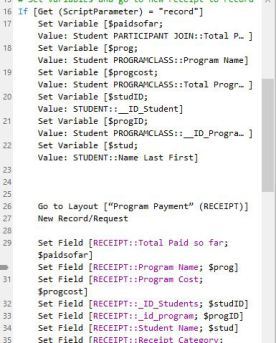
I’m sure you can see an abundance of uses for auditing data in your solutions. It’s nice to know who changed what data when.
The interesting topic at Pause was, is it possible to audit schema changes? Say a developer adds a table, alters a relationship or deletes a field. One of the agonizing parts of developing is tracking what went wrong so you can fix it. It’s entirely possible that you could create a bug that won’t be discovered for months.
Chris Moyer of the Moyer group hosted a session on this topic: Adding Schema Tracking To Your Databases.
He’s using get functions to get TableID’s and TableNames (these are based on table occurrences — not source tables), but he’s stuck on getting a list of unique table names. Also, in a clever twist, he’s using comments in the database management table to help filter (use a get function to pull the comment and filter strings of text like DO NOT AUDIT).
I wish Pause recorded sessions because this turned into a fascinating conversation, and I couldn’t take notes quickly enough. Should he rely on naming conventions? He’s considering two different approaches: ExecuteSQL and Scripts with get functions.
The conversation evolved into a feature request — Filemaker should create a command to export a DDR, or partial DDR, every night. Script steps and custom menus don’t have unique ID’s and should. Present in the crowd was Clay, our friendly neighborhood Filemaker guy, and someone suggested holding him hostage, but it was getting on dinner time so follow through was weak.
My two takeaways:
Pause is really cool because people present ideas that aren’t polished up and finish and turn the whole thing into a brain trust.
I need to buy either InspectorPro or BaseElements 3 like, right now. These allow you to work with schema much more efficiently and pay for themselves quickly. So now I just have to decide which one to get.


February 23, 2016
10 Free Tickets
In my earlier blog, I explained what the Pause on Error Conference is, how cool it is, and how much you should be there.
I didn’t say I was going, even though it’s in Cleveland, because my business can not support buying the tickets just now, in spite of their reasonable price.
In the tradition of the old format of Pause on Error, there were ten free tickets available . . . first come, first served.
:-) I’m pretty quick. I won a free ticket and will be attending Pause on Error 2016.
Can’t wait to fill you guys in on everything I learned!
 How I won a ticket to Pause on Error

February 9, 2016
“No Comment.”
If you’ve just been accused to scamming your company out of tens of thousands of dollars, or if your teenager hacked into NASA and sent an unhumanned shuttle to the space-station, you will no doubt be snapping those words to the press.
However, if you’re writing a script in Filemaker Pro, you should comment. Liberally. Like, go ahead and stop on the courthouse steps, take the mic from the squeaky-voiced reporter, and seriously settle in for a chat. Just be sure to begin each sentence with “#”. So you’re on the record.
Why comment?
Let’s start with the fact that age happens to all of us. Sorry, you sweet young thing, but one day you’ll stare into the mirror and see what I see — roots. Lines. The tired eyes of an aged crone who has seen and done far too much. (sorry . . . my birthday is coming up hard).
At any rate, with aging comes wisdom, and all that wisdom tends to crowd out other less important brain data, like whatever-the-heck-you-were-trying-to-do-with-that-script. Give your future self a break and explain what you were up to.
The second reason is an extension of the first: Give other people’s future selves a break and explain what you were up to. As much as you love this client, you or she may move on, and some other developer may someday try to decode your script.
Commenting your scripts is a Best Practice. Best Practices are rules that aren’t really rules, just choices, but if you don’t follow them they often lead to regrets. You’ll be tempted to skip this step, because the workday is short and you’re not sure whether this approach will work anyway. You can always go back and add comments later.
There lies the way of Regrets, my developing friend.
Take a minute to slap some identifying data at the top of that pup, and add a line or two for any sequences where the purpose isn’t immediately, glaringly obvious.
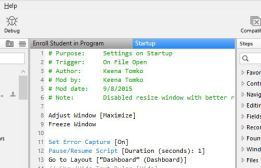
Now that you’ve conceded that commenting is critical, I’ll tell you my Pro Tip for writing complex scripts. Write the comments first, and then add the script steps. You can plan out exactly what needs to happen with the comments, then make it happen with the script steps.
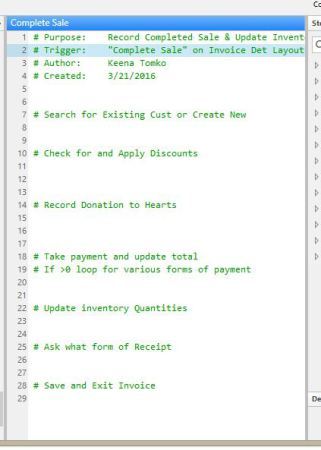 Use comments to plot out the steps first.