Know Your History: A Conversation
My next few blogs will be dedicated to what I learned at Pause on Error, or, in some cases, what I now know I need to learn. Some of this will be basic, but if nothing else it helps me review.
Several sessions touched on the subject of auditing — both data and schema.
To refresh, auditing data is a simple matter of creating a “change log.” For example, if a user changes an account number for a client, you may want a record of when that was changed, and why. When the record is updated, you trigger a script to capture all of the data and record it into the change log table. The example below follows this process to create a record of receipts: it sets the variables, goes to the layout sourced from the log table, then creates a record and sets the fields with the variables. You’d normally always include your “housekeeping” fields — the created and modification accounts and timestamps.
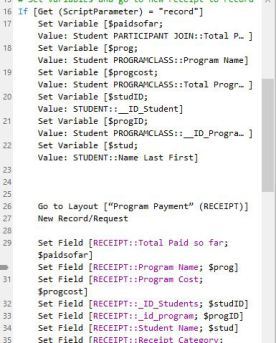
I’m sure you can see an abundance of uses for auditing data in your solutions. It’s nice to know who changed what data when.
The interesting topic at Pause was, is it possible to audit schema changes? Say a developer adds a table, alters a relationship or deletes a field. One of the agonizing parts of developing is tracking what went wrong so you can fix it. It’s entirely possible that you could create a bug that won’t be discovered for months.
Chris Moyer of the Moyer group hosted a session on this topic: Adding Schema Tracking To Your Databases.
He’s using get functions to get TableID’s and TableNames (these are based on table occurrences — not source tables), but he’s stuck on getting a list of unique table names. Also, in a clever twist, he’s using comments in the database management table to help filter (use a get function to pull the comment and filter strings of text like DO NOT AUDIT).
I wish Pause recorded sessions because this turned into a fascinating conversation, and I couldn’t take notes quickly enough. Should he rely on naming conventions? He’s considering two different approaches: ExecuteSQL and Scripts with get functions.
The conversation evolved into a feature request — Filemaker should create a command to export a DDR, or partial DDR, every night. Script steps and custom menus don’t have unique ID’s and should. Present in the crowd was Clay, our friendly neighborhood Filemaker guy, and someone suggested holding him hostage, but it was getting on dinner time so follow through was weak.
My two takeaways:
Pause is really cool because people present ideas that aren’t polished up and finish and turn the whole thing into a brain trust.
I need to buy either InspectorPro or BaseElements 3 like, right now. These allow you to work with schema much more efficiently and pay for themselves quickly. So now I just have to decide which one to get.