“No Comment.”
If you’ve just been accused to scamming your company out of tens of thousands of dollars, or if your teenager hacked into NASA and sent an unhumanned shuttle to the space-station, you will no doubt be snapping those words to the press.
However, if you’re writing a script in Filemaker Pro, you should comment. Liberally. Like, go ahead and stop on the courthouse steps, take the mic from the squeaky-voiced reporter, and seriously settle in for a chat. Just be sure to begin each sentence with “#”. So you’re on the record.
Why comment?
Let’s start with the fact that age happens to all of us. Sorry, you sweet young thing, but one day you’ll stare into the mirror and see what I see — roots. Lines. The tired eyes of an aged crone who has seen and done far too much. (sorry . . . my birthday is coming up hard).
At any rate, with aging comes wisdom, and all that wisdom tends to crowd out other less important brain data, like whatever-the-heck-you-were-trying-to-do-with-that-script. Give your future self a break and explain what you were up to.
The second reason is an extension of the first: Give other people’s future selves a break and explain what you were up to. As much as you love this client, you or she may move on, and some other developer may someday try to decode your script.
Commenting your scripts is a Best Practice. Best Practices are rules that aren’t really rules, just choices, but if you don’t follow them they often lead to regrets. You’ll be tempted to skip this step, because the workday is short and you’re not sure whether this approach will work anyway. You can always go back and add comments later.
There lies the way of Regrets, my developing friend.
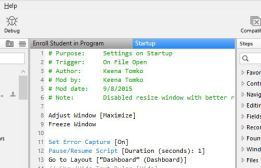
Take a minute to slap some identifying data at the top of that pup, and add a line or two for any sequences where the purpose isn’t immediately, glaringly obvious.
Now that you’ve conceded that commenting is critical, I’ll tell you my Pro Tip for writing complex scripts. Write the comments first, and then add the script steps. You can plan out exactly what needs to happen with the comments, then make it happen with the script steps.
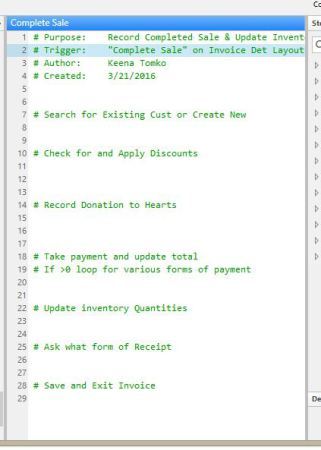 Use comments to plot out the steps first.