Phil Simon's Blog, page 39
November 6, 2019
Finding Teachable Moments in Poor Student Presentations
The slides were too busy. The flow was confusing and circuitous. The tone was generally awkward. Students covered things that their teammates already had just a few minutes ago. Sometimes they looked at each other with the expression What are you doing?
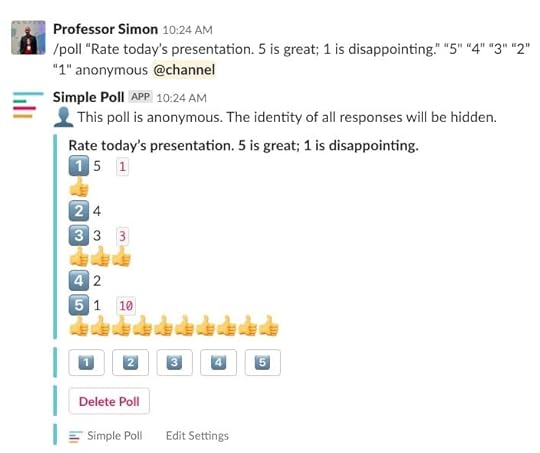
I looked around the room at the rest of the class had completely zoned out. Students were looking down at their devices, not up at their colleagues. That’s never a good sign. A quick, anonymous Slack poll confirmed what I suspected: the class wasn’t picking up what the students were putting down. Far a from it.
I graded the group of students according to the public rubric. (That is, they all know ahead of time how I will be evaluating them.) The grade reflected the quality of the presentation, and a good rubric minimizes the professor’s subjectivity. Rather than just criticize, though, I offered tips beyond those that I had already posted in Slack. I also indicated that I’d be happy to discuss the grade with them.
Yes, this was another example of a teachable moment if students wanted to learn from their disappointing performance.
Fortunately, one of them did.
Hello Larry
Larry (not his real name) booked time with me to discuss his group’s talk. Most important, he wasn’t whining. He really wanted to understand my feedback and how he could do better in the future.
This is exactly the type of interaction that I find the most rewarding: Helping a student who cares.
These types of interactions never get old. When you really reach students, it’s a rush.
I gave Larry a bunch of advice that has served me well as a public speaker over the years. Speakers should tell a story. Avoid death by PowerPoint. Use humor if possible.
To his credit, Larry was a sponge. He acknowledged that his group’s preparation wasn’t exactly optimal. I asked him what they all could have done to deliver a more cohesive presentation. After about fifteen minutes, he stood up, thanked me, shook my hand, and left.
I have little doubt that Larry’s next individual or group presentation will go much smoother and he’ll take that lesson with him for the rest of his career.
Simon Says
These types of interactions never get old. When you really reach students, it’s a rush.
Feedback
What say you?
The post Finding Teachable Moments in Poor Student Presentations appeared first on Phil Simon.


November 4, 2019
13 Slack Tips
 A few weeks ago I submitted the completed manuscript for Slack For Dummies two months ahead of schedule. (There benefits from living in the book bunker.)
Today I’ll put on my marketing hat and share a few tips on how to use my favorite collaboration tool.
The post 13 Slack Tips appeared first on Phil Simon.
October 25, 2019
Doing More with Slack
 I arrived early for my speaking gig yesterday to meet with the conference organizers and give them a few of my books.
As I waited at the counter for my badge, I noticed a man next to me working on Slack. He had split his laptop’s screen and routinely toggled back and forth between Slack and a spreadsheet.
We started talking about Slack. I asked him how he used the collaboration tool. I’ll admit that I was impressed: My consulting forays into the energy industry left me with the impression that they’re not exactly early adopters when it comes to new tech. Yet, there was no mistaking it: There was Slack on his computer.
After some more small talk, I asked him why he was working in both Excel and Slack. As it turns out, he was looking up employee information in Excel to find in Slack. I asked him if he was a Slack administrator. Yes, he was. They why not create custom profile fields to save himself some time and make information easier to find?
Huh?
You can do that?
Most people only use the basics of a software application.
I showed him how to do as much. He wanted to know how I knew so much about Slack. After all, I was there to talk about analytics. I mentioned my forthcoming book. he asked for my card. I suspect that I’ll be training employees at his company on how to best use Slack at some point in the future.
Simon Says: Become part of the 20 percent.
The 80/20 rule is alive and well: Most people only use the basics of a software application. For most people, what’s true in Microsoft Excel and Word is also true with Slack.
It doesn’t have to be.
Feedback
What say you?
The post Doing More with Slack appeared first on Phil Simon.
October 10, 2019
Adding Spice to a Mundane Lecture Topic
 Ask an professor today: Getting 19- and 20-year-olds to pay attention for 50 minutes can be challenging.
To be sure, some of the topics in my Introduction to Information Systems class appeal to more to members of iGen than others. On one side of the spectrum, artificial intelligence and privacy tend to evoke strong student reactions—or at least sustain their interest throughout the class. On the other, few subjects typically meet with more indifference than business processes.
This is not to say that covering business processes is not important. It most certainly is. During my consulting career, I saw firsthand hand companies found themselves in trouble by not following their own processes. Sometimes this meant hiring me for four to six months to fix a complicated data problem. Still, as a professor, I get it.
So how does a professor make a mundane subject more interesting?
A little humor never hurts.
First, by integrating real-world events. I could think of no better example than the Wells Fargo scandal. From everything that I’ve read, the company’s culture and lack of internal controls led to a $2-billion fine and multiple class-action lawsuits.1
Second, a little humor never hurts and Nathan Fielder is nothing if not funny.
Rather than hearing crickets, I hear students laughing. More important, they gain an understanding of a key—but not exactly riveting—topic. In the future, I’d like to add more active-learning exercises to the class like I did with my capstone courses. For now, though, I have to work within certain constraints.
Simon Says
I’ve said many times before that there’s no such thing as a boring topic—only a boring speaker. The same applies in the classroom.
Feedback
What say you?
The post Adding Spice to a Mundane Lecture Topic appeared first on Phil Simon.
October 6, 2019
Slack For Dummies Now Available for Pre-Order on Amazon
 Slack For Dummies is now available for pre-order on Amazon.
 Note that the publication date isn’t accurate. Odds are that it will be out in March of 2020. I can’t imagine that there will be an audiobook for this one but I the world today is a crazy place. Who knows?


The post Slack For Dummies Now Available for Pre-Order on Amazon appeared first on Phil Simon.
September 30, 2019
Update on Slack For Dummies
 I haven’t posted in a while but there’s a good reason: I’m knee-deep in writing Slack For Dummies.
As of today, I’m at about 63,000 words on the manuscript that will ultimately run about 80,000. My acquisitions editor at Wiley tells me that I’m insanely ahead of the normal pace1 and we may move up the publication date by a few months.
This is all very intentional. I start teaching a half-semester dataviz class and I’ll be doing some speaking events this fall. Beyond that, I’m close to signing a deal to ghostwrite a full-length business text. Oh, and there’s El Camino—a movie that I’ll probably watch daily for at least a week. Finally, it’s still pretty toasty in Phoenix.
Other Notes
I still have room for some examples in the book but space is filling up fast. Let me know if your organization uses Slack in an innovative way.
With all of the figures, I’m glad that this will be a full-color book.
The book should hit Amazon this week. I’ll post pre-ordering information. Also, I expect to see the preliminary book cover soon. The one in this post is clearly a placeholder.
Back to the grind.
The post Update on Slack For Dummies appeared first on Phil Simon.
September 19, 2019
Talking Tech with Professor Simon
I posted this in my Slack workspace for my students in CIS235: Intro to Information Systems. I’m reposting it here.
 As you probably know by now, I enjoy learning and reading about technology. Ditto for discussing it with others. I like to think that I’ve picked up a thing or six about the subject in my years (#humblebrag). Besides researching and writing a bunch of books and reading hundreds more, I spent more than a decade helping organizations deploy new technologies.
If you pay attention to the news (and you absolutely should), then you know that tech is everywhere these days.
Everywhere.
Against this backdrop, I have decided to host a series of open discussion sessions. The goal: To talk about different technologies and the effects that they are having on business, society, and the world.
There’s no preset agenda but I doubt that we’ll be lacking for content.
Details are below. Feel free to pass this along to any of your classmates. This is an open invitation.
When
Every Monday and Wednesday.
Why
Because understanding technology is really freaking important. It’s easy to look like a jackass if you don’t.
Who
Any ASU student in my class or not.
When
12:25 pm to 12:45 pm.
Where
BA396.
The post Talking Tech with Professor Simon appeared first on Phil Simon.
September 6, 2019
How a Good Syllabus Can Set the Right Tone with Students
 Think about the last time that you took a course. I’ll be that the first thing you read after the course description was the syllabus. I’ll also bet that it was at least one of the following:
Dry
Confusing
Poorly written
Not remotely visual
But does it have to be?
In a word, no. With a little creativity and effort, it’s not hard to turn a run-of-the-mill syllabus into something that students may want to—you know—read.
Case in Point
I spent some time yesterday adding a bit of flair to the syllabus for the dataviz class that I’ll be teaching soon. It didn’t take that long to create something engaging.
Click here to view this as a Google Doc.
Thoughts
I’m a big fan of headings and using a table of contents. This lets students easily navigate to topics of interest. Most students—and plenty of professionals—don’t know that you can do this. It’s a shame.
Professors don’t get a second chance to make a first impression.
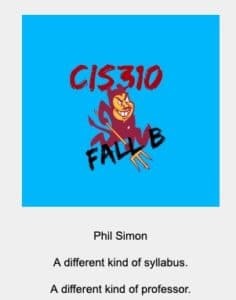
I use the same icon in both Slack and Canvas. This makes for more consistent branding and helps me keep my sanity. (I’m up to double digits with Slack workspaces now that I’m writing Slack For Dummies.)
Inserting a tree map for the grade breakdown just made sense here. After all, it’s a freaking dataviz class and we’ll be using Tableau.
Beyond that, I prefer Google Docs to Microsoft Word here. I’ll sometimes tweak the syllabus during the semester. Export a document to a PDF and uploading it to Canvas takes time. A live webpage or document obviates the need to to this.
Simon Says: Use the syllabus to start off on the right foot.
Professors are just like everyone else: We don’t get a second chance to make a first impression. Why not show that you’ve got a little personality? Not only is it part of my teaching philosophy, but it’s downright easy to do on syllabi because the bar is so low.
Feedback
What say you?
The post Adding Spice to a Mundane Lecture Topic appeared first on Phil Simon.
How a Good Syllabus Can Set the Tone with Students
Introduction
Think about the last time that you took a course. I’ll be that the first thing you read after the course description was the syllabus. I’ll also bet that it was at least one of the following:
Dry
Confusing
Poorly written
Not remotely visual
But does it have to be?
In a word, no. With a little creativity and effort, it’s not hard to turn a run-of-the-mill syllabus into something that students may want to—you know—read.
Case in Point
I spent some time yesterday adding a bit of flair to the syllabus for the dataviz class that I’ll be teaching soon. It didn’t take that long to create something engaging.
Click here.
Thoughts
I’m a big fan of headings and using a table of contents. This lets students easily navigate to topics of interest. Most students—and plenty of professionals—don’t know that you can do this. It’s a shame.
Professors don’t get a second chance to make a first impression.
I use the same icon in both Slack and Canvas. This makes for more consistent branding and helps me keep my sanity. (I’m up to double digits with Slack workspaces now that I’m writing Slack For Dummies.)
Inserting a tree map for the grade breakdown just made sense here. After all, it’s a freaking dataviz class and we’ll be using Tableau.
Beyond that, I prefer Google Docs to Microsoft Word here. I’ll sometimes tweak the syllabus during the semester. Export a document to a PDF and uploading it to Canvas takes time. A live webpage or document obviates the need to to this.
Simon Says: Use the syllabus to start off on the right foot.
Professors are just like everyone else: We don’t get a second chance to make a first impression. Why not show that you’ve got a little personality? Not only is it part of my teaching philosophy, but it’s downright easy to do on syllabi because the bar is so low.
Feedback
What say you?
The post How a Good Syllabus Can Set the Tone with Students appeared first on Phil Simon.
August 19, 2019
Looking for Slack For Dummies Case Studies
 Formerly a gaming company called Glitch, Slack rebranded—or pivoted, to use the parlance of Silicon Valley—in 2013. With more than 10 million daily active users, it’s fair to say that Slack has caught fire. In the process, it has spurred clones from Microsoft, Facebook, Google, and more.
Sure, I like to think that I’m doing cool things with the über-useful collaboration tool in the classroom. Still, higher education is simply one industry that can stand to benefit from Slack’s functionality. To that end, I’d love to how you or your organization use Slack for my next book Slack For Dummies.
Click here if you’d like to tell me more and then we can chat about it—maybe even over Slack.
I
Talk to me about how you use Slack.
The post Looking for Slack For Dummies Case Studies appeared first on Phil Simon.