Phil Simon's Blog, page 37
March 26, 2020
Geeking Out Over Scrabble in Python
 One of the core tenets of my teaching philosophy is desirable difficulty. TLDR: Assignments and classes should be hard. By overcoming challenges in higher education, students prepare themselves for the real world. If this concept sounds familiar to you, perhaps it’s because Malcom Gladwell popularized it in David and Goliath: Underdogs, Misfits, and the Art of Battling Giants.
To be sure, many of my students aren’t fans of the concept—especially when I reinforce it with my syllabus’ no-hand-holding policy. I hope, though, that they’ll reflect in a few years on it and appreciate the method to my madness.
Of course, it would be hypocritical of me to ignore desireable difficulty when I face an obstacle my own. That’s exactly what happened yesterday when I was noodling with Python.
Why write scripts for fun? First, I’m not going out too much these days. Second, my editor is putting the final touches on Slack For Dummies. Finally, my courses this semester don’t cover the powerful, general-use programming language. Still, if you don’t sharpen your axe from time to time, though, it will become dull.)
If you don’t sharpen your axe from time to time, though, it will become dull.
Brass tacks: Last night was a perfect opportunity for some sharpening.
By way of background, I’m a big Scrabble fan.1 I wanted write a script that would calculate the number of consecutive games that I’d need to win to reach a goal. For instance, if I had won 50 out of 100 games, then how many games would I need to win in a row to hit 60 percent?
The math isn’t hard. Yes, it’s just algebra and you only need to solve for x. In the prior example, it’s 25.
I was curious about my options for solving this equation in Python. I imported SymPy, a library for symbolic mathematics but I struggled trying to get it to do what I wanted. I sent a message to a friend of mine who has forgotten more about Python than I’ll ever know. It turns out that he hadn’t used SymPy much.
I went to sleep determined to figure it out. I’m nothing if not stubborn. A fresh set of eyes and a new perspective led to this:
No, it’s not the most elegant code and I’m sure that there many other ways to do the same thing. Still, it works.
Simon Says: Professors should practice what they preach.
Little victories can do wonders for your confidence, especially in trying times. Beyond that, why not set an example for your students?
Feedback
What say you?
The post Geeking Out Over Scrabble in Python appeared first on Phil Simon.


March 18, 2020
A Quick Note on Slack’s New UI and Slack For Dummies
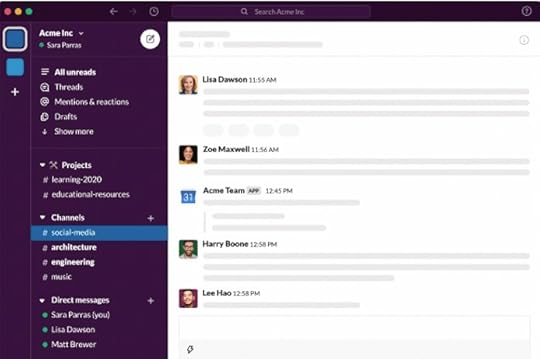 Slack’s new version is dropping today.
In a word, it’s awesome.
As I write in Slack For Dummies, Slack’s new and streamlined user interface is slick and intuitive. Brass tacks: Existing users will pick it up immediately and newbies will be able to quickly find valuable but lesser-used features. In other words, this is no Windows 8 debacle.
Yeah, it took quite a bit of work, but Slack For Dummies reflects the current version, not its predecessor. I’m particularly excited about the ability to organize channels and other content.

The post A Quick Note on Slack’s New UI and Slack For Dummies appeared first on Phil Simon.
March 15, 2020
Visualizing My Students’ Slack Messages
Professors new to Slack probably won’t spend much time playing around with its analytics. Still, there’s quite a bit that can you glean from its user data while concurrently respecting user privacy.
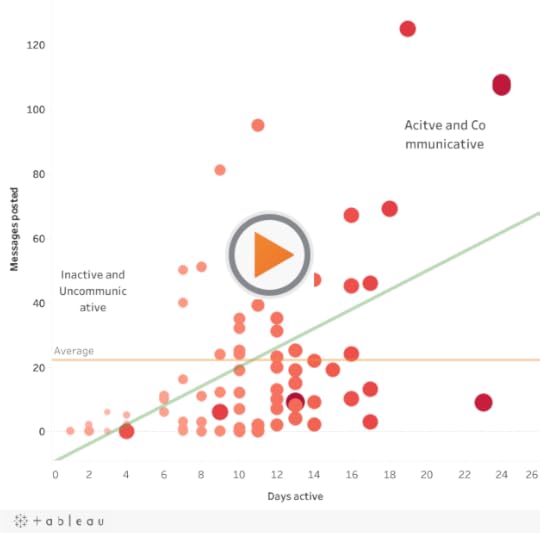
I was curious about the relationship between days spent in Slack and number of messages spent. To this end, I exported data on aggregate message from the workspace that I used for my online, seven-week Business Intelligence course last semester. Again, I wasn’t interested in what students were writing to each other—and Slack doesn’t let its users view others’ private direct messages (DMs) by default anyway. As such, I counted a simple one-word “yes” message as a 200-word rant against a slacker teammate (pun intended).
I then threw the data into Tableau and created a simple scatterplot. Here are the results:
Findings and Outliers
In no particular order, here’s what I found:
The average student posted 22 messages. That’s about three per week for the seven-week course.
Plenty of students were inactive and uncommunicative.
One student was active for 16 days but posted nary a single message in Slack.
One student was active for 11 days and posted a startling 95 messages. That’s more than eight per day.
A small number of students were both very active and communicative.
As expected, there’s a positive relationship between days active on Slack and the number of messages sent. (See green reference bar.)
Simon Says: Play with your data.
None of this took all that long. You can still respect user privacy and discover interesting things in your data. I’m curious if other professors will see more interaction in Slack as they put their classes online in light of recent events.
Feedback
What say you?
The post Visualizing My Students’ Slack Messages appeared first on Phil Simon.
March 13, 2020
Professors: Expect Your Student Evaluations to Drop
 In the wake of many schools’ decisions to move all classes online, odds are that you’re scrambling.
All of this change has made you uncomfortable. Perhaps you’re frantically recording lectures or learning Slack. Maybe you’re in the process of creating formerly in-person quizzes and exams in Canvas, Blackboard, or another learning management system. I’ll also bet that your instructional designers are working overtime. You don’t want your course to be a poor substitute for the original, but you’re trying to build the plane while it’s in the air.
With online courses, the fleas come with the dog.
I wish you all of the luck in the world, but let me tell you how this probably ends: Regardless of all of your hard work, your student evaluations are going to suffer. But don’t take my word for it just yet.
In a 2014 study, Suzanne Young and Heather E. Duncan demonstrated  that students routinely grade professors lower in online courses compared to their in-person equivalents. I suspect that this is just a limitation of online courses—even those that professors meticulously plan out.
That’s fine in theory, but what do student evaluations look like in practice under normal conditions?
I have seen this phenomenon play out first hand. From my interactive Tableau dataviz of student evaluations, consider the following:
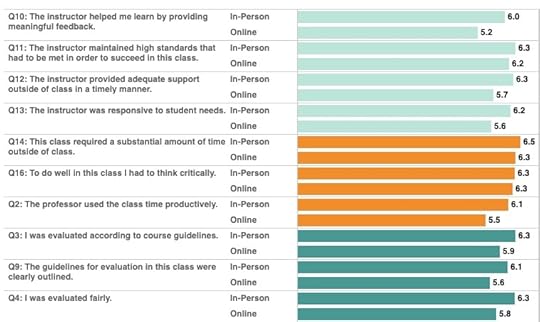
Click here to see the whole thing on Tableau Public.
Is this dip fair?
Probably not, under any circumstances—much less exigent ones.
Simon Says: Prepare yourself.
Don’t be surprised when you observe lower numbers in a few months.
Feedback
What say you?
The post Professors: Expect Your Student Evaluations to Drop appeared first on Phil Simon.
March 12, 2020
Tips for Professors Teaching Online for the First Time
 Yesterday my employer ASU joined the increasing number of universities to move classes online for at least the next two weeks in the wake of the coronavirus. Yes, it’s unequivocally the right move. Still, teaching online presents plenty of formidable logistical issues—especially for professors who have never taught online before.1 In this post, I’ll offer a few tech tips for professors new to teaching online.
By way of background, I’ve taught online courses at ASU since my first semester (Fall, ’16). I still prefer teaching in-person classes, but my online student evaluations don’t suck. This semester, I’m teaching exclusively online.2 Brass tacks: It’s fair to say that I know a thing or six about the topic.
Use Slack as a Communications Hub
 You’re going to need to communicate with your students online in a far deeper way than learning management systems such as Canvas and Blackboard currently allow. Corresponding with your students via email may be familiar but it certainly doesn’t scale. If you like answering the same question eight times, then ignore the rest of this post.
It’s high time that you introduce a true collaboration hub in your class. Put simply, Slack is the way to go. It’s not even close, even before you consider the benefits of third-party apps such as Simple Poll.
Let’s say that your college or university hasn’t purchased a Slack license. No bother. You can still get a great deal of mileage out of Slack’s free version. This goes double when you introduce it properly. In fact, I happily used this Slack plan for a few years under the radar—that is, before ASU purchased Enterprise Grid.3
As for security, all Slack plans offer end-to-end encryption. (Yeah, I learned a few things researching Slack For Dummies.) Don’t use security as an excuse not to learn the best collaboration tool out there.
Gangster tip: Take the remaining time on your Spring Break and learn the basics of Slack. The investment will pay off in spades.
Use Zoom for Video Calling
 Slack limits online calls to a maximum of 15 concurrent users. Zoom, however, allows for a far greater number as well as the ability to let others control your screen. Note that Zoom’s free plan caps video calls at 40 minutes, well below the length of most classes.
Set Up a YouCanBookMe Account Now
How will students schedule office hours with you? I’m not sure, but they’re not going to be walking into your office unannounced.
Inconvenient does not mean impossible.
To this end, YouCanBookMe is your best friend. It’s one of the many tools that I’ve embraced in my four years as a full-time college professor.
Ditto for Free Conference Call
Students will set up time to discuss tests, group projects, or grades with you one way or another. I’ll bet you a Coke, though, that at least few will experience technical problems when they try to chat with you via Zoom, Google Hangouts, Skype, or another app. Trust me: You don’t want to spend ten of your 15 minutes with a student diagnosing technical issues.
Do yourself a favor and go old school: Set up a free Free Conference Call account. You easily can record calls. What’s more, I’ll sometimes use it concurrently with Zoom’s screen sharing when a student can’t get his/her audio to work. As an added bonus, using Free Conference Call means that I don’t have to give my students my telephone number—and vice versa. It’s just easier than constantly hiding my phone number on my iPhone.
Simon Says: With online teaching, inconvenient does not mean impossible.
 Weather the storm here, folks. You may be new to teaching online but current circumstances leave us no other option.
Now is the time to learn a few simple yet essential tools to teach effectively online. As Churchill once said, “Never waste a good crisis.”
Feedback
Good luck and let me know if I can help in any way.
Check out Terri Griffith’s thoughts on crisis management as it relates to the race to go online.
The post Tips for Professors Teaching Online for the First Time appeared first on Phil Simon.
March 2, 2020
Slack and Change Management
 On a recent trip to Baltimore, I went to dinner1 with a friend of mine from grad school. She helps organizations deal with change management.
It was an interesting conversation. My friend has heard of Slack but doesn’t use it. In a way, though, I was glad.
After catching up, we spent most of our time talking about the nexus between Slack and change management. It’s a topic near and dear to my heart. (Chapter 13 of Slack For Dummies provides tips on how organizations can successfully adopt it in the workplace.)
Foolish is the soul who assumes that all employees will voluntarily jump on the Slack train.
Throughout my career, I have seen firsthand how employees fight new technologies and applications. That resistance is more than just a minor nuisance; it’s a real problem that far too many people don’t appreciate. In many ways, the people who resist Slack today aren’t any different from people who didn’t want to change enterprise systems a decade ago. Same fleas; different dog.
Slack and Network Effects
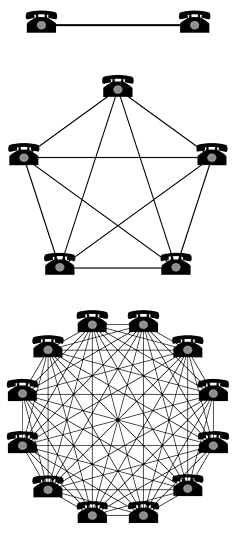 Just like Amazon, Apple, Facebook, and Google, Slack benefits from network effects and Metcalfe’s law. If fewer employees at Company X use Slack, then it becomes less valuable to the organization and its employees. Slack’s work graph makes less relevant, timely, and accurate recommendations because its data is limited.
It’s really that simple.
When you grasp the power of network effects, then you’ll start to view employee resistance to Slack as a really big deal.
Simon Says: Signing up for Slack is easy. Change management is hard.
It’s not hard to offer simple tips to ease the transition to Slack. Make no mistake, though: the people side of enterprise technology remains the real challenge for mature organizations. Overcome it and Slack becomes exponentially more valuable than just “email 2.0.”
Feedback
What say you?
The post Slack and Change Management appeared first on Phil Simon.
February 25, 2020
Tableau Animations Are Here. Professors Take Note.
All professors need to need to adopt. It’s a key tenet in my teaching philosophy. It’s incumbent upon us to keep up with important developments our classes.
Case in point: With its latest release, Tableau now includes the ability to include animations in its visualizations.
Here’s a simple bump chart that I created a while back. I inserted a quick animation. Now, by clicking on the filters on the right, you can see the animations in action: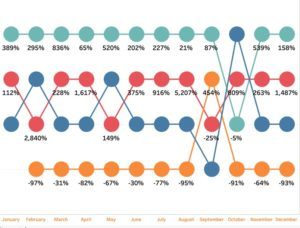
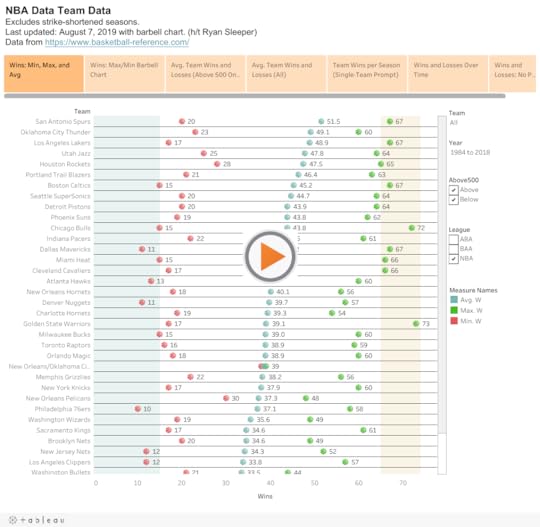
Lest I overwhelm students with all of this sophisticated Tableau functionality from day one,1 I recorded a quick video this morning for students in my forthcoming dataviz class:
Simon Says: A new software feature is an opportunity to tweak assignments.
To be sure, adding this exciting new Tableau feature isn’t imperative. At the same time, though, why not tweak last semester’s assignments for the better? No, students in the course won’t learn all things Tableau in CIS310, never mind become Zen Masters. Still, why not let them leave the course with one more arrow in their quivers?
Apropos of nothing, it’s important to animate…
Feedback
What say you?
The post Tableau Animations Are Here. Professors Take Note. appeared first on Phil Simon.
February 24, 2020
Using Slack to Ghostwrite a Book: A Case Study
 For the last eight months Slack has dominated my mind. Ever since signing the contract to write Slack For Dummies, I have been feverishly writing and editing, with the occasional blog post and book trailer thrown in. Of course, I am still teaching my courses and communicating with my students via Slack.
As I write in the book, how people use Slack in one context is anything but standard. In my case, the way in which I use Slack with my students differs a great deal from how I am using it to ghostwrite a book. In this post, I’ll focus on three essential Slack apps: Google Drive, Zoom, and Trello.
Ghostwriting a book involves a great deal of back and forth.
To be sure, native Slack is ideal for the simple exchange of group messages and more targeted ones via channels. Still, Slack’s impressive array of integrations allows for far more than that.
Google Drive
Ghostwriting a book involves a great deal of back and forth. Without proper version control, things may will quickly spiral out of control. To this end, Google Drive is a no-brainer.
Still, foolish are the souls who want constant comments flooding their inboxes. Deactivating comments altogether runs this risk of missing key updates. What to do?
Enter Google Drive. When my client responds to one of my queries or makes a suggestion, Slack dutifully notifies me. If I need to take a break,
February 14, 2020
Slack For Dummies Book Trailer
 I like to think that I cover different things in my books. That is, I don’t repeat myself and rehash the same idea over and over again.
That’s not to say, though, that won’t find some commonalities among them. You will, including:
Rush and Marillion references
Case studies
Something about tech and data
Obscure quotes
I’m also a big proponent of book trailers. I like the idea that someone can watch a quick video of my book and get a sense of it. Because, to paraphrase Ron Burgundy, videos are kind of a big deal.
Against that backdrop, here’s the trailer for Slack For Dummies, book number nine:
Feedback
What say you?
The post Slack For Dummies Book Trailer appeared first on Phil Simon.
February 8, 2020
Thoughts on Slack and Flexibility
 Slack power users tend to be a smart lot. Generally speaking, they use the popular collaboration tool in many innovative ways. Perhaps most interesting, though, is diversity.
To be sure commonalities exist, but different people take different approaches. Make no mistake: This is one of the key points in Slack For Dummies.
But what about the same person in different contexts? It turns out that I act and communicate differently depending on the workspace.
Different Tools and Applications for Different Workspaces
Case in point: The way that I use Slack in the classroom differs from how I’m using it with my writing clients. That is, when I compare my different workspaces, I see significant differences among:
Channel structure
Number of screen-sharing sessions and video calls
Number and types of apps installed
Quantity and types of direct messages (DMs)
And more
When I train new users on how to use Slack, many are surprised at the number of different options available to them—and challenges for that matter. The latter topic is fodder for a different post.
Feedback
How are you pushing envelope in your organization with Slack?
The post Thoughts on Slack and Flexibility appeared first on Phil Simon.