Phil Simon's Blog, page 33
August 9, 2020
Zoom Tip #5: Zooming in on Yourself
 At present, Zoom’s Meetings & Chat tool doesn’t let you zoom in on yourself. That is, you cannot bring the camera to you make your face or background bigger or small. By way of comparison, you can do this with Zoom Rooms by using the camera control in the green box below:
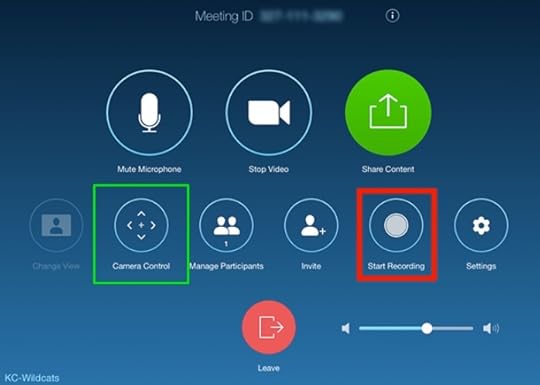
Great, but that factoid doesn’t solve the Meetings & Chat problem. Yeah, you can physically move your computer or webcam, but that solution isn’t exactly elegant and may not even get the job done depending on what you’re trying to accomplish. I suspect that Zoom will remedy this limitation in the near future.
Anyone up for a friendly bet?
In the interim, Meetings & Chat users are luck if they use a Logitech webcam. Just download this app.1
I show how to make the magic happen in the video below.
For more tips like these, check out Zoom For Dummies—available now.
BUY THE BOOK
Bookshop
Amazon
Barnes & Noble
IndieBound
Bulk Orders
The post Zoom Tip #5: Zooming in on Yourself appeared first on Phil Simon.


August 7, 2020
Obliviousness in Higher Education
 A little over a year ago, I hopped on not one, not two, but three planes to teach an in-person course on data visualization in Porto Alegre, Brazil for UOL. My total commute time exceeded 50 hours, but that’s neither here nor there. The students thoroughly enjoyed it. Every week, a few of them connect with me on LinkedIn and sing my praises. #humbling #nevergetsold
UOL paid me handsomely for my efforts. I won’t disclose the figure, but it exceeded five times what I charge for a webinar, excluding my considerable travel expenses.
If I’ve learned anything in my speaking career, it’s that outputs rise in proportion to inputs.1 In my case, my expertise on the topic, the three-legged journey, and my extensive preparation justified my fee. By way of comparison, my travel for a remote event involves walking from my bedroom to my office. Fifty hours vs. fifty seconds.
Big difference.
WTF?
If I were a student, I’d be furious.
Against this backdrop, it’s downright absurd that so many universities expect students to pay the same for remote classes as they do for in-person ones. Adding salt to the wound, a few schools are even trying to ram through considerable tuition increases.
The term tone deaf comes to mind.
If I were a student, I’d be furious—especially if I were attending a top-tier school. What’s more, I’d be strongly considering a gap year.
How are many well-to-do universities attempting to justify charging equivalent class prices for vastly inferior experiences? At the top of the list are hiring additional instructional designers and paying for additional software licenses.
I don’t buy it, especially given the astronomical rise in the cost of college over the past few decades:
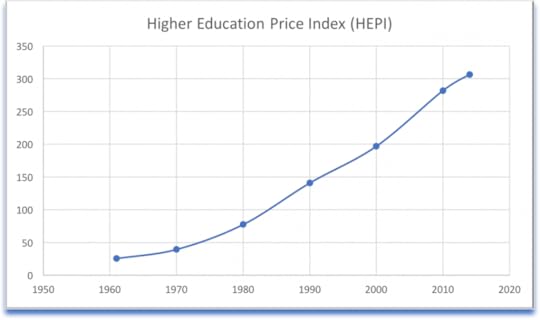
Source: Commonfund Institute HEPI model.
With the current unemployment rate, it’s a buyer’s market right now, especially in higher education. In fact, some schools have even laid off a considerable number of employees.
Simon Says
This is exactly the type of provincial behavior and downright exploitation that sows the seeds of discontent—and don’t think that others aren’t noticing. All schools ought to be reducing student costs to minimize the damage and show some freaking humanity, as a few of them have already done. Double that for pricey institutions of higher learning.
Feedback
What say you?
The post Obliviousness in Higher Education appeared first on Phil Simon.
August 5, 2020
Thoughts on Zoom’s New Presentation-Sharing Features
Zoom yesterday released version 5.2 with some new bells and whistles. Read the post announcing it here.
To be sure, many folks will find the new noise-reduction and appearance-improving options useful. I can see messing around with the new reactions and filters, but today I’d like to focus on the using PowerPoint or Keynote as a virtual background. In other words, in lieu of displaying a static custom picture or video, you can use dynamic slides.
To do this, just share your screen and follow the numbers below:
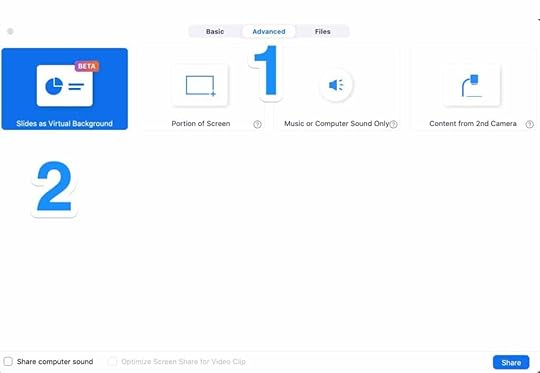
In the end, you get something like this:
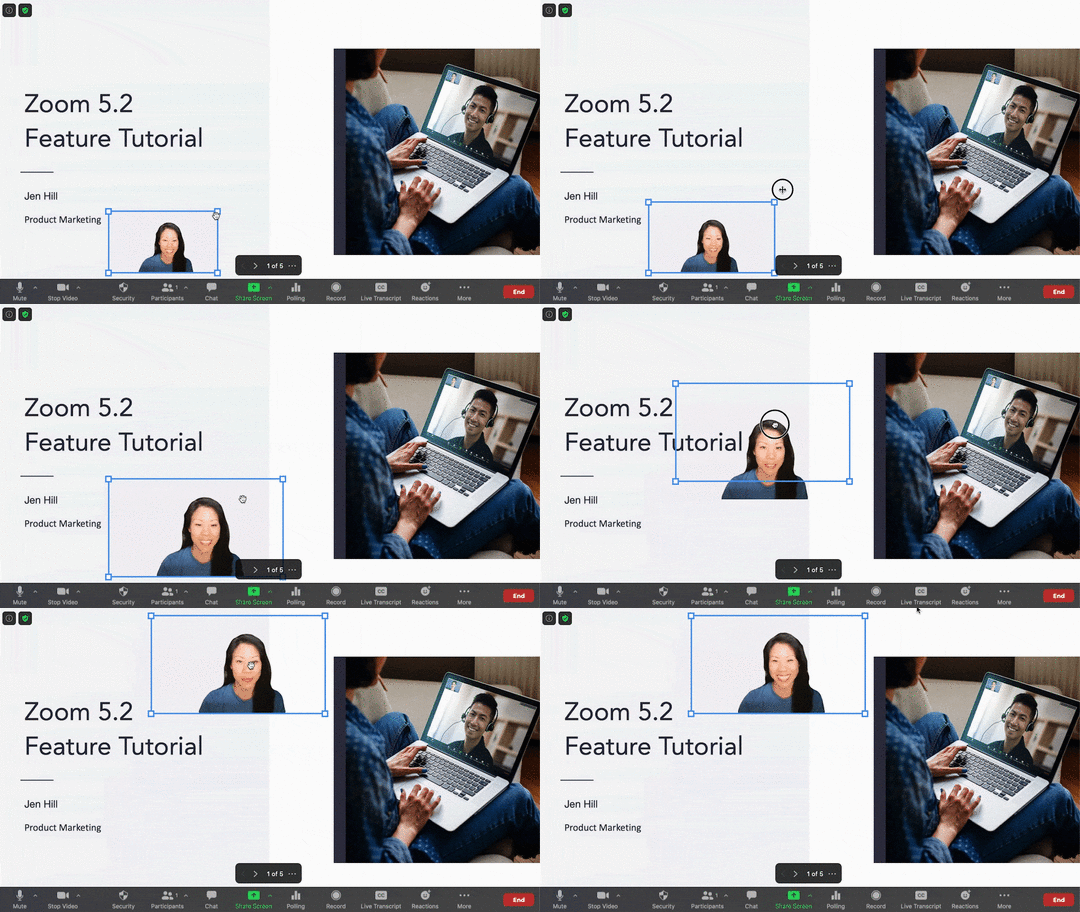
Photo credit: Zoom
This is exactly the type of feature that excited me about the mmhmm app a few weeks ago. I envision channeling my inner John Oliver or Hasan Minhaj.
I noodled with this functionality and it’s promising. Still, I’m not ready to abandon my current—and, admittedly, involved—Zoom presentation setup1 at the moment for two reasons.
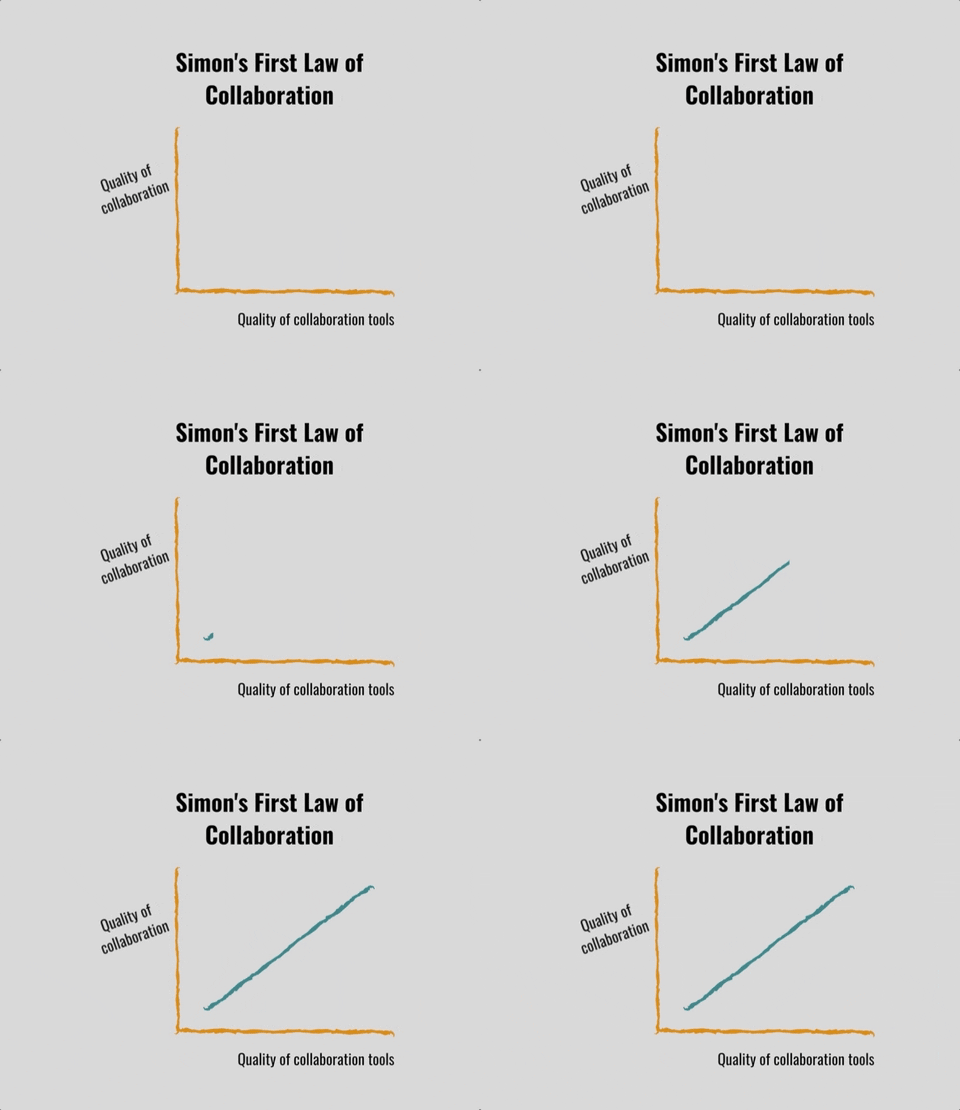
First, Zoom currently doesn’t allow you to use animations in your virtual background. For me, this is a dealbreaker. I always insert animations to keep my audience focused on the point that I’m making. I also use them to spice up graphs and charts as follows:
Second and as just as important, Zoom currently doesn’t let speakers use Presentation Mode—another professional essential. Complicating slides is a common mistake among newbies and even many experienced speakers. Put differently, keeping slides as spartan as possible often distinguishes good speakers from mediocre or terrible ones. To do this, I rely upon a hodgepodge of cryptic phrases and notes that only I can see.
Simon Says: Expect tighter integration between Zoom and proper presentation software.
As I write in Zoom For Dummies, these types of enhancements are expect. It doesn’t take a rocket surgeon to know that Zoom will concentrate on new features now that it has addressed its formidable security issues.
Brass tacks: I fully expect future versions of Zoom to enhance what professional speakers can do with proper presentation software.
Feedback
What say you?
The post Thoughts on Zoom’s New Presentation-Sharing Features appeared first on Phil Simon.
Thoughts on Zoom’s New Presentation Sharing Features
Zoom yesterday released version 5.2 with some new bells and whistles. Read the post announcing it here.
To be sure, many folks will find the new noise-reduction and appearance-improving options useful. I can see messing around with the new reactions and filters, but today I’d like to focus on the using PowerPoint or Keynote as a virtual background. In other words, in lieu of displaying a static custom picture or video, you can use dynamic slides.
To do this, just share your screen and follow the numbers below:
In the end, you get something like this:
Photo credit: Zoom
This is exactly the type of feature that excited me about the mmhmm app a few weeks ago. I envision channeling my inner John Oliver or Hasan Minhaj.
I noodled with this functionality and it’s promising. Still, I’m not ready to abandon my current—and, admittedly, involved—Zoom presentation setup1 at the moment for two reasons.
First, Zoom currently doesn’t allow you to use animations in your virtual background. For me, this is a dealbreaker. I always insert animations to keep my audience focused on the point that I’m making. I also use them to spice up graphs and charts as follows:
Second and as just as important, Zoom currently doesn’t let speakers use Presentation Mode—another professional essential. Complicating slides is a common mistake among newbies and even many experienced speakers. Put differently, keeping slides as spartan as possible often distinguishes good speakers from mediocre or terrible ones. To do this, I rely upon a hodgepodge of cryptic phrases and notes that only I can see.
Simon Says: Expect tighter integration between Zoom and proper presentation software.
As I write in Zoom For Dummies, these types of enhancements are expect. It doesn’t take a rocket surgeon to know that Zoom will concentrate on new features now that it has addressed its formidable security issues.
Brass tacks: I fully expect future versions of Zoom to enhance what professional speakers can do with proper presentation software.
Feedback
What say you?
The post Thoughts on Zoom’s New Presentation Sharing Features appeared first on Phil Simon.
July 24, 2020
Zoom Education at the Bank
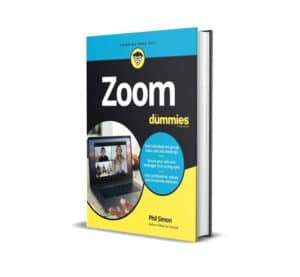 You can write a whole book about Zoom?
Even behind her mask, the woman’s voice was unmistakably incredulous—and, to be fair, she was hardly the first person to ask me that question.
By way of background, I visited a local bank the other day. I had to sit down with a manager to talk about one of my accounts. The fiftyish woman asked me what I did for a living. As usual, I answered that I wore a few hats, but for the time being I primarily label myself as a writer, trainer, and speaker.
Ostensibly impressed, she asked about my books and I told her that Zoom For Dummies was my latest. Like more than 300 million other people, she uses Zoom—but only for attending meetings.
Hence her question at the beginning of this post.
Without overwhelming her, I briefly explained1 to her that simple meetings represented just the tip of Zoom’s iceberg. The 400-page book easily could come in at twice that length given Zoom’s robust set of features. She seemed genuinely intrigued and responded that she’d like to open up my brain and see what’s inside.
While that wasn’t not possible, I mentioned that Zoom For Dummies was the closest thing. I suspect that she’ll be buying a copy of book.
Simon Says: Zoom lets you do far more than just hold simple meetings.
It’s an understandable misconception, but Zoom is so much more than just a better version of Webex. I’ll bet that Zoom For Dummies helps many of convince dabblers of Zoom’s power and ease of use.
Feedback
What say you?
The post Zoom Education at the Bank appeared first on Phil Simon.
July 23, 2020
Thoughts on Best-Selling Authors
Now that Zoom For Dummies is out, I suppose that I can claim that I’m a best-selling author.
It’s not hard, as long as I put my ethics on hold. I only need to my limit definition of best-selling author to a specific category on a popular website, as I’ve done below.
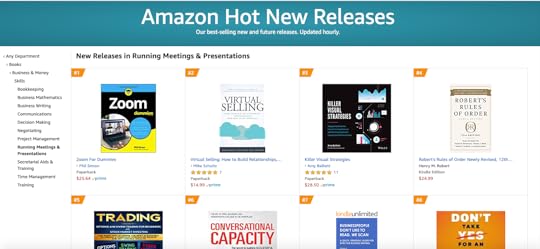
Sadly, plenty of authors don’t even do that much. That is, they prominently make this specious claim without a scintilla of proof. Here is one of them. Trust me: When it comes to book sales, this particular individual is no Michael Crichton, Michael Lewis, or Malcom Gladwell.
Not even close.
Simon Says
Look, I’m happy that Zoom For Dummies is finding an immediate audience. Seriously. You’ll never hear me claim otherwise. In fact, the promise of my two new books heavily influenced my decision to leave ASU a few months ago.
Still, climbing to the top of a niche category is a far cry from landing on the New York Times best-seller list. If Zoom For Dummies organically sells tens of thousands of copies and my BookScan numbers reflect that fact, then I’ll reconsider my stance. Until then, I’ll proudly go old school. I won’t make questionable claims about my book sales.
And I’ll sleep just fine at night.1 There’s more than enough dishonesty and shading of the truth these days.
Feedback
What say you?
The post Thoughts on Best-Selling Authors appeared first on Phil Simon.
July 22, 2020
Publication of Zoom For Dummies
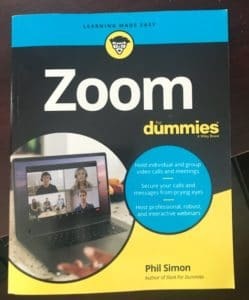 I’m pleased to announce the publication of my tenth book: Zoom For Dummies.
Read an excerpt here.
Thoughts
Interesting backstory on this one. Given how quickly Zoom exploded, my acquisitions editor was keen on bringing Zoom For Dummies to market quickly.
I was up for the challenge, but there were other moving parts. Specifically, Zoom was rebuilding1 its security as I was writing the book. We’re not taking about basic UI changes here. To this end, I had to juggle a bunch of balls. #firstworldproblems
I hope that you’ll check it out.
The post Publication of Zoom For Dummies appeared first on Phil Simon.
July 21, 2020
Zoom Tip #4: Creating a New User Role
Users on premium Zoom plans can take advantage of user roles. In a nutshell, roles allow companies to segment responsibilities. Case in point: An organizational owner or admin can do things that regular users cannot. Imagine if every employee could upgrade or downgrade services or change account-wide settings.But what if Zoom’s three native roles don’t cut it?
In this quick video, I demonstrate how to add a new user role: reporting analyst.
The post Zoom Tip #4: Creating a New User Role appeared first on Phil Simon.
July 18, 2020
Why I’m Psyched about mmhmm
For years I’ve railed against ugly and inefficient slides and decks.
I’m talking about monstrosities such as this one:
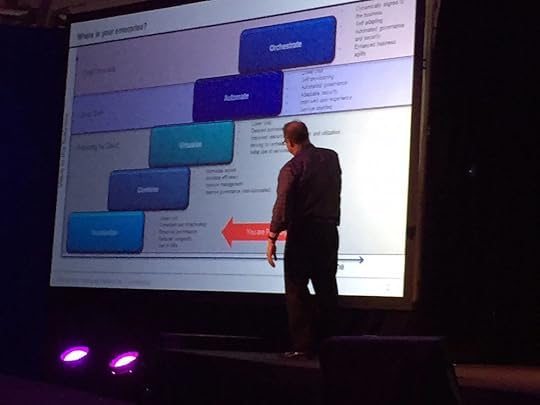
Somewhere in Vegas no one is listening.
If you think that few people in attendance were paying attention to this speaker, trust your instincts.
Many people tolerate awful slides because they’re used to them.
 That’s not to say, though, that you can’t can spruce up your slides. I’m a big fan of simple animations. You can use fewer bullet points. Videos are also easy to insert. If you really want to present in a different way, then Prezi is an interesting option—although I have found that it can cause motion sickness. For its part, Loom lets people record simple videos like this one.
I’d wager that, for people of a certain age, the types of presentations that they give haven’t changed much over the past 20 years.
Enter mmhmm
The possibilities are limitless. I’m frothing at the mouth.
Against this backdrop, I’m particularly excited about mmhmm. I envision being able to give talks, presentations, and lectures à la John Stewart, John Oliver, or Hasan Minhaj. Professors can engage their students far better than they currently do, especially when giving remote classes. (To be fair, I expect many if not most of them to resist mmhmm and its ilk.)
On a personal level, I could see redoing a few of my Udemy courses. I’d use it for training purposes. The possibilities are limitless. Think Zoom virtual backgrounds on steroids. I’m frothing at the mouth.
Check out a preview of it below.
Oh, and mmhmm works with Zoom, YouTube, and other videoconferencing services.1
Simon Says: Thanks to mmhmm, we will be able to create more engaging presentations.
I’ve been searching for a tool like this for years. Even if mmhmm sputters, expect Microsoft, Cisco, Facebook, Zoom, and other heavyweights to take notice.
This. Is. A. Big. Deal.
Feedback
What say you?
The post Why I’m Psyched about mmhmm appeared first on Phil Simon.
July 16, 2020
Excerpt from Zoom For Dummies
Wiley has let me post an excerpt of Zoom For Dummies. Enjoy.

The post Excerpt from Zoom For Dummies appeared first on Phil Simon.