
Inu Etc's Blog, page 15
June 3, 2023
Can We Do Freelancing on a Mobile Phone? (A Comprehensive Guide)
Do you want to start freelancing but are worried about having a laptop or computer?
Only some people who want to start freelancing are financially enough secure to buy a lavish laptop or computer. There is a breathtaking notification for you…
A smartphone is enough to start freelancing if it is challenging for you to afford an expensive laptop or computer. You can easily learn freelancing skills on a mobile phone and then do freelancing on the same device.
How can I do freelancing on a mobile phone?
Which skills do I need to learn for freelancing on a mobile phone?
Do I need to purchase a laptop or PC?
Well, if you want to get the answers to all these queries in great detail, you have come to the right place. In this article, we will discuss how a mobile phone could fulfill the conditions to start freelancing and help you make money to a great extent.
Freelance Projects You Can Do on Your Mobile PhoneRelated post: Freelancing for Beginners – The Ultimate Guide to Freelancing in 2023
There are some freelancing jobs you can do on your mobile phone.
Content Writing Social Media Managing Graphic Designing Online TeachingLet’s talk about how you can perform these freelancing jobs on a mobile phone.
Content WritingContent writing is a job in which you have to convey the message of the brand, product, or service to the audience in written form using different writing techniques. The purpose of content writing is digital marketing.
Content writing is categorized into informational content and marketing content.
Informational content intends to provide knowledge about a particular topic or a solution to a problem to an audience. Marketing content intends to provide knowledge about a product, service, or business to convert leads.You can do content writing on a mobile phone. You can write any type of content using your mobile phone. Whether it is service page content, website content, articles, blog posts, or social media ad copies, you can write content on your mobile phone.
All you need are content writing skills and some apps to write your content. The good news is that you can easily install some writing apps from the Play Store for free. Here are some amazing writing apps you need to install on your mobile phone.
MS Word WPS Office Google Docs MS WordIt is the perfect app for content writers to use on a mobile phone for writing, reviewing, editing, and creating documents for their projects.
Install MS Word on your mobile phone. Click here
WPS OfficeWPS is another app you can use as a content writer for creating, editing, and sharing documents, presentations, and spreadsheets with your clients.
Install WPS Office on your mobile phone. Click here
Google DocsJust like MS Word, Google Docs is used for creating and editing text documents. It tracks the changes you make and undoes anything you need to.
Install Google Docs on your mobile phone. Click here
Social Media ManagementSocial media management is one of the practically easiest freelance jobs you can do using your mobile phone. Building the presence of a brand or company on social media, formulating strategies to increase followers, producing engaging content regularly to keep their audience engaged, inspecting analytics, and forming alliances with influencers are the duties of a social media manager.
You can use different apps for managing the social media presence of companies. Here are the top 2 apps you can use for social media management on your phone.
CrowdFire Hootsuite CrowdfireCrowdfire helps you schedule or publish your posts on your page at the suggested time. You can reschedule your content, which saves a lot of time.
Install Crowdfire by clicking here.
HootsuiteHootsuite is well-known for scheduling, monitoring, and analytics. It enables you to stay on top of your social media efficiently.
Install Hootsuite by clicking here.
Graphics DesigningIt’s interesting that while doing graphic design on a mobile phone, you need not use complex desktop applications like Corel Draw, Adobe Photoshop, and Adobe Illustrator. There are some apps through which you can design beautiful posts, logos, text, and much more.
The top 3 apps that you can use for your graphic designing project on a mobile phone are as follows
CanvaAdobe Spark Desygner CanvaCanva is one of the easiest apps for graphic designers. It gives you the chance to design professional posters, presentations, images, flyers, business cards, certificates, and much more.
It gives you a variety of professional templates. You can use these templates to create the desired design you need for your project by retouching and editing.
Adobe SparkIt is an application used by graphic designers. It is also available on the Google Play Store for mobile phones. It allows you to make social graphics, simple web pages, etc.
DesygnerDesygner is similar to Canva.
You can create visual content like posters and prints by using the Desygner app.
Online TeachingYou can educate others using your mobile phone. All you need is a good internet connection and an area of expertise. After finding some students, you can teach them a relevant subject or a skill online.
You can make a gig about teaching a particular subject on Fiverr. You can find international students there. Also, you can use LinkedIn to showcase yourself as a teacher.
You can make YouTube videos to teach the relevant subject or skill. You can teach math, English, coding, science, biology, or whatever you are skilled in. Students from all over the world will have access to your YouTube video. YouTube will pay you based on the traffic you have on your channel.
There are certain apps you can use to teach students:
Zoom UdemyGoogle MeetZoomYou can search out the students on your own and teach them using an application called Zoom. It allows you to schedule your class, and you can record your class. UdemyUdemy is the best teaching platform. It is quick and free to launch a course on Udemy. There are no approval problems on Udemy. You don’t need any approval. Although verification is necessary.
Google MeetIt’s like Zoom. You can conduct real-time meetings with your students using the app, Gmail, or your browser. Using Google Meet you can share your desktop screen and presentations with your students.
Freelancing Websites You Can Use on Your PhoneThe purpose of freelancing websites is to connect freelancers and clients. For your convenience, these freelancing websites have a mobile app that you can install on your phone. You can easily install the applications of the following freelancing sites on your mobile phone.
UpworkFiverrFreelancerPeople Per HourAny other freelancing website.These are the simple steps you have to follow to start freelancing on these apps:
Set up your profile Add your portfolio Start applying for the JobsYou can easily hunt for clients on these freelancing sites using your mobile phone. A laptop is not essential to using these freelancing platforms.
Pros and Cons of Freelancing on a Mobile Phone
There are some pros and cons to freelancing on a mobile phone. Let’s discuss in briefly
Pros: You are not required to carry your laptop with you at all times. You can begin working on your project while still in the restaurant by using your mobile phone. By having the apps of freelancing websites on your mobile phone, you can increase your response rate. You can immediately give a response to the clients whenever you hear the notification sound. Cons: While using your mobile phone, you can easily get off track. A phone call or text message from a friend can easily cause you to lose focus on your project. Moreover, mobile apps give you limited access to their features.For Example,
If you are a graphic designer, the Canva website provides you with a large range of features on a laptop or PC, whereas the Canva app has fewer features to create visuals.If you are a content writer, you may not easily switch to another website while researching for your article or blog.FAQsCan I really do freelancing work on a mobile phone?Absolutely! Freelancing work can definitely be done using a mobile phone. In fact, there are numerous freelancers who effectively handle their projects, interact with clients, and accomplish tasks all through their mobile devices. The key lies in selecting the appropriate tools and applications that can enhance your productivity.
What are the essential tools and apps required to stay focused while freelancing on a mobile phone?When freelancing on your mobile phone, use productivity apps with task lists, reminders, and calendars to manage your time effectively. Set clear goals, prioritize tasks, and create a dedicated workspace. Establish a schedule, minimize distractions, and regularly review and update your progress to stay on track.
Are there any limitations or challenges to consider when freelancing on a mobile phone?Yeah, freelancing on a mobile phone does have its fair share of limitations and challenges, you know? The smaller screen size can make it a bit trickier to tackle complex tasks or projects that require design work. And let’s not forget about the limited processing power and storage capacity compared to a computer—that can definitely be a factor. Plus, spending a lot of time on your phone can strain your eyes and make you feel uncomfortable. Moreover, the number of services that you can offer through mobile is limited.
Can I earn a decent income by freelancing on my mobile phone?Absolutely! It’s totally possible to make a decent income by freelancing using just your mobile phone. In fact, there are plenty of freelancers out there who have managed to create flourishing careers and businesses solely through their mobile devices.
However, how much you can earn will ultimately depend on various factors, such as your skills, expertise, the demand for the services you offer, and how effectively you market yourself. So, it’s crucial to focus on honing your skills, finding your niche, and promoting your services to maximize your earning potential.
Final Thoughts: Can We Do Freelancing on a Mobile Phone? (Complete Guide)You should not be broken if you are not financially secure enough to purchase a laptop or PC. Instead of being disheartened, you should learn those freelancing skills that you can offer on your mobile phone easily.
As a newbie freelancer, you can use your mobile phone for your work but don’t cling to it forever. When you start generating your own income, you should invest in a laptop or a PC to grow financially as a freelancer.
This is a guest post written by Mahrukh Rana. If you want to submit guest posts to Inuidea, check out the guest post guidelines for Inuidea.com.
If you have any questions or if you wanna work with me, feel free to contact me. I’m always available to help young hustlers like you!
The post Can We Do Freelancing on a Mobile Phone? (A Comprehensive Guide) appeared first on Inuidea.com.


Can We Do Freelancing on a Mobile Phone? (Complete Guide)
Do you want to start freelancing but are worried about having a laptop or computer? Only some people who want to start freelancing are secure financially enough to buy a lavish laptop or computer. There is a breathtaking notification for you…
A smartphone is enough to start freelancing if it is challenging for you to afford an expensive laptop or computer. You can easily learn freelancing skills on a mobile phone and then do freelancing on the same device.
How can I do freelancing on a mobile phone?
Which skills do I need to learn for freelancing on a mobile phone?
Do I need to purchase a laptop or PC?
Well, if you want to get the answers to all these queries in great detail, you have come to the right place. In this article, we will discuss how a mobile phone could fulfill the conditions to start freelancing and help you make money to a great extent.
Freelance Projects You Can Do on Your Mobile PhoneRelated post: Freelancing for Beginners – The Ultimate Guide to Freelancing in 2023
There are some freelancing jobs you can do on your mobile phone.
Content Writing Social Media Managing Graphic Designing Online TeachingLet’s talk about how you can perform these freelancing jobs on a mobile phone.
Content WritingContent writing is a job in which you have to convey the message of the brand, product, or service to the audience in written form using different writing techniques. The purpose of content writing is digital marketing.
Content writing is categorized into informational content and marketing content.
Informational content intends to provide knowledge about a particular topic or a solution to a problem to an audience. Marketing content intends to provide knowledge about a product, service, or business to convert leads.You can do content writing on a mobile phone. You can write any type of content using your mobile phone. Whether it is service page content, website content, articles, blog posts, or social media ad copies, you can write content on your mobile phone.
All you need are content writing skills and some apps to write your content. The good news is that you can easily install some writing apps from the Play Store for free. Here are some amazing writing apps you need to install on your mobile phone.
MS Word WPS Office Google Docs MS WordIt is the perfect app for content writers to use on a mobile phone for writing, reviewing, editing, and creating documents for their projects.
Install MS Word on your mobile phone. Click here
WPS OfficeWPS is another app you can use as a content writer for creating, editing, and sharing documents, presentations, and spreadsheets with your clients.
Install WPS Office on your mobile phone. Click here
Google DocsJust like MS Word, Google Docs is used for creating and editing text documents. It tracks the changes you make and undoes anything you need to.
Install Google Docs on your mobile phone. Click here
Social Media ManagementSocial media management is one of the practically easiest freelance jobs you can do using your mobile phone. Building the presence of a brand or company on social media, formulating strategies to increase followers, producing engaging content regularly to keep their audience engaged, inspecting analytics, and forming alliances with influencers are the duties of a social media manager.
You can use different apps for managing the social media presence of companies. Here are the top 2 apps you can use for social media management on your phone.
CrowdFire Hootsuite CrowdfireCrowdfire helps you schedule or publish your posts on your page at the suggested time. You can reschedule your content, which saves a lot of time.
Install Crowdfire by clicking here.
HootsuiteHootsuite is well-known for scheduling, monitoring, and analytics. It enables you to stay on top of your social media efficiently.
Install Hootsuite by clicking here.
Graphics DesigningIt’s interesting that while doing graphic design on a mobile phone, you need not use complex desktop applications like Corel Draw, Adobe Photoshop, and Adobe Illustrator. There are some apps through which you can design beautiful posts, logos, text, and much more.
The top 3 apps that you can use for your graphic designing project on a mobile phone are as follows
CanvaAdobe Spark Desygner CanvaCanva is one of the easiest apps for graphic designers. It gives you the chance to design professional posters, presentations, images, flyers, business cards, certificates, and much more.
It gives you a variety of professional templates. You can use these templates to create the desired design you need for your project by retouching and editing.
Adobe SparkIt is an application used by graphic designers. It is also available on the Google Play Store for mobile phones. It allows you to make social graphics, simple web pages, etc.
DesygnerDesygner is similar to Canva.
You can create visual content like posters and prints by using the Desygner app.
Online TeachingYou can educate others using your mobile phone. All you need is a good internet connection and an area of expertise. After finding some students, you can teach them a relevant subject or a skill online.
You can make a gig about teaching a particular subject on Fiverr. You can find international students there. Also, you can use LinkedIn to showcase yourself as a teacher.
You can make YouTube videos to teach the relevant subject or skill. You can teach math, English, coding, science, biology, or whatever you are skilled in. Students from all over the world will have access to your YouTube video. YouTube will pay you based on the traffic you have on your channel.
There are certain apps you can use to teach students:
Zoom UdemyGoogle MeetZoomYou can search out the students on your own and teach them using an application called Zoom. It allows you to schedule your class, and you can record your class. UdemyUdemy is the best teaching platform. It is quick and free to launch a course on Udemy. There are no approval problems on Udemy. You don’t need any approval. Although verification is necessary.
Google MeetIt’s like Zoom. You can conduct real-time meetings with your students using the app, Gmail, or your browser. Using Google Meet you can share your desktop screen and presentations with your students.
Freelancing Websites You Can Use on Your PhoneThe purpose of freelancing websites is to connect freelancers and clients. For your convenience, these freelancing websites have a mobile app that you can install on your phone. You can easily install the applications of the following freelancing sites on your mobile phone.
UpworkFiverrFreelancerPeople Per HourAny other freelancing website.These are the simple steps you have to follow to start freelancing on these apps:
Set up your profile Add your portfolio Start applying for the JobsYou can easily hunt for clients on these freelancing sites using your mobile phone. A laptop is not essential to using these freelancing platforms.
Pros and Cons of Freelancing on a Mobile Phone
There are some pros and cons to freelancing on a mobile phone. Let’s discuss in briefly
Pros: You are not required to carry your laptop with you at all times. You can begin working on your project while still in the restaurant by using your mobile phone. By having the apps of freelancing websites on your mobile phone, you can increase your response rate. You can immediately give a response to the clients whenever you hear the notification sound. Cons: While using your mobile phone, you can easily get off track. A phone call or text message from a friend can easily cause you to lose focus on your project. Moreover, mobile apps give you limited access to their features.For Example,
If you are a graphic designer, the Canva website provides you with a large range of features on a laptop or PC, whereas the Canva app has fewer features to create visuals.If you are a content writer, you may not easily switch to another website while researching for your article or blog.FAQsCan I really do freelancing work on a mobile phone?Absolutely! Freelancing work can definitely be done using a mobile phone. In fact, there are numerous freelancers who effectively handle their projects, interact with clients, and accomplish tasks all through their mobile devices. The key lies in selecting the appropriate tools and applications that can enhance your productivity.
What are the essential tools and apps required to stay focused while freelancing on a mobile phone?When freelancing on your mobile phone, use productivity apps with task lists, reminders, and calendars to manage your time effectively. Set clear goals, prioritize tasks, and create a dedicated workspace. Establish a schedule, minimize distractions, and regularly review and update your progress to stay on track.
Are there any limitations or challenges to consider when freelancing on a mobile phone?Yeah, freelancing on a mobile phone does have its fair share of limitations and challenges, you know? The smaller screen size can make it a bit trickier to tackle complex tasks or projects that require design work. And let’s not forget about the limited processing power and storage capacity compared to a computer—that can definitely be a factor. Plus, spending a lot of time on your phone can strain your eyes and make you feel uncomfortable. Moreover, the number of services that you can offer through mobile is limited.
Can I earn a decent income by freelancing on my mobile phone?Absolutely! It’s totally possible to make a decent income by freelancing using just your mobile phone. In fact, there are plenty of freelancers out there who have managed to create flourishing careers and businesses solely through their mobile devices.
However, how much you can earn will ultimately depend on various factors, such as your skills, expertise, the demand for the services you offer, and how effectively you market yourself. So, it’s crucial to focus on honing your skills, finding your niche, and promoting your services to maximize your earning potential.
Final Thoughts: Can We Do Freelancing on a Mobile Phone? (Complete Guide)You should not be broken if you are not financially secure enough to purchase a laptop or PC. Instead of being disheartened, you should learn those freelancing skills that you can offer on your mobile phone easily.
As a newbie freelancer, you can use your mobile phone for your work but don’t cling to it forever. When you start generating your own income, you should invest in a laptop or a PC to grow financially as a freelancer.
This is a guest post written by Mahrukh Rana. If you want to submit guest posts to Inuidea, check out the guest post guidelines for Inuidea.com.
If you have any questions or if you wanna work with me, feel free to contact me. I’m always available to help young hustlers like you!
The post Can We Do Freelancing on a Mobile Phone? (Complete Guide) appeared first on Inuidea.com.
May 27, 2023
WP Rocket Review: Boost Your Website’s Performance and Speed
The performance of a website plays a crucial role in retaining and attracting visitors in today’s digital age. Slow-loading websites are bad for SEO, as they often lead to higher bounce rates, decreased user engagement, and lower search engine rankings.
To address this issue, bloggers, website owners, and developers turn to caching plugins, with WP Rocket being one of the most popular choices.
In this comprehensive WP Rocket review, I will discuss its features, benefits, and overall effectiveness in improving website speed and performance.
What is WP Rocket?WP Rocket is a powerful caching plugin designed to optimize website speed and performance for WordPress users.
With its user-friendly interface and intuitive setup process, WP Rocket offers an effective solution for beginners and advanced users alike.
It combines various caching techniques such as page caching, browser caching, and database optimization to enhance the loading speed of your website.
WP Rocket Key FeaturesThe first thing you may wonder is what does WP Rocket have to offer?
Well, there are a lot of features that will help you boost your website’s performance and speed!
Page Caching Cache Preloading Sitemap Preloading GZip Compression Browser Caching CloudFlare Compatibility CDNDNS Prefetching Mobile Detection Multisite Compatibility eCommerce Friendly (WooCommerce)Multilingual Compatibility Import/ExportDeveloper FriendlyDatabase Optimization Google Fonts Optimization Remove Query Strings From Static ResourcesLazy LoadingMinification and Concatenation Defer JS LoadingTake a quick look at some of my favorite features of WP Rocket:
a. Page CachingWP Rocket creates static HTML files of your web pages, reducing the need for database queries and server processing, leading to faster load times.
b. Browser CachingBy instructing the visitor’s browser to cache static resources like CSS, JavaScript, and images, WP Rocket helps in subsequent visits, where the browser retrieves the stored files rather than downloading them again.
c. GZIP CompressionWP Rocket enables GZIP compression, which significantly reduces the size of files transferred between the server and the visitor’s browser, resulting in faster load times.
d. Database OptimizationWP Rocket allows you to optimize your WordPress database by cleaning up unnecessary data, reducing its size, and improving website performance.
e. Lazy LoadingWith WP Rocket’s lazy loading feature, images, and videos are loaded only when the visitor scrolls down to the specific section, saving bandwidth and reducing the initial page load time.
f. Minification and ConcatenationWP Rocket minifies and combines CSS and JavaScript files, reducing the number of HTTP requests and improving website speed.
Easy Setup and ConfigurationOne of the standout features of WP Rocket is its user-friendly setup process.
After installation, you can activate the plugin with just a few clicks. The default settings will apply 80% of web performance best practices right away and are optimized for most websites, allowing even novices to benefit from the improved performance without making any additional changes.
However, WP Rocket provides extensive customization options for advanced users, enabling them to fine-tune the plugin’s settings according to their specific requirements.
Compatibility and SupportWP Rocket is designed to work seamlessly with most WordPress themes, plugins, and hosting providers. It ensures compatibility with popular e-commerce platforms, content delivery networks (CDNs), and multilingual plugins. The WP Rocket team also offers excellent customer support through their website, including a comprehensive knowledge base, FAQs, and ticket-based assistance.
Pricing and LicensingWP Rocket operates on a subscription-based pricing model. They offer three license options: Single, Plus, and Infinite.
The Single license allows you to use WP Rocket on one website, while the Plus plan allows you to use WP Rocket on three websites and Infinite licenses provide support for unlimited websites.
You will receive updates and support for one year as part of your subscription. They offer discounted rates on renewals. It provides excellent value for money, considering the significant performance improvements it offers.
Final Thoughts: WP Rocket Review: Boost Your Website’s Performance and SpeedWith its simple setup process, broad functionality, and observable speed benefits, WP Rocket is a reliable and efficient caching plugin for WordPress websites that enables website owners to make their sites faster and more user-friendly.
Whether you are new to WordPress or have years of experience, WP Rocket offers a user-friendly interface and flexible customization options that make it a top choice in the world of caching plugins.
Overall, WP Rocket improves website performance, reduces load times, and improves user experience.
For anyone wishing to speed up and enhance their WordPress site, this plugin is a great investment due to its extensive capabilities, simplicity of use, and compatibility with different platforms.
If you loved what you read, would you be able to buy me a cup of coffee? It’s okay if you can’t right now.
If you have any questions or if you wanna work with me, feel free to contact me. I’m always available to help young hustlers like you @InuEtc on Instagram.
Keep hustling!
The post WP Rocket Review: Boost Your Website’s Performance and Speed appeared first on Inuidea.com.
April 25, 2023
How to Use Tailwind Ghostwriter Blog Creation Wizard (2023)
If you want to overcome writer’s block or want to save time creating content, you can experiment with AI tools.
Google has finally admitted that it doesn’t mind AI-generated content for blog posts and articles, as long as the content is useful, high-quality, people-first, and well-crafted.
With its Ghostwriter AI toolbox, Tailwind offers 40 specialized AI tools for creating all types of content, whether it’s LinkedIn posts, SEO, or social media captions.
Now, they even have a new Blog Creation Wizard feature that will take you from a post idea to a full blog post in just a few minutes.
This post contains affiliate links . I may receive a commission for purchases made through these links. This commission comes at no extra cost to you. Also, I don’t recommend anything that I don’t believe in.
What is Tailwind?A great marketing tool that started as a Pinterest scheduling tool, Tailwind now offers Instagram scheduling, Facebook scheduling, social media content creation, link-in-bio tools, email marketing, and their Copilot marketing plan to help you stay on top of everything. They are now expanding into AI-generated content with Tailwind Ghostwriter.
Tailwind has a forever free plan that you can sign up for without entering your credit card details.
What is the Blog Creation Wizard?The Blog Creation Wizard is a powerful AI tool included in Tailwind’s Ghostwriter Toolbox that will help you turn your ideas into blog posts in just a few minutes.
You can create a blog post quickly and easily with the Blog Creation Wizard. You just have to enter your article idea, and it will give you five titles and summaries to choose from, create an editable outline from your selection, and then write the entire blog post while you sit back and watch.
How To Use the Blog Creation Wizard to Write a Blog PostYou can start writing a blog post with the Blog Creation Wizard by selecting the From Idea to Full Article tool from Tailwind (dashboard) AI Labs.

Enter your article or blog post’s topic in the Blog Creation Wizard. Provide as much detail as you can to assist the AI in generating the best content. Then click Generate Titles.
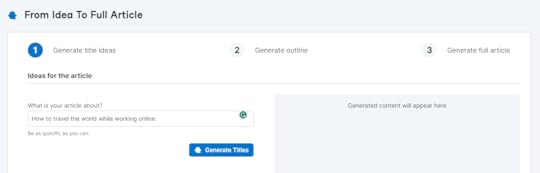
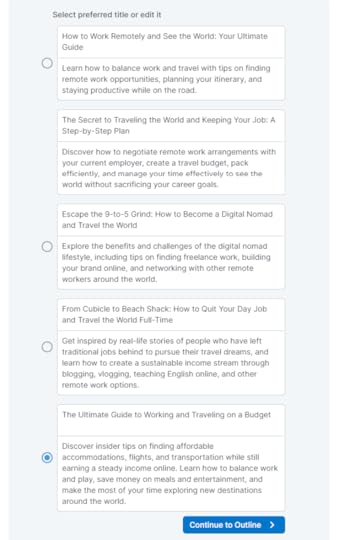
You’ll get 5 article titles and a short description, almost like an introduction paragraph or a meta description, so you can see what direction the AI would take.
In case of need, you can modify the options. Select your favorite title and click Continue to Outline.
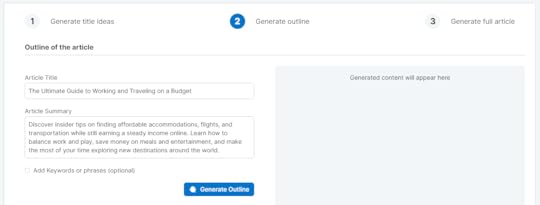
Here, you will find the article title and summary, both of which are editable. You can include keywords or phrases if you wish and click Generate Outline.
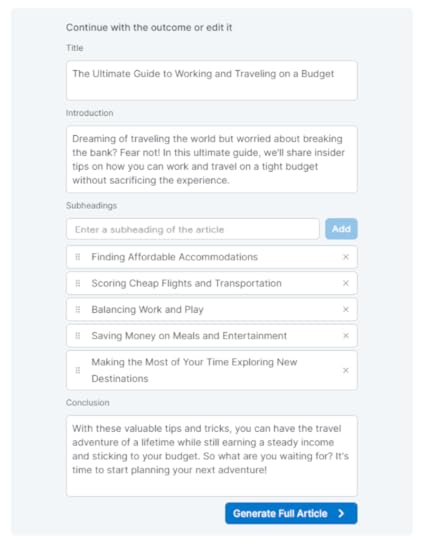
The panel on the right will generate an outline. Here, you can edit the title, introduction, subheadings, and the conclusion. If you’re not happy with the direction the Blog Creation Wizard took, just move to the left panel to edit and Re-Generate the Outline. Continue to the next step by clicking on Generate Full Article if you’re satisfied with the outline.
Watch the Blog Creation Wizard write your article word-by-word as you click Generate Full Article. You will end up with a 1,000-word article. In case you don’t like it, go to the left panel and click Re-Generate Article.
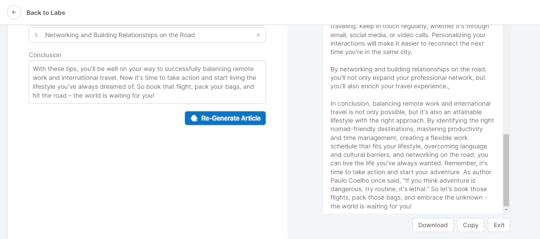
Also, you can make edits within the Blog Creation Wizard. If you do like it, you can copy or download the content to publish it wherever you want. Obviously, you should take the time to edit the article to ensure that it fits your style of writing, as well.
How to Get Access to Tailwind Blog Creation WizardJoin Tailwind’s FREE plan to gain access to Tailwind Ghostwriter and the Blog Creation Wizard. This feature is available for all plan levels, but each level provides a different number of credits.
Tailwind currently has 4 pricing plans. On the Free plan, you’ll get 10 Ghostwriter Credits per month. With Pro ($12.99 per month), you’ll get 50 credits. On Advanced ($19.99 per month), you’ll get 250 credits. And on Max ($39.99 per month), you’ll get 500 credits.
Final Thoughts: How to Use Tailwind Ghostwriter Blog Creation WizardIt is easier, faster, and more efficient for content creators to create blog posts with Tailwind Ghostwriter Blog Wizard.
However, I highly recommend that you carefully read the AI-generated blog post and make any necessary edits to fit your tone and style before publishing it.
While Tailwind’s Ghostwriter does a pretty good job of generating natural-sounding copy, some of this content can be repetitive, so it’s a good idea to add your own experience and expertise to make the article as unique as possible.
This is a sponsored post by Tailwind. I received compensation but this post reflects my personal opinion about the information provided by the sponsor. Please read my disclaimer for more information.
If you loved what you read, would you be able to buy me a cup of coffee? It’s okay if you can’t right now.
If you have any questions or if you wanna work with me, feel free to contact me. I’m always available to help young hustlers like you @InuEtc on Instagram.
Keep hustling!
The post How to Use Tailwind Ghostwriter Blog Creation Wizard (2023) appeared first on Inuidea.com.
April 11, 2023
The Pros and Cons of Digital Nomad Life, Freelancing, and Remote Job
The digital nomad lifestyle has gained popularity over the years, especially since the COVID-19 pandemic. One of my most popular blog posts is “How to become a digital nomad and travel the world.”
Many people have discovered the freedom and flexibility of remote work and are now taking advantage of it in order to live an adventurous and travel-focused life.
Pieter Levels, the founder of Nomad List, predicted that there’ll be an estimated 1 billion digital nomads roaming the planet by 2035.
However, like any lifestyle, the digital nomad lifestyle has its pros and cons.
In this blog post, I will discuss the pros and cons of the digital nomad lifestyle, including the differences between remote jobs and freelancing.
Let’s dive right in.
What is a digital nomad?A digital nomad is someone who uses technology to work remotely and live a location-independent lifestyle. Most digital nomads work in fields such as graphic design, programming, writing, or digital marketing. Digital nomads can work from anywhere in the world, as long as they have access to the internet connection.
Pros of the Digital Nomad Lifestyle1. Location IndependenceA significant benefit of being a digital nomad is the ability to work from anywhere in the world.
You can work from your home office, a coworking space, a hotel room, a public library, a coffee shop, or even a beach in Bali.
As long as you have access to an internet connection and a laptop, you can work from anywhere.
Having a digital nomad lifestyle allows you to travel and explore new places while still earning a living.
2. Increased FlexibilityOne of the best things about remote work is that it offers so much flexibility.
You can set your own schedule, work at a pace that suits you, and take breaks whenever necessary.
By having such freedom, you can become more productive and satisfied at work.
3. Cost Savings
The digital nomad lifestyle can also save you money.
As a freelancer, you don’t have to worry about the costs associated with running a physical office or commuting to work if you work remotely.
You may also be able to save money on rent and other living expenses by moving to an area where the rent is more affordable.
4. Increased Job OpportunitiesFreelancing and remote work have created new job opportunities for people around the world.
You can work for individuals and companies located in other countries, collaborate with other freelancers on projects, or find work through online job boards.
The rise of the gig economy has not only created numerous short-term and project-based jobs that offer greater flexibility and variety in work, but it has also opened up opportunities for individuals to pursue their passions and interests through freelance work.
5. Improved Work-Life BalanceThe digital nomad lifestyle allows you to blend your work and personal life in a way that suits you best.
The flexibility to work outside of traditional office hours allows you to take breaks when you wish to spend time with your family or explore a new city.
Achieving this balance can increase your happiness and fulfillment in both your personal and professional life.
Cons of the Digital Nomad Lifestyle1. Lack of StabilityThe lack of stability is one of the biggest drawbacks of the digital nomad lifestyle.
There is no guarantee that you will always have a steady stream of work or income.
This lifestyle may cause stress and anxiety, and may not be ideal for you if you prefer a more structured lifestyle.
2. Loneliness and IsolationSolo travel and working alone can be isolating, especially if you’re in a foreign land where nobody knows you.
When you’re constantly on the go, it can be difficult to make new friends.
This loneliness may have a negative effect on mental health and may not be suitable for everyone.
3. Distractions and InterruptionsRemote work can be full of distractions and interruptions.
If you work from a coffee shop or coworking space, noise and other distractions may affect your productivity.
Also, when you travel, there may be unexpected interruptions, such as flight delays or cancellations, that can disrupt your daily routine and work schedule.
4. Self-Motivation and DisciplineIt is important to maintain self-motivation and discipline when you work remotely.
When you’re your own boss and don’t have a structured workplace, you’re more likely to get distracted or procrastinate.
5. Work-Life ImbalanceAlthough the digital nomad lifestyle can improve work-life balance, it can also lead to work-life imbalance.
Without clear boundaries between work and personal time, you can easily fall into the trap of working all the time.
This can lead to burnout and negatively impact your mental health and your personal relationships.
This post contains affiliate links . I may receive a commission for purchases made through these links. This commission comes at no extra cost to you. Also, I don’t recommend anything that I don’t believe in.
Freelancing Vs Remote jobsRemote jobs and freelance work are both forms of work that allow individuals to work remotely. For digital nomads, freelancing and remote jobs can offer a way to earn a living while traveling the world.
However, there are distinct differences between the two.
A freelancer can work on a project-by-project basis for various clients, while a remote worker can work full-time or part-time for a company from a location of their choice.
As a freelancer, you have more freedom and control over your schedule and workload, as well as the chance to work on a variety of projects and with various clients.
It is also important to note that the income and workload of freelancing can be unpredictable.
Read more: The ultimate guide to remote job – 7 remote companies to get a remote job and travel the world
Remote jobs, on the other hand, offer the stability of income and the benefit of working for a company.
Remote jobs offer career development opportunities within a company, as well as health insurance and retirement plans.
The downside, though, is that remote jobs often require more commitment and may be less flexible in terms of schedule and work tasks.
Choosing between freelancing and remote jobs as a digital nomad depends on personal preferences and circumstances. Some may prefer the freedom and variety of freelancing, while others may prioritize the stability and benefits of a remote job.
No matter which option you choose, both offer remote work opportunities and the ability to live and work anywhere.
SafetyWing Nomad InsuranceRead more: The pros and cons of freelancing
It’s essential for digital nomads to ensure that they have the appropriate health insurance.
However, traditional health insurance plans may not be suitable for digital nomads, because they often require a permanent address and do not cover travel-related medical expenses.
SafetyWing is a travel medical insurance that was created by nomads for nomads. You can purchase a policy even if your trip has already started, and pause and resume coverage with flexibility. You’re covered in 185 countries and you don’t need to let them know about your itinerary in advance. It’s the perfect solution for people like me who are always on the move and never quite sure where we’ll be next month. For more information or to sign up, visit their website at SafetyWing.com
Now It’s Your Turn!Hey, I hope you enjoyed reading this blog post about the pros and cons of digital nomad life, freelancing, and remote job.
Now I’d like to hear from you:
How do you feel about the digital nomad lifestyle?
Let me know in the comment section below right now.
Also, share this post with your friends and aspiring digital nomads who would like to learn more about the digital nomad lifestyle.
If you loved what you read, would you be able to buy me a cup of coffee? It’s okay if you can’t right now.
If you have any questions or if you wanna work with me, feel free to contact me. I’m always available to help young hustlers like you @InuEtc on Instagram.
Keep hustling!
The post The Pros and Cons of Digital Nomad Life, Freelancing, and Remote Job appeared first on Inuidea.com.
March 22, 2023
How Outsourcing Can Put You Ahead of the Competition
As businesses strive to stay competitive in a fast-paced industry, outsourcing is becoming more and more popular. In order to concentrate on what they do best, firms might benefit from outsourcing some activities to outside contractors and freelancers.
This article explores how outsourcing can put businesses ahead of the competition.
How Competitive Advantage Can Be Achieved Through OutsourcingAccess To Specialized SkillsBusinesses may get specific expertise via outsourcing that might not be accessed internally. This is particularly true in industries that require highly specialized knowledge and expertise. By outsourcing, businesses can tap into a global pool of talent and experience, which can help them to stay ahead of their competition.
For example, a software development company can outsource specific coding tasks to a team of experts in a particular programming language or technology stack.
Cost SavingsOutsourcing can also result in significant cost savings for businesses. By outsourcing specific tasks, businesses can reduce the costs associated with recruiting, training, and retaining staff. Additionally, outsourcing can provide access to lower-cost labor markets, enabling businesses to save money without compromising quality.
For instance, a business may contract with a service provider in a nation with a cheaper cost of living to handle its customer service needs.
Flexibility And ScalabilityBusinesses may respond to shifting market circumstances with the scalability and adaptability provided by outsourcing. Businesses may concentrate on their core capabilities and react more swiftly to shifting market needs by outsourcing non-essential services.
Additionally, outsourcing can provide businesses access to additional resources, allowing them to scale up or down as required. For example, a retail company can outsource its e-commerce operations to a third-party provider during peak shopping seasons.
Improved Focus On Core CompetenciesOutsourcing non-core functions allow businesses to focus on their core competencies, which can help businesses differentiate themselves from their competition by providing superior products or services. Additionally, outsourcing can free up time and resources devoted to innovation, research, and development.
For instance, an app development firm may hire an outside firm to handle its payroll and accounting needs so that its employees can concentrate on creating new apps.
Access To Advanced TechnologyOutsourcing can provide businesses access to advanced technology that may be too expensive to implement in-house. To provide just one example, a new company may not yet be profitable enough to justify the purchase of costly equipment or software.
Nonetheless, they may hire a service provider with access to cutting-edge equipment to carry out these tasks on their behalf. This way, companies can keep up with the competition without having to spend much on technology.
Drawbacks of Outsourcing in a CompetitionCommunication Challenges
Working with a remote team can make communication more difficult, particularly if language or cultural barriers exist. This might result in miscommunications, delays, or errors that could affect your capacity to compete successfully.
Intellectual Property ConcernsOutsourcing may require sharing proprietary information or trade secrets with a third-party provider. If the provider does not have adequate security measures in place or is untrustworthy, this could lead to the theft of your intellectual property or other sensitive information.
Lack Of FlexibilityWhen you outsource work, you may be locked into a contract or agreement that limits your ability to pivot or make changes quickly. This could put you at a disadvantage if your competitors can respond to market changes more rapidly.
How to Face the Challenges While Outsourcing in a Competition?Clearly Define Your ObjectivesBefore outsourcing, it’s important to clearly understand your objectives and what you hope to achieve through outsourcing. By doing so, you may choose the ideal outsourcing partner and set clear expectations.
Choose The Right Outsourcing PartnerSelecting the right outsourcing partner is critical for success. Look for a provider with experience in your industry, a strong reputation for quality, and a proven track record of success.
Provide Feedback and RecognitionFeedback and recognition can help motivate the outsourcing provider and ensure continuous improvement. Recognize successes and provide constructive feedback on areas for improvement to help build a strong working relationship.
Outsourcing certain tasks, such as customer support through an answering service, can allow businesses to focus on their core competencies and gain a competitive advantage in their industry.
Final ThoughtsOutsourcing is becoming an increasingly popular method for businesses that are trying to remain competitive in order to become more efficient. By outsourcing specific tasks, businesses can access specialized skills, save costs, gain flexibility and scalability, improve focus on core competencies, and access advanced technology.
However, businesses must also be aware of the potential risks associated with outsourcing, such as language barriers, cultural differences, and data security issues. Businesses may decide if outsourcing is the best approach for their firm by evaluating the possible advantages and disadvantages of this tactic.
Keep hustling!
Thanks for reading this article.
If you loved what you read, would you be able to buy me a cup of coffee? It’s okay if you can’t right now.
If you have any questions or if you wanna work with me, feel free to contact me. I’m always available to help young hustlers like you @InuEtc on Instagram.
The post How Outsourcing Can Put You Ahead of the Competition appeared first on Inuidea.com.
March 15, 2023
How to Start an Online Fintech Business in 2023
You wish to start an online fintech business.
And why not?
After all, it is one of the most profitable industries in today’s digitally driven world
Capitalizing on this opportunity in the financial industry seems like the most natural choice.
Whether you’re an experienced financial professional or a tech-savvy entrepreneur, creating a successful online fintech business requires careful planning and innovative ideas.
In this blog post, we’ll explore all the essential aspects related to a fintech startup, including identifying your target market, choosing the right technology, etc.
So, if you’re prepared to shake up the financial industry and establish a successful online fintech venture, let’s get started!
What NOT to do 1. Do NOT Overlook Regulatory ComplianceThe fields of fintech and banking are subject to extensive regulation.
So for obvious reasons, it is essential to have a thorough understanding of this intricate sphere.
It includes regulatory bodies, laws, legal restrictions, and mandatory requirements. With the implementation of the GDPR in Europe or with the upcoming data protection law in India, these aspects have gained even more importance.
Fintech regulations may involve anti-money laundering (AML) policies or Know Your Customer (KYC) compliance requirements.
In addition, digital certificates and Adhaar authentication mechanisms may also be necessary.
It is important to consider that law can vary from country to country. Every region is governed by its own unique set of laws.
Therefore, knowing how to navigate the nuances of different legal systems should be your primary focus.
For example, countries such as Mexico and the UAE mandate that firms obtain specific market regulations for fintech licenses, whereas the United Kingdom requires standard licenses.
2. Fintech Subdomains Are ImportantThere are numerous subdomains you can explore some of which are mentioned below:
Data analysis and financial decision-makingCrowdfundingInsuretechLendingPayments and international money transfersFinancial products Cryptocurrencies and blockchain-based solutionsTrading and investmentsPersonal finance managementMobile bankingYour fintech product should also cater to a particular audience, such as a specific country or demographic group.
3. Ignoring Competition Is UnwisePro Tip: Do not put all your eggs in one basket at one time. Period. As an entrepreneur, focus on starting your fintech for the local market and then expand to the global market at a later stage if deemed necessary.
After selecting your niche, it’s absolutely important to research your competitors.
This will allow you to identify a competitive value that sets your product apart.
In fintech, there are many business opportunities, such as creating a new product or improving an existing service.
Follow a well-established process for the same.
Assess user experience. Share your ideas with as many potential customers as possibleSuccessful fintech companies like Mint prioritized creating highly personalized UI/UX that hit their target audience in the right way. 4. Not Focusing On Your TeamThe right people will produce the right results.
Not focusing on setting up the right team could be one of the biggest mistakes you’d be making.
However, attracting top financial app developers and building an on-site team can be challenging.
Additionally, experienced engineers in your country can be expensive.
Therefore, startups should consider hiring a software development team offshore, such as in Eastern Europe, Asia, and specifically India.
These can provide access to skilled specialists in a specific domain at a reasonable cost.
5. Tech Stack Is EVERYTHINGTo develop complex fintech products, custom software development is absolutely essential.
Third-party CMSs or frameworks cannot handle all the necessary transactions.
The tech stack used by most software providers for fintech app development typically includes the following:
Databases:
RedisMySQLMongoDBPostgreSQLProgramming languages:
C/C++,Python,JavaJavascriptRuby.Frameworks:
Spring.Node.js,Django React,6. Not Prioritising Data ProtectionWhen money is involved, security and privacy are everything.
No matter how good or bad your product is, the one thing a fintech app cannot risk is security breaches.
This means encrypting and securely storing sensitive data in the cloud should be your firm’s no.1 priority.
To ensure this, perform thorough testing of your source code to identify and address any vulnerabilities.
Additionally focus on the following:-
Use transport layer security (TLS) for network connections, prevent unauthorised API connections, Protect client information with HTTPS SSL certificates.Choose a secure cloud platform like AWS to protect against DDoS attacks Backup data in case of network disruptions.Implement multi-step authentication that requires customers to use strong passwords. Integrate biometric authentication methods such as face recognition and fingerprint scanning for advanced data protection.7. Focus On FundingIt could be bootstrapping or taking bank loans or crowdsourcing and venture capitalism- there are multiple ways to acquire funding for your fintech service.
You could also consider participating in a startup competition or seeking financial support from family and friends.
Irrespective of the funding option you select, it is necessary to have a prototype ready for your potential investors.
This will automatically help you, develop a visual prototype that can help you create an impressive pitch deck.

The demand for money management technology has only been increasing. This year has been challenging for businesses across various industries. While some entrepreneurs are choosing to wait out before embarking on new ventures, this strategy may not be suitable for the financial sector.
1. Check DemandThe fintech industry offers a range of solutions. From personal management apps to insurance technology and easy investment options, fintech has covered every possible niche.
Consumers are looking for a comprehensive and user-friendly interface that allows them to control their finances on the go.
By launching a fintech startup now, entrepreneurs can tap into the growing demand and attract attention in a market where startups often struggle to stand out.
2. Focus On ExpertiseNowadays, creating a fintech application has become more feasible.
Additionally, programmers can seek guidance from fintech consulting services to gain insight into the intricacies of financial systems.
In addition, most banks and government institutions have embraced the digitalization of the finance industry. They are also gradually adapting their services and operations to support the growth of fintech businesses.
3. InsurtechInsurance technology or Insurtech has been gaining significant attention in the fintech industry due to its data-driven capabilities. AI tools are everything when it comes to fintech.
It leverages AI to analyze
criminal recordsmedical records credit history, social media information,These factors help companies reduce risks while providing the most affordable option to customers.
4. Enterprise AccountingCreating a fintech startup that caters to businesses can be very profitable. Due to the COVID-19 pandemic, many companies have shifted towards online operations.
Neobanks or online banking services like Karbon Business, Razorpay, and Kodo have revolutionized the fintech industry in the recent past. These rely on the latest technology to improve their processes.
The field of enterprise fintech software is something to look out for as it is highly rewarding.
5. CryptocurrencyDecentralized applications are increasingly trusted to handle people’s money.
Users search for reliable platforms to manage digital currencies. Despite numerous trading and investment apps available in the cryptocurrency market, none have achieved 100% user satisfaction.
While it may be challenging for a fintech startup to compete with industry giants like Coinbase, creating a well-designed, low-fee, secure app can attract users and build customer loyalty.
Some Successful Examples1. StripeNiche: Online Payments
Funding: $479 M
Stripe is a well-known online payment gateway used by eCommerce businesses worldwide. Unlike PayPal, Stripe focuses on digital businesses rather than consumers.What sets Stripe apart is its easy integration, which was created to solve the problem of web developers struggling to add a payment system to their sites. Co-founders Patrick and John Collison recognized this issue and made Stripe’s setup as easy as possible, making it a $36 billion fintech giant.
2. MintNiche: Finance management
Funding: $31 M
Mint is an app that manages personal finances, offered by Intuit. The app combines several services, such as account management, expense tracking, and budgeting, in one easy-to-use app, eliminating the need for multiple apps.
The success of Mint is attributed to detailed planning, extensive market research, and effective content marketing.
Unlike social apps that often go viral, Mint did not follow an iterative development approach. Instead, the founder, Aaron Patzer, before the app’s launch focused on perfecting the app.
The company also invested heavily in producing credible and useful content, such as articles and infographics, and highlighted the app’s security features to reassure users.

Niche: Trade and Investments
Funding: $539M
Robinhood is a popular investment app that offers commission-free trading of stocks. The app makes money through interests from stocks and cash holdings. Additionally, their premium account is a good source of income.
It is particularly popular among millennials due to its personalized features and marketing strategies that cater to their needs and values.
With a user-friendly interface and no commission fees, Robinhood has become one of the top fintech apps in the market.
4. Oscar HealthNiche: Insurance
Funding: $892.5M
Oscar Health is a prominent example of the insurance market – insurance technology.
Unlike traditional health insurance solutions, this is a new type of health insurance company that is customer-centric, straightforward, and affordable.
As a fintech startup, creating a healthcare application that appeals to users can be challenging. Most similar services focus on selling the most expensive plans and limit customer information. This approach can make electronic healthcare seem like a necessary evil.
Oscar Health is different, with a strong user-first approach. The company provides teams of health advisors who help customers select the most affordable insurance options.
The app allows users to store their medical records, and lab reports, book appointments and get virtual health advisories.
Niche: digital currency exchange
Funding: $225 M across 8 rounds
Coinbase is a popular platform for buying and selling digital currencies like Bitcoin, Ethereum, and Litecoin online.
For a fintech company that deals with cryptocurrency transactions, transparency, accessibility, and affordability are essential. Coinbase meets all three criteria.
Operating smoothly in 102 countries with a quick and seamless registration process, users also enjoy high-level security and the platform’s clear adherence to legal compliance policies.
Final Thought: How to Start an Online Fintech BusinessKeep in mind: Do it once and do it right!
To start developing a fintech startup, it is crucial to have all the necessary aspects in place. However, it is highly recommended to start with a minimum viable product (MVP) first.
It is also important to avoid common pitfalls when creating an MVP.
This involves building the minimum scope of features to test the idea. Gathering users’ feedback to make improvements is the next crucial step.
Starting small and gradually growing the product is a smart approach, especially in the highly competitive fintech market.
Happy Financing!
This is a guest post written by Ramitha Ramesh
Ramitha Ramesh is the editor at Karbon Business, renowned for her expertise in SEO content marketing strategy for a diverse clientele across the US, UK, and India. With a penchant for exploring the fast-paced realm of finance, business, and banking, her blog is a treasure trove of insights that offer unique perspectives on the latest trends and developments in the industry. Finding nirvana in food, fun, and travel, she is on a mission to counter the infodemic of the digital world.
You can connect with her on LinkedIn.
If you want to submit guest posts to Inuidea, check out the guest post guidelines for Inuidea.com.
If you have any questions or if you wanna work with me, feel free to contact me. I’m always available to help young hustlers like you!
The post How to Start an Online Fintech Business in 2023 appeared first on Inuidea.com.
7 Great Online Business Ideas for Newbie Entrepreneurs in 2023
Starting a business is everyone’s dream.
But few of us start working on this dream to open a business. Mainly because we don’t know what business to start or have some vague ideas.
And above all, we don’t have the capital or money to invest in a new venture.
If you’re among such persons, then continue reading. Because here I’ll be discussing seven great online business ideas for newbie entrepreneurs in 2023.
Let’s start by looking at some of the advantages that an online business has to offer, especially for newbie entrepreneurs.
Reasons to Start Online BusinessThere are at least five main reasons to open an online business if you’re a newbie entrepreneur. I’ll list some of them to make my point.
The new normal dictates that all businesses have an online presence, in the aftermath of the 2020 Covid-19 pandemic. This means an online business could attract more customers than a traditional brick-and-mortar one.Setting up an online business is superb for newbies because it requires minimal investments. All you’ll require is your skills and a superb domain name with hosting that costs $9.99 per month or more.It’s economical to promote an online business through ads on the internet and your own website. In stark contrast, conventional advertising in newspapers, magazines, billboards, and other physical means is very expensive.You can adapt an online business very quickly to suit changing market conditions. This isn’t possible with offline business models.There’re countless ideas to start an online business. Comparatively, there’re fewer ideas for offline businesses.If you would like to benefit from these five top advantages that an online business offers, then here’re some great ideas that you might like. Of course, you can adapt them to suit your skills and location, among other things.
7 Great Online Business Ideas for NewbiesThe seven great online business ideas for newbies that I’m going to discuss require a minimum investment and your skills only. Therefore, you can try any of these. Furthermore, they’re easy to set up and operate too. You can select any of these ideas depending on your skills and the money you wish to invest.
1. Online MarketplaceE-commerce is growing at a rapid pace, as we would all know. Nowadays, most people buy stuff online. That’s due to the need for social distancing to prevent the Covid-19 contagion, despite the availability of vaccines. Therefore, opening an online marketplace is one of the great online business ideas for a newbie entrepreneur.
Actually, you don’t need to invest much in an online marketplace. Facebook Marketplace allows you to list and sell items within a specific area, free of cost. If you’ve something that can really sell, try Amazon Handmade, which specializes in handcrafted goods.
At the same time, consider opening an online marketplace on Shopify or Etsy. While Shopify is ideal for all kinds of stuff, Etsy allows you to open a marketplace only if you’re selling rare items, antiques, or handcrafted items.

Online translations are another superb business idea if you’ve expert-level fluency in English and a foreign language. There’s no limit on how much money you can make from this business of online translations. In fact, online translation services are always in demand since individuals and businesses require them frequently.
You could open a website offering online translation services. Or signup with any translation services company as an independent contractor and make money as a newbie entrepreneur. In fact, there’re several companies that offer superb online translation services. This requires no investment.
Generally, you’ll be translating documents, advertisements, legal notices, contracts, and other such stuff as an online translator. As I mentioned earlier, you’ll require excellent, expert-level language skills for this business since your translations should have at least 99 percent accuracy.
3. Selling Online CoursesAnother fabulous online business idea for newbies is creating and selling online courses. As education continues to suffer and people remain indoors, there’s a huge demand for online learning or e-learning. And you can ride the wave to make money from this business idea for a newbie.
To create an online course, you’ll require superb knowledge about a school or college subject or even something to do with a profession. Or you can create courses on your hobbies such as cooking, dancing, or playing a sport and sell them through any superb e-learning portal.
Another option is to create live courses. This means you’ll be conducting live classes using video conferencing software.
To create an online course, you’ll also require superb teaching skills. One way to be an online tutor is by signing up as a teacher at any of the topmost e-learning portals. In such cases, you’ll be working as an independent contractor that provides the course. In fact, several online tutors have become millionaires.
4. Online Graphic Designing
Online graphic designing is a superb business if you’ve got the right skills and a relevant degree. There’re countless websites where you could signup and enter contests for graphic designing. You could win a superb contract to design logos, livery, and product brand images from some of the topmost companies in the world.
Generally, online graphic designers work through a freelance system known as crowdsourcing. This means that a company will hire a full team of graphic designers to work on a project. This means you’ll be working alongside some of the top graphic designers from the USA and abroad. This provides ample opportunities to learn a lot from them too.
You can also become a graphic designer by launching your own website and promoting it online. Or by advertising your services through different portals such as Craigslist, among others. The best way a graphic designer can become an independent contractor is by signing up on freelancing platforms such as Fiverr, Upwork, and FlexJobs.com, among others.
5. Affiliate Marketing
Affiliate marketing is a business where you indirectly promote products for an eCommerce company such as Amazon or eBay and make money. To become an affiliate marketer, you’ll require a blog or website, YouTube channel, or free membership to other social media platforms including Pinterest and Instagram.
There’re several superb affiliate programs available from online retailers. For example, Amazon runs the largest affiliate marketing program known as Amazon Associates. eBay also has a similar program. In fact, some 43 percent of Amazon’s sales come through affiliate links.
When you become an affiliate marketer for any online store, they’ll provide you a dashboard where you can make links and ads for the products you wish to sell. And you’ve to post these links on your website, blog, or social media pages. When someone clicks on these links to buy something, you get commissions. Amazon pays between two percent and 18 percent commissions to its affiliate marketers, depending on the type of stuff they’re selling.
6. DropshippingRead more: Top 29 Affiliate Programs You Must Join to Monetize Your Audience
Dropshipping is also a business that requires almost zero investment. In fact, dropshipping is becoming very popular across America as one of the best businesses for newbies. If this sounds interesting, I’ll explain in simple words what dropshipping is all about.
As dropshipper, you’ll have agreements with wholesalers and manufacturers of various products around the world. Under these agreements, you’ll get stuff at wholesale or factory rates. You’ve to add your commission and advertise these products on your website.
Whenever anyone makes a purchase and pays, a widget that you’ve to install on your website will automatically deduct your commission and pass on the money and the order to the supplier. In turn, the supplier directly ships the stuff to your customer.
However, to enter dropshipping, you’ll need a superb returns policy and agreements on minimum quantities you can sell with the wholesaler or the manufacturer.

Several years ago, blogging was considered a hobby. However, nowadays, blogging has become a big business that also allows you to self-branding. And indeed, blogging is also a very lucrative business, if you’re a newbie entrepreneur.
To open a blog, you’ll require a domain name and hosting which costs $9.99 per month or more, depending on the plan you buy. And you’ll need in-depth knowledge about something combined with excellent writing skills. You can create content and upload it on your blog site.
There’re four ways to monetize a blog. The first one is by subscribing to Google AdSense. When you subscribe, you’re actually giving permission for Google to display ads on your blog site. And whenever someone clicks on these ads, you get some money.
The second and perhaps best way to make money from blogging is with affiliate marketing. Join any good affiliates program, write amazing reviews of the products, and provide links for people to buy the stuff.
The third way to make money from blogging is by accepting sponsored posts. Often some companies or individuals want their posts to feature on your blog. And they’ll pay you too. And finally, the fourth way to make money from blogging is by accepting paid ads to display on your blog site. That way, you can make a lot of money too.
Final Thoughts: 7 Great Online Business Ideas for Newbie Entrepreneurs in 2023Read more: The Ultimate Guide on How to Start a Money Making Blog
As a newbie entrepreneur, you can try any of these seven online business ideas. As you can see, they don’t require any investments, can be started easily, and are simple to operate. Instead of going for complex businesses, these online businesses are almost hassle-free.
And online businesses are very versatile too, meaning you can add or remove or upgrade your offerings as and when necessary. Online businesses also earn you money while you’re asleep or doing some other work. You can also designate a family member to care for your online business as a newbie if you’re going to be busy.
Now It’s Your Turn!Hey, I hope you enjoyed reading this list of 7 great online business ideas for Newbie Entrepreneurs in 2022.
So, now I’d like to hear from you:
Do you plan to work on any of these online business ideas?
Let me know in the comments below right now.
Also, share this post with your friends, struggling hustlers, and aspiring entrepreneurs who are looking for some great online business ideas.
7 Great #OnlineBusiness Ideas for Newbie #Entrepreneurs in 2023
Click To Tweet
If you have any questions, feel free to contact me. I’m always available to help young hustlers like you.
Keep hustling!
This is a guest post written by Alice Feltch
Alice is a career and productivity copywriter who believes in the power of networking. She’s passionate about blogging and writes web content for a variety of clients. She is currently dedicated to Online Jobs Academy as a gig worker, she understands the benefits and challenges of the industry. Blogging about education and career regarding ideas to grow is something that she loves doing.
If you want to submit guest posts to Inuidea, check out the guest post guidelines for Inuidea.
The post 7 Great Online Business Ideas for Newbie Entrepreneurs in 2023 appeared first on Inuidea.com.
March 11, 2023
Work smart, earn passively, and do what you love
The motto of my life is: Work smart, earn passively, and do what you love. To me, ‘do what you love’ means traveling, writing, and spending time with loved ones.
Believe me, everyone thinks I work a lot, even I think I work a lot but actually the work I need to do to make money is almost nothing compared to the other work I do. Still, I earn!
I will focus more on the right work that generates money and makes me happy. It’s always been my goal to automate my work so that I can travel more and focus on other ideas.
This article is actually the plan I’m following to get closer to my life’s motto. This article will help you a lot if you want the same things in your life.
I would like to mention one thing,
Even though I’m talking about passive income, there is no such thing as passive income. There is no such thing as ‘easy money’
In order to earn regularly, you must do some work, you must invest some money and time, but you can reduce your work by delegating and outsourcing your tasks.
For me, passive income means earning money with minimal effort and working when I want to work.
The ability to work smart, earn passively, and do whatever you want requires a combination of skills, strategies, and mindset. In order to achieve this goal, you can follow these tips:
1. Identify your passion and skillsWorking smart starts with identifying what you’re good at and what you enjoy, as your ultimate goal is to do what you love. You will be able to focus your efforts and work more efficiently if you do this.
2. Automate your incomeRead more: How to Find Your Passion and Pursue a Career You Love
One way to earn passive income is to automate your income streams.
There are many ways to generate passive income on the internet, but I recommend setting up an online business that generates income on autopilot or with minimal effort. (A quick reminder: the first few months require a lot of hard work.)
If you have an idea for an online business, you can work on it. You can start a lifestyle business (Read the 7th section to learn more about lifestyle business). You can be a content creator on social media. You can write on Medium (I feel sorry for Indian writers, though). You can also create digital products, such as e-books, courses, or software, and sell them online.
These are just some ideas; I do not recommend working on them without finding your own interest and skills.
You don’t need to start a website just because Inu Etc has one, start one if you believe you need one. If you don’t enjoy writing, don’t start writing on Medium.
To be successful, it is not necessary to copy* someone exactly; instead, be yourself, use your own skills, build your own empire, and live like a king.
*You can steal like an artist. LOL.
3. Automate your workDelegating certain tasks to others can help you focus on the most important ones and free up your time.
It’s not just people who can help you with your tasks; AI tools, SaaS, and other software can help you manage your tasks, reduce your work time, and make you more productive.
Use tools such as automation software, chatbots, or email autoresponders to streamline your work and increase efficiency.
I use various AI tools as an assistant a lot these days to generate ideas and drafts, and so far it has been very productive and a great way to reduce procrastination.
So, if you want ultimate freedom in life, you should automate and delegate your work with both software and humans.
4. Delegate and outsource tasksDelegate what you can afford to delegate. Outsource the tasks you can’t delegate.
Outsourcing tasks that are time-consuming or outside your area of expertise can also help you work smarter. You can hire a virtual assistant or freelancer to handle tasks such as bookkeeping, content creation, or social media management.
There are hundreds of freelancers on Fiverr you can hire to outsource almost anything you need to be done.
You can outsource a variety of tasks depending on your business. Soon, I will outsource my cold outreach, video editing, and social media management tasks.
5. Learn time managementIt is essential to manage your time well if you want to work smart and achieve more.
Learn to prioritize your tasks, eliminate distractions, and use tools such as calendars and to-do lists to stay organized. You are more likely to accomplish big tasks if you break them down into smaller, more manageable steps.
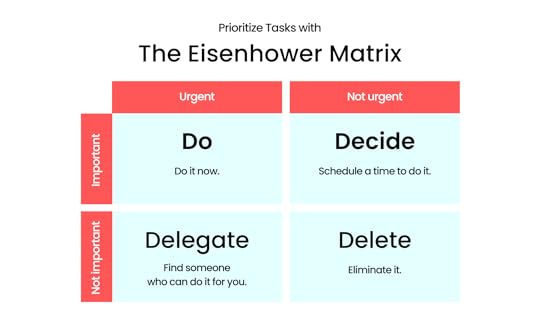
Photo by Inu Etc. Created with Canva
By managing your time properly, you can avoid procrastination, reduce stress, and achieve your goals.
I created a WhatsApp group called To Do List where I am the only member, where I save and send important voice notes.
My main reason for using WhatsApp is because I visit the app often and every time I open WhatsApp, I notice that pinned group and I always remember my tasks.
6. Prioritize self-careWorking smart and achieving big goals requires more than just hard work and dedication.
It also requires taking care of yourself and maintaining a healthy mind and body. Many people tend to neglect their physical and mental health when striving to achieve success, but this can actually hinder their progress in the long run.
Taking care of your mental health is crucial. Stress can negatively impact your work performance, making it difficult to focus, make decisions, and achieve your goals.
Make sure you get enough sleep, exercise regularly, and take breaks to avoid burnout.
7. Develop a growth mindset and do what you loveA growth mindset is the belief that you can learn and grow over time. This mindset can help you approach challenges with a positive attitude and seek out opportunities for growth and learning.
Create your own strategy, blend your skills, and take action. Take the time to educate yourself, develop a growth mindset, and be patient.
You can build your own personal brand and start a lifestyle business to support your desired lifestyle.
Lifestyle businesses can generate enough profits for entrepreneurs to live and work from anywhere, earning an income on their own terms. It’s a business that allows you to work on your own terms and gives you the freedom to do what you want.
Lifestyle businesses are generally internet-based, selling digital goods or software, providing virtual services, or operating an e-commerce business remotely.
The internet is a powerful tool. You can earn money online doing almost anything.
So why not do what you love and earn money from it?
Take a step forward today or consider transitioning slowly into what you love if you’re doing something else.
Remember,
It takes effort, persistence, and creativity to work smart, earn passively, and do whatever you want. By taking these steps, you can create a lifestyle that allows you to achieve your goals and enjoy life on your terms.
Keep hustling!
Thanks for reading this article. 
If you loved what you read, would you be able to buy me a cup of coffee? It’s okay if you can’t right now.
If you have any questions or if you wanna work with me, feel free to contact me. I’m always available to help young hustlers like you @InuEtc on Instagram.
Get the unisex ‘Work Smart’ tee at the Hope store.
The post Work smart, earn passively, and do what you love appeared first on Inuidea.com.
March 7, 2023
The Ultimate Guide on How to Start a Money Making Blog in 2023
Hey, looking for a simple and beginner friendly guide on how to start a money-making blog in 2023?
You’ve come to the right place!
Today I’m going to show you exactly how to start a profitable blog and make money blogging in 2023.
Let’s dive right in.
Related post: How Much Does It Cost to Start a Money Making Blog (The Cheapest Way)

Consistency is the key to your blogging success.
If you are blogging just because of money and you aren’t interested in what you are writing, then seriously, blogging is not for you!
Before starting a blog, you should choose a niche you are passionate about.
When picking a niche for your blog, make a note on the business value and the future of that topic.
A niche helps you find your targeted audience.
For example:
My blog Inuidea is all about online business, blogging, marketing, finance, and entrepreneurship.
Look:
I have a bunch of niches, but they all are related to each other, and the best thing is that I love sharing my thoughts and knowledge about these topics.
And who are my targeted audience?
Yes! Inuidea.com is a blog for young hustlers, bloggers, and aspiring entrepreneurs.
And because of my crystal clear niches, I know for whom I write a blog post. This way, I can connect and build a strong bond with my readers.
If you don’t know how to start a professional blog on your own, you can contact me!
This post contains affiliate links. I may receive a commission for purchases made through these links. This commission comes at no extra cost to you. Also, I don’t recommend anything that I don’t believe in.
After choosing a niche:Choose a name and a domain name for your blogRead more: 9 Proven Ways to Monetize Your Blog – Make Money Blogging
A domain name is your website URL.
For example:
The domain name for Inuidea is www.inuidea.com (It can be .org .net .xyz .in, etc instead of .com)
The Google global domain name is www.google.com, but the Google India domain name is www.google.co.in
Clear?
The first step of creating a blog is to choose a domain name for your blog.
It’s essential to have a short, catchy, unique, and easy-to-pronounce domain name.
There are over 1.8 billion websites in the world, and maximum number of people choose a .com extension for their sites. That’s why it’s so hard to get a short and meaningful .com domain.
You can quickly check domain name availability here:
If your desirable creative domain name isn’t available, choose a different name or stick to your name.
A lot of successful bloggers are using their name as their domain name. The plus point of using your name as your domain is that it’s unique!
In fact,
I’m using my first name on my domain name.
Inu + Idea + .com = Inuidea.com
No matter what your domain name is, If your blog is full of great content, people will love your blog.
So, don’t waste your time choosing a great domain name. Just keep it simple, short, and unique.
Choose a good and reliable hostingRead more: 7 Best Blogs to Learn Blogging
Hosting is like a home where your website is going to live.
Why free hosting sucks?The reason why free hosting sucks is that they come with an unprofessional domain structure.
For example:
www.yourdomainname.blogspot.com
Look at this:
It’s a subdomain, it’s long, and It looks unprofessional.
Also, free hosting gives you limited options to customize your blogs or websites.
Best reliable and affordable hosting solution for a new blogAs an online entrepreneur and a blogger, I have used Bluehost, Siteground, BigRock, Dreamhost, and for our web design company, we have used HostGator, but now I’m using Hostinger, which is the cheapest and the best hosting available online.
Hostinger is one of the most reliable and recommended WordPress hosting companies out there.
It’s a secure and the most affordable web hosting service you can use to start your blogging journey today.
They have one of the best loading speeds and their support team is fast, effective, and friendly.
If you want a fast and reliable web hosting service with great customer support, then Hostinger is perfect for you. They have affordable hosting plans for every budget and each plan comes with tons of useful features.
All their hosting plans include a free domain name, a free SSL certificate, LightSpeed Cache, 1-click WordPress installer, and lots of other useful features.

When you purchased hosting and the free domain name from Hostinger, you can install WordPress from the hPanel.
After installing WordPress, now you are ready to open your WordPress dashboards to start customizing your blog.
Read more: 11 “Must Have” Free WordPress Plugins Every Blog Needs.
[image error] [image error]
Choose a good looking and customizable ThemeEnough back-end setup!
Now we are going to do some front-end setup for your blog.
Till now, your blog has a name, a home to stay, but your blog is naked! LOL.
A theme is like a dress for your blog.
You can choose a good looking theme, and you can make modifications. Also, you can change your blog theme, just like a dress.
Once you’re in your WordPress site dashboard, you can install a theme on your blog.
Plenty of free themes are available on the WordPress.org site or other third party websites.
But just like the free hosting sucks, free theme sucks too.
They aren’t fully customizable and secure. Free themes look unprofessional, and they also want attribution!
So what’s the solution?
Well, there are thousands of pre-built premium themes available on many WordPress theme selling marketplace.
By installing a pre-built, premium theme, you will be able to create a complete, good looking, and professional site without coding.
If you are a newbie blogger, I recommend Divi by Elegant Themes.
Divi is a responsive and multipurpose WordPress theme. It supports drag and drop site building. Elegant themes also have amazing customer support.
For Inuidea, I’m using Avada by Envato Market.
And I’m in love with this theme. It’s the #1 selling theme of all time.
Just like Divi, Avada too a responsive and multipurpose WordPress theme that supports drag and drop building. You can create a unique and any website using Avada.
Need free help with Avada or WordPress themes? Contact me.
Essential Things to do After Installing WordPress – Configure Settings and Install Plugins.Related Post: 7 Best WordPress Themes for Blogs
WordPress installation comes with a sample post, a sample page, a sample comments, and some default settings. You should configure those default settings to improve your blog.
So, here is the first thing you should do after installing WordPress:
Delete defaults (Post, Page, and Comment)Set your timezone – Go to Settings > General and select your timezone. Click ‘Save Changes’.Set user registration – Allow or disallow people to register on your blog. The setting is available in the General section.Set WordPress discussion settings – Go to Settings > Discussion and follow this screenshot and configure discussion settings. Connect Google Analytics. Install the free MonsterInsights plugin and easily connect Google Analytics to your WordPress blog.Set up WordPress permalinks – Go to Settings > Permalinks and select ‘Post Name’. Click ‘Save Changes’.Install “must-have” free WordPress plugins for your blog. – Some plugins are essential to your blog. They can improve the SEO, security, and performance of your blog.
That’s it, after changing default settings and installing some essential plugins, now you are ready for the next step.
Add essential pages to your blog1. Home page.Your home page is all about your blog. It reflects your complete blog to your visitors. Make your homepage unique and extremely relevant to your blog.
2. About PageSometimes when your visitors are going through your blog or a high-quality blog post, they’re going to get curious and want to learn more about you.
By having an extraordinary about page, you can connect with your visitors; you can easily build a relationship with them and convert them into lifetime readers of your blog.
3. Contact PageIf you write great content on your blog, your readers are going to contact you to say thanks.
Sometimes they will contact you by asking for help from you. Also, your readers will give you suggestions to improve your blog.
Apart from that, brands and companies will want to contact for business inquiries.
4. Privacy Policy PageYour blog isn’t just a blog, now blogging is a business, and business grows when your customers trust you.
Internet users are now concerned about their personal information. A privacy policy informs your blog visitors about how protected they are when they visit your blog. This way, you can gain some trust from your blog visitors.
A privacy policy is required by law if you collect personal information from users.
Also, it’s necessary if you use third-party services such as Google Analytics, Adsense, etc.
Publish Quality Content
Content is king!
Maybe you’ve heard this evergreen sentence.
It’s true.
Content is the most crucial part of your blog.
You should write informative, engaging, and SEO-friendly articles to get more visitors to your blog.
How to write an engaging blog post?1. Add a personal touch – When you are writing a blog post, always write using ‘You’ and ‘I’. Because there is a single person, who is reading your blog post. Just like you are reading this post alone.
Don’t just write for the search engine. Make sure you aren’t behaving like a robot. Keep in mind that you are a person writing a blog post for another person.
2. Write better headlines – Add power words, and emotional words, and also add keywords to your blog post headline. Use Coschedule Headline Analyzer to analyze and improve your blog post headlines.
3. Write detailed content – Always write in-depth and detailed content. Feel free to write (1000+ words) long content. Also, try to help your readers by solving their problems.
Read more: Grammarly Review 2022: Boost Your Confidence and Enhance Your Writing
4. Add bucket brigades – You may be wondering what is “bucket brigades”?
Bucket brigades are words and phrases that add conversational value to your content. Bucket brigades make your content more conversational and engaging.
Some examples of bucket brigades are – “Look at this”, “Sounds familiar?”, “Ready?” etc.
Look at my content. I’m using lots of bucket brigades to make my content more engaging.
5. Use visuals on your blog – Add screenshots, graphs, infographics, and stock images. Don’t copy images from Google. Use copyright free stock image sites to download images for free.
Promote your blog and drive traffic to your blog

Using CopyAI, you can generate complete high-quality blog posts in a matter of seconds. Write better copy for content marketing, blogs, websites, and more — all in one click! Save time and get better results with CopyAI, the world’s leading artificial intelligence copywriting tool.
Content is the king, but promotion is the queen.
Your blog has no value if there is no one to read your blog.
So what to do?
Don’t worry.
There are so many amazing ways to market your blog for free.
1. Social media – Especially Pinterest!Why Pinterest?
Pinterest is one of the most underrated social media platforms out there. Lots of new bloggers are not aware of the power of Pinterest.
SEO is difficult, and it takes time to rank on Google. So, when you are just starting with a baby blog, you can’t get traffic from Google.
Also, Facebook, Twitter, and Instagram don’t do well if you don’t have a huge fan following, and also on these platforms, only paid promotions works.
But Pinterest works well because it has a different algorithm than other social media platforms. After you saved a Pin on Pinterest, it gets impressions even after a few months.
Related Post: 11 Actionable Ways To Get Massive Traffic From Pinterest To Your Blog
Pinterest Group boards are gems for bloggers. They are very similar to the Facebook group. Multiple Pinterest users can save pins to a group board.
The popular Pinterest group board has a lot of followers. Meaning, more Pinterest users can see your pins at a time, they engage with your pins, and it goes viral.
You can join and contribute (Save your pins) to my Pinterest group board – Traffic Sphere.
If you want to see more blogging tips, online business tips on my Pinterest feed, then be sure to follow me on Pinterest.
Also, make sure that you are promoting your blog on other social media platforms too. It helps you with building your brand.
Look at my Instagram profile.

Instagram is not my primary traffic source. But I’m creating posts, especially for my Instagram feed.
So, feel free to promote your blog on every social media platform available on the internet.
2. Comment on other relevant blogsWhenever you like a blog post on a related blog, don’t just leave.
Drop a valuable comment or ask a question.
Blog commenting helps you get traffic, build relationships, build your brand, and it also helps you with SEO, even though blog comments give you a nofollow backlink.
3. Join and help people in blogging communities.Facebook groups and online forums are a great place to show off your authority and build your brand by helping fellow bloggers.
Quora is another great place to promote your blog. If you write a helpful answer on Quora and link out to your blog, hundreds of people will visit your blog.
Grow Your Email ListRead more: 17 Amazing Free Websites to Download Copyright Free Stock Images
The money is on the list.
This line is so true!
Top bloggers, media companies, business websites, and start-ups use an email list to market, monetize, and grow their businesses.
Email marketing is vital if you want to start a money-making blog in 2023.
You should invest your time and money in an excellent email marketing service to grow your email list.
I’m using MailerLite, an alternative to MailChimp.
MailChimp isn’t a branding-friendly and beginner-friendly email marketing service. On the other hand, Mailerlite is beginner-friendly, and it lets you easily customize and create beautiful email forms that fit with your branding.
MailChimp’s free version lets you have up to 2000 subscribers, and Mailerlite’s free version allows you to have up to 1000 subscribers.
But 1000 targeted subscribers is enough to market and monetize your blog as a starter blogger.
After that, you can use their service, or you can use other email marketing services such as Convertkit, Aweber, etc.
Monetize your blogI suggest you wait at least 5-6 months to try different ways to monetize your blog.
In the beginning, Instead of thinking about monetizing your blog, you should focus on creating quality content, and promoting and building your brand.
But you can use affiliate marketing to monetize your blog from day one.
Ways to monetize a blog.Once you have at least 20 blog posts on your blog and your blog gets around 10,000 views, you can monetize your blog following these methods.
1. Ads – We all know about Adsense. It’s the best Ad network to monetize your blog traffic.
But in order to make some real money from ads, your blogs need a lot of traffic.
Related Post: How to Get Google Adsense Approval Fast With a New Blog.
2. Affiliate marketing – Affiliate marketing is a process of earning a commission by promoting and selling someone else’s products.
You can join affiliate programs like Amazon Associates, ShareASale, etc. to get a unique link to promote a product on your blog.
Related Post: Top 29 Affiliate Programs You Must Join to Monetize Your Audience
3. Services – If you have any professional skill, you can promote and sell your services on your own blog.
For example:
You can promote and sell your consulting service, design service, or other services on your blog.
4. Products – You can sell your own products too. From printables to e-book, you will be able to sell anything that is valuable and helpful to your visitors.
5. Sponsorship – As you grow your blog, you can collaborate with brands. They can contact you to write a sponsored post for their products.
Also, you can contact the brands you want to collaborate with. Tell them how you can help grow their brand. But keep in mind that It works when you have a popular blog.
Now it’s your turn!Hey, you’ve read a blog post on How to start a money-making blog in 2023.
Are you feeling confused?
Feel free to contact me for free assistance on starting your first blog.
Finally, the question is:
Are you going to start a blog?
Or maybe you have a blog.
Tell me, What are you blogging about?
Leave a quick comment below.
Like this post? Don’t forget to share it with your friends and aspiring bloggers, who want to start a money-making blog in 2023.
Featured image designed in Canva
The post The Ultimate Guide on How to Start a Money Making Blog in 2023 appeared first on Inuidea.com.


