
Inu Etc's Blog, page 33
January 17, 2020
How to Get Google Adsense Approval Fast With a New Blog
As a beginner blogger, If you want to convert your blog into a money making blog, then Google Adsense is the #1 ad network you can use to monetize your blog.
Every new blogger wants to monetize their blogs with Adsense, and many of them fail because of the strict Google Adsense policies.
The good news is,
If you follow some basic rules and maintain your blog like a real business from the starting of your blog, you’ll definitely get Google Adsense approval with your new blog.
In this post, I’m going to show you some Google Adsense approval tricks and the 7 essential things you must do before applying for Google Adsense.
Let’s dive right in!
Related Post: The Ultimate Guide on How to Start a Money Making Blog
How Much Traffic is Required for AdSense Approval?
There is no actual traffic minimum to apply to AdSense. The number of visitors is not a factor of Google Adsense approval. Like other ad networks, they don’t have minimum traffic thresholds you need to meet.
Even though Google says, the number of traffic isn’t a Google Adsense approval factor, according to my personal experiment, I think traffic matters.
After all, if you don’t have a decent amount of traffic, you’re not going to make much money from your blog.
So, if you’re a beginner blogger I suggest you use Pinterest to get targeted traffic to your blog and work on SEO to get free organic traffic from Google.
Things You Must Do Before Applying for Google AdSense
1. Write High-Quality Content
Don’t fill your blog with plagiarized articles. Write some unique, valuable, engaging, and high-quality content for your targeted audience.
Write in-depth and well-optimized blog posts with above 500-600 words.
Also, Adsense will not approve your application if you write Adsense prohibited content.
So, make sure your blog has some high-quality content before you apply for Google Adsense.
2. Make Your Blog Posts SEO Friendly
You should optimize your high-quality blog content with the Meta title and description tag.
Google Adsense may use their crawler bots to check your complete site because it’s not possible for the Adsense team to visit and review hundreds of websites that have applied for Adsense approval.
If you are using WordPress, install the free Yoast SEO plugin to optimize your blog content for search engines easily.
These simple tactics can help you rank higher on Google too.
Read more: 9 Proven Ways to Monetize Your Blog – Make Money Blogging in 2020
3. Write Sufficient Blog Posts
I get Google Adsense approval for Inuidea with only seven high quality and in-depth blog posts.
So the number doesn’t matter; what matters is the quality of the content.
But try to write up to 15 blog posts before you apply for Google Adsense and make sure your blog has sufficient content on every single web page.
4. Create Must-Have Pages
There are some pages which your blog must have before you apply for Google Adsense.
Such as about page, privacy policy page, and contact page
A privacy policy is required by law if you collect personal information from users, and it’s necessary if you are going to use Google Adsense ads on your blog.
If you have a business similar to my business, just copy and modify my privacy policy page according to your needs. You can copy and use someone else’s privacy policy and it doesn’t hurt your blog SEO health or reputation.
After all, there are millions of privacy policy pages and they are almost the same.
5. Make Sure You’re 18+
Adsense Terms and Conditions clearly notify that they only accept applications from applicants who are over 18.
If you’re under 18, you can ask your parents or guardian and sign up for Adsense using their information.
This post contains affiliate links (I don’t recommend anything that I don’t believe in), meaning at no extra cost to you, I might receive a small commission for purchases made through these links.
6. Ensure You Don’t Use Copyrighted Images
Adsense doesn’t approve blogs if they noticed copyrighted contents.
Maybe you’re using copyrighted images without taking permission from the owner. Keep in mind that it’s illegal and harmful to your business.
So, make sure you’re using images by taking permissions, or you’re using copyright free images on your blog.
7. Design a User-Friendly and Professional Looking Blog
You should design a user-friendly site with a clear navigation menu to help your visitors find important pages.
Also, make sure your blog is professionally designed and responsive to improve user experience.
If you’re using WordPress, you can easily design a professional-looking blog using a WordPress theme.
For Inuidea, I’m using Avada, an easy to customize WordPress theme available on Envato Market.
Related Post: 7 Best WordPress Themes for Blogs (2020)
Applying for Google Adsense
After maintaining a blog by following all the tips mentioned above, you can apply for Google Adsense and quickly get Adsense approval for your new blog.
To apply for Adsense, go to the sign up page for Google Adsense and apply by entering your website details, contact information, etc.
When applying for Google Adsense, keep in mind that you are using your real name, an actual address, and a correct payee name.
Read more: 11 “Must Have” Free WordPress Plugins Every Blog Needs.
Google Adsense Approval Process
Once you have signed up for Google Adsense, you need to add Adsense codes to your blog. Ads will show as blank until the final approval process doesn’t finish. It may take up to 1 or 2 weeks for the final review and approval.
After the final Adsense approval, you will get a confirmation email saying that ‘The site “yoursitename.com” is now ready to show Adsense ads.’
Yes, now you can add more ads on your site. Within a few hours, you’ll begin to see relevant ads and can start earning money from your Adsense approved blog or website.
Once your earning reaches $10, Adsense will mail you an address verification PIN to address. Login to your Adsense account and enter the PIN.
Congratulations,
You have completed all the steps of Google Adsense approval process. Once your earning reaches $100, Google will send you or wire transfer your earnings on your bank account.
Now It’s Your Turn.
Hey hustlers,
I really hope you enjoyed this Google Adsense approval guide.
If you follow all the above-mentioned tips, Google Adsense approval tricks, and apply for Adsense, I’m pretty sure that Google will approve your Adsense account.
Do you have any questions regarding Google Adsense approval?
Let me know in the comment section below.
If you enjoyed reading this article, don’t forget to share it with your friends and fellow bloggers.
How to Get #GoogleAdsense Approval Fast With a New Blog. #Blogging #BloggingTips
Click To Tweet
If you have any questions feel free to contact me. I’m always available to help young hustlers like you.
Keep hustling!
The post How to Get Google Adsense Approval Fast With a New Blog appeared first on Inuidea.


January 5, 2020
7 Inspiring Movies and Series for Aspiring Entrepreneurs (2020)
We all love movies. It gives us entertainment, knowledge and sometimes it inspires us, teaches us a lot and some movies change our lives.
These are my favorite movies and from the bottom of my heart, I highly recommend these movies and series to all aspiring entrepreneurs out there. And for your kind information, I want to say that all these movies are highly rated on IMDb and Rotten Tomatoes.
The best part is:
All these movies are really inspirational and thought-provoking.
So what are you waiting for?
Let’s dive right in!

1. The Social Network (2010)
The Social Network is an American biographical drama film directed by David Fincher and written by Aaron Sorkin. Jesse Eisenberg portrays the character of Mark Zuckerberg and Andrew Garfield portrays the character of Eduardo Saverin.
Adapted from Ben Mezrich‘s 2009 book The Accidental Billionaires, the film – The Social Network portrays the founding of social networking website Facebook, the struggle, and the resulting lawsuits.
It’s a movie about business success and the movie is all about Facebook and Mark Zuckerberg. The Complete story of Facebook, like how Mark Zuckerberg founded Facebook as a Havard student, the struggle of Mark Zuckerberg regarding the lawsuits, and many more about Facebook and the people linked with Facebook.
If you want to learn more about the founding of Facebook and the history of Facebook in an entertaining way, you should watch The Social Network right now.
The best part is that,
It’s not a boring movie, it’s impeccably scripted, beautifully directed, and filled with fine performances. It’s a masterpiece!!!
The Social Network has a 7.7/10 rating on IMDb and a 96% rating on Rotten Tomatoes.
This post contains affiliate links (I don’t recommend anything that I don’t believe in), meaning at no extra cost to you, I might receive a small commission for purchases made through these links.
Read more: 17 Genuine Ways to Make Passive Income While You Sleep

2. The Pursuit of Happyness (2006)
The Pursuit of Happyness stars Will Smith in the lead role along with his real-life son, Jaden Smith. The movie is directed by Gabriele Muccino.
It’s an American biographical drama film based on entrepreneur Chris Gardner’s nearly one-year struggle being homeless. The film is adapted from The Pursuit of Happyness by Chris Gardner.
The Pursuit of Happyness is a true story recounting the struggle of Christopher Gardner as he goes through the various stages of homelessness.
Chris Gardner takes up an unpaid internship in a brokerage firm after he loses his life’s earnings selling a product he invested in. His wife leaves him and he is left with the custody of his son.
The Pursuit of Happyness has an 8/10 rating on IMDb and a 67% rating on Rotten Tomatoes.

3. Forrest Gump (1994)
My all-time favorite, a masterpiece and one of the most inspiring movies for aspiring entrepreneurs and every movie-lover out there.
Forrest Gump is a 1994 American comedy-drama film directed by Robert Zemeckis and written by Eric Roth. It is based on the 1986 novel ‘Forrest Gump‘ by Winston Groom, and stars Tom Hanks as Forrest Gump, Robin Wright as Jenny Curran, Gary Sinise as Lieutenant Dan Taylor, Mykelti Williamson as Benjamin Buford “Bubba” Blue and Sally Field as Mrs. Gump.
The story depicts several decades in the life of Forrest Gump (Tom Hanks), a low IQ but kind-hearted man from Alabama who witnesses and unwittingly influences several defining historical events in the 20th century United States.
Forrest Gump has an 8.8/10 rating on IMDb, 72% rating on Rotten Tomatoes and ranked #12 on top 250 as rated by IMDb Users.
Related Post: 7 Best Podcasts for Aspiring Entrepreneurs – Learn and Get Inspired!

4. The Shawshank Redemption (1994)
The Shawshank Redemption is considered to be one of the best movies of all time. It’s a thought-provoking and inspiring movies and it helps us to realize the importance of freedom in our life.
This 1994 American drama film is written and directed by Frank Darabont, based on the 1982 Stephen King novella Rita Hayworth and Shawshank Redemption.
Tim Robbins portrays the character of Andy Dufresne and Morgan Freeman portrays the character of Ellis Boyd “Red” Redding, a prison contraband smuggler who befriends Andy. It’s an uplifting, deeply satisfying prison drama with sensitive direction and fine performances.
The movie tells the story of Andy Dufresne, a successful banker, who is arrested for murdering his wife and her lover and is sentenced to life imprisonment at the Shawshank prison, despite his claims of innocence.
The Shawshank Redemption has a 9.3/10 rating on IMDb, a 90% rating on Rotten Tomatoes and ranked #1 on IMDb as the all-time hit movie all over the world.

5. TVF Pitchers (2015, Web Series)
Indian media company, TVF aka The Viral Fever is the maker of TVF Pitchers.
I’m a big fan of TVF because of their comedy sketches and web series such as TVF Pitchers, TVF Tripling, Permanent Roommates and Kota Factory.
TVF Pitchers is a web series created by The Viral Fever (TVF) and developed by Arunabh Kumar, the founder of The Viral Fever.
The first season consists of five episodes are available for free on TVFPlay. It follows four young entrepreneur friends, Naveen, Jitu, Yogi and Mandal, who quit their jobs to develop their own start-up company.
If you want to learn about Indian startup culture and funding system, you should watch TVF Pitchers right now.
TVF Pitchers has a 9.2/10 rating on IMDb and ranked 5th on the website’s top 25 Indian web series.
Read more: How to Start a Podcast for Free in 2020 (Complete Guide)
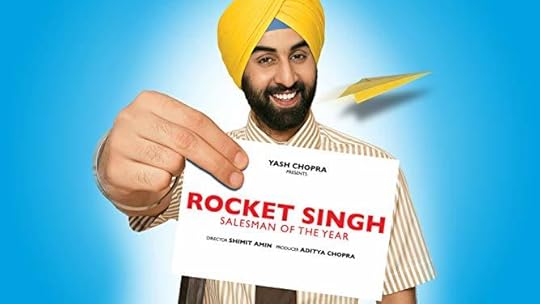
6. Rocket Singh: Salesman of the Year (2009)
Rocket Singh: Salesman of the Year is a 2009 Indian comedy-drama film directed by Shimit Amin and produced by Aditya Chopra under the Yash Raj Films banner. It stars Ranbir Kapoor, D. Santosh and Naveen Kaushik in the lead roles.
The movie portrays the story of Harpreet Singh Bedi, a commerce graduate, becomes a salesman. After being ridiculed by his colleagues and his employer, he plans to operate a parallel company – Rocket Sales, without their knowledge.
I love all Ranbir Kapoor movies and I think some of his movies are must-watch if you’re looking for inspiration and life lessons as an aspiring entrepreneur, such as Rockstar, Wake Up Sid, Tamasha, Yeh Jawaani Hai Deewani, Barfi! and I just want to say that Rocket Singh: Salesman of the Year is one of the best Ranbir Kapoor movies out there. It’s a thought-provoking, inspiring and a great movie with a great ending.
The movie has a 7.5/10 rating on IMDb and an 86% rating on Rotten Tomatoes.

7. Guru (2007)
Guru is a 2007 Indian drama film directed and co-written by Mani Ratnam. Guru tells the story of the successful Indian textile merchant, India’s biggest industrial tycoons, Dhirubhai Ambani.
It stars Abhishek Bachchan, Aishwarya Rai, Madhavan, Vidya Balan, Arya Babbar, and Mithun Chakraborty in the leading roles. The score and soundtrack for the film was composed by A. R. Rahman.
The story depicts a villager, Gurukant Desai, he and his wife, Sujata Desai, arrives in Bombay in early 1958, and rises from its streets to become the GURU, the biggest tycoon in Indian history.
Critic Taran Adarsh from Bollywood Hungama gave a four star rating and claimed in his review that “Guru ranks as one of Mani Ratnam’s finest attempts and one of the best to come out of Hindi cinema,” and praised actors performances writing “Reserve all the awards for Abhishek.
Guru has a 7.7/10 rating on IMDb and an 83% rating on Rotten Tomatoes.
Read more: 9 Proven Ways to Monetize Your Blog – Make Money Blogging in 2020

Bonus: The Man Who Built America (2012, TV Series)
The Men Who Built America is a miniseries docudrama which was originally broadcast on the History Channel in 2012. The series is directed by Patrick Reams and Ruán Magan and is narrated by Campbell Scott.
The series focuses on the lives of Cornelius Vanderbilt, John D. Rockefeller, Andrew Carnegie, J. P. Morgan, Thomas Edison, and Henry Ford. It tells how their industrial innovations and business empires revolutionized modern society and transformed the U.S into a global superpower.
This thought-provoking series is full of inspirational moments and life lessons. Watch this miniseries documentary to learn more about America’s biggest business tycoons.
The Man Who Built America has an 8.6/10 rating on IMDb and 94% Google users liked this TV show.
Final Thoughts: 7 Inspiring Movies and Series for Aspiring Entrepreneurs (2020)
This is my favorite list of top 7 inspiring movies and series for aspiring entrepreneurs.
Of course, there are a lot of other inspiring movies that you can watch if you’re an aspiring entrepreneur. Some of them are – The Aviator, The Green Mile, 127 Hours, Slumdog Millionaire, Jobs (2013), The Founder, Moneyball, Joy (2015, a movie about female entrepreneurs), etc.
Watch these movies and series, get inspired and learn something new.
Now It’s Your Turn!
Hey, I hope you enjoyed reading this list of inspiring movies for aspiring entrepreneurs.
I’m sure we’ve left out a few.
So, now I’d like to hear from you:
What movie would you add that every entrepreneur has to watch?
Let me know in the comments below right now.
Also, share this post with your friends, struggling hustlers and aspiring entrepreneurs who are looking for some inspiring movies to get inspired and to learn something new about entrepreneurship.
7 Inspiring #Movies and Series for Aspiring #Entrepreneurs (2020)
Click To Tweet
If you have any questions, feel free to contact me. I’m always available to help young hustlers like you.
Keep hustling!
The post 7 Inspiring Movies and Series for Aspiring Entrepreneurs (2020) appeared first on Inuidea.

December 24, 2019
How to Claim Your Website and Apply for Rich Pin on Pinterest
Pinterest is a social media and a visual search engine that helps you drive massive traffic to your blog.
But in order to drive organic traffic from Pinterest, you have to save engaging, attractive, and valuable pins consistently.
Most importantly you have to claim your website and apply for Rich Pin on Pinterest to get more advanced analytics and features.
In this post, I’m going to show you exactly how to claim your website and apply for Rich Pin on Pinterest to drive massive targeted traffic to your blog.
Let’s dive right in.
Claim Your Website
You should claim your website to get access to your website analytics. It lets people know where they can find more of your content.
Your profile picture and your name will show up next to any pin that comes from your site.
A small globe icon with a checkmark icon appears next to your site URL on your Pinterest profile.
To claim your site, go to edit settings section and head over to Claim section and then enter your site URL and hit the Claim button.

Pinterest will display a popup with two methods that you can use to claim your website. (add HTML tag or Upload HTML file)
Choose the HTML tag option because it’s easier. Just copy the HTML tag and go to your WordPress dashboards.
If you have the Yoast SEO plugin installed on your site, then visit SEO » Social page on your WordPress dashboard.
On the Facebook tab, make sure that open graph settings are enabled.

Next, go to the Pinterest tab, in the Pinterest confirmation field, past the HTML tag that you copied previously, and click on the save changes button.
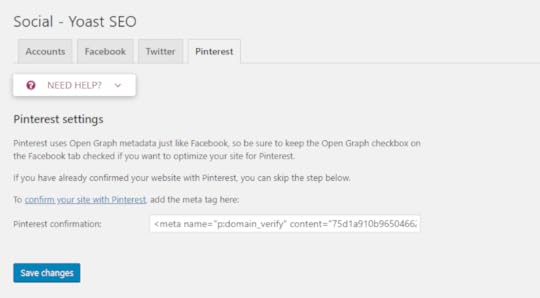
If you’re not using the Yoast SEO Plugin, you can use the Insert Headers and Footers plugin to insert the HTML tag to your site’s header section.
Once the HTML tag is added in your site’s header section, go back to the Pinterest popup screen and click on the Next button and then click the Submit button.
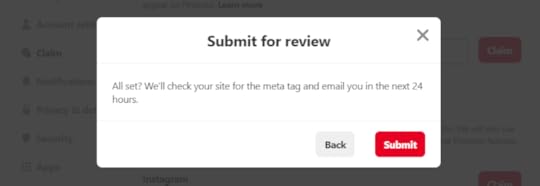
Usually, the verification process takes 24 hours, and you’ll get an email from Pinterest about the verification of your website.
Once the verification process is done, you’ll see the confirmation on the Claim section on Pinterest.

This post contains affiliate links (I don’t recommend anything that I don’t believe in), meaning at no extra cost to you, I might receive a small commission for purchases made through these links.
Read more: The Ultimate Guide on How to Start a Money Making Blog in 2020
Apply for Rich Pins
Rich Pins provide more context about pins because they show extra information directly on a pin.
Pinterest has 4 types of Rich Pins: app, product, recipe, and article.
As I write articles on my blog, I have enabled article Rich Pin on my Pinterest account.
Article Pins helps users know more about the pin by showing the article headline, author name, description, ‘read it’ button, published date, and site name.
For example,
Here’s a Rich Pin from my profile:

Setting up Rich Pins for your blog is one of the most important steps if you want to look more professional on Pinterest.
Rich Pins attract more eyeballs and help you drive more traffic to your blog.
Once you have claimed your website, you can apply for Rich Pins.
Go to Pinterest Rich Pin Validator, enter one of your blog post URL, and hit validate.
Once you get the green check and ‘Your Pin’s have been validated! Apply to enable your Rich Pins’ message you can click apply.
Sometimes your blog will be approved instantly; other times, Pinterest will take some time to verify your blog.
It can take a few days for your pins to start showing up as Rich Pins. But if it’s not showing after a few days, contact the Pinterest help desk.
Join my group board – Traffic Sphere.
Final Thoughts: How to Claim Your Website and Apply for Rich Pin on Pinterest
Claiming your website and setting up Rich Pin isn’t complicated and not so technical things to do. After reading this guide you can easily claim your site and enable Rich Pin on Pinterest. But in case you need any kind of help from me, just contact me.
If you really want to grow your Pinterest account to grow your blog traffic and audience, make sure you save pin consistently, use Tailwind to schedule your pins and also follow my ultimate guide to Pinterest success – 11 Actionable Ways To Get Massive Traffic From Pinterest!
Now It’s Your Turn
Hey, I hope you enjoyed reading this guide to claiming your website and setting up Rich Pin on Pinterest.
Now I would like to hear from you:
Have you claimed your website and enabled Rich Pin on Pinterest?
Let me know in the comment section below right now!
Also, share this post with your friends and bloggers who want to claim their website and set up Rich Pin for their domain to grow their audience.
Learn How to Claim Your Website and Apply for Rich Pin on #Pinterest !!! #BloggingTips #Blogging !!!
Click To Tweet
If you have any questions, feel free to contact me. I’m always available to help young hustlers like you.
Keep hustling!
The post How to Claim Your Website and Apply for Rich Pin on Pinterest appeared first on Inuidea.

November 21, 2019
9 Proven Ways to Monetize Your Blog – Make Money Blogging in 2020
Are you looking for some proven blog monetization method to monetize your blog to convert your baby blog into a money making blog?
Today I’m going to show you some of the most profitable ways to monetize your blog to maximize your income.
In fact,
I’m using some of these monetization methods to monetize my blog and slowly I’m implementing other methods too.
Check out these monetization methods, implement them and make money blogging in 2020.
Let’s dive right in.
1. Blog Advertisements
This is the most easiest and popular monetization methods available on the blogosphere.
As a beginner blogger, Google AdSense is the #1 ad network you can use to monetize your blog.
Related Post: How to Get Google Adsense Approval Fast With a New Blog
To generate more revenue using Google Adsense, once you reach 25K sessions, apply to Mediavine.
If you cross 100K pageviews, you can directly apply to AdThrive.
Looking for a Google AdSense alternative?
Try Media.net. They are reputable, they also have a large number of advertisers, and their payouts are good too.
Google AdSense is easy to set up, but the amount of money you can earn from AdSense is limited. So, directly selling banner ad space can be more profitable.
It takes more work to manage directly selling ads than Google AdSense. You’ll have to negotiate the pricing, come up with an agreement and take care of invoicing.
However, using a WordPress ad management plugin such as Ad Inserter can make the process easier.
I recommend you use AdSanity, it allows you to manage Google AdSense as well as your own banner ads.
Many bloggers hate blog advertisements because it can make your site slow and ugly. It also distracts your visitors and affect your site design.
However, there are many profitable ways to monetize your blog without AdSense and blog advertisements that don’t affect your site design and don’t distract your visitors.
Keep reading to learn more about these blog monetization methods.
2. Affiliate Marketing
Affiliate marketing is a proven way to make passive income by monetizing your blog’s loyal audience.
I’m a big fan of affiliate marketing and I often write about the power of affiliate marketing on my blog.
If you’re a beginner blogger, instead of waiting for Google AdSense approval, you should try affiliate marketing to monetize your blog from day one. After all, it’s one of the best ways to monetize your blog without AdSense.
Affiliate marketing is the process of earning a commission by promoting other people’s and companies products. You earn a commission for each sale that you make through your unique affiliate links.

Source – BigCommerce
To make money from affiliate marketing, all you need is a loyal and a target audience.
Write high-quality content, use affiliate links, drive targeted traffic, build a loyal audience and see the magic.
Related Post: 11 Actionable Ways To Get Massive Traffic From Pinterest To Your Blog
You can join affiliate networks such as ShareASale, Viglink, and Impact to get hundreds of relevant affiliate programs to promote on your blog.
Check out my in-depth affiliate marketing guide to learn more about affiliate marketing as well as get to know about the top 29 affiliate programs you can join to maximize your revenue.
This post contains affiliate links (I don’t recommend anything that I don’t believe in), meaning at no extra cost to you, I might receive a small commission for purchases made through these links.
3. Email Marketing
The money is on the list!
The line is so true!
Email marketing is vital if you want to start a money making blog in 2020.
One of the most powerful methods for making money from your blog and building a strong bond with your readers is directly through email marketing.
By using your engaging email list you can market your blog posts and market your own products and services along with affiliate offers directly through email.
Top bloggers use an email list to market their blog, to monetize their blog and to grow their online business.
I’m using Mailerlite, a beginner-friendly email marketing and automation tool that lets you create beautiful and professional email forms that fit with your branding.
Mailerlite free plan lets you have up to 1000 subscribers. It’s a great alternative to MailChimp because of its easy to customize features.
1000 targeted subscribers is enough to market and monetize your blog as a beginner blogger.
After that, you can go with their premium plan that offers more features, or you can use other email marketing services such as Convertkit, Aweber, etc.
Read more: How to Start a Podcast for Free in 2020 (Complete Guide)
4. Sponsored Blog Posts and Reviews
As you grow your blog and your brand, you can collaborate with individuals, brands, and companies. They can contact you to write a sponsored post or a review post for their products.
Also, you can directly contact the individuals and companies you want to collaborate with. Tell them how you can help grow their business using your reach.
It becomes easier to get sponsorship when you are working on a specific niche and if you have a target and engaging audience.
5. Sell Digital Products
You can effectively sell any type of digital product on your blog as long as it’s valuable to your readers and relevant to your content.
Digital products can be a combination of videos, eCourses, eBooks, downloadable guides, resources, PDFs, images, audio files, software components, SaaS and others.

How SendOwl Works – Source – SendOwl
You can use SendOwl to sell digital products on your blog. They let you set up your own shop on your blog and an affiliate program for your shop. The best part is that SendOwl makes the checkout process really fast, secure and easy.
6. Sell Your Services
It’s one of the best ways to make some active income as a freelancer. If you have an in-demand professional skill you can make huge money by selling your services online.
As it’s not passive income, it requires a lot of time and effort to make money by selling your services.
By using the internet you can make money doing almost anything from anywhere in the world.
The Internet is full of opportunities and freelance jobs are waiting for you. All you need is a skill. If you already have an in-demand skill, that’s great!
But in case you want to learn new skills, you can use resources such as blog posts, YouTube videos, and other resources to learn a new skill for free.
If you want a straightforward and organized course, you can use Udemy or Skillshare to get premium courses to learn a new skill without any hassle.
As a blogger, you can use your blog to promote your services to gain clients.
On your blog, you can show off your writing skills, design skills or you can write about your other skills on your blog posts.
This way you’re using your blog as your portfolio and you’re continuously marketing your skills as a freelancer.
If you love to write, you can become a freelance writer and offer your writing services to blogs and companies who want high-quality articles.
Apart from selling your writing services, you can offer your services as a:
Graphic Designer
Virtual Assistant
Digital Marketer
Photographer
Illustrator
Web Developer
Owner of any in-demand skill.
As a beginner blogger, it can be hard to get clients using your blog. So, start working with clients on Fiverr, 99designs (as a designer), and other freelancing sites.
7. Create and Sell Online Courses
It’s probably one of the best ways to make money blogging.
People love online courses because online courses are organized, straightforward, and actionable.
An online course is a passive income source for niche experts and teachers.
So, if you are a niche expert and If you have a skill that you want to teach your audience, you can share your knowledge by creating online courses.
You can host your online course on your WordPress blog using LearnDash, or you can use Teachable to host and sell your online courses.
Also, you can use Udemy or Skillshare to host and sell your online course with their existing audience.
8. Sell eBooks
Writing a best-selling eBook requires some knowledge and a bit of time investment upfront, but it can be a great source of passive income that works month after month.
The earning opportunity is huge.
For example,
Taylor Pearson sold over 5,000 copies of his book ‘The End of Jobs‘ in four weeks and in 2015 had made over $60k from just that book.

‘The End of Jobs’ – Image Source – Amazon
With Amazon, it’s pretty easy to self publish your eBook and make money from it. Just follow Amazon’s book writing guide and start writing your first book.
If you don’t have the required time or skill to write an eBook by yourself you can easily hire a ghostwriter from Fiverr to do it for you.
Read more: Grammarly Review 2020: Boost Your Confidence and Enhance Your Writing
You can also design your book cover yourself using Canva and Snappa or you can hire a professional designer from 99design or Fiverr to do it for you.
Before you begin writing, make sure you validate your idea and pick a profitable niche.
Also, don’t forget to promote your book through social media platforms, bloggers and influencers in that niche.
If you can sell a few hundred copies the first week of launching your book, Amazon will take over your eBook and start promoting it for you.
By the way,
If you want to sell your eBook on your blog, you can use SendOwl to create a shop on your blog. They also allow you to set up your own affiliate program. The best part is that SendOwl makes the checkout process really fast, secure and easy.
9. Accept Donations on your blog.
Once you add real value to your visitors and help them learn something valuable using your blog or personally help them for free to do something, slowly some of your blog audience become your loyal audience.
And many of them are also willing to help you happily. All you need to do is ask for the help you want from them.
When you have some loyal and engaged audience on your blog, you can monetize your blog by making it possible for your audience to make donations.
To accept donations on your blog you can use a plugin such as GiveWP, Charitable and Donation Manager for WordPress to set up a donation system on your own.
On the other hand you can use popular crowdfunding platforms such as Patreon, Buy Me a Coffee or Ko-fi to manage your donors and earnings without any hassle.
Hey, SUPPORT ME on Patreon or Ko-fi & be a member of Team Inu Etc (Forever Hustler!) or BUY ME a Coffee!!!
Final Thoughts: 9 Proven Ways to Monetize Your Blog – Make Money Blogging in 2020
Life is a journey!
Blogging is a journey too and becoming the best takes a lot of effort and time.
Look what others are doing. Learn from them and learn from their mistakes. Also, don’t be afraid to make mistakes. Overall it’s the best way to learn something new.
Learn from your mistakes!
So, take a deep breath and start your own blog today to convert your blog into a money making blog later.
And believe me, it’s really possible to make money blogging using these blog monetization methods.
All you need to do is start a blog, post quality content consistently, drive targeted traffic and build a loyal audience.
What are you waiting for?
Start now!!!
Read More: 7 Best WordPress Themes for Blogs (2020)
Now It’s Your Turn!
Hey, I hope you enjoyed reading this list of blog monetization methods.
Now I’d like to hear from you:
Which are your favorite ways to make money blogging?
Let me know in the comment section below right now.
Also, share this post with your friends and struggling bloggers who are looking for some blog monetization methods to monetize their audience to make money blogging.
9 Proven Ways to Monetize Your Blog - #MakeMoneyBlogging in 2020 #BloggingTips
Click To Tweet
If you have any questions, feel free to contact me. I’m always available to help young hustlers like you.
Keep hustling!
The post 9 Proven Ways to Monetize Your Blog – Make Money Blogging in 2020 appeared first on Inuidea.

October 27, 2019
Top 29 Affiliate Programs You Must Join to Monetize Your Audience in 2020
Affiliate marketing is a huge opportunity to make passive income from your blog. And It can drive more revenue than Adsense ads.
So, if you have a loyal and target audience, you should use affiliate marketing to convert your blog into a money-making blog.
The best part is,
Affiliate links don’t affect your site design and don’t distract your visitors.
In fact:
Relevant affiliate links helps your visitors choose the right product and add value to your target audience.
What is Affiliate Marketing?
Here’s the perfect definition of affiliate marketing by Pat Flynn:
“Affiliate marketing is the process of earning a commission by promoting other people’s (or company’s) products. You find a product you like, promote it to others, and earn a piece of the profit for each sale that you make.”
To make money from Affiliate marketing, all you need is a loyal and a target audience.
You can build your target audience using a blog, a podcast, a YouTube channel, or other social media platforms. Also, you should focus on building an email list.
Once you have some loyal audience, you can use these platforms and your email list to promote affiliate products.
To earn more passive income from affiliate marketing, always promote products that are valuable and helpful to your audience.
Source – BigCommerce
This post contains affiliate links (I don’t recommend anything that I don’t believe in), meaning at no extra cost to you, I might receive a small commission for purchases made through these links.
Read More: 9 Proven Ways to Monetize Your Blog – Make Money Blogging in 2020
Top 29 Affiliate Programs You Must Join to Monetize Your Audience in 2020
In this post, I’m going to show the Top 29 affiliate program that you can join as a creator or a blogger to monetize your blog and your audience.
Let’s dive right in.

1. ShareASale Affiliate Marketing Network
ShareASale has been in business for 19 years, exclusively as an affiliate marketing network. It’s one of the largest affiliate networks out there.
It has a huge variety of merchants to choose from in over 40 categories, including:
Grammarly
Tailwind
Namecheap
WP Rocket
WP Engine
StudioPress
FreshBooks
MonsterInsights
Once you get approved into the ShareASale affiliate network, you’re able to start promoting ShareASale right away, as well as you can apply to be an affiliate for different companies.
Join the ShareASale affiliate network to promote ShareASale and other relevant affiliate programs right now!

2. Canva Affiliate Marketing Program
Canva affiliate is back after a long time. Now you can make money promoting Canva.
Canva is an essential design tool for bloggers, digital marketers, entrepreneurs, and small business owners.
It’s a beginner-friendly online design tool, and the best part is it has a free version.
Almost every blogger use Canva to design graphics for their blog. And those who aren’t using Canva, someday they’re going to use Canva for their design work.
Canva lets you earn up to $36 for each new Canva Pro subscriber that signs-up through your unique affiliate link.

3. Envato Market Affiliate Program
Envato Market is the world’s largest creative marketplace where you get everything you need to get your creative projects done.
By joining Envato Market affiliate program, you can promote:
WordPress themes from ThemeForest.
WordPress plugins, app scripts, and mockups from CodeCanyon.
And lots of other products, including graphic templates, stock videos, stock images, and music tracks.
When a user clicks your referral link and makes a first purchase via any Envato Market site, you’ll even 30% commission!

4. Amazon Associates – Amazon Affiliate Program
If you’re a beginner affiliate marketer, amazon associates is the best affiliate program to kick off your affiliate marketing venture.
Amazon is one of the largest and reputable online marketplaces for selling almost anything. They have millions of products that you can promote to your audience.
You can promote books, clothing and accessories, arts and crafts, Kindle e-Books, and other products that are relevant and helpful to your audience.
You can expect up to 10% on any qualifying product sale that comes from your link.
The best part is:
If someone gets to Amazon, through your link, and buys different products, even if it’s not the product you link to, still you get a commission for that or those other products.
The only cons of Amazon Associates is that the affiliate cookies only last 24 hours.

5. ConvertKit Affiliate Program
ConvertKit is an authoritative email marketing service provider that is specially marketed towards bloggers, influencers, podcasters, creators, and other businesses who are building audiences.
ConvertKit send you a 30% recurring commission every month for every person who signs up to ConvertKit through your affiliate link.

6. Impact Affiliate Network
If you’re a beginner blogger and want to monetize your blog with affiliate link, you must join the Impact affiliate network.
The Impact affiliate network hosts several popular affiliate programs, including Envato Market and 99designs.
Once you get approved into the Impact affiliate network, you can apply to be an affiliate for other relevant affiliates programs.

7. CJ Affiliate
CJ Affiliate (formerly Commission Junction) is one of the oldest affiliate programs that work with the world’s best brands, including Godaddy, Aweber, Grammarly, and OYO Rooms.
Well, Grammarly is everywhere. But the only way to get access to the Godaddy affiliate program is through the CJ affiliate network.

8. Rakuten Affiliate Network
Rakuten Affiliate Network is one of the best affiliate marketing networks you can join to get access to thousands of relevant affiliate programs.
Once you get approved into the Rakuten affiliate network, you’re able to start promoting Rakuten right away, as well as you can apply to be an affiliate for other relevant affiliates programs.
Also, to join the Udemy affiliate program, you need to join the Rakuten Affiliate Network.

9. 99designs Affiliate Program
99 design is a design specific freelance marketplace, and it’s the best place to find and hire talented designers for your creative projects or to grow your business.
They pay you commission based on the number of sales you get.
For every new customer, you refer you get $35 per sale. When you bring 50+ customers, you get $50 per sale. Once you bring 50+ customers every 3 months, you get $80 per sale.

10. VigLink Affiliate Program (Sovrn Commerce)
VigLink is one of the best and easiest ways to monetize your blog and make money from affiliate marketing.
It’s a different kind of affiliate marketing program that automatically converts your existing normal outgoing link into affiliate links.
The best part is,
You don’t need to get signed up for an individual affiliate account on all affiliate networks. VigLink tracking takes care of all those affiliate networks automatically, as they have access to lots of affiliate programs all over the world.

11. Bluehost Affiliate Program
Bluehost is a reputable, reliable, and the most affordable hosting services one can use for their blog as a beginner blogger.
They offer a free .com domain, one-click WordPress installation, Free SSL certificate, and 24/7 customer support.
Bluehost is one of the higher paying affiliate programs, and you can make $65 per referral working with them.
So, if you want to start a blog, I highly recommend Bluehost for your hosting needs.
Also, I recommend you sign up for their affiliate program to monetize your blog using their affiliate link.

12. SiteGround Affiliate Program
SiteGround is a reliable web hosting company that offers fast and secure web hosting for small and medium sites.
They offer high commission, and the more you refer, the higher the commission you get per sale.
SiteGround pays you commission based on the number of sales you get.
For sales between 1-5 per month, you get $50 per sale. For sales between 6-10 per month, you get $75 per sale. If you sell between 11-20 sales, you get $100 per sale.

13. Elegant Themes Affiliate Program
Divi is one of the most beginner-friendly and powerful premium WordPress themes by Elegant Themes.
If you’re a complete beginner and looking for the best WordPress theme for your blog, I highly recommend you Divi. You can use 129+ pre-made professional layout packs to design your blog from scratch.
They offer the highest commission percentage of any WordPress Theme company available on the internet. When you refer someone to Elegant Themes sites through your affiliate link, if they sign up, you get 50% commission of the sale.

14. DreamHost Affiliate Program
DreamHost is an affordable web hosting company that offers 100% uptime guaranteed, fast, and reliable web hosting for web designers, bloggers, and online businesses.
By promoting DreamHost, you can earn up to $200 per referral.

15. Tailwind Affiliate
As a beginner blogger, you can’t expect millions of organic traffic from Google. But you can use Pinterest to drive massive traffic to your blog.
If you want to get massive traffic from Pinterest to your blog, you have to save engaging, attractive, and valuable pins consistently.
But it’s hard to stay consistent by saving pins manually. That’s why many bloggers and I use Tailwind to automate our pinning strategy and to schedule our pins.
Tailwind is a Pinterest scheduling tool that can earn you 15% recurring commission. Meaning, if a new blogger signs up for a monthly Tailwind plan through your affiliate link, you will receive 15% commission every month!
It helps bloggers stay consistently active on Pinterest with minimal effort.
So, beginner bloggers are always ready to use Tailwind. Meaning, you can easily attract lots of bloggers and Pinterest users by promoting Tailwind on your blog.
Also, your Tailwind affiliate link has 90 cookies attached. So, if someone clicks on your link and buys Tailwind 90-days later using your link, you’ll earn a commission.
If you want to use Tailwind for yourself,
You can schedule your first 100 pins for free using Tailwind!
Want to become an affiliate?
Join the Tailwind affiliate program and start earning recurring income every month.

16. Grammarly Affiliate Program
Grammarly is an online grammar checker and proofreading tool that automatically detects grammatical mistakes and help you avoid typos, grammatical errors, and improve the quality of your writing.
No matter your niche that your blog is in, you can promote Grammarly!
Because when we write, we all make mistakes.
So, Grammarly is an essential and helpful software for you if you are a blogger, writer, or student, and the best part is – it has a free version.
If you want to learn more about Grammarly, check out this post:
Grammarly Review 2020: Boost Your Confidence & Enhance Your Writing
Being an affiliate, I know promoting Grammarly is easy and effortless since everyone wants to improve their writing, and everyone wants to use Grammarly to enhance their writing.
Grammarly affiliate program is a high paying cost per action (CPA) type affiliate program that pays you $0.20 per free sign up and $20 for every successful upgrade.
Also, the Grammarly referral program has an insanely high conversion rate (20-30%), and your link has 90-day cookies attached. Meaning, someone can click on your Grammarly affiliate link, download it 90 days later, and you still get a commission off it.
The best part is,
As soon as you get approved into the Grammarly Affiliate Program, Grammarly gives you $25 activation bonus when you place a banner and write a Grammarly review post on your blog.

17. Social Warfare Affiliate Program
It’s a lightweight, easy to customize, and most popular WordPress social sharing plugin available on the market.
It has a free version with limited social sharing buttons and has paid plans with more buttons and customization features.
Social Warfare lets you earn 30% commission per referral that signs-up through your unique affiliate link.

18. Teachable Affiliate Program
Teachable is an easy to use online learning management system (LMS) that helps niche experts and content creators easily create online courses.
Teachable will pay you a recurring commission of 30% (per month) per paying customer, that converts through your affiliate link. The cookie life of the Teachable affiliate program is 90-days.

19. Udemy Affiliates Program
Udemy is the world’s largest online teaching and learning platform. It’s the most reputable e-learning platform with over 50,000 instructors, 100000 courses (in over 60 languages), and 30 Million students.
As people always want to learn more, you can promote thousands of useful courses from hundreds of categories.

20. vidIQ Affiliate
If you want to get more views on your YouTube videos, you need to use the free vidIQ chrome extension. It helps you maximize your organic reach and helps you grow your YouTube channel fast. They also offer paid plans with more amazing features.
Like SiteGround, vidIQ also pays you commission based on the number of sales you get.
For sales between 0-10, you get a 15% commission per sale. For sales between 11-50, you get a 20% commission per sale. If you make 51+ sales, you get a 25% commission per sale.

21. TubeBuddy Affiliate Program
TubeBuddy is a YouTube management tool that offers free extension from Chrome and Safari browser that adds smart YouTube management features to grow your YouTube channel. They also have paid plans with more amazing features.
The best part about TubeBuddy affiliate program is that you can earn a free star or legend license for yourself by referring people (even if they don’t pay for an upgrade).
When someone upgrades to a paid version, you’ll get up to 50% recurring commission forever.

22. MaxBounty Affiliate Network
MaxBounty is a leading cost per action (CPA) affiliate marketing network that already worked with McAfee, Norton, and T-Mobile.
They offer a wide range of reputable products that you can promote.
But their application process is a bit strict. After you sign up by filling your accurate information, they might call you via Skype or your phone number to ask you some questions regarding your niche and traffic source.
When you get approved, you can start promoting hundreds of affiliate products on your blog to monetize your audience.

23. Creative Market
Creative Market is a one-stop-shop to all creative design products. Fonts, stock images, illustrations, mockups, and even WordPress themes are available in this marketplace.
They let you earn 10% on all referred Creative Market customer purchases for a full year.

24. Ultimate Bundles
Ultimate Bundles offers “bundles” of e-books, courses, guides and resources for a massive discounted prices that range from 90 to 95% off than the original price.
They launch these bundles only once or twice a year, but because of the massive discount, you can easily convert your audience into a customer of Ultimate Bundles.
As an affiliate, you will earn 40% of the commission that you make during their bungle launches.

25. Fiverr Affiliate Program
Fiverr is a global online freelance marketplace. Lots of people buy and sell services and products everyday through Fiverr.
I started my entrepreneurship journey as a freelance designer on Fiverr.
Fiverr is a very affordable freelance marketplace, as the services start from $5.
Also, it’s a beginner-friendly and user-friendly freelance marketplace, that’s why many freelancers and business owners prefer Fiverr to exchange their money and services.
When you drive traffic to Fiverr through your link, if it converts, you can expect CPA up to $150.
Fiverr is a reputable freelance marketplace, useful, and the CPA is very high. These three reasons are enough to monetize your audience by promoting Fiverr.

26. MailerLite Affiliate Program
Mailerlite is beginner-friendly email marketing and automation tool that lets you easily customize and create beautiful email forms that fit with your branding.
It’s a great alternative to MailChimp because of its easy to customize features. Mailerlite free plan lets you have up to 1000 subscribers.
For every referral, you’ll earn 30% of both the initial sale and the recurring payments.
Once you’ve made $120 in commission, you can request a payout through PayPal anytime.

27. Thrive Themes Affiliate Program
Thrive Themes is a membership site that offers conversation focused WordPress themes, plugins, and some other useful tools to their members.
Through Thrive membership, individuals, entrepreneurs, and web designers get access to all their products.
Thrive Themes affiliate program gives you 35% commission per purchase, and then 25% recurring commissions on the yearly renewals.

28. Kinsta Affiliates
Kinsta is one of the best-managed WordPress hosting providers I’ve ever seen. It’s super-fast, secure, reliable. It comes with features like daily automatic backups, free SSL, and lots of other useful features.
You’ll earn $50-$500 for every referral depending on the plan and 10% recurring commissions as long as your referrals stay on.

29. Aweber Referral Program
Aweber is a reliable and affordable email marketing service. It’s one of the best premium email marketing services you can use to promote affiliate products via email if you’re a beginner blogger.
They send you a 30% recurring commission every month for every person who signs up to Aweber through your affiliate link.
Final Thoughts: Top 29 Affiliate Programs You Must Join to Monetize Your Audience in 2020
Blog like SmartPassiveIncome, ShoutMeLoud, WpBeginner, etc., search engine DuckDuckGo and the big brand Trivago uses Affiliate marketing as their primary ways to monetize their business.
So, affiliate marketing is a proven and a genuine way to make passive income by monetizing your loyal audience.
If you are a beginner blogger, you should monetize your new blog using affiliate links from day one, as well as try to drive targeted traffic to your blog to build a loyal audience.
Using these high paying affiliate programs, you can easily monetize your existing audience or your upcoming audience.
Some of these affiliate programs are relevant for all niches out there. Maybe some affiliate programs aren’t relevant to your audience.
So, you should choose relevant affiliate programs to monetize your audience to ensure that you’re earning money by providing value to your audience.
Now It’s Your Turn!
Hey, I hope you enjoyed reading this list of the top 21 affiliate programs you must join to monetize your audience.
Now I’d like to hear from you:
What’s your favorite affiliate program?
Let me know in the comment section below right now.
Also, share this post with your friends and struggling bloggers who are looking for some affiliate programs to monetize their audience to make some passive income.
Top 29 #AffiliatePrograms You Must Join to Monetize Your Audience in 2020 #AffiliateMarketing
Click To Tweet
If you have any questions, feel free to contact me. I’m always available to help young hustlers like you.
Keep hustling!
The post Top 29 Affiliate Programs You Must Join to Monetize Your Audience in 2020 appeared first on Inuidea.

October 16, 2019
How To Become a Digital Nomad and Travel The World (2020)
Nowadays, it’s becoming easier to become a digital nomad and live in a place you love while you work remotely.
More and more people are escaping their 9-5 job. It’s because now it has become easier to follow your passion and pursue a career you love.
Also, people are aware of passive income opportunities, online businesses, and opportunities to work remotely are rising.
According to a recent study, 4.8 Million Americans consider themselves Digital Nomads.
Pieter Levels, the founder of Nomad List, predict that there’ll be an estimated 1 billion digital nomads roaming the planet by 2035.
What Exactly Is a Digital Nomad?
Here’s the easy to understand definition of Digital Nomad:
Digital nomads are people who are location independent and travel the world full time while working remotely to earn a living.
They often work on coworking spaces, coffee shops, hotel rooms, or public libraries, relying on devices such as laptops, smartphones with internet access.
Actually, anybody who can do their job with a laptop, a smartphone, and an internet connection can become a digital nomad.
In this post, I’m going to show you exactly how to become a digital nomad, the ways you can build skills, the best job you can do as a digital nomad, best places to visit as a beginner digital nomad and much more.
Let’s dive right in.
How Do You Become a Digital Nomad?
The way of becoming a digital nomad isn’t the same for everyone. Everyone has different passions, skills, and professions.
So, there isn’t one specific blueprint for everyone to follow.
But there are some steps you can follow to become a digital nomad if you are just passionate about becoming a digital nomad.
You need some high paying skills, a remote job or an online business, a little bit of confidence, and a destination with a reliable internet connection.
Let’s break down the steps of becoming a digital nomad.
This post contains affiliate links (I don’t recommend anything that I don’t believe in), meaning at no extra cost to you, I might receive a small commission for purchases made through these links.
Learn Required Skills
Google and YouTube and relevant blogs are the best teachers out there.
But it’s not easy for everyone to learn from these free resources because educational resources from those platforms are not organized and straightforward.
So, you can use online courses to learn the required skills.
Here are the best places to educate yourself and build skills:
Udemy
Skillshare
Coursera
Lynda
Udacity
By signing up to one of these resources, you can get access to thousands of online courses that will help you build skills fast.
Udemy and Skillshare are the best place to learn creative skills and the required skills to become a digital nomad, such as graphic design skills, photography skills, marketing skills, web design skills, etc.
If you want to learn coding, you can try FreeCodeCamp or CodeAcademy to get free coding lessons and tutorials.

How Digital Nomads Makes Money While Traveling The World?
There are many ways you can make money while traveling the world as a digital nomad.
You can make money doing freelance jobs and remote jobs for companies.
Also, you can build a passive income generating business to make money while traveling or even sleeping too!
Here are three types of jobs and businesses digital nomads do while traveling the world.
1. Start Your Own Business
You can start a blog, podcast, or a YouTube channel to document your nomadic life and to share your experience.
The best part is,
By doing these, you can build a passive income generating business that makes money while you travel.
Also, you can start other passive income generating businesses to make your digital nomad life easier. Because having passive income streams means true financial freedom.
Check out this post to get some genuine passive income ideas and to learn more about passive income.
2. Freelancing
Freelancing isn’t a passive income generating business, but it’s one of the best ways to make instant active income as a digital nomad.
In freelancing, you have to sell your services to earn money. If you have a high paying skill, you can make a massive amount of money by doing freelance jobs.
For example,
If you are a graphic designer, you can sell your graphic design services. You can design logos, banners, flyers, illustrations, etc.
The best place to sell your graphic design service is 99Designs. It’s the only design specific freelance marketplace available on the market.
You can be a freelance writer, photographer, virtual assistant, digital marketer, and the list goes on.
If you’re a beginner, I suggest you start your freelance career on Fiverr because it’s user-friendly and beginner-friendly.
Also, you can use Upwork, Freelancer and Guru.com, Facebook groups, and other social media platforms to get more clients.
Are you a young hustler?
Join our facebook group – ‘Young Hustlers‘
3. Get a Remote Job
The difference between remote jobs and freelance jobs is remote jobs means you’re a full time or part-time employee at an organization or a company, while freelance jobs ends once the project is over. In both cases, your presence isn’t required at the office.
Remote jobs are better than freelance jobs because sometimes it’s hard to get clients as a freelancer and remote jobs makes your digital nomad life more secure.
If you have the required skills and degrees, you can quickly get a remote job and work from anywhere.
You can be a web developer, app developer, growth hacker, marketing specialist, graphic designer, a software engineer, and the list goes on.
Some well-known companies offer flexible remote jobs for digital nomads. Some of them are:
Automattic
Zapier
Buffer
Doist
Hubstaff
MailerLite
Online job boards such as FlexJobs, RemoteOK, We Work Remotely, and Remote.com are great places to find flexible part-time work or remote jobs.
Also, the power of networking is huge. LinkedIn is a great place to showcase your experience and skills and network with other professionals.
You can directly approach a company for a remote job. Choose a remote-friendly company, let them know who you are and how the company can benefit from your skills and ask if they have any positions available.

Reduce Obstacles, Boost Your Confidence, and Get Inspired!
Get rid of debt, save money, build your own business, or get a remote job and reduce other obstacles.
Educate yourself, motivate yourself, and boost your confidence by reading relevant blogs and books. Also, listen to podcasts and watch travel videos.
Nomadic Matt, Digital Nomad Soul, Hobo with a Laptop, Making It Anywhere, Wandering Earl are some of my favorite digital nomad blogs which you can follow to learn more about the digital nomad lifestyle.
Some digital nomad books I recommend are:
How to Travel the World on $50 a Day by Matt Kepnes
The 4-Hour Workweek: Escape 9-5, Live Anywhere, and Join the New Rich by Tim Ferris
Vagabonding: An Uncommon Guide to the Art of Long-Term World Travel by Rolf Potts
Travel While You Work: The Ultimate Guide to Running a Business from Anywhere by Mish Slade
Also, you should read two of my favorite book, ‘Rich Dad Poor Dad‘ by Robert Kiyosaki and ‘Crushing It‘ by Gary Vaynerchuk, to learn more about income streams, new age business strategies, and to achieve financial independence.
You can join digital nomad communities such as Couchsurfing, Nomad List, and Facebook Groups to get support and to meet more digital nomads.
Get a Travel Insurance
International health insurance and travel insurance is a must for digital nomads.
SafetyWing and World Nomads cover both health and travel insurance and are the most reliable and affordable travel health insurance for digital nomads available on the market.
Both World Nomads and SafetyWing do a great job of providing quality travel health insurance.
The big difference here is that SafetyWing doesn’t cover lost or stolen electronics while World Nomads covers loss of electronics, such as professional camera equipment, laptop, and other equipment, within certain limits.
Also, SafetyWing is cheaper than World Nomads. So, it’s up to you, and you can choose any of this insurance according to your requirements.
Get International Internet Connection
As digital nomads often work online, a reliable, fast, and secure internet connection is a must for digital nomads.
Although you will find WIFI in most places today, it’s always a good idea to have a backup plan, like a mobile hotspot. Your smartphone hotspot can help you, but you have to buy a new SIM card whenever you travel internationally.

So, I recommend Skyroam; it is a global hotspot, which means you don’t have to buy a new SIM card everywhere you go. Inuidea readers get an exclusive discount with promo code INUETC.
Choose a Destination and Go!
If you’re a beginner digital nomad and still learning how to become a digital nomad, I suggest you go to a popular as well as beginner-friendly digital nomad destination.
It’s obvious that you want a place with a lower cost of living with a higher quality of life. But more than that, you want to meet other digital nomads to make your digital nomad life easier.

Taipei, Taiwan
So, as a beginner, you have to choose your first destination wisely.
Here’s the top 7 location for digital nomads along with the cost of living.
Koh Lanta, Thailand – Average Cost of Living: $575-$1,620 per month.
Prague, Czech Republic – Average Cost of Living: $970-$2,420 per month.
Playa del Carmen, Mexico – Average Cost of Living: $900-$1,500 per month.
Taipei, Taiwan – Average Cost of Living: $1,400-$2,560 per month.
Las Palmas de Gran Canaria, Spain – Average Cost of Living: $1,620-$2,420 per month.
Medellin, Colombia – Average Cost of Living: $710-$1,620 per month.
Tbilisi, Georgia – Average Cost of Living: $700-$1,550 per month.
Do you know?
Bali is one of the most popular digital nomad destinations to avoid if you’re a beginner digital nomad. Bali was a paradise for digital nomads, but it has become too crowded and too expensive!
As well as Chiang Mai and Berlin become expensive too, and Cape Town becomes unsafe for visitors.
Quick Tips: You can use Nomadlist to find out your next destination. It’s the biggest crowdsourced database of cities in the world, analyzing 1,902,719+ data points to help you choose where to go next.
Accommodation
For free accommodation, check out Couchsurfing, it lets you meet and stay with locals all over the world for free.
Also, exploring Booking.com, Agoda, and Airbnb is a great way to find low-cost accommodation around your destination.
Final Thoughts – How To Become a Digital Nomad and Travel The World in 2020
Becoming a digital nomad requires time, lots of effort, and patience because It takes huge time to be financially independent and location independent.
So, keep patience and keep working to achieve your goals. If you’re passionate about becoming a digital nomad, you can easily become a digital nomad even though it requires lots of effort, money, and confidence.
Follow these steps, learn more about the digital nomad lifestyle, and start hustling today!
Now It’s Your Turn!
Hey, I hope you enjoyed reading this guide of becoming a digital nomad.
Now I’d like to hear from you:
What do you think about the term ‘Digital Nomad?
Let me know in the comment section below right now.
Also, share this post with your friends and aspiring digital nomads who are looking for an in-depth guide to become a digital nomad.
How To Become a #DigitalNomad and Travel The World! #TravelTips
Click To Tweet
If you have any questions, feel free to contact me. I’m always available to help young hustlers like you.
Keep hustling!
The post How To Become a Digital Nomad and Travel The World (2020) appeared first on Inuidea.

September 29, 2019
Grammarly Review 2020: Boost Your Confidence & Enhance Your Writing
You want your writing free of embarrassing grammatical errors and mistakes, right?
Grammarly is an online grammar checker and proofreading tool that automatically detects grammatical mistakes and help you avoid typos, grammatical errors, and improve the quality of your writing.

This post contains affiliate links (I don’t recommend anything that I don’t believe in), meaning at no extra cost to you, I might receive a small commission for purchases made through these links.
As I’m not a native English speaker, Grammarly helps me to feel confident when I write in-depth content for my blog or when I write emails and social media posts.
No matter if you are a native, or a non-native English speaker, a blogger or a professional writer, we all make mistakes!
So, Grammarly is the tool you should use to write error-free content, and If you’re not confident enough to publish your blog posts, you should definitely use Grammarly to boost your confidence.
Grammarly Features: What Does Grammarly Do?
Grammarly is an easy to use proofreading tool that improves your writing by checking for several errors.
It detects spelling errors, critical grammatical mistakes, and punctuation errors and tell you what needs to be changed and why.
Grammarly also detects plagiarism by comparing your writing to millions of articles across the web. It helps you avoid plagiarism as Google, and we all hate plagiarized content.
It will also help you enhance your writing style by providing real-time insights about your readability score, sentence lengths, and it detects overuse of words, suggests relevant words, and much more.
Read more: 17 Genuine Ways to Make Passive Income While You Sleep
Who is Grammarly Useful For?
Grammarly is a popular online grammar checker tool useful for both native English speakers and non-native, who don’t write in the English language often and those who want their writing to be mistake-free including:
Bloggers
Content marketers
Authors
Copywriters
Students
Proofreaders
Non-Native Speakers
Journalists
Business professionals or anyone who wants to write perfect email, social media post, presentation, or thesis, and report.
For new bloggers, writers, and non-native English speakers, Grammarly acts as a confidence booster as it removes all spelling mistakes and critical grammatical errors.
Grammarly also lets you select between American English, Canadian English, British English, and Australian English, and you can use any of these dialects in your writing.
How Does Grammarly Work?
Once you create a Grammarly account for free, you’re ready to use it to improve your writing.
I love writing articles on Google Docs. After the recent Grammarly updates, now it’s compatible with Google Docs and it suggests corrections and suggestions as you’re writing the article.
To detect errors on Google Docs, you need to install the ‘Grammarly for Chrome‘ extension. Once you’re writing, It will flag any errors in red and underline incorrect words or grammar and show you what to replace it with and why if you simply hover over it.
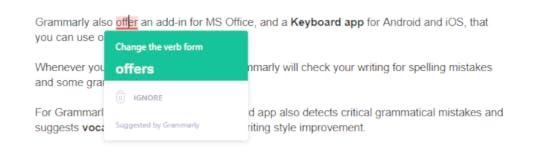
But if you want more features, you need to use the Grammarly web app or desktop app, which is available for both Windows and Mac.
You can set writing goals based on your intent, audience, writing style, etc.
After that, you just have to copy and paste your entire article or writing into Grammarly for proofreading, spell checking, and grammar checking.
Grammarly also offers an add-in for MS Office, and a Keyboard app for Android and iOS, that you can use on your mobile device.
Whenever you type with the keyboard, Grammarly will check your writing for spelling mistakes and some grammatical errors.
For Grammarly premium users, the keyboard app also detects critical grammatical mistakes and suggests vocabulary enhancement and writing style improvement.
How Much Does Grammarly Cost?
Here are the pricing of each Grammarly plan as of 2019:
Grammarly Free – The free subscription is the best option for new bloggers and anyone who doesn’t have a budget and would like to test Grammarly before spending money.
Grammarly Premium Monthly – Subscription costs $29.95 per month.
Grammarly Premium Quarterly – Subscription costs $19.98 per month, billed as one payment of $59.94.
Grammarly Premium Annual – Subscription costs $11.66 per month, billed as one payment of $139.92.
It’s the best deal out of these three premium options. If you want to go with premium, go with the annual plan as its the most cost-effective plan.
Grammarly Business – Subscription costs $15 per member per month. If you have a team and you want Grammarly premium features, the business plan is your go-to subscription plan.
It comes with features like priority 24/7 email support, monitoring tools, centralized billing, admin and user management controls for privacy and security of your team’s work.
Grammarly Education – If you have an educational institution and you’re interested in giving your institute unlimited access to Grammarly, the education plan is only curated for you.
It comes with all the premium features, including 24/7 support and vocabulary enhancement tools.
Should I Go With Free Or Premium?
If you can’t afford the premium version of Grammarly, I would suggest going with their free version.
Grammarly’s free plan has almost everything the premium plan has besides the plagiarism checker and the advanced writing detector.

If you’re a new blogger or a writer, I think the free grammar checker and proofreader version is enough to boost your confidence, eliminate common errors, and make your content readable to your audience.
However, if you can afford a Grammarly premium plan and you want more advanced features, you need to go with Grammarly premium plan.

Read more: The Ultimate Guide on How to Start a Money Making Blog
Grammarly Alternatives: What’s The Best Grammar Checker Tool?
Grammarly isn’t the only option when it comes to grammar checker and proofreading online tools.
There are other tools out there that are very similar to Grammarly; you might want to check out.
ProWritingAid – Probably the best Grammarly alternative out there. By using ProWritingAid you can eliminate error, fix writing style issues, and find the right words.
Ginger – Ginger is another handy spelling and grammar checker tool that comes with a few extra features that Grammarly doesn’t have, such as a translator that lets you translate your writing content between 60 languages.
Hemingway Editor – Hemingway Editor is a free web-based tool that you can use to check articles for readability, grammar, and spelling errors.
All these tools are fantastic, and occasionally I use them too. But I think Grammarly is more beginner-friendly, user-friendly, and most effective grammar checker tool out there.
Final Thoughts: Grammarly Review 2020
I like Grammarly because it’s the secret weapon that helps me boost my confidence. It automatically detects my mistakes and quickly gives me a solution in real-time.
Grammarly is the best writing assistant out there, but keep in mind that it’s not a replacement for a human proofreader.
Overall, Grammarly is a great grammar checker and proofreading tool that can make your writing error-free, advanced, and trustworthy.
So, you should use Grammarly if you’re the person who wants to feel confident by avoiding all embarrassing spelling errors and grammatical errors.
Now It’s Your Turn!
Hey, I hope you enjoyed reading this Grammarly Review.
Now I’d like to hear from you:
Are you going to use Grammarly to improve your writing or to boost your confidence?
Let me know in the comment section below right now.
If you’re an existing Grammarly user, don’t forget to share your experience!
Also, share this post with your friends and new bloggers who are looking for an advanced, cost-effective, and beginner-friendly tool to improve their writing.
Grammarly Review 2020: Boost Your Confidence & Enhance Your Writing! #Blogging #WritingTips #Grammarly
Click To Tweet
If you have any questions, feel free to contact me. I’m always available to help young hustlers like you.
Keep hustling!
The post Grammarly Review 2020: Boost Your Confidence & Enhance Your Writing appeared first on Inuidea.


