
Inu Etc's Blog, page 31
September 9, 2020
Top 17 Must-Have Mobile Apps for Bloggers in 2020
As a blogger, we want ourselves to stay focused on our work to get success in blogging. In other words, we want to grow our blog to make money blogging.
I know it’s hard to focus on your work when you’re surrounded by so many distractions, but you have to be focused to work hard and smart to make more money from your blog.
That’s why today I’m here with some of the most helpful and productive mobile apps for bloggers that you should use as a blogger to make your blogging journey easier.
Let’s dive right in.
1. WordPress
WordPress app allows you to do just about all the things you would normally do from your desktop.
For example,
You can draft a new post on your blog, review comments, track stats, and view other details right from your smartphone.
By using this app you can easily manage your free WordPress.com blog as well as your ‘self hosted’ blog from your smartphone.
The best part,
It’s a reliable app because it’s an official app by Automattic, the creator of WordPress.
2. Google Tasks
Feeling forgetful?
Relax man!
As a solo blogger, you’ve to manage multiple tasks in a day and nobody is capable of remembering everything at all times.
Organizing your tasks with a to-do list can make everything much more manageable.
A to-do list can boost your productivity, it helps you clarify your goals and that’s why you get more done with a to-do list app.
I used a lot of task manager apps but I think Google Tasks is the best task manager and to-do list app, because of its elegant look and easy to use features.
Google Tasks lets you create a to-do list within your desktop Gmail, Google Docs, or the Google Tasks app.
It syncs across all of your devices and you can easily manage, and edit your tasks from anywhere, at any time.
3. Google Docs
I always use Google Docs to write blog posts. Because while writing I often collaborate with my team and it’s easy to collaborate here.
Also, in Google Docs it’s easy to format a blog post by using H2s, H3s, titles, font, bullet points, etc.
Also, the Grammarly Chrome extension supports the web version of Google Docs. So, you can easily check grammatical errors and enhance your writing in Google Docs.
The mobile app is so simple with a clean interface, it’s easy to use and by using all features you can easily write a ready to publish, well-optimized blog posts on your smartphone.

4. Canva
I love Canva and I think it’s an essential design tool for bloggers, digital marketers, entrepreneurs, and small business owners.
It’s a beginner-friendly and easy to use online design tool, and the best part is it has a free version.
I’m using Canva to design engaging Pinterest pins, blog graphics, social media graphics, E-books, and more.
By using Canva mobile app or web app you can quickly design almost anything using free pre-made and ready to use templates.
Also, you can collaborate with your friends and coworkers to work together and faster.

5. Grammarly
You want your writing free of embarrassing grammatical errors and mistakes, right?
Grammarly is an online grammar checker and proofreading tool that helps you avoid typos, grammatical errors, and improve the quality of your writing.
Check out Grammarly Review 2020: Boost Your Confidence & Enhance Your Writing
Grammarly offers a Keyboard app for Android and iOS, that you can use on your mobile device to write mistake-free emails, blog posts, or social media posts.
It automatically detects grammatical mistakes and provides lots of features that help you enhance your writing right from your smartphone.
6. Google Analytics
Google Analytics is an essential web analytics tool by Google that tracks and reports website traffic.
The official Google Analytics mobile app lets you monitor your website traffic right from your smartphone.
With this app, you can monitor real-time data and the app allows you to check out just about all web analytics data you would normally check from your desktop.
7. Google Adsense
We all want money, and we love to see how our money grows up daily.
If you’re using Google Adsense to monetize your blog, you can use Adsense mobile app to see all your revenue statistics.
You can check your estimated earnings and other statistics such as page views, impressions, clicks right from your smartphone.
Google AdSense is no longer available on Android and iOS, you can open the Adsense website on your smartphone browser to see your earnings.
This post contains affiliate links (I don’t recommend anything that I don’t believe in), meaning at no extra cost to you, I might receive a small commission for purchases made through these links.
8. Pocket
The pocket app allows you to save almost anything from anywhere so that you can check out later. You can save articles from Twitter, Feedly, and from sites you want.
Pocket’s clean layout, elegant design, dark mode, and other features give you a relaxing reading experience.
Also, Pocket’s listen feature turns any article, or blog post into a podcast. So you can just relax and listen to the articles to learn new things.

9. Pinterest
I love Pinterest because it drives massive traffic to my blog and when it comes to traffic generation, SEO and other social media take time, but Pinterest reacts in just one day!
You can use Pinterest to discover new ideas and to share your ideas with millions.
You can build a following by sharing your helpful content. Also, you can use Pinterest to drive massive traffic to your blog.
The Pinterest mobile app allows you to manage your Pinterest account from your smartphone. You can save new pins, track analytics, and view other details right from your smartphone.
10. Google Keep
Google Keep is a really useful app that allows you to add notes, photos, and audio. It syncs across all of your devices so that you can track your thoughts from anywhere.
You can add labels and colors to your notes to quickly organize them, it will help you easily find them later.
Also, you can set reminders and If you want to find a note you saved, a simple search will turn it up.
11. PayPal
I’m using PayPal for a long time to receive international payments from Google Adsense, business partners, and clients from all over the world.
PayPal app is a more simple and secure way to send and request money online. for you, if you’re a blogger, freelancer, or anyone who’s working online and wanna receive payments online.
Like me, if you open a PayPal Business account for receiving international payments, both of us could earn US $10 each!
So what are you waiting for?
12. Gmail
Now, I’m not going to write a long essay on Gmail. LOL.
We all know about Gmail.
Gmail is an easy-to-use free email service developed by Google that saves you time and keeps your messages safe.
The best part,
You can set-up your professional email address with Gmail and manage your professional mail account from your phone.
A professional email address is the one that has your brand name or business name in it.
For example,
inu@inuidea.com is a professional email address.
You should use Gmail because of its organized inbox, it blocks spam and keeps your account secure.
Also, you can access Gmail right from your smartphone and anywhere.
13. Pomodoro Timer
The Pomodoro Technique is a time management method developed by Francesco Cirillo in the late 1980s.
The technique uses a timer to break down working sessions into intervals, traditionally 25 minutes in length, separated by 5 minutes of short breaks.
As a busy blogger, you can use a Pomodoro Timer to use The Pomodoro Technique while you write blog posts or when you design graphics for your blog and social media.
It can boost your productivity because frequent breaks keep your mind fresh and focused.
Also, the timer creates a sense of urgency and makes you more responsible for your tasks and reduces the time you spend procrastinating.
14. IFTTT
Do you want a free virtual assistant that could automate various aspects of your social media and blogging?
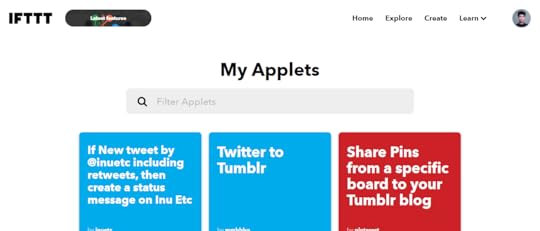
IFTTT (If This Then That) is that virtual assistant that can automate almost anything on your phone.
It allows you to automate your social media, blogging and there are a lot of other automation features available on IFTTT that makes your blogging journey easier and productive.
You just have to connect different apps and set conditions for different apps using IFTTT Applets, and when those conditions are matched IFTTT performs the operation you have defined.
For example,
It can tweet your new blog posts, share them on Facebook, retweet articles, backup your Instagram photos to Dropbox, share your tweets to Tumblr, and lots more.
15. Pushbullet
Pushbullet allows you to share files between your devices. It works on all operating systems plus all major browsers.
I often use Pushbullet to send important files and links to my desktop from my phone.
It also allows you to view notifications from your phone in your desktop app or browser.
You can also view and send text messages, WhatsApp messages, and more to your phone from your desktop.
Download for Android or Windows
16. LastPass
It’s really hard and messy to manage all your passwords and I think it’s impossible to remember all your affiliate accounts passwords, and lots of other websites login details.
LastPass is a secure password manager that stores encrypted passwords online.
The free version of LastPass comes with a web interface, but also includes extensions for various web browsers and apps for smartphones.

17. Anchor
As a blogger, if you want to build a loyal audience you should go omnichannel nowadays.
So, If you want to start a podcast to share your knowledge to build a loyal audience and to make money podcasting, you can use Anchor to start a podcast for free in 2020.
Anchor helps create a professional podcast and you can distribute your podcast to all major podcast streaming platforms for free.
By using the Anchor app you can record audio from anywhere. Also, you can record remote interviews with up to 4 guests or co-hosts.
Final Thoughts: Must-Have Mobile Apps for Bloggers in 2020
I’m using all these apps to make my blogging journey easier and I recommend you all these blogging apps if you’re struggling to manage your time or if you want to boost your productivity.
These apps not only help you in blogging but also these apps will help you with your social media, daily life, and online entrepreneurial journey.
Now It’s Your Turn
Hey, I hope you enjoyed reading these blog post about must-have mobile apps for bloggers in 2020
Now I’d like to hear from you:
Which is your favorite app from this list?
Let me know in the comment section below right now.
Also, share this post with your friends and bloggers who are looking for some blogging apps to make their blogging life easier.
If you have any questions, feel free to contact me. I’m always available to help young hustlers like you.
Keep hustling!
This article is edited by Inu Etc and co-authored by Baharul Islam.
The post Top 17 Must-Have Mobile Apps for Bloggers in 2020 appeared first on Inuidea.


September 2, 2020
4 Easy and Secure Ways to Share Your Google Analytics Reports with Others
Want to learn some secure ways to share your Google Analytics reports with others?
Sharing your solid analytical data with your customers, clients, and potential business partners is a great way to build a healthy relationship with them.
So, if you want to share your Google Analytics reports, you may have to grant them access to your Google Analytics account, but as you know your website data is confidential, sharing complete access can be risky.
In this article, I’m going to show 4 easy and secure ways to share your Google Analytics reports with others without having to give access to your Analytics account.
Let’s dive right in!
How to Share Google Analytics Reports
Here are 4 easy and secure ways to share your Google Analytics reports with others without having to worry about giving access to your Analytics account.
This post contains affiliate links (I don’t recommend anything that I don’t believe in), meaning at no extra cost to you, I might receive a small commission for purchases made through these links.
1. Get Weekly Website Stats with Email Summaries
Have you ever been in a situation where your clients or business partners require Google Analytics reports of your website?
With MonsterInsights you can easily solve this issue and share your Google Analytics reports with others.
Now you can get important stats from your Google Analytics account of your website delivered straight to your email inbox.
To enable them, go to your WordPress dashboard and then navigate to Insights » Settings » Advanced. Now scroll to Email Summaries.

Here you can add up to 5 email addresses to send the email summaries, also you can send out a test email.
And the best part,
You can customize the header to add your logo to give a personal touch to your reports.
This is beneficial as you can add your brand logo and send weekly reports to your clients.

2. Export Your Google Analytics Reports as PDFs
You can easily download any report as a PDF file if you’re using MonsterInsights on your blog.
To export your Google Analytics reports as PDFs just go to Export PDF Report option, which you’ll see at the top of all your MonsterInsights reports.
Simply click on the button and get properly formatted reports to share with whoever you want.

3. Give Permission to View Google Analytics Reports
Now, there might be some cases where you’d have to give access to your Google Analytics account, so your clients or business partners may see the reports.
The best part is that,
You can control who can save settings in Analytics and who can’t. You can also control different user roles and allow only a few people to view Google Analytics reports.
You can use MonsterInsights to make this process efficient, It helps you easily manage Google Analytics permissions from your WordPress dashboard itself.
Just go to Insights » Settings » Advanced and then navigate to Permissions. Here you can see which user roles can view reports, save settings, and which roles are excluded from tracking.

You can follow the MonsterInsights guide on how to grant access to your account and share Google Analytics reports.
4. Share Google Analytics Reports in Other File Formats
I already showed you how MonsterInsights helps you download your Analytics reports as PDF.
But what if you want to share it in another format?
In Google Analytics, you can export a report as Google Sheets, Excel file, or CSV format.
This allows you to download your data, clean it, format it according to your needs, and then share them with whoever you want.
To download your data, you’ll need to log into your Google Analytics account. Then, navigate to a report you want to share. In the top right corner, you’ll find an Export option for almost every report in Google Analytics.

Click on the Export option and select the file type you’d like to export.

Then, it’ll automatically download the report into your computer. Now you can share the report with your customers or business partners easily by emailing it to them.
And that’s it!
Now It’s Your Turn
Hey, I hope this article helped you to learn how to securely share your Google Analytics reports with others.
Don’t forget to share this post with your friends, bloggers, and business owners who want to learn more about sharing Google Analytics report with others.
If you have any questions, feel free to contact me. I’m always available to help young hustlers like you.
Keep hustling!
The post 4 Easy and Secure Ways to Share Your Google Analytics Reports with Others appeared first on Inuidea.

August 25, 2020
Basic SEO Techniques To Boost Your Organic Traffic
Today I will provide you some best basic SEO techniques to increase your organic traffic from Google as well as I will also mention how to improve your site performance within one month.
Learning SEO is a very difficult part for newbie bloggers that is why many people waste money to buy courses, watch videos, etc.
I am not saying that watching videos or buying courses is a total waste of money or time but you will have to gain your knowledge by working on your own ideas.
What Is Basic SEO
SEO is search engine optimization that helps you improve your current business to grow or make money by getting millions of traffic from Google.
When you search on google about educational stuff or related to your problems you see a lot of blogs and websites providing information or solutions on your problems.
If you want to grow your business in the online market then you must learn basic SEO and after this, you will be able to optimize your blog to drive organic traffic to your blog.
List Of Basic SEO Techniques To Improve Organic Traffic
On-Page SEO
Off-Page SEO
Fixing Errors
Improve Website Speed
Creating Quality Content
These are the SEO techniques to improve your organic traffic and if you work on these factors you will be able to increase your performance up to 300 times.
Now, let’s move to our first factor which is very important to know why you need to learn basic or advance SEO in the digital marketing world.
Related post: 11 Easy Ways to Drive Massive Traffic to Your Website For Free
This post contains affiliate links (I don’t recommend anything that I don’t believe in), meaning at no extra cost to you, I might receive a small commission for purchases made through these links.
On-Page SEO
Learning about basic SEO also contains some advanced knowledge on On-page SEO and it is necessary to understand how On-page SEO can improve your visibility in Google search.
There are multiple tasks that you should follow to work on On-page SEO techniques and if we talk about them here is the list of some On-page SEO techniques.
Customize Your Website Pages
Create High-Quality Content
Optimize Your Title And Meta Description
There are a lot of other points in On-page SEO but I will only cover some decent and effective methods of On-page SEO techniques.
Customize Your Website Pages Like A Pro
There are tons of bloggers who do not have enough knowledge to customize a blog like a professional designer.
But proper customization of your blog is important because if your website is not fully customized with navigation menus then it is hard to crawl your website by Googlebot.
Also, It’s important to SEO optimize your blog if you want to get approval from Adsense, you must customize your web pages with Elementor, Thrive Architect Plugin or you can SEO optimize your blog using one of the best WordPress themes.
It will also show how much passion you have in digital marketing and how well you have designing skills in the blogging field.
Create High-Quality Content
Creating high-quality content is also the part of On-page SEO, many bloggers ignore it but Google doesn’t.
Giving the right and genuine information to your readers is very important for your performance and website growth.
I got many messages on Instagram where newbie bloggers say that they are not getting any traffic.
After analyzing their website I find that they do not have any quality content but they keep publishing content without adding any value.
There is no point if you are making your content 100% free from plagiarism but having zero value for users.
As I said before in my previous article a poor quality content can’t drive organic traffic or if you also promote your website without having value then it will increase your bounce rate and in the end, you will lose your current ranking.
Optimize Your Title And Meta Description
It’s the basic SEO that you need to optimize your title and meta description. It will help you to increase your website’s CTR.
CTR will improve your website user behavior and it is a signal to Google that your website is adding something unique and giving the right information to the user.
Nobody will tell you how you can improve your CTR which will help you to drive organic traffic from Google to your website.
Check out the last seven days of tests after optimizing the title and meta description.

It’s not as hard as you think to optimize your blog posts title and description. You just need to target those keywords that you see in your search console.
Off-Page SEO
In the basic factor of SEO, Off-page SEO is very important to know.
When you work on your On-page SEO then the second part of SEO is also important and can be hectic for you because when you share content on social sites it can look spammy and it takes time and patience to build quality backlinks for your blog.
There are multiple tasks that you should follow to work on Off-page SEO techniques and if we talk about them here is the list of some Off-page SEO techniques.
Creating Commenting Backlinks
Sharing Content On Social Sites
Keyword Research
Create Quality Backlinks
Are Commenting Backlinks Still Makes an Impact?
When we talk about commenting backlinks it means we left a link into the comment box when we try to make no-follow backlinks.
No-follow backlinks still have importance in the eyes of Google and if you are creating 100 backlinks then it is necessary to have up to 30 no-follow backlinks, the rest of the 70 should be do-follow backlinks.
Sharing Content On Social Sites
When you publish your content there is no auto-sharing option to tell people you have something unique to learn.
You have to share your content with other people and when you interact with people using your genuine content they will be your loyal audience.
You can share your content on Pinterest, Facebook, Instagram, Linkedin, and Twitter. Also, forum websites such as Quora, Reddit are best to share your ideas.
Before sharing on social sites you should only target your niche based audience that will help you to reach more people.
Related post: 11 Actionable Ways To Get Massive Traffic From Pinterest
Keyword Research
In the blogging field, finding keywords are most important and keywords play a key role for your website or business growth.
If you are a new blogger then you must find some low competition keywords which will help you to rank fast in google SERP and if you want to see quick results then try to find some long-tail keywords and create quality content on them.
You can use premium SEO tools such as Semrush or Ahref to find keywords and to do other SEO research.
If you have not much money to invest in these tools you can use Ubersuggest, which is a free SEO tool by Neil Patel, and it can provide you hundreds of keyword ideas.
Create Quality Backlinks
When we think of creating backlinks as a newbie blogger we think it is a hectic and a hard-working job because getting high-quality links are very hard and sometimes you need to pay to get quality links.
There are two types of backlinks that are important for ranking in Google SERP.
Do-Follow Backlinks
No-Follow Backlinks
When you leave your link on another’s website or when somebody gives a quick suggestion by sharing your webpage link with href tag, the signal goes to Google that somebody referred to this website having something helpful and unique which helps Google to give value to your webpage.
It helps you to rank fast in Google and also increase your authority and trust flow, which is called do-follow backlinks.
No-follow backlinks are links with a rel=”nofollow” HTML tag applied to them. When somebody only provides you No-follow backlinks the nofollow tag tells search engines to ignore that link.
And when Google crawler finds these kinds of links the signal goes to Google that these links are not much important than to Do-follow links.
Some people only focus on creating commenting backlinks that look spammy in the Google eye and it can drop your ranking as well.
If your site is new or one year old then there is no need to create tons of backlinks instead you should focus on your content quality, which is a very important SEO factor.
Fixing Errors
If you are a new blogger then you are lucky to know that fixing errors from your site can improve your search performance because every newbie does not know about site errors.
There are a lot of errors you can face on your website such as 404, 502, etc. there are a lot of videos on youtube where you will get solutions to these errors.
Also, you can audit your complete blog for free using Ubersugget’s site audit feature. It will find out all errors and also show you what you need to do to get rid of those errors.
Improve Website Speed
I hope you understand the above factors that I have explained and now, you need to know why website speed can be good for your ranking.
If you have read Google webmaster policy then you must have seen that they have mentioned your website speed will also decide your ranking.
Then how can you improve your website speed, if you are not using cloud or VPS hosting? Do not worry if you are using shared hosting from any local company.
Here’s how to improve your website speed:
Use a light-weight and a premium WordPress theme.
Customize your theme with Elementor pro or Thrive Architect.
Use plugins like W3 Total Cache, Wp Rocket, Swift Performance, or any other cache plugin to speed up your blog.
Keep your images optimized with plugins.
Only use must-have WordPress plugins. Avoid installing plugins that are not important.
Create High Quality and Engaging Content
Do you know you can rank in Google without creating high-quality backlinks or even zero backlinks?
When we talk about quality content there is no need to create backlinks for that and you will automatically rank in google after 6 or 7 months depending on your keyword.
If you have any blog post ideas then you should keyword research using your ideas and find low competition keywords to rank on Google.
When you will find your keyword then also check your competitor’s website to learn how much engaging content they have and how many words they wrote.
Now, it’s time to mix your juice and make your high-quality content. A brief introduction, conclusion, as well as add some pictures in it.
There is no need to do keyword stuffing because it will hurt your ranking in Google.
So make sure you also find out how many times the keyword is mentioned in your competitor’s website or page.
Final Thoughts: Basic SEO Techniques To Boost Your Organic Traffic
I believe that you will surely work on these basic SEO techniques which will increase your web performance and these SEO techniques will also help you to drive more organic traffic.
Read more: 31+ Proven Online Business Ideas – Money Making Ideas That Work in 2020
Now it’s your turn!
You’ve read some basic SEO techniques to boost your organic traffic
Now I’d like to hear from you:
Which SEO techniques or SEO strategy from this list are you going to try first?
Let me know in the comment section below right now.
Also, share this post with your friends and bloggers who want to learn more about basic SEO techniques.
If you have any questions or if you want to ask help from me, feel free to contact me. I’m always available to help young hustlers like you!
This is a guest post written by Amrit Singh. You can check out his blog – Scikeeda.com. Also, this article is edited and co-authored by Inu Etc.
If you want to submit guest posts to Inuidea, check out the guest post guidelines for Inuidea.
The post Basic SEO Techniques To Boost Your Organic Traffic appeared first on Inuidea.

August 3, 2020
How to Make Sure Your Google Analytics Complies with CCPA
Are you thinking if Google Analytics is compliant with the new California Consumer Privacy Act?
Google Analytics is the most popular analytical tool that’s used by millions of webmasters to track their site performance. It helps you understand your user’s behavior and track your site’s performance.
But the way Google Analytics works and collects personal data about your visitors can get you into huge trouble if you don’t meet CCPA compliance.
In this article, I’ll show you how to make sure your Google Analytics complies with CCPA.
Let’s dive right in.
Disclaimer: Due to the ever-changing nature of websites, no single plugin can offer 100% legal compliance. Please consult a lawyer to determine if you comply with all applicable laws for your jurisdictions and your use cases. Nothing on my website should be considered legal advice.
This post contains affiliate links (I don’t recommend anything that I don’t believe in), meaning at no extra cost to you, I might receive a small commission for purchases made through these links.
What is CCPA?
California Consumer Privacy Act (CCPA) is a widespread data protection law in the United States that regulates how businesses all over the world are allowed to handle the personal information of California residents. The law went into effect on January 1, 2020, and it’s enforceable from July 1, 2020.
Some of the rights that residents of California have under CCPA include:
Right to be Informed – Users should know how your website collects, sells, discloses, and shares their data.
Right to have Data Deleted – Citizens have the right to get their data erased from your website.
Right to See What Data – This includes the data collected about a user in the past 12 months.
Right to Equal Services and Price – Websites aren’t allowed to discriminate against consumers that exercise this right and should be given the same price and service as other consumers.
Right to Opt-Out – People can opt-out from websites selling, renting, or releasing their personal information to third parties
Who Needs to be CCPA Compliant?
If your business meets the following conditions, then you’ll have to comply with the CCPA compliant law:
Your annual gross revenue is $25 million or higher.
If your 50% or more of your annual revenue is from selling consumer’s personal information.
You buy, receive, or sell personal information of at least 50.000 California residents.
What happens if you don’t comply with CCPA?
If you fail to comply with CCPA, it can put you at risk of huge fines. Well, if you’re found to be intentionally violating the law, then you could face penalties up to $7,500 per violation per individual.
Is Google Analytics CCPA Compliant?
Well, now you know what is CCPA and whether it applies to your business or not, the next burning question you might have is: what does CCPA have to do with Google Analytics?
Google Analytics is a powerful tool that helps you understand how people interact with your website.
But it works by assigning your website visitors an UserID and records personal data like IP addresses, gender, age, device, and more.
This means that it falls under CCPA’s explanation of the consumer’s personal information.
So, should your business disable Google Analytics for CCPA?
Nope!
Without Google Analytics, you won’t have any analytical data to make decisions and you’ll be just guessing about what works on your website.
The best part is,
You can easily make a few changes to make sure your Google Analytics complies with CCPA.
Here’s how you can do it:
How to Make Google Analytics CCPA Compliant?
You can follow these 3 steps to make sure that Google Analytics complies with CCPA requirements.
Step 1: Install MonsterInsights and its EU Compliance Addon
MonsterInsights is a beginner-friendly and one of the best WordPress plugins for Google Analytics. You can easily fulfill the needs of the new CCPA law by installing the plugin and its EU Compliance addon.
The EU Compliance addon allows you to automate different processes to meet CCPA. You can easily disable personal data tracking in Google Analytics using the EU Compliance addon.
Here’s what you can do with the addon:
Anonymize user’s IP address Google Analytics hits
Disable demographics and interest reports for advertising (Google Ads) and remarketing tracking in Google Analytics
Automatically disable author tracking Google Analytics and custom dimensions addon
Disable UserID tracking on Google Analytics
Enable ga() compatibility mode
Allow AMP addon users to agree with the Google AMP consent box before tracking their data
Easy integration with CookieBot and Cookie Notice WordPress plugins
To access the addon, go to Insights » Addons » EU Compliance. Then install and activate the addon.
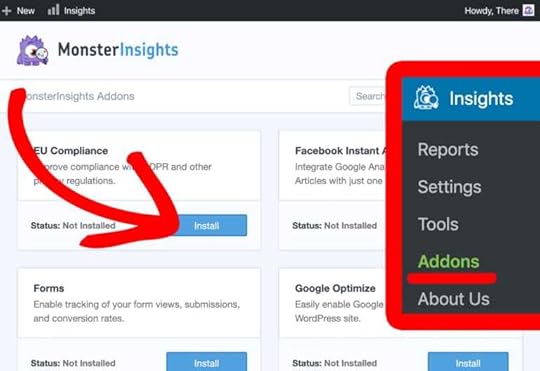
Once the addon is activated, go to Insights » Settings » Engagement and scroll down to EU Compliance.
Here you can play the settings and disable different tracking features in Google Analytics to comply with CCPA.

Step 2: Create an Opt-Out Consent Box
After setting up MonsterInsights and its EU Compliance addon, the next thing you’ll need to do is create an opt-out consent box.
That’s because one of the rights in CCPA says that people can opt-out from websites sharing their data with third parties.
The simplest way of creating an opt-out consent box is by using free WordPress plugins like CookieBot or Cookie Notice.
Both these plugins offer an option to set up an opt-out consent box that easily integrates with MonsterInsights as well.
Step 3: Update Your Privacy Policy
This is highly important because, under CCPA, California citizens have the right to be informed about how your website collects, sells, discloses, and shares their data.
You can inform your visitors that you use Google Analytics to track your site’s performance. Then describe what personal information Google Analytics collects about your visitors.
You’ll also have to explain the purpose of the data you collect, how you use it, and if it’s shared with any third party.
Your updated privacy policy should also include details about the different cookies you use to track your reader’s information.
Lastly, you can disclose the process that users can take if they want to see their data and how their data can be deleted from your website.
Final Thoughts: How to Make Sure Your Google Analytics Complies with CCPA
If you use Google Analytics and meet the requirements for CCPA, then with the MonsterInsights Google Analytics plugin, you can easily comply with the new CCPA law. Just use its EU Compliance addon and disable tracking with a few clicks of a button.
Now It’s Your Turn
Hey, I hope you found my article on how to make sure your Google Analytics complies with CCPA useful.
Now I’d like to hear from you:
What do you think about the CCPA compliance?
Let me know in the comment section below right now.
Also, share this post with your friends, bloggers, and business owners who want to learn more about CCPA compliance.
If you have any questions, feel free to contact me. I’m always available to help young hustlers like you.
Keep hustling!
The post How to Make Sure Your Google Analytics Complies with CCPA appeared first on Inuidea.

July 16, 2020
The Best Resources You Need to Make Your Online Entrepreneurial Journey Easier!
These are the resources I use to make my blogging journey, personal life, work-life, and my daily hustling life easier.
I strongly recommend these resources to grow your business and to make your online business and online entrepreneurial journey easier.
These resources include blogging resources, productivity tools, free design tools, books, free social media communities, and lots of other free and premium resources.
The best part is,
Most of these resources are completely free! (That means no affiliate commission!!! LOL)
Some of the links below are affiliate links, which means that if you choose to make a purchase, I will earn a commission. This commission comes at no additional cost to you. Please understand that I have experience with all of these companies, and I recommend them because they are helpful and useful, not because of the small commissions I make if you decide to buy something. Please do not spend any money on these products unless you feel you need them or that they will help you achieve your goals.
Bluehost
If you’re looking to start a blog for cheap with excellent features, you can use Bluehost.
Bluehost is a reputable, reliable, and the most affordable hosting services one can use for their blog as a beginner blogger.
With Bluehost, you can easily set up your website. They offer a free .com domain, one-click WordPress installation, Free SSL certificate, and 24/7 customer support.
So what are you waiting for?
[I’m recommending you Bluehost, but there are more affordable web hosting services available on the market. Such as Dreamhost, Siteground, etc. Check them out too!]
Namecheap
Wanna buy domains for your blog or your online business?
If you’re looking to secure a domain for your brand, then Namecheap is where you go!
ConvertKit
Made by bloggers, for bloggers and endorsed by people like Pat Flynn! ConvertKit is an authoritative email marketing service provider that is specially marketed towards bloggers.
If you’re looking for an email marketing tool that is easy to use, amazing to look at, and properly optimized to grow your emails, you NEED to get ConvertKit!
Envato Market
Envato is a premium marketplace from where you can buy digital products such as WordPress themes, code script, graphic design templates, mock-ups, stock images, premium music, and more.
For my blog, I’m using the Avada theme, which is a premium theme available on ThemeForest, Envato Market.
WordPress Themes
A good-looking theme can make all the difference between a boring website to an engaging and interesting website.
There are thousands of pre-built premium themes available on many WordPress theme selling marketplace.
By installing a pre-built, premium theme, you will be able to create a complete, good looking, and professional site without coding.
If you are a newbie blogger, I recommend Divi by Elegant Themes.
If you want to design a highly customized, extremely well-built, and an SEO optimized website, I highly recommend StudioPress by WP Engine.
For my blog, I’m using the Avada theme, which is a premium theme available on ThemeForest, Envato Market.
Check out the 7 Best WordPress Themes for Blogs (2020)
Affiliate Programs to Monetize Your Audience!
Affiliate marketing is a huge opportunity to make passive income from your blog. And It can drive more revenue than Adsense ads.
So, if you have a loyal and target audience, you should use affiliate marketing to convert your blog into a money-making blog.
Check out the top 29 affiliate programs you must join to monetize your audience in 2020.
Join Young Hustlers!
Join ‘Young Hustlers’ – a place for online entrepreneurs, bloggers, hustlers, and digital nomads to lend support and share advice to help each other.
Come on hustlers, Let’s change the world together.
Join the group, don’t spam, and get involved!
Join Pinterest Group Boards
If you want to increase your reach on Pinterest to bring massive traffic to your blog traffic, you should join relevant Pinterest group boards.
You can join my group board – Traffic Sphere. It’s a group board where you can save unlimited pins that are related to online business, blogging, entrepreneurship, marketing, and such other relevant topics.
The main motive of ‘Traffic Sphere’ is to drive more traffic to each contributor. So, try to engage with each contributor by repinning their pins.
To join ‘Traffic Sphere’, at first follow me on Pinterest and DM me on Instagram or request to join the board on Pinterest itself.
UpdraftPlus
UpdraftPlus is the most popular WordPress backup plugin. It allows you to automatically backup your complete site and safely stores your site backup file on a cloud service such as Google Drive, Dropbox, UpdraftVault, etc.
It has an option to manually backup your site with a single click and also, you can restore your site with one click.
All these features work for free, but UpdraftPlus have a paid plan with more features and premium support.
Read more: 11 “Must Have” Free WordPress Plugins Every Blog Needs (2020)
Tailwind
Want to automate your pinning strategy to generate massive traffic on auto-pilot?
If you want to get massive traffic from Pinterest to your blog, you have to save engaging, attractive, and valuable pins consistently.
But it’s hard to stay consistent by saving pins manually. That’s why many bloggers and I use Tailwind to automate our pinning strategy and to schedule our pins.
Tailwind helps you stay consistently active on Pinterest with minimal effort.
You can schedule your first 100 pins for free using Tailwind!
So what are you waiting for?
Books
Download the free printable PDF version of my book and learn more about the 37 genuine online business ideas and passive income-generating business ideas you can start and convert into a profitable business.
Also, If you are a true hustler and an aspiring entrepreneur, I recommend (from the bottom of my heart) you two of my favorite book, ‘Rich Dad Poor Dad‘ by Robert Kiyosaki and ‘Crushing It‘ by Gary Vaynerchuk, to learn more about income streams, new age business strategies and to achieve financial independence.
Check out the 7 best books for aspiring entrepreneurs
Canva
Canva is an essential design tool for bloggers, digital marketers, entrepreneurs, and small business owners.
It’s a beginner-friendly online design tool, and the best part is it has a free version.
I’m using Canva to design engaging Pinterest pins, blog graphics, and other social media design, E-books, and more.
Read more: 17 Amazing Free Websites to Download Copyright Free Stock Images
Mailerlite
The money is on the list.
This line is so true!
Email marketing is vital if you want to start a money-making blog in 2020.
Mailerlite is a beginner-friendly email marketing and automation tool that lets you easily customize and create beautiful email forms that fit with your branding.
It’s a great alternative to MailChimp because of its easy to customize features. Mailerlite free plan lets you have up to 1000 subscribers.
Grammarly
You want your writing free of embarrassing grammatical errors and mistakes, right?
Grammarly is an online grammar checker and proofreading tool that automatically detects grammatical mistakes and helps you avoid typos, grammatical errors, and improve the quality of your writing.
Check out Grammarly Review 2020: Boost Your Confidence & Enhance Your Writing
Grammarly is the tool you should use to write error-free content, and If you’re not confident enough to publish your blog posts, you should use Grammarly to boost your confidence.
Fiverr
Fiverr is a beginner-friendly and user-friendly freelance marketplace, that’s why many freelancers and business owners prefer Fiverr to exchange their money and services
Fiverr is a very affordable freelance marketplace, as the services start from $5.
Hire talented freelancers from Fiverr or start working as a freelancer on Fiverr.
Udemy
Udemy is the most reputable e-learning platform with over 50,000 instructors, 100000 courses (in over 60 languages), and 30 Million students.
I have enrolled in some Udemy courses and I think Udemy is one of the best places to learn in-demand skills using organized online courses.
Want to learn in-demand skills online?
vidIQ
If you want to get more views on your YouTube videos, you need to use the free vidIQ chrome extension.
It helps you maximize your organic reach and helps you grow your YouTube channel fast. They also offer paid plans with more amazing features.
TubeBuddy
TubeBuddy is the best YouTube management tool that offers a free extension from Chrome and Safari browser that adds smart YouTube management features to grow your YouTube channel. They also have paid plans with more amazing features.
LastPass
LastPass is a password manager that stores encrypted passwords online. The free version of LastPass comes with a web interface, but also includes extensions for various web browsers and apps for smartphones.
It’s really hard and messy to manage and memorize all your passwords when you’re a blogger or an online entrepreneur. I’m using LastPass for a long time to manage all my affiliate accounts and other important website login details.
99design
99design is a design specific freelance marketplace, and it’s the best place to find and hire talented designers for your creative projects or to grow your business.
Hire talented designers from 99design!
Best Blogs to Learn Blogging, SEO, Marketing, Entrepreneurship, and more!
The Smart Passive Income Blog, WPBeginner, Neilpatel.com, and Backlinko.com, these are my favorite blogs where I have learned a lot about blogging, SEO, digital marketing, online business, and entrepreneurship.
Check out:
The 7 Best Blogs to Learn Blogging in 2020
The 7 Best Blogs to Learn SEO, Marketing, and Copywriting.
The 9 Best Blogs for Aspiring Entrepreneurs to Learn from in 2020
Skyroam
Skyroam is a global hotspot, which means you don’t have to buy a new SIM card everywhere you go.
If you’re a digital nomad, you can get Skyroam to get a reliable, fast, and secure internet connection whenever you travel internationally to work from anywhere in the world.
Inuidea readers get an exclusive discount with promo code INUETC.
Popular Blog Posts
Learn more about entrepreneurship, online business, blogging, marketing, travel, and finance!
17 Genuine Ways to Make Passive Income While You Sleep
The Ultimate Guide on How to Start a Money Making Blog in 2020
11 Actionable Ways To Get Massive Traffic From Pinterest
How to Start a Podcast for Free in 2020 (Complete Guide)
Top 29 Affiliate Programs You Must Join to Monetize Your Audience in 2020
How to Get Google Adsense Approval Fast With a New Blog
31+ Proven Online Business Ideas – Money Making Ideas That Work in 2020
If you have any questions or if you want to ask help from me, feel free to contact me. I’m always available to help young hustlers like you!
The post The Best Resources You Need to Make Your Online Entrepreneurial Journey Easier! appeared first on Inuidea.

June 21, 2020
9 Websites to Download Free and Copyright-Free Music for YouTube Videos
Music and sound effects are vital if you want to make an attractive and engaging video for your target audience. Music adds the emotional touch to your video and makes your video more interesting and engaging.
Also, music helps your audience understand the hidden message and the emotion that you want to convey through your video.
But it’s not easy to find out the best and copyright-free or royalty-free music and sound effects to use on your YouTube video (as background music or other) or any other creative projects such as podcasts, games, and movies.
Today I’m going to show you 9 amazing free websites to download copyright free music to use on your YouTube videos or anywhere you want.
These websites are free to use, full of high quality, and copyright-free or royalty-free music files. You can use any audio files from these websites to do almost anything.
Understanding The License of Copyright-Free Music
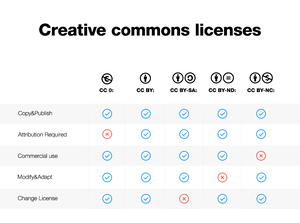
When looking for copyright-free music for videos, you’ll see that most of it are offered under a Creative Commons license. While this license gives you permission to download and share the content, there are different types of freedom within it. The five most popular types of creative commons licenses are the following:
CC0: Unrestricted. Publish, share, modify, and commercialize the work without restrictions.
CC BY: Attribution. Unrestricted license as long as you credit the author.
CC BY-SA: Attribution-Share-Alike. Derivative works can only be distributed under the same license.
CC-BY-ND: Attribution-No-Derivatives. Derivative works and remixes are not allowed.
CC BY-NC: Attribution-Non-Commercial. It cannot be used for commercial purposes.
Other common license types you might come across in your search for free music are “royalty-free” and “public domain”:
Royalty-free licenses are those which give the right of using a work without paying fees each time.
Public domain is the most open form of licensing, as works can be used for free for any purpose.

1. Unminus
I’m in love with Unminus – Unsplash for music. We all love Unsplash because they allow us to use their copyright-free images anywhere without giving attribution. Unminus wants to do the same with music licensing.
Unminus is different from all the other music downloading sites here because the tracks come with a Creative Commons Zero (CC0) license.
In case you don’t know about Creative Commons licenses, the CC0 license lets you use any work for free, in personal or commercial causes, edit it as you see fit, and without attribution. This means you can do whatever you want with the music on Unminus, and you don’t have to add a link for it in the YouTube description.
Type of license: CC0

2. Free Music Archive (FMA)
The Free Music Archive (FMA) is the #1 online resource for free music and royalty-free music. Free Music Archive works with radio stations, artists, and industry enthusiasts to offer one of the largest available selections of free music for videos.
You can search by song genres, title, clip duration, or type of license to find out the right music track for your YouTube videos or your creative projects.
While the majority of the songs are licensed under Creative Commons and licensed under the Public Domain, some of them are only available for personal download and listening. Make sure to double-check before you start working on your project.
Type of license: All CC types and Public Domain

3. FreePD
All music available on FreePD is licensed under CC0 1.0 Universal Public Domain dedication, and you can download all these music for free.
So, you can copy, modify, distribute, and perform the work, even for commercial purposes, all without asking permission and without giving attribution.
All music of FreePD is written by Kevin MacLeod, Alexander Nakarada, Bryan Teoh, and more.
Kevin MacLeod is the founder of another copyright-free music downloading site – Incompetech.com. He has composed over 2,000 pieces of royalty-free library music and made them available under a Creative Commons copyright license.
Type of license: Public Domain
Related post: 17 Amazing Free Websites to Download Copyright Free Stock Images

4. Freesound.org
Free sound is full of awesome royalty-free music, instrumental music, SFX, and free sound effects that you can use on your YouTube videos, podcasts, or wherever you want to use.
Launched in 2005, Freesound is a collaborative repository of CC-licensed audio samples, with more than 400,000 sounds and effects, and 8 million registered users (as of March 2019).
Sounds are uploaded to the website by its users and cover a wide range of subjects, from field recordings to synthesized sounds.
Type of license: CC0, CC BY, and CC BY-NC

5. Thematic.com
Thematic connects YouTube creators and music artists, providing curated and pre-cleared music for your YouTube videos for free.
Thematic allows you to use free songs from established artists and musicians to use on your YouTube videos without any copyright claim. To download free music from Thematic, you can be a Thematic member for free by signing up using your Google account.
After you’ve become a member, you’ll get to see the full Thematic music catalog, you can use all these premium quality music for free. No claims. No takedowns. No worries. All the music available on Thematic is pre-cleared.
Of course, you have to follow a particular attribution link and style to use the songs on YouTube or Instagram.
Thematic allows you to filter thousands of free music clips by genre, community, vocal, tempo, and mood.
6. YouTube Audio Library (YouTube Music Library)
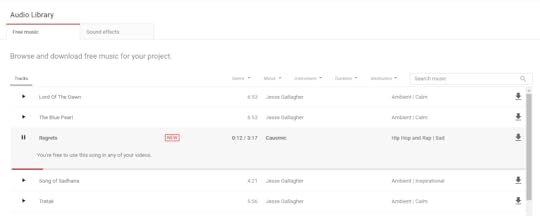
The YouTube Audio Library is a great and my favorite resource to download royalty-free music and sound effects for YouTube videos and other creative projects.
Maybe you’re planning to create a YouTube channel for your videos and later share them on your website or blog and other social platforms. If that’s the case, why not get your music directly from YouTube?
The YouTube Audio Library or the YouTube Music Library allows you to filter thousands of free music clips by genre, instrument, mood, duration, and license type.
Type of license: Royalty-Free and CC BY
7. Bensound.com
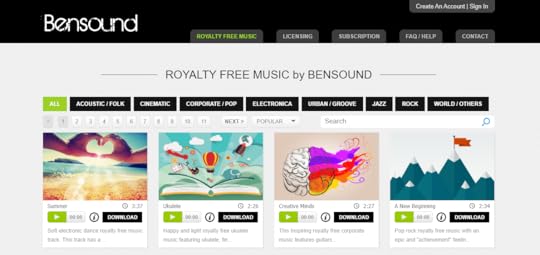
Bensound.com has been created by Benjamin TISSOT also known as Bensound, a Composer and Musician based in France who has been creating music for more than 10 years.
Bensound offers thousands of royalty-free music for YouTube videos, social media projects, websites, games, and more. The platform can be browsed by genre, popularity, uploading date, or tags. Although it once contained only the work of composer Benjamin Tissot, it now includes the works of other musicians as well.
The vast majority of clips on the platform are offered under an attribution no-derivatives CC license. This means you can use them as free background music for videos as long as you credit the site and don’t remix the tracks or use them to create new songs.
Type of license: CC BY-ND
8. Musopen
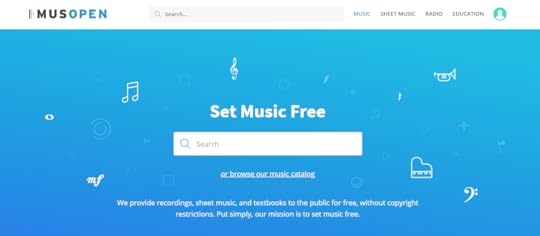
Musopen is a non-profit and its mission is to set music free by offering free music for video editing, educational materials, and sheet music.
The majority of the audio files available are orchestral pieces, either registered as public domain or under a Creative Commons license.
On the site, you’ll be able to download free music clips from historical figures like Ludwig van Beethoven, Johann Sebastian Bach, and Franz Schubert, as well as renowned pieces such as The Valkyrie, Carmen, and The Barber of Seville.
You can filter the Musopen music library by the composer, orchestra, period, mood, length, and more.
Type of license: Public Domain and all CC types

9. Chillhop
Chillhop is a totally different music licensing site that’s full of high-quality soothing music.
After signing up, you can use any of the songs found on your Chillhop Creator Dashboard which have the download option enabled.
All you need to do is credit the music on YouTube. Just add the following credit link in your YouTube video description: Music by Chillhop Music: https://chillhop.com
It’s something like the CC BY-ND license.
Chillhop holds all the rights to their music and their music is not royalty-free. They allow creators to use their music as long as their music receives the mandatory credit.
Final Thoughts: 9 Websites to Download Free and Copyright-Free Music for YouTube Videos
All these copyright free music downloading sites are awesome and I’m using all these sites for a long time. Just understand the license and use copyright free music from these sites without worrying about copyright claims and strikes.
Now It’s Your Turn
Hey, I really hope you enjoyed this list of websites to download free and copyright-free music for YouTube videos
Now I’d like to hear from you:
Which music downloading websites do you prefer to download music for your project?
Let me know in the comment section below right now.
Also, share this post with your friends and YouTubers who are looking for some music downloading sites to download free music for their YouTube videos and other creative projects.
If you have any questions feel free to contact me. I’m always available to help young hustlers like you.
Keep hustling!
The post 9 Websites to Download Free and Copyright-Free Music for YouTube Videos appeared first on Inuidea.

June 20, 2020
11 Easy Ways to Drive Massive Traffic to Your Website For Free
For anyone just getting started with blogging, driving traffic to your new website might be the most difficult task you will ever be faced with.
But that shouldn’t be the case. It is even more difficult to get Google to love you enough to show your content in top search results especially when your website is just new.
Google doesn’t usually rank new websites to the top of its search results and as a result, many websites with high-quality content may find themselves at the bottom of search results. You will have to wait for 4-6 months before you can see results from implementing good SEO practices such as On-Page and Off-Page SEO on your site.
You may not be patient enough to wait that long.
Don’t worry. I have got you covered.
In this post, I will be sharing 11 practical ways you can drive high-quality traffic to your website.
Let’s dive right in.
1. Guest Posting
This is one of the most effective ways to drive traffic to your website if done properly and strategically.
You will need to look for more authoritative websites within your industry that accept guest posts and submit high-quality blogs to their sites.
This will not only boost your traffic but also establish you as an expert in your field which will bring more credibility to your business.
It shows you are active in your niche and also results in high-quality backlinks – more on backlinks below.
A good example is Gregory Ciotti of HelpScout who added 36,733 more qualified subscriptions to his email list through guest blogging.
You can find websites that are suited to your niche and accept guest posts by searching for them on Google using the following search queries to see more specific results:
Name of your niche + “write for us”
Name of your niche + “submit guest post”
Name of your niche “sites that accept guest posts”
Write guest article + ‘name of your niche” + blog
Guest blog by + “name of writer” (e.g., Guest post by “Darren Rowse”).
2. Internal linking
This is an often ignored practice by many bloggers that might make a difference in your traffic and retention levels.
When a visitor comes to your blog, your goal is to get them to continue reading on other pages of your website. And that’s why internal linking is very important.
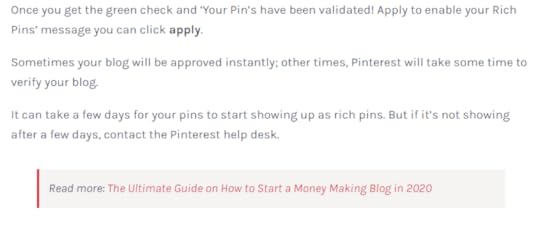
The image above is a good example of how to implement a good internal linking strategy.
You can direct your visitors to related blog posts within an article and this will result in more conversions and also increase the credibility of your site in search engines. Visitors that stay longer on your website are more likely to convert or even become repeat visitors to your site.
3. Repurpose Content
This is a technique that I have found very helpful in growing my own blog to thousands of readers monthly.
If you are finding difficulty in creating high-quality content to increase website traffic then this is a trick worth trying. Simply take a well-performing blog post and repurpose it into a video.
If you have a podcast that really did well you could also convert that into a blog post instead. High-quality content that did well for you will most likely do well again if you transform it while ensuring you are adding value for your readers.
This will continue to drive traffic to your site.
4. Embrace Email Marketing
This is still one of the most profitable marketing tactics around.
It is one of the traditional marketing approaches that has stood the test of time and it will be detrimental for any business to ignore it.
The beauty of email marketing is that it is very inexpensive and therefore it delivers a high ROI per dollar spent.
When it comes to email marketing you have the option to leverage your email subscribers to increase website traffic by encouraging them to share your content and also increase conversion rates from both new and current subscribers.
Provide useful information and links to pages on your website where they can learn more, such as through blog posts and landing pages for particular offers.
Email marketing software also makes it easy to track and analyze the efficacy of your marketing campaigns. You will be able to know how your campaigns are performing in terms of how much traffic you are getting, the sources of traffic, and the conversion rates. This priceless information will enable you to optimize your campaigns to improve performance.
5. Create Video Content
Many of us would rather watch a video about a product than read about it. Your website visitors are not any different.
Research shows that Videos yield a 157% increase in organic search traffic as well. A single search for a query will show video results at the top of the results page. This shows you just how effective videos can be.
Furthermore, 46% of consumers act after watching a video advertisement.
So even as a blogger, it is important that you create a YouTube Channel for your business. This will allow you to connect with your audience more while generating new leads and increasing your website traffic.
You can also create YouTube Videos to supplement some of your blog posts especially tutorial articles.
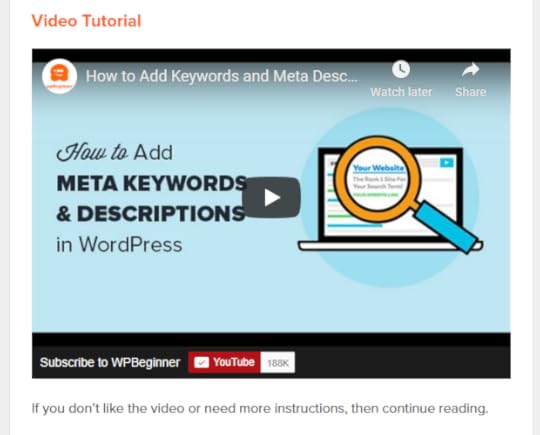
These videos can be embedded within your blog posts. This is a tactic popular websites such as WPBeginner have taken advantage of to grow their audience as seen in the image above.
Notice that they provide their audience a link to the text version of their content on the website.
Read more: 7 Best Blogs to Learn SEO, Marketing and Copywriting
6. Create High-Quality Content
Looking for links from other websites is not only tedious but also time-consuming. If you haven’t much time to do guest post pitches, consider creating valuable high-quality content that just begs to be linked to.
High authority and popular websites may pick up your content and that will result in a tremendous source of traffic for your website.
You can also add some relevant keywords to optimize your blog title to improve its ranking on search results.
Ensure you also create powerful headlines to capture the attention of your readers.
7. Create High-Quality Backlinks
You probably know just how much Google values backlinks as a ranking factor for websites. If websites with high authority link to your site, that gives you more credibility.
Irina Nica, senior content strategist at HubSpot says, “There are two main ways in which high-quality backlinks can help drive more traffic to a website: boosting ranking and driving referral traffic.
It is also important to note that not all backlinks are good. Some backlinks will do more harm than good.
Adopt an effective backlinking strategy to improve your site’s link profile. Thus this will also improve your ranking in Google.
Nica adds, “On the other hand, backlinks can also drive a substantial amount of referral traffic. This will come naturally once you get featured or mentioned on a popular website.
You can learn more about how to implement an effective backlinking strategy here
8. Answer Questions on Quora
This is one of my favorite methods of driving free traffic to my website.
Simply answer questions related to your niche on Quora and link the right keywords to anchor content on your site or blog.
However, don’t use this platform to spam other users. Be respectful and if you are not very knowledgeable about a particular topic don’t voice your own opinions as fact.

Above is a screenshot of a question I answered just today that has already driven over 500 visitors to my website in just a few hours. Think of how much traffic it will be in a month’s period.
9. Leverage Your Presence On Social Media
Social media can massively impact your business and its ability to generate traffic and sales.
According to statista.com, almost 4.57 billion people were active internet users as of April 2020, encompassing 59% of the global population.
Social media sites such as Facebook average over 2.5 billion monthly active users. This is a treasure box.
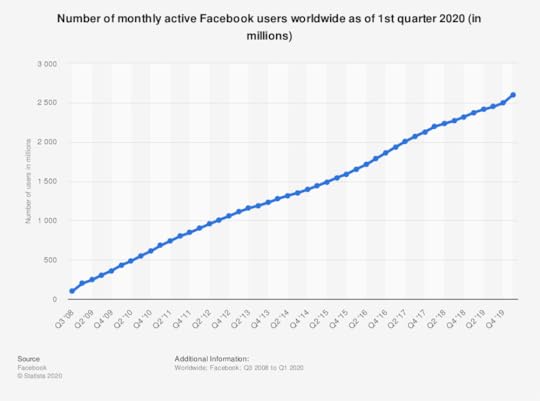
Source – Statista
You can tap into this pool of traffic by sharing your posts to social media sites and also ensuring you have social media share buttons on your blog posts.
Read more: 11 Actionable Ways to Get Massive Traffic from Pinterest
10. Create Infographics
This is also one of the amazing ways to drive traffic to your website.
Building high-quality infographics is an incredible form of clickbait that can essentially create an enormous amount of traffic for your site.
Platforms like Pinterest can be a great place to share your infographics and drive traffic to your website.
Ensure you carry out intensive research and gather relevant statistics. This might prove to be the most difficult task when it comes to creating infographics but there are a variety of tools and resources you can utilize to get the job done:
Statista is one of my favorite sites with statistics on almost anything you can think about.
Pew Research Center also provides a detailed look at hot topics including politics, religion, global and social trends.
11. Improve Site load time and design
Ever found yourself waiting 1 minute for a web page to load? Me neither. If your site takes forever to load, your bounce rate will skyrocket. And the same applies to the general outlook of your website.
First impressions are very important. Visitors are more likely to click off websites with poor designs and slow loading speeds.
This will negatively impact your traffic as well as conversion rates. If you can’t fully optimize your website for responsiveness, consider hiring an expert to do it for you.
Read more: 7 Best WordPress Themes for Blogs (2020)
Final Thoughts: 11 Easy Ways to Drive Massive Traffic to Your Website For Free
After reading this post, you should now be familiar with the different methods that you can use in order to boost the traffic to your website.
Try one of the methods we have discussed above or you could experiment with all the methods and see how it plays out for you in terms of driving high-quality traffic to your blog.
Now it’s Your Turn!
Hey, I really hope you enjoyed reading this actionable guide to get massive traffic to your blog.
Now I would like to hear from you:
What have you experienced when it comes to generating massive traffic to your website?
Please let me know in the comment section below right now!
Also, share this post with your friends and struggling bloggers who want to learn how to increase their website traffic.
If you have any questions feel free to contact me. I’m always available to help young hustlers like you.
Keep hustling!
This is a guest post written by Ewayu Bruno. You can find him on Twitter @ewayubruno
If you want to submit guest posts to Inuidea, check out the guest post guidelines for Inuidea.
The post 11 Easy Ways to Drive Massive Traffic to Your Website For Free appeared first on Inuidea.

June 19, 2020
How to Make Event Tracking with Google Analytics Easy in WordPress
Want to learn how to set up Google Analytics custom events tracking in WordPress?
When tracking certain events from your WordPress website, you can monitor how people interact with your content and website layout.
From clicks to scrolls, knowing how visitors behave can help you create engaging content and it’s especially useful when you’re trying to make money online.
Knowing how people interact with your layout can lead to smarter decisions about things like ad placements, banner placements, button placements, and other important link placements to increase CTR (click-through rate).
However, the Google Analytics custom events setup process is a bit tricky for beginners. That’s where MonsterInsights plugin’s custom link attribution feature turns out to be useful.
In this article, I’m going to show you exactly how to easily add Google Analytics custom event tracking in WordPress with MonsterInsights.
Let’s dive right in.
What are Google Analytics Custom Events?
Events are user interactions with content like banner clicks, downloads, button clicks, link clicks, etc.
Event tracking allows you to track how your site visitors are interacting with your site content and layout.
Tracking your events helps you to understand your most engaging content. Also, using the right Google Analytics event tracking data, you can optimize your less effective content and boost your conversions to make more money from your online business.
Let’s see how to add Google Analytics events tracking in WordPress with MonsterInsights.

This post contains affiliate links (I don’t recommend anything that I don’t believe in), meaning at no extra cost to you, I might receive a small commission for purchases made through these links.
Setting Up Google Analytics Custom Event Tracking in WordPress with MonsterInsights
By default, Google Analytics tracks only pageview hits and other metrics (bounce rate, traffic source, and more) related to pageviews. So, if you want to track how users’ interact with the content, you should set up custom event tracking to measure event hits.
You can set up Google Analytics custom events tracking in WordPress using MonsterInsights Google Analytics plugin. It simplifies the whole process of setting up event tracking in WordPress and I think it’s the easiest method available. Anyone can do it, even if they have zero coding knowledge.
With the new MonsterInsights Custom Link Attribution Feature, you can track your call-to-action (CTA) buttons and find out how your site visitors are engaging with those buttons. Also, you can add event tracking to other important links and see how users interact with those links.
It’s easy to add Google Analytics custom event tracking to your custom WordPress links with MonsterInsights. All you need to do is to add the following tags to the HTML of your link:
Once you add the tags, MonsterInsights will track your WordPress links and provide you with detailed reports.
For example,
Suppose your call-to-action button is a link to your subscribe page: https://www.example.com/subscribe
Here, MonsterInsights will use the following event conditions:
Category: “cta”
Action: “click”
Label: “subscribe button”
Now, you’ll need to replace the event category, action, and label with your event conditions. Then your custom event tracking link will look like the one below:
That’s it!
Now to view the data from your custom event tracking link, head over to the Publishers report in MonsterInsights Google Analytics Plugin.
Go to Insights » Reports » Publisher. Next, scroll down and view the Top Outbound Links report if you created a custom link like the one for ‘subscribe’ in the example.

Final Thoughts: How to Make Event Tracking with Google Analytics Easy in WordPress
Don’t underestimate the power of Google Analytics event tracking. It can help you deliver engaging content to your visitors. It can reduce the bounce rate and it can boost your conversion rate drastically.
Now It’s Your Turn
Hey, I hope you enjoyed reading this tutorial on adding Google Analytics custom events tracking in WordPress with MonsterInsights.
Now I’d like to hear from you:
Will you add custom event tracking on your website?
Let me know in the comment section below right now.
Also, share this post with your friends and bloggers who are looking for a guide to custom events tracking in WordPress.
If you have any questions, feel free to contact me. I’m always available to help young hustlers like you.
Keep hustling!
This article is edited by Inu Etc and co-authored by Baharul Islam.
The post How to Make Event Tracking with Google Analytics Easy in WordPress appeared first on Inuidea.

May 23, 2020
9 Ways to Make Money While Traveling [Travel 365 Days/Year]
Are you looking for ways to make money while traveling?
It can be extremely challenging making money as a frequent traveler. But it’s not an impossible task to do. Thousands of travelers, millions of digital nomads are roaming around the world while making money online.
In this blog post, I’m going to show you 9 proven ways to make money while traveling and how you can travel 365 days per year!
Let’s dive right in.
1. Freelancing
Freelancing isn’t a passive income-generating business, but it’s one of the best ways to make an instant active income while traveling the world.
Freelancing is the act of rendering service without having a boss. Ironically, you have clients, and your clients are your bosses.
The service you render is dependent on your skillset. It cuts across many fields from writing to translation, programming, graphic design, web development, niche research, video editing and the list is endless.
The success of your freelance career depends on your customer satisfaction and your marketing skills, like how you market your skills to attract potential clients.
If you’re a beginner, I suggest you start your freelance career on Fiverr because it’s user-friendly and beginner-friendly.
Also, you can use Upwork, PeoplePerHour, 99Design, Freelancer, Guru.com, LinkedIn, Facebook groups, and other social media platforms to get more clients.
To make more money doing freelance jobs, start a blog, create a portfolio, and use your blog as a freelance marketplace.
Related post: How To Become a Digital Nomad and Travel The World (2020)
2. Become an Affiliate Marketer
Affiliate marketing can be a great way to make money while traveling. All you need is a computer and a loyal audience. While traveling around the world, affiliate marketing will give you the chance of earning on the go.
In affiliate marketing, you have to promote someone else’s products to earn a commission.

Source – BigCommerce
To get affiliate products, you can join affiliate programs like ShareASale, CJ, etc. Also, like Amazon, almost every e-commerce website has its own affiliate program. You can join them too.
You can build your target audience using a blog, a podcast, or a YouTube channel. Also, you should focus on building an email list. After that, you can use these platforms and your email list to promote affiliate products.
To earn more passive income from affiliate marketing, always promote products that are valuable and helpful to your audience.
Related post: Top 29 Affiliate Programs You Must Join to Monetize Your Audience in 2020
3. Sell Products and Make Money While Traveling
Selling products both online and offline is another possibility to make money while traveling.
I’ve heard of some travelers who sell items they collect while traveling, those who create crafts to sell at local craft fairs, and so on. Etsy, eBay, Craigslist are great places if you decide to sell items online.
You can sell digital products such as your travel photos and videos, e-book, music, online courses, mobile apps, and hundreds of other digital products to earn money while traveling this beautiful world.
4. Become a Virtual Assistant
V.As help with numerous tasks such as opening emails to social media management, booking flights, and capturing data. This job is a perfect fit for travelers that are highly organized.
“A virtual assistant (typically abbreviated to VA, also called a virtual office assistant) is generally self-employed and provides professional administrative, technical, or creative (social) assistance to clients remotely from a home office” – Wikipedia
If you want to work while traveling the world, if you are an organized traveler, and if you have administrative, accounting, business, and some technical experience, a virtual assistant job may be right for you.
Start working on a freelance site, because it’s easier to get clients on freelance marketplaces.
Also, make a list of potential clients and start pitching and networking with them by sending cold emails or using LinkedIn.

5. Start a Blog and make money while traveling.
Blogging on any topic of interest can be an excellent way to earn while traveling 365 days per year. You can start a travel blog and use your blog as a travel diary or you can share travel tips. With high-quality content, you can quickly generate leads, run affiliate programs, or enable Google AdSense on your blog to make money while traveling.
You can make passive income from blogging, but it requires a lot of hard work in the setup phase. You have to invest some money and 3 to 6 months to set up your blog before you monetize your blog.
Now blogging is a competitive business. So, you have to choose a less competitive niche that you have some knowledge of, and you know how to write quality content to attract your target audience.
As a beginner blogger, it’s hard to drive targeted traffic to your baby blog, and we all know that more targeted traffic = more money!
The best part is,
You can use Pinterest to drive massive targeted traffic to your blog while optimizing your content for Google and other search engines.
If you’re interested in starting a passive income generating blog to make money while traveling, read this article:
6. Write and Sell E-Book
You can sell your E-book online and make cool money from them through sales and royalties, while you travel the world.
Want to sell E-book to make money while traveling?
Well, it’s pretty easy. With Amazon, you can self-publish your E-books (or paperbacks) easily, and make money from it.
Just validate your book idea, get to know your targeted audience, follow Amazon’s book writing guide, and start writing your first book.
Promotion is the most important part of publishing an E-book on Amazon.
Make sure you pick a profitable niche and don’t forget to promote your eBook through social media platforms, influencers, and bloggers in that niche.
If you can sell a few hundred copies the first week of launching your book, Amazon will take over and start promoting it for you. This way, you can make passive income from Amazon.
Writing a best-selling E-book requires some knowledge and a bit of time investment up front, but it can be a great source of passive income month after month and can help you make money while traveling.
7. Teach a Language
For every country you visit, there will be probably someone that needs to learn your native language. You can teach many languages online or using language teaching apps like Cambly, NiceTalk, Italki, etc.
Also, you can get students through freelance sites or you can market your language teaching skills using your blog (or YouTube videos and social media platforms) and teach your students using Skype or Zoom call.
If you can’t be a language teacher, you can be a fitness coach, business coach, or almost any kind of coach or tutor. You can sell your coaching service online and from anywhere. This way you can make money while traveling by selling your expertise.
Read more: 17 Genuine Ways to Make Passive Income While You Sleep
8. Become a YouTube Creator [Monetize Your Travel Videos]
Start documenting your travel journey and share your experience and stories with the world.
Just shoot videos, upload on YouTube, and build an audience to make money from your content. We all know that you can monetize your YouTube videos by using the YouTube partnership program and sponsorship.
Also you can post videos and contents on different social media platforms to make money from your content.
For example,
Nas Daily, my favorite video blogger (vlogger) who created 1,000 daily 1-minute videos on Facebook under the page, Nas Daily.

Now he is a successful social media influencer with over 15 million followers on Facebook and over 1.7 million followers on Instagram. He currently operates the Nas Daily Corporation, a video production company that uploads weekly videos and makes promotional videos for brands and companies from all over the world.
So, I suggest you upload your travel videos on all major social media platforms out there to build a strong social media presence and following.
It takes time to make a following but it’s not impossible and after building a loyal following you can make a huge amount of money by monetizing your travel videos and you can make money while traveling.
9. Get a Remote Job
The difference between remote jobs and freelance jobs is remote jobs means you’re a full time or part-time employee at an organization or a company, while freelance jobs end once the project is over. In both cases, your presence isn’t required at the office.
Working as a remote employee is better than freelancing because sometimes it’s hard to get clients as a freelancer, while remote jobs are always there for you. So remote jobs make your traveling life more secure.
If you have the required skills and degrees, you can quickly get a remote job in a company and start working as a remote employee from anywhere.
You can be a web developer, marketing specialist, app developer, a software engineer, growth hacker, graphic designer, and the list goes on.
Some well-known companies offer flexible remote jobs for digital nomads. Some of them are:
Automattic
Zapier
Buffer
Doist
Hubstaff
MailerLite
Online job boards such as Remote.com, RemoteOK, FlexJobs, We Work Remotely are great places to find flexible part-time work or remote jobs.
Also, you can directly approach a company for a remote job. Choose a remote-friendly company, let them know who you are and how the company can benefit from your skills and ask if they have any positions available.
Read more: 31+ Proven Online Business Ideas – Money Making Ideas That Work in 2020
Final Thoughts:
Traveling 365 days per year while making money is possible with the availability of internet connection, skills, and some business knowledge.
Don’t let traveling interfere with your ability to live in abundance; you can always combine both.
These are some proven ways to make money while traveling. Digital nomads and full-time travelers from all over the world follow these money-making opportunities to travel the world full-time.
If they can, why can’t you?
Start working from today!
Now It’s Your Turn!
Hey, I hope you enjoyed reading these ways to make money while traveling.
Now I’d like to hear from you:
Do you want to travel the world full-time?
If yes, what are the ways you’re going to make money while traveling?
Let me know in the comment section below right now.
Also, share this post with your friends and aspiring travelers and digital nomads who are looking for an in-depth guide to learn more about the money-making opportunities while traveling.
If you have any questions, feel free to contact me. I’m always available to help young hustlers like you.
Keep hustling!
This article is edited by Inu Etc and co-authored by Baharul Islam.
The post 9 Ways to Make Money While Traveling [Travel 365 Days/Year] appeared first on Inuidea.

April 3, 2020
237+ Free Online Courses in 2020 (Limited Time Offer)
Get premium online courses for free.
Here are 85 bestseller free online courses on Coursera with certificates and 150 free online courses on Udemy. Udemy will not give you certificates after completion of the courses, but they’ll give you the complete course, I mean the learning resources and content, for free.
The coronavirus pandemic has increased interest in online education, online work, online learning, and work from home is an essential part of our lives and it’s a trending topic nowadays.
Keep in mind that all these online courses were premium and bestseller online courses, but now, for a limited time, because of the COVID-19 crisis, we can access these valuable online courses for free. So don’t underestimate these online courses and start learning from today.
Coursera Free Online Courses With Certificates
Here are the top 9 must enroll (My favorite) best free online courses from Coursera! Enroll for free and get certificates!
[If you’re not seeing the discount on Coursera. After clicking on my blog, when you get the course page on Coursera, wait for the promotional banner to appear at the top, and only then click on Enroll for Free. If you don’t see the banner, please refresh and wait a minute!]
Mindshift: Break Through Obstacles to Learning and Discover Your Hidden Potential from McMaster University
Introduction to Personal Branding from University of Virginia
Build Your First Android App (Project-Centered Course) from École Centrale Paris
Chinese for Beginners from Peking University
Guitar for Beginners from Berklee College of Music
Getting Started With Music Theory from Michigan State University
Code Yourself! An Introduction to Programming from the University of Edinburgh
The Strategy of Content Marketing from the University of California, Davis
The Language of Design: Form and Meaning from California Institute of the Arts
Get the complete list of 85 free online courses with certificates: https://www.classcentral.com/report/coursera-free-certificate-covid-19/
Also, you can explore Coursera’s official blog post to get more free online courses: https://blog.coursera.org/coursera-together-free-online-learning-during-covid-19/
Udemy Free Online Courses
Here are the top 9 must enroll (My favorite) best free online courses from Udemy! Enroll for free! (No certificate of completion)
Introductory Photography Course
How To Build And Make A WordPress Website From Scratch 2020
The Total Beginner’s Guitar Course
Yoga for Beginners – by Sarah Beth Yoga
Unity 3d | Using Light and Shadow in Game Development
Art Fundamentals – Building Blocks of Digital Painting
cPanel For WordPress: How To Use cPanel [Beginners]
How to Use SMART Goals: Achieve More in Less Time
7 Scientifically Proven Steps to Increase Your Influence
Get the complete list of 150 Free Online Courses on Udemy: https://www.udemy.com/courses/free/
Hubspot Academy Free Online Courses
Hubspot Academy has free online courses related to inbound marketing, digital marketing, startup, social media marketing, SEO and more.
Get access to the Hubspot Academy and enroll free online courses: (also Hubspot Academy gives you a certificate of completion for free)
Final Thoughts: Free Online Courses in 2020
Now educate yourself with free online courses, and build skills for free to follow your passion, to pursue a career you love and to start your own online business in 2020.
These free courses include courses related to music, online business, personality development, coding, blogging, digital marketing, self-development, learning a new language, and more.
So, hurry up and now enroll these premium courses for free. It’s a limited time offer!
Now It’s Your Turn!
Hey, I hope you enjoyed reading this list of free online courses!
So, now I’d like to hear from you:
Which courses do you want to enroll in now?
Let me know in the comments below right now.
Also, share this post with your friends, struggling hustlers and aspiring entrepreneurs who are looking for some valuable free online courses to learn new skills and to improve their personality.
237+ Free #OnlineCourses in 2020 (Limited Time Offer)
Click To Tweet
If you have any questions, feel free to contact me. I’m always available to help young hustlers like you.
Life is a journey!
Keep hustling!
The post 237+ Free Online Courses in 2020 (Limited Time Offer) appeared first on Inuidea.


