
Barb Drozdowich's Blog, page 51
August 27, 2012
The Secret of Selecting Keywords for AdWords, REVISTED
Bakerview Consulting is happy to welcome back JP Thompson, aka the Adwords Guy, to the blog. JP has shared several posts with us about Google AdWords, and is back to share some more information. JP would love to help you with your AdWords Campaign. Please find his contact information at the end of this post!
 For your final preparation before running off and setting up your AdWords campaign I wanted to revisit your keyword phrases you developed from the earlier post on The Secret of Selecting Keywords for AdWords.
When you finally setup your campaign, one of the final activities will be to choose and enter your keywords and phrases for your ad. Beyond that you will need to decide what search criteria (keywords and phrases) will actually trigger your ad. Not all search criteria are created equal!
The key question is:
How closely do you want a potential buyer’s search criteria to match your keyword phrase in order to trigger your ad?
This can be a challenging task. So, it is a good idea to think about it now. You will have a choice of the type of search criteria that could trigger your ad. You will need to decide if you want a “broad match,” “broad match with modifier,” “phrase match,” “exact match,” and/or a “negative match” for each keyword phrase. To keep it simple, below is an example of a term and the different types of attributes you can add to your keyword phrase to determine when a search term will trigger your ad to show. Keep in mind that as you move down the list, although you are using the same keyword phrase you narrow and make more specific as to what type of search criteria can trigger your ad to show.
For example: If you ad the keyword phrase:
Humorous Books
This is a broad match. Your ad can be triggered by synonyms or a search related to humorous books: E.g., Humorous books, funny stories, jokes funny stories, motivational stories, funny books, fun books.
+Humorous +Books – use of the +
This is a broad match with a modifier. Your ad can be triggered by close variants in any order of the words humorous books, just has to have those two words or variants of those two words in the search criteria. E.g., humorous books, best humorous 2012 books, humorous joke books, books on humor and jokes.
“Humorous Books” – use of “ ”
This is a phrase match. Your ad can be triggered by a search with the phrase humorous books in it. That means any term can come before or after this phrase. Will include close variant of each keyword. E.g., humorous books, jokes humorous books, motivational humorous books, humorous books of 2012, award winning humorous book.
(Humorous Books) – use of ( )
This is an exact match. Your ad can be triggered by an exact match for humorous books in it but will not show if someone adds words before or after the phrase. It will include close variant of each word. E.g., humorous books, humor books, humorous book.
Humorous Books – Jokes – use of the -
This is a negative keyword. Your ad will not be triggered if your keyword phrase is accompanied by the negative term in the search criteria. E.g., Humorous joke books, books on humor and jokes. This is very specific to the search criteria of humorous books.
There is an option to add a negative keyword globally. So, anytime that negative keyword is used with any of your keywords your ad will not be shown.
Typically if I use a broad match on a keyword, after a week I will check the “key word details” to see what the actual search criteria was that triggered the ad and received clicks. It can help to determine if there are any negative keywords that need adding or change a broad match to a more specific type of match. Also, it could give you additional keywords to use that you may not have thought to use and can add to your keyword list. The cons to this approach is that you can get a lot of non-target clicks and too specific search criteria can minimize your ad showing and a loss of potential targeted clicks.
So, it is a real art to managing your keyword phrases. You should review the “key word details” regularly and adjust keyword phrases accordingly to help you to manage and maximize your Clicks, Click Through Rate (CTR), and Cost Per Click (CPC) for your ad campaign.
You can also have a combination of the different types of matching options. Some of your keyword phrases might be broad matches where as others may be phrase matches and so forth. You decide.
This week, go through your keyword phrases and determine what type of matching option you want for each of your keyword phrases. Also, think about potential negative key words you might want to add. To make insertion into AdWords easy, I like to list them in note pad or textedit. Then just do a copy and paste when setting up the ad. Also, you can use an Excel Spread sheet and import the list to AdWords.
Next week, the campaign!
 J.P. Thompson
Also, visit my blog on selling at Salescafe.
AdWords, as simple as 1-2-3. Get your ad campaign going in minutes! J.P. the AdWords Guy can help you with a task that will seem like you are in a cognitive learning experiment. If you are looking to GET EXPOSED fast and drive traffic to your Amazon page or book web site, J.P. the AdWords Guy can help you. Call, NOW!
949-431-3841

Author information
 adminSocial Media and Wordpress Consultant Barb Drozdowich has taught at Colleges, trained technical personnel in the banking industry and, most recently, used her expertise to help hundreds of authors develop the social media platform needed to succeed in today’s fast evolving publishing world. She owns Bakerview Consulting and manages the popular blog, Sugarbeat’s Books. Her first book is now available on Amazon - The Author's Guide to Working with Book BloggersTwitterFacebookGoogle+


August 17, 2012
Is Your Landing Page a Killer Page?
Is Your Landing Page a Killer Page?
The landing page is where your potential buyer will end up (land) when they click on your ad. It can make or break you! A killer page or killer page.
It’s now time to take off your author hat. You need to think like a marketer. You are now selling a book, NOT writing one.
When running an AdWords ad campaign or any other online promotion, it is important that your landing page is optimized to SELL! Let me repeat that . . . is optimized to SELL!
As discussed in the previous two articles, The Secret to Selecting Keywords for AdWords and AdWords: How to Influence with 95 Characters or Less, it is important to think like a potential buyer of your book. You discovered your need to optimize your keyword phrases and your ads to increase the probability that the person who clicks on your ad is a potential buyer of your book. So, our final task before running off and setting up an AdWords ad campaign is to look very seriously at your landing page.
Think of your ad campaign this way: The ad is your cold call on a prospect to get the opportunity to get in front of them to persuade them. Your landing page is the actual sales call to sell them. You can get a lot of clicks on your ad and drive a lot of traffic to your landing page, but does your landing page sell them once they arrive?
Here are three key questions to answer:
1) Does my landing page deliver on what I promised?
Again, it is important that your keywords > ad > landing page are relevant and congruent to each other. You want to ensure that when a potential buyer lands on your page it is what they expected to find.
2) Why should I, as a potential buyer, buy your book?
You are in competition with other books and authors for a buyer’s book purchases. So, it is important to differentiate your book from other similar books in your categories. How is your book different or unique from other similar choices I have as a buyer?
People buy because of the benefit(s) (what it does for them) they will realize with the purchase. So, tell them the benefits of buying your book. What will your book do for me if I buy it? Will it make them laugh, feel good about themselves, help them solve a problem, to mention a few.
There are four decision factors that people use when making any decision. One or a combination of each decision factor can influence people to decide. They are: does the decision looks right, sound right, feel right, or seem right. Below are the four decision factors and a sample of the keywords (predicates) for appealing to each decision factor.
Does this book look right for me?
Use visual words in your description like see, look, view, or observe.
*These buyers are heavily influenced by the “look” of your landing page. How visually appealing it is.
Does this book sound right for me?
Use auditory words in your description like tell, hear,
Does this book feel right for me?
Use kinesthetic words in your description like feel, warm, cool, touch.
Does this book seem right for me?
Use auditory digital words in your description like think, fact, know, or make sense.
Since you don’t know a potential buyer’s decision factors, you should incorporate all four types of keywords (predicates) in your description.
Recommended resource: Make a Killing On Kindle
3) Does your landing page have a strong call to action?
There needs to be a strong call to action on your landing page.
Buy, Now!
Read this book!
Subscribe today!
Purchase your copy, Now!
Further, you can have calls to action throughout your description. For example:
As you read this book, you will . . .
When you buy this book, you can . . .
Purchase/Read this book to . . .
Buy/Read it to . . .
Always have a statement of what I, as a buyer, should do next after viewing your landing page content.
Remember, you can lead a buyer to your landing page, but you can’t make them buy. You can only entice and persuade them to do so. Does your landing page SELL?
J.P. Thompson
Also, visit my blog on selling at Salescafe.
AdWords, as simple as 1-2-3. Get your ad campaign going in minutes! J.P. the AdWords Guy can help you with a task that will seem like you are in a cognitive learning experiment. If you are looking to GET EXPOSED fast and drive traffic to your Amazon page or book web site, J.P. the AdWords Guy can help you. Call, NOW!
949-431-3841
Other Resources:
AdWords: landing page
AdWords: landing page Experience

Author information
adminSocial Media and Wordpress Consultant Barb Drozdowich has taught at Colleges, trained technical personnel in the banking industry and, most recently, used her expertise to help hundreds of authors develop the social media platform needed to succeed in today’s fast evolving publishing world. She owns Bakerview Consulting and manages the popular blog, Sugarbeat’s Books. Her first book is now available on Amazon - The Author's Guide to Working with Book BloggersTwitterFacebookGoogle+
August 6, 2012
AdWords: How to Influence with 95 Characters or Less

So, you’re back for more.
A neutron walks into a bar and asks how much for a drink. The bartender replies “for you, no charge” ~ Sheldon from the Big Bang Theory.
In last week’s post, The Secret of Selecting Keywords for AdWords, you learned a few techniques for selecting your keyword phrases for your AdWords campaign. As a recap:
Select “phrases” rather than a single key word.
Select 5-10 Keyword Phrases (20 maximum).
Select Keyword Phrases that have 10K – 100k searches per month.
Use Amazon’s search bar and Google’s Keyword Tool to help you select your keyword phrases.
Now that you have your keyword phrases, let’s turn our attention to the ad itself. Again, before you go running off to set up an AdWords account, there are a few questions you should think about beforehand. This is so when it is time to set up your AdWords account and campaign you are prepared.
The next question is: what will your ad say?
Headline: This is the attention grabber .
You have 25 characters for your headline (including spaces).
Make it interesting and enticing.
It is a good idea to put a key search term in your heading. What your prospective buyer of your book is searching on.
Example: Let’s say one of your keyword phrases is “teen books.” Your headline might read: “Powerful Teen Book”
Text Lines: This is your description.
You only have two lines for your text to inform and sell.
You have 35 characters for each line of text (including spaces).
Again, include a key search term in the text.
Make the text enticing (a teaser).
Why should I want to read your book?
Write one sentence about what makes your book so interesting or important to the buyer.
Example: Let’s say another one of your keyword phrases is “award winning books.” Your text might read:
Line 1: Award Winner. What happens when
Line 2: family love just isn’t enough? Look
Also, include a call to action. E.g., buy, look, read, view, and etc.
*Note: You should also let the prospective buyer know this is an ad for a book or eBook. Otherwise you might get unnecessary clicks.
URLs:
You are going to enter two URLs. URLs are webpage addresses you enter in the address bar in a web browser to take you to a certain website or web page.
The two types of URLs you will enter are a Display URL and a Destination URL.
Display URL:
It is not necessarily a functioning URL. Meaning it is like a signpost that let’s the buyer know where they will go (website or web page) if they click on your ad.
This address appears in your ad.
You only have 35 characters for the display URL.
It does not need to be the exact URL (web address) of the landing page. The exact URL of your landing page is the “Destination URL.”
Destination URL:
This is the actual functioning web page address. It takes the buyer to the landing page (web page) you want them to go to when they click on your ad.
It does not appear in your ad.
You can use the actual URL or a shortened link, like a bit.ly link.
URL examples:
Display URL: www.amazon.com>kindle>BookName
This URL uses what Google calls “bread crumbs” (>). It gives the buyer an idea of where they are going, a signpost. Whether an Amazon book page or your book’s website. This is not a functioning link (URL).
Destination URL: http://www.amazon.com/The-Mancode-Exposed-Collection-ebook/dp/B006G5EMCK/ref=sr_1_1?ie=UTF8&qid=1344220861&sr=8-1&keywords=man+code+exposed
This is a functioning link (URL). It will take a buyer to an actual landing page.
Here is what your ad looks like:
Powerful Teen Book
Award Winner! What happens when
family love just isn’t enough? Look
www.amazon.com>kindle>BookName
*Note: Remember, ad relevance is very important. Be sure that your keywords > ad > landing page are all relevant to each other.
So, far I have been focusing on a search network campaign (most basic). I will discuss the display network ad campaign in a later post.
Until next week, take the time to write out three ads to begin your campaign. Once your campaign is running you will find that some ads get a better response than others.
J.P. Thompson
Also, visit my blog on selling at Salescafe.
AdWords, as simple as 1-2-3. Get your ad campaign going in minutes! J.P. the AdWords Guy can help you with a task that will seem like you are in a cognitive learning experiment. If you are looking to GET EXPOSED fast and drive traffic to your Amazon page or book web site, J.P. the AdWords Guy can help you. Call, NOW!
949-431-3841
J.P. Can be reached by email at emailme@jpthompson.us or emailme@theadwordsguy.com

Author information
adminSocial Media and Wordpress Consultant Barb Drozdowich has taught at Colleges, trained technical personnel in the banking industry and, most recently, used her expertise to help hundreds of authors develop the social media platform needed to succeed in today’s fast evolving publishing world. She owns Bakerview Consulting and manages the popular blog, Sugarbeat’s Books. Her first book is now available on Amazon - The Author's Guide to Working with Book BloggersTwitterFacebookGoogle+
July 30, 2012
The Secret of Selecting Key Words for Ad Words
Bakerview Consulting is happy to welcome J. P. Thompson, The AdWords Guy to the blog today. He’s here to share some thoughts on AdWords. Grab a coffee, sit back and learn! Enjoy!
So, you are thinking about an AdWords ad campaign, are you?
Let me begin.
“Scissors cuts paper, paper covers rock, rock crushes lizard, lizard poisons Spock, Spock smashes scissors, scissors decapitates lizard, lizard eats paper, paper disproves Spock, Spock vaporizes rock, and as it always has, rock crushes scissors.” – Sheldon ‘Big Bang Theory’
Setting up an AdWords campaign can, at times, seem like you trying to follow a discussion with Sheldon on the Big Bang Theory. Over the next few posts I will be assisting you in setting up your AdWords ad campaign.
Before you go running off to set up an AdWords account, there are a few questions you should think about beforehand.
So, I wanted to start with one of the most important questions you will have to think about and answer when setting up your ad campaign:
What are the key words and phrases you want to use?
This is a very critical step. Really think about your key words or phrases.
Select between 5 to 10 key words or phrases (Maximum of 20).
Typically, authors new to AdWords have a tendency to laundry list a whole host of key words hoping to cover all the bases to get lots of clicks. Wrong! It has been my experience that only about two or three key words or phrases will receive the vast majority of clicks.
When selecting your key words, take two things into consideration:
What are the terms or phrases a book buyer of your book will search on?
What is the relevance of your key words or phrases to your book, your eventual ads, and landing page (The webpage people who click on your ad end up on.)?
The secret to selecting key words and phrases is AMAZON! Amazon is the SECOND largest search engine on the planet. The really neat thing about it is that everyone there is a BUYER! So, a great place to start to identify your key words and phrases is Amazon’s search bar.
Typing in a key word for your book will produce a list of the most entered search terms or phrases that book buyers are searching on for books like yours to buy. For example, let’s say you wrote a humorous story. You type in humor and up pops a list of the most searched on terms, of which humorous is number five on the list. Humorous story is nowhere to be found. If your book is a work of fiction you might consider using a key word phrase like humorous fiction rather than humorous story.

Let’s take it further and use one of the phrases that came up “humorous books for” to refine and/or add to our options. Here we have the most common phrases that buyers are searching on to find books they are interested in:

Play around with Amazon’s search bar with different terms. Also, click on a term that looks promising to see what type of books actually come up. Are they relevant to your type of book?
Now open up another window in your browser and navigate to AdWords’ Keyword Tool:
https://adwords.google.com/KeywordTool
Now type in the terms or phrases you think your potential book buyers will search on in the “word or phrases” box at the top (#1) and click search.
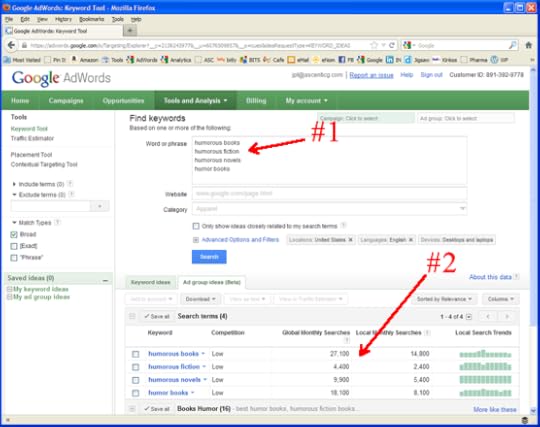
The Keyword Tool will display the results. Focus on the “Global Monthly Searches.” It will show you the total number of searches for each term for the previous @30 days. I look for words and phrases that return search numbers between 10,000 and 100,000, the sweet spot. So, in our example, humorous books and humor books look promising as key words/phrases for the ad campaign. Humorous novels is right on the threshold and could include it as one of the key phrases if the book is considered a novel. Humorous fiction may not be a good keyword phrase due to too low of a search volume. Also, it says that there is low competition for those terms that could lead to lower CPC (cost per click), more clicks based on budget, and better ROI (return on investment).
Below the search results are other suggestion for key words and phrases to use. Review those suggestion for additional insight and also may provide you with terms to avoid (negative keywords) which can cost $$$ with unqualified buyer clicks. For example, the term Humorous Books may trigger your ad and subsequent clicks in an organic Google search for Humorous Joke Books where your book has nothing to do with jokes.
Remember, when choosing keywords for your AdWords ad campaign, you are looking to drive book buyers to your landing page. So, use both Amazon’s search bar and AdWords Keyword Tool together to help you choose your keywords and phrases.
Until next week, take time to determine your keywords and phrases.
J.P. Thompson
AdWords, as simple as 1-2-3. Get your ad campaign going in minutes! J.P. the AdWords Guy can help you with a task that will seem like you are in a cognitive learning experiment. If you are looking to GET EXPOSED and drive traffic to your Amazon page or book web site, the AdWords Guy can help you. Call, NOW!
949-431-3841
JP Can be reached by email at emailme@jpthompson.us or emailme@theadwordsguy.com

Author information
adminSocial Media and Wordpress Consultant Barb Drozdowich has taught at Colleges, trained technical personnel in the banking industry and, most recently, used her expertise to help hundreds of authors develop the social media platform needed to succeed in today’s fast evolving publishing world. She owns Bakerview Consulting and manages the popular blog, Sugarbeat’s Books. Her first book is now available on Amazon - The Author's Guide to Working with Book BloggersTwitterFacebookGoogle+
July 9, 2012
Beta Readers

What’s a beta reader?
A beta reader is someone who reads a book that is either not quite finished, or someone that serves as a test audience for a newly finished book.
Where do you find beta readers?
You cultivate them. They are found amongst your friends and fans. They are people who want to help you with your career. They are people who are somewhat predisposed to like your book for one reason or another. They read the same genre that you write in, they have read other books that you have written, or they follow your blog and enjoy your posts on your blog. They are “friendlies.”
Why do you need beta readers?
Beta readers are the first readers/reviewers of your new book. They post reviews on Amazon and Goodreads and help you create a buzz when your book is released. If they have blogs, they post about your book and maybe invite you to guest post about your new book.
Can your book be published without beta readers?
Yes, but don’t you want to do everything you can to launch your book to a rousing round of enthusiasm? Don’t you want your book jump-started to the top of the Amazon rankings and lists? Don’t you want your book released into a pond filled with friendly fish instead of into the ocean filled with sharks?
Do authors innately know that they need beta readers?
In my experience, no. I think a lot of authors assume that the first person to read their new book (other than their mother) is the first paying customer. This can be true, but don’t you want the initial response to your book to be a positive one? Wouldn’t that be soothing on your ego – after the stress of writing, editing and formatting your book – to be told for the first little bit, how wonderful you and your book are?
One of our team members can help you get some beta readers – for help contact Babs Hightower at Author Services at the Bistro.
Go find yourself some Beta Readers!
Make some friends!

Author information
adminSocial Media and Wordpress Consultant Barb Drozdowich has taught at Colleges, trained technical personnel in the banking industry and, most recently, used her expertise to help hundreds of authors develop the social media platform needed to succeed in today’s fast evolving publishing world. She owns Bakerview Consulting and manages the popular blog, Sugarbeat’s Books. Her first book is now available on Amazon - The Author's Guide to Working with Book BloggersTwitterFacebookGoogle+
January 7, 2012
How to Install a Favicon on a Blogger blog
Today is a short tutorial on putting a Favicon on a Blogger Blog. For those of you who have a WordPress Blog, click HERE to see a tutorial on how to do the Favicon on WordPress!
Why do we go to this trouble?
Simple.
Branding.
It’s a simple way of adding more personalization and branding to your blog. It places an identifiable graphic on the tab holding your blog on everyone’s browser. You can reinforce your brand in multiple subtle ways. This is just one example.
Installing a Favicon on a Blogger blog is actually quite an easy job. It seems to be one of the things that Google has made quite straight forward!
The first thing that you are going to do is to create your graphic.
 I’m not very good with graphics, so I tend to create simple icons. Keep in mind that this graphic will be really small and not much detail will be visible. Because of this, I have created a graphic that is simply a set of initials on a colored background. This graphic should be square and small. Mine is 50pxX50px and saved as either a .jpg or .png and it needs to be less than 100 kb
Next, you need to open your dashboard for your Blogger blog and click on the “design” tab. This will bring up a screen like below.

Towards the upper left of the print screen above you can see the word Favicon and the word Edit beside it. See screen shot below.
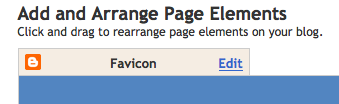
Click on the word Edit and you will see the following screen.
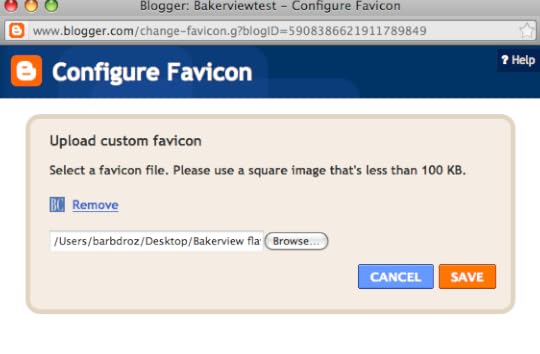 Click on the browse button and choose the graphic file that you have saved on your hard drive. Click on Save. This will put your little graphic in place. Your screen should show the Favicon in place as below.

Let’s look at a before and after so that you can see the difference.
Before:
After:

Now it’s time for you to do this on your blog! Easy! Drop me a note if you have questions or if you are interested in getting a little more help!
Author information
adminSocial Media and Wordpress Consultant Barb Drozdowich has taught at Colleges, trained technical personnel in the banking industry and, most recently, used her expertise to help hundreds of authors develop the social media platform needed to succeed in today’s fast evolving publishing world. She owns Bakerview Consulting and manages the popular blog, Sugarbeat’s Books. Her first book is now available on Amazon - The Author's Guide to Working with Book BloggersTwitterFacebookGoogle+


