Harmony Evans's Blog, page 684
September 22, 2023
Jack Smith Adds Radical Left-Wing Democrat Donor to Special Counsel Team Persecuting Trump | The Gateway Pundit
Jack Smith added Alex Whiting, a ‘war crimes prosecutor’ to his special counsel team of nearly two dozen rabid prosecutors gunning for Trump.
Whiting is a radical left-wing Trump hater who previously praised Mueller’s inquisition against the former president.
Former special counsel Robert Mueller’s ‘Trump-Russia collusion’ investigation ended in a whimper and completely crumbled.
“Whiting has been a frequent commentator on the previous special counsel to investigate Trump: Robert Mueller, who investigated links between Russia and Trump’s 2016 campaign. Whiting wrote numerous articles and gave interviews assessing the strength of Mueller’s case against Trump, often siding with those who saw extreme legal peril for Trump over his efforts to curb the investigation.” Politico reported.
Jack Smith, who is tied closely to the Obamas, has more than 20 lawyers harassing Biden’s main political opponent.
“Smith takes over a staff that’s already nearly twice the size of Robert Mueller’s team of lawyers who worked on the Russia probe. A team of 20 prosecutors investigating January 6 and the effort to overturn the 2020 election are in the process of moving to work under Smith, according to multiple people familiar with the team.” CNN reported last year.
Politico reported:
Special counsel Jack Smith has added a veteran war crimes prosecutor — who served as Smith’s deputy during his stint at the Hague — to his team as it prepares to put former President Donald Trump on trial in Washington and Florida.
Alex Whiting worked alongside Smith for three years, helping prosecute crimes against humanity that occurred in Kosovo in the late 1990s. The Yale-educated attorney also worked as a prosecutor with the International Criminal Court from 2010 to 2013. He has taught law classes at Harvard since 2007 as well, hired as an assistant professor by then-Dean Elena Kagan — now a Supreme Court justice — and rising to a visiting professorship in 2013.
Whiting’s precise role on Smith’s team is unclear. A spokesperson for Smith declined to comment, and Whiting did not immediately return requests for comment. The prosecutors’ office in the Hague and Harvard University also did not respond to requests for comment about Whiting’s current employment status.
Alex Whiting is also a Democrat donor who previously donated to Barack Obama and other prominent Democrats.
This guy– Alex Whiting– is a DEMOCRAT donor. Here’s just a sample of his political donations… https://t.co/82I6eJWeEd pic.twitter.com/4YIbzkT92u
— Steven Cheung (@TheStevenCheung) September 22, 2023
Trump was indicted on 37 federal counts related to Jack Smith’s classified documents case in Miami in June.
Trump was charged with 31 counts of willful retention of national defense information and 6 other process crimes stemming from his conversations with his lawyer.
Last month Jack Smith hit Trump with 3 additional charges in the investigation into classified documents stored at Mar-a-Lago.
The superseding indictment, filed in the Southern District of Florida, claims Trump was part of a scheme to delete security footage from Mar-a-Lago.
Last month Trump was hit with 4 counts in Jack Smith’s January 6 case: Conspiracy to defraud the United States, conspiracy to obstruct an official proceeding, obstruction of and attempt to obstruct an official proceeding, and conspiracy against rights.
Jack Smith is also trying to gag Trump in the middle of a presidential election.
The post Jack Smith Adds Radical Left-Wing Democrat Donor to Special Counsel Team Persecuting Trump | The Gateway Pundit appeared first on Harmony Evans.


Building Responsive Layouts for iOS Apps: A Step-by-Step Guide
Ever tried fitting a square peg into a round hole? That’s what designing mobile apps feels like without considering layouts for iOS apps. You want it to work on every device, but it doesn’t. Many others have encountered the same difficulty.
I’ve been there, too – grappling with app layouts that look perfect on one screen size but distort or shrink awkwardly on another. It can be frustrating and time-consuming!
In this article, you’ll uncover the key to a website design, forming adaptable designs that adjust easily across various gadgets and display sizes. We will explore how to set up your development environment correctly, design optimized layouts, implement responsive components effectively, and, more importantly – troubleshoot common issues you might face.
Building Responsive Layouts: The Step-by-Step GuideTechAhead builds all web apps and mobile applications, including those with responsive layouts for iOS apps. Our process involves several key steps:
Determining User Needs: We start by understanding what our clients want their users to achieve with the application.Crafting Wireframes: Next comes creating wireframes, which serve as blueprints for the final design.Selecting Suitable Elements: We choose appropriate elements, like buttons, text fields, etc., based on device specifications.Making Use Of AutoLayout: To ensure responsiveness, we use AutoLayout – a tool Apple provides that automatically adjusts interface elements based on changes in the screen size.Testing: We conduct rigorous testing to ensure the app’s layout performs well across different devices and orientations.In this era of mobile-first design strategies, recognizing the importance of responsive layouts is essential. With a user-friendly interface that adapts seamlessly to various screens and orientations, your iOS app can deliver an enhanced user experience, leading to higher engagement rates.
Highlighting the Importance of ResponsivenessIn this digital age, having a responsive layout for your iOS apps is no longer an option but a necessity. With the rapid increase in mobile usage, ensuring that your app delivers an optimal experience across all devices and sizes of the screen is paramount.
The Rise of Mobile UsageA recent report by Statista revealed over 6 billion smartphone users worldwide. This number is projected to reach 7.33 billion this year. Furthermore, DataReportal’s Global Digital Overview shows people spend over 40% of their internet time on mobile devices.
User Expectations and ExperienceUsers today expect seamless navigation and interaction with applications regardless of their device. A study conducted by Google Think Insights found that if an app or website does not satisfy users’ expectations, they are likely to switch to another one immediately.
The Impact on Business SuccessA well-designed and responsive website design layout can significantly impact business success factors such as customer satisfaction, conversion rates, and search engine rankings. According to research from Clutch Co, businesses with optimized mobile websites tripled their chances of increasing their customer base up to 5 times compared with those who don’t have one.
At TechAhead, we understand the importance of building responsive layouts for iOS apps. We specialize in developing web and mobile applications that are visually appealing and use the latest responsive design principles by providing a seamless user experience across all devices.
Ensuring a Smooth User Experience Across Multiple DevicesCreating an app that functions seamlessly across multiple devices is crucial in mobile application development. This is especially true for iOS mobile apps, where users expect high-quality performance and a smooth user experience regardless of screen size or model.
Understanding Responsive LayoutsThe first step towards ensuring this seamless functionality lies in understanding responsive layouts. A responsive layout adjusts its design based on the screen size and orientation to provide optimal viewing and interaction for optimal user experience. It allows your iOS app to look great on everything from smaller iPhone SE screens to larger iPad Pro displays without additional coding.
A Step-by-Step Guide to Building Responsive Layouts for iOS AppsTo create a responsive layout for your iOS app, follow these steps:
Determine Your Breakpoints: You’ll need to decide at what points your design will change based on different-sized screens.Create Flexible Grids: Your grids should be able to resize themselves depending on the viewport width.Use Auto Layout: This tool provided by Apple helps you define rules (constraints) about how views and UI elements relate to each other regarding positioning and sizing.Prioritize Content: Last but not least, ensure that critical content remains prominent no matter what device it’s viewed on.TechAhead has extensive experience building all types of web apps and mobile applications, including those with responsive layouts. We understand the importance of providing a smooth, user-friendly experience across multiple devices and are committed to helping you achieve this goal.
1. Create Wireframes & MockupsOnce you understand your users’ needs, start creating wireframes or mockups of the application using tools like Sketch or Adobe XD. These visual hierarchy guides represent the skeletal framework of your app and serve as a blueprint for its design and functionality.
2. Select The Right UI ElementsYour choice of responsive UI elements can significantly impact how users perceive and use your app. For example, buttons should be large enough for easy tapping; text must be legible even on smaller devices and screens; images must scale well across different devices and font sizes without losing quality.
3. Leverage Auto Layout ConstraintsAuto Layout constraints, offered by Apple’s development environment Xcode, allow developers to create flexible interfaces that respond appropriately regardless of screen size or orientation changes.
Remember: Building responsive layouts isn’t just about making things look good—it’s also about ensuring usability across all devices.
Setting Up the Development Environment

Creating a responsive layout for iOS apps starts with setting up your development environment. You need to get everything in place before you can start building, just like a chef prepares their kitchen before cooking.
To commence, download Xcode onto your Mac. Apple’s integrated development environment (IDE) lets you build and design apps for all devices. Here is the link to download Xcode.
1. Xcode Installation StepsYou’ll find this process similar to downloading any other software:
Go to the Apple App Store on your Mac and search for ‘Xcode’, then click Get once it appears.Type ‘Xcode’ into the search bar and click Get once located.Wait as your computer downloads and installs Xcode automatically.The installation may take some time because of its large size. So, while waiting, grab a coffee or do something productive.
2. Coding Languages: Swift & Objective-COnce installed, familiarize yourself with Swift or Objective-C– these are programming languages used by TechAhead when designing app layouts. Swift, particularly, has gained popularity due to its simplicity and power over recent years.
3. Create Your First ProjectTo ensure everything works perfectly fine after setup, create an initial project in XCode, which will give you hands-on experience in actual coding practice. Click File > New > Project from the menu options within the XCode interface, then select the appropriate template based on needs.
In essence, creating a development environment for your iOS app is akin to building the foundation of a house. It would be best to have it solid so that everything you build on top will hold up. With Xcode installed, understanding Swift or Objective-C under your belt, and an initial project underway – you’re ready to dive into designing responsive layouts.
Designing the Layout

When it comes to iOS app development, creating a responsive layout is vital. It’s about more than just aesthetics; you’re shaping the user experience. At TechAhead, we’ve gained knowledge over the years on how significant this procedure is.
A well-designed layout can adapt to user feedback from your target audience on different devices and screen sizes without compromising functionality or appearance.
Determining Your Audience’s Preferred DevicesThe first step is understanding your target audience and their preferred device types. To start designing a practical layout for your iOS application, it helps to know what devices your target audience prefers. You need data on which iPhones or iPads they use most frequently so that you can optimize accordingly.
The Apple Developer site offers valuable resources on device usage statistics and design guidelines for each model.
2. Selecting Appropriate Responsive Design ElementsMoving forward with these insights allows us to select appropriate design elements – buttons, images, text fields – based on the average screen size of our target audience’s preferred devices. This approach ensures consistency across various screens while enhancing usability.
We have found tools like Sketch and Adobe XD incredibly useful when selecting other elements, allowing designers to visualize their work in real-time on multiple screen layouts simultaneously (Adobe XD).
3. Ensuring Seamless User Experience Across DevicesYou’ll want a clear hierarchy of information: prioritizing critical functions by placing them at the top of your layout.Navigation should be intuitive and simple. Aim to reduce the number of taps needed to access key features.Always design with thumb-friendly zones in mind – these are areas easily reached while holding a device single-handedly.These elements ensure your app works smoothly on different devices – key for keeping users engaged. For more insights, check out the studies by Nielsen Norman Group.
Implementing Responsive Components

Creating an iOS app that functions optimally across all gadgets is essential. One key element to this goal is the implementation of responsive components. What does it imply for an element to be ‘adaptable’?
A responsive component adapts its size and layout according to the screen size and orientation of the device. This flexibility gives your app an edge, ensuring a consistent user experience across different iPhone models.
Apple’s Human Interface Guidelines recommend prioritizing adaptability in design. The company provides Xcode’s Auto Layout toolset, which lets you create flexible UIs for multiple screens.
1. Making Use of ConstraintsThe core principle behind implementing responsiveness lies within constraints – rules defining how responsive elements relate to each other and their parent view.
To start, specify horizontal and vertical constraints for each interface object. This helps determine their position relative to others or edges of the super-view.
2. Leveraging Stack ViewsYou can further streamline your design process using stack views (UIStackView). They automatically manage layout based on set parameters like spacing, alignment, and distribution – making it easier than ever.
3. Tailoring Designs with Size ClassesBeyond just adjusting dimensions, achieving truly adaptive layouts often needs variations in design depending on the screen size or orientation.
This is where font size and classes come into play. These abstract measurements allow designers to categorize devices based on font sizes and display characteristics, helping them tweak designs accordingly.
For example, iPads are smaller devices usually assigned Regular and font sizes and size widths, while iPhones have Compact widths.
You can use size classes to alter the number of elements visible on the screen or change their arrangement based on device type. Remember, creating an app that feels right at home across all devices is more than just scaling; it’s about giving a tailored, user-friendly experience.
Testing Design Layouts

As we create our iOS app layouts, testing becomes a vital step. This ensures that your design works well across different devices and screen sizes.
To guarantee that users receive an ideal experience on their device, examining your design across all the elements and sizes of the screen is critical. This includes iPhones of all models and iPad variants.
Think about it this way: You wouldn’t buy a new pair of shoes without trying them on first because they might not fit right or be comfortable. It’s the same with designing for multiple screens; you have to make sure everything works perfectly.
1. Selecting Devices for TestingYou don’t need every Apple device under the sun, but try testing your responsive layout using representative models from small (iPhone SE), medium (iPhone 12 Pro) to large devices (iPad Pro). These should cover most user scenarios and catch any major issues.
2. Finding Issues Through TestingDifferent problems can surface when you start testing your designs across varying devices – overlapping elements, font size too small, or big buttons are just some examples. Like how professional chefs taste their dishes before serving them up – designers must do similar tests with their mobile apps.
Xcode offers excellent debugging tools such as ‘View UI Hierarchies’, which lets us examine each layer within our user interface closely, helping us find where things may have gone wrong during implementation.
‘Slow Animations’: By slowing down animations, developers can better understand the transitions and interactions between elements.‘Color Blended Layers’: This tool helps identify layers that are being overdrawn, which can affect performance. It colors these areas red to highlight potential issues.Optimizing Performance

Your iOS app’s responsive layout must perform smoothly, irrespective of the device or the user-friendly-sized screen. The performance optimization journey begins with the efficient use of resources.
1. Effective Use of ResourcesThe key to optimized performance lies in using your resources effectively. It’s like running a finely tuned machine; each part should function most efficiently. This means understanding how different components interact and optimizing their interactions for speed and efficiency.
Avoid unnecessary computations by caching results where possible. Caching is akin to jotting down a recipe instead of trying to remember it every time you cook – it saves time and effort.
2. Image OptimizationApple’s guidelines on image optimization suggest we must aim for the right balance between image quality and file size. Imagine stuffing a king-sized comforter into a small washing machine – not practical. Similarly, large images can slow down your app considerably.
You can reduce image sizes without compromising quality using various online tools like TinyPNG.
3. Coding PracticesClean coding practices go far in improving an application’s performance, too. Code clutter slows down apps just like traffic congestion slows us down during rush hour commutes.
Ruthlessly eliminate dead code (unused variables/functions).Leverage lazy loading techniques similar to ordering pizza when you start feeling hungry – get what you need precisely when you need it.Make sure to use synchronous and asynchronous calls judiciously. It’s like deciding whether to call a friend (synchronous) or send them a text (asynchronous).4. Testing PerformanceNo optimization strategy is complete without testing its efficacy. Apple’s Instruments tool allows you to monitor your app’s real-time performance, helping identify bottlenecks.
Optimization improves an app’s speed and ensures its performance remains consistent despite changes. It also ensures the app stays speedy, even when adding new features, squashing bugs, or updating the latest iOS versions.
Troubleshooting Common Issues

Creating responsive layouts for iOS apps is not without its challenges. Sometimes, even the most meticulously designed layout can encounter issues when viewed on a different device or a different size screen.
You can confidently address any design challenges with the right tools and understanding. Let’s delve into some practical strategies that TechAhead employs to fix typical hiccups with your website designs.
1. Flickering UI ElementsIf elements in your app flicker when transitioning between different states or views, it might indicate a synchronization issue between various layers of the app’s User Interface (UI). One way to solve this problem is using CAMetalLayer, which provides high-performance rendering capabilities and minimizes graphical glitches.
2. Inconsistent Layout Across DevicesSometimes, an app may look perfect on one device but completely disarrayed on another. This usually stems from hard-coding dimensions instead of employing relative sizing techniques like Auto Layout. Apple’s official documentation about Auto Layout is an excellent resource if you need help understanding how to implement dynamic sizing methods effectively within your application.
3. Poor Performance On Older DevicesNo matter how beautiful an app looks, users will abandon it faster than a sinking ship if it doesn’t perform well across all devices – especially older ones. Test your app on different hardware configurations to ensure smooth performance across multiple generations of iPhones and iPads. Tools like XCode can simulate older devices and help identify performance bottlenecks.
4. Misaligned Touch TargetsAnother common issue is touch targets not aligning correctly with the screen size, making the app difficult or frustrating. Again, Auto Layout comes to the rescue by allowing you to define constraints for interactive elements relative to other views, ensuring a consistent and optimal user experience regardless of device size.
FAQs- Layouts for Ios Apps:How do I get different app layouts on my iPhone?
You can use Apple’s native tools like SwiftUI or third-party apps to customize your iPhone layout.
Can you change the layout of apps on iPhone?
iOS 14 and above lets you alter your home screen using App Library and Widgets for a unique look.
How do I organize my iPhone apps aesthetically?
Group similar apps together to make your iPhone more visually appealing, leverage color coding, or apply themed icons with Shortcuts.
How to structure an iOS app?
Create a solid structure by planning the navigation flow first. Use the Model-View-Controller (MVC) pattern as a starting point, then refine it based on needs.
Contact TechAhead today for all your web and mobile app development.
Inner Image Credit: Provided by the Author; Thank you!
Featured Image Credit: Provided by the Author; Thank you!
 Vikas Kaushik
Vikas Kaushik is the CEO of TechAhead, a mobile app development company in the USA. He started TechAhead in 2009 to use technology for empowering businesses. He has over 20 years of experience in the tech industry and has been featured in Forbes as a successful tech entrepreneur. He leads a team of developers who create apps that enhance the human-digital experience for clients worldwide, including Audi and American Express. He is passionate about the latest technologies such as IoT, Data Analytics, DevOps, etc. and using them to develop cutting-edge apps.
Source link
The post Building Responsive Layouts for iOS Apps: A Step-by-Step Guide appeared first on Harmony Evans.
OF COURSE: Pentagon Exempts Ukraine Funding From Possible Government Shutdown | The Gateway Pundit
Lots of people in Washington are talking about the possible government shutdown that’s looming.
Of course, Zelensky doesn’t have to worry about anything. He is going to get his money because the Pentagon has exempted Ukraine funding from the shutdown.
No matter what happens to Americans, we have to make absolutely sure that the cash keeps flowing to Ukraine.
Politico reports:
Pentagon exempts Ukraine operations from potential government shutdown
The Pentagon will exempt its Ukraine operations from a potential shutdown if lawmakers can’t agree on a deal to fund the government by the end of the month, allowing key training and other activities in support of Kyiv’s forces to move ahead uninterrupted, according to a Defense Department spokesperson.
Washington is more resigned to the looming government shutdown every day. As the Sept. 30 deadline approaches, congressional leaders showed little progress this week in moving a stopgap funding bill to avert that scenario. The House was in chaos on Thursday as a group of GOP hardliners tanked a vote that could have offered a path to fund the government.
But if lawmakers fail to reach an agreement and government appropriations lapse, DOD has decided to continue activities supporting Ukraine, DOD spokesperson Chris Sherwood told POLITICO Thursday — just hours after Ukrainian President Volodymyr Zelenskyy met with Defense Secretary Lloyd Austin, Joint Chiefs Chair Gen. Mark Milley and other senior leaders at the Pentagon.
This is so insulting to the American people.
JUST IN: The Pentagon has decided to EXEMPT Ukraine operations from a potential government shutdown if lawmakers fail to reach a deal by the end of the month.
This means tens of billions will continue flowing into Ukraine regardless.
Why is that even legal? pic.twitter.com/GKcCPb9aTb
— Nick Sortor (@nicksortor) September 21, 2023
Even if Congress doesn’t appropriate money, the Pentagon will keep funding Ukraine. As I’ve said, we do not have a representative government. We have not had one for a while. We have an oligarchy with the ornamentation of representative government. https://t.co/G6k8D7joJJ
— Justin Amash (@justinamash) September 22, 2023
Congress has been a dog and pony show.
It’s an act
The dementia patient in the White House shows the Presidency is an act. There’s no way he’s actually making decisions
The entire “Daylight Government” is the emperor no clothes.
Who’s pulling the strings?
— Being Libertarian (@beinlibertarian) September 22, 2023
Zelensky says jump and our leaders in Congress ask him how high. It’s pathetic.
The post OF COURSE: Pentagon Exempts Ukraine Funding From Possible Government Shutdown | The Gateway Pundit appeared first on Harmony Evans.
Chanel Les Beiges Healthy Glow: Where Glam Meets Natural
Mona Tougaard stars in Chanel Les Beiges Healthy Glow Sheer Powder campaign. Photo: Chanel Beauty
When glamour often bows to excess, Chanel’s Les Beiges collection embraces the understated. The makeup line’s new Les Beiges Healthy Glow Sheer Powder 2023 campaign stars the arresting trio of Mona Tougaard, Blesyna Minher, and Anna Ewers. It pays tribute to the kind of beauty that is effortless.
Dressed in a subtle palette of neutral tones and adorned with Chanel’s own exquisite jewelry, these models showcase the powder as an ode to a natural yet glamorous look, a nod to authentic beauty.
Chanel Les Beiges Healthy Glow Sheer Powder 2023 Campaign[image error]Model Anna Ewers shows a natural glamour for new Les Beiges de Chanel campaign. Photo: Chanel BeautyFrom the house of Chanel comes an announcement that elevates the traditional. The collection offers a stunning range of 12 shades, offering a glow that isn’t limited by the fickleness of lighting.
[image error]Blesyna Minher gets her closeup in Chanel Les Beiges Healthy Glow Sheer Powder campaign. Photo: Chanel BeautyFormulated with the enchantment of jasmine-flower-infused oil, this sheer powder is a tapestry of photo-adaptive pigments. What’s more, in a step toward sustainability, Chanel presents this makeup wonder in a refillable round square case.
[image error]With 12 shades, Chanel’s Les Beiges Healthy Glow Sheer Powder has a photo-ready glamour. Photo: Chanel BeautyBut don’t consider this a stand-alone marvel. The campaign elegantly follows the trail set by Les Beiges’ summer to-go release and fall makeup advertisements featuring Kristen Stewart.
Chanel articulates the essence of the collection with the following words: “A naturally radiant healthy glow with an imperceptible makeup finish.” In a world of bold declarations, Les Beiges by Chanel speaks the timeless language of understated allure.
[image error][image error][image error]Source link
The post Chanel Les Beiges Healthy Glow: Where Glam Meets Natural appeared first on Harmony Evans.
Fetterman Fights Back Tears as He Says He Has “Lost the Ability to Fully Process Language” – After His Doctor/Donor Claims He’s Fit to Serve (VIDEO) | The Gateway Pundit
Democrat Senator John Fetterman on Thursday got choked up as he recounted being bullied for struggling to process language after his massive stroke in May 2022.
Fetterman spoke at a Senate Special Committee on Aging and was accompanied by people with disabilities.
John Fetterman got choked up as he recounted being bullied for his post-stroke symptoms. Fetterman is not a civilian struggling to recover from a stroke. He is a US Senator who is making decisions for hundreds of millions of people. Any criticism of his inability to speak is warranted.
The US Senate is not a rehab facility.
“Because I live in a political environment, I was ridiculed and made fun of because I wasn’t able to process things at times,” Fetterman said fighting back tears.
“I’m so sorry, I’m sure many of you had to go through this kind of thing,” Fetterman added. “I admire everyone who has to live with these kind of struggles and prevail over them.”
“How can we become more empathetic, more responsive, and more effective senators?” Fetterman said.
WATCH:
During the campaign last year, John Fetterman released a note from his doctor (also a donor) who said he had “no restrictions” and could “work full duty in public office.”
Now he says through tears that he “lost the ability to fully process language.”
pic.twitter.com/raTshJhmYy
— Greg Price (@greg_price11) September 21, 2023
As TGP’s Kristinn Taylor previously reported, Fetterman suffered a stroke in May 2022.
53-year-old Fetterman also released a short video to accompany the statement that shows him in a hospital room with his wife, Gisele.
Gisele does most of the talking while John Fetterman only speaks briefly and moves just his left arm while seated in a chair wearing a dark hoodie.
On Friday, I wasn’t feeling well, so I went to the hospital to get checked out.
I didn’t want to go – I didn’t think I had to – but @giselefetterman insisted, and as usual, she was right.
The good news is I’m feeling much better + I’m well on my way to a full recovery. pic.twitter.com/WQ5X6QgQen
— John Fetterman (@JohnFetterman) May 15, 2022
Fetterman’s campaign donor Doctor Clifford Chen released a statement last October that Fetterman was fit to serve shortly before he was hospitalized for clinical depression.
“He spoke intelligently without cogntive deficits,” Fetterman’s doctor/donor said in a statement last year.
The doctor said Fetterman had “no restrictions” and could “work full duty in public office.”
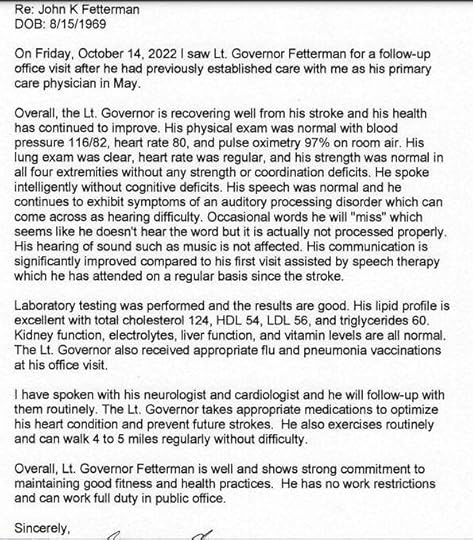
Now Fetterman is crying about his inability to fully process language.
The post Fetterman Fights Back Tears as He Says He Has “Lost the Ability to Fully Process Language” – After His Doctor/Donor Claims He’s Fit to Serve (VIDEO) | The Gateway Pundit appeared first on Harmony Evans.
CNN Recently Posted Their Worst Weekend Ratings on Record Since 1991 | The Gateway Pundit
CNN is struggling and that’s not news. What is news is that over the weekend, they posted their worst ratings since 1991.
The network that CNN has become in recent years is nothing like it was even just a decade ago. It is a far left, propaganda organization that conspires against half of the country on a daily basis and based on their numbers, most people know this.
At this point, they’re just coasting on fumes provided by the history of the brand, but even that is wearing thin.
The New York Post reported:
CNN posts lowest weekend ratings in key demo in its recorded history
Ratings-challenged CNN hit rock bottom in a key viewership demographic last weekend — another sign of the difficulties facing incoming boss Mark Thompson.
The cable news network logged its worst weekend ratings on record in the all important 25- to 54-year-old demo, according to the latest Nielsen data released Tuesday.
CNN — which launched in 1980 and bills itself as “the most trusted name in news” — totaled just 55,000 viewers for its weekend slate of shows that include Sunday political programs “State of the Union with Jake Tapper and Dana Bash,” and “Fareed Zakaria GPS.”
The network’s Sunday primetime lineup, which featured “The Whole Story with Anderson Cooper” and “Stanley Tucci: Searching for Italy,” drew 43,000 in the demo.
The ratings are the network’s worst since 1991 — the earliest TV data is readily available.
Data prior to 1991 is largely not digitized.
CNN’s overall viewership wasn’t much better.
The network logged 345,000 total viewers, trailing Fox News’ 683,000 and MSNBC’s 424,000.
43,000 people in the demo? There are small towns across the country with more citizens than that.
Right-leaning actor Rob Schneider made this point:
CNN records lowest weekend ratings in demo in recorded history…
More people see MY tweets than watch the Liberal partisan dumpster fire that is CNN https://t.co/yrHUiw2oov
— Rob Schneider (@RobSchneider) September 20, 2023
If it wasn’t for cable bundling, CNN would probably go under tomorrow. They are reaching a tiny audience.
The post CNN Recently Posted Their Worst Weekend Ratings on Record Since 1991 | The Gateway Pundit appeared first on Harmony Evans.
10 EdTech Tools That’s Enhancing The Digital Classroom
Rapid technological development has enabled widespread digitization of organizational structures, helping to create a more sustainable and efficient enterprise supply chain. During the last two decades, ongoing investment and adoption of new technology have allowed organizations to upskill their workforce, build effective communication channels, and create a more interactive virtual workplace.
While newer software tools and digital resources have witnessed broader appeal within private industries, other sectors with less digital involvement and inadequate financial investment have seen slower levels of technological adoption, despite Artificial Intelligence (AI) being a strong driver of change and forward-looking development.
Traditionally, the education sector, and more importantly, the classroom setting have seen slower use of technology. However, following the pandemic, educators and teachers have realized the scale of opportunities that come with using technology as a way to make lessons more intriguing, manage their planning structures, and help create a more engaging classroom experience.
The Rise of EdTechThe virtual and digital classroom has moved beyond traditional tools – Google Teams and Zoom – and has started to embrace the continuous development of newer, more advanced software tools that can help students and educators improve their performance within the classroom.
The establishment of edtech or educational technology has allowed big-tech companies and other household names to develop a range of digital services focused on improving the overall classroom setting and the teaching experience.
Generally speaking, edtech refers to the use of software and hardware components, and collaborating this with in-person teaching to create a more digital learning environment for students. Edtech encompasses a variety of tools and resources and is focused on providing real-time solutions for educators, enabling them with more efficient and optimum teaching experiences.
While the development, and more importantly adoption of these technological tools have been typically slow, better access to the Internet of Things (IoT), and Software as a Service (SaaS) have made edtech tools more attractive for educators and private investors.
Research by McKinsey and Company, a global consulting firm, estimates that venture capital investment in the global edtech sector will reach more than $20.8 billion in 2021, a representation of 40 times more than the amount invested eleven years earlier in 2010.
Do you know which under-the-radar stocks the top hedge funds and institutional investors are investing in right now? Click here to find out.
Was it perhaps not for the pandemic that helped fast-track this development, educational technology has now become an integral part of the classroom setting, whether this is for the facilitation of in-person or virtual teaching.
EdTech Tools For The Digital ClassroomAs technology begins to play a more important role in the classroom, educators will continuously look to adopt more advanced tools that will improve their lessons, further enhance student interactions and engagements, and assist with the management of course materials and lesson planning.
In-Class Lesson Planning SoftwareThe first, and perhaps most important category is the use of software to enable more effective and engaging classroom lessons and the presentation of course materials.
PlanBoardThis platform enables teachers to create a digital playbook and utilize lesson templates to create more compelling presentations. PlanBoard is a popular platform for various grades and levels and can be directly linked with U.S. state and Canadian curriculum standards.
The interactive platform allows for easy use and lesson planning and can be used both online and offline. The media function allows teachers to upload new content, and use this within their lessons. With PlanBoard, educators have access to analytical tools as well, helping to track student progression and performance.
NearpodNearpod can be used in different classes and lessons, especially for teachers with younger students who require intuitive lesson planning. This platform allows teachers to create more interactive and engaging lessons with the use of available templates and other multimedia materials.
One of the most attractive features of Nearpod is that teachers can make lessons available for students to download onto their mobile devices. The platform is free to use, and students can use the application both online and offline. This application is suitable for a variety of classes, and teachers can use the materials available on the platform to craft more lively, fun, and interesting lessons for students.
MentimeterNext on the list is Mentimeter, a free platform that provides near-endless opportunities for teachers. With Mentimeter, teachers can further streamline their lesson planning, and use Educational templates to create more interactive lessons.
Mentimeter comes with a variety of features, such as the Quiz Questions, which allows students to submit anonymous real-time answers. This feature is most suitable in big classes, either at the university level or even in situations where students are less confident to give responses in a classroom setting. Overall, Mentimeter can help teachers build more robust lessons, and create straightforward activities that will keep students at any level engaged.
Organizational SoftwareThe following category looks at various platforms that allow teachers to plan, organize, and execute their lessons better. This software helps to keep all of their important information in one place.
AdditioWith Additio, educators can keep better track of student attendance, class activities, and weekly planners. The platform helps to centralize critical organizational and classroom management, enabling more engagement between teachers and students beyond the classroom.
Additio allows teachers to build a weekly or monthly calendar, and include other records, such as attendance, observations, important notes, and extra curricular activities. More than this, the platform is available to students, meaning they can access important information and resources at any given time.
Additionally, the platform acts as a communication portal between teachers, students, and parents. With this, both students and parents can contact teachers, and teachers can also track any student’s progress. While it takes a bit of time to get used to the interface, Additio is a valuable tool for effective classroom management.
Socrative TeacherAnother classroom management platform, that is both desktop and mobile-friendly is Socrative Teacher. This platform can be used across various teaching levels, from primary school to high school, and is even used in the corporate environment.
With Socrative Teacher, educators can design their classroom management around their needs, while also making the process a lot more enjoyable with games, and a range of available templates.
For in-class use, there are options to create custom quizzes, and the backend allows teachers to review student reports with infographics and other visualizations. Socrative Teacher makes learning and understanding data more fun and interactive and is available for free to students.
AttendanceTeachers with multiple classes and students can use Attendance to keep better track of which students have been attending class and create a report that measures their performance that can later be used to help assess student behavior and forward-looking guidance.
With Attendance, teachers can create custom lists for different classes, which can then be used to keep track of individual student classwork, studies, projects, and assignments. The platform implements easy-to-use prompts and tools for teachers, allowing them to keep better track of student records, and to help verify student reports more effectively.
One of the downsides of this platform is that managing various students and classes all at once can feel somewhat overwhelming in the beginning. Additionally, teachers need to constantly keep track of different projects and information on the platform to ensure they use the data more effectively and to their best advantage.
ClasstreePerhaps less organizational, and more focused on providing teachers an effective and safe way to stay connected with parents. This platform aims to eliminate any potential communication barriers, allowing teachers the ability to directly contact parents and provide them with the necessary student performance reporting.
You can think of Classtree as the classroom version of Messenger of iMessage, as it has a one-on-one chat portal, but also provides additional features that can help teachers and parents have better control over student performance.
As a stand-alone communication platform, Classtree comes with all the bells and whistles. Teachers can send parents surveys and attendance records of their students. Additionally, they can have better analytical data to create student reports, all the while being able to directly share this information with parents.
Student-Teacher Collaboration SoftwareThe final category focuses on bringing students and teachers closer together, both in terms of in-class and virtual learning. This software enables teachers to give students more freedom to interact and engage with lessons through technology such as pop quizzes, videos, and presentations.
SlidoInstead of handing out individual question papers, teachers can now allow students to answer questions using Slido. The platform gives teachers the ability to share an event code with students, which they can access through their web browsers. Teachers can then provide questions and possible answers, which students can respond to using the platform.
This platform helps to make presentations a lot more interactive for students of any age, as results or answers are displayed in real-time. Teachers can remove results, and statements or answers that receive multiple upvotes will move to the top of the list quickly.
Slido can also be used in a university setting, or even corporate training, as presenters can set up polls and surveys, which can then be answered by attendees. Through this, presenters, and more importantly, educators can have an active and visual presentation of student queries, questions, and answers.
MoodleMoodle is a more robust software platform that houses several collaboration tools and features geared at educators across various education levels. One of the significant features of Moodle is that it allows for the mass integration of multiple students, and educators can include projects, assignments, and peer and self-assessments.
Moodle is free to use for both students and educators and is available on Open Source. Additionally, Moodle allows educators to customize the platform to their needs. While there are a lot of intricacies, and it takes a bit of time to get the hang of everything, Moodle provides efficient classroom management and collaboration for educators.
Explain Everything WhiteboardEducators who want to have more control and versatility in their classroom management can leverage Explain Everything Whiteboard to interact with students, collaborate on projects, and provide students with an open communication portal.
While the platform is mainly used to create an interactive interface, whereby students and teachers can write and share notes, create images, and share other media, Explain Everything Whiteboard also allows teachers to access student records and share important resources via the platform.
This creative collaboration tool allows for better attendance during online lectures and classes. Educators can record their videos or lessons, which can then be shared with students. The platform also features built-in voice chat and video link sharing.
Why Is Edtech Important For The Classroom?Edtech enables educators, schools, and universities to address issues of accessibility. With the necessary edtech software, educators can ensure that educational materials and resources are more widely available to all students, regardless of socio and economic background.
Following the pandemic, educational technology has become increasingly important for teachers and educators, to provide students with valuable classroom experiences, despite having to conduct classes virtually.
The pandemic allowed for the widespread deployment of educational technology. The World Bank estimates that “Learning Poverty” in low-income countries could potentially rise from 53 percent to more than 63 percent due to the limited availability of technological resources, school closures, and minimal intervention that promotes the adoption of edtech software.
Learning loss isn’t only present in low-income countries, and there are multiple instances where a lack of critical resources, especially technology, can directly make an impact on the classroom experience for students.
One research study found that roughly 86 percent of eighth-grade teachers have agreed that integrating some technology into lessons and presentations is important, and directly contributes to the learning experience.
Even more, a different study found that 90 percent of teachers and educators believe that with the use of technology and software, they can further expand their lessons, and enable a more collaborative classroom.
While there are still a lot of obstacles that may hinder the successful application of edtech, it remains a critical component for the advancement of student-teacher engagement and collaboration, but more importantly, helps to optimize classroom management, and ensures greater autonomy for teachers.
Published First on ValueWalk. Read Here.
Featured Image Credit: Photo by RF._.studio; Pexels; Thank you!
Source link
The post 10 EdTech Tools That’s Enhancing The Digital Classroom appeared first on Harmony Evans.
September 21, 2023
DEVELOPING: Third IRS Official Confirms Biden DOJ Blocked US Attorney David Weiss From Charging Hunter Biden | The Gateway Pundit
A third IRS official has come forward to House Republicans to confirm Biden’s Justice Department blocked US Attorney from Delaware Dave Weiss from charging Hunter Biden.
According to the Washington Examiner, IRS Director of Field Operations Michael Batdorf told lawmakers on the House Ways and Means Committee last week that the DOJ refused to approve tax charges against Hunter Biden.
“DOJ Tax would have to authorize charges prior to David Weiss recommending an indictment or prosecution,” Batdorf said during his interview according to the transcript obtained by the Examiner.
“So, I mean, my understanding is that, I mean, he can’t make that decision without DOJ Tax authorization,” Batdorf said.
The Washington Examiner reported:
A third IRS official confirmed that Delaware U.S. Attorney David Weiss faced roadblocks when attempting to bring charges against Hunter Biden, contradicting denials issued Wednesday by Attorney General Merrick Garland.
IRS Director of Field Operations Michael Batdorf told the House Ways and Means Committee in a closed-door interview on Sept. 12 that he felt “frustrated” by the refusal of the Justice Department to approve tax charges that IRS agents viewed as well-supported by evidence, according to a transcript of the interview obtained by the Washington Examiner.
He also said the IRS removed agent Gary Shapley, a whistleblower, from the Hunter Biden case at the direction of Weiss despite having done nothing wrong.
Batdorf’s testimony was the latest piece of evidence to suggest Weiss did not enjoy the unfettered authority to pursue Hunter Biden that Garland and others claimed he had.
Two IRS whistleblowers, Gary Shapley, and Joseph Ziegler, already testified on the government prosecutors’ preferential treatment of Hunter Biden.
Gary Shapley said Biden-appointed US Attorneys blocked charges against Hunter Biden.
Of course, US Attorney General Merrick Garland denied this was happening in a sworn statement under oath. Garland insisted Weiss had ‘full authority’ to bring charges against Hunter Biden.
However, Shapley’s testimony lined up with what whistleblower X, identified as Joseph Ziegler, said during a hearing in July.
Zieger said David Weiss, the US Attorney from Delaware, was hamstrung and marginalized by DOJ officials.
“It appeared to me, based on what I experienced, that the U.S. Attorney in Delaware in our investigation was constantly hamstrung, limited, and marginalized by DOJ officials,” Ziegler said.
“The Justice Department allowed the president’s political appointees to weigh in on whether to charge the president’s son,” Shapley said referring to the US Attorneys in DC and California.
“This case was presented to two presidentially-appointed U.S. attorneys in D.C. and California. That no charges were brought in those districts tells you everything you need to know,” Shapley said.
Earlier this summer Gary Shapley appeared on Fox News to discuss Hunter Biden’s sweetheart deal and DOJ corruption with host Bret Baier.
Shapley told Bret Baier that Hunter Biden received around $8.3 million from China (Chinese energy firm CEFC), Ukraine, and Romania between 2014-2019.
“Based on all the financial records that we did find, they’ve been analyzed – it was around $8.3 million he [Hunter] received,” Shapley said.
“From who?” Bret Baier asked.
“They came from China – from CEFC – came from Ukraine, and from Romania,” Shapley said. “And even the Burisma money…the 2014 and 2015 taxes years when the Burisma money was coming in, I mean to this day, there is still about $400,000 of unreported income from Burisma in 2014. Hunter Biden was told by his partner Eric Schwerin that he needed to amend his returns and he never did.”
Shapley said the statute of limitations ran out so Hunter Biden got away with not paying his taxes AND he was not charged for evasion.
This is why the corrupt prosecutors dragged out the Hunter Biden investigation for 5 years.
“So the DC US Attorney’s office declining those charges – David Weiss’s requested special counsel authority being denied and then the statute of limitations then expires in November and December of 2022 so those years are gone and there’s no way to recoup the money from that Burisma income,” Shapley said.
Shapley told Bret Baier that a public document deliberately downplayed Hunter Biden’s tax crimes and used the term “in excess of $100,000” to describe what he failed to pay for 2017 and 2018 – the real numbers are shocking.
“Is there criminal implications in what you were investigating when it comes to Hunter Biden?” Bret Baier asked Shapley.
“Absolutely and the most substantive felony charges were left off the table,” Shapley said.
“Which would have been what?” Baier asked.
“Evasion for ’14, false returns ’18 and 2019. So, as of right now in the information that’s been out there in the public, it uses the term ‘in excess of $100,000’ for 2017, separately for 2018. The true number is $580,000 of failure to pay for 2017 and $620,000 for 2018 – yet this document puts it close to $100,000,” Shapley said.
Hunter Biden was indicted on federal gun charges last Thursday.
Biden was indicted in a Delaware court on three counts related to his possession of a firearm while using drugs.
Special Counsel Dave Weiss indicted Hunter Biden after the sweetheart plea deal fell apart last month.
Last Thursday’s gun-related charges aren’t the end of Hunter Biden’s legal problems. Weiss previously withdrew Hunter’s tax-related charges in Delaware and said the venue for the offenses are either in California or DC.
Prosecutors say the venue for Hunter Biden’s tax-related charges lies either in California or DC, not Delaware.
Source link
The post DEVELOPING: Third IRS Official Confirms Biden DOJ Blocked US Attorney David Weiss From Charging Hunter Biden | The Gateway Pundit appeared first on Harmony Evans.
Unlocking the Power of Financial Data: How Data Annotation Enhance Decision-Making
The need for accurate and actionable information is becoming more and more important for financial businesses in today’s data-driven environment. The sheer volume and complexity of financial data, however, can pose significant challenges. It is possible to annotate and label data using a variety of services. Financial data can provide valuable insights, minimize risks, and assist businesses in making informed decisions by obtaining structured, annotated, and labeled data. This article explores the significance of using financial data annotation and labeling services to enhance the efficiency and effectiveness of business processes is the purpose of this article.
Assuring the accuracy and consistency of dataThere can be inconsistencies and errors in financial data, resulting in flawed decisions. Data annotation and labeling are essential for ensuring accuracy and consistency. This service analyzes and labels financial data points such as transactions, trends, and investment portfolios to ensure data integrity and reduce ambiguity. In order to make informed business decisions, you must have reliable and consistent data. The risk of inaccurate or incomplete information being presented to clients will be reduced as a result. Therefore, it becomes obligatory to seek the help of professional financial data annotation and labeling services providers.
Increasing the ability to interpret and analyze dataIt can be difficult and overwhelming to interpret raw financial data. Annotations and labeling can facilitate the analysis and interpretation of data by providing context and categorization. The financial data annotation and labeling services will provide certain details about the type of transaction, the sector classification, the level of risk, and the characteristics of the client in accordance with the annotation. Business owners can better understand market dynamics and operations by improving their understanding of data interpretation. The information provided by this resource can be used by businesses to make strategic decisions, optimize their investment portfolios, and identify new growth opportunities.
Complying with regulatory requirementsBusinesses operating in the financial sector must comply with financial regulations. Regulatory compliance can be achieved by identifying sensitive data, such as personally identifiable information (PII), transactional data, and fraud indicators, in an accurate manner through data annotation and labeling services. It is important that financial organizations label their data correctly in order to implement robust data privacy measures, to comply with regulatory requirements, and to minimize the risk of non-compliance. This results in the protection of sensitive data as well as the building of trust within the industry and among customers.
Assessing and managing risks more effectivelyIn order to make informed financial decisions, risk assessment and management are essential. By providing granular and structured data, data annotation and labeling services greatly contribute to this process. Data points can be tagged with risk indicators, historical trends, and market conditions to provide businesses with a comprehensive view of their risk exposure. As a result, they can accurately assess and quantify risks, develop risk mitigation strategies, and make informed decisions regarding protecting their assets and investments. Financial businesses can benefit from better managing risks by minimizing losses, maximizing returns, and navigating market fluctuations more effectively. Thus, the role of financial data annotation and labeling services is huge.
Machine learning and predictive analytics enabledThe financial sector is undergoing a transformation due to predictive analytics and machine learning algorithms. In order for them to be effective, they must be trained on high-quality labeled data. Annotation and labeling services are crucial for preparing labeled datasets for accurate predictions and insights. These services allow financial businesses to develop robust predictive models by annotating historical data, market variables, and other relevant factors. A number of functions can be achieved using this technology, including predicting market trends, detecting anomalies, identifying investment opportunities, automating decision-making processes, and improving operational efficiency.
Assisting in the preparation of financial reports and auditsTransparency and compliance require accurate financial reporting and auditing. In order to prepare reliable financial reports and facilitate auditing processes, data annotation and labeling services are beneficial to financial businesses. These services ensure the accuracy and integrity of financial data by annotating it with appropriate labels and categorizing it. This facilitates a seamless analysis of financial data, the evaluation of performance, and compliance with regulatory requirements. A properly labeled financial report can help financial business owners instill confidence in their investors, shareholders, and regulators and foster strong relationships with them.
Integrating and collaborating with data in a more efficient mannerIt is not uncommon for financial businesses to operate with data from a variety of sources, including internal systems, third-party providers, and data from external markets. As a result of data annotation and labeling services, data integration and collaboration across these diverse sources can be streamlined. Data can be analyzed and shared more effectively if it is annotated and labeled consistently. Collaboration between different teams and departments is facilitated, cross-functional insights are promoted, and effective decision-making is enabled through data-driven decision-making.
Innovating and adaptingThe ability to innovate and adapt is a key component to staying competitive in today’s fast-paced financial environment. As a result of annotations and labels being applied to data, advanced analytical models, algorithms, and tools can be developed based on structured and annotated data. As a result of this approach, financial organizations are able to identify emerging trends, identify new patterns, as well as adjust their strategies as necessary. In order to gain a competitive advantage and capitalize on emerging opportunities, businesses are turning to innovative technologies, such as artificial intelligence and machine learning.
Finally, a few thoughts.When it comes to making financial decisions, accurate and reliable data is of utmost importance. By leveraging data annotation and labeling services, financial businesses can maximize the value of their data. By ensuring accuracy and consistency, providing predictive analytics, and facilitating regulatory compliance, they play a critical role in unlocking the potential of financial data. It is possible to improve the decision-making process of a financial company through the implementation of data annotations and labeling services, resulting in better-informed decisions, reduced risks, increased operational efficiency, and keeping up with the ever-changing world of finance through the implementation of these services. Using labeled data, you can make better and more successful financial decisions.
Featured Image Credit: Provided by the Author; Pexels; Thank you!
Pramod Kumar10+ Years Experience in machine learning and AI for collecting and providing the training data sets required for ML and AI development with quality testing and accuracy. Equipped with additional qualification in machine learning and artificial intelligence research and development for business model and system applications for different industries.
Source link
The post Unlocking the Power of Financial Data: How Data Annotation Enhance Decision-Making appeared first on Harmony Evans.
Rand Paul Goes Off on Joe Biden and the ‘Corrupt Regime’ in Ukraine (VIDEO) | The Gateway Pundit
During a recent appearance on the FOX Business Network with Maria Bartiromo, Senator Rand Paul unloaded on Joe Biden for continuing to send boat loads of cash to Ukraine.
Paul pointed out that we don’t have the money and also noted that Ukraine is not a democracy, saying that Zelensky has canceled upcoming elections and banned political parties and invaded churches.
Paul does not defend Russia but asks why we need to be supporting Ukraine when they’re not much better.
Transcript via Real Clear Politics:
They have canceled the elections. What kind of democracy has no election? So next year, Zelensky said he is not going to have an election because it would be inconvenient and expensive during the war. Well the thing is, if you don’t have elections, why will the world be supporting a country that is not a democracy?
They have banned political parties, they’ve invaded churches, they’ve arrested priests, so no, it isn’t a democracy, it’s a corrupt regime. Are the Russians better? No, the Russians are worse. At the same time, we don’t always have to pick some side to be on. But the ultimate reason I am against this is we don’t have the money, when we borrow more it leads to more inflation and leads to more likelihood of recession in our country, so we just can’t keep doing it.
Here’s the video:
Rand Paul finally SNAPS on Ukraine approved narrative:
“Ukraine banned the political parties, they’ve invaded churches, they’ve arrested priests, so no, it isn’t a democracy, it’s a corrupt regime.”
— Benny Johnson (@bennyjohnson) September 21, 2023
Lots of people agree with Senator Paul on this.
Rand Paul is speaking the TRUTH about the corrupt Ukraine government, and GOP Congress members need to step up, stand with him, put America first, and refuse to send one more cent of taxpayer money to Ukraine. https://t.co/eK4mblf236
— Terrence Simpson (@TerrenceBeBack) September 21, 2023
America has enough problems of its own right here at home. That is what we should be focused on.
The post Rand Paul Goes Off on Joe Biden and the ‘Corrupt Regime’ in Ukraine (VIDEO) | The Gateway Pundit appeared first on Harmony Evans.