Michael Hyatt's Blog, page 169
May 11, 2013
Governmental Affairs Conference [Event]

I am looking forward to speaking to Alabama lawmakers, Chamber of Commerce executives and other business leaders, as well as state and local governmental elected officials.
Date:
August 17, 2013
Time:
10:30-11:30 a.m.
Event:
Governmental Affairs Conference
Topic:
Platform
Sponsor:
Business Council of Alabama
Venue:
Marriott Prattville Hotel & Conference Center
Location:
Point Clear, AL
Public:
Private
Registration:
Click here to register.
More Info:
Click here for more information.







May 8, 2013
#053: How to Become a Morning Person [Podcast]


Recently, I did a podcast about how to be more productive by re-engineering your morning ritual. The response was astounding. But many asked, “What if I’m just not a morning person?”

Well, you can be. It may not be easy, but it’s definitely possible. You can do it if you are intentional.
Click to Listen
Podcast: Subscribe in iTunes | Play in browser | Download
Here are nine steps you can take to become a morning person, beginning today.
Change your story. What would happen if you changed the story and began telling yourself, “I am a morning person.”
Determine what’s at stake Whenever I want to change anything in my life or accomplish a significant goal, I start by articulating why it’s important.
Plan your sleep. Like changing any other habit, you have to set yourself up for success.
Use an alarm. If you haven’t been a morning person until now, you will likely need to use an alarm. It’s part of training yourself mentally and physically.
Turn on all the lights. This may sound obvious, but your environment provides subtle clues to your body, so it knows how to respond.
Set out your clothes. When you get up, the fewer decisions you need to make the better.
Drink a cup of coffee. After considerable research, I’m convinced coffee is fine in moderation. In fact, it’s probably beneficial.
Enlist an accountability partner. Whether it’s a mentor or a peer, find someone who understands the value of accountability.
Commit to twenty-one days. According to many psychologists, this is how long it takes to form a habit.
What I really want to communicate in this episode is you have more power than you think. You don’t have to be held hostage by a label. (“I’m not a morning person.”)
If you are intentional, you can build the habits necessary to accomplish your goals—even if it means becoming a morning person.
Listener Questions
Christopher Scott asked, “It typically takes me ten to fifteen minutes to wakeup after I get up. What do you do to be alert more quickly?”
Egil Ellingsen asked, “How do you have a consistent start to your morning when you have small children in the house?”
Evan Moffic asked, “What is it about the morning that makes it such an important time?”
Ian Harber asked, “I’m a college student. The culture of the dorm is to stay up late. How can I become a morning person when the environment is against me?”
Jack Callender asked, “I’d really like to be a morning person. However, I am very sore in the morning, and it’s hard to get out of bed. What do you recommend?”
Jonathan Harrison asked, “If you go to bed late, what do you do the next morning? Skip it, compress it, or keep your commitment no matter what?”
Linda Kuhar asked, “I’m already a morning person, but I need to add some more things to my schedule (like exercise). Do you have any recommendations?”
Pete Ashby asked, “Is it possible to be both a morning and an evening person?”
Theresa Pobee-Mensah asked, “How can mothers of young children establish a consistent morning routine?”
Wayne Stiles asked, “I don’t think we are morning or evening people by nature. The ability to adjust to different time zones seems to prove this. What do you think?”
Special Announcements
I am at the SCORRE Conference this week in Orlando, Florida. This conference is sold out, but we just opened registration for our conference this fall in beautiful Vail, Colorado.
If you are a professional speaker—or want to be—or if you just want to improve your public speaking, this conference is for you. It is designed to teach you how to prepare with focus, deliver with confidence, and speak with power.
I will be keynoting the Biola Digital Conference in La Mirada, California on June 4th. This conference is focused on theology, strategy, and education in a digital world. I will be speaking on “Platform: Get Noticed in a Noisy World.”
My next podcast will be on the topic of “So You’re Overcommitted. Now What?” If you have a question on this subject, please leave me a voicemail message. This is a terrific way to cross-promote your blog or website, because I will link to it, just like I did with the callers in this episode.
Episode Resources
In this episode I mentioned several resources, including:
Podcast: Episode 28: Become More Productive by Reengineering Your Morning Ritual
Post: Slay Your Dragons Before Breakfast
Book: Early to Rise by Andy Traub
Conference: Biola Digital Conference
Conference: The SCORRE Conference
Website: Platform University
Show Transcript
You can download a complete, word-for-word transcript of this episode here, courtesy of Ginger Schell, a professional transcriptionist, who handles all my transcription needs.
Subscription Links
If you have enjoyed this podcast, please subscribe:

iTunes

Zune

RSS
Your Feedback
If you have an idea for a podcast you would like to see or a question about an upcoming episode, e-mail me.
Also, if you enjoyed the show, please rate it on iTunes and write a brief review. That would help tremendously in getting the word out! Thanks.
Question: What would becoming a morning person make possible for you? You can leave a comment by clicking here.




May 6, 2013
Use Video Interviews to Bring Outside Expertise to Your Tribe [Video]
Generating quality blog content is a lot of work. However, you don’t have to do it all yourself. You can use video interviews to bring in outside expertise. It’s simple and inexpensive.
If you can’t see this video in your RSS reader or email, then click here.
I have done this repeatedly on my blog. Two people who are particularly good at this are Jamie Tardy and David Siteman Garland. Their blogs are almost exclusively video interviews.
In this short Platform Video Tip, I explain:
How video interviews can build your credibility faster than almost any other means.
A seven-step process for ensuring your video interviews are the best possible quality.
An $19.95 software plugin that allows you to record split screen, video interviews right from within Skype.
Why you don’t need fancy video editing software or expertise to make your videos look great.
Whether you use video interviews occasionally or decide to build your entire platform on them, they are great way to bring outside expertise to your tribe.
Question: Who are three people you’d like to interview for your blog? You can leave a comment by clicking here.



May 3, 2013
Innovate [Event]
Are you sick of being labeled a “starving artist” because of not being able to make money doing what you are most passionate about? Are you ready to have “Wisdom” meet your “Passion?” This is a two-day intensive event focused on unleashing the creativity within you to create a life where wisdom meets passion. Speakers include Dan Miller,Michael Hyatt, Chad Jeffers, Dorsey McHugh, and Joanne Miller.
Date:
September 6, 2013
Time:
11:00-12:00 p.m.
Event:
Innovate
Topic:
Platform: Building Your Megaphone
Sponsor:
48 Days
Venue:
The Sanctuary
Location:
Franklin, TN
Public:
Public
Registration:
Click here to register.



Why Some Leaders Find Delegation Difficult (and What to Do About It)
Not long ago, I did two podcasts on delegation (Episode 42 and Episode 43) and wrote a blog post. However, in this post, I want to address the single biggest objection I get from leaders who struggle with delegation. Care to guess what it is?
If you can’t see this video in your RSS reader or email, then click here.
It’s usually some variation of this:
I don’t delegate because it takes longer to delegate the task than just do it myself.
Sound familiar? We’ve all used it.
But this thinking is flawed.
The truth is that delegation always takes longer—the first couple of times you hand off a task. But it will save you hours, days, and weeks if you hand it off the right way. This requires creating a clearly documented, optimized workflow, and then training someone how to use it.
Here are four steps you can take in transforming a workflow into a documented procedure. These steps apply to tasks you are currently doing yourself but want to delegate to someone else.
Notice the workflow. Whenever you find yourself repeating the same workflow over and over again in the same way, you have a candidate for delegation. This could be anything from answering your phone, to filtering your e-mail, to updating your blog. It could literally be anything.
For example, late last year I noticed I spent half a day a week editing my podcast, uploading it to my media server, and creating the “show notes.” Each time, I went through the same exact workflow. I realized I could save two full days a month if I could delegate this process.
Action point: Identify one workflow you could delegate to someone else. (I’d start with something that is fairly simple.) Now calculate how much time you would save per month if you could successfully delegate this workflow. Extra credit: Calculate how much this time is worth.
Optimize the workflow. Once you have the workflow identified, it is time to fine-tune it. You can do this by eliminating any unnecessary steps. Simplifying your tools can also help.
You don’t want to put yourself in a position where you have to hire a genius (like you) to perform the procedure. Instead, use your genius to create a simple, reproducible procedure almost anyone could execute.
Action point: Observe yourself in action next time you run through this workflow. Ask yourself, “What steps can I eliminate or modify in this process to make it easier for someone else to execute?” Extra credit: Explore whether or not there are better, easier-to-use tools.
Document the workflow. This is the difference-maker. It’s where 95 percent of leaders fail. They expect their staff to read their mind and then wonder why no one can do the job as well as they can.
Assume you are training someone with limited experience. Here’s what I do:
Chose the appropriate documentation tool. This could be a Google document, a note in Evernote, or an outline in OmniOutliner. I have used them all, but my favorite new tool is SweetProcess.
Write down the workflow as a series of sequential steps. Imagine you were explaining to someone what to do and waiting for them to complete each step before moving on.
Start each step with an action verb. For example, “open your e-mail program,” “create a request form,” or “upload the file to the LibSyn server.” These steps should look very similar to items on a to-do list. The person reading it should know when they have completed each step.
Use screenshots or screencasts to illustrate each step in the procedure. This can make your process much easier to follow and less error-prone. I use SnagIt for screenshots and ScreenFlow for screencasts. These both allow you to annotate the illustrations.
Test your own procedure by going through each step in a live setting. This is where the rubber meets the road. You want to make sure each step is clear and none is missing before you ask someone to implement it.
Action point: Select a documentation tool. I recommend SweetProcess. You can get a free trial by clicking here. Extra credit: Quickly list each of the steps in the workflow you want to document.
Share the workflow. Once you have tested the procedure and are reasonably confident you have identified all the appropriate steps, it is time to share it with your delegate.
Treat this as a beta test. (Note: you’re not Moses and these aren’t the Ten Commandments.) Tell your delegate he will likely find mistakes or steps that aren’t clear. Ask him to help you make the procedure better.
Personally, I don’t regard my workflows as sacred. They can always be improved. If my delegate can get to the same destination via a different route (assuming it is cheaper and more efficient), I am all for it.
I would share the workflow with your delegate via a cloud-based tool that you can both access. This is why I like Google docs, Evernote, and, especially, SweetProcess. Here, for example, is a workflow I created called, “How to Prepare for a Skype Video Interview.”
If you want to share it with a larger audience, you might even blog about it. I have done this several times. My WordPress Setup Screencast is a good example of a step-by-step procedure anyone can use to setup a self-hosted WordPress blog in 20 minutes or less.
Action point: Share your workflow documentation with your delegate. Send him a link via e-mail. Ask him to work through it a couple of times and give you feedback. Extra credit: Share this post with him and encourage him to start documenting his own workflows. This will enable him to get his successor up to speed quickly.
Don’t think of your workflow documentation as a finished product. It is always a work in process. As you discover new tools and think of new insights, you will want to update it.
Yes, delegating something the first time does take more time and effort. You could do it faster and better yourself. But you simply don’t scale. If you want to take your organization—and your life—to the next level, you have to be willing to make the investment.
Question: What workflow could you delegate next? You can leave a comment by clicking here.



May 1, 2013
#052: The Power in Choosing Your Response [Podcast]
When bad things happen, it’s natural to ask questions like, “Why did this happen to me?” or “What did I do to deserve this?” The problem with these questions is that they are unproductive and disempowering.

The bottom line is this: you can’t always choose what happens to you, but you can choose how you respond to those situations. This is where our real power—and our real freedom—is found.
Click to Listen
Podcast: Subscribe in iTunes | Play in browser | Download
Here are four steps—the ABCDs—for becoming more intentional with your response when you experience pain or setback.
A: Acknowledge the pain.
B: Be with it.
C: Have compassion on yourself.
D: Do something different.
As difficult as the pain or the setback might be, if we look back on our lives, most of us would admit that these times are often followed by tremendous growth and blessing.
Listener Questions
Chris Christensen asked, “What do you think about the question, ‘How do we keep this from happening again?”
Don Suess asked, “How can see with the eye of faith when you become shipwrecked by a catastrophic loss?”
Joan Harrison asked, “What do you think about the question, ‘Why have I attracted this into my life?’”
John Richardson asked, “How can you tell when something bad happens if it is really good?”
Mike Skiff asked, “When someone close to you experiences pain or heartache, how can you respond graciously in a way that is truly helpful?”
Special Announcements
Next week, I will be speaking at the SCORRE Conference in Orlando, Florida. This conference is already sold out, but you can register for the next one in October. Registration officially opens on Monday, May 6th. We always sell out, so if you are thinking about coming, I suggest you register sooner rather than later.
If you are considering launching your own platform, you need to start with a self-hosted WordPress blog. This is not as complicated as it sounds. In fact, I have put together an absolutely free, step-by-step screencast on exactly how to do it. You don’t need any technical knowledge. I walk you through the entire process in exactly 20 minutes,
My next podcast will be on the topic of “How To Become A Morning Person.” If you have a question on this subject, please leave me a voicemail message. This is a terrific way to cross-promote your blog or website, because I will link to it, just like I did with the callers in this episode.
Show Transcript
You can download a complete, word-for-word transcript of this episode here, courtesy of Ginger Schell, a professional transcriptionist, who handles all my transcription needs.
Subscription Links
If you have enjoyed this podcast, please subscribe:
iTunes
Zune
RSS
Your Feedback
If you have an idea for a podcast you would like to see or a question about an upcoming episode, e-mail me.
Also, if you enjoyed the show, please rate it on iTunes and write a brief review. That would help tremendously in getting the word out! Thanks.
Question: Consider a recent painful experience or personal setback. How would you have responded if you had to do it all over again? You can leave a comment by clicking here.



April 30, 2013
Book Yourself Solid Illustrated [Book]

Book Yourself Solid Illustrated by Michael Port (Hoboken, NJ: Wiley, 2013)
I read Michael Port’s original book, Book Yourself Solid , and loved it. The subtitle says it well, “The Fastest, Easiest, and Most Reliable System for Getting More Clients Than You Can Handle Even if You Hate Marketing and Selling.”
Now Michael has published the illustrated version. It’s a totally different experience. It makes the book more useful, more scannable, and more compelling. I literally couldn’t put it down. The bite-sized tips are pure gold, one after another.
If you need to attract more clients—the right kind of clients—and generate more business, this book is for you. I highly recommend it.



April 29, 2013
How to Set Yourself Up for a Productive Day
How many times has this happened to you? You go to bed after a long, unproductive day with the intention that tomorrow is going to be different.

Then you wake up the next day and fall right back into the same old trap. It feels like you’re trapped inside your own private version of Groundhog Day.
Before you know it, it is time to eat lunch and you can’t point to one significant thing you’ve accomplished.
In my experience, the best way to ensure a productive day is to set myself up for one the night before. This gives me a chance to make sure I do the most important things first.
Even if my day gets hijacked—and sometimes it does—I’ve achieved my most important tasks. I structure everything around this.
Here are seven strategies I use to set myself up for the most productive day possible:
Protect my morning routine. I don’t take early morning appointments. Ever. I rarely take breakfast appointments. My hours from 4:45 to 8:00 are sacred. I don’t allow them to get interrupted by anything other than the occasional flight—which I loathe. Fortunately, they only happen once or twice a year.
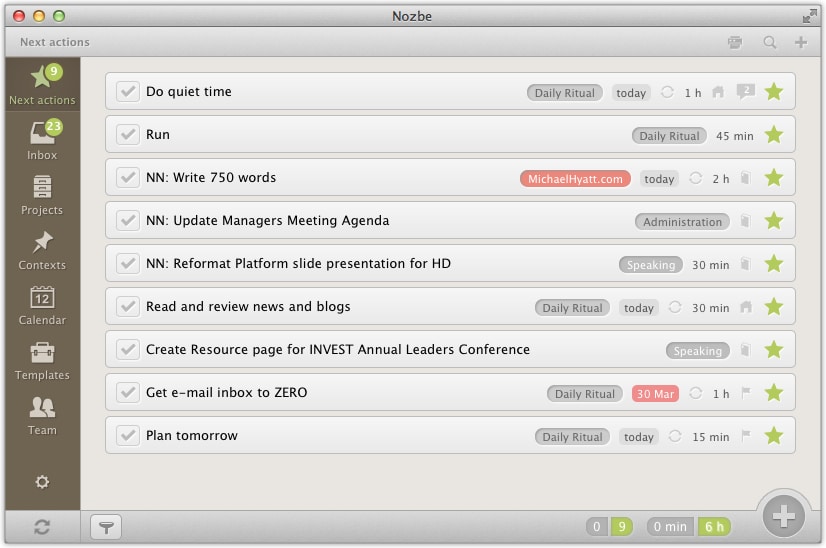
Create a to-do list with my top three must-dos. Before I wake up in the morning, I already know what my top three must-dos are for the day. These are the non-negotiables. I am committed to making them happen no matter what. I list them in Nozbe in priority order. (These are in addition to my routine habits.)
Set up your computer with only the first programs you will need loaded. This is so important. The reason I used to get sucked into e-mail, Twitter, or Facebook, is because I had those programs open when I woke up. Now I shut them down at the end of the day. I only have open those apps I need to see when I wake up. These are the ones I will use in my morning ritual.
Set your exercise clothes out. I’m no different than anyone else. With the exception of amazing spring or fall weather, I’d rather stay inside where it’s comfortable. But I need exercise—for numerous reasons. I am always more productive when I get it. For me, that begins by setting out my exercise clothes the night before. It’s how I make my intention real to my subconscious.
Get to bed at a designated time. It’s a heck of a lot easier to get up on time if you go to bed on time. I rarely go to bed after 10:00 p.m. I start getting ready at 9:00 p.m. (Yes, I have an evening ritual, too, that I intend to write about in a future post.) I personally never have to use an alarm. I have conditioned my mind and body to wake up at 4:45. I am sometimes early but never late.
Do I ever fall short of this ideal? Absolutely. It happened just this morning. I got up extra early. By 7:00 a.m., I was running ahead of schedule. I had finished my morning ritual.
I then said to myself, I’m a little ahead of schedule. I can afford to check the news before I head to the office and start writing.
Bad mistake. I got sucked into the tractor pull of the Internet. Before I knew it, I had lost an hour. Not only was I not ahead of schedule, I was behind. Argh.
Oh well, I don’t beat myself up about it. In my view there is no failure, there is only learning. What I learned was that I must, must resist the temptation to get on the Internet before my must-dos are done.
Fortunately, I’ll have another chance to practice tomorrow. And I know that having a productive day tomorrow begins tonight. It’s all in the setup.
Question: What do you need to do this evening to set yourself up for a productive day tomorrow? You can leave a comment by clicking here.



April 27, 2013
5 Headline Templates That Grab Readers
This is a guest post by Ray Edwards. He is is a marketing strategist, copywriter, speaker, and author. You can read his blog and follow him on Twitter. If you want to guest post on this blog, check out the guidelines here.
Your readers decide whether your blog post is worth their time within a few seconds. Most of that decision is based on the post title (or “headline”).

Some of the highest paying work in the copywriting business is creating headlines for magazine covers and tabloids. Think about it. Aren’t you sometimes at least tempted to pick up those magazines in the grocery store line? That’s the power of a great headline at work.
Effective headlines tend to follow a pattern. Here are five headline templates you can use that should have more people reading your posts and commenting on your blog.
The “How-To” Headline.
The key to making this particular headline work is that you need to tie it to a benefit your reader cares about (related to your content, of course). Examples:
How to Write a Blog Post Every Day
How to Land More Clients As a Freelancer
The “Transactional” Headline.
This headline is all about the promise. When you truly have “Wow!” level content, this headline that will grab attention. Examples:
Give Me 30 Minutes And I’ll Give You More Blog Traffic
Try These 5 Tactics for a Week, And Be Twice As Productive
The “Reason-Why” Headline.
Robert Cialdini cites the power of the word “because” in his book Influence: The Psychology of Persuasion. His research showed that simply adding the word “because” to a request makes it more likely you’ll get what you’re asking for.
Advertising copywriters have known this secret for a long time. Decades earlier, John E. Kennedy wrote a modest little book called Reason Why Advertising, which has become a classic in the field. Use the power of the “reason why” in your blog headlines. Examples:
Why Your Blog Posts Get Ignored, And How to Fix That
7 Reasons You Should Be Using Social Media In Your Marketing
The “Probing Question” Headline.
With this kind of headline, you ask a question that creates an intense desire to know the answer. Be careful with these headlines. If you ask a question like “Do You Want to Know My Blogging Secret?” You might get a discouraging answer, such as, “No.”
The kind of question you want to ask is one that really evokes strong curiosity, or taps into a problem you know your reader has. Examples:
Why Don’t Doctors Get Sick?
Do You Wish More People Bought Your Book?
The “If-Then” Headline.
With this headline, you contrast something that’s easy for your reader to do with the major benefit of your post. Examples:
If You Can Send and Receive E-mail, You Can Build a Platform
If You Can Follow a Recipe, You Can Write Better Headlines
One final piece of advice. I have found the ultimate secret to writing really good headlines … is to write a lot of really bad ones. The point is not to stop with just one or two attempts; write lots of possible headlines for your blog post before you finally settle on one.
Using these five headline templates, you should have more people reading your posts and commenting on your blog.
Question: What kind of headlines have worked best for you? You can leave a comment by clicking here.



April 26, 2013
7 Reasons to Convert Your WordPress.com Blog to WordPress.org
In my book, Platform: Get Noticed in a Noisy World, I recommend you start blogging with WordPress.com. It’s free and easy to get started. But if you are serious about blogging, you will eventually want to upgrade to self-hosted WordPress, also known as WordPress.org.

What’s the difference? WordPress.com is the hosted version of WordPress. In other words, the software lives on Automattic’s servers. They are the parent company of WordPress.
WordPress.org is the self-hosted version of WordPress. You download the software for free and then install it on your own server or one you lease. With most modern hosting services like Bluehost, you don’t even have to download WordPress. You simply install it with a click or two.
WordPress.org (self-hosted WordPress) provides seven advantages over WordPress.com (hosted WordPress):
You can use a custom domain name. Nothing is worse when it comes to online branding than a domain name that is long and includes someone else’s brand attached to it. MichaelHyatt.WordPress.com is an example of what not to do.With self-hosted WordPress, you can buy your own domain and then connect it to your blog for free. Yes, you can do this with WordPress.com, too. It’s one of their premium services, but you have to pay $13 per year—every year—for the privilege.
You have access to more themes. Because WordPress.com runs in a closed system, they are very selective about which themes they let you install. At this writing, you have your choice of 146 free themes and 55 premium themes (starting at $50).Will this may sound like plenty of options, compare it to the thousands of themes—both free and premium—that are available for self-hosted WordPress. Some of my favorite premium developers include StudioPress, Elegant Themes, WooThemes, and Standard.
You can install third-party plugins. These add additional functionality to WordPress. Unfortunately, WordPress.com does not allow this. You are stuck with the standard WordPress implementation.Just to give you an idea of what you can do with plugins, here are five of my favorites:
All-in-One SEO Pack—Optimizes your WordPress blog for search engines (SEO). It allows you to customize the meta data for each post.
AttentionGrabber—Adds a simple drop-down banner at the very top of my site. You can use this for either announcements, ads, or both.
Blubrry PowerPress—Embeds my podcast into specific blog posts (show notes). You can pick from a variety of player styles and display the one you want in your post.
Disqus Commenting System—Replaces the native WordPress commenting system. It has a number of features that I like better. It is arguably the most popular commenting plugin available.
W3 Total Cache—Improves the user experience of your blog by optimizing your server performance, caching every aspect of your site, reducing the download time of your theme, images, etc.
You can find a list of all my favorite plugins here.
You can customize and tweak the code. This might not be important to you, but it is critically important to me. I am constantly wanting to make “improvements” to the site.This could be as simple as adjusting the spacing between bulleted text (which requires modifying the site’s style.css file) to moving the post date from the top of the post to the bottom (which requires modifying the single.php file).
WordPress.com does allow you to modify the CSS, but only with a $30 per year upgrade. You can’t modify the PHP files at all.
You can run your own advertising. WordPress.com runs its own ads on your site. This is one way they pay for your “free” site. For $30 per year, you can remove these ads entirely.However, you still can’t run your own ads like I describe here. This requires the ability to ad plugins or embedded code—something WordPress.com doesn’t permit.
You can setup a web store. Eventually, you will want to monetize your site—especially if you are thinking of going pro. Selling ads is one way to do it. But there are other, more lucrative ways to turn your blog into a cash machine.One way is via a web store. This gives you the opportunity to sell your digital wares or your physical ones. Unfortunately, WordPress.com doesn’t provide any mechanism for doing this, since all the WordPress e-commerce solutions require self-hosted WordPress.
You own and control your home base. In my book, Platform: Get Noticed in a Noisy World, I define a “home base” as a place online you own and control. This is distinct from an “embassy,” which you don’t own or control but where you have credentials and a presence.Clearly, a self-hosted WordPress site qualifies as a home base. You own it. You control it. But a WordPress.com site? That’s a little iffy. It’s fine for hobby bloggers, but I would not run a business or pro site on it. It simply doesn’t provide enough control.
Ready to step up to self-hosted WordPress? If so, I provide a step-by-step screencast here. It will walk you through the entire process in twenty minutes or less.
Question: What advantages have you experienced with self-hosted WordPress as compared to WordPress.com? You can leave a comment by clicking here.