Michael Hyatt's Blog, page 167
June 5, 2013
#057: Why You Must Confront Seemingly Indispensable but Disrespectful Team Members [Podcast]


As a leader, what do you do when you have an employee or a colleague who disrespects you in front of your team? What do you do when this employee is a top performer and one of your supervisor’s favorites?

Confronting these people is never easy. However, it is essential if you are going to create a healthy organizational culture that drives the results you want.
Click to Listen
Podcast: Subscribe in iTunes | Play in browser | Download
Here are five actions you must take if you are going to retain credibility with your team and move your organization forward.
Action #1: Get clear in your own thinking.
Action #2: Count the cost.
Action #3: Secure your supervisor’s support.
Action #4: Confront the disrespectful employee.
Action #5: Give him some time to think about it.
This is the tough stuff of leadership that no one wants to discuss. But it is the necessary stuff. You can’t develop people and take them to the next level unless you are willing to speak into their lives—for their benefit and for your team.
Listener Questions
Christy Tennant Krispin asked, “How do you work in a situation where something might be disrespectful in one culture but not in another?”
Joe Consford asked, “How do you deal with a co-worker who is being disrespectful, but the team leader is unaware of it?”
Kwin Peterson asked, “Why do these kinds of conversations intimidate me so much?”
Michael Moak asked, “How do you deal with disrespectful team members when they are related to the boss or they are older than you?”
Tom Skilling asked, “How do you confront disrespectful team members when they are volunteers?”
Special Announcements
If you are considering launching your own platform, you need to start with a self-hosted WordPress blog. This is not as complicated as it sounds.
In fact, I have put together an absolutely free step-by-step screencast on exactly how to do it. You don’t need any technical knowledge. I walk you through the entire process in exactly 20 minutes.
The Launch Conference for this fall is continuing to fill up. If you don’t know, this is THE conference for professional speakers or those who want to be.
It’s all about the business of public speaking. This is the conference that launched me into my professional speaking career. We will be holding the conference on September 16–19 in beautiful Vail Colorado. This is one conference that will pay for itself almost immediately. Check it out.
My next podcast will be on the topic of “How to Create More Mental Focus.” I will share 10 tactics I use to be more productive and more effective. If you have a question on this subject, please leave me a voicemail message. This is a terrific way to cross-promote YOUR blog or website, because I will link to it, just like I did with the callers in this episode.
Episode Resources
In this episode I mentioned several resources, including:
Conference: Launch Conference
Membership Site: Platform University
Post: How to Launch a Self-Hosted WordPress Blog in 20 Minutes or Less
Show Transcript
You can download a complete, word-for-word transcript of this episode here, courtesy of Ginger Schell, a professional transcriptionist, who handles all my transcription needs.
Subscription Links
If you have enjoyed this podcast, please subscribe:

iTunes

Zune

RSS
Your Feedback
If you have an idea for a podcast you would like to see or a question about an upcoming episode, e-mail me.
Also, if you enjoyed the show, please rate it on iTunes and write a brief review. That would help tremendously in getting the word out! Thanks.
Question: How have you handled situations like this? What have you done? More importantly, what will you do the next time it happens? You can leave a comment by clicking here.








June 3, 2013
Using a Book to Build Your Platform: An Interview with Dave Ramsey
Can you use a published book to launch your platform? Can you use it as a catalyst to build a media empire? You bet. Dave Ramsey is living proof.
If you can’t see this video in your RSS reader or email, then click here.
What many people don’t know is that Dave self-published his first book, Financial Peace in 1992. He began selling it by mail and out of the trunk of his car.
It was so successful, Viking Press (a division of Penguin) picked it up and re-published in in 1997. Dave did a 21-city tour and the book landed on the New York Times best sellers list.
The Story I’ve Never Told
Fast forward to 2002. I am the publisher at Nelson Books, a division of Thomas Nelson. Dave has already had two bestsellers, and I wanted to sign him to our company.
But I needed an idea.
In the video above, I share how I came up with The Total Money Makeover while driving to work one day. I also reveal how I sold it to Dave and got him on board. This is the first time I’ve ever told this story publicly.
The Total Money Makeover went on to become a mega-bestseller. It has been on the New York Times best sellers list for more than 200 weeks, selling more than five million copies. It continues to be one of Thomas Nelson’s bestselling books, year after year, month after month.
The Story Dave’s Never Told
Tomorrow, at Platform University, we will post my “Master Class” video with Dave. This is the full interview with some phenomenal take-aways for anyone wanting to build a platform. We talk about self-publishing, social media, and the mindset you must have to succeed in today’s competitive environment.
You can get a little taste of the interview by watching the video above. If you want to experience everything Dave has to share, head over to Platform University. Members get access to the video, the transcript, and a complete study guide, designed to help you apply Dave’s insights to your own platform.
By the way, the monthly Master Class is only one of the regular content features we provide at Platform University. Our goal is to give you the inspiration, training, and resources you need to build your platform or take it to the next level.
Question: How could you use a book to build your platform? You can leave a comment by clicking here.



May 31, 2013
How to Find a Mentor to Help You Go Further, Faster
I mentored eight young men for three years. It was incredibly rewarding, and I wrote about it several times (see here and here).

As a result, nearly every week someone e-mails to ask, “Would you consider mentoring me?”
Unfortunately, I have to decline. I am taking this year off in order to focus on other priorities. But even if I were actively mentoring, my bandwidth would soon be exhausted.
Most people understand this and then ask, “Okay, so how do I find someone else to mentor me?”
Good question. But to be brutally honest, their chances of finding a mentor are slim.
The problem is their definition of mentorship. It’s too narrow. Let me explain.
When most people use the term mentor, they mean a one-on-one coaching relationship with someone older and more experienced.
It might be informal (someone who can advise them ad hoc) or formal (someone who is willing to meet with them on a regular basis). Regardless, the demand exceeds the available supply.
Fortunately, organizations like Radical Mentoring are working on training more mentors. But it’s a slow process. We simply don’t have enough mature men and women willing or able to make the investment.
So, what do you do if you are trying to find a mentor?
I suggest you broaden your definition of mentoring, so you don’t get stuck waiting for something that might not happen.
The truth is you can be mentored now if you understand the eight levels of mentoring:
Blogs and podcasts. If you could wave a magic wand and be mentored by anyone, who would it be? John Maxwell, Seth Godin, Dave Ramsey or someone else? Chances are they have a blog or podcast and are already churning out a tons of content—for free. Are you taking advantage of it?
Books. There’s no greater value than a relevant, well-written book. For less than $20, you can get someone’s best thinking on a specific topic. Never before in history has so much knowledge been available to so many, for so little. And if you don’t have the money to buy a book, go to the library.
Courses. I’ve spent hundreds of hours with Tony Robbins, Brendon Burchard, David Allen, and numerous others. Not personally, of course, but by taking their courses. This is the next level up from reading a book. The instruction is more in-depth and, as a result, more likely to actually transform my behavior.
Conferences. When possible, I prefer live instruction. It provides an opportunity for total immersion, focused learning, and interaction with other students. It occasionally provides direct access to the instructor(s). I make it a priority to attend three to four conferences a year as a student.
Masterminds. I didn’t start hearing about these until a few years ago. Now they are all the rage. They are actually a very old idea. Benjamin Franklin, for example, had one. It’s a wonderful opportunity for peer mentoring. My friend Dan Miller has a great audio and PDF on how to create one.
Membership Sites. This can be a wonderful hybrid of input from specific mentors plus the input of fellow members. For many people this is the perfect combination. That’s what I do, for example, at Platform University. There’s a monthly fee attached, but it is nominal and enables us to bring high-quality content to our members.
Coaches. If you are willing to pay for a mentor, a coach is a great option. I employed one for more than a decade. While you may think you can’t afford one, I would challenge you to investigate it before dismissing it. If a coach helps you seize one opportunity, optimize your productivity, or avoid one fatal mistake, it will pay for itself many times over. I recommend Building Champions.
Mentors. Though a true mentor may be difficult to find, it’s not impossible. If you have one in mind, start by building the relationship—just like you would anyone else. Don’t lead with “Will you be my mentor?” (That’s like asking someone to marry you on the first date.) Instead, get to know them. Look for opportunities to be generous. Start small and see where it goes.
Jesus said, “He who is faithful in little is faithful also in much” (Luke 16:10). Until you have taken advantage of the lower mentoring levels, you probably won’t gain access to the higher ones. Even if you do eventually find a mentor, you’re cheating yourself by not doing what you can now to learn and grow.
Instead of focusing on what you don’t have—a one-on-one, traditional mentoring relationship—focus on what you do have: more opportunities than ever before in history to learn and grow. If you simply expand your definition, you will find there are mentoring opportunities everywhere.
Question: What mentoring opportunities do you have now that you haven’t taken advantage of? You can leave a comment by clicking here.



May 30, 2013
Road to Hell
The road to hell is paved with adverbs.



May 29, 2013
#056: Who Are Your Trusted Advisors? [Podcast]
We all want to be successful. But when it comes to success, your advisors can make you or break you.

As a leader, one of the most important steps you must take is assembling an informal team of trusted advisors. They can help you take advantage of the opportunities coming your way—and avoid the biggest mistakes you will inevitably encounter.
Click to Listen
Podcast: Subscribe in iTunes | Play in browser | Download
I once made a terrible choice in selecting an advisor. It nearly cost me everything. In the process, I learned four hard but important lessons.1. Lesson #1: You can’t succeed alone.
2. Lesson #2: You need trusted advisors.
3. Lesson #3: You need multiple advisors.
4. Lesson #4: You need qualified advisors.
Think of your advisors as your “personal board of directors.” They will give you the accountability and insight necessary to avoid a lot of pain and achieve more than you could on your own.
Listener Questions
Adam Rico asked, “How do you initiate a mentoring relationship with someone you have identified as a possible advisor?”
Ben Nelson asked, “When you are looking for advisors, are you looking for specialists or well-rounded generalists?”
Dean Deguara asked, “What are some of the ‘trust-tests’ your advisors have to go through before they can work with you?”
Richard Manchur asked, “How can I find a group of trusted advisors in a niche I am trying to transition into?”
Travis Allison asked, “Do you think people’s advisors from their industry or outside their industry?”
Special Announcements
I want to remind you about my 21-session audio course, entitle “Get Published.” If you have ever thought about writing a book, but didn’t know where to start; or if you already have a book, but want to do everything you can to make the biggest splash you can in the marketplace, this course will give you the tools you need to make it happen.
�I have a number of speaking engagements over the next few weeks. Visit my speaking page for information on those events or if you are interested in having me speak to your organization or at your event.
My next podcast will be on the topic of “ hy You Must Confront Seemingly Indispensable but Disrespectful Team Members.” If you have a question on this subject, please leave me a voicemail message. This is a terrific way to cross-promote your blog or website, because I will link to it, just like I did with the callers in this episode.
Episode Resources
In this episode I mentioned several resources, including:
Course: Get Published
Conference: Biola Digital Conference
Conference: Interpret America Conference
Conference: She Speaks Conference
Website: Platform University
Show Transcript
You can download a complete, word-for-word transcript of this episode here, courtesy of Ginger Schell, a professional transcriptionist, who handles all my transcription needs.
Subscription Links
If you have enjoyed this podcast, please subscribe:
iTunes
Zune
RSS
Your Feedback
If you have an idea for a podcast you would like to see or a question about an upcoming episode, e-mail me.
Also, if you enjoyed the show, please rate it on iTunes and write a brief review. That would help tremendously in getting the word out! Thanks.
Question: Where could you benefit right NOW from having some trusted advisors? You can leave a comment by clicking here.



May 28, 2013
Announcing the Get Noticed! Theme Paid Beta
Last September, I announced we had begun development on the Get Noticed! Theme for WordPress. My goal was to create a powerful, easy-to-use theme for anyone wanting to build their own platform.

The theme entered beta testing in mid-January. Our faithful testers found some bugs (just as we had hoped) and made some great suggestions for additional features.
Meanwhile, we launched Platform University in January and the Platform Conference in February. Both were a tremendous success, but they stretched our modest resources.
Platform University has required more time from Andrew Buckman, my developer, and me than we anticipated. We have been swamped. Unfortunately, we had to put the theme on the back-burner until we could catch up.
Thankfully, the heavy-lifting is now behind us (we hope). We have been able to resume development on the theme. Andrew is finishing up the last private beta release. Meanwhile, I am turning my attention to getting everything ready for the public launch.
New Features in Development
The beta is currently very stable. If you want a list of the main features, click here.
We are now finalizing the last beta version for our testers before the public release. It will include:
Theme Customizer. This will enable users to customize their theme more easily, without having to touch the CSS files or know any code.
Subscription Counter. This widget will calculate your total reach, based on e-mail subscribers, Twitter followers, Facebook fans, LinkedIn connections, etc.

Multi-Author Support. This will insert an “author box” before or after the post. It will provide options for a photo (avatar), brief bio, and social media links.
RSS Feed Ads. This will enable you to insert advertising directly into your RSS feed, just as I currently do.
Social Share Tracking. This will keep track of how many times people click on the the various buttons in the Social ShareBar.
We are currently on-schedule to distribute this version to our testers by June 7th—less than two weeks away.
An Opportunity to Get It Early
We still have a significant amount of work to do in creating the documentation and sales tools. However, rather than make you wait any longer, we have decided to launch a paid beta no later than July 15th.
Here’s how it will work:
We will only make the theme available to 150 people. We are doing this to scale the roll-out, so we don’t overwhelm ourselves with support issues. We will also use the questions we get to build our FAQ page.
This option will be the full version, but it will still be beta. We will not provide any documentation and you will likely still find some bugs.
The price for the beta will be $197. This is the same price as Thesis 2.0 Professional. If this sounds like more than you want to spend, this theme is not for you. This is a premium theme for serious platform-builders.
We have not decided on all the upgrade terms and support details for the theme at this time. We will likely have tiered pricing and support options, but I don’t know the details yet.
Assuming the paid beta goes well, we plan to open it up to another 150 or so people, and then roll it out in stages. Again, we want to make sure we have adequate support resources in place to ensure our users have a great experience.
What You Need to Do Now
I will let everyone on our update list know twenty-four hours before we put the paid beta on sale. It will be available on a first-come-first-serve basis.
If you are interested in the paid beta, you need to make sure you are on our update list:
Note: If you are viewing this post via RSS or e-mail, you will need to click-through to my site, scroll to the bottom of this post, and sign-up using the form. Thanks.
Keep in mind we have more than 3,000 people on the list now. As a result, I expect to sell out of our first 150 copies in less than an hour.
Thanks for your continued interest in this project. I know it is taking longer than we thought. Andrew and I appreciate your continued patience. We are committed to making this the best theme for personal branding available anywhere.
Question: Do you have any questions about the theme or the process? You can leave a comment by clicking here.



May 24, 2013
5 Reasons I Switched to Scrivener for All My Writing
As a full-time writer, I take my tools seriously. With a blog, a podcast, speeches, and a new book in the works, I have to maximize my productivity. I have a daily word count goal, and I can’t afford to let the tools get in the way.
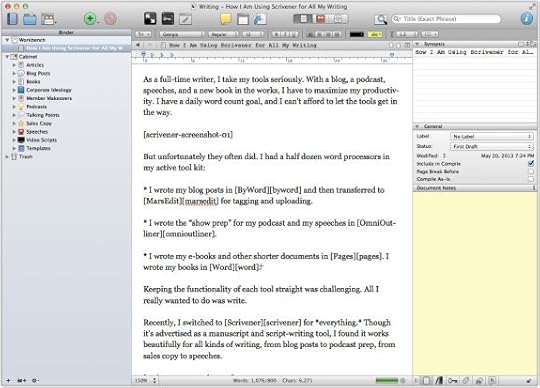
But, unfortunately, they often do. Until a month ago, I had nearly half a dozen word processors in my active tool kit:
I wrote my blog posts in ByWord and then transferred to MarsEdit for tagging and uploading.
I wrote the “show prep” for my podcast and my speeches in OmniOutliner.
I wrote my e-books and other shorter documents in Pages. I wrote my books in Word.
Keeping the functionality of each tool straight was challenging. All I really wanted to do—and needed to do—was write.
Recently, I switched to Scrivener for everything. Though it’s advertised as a manuscript and script-writing tool, I found it works beautifully for all kinds of writing, from blog posts to podcast prep, from sales copy to speeches.
I now begin every piece of content—no matter what it is—with this tool. It has simplified my life and enabled me to focus on the most important aspect of my job—creating new content. I am more productive than ever.
If you are a writer (or want to be) I would consider using Scrivener for five reasons:
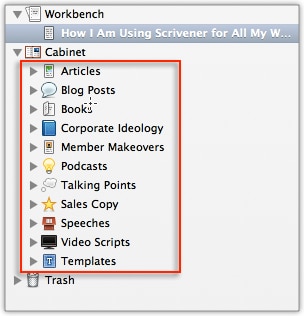
It provides a hierarchical file structure. Some people love to brainstorm with a mind mapping tool of some sort. The company that created Scrivener even offers one called Scapple. While I have used mind mapping from time to time, it is not my go-to method.
I naturally think in outlines and lists. I need a tool that shows hierarchy, so the ideas and the sub ideas are readily apparent. I loved OmniOutliner for this reason. However, it was a single-purpose tool. I found it difficult to get content in and out of it.
Scrivener solves this problem, because it provides just enough outlining functionality to keep me organized without becoming overpowering. Most of my workflow is now within this one tool.
It has a distraction-free composition mode. When I am writing, I need to focus on the words and nothing else. I have tried OmmWriter, iAWriter, Byword, Ulysses III, and a dozen others. (Let’s be honest, trying new apps is a lot more fun than actually writing!)
Scrivener’s composition mode is the best, distraction-free writing environment I have ever used. Period. It gives me a single column of text—and nothing else:
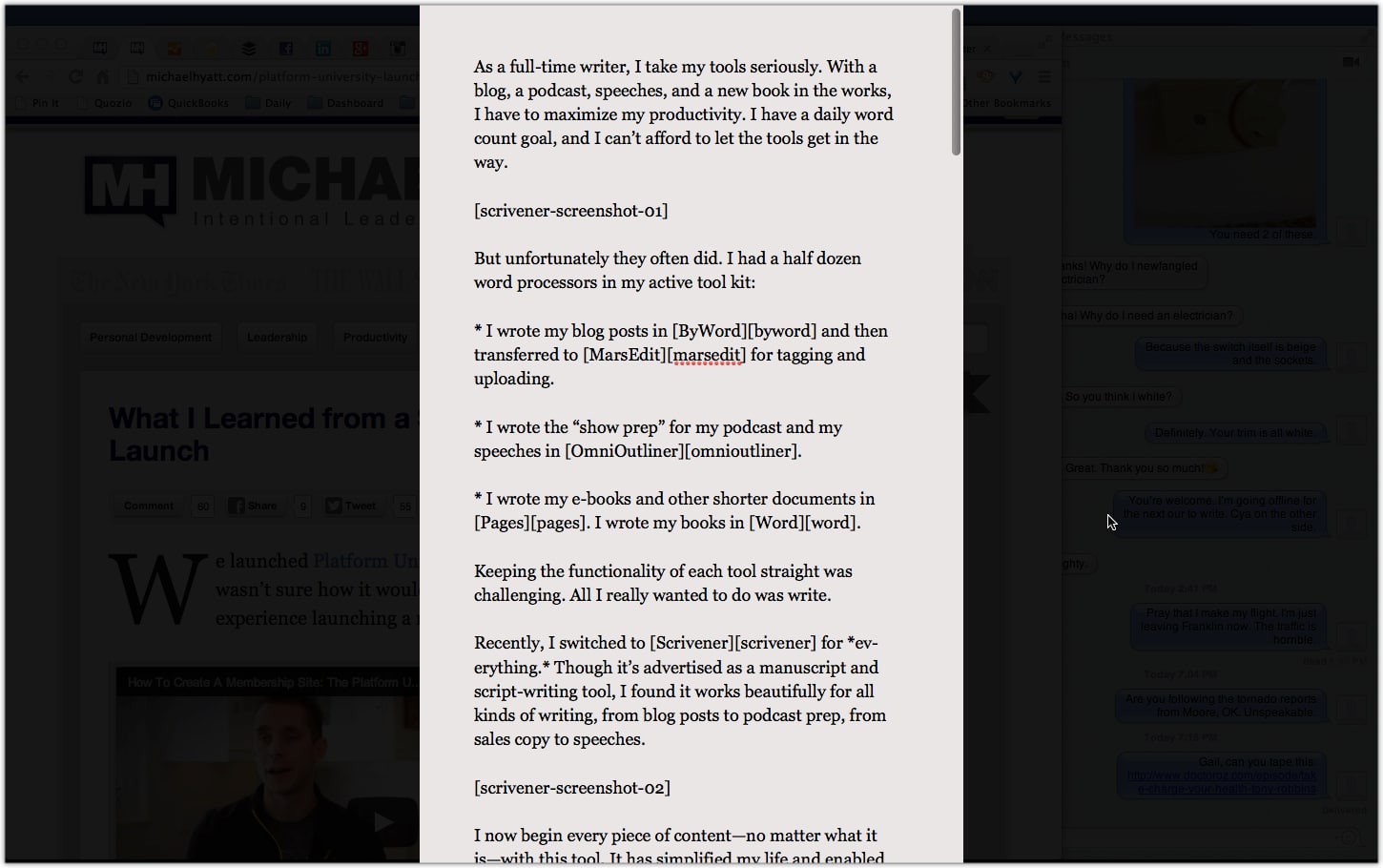
If I mouse over the bottom of the screen, it gives me a ribbon of useful information (e.g., word count) and tools I might want to access in this mode:
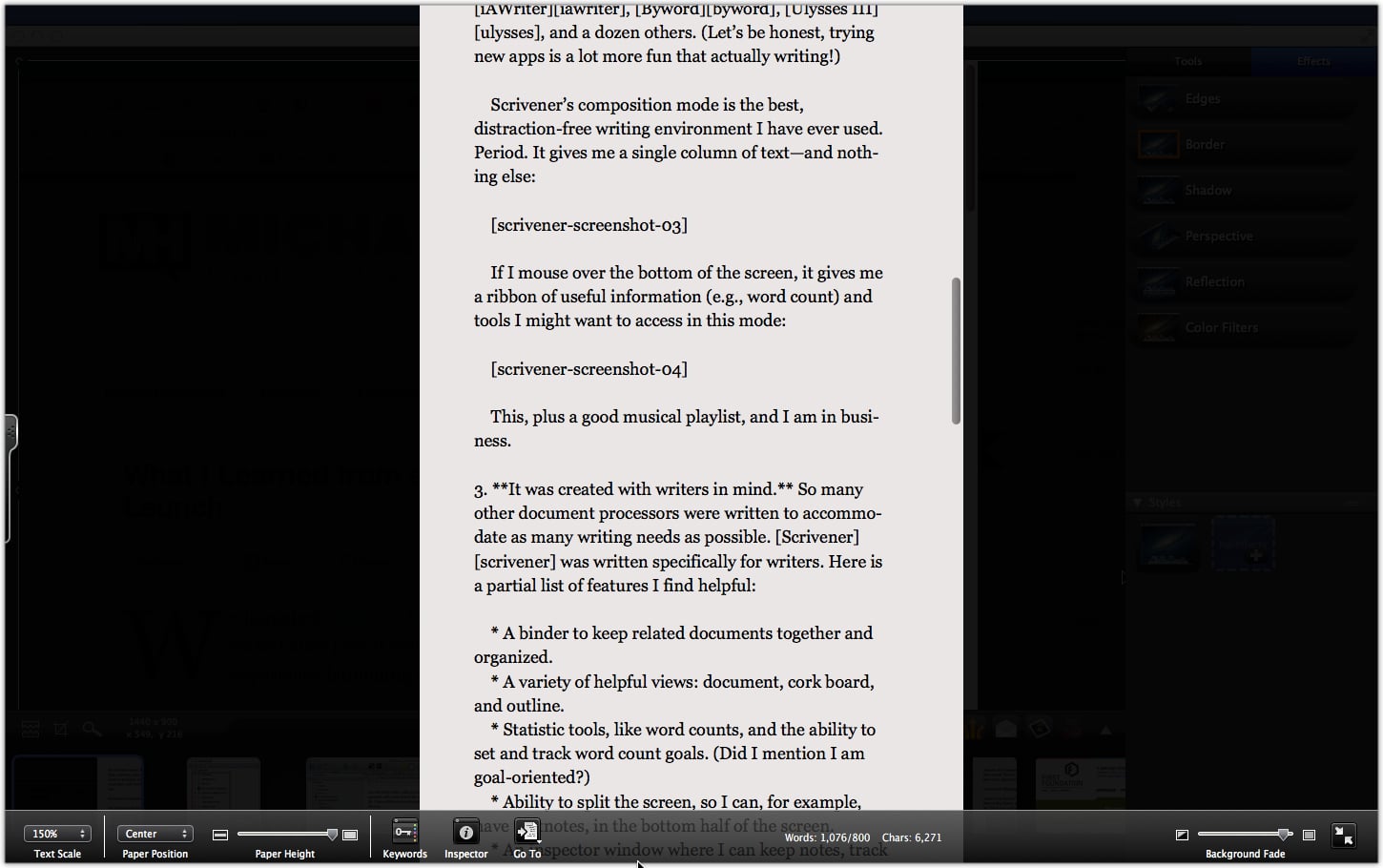
This, plus a good musical playlist, and I am in business.
It was created with writers in mind. So many other document processors were written to accommodate as many writing needs as possible. Scrivener was written specifically for writers. Here is a partial list of features I find helpful:
A binder to keep related documents together and organized.
A variety of helpful views: document, cork board, and outline.
Statistic tools, like word counts, and the ability to set and track word count goals. (Did I mention I am goal-oriented?)
Ability to split the screen, so I can, for example, have footnotes, in the bottom half of the screen.
An inspector window where I can keep notes, track status, link to articles, or even create custom meta data:
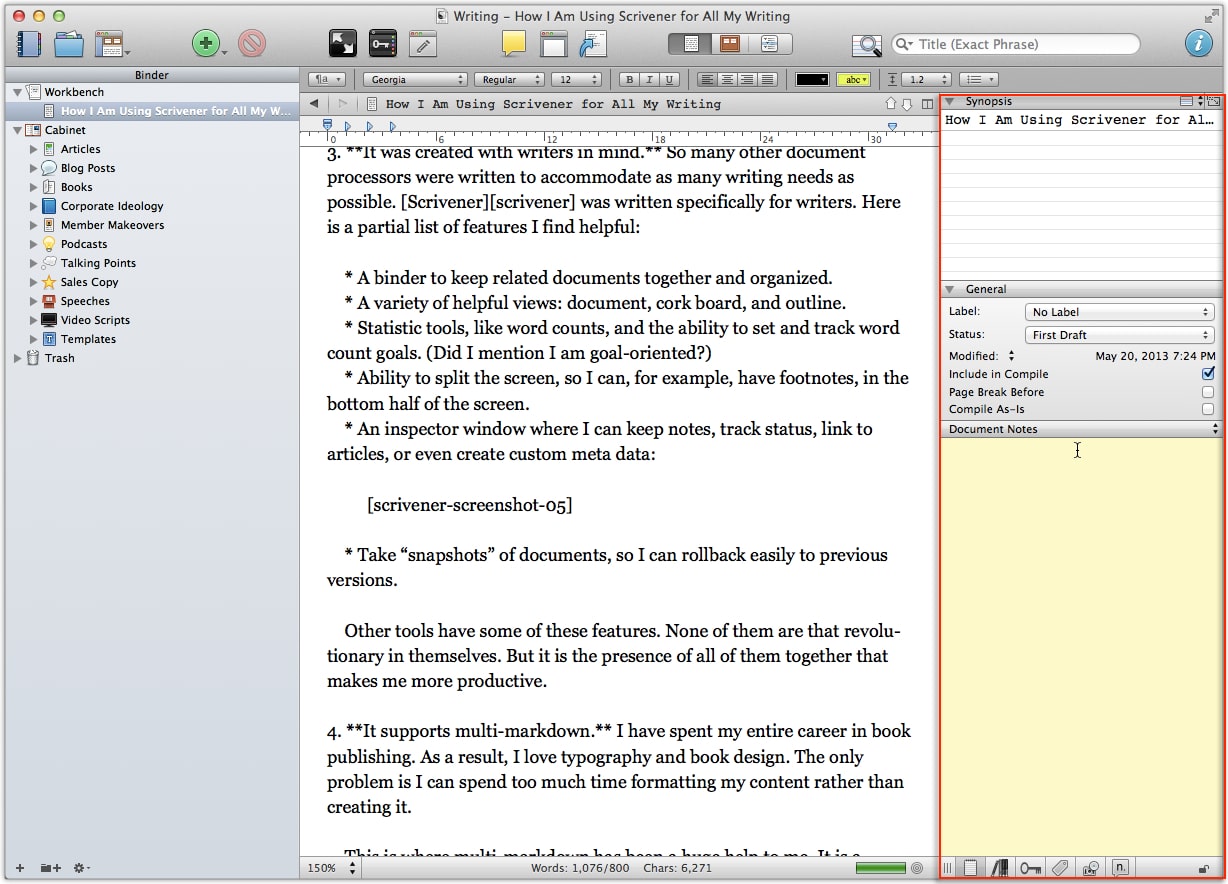
Take “snapshots” of documents, so I can rollback easily to previous versions.
Other tools have some of these features. None of them are that revolutionary in themselves. But it is the presence of all of them together that makes me more productive.
It supports multi-markdown. I have spent my entire career in book publishing. As a result, I love typography and book design. The only problem is I can spend too much time formatting my content rather than creating it.
This is where multi-markdown has been a huge help to me. It is a method of writing that requires minimal formatting. For example, if I want to create a bulleted list, I just precede the item with an asterisk. If I want to create a numbered list, I precede it with a number. What could be easier?
Unlike modern word processors, multi-markdown separates the content-creation phase from the formatting phase. Best of all, Scrivener understands multi-markdown and can translate it into whatever final output you want.
It allows for a variety of export options. This is where Scrivener shines. It has the ability to export to nearly any format you can imagine.
For example, I typically export my blog posts to HTML. I export my podcast show prep to multi-markdown, so my producer can create the show notes. I export my books to Word, so I can collaborate with my co-author or submit to my editor. I can even export directly to PDF, Kindle, ePub, or iBooks Author. The possibilities are seemingly endless.
By the way, last week I tweeted that I was using Scrivener for all my writing. Several of my followers asked why I was no longer using Evernote.
Actually, I am still using it—as much as ever. It is my digital brain. It is one of my three core productivity tools (the others being Nozbe and Google Calendar).
However, I am no longer using Evernote for writing. It’s not intended to be a word processor, and its writing functionality is minimal. If it works for you, great. I am now using Scrivener for this.
Honestly, I still feel I am a beginner when it comes to Scrivener. There is so much to learn. But that is not to say it is complex. You can become productive almost immediately, especially if you set it up the right way. (I’ll write more about that in a future post.)
If you haven’t tried Scrivener, you can download the trial version (also available for Windows) and give it a whirl. If you decide to buy it, you can get a 20 percent discount with my affiliate code: MICHAELHYATT.
Question: What are your go-to writing tools and why? You can leave a comment by clicking here.


May 22, 2013
#055: How to Read a Non-Fiction Book [Podcast]
It’s been said “leaders read and readers lead.” If that’s true, then reading is one of the most important things you can do to grow your leadership. But how do you get better at it and retain more of what you read?

Recently, my wife, Gail, and I had dinner with some close, neighborhood friends. As we always do with this group, we soon began discussing books.
Click to Listen
Podcast: Subscribe in iTunes | Play in browser | Download
A few minutes into the discussion, Gail asked, “So how do each of you read a book? What are your practices?” What a great question.For the next forty-five minutes everyone shared their best practices. I picked up some great tips.
Since that time, I’ve had a chance to think about this a little more. I have developed a list of ten best practices for better reading. I think these can help you make your reading even more valuable.
Here they are:
Don’t feel that you need to finish.
Start with the author bio.
Read the table of contents.
Quickly scan the whole book.
Highlight important passages.
Take notes in front or in the margin.
Use a set of note-taking symbols.
Dog-ear (or bookmark) pages you want to revisit.
Review the book and transfer actions to a to-do list.
Share the book’s message.
If you are convinced reading is important, then be intentional. Like everything else in life, the more thoughtful and deliberate you are with your approach, the more you will get out of it.
Listener Questions
Andrew Mason asked, “How do you retain all the stuff you are learning?”
Brad Blackman asked, “Do you use post-it notes to flag important passages?”
Brent Dumler asked, “What would recommend for someone with dyslexia who has trouble finishing books?”
Christian Monzon asked, “Am I doing myself a disservice by not making time for more fiction?”
Christopher Scott asked, “How can I read college textbooks faster and with better retention?”
Esther Aspling asked, “Can you recommend a site for good reviews that will help me find better non-fiction books?”
Jim Chandler asked, “What system do you use to queue and read books?”
Joshua Beck asked, “How do you decide what books to read?
Les Kerr asked, “Is there a happy medium between reading fiction and non-fiction?”
Matt McWilliams asked, “How do you thoroughly digest the content to make sure you get everything you can out of it?”
Pete Dahlem asked, “What do you do to help the people you mentor to grow and get to the next level?”
Travis Dommert asked, “How much of an author’s content can I use in a book summary without violating his or her copyright?”
Special Announcements
If you are considering launching your own platform, you need to start with a self-hosted WordPress blog. This is not as complicated as it sounds. I have put together a step-by-step screencast on exactly how to do it.
I also include a special discount code just for my podcast listeners and blog readers. It will enable you to get a hosting account for just $3.95 a month.
Registration is now open for the Launch Conference, September 16–19 at the beautiful Sebastian Hotel in Vail, Colorado.
Whether you are a professional speaker—or just want to be—this conference will teach you how to start where you are and take your speaking business to the next level. Register now and get in on the “Early Bird discount,” which will be expiring soon.
My next podcast will be on the topic of “Who Are Your ‘Trusted Advisors’?” If you have a question on this subject, please leave me a voicemail message. This is a terrific way to cross-promote your blog or website, because I will link to it—just like I did with the callers in this episode.
Episode Resources
In this episode I mentioned several resources, including:
Conference: The Launch Conference
Podcast: Episode 47: The Lost Art of Note-Taking
Post: Five Insights from My 2011 Reader Survey
Post: How to Retain More of What You Read
Post: The Lost Art of Note-Taking
Reading List: My Personal Reading List
Site: BookSneeze.com
Site: GetAbstract Book Summaries
Site: Platform University
Site: Radical Mentoring
Site: Soundview Executive Book Summaries
Screencast: How to Launch a Self-Hosted WordPress Blog in 20 Minutes or Less
Show Transcript
You can download a complete, word-for-word transcript of this episode here, courtesy of Ginger Schell, a professional transcriptionist, who handles all my transcription needs.
Subscription Links
If you have enjoyed this podcast, please subscribe:
iTunes
Zune
RSS
Your Feedback
If you have an idea for a podcast you would like to see or a question about an upcoming episode, e-mail me.
Also, if you enjoyed the show, please rate it on iTunes and write a brief review. That would help tremendously in getting the word out! Thanks.
Question: How do you read non-fiction books? What are your best practices? You can leave a comment by clicking here.



May 21, 2013
Nothing to Writing
There is nothing to writing. All you do is sit down at a typewriter and bleed.



Nothing to Writing [Quote]


There is nothing to writing. All you do is sit down at a typewriter and bleed.”

Ernest Hemingway