Ava Fails's Blog, page 7
February 11, 2013
Make Your Own Fonts On The Cheap
For those who don’t know, I have a background in Graphic Design. A huge part of the Graphic Design community is obsessed with typography. I LOVE typography! What the heck is typography? Well…
ty·pog·ra·phy
/tīˈpägrəfē/
Noun
The art or process of setting and arranging types and printing from them.
The style and appearance of printed matter.
There you have it.
Some Blah, Blah, Blah About Creating Fonts and Selling Them
(Scroll down to skip it)
Naturally, I have looked into creating my own fonts. That’s as far as I got because in order to do so, you have to purchase some pricey software in the neighborhood of $700. Sure, there are some free alternatives, but I like to keep things simple, and these alternatives aren’t. One I found is an open source program (I do love open source!) that required users to download a Linux environment to run. The other is an in-browser option that’s not too shabby, but a little tedious. Check the source box at the end of this post for both if you’d like to try them out.
Fonts can be lucrative. If you’re good, you can require a paid license to use your fonts. Fonts are sold through online services called foundries. Of course, you can always sell your fonts through your own e-commerce store if you’d like. I might know someone who could set that up for you. *looks around innocently*
Android Sucks
*/sarcasm — Man, I love me some Android apps. Is it obvious? Oh, PWW is starting to look like an Android blog? Hmmm. What do you mean is my ADD acting up? I’m supposed to be writing about creating your own fonts…oh yeah. Uh, I am. So check it.
I came across this awesome app. It makes creating your own fonts so simple it’s crazy.
 Font.My Font Maker they call it. Yes! There’s a free version! The paid version is on sale as of the time of this writing, so I went ahead and sank $2.99 into this. A small price to pay for making my handwriting into a custom font for my exclusive use. Not to mention I can also create additional fonts with a few swipes. The app allows you to email the font to yourself (or someone else) where you can download and install it on your computer.
That’s not all. You can also type messages, quotes, etc. into various backgrounds and share them in all the ways available on your Android device. Yeah, I don’t love this app at all. How about some logistics:
Please click the images for a larger view.

<
From here you can do everything. Pick a background, create you font, choose a picture, etc. This app does a lot.
____________________________________________________________

<
___________________________________________________________

<
__________________________________________________________
 <
<
___________________________________________________________
 <OK, your font is available for use. You can use it in the app or you can email it and install it on a computer.
___________________________________________________________ <
<
You know I love an app when it gets a post all to itself. This is actually the first one!
I Ain’t Got Time to Read All That
*/Southern twang and slang — Logistics for the time and attention impaired:
http://www.youtube.com/watch?v=qK9-uJGHP3A
Source Box
A couple free tools to make fonts on your computer:


February 4, 2013
Who Needs Tumblr?
 “Need”" is a strong word, but I guarantee you can use Tumblr as part of your web presence. I liken it to a marriage between WordPress and Twitter. In brief, Tumblr is a feature-packed blogging platform that is socially driven. You can “follow” people as you would on Twitter and your posts are fed to your followers via an interactive Dashboard. Even if you don’t use the platform to blog, you can use it to stay on the up and up with your interests or to promote others by reblogging their content.
Let’s Talk About Tags
Check out that “Search tags” box in the upper right corner of the Tumblr Dashboard. Let’s talk about it for a minute.

 Many users tag their posts to send them out to various content seekers and followers. You can search nearly any keyword and get user posts regarding the topic. It’s a unique feature because you get such a variety of content surrounding the subject. It also allows you to find new people to follow and reblog. As much as I believe in WordPress, it can’t do this. So, what’s up with that track button?
 If you click the track button, you can then track that tag. You can view an endless feed of posts about a certain topic. It’s ideal for research, finding content to reblog, and just to learn more about something you’re interested in. These are the features unique to Tumblr that keep me coming back. I can find images and content to reblog, pin to Pinterest and share on Facebook all in one convenient spot. It’s kind of like StumbleUpon all wrapped up in one website.
Use Tumblr to Promote Your Other Interests
You can also use Tumblr to your advantage. You can use it to promote your other websites or social media profiles. Check out the types of posts:

Text: Write about anything. This is mainly for posts where writing is the focus; however, you can still add images!
Photo: This post focuses on the image. You can also upload multiple images, and Tumblr will arrange them in a nice, neat collage. Write a caption, add a link, and post!
Quote: Quotes focus on what is being said by formatting quotes to draw attention with bold text.
Link: Simply post a link! Promote yourself or others.
Chat: Post some chatter and stimulate the discussion right on y our blog!
Audio: Upload some audio, Podcasters!
Video: If a vlog is more your style, there’s a post for that as well.
My Ulterior Motive
Today, I’m reverse promoting, if you will. Instead of using my Tumblr to promote ProWebWriter.com, I want to tell you about my new Tumblr blog.
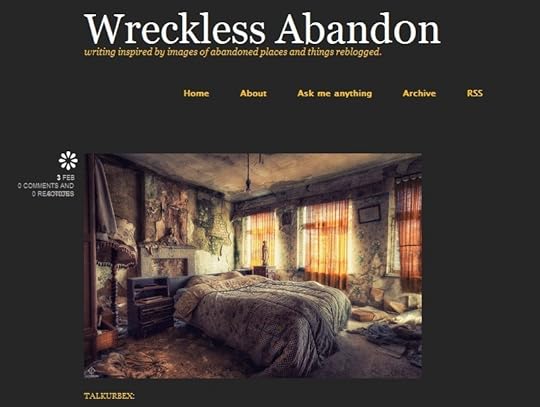
I’ve been following some tags for quite a while like #abandoned, #derelict, #urbanexploration, etc. The images in these posts often depict abandoned places and things across the globe and they always intrigue me. I find myself inspired by the decay, so I began a new blog where I reblog the images that speak to me and add in some original writing of my own.
Sometimes, I write from a general point of view. Other times, I choose an element in the photo to speak for. This is a completely non-profit creative writing exercise that I’ve invented for myself, and I wanted to make sure that I plugged it here at PWW.
If you Tumble, give me a follow or put a link to your own blog in the comments! I’d love to follow you!
January 25, 2013
ProWebWriter’s Exhaustive List of Android Tips
This aspires to be a dynamic post. This means that I will update it periodically as I think of more things to add. You know what that means….bookmark it, and check back. Do it.
DO NOT buy an app for grabbing screen shots from your phone like this:
UNTIL you do some intense Googling to ensure there’s not a shortcut built into the version of Android loaded on your phone.
Learn how to utilize widgets. Learn how they work, how they are sized and how to get them on your screen. With most devices if you long-press to add an app to the screen, you are offered the option of viewing what widgets are available. Any given app may have an available widget, so if you’ve added a bunch of apps, see what you’ve got. Sometimes the widgets are better than the actual app icon.
Take time to peruse App Stores. Whether it’s the Google Play Store or another lesser known store, browse around. This is the only way to find lesser known apps that may actually rock. I’ve found some great tools this way.
Trade phones with a trusted friend and see what apps they have loaded. This is another great way to find new apps you may find useful.
Before installing an app, check the permissions. My brother’s job released an app for his work email that seemingly made things more convenient for him. However, when he checked the permissions, the app basically granted permission to render his phone a useless brick if the employer felt it was necessary. He opted out of the convenience. All the more reason to check the permissions included with an app created by complete strangers who may sell your personal information or that of your contacts.
If you find a developer you really like, search for them exclusively by typing their name in the Play Store. Google uses those famous algorithms EVERYWHERE and the odds are that developer has other great apps.
Make your email address and passwords short (but strong). Typing it 8 million times on a tiny virtual keyboard is going to get old. You might as well make it as easy on yourself as possible.
Use Dropbox. This app is multi-faceted awesome. It makes sharing between your Android devices and your computer seamless. It automatically backs up all the images from the gallery on my phone. That means that I can snap a screen shot for a blog post like this one, and it’s uploaded automatically to Dropbox and synced with my computer while I’m writing the copy for the image. Dropbox adds a sharing option to many other apps too where you can instantly upload images, audio, or video to access from other devices. You can easily share files with friends from your Dropbox Public folder. I simply can’t say enough how useful this app is.
In fact, use all the storage apps. They’re all useful in their own way. I know this isn’t an app review post, but apps are often tips in and of themselves. Box has 50GB free and works much like Dropbox. Google Drive gives you 5GB and holds all of your Google files from Google Docs and the like.
Avoid power management apps. I haven’t found one that actually helps and I’ve tried more than a few. Mankind’s downfall with all of these awesome portable devices is our lacking in battery technology. Batteries suck, and there’s not much you can do about it. An app that constantly runs in the background will NOT help. Learn to optimize components on your phone so that you get the best battery life. Don’t have wifi on when there’s none available, optimize your screen brightness, optimize how long your screen stays on once your put your phone down, etc. Many of this is can be done with aforementioned widgets.
Don’t leave home without your charger…in light of the above.
Use optimizing apps for RAM and cache. Any one will do. I like Gemini App Manager for RAM, and I use an all-in-one app to keep other things cleaned out and running smooth.
Definitely invest in the highest capacity SD card. Many devices come with the option to expand the file space via a micro SD card. As of this writing, the max is running at 32 and 64GB I think. Get the largest amount your device can handle. This is usually specified in the specs somewhere. If you can’t find it, ask someone. You’ll want the space for your music, files, apps, etc.
January 24, 2013
5 Android Apps Everyone Can Use
Android is HOT. Yes, I am a master at stating the obvious. The few articles that I’ve written about it on this site garner quite a bit of attention. So, let’s give the people what they want! Check it, I FINALLY got an Android phone. Woo! I got the HTC Evo 4G LTE. All of those fancy letters and numbers don’t mean much on Sprint’s network unfortunately. Alas, that is another post altogether. The point is that I now have a tablet AND a phone, so nearly every app out there is MINE! So, here we go…
 The Amazon App Store – This one is a must have. Some devices may come with it pre-installed, but if yours doesn’t, you will want to grab it. Why? Because the Amazon App Store offers you one FREE paid app EVERYDAY, and as you know, we LOVE free at PWW. The link above will take you to the instructions on how to get it because you won’t find this in the Google Play Store. The TLTR (too long to read) version is: navigate to Amazon.com in the browser on your device. It will automatically show you a list of all of the available apps for Amazon. Download to your hearts content.
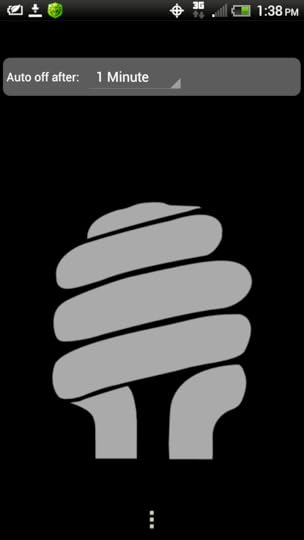
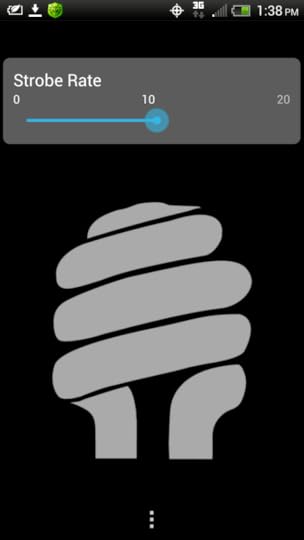
 TeslaLED — You will find variants of this app all over the Play Store. It’s your basic Android flashlight with the basic settings. I like this one because it’s simple and clean. If you have ever used your cell phone screen as a flashlight, this app takes that concept to the next level. Not only can you use your screen, but you can also use the flash LED associated with the camera. The light is just enough to illuminate a small area in the dark so that you find whatever you dropped, see where you need to go, or untangle your headphone cord. There’s a lot more to this app than meets the eye. I just discovered one of my favorite things about it, and that is the 1×1 widget that is a simple on/off switch. It just doesn’t get much better. Perhaps these pictures will convince you…
 CamScanner — This app will turn your phone into a portable hand-held scanner. CamScanner uses your phone’s camera to snap a picture of documents, business cards, restaurant menus, or anything you’d like a digital copy of and saves it. This allows you to have important documents and information a couple taps away. In addition, you can also convert the images to PDF and export it to other apps like Dropbox to print later. The fact that you can turn nearly anything you can snap a picture of into an instant PDF makes this a useful app. You can also get a paid version equipped with HD features.
 Mirror — Mirror, mirror, on my phone, who has the best ringtone? This app turns the rear-facing camera on your device (if equipped) into a mirror. Touch up your makeup, pop a zit, check your hair…you can do it all with this nifty app and make your purse a little lighter. Now you won’t have to wrench your rearview mirror around to check your teeth anymore. However, beware. Since this app uses your camera, the “adds 10 pounds” rule also applies. Bummer.
 Instant Buttons — This one is for fun. There are a lot of imitators beginning to pop up for this app, but this one from CremaGames is the best. There are HUNDREDS of sounds, more than 260 at this writing. They update the app with new ones ALL the time. If you’re the type of person who has a soundtrack to your life or you hear pop culture in normal things, then this is an app you will enjoy. Some may find it useful for podcasting or in other situations where various sounds are needed. Mainly, it’s just a fun app to play with. Enjoy!
As Always…A BONUS!
 URLtoPDF — I like to collect information. Is it obvious? PDF’s are small and a great way to save information on your computer OR your Android device. This app will save all of the information on a webpage as a PDF so you can access it on your device or transfer the file to your computer for saving or to read later. This is an excellent way to conduct and collect research about any topic. It also makes the results of your research portable. Were you to combine this app with CamScanner, you could save large chunks of information at the library or bookstore and take it home or back to the office.
My Other App Lists
http://prowebwriter.com/5-android-apps-i-couldnt-live-without/
http://prowebwriter.com/5-android-app...
Leave me a comment or share this post view one of the social media buttons if you found it helpful!
January 23, 2013
Checking Your Kindle Sales
From time to time I get questions that have been submitted through this website. It’s not a quick way to get an answer to a question, but it’s a great way to pay it forward since I answer these questions with a post that might help a future info seeker.
Most recently, a passer-by asked:
How do I check my Kindle sales?
It’s quite simple in fact.
Step 1. Click: http://kdp.amazon.com and sign into your account. If you can’t remember your log in details, you will need to run through the steps to retrieve them or reset your password. Your Kindle Direct Publishing Dashboard will open.
Step 2. Make sure you are on the Reports tab.
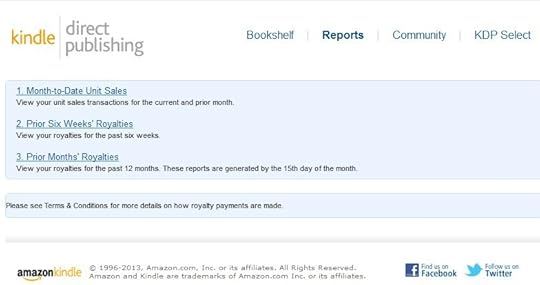
Step 3. Click one of the three links to view your sales for the stated amount of time.
You can even download the reports from your prior months’ royalties for your records. So, there you have it. Thanks to the anonymous reader who submitted this question. If you found it helpful, leave a comment.
January 20, 2013
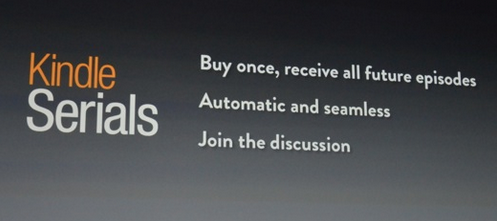
Publishing Via Kindle Serials
 Greetings. I know…long time, no write. I’m not really in a position to drop life and blog all the time, so I do it when I do it. It’s not working out that great from an Internet Marketing standpoint, but hey, I have a job.
I decided to release my debut novel as a Kindle Serial (or at least apply). Yes, I’m talking about the one I’ve written about here at PWW on occasion. See, I figure if I’m choking at 10,000 words, maybe writing the story in chunks would help. I’ve since written well past that mark, but still find it difficult to focus on the story when I’m in the mood to write.
What You’ll Need
If you decide you’d like to give Serials a try, their submission guidelines aren’t too terrible. As of this writing, you’ll need the following:
A “Brief” Pitch
At Least 2 Episodes of the Story
One-page Synopsis
One-page Biography
With a good bit of the writing done, it took me about a day to put this package together. I then had it edited and proofread. (No, I don’t hire people. I have friends and family do this part for me.)
Get more information here: Submission Guidelines
The Waiting
This is where I am. I sent off the email with all of the above attached 2 days ago. After some minor Googling, I’ve been unable to find any information on how long this wait might be. I’ve read some opinions on how long each episode should be, how often a new one should be released, and how to “serialize” your story. As with most things, people try to make it complicated. I just wrote it, and now I’m just going to wait and see what happens.
What If
Since Serials are by submission only, there is always the possibility that mine won’t be accepted. If this happens, I still have several options for releasing my debut novel. I can self-publish it as a regular Kindle book and even put together a hard copy through CreateSpace. I can distribute it myself as well amongst friends and family. So, the “what ifs” of self-publishing are much easier to take.
What Next
I’ll keep you posted on what’s up next as I travel along this road. There’s some new ideas in the cooker here at PWW, so I hope you’ll bookmark us or add us to your Reader and check back from time to time. Thanks for stopping by.
December 7, 2012
Timestamps Don’t Prove Anything
Time stamps can be manipulated and they DO lie.
October 6, 2012
Help Diamond
Diamond ran out in front on a vehicle I was riding in and sustained a broken leg. Her initial care is going to cost about $300 and none of the parties involved have it. Please help.

Clicking the Donate button will take you to a secure payment page. YOU DO NOT NEED A PAYPAL ACCOUNT TO DONATE.
If you have PayPal, you can simply send money to waxingpoetic75@yahoo.com. Thanks!! There will be a follow up on this situation.
September 18, 2012
Home Sweet Home in Holden Beach
As I said in my intro article, this was the first year that we rented our own house. It was a leap in the dark, really, you never know these days what you’re getting into when you rent vacation accommodations. Will it be a dump? Will it have bedbugs? Will it smell funny? Will it be clean? One spends a lot of time hoping for perfection. We spent a lot of time looking at pictures and flying by in Google Earth…dreaming and hoping.
We Have Arrived
The moment the key turned in the lock, it was love at first sight. We were charmed by the simplicity, decor, and casual comfort of our new home away from home. We were immediately at home. I’ll let the video and images speak for themselves.
What We Needed
Wi-fi
A large and comfortable porch
Kitchen with cooking utensils
Our small cottage met us at every turn with pleasant surprises…like a fireplace. Not to mention the 3rd room and 2nd bathroom downstairs. The more the merrier. For me, it’s the small things that excite me most. Some genius had installed a bottle opener on the wall beside the door. It was a week of bliss.
September 12, 2012
Here We Come Holden!
ProWebWriter.com is a repository on many subjects. This week, it is a travel journal. This is my 3rd year coming to Holden Beach, NC on vacation, and it gets sweeter every time. It’s like a well-kept secret. Sure, there are people who come each year just like me…thousands even, but it isn’t a place of 5-star resorts, hotels, or an endless nightlife commercial. Holden Beach is complete relaxation with all of the above within driving distance…if you MUST have it.
This is how we do…
Holden Beach is a mere 4-hour drive from home of complete anticipation. The drill goes arrive, unpack the car, and go buy the week’s groceries at the local Food Lion. Once bags and grocery bags are unpacked, the first evening begins. For me, it always a night filled with gratitude just to be here facing a week of this bliss.
This year of firsts…
This year was the first time my partner and I didn’t take advantage of a free family-owned house. We rented a place on our own and came down by ourselves like big girls. hehe It sounds silly, but it feels great. I think I appreciate it more this way.
The culmination of a longness…
I think part of the reason this year feels so amazing too is that it wrapped up a long summer of work and change for both of us. We massively cleaned our home and got rid of a lot of junk. I transitioned in my job from 3rd to 2nd Shift. Whereas some hard work was involved, the summer held good, good changes and Holden is the culmination and close to this time.