Brian Meert's Blog, page 41
September 6, 2023
How to Sell to Amazon Directly: A Simplified Guide

Would you like to learn how to sell to Amazon directly?
Selling directly to Amazon through your Seller Central account can be lucrative. However, you need to understand the process to make it work for you.
This easy-to-read guide will teach you how to sell to Amazon directly. We will also walk you through how to use Amazon Seller Central and understand the Amazon fee structure.
What Is Amazon Vendor Central?Amazon Vendor Central is a platform where businesses sell products directly to Amazon as a wholesale supplier. Instead of managing their product listings like third-party sellers, vendors supply their products in bulk to Amazon. Amazon then takes care of the sales, customer service, and fulfillment.
Using Amazon Vendor Central can be a beneficial arrangement for your business if you are looking to reach a broader audience. It can help you leverage Amazon’s extensive customer base without managing the nitty-gritty details of selling on the platform.
Who Can Sell Directly to Amazon?
Not all Amazon sellers can sell directly to Amazon. To sell your products directly to Amazon, you must join the Amazon Vendor Central program. However, this process isn’t as simple as creating a seller account because it requires an invite.
Amazon has two main types of sellers: third-party sellers and vendors. The third-party seller program would require you to manage your product listings, pricing, and shipping yourself. On the other hand, vendors sell products to Amazon in bulk, and Amazon handles selling, shipping, and customer service.
Additionally, Amazon typically invites businesses to become vendors based on product demand and quality. When you become a vendor, you work closely with Amazon’s buying teams, which involves negotiations, contracts, and regular product shipments.
How to Qualify for an Amazon Vendor InvitationSelling your products directly to Amazon through Vendor Central is a golden ticket to reaching millions of potential customers. But how do you land this exclusive invitation? You can follow the steps below to get invited to become an Amazon Vendor:
Step 1: Build a strong online presence.Amazon looks for reputable brands and businesses with a strong online presence. So, please ensure you have a professional website and active social media accounts showcasing your product and brand story. Positive customer reviews can also boost your credibility.
Step 2: Deliver quality products.Amazon wants vendors who consistently deliver high-quality products. You should ensure your products meet industry standards and focus on customer satisfaction.
Step 3: Optimize your Amazon Seller Account.Make the most of your existing Amazon seller account if you have one. To do this, keep your product listings updated, offer competitive prices, and provide excellent customer service. A track record of success on the platform can catch Amazon’s attention.
Step 4: Develop unique and in-demand products.Amazon always seeks innovative and unique products that resonate with its customers. You should conduct market research to identify gaps or trends in the market and tailor your product offerings accordingly.
Step 5: Network at industry events.You can put your brand on Amazon’s radar by attending industry events and trade shows. These events are an opportunity to make connections and showcase your products to potential buyers, including those from Amazon.
Step 6: Explore Amazon Launchpad.Amazon Launchpad is a program that helps startups and innovative businesses get their products noticed. Your participation may increase your chances of attracting Amazon’s attention and securing an invitation.
Step 7: Consider Fulfillment by Amazon (FBA).Using FBA can demonstrate your commitment to Amazon’s ecosystem. When Amazon sees you successfully using their fulfillment services, they may be more inclined to invite you as a vendor.
Read more: Amazon FBA vs. FBM.
Step 8: Be patient and persistent.Getting an invitation to become an Amazon Vendor may take time. So, don’t be discouraged if you don’t receive one immediately. Instead, you should continue improving your brand, products, and customer service and keep an eye on your email for that invite.
Step 9: Work with an Amazon consultant.If you need help getting an invitation, consider working with an Amazon consultant or agency. They can provide insights, optimize your listings, and help you stand out to Amazon’s buyers.
Step 10: Maintain a professional image.Present your business professionally in all communications with Amazon. This includes responding promptly to inquiries and adhering to Amazon’s policies and guidelines.
Pros and Cons of Being an Amazon Vendor

Becoming an Amazon Vendor can be a game changer for your business. But it is important to weigh the advantages and disadvantages before diving in. Let’s explore the ups and downs in simple terms.
Advantages of Being an Amazon VendorAccess to Amazon’s customer base: As a vendor, you get to tap into Amazon’s huge customer base, which can boost your sales significantly.Prime eligibility: Products sold by vendors are often eligible for Amazon Prime, attracting more customers with fast and free shipping.Amazon handles customer service: You won’t need to deal directly with customer inquiries or returns because Amazon will handle these issues.Fewer fulfillment hassles: Amazon manages the warehousing and shipping of your products, making logistics smoother.Enhanced marketing opportunities: Vendors can access Amazon Marketing Services (AMS) to promote their products more effectively on the platform.Potential for bulk orders: Amazon may place larger bulk orders with vendors, ensuring a steady income stream.Disadvantages of being an Amazon vendor.Amazon’s control: As a vendor, you will have less control over your product listings and pricing, as Amazon makes many decisions for its vendorsNegotiation challenges: Negotiating with Amazon can be tough, and you might face pricing pressure.Long payment terms: Payment terms can be extended, which may affect your cash flow.Limited branding: You may have limited branding opportunities on Amazon, as your product listings may look similar to those of competitors.Competitive fees: Amazon charges various fees, and this can affect your profit adversely.Vendor Central complexity: Managing your vendor account and understanding the Amazon Vendor Central platform can be complex.Comparing Amazon Seller Central to Amazon Vendor CentralVendor Central is like teaming up with Amazon as a supplier, while a Seller Account is like running your own shop on Amazon’s marketplace. Your choice should depend on your business size and how much control you want.
Amazon Vendor Central:Role: You’re a supplier to Amazon.Inventory: Amazon buys your products in bulk.Control: Amazon manages pricing, listings, and shipping.Prime: Your products often get the “Prime” badge.Access: Invite-only, often for larger businesses.Responsibility: Amazon handles customer service.Amazon Seller Account:Role: You’re like a shop owner on Amazon.Inventory: You manage your own stock.Control: You set prices, manage listings, and handle shipping.Prime: Your products can be Prime-eligible.Access: Open to most businesses.Responsibility: You’re in charge of customer service.ConclusionSelling directly to Amazon can be a rewarding venture, but it requires dedication and an understanding of the platform’s nuances. By following our guide, you can set up your Amazon seller account and start your journey of selling directly to Amazon. We wish you the best of luck with your Amazon selling adventure.
Are you planning an ad campaign on Amazon? Let the leading Amazon advertising agency run it for you.
Frequently Asked QuestionsWhat does it mean to sell to Amazon directly?Selling directly to Amazon is done via the Amazon Vendor Central Program. It means you supply your products directly to Amazon as a supplier or manufacturer. Amazon purchases your products wholesale and handles pricing, fulfillment, and customer service.
How can I become a direct Amazon vendor?Amazon typically invites sellers to join the Amazon Vendor Central Program. To increase your chances of getting an invitation, focus on building a strong seller history on Amazon, maintain competitive pricing, and offer quality products.
What are the benefits of selling to Amazon directly?Selling directly to Amazon can offer benefits like increased visibility and access to Amazon’s vast customer base. Also, it will offer you streamlined logistics through the Amazon fulfillment center and the potential for bulk orders.
Related TopicsHow Much Do Amazon Sellers Make?


Amazon Account Suspended? Reasons and Solutions
Is your Amazon account suspended?
As one of the largest online marketplaces, Amazon has strict policies in place to maintain a trustworthy shopping environment. A violation of these policies can result in account suspension.
This blog post will explore the causes, consequences, and solutions to Amazon account suspensions.
Reasons for Having an Amazon Account Suspended

An Amazon account suspension is a temporary or permanent restriction placed on an Amazon account due to violations of Amazon’s policies. Here are possible reasons for a seller account suspension:
1. Policy Violations.Amazon has strict rules that sellers must follow. If you violate these policies, your account may be suspended.
Selling prohibited items: Attempting to sell products like illegal drugs, weapons, or counterfeit goods is a severe policy violation.Manipulating reviews: Posting fake reviews, offering incentives for positive reviews, or using multiple accounts to review your products is against Amazon’s policies.Misrepresenting products: Providing inaccurate information about your products, like incorrect prices or misleading descriptions, can lead to suspension.Account sharing: Letting multiple individuals use your seller account or sharing login information is against Amazon’s rules.Late shipment and order cancellations: Consistently failing to ship orders on time or canceling orders without a valid reason can harm your seller performance metrics and lead to suspension.Seller Code of Conduct violations: Violating Amazon’s Seller Code of Conduct, which includes maintaining a professional and respectful tone in communication, can lead to account suspension.2. Poor performance metrics.Amazon wants sellers to meet certain performance standards, like timely shipping orders and maintaining a low order defect rate. Falling below these standards can lead to suspension.
Late shipments: If you consistently fail to ship orders by the promised date, it’s a red flag. Late shipments can lead to dissatisfied customers and, ultimately, account suspension.High order defect rate: This metric includes issues like receiving negative feedback, A-to-Z Guarantee claims, or chargebacks. A high defect rate indicates problems with your products or services.Cancellation rate: Too many canceled orders, especially by the seller, can harm your account’s health. Amazon expects you to fulfill orders promptly.Pre-fulfillment cancel rate: Canceling orders before shipping them shows poor inventory management or listing inaccuracies.Late response to customer messages: Failing to respond to customer inquiries or complaints promptly can affect your seller rating.Negative feedback: Accumulating negative feedback from customers can lower your seller rating and impact your account’s performance.Order returns: High return rates suggest customers are dissatisfied with your products, possibly due to inaccurate listings or quality issues.3. Intellectual property complaints.Intellectual Property Complaints on Amazon can include:
Trademark infringement: Selling products that use someone else’s registered trademark without permission.Copyright violation: Offering items that infringe on copyrighted material, like books, movies, or music.Patent infringement: Selling products that are covered by someone else’s patent.Counterfeit goods: Listing and selling counterfeit or fake versions of branded products.Design rights violation: Using someone else’s unique product design without authorization.Brand owner complaints: When a brand owner believes your listing violates their intellectual property rights and reports it to Amazon.Does Amazon Suspend Buyer Accounts?Although it is relatively rare compared to seller account suspensions, buyer account suspensions happen. They occur when there is evidence of fraudulent activity, policy violations, or misuse of the platform. Some common reasons for Amazon buyer account suspension include:
Review Manipulation: If a buyer is found to be providing fake or manipulated product reviews, their account may be suspended.Misuse of Returns: Excessive or abusive returns, such as returning items that have been significantly used or damaged, can lead to a buyer’s account suspension.Violation of Amazon’s Policies: Engaging in any activity that violates Amazon’s policies, such as attempting to buy or sell prohibited items, can result in a suspension.Account Security Concerns: Suspicion of unauthorized access or security breaches may lead to a temporary suspension while Amazon investigates.Payment Issues: Failure to make payments for orders or issues with payment methods can also result in a suspension.Effect of Suspended Amazon Account

So, what happens when your Amazon seller account gets suspended? Here are the key consequences:
Temporary vs. permanent suspension: Amazon may suspend your account temporarily while investigating issues or permanently if violations are severe.Impact on your business and income: A suspended account means no sales, impacting your revenue and potentially harming your business’s financial health.Risk to your brand reputation: An account suspension can damage your reputation as a seller, making it harder to regain customer trust.Repercussions on your customers: Customers with pending orders may face delays or cancellations, leading to negative reviews and dissatisfaction.Inventory and storage fees: While your account is suspended, you may still incur storage fees for your inventory stored in Amazon’s warehouses.Inability to access Seller Central: During suspension, you lose access to Seller Central, making it impossible to manage your listings, orders, and customer communications.Resolving an Amazon Account SuspensionResolving a suspended Amazon Account requires swift and strategic action, which can be a challenging process. Here are some steps you can follow:
Read suspension notice: Amazon will send you a suspension notice for your account. It is important to read it carefully and understand the specific issue and the reason for this account suspension.Identify the cause: If your account gets suspended, take time to identify the root cause of the suspension. Amazon will tell you the violated Amazon’s policies in the notice.Plan of action: Amazon allows you to create a plan of action that represents the detailed issue that led to the suspension and prevents it from happening again. It must be a clear, concise focus on resolving the problem.Use supporting documentation: Just like a law case, you should provide a supporting document or evidence of corrective action taken. Ensure that all of those documents are accurate and relevant to your issue of suspension.Reach Amazon Seller Support: If you are a seller, you should contact Amazon Seller Support through your Amazon Seller Central account. Explain everything with the plan of action you provided, and always be prepared to follow up and provide any information Amazon requests.Be patient: Resolving this problem takes time; you should always be patient and professional when interacting with Amazon support.Seek help: If you don’t know what to do, you can seek help from someone knowledgeable about Amazon suspension issues.Read more: Are your Amazon sales down? Get Your Sales Up
How To Prevent Amazon Account SuspensionDon’t wait for trouble to knock on your Amazon seller account’s door. Take proactive steps to avoid suspension:
Know Amazon’s policies: Read and understand Amazon’s seller policies thoroughly. Ignorance won’t protect you.Monitor account health: Regularly check your Seller Performance dashboard for any red flags.Product listings: Create accurate and compliant product listings. Avoid misleading info or prohibited items.Customer feedback: Address negative feedback promptly. Keep customers satisfied.Inventory management: Ensure you can fulfill orders promptly. Avoid stockouts and shipping delays.Returns handling: Deal with returns efficiently and professionally. High return rates can trigger suspensions.Read more: What can I sell on Amazon without approval?
The Importance of Professional HelpSometimes, getting professional assistance can be a game-changer in dealing with Amazon account suspensions. Here’s why it matters:
Expertise: Professionals know the ins and outs of Amazon’s complex policies, increasing your chances of a successful appeal.Customized strategies: They can tailor a strategy specifically for your case, addressing the root cause of your suspension effectively.Time-saving: Hiring help means you can focus on your business while experts handle the suspension process.Better communication: Professionals often have direct channels to Amazon’s support teams, speeding up the resolution.Cost-effective: While it may involve some cost, it’s often worth it when compared to the revenue loss from an extended suspension.Final ThoughtsAccount suspension can be daunting, but with the right knowledge and strategies, you can navigate this challenge. Remember to stay informed, follow Amazon’s policies diligently, and act swiftly if you ever face suspension. By doing so, you’ll safeguard your business and continue thriving in the world’s largest online marketplace.
Do you need a professional Amazon agency for your ad campaign? Hire the best Amazon advertising agency today!
Frequently Ask Questions on Amazon Account SuspendedCan I create a new Amazon account if my previous account is suspended?Yes, you can create a new Amazon account if your previous account is suspended. However, you should note that Amazon’s policies typically prohibit individuals with suspended accounts from opening new ones.
Is it okay to wait for Amazon to automatically resolve the suspension issue?While Amazon may automatically lift some suspensions, it’s not advisable to solely rely on this. Taking proactive steps and submitting a well-structured appeal can often resolve issues more quickly and increase your chances of reinstatement.
Can a suspended Amazon seller still access their seller account information?Yes, they can still access their seller account information, but it is usually limited.
Related ArticlesHow Much Do Amazon Sellers Make?
13 Ways to Make Money on Amazon.
Amazon FBA vs. FBM: Which is Right for Your Business?
September 5, 2023
A Step-by-Step Guide: How to Make an Amazon Account
Do you want to know how to make an Amazon account?
In today’s digital age, having an Amazon account opens the doors to a world of convenient online shopping and various services. Whether you want to snag the latest gadgets or outfits, Amazon offers various products and services to cater to your needs.
In this step-by-step guide, we’ll walk you through the process of setting up your own Amazon account.
Step-by-Step Guide to Creating an Amazon AccountTo create an Amazon account, you will need an email address, a means of payment, and a few personal details. Once you have these requirements, you can follow these steps to create your Amazon account:
1. Visit the Amazon website.Open your web browser and go to the official Amazon website, www.amazon.com.
2. Go to Amazon registration.You will see the “Create Account” window on the Amazon Registration page. There, you will find the blanks you need to fill out to create your account.
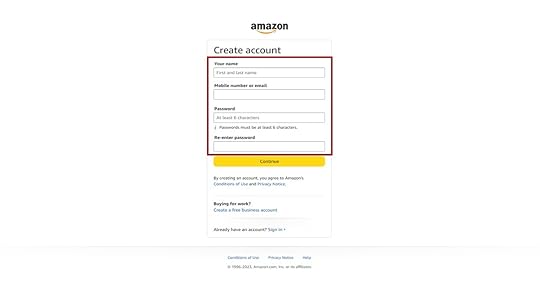
You need to input three pieces of information: your name, mobile number or email, and password. Remember to create a strong, unique password for your account. Once done, click “Continue.”
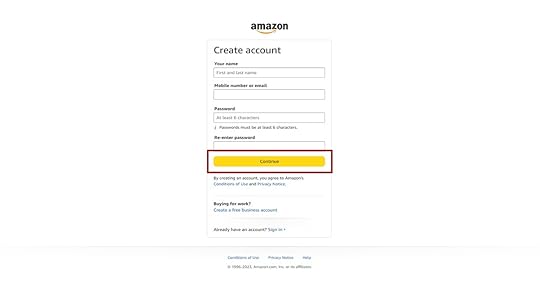
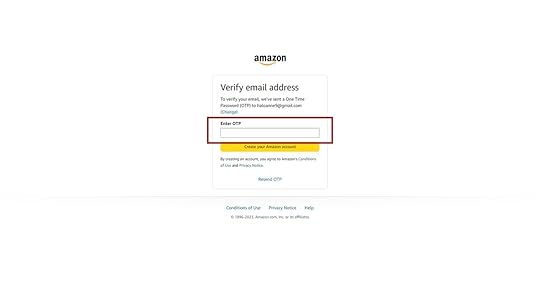
Once you provide the necessary information, the site will direct you to a page to verify your email address. The system will require you to enter the OTP sent to your email. Enter your OTP and click “Create your Amazon Account.”
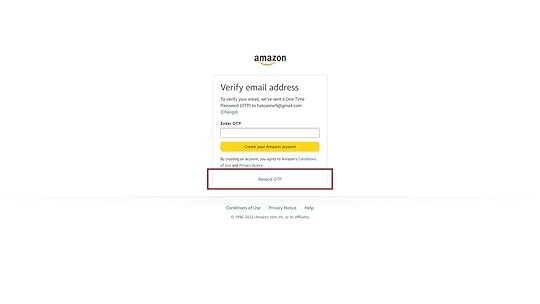
In instances where you couldn’t receive your OTP, click on “Resend OTP” under the Create your Amazon Account button.
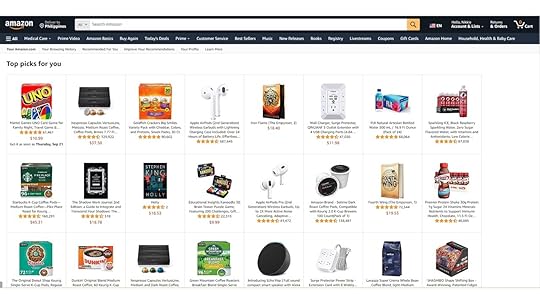
Once you have verified your account, you will be directed to the Top Picks page. It indicates that you have successfully made your account.
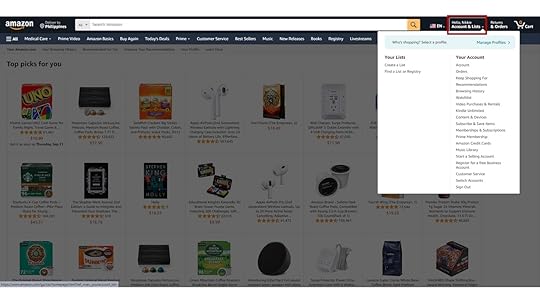
To check your profile, go to Account and Lists on the upper right side of the screen. You will see your orders, login details, payments, and more here.
If you plan to sell products on Amazon as a professional seller, include your business address in your account information. It will aid in effective order fulfillment and customer communication.
Exploring Amazon Account FeaturesNow that you have your Amazon account, let’s explore some key features:
1. Accessing your account dashboard.After logging in, click on “Account & Lists” at the top right to access your account dashboard.Here, you can view your order history, manage your payment methods, and more.2. Managing payment methods.In the account dashboard, click on “Payment options.”Add or edit your credit/debit cards, bank accounts, or other payment options.3. Setting up shipping addresses.Under “Account & Lists,” click on “Your addresses.”Add, edit, or delete shipping addresses for easy order placement.4. Customizing your account preferences.Click on “Account & Lists,” then choose “Your Account.”Explore settings like “Communication preferences” to manage email notifications.In “Login & security,” you can change your password or enable two-factor authentication for added security.Making Your First Purchase on AmazonReady to shop on Amazon? Here’s how to make your first purchase:
1. Browsing and searching for products.Go to the Amazon homepage.Use the search bar to find products or browse categories.Click on a product to see details, prices, and customer reviews.2. Adding items to your shopping cart.
When you find something you want, click “Add to Cart.”You can continue shopping or proceed to checkout.3. Checking out and making payment.
To complete your purchase, click “Cart” (usually at the top right).Review the items in your cart and click “Proceed to Checkout.”Choose your shipping address (or add a new one).Select your preferred payment method.Review your order, including shipping options and the total cost.Click “Place your order.”Troubleshooting Common Account Creation IssuesEncountering issues while creating your Amazon account? Here’s how to troubleshoot common problems:
1. Forgot password or email address.Click on “Sign-In” on the Amazon homepage.Select “Need help?” below the sign-in box.Follow the prompts to recover your password or find your account using the email address.2. Payment method issues.If your payment method isn’t working, ensure you’ve entered the correct information.Double-check that your card is valid and has available funds.Try using an alternative payment method if available.3. Account verification problems.If you’re having trouble verifying your account:Make sure you’ve entered the correct verification codes sent to your email and phone.Check your email spam folder for the verification email.Contact Amazon customer support for assistance if the issue persists.Final Thoughts on “How To Make an Amazon Account”It is a simple process creating an Amazon account. With a valid email address, a secure password, and basic personal information, you can join the millions of satisfied Amazon customers who enjoy the vast selection of products, fast shipping, and more.
Do you want to boost your brand’s visibility and profit on Amazon? Get the best Amazon advertising agency.
Frequently Asked QuestionsDo you need a valid bank account number to make an Amazon seller account?When setting up your Amazon seller account, you may be asked to provide a bank statement as part of the verification process.
What is a seller central account?It is an account on Amazon Seller Central, provided by Amazon for individuals and businesses to sell products on the Amazon marketplace.
What is an Amazon Prime account?An Amazon Prime account is a subscription service offered by Amazon that provides its members with a range of benefits and features. These features include free shipping, Prime Video and Prime Music, early access to deals, and more.
Related ArticlesMastering Your Marketing Funnel
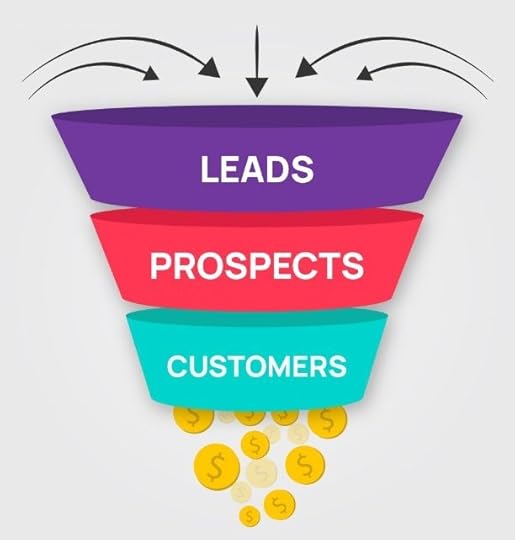
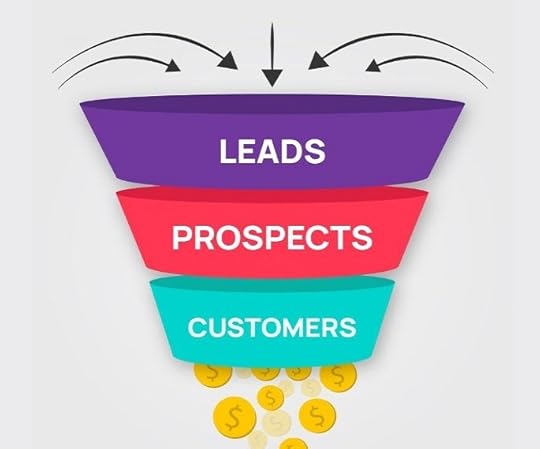
Want more leads and sales to grow your business? The solution is mastering the marketing funnel.
A rock-solid funnel guides potential customers step-by-step into becoming buyers. It paves a path that leads to marketing success.
Such a funnel first grabs the attention of your perfect audience. It raises awareness of your awesome brand. Then, it nurtures leads and converts them into happy customers. And finally, it delights those new buyers so they stick around.
Mastering the ins and outs of funnel strategy is essential for digital marketing wins. It can catapult your success and growth. You don’t have to be a marketing expert to create a funnel that works powerfully.
In this comprehensive guide, we’ll dive deep into funnel mastery. You’ll uncover the secrets to optimizing each stage for maximum conversions.
The proven structures, strategies, and tips on this page will help you sell more of your products and services.
Ready to harness the power of the marketing funnel? Let’s get started and unlock growth!
What is a Digital Marketing Funnel?Ever imagined you could guide a prospective customer through a strategic path to purchase? Well, that’s what a marketing funnel aims to do.
A marketing funnel is a process that takes prospective buyers on a journey in four main stages.
AwarenessEvaluationConversionDelightFirst, it raises awareness of your awesome brand. Then, it nurtures leads by providing value. Next, it converts the qualified leads into happy customers. And finally, it focuses on customer delight and loyalty.
At the top of the funnel, imagine a wide opening full of potential buyers who have just heard about your company. As they travel down the funnel, targeted marketing converts these prospects into loyal brand advocates. The shape of a physical funnel perfectly depicts the sales process.
Each stage of the funnel represents a milestone prospects meet on their journey with you. It’s like a path that leads customers from strangers to satisfied buyers.
Many leads enter the wide top, but only qualified, delighted customers reach the narrow bottom. That’s the true funnel magic!
With this customer journey mapped out strategically, you can guide buyers from awareness to conversion. And do so seamlessly. You should make the marketing funnel a huge part of your marketing plan.
The Stages of a Marketing FunnelNow let’s explore the four stages of the marketing funnel in greater detail.
Awareness StageBuilding awareness is the first step in any marketing funnel. It means getting your brand onto people’s radar.
Useful tactics in this stage include:
Search engine optimizationContent marketingPR outreachSocial media posts and social advertisingThese marketing strategies expose new eyeballs to your business and help build your brand.
Provide value by educating through blogs, videos, and guest posts. Establish yourself as a helpful authority, not just a salesperson.
Relevant, valuable content is key in the awareness stage. You want to resonate with your audience with the right content. This is called inbound marketing.
You can grab attention and kick off the customer journey with a smart content strategy. This awareness lays the groundwork for guiding folks through the buying process. It is beneficial to use multiple marketing channels at this stage.
First, connect with potential customers and show you understand their world. Then, you can progress them from one stage to the next.
Evaluation StageSo, you’ve grabbed people’s attention. Now what?
Next comes the evaluation phase. Here, leads are weighing options and deciding if your solution fits their needs. They’re in research mode – comparing you to competitors.
Your marketing should focus on proving your value to customers. Provide useful content that solve their problem.
Use case studies, free trials, and product demos to showcase your offering. Be helpful and educational, not pushy.
The evaluation stage aims to build confidence in your product or service. You want leads to conclude, “This company really understands me.”
By providing value during research, you nurture leads closer to a purchase decision. You position your brand as the logical, empathetic choice.
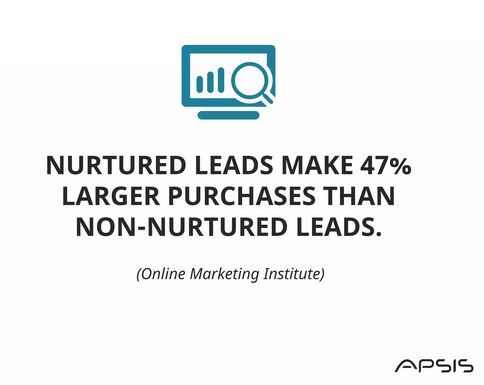
Do this right, and your target audience will be primed for your conversion stage.
Conversion StageThis crucial stage is when consideration leads to purchase intent, and prospects become customers.
Conversion rate optimization (CRO) efforts include:
Compelling calls-to-action to drive purchasesFrictionless website experienceEffective sales conversationsFollowing up quickly with hot leadsYou want to make it easy for prospects to say yes. Activate stress-free ways to get them to buy!
Use email marketing and social media to nurture leads across the finish line. Make sure your website has dedicated landing pages and clear CTAs.
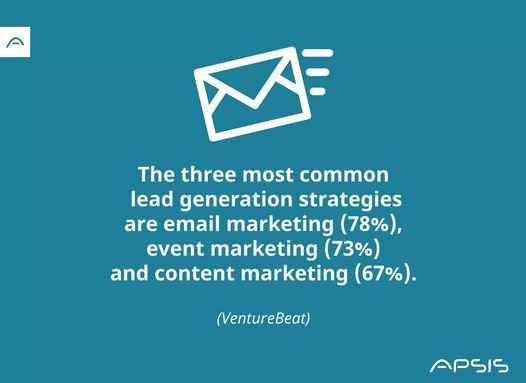
In this stage, you optimize for converting as many qualified prospects as possible. Leads should see the benefits of your product and feel confident in your solution.
With laser-focused conversion tactics, you turn interested prospects into delighted customers.
Now let’s cover how to keep customers happy.
Delight StageThe sales funnel doesn’t end when you make the sale. Your next goal is to make customers happy. You have to make it easy for customers to buy from you repeatedly.
Here the focus is on:
Providing excellent customer service and supportBuilding loyalty programs and special offersRe-engaging with automation and personalized touchesThe goal is to wow new customers so they stick around long-term.
Continuing to nurture buyers after purchase builds trust and affinity. This makes repeat purchases way more likely.
Delighting customers kickstarts a lifelong relationship beyond a single transaction. Who doesn’t love feeling appreciated?
With delight strategies, you reinforce that customers made the right choice. This leads to referrals, upsells, and lasting success.
Strategies for Mastering the Marketing FunnelNow let’s explore proven strategies and tips for optimizing your online marketing funnel at each stage:
Crafting an Effective Marketing FunnelHere’s how to pull together everything we’ve covered into a winning funnel strategy.
Do your research – Strive to understand your audience’s motivations and pain points. Map their journey from awareness to loyalty. This lays the groundwork.Outline the stages – Sketch out the 4 phases from attention-grabbing open to delighted customer. Plot how each marketing activity will guide prospects through each step.Set conversion goals – Define target rates for moving leads through each stage. This gives you something to optimize towards.Identify roadblocks – Look for any friction points or bottlenecks that could hamper conversions. Smoothing these will put you ahead of your competitors and get people to buy more from you.Test and refine – Keep improving with A/B testing and experiments. Optimization never ends.With an ultra-targeted funnel tailored to your audience, everything else you do marketing-wise flows better.
Creating a smooth flow from initial attraction to post-purchase delight is the big picture. Carefully study the funnel and remove all barriers and objections throughout the buyer journey.
Utilizing the AIDA ModelThe proven AIDA marketing model aligns perfectly with the funnel stages. Here’s how it works:
Attention – Catch interest with your brand story in the awareness phase.Interest – Provide value by educating in the evaluation stage.Desire – Highlight benefits to spark purchase intent for conversion.Action – Guide users to buy.
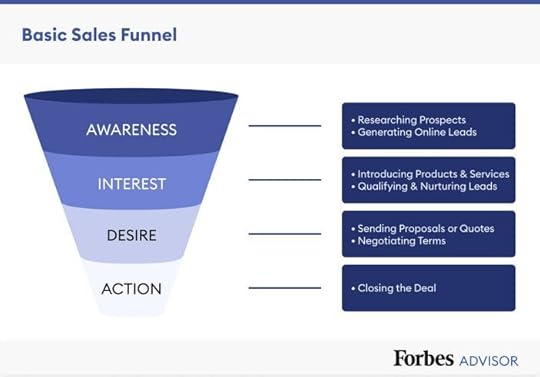
Keep AIDA top of mind when mapping content to each part of your conversion funnel. With AIDA, you take buyers on a strategic journey tailored to each stage. Your marketing message evolves naturally with the customer’s mindset.
This proven framework ensures you attract, nurture, convince, and delight for smooth conversions. Who doesn’t love a cohesive funnel?
Optimizing Funnel ContentLet’s look at the types of content that work for each funnel.
Awareness – Blog posts, social media, and PR raise brand visibility.Evaluation – eBooks, product demos, and webinars nurture consideration.Conversion – Case studies, free trials, and email sequences encourage purchase.Delight – Loyalty programs, automation, and support content spark retention.Content and messaging should evolve at each stage to move prospects closer to conversion.
A cohesive strategy that takes customers on an education-to-delight journey is marketing magic. Dialed-in funnel content is your secret sauce for conversions and growth.
Personalization and Customer JourneysToday’s buyers expect personalized, tailored experiences. Here are tips for success in that regard:
Map the journey – Understand how people move from stranger to buyer step-by-step. Identify key milestones.Leverage data – Build detailed customer profiles using analytics and CRM data. This uncovers insights.Get personal – Use names, individual details, and behavior to customize messaging and offers.Automate – Use tools like marketing automation to scale one-to-one personalization.Re-engage – Bring customers back with targeted recommendations when they go quiet.Hyper-relevant personal touches guide people smoothly through your funnel. When you tailor the experience around each individual, conversion and retention improve. It feels like you’re speaking directly to them.
Personalization powers modern marketing. Map journeys, deploy effective sales materials, leverage data, automate, and re-engage for funnel success.
Key Performance Indicators (KPIs): Using Measurement Metrics at Each StageOne of the biggest mistakes marketers make is not monitoring data. Marketing analytics is key to improving your funnel. It shows where and how to optimize.
But there’s a lot you could track. How do you pick the most useful metrics?
Let’s look at the key metrics for each stage:
Awareness Stage
Look at metrics showing brand awareness and traffic:
Website visits show overall traffic volume. Is it increasing or decreasing?Social reach and engagement show how content is working.Subscribers mean your lead generation is succeeding.Evaluation Stage
Check metrics on lead engagement:
Email open and click rates mean your messages are effective.Time on site and pages visited show content quality.Downloads quantify how assets perform.Conversion Stage
Examine metrics tied to conversions:
Lead quality means leads are ready to buy.Sales cycle length measures efficiency.Closed sales tell overall funnel success.Delight Stage
Finally, look at customer success metrics:
Retention rate shows churn and renewal effectiveness.Repeat purchases reveal re-engagement opportunities.Referrals show organic outreach potential.Set goals for each metric and track them over time. And take action if goals are missed. Comprehensive KPIs allow you to see leaks you need to fix.
With the right tactics and metrics, your business will thrive.
Learning from Successful ExamplesWant funnel inspiration? Let’s look at some great examples:
HubSpot
Gets visitors with free educational contentCaptures leads by exchanging assets for emailsDelights customers with great onboarding and supportTakeaway: HubSpot nurtures and delights at every stage.
Slack
Removes friction with free tiers to hook usersConverts smoothly with simple in-app signupBoosts retention with viral features and re-engagementTakeaway: Slack’s funnel drives quick growth.
These companies optimize each stage for conversions and retention.
You can borrow proven strategies like:
Lead magnets and incentivesEasy onboardingPersonalized re-engagementStudying success stories shows tactical best practices to apply. Now, go put them into action.
Funnel Marketing Challenges and How to Overcome ThemFunnel success rarely happens overnight. More often, you’ll encounter roadblocks and challenges along the way.
But don’t get discouraged! Many of the most common funnel struggles have tested solutions.
Let’s explore some typical marketing funnel challenges, along with potential fixes to get you back on track:
You Have Low Website Traffic
Driving interested visitors to your site is the first step for funnel success. Without enough traffic, your funnel can’t even get started.
If you’re struggling to attract an audience, try these troubleshooting tips:
Audit your website for SEO gaps and optimize pages to rank higher in search results. Targeting high-volume keywords can earn more organic traffic.Create pillar content centered around your top products or services. These comprehensive “ultimate guides” tend to attract and engage potential leads.Commit to blogging and posting social content 2-3 times per week. Consistent, helpful content keeps you top of mind.Your Lead Generation Is Lackluster
Once you’ve got site visitors, the next goal is capturing their contact information as leads. But if signups are sparse, tactics like these can potentially help:
Place clear calls-to-action across all pages – not just your homepage. Asking for the lead directly works better than subtle suggestions.Gate premium content behind lead capture forms. Offering free ebooks, trainings, or kits in exchange for an email gets more signups.Optimize your landing pages with persuasive copy, trust symbols, and a singular CTA focus. Reduce distractions to boost conversions.Conversion Rates Are Disappointingly Low
You’ve generated leads, but now they aren’t converting to sales. Identifying and fixing conversion sticking points can get you back on track:
Review analytics to pinpoint where leads are abandoning – your website, checkout, etc. Then, optimize these high-friction areas.Nurture cold leads who need more coaxing with tailored email sequences addressing concerns.Focus sales efforts on hot leads who have shown interest. They’re primed for conversion with a light push.Customer Churn Is High
Lastly, a common funnel frustration – customers make a purchase but don’t return. Reignite their interest with strategies like:
Strengthen your post-purchase onboarding process. Check in frequently at first to encourage engagement.Develop loyalty programs with points, tiers, and rewards. Incentives entice paying customers to stay activeSend re-engagement email campaigns when it’s time for a repeat purchase. Remind customers of your value.With consistent testing and optimization, you can overcome roadblocks and boost the effectiveness of your marketing. Stay dedicated, track results, and have patience in reaching your goals.
Evolving Your Marketing Funnel Over Time
As your business grows and the market changes, you should keep improving your funnel for the best results.
Do funnel check-ups regularly – Look at your marketing metrics around every three months. Find weak spots and brainstorm new approaches to keep funnel health in shape.Adapt to audience habits – Keep up with how your customers get info and communicate. Optimize content for them to ensure your funnel fits their lifestyle.Use new tech – Emerging tech, like AI chatbots, can optimize your funnel in new ways. Don’t get left behind by the latest innovations.Add more funnels – Make new funnels targeted at different groups like businesses. Expand your reach with specialized funnels.Automate for efficiency – Use marketing automation to increase funnel impact. Work smarter with automation.
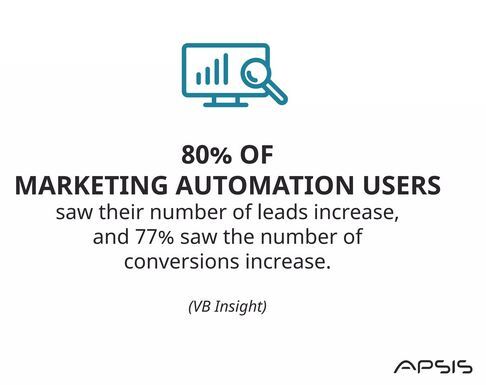
The marketplace moves fast, audiences evolve, and new tech emerges. Don’t just set and forget your funnel!
You must audit metrics, adapt to trends, innovate with tech, expand reach, and automate tasks. Keep improving your funnel to stay ahead of the curve and maximize results. What will you optimize next?
ConclusionWe covered the key stages, top strategies, and how to optimize for conversions. You’re now armed with a blueprint to guide customers from complete strangers to delighted buyers.
Remember, an effective funnel:
Grabs attentionNurtures leadsDrives salesDelights customersWith well-research marketing funnel planning tailored to your audience, you can smooth out their journey from consideration to loyalty.
The result? More traffic, leads, sales, and raving fans.
Ready to build an effective funnel and supercharge your business growth?
Take the first step by auditing your current funnel. Identify gaps in each stage. Brainstorm ideas to test – perhaps lead magnets or loyalty programs.
Then, start mapping changes to implement. Track performance and keep optimizing. With persistence and dedication, your funnel will convert.
Now, go out there, wow your customers, and watch your business thrive.
If you found this guide helpful, I have one request for you. Share it with other marketers who want to get the most from their marketing efforts. This lets us spread the word so more businesses can implement powerful funnel strategies.
We would love to help you reach more of your target audience and take your business to the next level.
If you need professional assistance to boost your marketing and sales, contact Advertisemint for a Free Google Ads consultation.
13 Ways To Make Money on Amazon
Do you want to know the ways to make money on Amazon?
Amazon is an e-commerce titan offering financial opportunities to people from all walks of life. Whether you are an entrepreneur starting a side hustle or a seller expanding your online empire, you can monetize your skills, products, and ideas on Amazon.
This article will explore the different ways to make money on Amazon. It will equip you with the knowledge needed to navigate this bustling marketplace.
1. Selling Physical Products

One of the simplest ways to make money on Amazon is by selling physical products. This includes retail arbitrage, private labeling, and wholesale.
Start by deciding on the type of physical products you want to sell. Then, you can proceed to source your products. Retail arbitrage involves purchasing discounted or clearance items from retail stores and reselling them on Amazon at a profit.
Additionally, wholesale entails buying bulk products from manufacturers and listing them on Amazon. Lastly, private labeling involves sourcing generic or unbranded products, branding, packaging, and selling under your brand name.
Read more: How much do Amazon sellers make?
2. Selling Digital Products

You can make money from digital products in different ways from Amazon. Some sellers use the Amazon platform to write and publish e-books on Kindle Direct Publishing. You can also develop and sell software, apps, or plugins through the Amazon App Store.
To sell digital products on Amazon, sellers create product listings and set prices. However, the platform has some requirements and restrictions. Hence, you should follow Amazon’s guidelines for each product category.
3. Affiliate Marketing

Another way to make money on this e-commerce platform is to join the Amazon affiliate program. As an affiliate, you make money by promoting Amazon products on your blog, website, or social media. You earn commissions on each sale referred.
What makes it appealing is that affiliate marketers don’t need to create or manage products. They promote existing products on Amazon, eliminating the need for inventory management, manufacturing, and product development.
4. Merch by Amazon

Merch by Amazon is a print-on-demand service and platform provided by Amazon. It allows brands to create and sell custom-designed T-shirts and other apparel.
Sellers create original T-shirt designs using various graphic design tools and software. These designs can include text, graphics, illustrations, and more. Once the design is ready, it can be uploaded to the Merch by Amazon platform.
5. Amazon Handmade

If you create handmade products, you can sell them on Amazon Handmade. Amazon Handmade is a marketplace for artisans. It is designed for artisans and independent creators to sell their unique products to a global audience. Amazon launched it to connect skilled artisans with customers who value handmade goods.
6. Amazon Flex

You can deliver packages as an independent contractor for Amazon Flex. Individuals can sign up for the Amazon Flex program through the Amazon Flex app or website. As a flex driver, you can work with your vehicle and set your schedule.
However, you must first provide information about yourself, your vehicle, and availability. Then, Amazon will conduct a background check to ensure you meet the program’s requirements.
7. Virtual Assistance

You can offer virtual assistant services to Amazon sellers. The role involves product research, customer support, and order management.
VAs often have diverse skills, including customer service, data analysis, content writing, and social media management. These skills are valuable to Amazon sellers who require assistance with various aspects of their business. Also, virtual assistants have the flexibility to work remotely from their preferred location. This allows them to balance work with other commitments like family, education, or freelance projects.
Read more: How many sellers are on Amazon?
8. Professional Services

If you want to monetize your skills, you can list them on Amazon Home Services. Amazon Home Services is a platform allowing service professionals to offer customers a wide range of home-related services. You can offer services like home repair, cleaning, or pet care. However, Amazon will require you to undergo a background check to protect customers.
9. Online Courses and Education

You can create and sell online courses or educational content through Amazon’s platform. Develop your educational content and submit it in the form of e-books, audio, video, guides, or written courses. Ensure that your content provides value and is well-structured.
Some Amazon platforms that can help you monetize your audio content include Amazon KDP, Amazon Video Direct, Amazon Audible, etc.
10. Dropshipping.

Dropshipping on Amazon is a business model where you sell products on Amazon without physically stocking them. You can establish a dropshipping business by partnering with suppliers or wholesalers who stock products. These could be items like electronics, clothing, or gadgets.
After that, you list the products on Amazon’s marketplace, set prices, and create product listings. When a customer buys from your Amazon listing, you order the product from your supplier, who ships the product directly to the customer’s address.
You make money by marking up the product’s price from what you paid the supplier. The difference is your profit.
11. Printable Products

You can design and sell printable templates, planners, and digital downloads on Amazon. Selling these products can be a profitable business, especially if you create high-quality and in-demand designs.
Start by selecting a category for your printable products. Common options include wall art, greeting cards, invitations, stickers, calendars, and planners. You can develop unique and visually appealing printable designs using graphic design software like Adobe Illustrator or Canva. Ensure that your designs are high-resolution and suitable for printing.
12. Amazon Mechanical Turk (MTurk).
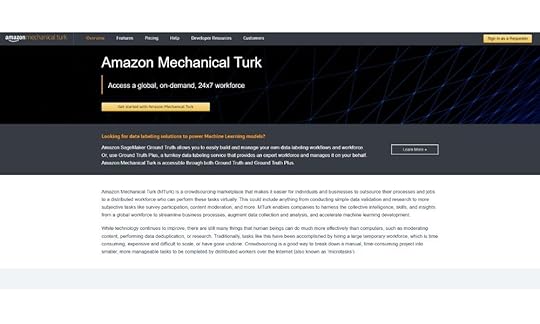
You can earn money by completing micro tasks and surveys on Amazon MTurk. Amazon Mechanical Turk (MTurk) is an online platform that connects businesses and individuals. It is designed for tasks that require human intelligence, such as data annotation, content moderation, image and video tagging, and various other microtasks. After signing up for the platform, workers browse the MTurk platform to find HITs that match their skills and qualifications.
Final Thoughts on Ways To Make Money on AmazonAmazon offers many opportunities to earn money, from selling products to publishing books and even leveraging affiliate marketing. The key lies in choosing the path that aligns with your skills, interests, and goals. Whether you’re starting a side hustle or aiming for a full-time income, Amazon’s diverse income streams can open doors to financial success.
Are you looking to increase your sales on Amazon? Run an ad campaign with the best Amazon advertising agency!
Frequently Asked Questions on Ways To Make Money on AmazonWhat is the Amazon Fulfillment Center?The Amazon fulfillment center handles storage and shipping. It allows sellers to focus on scaling their Amazon business without worrying about logistics.
Can I sell internationally on Amazon?Amazon allows sellers to expand their reach in multiple countries through programs like Amazon Global Selling. With their own Amazon page, international sellers can effectively showcase their online retail store products, building a brand presence that attracts loyal customers.
Can I earn a full-time income on Amazon?Yes, many individuals have built successful full-time income streams on Amazon. However, it requires dedication, strategy, and consistent effort.
Related ArticlesSeptember 4, 2023
Disovering Amazon: How Many Sellers on Amazon?
How many sellers on Amazon?
It’s a question that piques the curiosity of many, considering the sheer vastness of the online retail giant. Amazon has become a global powerhouse since its humble roots as an online bookstore in the 1990s. It has reshaped how we shop, ship, and sell.
This article will uncover the scale of Amazon’s seller ecosystem and explore the factors fueling its growth.
The NumbersAmazon seller statistics reveal over 6 million Amazon sellers worldwide, with 1.9 million of them actively engaged on the platform. Among these sellers, about 54% are private label sellers, while 26% operate as wholesale sellers. Also, roughly 73% of these sellers use Fulfillment by Amazon (FBA) to streamline their operations.
Regarding gender representation, women comprise around 33% of Amazon sellers, while men comprise 64%. Notably, 58% of third-party sellers on Amazon fall within the age group of 25-44, showing the platform’s diverse seller demographics.
Types of Sellers on AmazonThe following are the different types of sellers on Amazon:
Individual sellers: Individual sellers are small-scale and casual sellers who sell items on Amazon occasionally. They do not pay a monthly subscription fee but a per-item fee for each sale. Individual sellers are only eligible for some of the advanced selling features.

2. Professional sellers: Professional sellers are more serious and committed e-commerce businesses. They pay a monthly subscription fee to access Amazon’s advanced selling tools and features.

3. Private label sellers: They create brands and source products from manufacturers or wholesalers. A manufacturer makes the product, and another company puts its name on it, advertises it, and sells it. The company with the private label takes care of how the product looks, its pricing, and marketing, while the manufacturer is responsible for making it and ensuring its good quality.

4. Wholesale sellers: Wholesale sellers purchase products in bulk from manufacturers or authorized distributors and sell them on Amazon. They often work with established brands and have agreements to resell their products.

5. Dropshipping sellers: Dropshipping sellers list products on Amazon without holding physical inventory. When a customer places an order, they purchase the product from a third-party supplier, who then ships it directly to the customer.

6. International sellers: International sellers are businesses outside the United States selling products on Amazon’s global marketplace.

Becoming an Amazon seller offers many benefits but has its fair share of challenges. Here are the pros and cons of being an Amazon seller:
BenefitsVast customer base: Amazon has a diverse customer base. It provides sellers with hundreds of millions of potential buyers.Global reach: Amazon operates in various countries. This allows sellers to expand their reach through Amazon Global Selling.E-commerce infrastructure: Amazon provides a well-established e-commerce platform. It has features like product listings, payment processing, and customer support.Fulfillment options: Sellers can fulfill orders or opt for Amazon’s Fulfillment by Amazon (FBA) service. This service handles storage, packing, and shipping.Visibility and exposure: Products listed on Amazon often receive high visibility. Sellers also benefit from Amazon’s advertising tools.Trust and credibility: Amazon’s reliability and customer service reputation can boost buyer confidence. This leads to higher sales.Customer reviews: Good products get positive reviews on Amazon, enhancing their reputation and increasing sales.Access to Prime members: A factor that affects sellers’ success is the amount Amazon Prime members spend on the platform. Products eligible for Prime can attract loyal customers due to fast shipping and other benefits.ChallengesCompetition: Amazon is highly competitive. It has millions of sellers offering similar products. This makes it challenging to stand out.Fees: Amazon charges various fees, including referral and FBA fees, which can affect profit margins.Stringent policies: Amazon has strict policies that sellers must adhere to. Violations of these policies can result in suspension.Algorithm changes:” Amazon’s search algorithm can impact product visibility and affect a seller’s sales.Customer feedback: Negative reviews can harm a product’s reputation and sales.Counterfeit products: Counterfeit products on Amazon can be a concern for both sellers and buyers.Shipping and returns. Dealing with shipping logistics and returns can take time and effort.Factors Affecting Seller GrowthThe cumulative net sales of all Amazon sellers combined, including third-party sellers and those who own private label brands, contribute to the e-commerce giant’s revenue. Several factors help the growth of sellers on platforms like Amazon. These factors can vary depending on the type of seller and the market niche. However, some contributors to seller growth include:
Expanding product catalog: Adding new products to a seller’s catalog can attract customers and increase sales opportunities.Effective product listings: Well-optimized product listings with detailed descriptions, high-quality images, and relevant keywords can improve visibility and conversation rates.Competitive pricing: Competitive prices can attract price-conscious shoppers and help sellers stay competitive.Customer reviews and ratings: Positive and high ratings build trust with potential buyers. It can also significantly boost sales.Advertising and promotion: Amazon advertising can increase product visibility and drive sales. Hence, you should get a reputable Amazon advertising agency.Inventory: Managing inventory levels well to prevent stockouts and overstock situations is crucial for growth.Customer service: Giving excellent customer service, addressing inquiries promptly, and resolving issues can lead to repeat business and positive reviews.Market research: Doing market research to identify trending products and niches can help sellers tap into high-demand markets. Calculating the average profit margin is crucial for sellers on Amazon, as it helps them assess their profitability in a competitive marketplace.Diversification: Expanding sales channels beyond Amazon can reduce dependency on one platform. It can also increase sales opportunities. Expansion can be done through a personal e-commerce website or other online marketplaces.Adaptation to trends: Staying informed about e-commerce and industry trends and adapting business strategies can help sellers grow.Brand building: For private label sellers and brand owners, building a recognizable and trusted brand can lead to long-term growth and customer loyalty.Final ThoughtsIn the vast Amazon marketplace, the number of sellers continually changes, with millions of entrepreneurs and businesses offering their products to a global audience. While the exact count may fluctuate, one thing is clear: Amazon offers unparalleled opportunities for sellers of all sizes to thrive. Whether you’re just starting or looking to expand, understanding the competition can help you carve your niche and find success in this dynamic ecosystem.
Frequently Asked QuestionsWhy is it important to monitor sales on Amazon?Amazon sellers monitor sales to assess how well their products are performing.
What is the typical size and scale of Amazon sellers’ businesses?An Amazon seller’s business size and scale can vary widely. Amazon’s marketplace is diverse. It has sellers from running small operations to large corporations with extensive product catalogs.
How do Amazon Prime members impact the sales of Amazon sellers?Prime members tend to have higher conversion rates. It means they are more likely to purchase when they visit a product listing. It can lead to higher sales for Amazon sellers.
Related ArticlesThe Complete Guide to Instagram Swipe Up Feature

Did you know the Instagram Swipe Up feature can boost your content promotion strategy?
Instagram’s Swipe Up feature has become a game-changer for businesses and influencers. This feature allows users to guide Instagrammers to their websites, products, or exclusive content with a simple swipe.
This blog post will explore how this feature works, who can use it, and how you can use it to achieve your goals.
Proceed further as we discover the following topics:
Understanding the Instagram Swipe Up FeatureWhat is Instagram StoriesHow to Use the Swipe Up To Instagram StoryTips for Maximizing the Swipe Up FeatureBenefits of Using the Swipe Up FeatureUnderstanding the Instagram Swipe Up Feature

Instagram’s Swipe Up feature is a fantastic way to engage your audience and direct them to your desired destination. With this feature, you can direct your audience to your website, blog, product page, or any external content from your Instagram Story.
How does it work?The Swipe Up feature lets you add a link to your Instagram Story. Viewers can access the link’s content by simply swiping up. So they won’t have to leave the app.
Who can use it?You must meet certain criteria to use Instagram Swipe Up. To start with, you need to have at least 10,000 followers. Also, the feature isn’t available to personal accounts. So, you will need a business account to use it.
How To Add a Swipe Up Link to Your Instagram Story

This is a guide on how to use the Swipe Up feature:
1. Create Story.Start by crafting your captivating Story content. Snap a photo, record a video, or choose content from your camera roll.
2. Tap on the chain link icon.In the top toolbar, you’ll find a chain link icon. Tap it.
3. Add links.A new window will appear. Type or paste your URL. Double-check it to ensure it is correct. Instagram will automatically save and recognize it as a link sticker.
4. Choose a link sticker.Browse different styles of link stickers to find the right one for your story. Make sure it won’t obstruct your followers’ views.
5. Post Story.If you’re done finalizing everything and are satisfied, you can post it now. Tap the “Your Story” to make it live and visible to everyone.
Tips for Maximizing the Swipe-Up Feature

Unlock the full potential of Instagram’s Swipe Up feature with these easy-to-follow tips:
Use influencers: Collaborate with Instagram influencers in your niche. They can promote your Swipe Up content to a wider and more engaged audience.Cross-promotion: Partner with businesses or creators whose products or services complement your own. Promote each other’s content with Swipe Up links for mutual benefit. You can also promote your Story from your other social media accounts.Optimal posting times: Pay attention to when your audience is most active on Instagram. Schedule your Swipe Up Stories accordingly.Don’t overdo it: While Swipe Up is a powerful tool, avoid bombarding your followers with too many links. Balance your content to maintain engagement.Link relevance: Ensure your Swipe Up links are directly related to the content you’re sharing. Irrelevant links can confuse your audience.Link testing: Before going live, test your Swipe Up links to ensure they work correctly. Broken links can frustrate viewers.Create a sense of urgency: Encourage your followers and viewers to swipe by creating a sense of urgency for a quick response.Use and track analytics: Take advantage of Instagram’s built-in analytics. It can track the performances of your story based on how many people swipe it up. You can use the result to adjust and create a new strategy for your stories.Alternatives to Instagram’s Swipe Up FeatureWhile Instagram’s Swipe Up feature is a powerful tool, there are alternative methods to achieve your goals:
Bio link optimization: The link on your Instagram profile is a precious tool. Regularly update it to direct your followers to your latest content or promotions.Linktree: Consider using services like Linktree to create a landing page with multiple links. This allows you to showcase various destinations from your bio link.Product tagging: If you sell products, use Instagram Shopping to tag your products in posts and stories. Users can tap to view product details and make purchases.Shoppable posts: Create posts designed to drive sales, highlighting your products and providing shopping links in the captions.Final ThoughtsThe Swipe Up feature on Instagram allows you to add links to your stories, directing followers and viewers to external content. This feature enables you to smoothly share different forms of content, such as blog posts, product promotions, and more, by simply swiping up on the story. Start using the Instagram Swipe Up feature and transform your stories into visually captivating experiences.
Running an Instagram ad campaign? Let the top Instagram advertising agency manage it for you!
Frequently Ask Questions on Instagram Swipe-Up FeatureHow many links can I add or put in my Instagram story when using the Swipe Up feature?You can add only one link per Instagram story using the Swipe Up feature.
How can I confirm that my account is verified and that I can use the Swipe Up feature?You will know your account is verified on Instagram when you see a blue checkmark badge next to your profile name. You can try accessing the Swipe Up feature to verify if you’re uncertain.
Are there any restrictions on the type of content I can link to with Swipe Up?While there are some content guidelines on Instagram, you can generally link to websites, articles, YouTube videos, and other external content that complies with Instagram’s community standards.
Related Articles6 Instagram Video Editing Apps You Should Try
How to Buy UPC Codes for Amazon: A Step-by-Step Guide
Do you want to buy UPC codes for Amazon?
If you plan on selling online products on the Amazon marketplace, an essential requirement is obtaining a Universal Product Code or European Article Number code. These unique identifier codes help Amazon manage its vast inventory and ensure accurate product listings.
This step-by-step guide will walk you through the entire process of buying Amazon UPC codes without fuss. We will also discuss how to choose the best Amazon UPC code supplier and maintain your UPC codes.
Steps for Buying UPC Codes
Before diving into the purchasing process, it is crucial to understand what UPC codes are and why they matter for Amazon sellers. Amazon UPC codes are 12-digit numbers that uniquely identify products. They consist of a manufacturer identifier and a check digit. When you list a product on Amazon, you’ll use a UPC to create a product detail page.
Step 2: Determine how many UPC codes you need.The number of UPC codes you need depends on the unique products you intend to sell on Amazon. Each distinct product requires its own UPC code. Variations of the same products, like different colors and sizes, can typically use the same code, but you should follow Amazon’s guidelines.
Step 3: Choose a UPC code supplier.There are various online platforms where you can purchase UPC codes. However, you should carefully select a reputable supplier to ensure your codes are legitimate and accepted by Amazon. Some well-known UPC providers include GS1, the official source, Buyabarcode.com, and SnapUPC.
Step 4: Research and select a supplier.Here is a quick breakdown of some popular UPC code suppliers:
GS1: This is the most recognized and official source for UPC codes. However, it can be more expensive and involves an annual renewal fee.Buyabarcode.com: Buyabarcode.com is a reliable and cost-effective option for buying UPC codes. They provide lifetime ownership without annual fees.SnapUPC: SnapUPC is another reputable source for affordable UPC codes, offering a one-time purchase without renewal fees.Step 5: Purchase the UPC codes.Once you’ve selected a supplier, you can visit their website and follow their instructions for buying UPC codes. You may need to provide information about your business and the number of codes you need.
Step 6: Receive and verify the UPC codes.After your purchase, you should receive your Amazon UPC codes via email. Please verify that the codes are correctly formatted and match the information you gave during the purchase. You should ensure accuracy at this stage to prevent problems when listing your products on Amazon.
Step 7: List your products on Amazon.You can list your products on Amazon now that you have valid UPC codes. When you create a product detail page, you can just input the UPC in the relevant field, and Amazon will use it to link your products to its database.
Step 8: Maintain Your UPC CodesIf you bought UPCs from a supplier like GS1, remember to renew them annually to maintain their validity. For codes purchased from Buyabarcode.com or SnapUPC, there is typically no need for renewals.
Read more: How much do Amazon sellers make?
Choosing the Best Amazon UPC Supplier

Before diving into the selection process, you should recognize the importance of choosing the right UPC. The legitimacy and accuracy of your UPCs directly impact your Amazon selling experience. An unreliable supplier can lead to listing issues and even account suspension.
Step 2: Look for reputable suppliers.You can start your research by looking for reputable UPC suppliers. Here are some key points to consider:
Reviews and testimonials: Check online reviews and testimonials from other Amazon sellers. What do they say about the supplier’s codes and service?Longevity: Established suppliers tend to be more reliable. Look for companies with a good track record in the industry.Transparency: A trustworthy supplier should be transparent about pricing, policies, and code ownership.Step 3: Compare pricing.Price is a significant factor when choosing a UPC code supplier. Different suppliers offer various pricing models. Here are things to consider when comparing pricing:
One-time purchase: Some suppliers offer codes for a one-time fee, with no annual renewal fee. This can be cost-effective if you plan to sell products for an extended period.Annual renewals: Certain suppliers like GS1 charge initial and renewal fees. Try to understand the ongoing costs before committing.Step 4: Check code ownership.Ensure the supplier provides codes you own for life. Some suppliers may retain ownership after selling codes. Buying from such suppliers can lead to issues if you decide to switch suppliers or expand your business.
Step 5: Verify code format and compliance.Your UPC codes must meet Amazon’s requirements. So, please ensure the supplier’s codes are in the correct format and comply with Amazon’s guidelines. Codes should be 12 digits long, unique, and free from errors.
Step 6: Evaluate customer support.Look at the level of customer support the supplier offers. Reliable customer support can be a lifesaver if you encounter issues with your codes or have questions about the process.
Step 7: Read the fine print.Before making a final decision, read the supplier’s terms and conditions thoroughly. Pay attention to any hidden fees, cancellation policies, and the process for obtaining additional codes if needed.
Step 8: Ask for recommendations.If you are still deciding which supplier to choose, feel free to seek recommendations from other Amazon sellers or online seller communities. Their experiences and insights can be invaluable.
Read more: How many sellers are on Amazon?
How To Maintain Your UPC CodesUPC codes are the key to selling on Amazon. So, you should maintain them carefully.
Step 1: Understand the importance of maintenance.Before we dive into the steps, we want you to understand why maintaining your UPCs is crucial. Proper maintenance ensures that your products stay listed on Amazon without interruptions, prevents potential violations, and safeguards your seller account.
Step 2: Keep accurate records.Maintaining your UPCs begins with keeping accurate records. Here are the things you should do:
Document your codes: Maintain a spreadsheet or document with a list of all your UPCs. Include details like product names, descriptions, and any variations.Update as needed: Whenever you make changes to your products, like new versions or variations, update your records to reflect these modifications.Step 3: Monitor code usage.Please regularly monitor how your UPCs are used and ensure each corresponds to a specific product or product variation. Refrain from reusing codes for unrelated items, which can lead to clarity and compliance issues.
Step 4: Renew your codes if necessary.If you purchase your Amazon UPC code from a supplier that requires annual renewals, stay on top of these renewals. Missing a renewal could lead to code deactivation, disrupting your product listings on Amazon.
Step 5: Resolve issues promptly.Sometimes, issues may arise with your unique UPC codes. Perhaps a UPC is reported as incorrect or not matching your product. In such cases, follow the steps below:
Investigate quickly: Investigate the issue promptly to understand what went wrong.Contact Amazon Support: Reach out to Amazon Seller Support for guidance on resolving the problem.Provide correct information: If you uncover a mistake, correct it promptly and update your product listings.Step 6: Stay informed about Amazon’s policies.Amazon’s policies regarding UPC barcodes and product listings can change. You can stay informed by regularly reviewing Amazon’s Seller Central or contacting their support for updates or clarifications.
Step 7: Keep backup codes.Having spare UPCs on hand can be a lifesaver in emergencies. If you encounter issues with an Amazon UPC, you can use a backup to create or update product listings. Afterward, you can resolve the problem with the problematic UPC barcode.
ConclusionBuying UPC codes for Amazon is a necessary step for any aspiring seller. While it may seem daunting, following these straightforward steps to choose a reputable supplier will ensure success. You should also adhere to the guidelines on maintaining your Universal Product Code. With valid Universal Product Codes, you’ll be well-prepared to list and sell your products on the world’s largest online marketplace.
Do you want to run an ad campaign on Amazon? Let the best Amazon agency handle it.
Frequently Asked QuestionsWhat are Universal Product Codes, and why do I need them for Amazon?UPC codes are 12-digit unique identifiers used to distinguish products. Amazon requires them to create accurate product listings, ensuring seamless shopping experiences for customers.
Where can I buy UPC codes for Amazon?You can purchase Universal Product Codes from various suppliers. Some options include GS1, Buyabarcode.com, and SnapUPC. Research and choose a reputable supplier that fits your needs and budget.
How many UPC codes do I need for my Amazon products?You need a unique UPC code for each distinct product you plan to sell on Amazon. However, variations of the same product, like different colors and sizes, can typically share the same code, provided you follow Amazon’s guidelines.
Related ArticlesHow Much Do Amazon Sellers Make?
How much do Amazon sellers make?
It’s a question that often pops up in the minds of aspiring entrepreneurs and curious shoppers. If you are considering becoming an Amazon seller, this is the post you should read.
This article will dig deep into the world of Amazon sellers to uncover the truth about their earnings. We will also explore the various factors that influence their income and expenses and provide tips on maximizing earnings on Amazon.
Amazon Seller EarningsTo determine how much Amazon sellers make, one crucial metric to consider is their average monthly sales. Successful Amazon businesses often have a high sales volume, generating substantial annual sales. The earnings of Amazon sellers can vary widely depending on several factors. Here are some insights into the potential earnings of Amazon sellers:
a. Low-volume sellers: Individuals or small businesses with low sales volumes may earn a few hundred to a few thousand dollars monthly. Their income may supplement other sources of revenue.
b. Moderate-volume sellers: Sellers with moderate sales volumes might earn several thousand to tens of thousands per month. These sellers may run their Amazon businesses as their primary source of income.
c. High-volume sellers: Successful high-volume sellers can earn substantial incomes. It typically ranges from tens of thousands to hundreds of thousands of dollars per month or more. These sellers often operate as full-time Amazon businesses.
d. Exceptional sellers: A small percentage of Amazon sellers achieve remarkable success. They usually earn millions of dollars in annual sales and generate significant profits.
Many Amazon sellers earn over $1,000 monthly, with some top sellers making more than $100,000 monthly. Specifically, 45% make between $1,000 and $25,000 each month. It translates to $12,000 to $300,000 in yearly sales. Another 25% earn $25,000 monthly, with annual sales of $300,000 to $3,000,000. However, 17% of sellers make less than $500 monthly sales.
Factors Impacting Amazon Seller EarningsMany entrepreneurs are attracted to the potential of making money online as Amazon sellers, but success requires dedication and wise decision-making. Earning as an Amazon seller can vary depending on several factors. Understanding these factors is crucial for sellers to make informed decisions and optimize their strategies. Here are the key factors impacting Amazon seller earnings:
1. Product selection and niche.

The choice of products you sell on Amazon is one of the most critical factors. Products with high demand are more likely to generate sales and revenue. It is also important to assess the level of competition in your chosen niche. Entering a highly competitive market may require different strategies from entering a niche with less competition.
2. Seller type.

Amazon offers two primary seller account types: individual and professional. Individual seller accounts are ideal for new sellers. This account type is suitable for low-volume sellers. However, it may limit access to certain features. Professional accounts, on the other hand, are designed for high-volume sellers. This account type offers advanced features and tools for scaling your business.
3. Fulfillment method.

Amazon offers various fulfillment methods to accommodate different seller preferences and business models. The method you choose for fulfilling orders can impact your earnings.
Read more: Amazon FBA vs. FBM.
4. Pricing strategy.

Your pricing strategy directly affects your competitiveness and profitability. Pricing your products competitively can help you attract more customers.
5. Operating expenses.

Various operating expenses can impact your profitability. You should invest in tools and software for inventory management, pricing optimization, and analytics. Also, quality customer service can lead to positive reviews and customer retention.
Costs Associated With Amazon SellingSelling on Amazon can be a profitable venture. However, it is essential to be aware of the costs associated with the platform. These costs can vary depending on various factors, including your business model and the types of products you sell. Here are the primary costs associated with Amazon selling:
Amazon fees: Amazon charges sellers a referral fee for each product sold on its platform. The fee is typically a percentage of the item’s sale price and varies by product category. Referral fees are one of the core revenue sources for Amazon.Product cost: It includes the cost of purchasing or manufacturing the products you sell on Amazon. The cost of goods sold (COGS) directly impacts your profit margins.Advertising and promotion: While advertising on Amazon can boost product visibility and sales, it also comes with costs. Amazon PPC (Pay-per-click) campaigns require a budget. You have to pay for clicks on your ads. To make your Amazon ads more effective, consider hiring an Amazon ad agency.Operating expenses: Operating expenses are the business’s costs in daily operations. It includes employee compensation, rent, and utilities.Subscription fees: A professional seller account requires a monthly subscription fee. Hence, a seller must also set aside a budget for it.Storage fees: Using FBA may incur storage fees for storing your products in Amazon’s warehouses. These fees are usually higher during peak holiday seasons. Its price also depends on the volume of storage space your products occupy.Returns and refunds: When customers return products or request refunds, you may incur costs associated with processing returns and potentially restocking or disposing of returned items.Taxes and compliance: Sellers are responsible for collecting and remitting sales tax in states with a tax obligation. Compliance with tax laws and regulations may require additional costs.Tips for Maximizing Amazon Seller EarningsMaximizing earnings as an Amazon seller requires a combination of effective strategies and diligent management. Here are some tips to help you maximize your Amazon seller earnings:
1. Choose the right products: Conduct thorough market research to identify profitable niche products with strong demand. You should also consider selling products with higher profit margins to increase your earnings.
2. Optimize your product listings: Create compelling product listings with high-quality images and detailed keyword-rich descriptions. You should also use relevant keywords in your product titles and bullet points to improve search visibility.
3. Competitive pricing: Regularly monitor your competitor’s prices and adjust your pricing strategy to remain competitive. Consider using automated repricing tools to adjust prices in real-time based on market conditions.
4. Utilize Fulfillment by Amazon (FBA): Consider using Fulfillment by Amazon (FBA) to benefit from Amazon’s reliable shipping and customer service. This can boost your brand’s visibility and trustworthiness.
5. Inventory management: Monitor inventory levels to avoid stockouts and overstocking. You may also use inventory forecasting tools to accurately predict demand and ensure you have the right stock.
6. Offer bundle deals and cross-selling: Bundle-related products to increase the average order value. You can also use cross-selling techniques to recommend complementary products to customers during the buying process.
7. Leverage Amazon advertising: Invest in Amazon PPC (Pay-Per-Click) campaigns to increase the visibility of your products. You can also monitor and adjust your ad campaigns to improve efficacy while controlling costs.
8. Enhance customer service: Provide excellent customer service by promptly addressing inquiries and resolving issues. Aim for positive reviews and high seller ratings. It can boost your credibility and sales.
9. Build a brand: Register for the Amazon Brand registry to establish and protect your brand on the platform. It will help you focus on creating a unique and memorable brand presence that sets your products apart from competitors.
10. Expand to other marketplaces: Consider selling on multiple Amazon marketplaces (e.g., Amazon US, Amazon UK) to reach a broader audience. You can also use tools and services that can help you manage multi-marketplace operations efficiently.
11. Invest in marketing outside of Amazon: Consider using social media, email marketing, and other channels to drive traffic and sales to your Amazon listings. A digital advertising agency can help.
Final Thoughts on “How Much Do Amazon Sellers Make?”In conclusion, understanding Amazon seller earnings is like peeling an onion – there are layers to it. While there’s no one-size-fits-all answer, we’ve uncovered the key factors, statistics, and strategies that can help you succeed in this dynamic marketplace. Remember, with the right mindset, research, and dedication, you can achieve your Amazon selling goals and secure a profitable online business.
Frequently Asked Questions on “How Much Do Amazon Sellers Make?”What is an Amazon seller account?An Amazon seller account allows businesses to sell products directly to customers on Amazon.
Is it possible to make a full-time income as an Amazon seller?Yes, many Amazon sellers have built full-time businesses that provide substantial income. However, success requires dedication, smart business decisions, and scaling efforts.
How long does it take to start making money as an Amazon seller?The time it takes to start making money on Amazon varies. Some sellers are more likely to see results within a few weeks, while others may take several months to establish themselves and see consistent earnings.
Related ArticlesSeptember 3, 2023
Amazon FBA vs FBM: Which is Right for Your Business?
Are you trying to decide on Amazon FBA vs. FBM?
The decision between Amazon FBA and FBM can be a game-changer for your business. Would you prefer having the power to offer Prime shipping or the freedom to handle orders your way?
This blog post will discuss the differences between Amazon FBA (Fulfillment by Amazon) and FBM (Fulfillment by Merchant). By the end, you will have the information to select the perfect fit for your online venture.
Amazon FBA: The Hands-Free Approach to Selling Online

Selling stuff online can be exciting, but it can also be a lot of work. That’s where Amazon FBA comes to the aid of Amazon sellers. It’s like having a super helpful sidekick for your online store. Here is what it means to use Amazon FBA:
Benefits of Using Amazon’s Fulfillment CentersImagine sending your products to Amazon’s warehouses instead of storing them in your garage or spare room. That’s what Amazon FBA is all about. Here are some of the benefits FBA sellers enjoy:
1. Amazon takes care of everything.Your products will be in good hands once they arrive at Amazon’s Fulfillment Centers. You can trust Amazon to pack and ship them out promptly.
2. Prime benefits.When you use Amazon FBA, your products can get that fancy “Prime” badge. That’s like an invitation to a party where all the cool shoppers are. More Prime members might choose your products because they can deliver them fast and for free.
3. Customer service.Amazon provides customer support to FBA sellers. So, you focus on finding new products and growing your business while Amazon deals with the nitty-gritty stuff.
4. Easy scaling.As your business grows, Amazon FBA grows with you. Hence, you don’t need to panic about finding extra storage space or hiring many people to pack boxes. Amazon’s fulfillment centers have your back.
5. Trust and reliability.Amazon’s reputation for quick and reliable shipping rubs off on you when you use FBA. Shoppers trust that their orders will be handled with care and delivered promptly.
6. Winning the Buy BoxAmazon’s algorithms examine various factors when deciding who gets the Buy Box. FBA sellers often have a leg up because of their Prime eligibility and the trust associated with Amazon handling fulfillment.
Will Amazon FBA Cost You?While Amazon FBA is awesome, it is only partially free. You will pay storage fees and for Amazon’s help in packing and shipping your products. FBA fees can eat into your profit, but many Amazon sellers think paying FBA fees is worth it for all the time and stress it saves.
Amazon FBM: The Do-It-Yourself Way to Sell Online
If you are an independent spirit who likes to do things your way, Amazon FBM might be your ticket to online selling freedom. Amazon FBM is all about taking control of your store. As an Amazon seller, below are several benefits and many ways Amazon FBM can be a game changer for your business.
Benefits of Amazon FBMWhat are the advantages FBM sellers have over FBA sellers? Below are some of the benefits you get if you choose FBM:
1. You handle your stuff.Imagine having a stash of awesome products you want to sell on Amazon. With this fulfillment method, you keep those products in your warehouse, garage, or spare room.
2. Packing and shipping products.When someone buys your product, it is up to you to pack it up nicely and send it off to the customer. FBM sellers get to choose the method to deliver shipping orders and make sure they get to customers safely.
3. Avoiding fulfillment fees.FBA sellers pay fulfillment and storage fees, but FBM sellers can sidestep these costs and have more control over their expenses.
4. Customer loyalty and trust.FBM allows you to have a more direct relationship with your customers. With FBM, you can handle inquiries, which can build loyalty and trust.
5. Unique products.Some sellers prefer FBM for unique or personalized products that need special care.
5. Costs Management.While you have expenses to manage, FBM allows you to keep a tight rein on your costs.
Will Amazon FBM Cost You?With great power comes great responsibility, and in this case, it means you have to take care of all the costs. You pay storage fees, packing fees, and shipping fees. However, some FBM sellers find it a fair trade-off for the freedom and control they gain.
Which Option Is Right for You?Choosing between FBA and FBM depends on your Amazon business goals, resources, and preferences. Let’s break it down:
Amazon FBA is ideal if you want a hands-off approach and are willing to pay more for convenience. It is especially useful for new sellers looking to reach a broader audience quickly.Amazon FBM is a better fit if you want more control over your operations and have the infrastructure to handle storage and shipping. Although it can be cost-effective, it demands more time and effort.Consider a Hybrid ApproachSome Amazon sellers find success in combining both methods and so can you. You can use FBA for popular items with high demand and FBM for slower-moving products. By using both fulfillment methods, you can enjoy the benefits of both approaches while minimizing costs.
ConclusionIn the Amazon FBA vs. FBM debate, there is no one-size-fits-all answer. Your choice should depend on your business model, resources, and goals. Remember that you can always start with one method and switch to the other as your circumstances evolve. The key is to find the approach that best aligns with your business strategy and helps you succeed in e-commerce.
Are you planning an Amazon ad campaign? Achieve your marketing goals with the best Amazon ad agency.
Frequently Asked QuestionsWhat is the difference between Amazon FBA and FBM?Amazon FBA (Fulfillment by Amazon) means Amazon stores, packs, and ships your products. Meanwhile, FBM (Fulfillment by Merchant) is when you handle storage and shipping yourself, offering more control but missing out on Prime perks.
Amazon FBA vs. FBM, which is more cost-effective?Amazon FBA: While it offers convenience, FBA comes with storage and fulfillment fees. These costs can affect your profits, so it’s essential to factor them into your pricing strategy.
Amazon FBM: FBM allows you more control over expenses as you manage storage and shipping. It can be cost-effective if you handle these tasks efficiently.
Can I switch between FBA and FBM?You can switch between FBA and FBM based on your business needs. Many sellers use a hybrid approach, using FBA for some products and FBM for others. Amazon provides flexibility for sellers to adapt their fulfillment methods.
Related Articles