Brian Meert's Blog, page 45
August 23, 2023
How To Add Photos to TikTok Videos
Do you want to add photos to TikTok videos?
While TikTok focuses on short videos, you can add images to tell a richer story. Adding photos to your TikTok videos can be a creative way to enhance your content and make it engaging.
In this article, we will show you how to add photos to your TikTok.
How Do You Add Photos to a TikTok VideoFollow these steps to add a picture to your TikTok video:
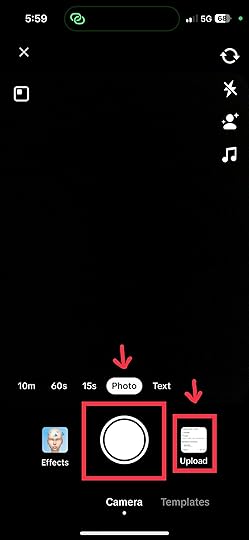
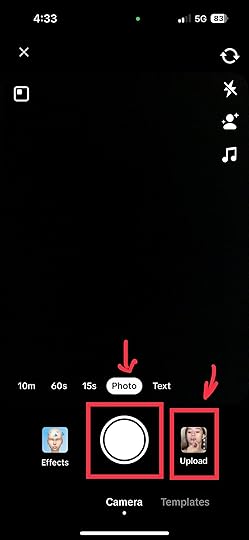
1. Select or film your video: Open the TikTok app and tap the “+” button. Next, select the circular button to film a video or tap the “Upload” button to upload photos you previously took.
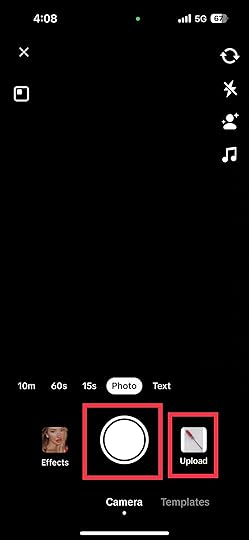
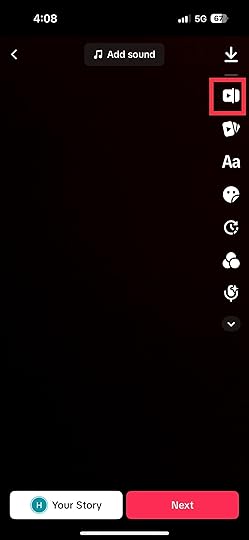
2. Open the editor: Open the editor to edit your video clip.
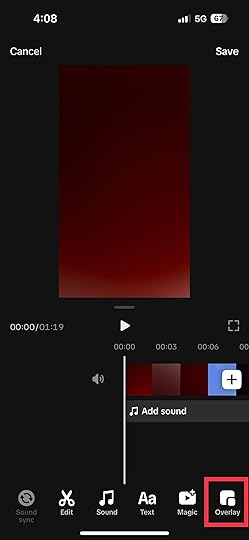
3. Tap Overlay: After opening the editor, tap “Overlay.” The overlay feature will allow you to insert photo or video into your first video.
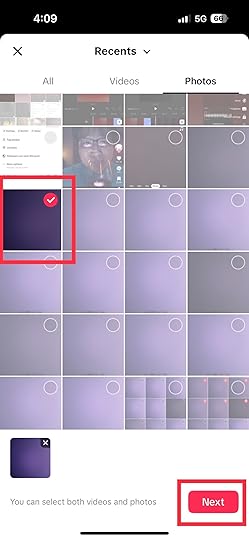
4. Add the image: After selecting your photo, make the necessary adjustments and tap “Next.”
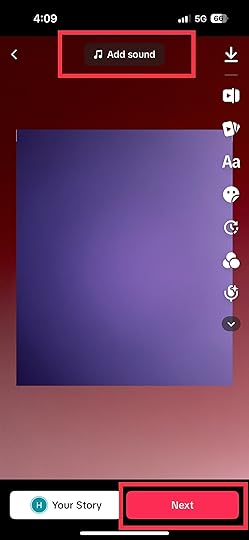
5. Add music, preview, and save: You can add music to boost your content. Once everything is set, preview your video to check for errors. Then, if you are happy with the results, save and post your video.
Read more: How to use the slow motion effect on TikTok.
How Do You Make a Slideshow With Pictures on TikTok?You can create a TikTok slideshow with a series of pictures. Here is a guide on how to make a slideshow on TikTok:
1. Open the TikTok app.
2. Tap the “+” button: This will lead you to where you can film and upload media like pictures and videos.
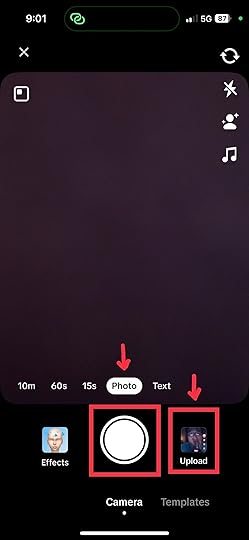
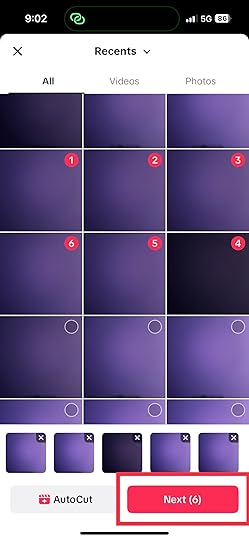
3. Choose photos: Look for the upload icon to integrate your chosen photos into your slideshow. Tap on them. The circular button will be go red once you’ve successfully selected them.
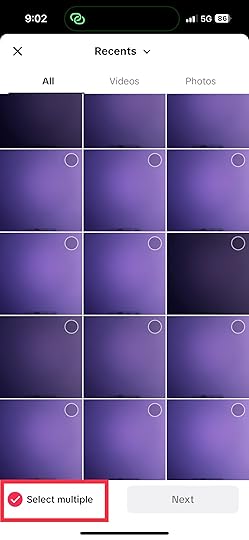
4. Tap Next: After selecting the photos you want to add, tap “Next.”
5. Add music: You can add music from TikTok’s music library. Pick one that resonates with the pictures you compiled.
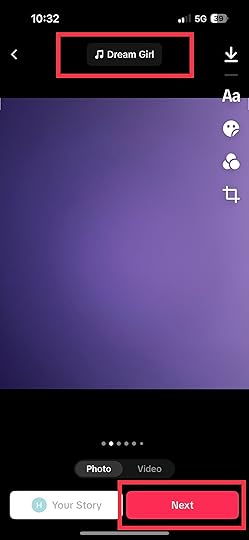
6. Preview the sequence: Next, you have to check if the sequence of your photos is correct. Adjust if necessary.
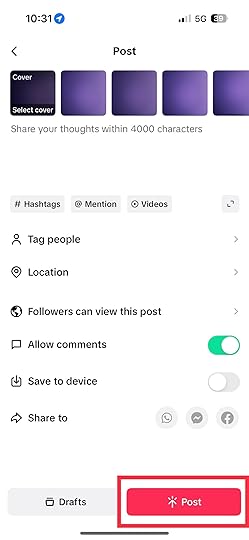
7. Write captions and hashtags: Lastly, write your captions and hashtags. Ensure that your caption resonates with the content of your photos.
8. Post your video: Once everything is settled, write your video description, set your preferred privacy setting, and post your content.
Adding photos to TikTok videos isn’t just a trend; it’s a powerful way to tell stories that resonate. By harnessing the visual appeal of photos, you can elevate your content and leave a lasting impact on your audience. So go ahead, experiment with the techniques we’ve explored, and watch your TikTok videos transform into engaging narratives.
Are you looking for ways to use TikTok for your ad campaigns? Get the best TikTok ad agency!
Frequently Asked Questions on How To Add Photos to TikTok for Captivating ContentIs there a limit to the number of photos I can add to a TikTok video?You can add up to 35 images on your TikTok.
Are there photo templates on TikTok?TikTok provides built-in photo templates that will save you time.
What is the green screen feature on TikTok?The green screen feature on TikTok allows you to replace your video’s background.
Related Articles

How To Use TikTok Slow Motion Effect the Easy Way
Do you want to learn how to use the TikTok slow-motion effect?
The slow-motion effect on TikTok adds cinematic flair to videos and makes ordinary moments extraordinary. Whether you’re showcasing your dance moves, DIY projects, or adorable pet antics, you can give your video an edge with this effect.
This article will walk you through the process of using the TikTok slow-motion effect and show you its various applications.
What Is the Slow-Motion Effect on TikTok?The TikTok slow-motion effect involves slowing down the speed of a video clip, transforming regular actions into graceful, attention-grabbing movements. It’s not just about slowing things down; it’s about adding a dramatic touch to your content. You can create captivating moments that leave viewers in awe with this effect.
The following are the areas in which you can use the slow-mo video feature to good use:
Dance and movement: The slow-motion effect highlights dance moves’ fluidity and grace. It allows viewers to see the details of every step. It can make dance videos more captivating and visually appealing.Beauty, fashion, cooking, and crafting: The feature shows intricate makeup applications, recipes, and steps on making crafts. It allows creators to show the process with detail and precision. Viewers can then follow the process and understand the details better.Comedic timing: You can use the slow-mo effect in funny videos to exaggerate reactions and facial expressions. It can also help you add humor and timing to videos.Transition effects: Creators use slow motion as a transition effect between different scenes or shots. This method adds a smooth and visually appealing flow to the video.Read more: How to make good TikTok videos.
How To Do The Slow-Motion EffectDoing the slow-motion effect on TikTok is a fantastic way to add cinematic flair and capture details in your videos. Here is a step-by-step guide on how to use the slow-motion effect on your TikTok video.
1. Open the TikTok app and tap the “+” button.
2. Start recording your video using the circular button. You may also use a pre-recorded video on your camera roll.
3. Tap the “Effects” button, the sixth icon on the right.
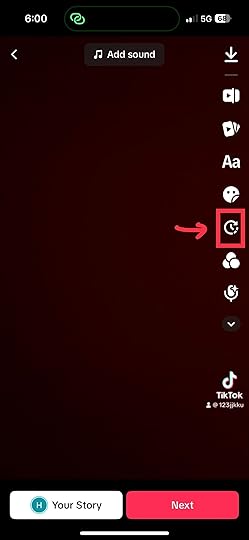
4. Tap “Time” and select “Slow Motion.”
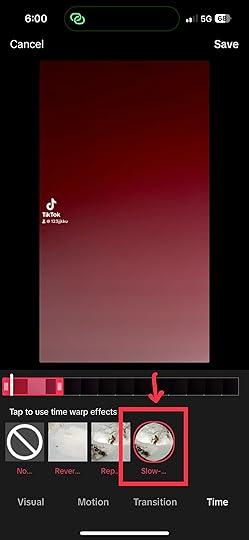
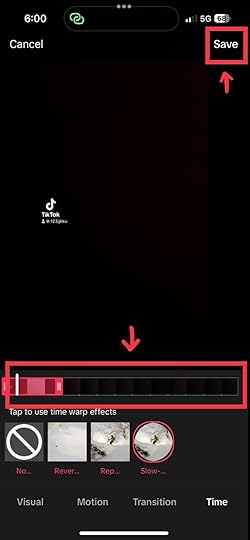
5. Adjust the video length you want to put in slow motion.
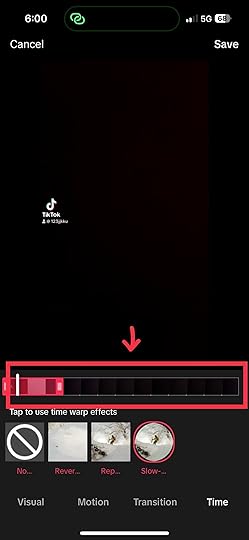
7. Tap “Save.”
The slow-motion effect can be a great tool on your journey as a TikTok creator. From showcasing your talents to telling engaging stories, this technique grabs attention and adds a touch of cinematic flair. So, grab your smartphone, experiment, and let your creativity shine!
Are you looking for ways to market your products and services on TikTok? Consult the best TikTok advertising agency today!
Frequently Asked Questions on TikTok Slow Motion EffectCan I adjust the speed of specific video parts to create a mixed-speed effect?Yes, you can adjust the speed of specific video parts to create a mixed-speed effect. Use the editing tools to split the video and adjust the speed of each segment separately.
Can I apply the slow-motion effect to an existing video in my TikTok gallery?TikTok’s slow-motion effect can only be applied during the video editing process. However, you can re-edit a slow-motion version of your existing video.
Will applying the slow-motion effect affect the quality of my video?Applying the slow-motion effect doesn’t affect video quality. However, results may vary depending on the quality of the original footage and your device’s capabilities.
Related ArticlesHow To Make Songs Longer on TikTok
August 22, 2023
How To Add Multiple Sounds on TikTok in 8 Easy Steps
Do you want to know how to add multiple sounds on TikTok?
You can make your TikToks more interesting by adding multiple sounds. Multiple sounds can make a big difference, whether you’re telling a story, dancing, or adding humor.
This guide will show you how to create amazing TikTok videos with multiple sounds.
Read more: How to make a sound on TikTok.
Step 1: Add Your VideoClick on the plus icon to add your video. You may tap the circular button to record a new video or click “Upload” to add an existing video from your device.
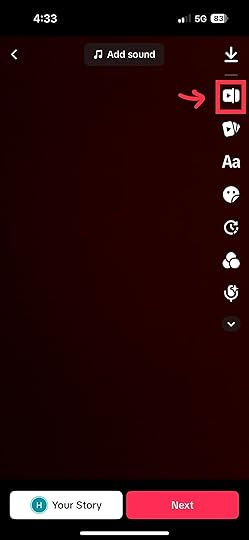
The video trimming tool is on the right side of the screen. It is the second icon from the top. Once you select this tool, it will direct you to where you can see the entire video length. It is also where you can access some of the editor’s controls.
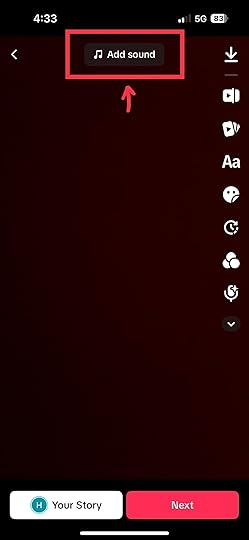
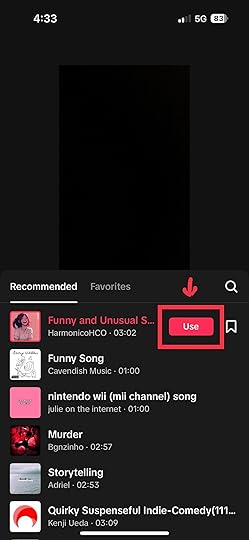
Tap the “Add Sound” button to access TikTok’s music library. Once you find your preferred sound, click the “Use” button. Feel free to adjust the sound to your desired length. You can do this by sliding on the sound line found under the video.
You can use a screen recorder or video downloader to get a video containing the second sound. TikTok alone does not allow users to add a second song from its library. Hence, you have to download and add it to your video manually.
Step 5: Select “Overlay”The overlay button on the TikTok app allows you to add multiple videos over one another. This function will help you attach your second audio to your video.
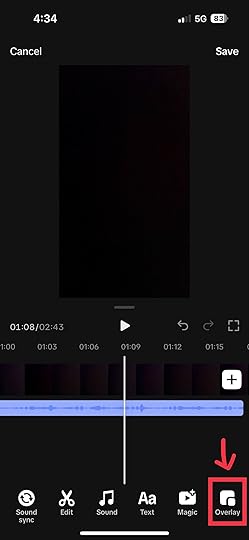
Add the video containing the second sound and adjust the sound to your desired length.
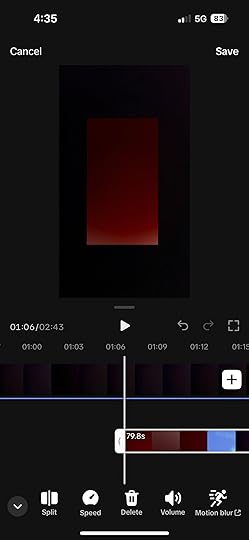
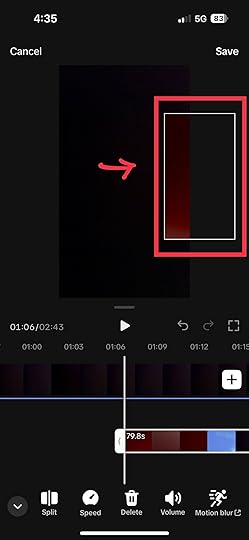
Drag the second video to the screen’s side until it is no longer visible. Doing so allows you to still have your second sound, with the video unseen.
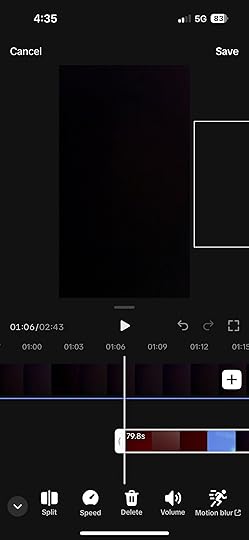
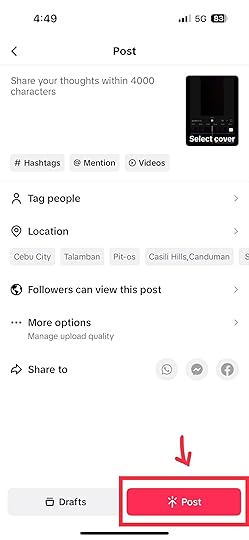
After hiding the second video, preview the entire content and see if they blend well. You can add more sounds if you desire. Once your video is ready, you can add your video description and hashtags and post it.
You can transform your TikTok videos from ordinary to extraordinary with the right sounds. Sounds have the incredible ability to set the tone, evoke emotions, and keep viewers engaged. Now, you don’t have to stick to one sound when making your TikTok videos. You can add multiple sounds to your TikTok videos using this sound.
Interested in advertising on TikTok but don’t know where to start? Consult the best TikTok advertising agency today.
Frequently Asked Questions on How To Add Multiple Sounds on TikTokCan I use copyrighted music as one of the sounds in my video?Using copyrighted music in videos could lead to copyright claims. It may impact your video’s visibility or audio usage. Hence, using TikTok’s licensed music library or creating original sounds is better.
Can apps or tools help me merge sounds for TikTok videos?Yes, video editing apps and software allow you to merge and edit sounds before uploading to TikTok. Some popular options include Adobe Premiere Pro, iMovie, and CapCut.
Will adding multiple sounds affect the quality of my video?Adding multiple sounds can enhance your video’s quality if done right. However, don’t overload your video with too many sounds, as it may overwhelm viewers.
Related ArticlesHow to Make Songs Longer on TikTok

Do you want to learn how to make songs longer on TikTok?
TikTok allows users to create fun videos with their favorite music, but there’s a 15 to 60-second limit. The company does this to avoid copyright infringement, but it can frustrate creators.
This blog post will explore the different ways to make songs longer on TikTok.
Method 1: Create a Remix or MashupWhen dealing with TikTok’s time limitations, the art of remixing and mashing up songs can be your secret weapon. This technique involves merging different segments of songs to extend your content and engage your audience in a novel way.
1. Remix magic: Start by selecting the segments of songs you want to incorporate. The segments can be from different parts of the same song or even multiple songs. Use audio editing tools to seamlessly combine the segments, creating a new audio track that flows smoothly.
2. Transition tricks: You can use transition effects to ensure a seamless listening experience. These effects help blend the different song segments without any jarring breaks. Some transitions include crossfades, echo effects, and gradual volume adjustments.
3. DIY remix: Get creative and craft your remixes. Mix different genres, experiment with tempo changes, or add unique sound effects. This extends the length of your TikTok video and showcases your creativity.
Method 2: Utilize Multi-Part StorytellingTelling a story across multiple TikTok videos effectively keeps viewers hooked and keeps your song content longer.
1. Serial storytelling: Break your content into multiple parts instead of cramming everything into a single video. Create a series of videos where each one continues the narrative. This approach encourages viewers to follow your story from one video to the next.
2. Cliffhangers rule: Introduce suspenseful endings to each video in your series. Leave viewers curious about what happens next. It will motivate them to stay tuned for the next video. This technique boosts engagement and prolongs their interaction with your content.
3. Seamless continuation: Maintain a seamless flow between the different parts of your story. Use transitions wisely to bridge the gap between videos, allowing viewers to transition effortlessly from one segment to another.
Method 3: Leverage TikTok’s Duet and Stitch FeaturesTikTok’s duet and stitch features offer excellent opportunities to create extended content by collaborating with others or building upon existing videos.
1. Duo dynamics: Use the duet feature to collaborate with another TikTok user. This side-by-side presentation can allow you to share longer song segments. Coordinate with your duet partner to ensure a harmonious performance.
2. Stitch stories: The stitch feature lets you integrate your content with another user’s video. By incorporating your song into someone else’s creative content, you can extend your music and present it in a unique context.
Method 4: Using Songs as Background MusicUsing songs as background music in your TikTok videos is another way to make songs longer without violating the platform’s time constraints. Here’s how you can effectively use this approach:
Extended storytelling: Incorporate longer songs as background music while telling a visual story. This allows you to maintain engagement while utilizing the full duration of the song.Dance routines: If your video involves a dance routine or choreography, using a longer song as background music can help you showcase more moves and add variety to your content.Showcasing art or creativity: For videos showcasing art, DIY projects, or any activity that can be shown over an extended period, using longer songs can keep the viewer engaged while you work through the process.Travel and scenic videos: Longer songs can enhance travel or scenic videos by letting you showcase more locations, activities, or scenes within the video’s timeframe.Educational Content: If you’re creating educational content, you can use longer songs to support your explanations, demonstrations, or tutorials without feeling rushed.Final Thoughts on How to Make Songs Longer on TikTokFinally, you no longer have to worry about the 60-second barrier on TikTok. You now possess the tools to make your songs longer on TikTok. You can open the door to creative possibilities through remixes, multi-part storytelling, or clever use of background music.
Are you considering running an ad campaign on TikTok? Let the best TikTok advertising agency handle it.
Frequently Ask Questions on How to Make Songs Longer on TikTokCan I use popular songs as background music without copyright issues?TikTok provides a library of licensed music that you can use safely. Using copyrighted songs without proper permissions can lead to content removal.
How can I maintain the flow between multiple videos in a series?Use seamless transitions and end each video with a suspenseful note to encourage viewers to watch the next installment.
Can I collaborate with other TikTok users to extend song content?Yes, TikTok’s duet and stitch features allow collaborative efforts, enabling you to share longer song segments and create engaging content together.
Related Article15 Tips to Gain More Qualified Leads
Generating a good number of qualified leads is essential to growing your business. You can sell more of your products or services and earn more money with high-quality leads. Here’s the thing – leads are only “qualified” if they can truly buy from you. So, you have to reach the right people who need your product or service. Unqualified leads waste your time. That’s why you need to target better leads – using all possible marketing strategies. Of course, only ethical ones. But how do you attract those great potential customers? That’s what this post is all about.
According to Startup Bonsai, 61% of marketers indicated that lead generation is their top challenge. You can guess that generating qualified leads would be even more challenging. In this post, you’ll learn 15 lead generation strategies to put your business in front of your target audience. It takes some work to attract marketing qualified leads, but the rewards are worth it. Take action on the ideas in this post and watch your qualified prospects grow. With better leads, your business will thrive. Enjoy these 15 tips to get you those sales-ready leads.
Tip 1: Determine Your Client AvatarThe first step to gaining more qualified leads is knowing exactly who your ideal customers are. To do this, you need to create a detailed “client avatar.” A client avatar is like a pretend-perfect customer. A good client avatar tells you all about your target audience. Information like:
Their age and locationTheir gender, income level, and educationTheir interests and valuesWhat problems do they haveHow do they like to find products and servicesWhy is information important? Because with that knowledge, you can market right to that avatar. Your content, ads, and messaging will appeal to them.
Take time to think through your ideal customer. Imagine their daily life and needs. Figure out where they hang out online. Be as specific as possible in creating your client avatar. For example, if you sell to women, your ideal client avatar is not just “women aged 30 – 40.” You need to dig deeper to get more specific.
The more you understand what your prospective customer ‘looks’ like, the better your marketing results.
Tip 2: Use Social Media Influencer MarketingHere’s a smart way to get more qualified leads – use influencers! Influencers are people with big followings on social media. They are “influential” because people trust them. Their followers look to them for advice and opinions. When an influencer recommends something, it carries weight. Their followers may check it out and become leads.
Find industry influencers in your niche with engaged audiences. Check that their followers match your client avatar. Then reach out to set up a partnership. Offer to pay influencers or give them free products. Ask them to mention your business to their followers. You could also give them a special discount code to share.
The influencer posts about you on social media. They talk up your product or service to their fans. Followers click their links, which drives qualified traffic to your site. When done right, influencer marketing gives great results. Those who use it gain more quality leads and sales. Their products get exposed to new yet relevant audiences.
So, tap into influencers to grow your leads. Be sure to track the process properly and nurture the leads you get. Use influencer promos along with other marketing efforts. This multi-prong strategy pays off hugely.
Tip 3: Focus On Your NicheWant a fast way to get more targeted, quality leads? Focus your marketing on a specific niche. You become a big fish in a small pond when you niche down, It’s easier to dominate a particular market when you specialize there. Spreading yourself too thin won’t attract qualified leads, but zeroing in on a specific niche pulls them in.
Choose a narrow niche that fits your expertise. Research to know your potential customers well. Figure out their pain points and desires, and create content that perfectly match their interests. Talk directly to that niche in your messaging and share how you can solve their problems.
This niche focus makes you irresistible to those ideal prospects. It shows you understand them and can meet their needs. Your niche customers will resonate with your brand. They’ll follow and engage with you online. And they’ll be eager to convert to leads and sales.
Niching down helps you attract more qualified leads without huge effort. You become the go-to solution for people when you niche down and stay laser-focused.
Tip 4: Build Relationships on Social MediaSocial media is great for connecting with leads. You can use social media platforms like Facebook, Instagram, X (formerly Twitter), and TikTok to good marketing effect. But don’t spam people with ads; build genuine relationships and offer value.
Comment and engage with others often. Join related Facebook groups and discussions. Be helpful and share the good stuff. Reply to comments and DMs as quickly as you can. Ask questions to learn about people’s needs. Offer support if they have problems or questions.
The goal is to demonstrate your knowledge and show people you care. Build brand awareness and provide value without always selling. Strong social relationships turn followers into warm leads. When done right, people feel they “know” you. Then they’ll be more willing to buy from you.
Keep sharing your expertise on social media and take time to nurture a community too. Engage with both potential and current customers. Building trust is key in social media marketing! Focus on the “social” part of social media. That’s what turns cold followers into hot leads over time.
Be patient and keep providing value without expecting anything. Those efforts will pay off with more qualified leads and sales down the road.
Tip 5: Create High-Value Educational ContentCreating educational content is another powerful way to attract qualified leads. Content like blog posts, videos, and guides work great. Make sure it provides real value to your audience. Share your expertise and teach people new skills. Answer common questions and address pain points. Go beyond product pitches. Useful, engaging content attract ideal prospects because they build trust and authority. You become a trusted advisor they want to buy from.
Educational content gets found in search when you do proper search engine optimization. With that, more potential customers can find you and convert to leads. Put in the effort to craft helpful content. Be consistent with content marketing and promote each piece across multiple channels when it’s published. Over time, your library of content will keep generating leads. Value-driven content marketers see huge ROI with qualified prospects.
You don’t have to sell all the time. Teach and empower your audience with helpful blogs, videos, and guides. A good content marketing strategy produces strong engagement and good conversions. Keep providing value, and you’ll keep gaining leads.
Tip 6: Utilize LinkedIn for Targeted OutreachLinkedIn is an ideal platform to connect with qualified leads. You can search for your ideal customers on LinkedIn and directly reach them. Do this by looking for job titles and companies that fit your ideal customer profile (ICP).
First, optimize your LinkedIn profile before connecting and engaging with relevant prospects. Comment on prospects’ posts and share their content. Share an article or resources tailored to them or ask smart questions to start a conversation. Offer value and build the relationship first instead of pitching right away. When you are sure you’ve earned a prospect’s trust, suggest a call or meeting. Don’t forget to outline how you can help solve their challenges.
LinkedIn outreach done right turns cold prospects into warm leads. The key is personalization and value. Craft customized messages that show you understand your prospect’s challenges. LinkedIn networking is gold for quality leads generation when you use it correctly.
Tip 7: Partner With Complementary Businesses
Team up with other businesses to expand your leads. Partner with businesses that offer something different than you. But with an audience that matches your target niche. For example, a caterer could partner with a photographer. The caterer caters events, and the photographer shoots them. But they share the same clients – people planning parties and weddings. Each business promotes the other to its audience. Introduce your contacts to their services and vice versa.
Run co-branded campaigns and contests. Offer combo deals that package both of your services. This cross-promotion exposes each brand to new, qualified leads. Partners both gain more prospects to convert. Choose partners wisely to benefit both sides. Look for brands that truly complement yours. Make sure you promote them as much as they do for you. Partnering with the right businesses is a win-win. You both gain more qualified leads and eventually more sales. Team up to grow your reach.
Tip 8: Create a Universal Lead DefinitionIt’s vital to clarify what counts as a “qualified lead” for your business. Create a standard lead definition that your whole team follows. This definition keeps you all on the same page. For example, your qualified lead definition could be:
“Someone who signs up for our email list, requests a quote, or schedules a call. They show clear interest in purchasing our services within the next three months.”
Now everyone knows what qualifies as a real lead to focus on. Using one definition prevents confusion. It keeps leads from falling through the cracks. Make sure your process captures every lead that fits the criteria. Track them closely as they move down the sales funnel. Solid leads are sales-ready folks showing genuine interest. Define yours clearly so you can better generate and qualify them.
Tip 9: Develop a Scalable Inside Sales ProcessWhen all categories of leads come in, how do you manage them? You need a solid qualifying process to manage them correctly. Create defined systems to qualify and nurture leads. Make your inside sales process repeatable and scalable. For example, leads could first get an automated email series. Then they are scored and prioritized based on engagement.
High-scoring leads get sent to your sales reps, and reps call them within 24 hours. Your sales team further qualifies leads with specific questions. The promising leads enter a dedicated nurturing track. This nurturing track includes emails, offers, and calls over time. Reps work to turn them into sales. Clear systems and processes are crucial to boosting your sales revenues. They help you handle qualified leads efficiently as you scale. Document your inside sales playbook and refine it over time to convert more leads faster. With defined systems for your marketing team, you can get better conversions.
Tip 10: Ask for ReferralsReferrals are a great source of qualified leads. Asking happy customers to spread the word can greatly impact your lead generation and Increase sales. First, wow clients with your excellent service or product. Then directly ask if they can recommend you to others. Explain that referrals help grow your small business. For example, a hair salon could say: “I’m so glad you love your new look. If you have friends looking for a salon, I’d really appreciate you passing along my name.”
Consider offering a reward for referrals. Give a discount for each new client sent your way. Referrals convert well since they come from a trusted source. Keep delighting customers so they refer others. When clients vouch for you, it means a lot. Master the art of making happy customers your promoters. They could be your unpaid marketing agents. Don’t forget to ask for referrals regularly. Referral marketing methods pay off in gaining more qualified leads.
Tip 11: Create Valuable Lead MagnetsA lead magnet is a freebie for which people trade their contact info. It could be an ebook, coupon, webinar access, or product sample. For example, a personal trainer could create a “10 Best Exercises to Get Toned FAST” guide. Folks enter their email to download it.
Offer a compelling lead magnet to drive traffic to your landing page or site and capture qualified leads. The key is giving away something worthwhile your target audience wants. You may have to do some research before creating a lead magnet. Promote your lead magnets widely after creating them if you want to see good results. Following up quickly with new leads from your lead magnet is crucial too. Nurture them carefully into becoming paying customers. Following up with leads within 5 minutes can boost conversions by 900%. Create an irresistible lead magnet that pulls targeted leads in, promote it widely, and thank me later.
Tip 12: Optimize for Converting KeywordsUsing the right keywords is vital for gaining qualified leads organically. Focus on terms and phrases that convert well in your niche. Like “buy product” and “sign up now.” For example, a SaaS company could target “start free trial” over “free trial.”
Do keyword research to find what drives action for your business. Look at your top competitors and study the keywords they use. Optimize your site and content for those converting terms by featuring them appropriately. Keyword optimization allows you to rank well for the searches that really matter. The ones people use when they are ready to buy or sign up. Targeting converting keywords means you get more qualified, sales-ready leads. Consistently align your SEO and paid ads with terms that convert to improve marketing ROI.
Tip 13: Invest in Quality Email MarketingEmail is a top way to nurture leads, but poorly crafted emails won’t convert them. Invest in doing it right. Only send emails people want to open. Use attention-grabbing subject lines like “Here’s how to save $50.” Keep the content short, helpful, and relevant. Ensure your emails look good and are mobile-friendly with clear calls to action. Get a designer to create a nice template. Automate emails to save time and set up sequences to engage new leads and nurture existing ones. Quality email marketing pays off big. Leads open, click, and buy more when you do it well. Don’t spam people or neglect it. Take the time to master email marketing. Then watch it become your #1 lead generating channel. Your email subscribers can become qualified leads and drive serious sales.
Tip 14: Use A/B Testing for Continuous ImprovementWant to turn more website visitors into qualified leads? Use A/B testing!
A/B testing lets you try two different versions of something to see which performs better. For example, you could test two email subject lines. Send half your list each line. The one with more opens wins. You can A/B test calls-to-action, headlines, images, offers, and more.
Keep testing to optimize your site, ads, and campaigns. Improve on what converts leads over time. Testing takes a bit of work, but it pays off handsomely. Make A/B testing part of your marketing process. Use tools to run them efficiently and check analytics to see which versions win. Then roll out the best performers across your marketing. Keep testing and improving to get qualified leads continuously.
Tip 15: Host Webinars and WorkshopsWebinars and workshops are effective lead qualification tools. You can get prospects to sign up for your online or in-person event and deliver good value when they attend. Webinars and workshops position you as an expert in your niche. They allow you to demonstrate your knowledge and build rapport with an engaged audience. For example, a business coach could host a webinar on “The 5 Secrets to Doubling Your Productivity.”
Pick compelling topics, promote your event widely, and entice sign-ups. Share valuable insights when presenting and offer a deal for purchasing after. Many attendees will convert to leads and buyers. Webinars and workshops take work, but they convert nicely. Start planning to host events to attract your ideal prospects.
ConclusionAttracting qualified leads could be tough without proper knowledge or approach. That shouldn’t be the case for you anymore. Now you’re equipped with 15 winning strategies to attract targeted, ready-to-buy leads. Start by focusing on your ideal customer avatar. Figure out exactly who you want to target. Reach them through content, social media, events, and more.
Build relationships and trust with potential buyers. Nurture leads by offering value. Create clear systems to capture and follow up with every lead. The key is finding and engaging your ideal prospects. Earn their trust, build relationships, and become their go-to resource. Focus on quality over quantity. More qualified leads mean more sales revenue for your business.
Try a few of these 15 tips at a time until they become habits. Don’t forget to track results and optimize those that work best for you. With smart, consistent effort, you can achieve lead generation success.
Advertising on digital platforms is a powerful way to attract more qualified leads to your business and drive massive sales. Our team of ad experts can help to grow your business using ads tailored for your target audience. Want to know more? Reach out to the friendly team at AdvertiseMint and we’d love to talk about how to grow your business.
Unveiling the Power of TikTok Sponsored Ads
Do you want to know how TikTok-sponsored ads help businesses reach a wider audience?
TikTok has over 1 billion active users spending an average of 52 minutes daily on the platform. Hence, it has become a top destination for businesses looking to connect with their target audience. One of the most effective ways to connect with potential customers on TikTok is to invest in sponsored ads.
This article will explore TikTok sponsored ads and how they can help your brand.
What Are TikTok Sponsored Ads?TikTok Sponsored Ads are a way for businesses to showcase their products or services to the massive audience on TikTok. Just like TV commercials or billboards, these ads pop up on users’ feeds as they explore the platform. They’re designed to catch your attention, entertain, and inform—all in the span of a short video.
Why Should You Care?As a brand, getting your message in front of the right people is vital. With TikTok’s global reach and engagement, these ads give you a chance to connect with potential customers in a fun and dynamic way. Whether you’re a small business or a big player, TikTok Sponsored Ads offer a unique opportunity to boost your brand visibility and engage with a diverse audience.
Read more: How much do TikTok ads cost?
Types of TikTok Sponsored AdsThere are different types of sponsored ads on TikTok, each with its own strengths. Hence, you should explore them carefully to find what satisfies your needs best. Here are the main types of TikTok sponsored ads:
1. In-Feed Ads
Think of these as the seamlessly integrated ads that show up as you scroll through your “For You” feed. They’re like those captivating videos from creators, except they’re from brands. In-Feed Ads blend right in with the user-generated content, giving you a chance to capture attention without disrupting the TikTok experience.
2. Branded Hashtag Challenges
Ever seen challenges trending on TikTok? Branded Hashtag Challenges take that energy and turn it into a marketing powerhouse. Brands create challenges, attach their unique hashtags, and encourage users to participate. It’s an interactive way to get your audience engaged and spreading the word about your brand.
3. TopView Ads
If you’re aiming for maximum impact, TopView Ads are your go-to. When users open the TikTok app, these ads take over the screen for a few precious moments. It’s like having your own mini commercial that plays front and center, ensuring your message gets noticed.
4. Brand Takeover Ads
Brand Takeover Ads are similar to TopView Ads but offer more exclusivity. They display as soon as users open the app and can include static images, GIFs, or short videos.
5. Branded Effects
Branded Effects are all about integrating your brand into user-generated content. They allow brands to create unique visual and interactive effects that users can incorporate into their own content. Whether it’s a cool filter, sticker, or special effect, Branded Effects help your brand become part of the user’s creative process.
Creating Effective TikTok Sponsored AdsLet’s uncover the secrets to crafting effective TikTok sponsored ads. Here’s how to do it:
Know your target audience: Before anything else, understand who you’re talking to. Get familiar with TikTok’s diverse user base and figure out your target audience. Are they into humor, challenges, or something else? Tailoring your content to your audience’s preferences is key.Be creative: TikTok thrives on creativity and authenticity. Don’t be afraid to think outside the box. Whether it’s through catchy music, playful edits, or relatable storytelling, let your brand’s personality shine in a way that fits the TikTok spirit.Ride the trends: TikTok is a trend-driven platform. You can give your ads an edge by staying updated with popular challenges, sounds, and memes. Integrating these trends into your content can help you connect with users on a deeper level. Keep it snappy: TikTok is all about short, attention-grabbing content. You have just a few seconds to make an impact, so get to the point quickly. Front-load your ad with the most compelling visuals and messages to hook viewers from the start.User-generated content (UGC) is Gold: Involve your audience in your campaigns. Encourage them to create their own content related to your brand or challenge. User-generated content adds authenticity and builds a sense of community around brands.Showcase your brand naturally: While creativity is key, don’t forget the purpose of your ad—to promote your brand. Integrate your branding elements seamlessly into the content, so it feels like a natural part of the TikTok experience.Setting Up a TikTok Sponsored Ad CampaignReady to bring your TikTok sponsored ads to life? Let’s break down the process of setting up your ad campaign:
Create a TikTok ads account: Start by setting up an account on TikTok’s Ads Manager. This is your control center for managing your ad campaigns, tracking performance, and making optimizations.Define your campaign objectives and budget: Clearly define your goals—whether it’s brand awareness, website visits, or app installations. Set a budget that aligns with your objectives and the audience size you’re targeting.Choose ad placements and scheduling: Select where you want your ads to appear. You can choose between In-Feed, TopView, and other placements. You should also decide when your ads will run, considering factors like peak engagement times and your target audience’s time zones.Select ad formats and creative specifications: Choose the ad formats that best suit your campaign’s objectives. For example, if engagement is your goal, Branded Hashtag Challenges might be the way to go. Make sure your creative assets meet TikTok’s specifications for a seamless viewing experience.Target your audience: TikTok offers a range of targeting options, from demographics and interests to behavior and location. Narrow down your audience to reach the users most likely to connect with your brand.Launch your campaign: Review your campaign settings and creative assets one last time. Once everything looks good, hit that launch button and watch your ads go live!Monitor and optimize: Your job doesn’t end with launch. Keep a close eye on your campaign’s performance metrics, like click-through rates and engagement. If something isn’t working as expected, don’t hesitate to make adjustments to improve results.Final Thoughts on TikTok Sponsored AdsIn the ever-evolving landscape of digital marketing, TikTok sponsored ads offer a unique avenue for brand exposure and engagement. By embracing the platform’s creativity and understanding its user dynamics, businesses can tap into a vast and enthusiastic audience. So, seize the opportunity, tell your brand’s story, and achieve your marketing goals via TikTok.
Are you try TikTok sponsored ads? Hire the best TikTok advertising agency.
Frequently Asked Questions on TikTok Sponsored AdsWhat is the TikTok ads manager for?The TikTok ads manager is used for creating and managing ad campaigns.
How do I target my ads to the right audience?It is important for you to clearly define your audience based on demographics, like age, sex, interests, location, education, etc.
Can I choose where my TikTok-sponsored ads will be displayed within the app?You have the freedom to choose the ad placement.
Related ArticlesAugust 21, 2023
Demystifying PPC Marketing: A Comprehensive Beginner’s Guide
Pay-Per-Click (PPC) marketing has become a potent tool for companies looking to engage with their target audience in today’s changing digital landscape, where online visibility is crucial. If you’re new to PPC, fear not – this comprehensive beginner’s guide will walk you through the fundamentals, decode the jargon, and unveil the strategies that can drive success for your online ventures.
Introduction to PPC MarketingAt its core, PPC marketing is a digital advertising model that enables businesses to display their ads on various platforms while paying only when users click on those ads. Unlike traditional advertising methods, where you pay for exposure, PPC ensures you’re investing in real, tangible engagement.
In the vast expanse of the internet, standing out is no easy feat. This is where PPC swoops in to save the day. It provides instant visibility to your offerings, targeting potential customers who are actively searching for products or services like yours. This targeted approach not only maximizes your reach but also offers measurable results, making every cent of your ad spend count.
Key Components of a Successful PPC CampaignTo navigate the PPC landscape, it’s essential to know the key players involved. Advertisers are businesses looking to promote their products or services, while publishers are platforms that host these ads. Popular PPC platforms include Google Ads, Microsoft Ads (previously Bing Ads), and social media networks like Facebook and Instagram (both part of Meta).
A well-crafted PPC ad comprises several elements that work in harmony to capture the user’s attention:
The headline is the first thing users see and must be concise yet compelling. The ad copy delves deeper into the value propositionThe display URL provides insight into the destination. The landing page is where the magic happens – it must be relevant, informative, and optimized for conversions.The Auction System and Ad PlacementThe process of ad placement involves an auction-like system. When a user searches for specific keywords, an automated auction takes place among advertisers vying for that keyword. The winner’s ad gets displayed to the user. However, it’s not just about who’s willing to pay the most – quality and relevance play a pivotal role.
The factors determining ad placement go beyond the highest bid, including:
Quality Score, a metric used by platforms like Google Ads, evaluates the quality and relevance of your ad, influencing its position. Ad extensions, additional snippets of information, enhance your ad’s visibility and user engagement.Mastering Keyword Research and SelectionThe cornerstone of an effective PPC campaign is keyword research. It involves identifying the keywords and phrases that potential customers are using to search for products or services similar to yours. The right keywords connect your ad with the right audience, ensuring your ad budget is wisely spent.
A multitude of tools, such as Google’s Keyword Planner and third-party options like SEMrush, aid in keyword research. These tools offer insights into keyword competition, search volume, and similar keywords. Using long-tail keywords and considering user intent are strategies that can give you a competitive edge.
*Note: Long-tail keywords are specific and detailed search phrases that are longer and more specific than typical keywords, often used by searchers looking for highly targeted information or products.
Crafting Compelling Ad CopyEffective ad copy is concise, relevant, and persuasive. It should clearly convey your value proposition and compel users to take action. Addressing pain points, showcasing benefits, and incorporating a strong call to action (CTA) are essential elements in creating click-worthy ad copy.
Ad copy isn’t one-size-fits-all. Depending on your offerings, you’ll need to tailor your copy to resonate with your target audience. For instance, e-commerce ads might focus on discounts and deals, while service-based businesses could highlight expertise and solutions.
Enhancing Visibility with Ad ExtensionsAd extensions are the secret sauce to making your ads stand out. They provide additional information and options to users, increasing the chances of engagement. Extensions like sitelinks, callouts, and structured snippets offer more context about your offerings. More specifically:
Sitelink extensions direct users to specific pages on your website, while Callout extensions highlight key benefits. Structured snippets highlight particular features of your goods or services.Utilizing these extensions strategically can enhance your ad’s appeal and drive more clicks.
Structuring Campaigns and Ad GroupsA well-structured campaign is the backbone of successful PPC marketing, and it requires two steps:
Begin by defining your campaign’s goals, whether it’s generating leads, boosting sales, or increasing brand awareness. Next, organize your campaigns into ad groups based on themes, ensuring each group targets a specific audience.Ad groups further segment your campaigns and allow you to customize your messaging for specific subsets of your target audience. For instance, an e-commerce store selling apparel can have separate ad groups for men’s clothing, women’s clothing, and accessories.
Bid Strategies and BudgetingBid strategies dictate how platforms like Google Ads will optimize your bids to achieve your campaign objectives. There are three strategies to choose from:
Manual bidding offers control but requires ongoing monitoring. Automated strategies leverage machine learning to adjust bids dynamically. Enhanced cost-per-click (ECPC) combines manual control with automated adjustments for optimal results.Allocating your budget wisely is crucial for campaign success. Start by determining your daily budget and distributing it among your campaigns and ad groups. Consider the potential returns when setting budgets, and don’t forget to monitor and adjust as needed.
The Power of Quality Score and Ad RankGoogle’s Quality Score assesses the relevance and quality of your ads, keywords, and landing pages. It impacts both ad position and cost-per-click. A higher Quality Score rewards you with better ad positions at lower costs.
A high Quality Score isn’t just about paying less; it’s about delivering a better user experience. Relevant ads lead to higher click-through rates, which in turn contribute to improved Quality Scores. This virtuous cycle enhances ad visibility and lowers costs.
Crafting Conversion-Driven Landing PagesThe link between your advertisement and conversion is a well-optimized landing page. Ensure your landing page aligns with your ad’s promise and provides a seamless user experience. Ensure that you:
Streamline the navigationEmphasize the benefits Make the call to action (CTA) prominentConsider the user’s journey when designing landing pages. If your ad promises a discount on a specific product, make sure the landing page prominently features that product and the corresponding discount. Consistency and relevance between ad and landing page are key.
Measuring and Optimizing PerformancePPC success is measurable through a variety of metrics. Click-through rate (CTR) measures ad engagement, while conversion rate indicates how well your ad and landing page drive actions. Cost per click (CPC) and cost per conversion reveal the efficiency of your campaigns.
Google Analytics provides invaluable insights into user behavior beyond the click. Track user journeys, understand bounce rates, and identify points of improvement. Leverage these insights to refine your campaigns for better results.
Exploring Different Ad FormatsDiverse ad formats cater to different campaign goals and target audiences. There are different formats to choose from:
Text ads are concise and directDisplay ads leverage visuals for impact Video ads engage users with dynamic contentShopping ads showcase products for e-commerce businessesSelecting the right ad format depends on your campaign objectives and the preferences of your target audience. Align your format choice with your goals – whether it’s driving traffic, promoting a sale, or increasing brand awareness.
Geotargeting and Audience SegmentationGeotargeting narrows down your audience based on location. This is particularly useful for businesses with physical locations or those looking to target specific regions. Adjust your ads and bids to cater to local preferences and needs.
Beyond geography, audience segmentation allows you to target users based on demographics, interests, and behavior. Tailor your messaging to resonate with specific subsets of your target audience.
Testing and Refinement with A/B TestingA/B testing involves comparing two versions of an element to determine which performs better. Test different ad headlines, images, and even landing page designs to identify what resonates with your audience. Incremental improvements from A/B testing can lead to significant gains over time.
Every aspect of your campaign is a potential testing ground. Experiment with ad copy, images, colors, and layouts. Test landing page elements like CTAs, forms, and content placement. The insights gained from A/B testing guide refinements that maximize campaign effectiveness.
Leveraging Remarketing StrategiesRemarketing (or retargeting) campaigns target users who have previously interacted with your site but didn’t convert. These campaigns remind users of their initial interest and entice them to return and complete their desired action.
Remarketing is an effective way to keep your brand top-of-mind for users who have expressed interest. By presenting relevant offers to these users, you increase the likelihood of conversion and reinforce brand recall.
Ad Compliance and Platform PoliciesAdherence to platform guidelines and policies is essential to maintain a smooth advertising experience. Platforms like Google have strict ad policies to ensure user safety and positive experiences. Familiarize yourself with these policies to avoid disruptions to your campaigns.
Common pitfalls include using misleading ad copy, employing aggressive tactics, or violating copyright. By following best practices and adhering to guidelines, you create a trustworthy and valuable user experience.
Future Trends in PPC MarketingAs technology evolves, so does PPC marketing. Voice search, AI-driven campaigns, and augmented reality are shaping the future of digital advertising. Staying informed about these trends equips you to adapt and capitalize on new opportunities.
As voice assistants become more popular, voice search optimization is becoming increasingly important. AI-driven campaigns leverage machine learning for improved targeting and performance. Embrace these trends to stay ahead of the curve.
Conclusion and Action StepsCongratulations, you’ve now traversed the intricate world of PPC marketing! Remember, the journey doesn’t end here. With your newfound knowledge, you’re equipped to craft impactful campaigns that drive results.
Take the first step towards implementing what you’ve learned. Whether you’re a small business owner, an e-commerce entrepreneur, or a marketing professional, PPC has the potential to elevate your online presence and drive business growth. Start small, monitor your campaigns, and refine your strategies based on data-driven insights.
Final Thoughts on PPC MarketingAs you embark on your PPC journey, remember that while this guide provides a strong foundation, experience is the best teacher. Experiment, adapt, and continue learning to master the art of PPC marketing and propel your business toward greater success. Your journey into the world of PPC marketing has just begun!
Are you looking to start your PPC marketing campaign? Google advertising experts can help!
Frequently Asked Questions on PPC MarketingWhen can I start seeing the results of PPC marketing?You can start seeing results from PPC marketing within a few days to a couple of weeks, as the ads begin to appear and generate clicks, but meaningful outcomes and optimizations may take a few months for a clearer picture of effectiveness.
Is PPC marketing worth it?PPC marketing is highly worthwhile, providing rapid visibility, precise audience targeting, and measurable results that can lead to increased brand exposure and conversions when managed effectively.
Is PPC marketing difficult to execute?PPC marketing can be initially challenging due to its complexity, but with proper research, thoughtful keyword selection, and continuous optimization, businesses can harness its power to efficiently reach their target audience and achieve impactful results.
The Top 5 TikTok Video Editing Apps

Are you searching for the best TikTok video editing app?
The best TikTok video editing app will provide the necessary tools to create excellent content. However, finding the right app can be tricky as several options are available.
To make your search easier, this article will explore the top 5 video editing apps for TikTok and provide tips on how to use them.
1. CapCutCapCut, formerly known as Viamaker, is a user-friendly video editing app offering a range of editing tools. It provides various features such as trimming, cutting, merging, and adding music to your videos. It also includes various filters, effects, text overlays, and stickers that can enhance your TikTok content.
Ease of useCapCut’s interface is intuitive and easy to navigate, making it suitable for beginners and experienced editors. Its drag-and-drop functionality simplifies the editing process.
TikTok-focused features
CapCut provides features specifically designed for TikTok trends and aesthetics, allowing users to easily create trendy videos.
ProsUser-friendly interfaceA wide range of editing toolsTikTok-specific featuresFast export options.ConsSome advanced editing features might be limited compared to more professional editing software.2. InShotInShot is a versatile video editing app that offers essential editing tools like trimming, cutting, and merging videos. Unlock your creativity with InShot. It allows users to add music, text, stickers, filters, and effects to their videos.
Ease of useInShot has a simple and intuitive interface that makes it suitable for beginners. Its drag-and-drop features and straightforward navigation are a delight.
TikTok-focused features
InShot’s various filters, effects, and text options enable users to make videos in line with TikTok’s visual trends.
ProsWide range of creative editing featuresUser-friendly interfaceQuick sharing options for TikTokA convenient app for on-the-go editing.Cons
May lack some advanced editing features for more intricate projects.3. KineMasterKineMaster is a comprehensive video editing app offering multi-layer editing, transitions, special effects, and more. Its advanced tools for fine-tuning audio, color correction, and animations make it suitable for creating more complex TikTok videos.
Ease of useDespite its more extensive feature set, KineMaster maintains a user-friendly interface. This makes it accessible to both beginners and advanced editors.
TikTok-Focused FeaturesKineMaster’s wide range of editing capabilities allows users to create intricate TikTok videos with professional-level effects and transitions.
Pros
Professional-grade editing featuresMulti-layer editingAdvanced audio toolsA variety of effectsExport in different resolutions.ConsThe complexity of the app may overwhelm some beginners.
4. VSCOVSCO is primarily known as a photo editing app, but it also has video editing capabilities. It specializes in stylish filters and adjustments that can give your TikTok videos a unique and visually appealing look.
Ease of useVSCO’s interface is relatively straightforward. It’s easy for users familiar with the photo editing app to use its video editing features.
TikTok-focused features
VSCO’s strength lies in its filters and color adjustments, which can help you achieve a distinct aesthetic.
ProsStylish filters and adjustmentsStraightforward interfaceConvenient for users already familiar with VSCO’s photo editing features.Cons
Limited video editing features compared to dedicated video editing apps.5. Adobe Premiere RushAdobe Premiere Rush is a professional-level video editing app with various advanced features. It offers multi-track editing, color correction, audio enhancements, transitions, and more. This provides a comprehensive toolkit for creating polished TikTok videos.
Ease of useWhile more complex than other apps, Adobe Premiere Rush balances its professional features with a relatively user-friendly interface. Hence, it’s suitable for intermediate and advanced editors.
TikTok-focused featuresAdobe Premiere Rush’s robust feature set allows users to create TikTok videos with intricate effects, transitions, and audio adjustments.
ProsProfessional grade editing capabilitiesMulti-track editingAdvanced audio toolsSeamless integration with Adobe Creative CloudA wide range of export options.ConsNot suitable for beginners.Criteria for Choosing the Right TikTok Video Editing AppWhen selecting the perfect TikTok video editing app, key factors can make all the difference in your content creation journey. Here’s what you need to consider:
User-friendly interface: Look for an app with an intuitive interface that doesn’t have a steep learning curve. You want to spend time creating, not figuring out complicated menus.Editing features and tools: A robust set of editing features is crucial. Ensure the app offers essential tools like trimming, cutting, merging clips, adding text, and incorporating effects. The more features, the more creative you can get.TikTok compatibility: Not all apps have TikTok in mind. Choose an app that aligns with TikTok’s video format and requirements to avoid frustrating compatibility issues.Music and sound options: TikTok is known for its music-driven content. Opt for an app that provides a wide selection of in-app music and sound effects to enhance your videos and keep up with trends.Special effects and filters: To keep up with TikTok’s dynamic trends, look for an app that offers an array of special effects, filters, and stickers. These can help your videos stand out and stay relevant. Advanced Techniques for TikTok Video EditingReady to take your TikTok videos from good to jaw-dropping? It’s time to explore some advanced editing techniques that will make your content shine. Here are some creative tips to elevate your TikTok video editing game:
1. Seamless transitions: Smooth transitions between clips can add a professional touch to your videos. Experiment with different transition effects, like fades, wipes, and zooms, to create a visually pleasing flow.
2. Captivating text overlays: Make your message pop by adding text to your TikTok videos. Whether a witty comment or a call to action, well-placed text can engage viewers and enhance storytelling.
3. Trendy visual effects: Stay updated with the latest visual trends on TikTok. Incorporating popular effects like glitching, color grading, or split screens can add a trendy edge to your videos.
4. Musical synchronization: Timing is everything on TikTok, especially when syncing video edits with music. Experiment with syncing movements, transitions, and effects to match the rhythm of the music for a captivating viewing experience.
5. Dynamic speed changes: Altering the speed of certain clips can create dramatic effects. Use slow motion for emphasis or speed-up clips to add an energetic vibe to your video.
Final Thoughts on TikTok Video Editing AppsExcellent video editing is key to success on TikTok. With the right TikTok video editing app, you’re equipped with the tools to create captivating and entertaining content. Remember to embrace your creativity, stay updated on trends, and don’t hesitate to push the boundaries of your editing skills.
Are you looking to boost your brand’s visibility? Start advertising on TikTok today!
Frequently Ask Questions on TikTok Video Editing AppsDo these apps provide tutorial guides for editing TikTok videos?Absolutely Yes! They provide users with guides on how to use their features.
Do these apps have a video length limit?Yes, some of the TikTok video editing apps have limitations on the length of the videos you can create. These limits can vary from app to app, so checking their guidelines is important.
Can I use these apps on both iOS and Android devices?
Yes, most TikTok editing apps are available for iOS and Android platforms.
Related ArticleHow To Make a Sound on TikTok (A Step-by-Step Guide)
Are you ready to learn how to make a sound on TikTok?
Sound is an essential part of TikTok. From catchy tunes to hilarious voiceovers, TikTok sounds transform videos. If you don’t know how to create your own sound on TikTok, don’t feel left out.
This article contains everything you need to make a sound on TikTok.
Understanding TikTok SoundsTikTok sounds are the heartbeat of the platform. They’re the music, voiceovers, and funky effects that breathe life into your videos.
Think of sounds as the emotional backdrop. They can make people laugh, cry, or dance – it’s all about picking the right vibe.
The TikTok sound library is your treasure chest with thousands of options. You can find famous songs, trending tracks, and quirky noises to suit your style. However, TikTok also allows you to add your original sound.
Creating Your Own SoundGetting famous on TikTok goes beyond just following trends – it’s about setting them. One powerful way to do that is by crafting your own unique sounds. Whether you’re a musician, comedian, or just brimming with creative ideas, creating original sounds can skyrocket your video’s impact. Here’s how:
1. Open the TikTok app and tap the “+” button to film a video. You may also upload your pre-recorded videos.
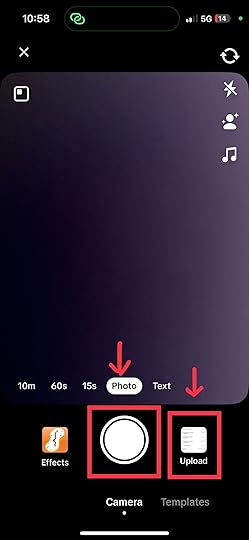
2. Upload the video by clicking “Next.”
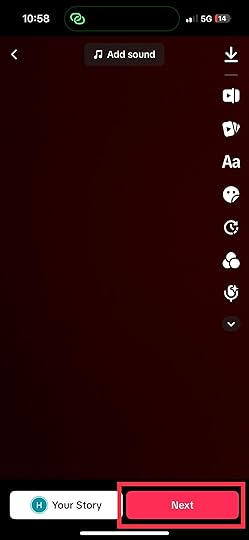
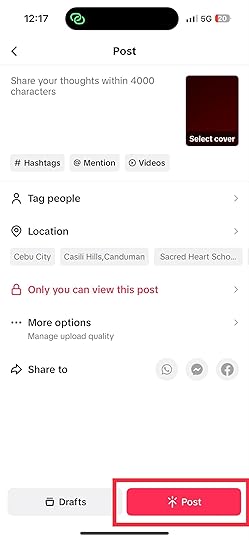
3. Click the “Who can view this video” button and set it to “Only you can view this post.”
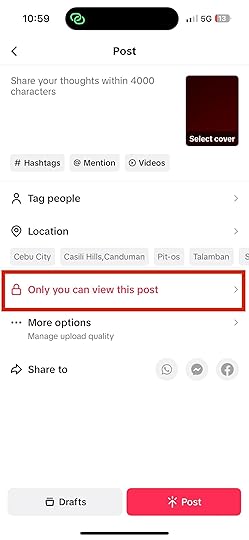
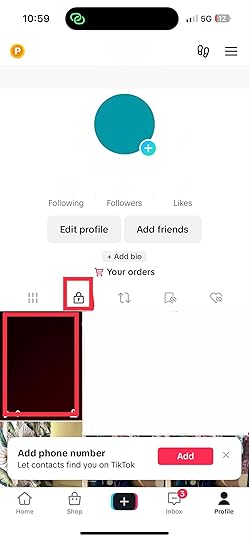
4. Once your video is uploaded, go to your profile. You will find the video under the tab with the lock icon.
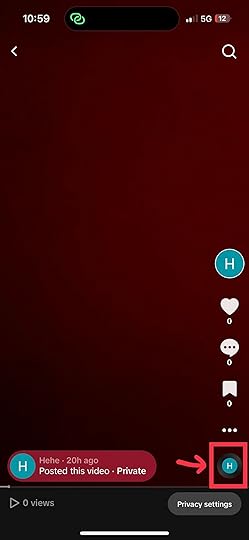
5. Click on the sound by selecting the spinning record icon.
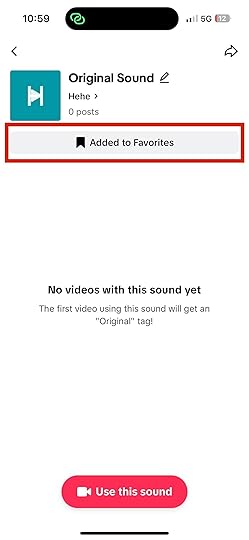
6. Add the sound to your “Favorites.”
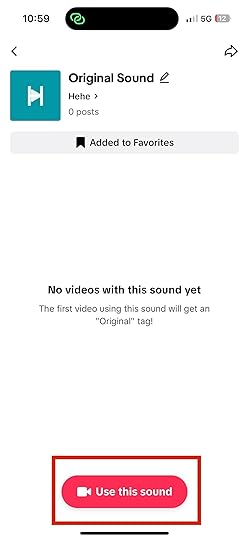
7. Now, you can start using your sound.
Read more: How to trim a sound on TikTok.
Benefits of Making Your Own Sound on TikTokCreating your sound on TikTok can offer several benefits. Here are some reasons you might consider making your sound on TikTok:
Originality: Making your sound sets your content apart from others. It allows you to showcase your creativity and personality.Copyright: Using copyrighted music in your videos can lead to issues with your content’s visibility. By creating your sounds, you can avoid potential copyright violations. You can also use your original audio without limitations.Engagement: Original sounds can foster engagement with your audience. When viewers use your sound in their videos, it creates a sense of community around your content.Trends: Creating your sound allows you to explore various creative avenues. You can experiment with music, sound effects, and more. This can help you create unique and compelling content.Monetization: If you’re a TikTok creator looking to monetize your content, original sounds can contribute to your revenue stream. TikTok allows musicians to monetize their music.Sharing and Promoting Your SoundSo, you’ve crafted an awesome sound and are eager to share it with the TikTok world? Let’s dive into some effective strategies for getting your sound out there:
Utilize hashtags: Like with videos, using relevant and trending hashtags can increase the discoverability of your sound. Incorporate popular hashtags that match the theme of your sound to expand its reach.Collaborate with creators: Collaborative efforts can work wonders. Partner with TikTok creators with a strong following and ask them to use your sound in their videos. This can introduce your sound to a wider audience.Cross-Promote on social media: Leverage your presence on other platforms. Share snippets or previews of your sound on platforms like Instagram, Twitter, or YouTube with a link to your TikTok profile.Join challenges: Participate in trending challenges that resonate with your sound. This can help your sound gain traction as more users join in on the challenge using your audio.Engage with comments: When users use your sound, engage with their comments. This interaction can create a sense of community and encourage more users to try your sound in their videos.Final Thoughts on How to Make a Sound on TikTokMaking your own sound on TikTok opens the door to a world of creative possibilities. It also frees you from the shackles of the TikTok music library. Follow the steps in our guide and start experimenting.
Are you looking for ways to advertise your products and services on TikTok? We have the best TikTok ad solutions for you.
Frequently Asked Questions on How To Make a Sound on TikTokCan I use a third-party video editing app when editing my videos?Yes, you can use a third-party app to edit your videos.
Can I use copyrighted music to make a sound on TikTok?Using copyrighted music without proper authorization may result in copyright claims on your video. It is better to use TikTok’s licensed music library or create your original sound.
How can I make sure my sound quality is good on TikTok?Record in a quiet environment with minimal background noise to ensure good sound quality. Speak or create sounds directly into the microphone for clear audio.
Related ArticlesAugust 20, 2023
How To Trim a Sound on TikTok in 7 Easy Steps
Do you want to learn how to trim a sound on TikTok?
The importance of a well-trimmed sound snippet can’t be overemphasized. TikTok sounds evoke emotions and set the mood in videos. Whether you want a punchline or a pause that captures attention, trimmed sounds can be effective.
This blog post will provide step-by-step instructions on how to effectively trim sounds on TikTok.
Trimming a Sound on TikTokThe process of trimming a sound on TikTok is straightforward. We have explained the necessary steps below:
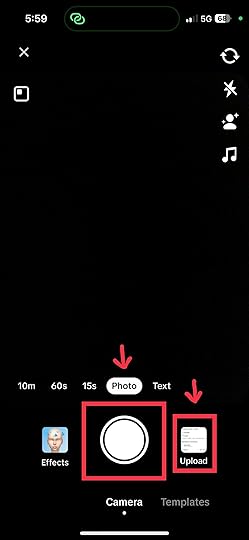
Tap on the “+” button on the TikTok app. Add the video you want to edit or film using the app’s circular button. When filming a new video, you can make it up to 10 minutes long.
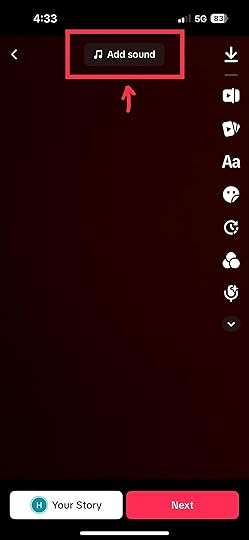
2. Add the sound by clicking the “Add sound” icon at the topmost part of the screen.
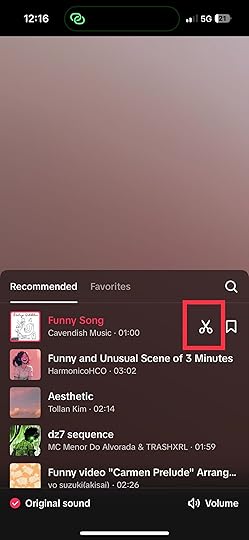
3. Upon adding your sound, tap on the scissors icon next to the sound’s title.
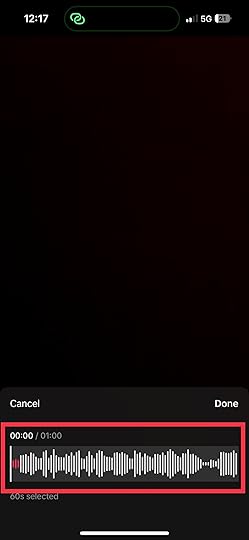
4. Afterward, you will see the waveform of the sound you picked. Slide to the left or right to adjust to the desired part of your video where you want to position the sound. Tap “Done” once you are finished.
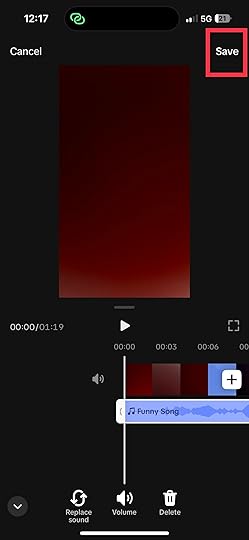
5. For longer videos, you may click on the trim video icon.
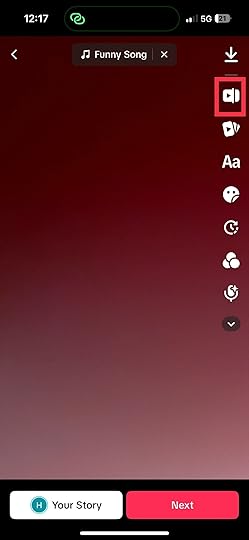
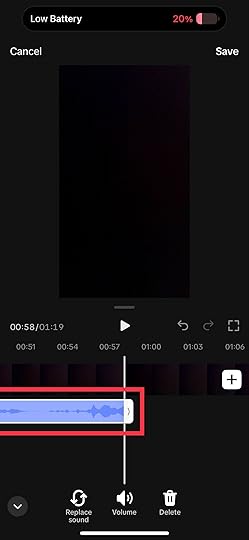
6. Upon tapping it, you will see the video roll and the sound underneath. Drag the sound line to your desired length. You can do this if you only want a certain part of your video to have sounds.
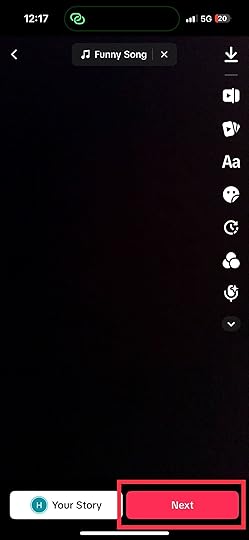
7. Once done, tap “Next” and write your video description and hashtags. After finalizing, you can now post your video.
Read more: How To Add Music To TikTok.
Advanced Tips for Sound TrimmingHere are some advanced tips to ensure your sound trimming on TikTok is perfect:
Waveform visualization: TikTok allows users visualize waveforms on the sound editor. The sound wave will help you achieve pinpoint accuracy.Dynamic fade effects: Elevate your sound transitions by experimenting with fade-in and fade-out effects. Gradual volume changes create smooth, cinematic shifts between audio clips. It can help enhance the viewer’s auditory experience.Layering soundscapes: Combine multiple trimmed sounds to craft intricate soundscapes. Doing so can add depth and dimension to your content. It immerses your viewers in a sensory journey.Beat matching: Beat matching is perfect for dance routines and music-related content. It involves aligning sound cuts with rhythmic beats. This technique enhances the synchronicity between sound and movement. It helps you create a visually stunning performance.The Importance of Trimming Sounds on TikTokThese are the importance of trimming sounds on TikTok:
Seamless audio-visual experience: Trimming sounds enables you to craft a seamless experience. It helps you sync emotions, actions, and words.Impactful engagement: Capturing attention within the first few seconds is crucial on TikTok. Trimmed sounds allow you to front-load your videos with the most attention-grabbing and relevant audio. It helps you draw viewers in.Enhanced comedic timing: Humor thrives on timing. The same thing applies to TikTok. TikTok’s wide array of funny sound filters empowers you to infuse humor into your content. By trimming sounds, you can create comedic punchlines. Perfect timing can transform a chuckle into laughter and turn an ordinary video into comedy gold.Aesthetic harmony: The fusion of audio and visuals gives TikTok distinct appeal. Trimming sounds ensures that your content fits well together.Attention retention: The allure of TikTok lies in its rapid-fire content consumption. Trimming sounds helps you maintain viewers’ attention on your video. It helps prevent dull moments that can cause you to lose your audience.Narrative pacing: Some TikTok trends demand an element of suspense. Trimming sounds allow you to control the pacing of your content. It also helps build anticipation before a thrilling revelation.Common Mistakes to AvoidThe following are the common mistakes you should avoid when trimming sounds on TikTok:
Over-trimming: Excessive cutting can strip away the context and coherence of your audio. So, you should avoid over-trimming.Bad timing: Perfect timing is the secret to sound trimming. Failing to trim at the right moment can cause your audio to be out of sync with the visuals. This will result in a jarring and disjointed viewing experience.Ignoring sound quality: A well-trimmed sound loses its charm when the audio quality is compromised. Using low-quality or distorted sound clips can diminish the appeal of your video. You should opt for clear and crisp audio.Ignoring copyright: TikTok offers creative freedom, but you need to respect its copyright rules. Trimming sounds from copyrighted material without proper attribution can lead to content removal and penalties.Misaligned emotions: Sound trimming should enhance emotions. Ensure that your trimmed sound aligns with the mood of your video.Omitting fade effects: Abrupt sound cuts can be jarring to the ear. Adding fade-in and fade-out effects can provide a smoother transition between trimmed sections.No previewing: You should always preview the edited sound in your video. Make sure that it fits perfectly and complements your content.Final Thoughts on How to Trim a Sound on TikTokYou can take your TikTok videos to another level with sound trimming. Follow our simple guide to captivate your audience like never before. Set yourself apart as a content creator with perfectly synced visuals and audio.
Are you considering running an ad campaign on TikTok? Hire The #1 TikTok Advertising Agency – AdvertiseMint.
Frequently Asked Questions on How To Trim a Sound on TikTokCan I add more than one TikTok sound?Yes, you can add more than one TikTok sound to your video. The app allows you to layer and mix multiple sounds to create a unique auditory experience for your viewers.
Why can’t I upload sounds on TikTok?TikTok has strict copyright policies to protect intellectual property. If the sound you’re trying to upload contains copyrighted music, TikTok might prevent you from uploading it.
What should I do if I get a copyright warning when uploading sounds?Consider using sounds from TikTok’s library or original content if you receive a copyright warning. Be aware of copyright restrictions to avoid violations.
Related Articles