Brian Meert's Blog, page 43
August 30, 2023
Amazon Review Not Showing Up? The Top Reasons & How To Solve Them

Is your Amazon review not showing up?
Product reviews are vital on Amazon because they show what customers think of products. Hence, Amazon reviews not showing is a common frustration many Amazon sellers and shoppers encounter.
In this article, we’ll discuss the top reasons for your Amazon review not showing and how to resolve the issue.
Possible Reasons for Amazon Reviews Not Showing UpThere are a number of reasons your Amazon reviews aren’t showing up. See them below:

Amazon employs a review moderation system to prevent spam and fake reviews. Sometimes, reviews may take some time to appear because they await approval from Amazon’s moderation team. This delay can vary, and it’s not uncommon for reviews to take some time before becoming visible to the public.
Violation of Amazon’s guidelines.Amazon has strict guidelines for writing reviews. A review that violates these guidelines won’t pass the approval process. Examples of these violations are the usage of inappropriate language, fake reviews, promotional content, or a direct competitor’s attempt to undermine a product. Additionally, positive reviews written by the seller’s close friends or family members might be considered biased and might not be displayed.
Technical glitches.Like any digital platform, Amazon can experience technical glitches. Sometimes, these glitches can lead to display issues. This issue is often temporary and gets resolved once the glitch is identified and fixed.
Purchase verification.Amazon often requires reviewers to have a verified purchase of the product. If the system fails to recognize the purchase, the review might not appear. This measure is in place to ensure that reviews come from genuine buyers with firsthand experience of the product.
Review velocity.Posting many reviews in a short period can raise suspicion of spamming. Amazon’s algorithms might flag such activity, delaying or suppressing reviews until they can be reviewed more closely.
Account or IP issues.If Amazon detects unusual activity or multiple reviews from a single IP address, it might withhold those reviews until the source’s legitimacy is confirmed. This is to prevent review manipulation and maintain the integrity of the platform.
Steps to Address the IssueWe understand how frustrating it can be when your reviews don’t appear. You can follow these steps to fix your review problems:
Wait patiently.Amazon employs a thorough review approval system to ensure authenticity and quality. Sometimes, reviews might experience a brief delay before becoming visible. Patience is key, so you should give the system time to process and approve the reviews. The length of these delays can vary, so avoid jumping to conclusions too quickly.
Encourage verified purchases.Encouraging your customers to make verified purchases, i.e., buying products directly on Amazon, can accelerate the review process. Verified purchase reviews hold more weight in terms of credibility, so it is in your best interest to foster this practice among your customers.
Verify Amazon’s guidelines compliance.Amazon has review guidelines in place to maintain fairness and originality. Double-check that your customers’ reviews adhere to these guidelines. Ensure the content is product-focused, respectful, and free from promotional language. Reviews that violate these guidelines might not be approved.
Request customer support assistance.You should contact Amazon’s customer support if your customers’ reviews are consistently absent. They can provide insights into potential issues and guide you through the necessary steps to address them. Amazon’s support team is well-equipped to handle review-related concerns.
Educate customers on review guidelines.Proactively educate your customers about Amazon’s review guidelines. You increase the likelihood of compliant and effective reviews by letting them know what is expected in their reviews. This education can also prevent potential issues from arising.
Monitor for technical glitches.Technical glitches can cause reviews not to be displayed properly. Monitor your product pages and reviews section to ensure everything runs smoothly. If you notice any inconsistencies or glitches, report them to Amazon’s support team for swift resolution.
Encourage honest and constructive reviews.Encourage your customers to give honest and constructive feedback. Genuine reviews focusing on product experiences are more likely to be approved and appreciated by potential buyers. Hence, it would be best if you highlighted the importance of authenticity in reviews to your customer base.
Avoid incentivized reviews.Amazon needs to know the outcomes of a positive product review in their operations. This online marketplace forbids sellers from using incentives to offer buyers discounts or free products to get a positive review. Failure to follow this rule can cause you to lose your Amazon profile.
Importance of Amazon ReviewsAmazon reviews offer several benefits, including:
Building trust in the virtual world.In a world where we can’t physically touch or test products before purchase, trust is the currency of online shopping. Amazon reviews function as a trust-building mechanism, allowing buyers to hear from their peers about their real-life experience with a product. Positive reviews reassure potential buyers that they won’t lose their hard-earned money, while negative reviews provide insights into potential pitfalls. These collective opinions mimic our conversations with friends before making a decision.
The social proof phenomenon.Human psychology is an intricate dance of influence, and Amazon reviews tap into the concept of social proof. According to psychology, people tend to follow the actions and opinions of others. When we see a product with hundreds of positive reviews, our brains interpret this as a vote of confidence from a community of buyers. This effect is amplified when potential customers spot verified purchase reviews from individuals with similar needs or preferences. Reading such reviews makes the purchase decision feel like a collective one.
Guiding the decision-making journey.Imagine scrolling through a sea of product listings, each promising the world. How do you choose? Amazon reviews serve as a compass. You can filter out the noise and zoom in on products that have garnered positive reviews from like-minded individuals. These customer reviews can help you assess a product’s effectiveness and whether a product meets your expectations. All the reviews provide insights beyond product descriptions, giving a glimpse into real-world applications.
Influence on seller success.For Amazon sellers, reviews are more than just feedback; they are the cornerstone of success. When customers leave positive reviews, they elevate a product’s visibility. This leads to increased sales and higher ranks in search results. The ripple effect is substantial as higher rankings translate into more visibility, potential customers, and, subsequently, more reviews. It is a virtuous cycle where quality products and exceptional service are rewarded with enhanced visibility.
Room for improvement.Negative reviews aren’t just a black mark on a product; they are an opportunity for sellers to improve. Constructive criticism helps Amazon sellers identify areas of concern and make the necessary adjustments. By addressing customer concerns, sellers can transform detractors into advocates, enhancing their reputation and fostering customer loyalty. This dynamic highlights the symbiotic relationship between buyers and sellers in the Amazon ecosystem.
A marketplace democracy.

The market community can hear every shopper’s voice in the digital realm, and Amazon reviews democratize this process. Whether a casual shopper or a seasoned expert, everyone’s opinion carries weight. This sense of empowerment encourages consumers to share their thoughts, fostering a community of transparency and accountability. Products that deliver on their promises rise to the top, while those that fall short are held accountable through candid reviews.
Seller Feedback vs. Product ReviewsWithin the Amazon marketplace, seller feedback and product reviews are two critical elements that shape the transaction experience. While they might seem similar, each serves a distinct purpose. Below are illustrations of the difference between both elements:
Seller feedback: The vendor’s report cardWhat is seller feedback? Seller feedback is similar to a vendor’s report card as it reflects the overall performance of a seller. It encompasses the buying experience, from shipping time and customer service to communication and product quality.
Why is seller feedback important? Sellers’ reviews influence their reputation on Amazon. Positive feedback boosts a seller’s credibility, leading to increased sales and higher rankings in search results. It is a thorough measure of a seller’s professionalism and service.
How to give seller feedback: Customers receive a prompt to rate their experience with the seller after a purchase. Also, buyers can access the “Orders” section on their Amazon account, find the relevant order, and leave feedback there.
Product reviews: Consumer’s voiceWhat are product reviews? Product reviews focus solely on the item you purchased. They offer insight into the product’s quality, features, and real-life performance.
Why are product reviews important? Product reviews serve as a guide for other potential buyers. They help shoppers make informed decisions based on real experiences. A positive product review can boost a product’s popularity, while a negative review can serve as a warning signs.
How to write product reviews: First, shoppers should go to the product’s page, scroll down, and locate the “Write a customer review” button. Then, they can rate the product and share their thoughts about it.
ConclusionReviews are integral to the Amazon shopping experience, benefiting buyers and sellers. While it can be frustrating when your reviews don’t appear, it’s essential to understand that various factors influence the process. From review approval procedures to technical glitches and account-related issues, reviews may fail to appear for various reasons. By following the steps mentioned above and Amazon’s guidelines, you can increase the chances of your reviews being approved and shared with the Amazon community.
Are you ready to grow your business with Amazon advertising? Get the best Amazon advertising agency.
Frequently Asked QuestionsWhy is my Amazon review showing up after some time?Amazon employs a review moderation process to ensure authenticity and quality. This means a brief delay might occur before the review becomes visible to the public.
What could be causing my reviews to not appear on Amazon?Several factors could contribute to this issue. It could be due to guideline violations, technical glitches, or the need for purchase verification.
Would Amazon customer support be able to help if my reviews aren’t appearing?Yes, Amazon’s customer support can be a valuable resource in such situations. They can provide insights into potential issues and guide you through the steps to address the problem. Don’t hesitate to reach out for help.
Related ArticlesHow To Deal With Amazon Hijackers


TikTok Ads Policy 101: Things You Need To Know
What do you know about TikTok ads policy?
TikTok advertising effectively allows businesses to take advantage of the platform’s massive user base. However, you should understand TikTok’s rules and regulations before you start your ad campaign.
We will explain everything you need to know about TikTok’s advertising rules, from what you can and can’t do to the consequences of not playing by the book.
What Are TikTok Ads Policies for?

TikTok ads policies are guidelines advertisers should follow when creating ads on TikTok. These policies ensure that ads are safe and appropriate for the TikTok community. They cover ad content targeting, user experience, and more. Violations of these policies could result in ad removal, suspension of account, or other penalties.
What Ads Are Not Allowed on TikTok?The following are the ads that are not allowed on TikTok:
Sensitive topics: TikTok aims to provide users with a positive and enjoyable experience. Sensitive topics discourage users from engaging and potentially harm the mental and emotional well-being of individuals using the platform.Misleading information: TikTok aims to maintain a platform where users can trust the information they encounter. Misleading information could lead to the spread of false narratives and misinformation. This could have consequences, affecting the perceptions of the public, as well as decisions and public safety.Hate speech and discrimination: TikTok has a global audience from various backgrounds, cultures, and beliefs. Hence, it prohibits hate speech and discrimination to foster an inclusive environment where everyone can express themselves without harassment or prejudice.Illegal services, weapons, and drugs: Ad creatives must not promote illegal services or activities in any jurisdiction. They must not show or endorse illegal drugs, controlled substances, prescription drug misuse, recreational drugs, and similar drugs. The promotion of dangerous weapons, ammunition, or explosives is also prohibited.Political and issue-based advertising: Ads related to political candidates, parties, elections, and government actions are prohibited. Likewise, ads that attack the governments should be avoided.Military content: Avoid showing negative content related to military or police symbols. This includes sensitive military events, war, militarism, and other unlawful elements.Adult and sexual content: Your ads shouldn’t show or endorse forbidden adult products or services. You should also avoid displaying suggestive or sexually provocative activities or behaviors. Don’t include nudity, sexual references, and other explicit content.More Policies You Should Know

Here are more guidelines you should follow during ad creation:
Your ad must be 5-60 seconds long. Ads that are less or longer than the specified duration will not be approved.Creating ads with consistent and suitable text, images, captions, audio, videos, landing pages, and language is crucial to providing a positive user experience.Check that the products or services you promote are allowed based on the industry’s rules.Ads must not contain misleading claims and false information. Ads must not make exaggerated claims about a product’s effects or performance.Do not violate intellectual property rights.Ads and landing pages shouldn’t make harmful comparisons with other brands.A landing page should not have a pop-up window that can’t be closed or skipped (this applies to all regions except the US, Canada, and Latin America).Ads shouldn’t show disturbing or shocking images, like crime scenes or accidents, that could frighten users. You should also avoid graphic, disgusting, or bloody scenes.Creative StandardsThe following is an overview of TikTok’s creative standards:
Video quality and resolution: TikTok encourages advertisers to use high-quality videos to capture users’ attention and convey messages well. It recommends 1080p video resolution to ensure crispness and clarity. Also, video ads should not have still images as their main element.Aspect ratios and dimensions: TikTok supports various aspect ratios. However, the commonly used ones are 9:16 (vertical), 1:1 (square), and 16:9 (horizontal). The 9:16 is the most popular as it fills the screen when users view videos in portrait mode.Sound and music usage: TikTok is known for its music. Audios play a significant role in user engagement. Advertisers can use TikTok’s music library and sound to enhance their ads. However, you should ensure the audio quality is clear and well-balanced with the video content.Text and captions guidelines: If text is present in the video, it should be concise, legible, and visually appealing. Short captions or text overlays can help convey important messages well. However, the text should be manageable and placed strategically for readability.Read more: How to add text to TikTok videos.
Targeting audienceThe following are some aspects of TikTok’s ad policies related to targeting audiences:
Geographic targeting: Advertisers should ensure their geographic targeting settings are accurate and aligned with their campaign objectives. Misleading location targeting can lead to inappropriate user experience and negatively impact the ad’s credibility. Likewise, advertisers are required to comply with the laws and regulations of the targeted geographic locations.User interests and behaviors: Advertisers should use interest-based and behavioral targeting responsibly. Likewise, targeting should be relevant to the user’s interests and enhance their experience on the platform rather than intruding on their privacy.Relevance to the TikTok community: TikTok encourages advertisers to create ads that feel like a natural part of the user experience rather than interruptive or unrelated content. Likewise, advertisers should be mindful of cultural sensitivities and nuances to avoid offending or alienating users from different backgrounds.It is important to note that while TikTok offers robust targeting options based on the interest, location, and age of users, privacy and user data protection are taken seriously. TikTok follows strict data privacy regulations and guidelines to ensure user data is used ethically and responsibly.
User-experience and TransparencyThe following are some aspects of TikTok’s ads policies related to user experience and transparency:
1. Ad labeling and disclosure.A clear distinction between ads and organic content: Advertisements on TikTok should be clearly labeled as ads. Users should be able to easily distinguish between organic content and sponsored content. Transparent ad labeling builds trust and helps users make informed decisions about their interactions.Proper usage of “Promoted” or “Sponsored” labels. Advertisements on TikTok must be clearly labeled as “Promoted,” “Sponsored,” “Ad,” or a similar term. The label should be prominently displayed and easily visible to users. This labeling ensures that users can readily identify the content is paid advertising.2. Landing page guidelines.Relevance of landing page to ad content: The content on the landing page that users are directed to after clicking an ad should be relevant to the message found on the ad. Advertisers should avoid misleading users by ensuring that the landing page matches the expectations set by the ad.Transparency about products, services, or offers: Advertisers should display the brand’s complete information on the landing page. This information includes contact details, company name and address, business license, prices, terms and conditions, and policies. Likewise, advertisers should avoid creating landing pages that ask users for their personal information to access content and automatically download files to a user’s device.3. User feedback and reportingMechanisms for users to report misleading or inappropriate ads: TikTok encourages users to provide feedback on ads through reporting mechanisms. Hence, advertisers should be prepared to address user concerns and feedback promptly.Read more: How much do TikTok ads cost?
Ad Formats and PoliciesHere are the various TikTok ad formats and their respective guidelines:
In-feed AdsVideo length and format: In-feed ads on TikTok typically have a maximum length of 60 seconds. However, shorter video lengths, like 15 or 30 seconds, are often recommended. This helps brands get better user engagement and ensures that the ad quickly captures the viewer’s attention.Call-to-action (CTA) guidelines: Brands must keep CTAs clear, concise, and understandable. Users should know what action to take after watching the ad.Branded hashtag challengesRules for creating and promoting challenges: Branded hashtag challenges should be communicated clearly as sponsored content. Users should know that the challenge is initiated or supported by a brand. Doing so can help maintain transparency.Encouraging UGC: Advertisers should obtain consent from users whose UGC is used in ads. It may include obtaining the rights to use the content, including any images, videos, or music.Top-View AdsFull-screen video ad placement: Advertisers should ensure that the TopView ad’s content is high quality, clear, and visually appealing. While TopView ads are highly visible, they should maintain the user experience. The content should be engaging without being overly intrusive.Frequency capping and user experience: Implementing frequency capping helps prevent users from seeing the same ad frequently. It also helps reduce the risk of ad fatigue.Branded EffectsAugmented reality (AR) effects in ads: AR effects can include branded elements like logos or visual identities. However, these elements should not dominate the user experience to the extent that they overshadow the interactive or creative aspects of the effect.Guidelines for creating interactive and engaging effects: Keep the user at the center of your design process. Consider how the effect will enhance users’ experience and encourage them to interact.Ad Review processThe review process for TikTok ads involves several steps to ensure that the content aligns with TikTok’s community guidelines and advertising policies. Here is the overview of the TikTok ad review process:
Ad creation and submission: Advertisers use TikTok’s Ad Creation Platform for this. It involves selecting the ad format, targeting the audience, setting a budget, and uploading the ad content.Evaluation: TikTok’s content review team checks the ad creative to ensure it adheres to the platform’s community guidelines and policies. Usually, TikTok ads are reviewed within 24 hours. However, in some cases, it may take longer.Ad approval notification. After the review, the ad is either approved for circulation on the app or rejected if it violates TikTok’s policies. If an ad is rejected, advertisers may receive feedback explaining the reasons behind the rejection. They can make necessary adjustments and resubmit the ad for review.Consequences of Policy ViolationsThe following are the consequences that come with policy violations:
1. Warning and corrective actionNotifying advertisers about policy violations: If TikTok finds issues with your ads, they might issue a warning and ask you to take corrective action. They will inform you about problems on the TikTok Business Help Center.Requirement for necessary ad changes: TikTok will explain what rule you broke and the possibility of suspension. These notifications will stay until your account is suspended or you fix the problem.2. Account suspension and terminationEscalation of consequences for repeated violations: TikTok has a gradual approach to consequences for repeated violations of its policies. The consequences become more serious if you continue breaking the rules. If the violations continue, they start with warnings and can progress to account suspension.Why Advertise on TikTok?Advertising on TikTok has many advantages that can boost your marketing efforts. Here are reasons why you should advertise on TikTok:
Massive and engaged user base: TikTok boasts a large user base across nations and generations. Users include Gen Z, Millennials, and beyond. With this, TikTok provides a vast and engaged audience eager to discover new content and trends.Creative and authentic content: TikTok’s core revolves around creativity and authenticity. Its short-form video format encourages brands to tell their stories in concise ways. This allows brands to have a unique and memorable brand message.Viral potential: TikTok is known for its viral content that spreads like wildfire. When users engage with content, it has the potential to gain attention and quickly become a trend. It also allows advertisers to tap into this virality for their campaigns.Innovative ad formats: TikTok offers varied ad formats. These formats enable advertisers to create diverse and engaging content that aligns with the goals of their campaigns.Final Thoughts on TikTok Ads PolicyIt is crucial to understand and adhere to the TikTok advertising policies. TikTok’s ad rules are important for keeping the platform safe and fun for users. By adhering to TikTok’s ad policies, you’re not only ensuring compliance but also building trust with your audience.
Ready to start advertising on TikTok? Get the best TikTok advertising agency.
Frequently Asked Questions on TikTok Ads PolicyHow can I track the performance of my TikTok ads?TikTok provides ad performance metrics through its Ads Manager platform. Advertisers can track impressions, engagement, CTR, and more.
Are there any best practices for creating successful TikTok ads?To create successful TikTok ads, grab attention early, use trending content and music, and stay authentic and relatable.
Is there a minimum budget requirement for TikTok ads?TikTok ads offer various budget options, but the minimum budget is $50 for the campaign and $20 for the ad group levels. Advertisers can set their budget based on their goals and target audience.
Related ArticlesAugust 29, 2023
How To Use TikTok Top Ads Dashboard in 9 Easy Steps
Do you want to know how to use the TikTok top ads dashboard?
As a digital marketer, it is essential that you stay ahead of the trends. Fortunately, TikTok offers advertisers a tool to achieve that—the Top Ads dashboard. This dashboard will help you stay updated by showing you the most effective ads in your industry.
This article will tell you what the Top Ads dashboard is and how to use it.
What Is the TikTok Tops Ads Dashboard For?The TikTok Top Ads Dashboard is a tool designed to assist advertisers and marketers find and understand successful advertising campaigns on the platform. It serves the following purposes:
Insights into high-performing creatives: The dashboard showcases a collection of top-performing ad creatives. By examining these successful ads, advertisers can gain insights into effective strategies, creative approaches, and content that resonates with TikTok’s user base.Filtering options: Users can filter ads based on various criteria such as region, industry, campaign objectives, and more. It allows advertisers to narrow their search to find relevant examples that align with their goals and target audience.Learning from success: The dashboard offers an opportunity for advertisers to learn from the success of others. Marketers can identify successful trends, styles, and storytelling techniques.Performance evaluation: Advertisers can assess the performance of top ads, including metrics like engagement, views, shares, and more. This information helps advertisers understand what resonates with viewers and informs their campaign strategies.Optimization and inspiration: The insights gained from the Top Ads dashboard can inspire advertisers to create engaging content. It can also guide optimizing campaigns to align with best practices and trends.Competitive analysis: Advertisers can also gain competitive intelligence by observing the strategies used by competitors in the same industry or niche.How To Use Top Ads DashboardThe TikTok top ads dashboard visually represents an ad campaign’s success. The following is a guide on how to use the TikTok top ads dashboard:
1. Login to the Creative Center: Log in to the TikTok Creative Center. If you don’t have an account, sign up and create one.
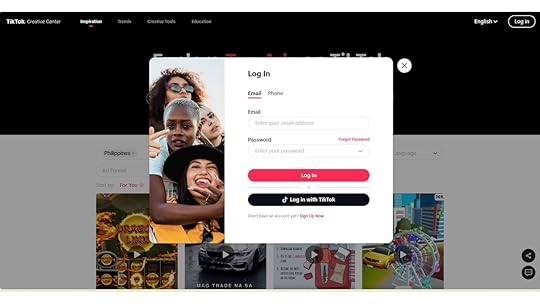
2. Go to Inspiration.

4. Set your search results: Select a Region, Industry, Objective, Duration, Ad Language, Ad Format, and Likes percentage.
Region: It allows advertisers to specify geographical locations where they want to see top ads. It includes countries, states, or other defined regions.
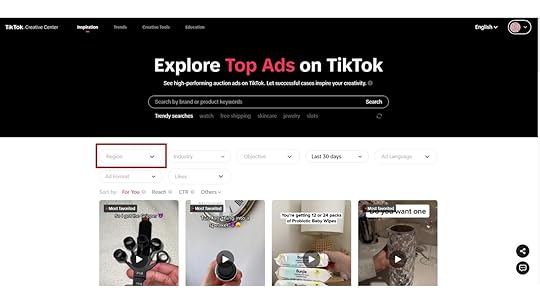
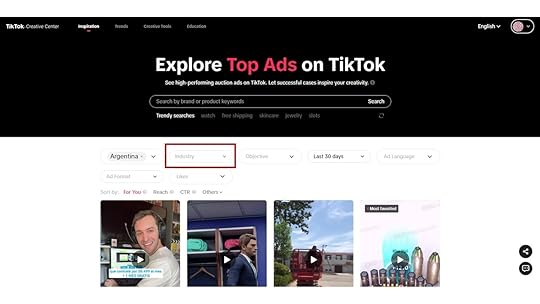
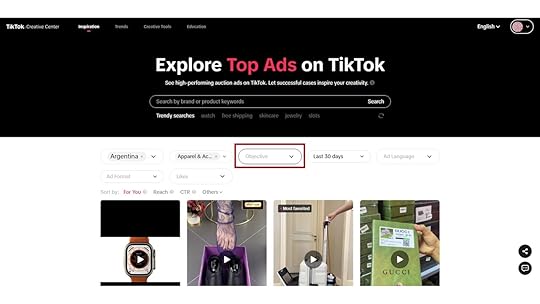
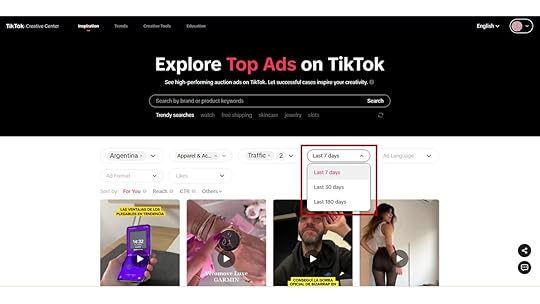
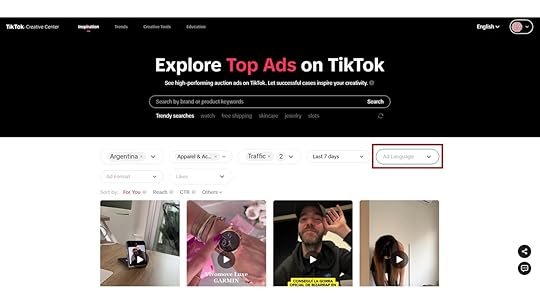
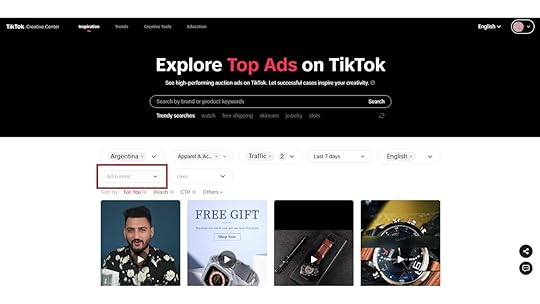
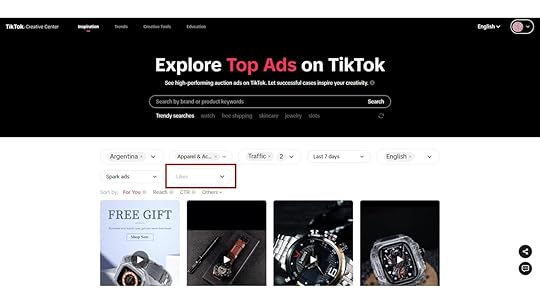
5. View top ads: On the dashboard, you will see a list of your top-performing ads based on the selected metrics.
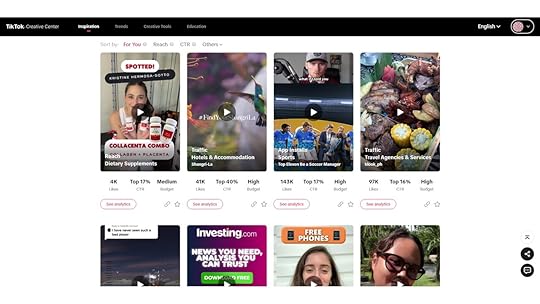
6. Move your cursor below the ad and click “See Analytics.”: By doing so, you will see the graph that compares how well the ad is doing. It will show its ad performance, creative summary, and interactive time analysis.

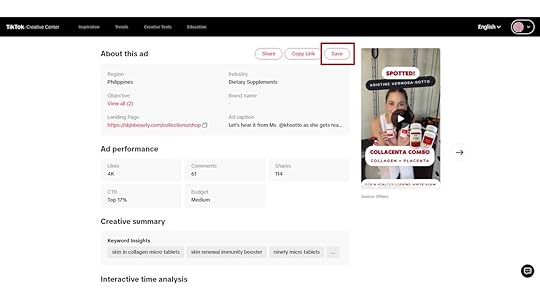
7. Save: Save the ads you want to put up as a reference to your Collection. This will help you find them easily later.
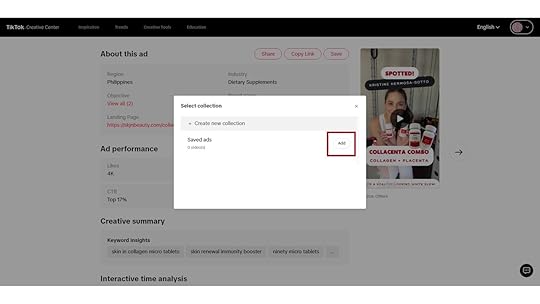
8. Visit your profile: Go to your Profile and click “My Collections” to see your saved ads.
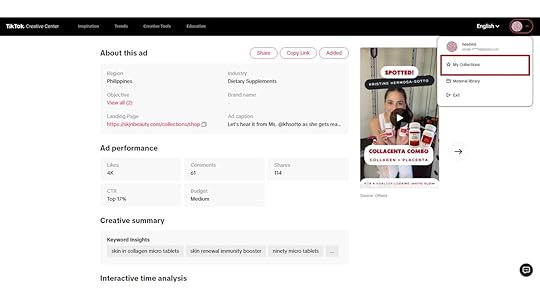
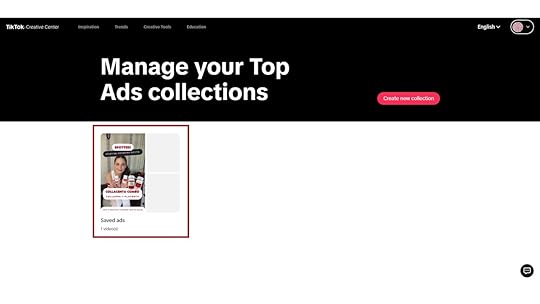
9. Analyze performance: Once you’ve compiled the ads you want as your reference, review and note their performance. Look for trends, patterns, and insights that can be helpful to you. Determine which creative elements, targeting options, or campaign types drive the best results.
Final ThoughtsThe TikTok Top Ads Dashboard empowers advertisers with valuable insights to refine their strategies and optimize their campaigns. With its help, brands can achieve better results in the dynamic world of social media advertising. By effectively leveraging this tool, advertisers can make informed decisions that contribute to the success of their TikTok ads.
Are you considering running an ad campaign? Get the best TikTok advertising agency!
Frequently Asked QuestionsHow frequently should I revisit the TikTok top ads dashboard page to monitor and optimize my campaigns effectively?If running time-sensitive promotions, consider checking the dashboard daily to ensure everything runs smoothly. However, a weekly review of the TikTok top ads dashboard can be sufficient for some advertisers.
Can I add a link to my TikTok ads?If you run paid ad campaigns on TikTok using TikTok Ads Manager, you can include a clickable link in your ad creatives.
Is the TikTok top ads dashboard available to all advertisers?The TikTok top ads dashboard is available to advertisers with an active TikTok Ads Manager Account.
Related ArticlesAugust 27, 2023
How To Edit TikTok Videos
Curious about how to edit TikTok videos?
TikTok knows no bounds, and storytelling always takes center stage. The power of video editing is your secret weapon as a creator. From catchy music to seamless transitions, editing can transform a video into a masterpiece that captures the hearts and minds of viewers. Also, you must regularly edit TikTok videos to create engaging content to optimize your TikTok for business strategy.
In this article, we will talk about how to edit TikTok videos that convert.
Editing TikTok VideosEditing TikTok videos is easy once you know how to navigate the platform. These are the steps you can follow to edit TikTok videos:
1. Plan your content.You should decide on the theme you want to convey in your videos. It is also important to plan your shots, angles, and any actions that you would want to capture. You should create videos that resonate with your audience.
2. Record video or select pre-recorded footage.Next, open the TikTok app and tap the “+” button. Tap the red button to start recording. You can also record your video in segments. It will help ensure you capture all the shots you need for your content.
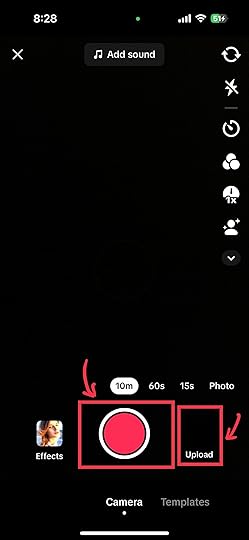
After recording, you may trim or cut your footage to eliminate unnecessary parts of your video. You should master TikTok video editing techniques to seamlessly weave together multiple clips using your TikTok video editing app.
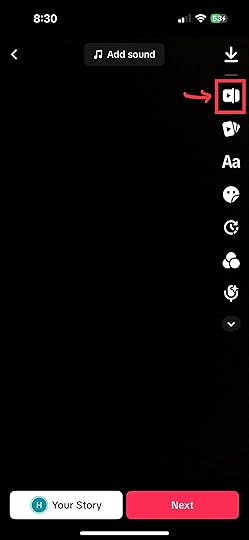
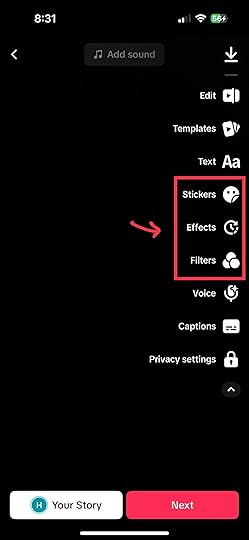
You can enhance your video by adding filters, effects, and stickers. TikTok’s editing app has a library of catchy filters and effects that can improve the visuals of your video.
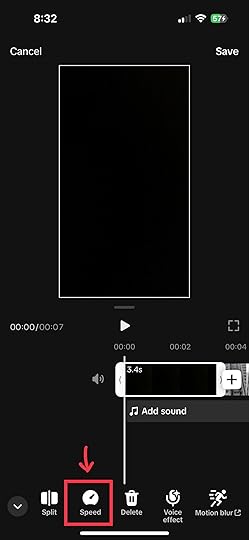
You must also ensure the video follows smoothly and maintains good pacing. You can use speed adjustments like slow motion or time-lapse to create visual interest. You can experiment with the video’s playback speed and incorporate audio clips to enhance the video’s appeal.
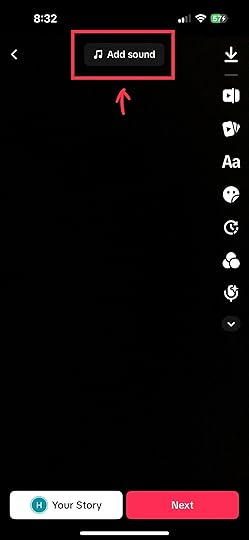
Choosing a suitable background music or audio track that complements the feel of your video is also important. Adjust the volume levels to balance the music and voiceovers, if applicable.
Read more: How to add music to TikTok videos.
As a final measure, you must preview your video to ensure everything is correct and in place. You must ensure that each video shines on the editing screen before sharing. A preview gives you a run-through of the contents. Also, it allows you to make necessary adjustments or corrections.
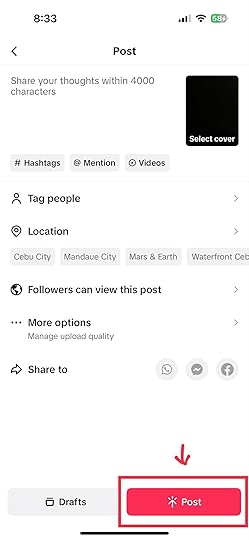
8. Save and share.Once you are satisfied with the edits, you may export the final video in a suitable format. Consider the recommended aspect ratio for TikTok videos (usually 9:16 or 11).
Here are some advantages that come with using TikTok video editor:
Ease of use: The TikTok video editor is user-friendly and accessible. Its UI design is easy to navigate. Also, its functions are well-positioned. This makes it easy to use for people with no video-editing experience.Quick editing: The video editor lets users trim, cut, and rearrange video clips quickly. While TikTok’s video editor has limited editing options compared to professional software, it can make the process more manageable.Effects and filters: The TikTok video editor offers a variety of effects, filters, and stickers that can enhance the visual appeal of your videos. It can help make your content more engaging. Also, choosing effects and filters for your TikTok content is easy. It makes it even more appealing to users.Music integration: TikTok is known for being music-driven. The video editor lets users add music tracks from the app’s extensive library. It is also easy for users to pick music that matches their content.Transition effects: Users can add transition effects between clips to create a visually appealing flow in their videos. Transitions can help you connect different scenes, shots, and clips. It will allow you to tell a more cohesive and engaging story.Text and captioning: TikTok editor allows users to add text and captions to their videos. It can help convey messages, add context, or engage viewers. Adding text and captions can also make your content more inclusive.Direct sharing: After editing, users can directly share their videos to the TikTok platform. So you won’t have to export and upload separately. This makes the process of content production easier.Final Thoughts on How To Edit TikTok VideosEditing TikTok videos is a creative aspect of producing engaging and captivating content on the app. Hence, you must maintain your brand’s identity and values when editing. It would help if you focused on creating content that viewers would like. You should avoid making videos look rushed; instead, take time crafting them.
In need of help with your TikTok advertising? Work with the best TikTok ad agency now!
Frequently Asked Questions on How To Edit TikTok VideosCan I use third-party apps for editing TikTok videos?While TikTok’s built-in editing tools are good, some creators still prefer third-party video editing apps. They usually do this for more advanced editing options.
Can I edit videos on TikTok using a desktop computer or only on mobile devices?TikTok’s in-app video editor isn’t available on desktop computers. You must choose a third-party editor or download a phone emulator.
What is the difference between the “Effects” and “Filters” options in TikTok editing tools?With effects, users can add visual enhancements to their videos. Meanwhile, filters change your video’s color balance, brightness, and overall mood.
Related ArticlesThe Trendy World of Stickers on TikTok

Are you ready to discover stickers on TikTok?
TikTok stickers have emerged as a powerful visual tool that adds a touch of magic to videos. They have evolved from simple decorations to dynamic elements that evoke emotions, spark interactions, and tell stories.
This article will provide all the information you need to use stickers on TikTok.
What are TikTok Stickers?TikTok stickers are animated or static images that you can add to videos to boost their visual appeal and communicate messages dynamically. These digital decals range from cute and funny animations like dancing cats or flying hearts to informative icons like tags and stamps. By tapping into TikTok stickers’ playful and expressive nature, creators get a versatile tool to engage their audience and amplify storytelling.
Read more: How to edit TikTok captions.
Why are TikTok Video Stickers So Popular?TikTok stickers are popular for several reasons, they include:
1. Expressive communication.TikTok stickers efficiently express emotions, reactions, and sentiments in a platform that thrives on concision and creativity. For instance, a thumbs-up sticker can instantly convey approval, while a laughing emoji can indicate something funny.
2. Visual appeal.Stickers on the TikTok app are eye-catching and lively, so they help videos stand out in a sea of content. Viewers who see video sticker content are likelier to be drawn in and engaged, ultimately contributing to higher view counts.
3. Interactive storytelling.These digital decals enable creators to interact with their audience on a new level. For instance, they can ask viewers to vote by selecting a specific sticker or participating in challenges using challenge-related stickers. This interaction fosters a sense of community and involvement.
4. Brand promotion.Businesses and influencers can harness the power of TikTok stickers to promote their brand, products, or services. These digital decals allow them to establish a visual identity and catch the eye of potential customers memorably.
Using Tickers Creatively in TikTok VideosYou can use TikTok stickers in various ways. Here are some ways to use them creatively:
1. Adding context.TikTok stickers can provide context to your video, setting the tone and helping viewers understand the narrative quickly. For instance, if you’re sharing a travel story, you can use location stickers to show where you are.
2. Enhancing humor.Humor stickers can add an extra layer of comedy to your TikTok videos. A well-placed funny sticker can turn a boring moment into a hilarious one, making your content more shareable.
3. Showcasing personality.Your choice of stickers can reflect your personality and style. If you’re into vintage beauty, you might use retro-style stickers, while a music enthusiast might decorate their TikTok videos with music note stickers.
4. Promoting challenges.Many TikTok challenges come with their own stickers. Incorporating these digital decals into your video content shows your participation and encourages others to join.
How to Add Stickers on TikTok: Step-by-Step TutorialFollow these steps to add stickers to your TikTok videos:
Record or upload a video: Start by recording a new video on the TikTok app or uploading one from your device’s gallery.Open the sticker menu: Once you’ve recorded or uploaded your video, click the “Sticker” icon represented by a smiley face or square icon with a folded corner.Explore sticker options: Browse through the array of options in the sticker panel. You can find stickers for every occasion, emotion, and theme.Select and place stickers: To add stickers to your video, tap on the stickers you like, and they will appear on your video. You can drag, resize, and reposition them to your desired spots.Animated stickers (If Applicable): Some stickers are animated, meaning they move or react to your video. If you add animated stickers, preview how they interact with your content.Save and share: Make every necessary adjustment and save the changes once you add stickers to your sticker store. You can then add captions, hashtags, and other elements before finally sharing your TikTok video sticker with the TikTok world.TikTok Sticker TipsHere are some tips on how to use TikTok stickers:
Don’t overload: While video stickers can be exciting, using too many in a single video can make it look disorganized and distract from your content’s main message.Relevance matters: Ensure your chosen stickers align with your video’s theme and message. Inconsistent or unrelated stickers could make your audience understand.Experiment with styles: TikTok offers an array of sticker styles. Experiment with different styles to find what suits your content best.Customize your content: You can mix stickers with creative elements like text, filters, and effects. Combining these elements can lead to truly unique and captivating TikTok video content.Join trends: Stay up to date with trending stickers and challenges. Joining these trends can increase the discoverability of your videos.How To Create Custom Stickers on TikTokFollow the steps below to create stickers on TikTok:
Envision your stickers: Before diving into the creation process, please look at the type of stickers you want in your sticker store. Think about the themes, emotions, or messages you want to convey.Design sour stickers: You can use a third-party app on your mobile device or graphic design software on your computer to design your stickers. Keep them simple, vibrant, and aligned with your chosen theme.Size and Format: TikTok stickers are normally 128 by 128 pixels in size and have a transparent background. Ensure your custom sticker matches this format for a seamless integration.Export and save as PNG or JPEG files: Store your stickers in JPEG or PNG format to maintain transparency. Doing this is crucial to ensure they blend well with your videos.Transfer to your device: Once your stickers are ready, transfer them. You can use cloud storage, email, or a USB connection.Recording or uploading a video: Open TikTok and record a video or select one from your gallery.Access stickers: While editing your video, click the “Sticker” icon to access the sticker library.Upload custom stickers: Look for the “Upload” or “Custom” option to add your images to the sticker library.Select your stickers: Choose the custom stickers you want to include in your set. You can select multiple stickers to create a cohesive set.Save and reuse: Store your TikTok sticker collections once you customize them within the app. You can use these sticker collections in future videos without recreating the customization process.ConclusionAs TikTok continues to evolve, embracing and experimenting with stickers can open up new avenues for creativity, engagement, and connection with your audience. Fortunately, this article has provided the information you need to create and add stickers to your TikTok videos.
Does your brand need expert help with your ad campaign on TikTok? Hire the best advertising agency!
Frequently Asked Questions on Stickers on TikTokWhat exactly are TikTok stickers, and how do they enhance TikTok videos?TikTok stickers are animated or static images you can add to your videos. They come in various styles, from cute animations to informative icons.
Can I customize stickers on TikTok to match my style?Yes, you can! TikTok allows you to customize stickers to match your unique style.
How can stickers enhance my TikTok videos?Stickers are like colorful accents that can elevate your videos in various ways. They can add context to your video, convey emotions, and inject humor.
Related ArticlesHow To Upload a TikTok Story in 5 Easy Steps
Do you know how to upload a TikTok story?
The story feature is one of the best on TikTok. It offers users an alternative to posting on their feeds and allows them to provide a glimpse of their activities.
This article will give you a run-through of the simple process of uploading your TikTok story.
Steps on How To Upload a TikTok StoryTikTok’s story feature is similar to that of other social media apps. Hence, navigating it will be easy and hassle-free. The following are the steps you can follow to upload a TikTok story:
1. Go to your profile page: Your profile page is the first icon you’ll see from the right.
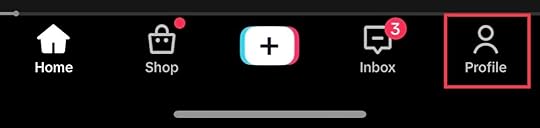
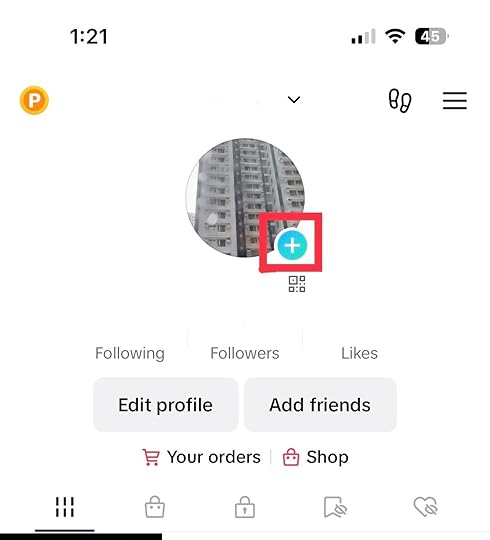
2. Tap on the blue circle with the plus sign: It is next to your profile picture. Tapping on it will lead you to where you can pick the media that you want to set as your story.
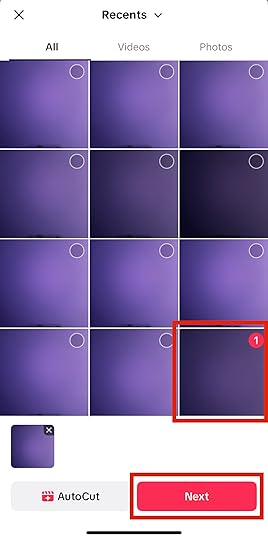
3. Add your media: Select the picture or video you want to upload on your camera roll. Then, tap “Next.”
4. Add text, filters, and sound as desired: You can also vamp your TikTok story by adding filters, sounds, and text that resonates with your content and viewers.
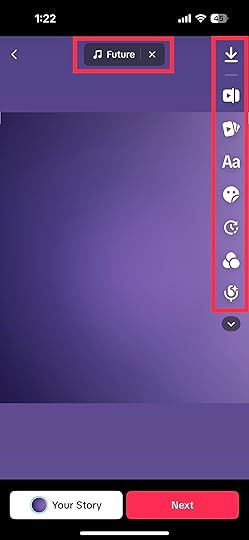
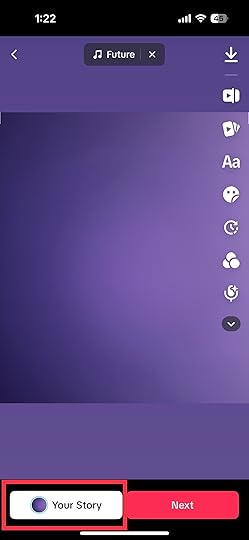
5. Post it: Once everything is set, tap “Your Story” to post.
Read more: How to get more views on TikTok.
What Can You Use TikTok Stories For?TikTok stories are used similarly to how Stories are used on other social media platforms like Instagram, Facebook, and Snapchat. Users use these temporary posts to share moments and updates in their daily lives. Here are some potential purposes for uploading stories on TikTok:
Daily updates: Users can share video snippets or pictures of their daily activities with TikTok stories. It allows followers to glimpse their lives beyond what they regularly post. Also, it allows users to share casual updates without the pressure of creating highly polished content.Behind-the-scenes: Stories can also showcase behind-the-scenes moments of their content creation, events, and activities. It gives followers a look into what goes behind the camera. Also, it can highlight the dedication and effort that goes into creating products and services.Engagement and interaction: Stories often include interactive features like polls, questions, and mentions. You can ask questions about preferences, opinions, or suggestions through this. It can engage followers and prompt them to participate in the discussion. Likewise, it fosters a sense of community among users.Limited-time offers: Brands and businesses can use stories to announce flash sales, exclusive promotions, or time-limited deals to create a sense of urgency among their viewers.Showcasing products: Brands and influencers can use stories to showcase products authentically. For instance, brands can show their viewers a few ideas on how to use their products well.Final Thoughts on How To Upload a TikTok StoryTikTok stories can capture viewers’ hearts and minds in seconds. Similar to what TikTok videos do, they have the potential to redefine how we communicate and share experiences in the digital realm. So, feel free to unleash your imagination and embark on a storytelling journey with TikTok stories.
Are you looking for ways to boost your brand’s visibility on TikTok? Let the best marketing agency do the work!
Frequently Asked Questions on How To Upload a TikTok StoryHow do I delete TikTok stories?Deleting TikTok stories is easy. Just click on the story and tap the “Delete” icon.
How many hours until TikTok stories expire?TikTok stories expire 24 hours after posting.
What sets TikTok stories apart from other platforms?TikTok is popular for its wide range of creative tools, effects, and filters. Likewise, TikTok stories offer unique and innovative tools that provide a more visually dynamic storytelling experience.
Related Articles on How To Upload A TikTok StoryAugust 26, 2023
6 Effective Tips on How To Get More Views on TikTok

Do you want to learn how to get more views on TikTok?
The ultimate quest for TikTok content creators has become getting more views. So, you are not alone if you wonder how some creators rack up thousands or even millions of views.
This article will reveal the secrets to boosting your TikTok views.
1. Content StrategyCreating videos that captivate and resonate with your audience is the cornerstone of gaining more views on TikTok. To do this effectively:
Understand the algorithm: Get familiar with how TikTok’s algorithm works. It rewards videos that engage users quickly and keep them watching. The longer viewers stick around, the better your chances of more views.Choose your niche: Decide on a specific theme or niche that defines your content. This helps you establish a recognizable identity, making it easier for users interested in your niche to find and follow you.Ride the trends: Stay up-to-date with trending challenges, songs, and formats. By incorporating these trends into your videos, you tap into what’s currently popular and increase the likelihood of your content being discovered.Grab attention early: In the fast-scrolling world of TikTok, the first few seconds are crucial. Hook your viewers with something attention-grabbing right from the start to prevent them from scrolling past your video.Tell a story: Even within short videos, a compelling narrative can work wonders. Whether it’s a mini-story, a surprising twist, or a series of connected clips, storytelling keeps viewers engaged and curious.2. Enhancing Video ProductionLights, camera, quality! When it comes to standing out on TikTok, your videos’ visual and auditory appeal can’t be overlooked. Here’s a quick guide to elevating your video production game:
Light it up: Good lighting can make all the difference. Natural light or well-placed artificial lights can give your videos a professional look. Say goodbye to shadows and hello to clarity.Crystal clear audio: Viewers should hear you loud and clear. Invest in a decent microphone to capture your voice without any unwanted background noise. Remember, a well-recorded sound is music to the ears.Frame for fame: Keep your content well-framed and centered. Make sure your face or main subject is easily visible. A balanced composition keeps viewers engaged and focused.Visual flair: Spice up your videos with simple visual effects. Text overlays can emphasize key points, and filters can add an artistic touch. Just remember, moderation is key – don’t overdo it.Edit like a pro: Basic editing can go a long way. Trim any unnecessary parts, add captions for those scrolling without sound, and ensure a smooth flow. Several user-friendly apps can help you work wonders.3. Mastering Hashtags and CaptionsWhen it comes to getting more views on TikTok, hashtags and captions are your secret weapons. These tiny yet mighty elements can significantly boost your discoverability and engagement.
Research matters: Research relevant and trending hashtags in your niche. Using the right hashtags can place your video in front of a larger audience already interested in similar content. Strike a balance between popular hashtags and niche-specific ones to maximize your reach.Craft captivating captions: A great caption adds context, personality, and a touch of intrigue to your video. It’s your chance to spark curiosity and encourage viewers to watch till the end. Keep it concise, witty, and aligned with your video’s theme. Don’t forget to include a call-to-action (CTA) that prompts viewers to like, comment, or share.Mix and match: Combine popular and niche-specific hashtags and weave them naturally into your captions. But remember, less is more. A few well-chosen hashtags are more effective than an overwhelming barrage.Stay current: Keep an eye on trending hashtags and challenges. If your content fits, jump on the bandwagon. This can expose your video to a broader audience participating in the trend.Engage with hashtags: After posting, engage with the hashtags you’ve used. Like and comment on other videos with the same hashtags. This interaction can lead curious viewers to your profile.4. Consistent Posting ScheduleConsistency is the secret ingredient that keeps your TikTok audience engaged and hungry for more. Think of your TikTok account like a TV show with scheduled episodes. When you establish a regular posting routine, your viewers know when to expect new content from you. Here’s how to nail down a consistent posting schedule:
Frequency is key: Decide how often you can realistically create and post content. It could be daily, every other day, or a few times a week. Stick to this schedule so your audience doesn’t lose interest.Know your audience: Understand your audience’s time zones and daily routines. This helps you determine the optimal times to post when they’re most active and likely to see your videos.Plan: Brainstorm and create content in advance. This way, you’re not scrambling to make a video last minute, which can lead to lower-quality content.Variety and balance: While consistency is vital, keep your content fresh. Mix up your videos to avoid monotony and cater to different aspects of your niche.Be patient: Building a loyal following takes time. Don’t get discouraged if you don’t see immediate results. Consistency over weeks and months will pay off.Read more: How Often To Post on TikTok.
5. Collaborations and DuetsCollaborating with fellow TikTok creators is like adding rocket fuel to your visibility. By teaming up with others, you can tap into their audience while showcasing your unique style. Here’s how to make collaborations and duets work wonders for your TikTok journey:
Pick the perfect partner: Look for creators whose content complements yours. A great match sets the stage for an engaging collaboration, whether it’s a shared interest, similar humor, or a complementary skill.Duet dynamics: TikTok duets allow you to interact directly with another user’s video. It’s a chance to react, mimic, or add your twist to their content. When you engage in a duet, you become part of their video, exposing your talent to a new set of eyes.Creating chemistry: Plan your collaboration together. Brainstorm ideas that blend both of your styles seamlessly. This can produce a fresh and captivating video that appeals to both audiences.Promotion power: Cross-promote the collaboration on your respective profiles. Encourage viewers to check out your partner’s content as well. This mutual shoutout can introduce each of your audiences to the other’s unique content.Engage and respond: Once the collaboration is live, actively respond to comments and engage with the influx of new viewers. This interaction can leave a lasting impression and encourage these new viewers to stick around for more.6. Promoting Your TikToks on Other PlatformsReady to amplify your TikTok reach? Cross-promotion is the name of the game. Here’s how to spread your TikTok magic to other social media platforms:
Strategic sharing: Don’t keep your TikTok gems exclusive to the platform. Share your TikTok videos on Instagram, Twitter, Facebook, and even Snapchat to catch the attention of your existing followers there.Snappy previews: Craft bite-sized previews or teasers of your TikTok content to pique interest. Link back to your TikTok profile for viewers wanting the full experience.Storytelling on Instagram: Instagram Stories are perfect for behind-the-scenes peeks, challenges, and collaborations. Use the Swipe Up feature if you have over 10k followers to direct traffic straight to your TikTok.YouTube teasers: If you’re a YouTuber, create short compilations or highlight reels of your TikTok content. Link back to your TikTok profile in the video description.Twitter teasers: Share GIFs or short clips of your TikTok videos with catchy captions to entice your Twitter followers. Include relevant hashtags to increase discoverability.Engage with the community: Don’t just share and forget. Respond to comments, messages, and mentions across platforms. Build a bridge between your TikTok audience and followers on other networks.Collaborate with influencers: Team up with influencers or creators on other platforms. Their audience might be interested in your TikTok content, expanding your reach further.Consistent aesthetics: Maintain a consistent visual style and theme across platforms. This helps in creating a cohesive brand identity that’s easily recognizable.Final Thoughts on How To Get More Views on TikTokBuilding a significant following and getting more views takes time and patience. However, there is a hefty reward for creators who get it right. Follow our tips and embrace the challenge ahead.
Are you looking for ways to boost your brand’s visibility via TikTok? Let the best marketing agency do the work for you!
Frequently Asked Questions on How To Get More Views on TikTokHow can I use music effectively in my videos to gain more views?It would help if you chose trending or popular songs that align with the mood of your video. Music can enhance viewer engagement and make your content more shareable.
Does the length of the video matter for views?Shorter videos are more likely to retain viewers’ attention. Aim for concise and engaging content that gets your message across fast.
Is it better to follow trends or create unique content?Both have their pros. Participating in trends can make your content more discoverable. However, focusing on trends can also make your videos stand out.
Related ArticlesHow To Share TikTok on Instagram in 4 Easy Steps
Are you curious about how to share TikTok on Instagram?
With the rising popularity of short-form video content, platforms like TikTok and Instagram have become go-to places for showcasing creativity. If you want to bridge the gap between these two platforms, we have you covered.
This article will discuss how to share TikTok videos on Instagram, whether you want to share them on your Feed, as an IG story, or as a message.
1. Launch the TikTok app.The first step is to launch the TikTok app. You can do this by simply clicking on the TikTok app icon.
2. Find the VideoSearch for the video you want to share and tap on the arrow on the right side of the video. Doing so will lead you to a window where you will see the platforms where you can share TikTok videos.
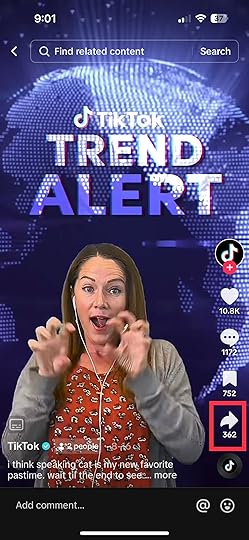
The Instagram icon is the second icon from the right. It is found next to the “Repost” button.
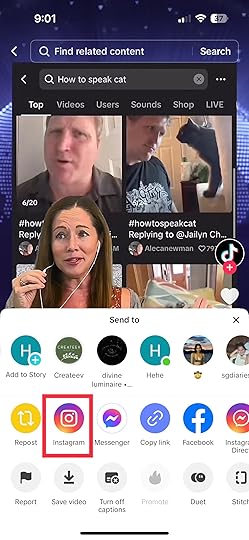
You have these options for sharing your content: uploading the full TikTok video as an Instagram post, as a message, or using Instagram Stories for a more dynamic approach.
Note that TikTok downloads the video before directing you to the Instagram app.
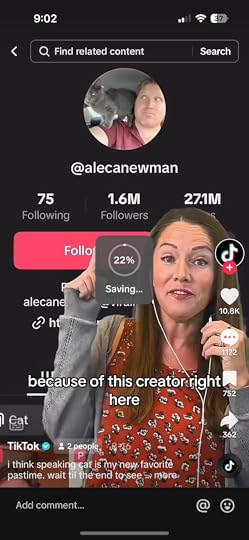
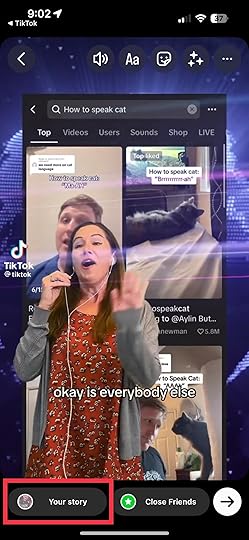
If you want to share a TikTok video as an Instagram story, tap “Story.”
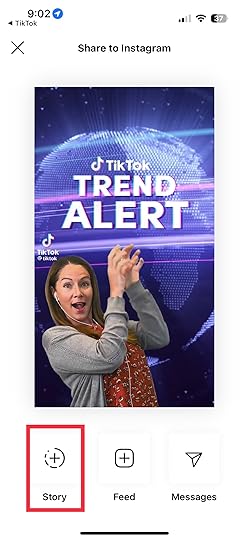
Add text or stickers if desired. Then, tap the “Your Story” button on the left side of the screen. Doing so will automatically upload the TikTok video as an Instagram Story.
Meanwhile, if you want to share a TikTok video on your Feed, tap the “Feed” option.
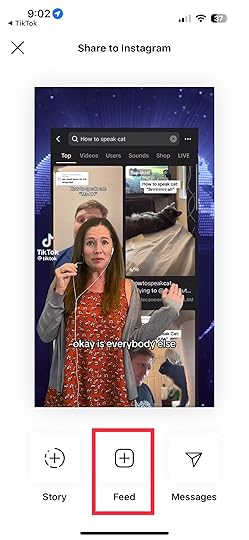
Then, add your text and stickers if you like. Afterward, tap “Next.”
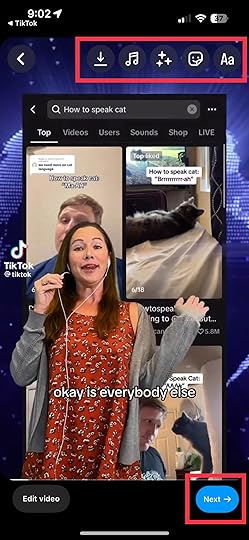
Lastly, write your caption and tap “Share.”
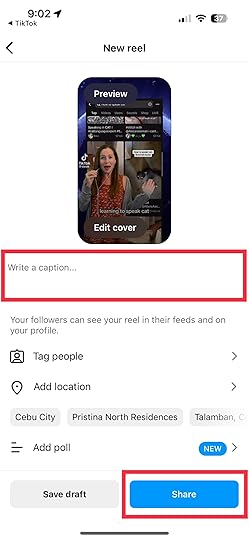
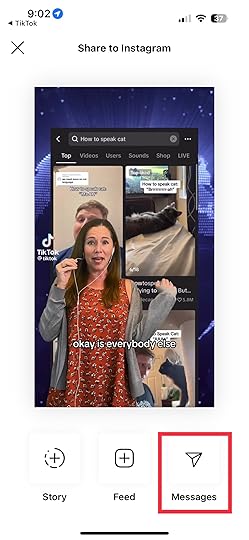
On the other hand, if you want to share a TikTok video as an IG message, tap “Message.”
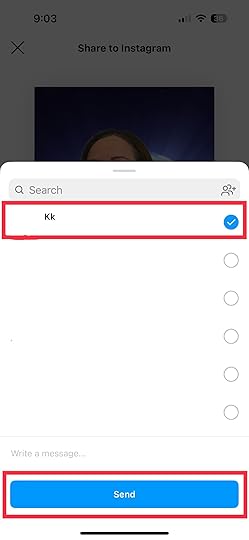
Then, select the IG username of the person you want to send the video to. Note that you can also send it to multiple recipients. When done, tap “Send.”
You need to monitor the engagement on both your TikTok and Instagram posts. Respond to comments and answer questions to foster a sense of community. While sharing TikTok videos on Instagram can be a great way to cross-promote, remember that each platform has its audience and best practices.
Final Thoughts on How To Share TikTok On InstagramAs you can see, sharing your TikTok videos on Instagram doesn’t have to be complicated. By following these steps, you can amplify your reach, engage with a wider audience, and make the most out of your creative efforts. Embrace the synergy between TikTok and Instagram, and watch as your content gains momentum across both platforms.
Are you looking for ways to market your products and services on TikTok? Work with the best advertising agency to get your ad journey started!
Frequently Asked Questions on How To Share TikTok on InstagramCan I edit my TikTok video before sharing it as an Instagram story?You can’t do heavy edits on your TikTok videos before sharing them on your Instagram story, but you can still add text, stickers, and filters and draw on them.
How do I get the TikTok video link?Tap the arrow button on the right side of the video that you want to share. Then, tap “Copy Link”; doing so lets you copy the link of the video.
Can you share private TikTok videos on Instagram?Sharing a private TikTok video directly on Instagram is not possible due to the privacy settings of both platforms. Private videos can be viewed only by the users you’ve approved.
Related ArticlesHow to share TikTok videos on Facebook
How To Change Profile Picture on TikTok in 6 Easy Steps
Do you want to learn how to change profile picture on TikTok?
Your profile picture serves as your digital representation on TikTok. First impressions matter, and a well-picked TikTok profile image can set the tone for your TikTok presence.
This article will give you a run-through of changing profile pictures on your TikTok account.
The following are the steps you should follow when doing so:
1. Open Your TikTok AppStart the TikTok app on your mobile device. Ensure that you are logged in to your TikTok account.
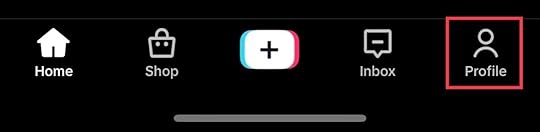
2. Go to Your Profile PageThe profile icon is the last at the screen’s bottom right corner. Tapping this will lead you to your TikTok profile.
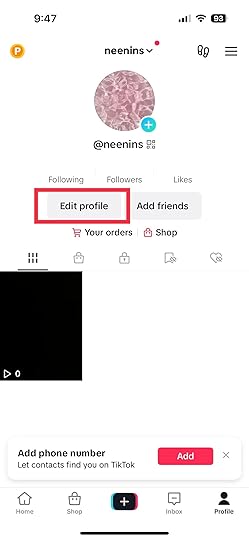
Once you are on your profile page, you will see an “Edit Profile” button. It is situated below your profile picture. Tap on it to proceed.
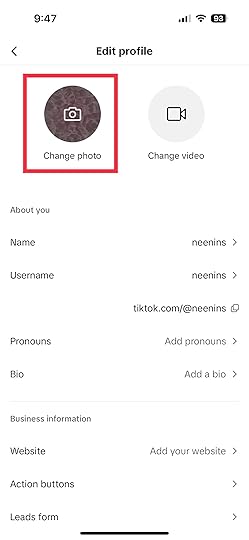
Tap “Change Photo” if you want your profile picture to be a still image. You can also tap “Change Video” to use a profile video instead. If you want to use a video, select a clip that lasts up to only 6 seconds.
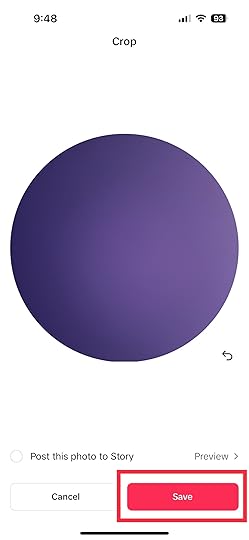
Select the photo or video that resonates best with your branding and personality. However, you must ensure your photo or video doesn’t violate the app’s community guidelines. Violation of the app’s guidelines could result in the account’s suspension.
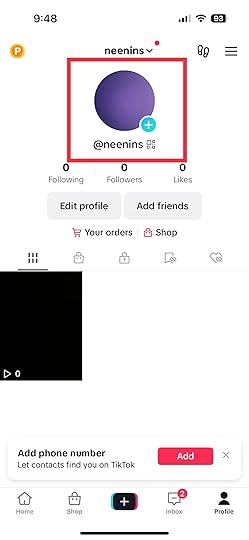
6. Tap “Save”Once you’re happy with the selected profile picture, tap the “Save” button. TikTok will confirm that your profile picture has been updated. Then, the new profile picture will appear.
Read more: How to share TikTok videos on Facebook.
Guidelines on Picking a Good Profile PictureChoosing a good profile picture is essential for making a memorable impression on your viewers. Here are some guidelines to help you pick a great profile picture:
Choose a high-quality image: Pick a clear, well-lit picture. You should also ensure that your image is in high resolution. A sharp image will help your profile picture stand out and appear professional.Show your identity: Your profile picture should represent you and your brand. Hence, you must choose an image that reflects your personality and interests.Consistency across platforms: Consistency on your profile picture ensures that viewers can recognize you easily. Consistency will also help you grab your viewers’ attention.Respect guidelines and policies: Follow the platform’s guidelines to avoid problems with your account. It is also important that you avoid using copyrighted images.Check the preview: Check the preview before saving your new profile picture. Doing so lets you see how the image will appear on your profile.Final Thoughts on How To Change Profile Picture on TikTokTikTok profile pictures are a great way to set your brand or identity. It is on the front of your account and is the primary sense of identity viewers see every time they visit it. You can pick whatever image you want as your profile picture, but opt for an image that best resonates with you.
Are you considering TikTok advertising but unsure of where to start? Let the best TikTok advertising agency get the burden off your shoulders.
Frequently Asked Questions on How To Change Profile Picture on TikTokCan I view somebody else’s TikTok profile picture?Yes, TikTok allows users to fully view other user’s profile pictures.
What are the size and format requirements for profile pictures on TikTok?TikTok requires a minimum size of 20×20 pixels. However, 200×200 is the best TikTok profile picture size to use.
Why am I having trouble changing my profile picture on TikTok?Poor internet connection, glitches on the app, or server issues can be a few of the possible reasons you can’t change your profile picture. You may check your internet connection or update the app to solve the issue.
Related ArticlesHow To Make A TikTok With Pictures

Do you want to learn how to make a TikTok with pictures?
You can create captivating TikTok video content using a photo slideshow. With the right techniques, you can craft unique and attention-grabbing videos using a series of photos on the TikTok app.
This guide will show you how to make a photo slideshow in TikTok videos and why you should.
Step-by-Step Guide on How To Make a TikTok with PicturesPictures can tell a powerful story in a matter of seconds. They can convey emotions, share experiences, and entertain viewers like videos. Using pictures on TikTok offers a different approach to help you stand out and creatively connect with your audience. Below are the steps to follow:
Choose your theme or story.Before you gather photos, decide on the story you want to convey. It could be a travel diary, a recipe tutorial, a before-and-after transformation, or a funny sequence. A clear theme will guide your picture selection and help you maintain a consistent narrative.
Gather your pictures.Collect the photos you will use for your TikTok. You can select photos from your camera roll or old albums or download high-quality images from the internet that match your theme.
Arrange the photo clips.A video editing app can arrange your picture clips in the desired sequence. Apps like InShot, ViVaVideo, or Adobe Premiere Rush are great options. Drag and drop the images in the order you want them to appear. Pay attention to the flow of the story and how each picture transitions to the next.
Add transitions and effects.Enhance the visual appeal of your TikTok content by adding transitions between the images. Select from fade, slide, zoom, or flip options to make the sequence smooth and engaging. Additionally, add effects or filters to match the mood of your story.
Edit duration.Decide how long you want each picture to appear on the screen? Normally, 2 to 3 seconds per picture works well. But you can set the photo duration based on the content and pacing of your story. Set your photo duration properly to ensure viewers have enough time to absorb each image.
Incorporate text and music.Include text overlay to add context or captions to your pictures. This is your chance if you have a message or a funny comment. Choose a font and a text color that are easy to read against the background. In addition, add suitable background music from TikTok’s library to complement your story.
Review and edit.Once you have added all the elements, review them with your TikTok. Watch it from start to finish to ensure the picture clips flow seamlessly, the text is legible, and the music complements the mood. Make any necessary adjustments until you are satisfied with the result.
Publish and engage.It is time to share your creation with the TikTok community. Type an appealing caption and relevant hashtags to increase the visibility of your content. As viewers watch your picture-based TikTok content, they can like, share, and comment, allowing you to engage with a wider audience.
Tips for Creating an Effective Photo Slideshow Video on the TikTok AppKeep it simple: Don’t overwhelm your audience with too many photos or complex transitions. A clean and simple approach often works best.Tell a story: Ensure that your photos follow a logical sequence, telling a story that captures the viewers’ attention and keeps them engaged.Select captivating photos: High-quality and eye-catching images are essential. Blurry or irrelevant photos can detract from the impact of your TikTok slideshow videos.Match text with visuals: If you add text, please ensure it matches your picture clips. The text should enhance the viewer’s understanding, not confuse them.Choose the right music: Music sets the tone for your TikTok content. Select a music track that resonates with your theme and evokes the desired emotions.Test with timing: Experiment with the timing of each picture. Ensure that viewers have enough time to grab the content without getting bored.Be creative: Use effects, filters, and text creatively. These elements can add depth and personality to your TikTok content.Engage with viewers: Respond to comments and engage with viewers who interact with your TikTok content. Building a community around your content can lead to more followers.Why You Should Use Photo Slideshow on at Least One VideoStorytelling simplified: Photos have incredible power to tell stories. When you make a TikTok with photos, you are not limited to a few seconds of video. Also, when you use photos on TikTok, you can construct a visual narrative that unfolds seamlessly. Each picture can represent a moment, emotion, or concept, allowing you to tell a story that resonates deeply with your audience.Creative freedom: Using photos on TikTok gives you a canvas for creativity. You can experiment with different visual styles, arrange images in unique sequences, and play with effects to enhance the overall impact. This creative freedom allows you to craft TikTok content distinctively yours, setting you apart from the crowd.Attention grabber: Grabbing and holding attention is key in a fast-paced digital world. Using photos on TikTok can help you achieve this effortlessly. The human brain is weird to process images quickly, which makes your content instantly eye-catching. Audiences scrolling through their feeds are more likely to pause for an intriguing picture, increasing the chances of engagement.Accessible and inclusive: Not everyone has the resources or skills to create elaborate video content. Using photos on TikTok video clips eliminates the need for advanced video equipment or editing expertise. This inclusivity allows a wider range of users to participate, share their stories, and contribute to the TikTok community.Versatility in themes: The benefits of using photos on TikTok videos are not limited by subject matter. Whether you share travel memories, showcase recipes, highlight fashion transformations, or express emotions, picture clips can cater to various themes. This versatility lets you explore various niches and interests, reaching diverse audiences.Less time-consuming: Creating videos can be time-consuming as it requires scripting, shooting, editing, and more. Using photos on TikTok content offers a quicker alternative. Selecting and arranging images takes less time, enabling you to share content more frequently. This efficiency is more advantageous for you if you have busy schedules.Engagement amplifier: Engagement is the heart of social media, and using photos on TikTok videos will help you supercharge it. Audiences are more likely to like, comment, and share content that resonates with them emotionally. The visual nature of photos enhances emotional connections, fostering interactions that can boost your content’s visibility.Final Thoughts on How To Make a TikTok With PicturesTikTok is a versatile platform that welcomes creativity in various forms. Using slideshow templates in at least one video clip is an innovative way to share your stories, ideas, and experiences. By following this guide, you can reap the benefits of using photos on TikTok video clips.
Do you plan to begin a TikTok ad campaign? Let the best TikTok advertising agency handle it.
Frequently Asked QuestionsIs it possible to make a TikTok with just photos?Yes, you can! The TikTok app allows you to create engaging videos using a sequence of photos.
What is the advantage of using photos over videos on TikTok?Photos are quick attention-grabbers and are great for telling stories. They are also accessible to everyone and require less time to create.
How do I add photos to my TikTok?You can use a video editing app to arrange and sequence your photos. Apps like InShot or ViVaVideo are user-friendly for this purpose. Afterward, tap the “Upload” icon to upload it on your TikTok.
Related ArticlesHow to change your profile picture on TikTok