Brian Meert's Blog, page 44
August 26, 2023
How To Make A TikTok With Pictures And Its Benefits

Did you know you can create captivating TikTok video content using a photo slideshow? With the right techniques, you can craft unique and attention-grabbing videos using a series of photos on the TikTok app. The platform’s features allow users to edit duration of photos to change TikTok photo duration in a slideshow video. This guide will show you how to make a photo slideshow in TikTok videos and why you should.
Step-by-Step Guide to Making a TikTok with PicturesPictures can tell a powerful story in a matter of seconds. They can convey emotions, share experiences, and entertain viewers like videos. Using pictures on TikTok offers a different approach to help you stand out and creatively connect with your audience. Below are the steps to follow:
Choose Your Theme or StoryBefore you gather photos, please decide on the story you want to convey. It could be a travel diary, a recipe tutorial, a before-and-after transformation, or a funny sequence. A clear theme will guide your picture selection and help you maintain a consistent narrative.
Gather Your PicturesCollect the photos you will be using for your TikTok. You can select photos from your camera roll or old albums or download high-quality images from the internet that match your theme.
Arrange The Photo clipsA video editing app can arrange your picture clips in the desired sequence. Apps like InShot, ViVaVideo, or Adobe Premiere Rush are great options. Drag and drop the images in the order you want them to appear. Pay attention to the flow of the story and how each picture transitions to the next.
Add Transitions and EffectsEnhance the visual appeal of your TikTok content by adding transitions between the images. Select from fade, slide, zoom, or flip options to make the sequence smooth and engaging. Additionally, add effects or filters to match the mood of your story.
Edit DurationCould you decide how long you want each picture to appear on the screen? Normally, 2 to 3 seconds per second works well. But you can set the photo duration based on the content and pacing of your story. Please set your photo duration properly to ensure viewers have enough time to absorb each image.
Incorporate Text and MusicTo add context or captions to your pictures, include text overlays. This is your chance if you have a message or a funny comment. Choose a font and a text color that are easy to read against the background. In addition, pick a piece of suitable background music from TikTok’s library to complement your story.
Review and EditOnce you have added all the elements, review them with your TikTok. Watch it from start to finish to ensure the picture clips flow seamlessly, the text is legible, and the music complements the mood. Make any necessary adjustments until you are satisfied with the result.
Publish and EngageIt is time to share your creation with the TikTok community. Could you type an appealing caption and relevant hashtags to increase the visibility of your content? As viewers watch your picture-based TikTok content, they can like, share, and comment, allowing you to engage with a wider audience.
Tips for Creating an Effective Photo Slideshow Video on The TikTok AppKeep It Simple: Don’t overwhelm your audience with too many photos or complex transitions. A clean and simple approach often works best.Tell a Story: Ensure that your photos follow a logical sequence, telling a story that captures the viewers’ attention and keeps them engaged.Select Captivating Photos: High-quality and eye-catching images are essential. Blurry or irrelevant photos can detract from the impact of your TikTok slideshow videos.Match Text With Visuals: If you add text, please ensure it matches your picture clips. The text should enhance the viewer’s understanding, not confuse them.Choose The Right Music: Music sets the tone for your TikTok content. Select a music track that resonates with your theme and evokes the desired emotions.Test with Timing: Experiment with the timing of each picture. Ensure that viewers have enough time to grab the content without getting bored.Be Creative: Use effects, filters, and text creatively. These elements can add depth and personality to your TikTok content.Engage with Viewers: Respond to comments and engage with viewers who interact with your TikTok content. Building a community around your content can lead to more followers.Why You Should Use Photo Slideshow on At Least One VideoStorytelling Simplified: Photos have incredible power to tell stories. When you make a TikTok with photos, you are not limited to a few seconds of video. Also, when you use photos on TikTok, you can construct a visual narrative that unfolds seamlessly. Each picture can represent a moment, emotion, or concept, allowing you to tell a story that resonates deeply with your audience.Creative Freedom: Using photos on TikTok gives you a canvas for creativity. You can experiment with different visual styles, arrange images in unique sequences, and play with effects to enhance the overall impact. This creative freedom allows you to craft TikTok content distinctively yours, setting you apart from the crowd.Attention Grabber: Grabbing and holding attention is key in a fast-paced digital world. Using photos on TikTok can help you achieve this effortlessly. The human brain is weird to process images quickly, which makes your content instantly eye-catching. Audiences scrolling through their feeds are more likely to pause for an intriguing picture, increasing the chances of engagement.Accessible and Inclusive: Not everyone has the resources or skills to create elaborate video content. Using photos on TikTok video clips eliminates the need for advanced video equipment or editing expertise. This inclusivity allows a wider range of users to participate, share their stories, and contribute to the TikTok community.Versatility in Themes: The benefits of using photos on TikTok videos are not limited by subject matter. Whether you share travel memories, showcase recipes, highlight fashion transformations, or express emotions, picture clips can cater to various themes. This versatility lets you explore various niches and interests, reaching diverse audiences.Less Time-Consuming: Creating videos can be time-consuming, involving scripting, shooting, editing, and more. Using photos on TikTok content offers a quicker alternative. Selecting and arranging images takes less time, enabling you to share content more frequently. This efficiency is more advantageous for you if you have a busy schedules.Engagement Amplifier: Engagement is the heart of social media, and using photos on TikTok videos will help you supercharge it. Audiences are more likely to like, comment, and share content that resonates with them emotionally. The visual nature of photos enhances emotional connections, fostering interactions that can boost your content’s visibility.Platform Familiarity: TikTok’s interface and user experience are well-suited for short, engaging content. Using picture clips prevents you from straying from the platform’s design. Instead, you are enhancing it. TikTokers are accustomed to quick and visually appealing content, making image-based content a natural fit.Experimentation Playground: Using photos on TikTok video clips offers a playground for experimentation. You can test different layouts, transitions, and effects to gauge audience reactions. This analytical approach helps you refine your content creation skills and understand what resonates best with your viewers.Evergreen Content: Unlike some time-sensitive videos, using photos on TikTok video clips often has a timeless quality. They can be relevant and enjoyable to viewers after weeks or months. This evergreen nature ensures that your content attracts new audiences long after posting.ConclusionTikTok is a versatile platform that welcomes creativity in various forms. Using slideshow templates in at least one video clip is an innovative way to share your stories, ideas, and experiences. By following the steps outlined in this guide and keeping these tips in mind, you can reap the benefits of using photos on TikTok video clips. So, select all the photos in your gallery and use free templates to make content that will live in your viewers’ memories.
Do you plan to begin a TikTok ad campaign? Letting the best TikTok advertising agency handle it would be best.
Frequently Asked QuestionsIs it possible to make a TikTok with just photos?Yes, you can! The TikTok app allows you to create engaging videos using a sequence of photos instead of videos.
What is the advantage of using photos over videos on TikTok?Photos are quick attention-grabbers and are great for telling stories. They are accessible to everyone and require less time to create.
How do I add photos to my TikTok?You can use a video editing app to arrange and sequence your photos. Apps like InShot or ViVaVideo are user-friendly for this purpose. Afterward, tap the “Upload” icon to upload it on your TikTok.
What’s the ideal duration of photos on a TikTok?Generally, 2 to 3 seconds per photo works well, but adjust the duration based on your story and pacing.
How can I make my photo-based TikTok interesting?When you create your content on TikTok using photos, use transitions like fade, slide, and zoom to enhance the visual appeal and engagement. Also, you can use text overlays and effects.
Do you know if I can use text in my photo-based TikTok?Absolutely! Add text to provide context, captions, or to emphasize a point. You can make it legible to complement the visuals.
Do I need music for a photo-based TikTok?Music can enhance the mood. Choose from your TikTok library to create an emotional connection with your visuals.
What kind of photos should I use?High-quality, relevant, and engaging photos work best. Ensure they tell a coherent story or convey a message.


August 25, 2023
Step-by-Step Guide on How To Share TikTok Videos on Facebook
Are you curious about how to share TikTok videos on Facebook?
The combination of TikTok and Facebook can be a good recipe for success for any content creator. Sharing your TikToks on Facebook allows you to combine TikTok’s youthful energy and Facebook’s wide user base.
Let’s walk you through the simple steps to share your TikTok videos on Facebook.
Steps 0n Sharing TikTok Videos on FacebookWith about 3 billion active monthly users, Facebook is the biggest social media platforms in the market. It is known for its diverse user base and multifunctionality. Follow these steps to share TikTok videos on Facebook:
1. Open the TikTok app: Launch the TikTok app on your mobile device and go to your profile.
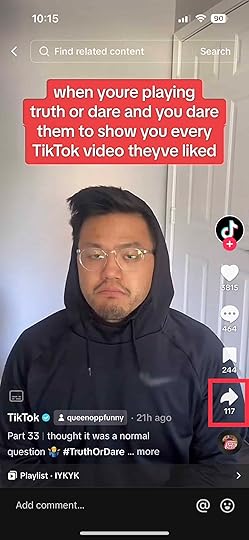
2. Tap the arrow button: Once you’ve picked the video you want to share, tap the arrow button on the lower right side of the screen. Doing so will direct you to a tab where you can pick the platform to share the TikTok video you selected.
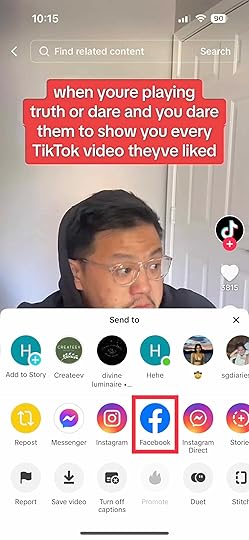
3. Share to Facebook: Tap on the Facebook icon, as shown below. This will lead you to a TikTok pop-up, which will ask for your permission to access your Facebook app.
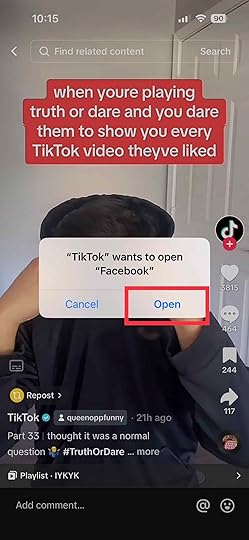
4. Allow access: The TikTok app will request access to open the Facebook app. Tap “Open.”
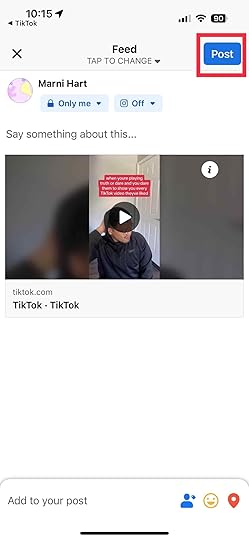
5. Provide a caption and set your privacy settings: You need to provide a caption that resonates with your content and target audience. Also, you should void using foul language to avoid the violation of Facebook’s guidelines. Finally, decide if you want your post to be private or public in the privacy settings.
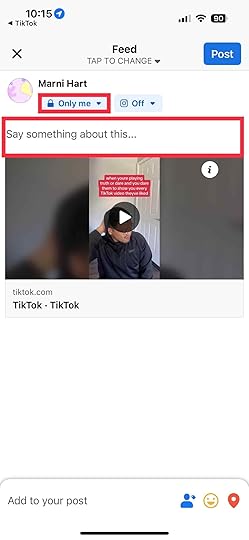
6. Post: Once everything is set and done, tap “Post.” Check the shared video on your profile. The video should appear with the caption you provided on TikTok.
Read more: TikTok Ads vs. Facebook Ads.
Sharing TikTok Videos to Your Facebook StoryUnfortunately, the TikTok app does not allow sharing TikTok videos to your Facebook story directly. However, you can share downloaded videos instead. You can follow these steps to add TikTok videos on your Facebook story:
1. First, open the TikTok app.
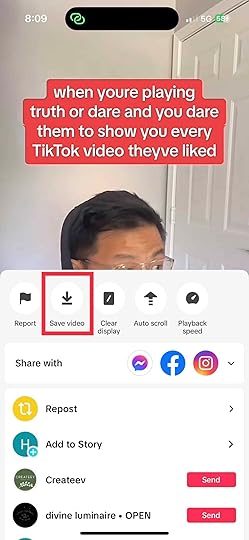
2. Long press the video you want to download. Afterward, the option to download your video will pop up. Tap “Save Video.”

3. Launch your Facebook app.
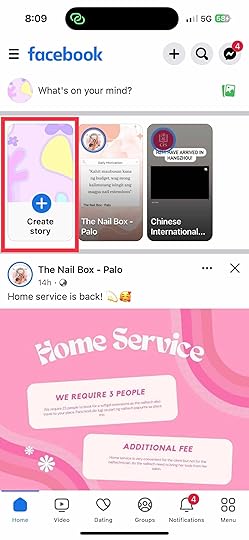
4. Tap “Create Story”.
5. Select your video.
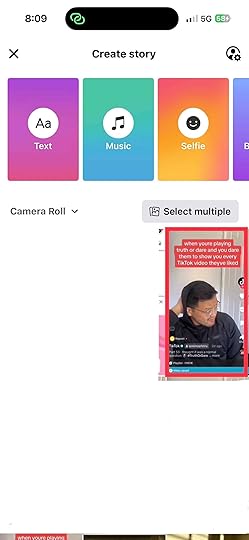
6. You can add stickers, filters, or effects to the video you want to post on your TikTok story.
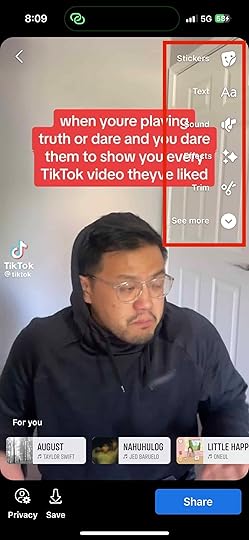
7. Set your privacy settings.
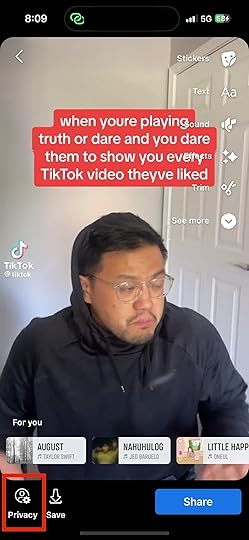
8. When you are satisfied with your video, tap “Share.”
Best Practices for Cross-PromotionCross-promotion between TikTok and Facebook can be a powerful strategy to amplify your content’s impact. Here are some straightforward best practices to make the most out of this synergy:
1. Sharing Facebook links on TikTok.Don’t just share your TikTok videos on Facebook. Share your Facebook content on TikTok, too! This reciprocal approach not only diversifies your content but also encourages your followers on both platforms to explore your multifaceted online presence.
2. Engaging with comments and reactions.Engagement is the heartbeat of social media. When you cross-promote your TikTok videos on Facebook, be proactive in responding to comments and reactions. Acknowledge your audience’s feedback, answer their questions, and encourage discussions. This two-way interaction fosters a sense of community and can drive higher engagement rates.
3. Tailoring content for each platform.While cross-promoting, remember that TikTok and Facebook have distinct vibes. Tailor your content to suit each platform’s audience preferences. What resonates on TikTok might need a tweak to perform optimally on Facebook. Adapt your captions and presentation style to align with the nuances of each platform.
4. Utilizing stories and live streams.Both TikTok and Facebook offer features like stories and live streams. These tools can be your allies for cross-promotion. Share snippets of your TikTok videos on stories to tease your Facebook audience. Similarly, going live to discuss your TikTok journey or share behind-the-scenes can forge deeper connections.
4.5 Measuring and adjusting.Keep an eye on the performance of your cross-promotion efforts. Utilize analytics to gauge which types of content resonate more with each audience. Use these insights to refine your strategy. Perhaps your TikTok dances get more love on Facebook or your how-to videos shine on TikTok. Flexibility is key.
Final Thoughts on How To Share TikTok Videos on FacebookReady to take your TikTok videos to new heights by sharing them on Facebook? With these simple steps and best practices, you can unlock a world of cross-platform potential. Remember, each platform has its own unique dynamics. By strategically adapting your content, engaging with your audience, and embracing the reciprocity of cross-promotion, you can maximize your reach and impact.
Do you want to use advertise your brand via TikTok? Work with the best advertising agency and to guarantee the best results!
Frequently Asked Questions on How To Share TikTok Videos on FacebookCan I share someone else’s video on Facebook?Sharing someone else’s TikTok video on Facebook without proper authorization could infringe on their copyright.
Do the views and engagement count from the original TikTok video when shared on Facebook?No, the views and engagement incurred on TikTok won’t carry over to the Facebook post. The views and comments will be counted separately on each platform.
Will my TikTok video’s caption and hashtags carry over when shared on Facebook?You can customize the caption when you share a TikTok video on Facebook. You can also use hashtags on TikTok, but ensure it fits well on Facebook.
Related ArticlesHow To Edit TikTok Captions
Do you want to know how to edit TikTok captions?
Captions play a vital role in conveying messages, driving engagements, and boosting accessibility on TikTok. Hence, a poorly written caption can hinder the success of your TikTok video.
You may have noticed that you can’t edit TikTok captions directly on the app after uploading. Don’t worry, you can still edit your TikTok captions by deleting and reposting your videos. What’s more, you don’t have to create a new video!
Follow these steps to edit captions on TikTok videos after posting:
1. Go to Your ProfileYour profile icon is the last icon on the left part of the screen. Tapping the profile icon will lead you to your profile page, where you will find all your uploads.

Select the video you want to edit and save it. To save your video, tap the tree-dot icon on the left side of the screen. Then, tap “Save Video.”

To upload your video, tap the + symbol. It will lead you to the option to either upload or film a new TikTok video. Then, tap “Upload”.

Look for the video you downloaded earlier, then tap it until its circular button turns red. Clicl “Next”. Doing so will lead you to where you can add a new caption.
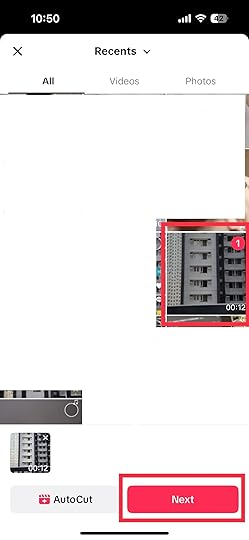
Write the caption and hashtag that matches your content. You have to ensure that your content and caption follow TikTok guidelines mandated. Likewise, make sure that it gives context to your content. It should help viewers understand what they are about to see.
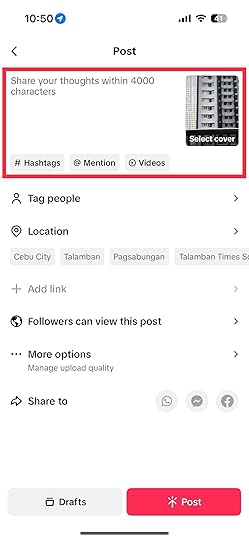
Once everything is set and done, post your video.
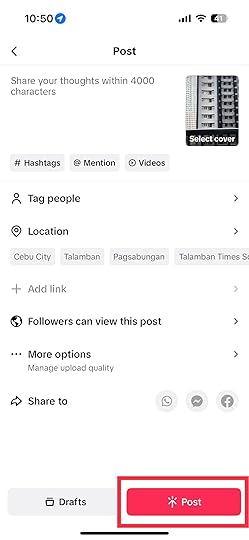
You may delete your first video after uploading the edited version.
Read more: How To Trim a Sound on TikTok.
Best Practices for Effective TikTok CaptionsCreating compelling captions is an art that can significantly enhance your TikTok game. Here are some straightforward tips to make your captions pop:
Keep it concise: Short and sweet is the name of the game. Aim for captions that quickly get to the point and match the pace of your video.Use emojis: Emojis are like visual spices for your captions. They add flavor, personality, and can convey emotions in an instant.Incorporate hashtags: Strategic use of hashtags can widen your video’s reach. Research and include relevant hashtags that align with your content.Spark curiosity: A curious caption can be irresistible. Tease viewers with a question or a hint about what’s coming, encouraging them to hit that play button.Provide context: Your caption should complement your video, not confuse. Give a brief overview of what the video is about to pique interest.Final Thoughts on How To Edit TikTok CaptionsNow that you know how to edit TikTok captions, you have the key to unlock greater engagement, accessibility, and impact for your videos. Remember that captions aren’t just words; they’re bridges that connect your content with your audience’s interests.
Do you want to use TikTok as an avenue to drive sales? Consult the best marketing agency on the market!
Frequently Asked Questions on How To Edit TikTok CaptionsWhat is the three-dot icon on TikTok?TikTok has two three-dot icons; the first is the comments icon, and the second is the “More” icon. The former houses the comments that a video has incurred, while the latter shows your varied sharing options.
Will editing the caption affect the engagement on my TikTok videos?Editing the caption of your TikTok video may or may not affect the engagement of your TikTok video. If viewers like your new caption, it may generate more attention than your original content.
Is there a limit to how many times I can edit the caption of a TikTok video?You can re-upload videos as many times as you like. However, doing so may confuse your viewers. Hence, it is important to do it sparingly.
Related ArticlesHow To Use Two Effects on TikTok Videos

Are you searching for how to use two effects on TikTok videos? You are in the right place. TikTok video editor offers a wide range of tools that let your creativity shine. One such way is combining two effects to edit videos and create captivating content that stands out from other TikTokers. With this article, you can master editing videos using TikTok effects and TikTok filters.
How To Use Two Effects on TikTok: New VideoFollow the steps below to use multiple effects on new videos on the TikTok app:
Step 1: Launch TikTok and Create a New VideoFirst, open TikTok and log into your device. Click the “+” icon at the center of the bottom of the screen to start recording a new video.
Step 2: Explore and Add EffectsOn the right side of the recording screen, tap “Effects” to open the effects on Tiktok. You can scroll through all the effects in the library and select the first effect you intend to use. The first effect would serve as the foundation for your creative concoction.
Step 3: Activate The First EffectWith your chosen effect selected, follow the on-screen instructions to apply it to your TikTok video. Different effects require various interactions, such as tapping, swiping, and holding down.
Step 4: Capture Your Video and Save ItPress and hold the red button to start recording your video. The first effect you selected will be in action during the recording. Once you’ve recorded your video with the first effect, press the checkmark icon to confirm and move to the next step.
Step 5: Choose and Adjust the Second EffectTap the “Effects” icon again to access the TikTok effects library. You can scroll through the multiple effects in the library and pick the second effect you intend to combine with the first one. This effect will overlay the first, creating a delightful blend. Many TikTok effects offer customization options. You can swipe your second effect left or right to adjust its intensity to your liking.
Step 6: Record with the Second EffectWith the second effect, hold down the red recording button again to capture your TikTok video. This time, the combination of both effects will be visible. Once you record the two effects, press the checkmark icon to move to the next page.
Step 7: Edit Your Video and Enhance it with Captions and MusicTikTok provides some basic tools on its editing screen, allowing you to trim, cut, or reorder your clips to perfection. Tap “Text” to add captions that align with your video’s theme, and explore the “Sounds” library to find the perfect background music.
Step 8: Choose Your Cover Image and Craft an Engaging CaptionYou can select an appealing cover image that encapsulates the essence of your video. Could you write a caption that piques viewers’ curiosity? Doing this will encourage TikTok users to engage with your video.
Step 9: Set Privacy Settings and Share Your Master PieceChoose whether you want your TikTok video to be viewable by your followers or everyone. Tap the “Post” button to post your creatively enhanced video with the TikTok community.
How To Use Two Effects on TikTok: Recorded VideoFollow the steps below to add two effects to your already-recorded video after opening TikTok and accessing your profile page:
Step 1: Select Your VideoYou can select the video you intend to enhance with two effects from your uploaded videos.
Step 2: Tap “Edit”Tap the “Edit” icon below the video on the preview screen.
Step 3: Tap “Effects”Under the video, you will see a list of options. Tap on “Effects” to access the effects Tab.
Step 4: Choose Your First EffectOn the effects tab, choose the first one you intend to use. Tap on it to apply it to your TikTok video content. You can follow the on-screen instructions to adjust the intensity of the effect. Once satisfied with the first effect, press the checkmark or “Save” icon to apply it to your content.
Step 5: Return to TikTok Effects Library and Choose Your Second EffectTap the “Back” or “Effects” icons to return to the TikTok effects library. Please scroll through the effects on TikTok again and select the second one you intend to use in combination with the first. Like the first one, you can change the settings of the second effect if the option is available. After customizing the second one, press the checkmark or “Save” icon to apply it to your content.
Step 6: Preview Your Video And Save Your ChangesClick the “Play” icon to preview your video content with both effects applied. If you are satisfied with the combination of the effects, tap the “Save” button to apply the changes to your content.
Step 7: Add Captions and Music and Choose a Cover ImageAfterward, you can add texts and background music to your content based on your preferences. You can select a cover image representing your video well when displayed on your profile.
Step 8: Adjust Privacy Settings and Post Your VideoChoose if the video should be publicly visible or just your followers. Afterward, Tap the “Post” button to post your video with combined TikTok effects.
Tips for Effective Use of Two Effects on TikTokBalance is Key: Choose effects that complement each other and ensure they don’t overpower the video’s message.Experiment: Try various combinations to discover unique effects that match your style.Stay Relevant: Select effects that align with your video’s theme or emotion.Sync with Music: Harmonize effects with the background music to create a synchronized experience.Know Your Limits: Don’t overload your videos with too many effects.ConclusionUsing two effects in a TikTok video is like blending colors on an artist’s palette. It enables you to add depth, flair, and uniqueness to your video, grabbing the viewer’s attention and making your content memorable. Follow the steps and tips in this article to add more than one effect to your videos.
Are you looking to set off an ad campaign on TikTok? Could you allow the best TikTok advertising agency to handle it?
Frequently Asked QuestionsCan more than two effects be used on a single TikTok video?Currently, TikTok allows users to apply a maximum of two effects per video. Combining two TikTok effects offers a creative way to enhance your video without overwhelming them.
Can I change the order of the effects after applying them?No, once the effects are applied, you can’t change them. The first one serves as the base, and the second overlays it. You can plan your effects sequence before applying them to your TikTok video.
Are all effects adjustable?While some are adjustable, not all have customizable settings. If an effect allows adjustments, you can modify its intensity or style during application.
What Is TikTok: Get All the Details

What is TikTok?
In today’s fast-paced digital world, social media platforms come and go, but TikTok seems to have carved out its unique space. It’s not just an app; it’s a cultural phenomenon that has captured the attention of over 1 billion people.
Join us as we unravel the world of TikTok, exploring its origins, features, and impact.
Proceed further to discover the following topics:
What is TikTok?The Genesis of TikTokTikTok’s Key Features and FunctionalityHow Can Brands Use TikTok?What is TikTok?TikTok is a social media platform that lets users create, discover, and share videos. The videos are usually short and set to music. The app is known for its user-friendly interface, creative tools, and the For You Page (FYP), which personalizes content recommendations.
Additionally, TikTok users can film themselves dancing, lip-syncing, or sharing various talents. With a global community, TikTok has become a hub for trends, challenges, and viral content. It is influencing pop culture and reshaping the way we consume entertainment in bite-sized, engaging formats.
The Genesis of TikTokThe story of TikTok begins with its predecessors, Musical.ly and Douyin. Musical.ly was a lip-syncing app popular in the early 2010s, especially among young users. In 2016, Chinese tech company ByteDance launched Douyin in China, allowing users to create and share short videos.
Recognizing the potential beyond China’s borders, ByteDance purchased Musical.ly for around $1 billion and merged it with Douyin, creating what we now know as TikTok.
Understanding TikTok: Features and FunctionalityTikTok stands out with its array of features designed to facilitate creativity, engagement, and content discovery. Here’s a breakdown of its key functionalities:
Short-form video creation: TikTok allows users to easily create and share short videos to foster quick and captivating content. Though the platform only allowed 15-second videos initially, users can now create TikTok videos up to 10 minutes long.Creative tools: TikTok offers an assortment of filters, effects, and text overlays to make any video pop.Soundtracks: Users can add songs and sounds to TikTok videos, enhancing the mood and narrative.Hashtags and challenges: Hashtags and challenges spark trends and encourage users to participate, driving community engagement.Duet and stitch features: These tools enable users to collaborate with other users by creating side-by-side duets or stitching clips together.For You Page (FYP): TikTok’s algorithm-driven FYP recommends content personalized to users’ preferences, promoting content discovery.User interactivity: Viewers can like, comment, share, and even send virtual gifts to content creators, fostering a sense of connection.Live streaming: Users can broadcast live videos, interact with viewers in real time, and receive virtual gifts as a form of appreciation.In-app editing: The app has basic video editing tools that allow users to seamlessly trim, merge, and adjust clips.How Can Brands Use TikTok?TikTok offers brands a dynamic platform to connect with audiences in novel ways. Here’s how your brand can utilize TikTok effectively:
Authentic content: Create videos that align with the platform’s authenticity, showcasing the human side of your brand.TikTok ads: You can invest in TikTok ads to market your products and services on the platform. For the best results, consult a TikTok advertising agency.Participate in trends: Engage in viral challenges and trends relevant to your brand’s identity, enhancing visibility.Influencer collaborations: Partner with TikTok influencers to tap into their engaged followers and gain credibility.User-generated content: You should encourage users to create their own video relating to your brand through hashtag challenges and trends. This fosters community engagement.Behind-the-scenes: Offer glimpses into your brand’s workings by posting behind-the-scenes videos. This builds transparency and trust.Market Research: Use TikTok’s insights to understand audience preferences and trends.Final Thought on What is TikTokTikTok isn’t just a social media app; it’s a global movement reshaping how we connect and create. With its short videos and vibrant community, it’s showing us the power of creativity and shared experiences. It’s a testament to social media’s impact on our digital lives and beyond.
Are you considering marketing your products and services on TikTok or other social media platforms? Get the best social media advertisement agency.
Frequently ask Questions on “What is TikTok?”Can I post a video on TikTok that I get on other platforms?Yes, you can post videos that you obtained from different platforms.
Do I need a TikTok account to watch videos on TikTok?You don’t need an account to watch TikTok videos on TikTok’s website, but you will need one to watch videos on the TikTok app.
Does TikTok have privacy settings for my account?TikTok offers privacy settings that give you full control over your account’s privacy. You can adjust these settings to determine who interacts with you.
Related ArticleUnveiling the Magic: What Is Stitch on TikTok?
August 24, 2023
How To Loop Music on TikTok: Creating Catchy Sounds
Would you like to learn how to loop music on TikTok?
If you’ve ever found yourself tapping your feet to catchy tunes on TikTok, you’re not alone. The secret behind those addictive videos lies in the art of looping music.
Whether you’re a TikTok dancer, a storyteller, or a DIY enthusiast, you can elevate your content by learning how to loop music. This article will show you how to loop a song on TikTok.
Step 1: Open TikTok and Choose Your VideoOpen the TikTok app and tap the “+” button to create a new video. Alternatively, you can choose an existing video from your gallery.
Step 2: Access the Music LibraryTap the “Sounds” icon located at the top of the screen. This will open TikTok’s music library, where you can explore various songs and sounds to find the perfect loop for your video.
Step 3: Search for a SongUse the search bar to enter keywords or the song name you want to loop in the TikTok music library. Browse through the search results and tap on a track that would fit your video. You can preview different song parts by dragging the timeline at the bottom. Once you’ve found the right section, tap the checkmark to select the music.
Step 4: Set the LoopOn the video editing screen, you’ll see a “Trim” button at the bottom. Tap on it. After that, adjust the start and end points of the song to create the desired loop. Make sure the loop flows seamlessly and sounds natural. Click the checkmark.
Step 6: Adjust Volume and Effects (Optional)Before finalizing the loop, you can adjust the music volume using the volume slider. Additionally, you can experiment with TikTok’s effects to enhance the audiovisual experience of your looped video.
Step 7: Preview and EditTap the play button to preview your video with the looped music. You can proceed to the next step if you’re satisfied with how it sounds and looks. If not, you can go back and adjust the loop points or try a different section of the song.
Step 8: Finalize and ShareOnce you’re happy with the loop, tap the “Next” button. You can add captions, stickers, and other creative elements to your video here. Write a caption that complements the loop and makes your video stand out. Then, select your audience preferences and tap “Post” to share your looped music video with the TikTok community.
Benefits of Using a Sound Loop in a TikTok VideoUsing a sound loop on TikTok will impact your video track in various ways.
Reinforce the message: Looping music files into your TikTok video can reinforce the theme of your video content. Repetition can emphasize certain moments or emotions, making them more relatable and memorable to users.Engagement: Music can captivate audiences and keep them engaged. Looping catchy audio clips can entice viewers to watch your video content multiple times. This will boost your content’s visibility and help you gain more followers.Creating trends: Some songs become popular on TikTok due to their addictive nature. Looping popular music allows you to contribute to or create new trends and gain recognition within the TikTok community.Final Thoughts on How To Loop Music on TikTokLooping an audio file on TikTok can turn a simple video into engaging and memorable content. Following the steps we provided and incorporating creative elements, you can create videos that amplify your message and resonate with viewers. So, experiment with looping music files, and your catchy creations might become the next TikTok sensation.
Do you want to run an ad campaign on TikTok? Let the best TikTok advertising agency handle it.
Frequently Asked QuestionsCan I loop music on TikTok?Yes, you can loop almost any music available in the TikTok library. However, the looping process requires picking specific parts of the music. Therefore, choosing a part with a catchy chorus or a repetitive element is best to make a seamless loop.
How do I choose the right segment of the music to loop?When adding music to your video, TikTok provides a slider allowing you to select a portion. Please look for parts of the music with a repetitive beat, a catchy chorus, or lyrics that align with your video’s content. You can experiment with different sections to select the best one for your loop.
Can I loop a song while using other effects on TikTok?Absolutely! TikTok offers a variety of effects, filters, and text overlays that you can use to enhance your video. You can easily incorporate these effects along with the looped song. Combining looped songs with creative effects can make your video more eye-catching and entertaining.
Related ArticlesHow To Create a Sound on TikTok
TikTok Brands: The New Age of Digital Marketing

How big are TikTok brands in social media marketing?
In the ever-growing social media landscape, TikTok has developed into a prominent platform that has changed how users create content online. It has also transformed how top brands interact with their audience.
If you’re interested in how businesses are connecting with their audience via TikTok, you’re in the right place. In this blog post, we’ll uncover the phenomenon of TikTok branding, strategies, challenges, and the platform’s exciting potential.
Understanding TikTok’s Impact on BrandingTikTok isn’t just another social media platform – it’s a game-changer for brands. Let’s delve deeper into the ways TikTok is influencing branding strategies:
1. TikTok’s demographics and audience behavior.TikTok’s user base primarily consists of Gen Zs and Millennials. This demographic is known for its preference for authentic, visually appealing, and fast-paced content. Understanding their interests, values, and online behaviors is crucial for brands looking to establish a genuine connection.
2. The power of short-form video content.In an era of information overload, TikTok’s short-form videos are a breath of fresh air. These bite-sized clips offer brands a unique opportunity to convey their message succinctly and creatively. Capturing attention quickly is essential, and TikTok provides the perfect canvas for this purpose.
3. The viral nature of challenges and trends.
TikTok thrives on challenges and trends that spread like digital wildfire. Brands that leverage these viral phenomena can significantly amplify their reach and engagement. By participating in or initiating challenges, brands can position themselves at the forefront of trending topics, showcasing their relevance and creativity.
Building a TikTok Brand: Key StrategiesCreating a strong brand presence on TikTok involves a mix of creativity, authenticity, and strategic thinking. Here’s how you can lay the foundation for a successful TikTok brand:
1. Define your brand identity and voice.Before you start creating content, establish a clear understanding of your brand’s identity and the voice you want to project. Are you fun and quirky or informative and authoritative? Consistency in your brand’s personality will help you connect better with your target audience.
2. Craft compelling narratives.Despite the short duration, your TikTok videos should tell a story. Start with attention-grabbing openings, build anticipation, and deliver a satisfying conclusion. The key is to make an emotional connection in a brief span.
3. Leverage user-generated content.
Encourage your audience to participate in creating content related to your brand. User-generated content builds a sense of community and enhances your brand’s authenticity. Reposting user-generated content demonstrates that your brand values its audience’s input.
4. Collaborate with TikTok influencers.Partnering with TikTok influencers can give your brand broader reach and credibility. Look for influencers whose style aligns with your brand and let them take the reins to create authentic and engaging content.
5. The role of music and sound
Music and sound are a big deal on TikTok. Utilize popular songs, sounds, and effects to enhance the appeal of your content. Associating your brand with specific sounds can also contribute to brand recognition.
Read more: How to add music to TikTok videos.
Navigating Challenges and Best PracticesWhile TikTok offers exciting opportunities, it’s important to navigate potential challenges and adhere to best practices to ensure your brand’s success.
1. Stay updated on trends.TikTok trends change rapidly. Keep a close eye on emerging challenges, popular hashtags, and content formats to stay relevant. Flexibility and adaptability are key to maintaining an engaging presence.
2. Overcome creative constraints.TikTok’s short format might feel limiting, but it’s also an avenue for creativity. Embrace the challenge of conveying your brand message succinctly and creatively. Experiment with storytelling techniques that make the most of the platform’s brevity.
Read more: How to make good TikTok videos.
3. Balance promotion with engagement.While promoting your products or services is essential, don’t make every post overtly promotional. Mix in entertaining and relatable content that engages and entertains your audience. Strike a balance between promotional content and content that adds value or entertainment.
4. Handle potential backlash effectively.Negative comments or backlash can arise on any social platform. Address criticism gracefully and professionally. Show that your brand values feedback and is committed to improvement. Turning negative interactions into positive ones can enhance your brand’s reputation.
5. Measure success with KPIs.Determine key performance indicators (KPIs) that align with your TikTok goals. Metrics such as engagement rates, follower growth, and video shares can help you gauge your brand’s performance. Regularly analyze these metrics to fine-tune your strategy.
Case Studies: Successful TikTok Branding CampaignsReal-world examples can provide valuable insights into effective TikTok branding. Here are some successful TikTok brands:
1. Fenty BeautyFenty Beauty is one of the most popular fashion brands. However, it is also about empowerment. This brand enchants beauty enthusiasts because it combines its diverse range of products with makeup challenges, tutorials, and real user reviews.
2. NikeNike is one of the most successful leading fitness brands, but it is still a lifestyle. It keeps its audience engaged and inspired by creating energetic challenges, athlete spotlight, and behind-the-scenes TikTok content.
3. NBAThe NBA has slam-dunked its way into the hearts of many TikTokers. Basketball lovers are an engaged community on TikTok because the NBA creates relevant content like dance-offs, captivating highlights, and interactive fan experiences.
4. Elf CosmeticsElf cosmetics sprinkles fairy dust on TikTok. Budding artists and beauty fanatics are loyal to this brand due to its affordable products, makeup tutorials, and viral challenges.
5. Red BullRed Bull gives users wings to engage. This brand fuels users’ adrenaline and imagination with exhilarating stunts, user-generated content, and extreme sports showcasing.
6. ChipotleChipotle spices up the platform with mouthwatering quality videos. Their menu showcases, challenges and creative storytelling have food flocking to their TikTok channel.
7. GuessGuess is making fashion statements on TikTok. Fashion-forward TikTokers are attracted to this brand due to its dance challenges, trendy accessories, and stylish outfits.
8. NetflixNetflix transforms entertainment into an interactive experience. Teasers, behind-the-scenes glimpses, and user-created content keep users eagerly awaiting their next binge-worthy show.
9. ChobaniChobani is more than just yogurt; it is a delightful experience. Their food hacks, recipes, and user-generated content have lovers and food lovers returning for seconds.
10. CrocsCrocs is taking steps to win hearts. Their comfy shoes, dance challenges, and fun user-created content highlight their brand’s appeal and versatility.
ConclusionThe rise of TikTok brands highlights the power of creativity, originality, and user engagement. As the digital world evolves, brands that harness TikTok’s unique features will reap many benefits. TikTok is poised to help more brands connect with audiences and build lasting relationships.
Are you thinking of running an ad campaign on TikTok? Let the best TikTok advertising agency handle it!
Frequently Asked QuestionsWhat is a TikTok brand?A TikTok brand is a business or company that creates a TikTok channel to promote its products, services, or values through creative and engaging content.
How can my brand benefit from TikTok?TikTok provides a unique platform to connect with a large and engaged audience. Your brand can increase visibility, foster originality, and engage the younger generation through creative content, challenges, and influencer collaborations.
Are the brands on TikTok only for Gen Z?While TikTok is popular among younger users, its audience is diversifying. Brands can tailor their content to target specific age groups, interests, and demographics.
Related ArticlesUnveiling the Magic: What Is Stitch on TikTok?
What is Stitch on TikTok?
Stitch is an innovative feature that facilitates collaborative content creation on TikTok. With this feature, you can take someone else’s TikTok video and add your own twist.
This article will explain what Stitch is, how it works, and how to use it.
Understanding TikTok’s Stitch FeatureAt its core, the Stitch feature is like a creative puzzle piece that lets you add your unique touch to another user’s video. Unlike simple comments or duets, Stitch enables you to take a snippet of someone else’s content and incorporate it into your own, seamlessly. This feature not only sparks collaborations but also encourages a dynamic flow of ideas and perspectives.
Read more: How to duet on TikTok.
How To Stitch on TikTokAre you ready to stitch videos on TikTok? Follow this step-by-step guide:
1. Find an existing video to stitch. Next, tap on the arrow on the right side of the screen.
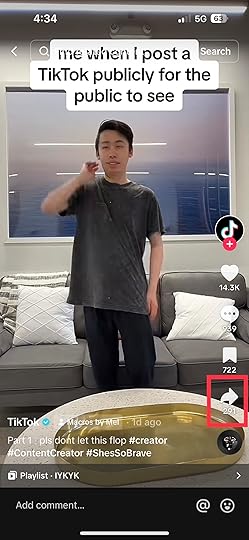
2. Select the “Stitch” settings.
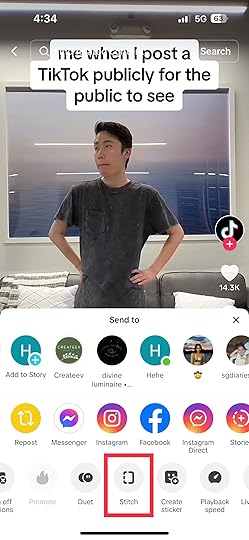
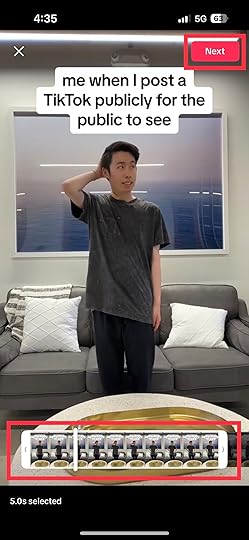
3. Trim the video you want to stitch and tap Next. You are allowed to stitch up to five seconds of the video segment. Hence, you should select the most impactful part of the video.
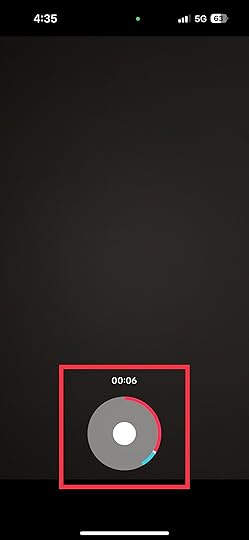
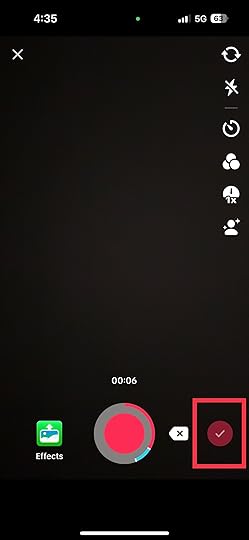
4. Film your response. It should be at least 3 seconds long. Once done, tap the check mark.
5. Preview your video.
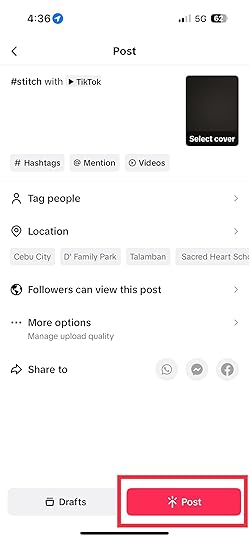
6. Once satisfied, tap Next and write your video description.
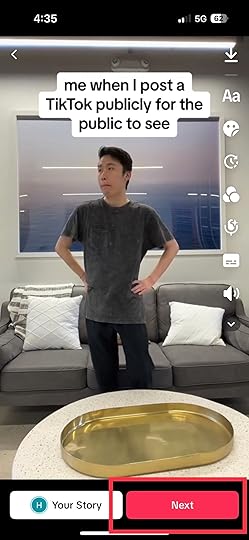
7. After everything is set and done, tap Post.
There are several reasons you should use Stitch on TikTok. They include:
Collaborative Creativity: Stitching lets you blend your creativity with others’ content, leading to unique and collaborative videos that showcase multiple perspectives.Joining Trends Effortlessly: You can easily hop onto trending challenges or discussions by stitching relevant videos, adding your spin to the conversation.Building on Existing Content: Stitch allows you to take inspiration from a video and expand upon it, offering new insights, humor, or commentary.Connecting Communities: By stitching videos from different niches, you bridge communities and foster engagement between creators with diverse interests.Enhancing Storytelling: Stitching enables you to create layered narratives by incorporating multiple viewpoints or adding context to existing stories.Showcasing Your Style: While stitching, you can infuse your personal style, humor, or creativity, helping your content stand out in a sea of videos.Boosting Engagement: Stitched content often attracts more engagement, as viewers appreciate the interplay between original and added elements.Increasing Discoverability: When you stitch a popular video, your content can gain visibility through the original video’s audience and beyond.Final Thoughts on “What Is Stitch on TikTok?”TikTok’s Stitch feature is a powerful tool that opens the door to endless creative collaborations and connections. It’s a way to join the ongoing conversation, add your unique twist, and spark new trends within the vibrant TikTok community. So, don’t hesitate to explore the world of stitching, and let your creativity shine on this dynamic platform!
Are you interested in promoting your products and services on TikTok? Get the premium TikTok Advertising agency!
Frequently Asked Questions on “What Is Stitch on TikTok?”How does the Stitch feature enhance engagement on TikTok?The Stitch feature encourages engagement by allowing users to take a specific segment from another user’s video and add it to their video. With this, they can participate in trends and collaborate creatively, leading to more interaction and dynamic conversations.
What is the difference between Stitching and Dueting?The Stitch feature allows you to take a segment from another user’s video and add it to your video. Meanwhile, the Duet feature helps you make a video that can be played with another user’s video in a side-by-side format.
Are there any guidelines for using the Stitch feature?Following TikTok’s community guidelines and copyright policies is important when using the Stitch feature. Respect the original creator’s content and ensure your stitched video contributes well to the conversation.
Related ArticlesAugust 23, 2023
How To Use Green Screen Video TikTok in 6 Steps
Do you want to know how to use green screen video on TikTok?
The green screen effect allows TikTok creators to transport themselves to exciting places and unique backgrounds. You can join the fun and replace your video’s background with anything your imagination can conjure.
This guide will break down the process of creating green-screen videos on TikTok into easy-to-follow steps.
What Is the Green Screen Feature on TikTok?The green screen feature on TikTok allows users to replace the background of their videos with a different image, video, or animation. This feature is also known as the “Chroma Key” effect. While traditional green screen setups can be complex, TikTok’s user-friendly green screen effect simplifies the process. This makes it accessible to all creators.
When creating content using the green screen feature, users record themselves against an in-app green background and then add their desired background. After that, the green background is automatically removed, leaving a space that can be filled with another image, video, or animation. This feature has become popular for storytelling, comedy, tutorials, and other types of content where a new background can change the video’s impact.
Read more: How to combine photos and videos on TikTok.
How Do I Use the Green Screen Effect on TikTok?Ready to dive into the magic of green-screen videos? Let’s get started with the creation process:
1. Tap the + button.
2. Go to “Effects.”
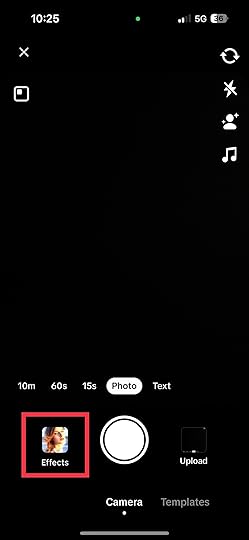
3. Proceed to “Tool.”
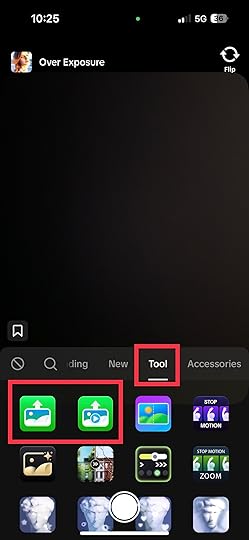
4. Select the green screen icon. The first icon from the left is for images, and the second green icon is for videos.
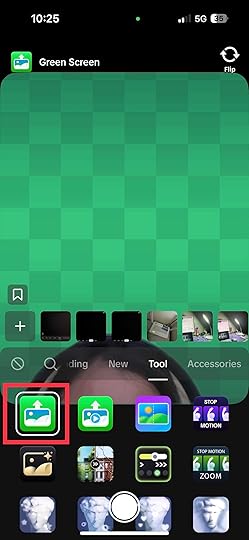
5. Select the pictures you want to set as your backdrop from your gallery. Selecting images or videos from your camera roll lets you integrate personal visuals into your green-screen TikTok creations.
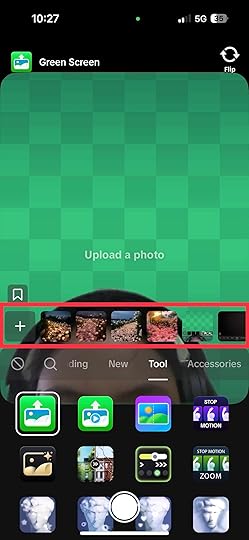
6. The same process will be applied if you use the green screen feature for videos.
Pro Tip: Experiment with different backgrounds to see what works best for your video’s theme and style. Don’t be afraid to get creative and let your imagination run wild!
Third-Party Apps for Creating Green Screen VideosIf you want to create green screen videos outside of TikTok, several third-party apps offer advanced editing capabilities and greater control over your content. Here are a few popular options:
Chromavid: Chromavid is a user-friendly app for iOS and Android devices. It allows you to shoot videos against a green screen and replace the background with images or videos from your device’s library. The app offers tools for adjusting the chroma key settings to achieve a seamless transition.KineMaster: KineMaster is a versatile video editing app for iOS and Android. While it’s not specifically designed for green screen videos, it offers advanced editing features that allow you to layer videos, add effects, and control chroma key settings. This app is great for those who want more editing control and flexibility.VivaVideo: VivaVideo is another popular video editing app for iOS and Android. It offers a chroma key feature that lets you create green-screen videos. You can apply this effect to replace the green background with images or videos of your choice.iMovie: If you’re an iOS user, iMovie is a powerful video editing app with a chroma key feature. It allows you to easily create green screen videos, along with a range of other editing tools.PowerDirector: Available for iOS and Android, PowerDirector is a comprehensive video editing app with a chroma key feature. It provides a range of options for adjusting the green screen settings and creating professional-looking videos.FilmoraGo: FilmoraGo is an intuitive video editing app for iOS and Android devices. It offers a chroma key feature that enables you to create green-screen videos and replace the background with images or videos.Adobe Premiere Rush: For those looking for professional-level editing capabilities, Adobe Premiere Rush is available on iOS, Android, and desktop. It offers a chroma key feature among its extensive editing tools, allowing you to create high-quality green-screen videos.Final Thoughts on How To Use Green Screen Video TikTokCreating green screen videos on TikTok can be an exciting journey. By following the steps outlined in this guide, you can now transport yourself anywhere you imagine. The TikTok green screen feature will enhance your storytelling and engage your TikTok audience like never before.
Brands around the world promote their products and services on TikTok. You can also use its ever-growing user base by hiring the best TikTok ad agency.
Frequently Asked Questions on How To Use Green Screen Video TikTokCan I adjust the size and position of my video on the new background?
Yes, you can use pinch and drag gestures to adjust the size and position of your video on the new background to create the desired effect.
Can I add text or stickers to my green screen video on TikTok?You can enhance your green screen video by adding text, stickers, and other effects to make your content more engaging.
Are there tips for making successful green screen videos on TikTok?You need to use high-quality images or videos for backgrounds. Also, pay attention to lighting to avoid shadows and uneven color.
Related ArticlesHow To Combine Photos and Videos on TikTok: A Simple Guide

Do you want to learn how to combine photos and videos on TikTok?
TikTok creators merge videos and photographs to enhance their content, and so can you. If you run a business on TikTok, you can provide various information about your products and services by combining videos and photos.
In our simple guide, we will discuss several ways to combine videos and photos on TikTok.
Method 1: How To Combine Video and Photos on Tiktok Using the App’s CameraOne of the simplest methods to merge photos and multiple video clips on TikTok is using the app’s camera. Follow the steps below to use this method:
Tap the “Plus” option at the bottom of the home screen. After that, you can begin recording multiple video clips.Tap the “Timer” icon above the recording screen to choose the duration of your TikTok video clips.Before beginning the timer, drag the red bar on the audio track’s right side to the length you want your TikTok video clips to stop.Redo the recording of the video clip multiple times based on the number of videos you want to merge.After recording your TikTok video clips, click the red “check-in” icon and add your photos. Once you add your pictures, tap the “effect” icon beside the record button.Select the effect with an arrow image to add photos from your camera roll.Once your camera roll appears, scroll through your photos and make your selections.Afterward, press the “Record” icon for at least three seconds to record photos as part of your recorded TikTok videos.Add more photos to your TikTok videos by clicking the “Effects” button again. To record a different TikTok video, press the “Effects” and the “Stop” icon to erase the effect and start recording a new project. Use the effects again to add an image or more to the new project. Once you finish recording and merging multiple videos and photos, click the “Next” button to edit your TikTok video.
Method 2: Post Photos and Videos SimultaneouslyAnother simple way to combine videos on TikTok with pictures is by uploading them from your camera roll at the same time. Follow the steps below to merge videos to photos from your Android or iOS device memory:
The first step is to plan your content’s theme and think of the multiple clips to use.Go through your device to choose the photos and video files you are using.Open the TikTok app and click the “+” icon at the bottom of your screen to create a new video.Look for the “Upload” button, normally represented by a symbol resembling a plus sign picture frame.Press the “Upload” sign to go through your camera roll. Select the photographs and video clips you want to add to your TikTok video content.Once you post your chosen media files, they will appear on the video editing screen. You can organize them in the order that best portrays your story.Click on each uploaded file to edit. Trim the videos and set the duration of the photographs and the videos for a seamless transition.Use TikTok’s built-in effects and music options to make your video fun.Add transition effects between the photographs and videos to blend perfectly.Go through your content and make the necessary adjustments.After reviewing your project, click the “Next” icon to post it.Interact with viewers who engage with your TikTok post by replying to their comments and messages.Method 3: Combine Draft Videos on TikTok and PhotographsThe TikTok app has several innovative features enabling you to upload more than short videos. The steps below will show you how to combine videos on TikTok and photos and create visually impressive and innovative storytelling content:
You can combine drafts by initially creating your story and contemplating how to harmonize it with your videos and photographs.Please select the draft photographs and videos you want to combine and ensure they align with your concept.On the TikTok app, click the “+” icon to begin your project and tap the “Upload” button to download your draft video clips and photographs.After uploading your photos and videos, arrange them in the order you want them to appear. Press and drag every element to the right position in the timeline.Click each video to see its editing options. Adjust the length of your video for a seamless flow, add effects filters, and adjust the speed to make it visually appealing.Use effects like zooms, fades, or swipes for smooth transitions between videos and photographs.After incorporating transitions and effects, add text captions to your content to give it more context. Also, to set the atmosphere and mood of your story, you can add music to your TikTok content.Save your edited content as a draft and preview it to ensure the photographs and videos you combined are well-ordered and alluring.Method 4: Combine Photographs and Videos on TikTok Using a Third-Party AppAlthough TikTok has an editing tool, you can download some third-party applications for more editing options. Below is a simple guide on how to combine TikTok videos and pictures using third-party apps:
Download a reputable third-party video editor app for combining pictures and videos.Gather the videos and photographs you want to merge. Ensure that they correspond with the concept and add context to your content.Open your preferred media editing app and upload your files.Organize your picture and video files in the app’s timeline in your preferred order.Use the app’s editing tools to boost the video’s visual appeal. You can cut, trim, and adjust your video’s length. Also, you can apply effects, filters, and transitions.Several top video editing apps have features enabling you to overlay photographs into your videos for TikTok. You can add your photograph as a separate layer for photo and video merge and adjust its duration and position as required.Please ensure your content looks perfect by previewing it and making adjustments.If you are satisfied with the result of your photograph and video merge, export it from the video editor app. Save it on your device as an MP4 file, the compatible format for TikTok.Open TiKTok, click the “+” icon, press the “Upload” button, and select your exported video.ConclusionYou can become a top creator on TikTok by mastering how to combine photos and videos. Using any of the methods in this guide, you can craft captivating stories that capture attention and resonate with your audience.
Are you considering running an ad campaign on TikTok? Save time and money by choosing the best TikTok advertising agency.
Frequently Asked Questions on How To Combine Photos and Videos on TikTokCan I combine photos and videos directly within the TikTok app?Yes, TikTok offers built-in features for combining photos and videos.
What if I want to add more advanced effects to my mixed media content?If you want more advanced editing options, export your media from TikTok and import it into third-party editing apps. This allows you to incorporate transitions, overlays, and music for a unique creation.
How can I ensure my mixed media TikToks stand out and engage viewers?To make your mixed media TikToks stand out, focus on captivating introductions, smooth transitions, and complementary music. Also, keep your content concise, maintain visual consistency, and actively engage with popular trends for increased visibility and engagement.
Related Articles