Vlad Catrinescu's Blog, page 11
December 9, 2019
Delve Blogs Retirement deadlines extended!
On November 22nd , I wrote a blog detailing the timelines of the retirement of Delve Blogs! One of the main complaints from the community was the very aggressive timelines, which gave less than 1 month notice until the first pieces of functionality were starting to go away. Originally, the timelines were:
Beginning December 18th, 2020, tenants will not have the ability to create new Delve blogs.Beginning January 18th, 2020, the ability to create new, or edit existing posts, in existing Delve blogs will be disabled.Beginning April 17th, 2020, existing Delve blogs will be deleted and removed from Delve profiles.
On December 4th, in Message Center ID: MC197403, Microsoft has updated the dates to be:
Beginning January 18th, 2020, tenants will not have the ability to create new Delve blogs.Beginning February 18th, 2020, the ability to create new, or edit existing posts, in existing Delve blogs will be disabled.Beginning July 17th, 2020, existing Delve blogs will be deleted and removed from Delve profilesThis basically adds a month to the first two pieces of functionality going away, but more importantly 3 extra months until content will be deleted and lost. Furthermore, Microsoft (and the community) actually updated the SharePoint modernization scanner to include the ability to Modernize Delve blogs and classic blogs. This new tool will make it easier for Office 365 administrators to migrate their Delve Blog content to modern SharePoint communication sites before it’s permanently deleted.
The new July 17th 2020 deadline also matches a key date for the retirement of classic blogs in SharePoint Online!
Leave a comment and don’t forget to like the Vlad Talks Tech Page on Facebook and to follow me on Twitter here for the latest news and technical articles on SharePoint. I am also a Pluralsight author, and you can view all the courses I created on my author page.The post Delve Blogs Retirement deadlines extended! appeared first on Vlad Talks Tech.


December 3, 2019
Step by Step: How to Disable Power Platform Self Service Purchasing in Office 365
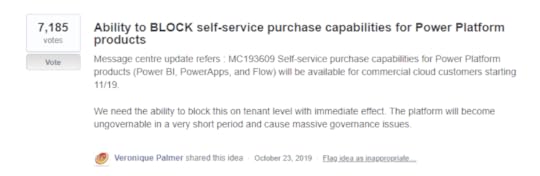
On the 21st day of October 2019, Microsoft made public some very ambitious plans: Self-service purchasing for end-user for all Power Platform products (Power BI, Power Apps, Power Automate), enabled by default, and without the possibility for this to go trough an IT approval workflow, or even for IT to even disable the feature. As you might guess, admins were not too happy about this, and took to User Voice to ask Microsoft to enable a way for administrators to disable the Power Platform self service purchasing option on the tenant. Within only a few days, it got over 5,000 votes and Microsoft acted by releasing a PowerShell module allowing you to disable the functionality before it hits production with the new date of January 14th.
 Disable Power Platform Self Service Purchasing in Office 365
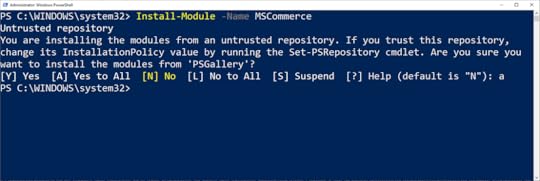
The first thing we will need to do is to install a new PowerShell module called the MSCommerce PowerShell Module. You will also need to be either a Global Administrator or Billing Administrator. The MSCommerce PowerShell module is hosted on the PowerShell Gallery , making it easy for us to install and update. To install the module on a Windows 10 device simply open up PowerShell as an administrator and run the following command:
Install-Module -Name MSCommerce
You will get a few prompts asking you if you trust the install location, to which you must answer yes. If it’s the first time you install a module from the PowerShell Gallery, there might be some additional prompts you need to accept, but everything is straightforward.
After the installation is done, we need to connect by using the following cmdlet
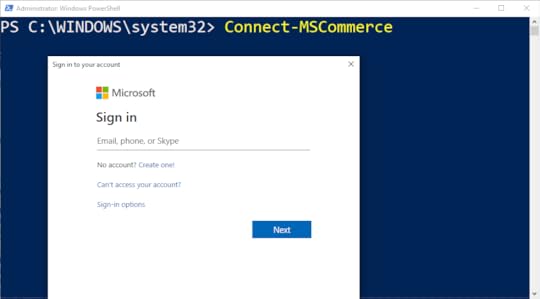
Connect-MSCommerce
This will open a pop up as seen in the screenshot below, asking you for your username and password. Remember that this account must have either the Billing Administrator Role, or the Global Administrator roles.
Next up, we can view what our current policy settings are by running the following cmdlet:
Get-MSCommerceProductPolicies -PolicyId AllowSelfServicePurchase
The default settings, seen below, would be that the self-service purchasing is enabled on all three products.
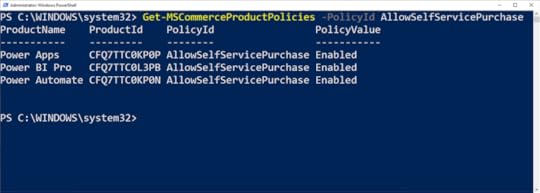
You can turn off the options for users to buy their own licenses either for specific products, or for all three of them, it’s really up to you!
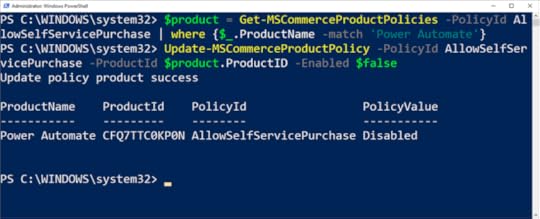
To disable self-service purchasing for Power Automate (Microsoft Flow) you could run the following script:
$product = Get-MSCommerceProductPolicies -PolicyId AllowSelfServicePurchase | where {$_.ProductName -match 'Power Automate'}
Update-MSCommerceProductPolicy -PolicyId AllowSelfServicePurchase -ProductId $product.ProductID -Enabled $false
With a small change, you can do the same for Power Apps:
$product = Get-MSCommerceProductPolicies -PolicyId AllowSelfServicePurchase | where {$_.ProductName -match 'Power Apps'}
Update-MSCommerceProductPolicy -PolicyId AllowSelfServicePurchase -ProductId $product.ProductID -Enabled $false
As well as for Power BI:
$product = Get-MSCommerceProductPolicies -PolicyId AllowSelfServicePurchase | where {$_.ProductName -match 'Power BI Pro'}
Update-MSCommerceProductPolicy -PolicyId AllowSelfServicePurchase -ProductId $product.ProductID -Enabled $false
Another option, if you want to disable self-service purchasing for all of the products, you can also run this quick script:
$Products = Get-MSCommerceProductPolicies -PolicyId AllowSelfServicePurchase
foreach ($Product in $Products){
Update-MSCommerceProductPolicy -PolicyId AllowSelfServicePurchase -ProductId $Product.ProductID -Enabled $false
}
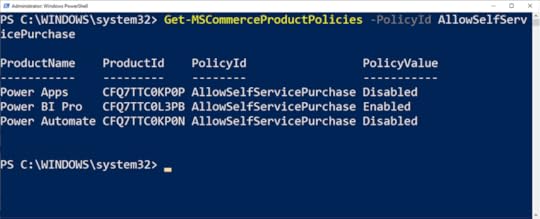
To validate the result, re-run the following cmdlet, and all of the services that you wanted to modify should now be Disabled as seen in the screenshot below. (I did save Power BI in this one as an example ).
Get-MSCommerceProductPolicies -PolicyId AllowSelfServicePurchase
 Conclusion
Whether you like it or not, the self-service purchasing option will hit all commercial Office 365 tenants starting on January 14th 2020 with Power BI, but thanks to the strong response of the community, Office 365 Administrators can now disable that option for a single product, or for all of the products of the Power Platform.
It’s also important for any Office 365 Administrator out there to note that, like it or not, you need to learn PowerShell for Office 365! Even if you do not mange Virtual Machines and Windows Server anymore, PowerShell is a very important skill in every Office 365 Administrator’s tool belt and Microsoft does push a lot of configurations only via PowerShell! PowerShell knowledge is also required for any Microsoft 365 and Azure certification you might want to be interested, so again, super important to learn! If you don’t feel comfortable with PowerShell yet, you can always get a free Pluralsight Trial, and listen first to the Windows PowerShell: Essentials path to familiarize yourself with the basics of PowerShell in General, and afterwards you can dig deeper into PowerShell for Office 365 with this Pluralsight course.
Leave a comment and don’t forget to like the Vlad Talks Tech Page on Facebook and to follow me on Twitter here for the latest news and technical articles on SharePoint. I am also a Pluralsight author, and you can view all the courses I created on my author page.The post Step by Step: How to Disable Power Platform Self Service Purchasing in Office 365 appeared first on Vlad Talks Tech.
November 25, 2019
Black Friday Deals on Microsoft 365 Learning Material
While I am sure most of you (including myself if I am honest 
Pluralsight Black Friday Deal: 40% Off Annual Subscriptions
Is your Pluralsight subscription up for renewal soon or have you been waiting for a promotion to become a Pluralsight subscriber? Pluralsight, one of the best on-demand online training companies with over 6000 courses is currently having a promotion between now and December 1st, 2019 at 11:59 pm Mountain time to save 40% on a Pluralsight Subscription, and it even works on renewals!

Both the Annual and Premium are 40% off, and here is the difference between the plans! The prices are shown for Canada, but since a lot of my readers are from India where promotions don’t usually apply, I have good news, it’s also 40% cheaper in India!
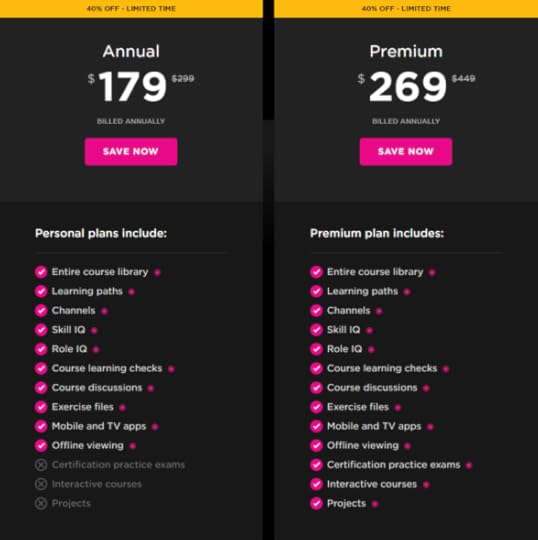
Whether you’re interested in learning SharePoint, Office 365, PowerShell, Angular or even Ethical Hacking and Security, 179$ for a year of unlimited learning is an amazing deal! Get the promotion now, click on the banner above or at the following link: https://spvlad.com/PSBlackFriday2019 ! Don’t wait too long as the deal ends on December 1st, and it might not come back until the end of 2019!
The post Pluralsight Black Friday Deal: 40% Off Annual Subscriptions appeared first on Vlad Talks Tech.
November 22, 2019
Delve Blogs Retired: Another One Bites the Dust
For the past two weeks, everyone was super excited about all of the new products that Microsoft has announced at Microsoft Ignite, but looks like shortly after Ignite, Delve Blogs, a product announced at the SharePoint Conference 2014 is the next Office 365 feature that will, bite the dust! There are not many details but here is what we know so far!
PS: If you want listen to the Queen Song Another One Bites the Dust while reading this blog you can do so here: https://www.youtube.com/watch?v=uFNK-9A2VRo
Delve Blogs Being RetiredSome Customers started receiving the following Message Center information earlier this week:
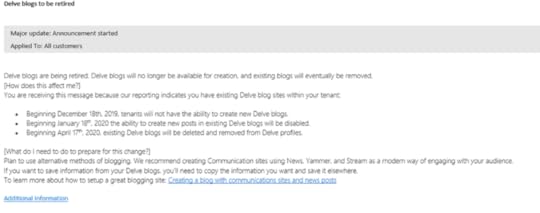
As you can see, the deadline is quite aggressive (opinions lower in the post) , with no more new blogs in less than a month, and in April 2020 (4 months) all existing content will be deleted. This is further confirmed by a tweet today by Tim Milan , who was told by Microsoft Support that Delve Blogs is going away, as well as by Microsoft MVP Nate Chamberlain on his blog.
Ding Dong #Microsoft Delve is Dead!
— Tim Milan
•December 18th, 2019, tenants will not have the ability to create new Delve blogs.
•January 18th, 2020 the ability to create new posts will be disabled.
•Beginning April 17th, 2020, existing Delve blogs will be deleted#Microsoft
November 21, 2019
The Last Blog Post on Absolute SharePoint
This site, https://absolute-sharepoint.com/ has been the home of over 400 blog posts, and over 20 Microsoft Certification study guides for the last 7 years! When I first started it in 2012, I was doing mainly consulting for on-premises SharePoint 2010, and Windows 8 has just gotten released, which gave me the inspiration for the “Metro Style” look that this blog has. The colors of the blog currently are also inspired from the SharePoint 2013 logo which came out recently after the blog was launched!
However, in the past few years, the content on this blog has not only been SharePoint, it has been about of course SharePoint, but also PowerShell, Teams, Power Automate, Azure, Pluralsight, Certifications, and more! Therefore, I have decided to rebrand the site starting this weekend (November 23-24, 2019) to something new! Introducing, Vlad Talks Tech!
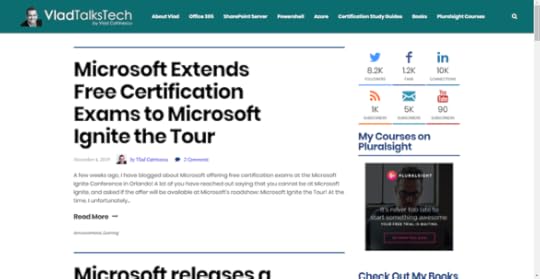
All the content from this site has already been migrated to the new domain, and 301 redirects will be put in place in order to make sure any old bookmarks will keep functioning as previously, without any intervention needed! If you have subscribed to this blog through WordPress, or RSS you will need to do it again, as it’s a brand-new WordPress install! The new RSS feed will be at > https://vladtalkstech.com/feed.
About Vlad Talks Tech
On the new site, you can expect the same type of content that is currently on here, everything SharePoint, Microsoft 365, Certifications, PowerShell and Pluralsight! I will keep working on updating the Certification Study Guides (hopefully 3-4 more by the end of the year) as well as a lot of technical blog posts that have been in the pipeline for too long! Don’t worry, even if SharePoint is not in the URL anymore, SharePoint is more alive than ever, and it’s still my main passion, so SharePoint content will not stop!
Now a note about the design! The top header is still inspired by SharePoint, but by the new SharePoint logo, so I hope they will not change colors anytime soon . The headers have a OneDrive blue color, and the link hovers are Pluralsight orange/red/pink (can you tell I am not a designer )? Other than the design being more modern, I have also cut down the number of WordPress plugins, made the site more responsive, as well as improved the site speed by a lot as you can see in the screenshots below! Test in this case is the home page, however similar results are there on individual pages as well.
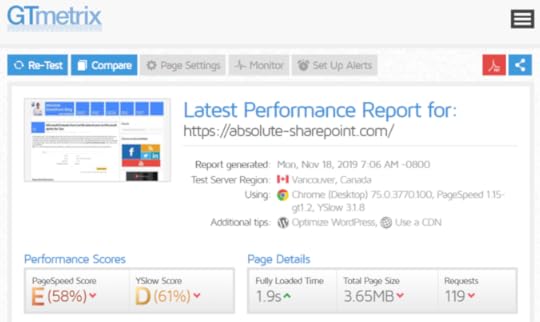
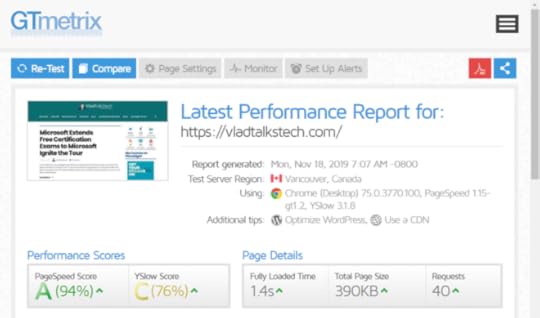
The optimization will continue after the site is launched, including implementing a CDN to make it even faster for International Readers!
Conclusion
While this is the last blog post that will be posted on https://absolute-sharepoint.com/ , you haven’t finished hearing from me . I am simply moving homes to a more optimized site, that really reflects the content the site is covering, and my goal is to be more active than ever to create more technical content, certification study guides and general news that are interesting to the community! As a bonus, and a Throwback Thursday, here is the first logo that the site had, back in 2012 .

Looking forward to seeing you all on https://VladTalksTech.com/ really soon!
The post The Last Blog Post on Absolute SharePoint appeared first on Absolute SharePoint Blog by Vlad Catrinescu.
November 20, 2019
The Last Blog Post on Absolute SharePoint
This site, https://absolute-sharepoint.com/ has been the home of over 400 blog posts, and over 20 Microsoft Certification study guides for the last 7 years! When I first started it in 2012, I was doing mainly consulting for on-premises SharePoint 2010, and Windows 8 has just gotten released, which gave me the inspiration for the “Metro Style” look that this blog has. The colors of the blog currently are also inspired from the SharePoint 2013 logo which came out recently after the blog was launched!
However, in the past few years, the content on this blog has not only been SharePoint, it has been about of course SharePoint, but also PowerShell, Teams, Power Automate, Azure, Pluralsight, Certifications, and more! Therefore, I have decided to rebrand the site starting this weekend (November 23-24, 2019) to something new! Introducing, Vlad Talks Tech!
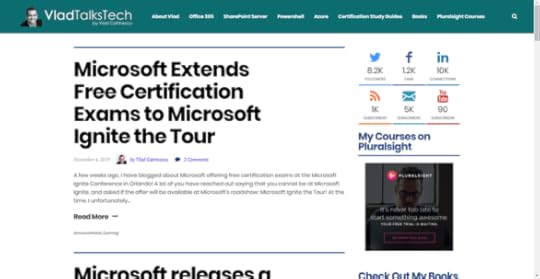
All the content from this site has already been migrated to the new domain, and 301 redirects will be put in place in order to make sure any old bookmarks will keep functioning as previously, without any intervention needed! If you have subscribed to this blog through WordPress, or RSS you will need to do it again, as it’s a brand-new WordPress install! The new RSS feed will be at > https://vladtalkstech.com/feed.
About Vlad Talks TechOn the new site, you can expect the same type of content that is currently on here, everything SharePoint, Microsoft 365, Certifications, PowerShell and Pluralsight! I will keep working on updating the Certification Study Guides (hopefully 3-4 more by the end of the year) as well as a lot of technical blog posts that have been in the pipeline for too long! Don’t worry, even if SharePoint is not in the URL anymore, SharePoint is more alive than ever, and it’s still my main passion, so SharePoint content will not stop!
Now a note about the design! The top header is still inspired by SharePoint, but by the new SharePoint logo, so I hope they will not change colors anytime soon . The headers have a OneDrive blue color, and the link hovers are Pluralsight orange/red/pink (can you tell I am not a designer )? Other than the design being more modern, I have also cut down the number of WordPress plugins, made the site more responsive, as well as improved the site speed by a lot as you can see in the screenshots below! Test in this case is the home page, however similar results are there on individual pages as well.
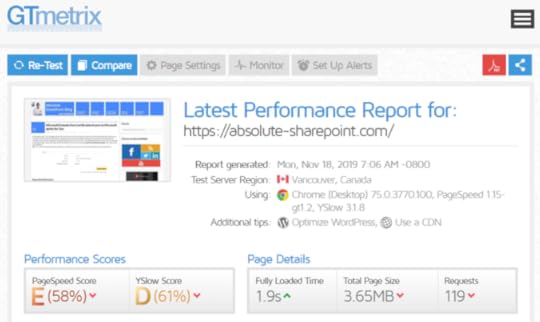
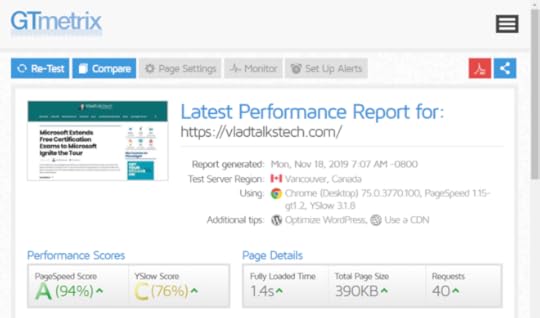
The optimization will continue after the site is launched, including implementing a CDN to make it even faster for International Readers!
ConclusionWhile this is the last blog post that will be posted on https://absolute-sharepoint.com/ , you haven’t finished hearing from me . I am simply moving homes to a more optimized site, that really reflects the content the site is covering, and my goal is to be more active than ever to create more technical content, certification study guides and general news that are interesting to the community! As a bonus, and a Throwback Thursday, here is the first logo that the site had, back in 2012 .

Looking forward to seeing you all on https://VladTalksTech.com/ really soon!
The post The Last Blog Post on Absolute SharePoint appeared first on Vlad Talks Tech.
November 4, 2019
Microsoft Extends Free Certification Exams to Microsoft Ignite the Tour
A few weeks ago, I have blogged about Microsoft offering free certification exams at the Microsoft Ignite Conference in Orlando! A lot of you have reached out saying that you cannot be at Microsoft Ignite, and asked if the offer will be available at Microsoft’s roadshow: Microsoft Ignite the Tour! At the time, I unfortunately had to tell you that no, however I have good news, every attendee of Microsoft Ignite the Tour will also get one free certification exam! Let’s take a look at the details!
PS: This is also for Ignite Orlando attendees in addition to your one free exam you took during the conference!
Executive Summary
For those of you that want to know the basics of this offer, read this! If you attended Ignite in Orlando, or any Ignite the Tour, Microsoft will add an automatic voucher on your e-mail address that allows you to take a role-based Microsoft Certification exam for free for 180 days after the event! There are no testing centers at Ignite the Tour, so you can do this at a local testing center in your city/country, or even online! The offer is available to everyone except 1) government officials; or 2) residents of China, Hong Kong, Taiwan, Switzerland, Israel, Germany, or Sweden. As a Canadian, if you are in any of those countries, I have to say I am sorry, nothing I can do on this! Read on for all the details!
Eligible exams for this offer
This offer includes all Microsoft fundamentals, role-based, and specialty certification exams. (Basically, not valid for the 70-XXX series exams or the Office ones) The eligible exams are listed below.
By Product
Exams
Azure
AI-100: Designing and Implementing an Azure AI Solution
AZ-103: Microsoft Azure Administrator
AZ-120: Planning and Administering Microsoft Azure for SAP Workloads
AZ-203: Developing Solutions for Microsoft Azure
AZ-300: Microsoft Azure Architect Technologies
AZ-301: Microsoft Azure Architect Design
AZ-400: Microsoft Azure DevOps Solutions
AZ-500: Microsoft Azure Security Technologies
AZ-900: Microsoft Azure Fundamentals
DP-100: Designing and Implementing a Data Science Solution on Azure
DP-200: Implementing an Azure Data Solution
DP-201: Designing an Azure Data Solution
Dynamics 365 and Power Platform
MB-200: Microsoft Power Platform + Dynamics 365 Core
MB-210: Microsoft Dynamics 365 Sales
MB-220: Microsoft Dynamics 365 Marketing
MB-230: Microsoft Dynamics 365 Customer Service
MB-240: Microsoft Dynamics 365 Field Service
MB-300: Microsoft Dynamics 365: Core Finance and Operations
MB-310: Microsoft Dynamics 365 Finance
MB-320: Microsoft Dynamics 365 Supply Chain Management, Manufacturing
MB-330: Microsoft Dynamics 365 Supply Chain Management
MB-400: Microsoft PowerApps + Dynamics 365 Developer
MB-500: Microsoft Dynamics 365: Finance and Operations Apps Developer
MB-600: Microsoft Power Platform + Dynamics 365 Solution Architect (exam will not be available in beta until after December 31, 2019)
MB-700: Microsoft Dynamics 365: Finance and Operations Apps Solution Architect (exam will not be available in beta until after December 31, 2019)
MB-900: Microsoft Dynamics 365 Fundamentals
PL-900: Microsoft Power Platform Fundamentals
Microsoft 365
MD-100: Windows 10
MD-101: Managing Modern Desktops
MS-100: Microsoft 365 Identity and Services
MS-101: Microsoft 365 Mobility and Security
MS-200: Planning and Configuring a Messaging Platform
MS-201: Implementing a Hybrid and Secure Messaging Platform
MS-300: Deploying Microsoft 365 Teamwork
MS-301: Deploying SharePoint Server Hybrid
MS-500: Microsoft 365 Security Administration
MS-600: Building Applications and Solutions with Microsoft 365 Core Services
MS-700: Managing Microsoft Teams
MS-900: Microsoft 365 Fundamentals
How to claim your free exam
You must use the same email address that you used to register for the Microsoft Ignite 2019 or a Microsoft Ignite The Tour 2019-2020 event you attended in order to claim your free exam. You must schedule your free exam online.
To register for a free exam:
Select any of the qualifying exams above.
Once you have accessed the desired exam details page, click the “Schedule exam” button to begin the online registration process.
Sign in with the Microsoft account associated with your Microsoft Certification profile. If you do not have a Microsoft Certification account, follow the steps to create one.
On the ‘Account Linking’ page, select the appropriate event/event category and verify your event registration by signing in with your Microsoft Ignite registration credentials.
Follow the information on the screens and provide the required details to schedule your exam.
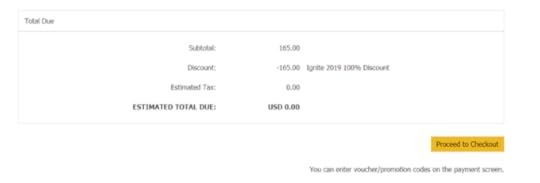
Verify that the cost at Checkout is $0.00 and submit the order. Note: The ‘My Order’ page should show the following discount at the bottom of the page: Microsoft Ignite 2019-2020 100% Discount . Previous pages in the exam scheduling flow will show the full price.
Terms and conditions
This exam offer may be redeemed to take one (1) Microsoft Certification exam, delivered at an authorized Pearson Vue testing center or through a Pearson Vue online proctoring site.
This exam offer is exam-specific and only redeemable for select Microsoft exams.
This exam offer is available for a period beginning the first day of the event at which you received this exam offer and expires 180 days after the last day of such event.
This exam offer entitles you to register for one (1) exam prior to the offer expiration date.
This exam offer expiration date cannot be extended under any circumstances.
This exam offer is not valid for, and may not be redeemed by, either: 1) government officials; or 2) residents of China, Hong Kong, Taiwan, Switzerland, Israel, Germany, or Sweden.
This exam offer may only be redeemed once.
This exam offer may not be redeemed or exchanged for cash, credit or refund.
This exam offer is nontransferable and is void if you alter, revise or transfer it in any way.
This exam offer is only offered to individuals who have registered and attended an official Microsoft Ignite 2019 or Microsoft Ignite The Tour 2019-2020 event.
Learn More
If you want to learn more on this directly from Microsoft, check out the official page, by clicking on the image below. Make sure you also check my Microsoft Certification Study Guides to get you ready for those exams!

Leave a comment and don’t forget to like the Absolute SharePoint Blog Page on Facebook and to follow me on Twitter here for the latest news and technical articles on SharePoint. I am also a Pluralsight author, and you can view all the courses I created on my author page.
The post Microsoft Extends Free Certification Exams to Microsoft Ignite the Tour appeared first on Absolute SharePoint Blog by Vlad Catrinescu.
Microsoft releases a new certification for Microsoft Teams Administrators
Microsoft Ignite started today, November 4th, and we didn’t only get announcements on technology, but also on certifications! And as you know, it’s a topic that I write quite a lot about on this blog! One of the certifications announced today is the MS-700: Managing Microsoft Teams to work towards the Microsoft 365 Certified: Teams Administrator Associate certification! Finally something for dedicated Microsoft Teams Administrators
Why a new certification?
While this is not official, and just my opinion based on a lot of conversation with readers from this blog and the community, I think Microsoft wanted a certification for Administrators that only manage Office 365, without touching on-premises. The Microsoft Certified Teamwork Associate (MS-300 + MS-301) requires an admin to also master SharePoint 2019 On-Premises / hybrid in order to get the title, and a lot of people complained that their organization is now fully Office 365, and they simply aren’t working with on-premises anymore! This is also a certification for the Skype for Business admins turned Teams Administrators and covers a lot of topics not covered in the MS-300 such as upgrading from Skype for Business, network planning and more!
What is covered in this certification?
At a first glance, the topics covered in the MS-700 seem pretty straightforward, and with only three topics, it might look quite easy, however remember that with MS Certification exams, the less top level objectives, the more you have to study and the devil is in the details!
Plan and Configure a Microsoft Teams Environment (45-50%)
Manage Chat, Calling, and Meetings (30-35%)
Manage Teams and App Policies (20-25%)
While there is some overlap with the content covered in the MS-300 exam, here are some of the topics that really set the MS-700 apart directly from the exam introduction!
The Teams Administrator must be able to plan, deploy, and manage Teams chat, apps, channels, meetings, audio conferencing, live events, and calling. The Teams Administrator is also responsible for upgrading from Skype for Business to Teams.
The Teams Administrator collaborates with Telephony engineers to integrate advanced voice features into Microsoft Teams. This role is not responsible for configuring direct routing, configuring call routing, or integrating telephony. The Teams Administrator may work with other workload administrator roles, including security and compliance, messaging, networking, identity, and devices.
A SharePoint Admin, now turned also Teams admin that has never managed Skype for Business or Voice and network testing might find this exam a lot more difficult and outside of their daily tasks versus a Skype for Business admin, now turned Teams Admin! So, while there is an overlap, I think I really see this certification more for Skype for Business admins now doing Teams, or Unified Communications admins in general!
Certification Path
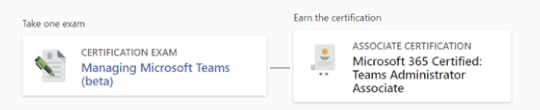
The Certification path for this exam is easy, pass the MS-700 and you become a Microsoft 365 Certified: Teams Administrator Associate!
When can we take it?
The Beta for the MS-700 opens today on November 4th, and you can pass it today as a beta exam, but you will not get the results until the beta is over. Remember, you can also get free exams by attending Microsoft Ignite, or Microsoft Ignite the Tour! Check out my blog post on this to learn more!
More Info and Discount Code!
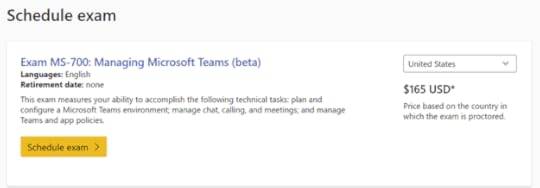
Learn more about the exam on the Microsoft Learning page or by clicking the picture below! Use code MS700Farmington to save 80% of the beta if you take the exam before December 20! (Limit 300 codes used!)
Will you go for the exam? Let me know what you think about it, and the topics covered in the comments!
The post Microsoft releases a new certification for Microsoft Teams Administrators appeared first on Absolute SharePoint Blog by Vlad Catrinescu.
Microsoft releases a new certification for Power Platform Fundamentals
Ever since my Pluralsight course on Microsoft Flow, I have been getting questions about a more power-user Microsoft Certification for the Power Platform, without needing to know the ins and outs of Dynamics! Previously, the only way you could get certified in Flow and PowerApps was trough the Dynamics Certifications, but today, Microsoft finally released a fundamentals certification for the Power Platform, which covers Flow, PowerApps, and Power BI! The new exam is the PL-900: Microsoft Power Platform Fundamentals!
Why a new certification?
From an organizational point of view, the Power Platform has always been under the Dynamics 365 umbrella, and so have been all of the certifications. Flow and PowerApps were both included under various Dynamics 365 exams, but they were there as “supporting” technologies, not really there as the goal of the exam. The goals of those certs were really on Dynamics 365. With Flow and PowerApps becoming stand alone tools, as well as heavily used for SharePoint, a lot of Power users (see what I did there