Vlad Catrinescu's Blog, page 15
April 15, 2019
Win a free Pass to SharePoint Fest DC 2019
I have been blogging about learning resources for a while and one of the best ways to learn from the experts is to attend in person conferences! Since Valo Intranet is sponsoring, we have a pass to give away! To enter you simply must put your name and email (They will not be shared with any 3rd parties), and you can get bonus entries if you follow @vladcatrinescu on Twitter and like the Absolute SharePoint page on Facebook! Furthermore, you can tweet about the giveaway every day and get 5 bonus entries for every time you tweet!

The prize only includes the conference pass and not any travel costs or anything else. Just the conference pass! Here is a small paragraph about the conference
SharePoint Fest brings to you the world’s leading experts in SharePoint, Office 365, Microsoft Teams and Azure. Whether you are new to SharePoint or an experienced power user, admin or developer, SharePoint Fest has content designed to fit your experience level and area of interest. Our workshops and sessions are taught by Microsoft Certified Trainers, Microsoft MVPs, Microsoft Regional Directors and Microsoft engineers.
Good Luck, and if you are at SharePoint Fest DC, make sure to visit me at the Valo Booth to say hello :)!
Leave a comment and don’t forget to like the Absolute SharePoint Blog Page on Facebook and to follow me on Twitter here for the latest news and technical articles on SharePoint. I am also a Pluralsight author, and you can view all the courses I created on my author page.
The post Win a free Pass to SharePoint Fest DC 2019 appeared first on Absolute SharePoint Blog by Vlad Catrinescu.


April 11, 2019
Meet the Speaker series: Jill Hannemann
Last December, I was talking to Lyman from the SharePoint Conference organizing team about cool ideas to do before the SharePoint Conference in May! One of the ideas I had that I thought would be awesome is a series of videos with the speakers from the SharePoint Conference that allows everyone from the community to learn a bit more about them, of course focused a bit about SharePoint. As I already interviewed over 20 speakers, it’s very interesting to learn how everyone got into SharePoint, from nuclear engineers, to hardcore developers that now only do no-code solutions! I will release two interviews per week for the next two months (or more if you guys like it!)!
12th video in the series is the awesome Jill Hannemann from Seattle!
Meet Jill Hannemann
Where to find Jill
You can find Jill on Twitter at https://twitter.com/ImJillHannemann and his site at https://digital.withum.com/blog/author/jill-hannemann
Are you coming to the SharePoint Conference?
Stay Connected to the Largest SharePoint Conference in the Industry! Register now with the following link and save 50$ by using code VLAD at check out!
https://spvlad.com/SPC2019
The post Meet the Speaker series: Jill Hannemann appeared first on Absolute SharePoint Blog by Vlad Catrinescu.
April 9, 2019
Meet the Speaker series: Asif Rehmani
Last December, I was talking to Lyman from the SharePoint Conference organizing team about cool ideas to do before the SharePoint Conference in May! One of the ideas I had that I thought would be awesome is a series of videos with the speakers from the SharePoint Conference that allows everyone from the community to learn a bit more about them, of course focused a bit about SharePoint. As I already interviewed over 20 speakers, it’s very interesting to learn how everyone got into SharePoint, from nuclear engineers, to hardcore developers that now only do no-code solutions! I will release two interviews per week for the next two months (or more if you guys like it!)!
11th video in the series is the awesome Asif Rehmani from Chicago!

Meet Asif Rehmani
Where to find Asif
You can find Asif on Twitter at https://twitter.com/asifrehmani and his site at https://www.visualsp.com/
Are you coming to the SharePoint Conference?
Stay Connected to the Largest SharePoint Conference in the Industry! Register now with the following link and save 50$ by using code VLAD at check out!
https://spvlad.com/SPC2019
The post Meet the Speaker series: Asif Rehmani appeared first on Absolute SharePoint Blog by Vlad Catrinescu.
April 5, 2019
Meet the Speaker series: Daniel Christian
Last December, I was talking to Lyman from the SharePoint Conference organizing team about cool ideas to do before the SharePoint Conference in May! One of the ideas I had that I thought would be awesome is a series of videos with the speakers from the SharePoint Conference that allows everyone from the community to learn a bit more about them, of course focused a bit about SharePoint. As I already interviewed over 20 speakers, it’s very interesting to learn how everyone got into SharePoint, from nuclear engineers, to hardcore developers that now only do no-code solutions! I will release two interviews per week for the next two months (or more if you guys like it!)!
Tenth video in the series is the awesome Daniel Christian from North Carolina!
Meet Daniel Christian
Where to find Daniel
You can find Daniel on Twitter at https://twitter.com/dchristian19 and his Youtube Channel at https://www.youtube.com/channel/UC2v4TcvO4rdDdfqd6rUR5yg
Are you coming to the SharePoint Conference?
Stay Connected to the Largest SharePoint Conference in the Industry! Register now with the following link and save 50$ by using code VLAD at check out!
https://spvlad.com/SPC2019
The post Meet the Speaker series: Daniel Christian appeared first on Absolute SharePoint Blog by Vlad Catrinescu.
April 4, 2019
Find a user’s OneDrive for Business site URL with PowerShell
While working on an offboarding script, one of the requirements was to send an e-mail to the manager with the OneDrive for Business URL of the user that was going to get disabled. There is quite some information on the internet on how to get this with CSOM, but not a lot in how to get it with PowerShell for IT Pros like me … we prefer PowerShell cmdlets to code! While this is not available in the default SharePoint Online Module ,we can use the PnP PowerShell cmdlets to do it!

The first thing you must do is to get your credential and use the Connect-PnPOnline cmdlet to connect to your SharePoint Online Admin Center!
$cred = Get-CredentialConnect-PnPOnline -Url https://-admin.sharepoint.com/ -Credentials $cred
You can then run the Get-PnPUserProfileProperty cmdlet to get the information about the user’s profile and select only the PersonalUrl which is the URL of that user’s OneDrive for Business!
$username = ""$OneDriveUrl = Get-PnPUserProfileProperty -Account $username | select PersonalUrl

That’s it! Once you know the right cmdlets to use, it’s that simple!
Leave a comment and don’t forget to like the Absolute SharePoint Blog Page on Facebook and to follow me on Twitter here for the latest news and technical articles on SharePoint. I am also a Pluralsight author, and you can view all the courses I created on my author page.
The post Find a user’s OneDrive for Business site URL with PowerShell appeared first on Absolute SharePoint Blog by Vlad Catrinescu.
April 3, 2019
Meet the Speaker series: Liam Cleary
Last December, I was talking to Lyman from the SharePoint Conference organizing team about cool ideas to do before the SharePoint Conference in May! One of the ideas I had that I thought would be awesome is a series of videos with the speakers from the SharePoint Conference that allows everyone from the community to learn a bit more about them, of course focused a bit about SharePoint. As I already interviewed over 20 speakers, it’s very interesting to learn how everyone got into SharePoint, from nuclear engineers, to hardcore developers that now only do no-code solutions! I will release two interviews per week for the next two months (or more if you guys like it!)!
Ninth video in the series is the awesome Liam Cleary from Virginia!

Meet Liam Cleary
Where to find Liam
You can find Liam on Twitter at https://twitter.com/helloitsliam and his site at https://www.helloitsliam.com/
Are you coming to the SharePoint Conference?
Stay Connected to the Largest SharePoint Conference in the Industry! Register now with the following link and save 50$ by using code VLAD at check out!
https://spvlad.com/SPC2019
The post Meet the Speaker series: Liam Cleary appeared first on Absolute SharePoint Blog by Vlad Catrinescu.
April 2, 2019
Display the Flow button in SharePoint 2019 modern lists and libraries
One of the major advantages of setting up a hybrid SharePoint 2019 environment is that you can use the latest and greatest tools of Office 365, even for your On-Premises environment. One of those tools is Microsoft Flow, and by setting up your environment correctly, you can now have triggers and actions in Flow, on your On-Premises lists and libraries!
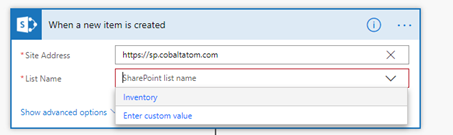
However, one of the things that is available in SharePoint Online, but not in SharePoint 2019 is having a button in each list and library that allows you to go to Microsoft Flow, or even create a quick Flow directly in SharePoint so you can quickly automate business processes. This can confuse users and make it difficult for them to know where to go and what tools to use. But there is hope!
One of my good friends, SharePoint MVPs and co-author of Deploying SharePoint 2019 Trevor Seward, just released a new open-source app called SharePoint 2019 Flow Extension which bridges some of the gap. As the description says, it provides a Flow button in the command bar as you can see in the screenshot below!
 [image error]
You can get the solution and instructions on Trevor’s GitHub over here: https://github.com/Nauplius/SharePoint-2019-Flow-Extension !
PS: If you want to learn how to configure the Data Gateway for using Flow on SharePoint Server 2019, make sure to check out the book by Trevor and myself titled Deploying SharePoint 2019 !
Leave a comment and don’t forget to like the Absolute SharePoint Blog Page on Facebook and to follow me on Twitter here for the latest news and technical articles on SharePoint. I am also a Pluralsight author, and you can view all the courses I created on my author page.
The post Display the Flow button in SharePoint 2019 modern lists and libraries appeared first on Absolute SharePoint Blog by Vlad Catrinescu.
March 28, 2019
Meet the Speaker series: Eric Overfield
Last December, I was talking to Lyman from the SharePoint Conference organizing team about cool ideas to do before the SharePoint Conference in May! One of the ideas I had that I thought would be awesome is a series of videos with the speakers from the SharePoint Conference that allows everyone from the community to learn a bit more about them, of course focused a bit about SharePoint. As I already interviewed over 20 speakers, it’s very interesting to learn how everyone got into SharePoint, from nuclear engineers, to hardcore developers that now only do no-code solutions! I will release two interviews per week for the next two months (or more if you guys like it!)!
Eighth video in the series is the awesome Eric Overfield from California!

Meet Eric Overfield
Where to find Eric
You can find Eric on Twitter at https://twitter.com/EricOverfield and his site at http://ericoverfield.com/
Are you coming to the SharePoint Conference?
Stay Connected to the Largest SharePoint Conference in the Industry! Register now with the following link and save 50$ by using code VLAD at check out!
https://spvlad.com/SPC2019
The post Meet the Speaker series: Eric Overfield appeared first on Absolute SharePoint Blog by Vlad Catrinescu.
March 26, 2019
Change External Sharing Settings Across a Hub Site with PowerShell
One of the big Information Architecture changes with modern SharePoint is the flat architecture, which means that now, instead of your Intranet being one Site Collection with multiple subsites, it will now be multiple Site Collections. I’ve seen multiple example architectures where an Intranet can easily become over 15 Site Collections! That means, each Site Collection has its own settings, including external access! While a new SharePoint Admin Center is shipping, you cannot bulk-change External Sharing settings.

So I have built a quick PowerShell script that you can simply provide the URL of a Hub Site and the level of external sharing you want to enable, and it will do the magic for you! The script seen below requires two parameters, and it has some validations in to make sure you supply the right type of values.
HubSiteUrl : The URL of a Hubsite
ExternalSharing : one of the following options:
Disabled – don’t allow sharing outside your organization
ExistingExternalUserSharingOnly – Allow sharing only with the external users that already exist in your organization’s directory
ExternalUserSharingOnly – allow external users who accept sharing invitations and sign in as authenticated users
ExternalUserAndGuestSharing – allow sharing with all external users, and by using anonymous access links.
If you examine the script, you will realize that I run the Get-SPOSite twice , that is because when you run Get-SPOSite without specifying a URL , it doesn’t return the HubSiteId , so that’s why we have to do it!
Download the following script and save it as HubExternal.ps1.
param(
[Parameter(Mandatory=$true)]
[string]$HubSiteUrl,
[Parameter(Mandatory=$true)][ValidateSet("Disabled","ExistingExternalUserSharingOnly","ExternalUserSharingOnly","ExternalUserAndGuestSharing")]
[String]$ExternalSharing
)
$HubId = (Get-SPOHubSite -ErrorAction SilentlyContinue | Where {$_.SiteUrl -eq $HubSiteURL}).Id.Guid
if ($HubId -eq $null)
{
Throw "URL provided is not a valid Hub Site url"
}
$sites = Get-SPOSite -Limit All
foreach ($site in $Sites)
{
$siteDetails = Get-SPOSite $site.Url
If ($siteDetails.HubSiteId.Guid -eq $HubId)
{
Write-Host "Setting " $site.Url " external sharing permissions to " $ExternalSharing
Set-SPOSite $siteDetails -SharingCapability $ExternalSharing
}
}
Here is an example on how to run it:
.\HubExternal.ps1 -HubSiteUrl https://valo365.sharepoint.com/sites/... -ExternalSharing ExternalUserAndGuestSharingAnd this is what it should look like when running it!
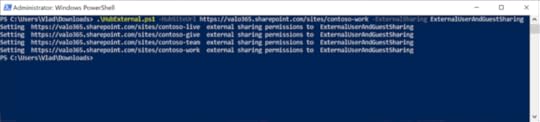
I hope this helps! You can of course modify this script to take the same logic, and do a bunch of different changes on all the Site Collections in a certain Hub Site!
Leave a comment and don’t forget to like the Absolute SharePoint Blog Page on Facebook and to follow me on Twitter here for the latest news and technical articles on SharePoint. I am also a Pluralsight author, and you can view all the courses I created on my author page.
The post Change External Sharing Settings Across a Hub Site with PowerShell appeared first on Absolute SharePoint Blog by Vlad Catrinescu.
March 25, 2019
Meet the Speaker series: Chris Kent
Last December, I was talking to Lyman from the SharePoint Conference organizing team about cool ideas to do before the SharePoint Conference in May! One of the ideas I had that I thought would be awesome is a series of videos with the speakers from the SharePoint Conference that allows everyone from the community to learn a bit more about them, of course focused a bit about SharePoint. As I already interviewed over 20 speakers, it’s very interesting to learn how everyone got into SharePoint, from nuclear engineers, to hardcore developers that now only do no-code solutions! I will release two interviews per week for the next two months (or more if you guys like it!)!
Seventh video in the series is the awesome Chris Kent from Indianapolis!
Meet Chris Kent
Where to find Chris
You can find Chris on Twitter at https://twitter.com/theChrisKent and his site at https://thechriskent.com/
Are you coming to the SharePoint Conference?
Stay Connected to the Largest SharePoint Conference in the Industry! Register now with the following link and save 50$ by using code VLAD at check out!
https://spvlad.com/SPC2019
The post Meet the Speaker series: Chris Kent appeared first on Absolute SharePoint Blog by Vlad Catrinescu.