Vlad Catrinescu's Blog, page 10
December 27, 2019
SharePoint Online Site Template ID list for PowerShell
If you want to automate certain parts of your SharePoint Online provisioning process, or simply need a one-time creation of many sites, you probably want to automate everything with PowerShell! But in order to create the new sites with the intended template, you need to know the right template ID that needs to be passed trough PowerShell. So this blog post is a list of all of the different SharePoint Online Site Template ID you will need for either creating a large number of sites, or maybe just creating reports of your SharePoint Online environment!
Modern SharePoint SitesTemplate IDTitleDescription / Additional InfoSTS#3Team site (no Office 365 group)A site with no connection to an Office 365 Group.SITEPAGEPUBLISHING#0Communication sitePublish dynamic, beautiful content to people in your organization to keep them informed and engaged on topics, events, or projects.GROUP#0Office 365 Group associated Team SiteFor Reporting Only – You cannot create sites with this templatePOINTPUBLISHINGPERSONAL#0Delve BlogFor Reporting Only – Delve Blogs are being RetiredSPSPERS#10OneDrive for Business personal SiteFor Reporting Only – Use the Request-SPOPersonalSite cmdlet to pre-provision a OneDrive for Business iteRedirectSite#0Redirect SitePlaceholder template for the old URL when you rename the Site URL. This is for reporting only and those sites are only created by Microsoft programmatically.TEAMCHANNEL#0Teams Private Channel SiteLightweight Site Collection provisioned for each Teams Private Channel Site. This is For Reporting Only, and not for manual provisioning trough SharePoint OnlineAs you can see, while there are 7 different “modern” templates, however only two of them can really be used for creation, the other 4 can only be used for reporting purposes. To use those templates, you can use the New-SPOSite PowerShell cmdlet as in the example below:
New-SPOSite -Title "TemplateTest - 01" -Url https://contoso.sharepoint.com/sites/... -Template " STS#3" -Owner vlad@contoso.com -StorageQuota 1024
Modern SharePoint Sites – SharePoint PnP PowerShell Module
If you prefer to use the SharePoint PnP PowerShell Module to automate things, this is the list of sites you can use!
Site TypeTitleDescription / Additional InfoCommunicationSiteCommunication sitePublish dynamic, beautiful content to people in your organization to keep them informed and engaged on topics, events, or projects.TeamSiteOffice 365 Group (including a Team Site of course)Creates a Office 365 group together with it’s team site!To create a site using those templates, you can use the New-PnPSite PowerShell cmdlet as in the example below:
New-PnPSite -Type CommunicationSite -Title Contoso -Url https://tenant.sharepoint.com/sites/c...
New-PnPSite -Type TeamSite -Title 'Team Contoso' -Alias contoso
Using the New-PnPSite PowerShell cmdlet, you can also specify which type of Communication Site you want out of the three default ones by providing the name in the -SiteDesign parameter as in the example below.
New-PnPSite -Type CommunicationSite -Title Contoso -Url https://tenant.sharepoint.com/sites/c... -SiteDesign Showcase
Lastly, if you want to use PnP to let’s say create any of the templates in the Modern SharePoint Sites section (ex: #STS3) you can use the New-PnPTenantSite PowerShell cmdlet as in the example below:
New-PnPTenantSite -Title Contoso -Url https://tenant.sharepoint.com/sites/c... -Owner user@example.org -TimeZone 4 -Template STS#3
Classic SharePoint SitesTemplate IDTitleDescriptionSTS#0Classic Team SiteA place to work together with a group of people.APPCATALOG#0App Catalog SiteA site for sharing apps for SharePoint and OfficeBDR#0Document CenterA site to centrally manage documents in your enterpriseBICenterSite#0Business Intelligence CenterA site for presenting Business Intelligence content in SharePoint.BLANKINTERNETCONTAINER#0Publishing PortalA starter site hierarchy for an Internet-facing site or a large intranet portal. This site can be customized easily with distinctive branding. It includes a home page, a sample press releases subsite, a Search Center, and a login page. Typically, this site has many more readers than contributors, and it is used to publish Web pages with approval workflows.BLOG#0BlogA site for a person or team to post ideas, observations, and expertise that site visitors can comment on.COMMUNITY#0Community SiteA place where community members discuss topics of common interest. Members can browse and discover relevant content by exploring categories, sorting discussions by popularity or by viewing only posts that have a best reply. Members gain reputation points by participating in the community, such as starting discussions and replying to them, liking posts and specifying best replies.COMMUNITYPORTAL#0Community PortalA site for discovering communities.DEV#0Developer SiteA site for developers to build, test and publish apps for OfficeENTERWIKI#0Enterprise WikiA site for publishing knowledge that you capture and want to share across the enterprise. It provides an easy content editing experience in a single location for co-authoring content, discussions, and project management.OFFILE#1Records CenterThis template creates a site designed for records management. Records managers can configure the routing table to direct incoming files to specific locations. The site also lets you manage whether records can be deleted or modified after they are added to the repository.PRODUCTCATALOG#0Product CatalogA site for managing product catalog data which can be published to an internet-facing site through search. The product catalog can be configured to support product variants and multilingual product properties. The site includes admin pages for managing faceted navigation for products.PROJECTSITE#0Project SiteA site for managing and collaborating on a project. This site template brings all status, communication, and artifacts relevant to the project into one place.SRCHCEN#0Enterprise Search CenterA site focused on delivering an enterprise-wide search experience. Includes a welcome page with a search box that connects users to four search results page experiences: one for general searches, one for people searches, one for conversation searches, and one for video searches. You can add and customize new results pages to focus on other types of search queries.SRCHCENTERLITE#0Basic Search CenterA site focused on delivering a basic search experience. Includes a welcome page with a search box that connects users to a search results page, and an advanced search page. This Search Center will not appear in navigation.visprus#0Visio Process RepositoryA site for viewing, sharing, and storing Visio process diagrams. It includes a versioned document library and templates for Basic Flowcharts, Cross-functional Flowcharts, and BPMN diagrams.
While knowing what the classic SharePoint templates are for reporting purposes, I recommend only creating modern SharePoint sites from now on, and not adding any classic SharePoint sites to your environment, as it would add extra content to migrate to modern in the future!
Leave a comment and don’t forget to like the Vlad Talks Tech Page on Facebook and to follow me on Twitter here for the latest news and technical articles on SharePoint. I am also a Pluralsight author, and you can view all the courses I created on my author page.Whether you want to automate your #SharePoint provisioning or simply create #Office365 reports, you need to know the different template IDs for #PowerShell! Check out the updated list for SharePoint Online on my Blog > https://t.co/4HVu0AnCpe pic.twitter.com/ZLqeiG8wd2
— Vlad Catrinescu (@vladcatrinescu) December 27, 2019
The post SharePoint Online Site Template ID list for PowerShell appeared first on Vlad Talks Tech.


December 26, 2019
New Pluralsight Course: Configuring and Managing OneDrive for Business
I am extremely happy to announce that my 22nd Pluralsight course is published, and this one is focused on OneDrive for Business! This is a pretty big course at around 3h of content!
With over 180 million monthly active users of Office 365 and each user having their own OneDrive for Business site, it’s one of the most popular services in the suite. In this course, Configuring and Managing OneDrive for Business, you will gain the ability to manage the OneDrive for Business service. First, you will learn about OneDrive for Business administration tools. Next, you will discover how to configure security settings such as external sharing and compliance. Finally, you will explore how to configure OneDrive for Business features such as Storage, Mobile Access, and more. When you are finished with this course, you will have the OneDrive for Business skills and knowledge needed to effectively manage it. This course also covers the configure and manage OneDrive for Business portion of the MS-300 exam!
You can find the course on Pluralsight at : https://spvlad.com/Configure-Manage-OD4B or by clicking the banner above!
Also, if you haven’t checked it yet, check out my Configuring and Managing SharePoint Online course as well!
Leave a comment and don’t forget to like the Vlad Talks Tech Page on Facebook and to follow me on Twitter here for the latest news and technical articles on SharePoint. I am also a Pluralsight author, and you can view all the courses I created on my author page.The post New Pluralsight Course: Configuring and Managing OneDrive for Business appeared first on Vlad Talks Tech.
December 23, 2019
Speaking at Microsoft Ignite the Tour Toronto 2020
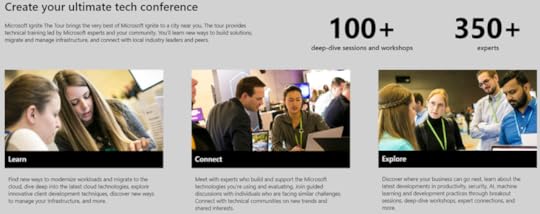
My first conference of 2020 will be Microsoft Ignite the Tour Toronto, January 8th and 9th 2020! Even if it’s only a two-day event, there is a lot of content at this Microsoft organized event that usually has about 5,000 attendees join from all over Canada! Here’s a bit about my sessions!
 Creating Approval Flows with Microsoft Power Automate
15-minute theater session – Jan 9th @ 10:20 AM
Microsoft Power Automate makes creating workflows easy, and Approvals are the most common type of workflow that users need! Join this session to understand Microsoft Power Automate workflows by looking at real scenarios, as well as taking them to the next level by creating automatic reminders and more!
Real World Governance for External Sharing in Office 36545-minute breakout – Jan 9th @ 1:45 PM
Does the idea of your users sharing content externally keep you up at night? In this session, we will look at real-world scenarios on how you can enable your users to securely share content with external users, while ensuring everything is done within the security policies set forward by IT.
5 PowerShell reports every Office 365 admin needs to have45-minute breakout – Jan 9th @ 3:00 PM
PowerShell not only gives administrators access to all the settings in Office 365, it makes it easy to connect to multiple services and gather information to create useful reports. In this session, we will learn what PowerShell for Office 365 can do by looking at five real-life reports that every Office 365 Admin needs to have as part of their administration toolbelt!
Ask the Experts / Expert ConnectJan 8th @ 3:30 PM – 5:15 PM
On January 8th I will be at Table 6 for any questions you might have around my areas of expertise, so feel free to drop by and ask my any questions you might have (or simply drop by to say hi!)
See you in Toronto in January!I am looking forward to seeing everyone in Toronto this January for all things Microsoft 365! You can get all the info on the event over here > https://www.microsoft.com/en-ca/ignite-the-tour/toronto
Leave a comment and don’t forget to like the Vlad Talks Tech Page on Facebook and to follow me on Twitter here for the latest news and technical articles on SharePoint. I am also a Pluralsight author, and you can view all the courses I created on my author page.The post Speaking at Microsoft Ignite the Tour Toronto 2020 appeared first on Vlad Talks Tech.
Top 5 Microsoft 365 Conferences I am Looking Forward to in 2020
The new year is almost here, and with the cloud and IT in general always changing, staying up to date is now a challenge for every IT person in the world. Conferences offer a great way to get the latest knowledge out there from both Microsoft, as well as the community. Most conference also have dedicated times such as “Ask the Experts” where you can sit down and ask your questions to an expert in the field. Furthermore, conferences are a great way to network with your peers in the community and discover what other organizations are doing to get the best out of Microsoft 365! I know there are a ton of conferences out there, and especially a ton in the “other parts” of Microsoft 365 that I am not necessarily the expert in, but from a SharePoint, OneDrive, Teams, Yammer, Stream perspective, those are the top of my list for 2020, in no particular order!
SharePoint Conference 2020 – Las Vegas, NV, USA
One of the first ones that comes to mind is the SharePoint Conference, happening May 19-21 in Las Vegas, Nevada. One of the great things about the SharePoint Conference is that it’s one of the events that Microsoft uses the announce things in the spring, and there is a big Microsoft presence there, allowing anyone to talk directly to Microsoft Product Managers and get their questions answered directly from the source. The conference has 3 days of sessions, as well as 3 days of optional, full day workshops you can sign up for to deep dive into certain topics. To learn more, check out the following links:
Conference Home Page: https://sharepointna.com/#!/Conference Registration: https://sharepointna.com/#!/register?utm_term=VLADMy Sessions at SharePoint Conference: https://vladtalkstech.com/2019/12/speaking-at-the-sharepoint-conference-2020-discount-code-included.htmlDiscount Code: Use discount code VLAD at checkout to save 50$ off your registration!SharePoint Fest – Washington DC, Seattle, and Chicago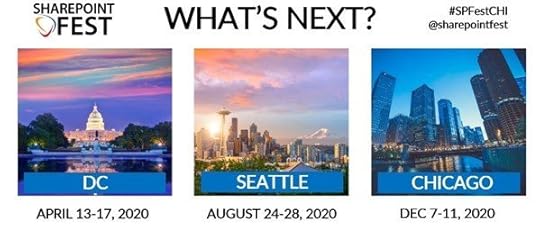
SharePoint Fest is probably the conference that I have been the most at, and there’s a reason for that, they’re awesome! SharePoint Fest puts on 3 different conferences every year, one in DC in the spring, Seattle in the late Summer and Chicago during the winter. The dates for this year’s events are:
Washington DC: April 13th – April 17th, 2020 > https://www.sharepointfest.com/DC/ (Read about my sessions here)Seattle: August 24th – 28th, 2020 > https://www.sharepointfest.com/Seattle/Chicago: December 7th-11th, 2020 > https://www.sharepointfest.com/Chicago/SharePoint Fest has 3 days of sessions, with 2 days of conferences. This event is a bit smaller in nature (~500-700 attendees) but this makes it easier for attendees to spend time with the speakers and get their specific questions answered, which is awesome. Another cool thing about the SharePoint Fest workshops is that there are both Full Day, and Half Day workshops for you to choose from, allowing you to cover two topics in the same day.
Discount Code: Coming SoonEuropean SharePoint, Office 365, and Azure Conference 2020 – TBD
The European SharePoint, Office 365, and Azure conference (commonly referred to as ESPC) is by far the top conference in Europe for everything SharePoint and Office 365. Another awesome thing is that every year, they organize it in a new city in Europe. So far, I have spoken at this conference in Stockholm, Vienna, Dublin, Copenhagen, and Prague! The conference has 3 days of sessions, and 1 day of full-day workshops! So far, they have not yet announced the dates/location for next year, but make sure you keep an eye out as it’s guaranteed to be awesome!
ESPC 2020 > https://www.sharepointeurope.com/Microsoft Ignite 2020 – TBD
Microsoft Ignite is the biggest Microsoft conference in the world with over 30,000 attendees! This is Microsoft’s flagship event, and this is where the biggest announcements are made. There is also a huge part of the expo hall dedicated for Microsoft Product Managers and Engineers that are there and available to answer any questions you might have on the product. There are thousands of sessions to choose from over a 5-day period, and an optional pre-day of workshops that you can attend. This conference is very heavily focused towards announcements on what Microsoft will just have announced, but there are also sessions by Microsoft MVPs and MCTs on how to use those tools in the real world. Dates and Location have not yet been announced, but I hope they will be announced soon!
Microsoft Ignite 2020 > https://www.microsoft.com/en-us/igniteLive! 360 2020 – Orlando
Live 360 is an amazing conference that I spoke at a while back, but I unfortunately couldn’t make it in the past few years! The amazing thing about Live! 360 Orlando is that it’s kind of a 6 conference into a single event, in November, in Orlando, on a Universal resort!
Visual Studio Live!SQL Server Live!TechMentor (training for IT Pros)Artificial Intelligence Live!Office & SharePoint Live!Cloud & Containers Live!Having this many events in one, allows you to really switch around from all kinds of session to learn everything you want from Dev, IT Pro , Office 365, and even go outside your normal focus area and look at things you might not work as much with, such as Artificial Intelligence. Another awesome thing about this event is that it’s “anti-marketing” , so all of the sessions are really about the tech, and not about marketing, which makes it awesome for people looking for awesome hands on sessions. The conference is November 15th to the 20th, with optional pre-day workshops before! Make sure to check it out;
Live! 360 Orlando > https://live360events.com/home.aspxOther Amazing Microsoft 365 Conferences you should look at:Microsoft Ignite The Tour (30 events around the globe) > https://www.microsoft.com/en-ca/ignite-the-tour/North American Collaboration Summit (Branson, Missouri) > https://www.collabsummit.org/SPTechCon (San Francisco, CA and Myrtle Beach, SC) > https://www.sptechcon.com/SharePointandOffice365ConferenceSharePoint Saturday Events (around the globe) > http://www.spsevents.org/eventsWhich events do you plan to attend in 2020?
Leave a comment and don’t forget to like the Vlad Talks Tech Page on Facebook and to follow me on Twitter here for the latest news and technical articles on SharePoint. I am also a Pluralsight author, and you can view all the courses I created on my author page.The post Top 5 Microsoft 365 Conferences I am Looking Forward to in 2020 appeared first on Vlad Talks Tech.
Save 33% off your Pluralsight Subscription – December 2019
Is your Pluralsight subscription up for renewal soon or have you been waiting for a promotion to become a Pluralsight subscriber? Pluralsight, one of the best on-demand online training companies with over 6000 courses is currently having a promotion between now and December 29th, 2019 to save 33% on a Pluralsight Subscription, and it even works on renewals! You can also offer it as a gift to someone you care about!
Both the Annual and Premium are 33% off, and here is the difference between the plans!

Whether you’re interested in learning SharePoint, Office 365, PowerShell, Angular or even Ethical Hacking and Security, 199$ for a year of unlimited learning is an amazing deal! Get the promotion now, click on the banner above or at the following link: https://spvlad.com/PS-Save33-End2019 ! Don’t wait too long as the deal ends on December 29th, 2019 and it won’t come back this year for sure .
Leave a comment and don’t forget to like the Vlad Talks Tech Page on Facebook and to follow me on Twitter here for the latest news and technical articles on SharePoint. I am also a Pluralsight author, and you can view all the courses I created on my author page.The post Save 33% off your Pluralsight Subscription – December 2019 appeared first on Vlad Talks Tech.
December 22, 2019
Speaking at SharePoint Fest DC 2020!
I am super excited to have been accepted to speak again at the wonderful SharePoint Fest Conference – Washington DC, happening April 13th to the 17th, 2020! Here’s a bit about my sessions!
 ADM102 – Enable Secure External Sharing for the Office 365 Administrator
Does the idea of your users sharing content externally keep you up at night? Join Vlad Catrinescu in this demo-filled session to learn what security controls Office 365 and SharePoint Online offer in order to enable users to securely share content in SharePoint Online.
ADM302 – Advanced PowerShell For Office 365Know the basics of PowerShell for Office 365 but want to take it further? In this session, we will look at some awesome real-life examples of how PowerShell can make our life as an admin easier, and at quite a few things that cannot be done from the User Interface! This session requires you to have basic knowledge of PowerShell for Office 365.
CM204 – Practical Steps for Migrating Shares to Office 365If you still have shares and want to move them to Office 365, you are not alone! Organizations want to take advantage of all the benefits Office 365 has to offer, but where do you begin? Can you just “lift and shift” and be done with it?
In this session, you will learn how you can effectively analyze and migrate your shares to Office 365. We will show how to navigate the common issues with share migrations, how to discover business processes dependent on shares, and get you started on the migration journey.
Join Microsoft MVPs Vlad Catrinescu and Daniel Glenn in this session inspired by real-world use cases to learn how to successfully migrate your shares to the cloud and get the most out of your Office 365 deployment.
I am looking forward to seeing everyone in Washington, DC this April for all things SharePoint and Office 365! Check out the agenda on the site and register soon to get the best early bird pricing! > https://sharepointfest.com/DC/
Leave a comment and don’t forget to like the Vlad Talks Tech Page on Facebook and to follow me on Twitter here for the latest news and technical articles on SharePoint. I am also a Pluralsight author, and you can view all the courses I created on my author page.The post Speaking at SharePoint Fest DC 2020! appeared first on Vlad Talks Tech.
December 20, 2019
Speaking at the SharePoint Conference 2020 – Discount Code Included!
I am super excited to have been accepted to speak again at the one and only SharePoint Conference in Las Vegas, May 19-21, 2020! Here’s a bit about my sessions!
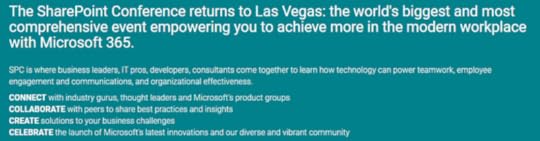
Full Day Workshop on May 17th 2020 – SHAREPOINT ADMINISTRATOR DAY CAMP
My week at SharePoint Conference 2020 will start early on May 17th with a Full Day workshop on SharePoint Administration! Here is the description:
Are you a SharePoint Server administrator looking to up your game? If the answer is yes then this workshop is for you. In this workshop, we will cover important foundational on-premises topics like farm architecture, optimization, and of course configuring SharePoint to fit your needs and requirements. We will then learn what a hybrid environment is, how to configure a hybrid farm and where each workload should go. Finally, we will look at the different ways you can migrate content to SharePoint Online using the latest Microsoft provided tools. If you’re interested in Microsoft Certifications, this workshop will cover most of the topics of the MS-301 Deploying SharePoint Server Hybrid Microsoft exam!
I really hope to see you in Vegas on May 17th at this workshop as I will cover a bunch of best practices on SharePoint administration and how to make sure your users are always happy with your SharePoint deployment!
60 Minute Session > What do YOU get from SharePoint Hybrid?
This one fits perfectly, as I will be using the hybrid environment, we build in the Full day Workshop before! Here is the session abstract for this one!
Every time you see a blog post about SharePoint 2019, you see the word hybrid. But what exactly is a hybrid infrastructure and what features does the business user get? In this session, we will look at SharePoint Hybrid from a business user point of view to understand what features we get out of it. We will look at Hybrid Sites, Hybrid Search, Hybrid Taxonomy and more!
60 Minute Session with my good friend Drew Madelung > How To Automate Your Modern SharePoint Site Provisioning Solution
Provisioning is a constant topic as soon as your bring up governance in Microsoft 365, and there will be many great sessions at SPC focusing on parts of the solution such as deep dive into Site Scripts / Site Designs / PnP, but our session will really showcase how you can build an end-to-end provisioning system and leverage all of your Microsoft 365 toolbox to build something your users will fall in love with! Here is the description:
Haven’t signed up yet? Here’s how you can save some money, and even get some extra goodies!Creating modern SharePoint sites only takes a second but what if you want to customize or control that process? It can be a challenge to keep up with all the sites in an organization and can affect support and governance a SharePoint environment. In this session, we will learn how to use Microsoft’s latest tools such as Site Designs, Site Scripts, PnP Site Provisioning, PowerApps and Flow to create a full Site provisioning system with custom templates, custom branding and easy approval before creation!
First, whenever you choose to sign up, if you use code VLAD in the Discount Code box, you will instantly save 50$
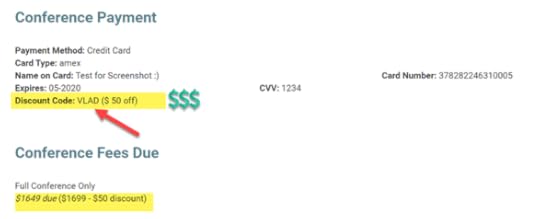
Furthermore, if you sign up before December 31st, you can save an extra 150$ (so 200$ total!)
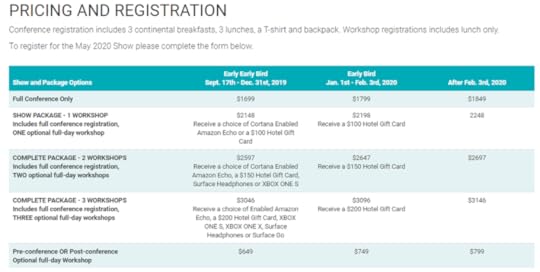
And as an extra, if you sign up for a workshop (ex: My SharePoint workshop ) you can get some awesome hardware such as a Surface Go, Surface Headphones, an Xbox or , if you want to spend more time in Vegas, you can even get a Hotel Gift Card !
 Can’t wait to see you in Las Vegas for the amazing SharePoint Conference 2020
Make sure you register before December 31st, (or as soon as you can) and use code VLAD to save 50$ off! Here is a link to the registration page! > https://sharepointna.com/#!/register?utm_term=VLAD
Leave a comment and don’t forget to like the Vlad Talks Tech Page on Facebook and to follow me on Twitter here for the latest news and technical articles on SharePoint. I am also a Pluralsight author, and you can view all the courses I created on my author page.The post Speaking at the SharePoint Conference 2020 – Discount Code Included! appeared first on Vlad Talks Tech.
December 17, 2019
2020 Microsoft 365 Certifications Overview
Are you a Microsoft 365 professional that is thinking of getting certified in 2020? If yes, this blog post is for you! This blog post will introduce you to the available Microsoft 365 Certifications that MS offers in 2020, as well as share links to the best learning resources! Before we get in the details, let’s start with a crucial question, why get certified?
Why Get Certified?There are a ton of reasons to get a Microsoft Certification, as there are thousands of people who do not believe in them. If you’re reading this blog, I assume you’re at least interested a bit, so let me give you the main reasons I see out there!
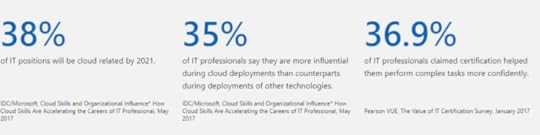
First, it’s good for your career! Check out the stats below, or you can also view the full Microsoft and Pearson White Paper here which outlines the main benefits according to Microsoft. Certified professionals are also needed by Microsoft Partners for their Silver/Gold competencies, so having those certifications certainly increases your value inside the company.
However, for me personally, the biggest benefit is that is forces me to learn and master a certain topic. I am always way more effective when I have a goal in mind such as passing a certification, running a 5K, or winning in a sport, VS just doing something with no goal in mind. By aiming for that certification, I can really look at what Microsoft thinks that a certain Job Role needs to have as competencies, than I go into each one of them in my lab, try them out, and often I am able to try new things I have never done before, because maybe none of my clients wanted to implement a certain feature, or simply I never had access to it. So, with cloud skills becoming more and more important, certification can be simply a motivation / end goal for you to get out there and study the ins and outs of a certain Microsoft Product.
Microsoft 365 Certifications in 2020There is a total of eight (8) certification options for Microsoft 365 (also called Modern Workplace) Professionals, and the one you should go for really depends on how much experience you have with Microsoft 365, as well as what products you have the most experience in. Certifications are split in 3 categories depending on difficulty, Fundamentals, Associate, and Expert. The Fundamental level certification is Optional; however you must pass an Associate level certification before being able to become an Expert. Not all Associate level certifications are available however, and I will specify this as we get deeper in the details.
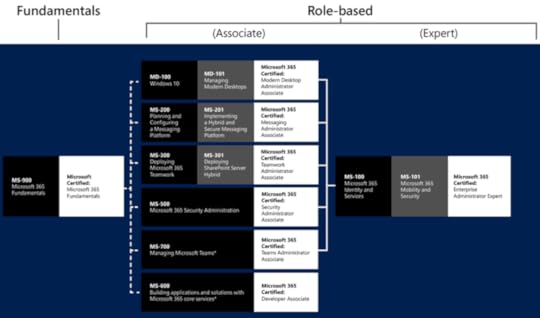 Microsoft 365 Certified Fundamentals
The first certification, at the Fundamentals level is the Microsoft 365 Certified Fundamentals certification, for which you only need only exam MS-900. This certification is perfect whether you’re a technical salesperson, IT Professional or Developer as it just covers the basics of Microsoft 365. If you’ve never taken a Microsoft certification exam before, this can also be a good way for you to try out an easier exam, so you can get used to the experience before going deeper with the more advanced exams. You can find the study guide for the MS-900 exam here!
Associate Level CertificationsThere are 6 options for Associate level certifications, and this depends largely on what you want to specialize in. The six options are:
Modern Desktop Administrator Associate (Modern Desktop Administrators deploy, configure, secure, manage, and monitor devices and client applications in an enterprise environment) Messaging Administrator Associate (Microsoft 365 Messaging Administrators deploy, configure, manage, and monitor messaging infrastructure, permissions, client access, mail protection, and mail flow in both on-premises, hybrid, and cloud enterprise environments) Teamwork Administrator Associate (Microsoft 365 Teamwork Administrators configure, deploy, and manage Office 365 workloads that focus on efficient and effective collaboration, such as SharePoint (online, on-premises, and hybrid), OneDrive, and Teams.) Security Administrator Associate (Microsoft 365 Security Administrators proactively secure Microsoft 365 enterprise and hybrid environments, implement and manage security and compliance solutions, respond to threats, and enforce data governance)Teams Administrator Associate (Microsoft Teams Administrators configure, deploy, and manage Office 365 workloads for Microsoft Teams that focus on efficient and effective collaboration and communication in an enterprise environment.) Developer Associate (Microsoft 365 Developers design, build, test, and maintain applications and solutions that are optimized for the productivity and collaboration needs of organizations using the Microsoft 365 platform)Let’s look at them more in detail!
Microsoft 365 Certified: Modern Desktop Administrator AssociateThis certification is made for systems administrators and IT Pros who deploy and manage Windows 10 in the enterprise. In order to achieve this certification you must pass exams MD-100 and MD-101.
Microsoft 365 Certified: Messaging Administrator AssociateThis certification is made for the Exchange Online and hybrid administrators! You need to have knowledge of hybrid Exchange as well in order to be successful. In order to achieve this certification you must pass exams MS-200 and MS-201!
Microsoft 365 Certified: Teamwork Administrator AssociateIn terms of products covered, this certification is probably the widest. In order to get this certification you need to master SharePoint Online, OneDrive for Business, Teams for collaboration, not voice, Flow/PowerApps administration, Stream and Yammer! You must also know how to install and manage a SharePoint 2019 farm, configure hybrid, and migrate from SharePoint On-Premises to SharePoint Online. In order to get this certification you need to pass exams MS-300 and MS-301. You can find the MS-300 Study Guide here & the MS-301 Study Guide over here!
Microsoft 365 Certified: Security Administrator AssociateThis certification covers everything to do with security and information protection / compliance in Microsoft 365. If DLP, AIP, ATP, PIM are the acronyms you play with daily, this exam is for you! To get this certification, you need to pass only one exam, the MS-500.
Microsoft 365 Certified: Teams Administrator AssociateThis certification is brand new, announced at Ignite 2019 in November 2019, and will come out of beta in 2020. This certification is built for Skype for Business professionals turned Teams administrators, as well as administrators who know Teams inside out, including Upgrading from Skype for Business to Teams, and configuring all of the voice/calling stack in Microsoft Teams. There is a bit of overlap between the Teamwork and the Teams certifications, but not a lot. To pass this certification you need to pass the MS-700 exam. The MS-700 Study Guide will be over here!
Microsoft 365 Certified: Developer AssociateThis certification is also one that will come out of beta early 2020, and as the name says this is for Developers. You need to master authentication for your apps, as well as know how to create customizations for Teams, Office, and SharePoint. You must also master the Microsoft Graph. To get this certification, you need to pass only one exam, the MS-600. You can find the MS-600 Study Guide over here! Really important to know that this certification is not a valid prerequisite for expert level certifications.
Expert Level CertificationsNow that you have passed an Associate level certification, you are ready to go to the expert level exams. In order to have the Expert level certification, you must pass any of the associate level certifications, except the Developer one, which is the only one that isn’t a valid prerequisite.
Microsoft 365 Certified: Enterprise Administrator ExpertThere is only one expert level certification in the Microsoft 365 branch, and it’s the Enterprise Administrator Expert certification. This certification covers a lot of the tenant/user/governance scenarios inside Microsoft 365, and also focuses on Identity and Mobility. In order to pass this certification you must pass exams MS-100 and MS-101. You can find the MS-100 Study Guide here , and the MS-101 Study Guide over here
ConclusionIn 2020, a Modern Workplace (Microsoft 365) professional really has quite a few options to get certified, with one Fundamentals level certification, 6 Associate level, and one expert level certification, for a total of 12 possible exams. If you’re not sure which one to go for, start with the Fundamentals, which will give you a good idea of what Microsoft 365 exams look like ,and what you should expect!
Leave a comment and don’t forget to like the Vlad Talks Tech Page on Facebook and to follow me on Twitter here for the latest news and technical articles on SharePoint. I am also a Pluralsight author, and you can view all the courses I created on my author page.The post 2020 Microsoft 365 Certifications Overview appeared first on Vlad Talks Tech.
December 12, 2019
Step by Step: How to redeem your free Microsoft Certification for Ignite the Tour
Last month, I have blogged on the fact that Microsoft Extended Free Certification Exams to Microsoft Ignite the Tour attendees, and a lot of you came back asking for more information on how you can actually take advantage of the offer after registering and attending an Ignite the Tour conference! If you didn’t know about the discount yet, make sure to read the Microsoft Extended Free Certification Exams to Microsoft Ignite the Tour post before so you know what it’s about!
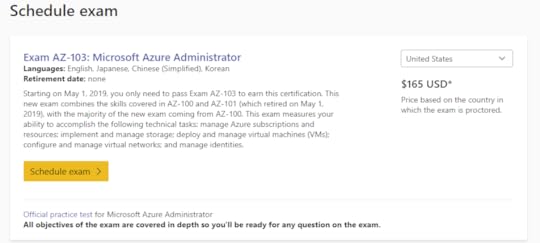
First, go on the exam page of the exam you want to take, and click on Schedule Exam
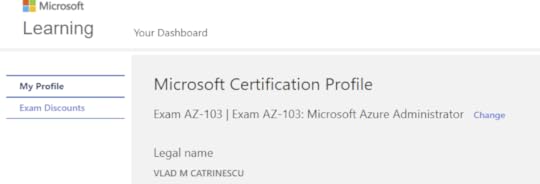
Next up, validate your Profile Information!
On the next page you have the Exam Discounts page, which is the one for us! Under the “For Microsoft vent attendees”, you have the option to choose which event you attended, either Microsoft ignite, or a Microsoft Ignite the Tour. Each one of them gives you access to one free Microsoft Role-Based Certification (see exact list here)
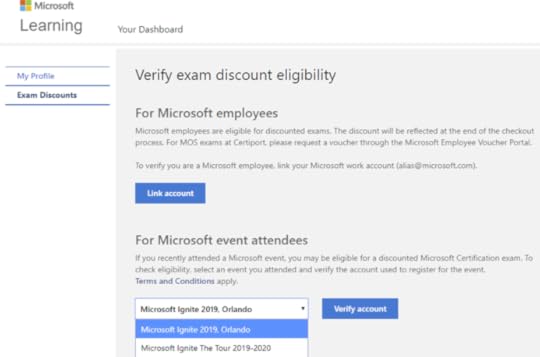
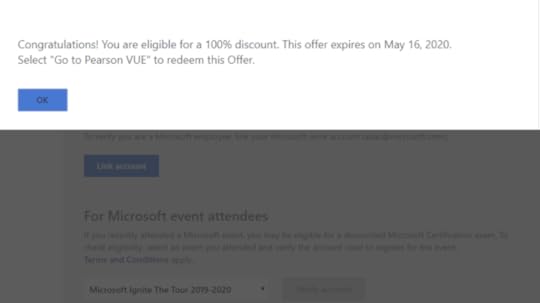
After you select the right conference, click on Verify Account, and you should get a confirmation similar to this one! Click on OK to make the pop up go away, and then click on “Go to Pearson Vue” on the bottom of the page.
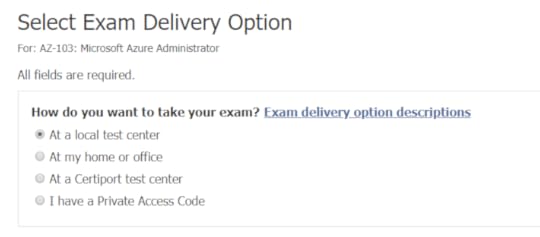
You can then continue booking the exam at a local test center, or Online trough the “At my home or Office” option!
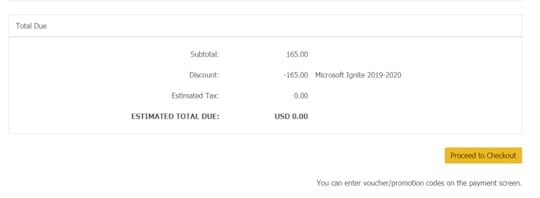
Follow the normal process, and at the end on the check out page, you will see the “Microsoft Ignite 2019-2020” discount which brings the exam to 0.00!
Was this blog useful? What exam did you sign up for? Let me know in the comments!
Leave a comment and don’t forget to like the Vlad Talks Tech Page on Facebook and to follow me on Twitter here for the latest news and technical articles on SharePoint. I am also a Pluralsight author, and you can view all the courses I created on my author page.Hey #MSIgniteTheTour attendees! Did you know that you can get a FREE #Microsoft Certification exam after attending? Check out my blog to learn how! > https://t.co/oSnYQ4LPHm pic.twitter.com/DQB0Flbrfb
— Vlad Catrinescu (@vladcatrinescu) December 12, 2019
The post Step by Step: How to redeem your free Microsoft Certification for Ignite the Tour appeared first on Vlad Talks Tech.
December 9, 2019
Classic SharePoint Blogs are Being Retired in SharePoint Online
Three weeks ago, news has broke that Delve Blogs are being retired, and since then, Microsoft has updated the messaging to also include the fact that Classic SharePoint Blogs are Being Retired in SharePoint Online! Let’s look at the details!
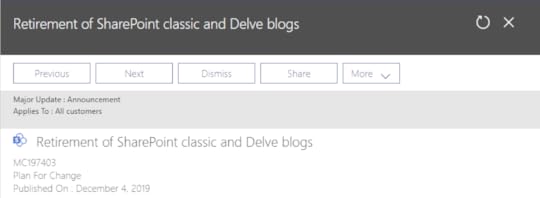
On December 4th, Microsoft published Message Center MC197403 , which covers what we already knew on Delve Blogs, as well as the information on Classic Blogs. Let’s focus on the messaging on Classic Blog Sites. Here is what was announced in the Message Center:
SharePoint classic blogs and Delve blogs are being retired. Existing SharePoint classic blogs will continue to work as expected, including the ability to create new posts, but you will not be able to create new blog sites after a period of time.
How does this affect me?
If you use SharePoint classic blogs, be aware that:
Beginning January 18th, 2020, the classic blog site template name will change to “Blogs (retired)”.Beginning July 17th, 2020, the ability to create new classic blog sites through the user interface will be turned off.What do I need to do to prepare for this change?
Plan to use alternative methods of blogging. We recommend creating Communication sites using News, Yammer, and Stream as a modern way of engaging with your audience.
As you can see already, unlike Delve Blogs, Classic SharePoint blogs will not be deleted by Microsoft! The only real impact so far is that from a UI perspective, users will be discouraged from creating new classic SharePoint blogs, and starting on July 17th 2020, classic blog sites will only be able to be created by PowerShell, or other APIs. This retirement will not stop users from creating blog posts on existing blog sites, it simply stops the ability to create blog sites trough the User Interface!
My take on ItI think that communication sites are a great replacement of classic SharePoint blog sites, and this change was imminent as Microsoft is trying to push more customers to use the modern experiences. This service deprecation is also done right, in the sense that no customer data will be deleted, and even past the July 17th deadline, an administrator that knows what they are doing will still be able to create a new Classic SharePoint Blog Site without too much trouble.
What are the next steps?As an Office 365 Administrator, your next steps should really be to first find out how used are classic SharePoint Blogs in your tenant, and, start migrating them to modern. There is no timeline on when this template will fully stop working, so this can be a lower priority item, but I would recommend doing it sooner than later! Microsoft (and the community) actually updated the SharePoint modernization scanner to include the ability to Modernize Delve blogs and classic blogs. Make sure to read that guide, and start testing out the modernization tool!
What is your take on this? Are you still using Classic SharePoint Blogs? Do you agree with the way Microsoft is handling this retirement? Let me know in the comments!
Leave a comment and don’t forget to like the Vlad Talks Tech Page on Facebook and to follow me on Twitter here for the latest news and technical articles on SharePoint. I am also a Pluralsight author, and you can view all the courses I created on my author page.The Classic #SharePoint Blog template is going away in 2020! Check out my blog post to learn more! https://t.co/aVNBL3jqRe pic.twitter.com/VojoiA9xEp
— Vlad Catrinescu (@vladcatrinescu) December 9, 2019
The post Classic SharePoint Blogs are Being Retired in SharePoint Online appeared first on Vlad Talks Tech.