Step by Step: How to redeem your free Microsoft Certification for Ignite the Tour
Last month, I have blogged on the fact that Microsoft Extended Free Certification Exams to Microsoft Ignite the Tour attendees, and a lot of you came back asking for more information on how you can actually take advantage of the offer after registering and attending an Ignite the Tour conference! If you didn’t know about the discount yet, make sure to read the Microsoft Extended Free Certification Exams to Microsoft Ignite the Tour post before so you know what it’s about!
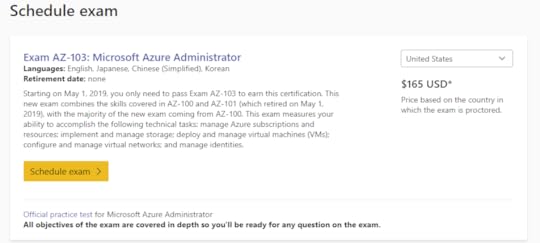
First, go on the exam page of the exam you want to take, and click on Schedule Exam
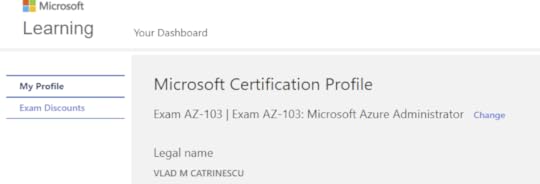
Next up, validate your Profile Information!
On the next page you have the Exam Discounts page, which is the one for us! Under the “For Microsoft vent attendees”, you have the option to choose which event you attended, either Microsoft ignite, or a Microsoft Ignite the Tour. Each one of them gives you access to one free Microsoft Role-Based Certification (see exact list here)
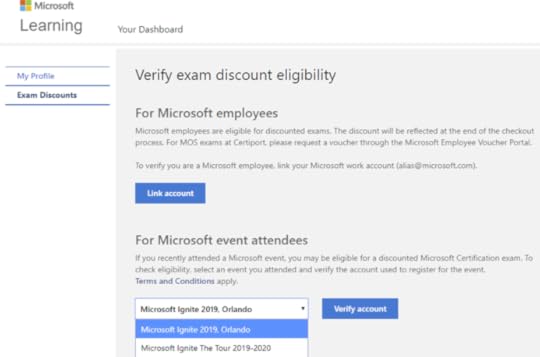
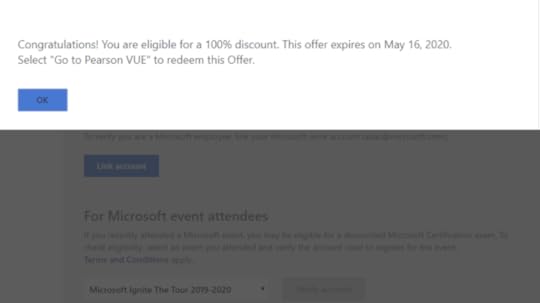
After you select the right conference, click on Verify Account, and you should get a confirmation similar to this one! Click on OK to make the pop up go away, and then click on “Go to Pearson Vue” on the bottom of the page.
You can then continue booking the exam at a local test center, or Online trough the “At my home or Office” option!
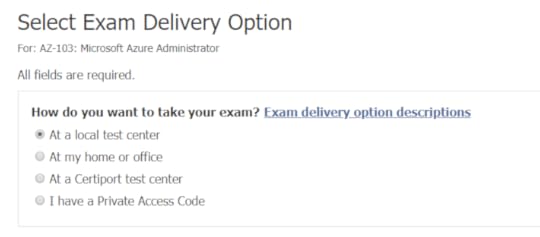
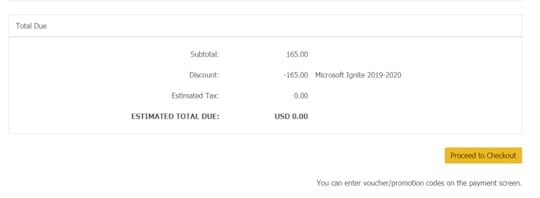
Follow the normal process, and at the end on the check out page, you will see the “Microsoft Ignite 2019-2020” discount which brings the exam to 0.00!
Was this blog useful? What exam did you sign up for? Let me know in the comments!
Leave a comment and don’t forget to like the Vlad Talks Tech Page on Facebook and to follow me on Twitter here for the latest news and technical articles on SharePoint. I am also a Pluralsight author, and you can view all the courses I created on my author page.Hey #MSIgniteTheTour attendees! Did you know that you can get a FREE #Microsoft Certification exam after attending? Check out my blog to learn how! > https://t.co/oSnYQ4LPHm pic.twitter.com/DQB0Flbrfb
— Vlad Catrinescu (@vladcatrinescu) December 12, 2019
The post Step by Step: How to redeem your free Microsoft Certification for Ignite the Tour appeared first on Vlad Talks Tech.