
Kourosh Dini's Blog, page 38
October 18, 2013
Back to Work – Merlin Mann on Perspectives
There’s a recent Back to Work episode where Merlin Mann goes way deep into the use of perspectives. He gives a great overview of what can be done with them.
One of the perspectives he uses is a Recent Additions perspective.
He is also particularly fond of using geotagging, which I do not do myself. If you think it is in line with your own methods of work, do consider also listening to MacPower Users Episode 91 where he goes into detail about them there.
If you are not using perspectives in OmniFocus, you are, without question, missing out on one of its most powerful features.
PS I’m basically elbows deep into the next project, so it will still be some time before I make my next contribution to the OmniFocus/Productivity community at large.


July 5, 2013
Setting Target Dates
Chris of Pxldot, creator of a fantastic Applescript template for OmniFocus, wrote a two-part series of the why and how of the changes he’d like to make to OmniFocus (found courtesy of Workflowing):
What’s Eating OmniFocus – Part 1
What’s Eating OmniFocus – Part 2
While I cannot agree with everything he says, I totally admire the effort he’s put in. I will now, in true critic form, say what’s right and wrong about a bunch he’s said. [1]
I don’t mean to pick on his ideas specifically. But Chris has so nicely laid out a number of concerns that all touch upon several ideas I just haven’t had the time to write about, that I couldn’t pass up the opportunity.
I’d like to do this in a series of posts. Today, I’ll focus on …
“Target Dates”
Chris describes a difficulty with start dates and an interesting remedy with the use of “target dates”:
In OmniFocus, two dates can be assigned to a task or project: a start date and a due date. Due dates are clear in purpose (though some still abuse them as a result of the same issue I’m about to detail): if something has to be done by a certain date, that is the date it is due. Start dates, however, are far more ambiguous; if not in their purpose, at least in their typical usage. I believe their name implies that they are the first time that a task becomes available; for example, you can only start working on your taxes on January 1st. …
… For many, this involves setting the start date (and, if you are like me, a flagged status as well). But if you set the start date in the future, the task will no longer appear as “available”, meaning you will never be aware that they are, technically, available for you should you go through your OmniFocus lists looking for something productive to do. This situation happens to me so often, and my frustration of having to set the start date and flagged status for scheduling tasks is so pointed, that I think the single most important change in OmniFocus would be the addition of a third date: the Target/Planned date.
While I think I can see the benefit, its hard to say how it would manifest in practice. In fact, I wonder if it would confuse matters as I do believe that the functionality is already there.
The tax example he presents is a good one. One cannot do the taxes until January 1st. Having a start date of January 1st makes sense as the tasks are now available. However, I may not want to do the work until February 1st, perhaps when I anticipate more time.
One can have this using a Flag Dated core. In other words, one uses available and flagged tasks for the things to be worked on today.
Specifically, with all projects available in the library, the filter settings would be:
Availability Filter: Available
Status Filter: set to “Flagged” or “Due or Flagged”
Estimated Time Filter: Any Duration

Doing so allows the tax work to become active on January 1st, but not appear in daily view until desired. In the example I propose of wanting to do the work on February 1st, I would add a task to the project that says “Begin tax project” @Laptop ; Start Date 2/1 ; Flag on.

Doing so allows the task to appear when I want it to while the other tasks remain available, but not visible to daily view. They’re just not on my daily plate until I want them to be.
In other words, the target date system is already in place. Adding another date mechanism could make an already complex program more confusing.
Note: For those who’ve read Creating Flow with OmniFocus, this does not apply to the start date based core. I increasingly find that a system centered on flags offers greater flexibility, as is evident here.
Depending upon response, I hope to continue posting thoughts in response to Chris’ excellent post …
Hopefully, we can create an endless chain of critique upon critique. This’ll be awesome. ↩
June 19, 2013
Next Directions
Now that Workflow: Beyond Productivity is complete and the dust has settled, I am curious as to what readers would be interested in seeing next. If you have moment, please check a box below to send me a vote in next directions!
Next directionsOmniFocus & Workflows webinarOmniFocus & Workflows live seminar (Chicago) Video additions to Workflow: Beyond ProductiviyCreating Flow with OmniFocus 2
May 15, 2013
Workflow: Beyond Productivity now available
Two and one-half years, 500+ pages, and nearly 100,000 words after Creating Flow with OmniFocus, Workflow: Beyond Productivity is now available:
Preview available to members of the OmniFocus & Workflows mailing lists
Workflow is an advanced textbook ready to reward the diligent reader, interested in not only productivity, but also creativity and mastery.
The text dives deep into the individual components of the workflow. While each individual has his or her own unique systems, the basics of the workflow remain. Intention, organization, sessions, practice, mastery, motivation, and more are explored at both a practical and psychological depth. Terminology and definitions work in concert with each other, while they are also presented individually so that you can decide where and how to improve your individual workflow to whatever degree you may wish.
What you will not find is a series of quick fixes or how-to lists. However, you will find an in-depth examination, from basic concepts to an advanced understanding so you can build the secure foundations needed to truly develop meaningful work.
Workflow is application independent. Though the text is also a companion to Creating Flow with OmniFocus, it is a standalone work, ready to support you regardless of the tools you may wish to use.
Now available at:
April 5, 2013
Talking about Talking about Productivity – a Podcast
Mike Schechter and Mike Vardy, had Thanh Pham and I on their show to discuss the awesomeness of productivity.
Have a listen to the Mikes on Mics podcast #62 here.
In all seriousness, we discuss the concern of how an over-focus on productivity can ironically turn into an avoidance of doing the work itself. The issue is actually quite a large one as it is a major means of procrastination. For this reason, perhaps among others, the productivity space can get a bad rap.
But the focus, as always, is on mastery and meaningful work. The rest are just tools.
March 11, 2013
The Omni Group Setup Videos
All presentations from the Omni Group’s visit to San Francisco in January are now available for viewing. Check out my writeup of the event here. In the mean time, I would like to highlight this rather dashing fellow:
The Creative Task Group from The Omni Group on Vimeo.
March 10, 2013
Resource Page Updated
The Resources page is updated with the following latest additions:
Asian Efficiency Premium Posts
Pixeldot’s Template
Michael Schechter’s "My OmniFocus Overview
Robert Agcaoli’s OmniFocus Series: Projects
Asian Efficiency’s Premium Posts marks a major addition to the resources available for OmniFocus users. Thanh and Aaron present a clear and structured method of using OmniFocus.
Chris Suave of Pixeldot has created an impressive template applescript along with a tutorial video for its use.
Michael Schechter presents an overview of his own use of OmniFocus.
Robert Agcaoli continues his OmniFocus series with a focus on Projects.
Check out the OmniFocus Resources Page for an overview of all posts gathered over the years.
March 5, 2013
A “Recent Additions” Perspective
There are any number of ancillary perspectives that may be created in OmniFocus. One example may be a perspective attempting to answer:
“What’s been on my mind recently (about this)?”
Whether for a particular project, such as writing, or with one’s overall database of tasks, whether concerning the last few minutes or the last several days, it can be nice to have a means of considering the recent past.
To this end, I use a perspective called “Recent Additions”. Basically, it answers the question above be it for a particular project, a folder of projects, or my entire library. The perspective answers more specifically:
What tasks have I added to the system today?
What tasks have been added to a specific project recently?, and
Oh, wait! I wasn’t done with that task before I hit clean up! (Not a question, I know, but a problem with which to deal nonetheless.)
The following is the perspective’s creation and a few practical uses. It does require some knowledge of creating perspectives and a general familiarity with the context/project based means of viewing tasks.
Setting up a Recent Additions Perspective
In short, the perspective is context based (Command-2) with the following settings:

Group actions by: Added
Sort Actions by: Added
Availability: Available or Remaining (see below for utility of either)
Status: Any Status
Duration: Any Duration
Here it is from the perspectives window (Control-Command-P):
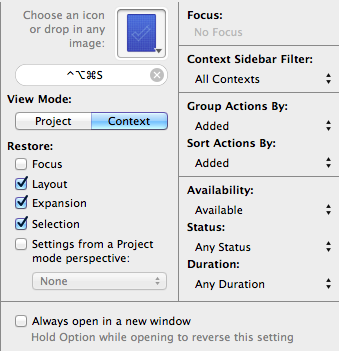
I’ve added the key command Control-Option-Command-S (which obviously stands for “Recent”).
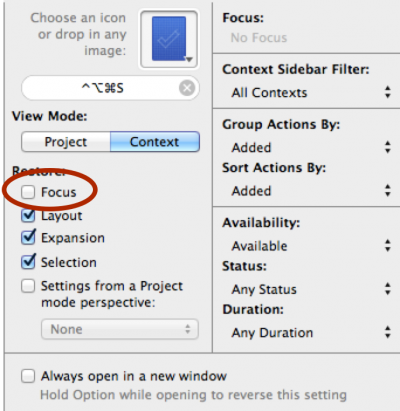
Notice that the restoration of Focus is unchecked:
In addition, I’ve set the columns to only include the Project name. To add or remove columns, with filter options open (Shift-Command-V), control click on the gray name bar:
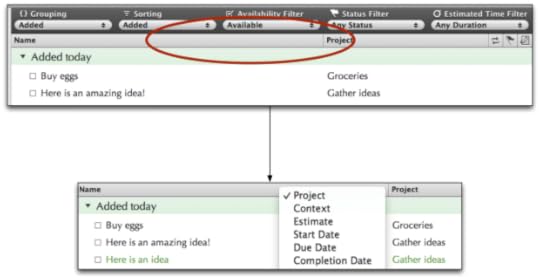
Finally, the “Added today” grouping is expanded while the others are collapsed. The perspective appears as follows:
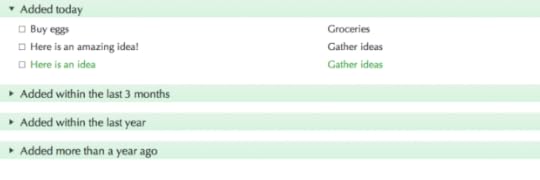
As always, salt to taste.
In Practice
1. Tracking a Recently Added Task Moved from the Inbox
Now, any time I have cleaned up a task that I suddenly realize is not written to my satisfaction (e.g., I have forgotten to flag it or it could have been better written), I can type the perspective key command to gain access to these most recently added erroneous tasks.
One could argue for making the availability filter set to Remaining for tasks added instead of Available as noted above. For example, a task written that starts in the future would not appear. However, when I transfer the perspective onto the iPad, the client slows down tremendously as I have far too many On Hold tasks for it to calculate speedily. The same is not true for the iPhone’s version of OmniFocus which a different mechanism for graphical presentation of tasks. Your mileage may vary.
Speaking of the mobile clients, the Recently Added perspective can be very useful there. Adding the perspective to the front menu of either client makes it easy to go back and look up anything recently entered rather than having to hunt for the task:
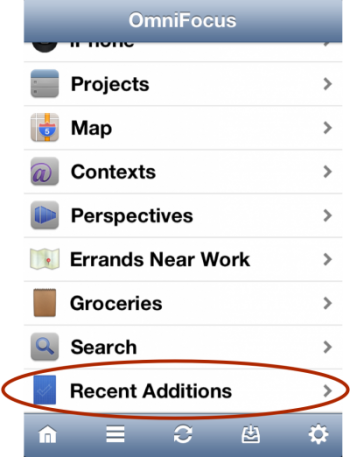
Note: Though the Focus field was left unchecked during the perspective’s setup, I have found that the mobile clients ignore this setting and always use the entire database of tasks.
2. Looking Forward and Backward in Time
At the end of the workday, if I have the time, I will examine not only the Forecast view to see lays ahead tomorrow, but also the Recent Additions perspective, to review any of the day’s loose-ends. Tasks that I entered into the Inbox while I was too busy to follow them during the day wait here. I often discover a loose-end or simple task that I could easily just wrap up or complete there and then at the end of the day.
3. Utility in Writing
A Recent Additions perspective has also been useful in the midst of a particular project, where I have the need to recall what I had just considered a few moments ago. Having that option open allows me to follow a whim of thought, having placed a marker in the trails of work in the form of a task.
To do so, I simply focus upon the project and call the Recent Additions perspective. Again, having left the “Focus” field of restoration unchecked allows for the perspective’s utility to work with the entire database, individual projects, or even groupings of projects and folders.
For example, while writing, I can have many thoughts come to mind seemingly at once–or at least faster than I can reasonably develop them. Tossing the ideas as tasks into a project helps alleviate the strain associated with the feeling that the ideas need to be developed in their moments of inspiration.
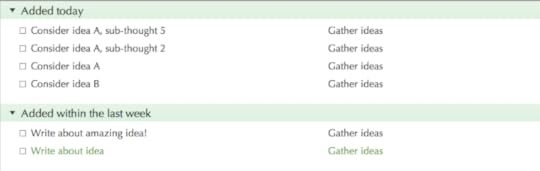
I write down the several options of thoughts to develop, choose one, and move forward. Upon its completion, I may return to the perspective. If I had additional thoughts come to mind while writing, I enter them as tasks into the project, too. The tasks closer to the top tend to be more related to the topic I had chosen, having been more recently on my mind. As I tend to move from the top of a list down, the process creates a form of automatic closed loop, promoting completion of a thought and therefore thoroughness in developing the various possible paths.
February 18, 2013
The Fear of Losing Control to our Tools
Any tool, whether physical, digital, or mental, requires some form of caution.
We must recognize our intentions as separate from the tools we use to develop them. It is we ourselves who form the intentions and are ultimately responsible for them. This may seem obvious, but in practice, it is not.
Michael Schechter of a Better Mess wrote two fine posts called Clarifying Productivity and The Error of the App Mentality, spawned from a OneThirtySeven post and a twitter discussion between himself and Matt Alexander in which Matt proclaimed,
“… purported elements of productivity often become deep pits of wasted time and effort.”
In attempting to define productivity, Schechter noted,
“It’s about understanding the structure your work needs to take in order for it to actually get done.”
Both comments are potentially true in their own right. The important underlying concept to their discussions, I believe, is found in the definition and use of the “tool”. The definition given by my handy computer states that a tool is:
“a device or implement, esp. one held in the hand, used to carry out a particular function”
However, I would like to begin our examination of the tool with the following proposed definition:
A tool is an object used to shorten the distance between a vision and its realization.
With this definition, let us consider:
Examples of how tools may be useful
Examples of how tools require caution
An Example of a Hammer
As a simple example, we might examine a hammer. A hammer is a tool that allows the development of an intention such as “hang a picture on the wall.” The distance referred to is between our present experience of not having a picture on the wall and having a picture on the wall. The distance without the hammer is very far. With the hammer, the distance shortens.
The caution here is obvious. The shape and weight of the hammer translates the force of one’s arm movement into a tremendous amount of pressure upon a small area. If that force is misdirected, say to one’s thumb, we create unintended and undesired consequences of the black and blue variety.
The use of the hammer, in other words, the translation of our agency instructing the intention to place a nail in the wall, carries caution.
An Example in Mnemonics
However, tools, at least by the definition I proposed above, are not just simple objects such as hammers or even the shiny new applications resting in our computers. They may even be in our own minds. For instance, the familiar use of a mnemonic qualifies as a tool.
A mnemonic is a device such as a pattern of letters, ideas, or associations that assists in remembering something.1
Even here, we must be cautious as we recognize that the mnemonic itself is not the primary intention. We remember something for a reason. We form our intentions with some sense of meaning. Without a recognition of that meaning, mnemonics risk being hollow.
Probably the best example of this may be found where a particular student only wishes for a good grade without a care for the knowledge the grade represents. Massive lists worth of information may be memorized using the tool of mnemonics, but the meaning behind the lists themselves are lost.
The intention to learn at a meaningful depth was missing, just as the intention to hammer the nail was not well focused. In either case, intentions were not fulfilled as their associated tools were misused.
Agency & An Example in Task Management
Even a task management system requires caution. A well-tended task management system provides a means of not needing to remember every responsibility, task, and project. By creating a trusted system, we become better able to rely upon it so that we may more clearly consider the moment.
However, even in developing our habits and systems of work, we must be vigilant to retain agency, as these systems, too, have a potential trap in our reliance upon them. I define agency as follows:
Agency is the degree to which we may decide non-reactively.
When a task management system is used without thought, agency is lost. We forget that there is an importance of thinking things through. The spirit of a concept dissolves and the details become a meaningless husk. The work becomes a drudge.
Having forgotten that the trust required for a working system is a felt belief, continually reflected upon and developed, we risk following tasks on some form of auto-pilot, or we become so frustrated that we jettison the entire system–baby, bathwater, and all.
With the ability to pause and reflect, we understand how a task management system qualifies as a tool:
A task management system is best consulted, not followed without thought.
When disagreeing with a system, even though we may have carefully designed it ourselves, the task is then to
Recognize and acknowledge that which seems incorrect in its reflection of present experience and
Recognize and acknowledge its inaccuracy in representing the visions we would like to develop, at least as well as they can be seen and understood in the moment.
Conclusion
By pausing to reflect, we can decide when and how our purported tools either aid or impede the development of any particular intention, in the moments of their use. We cannot simply react to the systems we create. It is in the habit of reflection where we retain agency, take an active role in honing our habits, use the tools we desire with the caution they demand, and ultimately develop meaningful intentions.
And therein lies a fundamental caution inherent to our tools:
Tools are objects external to agency.
Redefining tool then:
A tool is an object, external to agency, used to shorten the distance between a vision and its realization.
If there is a moral to this, at least for myself, it is that I often benefit from pausing. The place where I may retain agency, i.e. where I can decide non-reactively, where I can decide whether or not something is helping or hindering, is in those moments where I am not simply typing away or examining the next thing. It is where I have given myself permission to let go of the work, the tools, the play, or whatever it is in which I am involved.
Also defined by my handy dictionary application easily accessed by a three-finger tap of the trackpad. ↩
February 4, 2013
Reflections on OmniFocus 2, The Setup, and The Future
Attending the Set Up was a blast. Everyone was such a pleasure to meet. I continually wonder at the fact that there is this group of people who are all so excited about task management of all things, and I get to be one of them.
Ken Case, Omni’s CEO, and the entire staff of the Omni Group were very nice. They made an excellent experience for both audience and participants alike. In addition, it is always enjoyable to speak with people who create. I am grateful for having had the opportunity to attend, and I thank the Omni Group for inviting me to take part in their event.
Merlin Mann really is just as much himself as he is on the microphone. The skill with which he can both fiercely and delightfully deviate from a conversation, yet remember exactly where he left the trail so he may return, is strong. Conversationalists, be warned.
David Sparks made neat use of example in his presentations. During the Q & A, I was particularly entertained by his description of how shocking it can be to others when you’re really on top of your game.
Mike Schechter and Mike Vardy approach the workflow from such different but equally engaging mindsets. They both enjoy thinking about how we bring our minds to focus upon the work we desire to do, which is really the fundamental question to all of this.
In fact, I think I waxed on philosophically about workflow in general with everyone there. Tim Stringer even eloquently described productivity as evolving into a term more “holistic” in nature.
Sven Fechner has really honed his thoughts on A Fresh Take on Contexts. Even behind the content of the work, he displayed how developing one’s contexts in a way that works for one’s self takes active thought and reflection but pays off very well in the end. Each of the contexts he used clearly had a use for himself honed in habit.
Dinah Sanders presented her thoughts on the importance of regularly reflecting on and discarding projects that lose relevance. Making the act of deleting old projects into a habitual process leaves more room for the present.
In the morning session, Thanh Pham presented alongside Mike Schechter. Watching their animated arguments about how each were “right and wrong” about the same topics both entertained and highlighted the very individual nature of our workflows.
OmniFocus & OmniFocus Pro 2
Looking quite dashing in its new threads, of course, OmniFocus 2 itself was revealed. It’s still in its early stages, but it is obvious how strongly the iPad version’s interface is influencing the new direction.
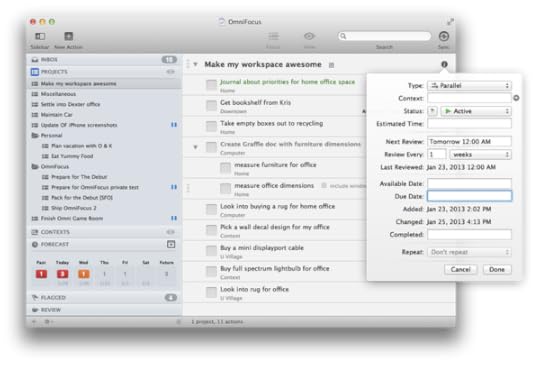
Having said that, my own selfish fear that the strength inherent to the OSX version might be lost in that translation does not appear to be the case at all. If anything, some very neat enhancements relating to the Forecast view have been newly added such as an ability to see the scheduling of tasks across the entire month and even see where tasks rest during the day amongst one’s present calendar schedule items.
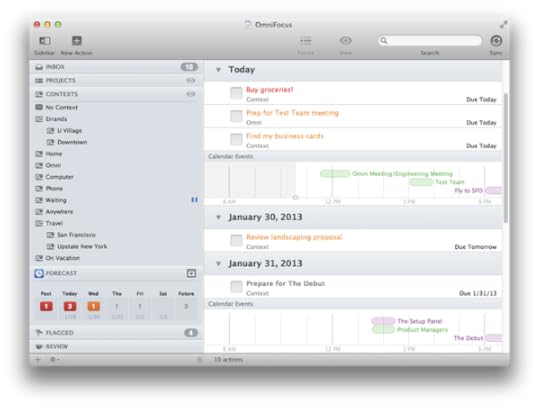
As the program is still in its early stages, it remains to be seen how its individual components will contribute to supporting one’s singular workflow. Among the functionality I am eager to see is that of perspectives. Perspectives create a part of OmniFocus that I rely upon heavily. One of my responses during the Q & A session, in fact, involved describing the regular part of my weekly review in which I examine my perspectives to see which may be deleted. The regular growth and pruning of perspectives has been a significant aspect in the evolutions adapting OmniFocus to my own workflow.
Perspectives, along with the use of Applescripts, will be a part of the “Pro” version of OmniFocus.
Several other posts have already described, in good detail, the information released about OmniFocus 2 including:
Omni’s Debut Post
Sven Fechner’s post
Michael Schechter’s Post
Katie Floyd’s Post
Ars Technica’s preview
In the meantime, also check out Ken’s Interview about OmniFocus 2 and OmniOutliner 4 over at MacStories.
The Future of Creating Flow
While I wait for the beta of OmniFocus 2 to become available, I hope to wrap up my present book of focus, Workflow. Having discussed some of its content with my productivity colleagues, I feel increasingly confident that readers will find it to be a useful companion piece to Creating Flow 1 and 2. Once Workflow is done, I plan to bring Creating Flow 2 to a major spot in my Running Projects[1] perspective.
As Creating Flow with OmniFocus 2 is still in the vague and nebulous stages of thought, I can only say that I have no idea as to when it will be ready, what it will look like, or anything along those lines. The original Creating Flow had the benefit of being written in near secrecy. While I had discussed it in the forums[2], I only first otherwise publicly announced it about a week before launch. As such, it had time to develop.
I firmly believe that time is invaluable to the development of any creative endeavor. In the course of creativity, one needs to be able to play, and play needs to be able to head off in odd or unknown directions, explore, discover, question, and gleefully make many mistakes. All of this needs time to be guided and developed to become anything resembling meaningful work.
All of this is to say, I will try to get the work done in a timely manner but will also allow the work the time it needs to develop well.
Disclaimer: Please note, as a participant of the OmniFocus Setup event, I was indeed compensated. But, also know, I’ve been an OmniFocus enthusiast long before such an arrangement.
Nowadays, titled “Land & Sea” because I’m romantic that way. ↩
The OmniFocus forum is an excellent resource with some very helpful regulars. ↩


