
David Allen Wizardgold's Blog: Good and Geeky, page 14
December 17, 2016
Not too Old to learn to Code
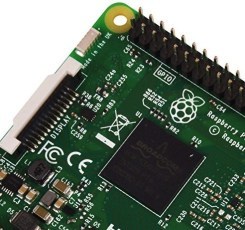
The height of being good and geeky is using code or programming to get things done. I can remember way back when, I had a book about how to construct webpages. I specifically remember reading through this book while lying on a beach in the sunshine. These days I would do that reading on my iPad and I’d be using an e-book or maybe just reading from a webpage. Webpages were much simpler in those days though. During the last week I have been learning more HTML editing and now I am working through CSS coding. I have used CSS coding in the past but not really done much with it. Now I’m following a course going through it all step-by-step. I’m getting a better understanding of how it all works. For the most part, the HTML and CSS I’ve been learning I really don’t need it. For my webpages I’m using WordPress and I only have to worry about the content. There are occasions though when I do need to delve into the actual code of webpages. On such occasions, it is helpful to know more about what it is your looking at. This is why I’ve gone back to the online classroom to update my knowledge. I’m planning to take it a stage further and continue learning more about coding generally. For some of things I’m doing with home automation and home security I need more coding skills for the projects. There are different languages for working with the Raspberry Pi or for the Arduino and I also have an interest in Swift coding. Swift is the new coding language from Apple which is open-source but mainly used for creating for iOS and for the Mac operating system.
Thinking like a programmer
Sometimes the thing about working with code is not about the way the language works and uses words to do what needs to be done, but more about how your brain understands the logic. I was going through a Tapcoding course to learn swift programming and there were occasions where my head felt like it was going to explode. There are lessons where you need to flip-flop true and false states of Boolean logic to get things to work as they should. There are parts of these courses where I’ve had to do a section two or three times to work out what was supposed to be happening. It’s an interesting learning experience. I’m a firm believer in being a lifelong learner. In this day and age our earning capability is affected by an ability to learn new knowledge and skills.
One hour of code
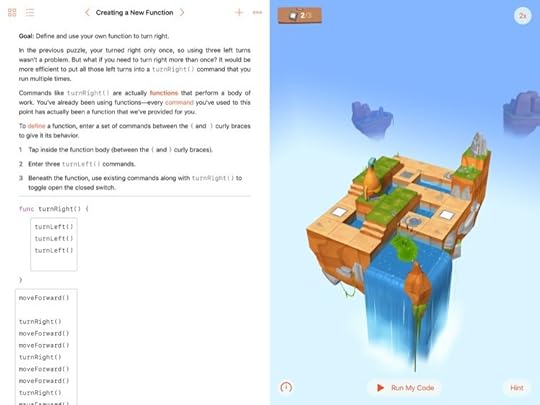
Each year about this time there is an initiative called one hour of code. Children can go to Apple stores and have an hour learning to code. This year Apple has the new iPad application called Playgrounds which teach you how to think like a programmer. I have done a couple of these coding lessons and they are not just for kids. It’s a visual way to learn which is more suitable for children but works very well for this older adult. I also received an email from the Khan Academy about this one hour of code. This email offered me coding courses available within that online courses website. I plan to have a look at some of these because it’s good to do the same topics from different sources. When material is presented in a different way it can help to get the information ingrained inside your head. Often what you need to have the lightbulb moment is for the subject matter to be offered in a different manner.
A plan to learn programming
HTML
CSS
JavaScript
Swift
Python
SQL
PHP
To a certain extent my list of programming languages to learn is a ‘Programming by Stealth’ approach. Starting off with something simple like HTML and moving on steadily through CSS and JavaScript is a good plan to steadily ramp up the learning process. Jumping directly into learning C++ or Java script would only lead to excessive head scratching and confusion. Swift has been presented as an easy language to learn and is without a doubt much easier than learning Objective-C. I tried learning some Objective-C before Swift came upon the scene and I got stuck fairly quickly.
Making use of coding skills
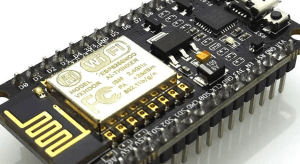
Working with the Raspberry Pi requires knowledge of Python. I still have projects I’d like to complete using the Raspberry Pi as the starting point. I have got a couple of microprocessors coming to me from China. These are the Arduino killer ESP8266 12E boards. Basically they are Arduino compatible development boards with built in Wi-Fi and you can buy them for less than $10. I plan to use these to control one or two things around the house. I want to control the garage door and the gate which at the moment both work with radio remote controllers. It’ll be much better if I can make them operate by sending a signal across Wi-Fi. It’s going to be some fun to build some Wi-Fi gadgets using this microprocessor. I actually saw a video on YouTube where a young boy of 10 years old was showing how to control one of these devices from an iOS application. When I was 10 years old all I wanted to do was go and play football in the garden. How times have changed!
The post Not too Old to learn to Code appeared first on Good and Geeky Books.


December 14, 2016
Home Automation Systems – Which One?
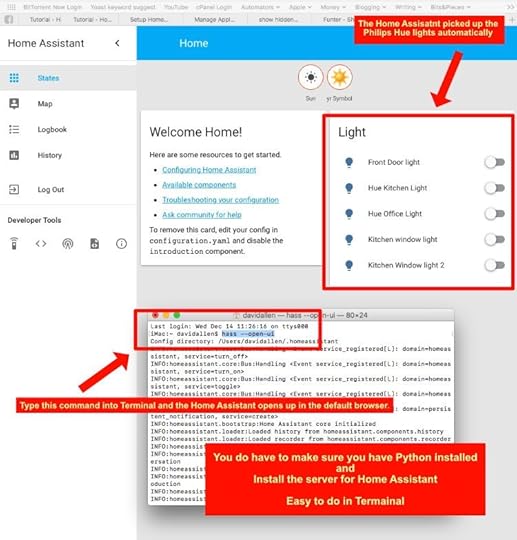
My preference for home automation is always going to be with HomeKit due to my liking for Apple and the components/accessories that will work with it. My experience so far with HomeKit accessories is that it’s been very easy to setup and use. The whole thing of – It just works! I have HomeKit accessories for my home automation from two sources at present. These are the Hue Lights from Philips and the security devices from Elgato Eve. I’m able to get the devices from these two different companies to work with each other. I can have lights turned on by the Elgato Eve motion detector or by the door and window sensors I have fitted. This does mean to a certain extent I will be stuck with keeping within the HomeKit environment or walled garden as some people like to call it. For my part I really don’t care just so long as it does what I want it to do. So far that has been the case and Homekit home automation systems are easy to setup. I am also drawn to looking at more good and geeky ways of achieving home automation. There are some fantastic videos on YouTube showing how people have used setups such as IFTTT, MQTT servers, Home Assistant, Raspberry Pi, Arduino and other microprocessors. These are not all HomeKit compatible, but it is possible to use these systems with some accessories that are in the HomeKit universe. I tested it today and saw it was possible to use Home Assistant running on a web browser and switch on the Philips Hue Lights.
Using the Amazon Echo for home automation
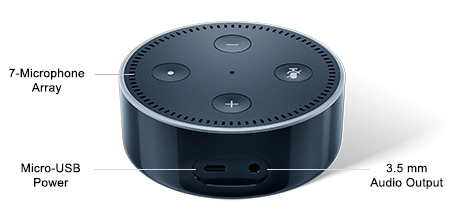
I am tempted to buy a Amazon echo or more likely a Amazon Dot. My wife doesn’t carry around her iOS devices and has the muscle memory of hitting the switch on the wall to turn lights off. When the lights are turned off at the switch then they do not react to controls via HomeKit. I have to admit it’s driving me nuts. She is doing her best and will apologise profusely when she realises what she’s done. I think she likes the automation’s I have set up but is just taking some time to get used to it. If we had an Amazon Echo or Amazon Dot it would be always listening and maybe she’d be more likely to speak the commands to turn the lights on and off. The kitchen lights are easy because they are turned on by an motion sensor after dusk. They are programmed to turn off after two minutes. I did have it set to 3 minutes but it was more likely that my wife would use the switch when it was set to 3 minutes. The person who pays a electricity bill is obviously going to be concerned by the cost of leaving lights on. The good thing about using these new fancy LED light bulbs is that they are extremely frugal using the electric juice. Last week during the Black Friday and Cyber Monday sales the Amazon Echo was reduced in price as was the Amazon Dot. I should have bought one when they were cheaper. I’m inclined to wait until the January sales and see if they will be more reductions available. The Echo devices are good choices for any Home automation systems you might set up.
Advantages of using Home Assistant rather than HomeKit
One advantage I can see with the Home Assistant is that you can have more control over the automation. The level of automation with HomeKit to a certain extent is about the same as you get with If This Then That. That comes down to one trigger and one effect happening based on the trigger. There are most heavily certain occasions when you want to have more than one trigger. This is easy enough to get around by duplicating the automation to have different triggers. It’s not so easy to get around the conditionals you might want to introduce. An example of this would be if I have the lights and television turnoff when I leave the house. This is fine in theory but if by wife is still at home and I leave. The trigger will activate based upon a the GPS location of my iPhone or it will trigger based upon the front door being closed. I need this to not work if my wife is still inside the house. I could see her getting quite miffed if she’s watching a television programme and everything is turned off by the automation. I can imagine there being steam coming out of her ears and a few choice words. From my initial browsing through the documentation for Home Assistant it seems you are able to add conditionals to the automation. This is why I’m interested in finding out more on how Home Assistant works. With luck, over time the automation features of HomeKit will improve and I’ll be able to keep it all in-house. What are your views on Home automation systems?
This is what I used to set up the Home Assistant sever on my Mac.
I might still put it on the Raspberry Pi instead.
The post Home Automation Systems – Which One? appeared first on Good and Geeky Books.
Good and Geeky

- David Allen Wizardgold's profile
- 3 followers

