Jason SurfrApp's Blog, page 4
January 25, 2022
Our 2021 Year-End Review and 2022 Preview
Another year in the books, folks! While 2021 felt a lot like 2020 in many ways, we were incredibly grateful to make it through some fairly rough patches and also some really great moments too.
2021 summed up in a GIF:
We love doing these year-end reviews as it helps us zoom the lens out and see the good, the bad, the ugly, and the in-between. It’s also really interesting to review these… reviews… as the years go by. If you’ve never written one of these, we highly recommend it (even if you don’t share it publicly).
Last year’s review had a callout to a (100% free) Notion Yearly Planning Template and we wanted to share that again. We’re biased, but we think it’s a solid way to go through end-of-year planning 
 .
.
 Want to listen to the podcast version of this Year-End Review? You can do that using the podcast player below or you can queue this episode up from our What Is It All For? podcast in your podcast player of choice.
What Went Well In 2021?

 Made consistent exercise a priority (and learned not to hate it!)
This was my one big personal commitment to myself in 2021, and I feel really proud to say that I was able to follow through on it. I’m no longer a person who hates to exercise! Hooray!
I want to be 100% clear here in stating that this goal did not come from a place of wanting to change my body, needing to hit a certain number on a scale, or the belief that exercising regularly somehow makes one a better person than anyone else. We have enough of that crap messaging being launched at us from the diet industry and the media.
For me, this was about a few things instead:
I know from experience that regular exercise helps me manage my anxiety. Maintaining good mental health is the most crucial priority to me, so learning to not hate it seemed like a pretty worthy endeavor.I wanted to change this recurring self-perception and narrative that has popped up my entire life telling me I’m not capable of caring for myself in this way. One of the childhood stories I continue to work on in therapy is this idea that I am “weak” and I wondered if challenging this belief in this way could help reinforce a sense of self-trust and some lived experience to rewrite that internal self-criticism.I’ve tried to work on establishing this habit for years, but it’s never stuck. I think the biggest reason I was able to finally to make it happen in 2021 is that this time, my desired change was coming from a place of self-love and not self-hate. My motivation was not to chase down something I felt I was lacking; it was born out of a deep desire to care for myself. This major difference meant that I approached everything from a place of compassion, joy, and curiosity, rather than making it about strictness, punishment or disappointment. And that little bit of grace was enough to keep me coming back.
I made up my own rules and I kept the expectations low. Just ten minutes a day. And yes, even stretching for ten minutes or a restorative yoga session “counted.” I would cross off a big X for every day I completed to track my streak. If I felt like pushing myself one day, I would. If I had zero motivation and just wanted to dance around in my garage for ten minutes, I would. If I got bored with an exercise session and “quit” after ten minutes, great! Totally allowed. Because I showed up. And the only person who was there to judge me was me. It was always about whatever I needed that day, and that’s how I was able to turn it into a daily habit.
This year, as we travel, I know it will be harder to keep this habit alive but I’m committed to trying because I know just how positive the impact has been on my life.
[image error]
[image error]
 We reached our “Enough Number” and had our best WAIM Unlimited launch yet!
In 2018, we agreed on an “Enough Number” for our monthly business revenue: $33,000. This number wasn’t just plucked out of thin air because it sounded good on paper; it was intentionally chosen based on clearly outlining our realistic financial and lifestyle goals. (Also, keep in mind, that number is revenue, not profit. ) We thought it would take us one year to achieve it when we started WAIM, which honestly seems laughable at this point, but, hey, these two kids can dream!
On September 28* of this year, this goal became a reality! 


*100% honesty moment: During our launch when we hit our enough number, we were barely able to celebrate it due to some personal family issues that took us on a two-month emotional roller coaster. Life has a funny way of balancing out our emotions, huh?
You can read all about our Journey to Enough here (with the first update starting at $0 per month in revenue). In the 2022 preview section below, you can read why we’re actually updating this enough number three years later, not as a means to keep growing for growth’s sake, but just to adjust to the vision we have for this next phase of our lives.
WAIM’s monthly revenue increased 127% from 2020 to 2021In the lovely chart below, you can see the monthly revenue line for 2020 (in magenta) and our awesome new revenue line for 2021 (in blue).
What feels most amazing about this chart to us is that our work output was probably LESS in 2021 than it was in 2020. It felt like we really found our groove in 2021 with our bi-annual launch model (Spring and Fall).
[image error]
In 2021, WAIM Unlimited welcomed in 266 new customers (49% increase from 2020)In looking back, 2020 was actually a solid year for WAIM. We saw consistent growth and ended the year with 165 new customers. But, 2021 saw an awesome increase thanks mostly to our affiliate program.
[image error]
Of those 266 new customers in 2021:
167 came from affiliates (63% of total customers)16 came from our “passive” email sales funnel (6%)21 customers canceled their WAIM membership (6.7% churn for the year)Speaking of customer churn, we made some great strides this year in reducing cancelations!Any time you increase new customers, you’re likely to see more churn. However, in 2021 we saw a 44% reduction in churn from 12% in 2020 to 6.7% in 2021.
We strongly believe the decrease in churn boiled down to a few factors:
Many new customers came via affiliates, which is usually someone they trust and know will lead them to buy something worth investing inWe feel our business model is very dialed-in these days and new customers know exactly what they are going to get on a monthly basisWe’ve continued to evolve our sales page and email sales copy to be extremely honest, transparent and lacking in psychological/fear-based tactics[image error]
 Our email metrics are UP but our website traffic is DOWN
It’s weird to put this in the “what went well?” part of this review, but it feels like it was a good thing, so let’s run with it for now (we’ll check back next year on those feelings  ).
).
Total new website visitors in 2020: 353,021
Total new email subscribers in 2020: 3,145
Traffic to email conversion in 2020: .08%
Total new website visitors in 2021: 206,574 ( 41% decrease)
Total new email subscribers in 2021: 4,469 ( 42% increase)
Traffic to email conversion in 2021: 2%
Here’s a look at our new email subscribers broken down over the course of the year. Two fun tidbits for all you tidbit fans out there:
Highest day of subscribers: 46 people on September 5Lowest day of subscribers: 1 person on July 17 (no days with zero tho!)
[image error]
We doubled our website conversion rate and nearly doubled our new email subscribers while seeing a 41% decrease in website trafficWhen you compare our website traffic numbers from 2020 to 2021 it can feel like this:

But, when you break down the metrics that matter most for our business to thrive, it actually has us feeling like this:

Over the years, we’ve had a handful of articles that really pumped up our website visitor counts. BUT, the majority of those articles weren’t serving the core focus of WAIM that we’ve been moving into (un-boring and thoughtful business coaching). As those larger trafficked articles started to slump we noticed the traffic, decreasing but our email subscriber rate actually increased!
While we only published five new articles in 2021  (our goal was 12), they were high-quality articles and would target our ideal email subscriber (and hopefully, eventually WAIM Unlimited customer). We also did some tweaking on a few existing articles and hope to see the fruit of those traffic trees in 2022. We’ll check back on that next year!

Every year we do what’s called a re-engagement email campaign to our email list. It’s a series of four emails sent over the course of 20 days. In those emails, we ask subscribers who don’t seem interested in our emails to click a link to stay subscribed.
This year, that campaign (and some other cleanups) removed 6,000+ subscribers from our list. This task used to scare us, but now it empowers us. It keeps our email list healthy and reduces our monthly bill with our email provider (nearly $1,000 in savings coming our way in 2022!)
[image error]
 We created two new products this year: the Notion Starter Pack and Page Layout Library
Everything we create these days is for our WAIM Unlimited members. While we still have a few straggler products out in the ether, we spend zero time on those and make very little revenue from them (no surprise in that correlation). When we make a new product, it’s to help improve the lives of our WAIMers!
 The Notion Starter Pack
Notion has REALLY been a game-changer for us. Maybe you’re drinking the kool-aid too? They’ve just done such a great job of building a productivity tool that is powerful yet flexible, and it works really well with our brains. We laugh all the time while asking ourselves, “how the hell did we get anything done before Notion??”
The Notion Starter Pack is our own cobbled-together Notion system. We took parts that we learned from other awesome Notion folks (h/t Marie Poulin and August Bradley) and built something unique to us and the way we manage our business/life blend in one system. We built this system and test drove it ourselves for six months before we launched it in Spring of 2021, including it as an added bonus during our WAIM Unlimited enrollment.
During that Spring enrollment, we saw 15% of new customers say they joined because of the Notion Starter Pack. If we extrapolate that out, it equates to ~$40,000 in total revenue. Not bad!
[image error]
 Page Layout Library
A difficult task that can often delay launching ideas within your online business is layout and copywriting for your website. Whether it’s your home page, about page, sales page, etc, it can be a mental grind to know what to put where especially when you’re starting with a blank page.
While we know there’s no “one-size-fits-all” right way to design a web page, we wanted to make it easier for our WAIMers to get pages designed and live so they could continue experimenting to see what worked for their unique audience. We created 10 page layouts that include step-by-step prompts to write compelling copy as well as design and layout advice for each page (and section within it). Within 24 hours of launching the Page Layout Library we had a few WAIM members who had turned an existing homepage or about page from something they weren’t excited about into a page they LOVED. That’s exactly what we wanted this project to do, so we call it a success .
And yes, if you were wondering, the library was built using Notion!
[image error]
 Committing to our dream of travel and building a plan
Departing from the world of business (see what I did there??), let’s talk about huge life changes.
As of writing this year-end review, we are planning to move to Europe and live abroad for all of 2022.
This has been in the works for five years and for obvious reasons it didn’t happen last year. With the current omicron variant of COVID, we of course have to be mindful of taking every safety precaution to try and make sure we stay healthy as we travel, and more importantly, to make sure we don’t thoughtlessly spread this disease to others as we travel who may have less protection. As of writing this, we are triple-vaccinated and our first destination has almost 90% of its citizens fully vaccinated with a much lower hospitalization rate than the United States. These are things that will stay top-of-mind for us as we travel and we will consider the risks with every decision we make, not just for ourselves but the people we come into contact with.
[image error]
Where are we planning to travel in 2022??That’s a great question, and one we’re kind of keeping close to the vest. As you can probably tell by these review articles we share A LOT, but this is one instance where we want to keep a bit of mystery.
We can tell you that our travel plans look like this:
We’re planning to spend 2ish weeks in each spotWe’ve currently booked everything through March 25And we can also tell you that our priorities in choosing destinations are as follows:
We’re not interested in big cities, so we’ll mostly be going to smaller citiesWe’re not interested in museums, site seeing, etc, we want to try to live like localsFood and great restaurants are HIGH on our list (we may have booked one destination just on its food alone)Fun Airbnb options that will feel unique and different in each countryBalancing between city life, country life, and seaside life Will we be documenting our travels?
We will!
Video – We’ve decided we want to try to record and upload one travel video from each location to our YouTube channel.
Instagram – We’ll be sharing some travel updates on our Instagram account @wanderingaimfully.
Podcast – We’ll definitely be sharing more behind-the-scenes stories on our weekly podcast.
Email List – Our weekly email content hasn’t been decided on yet with how much we’ll be talking about our travels. It might just be the place we share links to the podcast, YouTube, etc. The jury is still out on this one and we’ll figure it out as we go!
What did we have to do to get ready to become full-time travelers for a year?The first thing was simply committing to this enormous life change. When we moved across the US from Florida to California in 2015, it wasn’t an easy decision. Leaving your routines, comforts, family, and friends behind is daunting just to think about… let alone DO!
Once we got over the mental hurdles of making this big change, it was time to do all the practical stuff. I’m going to boil it down into some bullet points, but just know it was not as easy as these simple statements make it seem  .
.
 s we sent to my Mom with a few memory items and important papers.We sweet-talked friends into storing Caroline’s first large canvas art piece (thanks Caleb and Jen!)We whittled our possessions and wardrobes down into 2 roller suitcases and 2 travel backpacks.We ended our rental lease.We sold our car.We updated our address to a virtual mailbox and changed it on all. the. things. (Twice, because I screwed up the first time
  .)We canceled all our US insurances and got travel insurance.We stayed as grounded and levelheaded as possible during that entire process
 .
.Needless to say, the final two months of 2021 were very busy and full of small emotional moments realizing how much our lives were about to change!
[image error]
 Our “Classic” Movie Night Continued!
Okay, the last item of business in this section, but one of our favorite things we do together as a couple. On Saturday nights we hunker down, pick two movies from the 80s, 90s, or 00s, and just enjoy the time together.
Here’s the highlight reel from 2021’s watched movies (2020’s movie highlights are in that review if you are dying to know what movies we watched last year and loved):
The Guest (our favorite rewatch of the year – suuuuuch a fun and unique thriller!)Virtuosity (omg, what a ride of a movie – truly a gem!)2012 (just a really great disaster movie)Skyfire (not nearly as good as 2012 but definitely entertaining)Taken 1/2/3 (Liam Neeson doesn’t disappoint)Scream 1/2/3/4 (while mentioning an enjoyable series, Scream )Away We Go (for the Enneagram 4s out there + the soundtrack is great!)The Net (Sandy B, you nailed all that computer hacking!)Sudden Death (Caroline actually enjoyed this JCVD classic)Volcano + Dante’s Peak (super fun to watch volcano disaster movies back to back)Dune (the new one… not the classic… absolutely FANTASTIC movie)
We’ll see if we keep up with this ritual as we travel in 2022. Every time we think we’re running out of movies we find another genre we forgot about (like volcano disaster flicks  ).
).
What Didn’t Go Well In 2021?

 Content warning: If reading about COVID-19 is triggering for you or you struggle with family trauma and don’t want to read about ours, please feel free to skip these next two sections.
 COVID-19 hit our family pretty hard
When I finished writing last year’s year-end review, I knew the odds were that someone close to us would likely be hit with COVID, we just didn’t know it would happen so soon after hitting publish. Unfortunately, one of our most vulnerable family members who lives in Florida ended up hospitalized for 5 weeks starting in January of 2021.
This was before we were eligible for the vaccine, so traveling back to Florida unvaccinated amidst the largest (at the time) case numbers didn’t feel safe or responsible to us. That made the experience especially hard because you can’t really do much from far away except provide emotional support to your other family members and FaceTime as often as possible to help someone through it. Of course, we know just how lucky we are that this family member was able to get good healthcare and survived two rounds of pneumonia throughout those five weeks. We know other families were not this lucky, and we just want to take a moment to say our hearts go out to you if you have lost someone you love during this pandemic. We know the collective pain everyone has gone through is immense.
Though our family member survived  , the lingering effects of COVID on them are still present a year later, and this continues to inform our decisions as we try to balance navigating COVID-era life and mitigating risk at the same time.
We are fully vaccinated and boosted as of writing this review. If you are able to do the same, we highly encourage it to keep our more vulnerable communities safer.
 Complicated family interactions derailed the end of 2021 for us
Without getting too specific on this one, we’ll just say that family relationships can be incredibly hard to navigate as you get older. We grow up and sometimes it becomes clear that the way our family of origin systems functioned when we were kids wasn’t always healthy. As an adult, trying to set boundaries to protect yourself from harm within that system can be extremely difficult, and we found ourselves entangled in this after our trip back to Florida post-vaccination.
Again, we’ll spare you the details for sake of privacy of those involved in this, but we felt it was important to share because it was a HUGE part of our year and it left both of us in a very tumultuous and at times low mental health state for the last quarter of the year. Thankfully, we were able to move forward through it (with the help of Caroline’s awesome therapist!) and ultimately will look back on this last part of the year as a very transformative time when old patterns and ways of being had to be shed in order to make room for new, healthier ways of being.
*I do want to add a note of positivity here. We DID get to hug our Moms (and other family members) for the first time in nearly two years and that definitely was a highlight of our trip back to Florida.
[image error]
 Did we mention Caroline got shingles for a 2nd… and 3rd time in 2021??
Soooooooo… yep. There’s a reason we didn’t write a year-end review for 2019 and it’s because it was the hardest year ever for Caroline. She dealt with terrible anxiety and depersonalization for almost the entire year on top of getting severe shingles for the first time.
The only silver lining to 2019’s bout with shingles is that is acutely aware of what it feels like when shingles is starting to flare up. There’s an unmistakable sensitivity to a localized area of her body, and she immediately can detect that something isn’t right.
The 2nd shingles battle happened after our family member was in the hospital with COVID. And the 3rd shingles battle happened a few weeks after our October trip and difficult family interaction. HUH. Seems to be a (shitty) pattern emerging here. We know that as a Highly Sensitive Person and someone who has an anxiety disorder, Caroline is highly susceptible to internalizing emotions and this often has very real physical consequences. We are both learning how to support her through this when it happens, and how to accept this as the reality. Being sensitive has incredible benefits and tremendous value, but there are unfortunately costs as well.
Anyway, again, not trying to be a Debby Downer, just sharing the reality that is life for all of us (ups and downs). We feel very fortunate that Caroline knew shingles were creeping up both times, and both times she was able to get the medication she needed early, which prevented the painful rash from developing like it did the first time.
Sucks that shingles came around twice this year, hopefully, that means it’ll skip the next 30 years?? 
[image error]
 Let’s transition to business: we didn’t have time for a passive income project
For two years we’ve had this itch to create a smaller passive income project. Not because we want to make more money—we have pretty modest financial goals for this project compared to our other businesses. It’s really because we believe in diversification in business, and we love experimenting with new business ventures so we continue to bring value to our WAIM members.
We finally landed on an idea we felt good about for a new biz venture, but it always fell to the bottom of our priority ladder. The sad part is, we REALLY like the idea! It seems like something fun, fairly low investment of time, and right in our technical + creative wheelhouse. It’s just, there wasn’t enough time this year with everything else we wanted to do.
Maybe you’re like us and you’ve had a side project staring you in the face for years, but you simply can’t muster the time to work on it? We’re here to tell you that’s  . It’s more important to keep your mental and physical health in check and focus on having a strong business foundation before adding yet-another project to your mix (we’ve definitely fallen into the trap before).
Instead of pushing ourselves to make this project happen, we simply accepted we didn’t have time for it. We won’t have time for it in 2022 either, but that doesn’t mean we can’t revisit for 2023! We shall see.
 Last item in this section, we definitely didn’t make as much progress with Teachery this year
For those of you reading this who have no idea what Teachery is, it’s a small SaaS (software as a service) that helps people build and sell online courses. It’s been around since 2014 when the idea popped in my head to build an online course and I couldn’t find a platform I liked. In 2020, we spent the entire year redoing the branding and interface of Teachery which was wonderful! A difficult task indeed, but it created a really solid foundation for Teachery moving forward.
We had some fairly lofty goals for Teachery in 2021, most of which were NOT financial. Instead, they were features we wanted to create and launch. Given the last few sections you just read, you might understand why we didn’t accomplish our goals with Teachery this year.
But… We’re not too upset about this. Would we like to have gotten more features out the door for our awesome Teachery users? Heck ya! But, we still knocked a few features out and made some solid infrastructure improvements along the way.
We’re trying to keep our goals with Teachery very modest and realistic in 2022, as traveling full-time won’t afford us much extra bandwidth to work on features or marketing. It’s something we want to prioritize in the future, just probably not next year.
The good news is, word of mouth continues to grow Teachery’s revenue slowly and steadily 

 …
…
[image error]
 2022 Preview (What’s Next?)
 Full-time travel: Wish us luck!
 As of writing this review, we’re just days away from departing on a year of living out of two suitcases and two backpacks. We are SO excited, but also nervous at the same time (COVID doesn’t help that, obviously).
We’re hopeful we’ll be able to leave, make our way over to Europe, and bounce around feeling as safe as possible.
Be sure to subscribe/follow our YouTube Channel, Podcast, Instagram, and email list if you want to hear about our adventures!
 Side goal during travels: My hope is to try a cinnamon roll in every destination we hit. I hope to find the best cinnamon roll in the world (okay, not really, but it seems fun to try to find one in every place we go!)
Editor’s note in January 2022: We’ve officially made it to our first destination! WAHOOO!
[image error]

 WAIM: Maintain what we did this year and deepen the connection with our members
WAIM is working as a business! (Honestly, there were times the past few years when we would have DREAMED to be able to say that!) We’re able to deliver value to our members each month, and we’ve found a reliable system for growing our revenue through our bi-annual launches.
It will be interesting to navigate our live monthly coaching sessions from Airbnbs around Europe. That could get a bit hairy, but we’re not stressing out about it until we have to.
If you’re a WAIMer and you’re reading this, we heart your face REAL HARD. We hope to keep bringing you helpful, un-boring, inspiring business content all year long in 2022! 

 $57,000: Our new monthly “enough” number
Okay, whoa, whoa, whoa. You might be thinking $33,000 -> $57,000?! What’s the deal?! That’s a huge jump! But, allow us to add some context.
We aren’t just doing this just because we want more money to buy Jason cinnamon rolls. Three years after setting our first goal, we need to adjust this number because:
#1 It costs more money to make $33,000 than we thoughtWhen we set that original revenue goal in 2018, we had no idea that WAIM affiliates would ultimately be the driving force of our revenue. In fact, in the original breakdown of our $33,000 enough number, we earmarked $5,000 for our total average business expenses and $3,000 for our total average taxes to set aside.
To put those initial cost projections into context, now that we actually hit that $33,000 per month revenue number, we pay $10,000 per month just in affiliate payouts (which we LOVE doing). But that means our profit is much lower than we projected in 2018. Also, our taxes nearly tripled from our original estimations  . So, that’s the first reason we need to adjust that number to account for the costs associated with reaching our desired profit.
Taxes and affiliates are enough to justify the enough number increase for us, but we also want to build a larger savings buffer (especially after watching family members get hospitalized, and let’s just be honest, the US healthcare system has the power to put any one of us into a very precarious financial position.)
We want to save up a down payment for our first home together, and account for the fact that we want to have children in the next few years (we’re told they cost just a bit of money, right?  )
)
You can see in this chart that while the difference between the $33K to $57K seems like quite a jump, for our lifestyle it ultimately boils down to a $3K/month increase in mortgage, a $2K/month increase in living expenses (hi, kiddos!), and a $2K increase in our savings contributions.
You may not have read our enough number article so we just want to remind you that our goal does not have to be your goal, nor should it be! And, we don’t share our goal to be aspirational. We share it to be honest, transparent, and to demystify the conversation around money.
Oh, last note here, we aren’t sure what the timeline looks like to hit our new monthly $57k enough goal. Will it happen in 2022? Probably not. Might it take 3 years like our last enough goal? Keep reading these reviews to find out!
Hoping everyone is healthy (by your own standards!) and happy (also by your own standards! )Given the new variants of COVID we saw in 2021 and the continued uncertainty of this disease, we hope you, your families, and your friends are staying safe and taking as many precautions as possible. Wishing everyone a healthy and happy 2022—whatever that means for you given your circumstances!
 Let’s Wrap It Up! How Are We Framing 2022?
Each year we pick a word that helps us frame the next year. The word becomes a mantra and we’ve done this since 2015!
Caroline’s word(s) for 2022: Discomfort and MagicWhen I thought about what over-arching theme and intention I wanted to set for this year of flux and adventure, I couldn’t limit myself to just one word, as I usually do. So the TWO words I’ve chosen to guide my 2022 are DISCOMFORT and MAGIC.
First, discomfort. I know this year is going to present me with so many situations that challenge my comfort. Going places where I don’t speak the language. Sleeping in a different bed every few weeks. Taking more flights than I have in years. All of these things are potentially anxiety-inducing, and as someone who struggles with an anxiety disorder, that scares me.
AND YET… the past few years I’ve assembled an array of tools that make me feel capable of weathering that discomfort. I trust myself enough to take care of myself in this sea of uncertainty, and I’m actually excited to challenge my own limits. I’ve learned that the more I practice being comfortable with discomfort, the more resilient I become and the more my world expands. I’m eager to stretch myself in that way, as I know it will benefit me throughout the rest of my life.
Embracing discomfort though is only one aspect of why we want to take this trip. I wanted a second word that would speak to the more joyful benefits that happen AFTER you do the scary thing. I wanted a kind of guiding “why” behind all that discomfort. And that’s where MAGIC comes in.
Amidst the uncertainty and anxiety of next year, I want to stay ever-mindful of the delightful, unexpected, and exciting moments that will undoubtedly arrive. I want to notice the magic of a jovial shop owner; the reflection of the sun on the water of a coast I’m seeing for the first time; a new cuisine; a cobblestone street; a helpful stranger. I want to collect these little magical experiences as I go and make sure that as I’m learning to live in this more transient way, I’m staying open to noticing these tiny rewards for making myself uncomfortable.
 Jason’s word for 2022: Absorb
We are going on a HUGE life adventure in 2022 and I want to soak as much of it in as possible. My nature is to optimize and do things as efficiently as possible and I’ll be fighting those urges at every turn. Having the word absorb as my focus should help me to slow down, take a beat, and not worry about how much faster something can get done.
It’s not lost on both of us how amazing of an opportunity traveling full-time is. I want to savor as much of it as I can, each and every day!
Are you writing a “Year-End Review”? We’d love to read it!If you decide to write your own Year-End Review post feel free to send it to us via email (head to our contact page).
We hope you enjoyed reading our review! 


July 8, 2021
Step-By-Step Guide to Hosting Better Live Workshops
Just to get on the same page when it comes to terminology, when we say live workshops, we’re using it as a blanket term referring to:
Webinars: Teaching a topic with a sales call-to-action, like selling a course, at the end.Workshops: These could be free with no strings attached OR a paid workshop to bring in revenue.Trainings: Teaching to existing customers, like our Wandering Aimfully Coaching Sessions! #shamelessplug

Basically, live workshops are all about teaching something in front of a camera to further your business.
Some of the many reasons we’ve loved hosting live workshops over the past 10 years:
 They create a direct connection with our audience
 We love teaching things while also having fun
 Live workshops are an effective way to deliver value and sell products or services
Whether you want to build an audience, deepen your trust with your customers, or sell a product or service, there’s one thing that helps you achieve all three of those things…
… establishing authority.
Live workshops allow you to establish authority because they’re about showing someone you have the skills to solve a problem for them.
Your customers (or potential customers) have a pain point and it’s your job to use your expertise to make that pain point go away.
Think of your customers or your audience like someone who has a specific problem or pain point. Your customer is searching for someone WITH AUTHORITY to help them alleviate their pain.
That’s where you come in!
You use your knowledge and expertise to alleviate their pain through live workshops. Think of your live workshops as if it’s your doctor’s appointment with them and the goal is for them to leave with some relief.
You customers (or potential customers) have a pain point and it’s your job to use your expertise to make that pain point go away.
We’ve divided this live workshop guide into four parts: Part 1: Creating your live workshop curriculum
This is your bag of solutions to ease your audience’s pain AKA your workshop topic and curriculum.
 Part 2: Learning the live workshop tech
You have to learn to use the tools at your disposal to best help your audience. We’ll go over all the tech specs (workshop software, microphones, webcams, etc) to make your workshops top-notch without breaking your bank!
 Part 3: Going live!
This is where you actually ease your audience’s pain. We’ll share best practices for running your live workshops and how to set up replays.
 Part 4: How to effectively sell during a workshop
We’ll walk you through how to use your live workshop to actually sell a bigger solution to your audience’s pain.
Let’s dive right into it!
First up, let’s talk about a critical piece of live workshops…
You need to have a clear goal for WHY you are hosting a live workshop.Here are some different ways to use live workshops based on different goals:
[image error]
Across the top of the table, you have different end goals for your live workshop that depict the journey of your potential customer through your marketing bridge*. Your live workshops can either be set up as Free or Paid, depending on your goals.
Note: We really dislike the phrase “sales funnel” around here so we refer to that concept as creating a Marketing Bridge. You can learn more about how we think about marketing and get 13 free marketing bridge ideas in this related article.
 Live Workshop Goal #1: Brand Awareness (free)
You can have a live workshop that is all about building brand awareness. It could be something you host on Instagram Live, Facebook Live, or even inside a Facebook Group.
Goal #2: Email List Growth (free)Then, you can have a live workshop that is behind an email sign-up but you’re not doing any selling. We used to do this in a series called “Transparent Talks” which was just a way for us to deliver value through a monthly training session and get people to sign up for our email list.
Goal #3-A: Sales (free)You can also do a live workshop to teach and then sell a product or service at the end. We’ve done various free live workshops to sell our Wandering Aimfully Un-Boring Business Coaching (a $2,000 product). I, Jason, used to host a weekly free live workshop and sold an online course at the end. Remember, the live workshop itself is free but you generate revenue for your business by landing a few sales of a paid product at the end of the workshop.
Goal #3-B: Sales (paid)You could sell a paid live workshop where the offer is the live workshop itself. We’ve done this a handful of times, creating a simple sales page to promote the paid live workshop and selling “seats” to it. This is a great way to get a cash injection in your business AND to validate an idea for a bigger product you might be thinking of building.
Goal #4: Customer Trainings (paid)Finally, you could do a live workshop as a part of a paid program or a course like we do with our Wandering Aimfully Un-Boring Coaching Sessions. Here’s a look at our coaching dashboard we’ve created for our members which features the upcoming live workshop and the past recorded workshops:
[image error]
Your live workshop goal should be one of these things:
 I’m doing live workshops to build my brand awareness and email list.
 I’m doing free live workshops to deepen the connection with my audience and establish trust.
 I’m doing live workshops to teach something and then sell a product/service that teaches MORE on that topic.
 I’m doing live workshops because I run a paid offering and it’s how I show up for my customers.
By setting a specific goal for your live workshop, it becomes easier to be satisfied with the result of all your effort.
Now that you know what goal you want for your live workshop, let’s talk about building your curriculum!
Remember, this is like your bag of solutions you’re going to use to ease your audience’s pain and build authority with them.
First things first, you have to come up with a live workshop topicWhen you’re coming up with a workshop topic, you have to think of your goal and think of your audience (potential customer).
If you’re trying to build your awareness…
Answering these questions will give you a range of topics that people want to learn about from you.
For example: If you have a Virtual Assistant Business and you want to target busy entrepreneurs and you noticed that your blog post on Asana is getting a lot of traffic, your workshop topic could be “3 Ways to Save Time in Your Biz Using Asana.”
If you’re trying to deepen the connection with your audience to establish trust…
For example: If you have a Digital Planner Business and you know that one of the pain points of your audience is that they don’t have enough time to customize and personalize their planners, you can create a live workshop on “How to Customize & Embellish A Digital Planner in 15 Minutes.”
If you’re trying to sell a product/service…
For example: If you have a course on Selling Printables on Etsy but you know that the initial problem most first-time sellers need to solve is how to even get started on Etsy then it would make sense to build a live workshop on the “4 Steps To Getting Your First Printable On Etsy.”
If you’re trying to show up for your customers…
As an example, we do this a lot in Wandering Aimfully! We have loads of ideas for our coaching sessions so we ask our members which topics are most interesting to them. That’s exactly how we came to one of our workshop topics “How To Use Live Workshops Effectively.” 
 Caveat: We don’t believe in teaching second-hand knowledge. Teach from YOUR experience or a process you’ve created. If you don’t have enough knowledge, experiences, or a unique process… create one. This is your chance to start learning stuff now so that you can teach it later. Remember to stick to your values and listen to your gut on what feels right to YOU.
Let’s look at the Instagram live workshop we did to promote our Wandering Aimfully coaching program because our coaching session at that time was all about setting up an Instagram strategy.
If your goal is a workshop that sells an offering, use the “iceberg” concept to come up with your topic.
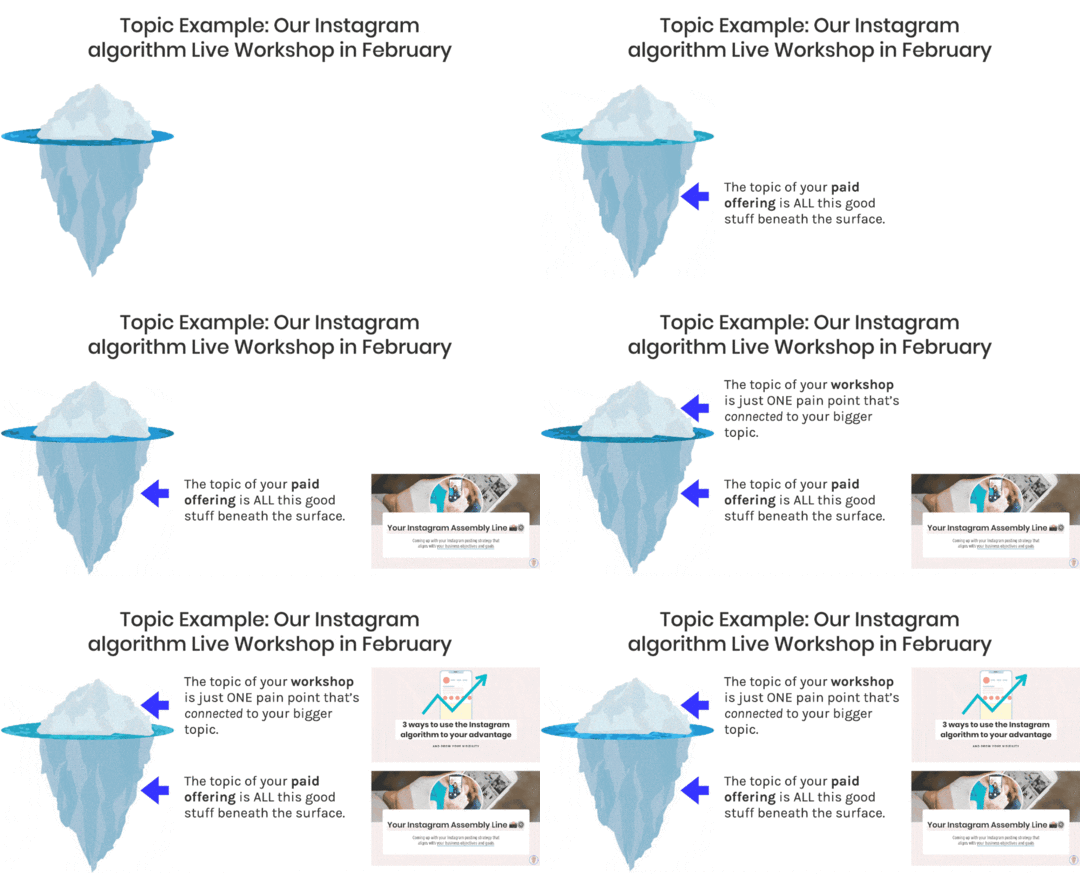
The topic of your paid product or service is ALL this good stuff beneath the surface of the water. For our case, it’s our 2-hour coaching session where we teach an entire Instagram strategy. It was only available inside our paid coaching program.
The topic of your workshop is just ONE pain point that’s connected to your bigger topic. In our example, we chose the topic “3 ways to use the Instagram Algorithm to your advantage” as our little iceberg on top of the surface. Then, we sold our coaching program that will teach them everything else beneath the surface.
Another way to think of this: your workshop is like a band-aid and your paid offer is the cure.
Now that you have your topic, how do you even begin to make your curriculum?We have a general formula for running a successful live workshop based on years of experience:
Problem: Start with the problem you’re solvingIntro: Then introduce yourself and your experiencePreview: Preview what they will learn in the workshopTeach: The bulk of your workshop is the teaching portion (duh!)Pitch: if you’re doing a pitch, give this plenty of time and spaceQ&A: And finally, we love a good Q&A (and so will your audience)Here’s an example of how the formula works for a 60-minute sales webinar:
[image error]
Hellos & Welcome (5 mins): Greet people and ask a couple of icebreaker questions as you wait for attendees to trickle in.
Problem, Intro, Preview (5 mins): Start with the problem you are going to solve for them and tell them why they are here. Then do your introduction after that and tell them why you are the person who can solve the problem for them. Finally, give them a preview of what you will be teaching in the workshop.
Teaching Section (25 mins): This is the bulk of your workshop! Your priority here is to deliver value and the solution to the problem you introduced earlier.
Pitch (10 mins): Yes, you are going to spend ten minutes selling your offer confidently. You made a thing that is awesome so spend time on pitching it!
Q&A (15 mins): Answer questions from the attendees on the workshop topic or your offer.
 PRO TIP: Add subtle reminders and cues throughout the workshop to bring the audience’s attention back to the workshop. It can be something as simple as asking them a this-or-that question or gently telling them to go back to the workshop if their attention has veered off to social media.
Our process for creating your live workshop presentation:
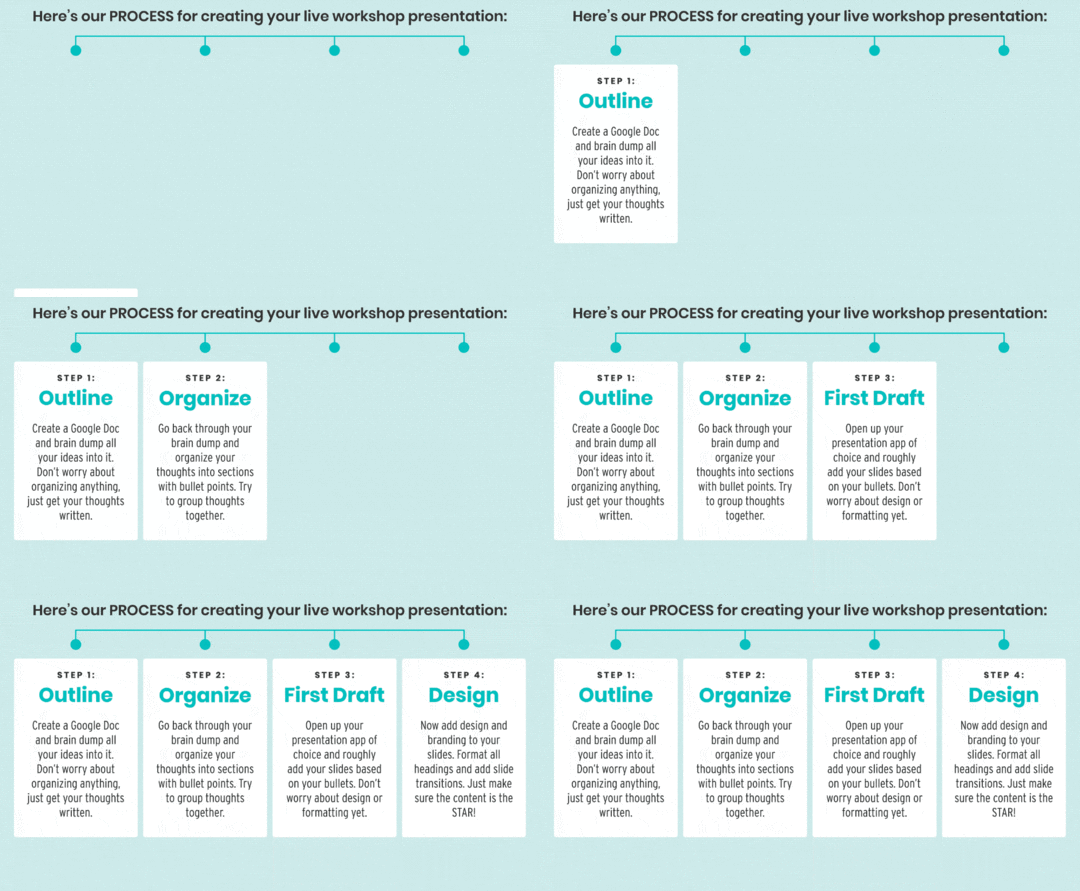
Create a Google Doc and brain dump all of your ideas into it. Don’t worry about organizing anything, just get your thoughts written down (bullet points are great).
Step 2: OrganizeOnce your outline is done, go back through your brain dump and organize your thoughts into sections. Try to group thoughts together. Try to break things into three to four “acts” or parts.
Step 3: First DraftOpen up your presentation app of choice and roughly add your slides based on your sections and bullets. DON’T get caught up on the design or formatting yet. This process will go so much faster and smoother if you just take your organized first draft and get them into your slides.
Step 4: DesignFinally, add design and branding to your slides! Format all headings and add slide transitions (get those star wipe transitions!) You can add all the design, GIFs, and transitions but remember that the content should be the star of the show.
PRO TIP: If you are someone who tends to dive into design first, try putting together the content first and show it to a trusted friend before you do any design on it. Ask them if the content is helpful and if they give you the thumbs up, then you know it’s time to move on to design.
Some live workshop teaching best practices:
Think of the final result you want for your attendee and then reverse engineer your information and sequence based on that final result.Structure things in three or four “acts” so it’s easier for people to follow along (think: Step #1, Step #2, Tip #1, Tip #2, etc).Studies show people retain information better when it’s attached to a story so it might be worthwhile to think of a metaphor that you can use throughout the workshop.This could be a separate article on its own but…
Let’s talk about basic slide design for your live workshop presentationsWe’re not here to teach you how to move from MS Paint  to the modern era of design tools but we do have some helpful tips we’ve learned from hosting 100+ workshops over the years.
 (but only if that doesn’t overwhelm you).Be careful with templates. Canva, Envato, Creative Market, etc offer great templates but don’t go overboard!Keep transitions SIMPLE and consistent. Star wipes are wonderful in theory but distracting.
 HOT DESIGN TIP: Keep in mind the design of the page you’re embedding the replay in. For example, if your website has a white background, you might want your presentation to have a different color background or border so when it’s played it doesn’t disappear on the page.
It is soooooooo easy to get distracted by all the technical bells, whistles, and gear that can help you deliver a great live workshop.
 Don’t get distracted!
Your content is the star of your live workshop show; the gear and the tech are the supporting cast.
We love gadgets and goodies as much as the next person, but we’ve also used the bare minimum and still had great results. Be willing to upgrade AFTER you gain more experience (and revenue).
We’ve put together a couple of audio, video, and lighting recs whether you’re on a budget or looking to splurge and invest. Most of them are affiliate links and we make a small commission if you buy using these links.
 Best Webcam for Live Workshops
No Budget: Use whatever laptop camera or webcam you already have. Boom, done, congrats to you!
Low Budget: Anivia 1080p HD Webcam ($45). Highly rated and solid price point.
Higher End: Logitech Brio 4K Webcam ($199). This is our webcam of choice these days but we only recently upgraded to this.
[image error]
 Best Microphone for Live Workshops
No Budget: Any headphones with a built-in microphone are better than nothing!
Low Budget: RODE SmartLav+ ($70). Great lavalier microphone that’s also unobtrusive. We used two of these for years!
Higher End: Sennheiser MKE600 mic with Manfrotto Boom Stand ($560). This is what we use but it’s overkill unless you do a lot of video.
[image error]
 Best Lighting for Live Workshops
No Budget: Find natural light in your space and sit in front of it! This is what we do 99% of the time for our workshops  .
.
Low Budget: Selvim 6-inch Selfie Ring Light ($33). Has a desk clip as well which is neat.
Higher End: Dazzne Desk Mount Key Light ($199). Lots of color range and a ton of light.
[image error]
 Misc Gear for Live Workshops
There are so many little items that make workshops easier to run but these are the 3 things that we use MOST often and wanted to recommend:
Wireless Trackpad: This is great for clicking through slides and not having to click keys on your keyboard. We’re on Apple laptops so we use the Magic Trackpad.
Second Screen: Great for keeping up with comments, Q&As, or ensuring you stay live the entire time. We just use one of our iPhones or iPads for this!
Wire-In to the Internet: From years of experience, trust us, if you can hardwire in using an ethernet cable, DO IT. We didn’t know our Apple laptops just needed this USB-C ethernet dongle but now we do.
[image error]
 PRO GEAR TIP: Do a couple live workshops with no budget or low budget items and make sure you even like doing them. There’s absolutely no point in buying a bunch of gear if you find out you don’t even like the experience of hosting live workshops.
 Best Software for Hosting Live Workshops
 Our choice: Zoom Webinars ($79/mo). Zoom has the most stable connection, has all the features you need, and seems to have the least amount of outages and issues.
WebinarNinja ($49/mo): Full disclosure, we are friends with the creators of WebinarNinja but that’s not why they get our recommendation. This is a solid, all-in-one platform that is extremely robust and always being improved.
Crowdcast ($29/mo): We used to use Crowdcast a ton. They have fantastic customer service and a really nice user interface. The only problem? We would run into some sort of technical hiccup from time to time. They may have sorted this out over the years as we haven’t used them since 2019.
[image error]
 Best Program for making Live Workshop Slide Presentations
 Our choice: Keynote (Mac). We absolutely love Keynote and how flexible and intuitive it is. PLUS, you can record your presentation directly in it for great replays!
Google Slides or Canva: If you can’t use Keynote, Google Slides or Canva are robust free slide presentation tools with many of the same features.
Microsoft Powerpoint: Maybe Powerpoint has gotten better since we last had to login to it almost two decades ago?? We have no idea  .
.
[image error]
 How to create a great recording space in your home
Let’s talk about a few tips to create a visually interesting (read: not-distracting) backdrop for your live workshops…
Move things around: Your plants, furniture, pictures on the wall! Be okay with temporarily decorating a part of your home to ensure your workshop backdrop isn’t too distracting. We do this every month in a corner of our home for our live workshops!
Set a budget: If you are going to buy a few things for your workshop recording area, set a budget and don’t go nuts. You can always upgrade more later on down the road.
Avoid blank walls: Blank walls actually make video backdrops drab and boring. Find a spot where there’s some character behind you. Pro-tip: Do you have a larger painting on a wall somewhere else in your house? Take it down and lean it up against the wall behind you like we do!
[image error]
Let’s Recap Part 2!Choose your video, audio, and lighting options according to your budget/experience.Decide on the software you’ll use to create your slides and to host your actual workshop itself.Construct a workshop backdrop that’s visually interesting!
Let’s talk about some best practices for delivering an awesome workshop! The biggest tip we can give you while you’re live and presenting…
 STICK. TO. THE. BULLETS. ON. YOUR. SLIDES.
You’re going to have bullets in a lot of your slides. Remember to stick to those core points and don’t veer off on a 5-minute tangent.
If you’re nervous about hosting a live workshop, we’ve got your back!This is especially for all you Nervous Nellies! To fend off nervousness during your live workshop:
Just read your bullets. Don’t go off track.Have some emphasis slides to create impact and break up the bullets.Practice, practice, practice, so you know your slides really well.Show your personality but don’t try to deliver a comedy routine if that’s not something that comes naturally to you (be yourself but bring some energy!)Did we mention sticking to reading the bullets on your slides??This is where all the work in Part 1, where you wrote and organized your workshop content, comes into play. Make sure you craft your slide bullets in a conversational tone so that when you read them during the live workshop, you won’t sound stiff or like a robot.
PRO-TIP: If you’re hosting your first-ever live workshop, ask a friend to watch a practice version. Tell them you want their honest feedback and wear your feedback-armor when they tell you what needs improving. Additionally, you can do a dry-run of your workshop, record it, and watch it back… what did YOU think needed improvement?
 Are all your devices charged, in Do Not Disturb mode, and ready to go?
 Are your kids, dogs, cats, okapis, all wrangled-up and away from distracting you?
 Make sure to have ample fluids available.
 Queue up your favorite pump-up jam and dance around a bit 10-15 minutes beforehand! (This sounds silly but it’s actually very useful for getting your adrenaline going so you can dive into the workshop pumped up and energetic!)
listens to Taylor Swift or Whitney Houston listens to Outkast, Lil Dicky, or Daft Punk  Have your GOING LIVE Checklist written next to you (what buttons do you need to push, what things need to be recorded and how, is your second screen setup, etc).
How should people interact during the live workshop? Tell them how to use the chat and really guide them on how they should behave during the workshop. We like to do this in the Hellos & Welcome portion of our workshops. We tell people exactly where the chat is, how they can interact with one another, and that we like to answer questions at the end using the Q&A box.
Tell people when they should get ready to pay attention. When you’re getting into the meat of the teaching portion, tell your viewers to get ready to take notes or get ready to answer live questions from you. Remind them multiple times throughout when you’re making an important point.
[image error]
If there’s a sales pitch, make sure you give people a head’s up! We don’t like to bait and switch our live workshop viewers so we always tell them, in the beginning, there’s a pitch at the end. We also give a head’s up when the pitch is about to start so people can leave if they don’t want to be sold to.
Reminder: Something WILL go wrong during your live workshop . Prepare for this. You’re probably not a pro at live workshops so give yourself permission to mess up!
We’ve hosted enough live workshops over the years (100+) that we can unequivocally tell you unfortunate things WILL happen. Your workshop software craps out. Your dog barks wildly. Your slide presentation won’t load. Just do your best to explain to your viewers what’s going on and they’ll appreciate the honesty and realness.
What about live workshop replays??
Hot take on live workshop replays: We don’t believe in expiring or limited-time replays.
Someone may have taught you otherwise or you’ve seen this practice in action time and time again. However, we simply don’t believe in expiring replays (“The webinar replay is only available for 48 hours!”)
We get it, people need urgency and scarcity to make a purchase but use the countdown timer to take advantage of a limited-time offer not watching the replay.
[image error]
 There are two main live workshop replay options to choose from:
Option #1: Live Platform Hosting
Let your live workshop software (Zoom, WebinarNinja, Crowdcast, etc) host the recording for you and simply link to it.
Pros Almost zero effort on your end and the replay is probably immediately available.Cons  Harder to add a limited-time offer to the replay “page.” Watching environment usually isn’t great or branded.
This option is HIGHLY recommended if you are A) a beginner at live workshops and/or B) not very technically savvy. It’s not the lesser of the two options, it’s just less customizable.
Option #2: Self-Hosted (this is our choice)
Download the recording from the workshop software, upload it to your video host of choice, and put it on a page on your site you can customize to your liking.
Pros Gives you total control of the replay watching experience and is especially great if you have a limited-time offer to add to the replay page.Cons Takes longer and requires extra effort and technical know-how.[image error]
Let’s Recap Part 3!Stick to your bullets and keep your slides moving.Make sure you write out a checklist ahead of time for exactly what you need to do when you go live.Check-in with your audience periodically during the workshop.Don’t sweat it if something goes wrong!Make sure you have a plan to deliver your replay.
As a friendly reminder, we use “workshop” and “webinar” fairly interchangeably around our household. We’re going to refer to your live workshop as a webinar for this section.
Your webinar: This is the temporary relief you offer your viewer for their pain point. It’s the tip of your iceberg.
Your product or service: This is the CURE to the problem! It’s not just a band-aid/quick fix, it’s the solution and the entire glacier sitting below the water.
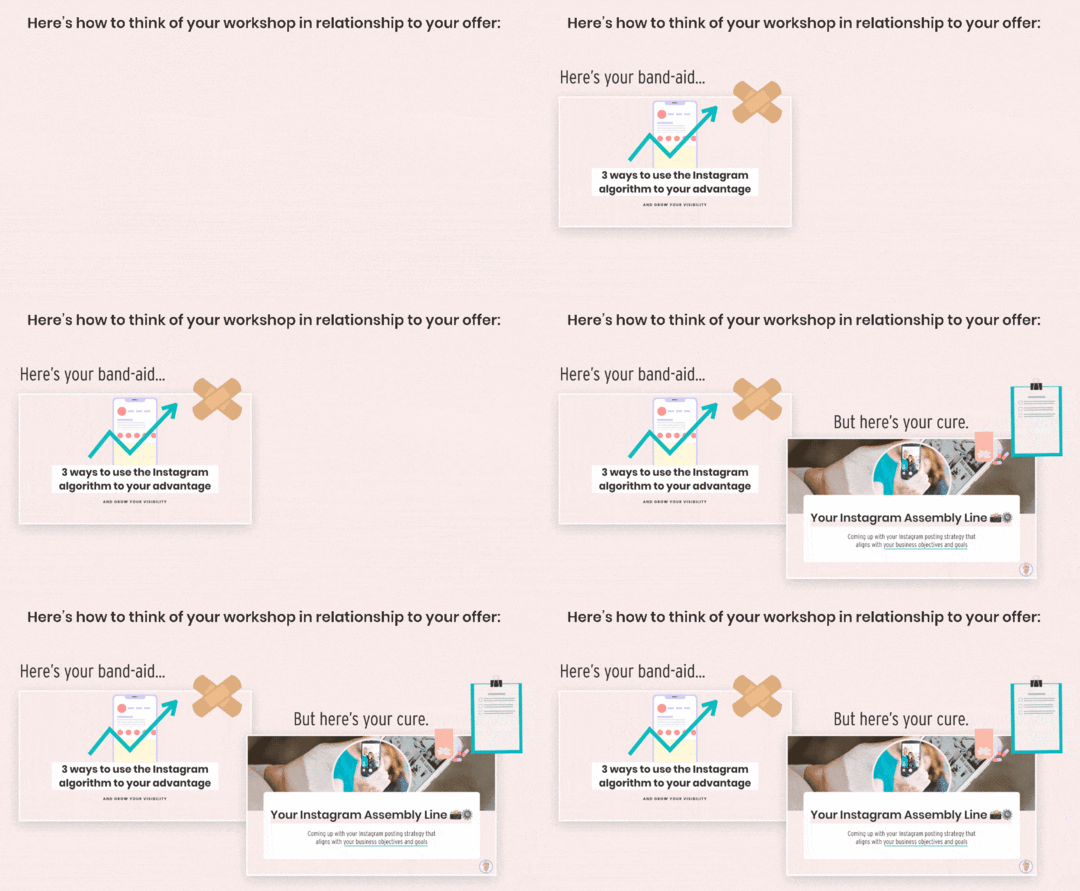
Pretty straightforward, however, there are many steps that go into those three bullet points. Don’t worry, wegotchu!
A simple step-by-step process for creating a webinar that actually sells[image error]
Step 1: Create your webinar sign-up page.The purpose of this page is to get people to sign up for the webinar and get excited to learn something from you.
Here’s a very simple registration page layout we mocked up to show you the main components you need:
[image error]
Keep it simple: The page needs to be incredibly straightforward (no distractions, no social icons, nothing but the register button!)
Don’t hide the time/date: The time and date of the webinar need to be crystal clear. Bonus points if you want to use a timezone converter to help your registrants.
Post-signup thank you page: There should be a thank you page after registering that tells them to add the date of the webinar to their calendar. If you want to add social sharing icons for the webinar, put them on THIS page.
Reminder emails: Your registration system should send reminder emails about the webinar (most platforms offer this as a built-in feature).
Step 2: Promote sign-ups by driving traffic to your sign-up page.Use your existing email list and social media accounts to get people to sign-up for the webinar!
Send multiple signup emails: We recommend sending multiple emails, at least 2-3 weeks ahead of time, getting people to sign-up.
Create your social promo content: Create multiple social media posts that promote the webinar, but also give people actionable tips to intrigue them to want to learn more (link in bio!)
Be descriptive and entice people: Whether it’s email or social, don’t just say “sign up for my webinar” − address the pain point you’ll solve and tease people with helpful info.
Here’s an example webinar promotion schedule:
[image error]
Step 3: Create your curriculum/presentation.Bust out your presentation tool of choice and create an awesome and helpful webinar!
Webinar structure and timing: Follow the structure we outlined in Part 1. Here’s that image again for ya…
[image error]
Practice your little buns off: Run through the presentation LIVE with a friend and watch the recording back. Make notes on how you can improve. Practice, practice, practice!
Be proud to sell your product or service: Do NOT skimp on the sales pitch part of the webinar. You did all this work, don’t shortchange yourself and undersell your offering.
Here’s an example of webinar slides we’ve used in the past during the sales portion (these all have bullet by bullet or sentence by sentence slide-builds so it isn’t just one giant slide with too much info on it):
[image error]
Step 4: Create your Replay Page.If you’re going with Replay Option #1 (hosted by the webinar software), make sure to grab that URL and add it to your post-webinar sales email sequence.
PRO-TIP: You’ll get traffic to your webinar registration page well after your live webinar has already happened. Think about updating this page to deliver the replay to someone if they still want to “sign up.”
If you’re going with Replay Option #2 (self-hosted on your website), make sure you:
Have your replay page designed and ready to goHave your process in place to download the replay from the webinar software and then upload it to your video hostHave your sales section on your replay page with your limited-time offerHave double-checked all links, buy buttons, etc!And, some additional tips for you if you’re creating a self-hosted replay page:
Remind people of the outcomes they will learn by watching the webinar replay (30-40% of replay watchers don’t attend live).Include the slide presentation as a PDF they can download. Use smallpdf.com to compress PDFs.Make your call to action (your limited-time offer) VERY CLEAR to get someone to the full sales page for your product or service.Add a countdown timer for the limited-time offer (not the replay). Just remember to remove the limited-time offer buy button on the replay page when the countdown expires.[image error]
Step 5: Create your Limited-Time Offer sales page.If you want to sell using a webinar effectively, you want to create some sort of urgency in your limited-time offer for your product or service.
 Launch offer: If your sales webinar is part of an open/closed launch, cool − there’s your urgency (although you might want to throw in a bonus to sweeten the deal!)
 Evergreen offer: If your sales webinar is for a product or service that’s normally evergreen (available all the time to purchase), think about a bonus you can throw in to really make the offer feel time-sensitive. This does NOT have to be a discount and could be something like a 1-on-1 call, group Q&A, or another product you throw in the mix.
Use what we already discussed to prepare for your webinar, interact with your audience and nail your sales pitch!
Keep in mind the pain point of your attendee − what problem are they seeking solutions to?What is the “band-aid” solution you’re offering in your webinar? Make sure your teaching content delivers on that promise.And what is the “cure” solution your product or service promises? Make sure your pitch communicates that clearly.[image error]
Step 7: Send your post-webinar sales emails.For every one that registered for your webinar (attended or not), you want to queue up and send a series of sales emails. You gotta pay your bills!
For example: Let’s say you want to leave the cart open for one week after the webinar…
You’ll send 4-6 sales emails starting the day after the webinar.Each email should be helpful in some way and not just a pitch to buy. You want to always be delivering value.Each email should have a very clever call to action to go to the sales page AND mention the deadline to buy.If you can avoid it, don’t send any “normal” email newsletters to this group during your sales sequence.This is what your post-webinar email schedule could look like:
[image error]
Step 8: Wrap it up and shut it down!Shut everything down and make sure any pages that have countdown timers are no longer available for purchase.
We like to turn any sales pages into email capture pages after the limited-time offer expires.When doing email capture, make sure to have a Welcome Email that lets them know they’ll get your normal email newsletter moving forward.Take time to decompress, relax, and reflect on how everything went.Think about using your webinar replay as an evergreen marketing bridge in the future!Let’s Recap Part 4!Make sure your sales workshop topic is the band-aid to your offer’s cure.Know your sales strategy before, during, and after your webinar.Don’t shortchange yourself on the pitch!

All the tactics and strategies in the world won’t help you if you don’t have the right mindset! Running a live workshop is A LOT of work (as you’ve read) and it’s important to get your head in the game ahead of time  .
.
Mindset Tip #1: Increase live workshop confidence with practice.You are going to be nervous if you don’t host live workshops often. That’s normal! We even get nervous and we’ve done 749 live workshops at this point. The more practice you have, the easier it will be to “go live.”
Mindset Tip #2: Have realistic goals based on YOUR audience size.Depending on the size of your email list and social media following, you should expect 3-5% of your total audience to sign up for a webinar.
Example: If you have 500 email subscribers and 500 followers on social media, 5% of your audience would be 50 webinar registrants.
Mindset Tip #3: Something will go wrong.We’ve done this enough times and almost every single live workshop we do has some sort of hiccup. Mentally prepare yourself for this. It’s not the end of the world. Just roll with the punches and do the best you can.
Mindset Tip #4: You can always host another live workshop in the future.If you have a live workshop that flops, especially one where you tried to sell a product or service and didn’t get any sales, don’t give up! We’ve had complete flops and then six months later had a super-successful workshop.
Mindset Tip #5: Remember your marketing bridges.Live workshops are just ONE marketing bridge on your journey of getting strangers on the Internet to buy from you. Live workshops may be a bridge to another guidepost on a customer’s journey to find your castle!
Phew, that was a lot to throw at you! We know that live workshops can be intimidating if you’re not used to being on video but trust us, once you’ve gone live again and again, it DOES get easier.
We enjoy incorporating live workshops into our business because it’s an incredibly effective way to grow our audience, deliver amazing value to them, and convert them into happy, paying customers.
July 7, 2021
Organize Your Life and Business Using Notion (Our S.O.A.R. System)
While we love productivity, we’re NOT trying to be the most productive humans ever and we don’t enjoy hustle-culture. However, we are constantly trying to improve our efficiency and use systems that make our lives easier.
When wearing multiple hats in your online business, it becomes all too easy for tasks, projects, and goals to fall through the cracks.
As creative people, we don’t always think about organization first, but organization has actually made us MORE creative.
When you can get all of your to-dos, your tasks, the overwhelm of everything you have to think about out of your brain and into a system, it leaves more room for creativity, for having ideas and for executing those ideas.
When you can get all of your to-dos, your tasks, the overwhelm of everything you have to think about out of your brain and into a system, it leaves more room for creativity, for having ideas and for executing those ideas.
Let us share a big, juicy secret with you: Sustainable habits and being consistent are the most* important things necessary when trying to reach your goals.
*When we say most important, we mean the most important things YOU can control. We don’t want to ignore or minimize that privilege is real and not everyone has the same advantages.
But alas, forming new habits can be a struggle!
We all love to read/watch/listen to other people talk about their holy grail productivity tools and habit-building hacks, but it’s important that you figure out what works best for YOU and your unique situation.
Our Journey with Productivity Apps and Tactics before NotionHere’s the truth about our journey with organizing our business and staying on top of things using different productivity tools/tactics over the years…

Every time we discover a new productivity tool or app, our motivation and organization shoot up! We get really excited and we spend hours setting up a new app to ensure maximum productivity but then, a few months (maybe even weeks) later, the adrenaline of the new shiny app wears off and we just stop using it. #wompwomp
It happened with Trello.
It happened with Asana.
It happened with digital planning.
It happened with Airtable.
We craved consistency in our organization systems. We wanted a system that was flexible enough that we could adjust when we got bored (or didn’t feel as productive). We also wanted something versatile enough to manage multiple types of organization so we could focus on actually using just ONE system, not three different apps and systems.
Notion is what finally fit that criteria.
[image error]
Before we dive into how we use Notion to organize our lives and businesses, let’s go through a little crash course on the basics of how Notion works.
Notion is a system of interconnected pages. You can add content to each page by using different types of content blocks.
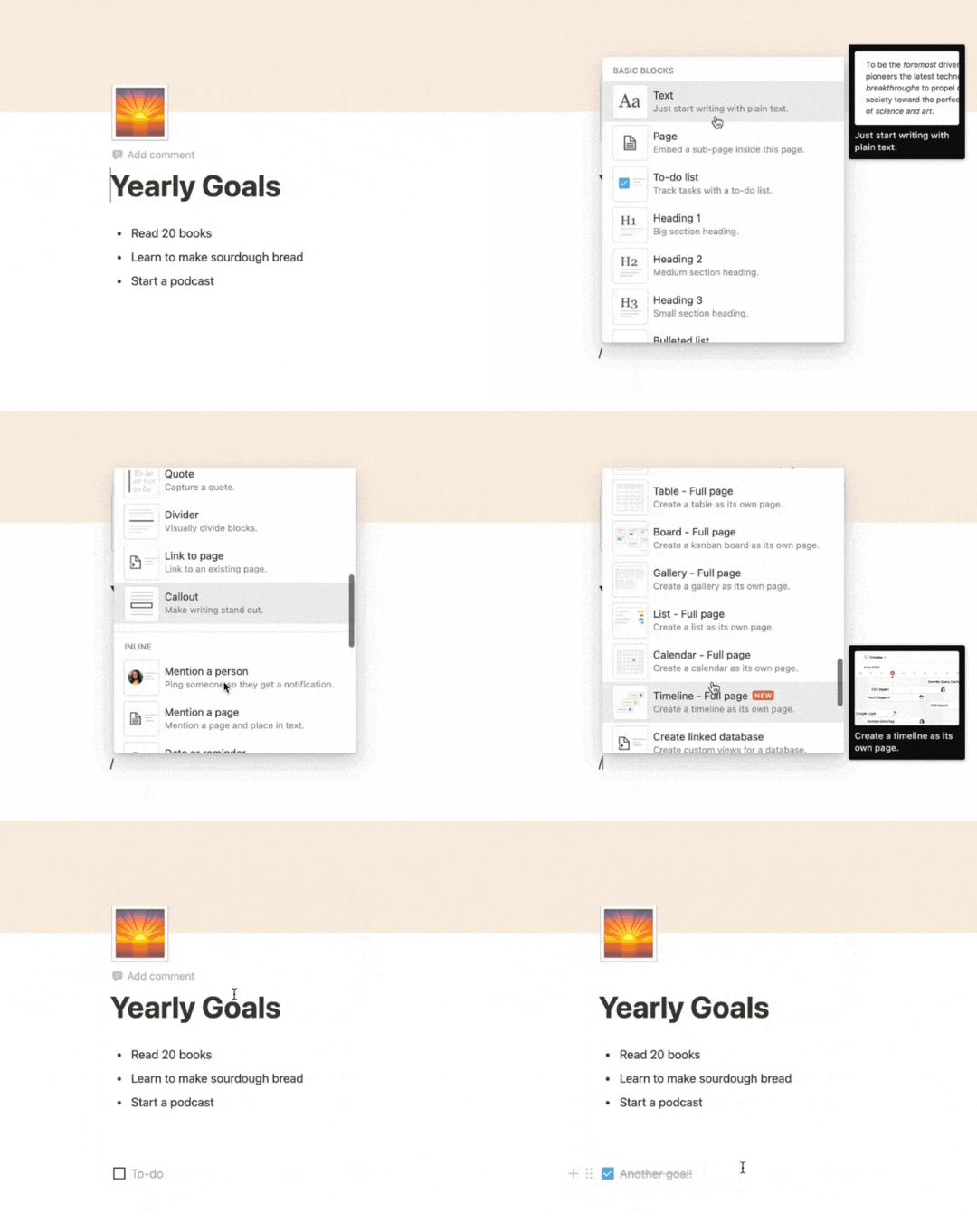
There are many different content blocks in Notion such as:
basic headings and lists,code, quotes, and callouts,content toggles,images and videos,and so much more!We like to think of Notion as a system of blocks for you to build whatever you want.
You can pick and choose the blocks that would work for every single page in your Notion workspace.
But by far, the feature that stands out the most is the ability to create Databases.
Notion Databases (a quick overview)Notion Databases allow you to organize similar pages and assign different properties to them.
While databases seemed complicated and clunky with other productivity apps, Notion has really nailed this feature!
You can visualize the same Database in different ways using Views (Gallery, Calendar, Board, Timeline, etc):
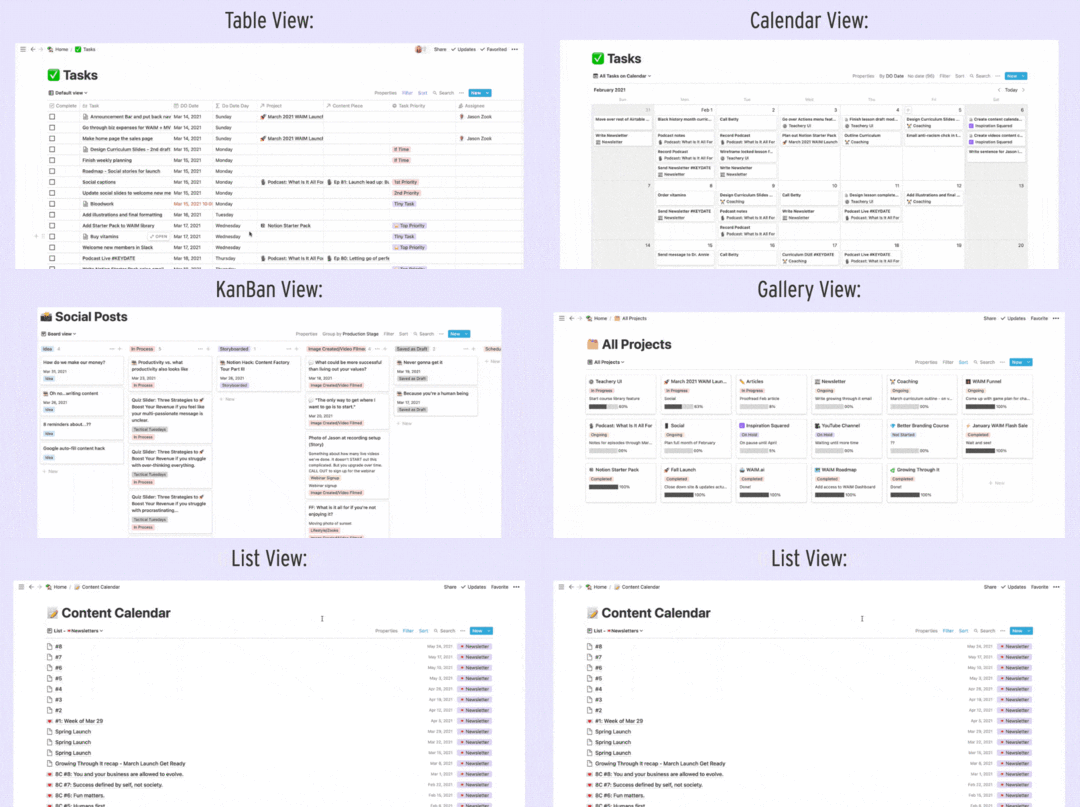
You can also create Templates to load a pre-made set of content blocks for every page.
The best part of Notion is using all these blocks together to build whatever dashboards and pages are most helpful to keep your life and business organized. Truly, the possibilities are endless and that’s what makes Notion powerful!
Note: This section is a very abridged overview of Notion and all its functionalities. Notion has very robust and easy-to-understand help docs so if you want to deep dive into a specific feature, you can go to their help docs to learn more about it.
After many months of using Notion, we took a look at the MOST important databases and pages we use here at Wandering Aimfully and then we organized it into a system we could teach to you!
And that system has an acronym, because DUH.
S = SetupO = Organize
A = Act
R = Review
 (feel free to do your own bird screech sound effects for added flare!)
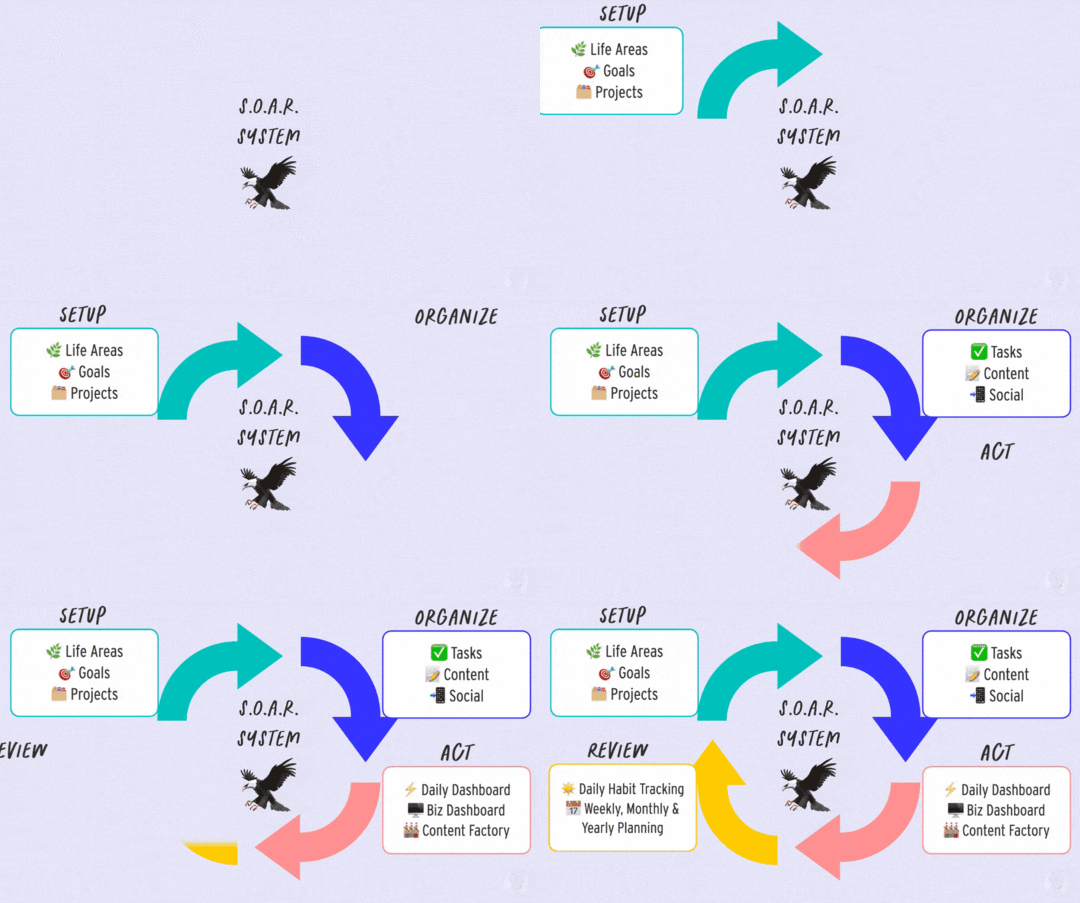
Quick Note The remainder of this article will be less about the ins and outs of how to set up the S.O.A.R. Notion system, and more about how we USE the system to run our lives and businesses more efficiently and calmly. Our S.O.A.R. System template is only available to our paying Wandering Aimfully members. Hopefully, you’ll be able to create your own system from what you learn based on our setup!
Before we dive into each component of the system, we’re going to give you an overview of the key pages in our S.O.A.R. Notion system. This will give you a reference point for everything in the system, then we’ll show you how we actually USE it.
The pages in this category are the foundation blocks of setting the vision for what we are aiming for, what areas of growth we want to see, and what projects will help us get there.
We have three main databases for the Setup part of the system:
 Life Areas Goal Tracker
 Projects Life Areas: What aspects of your life you want to cultivate and keep balanced?
In this database, we’ve listed out all of the areas in our life that we want to pay attention to. Think of broad categories like Family, Finances, and Knowledge and Learning. Here are the exact Life Area categories we use:
HealthFriendshipsFamilyMarriageCreativityPersonal CareRest & JoyWork ProductivityPlanning/OrganizationFinancesTravel/AdventureHomeCommunityIn order to cultivate each Life Area, we’ve created a relation property that is linked to the Goal Tracker database (more on this below) so we can set goals for each area of our life.
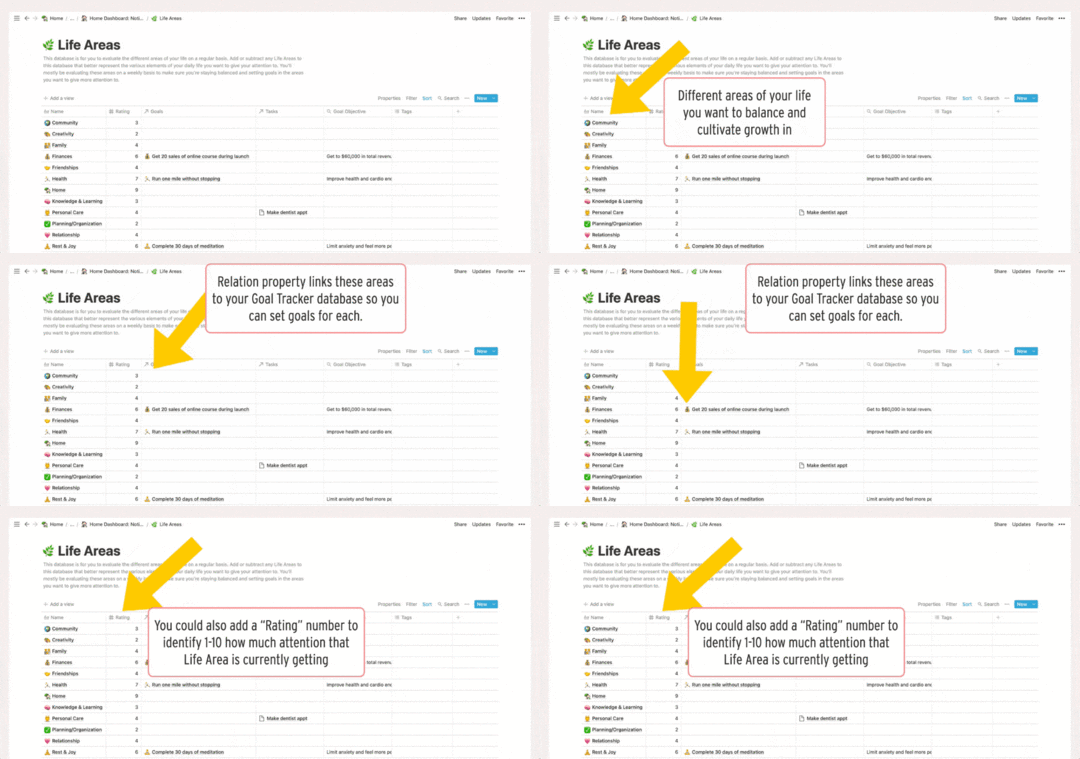
For example, in the Finances life area, we set a goal to get 20 sales of an online course during launch.
Tip: One of the ways we also like to use the Life Areas database is by rating it on a weekly basis (during our Weekly Reviews, more on this in Part 4) using a scale from 1 to 10 based on the attention it got during that week. Afterwards, we sort it from highest to lowest, we can clearly see which Life Areas we could be cultivating more or we can decide what our current priorities are.
Goal Tracker: What specific, measurable results are you working toward?In this database, we add each goal as a Key Result (specific, measurable outcome) and identify the Objective (more intangible and broad) that it aligns with.
Each goal is connected to a Life Area and to Projects (if applicable) using relation properties. We also have a date property to take note of when we want the goal to be completed.
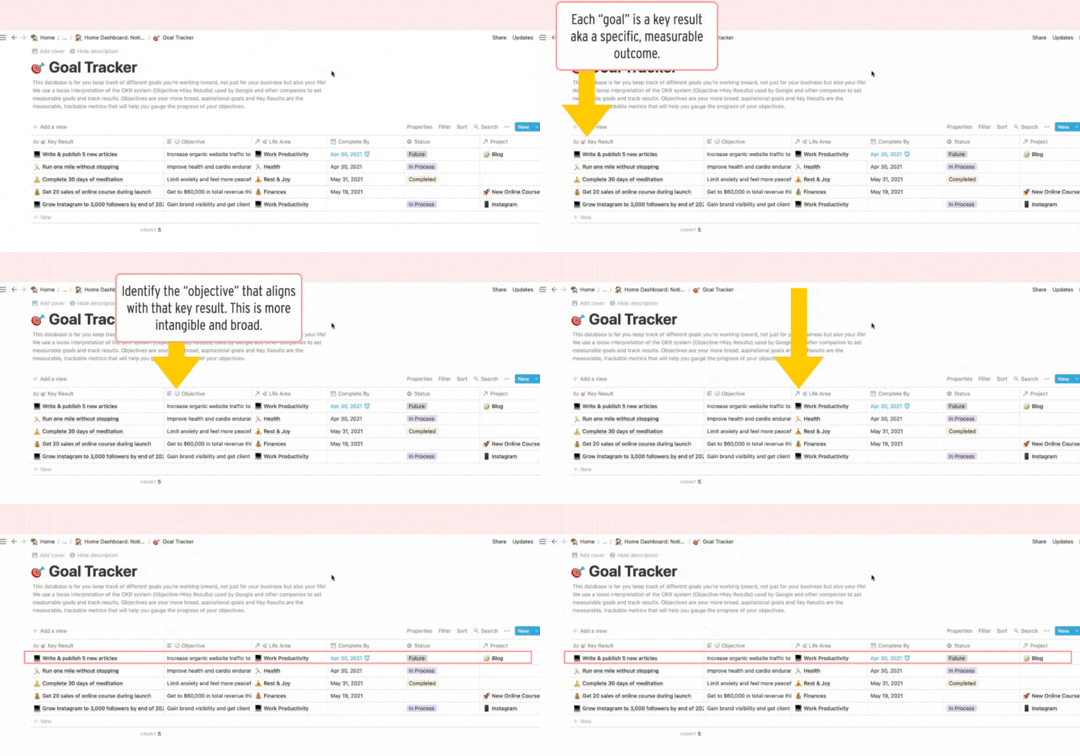
For example, the key result is to write & publish 5 new articles, and the objective it’s trying to serve is to increase organic website traffic. This key result is connected to the Work Productivity life area and the Blog project.
Projects: What self-contained marketing channels or initiatives will help you reach your goals?This database consists of any projects that we want to track for our business(es). This could range from launching a new course, tracking an ongoing marketing channel like Podcasts, to managing your Clients, etc.
We find it really helpful to create Projects for content creation as it’s easy to have those recurring “projects” slip through the cracks week by week if you don’t plan them accordingly with everything else.
[image error]
The PAGE area of each project is where you can manage everything related to just that project. We’ve created a Project Template where we set objectives and key results for the project. We also create the tasks associated with the project and compile the resources and inspiration for it.
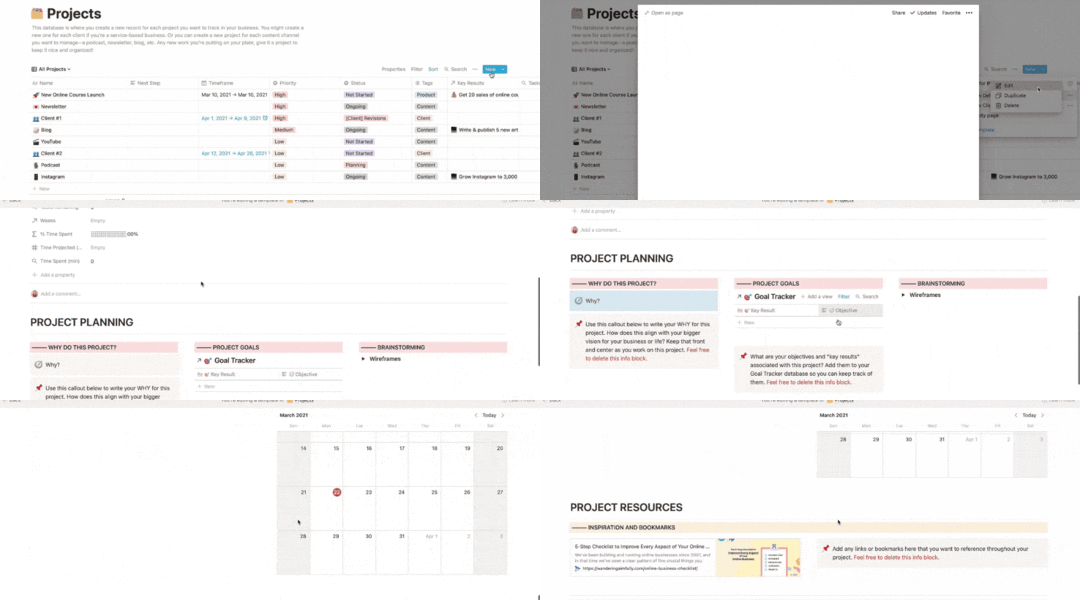
Just to further clarify how these all work together, we like to think of it as:
Life Areas are the broad aspects of your life and business. Objectives are setting up the vision for those life areas. Key Results are the specific, measurable outcome that serves your objectives.
Here’s a specific example:
Your life area is Community as in trying to be a better community member. Your objective within that life area is to engage in ongoing anti-racism education, reflection & action. To serve this objective, one of your key results is to complete at least one anti-racism course or workshop per quarter.[image error]
You can also apply the same concept to your Projects. For example:
Your project is Launching Your Hand-Lettering Business.One of your objectives within that project is to establish organic traffic coming to your website.To serve this objective, one of your key results is to write and publish ten articles on your website.[image error]
Part 2 of the S.O.A.R. System: OrganizeThe pages in this category are the smaller bits that projects and initiatives get broken into. These pages help us move the bigger projects forward.
We have three main databases for the Organize part of the system: Tasks, Content Calendar, and Social Posts.
Tasks: What are the actual to-do items you will spend time on to execute your projects and goals?All of our tasks across all of our Life Areas and Projects go into this master Task Manager database.
For each task, we assign a DO Date which is the date we plan to actually work on the task, not the deadline.
Quick shout-out to August Bradley; we believe he came up with the term “DO Date” for his own Notion system.
We also connect each task to the Project or Content Piece (more on this later) the task is related to via relation properties.
[image error]
For example, the task record podcast falls into the Podcast project and the Episode 01 content piece. That way, we’re able to see all the tasks in the context of the project or specific content it falls under.
Tip: You can also estimate how long your tasks take and then log a Start Time and End Time (using two date properties) to see how long each task actually takes. If you’re diligent about tracking your time for each task, it’ll be easier to estimate times for similar tasks in the future.
Content Calendar: What longer form pieces of content do you plan to create?All of our content (articles, podcasts, newsletters, YouTube videos) goes into one master Content Calendar database.
[image error]
We use the type property to differentiate between the different content channels and to set the status of each content piece. We also add a Publish By date (deadline) and a Create By date (when the majority of the creation will happen) to each content piece.
Social Posts: What longer form pieces of content do you plan to create?The Social Posts database functions similarly to the Content Calendar but we prefer to keep it separate because if you’re posting on your socials every day, it can get cluttered very quickly.
We use the type property to differentiate between the different platforms and to set the status of each social post.
[image error]
The Calendar View for both the Content Calendar and Social Posts databases are especially helpful to see when our content and when the related social posts get published.
[image error]
Part 3 of S.O.A.R.: ActThe pages in this category are the dashboards and pages designed to actually GET. THINGS. DONE. most efficiently.
We have three main pages for the Act part of the system:
 Daily Dashboard
 Biz Dashboard
 Content Factory Dashboard
This is really where the system starts to come together because this is where you execute on all of the stuff that you did in the set-up and organize sections.
Daily Dashboard: What will keep you focused on what you need to work on each day?This page is where we spend most of our time in Notion every single day.
[image error]
You can customize your own daily dashboard but for our system, we have spaces for:
Weekly Intention: What aspect of my life do I want to focus on this week?Weekly Goal: What is the most important goal I want to achieve this week?Daily Trackers: This is where we track our habits, gratitude, and mood.The most actionable part of the Daily Dashboard (and where the magic really happens) is the Daily Task Manager. This is the same database as your Task Manager but it is filtered to show only the uncompleted tasks whose Do Dates are today and previous days.
This way, tasks don’t fall through the cracks because you are always reminded every day which tasks you assigned to be done today and the tasks you didn’t manage to complete from previous days.
The tasks are always piling up in this section so if there’s a task we haven’t done for a week, that tells us that we’re not prioritizing this task and we either need to do it or set it for a date in the future.
We also have linked databases to our Projects and Goal Trackers so we can quickly jump to a specific project if we need to.
[image error]
Biz Dashboard: What are the basic guiding principles for your business and how can you track your progress?The Biz Dashboard is a page where you can see your business at-a-glance. Think of it as a living and breathing page of where you can implement the things you’re learning for your business.
In this dashboard, we have:
4Qs: These are the core questions you need to answer to know what you’re doing and what your business can offer to people. We talk more about this in the Foundation section of our 5-Step Business Checklist.
Goals: This is where we write our revenue goal for the year as well as list our business-specific goals from the Goal Tracker database.
[image error]
Marketing Bridge Strategy: This little section is where we can see at-a-glance, “Are we hitting initiatives at every step of the critical marketing bridge puzzle?” We share more about the Marketing Bridge concept in this article.
Project Focus By Week: Each week, we like to set our project focus which is especially useful if you’re juggling multiple projects at a time.
Growth: We also track specific metrics in our business each week such as traffic and newsletter subscribers.
[image error]
Tip: You can also dedicate a space for business-related files! For example, you can compile all of the worksheets you’ve been filling out for to gain clarity on your business in this dashboard so they get lost in the catacombs of your file folders.
Content Factory Dashboard: What will help you batch ideate and create content?The Content Factory Dashboard helps us stay on track on all of our content channels. We use this dashboard to:
Brainstorm content piece ideas and social posts,schedule our content pieces and social posts in our content calendar,and view the tasks related to upcoming content pieces.We’ve found that an efficient way for us to generate content ideas is to write all our ideas in a stream-of-consciousness style and then decide afterward the content channel that is best suited for each idea.
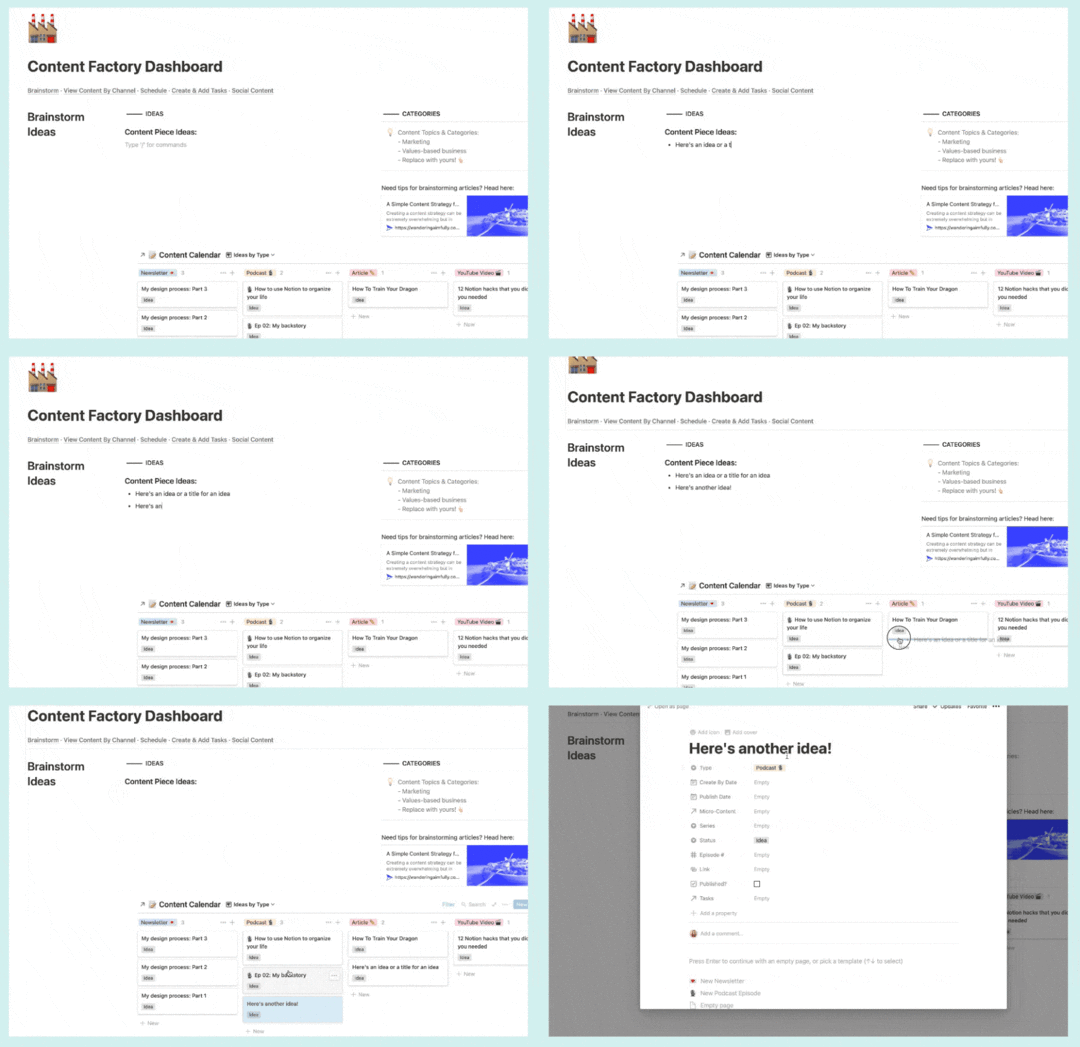
We use the same drag-and-drop concept for batch ideating and scheduling our Social Posts.
[image error]
In the Scheduling section of our Content Factory Dashboard, we have a list view of our Content Calendar database which is filtered to show only the content pieces that have not been assigned a Publish Date, basically ideas that are floating around but haven’t actually made it in our Content Calendar.
From this list view, we can then drag each content piece idea to a calendar view (using the Publish Date) of our Content Calendar database to easily assign a publish date.
This process makes sure that all of our content ideas are captured and ready to be scheduled.
[image error]
Once we’ve added our publishing dates, we go to this section to create tasks related to each content piece.
[image error]
Part 4 of S.O.A.R.: ReviewThe pages in this category are the time-based pages and databases that help us check in regularly, plan for the future, and review all we accomplish.
The main databases for the Review part of the system: Daily Habit Tracking and Weekly, Monthly & Yearly Planning.
This is crucial because even if you spend all the time setting everything up in Notion, if you don’t come back to it often and don’t give yourself set times to invigorate and maintain the system, it will not work.
Even if you spend all the time setting everything up in Notion, if you don’t come back to it often and don’t give yourself set times to invigorate and maintain the system, it will not work.
 Daily Tracking: What daily habits or data do you want to track?
In this database, each entry corresponds to a single day. We created properties to correspond to specific habits, metrics, and information we want to track on a daily basis.
Each day is also connected to a specific week in the Weeks database so we can review that information later on during the Weekly Review process (more on this below).
[image error]
 Weekly Planning & Reviews: How do you want to look back on your week and set intentions for the upcoming week?
Moving on to the Weeks database, each entry in here corresponds to a single week.
[image error]
The properties for the Weeks database are a little bit different because it rolls up or aggregates the data you’ve tracked in your Daily Tracking database.
For example, if you recorded the following data for the Exercise habit (property) in your Daily Tracking database:
Apr 4:Apr 5:  Apr 6: Apr 7: Apr 8: Apr 9: Apr 10:
 In your Weeks database, you’ll see this for the Exercise roll-up property:
Apr 4-10: You can roll up all kinds of data like habits, daily mood, sleep hours, business metrics (average traffic, total newsletter sign-ups), and even your daily gratitude.
[image error]
Inside each of the Weekly pages (remember, each entry in a database is also a page!), we’ve created a Weekly Planning & Review Template.
In this page, we summarize what went well (or didn’t go well) and what we learned from the week. We check in on our Life Areas and Goal Trackers to see which areas we need to give more attention to. Then we hop in on planning for our Projects and Upcoming Tasks to make sure we’re on track or if we need to reschedule tasks. We also look at our Content Calendar and Social Posts to check our upcoming content pieces and make sure that we have enough ideas batched and planned for the next two weeks. And lastly, we have a section for tracking specific growth metrics in our business.
[image error]
Quick Note: Each section in this Weekly Planning & Review Template is actually hidden under a toggle button (that little triangle ▸ on the left side of each colored box). If we expand each toggle, we have content blocks that pull in data from all of the databases we’ve worked on in the Set-Up, Action, and Organize parts of the S.O.A.R. Notion System.
Think of it this way: Weekly Planning is Boss You and the Daily Dashboard is the Employee You. The Daily Dashboard is for getting stuff done every day and the Weekly Planning is for setting what needs to be done every day.
 Monthly & Yearly Reviews: What processes will help you on a monthly and yearly basis to set goals for your life and business?
We also do Monthly and Yearly Reviews, which is set up similarly to the Weekly Reviews, but we review and plan broader aspects of our life and business.
[image error]
You can also watch us break down our (free!) Yearly Planning Notion Template in this video:
.embed-container { position: relative; padding-bottom: 56.25%; height: 0; overflow: hidden; max-width: 100%; } .embed-container iframe, .embed-container object, .embed-container embed { position: absolute; top: 0; left: 0; width: 100%; height: 100%; }
Now that you’ve got the lay of the land, let us show you how we actually USE our Notion System!
There are a lot of components in our Notion System so you’re probably wondering: How do all these blocks work together to help us actually run our business better?
Let’s walk you through it!
First, we set our vision for the year in the Years database…
[image error]
Then we turn that vision into concrete financial goals and project plans for Q1 in our Quarters database…
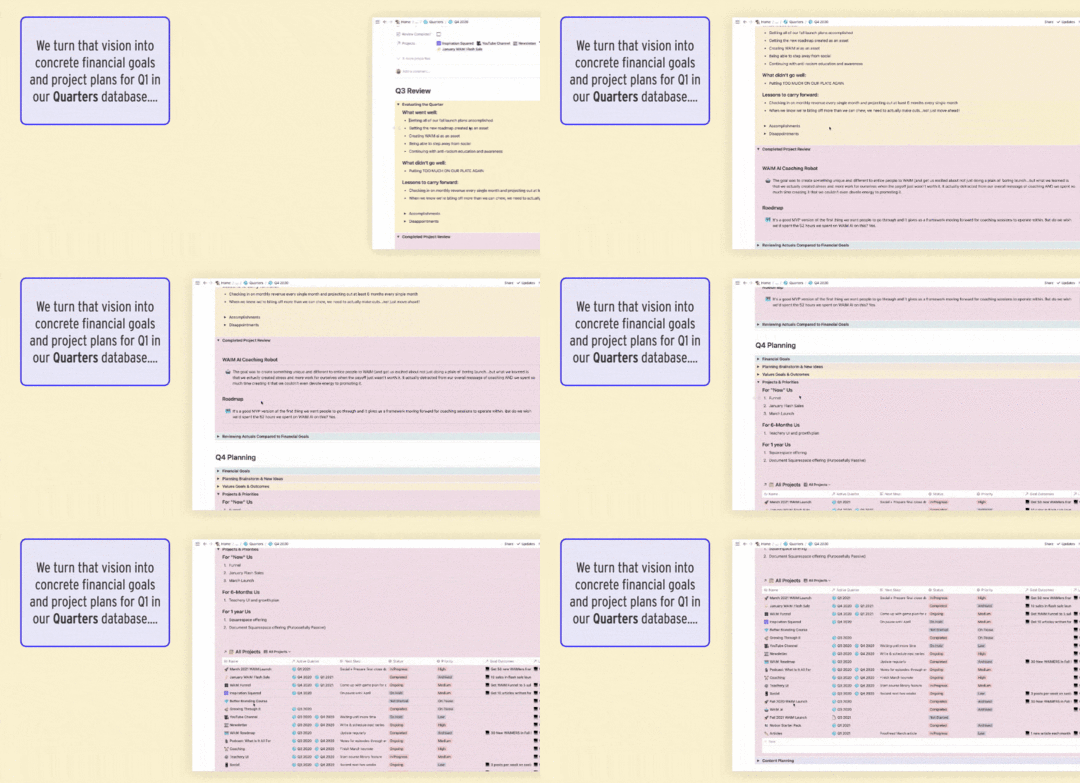
For example: at the beginning of Q1, we set up projects for our January Flash Sale and Spring Enrollment Launch, and when we finally decided on the Notion Starter Pack as our spring “product,” we turned that into a project as well.
When we make a new project, we load our New Project template, and brainstorm tasks. We pull those into our Tasks database, and we’ll usually also estimate time for each task at this point too and assign a “Do Date”
We also usually add goals at the Project level as well so we know what we’re aiming to achieve with that project.
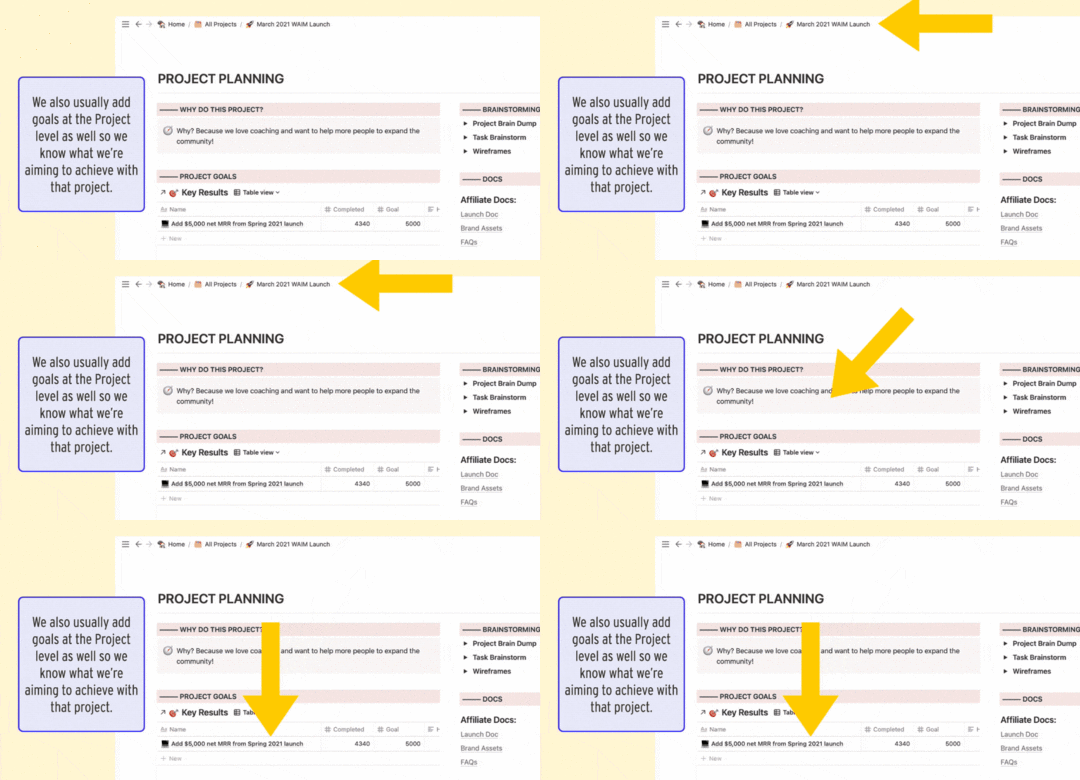
We have a project for each content channel. We plan our publishing schedule a month ahead at a time during our Monthly Planning meeting.
We do our monthly planning in the Months database…
[image error]
Usually, our Content Calendar is empty or half-empty at this point, which means we need content ideas!
That’s when we head to the Content Factory!We can use this page to come up with ideas or schedule content that are in the idea stage and needs a Publish Date.
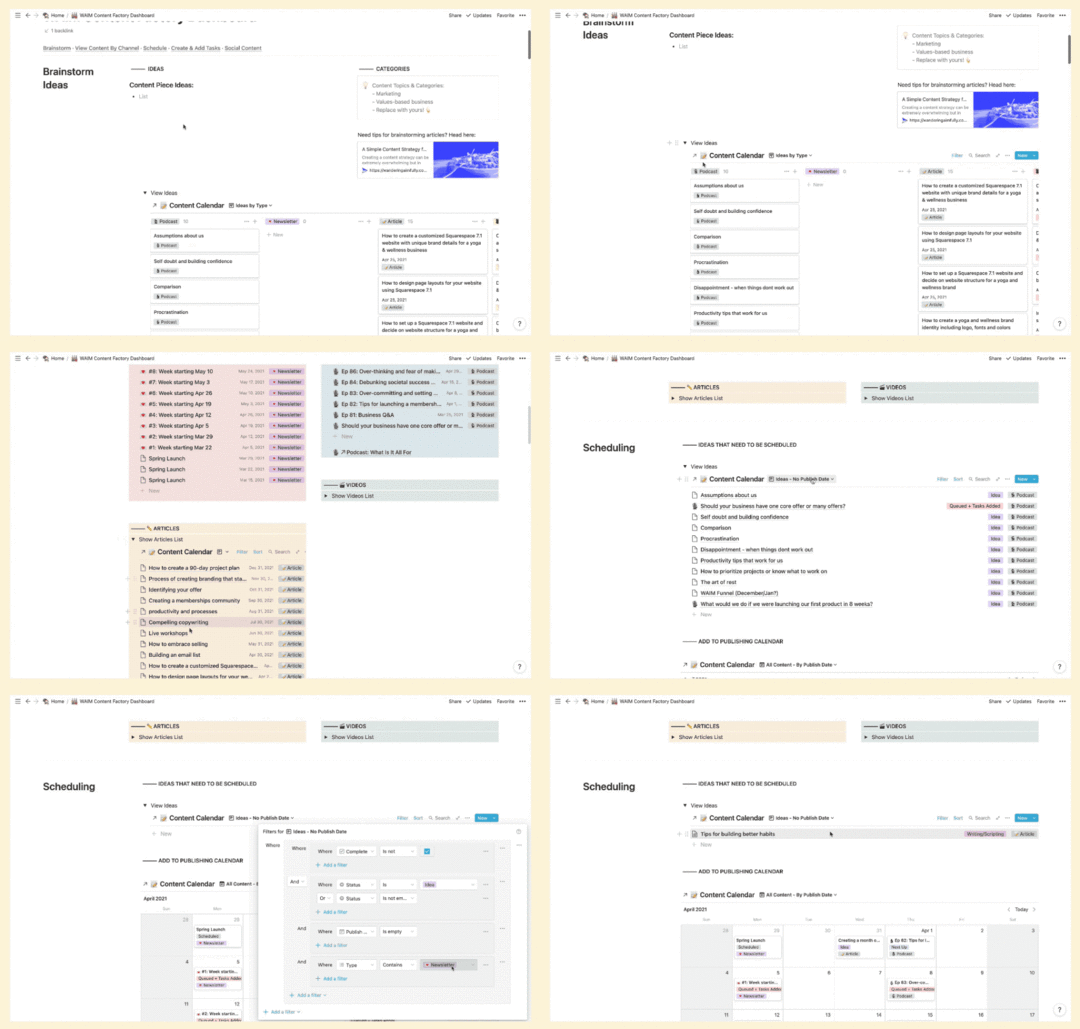
For example, if we have an idea for a new podcast episode, we can add it in the Brainstorm section of our dashboard and drag it into the Podcast column.
Or we can go to the Podcast project page directly and drag our “Ideas” view onto our Calendar View to assign a Publish Date to them.
Once episodes have a Publish Date, that’s when we load in our “Podcast Episode” template and create tasks to actually MAKE that piece of content.
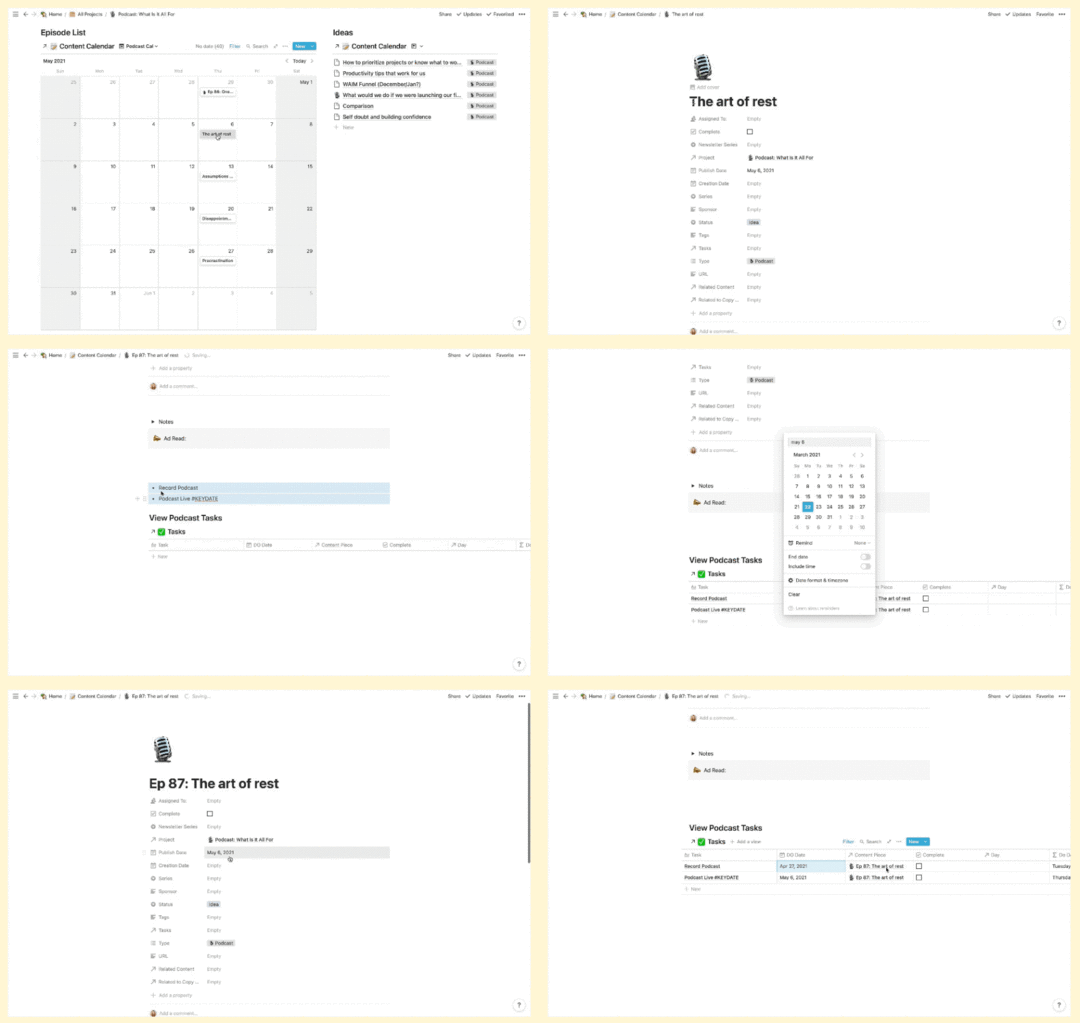
On a monthly basis, we also have our Budget Meeting . We use this dashboard page to input our expenses, our income, see our profit for the month, and see our spending compared to our budget.
We evaluate Life Areas, Projects, Goals, Content, and basically just check in with the whole system to see what needs to be updated or tackled in the upcoming week.
[image error]
This is where I ( Caroline) do my “Intentional Balance Inventory” where I rate my Life Areas 1-10 based on how much attention they got the previous week. If I want to shift my focus to an area that is being neglected, I set that as my weekly intention in our Daily Dashboard so I see it every day.
During that Weekly Review, we’re also logging any stats we want to track for our conversions, etc.
[image error]
And, also during the Weekly Review, we’re rearranging any tasks for the upcoming week to better even out my schedule and batch tasks if necessary. Don’t be afraid to have a bad week and then need to rearrange your tasks, it happens to us too!
Then… every single morning, we sit down at our Daily Dashboard, and we plan out our day.[image error]
The first thing we do is add a new day to our Daily Tracking and we fill out our gratitude, our habit trackers.
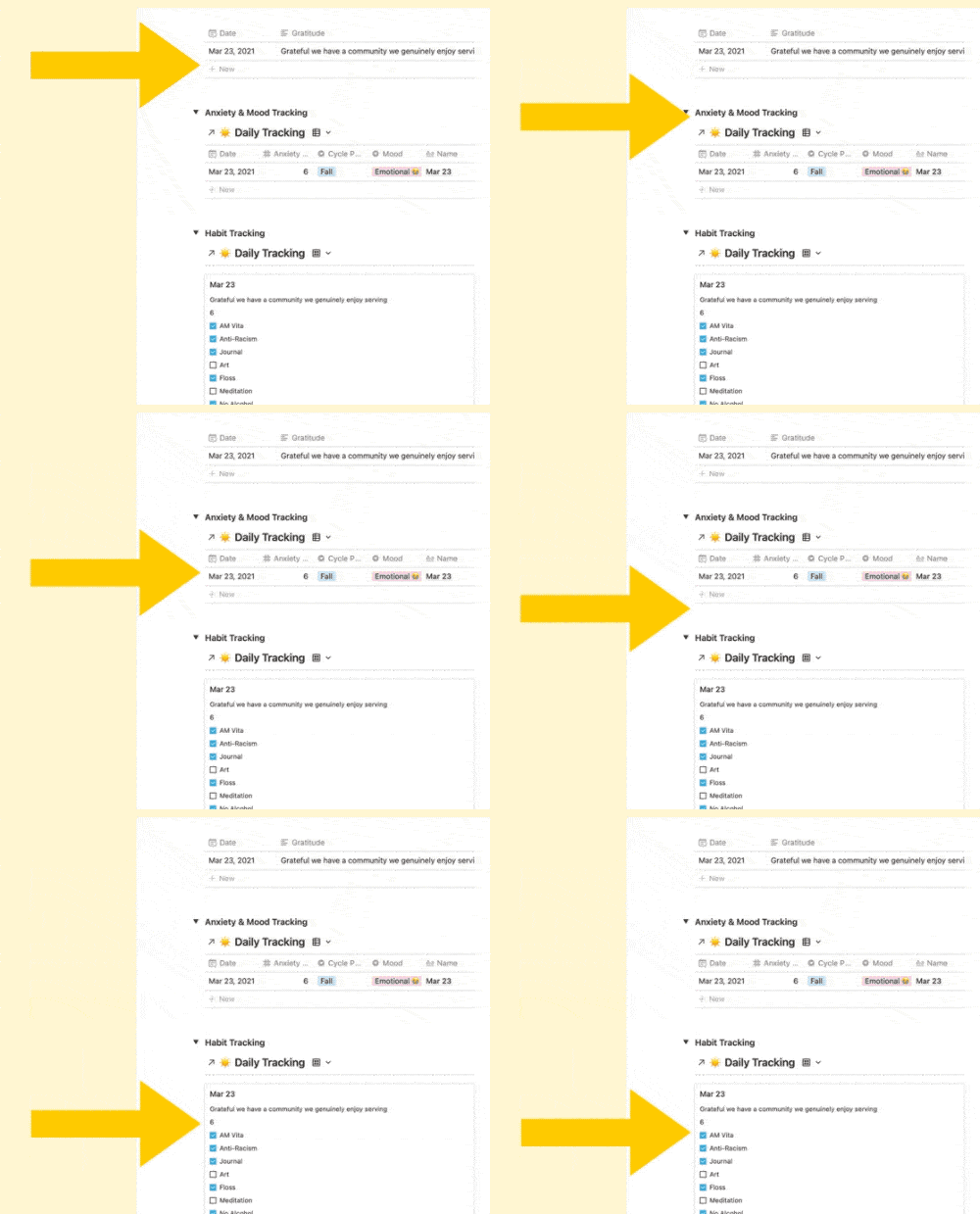
This section of our Dashboard is where we spend our day though. We assign priorities to our tasks or we designate them for 1 of our 4 “work blocks.”
[image error]
If it’s a task where we want to track our time, we set the Start Time when we begin and we set the End Time when we’re done.
That’s it! And still, you might be like… WHOA.

This system is complex but you’re really only updating it at specific times. When we do our Weekly Review, it usually only takes about an hour max but that hour is the most powerful hour that we spend on our business because it sets us up for everything else.
Wrap-upIf your head is up in the Notion-clouds with all the databases, blocks, properties and dashboards, here’s a quick little zoomed out recap to show you how we use the S.O.A.R. Notion System to run our life and business:

 Yearly Plan
We start by mapping out our year and setting goals for our life and business as a whole.
 Quarterly Plan
During the Quarterly Planning, we create our new Project pages, set up goals and create tasks for those projects.
 Monthly Plan
This is when we set up our Content Calendar for the month, update our Content Factory Dashboard, and do our Budget Meeting to check in on our financials.
 Weekly Plan
Every week, we review and update our Life Areas, set our daily intentions in the Daily Dashboard, plan our Social Posts, track our Growth metrics, and make adjustments to the Tasks we’ve already entered in our system.
Daily DashboardThis is where we do our Daily Tracking, where we take action on our Tasks, track our time and GET. THINGS. DONE
It seems like a lot but again, you’re only updating the system:
once a year,every quarter,once a month (for an hour every week),and then you’re executing it daily!
Everything else is working for you behind the scenes and you are just presented with the things that you need at the time you need them.
The final thing to remember: If your life and business have felt disorganized in the past, we’re with you! This system in Notion has really helped us get a stronghold on everything that’s important for us to focus on.
Good luck and happy organizing!
February 26, 2021
12 Toxic Mindsets To Avoid as a Business Owner & How To Fix Them
We (hello, we’re Jason and Caroline Zook by the way) know how tough it is to start a business, run a business, or simply create a new product or service.
The number of to-dos and tasks get piled higher than all the stacks of pancakes  at IHOP on a busy Saturday morning. But it’s not actually the project to-dos themselves that bring us stress; it’s all the mindset hurdles we have to navigate in accomplishing those tasks that bring our projects to a screeching halt.
We have personal experience with this entire cast of lovely characters…
PerfectionismImposter Syndrome/Self-DoubtComparison TrapsFeeling “Too Salesy”People-PleasingNeeding ValidationOver-ThinkingOver-CommittingDisappointment & DiscouragementThe list goes on…Fear not, though! Over the years we’ve acquired some tools to shift these mindsets and we want to share them with you. We’ll go over a bunch of these “mindset poisons” in this article AND give you the “mindset antidotes” to deal with them!
We want you to know you are NOT ALONE, and dealing with these mindset hurdles as a business owner is completely normal  .
.
An Introduction to Mending Your Mindsets

We all have voices and thoughts in our heads that are not helpful. Some voices are louder than others and can keep us from reaching our goals.
“My work isn’t as good as theirs, so why try?”
“Who cares what I have to say?”
“I’m an imposter and totally unqualified to do this!”
These are just a few examples of mindset poisons. They are thoughts and ideas that run rampant in our minds, kind of like a kid getting let loose at a Chuck E. Cheese 

 for the first time. (Gosh, remember those simpler times??)
Our goal with the rest of this article is to identify a handful of these mindset poisons and offer you mindset antidotes that have been critically helpful for us and our Wandering Aimfully members over the years.
The 5 Foundational Steps To Dealing With Mindset PoisonsWe’ve created a 5-step process to help cure ANY mindset poison you might encounter! This simple process will be the guiding force moving forward (kind of like a giant mouse was the guiding force at Chuck E. Cheese*).
Extremely random and silly fact: From 1977 to 1992 the Chuck E. Cheese mascot was an anthropomorphic rat, then it was changed to a mouse in 1993. In 2012, the mascot was rebranded into a smaller, “hipper” mouse-version in an attempt to increase sales. (Thank you Wikipedia!)
Step 1: Identify the “poison”The first step to changing anything is becoming AWARE of what you wish to change.
Step 2: Get to the root fearWhat is the poison when we break it down into its most basic fear? What moment from our childhood or a previous time in our lives is this fear grabbing onto?
Step 3: Identify the “antidote” to lessen the fearWhat thoughts and actions can you intentionally shift in order to offset the effect of the “poison”? What is an opposite action (antidote) you can take?
Step 4: Visualize the new resultImagine your mindset shifting from negative to positive. How would a specific situation be different using a different outlook?
Step 5: Put that antidote in action!Identify 3 tangible habits, practices, or processes to ACTIVATE that antidote and see it play out in your work and life.
Don’t worry, we’ll go over specific examples throughout this article, but now that you have a clear process for working through your own toxic mindsets, you will be able to identify your own antidotes any time you encounter an unhelpful mindset in the future.
Okay, let’s get into a few specifics, shall we!
[image error]
Toxic Mindset #1:
 Perfectionism
When Perfectionism holds you back:
Projects or tasks drag on because you always see how they can be 1% better.
You abandon an idea or project before sharing it because you don’t want people to see what you consider an imperfect product.
You won’t try a new endeavor because you already know you won’t be able to execute to your perfect standards.
You don’t allow yourself to be vulnerable or authentic because the real parts of you feel imperfect.
The question to ask yourself: “What fear does my perfectionism really stem from?”
Potential answer: “I’m afraid of feeling not good enough.”
Ways this root fear can impact you…
“I’m afraid people will judge me if I put out something less than perfect.”
“I learned as a kid that I wasn’t worthy of love unless I was perfect so feeling not good enough feels like I’m worthless.” (This one goes out to all our fellow over-achievers!)
Step 3: Identify the antidote to lessen the fear
Let’s go with: “I’m afraid of feeling not good enough.”
 What are some thoughts you can repeat to yourself that can assuage that fear?
“I am already ‘good enough’ as a person because my worth is inherent.”
“I have the power to decide what ‘good enough’ means in my work, which is separate from my worth.”
“My skillset may not be perfect, but I’ll never improve if I don’t continue making and sharing things.”
Basically…learn to be your own best friend and lean into some self-love (you deserve it)!

Perfectionism (poison) says: “I’m afraid of feeling not good enough.”
 Completion (antidote) says: “I’m the one who gets to define ahead of time what is good enough in my work and that will help me keep creating.”
Constraints help you pre-define “good enough” and completion helps you focus on finishing (not perfecting) so you can make more awesome stuff.
The goal is no longer to make something perfect; it’s to COMPLETE something in the time allotted to the standards you already set.
There is a snowball effect—the more you complete, the more you will see that things don’t have to be perfect for them to get you results.
You practice overcoming the fear of feeling not good enough by reframing good enough as something YOU determine, not anyone else.
Step 4: Visualize the new resultPrevious you: Posting 1 or 2 “perfect” things on social media and continuing to feel stuck.
Antidote you: Posting consistently according to your constraints, knowing you’re planting seeds of audience growth every time you publish!
[image error]
Step 5: Put the antidote into action Try a daily challenge: Here’s an idea. For the next 2 weeks, publishing something daily that’s imperfect but still helps move the needle forward for your business. There’s nothing like a daily challenge to desensitize you to imperfection.
 Constrain your time: You only get ONE hour to do X task. Once the time is up, you are done and you move on. No extra time. No perfecting for hours.
 Write a “good enough” list: Before you start a project or share your work, try making a checklist for yourself for what Good Enough means in your eyes.
Constraints help you fight perfectionism by pre-defining “good enough” and completion helps you make more awesome stuff with less pressure.
Toxic Mindset #2:
Self-Doubt

When Self-Doubt holds you back:
You say no to opportunities because you doubt your abilities or don’t think you’re qualified.
You feel paralyzed before you get started on a new idea because you don’t believe you’re capable of figuring it out.
You’re afraid to raise your prices or charge more for your product because you doubt people will pay it.
You feel a general sense of Imposter Syndrome which affects the confidence you bring to situations.
The question to ask yourself: “What fear does my self-doubt really stem from?”
Potential answer: “I’m afraid of being exposed as a ‘fraud’.”
What are some thoughts that can assuage that fear?
“I know that I’m conscientious and I will give my best to every opportunity.”
“I have taken on opportunities before when I felt fearful and it turned out okay.”
“I’m not ‘defrauding’ anyone! If I’m clear about my strengths and honest about my skills, I can set the expectations of those I fear letting down.”
Step 3: Identify the antidote to lessen the fearThe antidote to Self-Doubt is Self-Trust…
Self-Doubt (poison) says: “I’m afraid of being exposed as a fraud.”
 Self-Trust (antidote) says: “Giving myself the opportunity to grow does not make me a fraud. I trust myself that I can handle the discomfort of growth and I will bring my best to any opportunity.”
You think you need confidence first in order to trust in yourself, but you actually need to trust yourself before you can build confidence.
Self-doubt counts you out before you even begin; self-trust deals you in so you can continue to grow.
Self-trust is a muscle. The more you can trust yourself and practice sitting with the discomfort of feeling “out of your depth” the more you will grow and the less uncertain you’ll feel.
Step 4: Visualize the new resultPrevious you: You say NO to speaking or podcast opportunities because you doubt in your ability to deliver.
Antidote you: You say YES to opportunities, even if they scare you, and you grow your brand awareness and improve your speaking skillset.
[image error]
Step 5: Put the antidote into action Create a “trustworthy” list: Sit down and make a running list of all the things you’re good at and the things you know how to do—all the reasons big and small that make you trustworthy. Go back to this list when you doubt yourself.
Intentionally practice a skill: Building self-trust takes EXPERIENCE. But you don’t have to wait for an opportunity to grow. If you want to get better at something, set time aside to practice which will improve your confidence.
 Set a “rep goal”: 50 speaking engagements. 20 podcast interviews. 50 art pieces. Focus on a clear goal to get the experience and this will help you establish building self-trust as the goal, not the outcome.
Overcome self-doubt with self-trust. You think you need confidence first in order to trust in yourself, but you actually need to trust yourself before you can build confidence.
Toxic Mindset #3:
 Need For Validation

When Need For Validation holds you back:
You let the thoughts and opinions of your audience steer your content in a direction that doesn’t feel authentic.
A negative comment or email sends you into a self-doubt spiral.
You try to be everything to everyone so you don’t turn anyone off your brand, but for this you end up being vanilla.
The question to ask yourself: “What fear does my need for validation really stem from?”
Potential answer: “I’m afraid of not being liked.”
What are some thoughts that can assuage that fear?
“Not being liked might feel crappy in the short-term but stifling my own wants or needs in the long-term will have much more severe consequences.”
“I can’t make everyone happy anyway, so I might as well be true to myself.”
“Relying on other people for my source of happiness or validation puts way too much power in the hands of other people.”
Step 3: Identify the antidote to lessen the fearThe antidote to Need For Validation is Intrinsic Motivation…
Need For Validation (poison) says: “I’m afraid of not being liked.”
 Intrinsic Motivation (antidote) says: “Being liked is not my primary objective—being MYSELF is. I’m not chasing acceptance, I’m fueled by my own deeper purpose.”
Intrinsic motivation is about finding a WHY and a purpose that has nothing to do with the opinions of other people.
It requires that you prioritize your opinion of yourself above the opinion of others.
You have to be willing to be misunderstood, not liked, or ignored in order to try something new.
You can be motivated by the desire to develop a skill; the desire to be creative; the desire to impact other people positively…anything but “I am motivated by the desire to be liked.”
You have to learn to prefer the free feeling of being true to yourself above the fleeting feeling of being patted on the back or liked
Step 4: Visualize the new resultPrevious you: You water down your content to please everyone and feed the algorithm, but start to feel uninspired.
Antidote you: You allow yourself to experiment, you feel free, you stumble upon a new area you want to explore.
[image error]
Step 5: Put the antidote into action Write down your why: When you embark on a project or endeavor, be sure to take time to write down your deeper why. This will help you stay connected to your motivation even if people don’t “get it.”
 Don’t wait for the response: If you’re putting your work out there or hitting publish on something, don’t just wait with bated breath to see the reaction. Once you release it, let that be enough.
 Celebrate yourself: Become your biggest fan. When you push the envelope or try something new, celebrate it. Congratulate yourself. Learn to value your opinion of yourself in the highest regard.
Avoid the constant need for validation by focusing solely on intrinsic motivation. Intrinsic motivation is about finding a WHY that has nothing to do with the opinions of other people.
Toxic Mindset #4:
Comparison

When Comparison holds you back:
You use the talent or success of others to put yourself down or feel negative about where you are.
You follow others so closely that you lose your unique voice and start to copy their blueprint instead.
You compare your beginning to someone else’s middle so you think something isn’t worth doing because you don’t have the skills of someone who’s further along.
You see how someone else does things and it makes you question your instincts.
The question to ask yourself: “What fear does my comparison really stem from?”
Potential answer: “I’m afraid of being judged as inadequate.”
What are some thoughts that can assuage that fear?
“Inadequate according to whom?! I can’t let the opinions of other people stop me from making progress toward my goals.”
“Comparison is relative, so why do I only use comparison as a means to discourage myself, rather than comparing myself to where I was a year ago?”
“I can’t compare my journey to anyone else’s because they aren’t me. They don’t have the same strengths, values, skills, etc. that I do so I have to make decisions that are right for no one else but me.”
Step 3: Identify the antidote to lessen the fearThe antidote to Comparison is Owning Your Story…
Comparison (poison) says: “I’m afraid of being judged as inadequate.”
 Owning Your Story (antidote) says: “My story is mine alone. I can’t look to the path of others to set my standard of adequacy; only I can do that for myself.”
Owning your story will help you focus on the strengths within your own experience/self instead of chasing the story of others.
Comparison is about looking outward at others for cues on how you’re doing; owning your story is about looking inward instead.
Once you realize that everyone’s path is 100% unique to them, you realize that comparison is futile.
Step 4: Visualize the new resultPrevious you: I want to start a travel vlog but compare my video editing skills to the popular channels and feel discouraged and paralyzed.
Antidote you: I know I have a unique creative voice to bring to the table so I start anyway and one year from now my travel vlogs feel polished and unique to me.
[image error]
Step 5: Put the antidote into action Limit your consumption: One easy way to stop comparing yourself is to limit your exposure to what other people are up to. If you find yourself comparing, unfollow. Spend more time creating than consuming.
Make a core values list: Remember, those you are comparing yourself to are not operating with your same core values. Write down what YOU care about, what your guiding list of values is, and this will help you own your unique path/story.
 Write down your journey: Write down a timeline of all the pivotal moments that led you to where you are now. This will help you focus in on YOUR journey, no one else’s, and remind you how far you’ve come.
Steer clear of comparison traps by leaning heavily into your story. Owning your story will help you focus on the strengths within your own experience/self instead of chasing the story of others.
Toxic Mindset #5:
 Procrastination

When Procrastination holds you back:
You put off getting started on projects because you don’t know where to begin.
You don’t get back to clients or other business connections in a timely manner.
The question to ask yourself: “What fear does my procrastination really stem from?”
Potential answer: “I’m afraid of feeling overwhelmed and like I’m not capable.”
What are some thoughts that can assuage that fear?
“The most overwhelmed I’ll be during a project is likely at the beginning, so the sooner I get started, the sooner I can get through that feeling.”
“Overwhelm is something I feel if I focus on the WHOLE project instead of just the first step.”
“Not knowing how to get started or what to do is a natural part of figuring anything out.”
Step 3: Identify the antidote to lessen the fearThe antidote to Procrastination is Permission to Start Ugly…
Procrastination (poison) says: “I’m afraid of feeling overwhelmed.”
 Permission to Start Ugly (antidote) says: “I embrace feeling overwhelmed or inept at the beginning of every project because I know it’s a part of the process.”
Giving yourself “permission to start ugly” will help lower the stakes for getting started.
By focusing on “starting” rather than the whole project, you can reduce that overwhelm just a tad and find the discipline just to tackle step 1 instead of steps 1-100.
Keep your expectations super low to get started and with that first action, you’ll notice you build momentum, requiring less effort to continue moving the ball forward.
You’ll make yourself feel like whatever crappy version you start with was done on purpose!
Step 4: Visualize the new resultPrevious you: Waiting until the week of a deadline to start a project, getting stressed out and working long hours all week.
Antidote you: Starting the moment you got the project, and working in increments to slowly complete/improve the project.
[image error]
Step 5: put the antidote into action Make “ugly” part of your process: Not everything starts out as a swan! Whatever your process is for your work, make step 1 something that is VERY low barrier and easy to accomplish. Ex) coaching slides
Set a “Getting Started” timer: Constraints for the win again! If you have trouble feeling overwhelmed when you start, try setting a timer for just 15 minutes to “start ugly.” You can do anything for 15 minutes!
 Do the 5-minute task first: Title the Google Doc, even if you don’t start it yet. Import your footage. Write bullets for the blog post. Choose one maddeningly simple place to start.
If you’re constantly procrastinating, giving yourself “permission to start ugly” will help lower the stakes for getting started.
Toxic Mindset #6:
 People-Pleasing

When People-Pleasing holds you back:
You say yes to too many opportunities because you don’t want to say no or let people down.
You let clients take advantage of you and project scopes creep because you have trouble putting your foot down.
You don’t speak up for yourself when a situation feels out of integrity or inauthentic because you don’t want to seem “difficult.”
The question to ask yourself: “What fear does my people-pleasing really stem from?”
Potential answer: “I’m afraid of letting other people down.”
What are some thoughts that can assuage that fear?
“My responsibility is to myself first. I have to put on my own oxygen mask first.”
If people are not okay with me standing up for my own needs, they are not people I want to let into my circle anyway.”
As long as I’m clear and up front about what my feelings/needs are, most people will respect that.”
Step 3: Identify the antidote to lessen the fearThe antidote to People-Pleasing is Boundaries…
People-Pleasing (poison): “I’m afraid of letting people down.”
 Boundaries (antidote): “When I take on too much or don’t speak up for myself, I let myself down. I have a right to protect my energy and be honest about what I can and can’t take on.”
Boundaries are how you articulate—to yourself and others—what does and doesn’t feel authentic to you.
When you are clear about your boundaries, you limit your resentment toward other people or the feeling that they’re taking advantage of you.
Every time you enforce a boundary, you’re choosing to “love yourself, even if you risk disappointing others” (credit: Brené Brown).
Step 4: Visualize the new resultPrevious you: You say yes to every request a client makes because you don’t want to disappoint them but you end up spending twice as long on a project for half the money.
Antidote you: You establish clear boundaries and scope with your clients upfront, and because you’re sticking to timelines you can take on more clients while being happier.
[image error]
Step 5: Put the antidote into action Know your limits: Hard to enforce boundaries if you don’t know what they are. Decide where your limits are. How much are you willing to work? How many opportunities are you willing to take on?
Write down your “no scripts”: Saying “no” sometimes feels awkward because we’re so trained to say yes. If you need to practice, write out thoughtful responses to some requests that have crossed your boundaries before.
Create a “not okay” list: Boundaries aren’t just about what you’re willing to take on, they’re about what behavior you’re willing to accept. Make a list of things that are not okay with you so that if they come up, you can speak up.
If you’re constantly procrastinating, giving yourself “permission to start ugly” will help lower the stakes for getting started.
Mending Your Mindset Various Additional Poisons

In this section, we wanted to give some quicker antidotes to additional poisons that can affect our mental fortitude as entrepreneurs.
Mindset: Over-ThinkingOver-Thinking (poison): “I’m afraid of making the wrong decision.”
Embracing Experimentation (antidote): “It’s impossible to know the ‘right’ or ‘wrong’ decision. I can’t think my way to an answer; I have to ACT my way to an answer and learn by doing.”
Mindset: Need For Control
Need For Control (poison): “I’m afraid of putting my fate in someone else’s hands.”
Collaboration (antidote): “I recognize that there are also positive things gained from combining forces with someone else.”
Mindset: Disappointment
Disappointment (poison): “I’m afraid I’m not cut out for this.”
An Attitude of Service (antidote): “One setback doesn’t define me. Instead of focusing on one lackluster launch or project, I choose to focus on helping/serving others and how good that makes me feel.”
Mindset: Over-Committing
Over-Committing(poison): “I’m afraid of losing out on an opportunity.”
Prioritization (antidote): “My next opportunity is not my last opportunity. I can only be effective if I choose where to place my focus carefully.”
Mindset: Giving Up Easily
Giving Up Easily(poison): “I’m afraid of trying and failing so I give up before I can feel disappointed.”
Patience, Persistence, and Practice (antidote): “I know anything worth pursuing will have setbacks and I need to offer myself time to work through those setbacks to get to where I want to be.”
Mindset: Unworthiness
Unworthiness (poison): “I’m afraid I’m not worthy of good things.”
Self-Love (antidote): “Every single human is worthy of good things, including me. I will practice loving myself out loud until I believe that in my bones.”
Wrap Up: Mending Your Mindset is a Crucial Business Skill
Much like learning how to sell, market, grow an audience, or even creating a great product or service, mending your mindset is a business skill.
Without the tools (antidotes) to deal with mindset hurdles (poisons) we all face, none of the practical business skills are enough. You know, just like going to Chuck E. Cheese isn’t fun if you only eat pizza and never play whack-a-mole!
Our hope is we’ve given you a process to work through whatever mindset poisons might be affecting you or that you might run into in the future. Just remember, your fears and your mental roadblocks are normal and we all go through them!
Now, grab your antidote and kick those poisons to the curb.
January 28, 2021
A Simple Content Strategy for Creative Online Business Owners
Here’s the zoomed-out strategy we use to build our audience, gain organic traffic, and keep our sanity when it comes to content creation:
Priority #1: Defining your core audience and product
Priority #2: Writing foundation articles within your product niche that will be helpful to your audience
Priority #3: Creating consistent, ongoing content to build trust and authority
Priority #4: Sharing micro-content on social to further market your foundation content
To even further zoom the lens out on this content strategy and how it relates to building your Content Salad  :
:
Priority #1: Your business and your customer (your salad bowl)
Priority #2: Foundation Articles/Posts (your lettuce)
Priority #3: Email Marketing Content (your salad fixins)
Priority #4: Social Media Content (your salad dressing)
These four priorities will set the tone for the rest of this article, which, you may have already guessed, is an example of a foundation article (Priority #2) for our Wandering Aimfully business! Wow, so meta!? 
You could read this entire article, follow every step to a T, only to realize your content strategy isn’t netting you any audience growth or sales of your product/service.
The reason that would happen is very simple: The best content strategy, and the most awesome content in the world, isn’t going to help your business growth if it’s not related to your product and it’s not attracting the kind of person who could pay you.
If you don’t know who your ideal customer is…Define them!The best content strategy, and the most awesome content in the world, isn’t going to help your business grow if it’s not related to your product and it’s not attracting the kind of person who could pay you.
What job do they have? What values do they hold? What are they seeking more of in their life? Get specific!
Where does your ideal customer hang out?A great content strategy is worthless if it isn’t executed WHERE your customer spends their time. (If your customer doesn’t spend time on Twitter, don’t create content for Twitter!) Figure out where your ideal audience is looking for information online.
What are they searching for?What is your ideal customer searching for as it relates to the problem your product solves, or the product topic itself? What content would make their life easier or better?
If you aren’t crystal clear on your core product offer…What is your product’s “two-word tango?”Your “two-word tango” is just a silly phrase we like to use meaning the two-word description of what you do. Your ideal customer needs to be able to put your business/product offer into a mental bucket they can easily understand. Don’t make them overthink things; keep it really simple. (Examples: Website designer, online course, dating coach, membership program, digital planner, etc.)
Do you have product validation?Has your product offer been validated and purchased yet? If not, we highly recommend getting beta customers to ensure you want to be working on this specific idea and the product is doing a good job of solving a problem your audience has. Speaking of which…
What outcomes does your product create for your customer?Your product should fill a gap in your ideal customer’s life! What is the outcome your product provides for them and how does it get them there? Be specific about this.
Hopefully, you’ve already clearly identified your ideal customer and you have a product or service that solves a problem for that person. Having these two things nailed down helps your content strategy work on your behalf.
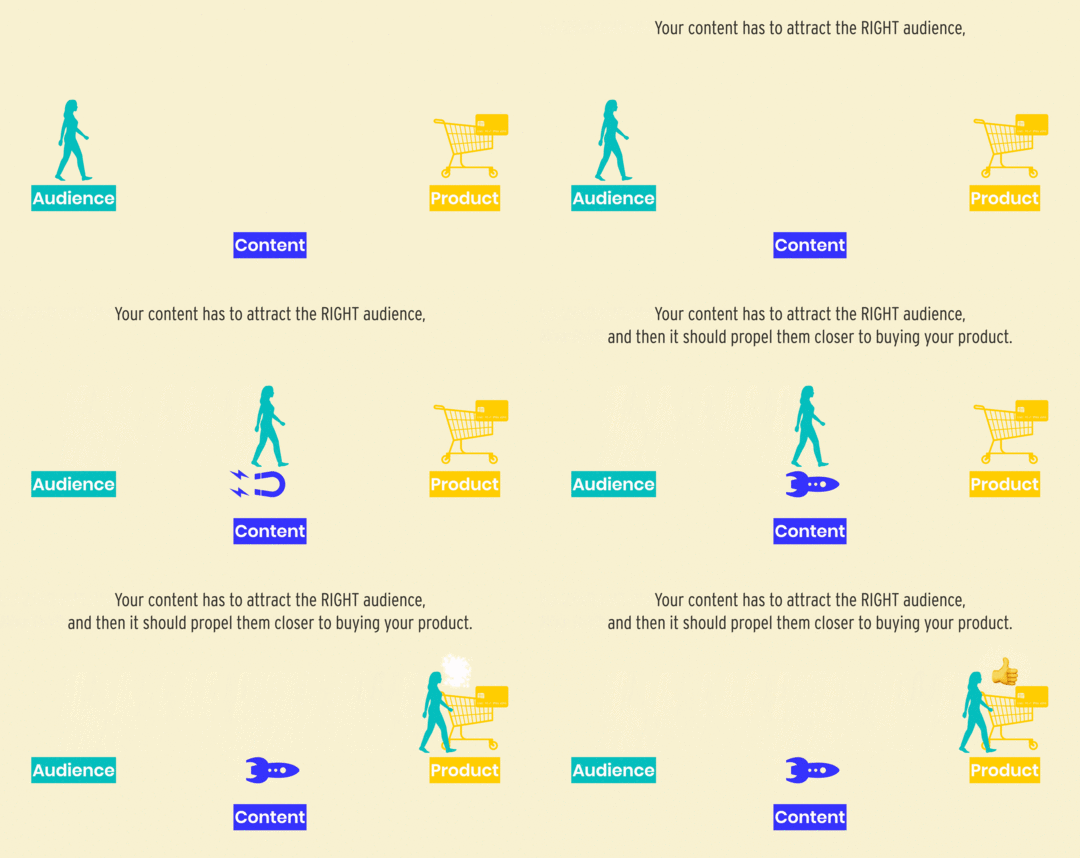
We’re on the same page with your product and audience, now let’s bring on the salad puns!
Content StrategyFor the rest of this article, we’re going to refer to your content strategy as a Content Salad .

We’re doing this because metaphors are fun and because it helps build a content creation order of operations that works time and time again.
There are two important caveats to a Content Salad we want to highlight before we jump into the salad itself (which, is a very fun Double Dare-esque visual to think about, leaping into an enormous bowl of salad!)

This may come as a shocker to you and might be the complete opposite of how you’ve thought about your content strategy in the past. And you’re not alone!
Social media is a really EASY thing to jump into. You can create an account, upload a piece of content, and boom, those dopamine hits (in the form of likes, comments, follows) can happen extremely quickly. But, and we’ve seen this time and time again, having a following on a social media website does NOT equal having a profitable business that can sustain your life.
Having a following on a social media website does NOT equal having a profitable business that can sustain your life.
While social media sites/apps are powerful vehicles for word of mouth marketing, they are also time blackholes and can keep you in a content creation loop that you never get out of. Social media content is also ephemeral and not searchable.
Those beautiful posts/stories on Instagram are almost never viewed again after 24-48 hoursThose fun TikTok videos vanish into the quick-scrolling feeds of yesteryearYour eloquent tweets are gone faster than you can type themEtc…We believe in the power of social media (heck, Jason was very early on it) but we also know our time is valuable and we want our precious hours spent to be planting seeds for future rewards. So, yes, we will talk about using social media, but we wanted to address why it’s last on the list.
Content strategy caveat #2: The majority of us cannot compete with the content strategies of large brands and influencer-typesWe’re going to mention the lovely and talented Marie Forleo as an example of someone who nails creating content. But, it’s important to note we are NOT Marie Forleo and neither are you (and that’s okay!)
For the purpose of this article, Marie Forleo is merely an illustration of someone who has an abundance of resources that most of us do not have and may not ever want. As of writing this, Marie has a team of contractors and staff who help her content engine run. This is what gives her the ability to make weekly videos, turn those into blog posts, create videos unique to Facebook, show up on Twitter, and Instagram…and have perfectly Pinterest-tailored images. She can make all of that happen because she’s built up that team. But if you are a solopreneuer or small business and you’re comparing your content creation abilities to her, you’re going to find yourself disappointed.
[image error]
It’s important to acknowledge the limitations of the resources you have. While it’s amazing that some brands and influencers have big teams, we have to be realistic about what is possible for US.
You do NOT need to create content like Marie Forleo for your business to be successful.You just have to find what’s DOABLE for you and make sure each piece of content you create is working toward your bigger business vision.
The same principles Marie (and her team) use, are ones we can use for our businesses:
Knowing exactly who your ideal audience isCreating foundational (helpful) content firstLeveraging one piece of content in many formats/placesCreating helpful micro-content that’s shareableShowing up consistently and authenticallyBuilding a content schedule that’s sustainableWe’re on the same page with these two caveats? Cool? Cool.
Part 1: Foundation Articles (Lettuce)[image error]
Why do we start our content strategy with foundation articles (like what you’re reading now)? Written content helps build organic long-tail traffic. Over time, these articles should bring your ideal audience to you without much extra effort.
For us, over 70% of our website traffic comes from organic search. Specifically, people searching Google for different words or phrases and finding articles we’ve written on the first page (or two) of results.
This organic traffic reads our articles, signs up for our email list, and a percentage of our email subscribers convert to paying customers of our WAIM Unlimited Program.
[image error]
 We know Search Engine Optimization (SEO) is confusing

Over the years we’ve honed a dead-simple SEO strategy and here’s how that breaks down for all the foundation articles we write:
Write an article on a specific topic around your product that helps your ideal audience.In that article, choose the main keyword or phrase that someone would search to have your article come up as the result.Make sure your keyword/phrase is prominently featured in the headings of the articles (H1, H2, H3).Continue to tweak and improve (aka optimize) your articles over time.Share and promote your articles in places where your ideal audience hangs out.If you want to go further down the SEO rabbit hole, we have another article on this topic you can read here: Learn Everything We Know About SEO
 You should aim to write 8-10 Foundation Articles
Every foundation article should be solving a key problem for your audience. If you need help figuring out 8-10 article topics, don’t worry, we’ve got your back!
 Article topic brainstorming tip #1: Start writing an article with the words, “I want to help you…”
Finish the statement, “I want to help you…” as it relates to your ideal customer and your product niche.
As an example, if you were a Squarespace designer, you might write statements like:
I want to help you design unique Squarespace homepagesI want to help you pick the best Squarespace templateI want to help you set up a Squarespace blogI want to help you use Squarespace blocks effectivelyI want to help you brand your Squarespace siteI want to help you speed up Squarespace site loading timeI want to help you learn how to master SquarespaceI want to help you design better converting Squarespace sales pagesOnce you write these ideas out for your audience/product, you can see there’s a list of helpful articles waiting to be expanded upon!
Article topic brainstorming tip #2: Use Google AutofillOpen up an Incognito (Google Chrome) or Private (Safari/Firefox) browsing window and start typing the keyword or phrase around your topic in Google’s search box. As Google starts to autofill the next words, you’ll be met with a bevy of article ideas based on what people are searching for most  .
.
As an example, one of our Wandering Aimfully members named Naomi runs a business where she helps people take their screenplay ideas and turn them into finished screenplays.
When Naomi types “screenplay” into Google, she’s met with a handful of results that can be turned into awesome foundation articles!
We took the liberty to write a few potential article titles based on the Google Autofill results, just to further show you this article topic brainstorming tip in action:
[image error]
Further reading: Naomi actually took our advice and wrote a few of these articles, starting with The Most Important Screenplay Formatting Guidelines You Need To Know.
Once you have article topics to write about, do some competitive researchTake one of your keywords or phrases and look through all the articles on the first page of Google. (If you’re fancy, make a spreadsheet!)
Once you’ve read through the top-ranking articles, what do YOU think is missing? What experience or knowledge do YOU have that hasn’t been shared?
It’s important to be thorough with your foundation articles but don’t lose sight of pouring your own stories and uniqueness into your article as well.
Avoid comparison traps when doing research

It’s really easy to start doing research and then think your articles won’t be as good as articles that are ranking #1 (or even #27) on Google. But, it’s not your job to rank your article, it’s your job to write an awesome set of articles that help your customers!
Give yourself a set amount of time to do research and then move on. You want to avoid comparing a well-written, already ranking article, to the one you haven’t started writing yet.
Create a writing and publishing schedule you can stick to!There’s an old Chinese proverb that says, “The best time to plant a tree was 20 years ago. The second best time is now.”
The same can be said for writing and publishing your foundation articles!
The best time to write and publish a foundation article was 2 years ago. The second best time is now.
It takes time to get organic traffic to a foundation article so the longer you procrastinate and let perfectionism hold you back from publishing, the longer you’ll have to wait to reap the rewards. And trust us, some of our highest ranking articles are cringe-worthy because we wrote them years ago and consider ourselves much improved writers now.
Give yourself permission to hit publish sooner than you’re comfortable with and plan to come back around to update your article 6-12 months from now.
Plan to publish 1-2 articles per month at a minimumTo build a great Content Salad you have to get those foundation articles done and published as quickly as possible. A good goal is 1-2 articles published per month, which means in 4-5 months all your articles should be published and starting to do work on your behalf!
Remember, you can’t eat a salad without lettuce, just like you can’t have a good content strategy if you don’t have helpful foundation articles to lean on.
Part 2: Consistent Email Newsletter, Podcast, or Video (Fixins)[image error]
Do you know why most people don’t enjoy salad? Because they aren’t adding the right fixins to it!
Listen, we don’t want to eat a plate or bowl of lettuce either (salads go in bowls though, just so we’re clear on that). A delicious salad only becomes delicious because the lettuce is accompanied by some wonderful additional items (aka fixins).

The same can be said for your content strategy. Just writing helpful articles isn’t enough. Articles are great at establishing authority but your customer needs to trust you, and trust takes TIME.
The three examples of fixins we’ll share below all have the same things in common:
You publish them consistentlyThey continue to help you ideal customerThey are focused on your product nicheYou publish them CONSISTENTLY

We’re not saying you have to do all three of our fixin examples below, but we would vote for fixin #1 as a bare minimum.
Salad fixin #1: Email Newsletter
We’ve been writing and sending a weekly email newsletter since 2014. This is THE BEST thing we’ve ever done for our online businesses and we believe email marketing is alive and well.
We’ve been able to track that 80% of our customers come from our email newsletter. This makes us feel in control of our business because we manage and run our email list.
Why does an email newsletter still work?By collecting someone’s email address, you have a bit more control in making sure your content reaches them.
People don’t swipe as quickly through email like they do other types of content (ahem, social media feeds). If they’re interested in what you have to say, they might spend a few minutes with you vs just a few seconds and a scroll.
Writing and publishing email newsletters takes less technical know-how and you can be yourself without much effort.
Think of your email newsletter as your ongoing conversation with your ideal customer around your product nicheWhether you send a newsletter weekly or bi-weekly, think of your newsletter as a way for you to engage with your audience around their topic.
What problems have you run into in your niche?What stories can you share with good lessons to be learned?What new discoveries have you made that can help others?How can you connect on an emotional level and bring your personality out?Where your foundation articles should be evergreen pieces of content that don’t change too often, you may write an email newsletter that’s “out of date” after 3 months. That’s okay! If it’s content worth sharing and can help your audience now, go for it.
Further reading: The Ethical Guide To Building An Email List Without Sleazy Tactics
Salad fixin #2: Podcast
Podcasting is a great fixin because it can create an emotional connection to your audience. They can hear you and they can get more context with the topic you’re discussing than if they were simply reading an email/article from you.
We also love podcasting because there’s a ton of room for imperfection in the production of this type of content. Plus, you can always record your podcast in your comfy sweatpants! 
We’ve all seen the rise of podcasting over the years! It feels like just yesterday we were tuning into new episodes of Serial, with no other podcasts in our subscription inbox. But, if you’re anything like us, you probably subscribe to a handful of podcasts and listen to them while going about different parts of your life.
It’s never been easier to record and share a podcast episode. Microphones are incredibly affordable and podcast hosting platforms make it really easy to get your show distributed to Apple Podcasts, Spotify, etc.
A podcast allows you to be in someone’s ear sharing a genuine passion for something you both enjoy, sometimes in otherwise quiet moments of their life that can feel intimate (road trips, folding laundry, on a walk…) This direct connection is crucial to building trust.
Further reading: Start A Podcast Today Without Feeling Overwhelmed
[image error]
(Isn’t this a lovely posed photo of us pretending to be podcasting? We totally were NOT recording, but it looks nice!)
Salad fixin #3: YouTube Channel
We’ll be 100% honest with you, creating videos is one of the most difficult fixins to keep up within the Content Salad . We’ve had years of experience and created thousands of videos, it’s a lot of work.
BUT… having a YouTube channel is not only a great way to publish consistent helpful content that’s very engaging, but it’s also a smart strategy because YouTube is the second largest search engine. Your videos can also be a form of long-tail content that brings organic traffic to your business! HUZZAH!
Why is YouTube a good consistent content opportunity?Videos are the perfect way to share your personality and create a deeper connection with your audience. For us, nearly 25% of our WAIM Unlimited members have come from YouTube. That’s a sizable amount!
Building your own YouTube channel and growing subscribers there is a great way to diversify your audience landscape. Having a second group of people who you can reach is always helpful.
And, as we already mentioned but it bears repeating, YouTube is the second largest search engine. There’s an amazing opportunity to build organic search traffic via video content using a similar strategy to writing foundation articles.
With YouTube, specifically, don’t fall into the trappings of chasing big subscriber numbers or views per video. Our videos average ~500 views and we have ~5,000 subscribers. This is enough for us and for our business.
Your content fixins can be used in tandem together based around the same initial piece of contentIf we go back to our friend Naomi’s screenplay writing example, let’s pluck out ONE content idea: The Most Important Screenplay Formatting Guidelines You Need To Know
Email newsletter fixin: Naomi could share three of the most recent screenplay formatting trends she’s seeing and how her subscribers can apply them.
Podcast episode fixin: Naomi could talk in-depth about screenplay formatting and share anecdotes and examples (maybe even pluck out audio clips from movies that reinforce the formatting).
YouTube video fixin: Naomi could put a video together that share 10 screenplay formatting guidelines in a fun, but informational way.
In these examples, it’s all the same starting piece of content, but that one topic can be leveraged across multiple platforms to deliver value where people are spending their time.
To get better at creating content consistently…Embrace that you can’t do everythingYou do NOT have to have an email newsletter, a podcast, AND a YouTube channel, etc. What is the fixin you can be the most consistent with? Start there.
Avoid perfectionism like the plagueWhat’s going to be more beneficial to your business: One “perfect” email newsletter every three months, or one “good enough” email per week? The answer is every week.
Your content fixins should be produced as often as you can consistently produce them and not feel overwhelmed or burned out (not based on what other people are doing!)
What type of content do you actually WANT to create?What ongoing content do YOU actually want to be producing? It’s more important to be consistent and authentic with a content type that YOU can crank out often and without too much resistance.
Build a simple process you can stick toPick your fixins (email newsletter at a minimum). Establish your formula and your publishing schedule. Create a content calendar and plan a few months in advance so you aren’t constantly creating content the day of (or minutes before publishing). And batch the creation of your fixins if you can!
[image error]
Part 3: Social Media (Dressing)[image error]
A content strategy that starts with social media is like building a salad by pouring dressing on the plate.
You’d never put lettuce and fixins on TOP of dressing and try to eat it that way. You need the foundation of your salad first, then your fixins, then your dressing goes on top.
The two types of social media content you should createA content strategy that starts with social media is like a building a salad by pouring dressing on the plate.
 Micro-content
Micro-content is something plucked from a larger piece of content (like a foundation article, email newsletter, podcast episode, video, etc) and shared in a bite-sized format for social media.
These could be things like:
A tweetstorm that teaches part of a bigger ideaA pull quote from an article that inspires someone formatted for InstagramAn Intagram slider that walks someone through a processAn audio clip for Instagram Stories or TikTok that gives quick practical adviceToo often we see people saying things like, “check out my new podcast episode!” with a link to the episode and maybe the cover art of the podcast. This is NOT compelling or interesting. Instead, pull out one 30-second useful clip from the podcast episode that can actually help someone learn something. Then, give them the opportunity to listen to more by clicking through to the full episode.
 Brand content
Brand content is a type of content that doesn’t point back to any bigger piece of content but lives on its own and reinforces your brand.
For our @wanderingaimfully IG account, these are little graphics, sayings, or thoughts that we come up with and share in our feed (they don’t come from a podcast, email, or video, they’re often one-off ideas or thoughts).
You can come up with brand content ideas by answering some of these prompts:
What is the question you answer most often?What is the process you repeat over and over?What is the lesson you’ve had to learn more than once?What mindset shift finally helped you make a big leap?What do your competitors believe that you don’t?What industry “standards” do you think are worth ignoring?What unique idea have you tried that worked?[image error]
Social media content should…Reinforce your brand values/messaging: There’s a reason you follow the people you follow and it’s because they continually talk about something you enjoy or align with.
Be useful in the environment: Aim to solve problems, share ideas, or be a source of inspiration IN THE FEED. Don’t force people to leave the social media platform to get value from you, make your content valuable where people are spending their time/attention.
Be a springboard to other content/marketing bridges: Once you deliver value inside the platform, use social content as a bridge to your email newsletter or even directly to your product you sell. Remind people where they can go deeper with your brand. Your social content isn’t always going to do this (read: be promotional) but it’s good practice to put it in rotation so you can see the results of your effort on social.
Connect with your audience: Remember the “social” part of this. It’s not just about posting and being a one-way street of communication. Make time to answer comments, DMs, etc.
We absolutely believe in the power of social media. Having an engaged audience on Instagram, Twitter, etc, is definitely a great business move. The mistake many people make is that their social media profiles aren’t actually helping them grow their business (they’re just accruing eyeballs and vanity metrics in a social media app).
Just make sure you’re spending time on social media AFTER you’ve nailed down your foundation articles and you have a good system in place to churn out your fixin consistent content!
Wrap-Up, Your Content Strategy Next Steps
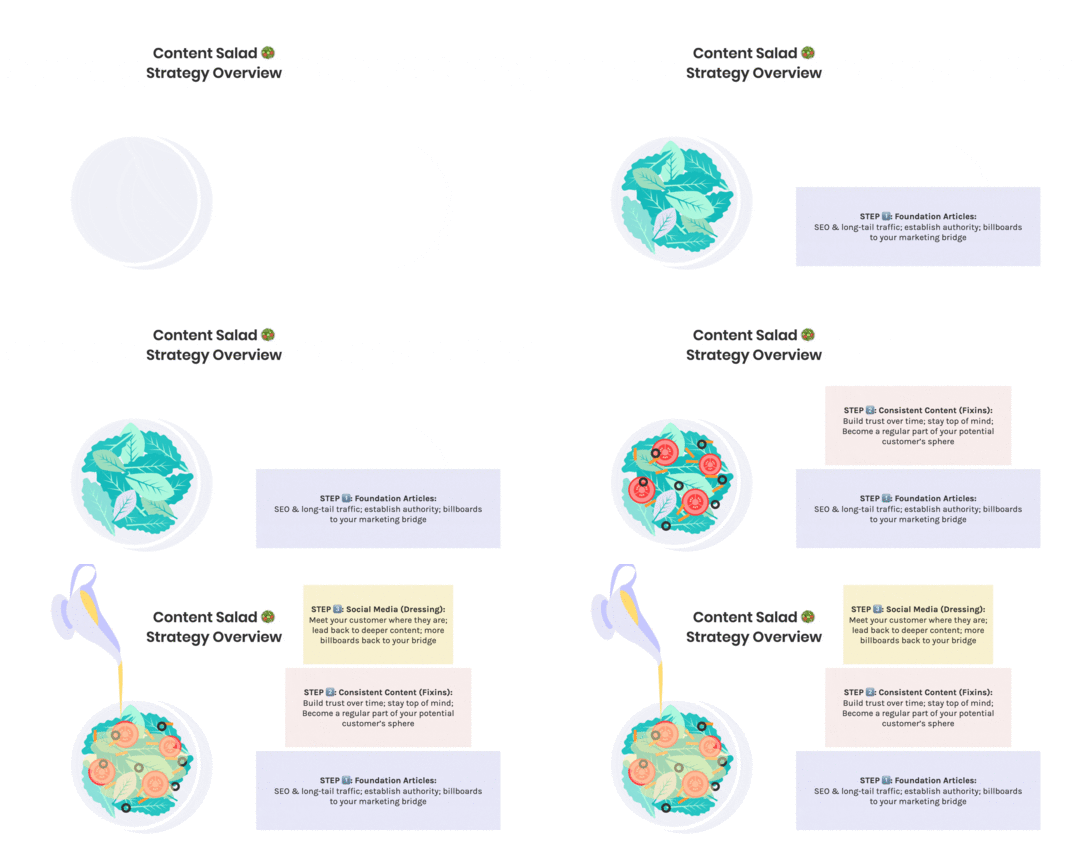
If you scrolled all the way to the bottom of this article or you’ve just read every word we wrote and your brain is spinning, here’s your recap…
STEP 1⃣: Write 8-10 Foundation ArticlesThese should be focused on helping your ideal customer and should be directly related to your product niche. They should be optimized for SEO and building long-tail organic search traffic.
STEP 2⃣: Consistent Content (Fixins)Grow your audience and build trust over time by showing up consistently for them. Become a regular part of your potential customer’s life through their email inbox, podcast app, etc.
STEP 3⃣: Social Media (Dressing)Meet your customer where they are and use these powerful platforms to lead back to your product or a marketing bridge to get further value from you.
Build the Content Salad that works best for you!Be realistic about what YOU can create with the resources you have. Choose the content platforms and types that you are excited to spend time and effort on.
No one creates “perfect” content right out of the gates. The goal is simply to create helpful content that you can get better at creating over time!
December 16, 2020
Our 2020 Year-End Review and 2021 Preview
If this is the first year-end review you’ve read from us, these reviews are as much for you as they are for us. We love reflecting back on the year to see where we’ve just come from so we can make informed decisions on where we want to go.
 COOL THING ALERT!
 In years past, these reviews were scribbled in digital docs, cobbled together in random notes/boards, and while they had some structure, it was a bit of a hot mess. But, hot mess no more!
We’ve created a Yearly Planning Template in Notion that you can use 100% fo’ free (and you don’t even have to submit your email or jump through 27 hoops to get it!)
Click here to grab the Notion Template or click the image of the template below. Duplicate the template for yourself and fill it out/answer all the questions at your leisure!
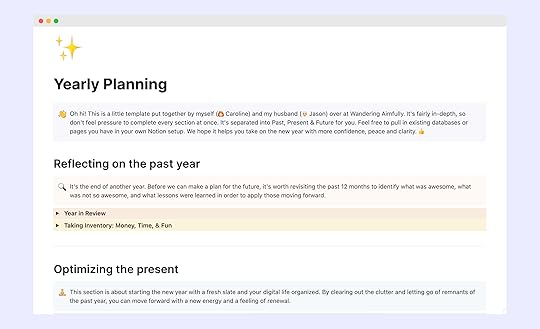
May 27, 2020
We Scrapped Part Of Our Big Launch – The Uncertain Times – Ep 10
Episode Summary

May 20, 2020
If You’re Not Enjoying Your Business, Switch It Up – The Uncertain Times – Ep 9
Episode Summary
May 13, 2020
You Have To Be Willing To Do ENOUGH Selling (plus, Mini Office Tour), The Uncertain Times – Ep 8
Episode Summary

May 10, 2020
B2B Website Best Practices And Marketing Strategy (Detailed Walkthrough)
Welcome to our series called Growing Through It where we makeover a member of our community’s business (and you get to follow along and learn tips and strategies for your own business).

We’re going to offer suggestions of how you can take advantage of this collective slow down that we’re all going through and come back even more strategic and even better when this is all over. If you’re a business owner trying to figure out what the heck to work on right now, we want to help you strengthen the foundation of your business with this series.
In this third installment of Growing Through It, you’ll meet Andrew. Andrew left his corporate marketing career to start his own marketing agency (Hotcano