
Val Silver's Blog, page 4
June 20, 2024
7 Lessons Pet Ownership Can Teach You About Business

An unexpected post popped up on our village Facebook group. Within seconds, I felt a strong emotional pull. A young dog was in urgent need of a home.
This dog had been discovered alone on the streets, seriously injured. Thankfully, he was rescued and received medical treatment.
The vet’s assistant then contacted Jayne, a local woman who offers dog boarding, enquiring if she knew anyone who could provide a forever home for the dog. Jayne made the Facebook post, I saw it, and knew I had to act fast. The dog shelter was scheduled to pick him up within the hour!

If it had been any other breed, I may have kept scrolling. But the picture stopped me in my tracks. Those soulful eyes, that sleek physique — it was a Saluki, a breed I had long admired.
I typically strive to balance impulse and careful consideration. However, in this instance, I allowed my emotions to guide my decision-making process. Sometimes, it’s okay to listen to your heart and take a leap of faith.
In this post, I’ll share the key takeaways from my journey with Finn, drawing parallels between pet ownership and entrepreneurship.
Lesson 1: Do Your Due Diligence and Consider Startup CostsBefore making any significant decision, conducting due diligence is crucial.
In my situation, I needed to know that my current dog would accept a new family member who was four times her size. After a single, authoritative glance from her, Finn understood she was in charge and I was comfortable to confirm the adoption would go ahead.
Launching a new venture, business or personal, often involves upfront costs. Adopting Finn was no exception.
While there was no adoption fee, other expenses quickly accumulated.
On visiting the vet, I discovered Finn was approximately six months old, not microchipped, and therefore unlikely to have been vaccinated either. I also chose to neuter him to prevent breeding, an essential aspect of responsible pet ownership.
A more significant expense was installing 6-foot fencing around the huge backyard to ensure Finn’s safety.
 Recovering from surgery.Lesson 2: Adapt to the Unexpected
Moving from previously owning gundogs to a sight hound has proven to be more challenging than I expected. I anticipated an adjustment period, but underestimated the unique aspects of raising a sight hound.
Not knowing his previous history, I was in the dark as to what training he had received. He appeared to be house-trained, thank goodness, so that was a good start. However, he didn’t understand basic commands and, despite getting on fine with our little Terrier, he seemed fearful of other dogs.
I learned to keep out of the way when he needed to let off steam or something in the garden spooked him. As one of the fastest dogs on the planet, collisions hurt!
I soon realized I would need help, so I enlisted the help of a recommended dog trainer.
 Better to keep out of Finn’s way!
How This Applies to Your Business
Transitioning to working for yourself also requires a willingness to learn new skills, adapt to new situations, and seek help from experts when needed.
This shift can be challenging, but breaking it down into manageable parts makes it more achievable. Start by focusing on essential skills like time management, self-discipline, marketing, and financial management. Don’t be overwhelmed by the list – tackle each skill one at a time, and don’t hesitate to ask for help or seek resources to make the learning process easier.
Just as I adapted to my dog’s unique needs, adapt your business to your audience’s needs. Tailor your content and offerings to be broadly helpful yet sharply focused, and be open to feedback and suggestions for improvement.
Lesson 3: Demonstrate Patience and Perseverance save pin for later
Training a young dog doesn’t happen overnight. At times we wondered if he had ever lived in a house before, as he didn’t understand how to climb stairs, and would have “zoomies” throughout the whole of the ground floor without taking into account any furniture in his way!
Issuing commands didn’t have any effect. It was as if, at first, he didn’t hear me, and if I raised my voice in exasperation it would frighten him and he would pick up speed!
He was no better on leash. Dashing in all directions, lunging at other dogs, barking at humans — other villagers quickly learned to give him a wide berth.
It was going to take patience and perseverance to deal with this nervous, untrained hound.
How This Applies to Your Business
Dealing with fears or apprehension when setting up your first online business can seem overwhelming. There’s so much to take into account: hosting, security, website development, software integration, finding and keeping customers.
There are risks to negotiate whether you run a business or walk an unruly dog.
Patience and perseverance aren't just for training pets - they're key to business success too.Click To TweetWhile hiring professionals like dog trainers or business consultants can be costly, their expertise can contribute significantly to long-term success.
Lesson 4: Develop Personal ConnectionsThe old adage goes, “It’s not what you know, it’s who you know.” This illustrated our adventure perfectly.
If the veterinary nurse responsible for Finn’s care hadn’t been friends with our village’s dog boarder, that Facebook post would have never been written. We would have never known of his need for a new home.
How This Applies to Your Business
Building a strong network is essential for success in many areas, including online business.
Engaging with your followers, creating a sense of community, and establishing yourself as a trusted source of information can lead to valuable collaborations, increased traffic, and loyal customers.
By investing time and effort in building relationships, you can open up a world of opportunities for yourself and your business.
Lesson 5: Celebrate Small WinsDuring Finn’s training, we celebrated each small success. He eventually learned to sit on command, which eventually led to anticipating my command when we stopped at the curb. He also understood to move to the grass verge when a car approached during our walks down the lane.
And then there was the time he didn’t freak out when we encountered Millie, the tiny white Terrier on our street — that was a significant breakthrough.

How This Applies to Your Business
Similarly, as an entrepreneur, you’ll come to value incremental progress and small victories.
Maybe you…
Secured a meeting with a potential client or investor.Received positive feedback from a customer or user.Hit a milestone in your social media following or website traffic.Successfully implemented a new process or system that made all the difference to sales.These small wins can provide a sense of accomplishment and motivation, helping you stay focused and motivated as you work towards your larger goals.
A journey of a thousand miles begins with a single step.Click To TweetLesson 6: Keep LearningEven after Finn’s basic obedience training, I continue to learn and adapt my training methods based on new situations.
For example, like many dogs, he sometimes preferred exploring outdoors over responding to my calls. Instead of getting frustrated, I changed my approach, which eventually worked — during the day.
However, night time was a different matter. The only solution here was to take him out for his last patrol around the garden on a leash. That way I managed to get to bed at a sensible hour without being totally stressed out!
How This Applies to Your Business
As a successful online business owner you can also benefit from continuous education to stay ahead of trends, new technologies and evolving customer needs.
This might involve attending webinars or conferences, enrolling in online courses, or even hiring a coach or mentor. By viewing challenges as opportunities to learn and grow, you’ll be better equipped to move forward.

One of the most valuable aspects of my journey with Finn was the support I received from fellow saluki owners and enthusiasts. Their shared experiences, advice, and encouragement played a vital role in my success in turning him into a polite, well behaved member of the family.
How This Applies to Your Business
Likewise, in the online business world, connecting with fellow solopreneurs and joining relevant forums or groups can offer valuable insights, networking opportunities, and camaraderie during highs and lows.
Take ActionAs I reflect on our journey with Finn, I realize that the lessons I’ve learned extend far beyond pet ownership. They offer valuable insights for anyone starting, or running, an online business.
Whether you’re a pet lover or an aspiring solopreneur, I hope my pet ownership story inspires you to take action, enjoy the journey, and make the most of every opportunity.
The path to success is rarely straightforward, but with patience, perseverance, and a supportive community, you can achieve your dreams.Click To TweetIf you have any questions or would like to share your own experiences, please leave a comment below. Let’s continue the conversation and support each other on our incredible journey.
Start Your Online Journey With SBI! TodayAuthor information
 Carol Leather
Carol Leather is head of content at SiteSell. She started her first successful online business, www.needlework-tips-and-techniques.com, with Solo Build It! in 2006 and it's still going strong. She loves photographing and drawing wildlife. She shares her walks in the English countryside on her new site www.naturewalkswithcarol.com. When she is not busy with all the above, she works on her two art sites! All using Solo Build It!, of course.
|The post 7 Lessons Pet Ownership Can Teach You About Business appeared first on SiteSell Blog - Proven Real-World Advice for Solopreneurs.


June 13, 2024
25 Online Business Ideas for Doctors: Rx for Revenue

The doctor’s orders are in, and this prescription isn’t for antibiotics. It’s for entrepreneurship. The medical landscape is evolving, and the stethoscope isn’t the only tool in your arsenal anymore. This isn’t your grandpa’s practice – it’s time to trade waiting rooms for a website, and your white coat for Wi-Fi.
Whether you’re a tech-savvy surgeon or a compassionate pediatrician, one of these 25 online business ideas for doctors will be just the right one for you. From telemedicine consultations to medical podcasts, from ebooks to subscription boxes, we’ll guide you through a world of possibilities, each one a prescription for prosperity.

Here are some compelling reasons why you should consider starting an online business:
Increased Income and Revenue DiversificationMultiple income streams: Online businesses offer passive and active income options, from selling digital products like courses and ebooks to providing online consultations and telehealth services. This can supplement your regular practice income and create financial security.Scalability: Compared to a traditional brick-and-mortar practice, your online business can reach a wider audience geographically, which can lead to increased revenue with minimal additional overhead.Flexible monetization: Online platforms offer diverse options for monetization, such as subscriptions, ad revenue, affiliate marketing, and partnerships, allowing you to tailor your income strategy.Greater Reach and ImpactExpanded patient base: Online consultations and services break down geographical barriers, allowing you to connect with patients beyond your local area and reach underserved communities.Community-building: Building an online presence through a blog, social media, or a podcast enables you to engage with a larger audience, share your expertise, and establish yourself as a thought leader.Improved patient access: Telehealth options cater to patients who face challenges traveling to physical appointments, increasing patient satisfaction and adherence to treatment plans.Dr. Richard Mitchell, a dentist since 1979, came across a lot of myths and bad information about teeth, gums and dental care in his 40-plus years of practice. He wanted to help more people than just the patients who came to him. How did he do it? He started an informational website with Solo Build It!. As a nice “extra,” the additional income from his online business allowed him to retire early. Dr. Richard Mitchell working in his hotel room during a trip to Madrid.Improved Work-Life Balance and FlexibilityTime and location independence: You can work online on your own terms, from anywhere with an internet connection. This flexibility allows for better work-life balance and freedom to manage personal commitments.Control over schedule: With an online business, you can structure your work hours and workload to suit your needs, reducing stress and burnout associated with traditional practice schedules.Enhanced efficiency: Digital tools and automation can streamline administrative tasks and patient communication, freeing up your valuable time for patient care and personal pursuits.Professional Development and Career AdvancementSkill development: Starting an online business requires learning new skills such as content creation, marketing, and digital technology. These skills can enhance your overall professional profile and open doors to new career opportunities.Building your brand: Establishing a strong online presence showcases your expertise and builds credibility, attracting potential collaborators, employers, or patients seeking specialized care.Leadership opportunities: Online platforms create avenues for you to lead and contribute to the healthcare community through webinars, online courses, or participation in discussions and forums.
 Addressing Industry ChallengesPatient demand for convenience: Telehealth and online services cater to the growing demand for convenient and accessible healthcare, improving patient satisfaction and loyalty.Healthcare workforce shortages: Online platforms can help address the shortage of healthcare professionals in certain areas by providing patients with alternative options for accessing care.Changing reimbursement models: As healthcare reimbursement models evolve, online businesses can offer you a way to diversify your income and adapt to shifting economic realities.
Overall, venturing online is not just a way to generate additional income as a doctor; it’s a way to embrace the changing healthcare landscape, expand your reach and impact, improve work-life balance, and contribute to a more convenient and accessible healthcare system for everyone.
The Best Online Business Ideas for DoctorsThis guide unveils 25 online business ideas categorized into five key areas, offering a diverse array of options for you, regardless of your medical specialty and interests.
I. Content Creation and ConsultingWith content creation and consulting, you can leverage your expertise to engage with a wider audience and access new revenue streams. Let’s explore each idea in greater detail.
Medical Blog/Website: Share your knowledge, build a community, and monetize through ads, affiliate marketing, and sponsored content.Online Courses: Develop and sell courses on specific medical topics, practice management, or patient education, becoming a trusted online educator.Ebooks and Guides: Create downloadable resources on wellness, health conditions, or patient education, offering valuable information to a wider audience.Online Consultations: Leverage telehealth platforms to offer remote consultations, expanding your reach and providing convenient care to patients.Medical Podcasts or YouTube Channel: Share insights, build a loyal following, and even generate revenue through sponsorships and advertising.II. Telehealth and Virtual Medical ServicesThe rise of telehealth opens up a world of possibilities for you to extend your reach, improve patient outcomes, and create flexible income streams. This category explores five virtual service options.
By partnering with patients with chronic conditions and offering continuous support, you can significantly improve their quality of life and health outcomes.

The world of online business for doctors extends beyond consultations and content. This category explores five innovative ways to transform your medical expertise into tangible products and services, generating passive income and reaching new audiences.
Medical Apps: Develop mobile apps for patient education, symptom tracking, medication management, or other valuable functions.Medical Supplies and Equipment: Sell curated kits, specialized devices, or personalized medical products, catering to specific patient needs.Subscription Box Service: Offer monthly boxes with health supplements, wellness products, or patient education materials, creating recurring revenue streams.On-Demand Medical Resources: Create a platform for curated medical resources, research tools, or patient education materials, filling a gap in the market.Online Fitness & Wellness Programs: Develop and sell personalized fitness plans, nutrition coaching, or mindfulness courses, promoting holistic well-being.IV. Content Marketing and OutreachBeyond your immediate patient base and medical practice lies a vast online audience eager to learn from your expertise. This category explores five powerful content marketing and outreach strategies to amplify your voice, build your brand, and make a significant impact on the lives of many.
Freelance Medical Writing: Write medical articles, website content, or marketing materials for healthcare companies, showcasing your expertise.Social Media Influencer: Build a strong online presence, promote healthcare products, services, or your own brand, and connect with a targeted audience.Public Speaking & Webinars: Offer paid presentations or webinars on medical topics to various audiences, establishing yourself as a thought leader.Medical Podcast Guest Appearances: Share your knowledge and expertise on relevant podcasts, reaching new audiences and expanding your reach.Expert Guest Blogger: Contribute articles and insights to health and wellness websites and blogs, building your online presence and credibility.V. Additional Revenue Streams save pin for later
This final category explores five additional revenue streams that capitalize on your expertise, influence, and strategic partnerships.
Not all options will be equally relevant or appealing to your specific goals and resources. Carefully consider your strengths, audience, and risk tolerance, and choose a combination of online business strategies that align with your overall vision and passion for healthcare.
Affiliate Marketing: Promote healthcare products and services through your online platforms and earn commissions on sales.Online Advertising: Sell banner ads on your website or blog to healthcare companies, generating passive income.Paid Sponsorships: Partner with relevant brands for product endorsements or content collaborations, leveraging your influence.Grant Writing and Consulting: Assist researchers or healthcare organizations with grant proposals and funding strategies, using your expertise to secure funds.Invest in Healthcare Startups: Leverage your medical knowledge and network to invest in promising healthcare industry ventures, potentially reaping significant financial rewards.The Crucial Role of E-E-A-T in Medical Online BusinessesFor doctors venturing into the world of online business, understanding E-E-A-T (Experience, Expertise, Authoritativeness, Trustworthiness) and its importance is crucial. Here’s why:
E-E-A-T Takes Center Stage in HealthcareMedical information directly impacts people’s health and well-being. Google, prioritizing user safety, demands unwavering accuracy and trustworthy sources for such topics. E-E-A-T has become the gold standard for websites and blogs in this realm.As a doctor, you possess expertise. Leveraging your knowledge and experience to create high-quality, evidence-based content is key. This builds authoritativeness and attracts a loyal audience.Trust is paramount. Patients need to feel confident that the information they consume is reliable and won’t lead to harm. You can cultivate trustworthiness by showcasing your credentials, maintaining transparency, and ensuring content accuracy.Medic Update: Raising the Bar for Medical ContentGoogle’s Medic update targeted YMYL (Your Money Your Life) websites, including health-related ones. Websites with low E-E-A-T faced ranking penalties, impacting traffic and visibility.Simply having a medical degree isn’t enough. Creating compelling, well-researched content, providing consistent updates, and displaying clear attribution of authorship are essential to your success with online medical content.Focus on user needs. Content must be informative and easy to understand, addressing common concerns without making medical claims or offering diagnoses.By prioritizing E-E-A-T and staying informed about Google’s algorithm changes, you’ll give your online business the best chance for success.
Starting an Online Business as a Doctor: Final ThoughtsThe medical landscape is changing. Telehealth is booming, technology is reshaping healthcare, and doctors are increasingly seeking flexible work options. This presents a unique opportunity: the rise of online businesses for doctors.
Forget the limitations of brick-and-mortar. Imagine reaching thousands, not dozens, of patients. Imagine controlling your schedule, setting your own hours, and ditching the commute. Imagine diversifying your income with passive and active revenue streams, and gaining more financial certainty.
Start your online journey today, with a trusted partner by your side: Solo Build It! helps you from start to finish, even if you’ve never built a website before, let alone made money with it.
The future is digital. As a doctor, you’re uniquely positioned to excel in this new environment.
Start Your Online Journey With SBI! TodayAuthor information Margit Streifeneder
Margit Streifeneder is the Marketing Co-Director at SiteSell. She works with a small but mighty team to spread the word about Solo Build It!, via helpful content, informative emails and eye-catching ads. She's passionate about helping solopreneurs achieve success, and enjoys interviewing SBI! members about their achievements. Besides growing her own online business, she loves exploring new places, hiking, dancing and spoiling her three cats.
|The post 25 Online Business Ideas for Doctors: Rx for Revenue appeared first on SiteSell Blog - Proven Real-World Advice for Solopreneurs.
June 6, 2024
Best Time to Register Your Domain Name

What is the best time to register your domain name when starting an online business?
Many aspiring entrepreneurs make the mistake of rushing to register their domain name without a solid plan in place. However, launching a successful web-based venture requires more than just a catchy domain name.
Many site builders or blogging platforms sell you on fancy designs or get you to register your domain name quickly, or both. Either way, they neglect to tell you the whole story.
Without a comprehensive strategy and the right skills, your online dreams may remain just that — dreams.
The Four Elements of a Successful Online BusinessTo build a thriving online business, you must focus on four key elements:
Create in-demand content: Offer valuable information that attracts and engages your target audienceAttract targeted traffic: Drive qualified visitors to your website through effective marketing strategiesPresell your visitors: Establish trust and credibility with your audience before asking for a saleMonetize your presold traffic: Convert your engaged visitors into paying customers or clients
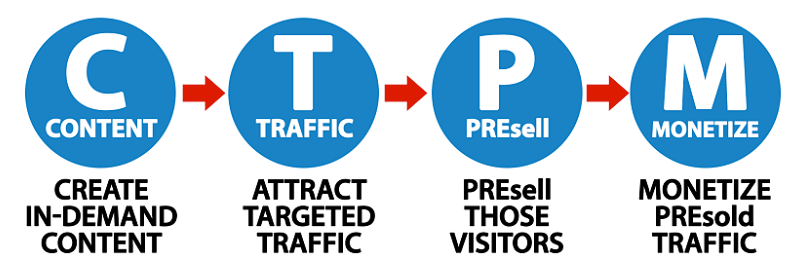
While creating in-demand content is the foundation, neglecting the other three elements can lead to a website that struggles to generate the desired financial results.
Best Time to Register Your Domain NameContrary to popular belief, domain name registration should be the last step in the process. Before securing your domain name, invest time in researching your market, identifying your target audience, and developing a solid content strategy.
Solo Build It!’s Action Guide provides a step-by-step roadmap to help you navigate this crucial planning phase.
The Power of Solo Build It!’s Action GuideThe Action Guide is a comprehensive resource that supports you in developing the best approach for your online business idea. It guides you through the necessary research and website-building sequence to create a rock-solid foundation for your online business success.
Real-life examples, like Elizabeth O’Brien and her husband David, demonstrate the impact of following the Action Guide. Their website, GrammarRevolution.com, attracts 15,000 to 20,000 daily visitors through free search engine traffic. This success has allowed them to be stay-at-home parents and enjoy financial freedom.
Keyword Research: The Foundation of a Profitable Web BusinessEffective keyword research is the cornerstone of a profitable online business.
Luke and Hollie Barber, who generate over $100,000 annually from their online venture, attribute their success to the education they received through Solo Build It!. “It educated me on what keyword research is and how to do it,” says Luke.
 save pin for later Frequently Asked QuestionsQ: Can I start an online business without any technical skills?
A: Yes! Solo Build It! provides the tools, education, and support you need to build a successful online business, even if you have no prior technical experience.
Q: How long does it take to see results with Solo Build It!?A: The timeline varies depending on your niche, content quality, and marketing efforts. However, many Solo Build It! Members (SBIers) report significant traffic and income growth within 6-12 months of consistently applying the Action Guide principles.
Q: Is Solo Build It! suitable for any niche or business idea?A: Yes, Solo Build It! can help you succeed in any niche, as long as there’s a viable market and an opportunity to create valuable content that addresses your target audience’s needs and interests.
Check out this article for more in-depth answers to online business FAQs.
The Best Time to Register Your Domain Name: Wrapping UpBuilding a successful online business requires careful planning, research, and execution. By following the Solo Build It! Action Guide and focusing on the four essential elements of online success, you can turn your passion into a thriving online venture.
Avoid rushing to register your domain name no matter how excited you are. Instead, invest time in laying the groundwork for your profitable web business, one that will stand the test of time.
Want more tips for starting and growing an online business?
Subscribe to the Solo Build It! newsletterAuthor information Paul Buckingham
As a SiteSell Professional, Paul Buckingham supports online business owners, like you, to use video and podcasting effectively. Effective online video and/or audio result in increased traffic, improved sales and engaged loyal visitors.
Each consultation is personal and his 30 years experience in radio and video production will enable you to take advantage of the online video revolution no matter how experienced (or inexperienced) you are.
|The post appeared first on SiteSell Blog - Proven Real-World Advice for Solopreneurs.
May 30, 2024
How to Humanize AI Content: Go Beyond the AI Buzzwords

As content creators, we’ve all dreamed of crafting content that speaks directly to our audience’s hearts. We want our words to resonate, to evoke emotions, and to build a connection with our readers.
But, let’s be honest, creating such content can be a labor-intensive process. That’s why many of us have turned to AI-generated content to speed up our workflow.
However, we’ve all experienced the harsh reality: AI-generated content often falls flat, lacking the human touch that makes words truly resonate.
The Reality of AI-Generated ContentAs AI becomes more sophisticated, it’s getting harder to distinguish AI content from human-written work. But, there are telltale signs that can give away the machine-generated nature of the content.
Have you ever come across an article or blog post that:
Repeats uncommon words and phrases?Has an overly formal or academic tone?Lacks detailed information or specific examples?Leaves you with a subtle sense that something feels “off”?These signs can be a major turnoff for readers, leading them to lose trust in and disengage from your content.
So, how can we bridge the gap between the efficiency of AI-generated content and the human touch that our audience craves?
The Secret Weapon: EditingThe answer lies in editing. Yes, you read that right — editing.
It’s the secret weapon that transforms AI-generated content into engaging, accurate, and tailored pieces that resonate with your audience.
There are three types of editing that can help you achieve this:
Structural editing: The first step in the editing process, structural editing refines the overall structure of your content, ensuring that it flows logically and effectively.Copy editing: This type of editing reviews word choice for effectiveness, ensuring that your content is clear, concise, and engaging.Proofreading: The last step in the editing process, proofreading involves checking grammar, spelling and punctuation to ensure error-free content.Editing poses a challenge — it’s also labor-intensive, and it requires specific skills. Hiring a fully trained editor can be costly. What’s the solution?
Collaborative Editing: The Best of Both WorldsThe answer lies in collaborative editing. AI generates content, while a human refines, polishes, and adds a personal touch. This process offers several benefits:
Efficiency: AI quickly generates drafts, saving you time and effort.
Improved quality: A human ensures that the content is engaging, accurate, and tailored to your audience.
Cost-effective: Collaborative editing is more affordable than hiring a professional editor.
When you sign up to Tai, Solo Build It!’s AI assistant, you’ll get access to the Tai Guide, a comprehensive training manual. One chapter is dedicated to this process of editing, or, as we like to call it, “Just. Add. You.” You’ll learn how to make AI-generated content distinctively yours.Can AI Edit Itself?While AI can’t replace human editors entirely, it can help with the editing process.
For instance, AI can check its own work when prompted to review text for redundancy. Here’s the prompt I use for this purpose…
[paste content here]
Revise the above article or passage to remove redundancy and enhance clarity based on the following guidelines:
– Redundancy Location: Mention specific sentences or phrases where you notice redundancy.
– Issue Description: Briefly describe the redundancy issue for clarity.
– Suggestion: Provide a possible rephrased version or a hint for removing the redundancy.
Your task is to analyze the provided text, identify redundancies, and suggest a more concise version of the complete text that still retains the original meaning. Focus on improving the flow of text and avoiding repetition. Aim for a revision that is clear and to the point, maintaining the essence of the original message while still being engaging to read.
Complete the process by rewriting the original in its finished form. Add paragraph breaks where required to make the content read well.
Here’s an example of the output:
Before : In the diverse tapestry of the UK’s inland water bodies, from serene lakes to meandering rivers, there thrives a fascinating variety of ducks, each with its own unique charm and characteristics. Let’s embark on an exploration of these wonderful feathered friends and discover what makes each one so special!
Review and suggestions: After analyzing the original text, I’ve identified a redundancy issue:
Redundancy Location: “each with its own unique charm and characteristics” and “what makes each one so special”
Issue Description: The phrases are redundant as they convey the same idea, which is that each duck has distinct qualities that make it special.
Suggestion: Remove or rephrase one of the phrases to avoid repetition.
After: In the diverse tapestry of the UK’s inland water bodies, from serene lakes to meandering rivers, a fascinating variety of ducks thrive. Let’s embark on an exploration of these wonderful feathered friends and discover their unique charms.

You wouldn’t use that content if you were writing about ducks, would you? It still sounds unnatural.
What’s really being said is…
The UK’s lakes and rivers host a variety of ducks. Let’s discover what makes each species different.
Those two sentences used 17 words compared to the original 49!
You might prefer something in between…
Ever wondered about the diverse ducks that call the lakes and rivers of the UK home? Let’s explore the different species, uncovering their unique features and characteristics. (27 words)
Overused AI Words and PhrasesI’ve flagged the AI giveaways in bold below, words that scream “AI” to anyone who knows what to look for.
In the diverse tapestry of the UK’s inland water bodies, from serene lakes to meandering rivers, a fascinating variety of ducks thrive. Let’s embark on an exploration of these wonderful feathered friends and discover their unique charms.
When did you last include “tapestry” or “embark” in a conversation? Unless, of course, you work with textiles or ships?
It looks like we still have work to do.
The Forum PostI sparked a lively debate in the Solo Build It! forums by tackling this topic, and it resonated with many.
The Solo Build It! forums are a private resource for SBI! members. However, when you sign up for a free Tai account, you’ll be able to join the discussions in the Tai section. We often share tips and advice around working with generative artificial intelligence, just like the one that sparked this article.The comments revealed that this issue transcends industries, with different fields using distinct phrases. In travel, for example, AI often employs phrases like…
serene beach peninsulastunning landscapesnatural beautypicturesque scenesrich historydiverse natural habitatbreath-taking ocean vistasunmatched solitudehavenenchantingmesmerizevibrantAnother responder added to the list…
that tropical oasisthey can thrivea delightful additiona great additionadd a tropical feelSo, are you ready to transformmy friendfear notwarriorRemoving Overused Words save pin for later
 By instructing the AI to avoid certain words, you might inadvertently encourage it to use them more frequently.
So how can we limit the use of words we don’t want?
I devised the following prompt…
Initial Content: [paste your content here]
Unwanted Words: testament to, embrace, transformative, delve, master the art, dive into, in conclusion, vibrant, verdant, unleash, transcend, thrilling, ethereal, tapestry, next level, game-changing, game-changer, fear not, elevate, truly, unique, weave, array, diverse, amidst, symphony, whimsical, mesmerizing, embark, harmony, symphony, captivating,
Process:
Check the first sentence in the content for any unwanted words listed. If you detect unwanted words, rewrite the sentence without the unwanted words. Repeat the check and rewrite process until there are no unwanted words in the sentence. Move on to the next sentence and repeat. Output the final revised passage.Rewrite the initial content:
I ran it with our paragraph from earlier:
In the diverse tapestry of the UK’s inland water bodies, from serene lakes to meandering rivers, a fascinating variety of ducks thrive. Let’s embark on an exploration of these wonderful feathered friends and discover their unique charms.
The result came back as:
In the UK’s inland water bodies, from lakes to rivers, a variety of ducks live. Let’s explore these feathered friends and learn about their charms.

I call that a success! No more “tapestry” or “embark” and a more streamlined (sorry, I couldn’t resist) version of our paragraph to boot.
I tested the prompt with more AI-generated text to rule out a one-off result.
With a selection of coloured pencils in hand, I embarked on a creative journey to bring a tree to life on my blank canvas. The soft whisper of the pencil danced across the paper, the vibrant green pigment blooming into leaves with each stroke. The strong, earthy brown formed the sturdy trunk, grounding the tree in an imagined reality. Each line and shade breathed life into the tree, transforming the once empty canvas into a vibrant , verdant spectacle.
After running the prompt the result came back as:
With a selection of coloured pencils in hand, I began a creative journey to bring a tree to life on my blank canvas. The soft whisper of the pencil danced across the paper, the green pigment blooming into leaves with each stroke. The strong, earthy brown formed the sturdy trunk, grounding the tree in an imagined reality. Each line and shade gave life to the tree, changing the once empty canvas into a lush spectacle.
The words from the no-no list were removed, although the language isn’t “me.” The piece would still need human editing. I would personally write something like…
I picked up some colored pencils and started drawing a tree. I gently moved the pencil across the paper, and the green strokes turned into leaves. I used a dark, earthy brown for the trunk. Every line and shade I added brought the tree to life, turning the empty paper into a woodland scene.
I’ve found that AI isn’t perfect — it occasionally lets a word slip through. Still, I think you’ll find this helpful.
Blending AI and the Human TouchI’ll leave you with the following thoughts.
Partner with AI to craft content that resonates with your readers.Edit the output and rephrase it in your own words, stripping away any language that screams “AI-generated.”Strike a balance between AI’s efficiency and your unique voice and style to craft compelling content.Humanize Your AI Content With TaiAuthor informationCarol LeatherCarol Leather is head of content at SiteSell. She started her first successful online business, www.needlework-tips-and-techniques.com, with Solo Build It! in 2006 and it's still going strong. She loves photographing and drawing wildlife. She shares her walks in the English countryside on her new site www.naturewalkswithcarol.com. When she is not busy with all the above, she works on her two art sites! All using Solo Build It!, of course.
|The post How to Humanize AI Content: Go Beyond the AI Buzzwords appeared first on SiteSell Blog - Proven Real-World Advice for Solopreneurs.
May 23, 2024
Pros and Cons of Using Zazzle: A Seller’s Guide to Success

Curious about the pros and cons of using Zazzle? I’ve been with Zazzle for over a decade, and I’d love to share my experiences with you.
Zazzle can be a fun and easy way to create and sell your own products, both on the platform itself and your own site or blog. You can build up a nice passive income over time doing this.
What is Zazzle and How Does it Work?Zazzle is a pioneer in the print-on-demand (POD) industry, which has revolutionized the way artists, designers, and creators can bring their ideas to life and monetize their work. The concept of print-on-demand is simple yet powerful: instead of producing and storing products in advance, items are printed and shipped only after a customer places an order.
Here’s how it works: you upload your designs (illustrations, photos, logos, anything creative) and Zazzle offers a massive catalog of products to put them on. T-shirts, mugs, phone cases, even puzzles and homeware — the possibilities are endless.
Once your design is set up, Zazzle takes care of everything behind the scenes. They print your design onto the chosen product, and handle packaging and shipping directly to the customer.
You simply set your profit margin (royalty) and enjoy the potential for passive income as people discover and purchase your creations!
Sounds too good to be true? Well, there are a few drawbacks, which I’ll explain below. Overall though, the pros of Zazzle outweigh its cons. In my opinion, selling on Zazzle is totally worth it!
Let’s look into the pros first.
Pros of Using ZazzleGood quality productsProducts can be customized by the buyerWide range of items from cards, posters, canvases, stationery, clothing, electronics, personalized gifts, office products, wedding items, crafts and moreZazzle does everything for you — manufacturing, shipping, customer serviceExcellent marketingYou can be an affiliate tooEnvironmentally friendly — products only made on demand.In summary, all you have to do is the fun part — which is the creativity. OK, you do have to do some uploading and keyword selection, but once that’s done your design is for sale forever on the Zazzle marketplace.
Their products get good reviews for quality and there are so many to choose from that there’s bound to be something suitable for your niche.
What Exactly Can You Sell on Zazzle?Let your creativity run wild! Zazzle offers a massive selection of products across a wide range of categories. Here’s a taste of what you can sell:
Clothing: T-shirts, hoodies, tank tops, leggings, dresses, aprons, and baby clothes.Accessories: Phone cases, tote bags, backpacks, notebooks, keychains, and jewelry.Homeware: Mugs, throw pillows, wall art, clocks, blankets, and even shower curtains.Stationery: Greeting cards, invitations, stickers, notepads, and calendars.Tech Accessories: Laptop sleeves, phone chargers, mousepads, and power banks.You can also find quirky and niche-specific items, such as customizable dog bowls for pet lovers or personalized golf balls for sports enthusiasts.
Actionable Tip: Not sure what kind of products will resonate with your target audience? Take advantage of Zazzle’s built-in search engine. Use relevant keywords related to your niche and browse the existing products to see what’s popular. This can spark inspiration and help you identify potential best-sellers for your Zazzle store.My niche is sympathy and memorial cards and gifts. Zazzle has been perfect for that. Customers love products that they can customize with their own photos of people or pets.
 A “Thank You for Your Sympathy” card, which customers can personalizeA Cool Pro of Using Zazzle: Their Collections Feature
You can also put together collections of items to promote on your own websites or social media. Below is an example of some of my pet loss collections. Some of the photos are mine on products I set up myself, and others are products from other people, for which I get affiliate commissions.
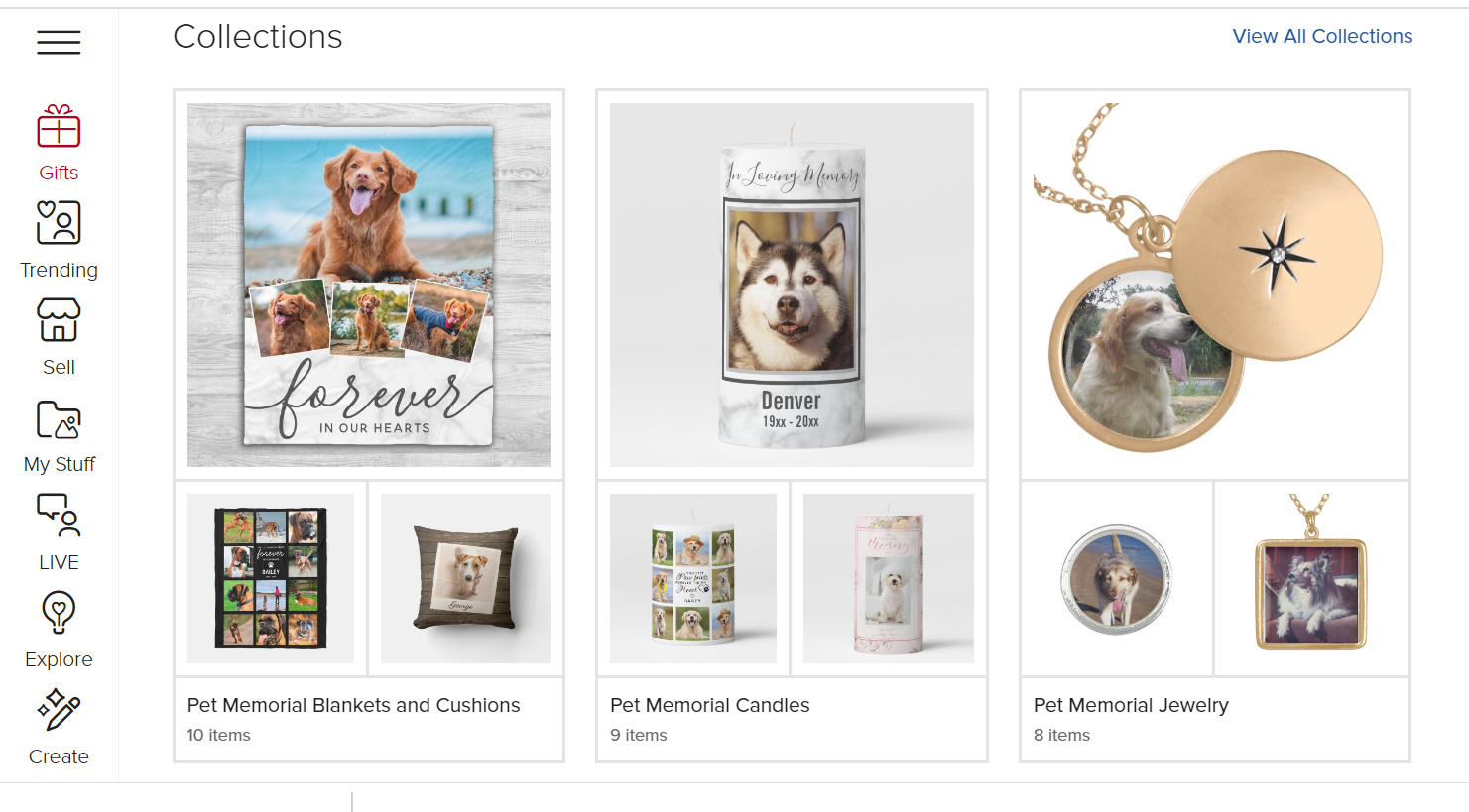 Examples of pet loss Zazzle collections. The cool thing is that you can mix your own products with other people’s products (for which you get affiliate commissions).
I have friends in the travel niche who sell items on Zazzle related to the destination they’re writing about.
 A Zazzle collection based on Melbourne, Australia
I also know someone who has a website about raising chickens.. She has created some wonderfully quirky chicken designs to sell on mugs or Christmas ornaments. She even does a range of chicken postage stamps for Christmas!
Another Pro of Using Zazzle: They Market Your ProductsZazzle is very good at marketing. One of my products appeared on their Facebook advertising once, which was rather exciting. You’ll often see them at the top of Google for many product searches.
But, as I mention in the cons, there is a lot of competition on Zazzle for every product type, so it pays to do your own marketing too, as my chicken lady friend does on her own website, like this:
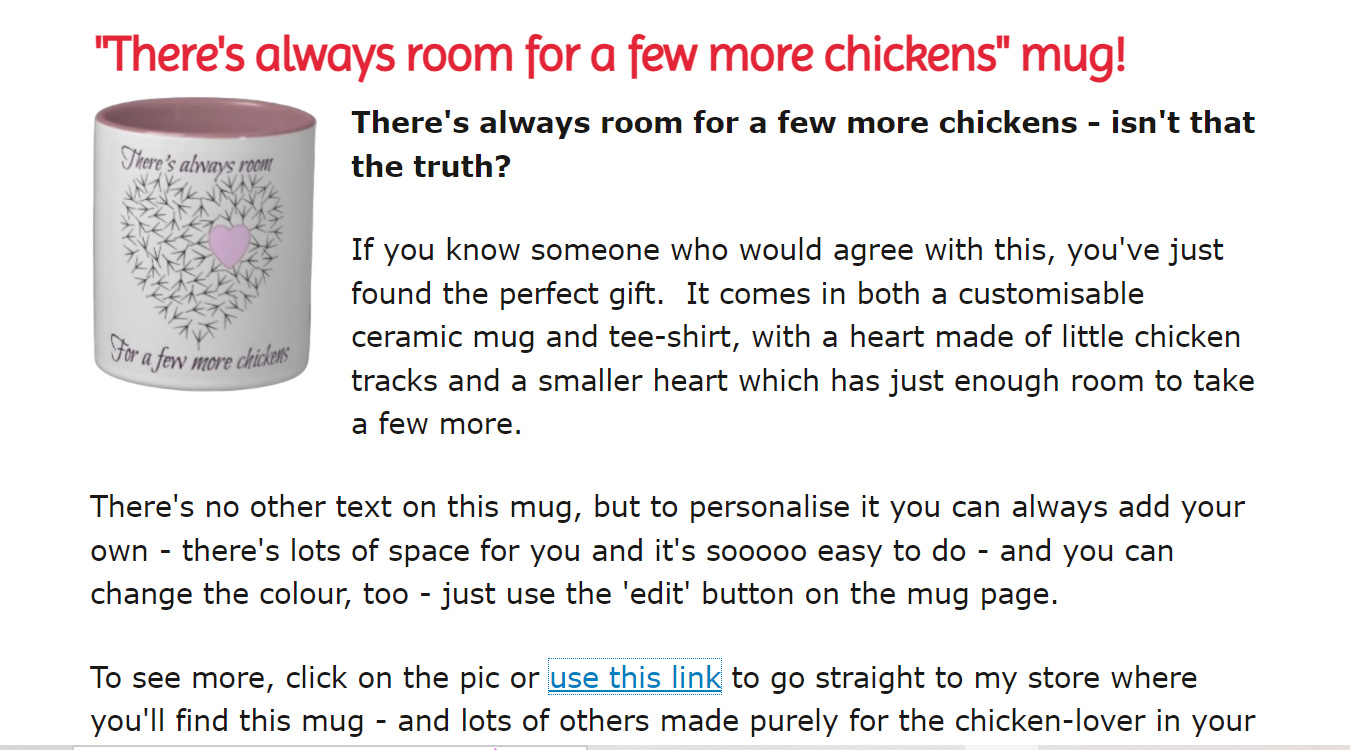 “Chicken lady” product marketing example on her own siteHow Much Does it Cost to Sell on Zazzle?
 save pin for later
 The good news is that listing your products on Zazzle is completely free! There are no upfront fees, monthly subscriptions, or listing charges.
For every sale, Zazzle charges a base price that covers the cost of manufacturing, printing, and shipping the product. You don’t have any control over this price.
As the seller, you can then add your desired royalty on top of this base price, effectively setting the final retail price for the customer. This is the profit you make on each sale. You get to set your own royalty rate as a percentage of the base price, anywhere from 5% to 99%. Keep in mind, a higher royalty might make your products less competitive.
Here’s an example:
Let’s say you design a customizable pet loss charm bracelet and set your royalty at 20%. The base price of the bracelet is $25. If someone purchases the bracelet, you would earn a royalty of $5 (20% of $25).
Another way to earn with Zazzle are its referral fees.
Zazzle offers a 15% referral fee if a customer clicks through from your website or social media and makes a purchase (even if it’s not your product).
Quite often a referral pays more than the royalty, so it’s worth joining Zazzle’s Associates Program.
Zazzle’s fee structure is very seller-friendly. There are no hidden costs and you have control over your profit margin. The key is to find the right royalty rate that balances profitability with staying competitive in the marketplace.
Finally, the thing I like best is that you don’t need to have a storefront, and there are no upfront costs. You don’t need to keep stock or deal with manufacturing, customers or shipping.
Zazzle does all that for you so you can do what you do best — designing.
Promote Other People’s Products on Zazzle as an AffiliateNot creative? No worries! Become an affiliate and promote other people’s designs on Zazzle.
As I mentioned above, Zazzle pays a 15% referral fee. That’s also true if you promote someone else’s products. So you don’t have to have your own designs to make a passive income from Zazzle. You can promote other people’s work.
Being a Zazzle affiliate can be a great addition to a diversified monetization strategy for a content-based website. It gives your readers a lot of choice of products, and allows you to offer something relevant and personal to your site.
Cons of Using ZazzleZazzle is getting pretty saturated, so there’s lots of competition.It’s a lot of work to set up and slow getting started.Filling out the sales details on each product is time-consuming and tedious. But hey, you only have to do it once!Even though you can set your own royalty, in reality the fierce competition means you need to compete on price and not set your royalty rate too high.Like anything else, you get out of Zazzle what you put into it. No one said that making money online was easy. But if you work away at it little by little, you can gradually build up a large portfolio of products on Zazzle, which will keep on earning for you year in and year out.
Full disclosure, as I’ve been with Zazzle so long, I haven’t tried any of the other print on demand companies. You may well find that they don’t have the disadvantages I’ve mentioned above.
It might be worth doing some research to see whether another company suits you better. Cafepress has been around a long time, and there are a couple of newer ones, Redbubble and Teepublic, that are getting very good press.
Can You Use AI-Generated Art on Zazzle Products?Zazzle allows the use of AI-generated content, as long as it adheres to certain guidelines outlined on their content policy page.
Here’s what you need to know:
Zazzle emphasizes that all AI-generated designs must be “entirely novel works, and not knowingly copied from any existing design.”
Your AI-generated designs should meet the same quality standards as any other artwork sold on Zazzle. In addition, if any AI-generated content is part of the final design, you need to tag it as “generativecontent”.
The legal landscape surrounding AI-generated art and copyright is still evolving. It’s unclear whether the AI itself or the person using the AI tool holds the copyright.
The bottom line: If you want to experiment with AI art, use it as a starting point. Creatively modify the AI-generated image to ensure it’s a unique and original work before uploading it to Zazzle.
My Hands-On Tips for Using ZazzleSo, with the pros and cons of using Zazzle, is it worth it? I think, if you put in a bit of effort over time, and follow the tips I share below, you may be surprised what you can achieve. Most of what I’m saying would be valid for any print on demand site, not just Zazzle.
Sell the same design on multiple products. Just copy and paste the title and description of your design across to save time. You don’t need to describe the item itself as Zazzle does that for you.If you create several items at once it’s possible to bulk edit from your store’s product page. Once it’s done your product is there forever. It’s worth it for something that can then make a passive income for you for years and years.Grab the opportunity of designing on the newest products as soon as Zazzle brings them out to beat the competition.Put your designs on items that people are likely to buy in multiples. I was surprised when I sold multiples of a sympathy card, but realized that stores such as newsagents and gift shops may well be getting their stock from Zazzle. My most successful cards were the thank you cards for coming to a funeral as people buy large quantities of these.Consider products that may be used for group activities, such as t-shirts for sports teams, or promotional materials for conferences. Make sure it’s obvious in your description that these can be customized.Keep the products you choose relevant to your niche so you can market them to your audience.Do your own marketing. Don’t leave it all to Zazzle. Create your own website to display your designs. Post them to Facebook and Pinterest. Zazzle gives you better rankings too if you share your products widely. It’s easy to do from the store and collections pages.Be competitive with your royalties. It’s all very well being able to set your royalty at any rate you like from 5% to 99%, but if your product ends up being way more expensive than everyone else’s, customers will likely just choose another design. After all, the base product is the same. Unless your design is way better than your competitors on the same item, people won’t be prepared to pay a premium for it.Choose higher price items to put your designs on. You’re not going to make a fortune on postcards and greetings cards, but add a few calendars, framed wall art, silver lockets, hoodies, watches, mugs, jigsaws etc. and it all starts to add up.Finally, a warning. Do not use other people’s designs, art or photos. You could end up with copyright issues. Even stock photos usually have restrictions about commercial use, so be very careful when using anything you didn’t design yourself.Why not join the Solo Build It! community, flex your creative muscles and become a Zazzle maker too? In my view, the pros of using Zazzle definitely outweigh the cons.
Click here to learn more about Solo Build It! and what it can do for you.
Editor’s note: This post was originally published in October 2022 and was updated and republished in May 2024.
Author information Lesley Postle
Lesley Postle is a Sitesell Pro specializing in eBook formatting and publishing. Her journey with Solo Build It! started in 2009 with her first site Decolish.com which was based around her passion for the Art Deco style of the 1920s and 1930s. Later, in 2012, working with her mother, a health professional with over 45 years experience, GriefandSympathy.com was born. This site helps those coping with any form of grief and loss and has become one of the foremost sites about grief on the internet. "Our grief website has made my mother so proud and given her a purpose in her retirement. The fact that my sites will also pay for my retirement is an added bonus." is how Lesley now speaks of her online journey.
|The post Pros and Cons of Using Zazzle: A Seller’s Guide to Success appeared first on SiteSell Blog - Proven Real-World Advice for Solopreneurs.
May 16, 2024
Write Faster, Maintain Quality: 7 Tips on How to Write Blog Posts Faster

In the fast-paced world of content creation, mastering how to write blog posts faster is a game-changer.
It’s not just about churning out content. The real challenge lies in matching speed with quality.
This delicate balance is crucial for bloggers who aim to produce engaging, high-quality blog articles consistently without compromising the integrity of their content.
In this guide, we dive into seven effective strategies that streamline your blog writing process, ensuring that each post, no matter how quickly produced, still hits the mark with your audience.
Get ready to transform your blogging routine, boosting both efficiency and quality!
 1. Lay the Foundation
A well-thought-out writing process is the backbone of efficient blog content creation. It’s about establishing a structured approach that guides you from conception to completion of each blog post.
This process begins with selecting blog post topics that not only resonate with your audience but also align with your blog niche.
A solid process ensures that each step, from researching to writing, is done methodically and efficiently, cutting down on time spent meandering through ideas or grappling with writer’s block.
Central to this organized approach is the use of a content calendar. This invaluable tool serves as a roadmap for your blogging journey, allowing you to plan and organize blog topics ahead of time.
It’s not just a schedule. It’s a strategic plan that helps you manage your content creation process.
This foresight enables you to align your posts with upcoming trends, seasonal events, or key dates relevant to your audience.
Moreover, a content calendar aids in maintaining a consistent publishing rhythm, a crucial factor in building and retaining blog traffic.
It also provides a bird’s-eye view of your content strategy, helping you spot gaps or opportunities for diversification in your subject matter.
2. Use Efficient Writing TechniquesTo write blog posts faster, honing your writing skills and typing speed is essential.
Improved typing speed directly translates to quicker content creation, allowing your thoughts to flow onto the screen without delay. Consider practicing with typing tools or games to increase your speed and accuracy.
Simultaneously, refining your writing skills can drastically reduce the time spent on editing and restructuring your posts. Engaging in regular writing exercises, reading widely and using AI writing tools can sharpen these skills.
Implementing a blog post template is another powerful strategy for efficiency. Templates act as a repeatable framework, guiding the structure of your blog posts and saving valuable time.
They ensure that each blog post maintains a consistent format, which not only speeds up the writing process but also helps in maintaining the quality of the content.
This structured approach allows you to focus more on the creative aspect of writing, like infusing your unique voice and insights into the post, rather than getting bogged down by layout decisions for each new article.
By integrating these techniques into your writing process, you’ll find yourself crafting amazing blog articles more swiftly and confidently.
3. Streamline Your Idea Generation Process save pin for later
 Efficiently generating blog post ideas is a crucial step in speeding up your writing process. One effective technique is to maintain an ongoing list of ideas.
This list becomes a reservoir of inspiration, ensuring you’re never at a loss for what to write next.
Regularly update this list with fresh topics, interesting queries from your audience, or emerging trends in your niche. This practice not only saves time. It also keeps your content relevant and engaging.
Another time-saving tip is to use AI writing tools like Tai to provide new topic ideas and expedite the process of structuring your blog posts.
These tools help in quickly transforming a raw idea into a detailed outline, including key points and subtopics that you need to cover.
This preliminary organization streamlines the actual writing, allowing you to focus on fleshing out the details rather than figuring out the flow of content.
4. Craft the Perfect Blog Post OutlineCreating a solid outline is a pivotal step in writing blog posts faster. Here’s a step-by-step guide to crafting an effective outline:
Start With a Strong Title: Your blog post title should be captivating and clear. Use a relevant keyword to enhance SEO and give readers a precise idea of what to expect.Define Your Main Point: Identify the key message or idea you want to convey. This forms the backbone of your post, ensuring you stay focused and relevant.Organize Your Subtopics: Break down the main point into subtopics. This gives structure to your writing and makes it easier for readers to follow your argument or narrative.Include Examples and Data: Plan where to include supporting examples, data, or personal anecdotes. This enriches your content and provides more value to your readers.Decide on a Conclusion: Outline your conclusion to ensure it effectively summarizes the post and reinforces your main points.A well-structured outline simplifies the writing process, enabling you to transition smoothly from one section to the next.
It also reduces the time spent on organizing thoughts while you’re writing and ensures a coherent flow of ideas. This results in a quality blog post that resonates with your audience.
Need a little help creating your outlines? Tai to the rescue. In the video below you’ll also learn how to improve your prompt, so that the AI assistant provides the best possible outcome. 5. Optimize the Writing EnvironmentAn environment conducive to writing is key to turning productive time into high-quality blog posts swiftly. Create a work space where your creative juices can flow uninterrupted.

First, identify a physical space that minimizes distractions. Whether it’s a quiet corner in your home or a local café that sparks your creativity, the right environment can enhance your writing flow.
Managing digital distractions is also crucial. If digital interruptions are a challenge, consider using apps that block social media during your writing hours.
If your creative peak is during unconventional hours (you’re a night owl), embrace it! The stillness of the night can be conducive to focused writing.
Remember, your environment isn’t just physical. It’s also about the mental space you create for writing.
A brief, focused writing session can be more productive than a couple of hours filled with interruptions.
Setting specific times for writing, tailored to when you feel most energized and inspired, will help you craft amazing blog articles more efficiently.
In the end, it’s about knowing what works for you and harnessing that environment to its fullest potential.
6. Establish Writing and Editing StrategiesMaximizing your writing flow and minimizing editing time is crucial for fast blog post-production. Here are some strategies:

By applying these strategies, you’ll find that both your writing and editing processes become more streamlined, leading to faster creation of high-quality blog posts.
7. Hit Publish Faster: Your Blog Post Quality ChecklistBefore you publish your new blog post, you want to ensure that it satisfies your (and Google’s) quality standards.
What’s the fastest way to do this? Use a checklist that ticks off all the relevant questions and helps you assess your post’s quality.
Conveniently, we’ve got just the checklist you need! Download your free copy now and streamline your quality control process.
Wrapping UpIn the world of blogging, speed doesn’t have to come at the cost of quality. Writing blog posts faster while maintaining excellence is an art you can master.
So, how to write blog posts faster while ensuring your content remains top-notch?
Here’s a quick recap:
Efficiently plan with a content calendarUse writing techniques and templatesStreamline your idea generation processCraft solid outlines using AIOptimize your writing environmentEmploy writing and editing strategiesUse a checklist to streamline your quality control processWant more tips for growing your blog and online business?
Subscribe to the Solo Build It! newsletterAuthor informationMargit StreifenederMargit Streifeneder is the Marketing Co-Director at SiteSell. She works with a small but mighty team to spread the word about Solo Build It!, via helpful content, informative emails and eye-catching ads. She's passionate about helping solopreneurs achieve success, and enjoys interviewing SBI! members about their achievements. Besides growing her own online business, she loves exploring new places, hiking, dancing and spoiling her three cats.
|The post Write Faster, Maintain Quality: 7 Tips on How to Write Blog Posts Faster appeared first on SiteSell Blog - Proven Real-World Advice for Solopreneurs.
May 8, 2024
Jasper AI vs Copy AI: Which AI Assistant Is Best for Bloggers and Solopreneurs?
You’re juggling a million tasks, content creation included. AI assistants like Jasper AI, Copy AI and Solo Build It!’s Tai promise to be your secret weapon, but which one reigns supreme for busy solopreneurs and bloggers?
Fear not, fellow word warrior! This post dives deep into a Jasper AI vs Copy AI showdown, dissecting their features, strengths, weaknesses, and all the nitty-gritty details you need to make an informed decision.
We’ll discuss:
Content creation superpowers: Who generates long-form content that flows like a dream, and whose short-form snippets pack a punch?Finding AI that fits your brand voice: Will these AI platforms craft content that sounds exactly like you, or are you stuck with a robotic tone to your content?Budget-friendly champion: Solopreneurs need to be smart with their cash. We’ll discuss the most cost-effective option for your needs.Consider your choices: Is there an even better alternative to Jasper and Copy AI? We’ll look into that at the end of our comparison.For the time pressured: Jump directly to the alternative option. It’s the only AI assistant that boasts a direct integration to a sitebuilder, saving you time and money.So, grab a coffee (or your beverage of choice) and let’s find out which AI assistant will become your ultimate content creation assistant!
Table of Contents for Our Side-by-Side ComparisonCopy AI vs Jasper AI: Which of These AI Writing Tools Is Better for You?
Jasper AIAs you enter Jasper’s home page, there’s a link for a free demonstration as well as a free trial, so you don’t have to incur expense prior to trying it out.
Once you sign up and log in, you’re greeted by a simple dashboard with seven links on the left. There’s an easy-to-find “Learn” button in the top-right corner if you want to do a tutorial first.
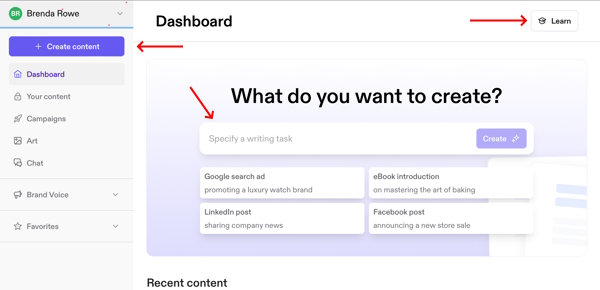
To create content right away, click the purple button in the top-left corner that says “Create Content.” Or you can use the prompt box on the right-center of the page, below the headline that reads, “What do you want to create?”
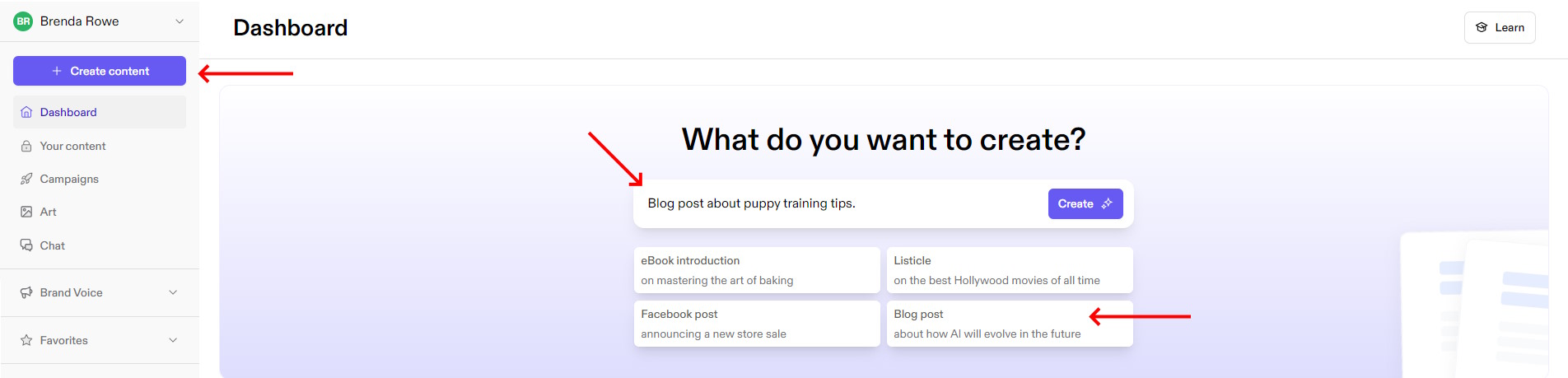
For my experiment, I chose the latter by clicking the Blog post button below the prompt box. That filled in a preformed prompt, which I modified by specifying what I wanted my post to be about, like this:
Once I clicked create, Jasper asked me to enter certain information as indicated in the image below. It wanted to know what I was interested in covering. It conveniently provided suggestions I could click on and add to the box. I was also able to type in my own instructions, freestyle.
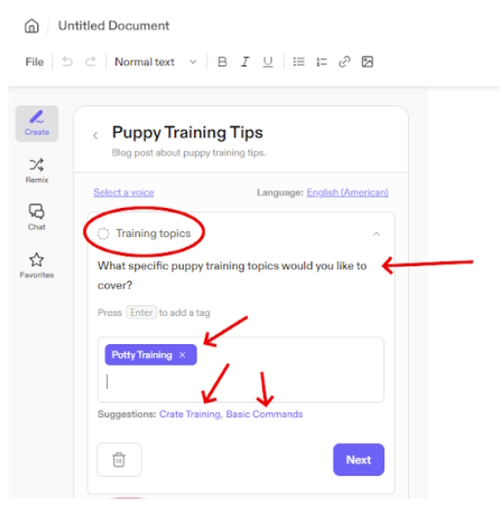
Once complete, I clicked “Next” and let Jasper know what target audience my post was intended for. I chose “New Puppy Owners,” one of Jasper’s suggestions.
Once I answered all the questions, I clicked “Generate Now.” After that, it took roughly 50 seconds for Jasper to create the 700-word blog post you see here:
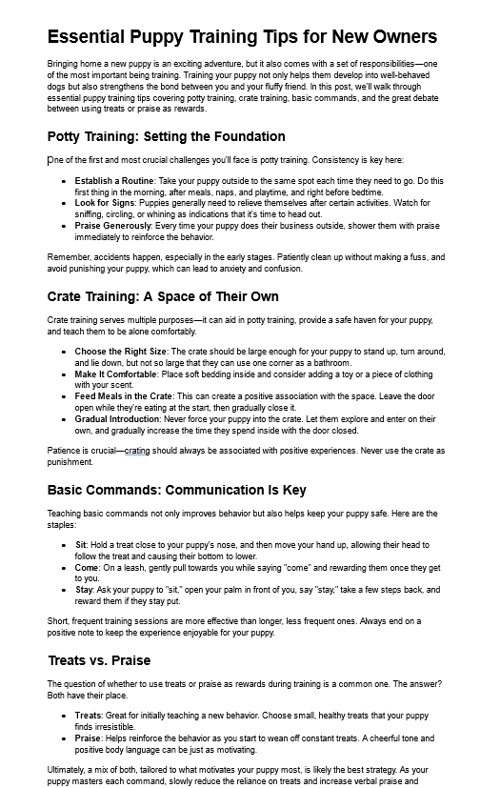 Blog Post Generated by Jasper AI
In addition to creating posts like the one above, Jasper provided options to edit or continue creating my post.
You can also use the Remix tool to add in and rework pieces of your content, or you can use chat right in the document editor. You can also tag a file as a favorite if you want to easily return to it again.

Aside from creating blog posts, Jasper has a repository of templates for you to browse and use. Templates are pre-designed prompts created to make your job easier.
Take a look at the wide array of templates Jasper has available. You can customize them to suit your needs.
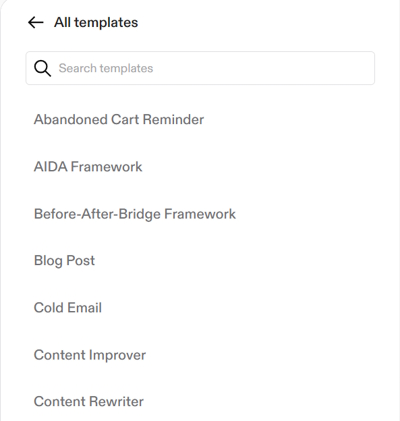 Jasper Templates ListCampaigns
Jasper’s Campaigns feature allows users to organize and manage content projects from inception to completion. It simplifies the process of creating, editing, and tracking multiple pieces of content, enabling efficient workflow and consistency across campaigns.
This tool is especially beneficial for users looking to streamline their content strategy and execution.
To illustrate, let’s say you publish a new page. You might also promote it by email, develop advertising campaigns, write a press release, and make social media posts. Those are the kinds of items held together in Campaigns for easy execution and tracking.
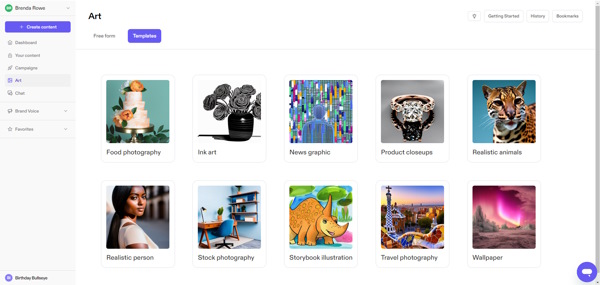
ArtNext, Jasper AI includes an art generation tool that empowers users to create original images, enhancing their written content. You can use templates to create images, or use the Free form feature and prompt your own works.
This feature supports a range of styles, like anime, pop art, and surrealism, helping folks visually articulate their written ideas.
ClipDrop.co Acquisition – In February, 2024, Jasper AI expanded its art capabilities even further by acquiring Clipdrop from Stability AI. Clipdrop is an advanced AI image creation and editing platform that can remove backgrounds and objects with the click of a mouse.
Be aware that while I was able to access Clipdrop.co as a Jasper.ai user, many features required a Pro subscription, meaning there is an additional charge to reach all of Clipdrop’s features. Clipdrop Removing a BackgroundChat
With Jasper’s Chat feature, you can use conversational prompts to craft copy, reword sentences, or summarize areas of text. It’s a practical feature for fleshing out drafts and performing on-the-fly research.
It provides a simple way to interact with AI for various tasks. Anything you can do with chat, you can do with this tool.
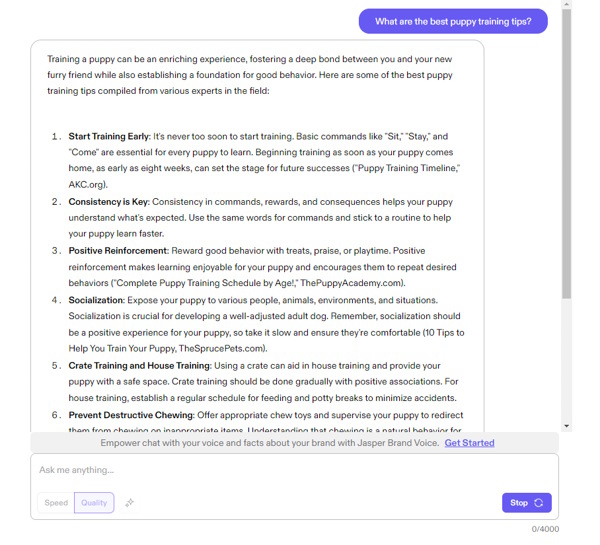 Jasper AI ChatBrand Voice
Online, you’re always just a click away from a post, ad, or article, so maintaining a consistent brand voice is imperative. Jasper AI’s Brand Voice feature allows users to tailor the tone and style of their content to reflect their brand’s unique identity.
This provides you with an even voice across the Internet so your Facebook posts are just as professional as your website. If your site has multiple contributors, this feature gets everyone on the same page using the same voice.
Say goodbye to robotic-sounding AI content by customizing the tone and style your AI tool of choice writes in.Click To Tweet Created with Jasper AI ArtFavorites
The favorites feature is a way to organize and streamline the user experience. It allows you to save and quickly access your preferred templates, prompts, or settings.
It reduces the time spent searching for frequently used tools or configurations. It also enhances productivity, especially if you plan to use Jasper regularly.
Jasper Chrome Extension

If you’ve ever used Grammarly, this extension will have a familiar feel. Except, instead of being a grammar app, it’s an AI writing assistant. Use it in your Chrome browser to edit and compose emails, documents, and forms.
Once installed, double-click a word and up pops the “Ask Jasper” tool. A subsequent drop-down then gives you choices of what to do next. You can improve the writing, change tone or change length.
This is a very handy tool for rewrites! The Jasper Chrome Extension is also available for Edge browsers, but not Firefox or Safari.
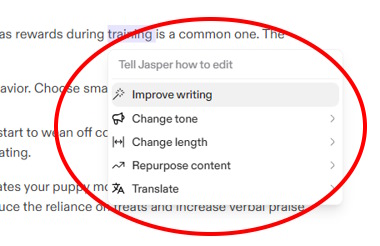
Jasper AI’s Integrations module connects Jasper with various platforms and apps like Microsoft Word and Google Docs. This enables users to streamline their work, automate content creation, and publish across multiple channels directly from Jasper.
Here are some specific integrations available through this feature:
Microsoft Word Add-onGoogle Doc Add-onJasper Webflow IntegrationJasper and ZapierJasper and Surfer SEOJasper and Make.comPlagiarism CheckerImportant note: Jasper AI is an AI content creator with a penchant for marketing. It’s not a sitebuilder. It requires Zapier, a third party application, to connect to a site builder like WordPress.There’s a free version of Zapier, but if your needs should exceed that level, expect to pay an extra $19.99 per month or more.
Training, Support, and HelpJasper AI provides comprehensive training, support, and help to assist you in acquiring the skills to maximize the platform’s capabilities. It includes detailed tutorials and resources to guide you through functionalities and best practices.
I found Jasper’s training materials and help to be well-written, easy to understand, and cleverly equipped with inventive tools to periodically assess how well you’re grasping the materials.
There’s also a dedicated help center, live chat, and community forums, where users can find answers to their questions and share insights with other users.

You may be interested in gaining pro level Jasper skills. Jasper AI has introduced a certification program designed to validate and recognize the expertise of individuals who navigate and leverage the platform effectively.
This certification is good for folks looking to document their well-honed Jasper AI skills.
Language TranslationsJasper AI offers language support and translations in 30 languages. This makes Jasper a versatile tool for those aiming to reach and engage diverse audiences in their native language.
The AI EngineAnother thing to consider about Jasper AI is the technology it’s built upon. I can’t say it any better than they do, themselves. Here’s how Jasper describes its AI engine:
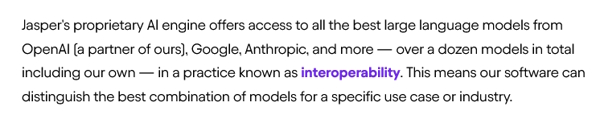 From Jasper.ai
With access to several large language models, Jasper is well-equipped to generate high-quality AI-generated long-form content for its users.
Jasper AI PricingJasper AI is an excellent AI assistant with a lot of features. Every solopreneur’s business is different with varying niches and products. My point is, you know your needs best.
If you’re staying within a budget, though, you’ll need to decide if you’ll use Jasper enough to justify the expense.
Plans start at $468/year if you pay annually ($49/month if you pay monthly). This plan doesn’t include the art tool.For $708/year (or $69 per month if paid monthly), you’ll also receive the art tool and some other advanced features.An unlimited Business plan is available to give you more control, security, team training, and tech support, but that’s a “Contact Jasper for More Information” plan.If you haven’t got much experience with AI content tools, it’s best to start with a tool that offers a generous free trial so you can get familiar with the way AI produces content.Click To TweetCopy AIHaving delved in-depth into Jasper AI, let’s turn our attention to Copy AI. In this segment, I’ll contrast Jasper’s AI content creation approach with Copy AI’s, so we can determine which platform is better for bloggers and solopreneurs.
Creating ContentLike Jasper, Copy AI also has a simple interface. When you log in, you’re greeted by seven functions on the left and a series of navigational boxes on the right. Then, you’re guided by the heading, “Get started with Chat.”
Unlike Jasper, Copy AI offers no obvious “Learn” button, so I dove in right away. I clicked the button called “New Chat” and was off to the races.
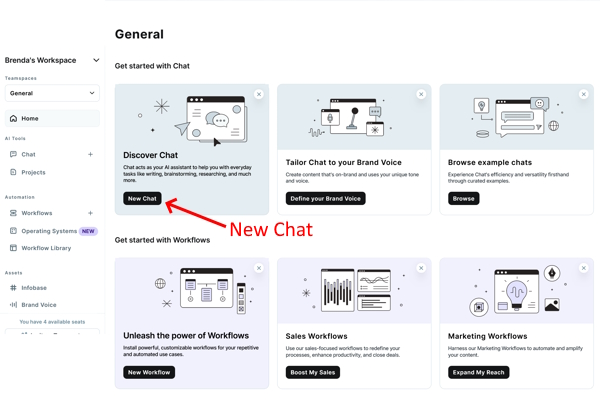
On the next screen, you’re given a short introduction and three suggestions for what to type into the chat prompt box. It’s indicated by the red arrow towards the bottom of the screenshot below.
I decided to try some longish content so I opted for “Create a blog post about” and used my keyword “puppy training tips” to complete the prompt. The finished prompt said: “create a blog post about puppy training tips.”
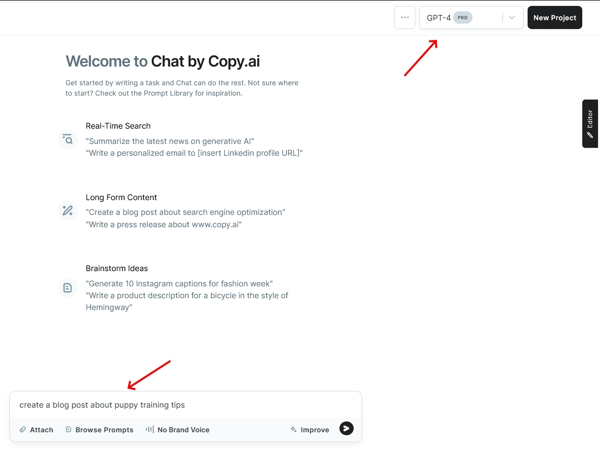
Notice I also changed the GPT option from 3.5 to 4 in the upper right corner. You’ll want to make sure you do that so you’re taking advantage of OpenAI’s most advanced model. After that, I clicked the > button next to the box.
Copy AI ResultsIt took one click of a mouse and 30 seconds to generate the page below. The result was a 500-word post.
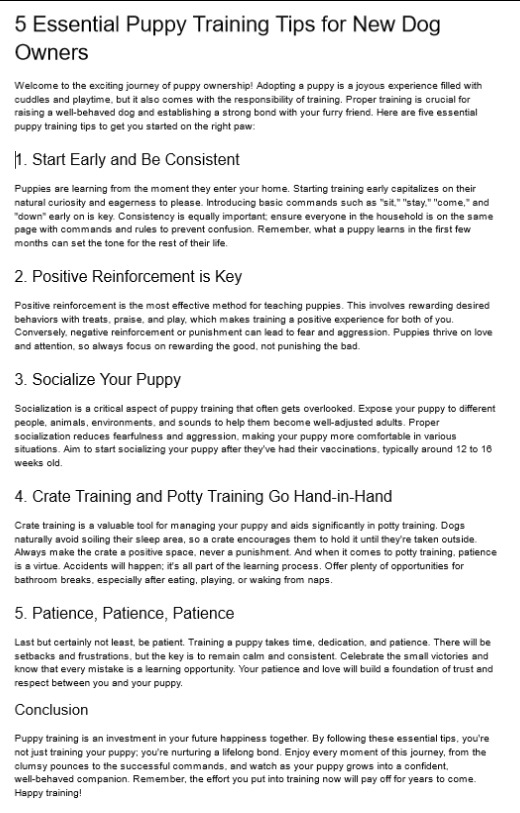
You’ll notice in the earlier image an “Improve” button under the prompt box. You can use that to make your results better. After I generated the post above, I went back and used that “Improve” feature just to see what would happen.
When I clicked the “Improve” button, a box opened to allow me to edit the instructions. I found that this feature could give me quite a bit of control over my output. Take a look:
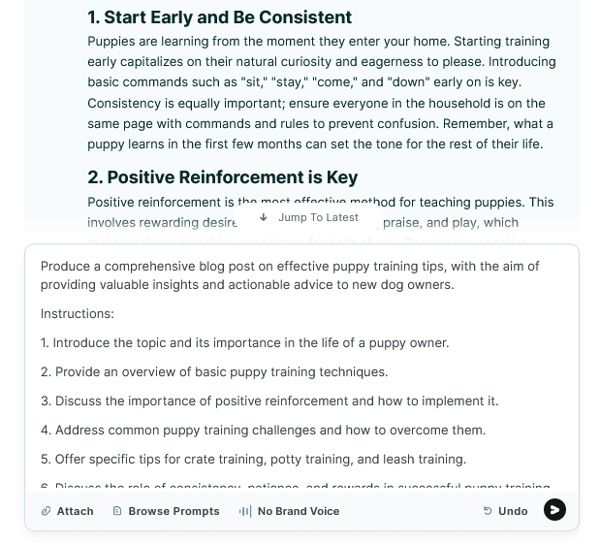 The Improve Box in Action
For my test, I inserted a one-word change into my prompt to see how Copy AI would handle my request, as a follow-up prompt. Thirty seconds later, Copy AI delivered a brand new post implementing my requested changes.
The original prompt was:Create a blog post about puppy training tips
The improved prompt was:Create a blog post about effective puppy training tips
This revision also brightened the overall tone of the article, although I didn’t ask for that. You can see the results here, yourself:
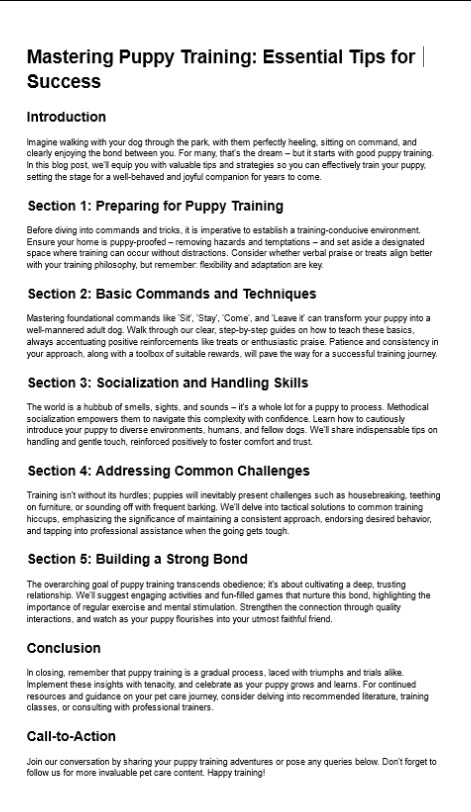
With Jasper, many functions required several clicks or clarifications before a task could be completed. That, to me, made Copy AI closer to “one click and done” than Jasper.
If you love speed, you might prefer Copy AI over Jasper if Copy AI can provide enough other features to be cost effective for your situation.
Some cautionary advice: Speed is secondary to creating high-quality helpful content (part of the Google algorithm).
Workflow TemplatesThe next way Copy AI grabbed my attention was its workflows. Workflows are prompt-based tasking templates. There are many different functions that can be done using these tools, all click-button easy.
Take a look. Are these tasks something you need for your business?
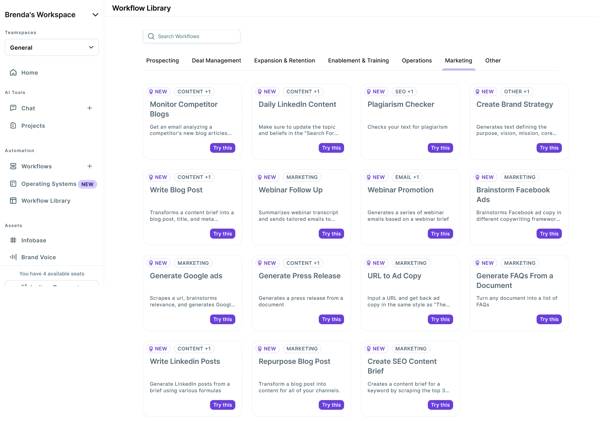 Copy AI Prospecting WorkflowsAbout Workflows
If you’re curious what a workflow does or what it looks like, a workflow is a step-by-step process that results in task completion. Here’s an image of a marketing workflow to monitor competitor blogs.
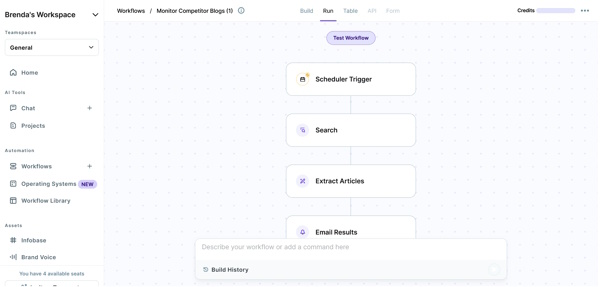 Copy AI Marketing Workflow
In browsing through these workflows, you’ll see ways to automate many sales and marketing functions like email messaging, web searches for prospecting, and extracting data for lists.
Workflows are powerful tasking tools that increase productivity, if you know how to use them and if they’re something you need.
Brand VoiceCopy AI’s Brand Voice feature is a dynamic tool designed to ensure your brand’s unique tone, style, and personality are consistently reflected across all content generated by Copy AI’s platform.
To use this feature, you’ll begin by inputting examples of your brand’s content, such as social media posts, blog articles, or any text that embodies your brand’s voice.
The platform then analyzes this input to understand and replicate your distinctive tone and style across various content forms, from email marketing to social media.
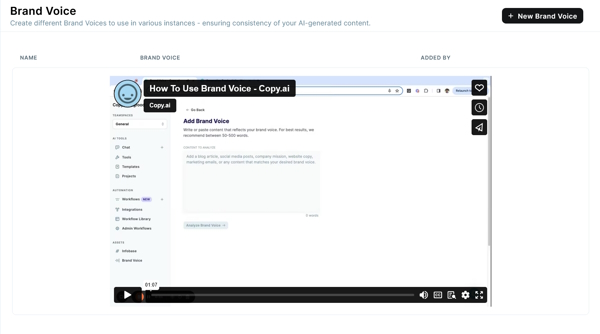 Copy AI’s Brand VoiceAI OS Sales
AI OS for Sales uses artificial intelligence to streamline the sales process, clearly a productivity tool. If you’re a business owner with a sales team, AI OS Sales can help you with lead development, opportunity analysis and more.
This feature helps supply your people with data tailored to making the sales process more efficient.

Copy AI’s overall design strategy has been to reduce or eliminate impacts on the speed and smoothness of its operations. Its training and support follow the same design.
Most of the materials I read or watched were short pieces of text or video. I could see how some people might appreciate this approach because it was light and easy-to-digest, like taking small bites instead of having a full meal.
However, unlike Jasper, whose Learning button was prominently displayed in the upper right corner of every page, you’ll need to scroll all the way down to the footer to find Copy AI’s Help section.
Once you do, though, you’ll find sections like Knowledge, Information on Starting Up, How to Engage With the Chat Tool, and Grasping the Nuances of AI Technologies such as GPT-3 and GPT-4.
Copy AI does not emphasize prompt training, so users unaware of its importance may need to learn effective prompting elsewhere. Fortunately, Solo Build It!’s team came up with a handy prompt-building cheat sheet. Click here to download it (free access, you don’t need to give your email address).Language TranslationsCopy AI supports 95 languages, with capabilities that extend across various templates and uses, enabling high-quality content creation for social media and advertising campaigns, as well as for multilingual websites or blogs.
Bonus ToolsCopy AI’s popularity stems from its ability to generate high-quality content quickly, as well as the wide range of content types it serves up. One reason Copy.ai is so popular is the free artificial intelligence tools on the site, which you can find here. You don’t even need to log in to use them.
The AI EngineCopy AI’s engine is powered by GPT-4, the fourth iteration of GPT developed by OpenAI, one of the first large language models to emerge.
Copy AI PricingBudget-minded folks will be pleased to know that Copy AI has a free chat plan. It includes up to 2000 words in chat. However, I ran out of free credits and needed to upgrade fairly quickly.
The paid Pro plan is $49 a month or $432 per year if paid annually. You get five users, unlimited chats, and 500 workflow credits per month.
Team plans are also available at $249/month or $2,232/year up front, which includes up to 20 users and 3K/month workflow credits. But most solopreneurs won’t have such a large team.
 Created with Jasper AI ArtCopy AI vs Jasper AI: Which of These AI Writing Tools Is Better for You?
Now that I’ve explored their features, it’s time for the final judgment: Which platform is better for solopreneurs and bloggers?
Both platforms have helpful tools that offer fast, easy content creation with their own special features.
What I like about Copy AI: Great for fast copy and snippets. In addition to blog post creation capabilities, it can automate many processes, including sales and marketing activities.
The downside: Not every solopreneur actively sells a product, has a sales team or needs special marketing or sales automation. If that’s you, you won’t benefit from some of Copy AI’s tools.
What I like about Jasper AI: This tool streamlines the creative process using advanced language processing. It enhances productivity, adapts to user feedback, and simplifies high-quality writing, making it ideal for marketers and writers. But what about bloggers? Is Jasper AI best?
And the Winner is…After testing both tools and experimenting with their various features, here’s my verdict:
Jasper is the better tool for solopreneurs and bloggers.

My final decision boiled down to these points in Jasper’s favor:
Jasper leverages multiple AI engines from big names like OpenAI, Google, and Anthropic. This translates to a clear advantage in long-form content creation compared to Copy AI. And we all know how important quality content is for achieving high search engine rankings.Jasper has a built-in art generator, so you can make your own original art to enhance your content. This saves you time and money on stock images.Similar to Grammarly’s extension, Jasper’s browser extension makes its tools available on the fly, extending Jasper’s reach into your browser window. Great for rewrites and research.Is There An Even Better Choice? save pin for later
 Even though Jasper won that battle, that doesn’t mean Jasper AI’s the best choice for every solopreneur or blogger. Because when all is said and done, the real question you should ask is:
“What AI tool do I need for my online business?”
That’s because every business is different. Your needs will vary depending upon
Your nicheHow big you want to grow (i.e. will you hire a team?)How you plan to monetizeWhether you’re just starting out or are already establishedImportant Points to ConsiderHigh-price tag ($) Jasper’s price point is high, especially if you don’t need all the tools or won’t use it enough to justify the expense.
Let’s Do the MathIf you build one page per week, every week, your per-page cost for Jasper ranges from $9 to $15 per page, depending upon the plan you choose. That’s just for the content. It doesn’t include your web host or sitebuilder.
And remember, if you miss a week, your cost per page goes up. Which leads me to my next point…
What are you paying for? Jasper is a content generation tool, not a sitebuilder.
That means bloggers and site owners will continue paying for hosting, plugins, security, email, and other tools they need to operate their business on top of their AI writing assistant. That’s in addition to Jasper’s $39-$69 per month price tag.
Integration into your site: Sure, you can copy and paste your Jasper results into your sitebuilder, then build your page. But if you want to connect Jasper to your sitebuilder in a one-click fashion, you’ll need to learn and use Zapier to connect your processes.
Zapier’s basic plan is free, but if it’s insufficient, your content-to-builder connection will cost you an extra $19.99 a month, or more.
Between Jasper, your sitebuilder, hosting, security, plugins, add-ons, and other integrations, you could easily wind up paying over $100 per month for your site. To some people, that’s a lot of money. ($$$)Tai: An Alternative at a Fraction of the CostFor solopreneurs and bloggers alike, building a successful online business is a process laden with tasks. And as the Internet expands, the number of tasks necessary for success expands as well. Today, AI writing tools are vital, but getting the right tool is what counts.
Like Jasper AI and Copy AI, Solo Build It!’s Tai is an AI assistant that helps you build high-quality, engaging content quickly. And like Jasper, Tai creates original images.
But something neither Jasper AI or Copy AI can do is integrate its output into a web page with the click of a mouse, without extra cost or the use of multiple applications.With Tai, you create and edit your content right there, then click! send it to SBI!’s easy-to-use, drag and drop site- builder called BB2. One click, without having to read, learn, and navigate another platform, or worry about incurring extra charges.
From there, you build out your page and publish it — eliminating the cumbersome need for copying and pasting, or toggling between multiple tabs and third-party applications to get the content into your page.
 Created with SBI!’s Tai
This operation extends way beyond mere convenience because using Solo Build It! (SBI!) opens the entire suite of SBI! tools to your disposal. Use them to build and grow your business. With SBI!, hosting, plugins, security, email, and other tools — everything’s included.
Ready to soar in your content creation journey? Make the leap with the AI assistant that amplifies your potential and propels you towards online success.Click To TweetAI Assistant Comparison: The Bottom LineNeed only an AI content generation tool? Jasper AI or Tai is your best option. You can try either for free and decide which one you like best. Jasper’s free trial is limited to 7 days. Tai comes with 20,000 free credits and no time limits.
Need a complete solution for starting a blog or website and growing it into an online business? SBI!, with Tai included, is the way to go, as it contains everything you need in one integrated package.
Try Tai for Free Try SBI! plus TaiAuthor information Brenda Rowe
Brenda Rowe is a freelance writer who's been an SBI! enthusiast since 2006. She's the creator of BirthdayBullseye.com, where she transforms birthdays into extraordinary experiences. Beyond content creation, Brenda has a passion for helping and devotes herself to several volunteer activities. She also enjoys baking, crafting and decorating her country home where she lives with her husband of over 30 years.
|The post Jasper AI vs Copy AI: Which AI Assistant Is Best for Bloggers and Solopreneurs? appeared first on SiteSell Blog - Proven Real-World Advice for Solopreneurs.
April 25, 2024
How Much Does It Cost to Start a Blog? (Full Expense Breakdown)

Tech Business News estimates that there are 600 million blogs in total.
Want to start one?
Since you’re here, I assume you do, and you’re wondering about the upfront price. So, how much does it cost to start a blog?
You can get a blog or website up and running for one dollar a day with Solo Build It! (SBI!), the ultimate all-in-one solution to create a successful online business.
You can also go with a different approach and mix-and-match services and tools from vendors. There’s a huge range of prices. Odds are, you’ll stumble across even more expenses as you go. Some are necessary. Others? Not so much.
Today, I’ll break down the initial cost and extra expenses. I’ll also share with you why I think a properly run blog can be well worth your money (and time).
Free Blogs: Are They Any Good for Professional Bloggers?It’s possible to start a blog using free blogging platforms like WordPress.com.
But the million-dollar question is: Is it a good idea?
First, let me explain that not all bloggers are the same. There are hobbyists, part-time hustle bloggers, and those who do it as a full-time job.
Are you a hobbyist blogger looking to share your passion with others? Then, by all means, start a free blog. It’s a great way to dip your toes in the water without the financial commitment!
Meanwhile, if you’re in it for the passive income, I don’t recommend free blogs. They might limit your monetization and customization options. Plus, they usually don’t inspire confidence in your audience.
Blogging Costs Breakdown: Essentials and Nifty AdditionsHow much does it cost to start a blog? Well for starters, a domain name, a hosting service and a blog theme is all you initially need to start an online business.
Scaling it and monetizing off of it, though? That’s a whole different story. You need high-quality content, an email marketing system, and a good arsenal of SEO tools.
Let’s take a quick look at the costs and what the all-inclusive Solo Build It! solution covers.
ItemAverage Market CostIncluded in Solo Build It!Domain Name$15 annuallyYesHostingUp to $240 annuallyYesDesign$0–$1,000+YesContent$0–$500 per monthNo (but we have Tai to help you with content creation)SEO$200+ annuallyYesEmail Marketing Tool$100 annuallyYesHardware and Extras$0–$500+ (niche-specific)NopeI’ll dig deeper into the expected value for money if you choose SBI!.
But for now, I’ll look at the typical approach: mixing-and-matching from various vendors.
1. Domain Name Registration (Essential)

You can expect to pay around $17 annually for a custom domain name. You may find a deal on the first year’s registration fee, which will rise to the standard rate for years two and beyond.
Popular registrars like Namecheap and GoDaddy offer domain names at affordable prices. Keep in mind that you’ll need to renew each year or risk losing your domain name. Solo Build It! takes care of this for you.
2. Hosting Service (Essential)Now that you have a domain name, you need a provider to “host” it. The thing is, the price tags for hosting services vary a lot based on the features you need. But as a ballpark figure, let’s say you’ll need an upfront cost of around $240 for a reliable, no-limit service.
You could get a Bluehost/WordPress package for a low introductory price. Or you could pick a hosting plan from GoDaddy for around $10, with a three-year term.
That said, most hosting providers will throw a free domain name registration into the mix. You’ll likely get a free SSL certificate as well.
3. Designs (Essential)You could pick a website template (free or paid premium theme) or use a builder tool. Mostly, I’d go for a premium theme if the budget allows for it.
On the other hand, getting a web designer to put together a professional-looking blog for you is the most hassle-free approach. It’s an expensive option, though. Think four-figures.
The designer could also help you create a memorable logo, which is nice to have, but not an essential purchase. You technically could make a basic logo design on Canva without needing much technical skills.
4. Blog ContentIf you want to keep the costs down, the obvious approach would be to write your own blog content. Writing your own content isn’t just great for your wallet. It’s also good for satisfying Google’s EEAT guidelines (experience, expertise, authoritativeness, trust), as you’ll bring in your personal experiences.
But many people struggle with writing, or it takes them a long time to produce a high quality post (looking at myself here!). Using a generative AI tool like SBI!’s Tai can be a real game changer.
Alternatively, consider outsourcing content creation. Freelance writers or content agencies can be a godsend for creating drafts that you can refine and perfect yourself.
How much will this cost? Well, you have quite a wide range here.
If you hunt on freelance platforms, you’ll find someone willing to deliver an article for $5 or $10. Other writers will ask for three figures for a single blog post.
When you outsource content writing, check the drafts you receive for plagiarism and whether they are AI-generated. You don’t want to pay for an article that’s 100% written by the likes of ChatGPT or contains plagiarized material. My go-to tool for these kinds of checks is Originality.ai.5. SEO Tools

Tools like Google Analytics and Google Ads Keyword Planner are free and handy. However, if you want search engines to find (and love) your content, odds are, you’ll need a few premium SEO tools.
Here are some popular options:
Yoast Premium plugin: $99 for an annual packageAhrefs: $99 per monthSemrush: $129.95 a month6. Email Marketing SoftwareA word of advice: Start building your email list ASAP. Seriously! Getting your readers on a subscriber list will pay dividends for your online business as it grows.
There are many software options out there. Prices often relate to the number of people on the email list.
For ConvertKit users, the paid plans start at a monthly cost of $9 for up to 300 subscribers. Meanwhile, Mailchimp’s plans start with a 500-member contact list.
 save pin for later 7. Extras
Obviously, you need a laptop, a smartphone, and a reliable internet connection. I can only assume you already have those.
If not, you can get a budget-friendly laptop for under $500 and upgrade to high-speed internet (around $60).
Now, there might be some niche-specific extras. Make a list of the additional costs before beginning your blogging journey so you don’t get caught unprepared!
If you’re not sure what you’ll need, as you look into how much does it cost to start a blog, look at the content from successful bloggers in your niche. Ask yourself: What will I need to create similar stuff?
Maybe a camera and decent lighting setup for your DIY projects. Perhaps you’ll need some image editing software as well. Blogging tools like Grammarly are handy, too.
But if there’s one “extra” hardware I’d recommend, it’s noise-canceling headphones. They can be a great productivity booster when working from home or public spaces.
The Hidden Cost: TIMEWhile budgeting is a major aspect, don’t ignore the time investment.
Technically, you could get a basic blog up and running in just a few hours, especially nowadays, as many site builders have integrated AI capabilities. However, customizing it takes substantially longer.
Expect to spend weeks adding pages, fine-tuning a premium theme, setting up additional plugins, and publishing initial posts. And that’s just the setup phase!
Sure, you’ll work from home and set your own hours. Still, you need to put in some effort.
Most bloggers invest 5+ hours per week on their site. Full-time bloggers? They devote 60 hours weekly.
The good news? It’s possible to balance blogging with your family life, with a few “off” days per month, too. You just need the right blogging tools and some insider tips to build an online business that runs smoothly.
Value for Money in Solo Build It!The average cost breakdown showed how much you’d expect to spend on starting and running a self-hosted blog if you were to buy from separate vendors.
Wondering how the all-inclusive solution Solo Build It! and its 80+ modules compare?
Well, Solo Build It!’s team ran the numbers, and it turns out SBI! can save you $3,800+ every year!
After all, SBI! has way more than the “basic” features and tools mentioned in the breakdown list—without the extra cost.
If that’s not enticing enough, consider the “priceless” functionalities you’ll get with SBI!.
Education & Training: The step-by-step Action Guide, a vast knowledge base and weekly newsletter provide everything you need to know, under one roof.Community & Support: Friendly forums, regular live Zoom calls and a stellar support team ensure that you’re never alone in your business-building journey.Always Up to Date: Whether it’s major new developments like artificial intelligence or the rare golden nugget from hundreds of business sources, SBI! has your back. All updates are included automatically. Nothing for you to install or upgrade.What Makes the Blogging Business Worth the CostYou can make money through blogging.
Granted, some bloggers never make a profit, but others earn $100,000 or more from their sites. It all depends on your skills, commitment, monetization strategy, niche, and luck.
Unless you have a four-leaf clover, there isn’t much to do about luck.
Niche choice, on the other hand, is something to work with. According to RankIQ, food blogs are particularly lucrative. Lifestyle and travel blogs are viable options, too.
But let’s talk about effective monetization strategies for a minute. Ads, affiliate marketing, digital products, and online courses are common money-makers.
I’ve had the privilege to interview many of SBI!’s successful members. Their success stories often show a common pattern: they started out by monetizing with Google AdSense or Amazon’s affiliate program.
Once they had some experience and attracted decent blog traffic, they switched to higher paying advertising platforms like Mediavine and began selling their own digital products.
Either way, you can’t expect instant cash. Plenty of blog owners need to wait at least six months before seeing any profits.
How Much Does it Cost yo Start a Blog? The Bottom LineThere are a lot of reasons why a blogger might quit halfway. Let’s make sure bad budgeting isn’t one of them.
So, be on the lookout for the best value for money and crunch the numbers. As a beginner blogger, don’t be afraid to start small and scale up as you go.
Of course, you can get in touch with Solo Build It!’s Advisor Team if you have any questions about the features included in SBI! and SBI! for WordPress.
Learn More About SBI! Learn More About SBI! for WPAuthor informationMargit StreifenederMargit Streifeneder is the Marketing Co-Director at SiteSell. She works with a small but mighty team to spread the word about Solo Build It!, via helpful content, informative emails and eye-catching ads. She's passionate about helping solopreneurs achieve success, and enjoys interviewing SBI! members about their achievements. Besides growing her own online business, she loves exploring new places, hiking, dancing and spoiling her three cats.
|The post How Much Does It Cost to Start a Blog? (Full Expense Breakdown) appeared first on SiteSell Blog - Proven Real-World Advice for Solopreneurs.
April 11, 2024
Keyword Research Tutorial With SBI!’s Tools

Beginning the journey of creating a niche website can be both exciting and daunting.
This smart keyword research tutorial using tools like SBI!’s “Brainstorm It!” and “Blueprint It!” can simplify the process for you. They guide you from the brainstorming phase to the creation of a structured site blueprint.
Let me demonstrate how to leverage these tools effectively.
This step-by-step guide and the videos were inspired by a recent Zoom session with Solo Build It! members and one of our brainstorming experts. We offer almost weekly calls with a variety of topics, from welcome sessions for new members to design workshops to using AI efficiently. It’s a great way for our customers to mingle with fellow solopreneurs and get their questions answered on the spot. Keyword Research Tutorial Step 1: Kickoff with Brainstorm It!Brainstorm It! is your first port of call. This tool is designed to help you uncover valuable keywords related to your niche, providing insights into demand, supply, and potential profitability.
Let’s say your passion project revolves around archery. You aim to build a site that not only shares your journey to the Olympics but also educates beginners aspiring to reach professional levels.
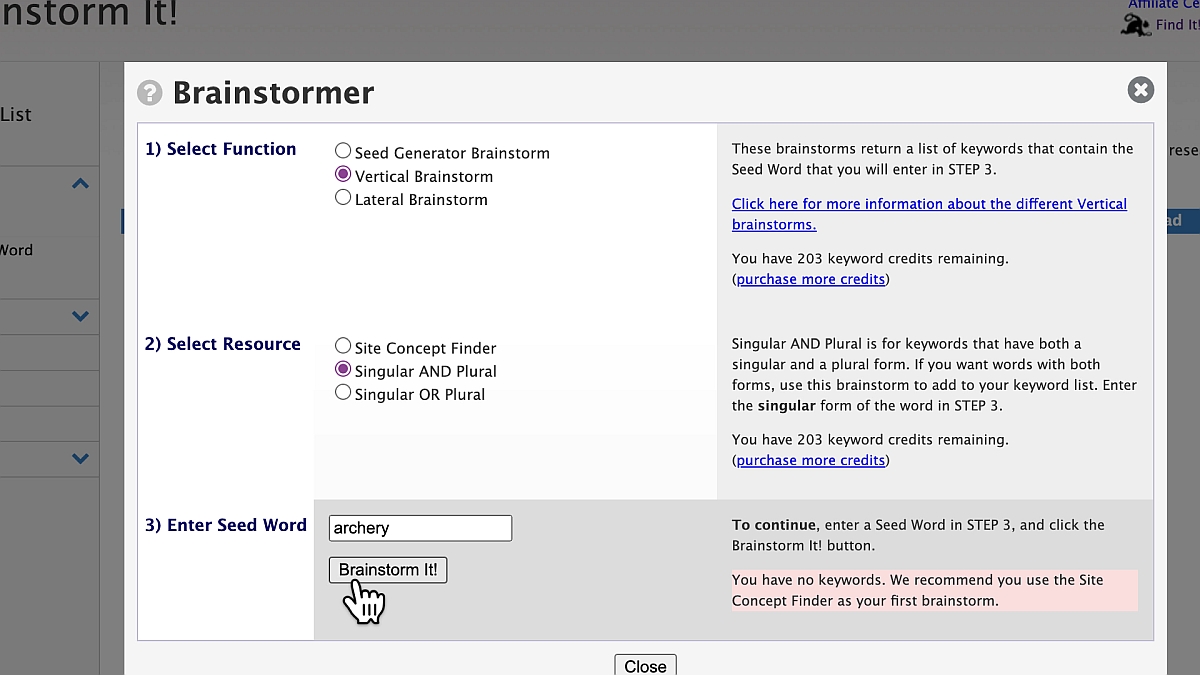 Brainstorm It! offers different types of brainstorms. For my example, I am doing a vertical brainstorm with the seed word “archery.”
Brainstorm It! offers different types of brainstorms. For my example, I am doing a vertical brainstorm with the seed word “archery.”
Start Broad, then Narrow Down: Begin with general keywords related to your niche, like “archery.” This broad approach helps you capture a wide array of related terms. However, it’s crucial to refine these keywords to ensure relevance and manageability.Refine Your Keywords: Identify and eliminate overly general keywords. For example, “target” might bring up unrelated results. Instead, focus on more specific terms like “archery target” to maintain niche relevancy.Explore Specific Aspects: Dive into particular areas within your niche. If you’re focusing on a specific type of archery, like using a recurve bow, use this term for a more targeted brainstorming session. This approach helps you discover keywords with less competition, making it easier to rank in search engine results.Watch this one minute video to see Brainstorm It! in action.
Keyword Research Tutorial Step 2: Transition to Blueprint It!With a refined list of keywords, it’s time to structure your site using Blueprint It!. This tool allows you to organize your keywords into a coherent website architecture. It helps you visualize the layout of your content, similar to a mindmap.
 The image shows how you’d develop the structure for a niche website about archery with Solo Build It!’s Blueprint It! tool.
The image shows how you’d develop the structure for a niche website about archery with Solo Build It!’s Blueprint It! tool.
 save pin for later
 Identify Your Audience: Understanding who you’re writing for is crucial. If your target audience is beginners with aspirations to go professional, your content should reflect this journey. Use your experiences and the questions you had when starting out as a guide for your content.
Structure Your Site: Begin by selecting a broad, brandable term for your site concept. Then, create tiered categories (Tier 2) and subcategories (Tier 3) based on your keywords. For example, “Recurve Bow” could be a Tier 2 category with several Tier 3 pages discussing different aspects, such as “Choosing a Recurve Bow” or “Recurve Bow Techniques.”Content Planning: Use your blueprint as a roadmap for content creation. Start with less competitive keywords to build authority and gradually tackle more competitive terms. This strategic approach helps you grow your site’s visibility and authority over time.Evaluate and Adjust: Your site’s blueprint is not set in stone. As you create content and learn more about your audience’s needs and pain points, be prepared to adjust your plan. Adding new categories or refocusing existing ones is part of the evolving nature of a successful niche site.See how Blueprint It! helps you organize your content in this short video.
Practical Tips for Niche Website SuccessBy following this keyword research tutorial and leveraging “Brainstorm It!” and “Blueprint It!,” you’re well on your way to building a niche site that not only ranks well in search engines but also genuinely connects with your audience.
I’d like to finish my short keyword research demonstration with three additional tips to make your site successful:
Use Tools Like “Answer The Public“: This can provide insights into the questions your audience is asking, helping you create content that directly addresses their needs.
Focus on Quality and Relevance: Always prioritize creating content that is both informative and engaging. Your goal is to become a trusted resource in your niche.
Monitor Your Progress: Regularly review your site’s performance using analytics tools (e.g. Google Analytics). This data can guide your content strategy and site adjustments.
Remember, the journey of creating a profitable site is a marathon, not a sprint. Patience, persistence, and continuous learning are your best allies.
Solo Build It! includes everything you needto take you from idea to income.
For just $1 a day.Check it out hereAuthor information
Carol LeatherCarol Leather is head of content at SiteSell. She started her first successful online business, www.needlework-tips-and-techniques.com, with Solo Build It! in 2006 and it's still going strong. She loves photographing and drawing wildlife. She shares her walks in the English countryside on her new site www.naturewalkswithcarol.com. When she is not busy with all the above, she works on her two art sites! All using Solo Build It!, of course.
|The post Keyword Research Tutorial With SBI!’s Tools appeared first on SiteSell Blog - Proven Real-World Advice for Solopreneurs.
April 4, 2024
How to Buy a Blog or Website: A-to-Z Guide for Solopreneurs

Ever stare at a blank page, intimidated by the prospect of building a website or blog from scratch? The long list of tasks, the learning curve—it’s enough to send you fleeing for the comfort of a Netflix binge.
But what if there was another option?
Buying a website can be a strategic leapfrog into the online arena. It’s a game-changer for those who want to hit the ground running. But you have to know what you’re doing.
So, buckle up, as we show you how to buy a blog or website, and go over the pros, cons and alternatives.
Step 1: Choose a Niche That Appeals to You

In order for a blog or website to be successful, it needs a solid foundation. This isn’t just about choosing a trendy topic; it’s about aligning your passions, expertise and market potential.
Some examples of broad niches you may consider include:
Animals and pet careTechnology and electronicsGardeningCookingFitness and healthy livingHome improvementArt and designPersonal financeStocks and investmentBeauty, makeup, and skincareFashionBusinessFor even more inspiration, browse through this list of 500 successful websites created with Solo Build It!.
But how do you choose the right niche for you? Here are a few factors to help you make a well-informed decision:
PassionWhat topics make you lose track of time as you get lost in research rabbit holes?
This intrinsic motivation will fuel your content creation and keep you invested long after the initial excitement fades.
Remember, passion is contagious. Your readers will pick up on your genuine enthusiasm (or lack of it).
ExpertiseAfter following your interests, think about the unique skills or knowledge you bring to the table.
This tip ensures you buy a blog or website you can keep running by adding high-quality content that sets you apart from the crowd.
Don’t underestimate the power of niche-specific insights. They can turn you into a trusted authority in your corner of the internet.
Market PotentialPassion and expertise are fantastic, but you also need an audience. That’s why it’s important to research several possible niches to ensure they have both traffic and monetization potential.
Tools like Google Trends, SEMrush and Solo Build It!’s Brainstorm It! can help you gauge search volume. They also offer some much-needed data on competition and potential advertising revenue.
Keep in mind that a niche that’s too small is like a one-horse town, while a niche that is too broad is like Times Square on New Year’s Eve. So, it’s important to find that sweet spot where your audience is seeking out your topic-specific info and appreciate your unique perspective.
Step 2: Browse Popular Online MarketplacesMany websites are dedicated to people who want to buy and sell online businesses, domain names, and blogs.
For example, Flippa, Empire Flippers, and Facebook’s Exchange Marketplace are teeming with websites of all shapes and sizes. It can be overwhelming to navigate unless you equip yourself with the right tools to track down your preferences.
Most platforms allow you to filter by niche, so hone your search to websites within your chosen categories. This saves you time and prevents you from getting distracted by irrelevant listings.
Next, try to focus on websites with consistent traffic flow, ideally generated by organic search. Look for listings that provide detailed traffic analytics, like monthly visitors, unique visitors and average session duration.
Also, prioritize options with established revenue streams, whether through advertising, affiliate marketing, or direct sales. Websites that rely solely on traffic aren’t as reliable because monetization potential is key to long-term success.
The step after that is to research comparable websites in your niche to get a sense of fair market value.
Don’t overpay for a fixer-upper blog or website. At the same time, don’t be afraid to invest in a high-quality website with proven potential. Your research will make things clear.
Step 3: Dig Deeper for All the Important DetailsOnce you’ve chosen some promising candidates, the real research must begin. You’ll want to determine which blog or website to invest in. Let’s delve into the hidden corners of your potential online community.

Numbers don’t lie, and website financials are your friend—even if you don’t love numbers.
Start by asking for access to detailed income statements, revenue sources and expense reports. Verify everything—from ad network payouts to affiliate commissions.
A thorough financial investigation helps prevent the dangers of inflated claims. No one wants to deal with those.
Tracking Organic TrafficWebsite traffic is the driving force behind any online venture. For that reason, it’s important to dig deeper into surface-level visitor counts.
Ask for access to analytics platforms like Google Search Console and Google Analytics. This step allows you to scrutinize traffic sources and user engagement.
Is the traffic organic, paid, or a mix of both? Unmasking the true nature of website traffic is crucial before you hand over your hard-earned money.
 save pin for later Blog Content Analysis
Next, it’s crucial to analyze the existing content with a critical eye.
Is the website or blog well-written, informative and engaging? Does it resonate with your target audience? Or is it full of outdated articles and stale blog posts?
Because you’re inheriting content along with the website, ensure it aligns with your vision and quality standards.
Other Technical ConsiderationsDon’t let the website’s shiny front-end fool you. Lift the hood, peek at the technical engine, and ask yourself some questions; for example:
Is the website built on a stable platform?Is it mobile-friendly and optimized?Are there any lurking technical gremlins waiting to pounce?Do you know the platform well enough to manage a site or blog on it?A website with hidden technical issues can become a bottomless money pit, draining your resources and patience. So, choose one with a known platform where you know you can hire help if needed in the future.
Step 4: Negotiate Like a ProArmed with your findings on website market values, it’s time to negotiate the price of the website or blog you’ve finally settled on.
The buying process begins by presenting a fair counteroffer that reflects the website’s strengths and weaknesses. You should also factor in your vision for its future.
While negotiating, always treat the seller with professionalism and open communication.
Also, don’t get so attached to a specific website that you overspend or compromise your financial stability. If the negotiation reaches a dead end, you can simply walk away and search for another blog or site that matches your budget.
This way, you’ll secure a fair price, build rapport with the seller, and pave the way for a smooth transition to your new online business.
Step 5: Use Escrow for a Secure Buying ProcessTo play it safe, it’s best to secure your purchase with Escrow.com. For those who don’t know what Escrow is, it’s a secure virtual vault that holds your funds until the website is officially yours.
Think peace of mind and fraud prevention, supercharged negotiation, and a safe haven for both buyer and seller. Deposit your funds, finalize the transfer and watch Escrow verify it all.
Step 6: (Re)Launch Your Newly Bought WebsiteCongratulations! You now hold the keys to your own pre-owned website or blog. It’s time to transform your acquisition into a launchpad for success.
Technical Tune-UpBegin by giving your website a thorough once-over. Update plugins, secure the backend and optimize for speed and mobile responsiveness.
A smooth-running website translates to happy visitors. It also positions you to grow the audience and convert more sales.
Content ContinuityNext, analyze the existing content, identifying strengths and areas for improvement. Use Tai Freestyle to make easy work of updating / improving existing pages and posts. Inject your unique voice into each piece with the primary goal of serving your audience with the best information and resources available.
It’s crucial to understand that you’re building on an existing foundation, not starting from scratch. So, you’ll have to find a good balance between the content that’s there and adding your fresh perspective, voice and style of writing.
Different Online Marketing Tactics

Now it’s time to spread the word about your new online business using various approaches.
Consider using social media and email marketing to attract your target audience. Use AI to help create authentic stories and draw readers in with fresh and engaging content.
For more ideas to promote your newly acquired blog or website, download our free checklist below.
Various Monetization TechniquesDon’t forget the financial engine!
Explore the website’s existing revenue streams and identify growth potential.
Choose from options like affiliate marketing, advertising and / or direct sales. Use your preferred techniques to refine your monetization strategy and watch your digital piggy bank start filling up.
Last, keep in mind that success doesn’t happen overnight. It happens as a natural result of dedication and strategic planning. Soon enough, you’ll watch your website blossom into a source of pride and profit.
Buying a Blog or Website: ConclusionBuying a pre-owned blog or website is a strategic way to launch an online venture quickly and with a solid foundation. It’s not just about getting a headstart. It’s about acquiring an existing audience, proven revenue streams, and established search engine optimization.
By following the six steps outlined in this guide, you should be able to navigate the process with confidence. All you’ll have to do is find the perfect niche and website or blog, conduct thorough due diligence, and negotiate a fair price.
If, after learning about the process for buying a website or blog, you feel it’s going to be too much work, you may want to consider building one from scratch.
Solo Build It! includes everything you needto take you from idea to income.
It costs just $1 a day.Check it out hereAuthor information
Margit StreifenederMargit Streifeneder is the Marketing Co-Director at SiteSell. She works with a small but mighty team to spread the word about Solo Build It!, via helpful content, informative emails and eye-catching ads. She's passionate about helping solopreneurs achieve success, and enjoys interviewing SBI! members about their achievements. Besides growing her own online business, she loves exploring new places, hiking, dancing and spoiling her three cats.
|The post How to Buy a Blog or Website: A-to-Z Guide for Solopreneurs appeared first on SiteSell Blog - Proven Real-World Advice for Solopreneurs.


