Michael Hyatt's Blog, page 161
August 12, 2013
You Get What You Expect
In life we often get what we expect. If we expect something good, it has a way of showing up. If we expect something bad, it too has a way of showing up.

It reminds me of a story I heard about a wise clerk who worked at a convenience store in a small town out west.
One day, a stranger walked in, picked up some bread and milk, and made his way to the cash register.
“New to town?” the clerk asked.
“Yep. Just moved here with my family,” the stranger replied.
“Well, then let me be the first to welcome you,” the clerk offered, extending his hand.
“Thanks,” the stranger said as he shook it. “Say, what are the people like in this town?”
“Well … what were they like in the town you just left?” the clerk queried.
“Oh, they were fantastic,” the stranger replied. “Friendly, upbeat, and generous. We hated to leave.”
“I know what you mean,” the clerk nodded. “I think that’s pretty much what you’ll find here, too.”
A few days later, another stranger walked into the convenience store. Like the first, he picked up a few staples and headed to the cash register.
The same clerk asked, “New to town?”
“Yes,” the stranger mumbled. “Just arrived.”
Following the same track, the clerk smiled and extended his hand. “Let me be the first to welcome you!”
The stranger took his hand reluctantly, frowned, and quickly looked down. “So what are the people like in this town?”
“Well … what were they like in the town you lived in last?” the clerk queried.
“Not great,” he stammered. “They were cold, aloof, and selfish. We were glad to get out of there.” He looked up at the clerk.
“I know what you mean,” the clerk affirmed. “I’m afraid that’s probably what you’ll find here, too.”
If it’s true that we get what we expect, it’s worth noticing our expectations—and shifting them toward a more positive outcome.
Question: What are you expecting today? You can leave a comment by clicking here.









August 10, 2013
How I Became a More Confident Public Speaker
Following Michael Hyatt’s lead, I guess you can say I have a significant platform. I’m mother of sixteen children. There’s “wow” for you. Needless to say, I get asked to speak for all sorts of occasions—women’s groups, conventions, and churches. I have a unique message on “Love in the House” that I enjoy sharing.

My problem is this: I hate public speaking. I love the message, but the actual public speaking part makes me sick. My knees lock up, I can’t keep my notes organized, my voice shakes and I sound like I’m about to cry—because I am! Not a good combination for an audience who just wants to hear what a mom of sixteen has to say.
To make matters worse, my husband, Chris, runs Training Minds, an organization that trains young people the skills of speech and debate competition. Many of my children have gone on to become national champions with award-winning speeches.
This just makes me feel deflated. I come from a family of great speakers, yet I’m no good at it. So last year I signed up for SCORRE.
SCORRE is a speaking conference for people like me who want to overcome the all-too-common fear of public speaking. Since SCORRE, I have been invited to speak on several occasions. Rather than turn them down or bear the embarrassment, I have confidently taken these opportunities and connected with audiences. I’m actually starting to enjoy public speaking.
SCORRE was the support I needed. I was able to realize my fear, recall my lessons, and rely on my support. These three reminders helped get me out of a paralyzing fear of speaking, and I suspect the same for you.
1. Realize Your Fear
If you are like me, you have something to say, but you avoid public speaking like the plague. It is the scariest thing on the planet. People go to the grave never overcoming the fear of speaking.
To tell you the truth, I was fine going to the grave with this one, but I knew well enough that it was senseless fear. My first step for me was registering for SCORRE.
For many years I kept my story to myself. I felt confident in front of no more than a small group of people.
I wrote books and preferred to stay out of the limelight. I refused invitations time and time again, but the requests kept coming in. I knew that if my message were to get out, I needed to become a public speaker.
If you have a message that is burning inside you, and the only barrier between you and communicating this message to the world is overcoming your fear, well then, you have one solution: realizing and overcoming that fear. Realize that fear is a farce. Then press on.
2. Recall Your Lessons
I honestly thought there was some kind of magic to public speaking, that you were born to do it or something. Maybe there was something inside people who did it and were successful at it. Whatever it was, I didn’t I have it. I watched people on stage do so well and not seem nervous or embarrassed. I was amazed with people who could pull it off.
I never would have guessed that there were actual strategies and lessons that someone like me could learn. This is what SCORRE is: a conference that gives you specific strategies to public speaking. There is a method to the magic! And I was able to learn it in just a few days.
Today when I am asked to speak, I recall those things I learned at the SCORRE Conference. I don’t shy away or make up excuses to avoid the opportunities. I get out there and I do it. There is no speaking engagement that I can’t do anymore, all thanks to SCORRE.
3. Rely on Your Support
This was perhaps the best thing about SCORRE: the support. The others at SCORRE are not a critical audience who expect more than you can deliver. They were my peers who were in the same boat as me: scared and unsure, yet determined to learn. We all wanted to get better, and we all wanted the best for one another.
Better yet, I had a professional coach to help me prepare my speeches. SCORRE attendees are broken up into small groups with a dedicated coach who helped me every step of the way. I learned the SCORRE method and delivered three speeches, each making me a better and stronger speaker.
Speaking in public is not nearly as forgiving. Audiences expect speakers to deliver. Everyone at the SCORRE Conference is there to support you. I even had Ken Davis (Michael’s partner and the original founder of SCORRE) come in and watch my last speech, and he was enormously supportive and encouraging to me. Hands down, this last feature made SCORRE worth every penny.
Can you identify with me? You probably don’t have sixteen children, but you have a unique platform that you would love to share with the world. SCORRE turned me from a shy, nervous speaker to a person willing to take the stage and deliver. Perhaps the same is true for you.
The next SCORRE Conference will be October 14–17, 2013 in Vail, Colorado. You can register now and take $200 off the registration price by using the discount code HYATT. But this offer expires on August 15th, 2013, so you need to act quickly.



August 9, 2013
4 Considerations in Picking a Website Name
One of the first questions you must answer as a would-be platform-builder is this: What do I name my site? This is also one of the questions I am most frequently asked when speaking on the topic of Platform.
You basically have four options:
Use your own name.
Use a company name.
Use a niche name.
Use a project name.
So what’s the best option? The short answer is, it depends.
In this post, I want to talk about the pros and cons of each, so you can think through this for your own platform.
Option #1: Use Your Own Name
More and more, people are distrustful of institutions. They are looking for human connection. They want a name, a face, values, and a style they can trust.
This is why this is the age of personal brands. This is by far my favorite option when it comes to building a platform. It’s the one that provides the most flexibility.
For example, I have owned MichaelHyatt.com since 1998. Over this fifteen-year period, my brand has morphed at least five times. But my web address has remained the same. This ensures that I take most (if not all) of my audience with me as my interests and activities change.
If you are just starting out, I suggest you start here. Secure a domain name with your personal name or some variation of it. Yes, your name may already be taken. If so, you just have to get creative.
For example, if someone else owned MichaelHyatt.com, I might try:
MichaelSHyatt.com
MichaelHyatt.org
MichaelHyatt.us
MichaelHyatt.tv
MichaelHyattLive.com
RealMichaelHyatt.com
TheRealMichaelHyatt.com
MichaelHyattWriter.com
MichaelHyattWrites.com
These all have their pluses and minuses. There’s no right answer. You just want to make it as easy to remember as possible.
The only disadvantage to using your name is that you can’t build a platform you can easily sell. If you build your business around your personality, it won’t be worth much if you aren’t included as part of the package.
Option #2: Use a Company Name
You may or may not also need a company site. It depends on the nature of your business and what your goals are.
In my case, for example, I have a corporation: Intentional Leadership, LLC. But that’s really just a legal entity, not a brand. I don’t sell products or services under that name, so I really don’t need a website.
On the other hand, Dynamic Communicators International, LLC is a corporation I co-own with my partner, Ken Davis. It is the company that hosts our live events. It has some brand value, so we have a small website for it. Primarily we use it to tie together our three conference brands: SCORRE, Launch, and Platform.
So if your company has brand value, either with consumers, constituents, or businesses, you will likely need a corporate site as well.
Option #3: Use a Niche Name
This can work well, too, especially if want to make it clear what you are about, are committed to serving this niche for the long haul, and want the option of being able to sell it eventually.
Another advantage is that you can use other people to create the content. If it’s not built around you, but around the niche, then you can recruit other writers.
This is almost like a magazine, but way cheaper to get started. But that’s how you should think about it.
Examples from my own RSS reader include:
BloggingYourPassion.com
ChurchM.ag
CopyBlogger.com
KissMetrics.com
Lifehacker.com
PlatformUniversity.com
SocialMediaExaminer.com
Option #4: Use a Product Name
This is where you have to be careful. I would not build a website or a blog around a product that has a limited shelf-life. I see authors making this mistake a lot. They build a site for their new book rather than having a dedicated page off their personal site.
When I was the CEO at Thomas Nelson, we spent literally hundreds of thousands of dollars doing this from about 2000–2006. We built a site for every major book we published. It was a complete waste of money.
With a book, you just don’t have enough time to build an audience and sustain it. The exception might be if you want to create a community around your book and plan to provide ongoing content and other resources to your audience. This is what I did, for example, with my Platform University membership site. It’s not just about the book.
A product site does make sense for products you intend to launch and make available for the foreseeable future. In addition to Platform University, I have a site for my new Get Noticed! Theme for WordPress. (There’s not much there to see yet.)
I also plan to create one around the The Life Plan Manifesto book that I am writing with Daniel Harkavy. But that’s because we plan to offer an assessment tool there, along with some other resources.
Action Plan
I wish I had a simpler answer for you. I know this is a lot to think about. But if you are just starting out, I recommend you build a site based on your name first. This will give you the maximum flexibility. You can use it to find your voice and begin building a tribe.
Once you get that up and running, and depending on your business interests, you can add a portfolio of other sites to it.
Question: What’s your next step? You can leave a comment by .



August 8, 2013
Mark Twain Right Timed Pause [Quote]


The right word may be effective, but no word was ever as effective as a rightly timed pause.

Mark Twain



August 7, 2013
#061: How To Coach Your Boss [Podcast]
There seems to be no end to the wealth of material written on coaching employees. However, very little has been written on the subject of coaching your boss.

While many employees probably dream of this, precious few act on it for fear of being fired. But what if you there was a way to approach this without jeopardizing your job?
Click to Listen
Podcast: Subscribe in iTunes | Play in browser | Download
The best bosses welcome criticism, knowing that the shortest distance between where they are and where they want to go is the truth. They create a “safe environment,” where people can freely speak their mind. Here are a few things to consider when attempting to coach your supervisor.Check the weather—bosses are people too.
Be humble—acknowledge that you and your boss are both human.
Start with praise—offer a genuine compliment before anything else.
Ask for permission—it’s difficult for the boss to take offense if he or she has given you permission to proceed.
Put It in context—help your boss understand how his behavior is keeping you from accomplishing his (or her) goals.
Assume the best—it’s highly unlikely your boss gets up in the morning with the goal to make your life miserable.
Believe that it matters—it’s not an accident that you are working for this person at this time and are noticing this behavior.
Take the risk—you will never grow into the leader you were meant to be if you are not willing to take a risk and occasionally speak up.
As a boss myself, I consider it an expression of loyalty when my people talk directly to me rather than about me. I know I have faults. I want to grow. You can help me—and your own boss—by taking the initiative.
Listener Questions
Joanna Holman asked, “How do I coach a boss on a topic that is outside their area of expertise that shows respect for their status?”
Special Announcements
If you are considering launching your own platform—or just getting serious about it—you need to start with a self-hosted WordPress blog.
This is not as complicated as it sounds. In fact, I have put together a step-by-step screencast on exactly how to do it.
You don’t need any technical knowledge. I walk you through the entire process in exactly 20 minutes.
This fall’s SCORRE Conference is filling up fast!
My business partner Ken Davis, who originally developed the SCORRE Conference, and I will be hosting this next conference on October 14–17 at the beautiful Sebastian Hotel Hotel in Vail, Colorado.
You can use the discount code HYATT and take $200 off the registration price. But this offer expires on August 15th, 2013, so you need to act quickly.
My next podcast will be on the topic of “Three Reasons You Can’t Afford High Maintenance Clients (and What to Do If You Have One).” If you have a question on this subject, please leave me a voicemail message.
This is a terrific way to cross-promote your blog or website, because I will link to it, just like I did with the callers in this episode.
Episode Resources
In this episode I mentioned several resources, including:
Book: Becoming a Coaching Leader: The Proven Strategy for Building Your Own Team of Champions by Daniel S. Harkavy
Conference: The SCORRE Conference
Post: 5 Reasons You Should Take a Nap Every Day
Post: How to Setup a Crash-Proof Backup System for Your Mac
Screencast: How to Launch a Self-Hosted WorPress Blog in 20 Minutes or Less
Software: CrashPlan
Software: SuperDuper
Software: Time Machine
Show Transcript
You can download a complete, word-for-word transcript of this episode here, courtesy of Ginger Schell, a professional transcriptionist, who handles all my transcription needs.
Subscription Links
If you have enjoyed this podcast, please subscribe:

iTunes

Zune

RSS
Your Feedback
If you have an idea for a podcast you would like to see or a question about an upcoming episode, e-mail me.
Also, if you enjoyed the show, please rate it on iTunes and write a brief review. That would help tremendously in getting the word out! Thanks.
Question: Do you need to sit down with your boss and have a conversation? How can I help you? What questions do you still have? You can leave a comment by clicking here.



August 6, 2013
If You Don’t Have Passion, You May as Well Give Up [Video]

If you can’t see this video in your RSS reader or email, then click here.
Listen to what Steve Jobs has to say on the importance of passion in order to be successful, and why if you don’t have it, you may as well give up.
Question: Do you agree with his perspective? You can leave a comment by clicking here.



August 5, 2013
3 Common Mistakes in Building a Powerful Blog
In this brief video, I talk with Andrew Buckman about three common mistakes platform-builders make with their blogs. This is an excerpt from this month’s Master Class at Platform University. Andrew is a WordPress genius, my web developer, and the co-founder of Get Noticed! Theme for WordPress.
If you can’t see this video in your RSS reader or email, then click here.
In this ten-minute video, we discuss:
Why search engine optimization is over-rated and the one thing that is even more important in driving traffic to your blog
SEO plugins for WordPress, including our two favorites (both are free)
Which social share buttons you should use.
Why social media share buttons are not enough and what you should do instead
How analytics can help you become a more effective blogger
Two simple WordPress plugins for integrating Google Analytics into your site
At the end of the video, Megan Hyatt Miller (yes, my daughter!) provides an overview of the content we’ll be sharing next month with our Platform University members.
In our Master Class, I interview Andrew Buckman. We discuss the ten most common mistakes platform-builder make with their blog. (The above video is an excerpt from the class.)
In our Backstage Pass, I share my secrets for packing for the road. These are designed to keep you organized—and energized!
In our Member Makeover, Megan and I review the platform of Jen McDonough. We share with her ten recommendations to take her platform to the next level.
In addition to this, I will be hosting our members-only Live Q&A Conference Call at the end of the month. We will be talking about “Proven Strategies for Building a Home Base.” This is an opportunity for our members to ask me any question they want about platform-building.
If you’re not a member, check us out. I created Platform University to help you build your platform bigger and faster than you could on your own. Don’t miss this opportunity to get the inspiration, training, and resources you need to succeed.
Question: Are you making some of these mistakes? What can you do today to correct them? You can leave a comment by clicking here.



August 2, 2013
Learning to Embrace the In-Between
I love beginning projects. Nothing is more exciting that launching something important. I love finishing projects too. As an achiever, I live to check things off my to-do list.
If you can’t see this video in your RSS reader or email, then click here.
It’s that middle part I don’t like so much.
It’s true of projects. And it’s also true of life. The middle part is the hard part. The messy part. The part I wish I could avoid.
But Jeff Goins new book, The In-Between: Embracing the Tension Between Now and the Next Big Thing is a great reminder that the middle is where the important stuff happens.
This is a hard message for most of us to hear. We live in a world of instant gratification. We want what we want and we want it now.
But this is not how life works. Much of it is spent waiting:
waiting to see the doctor;
waiting to get your driver’s license renewed; or
waiting to hear if your got the job.
Let’s face it, we’re restless. We’re dissatisfied with where we are now.
This even happens when we aren’t waiting but working through the projects, relationships, and events that make up ninety percent of our daily lives.
The In-Between is a call to accept the importance waiting plays in our lives. As Jeff notes,
Maybe the ‘good stuff’ isn’t ahead of or behind us. Maybe it’s somewhere in between. Right in the midst of this moment, here and now…. Perhaps, the abundant life we’ve been seeking has little to do with big events and comes in a subtler form: embracing the pauses in between major beats.
The moments of break-through where real change happens aren’t typically instant and extraordinary. They usually happen gradually in the ordinary course of our lives.
This book is a wonderful corrective to our modern, give-it-to-me-now culture. It is a powerful reminder that we must embrace the “long game” of life, if we are to experience the love, joy, and peace we seek.
Moody, Jeff’s publisher, has agreed to give 50 copies of his new book, The In-Between: Embracing the Tension Between Now and the Next Big Thing to my readers. To get a chance at snagging one, you must take the following three actions:
Leave a comment below. Answer the question at the bottom of this post.
Fill out the special form. I have set up a separate contact form to make it convenient for you to provide your mailing address. Please do not put your shipping address in your comment. This will automatically disqualify you.
Twitter a link to this post. You can do so automatically by clicking here. If you don’t have a Twitter account, you can use Facebook.
On Thursday, August 8, 2013, I will select 50 people at random. If you are one of those selected, I will notify you via email. If you don’t hear from me, you can assume you were not selected.
Question: Question: Where do you find yourself smack dab in the middle of something? What are you learning? You can leave a comment by clicking here.



July 31, 2013
Encore Episode: A Peek Inside My Toolbox [Podcast]
In this episode, I give you a peek inside my toolbox. These are “tools” I use virtually every day in my professional and personal life.

I want to look at my tools in six different areas: Hardware, Startup Software, Blogging, Writing, Speaking, and Podcasting
Click to Listen
Podcast: Subscribe in iTunes | Play in browser | Download
Hardware
13″ MacBook Air
27″ Apple Thunderbolt Display
Fujitsu ScanSnap 1300 Scanner
HP OfficeJet Pro 8100
Big Jambox by Jawbone
Time Capsule
iPad Mini
iPhone 5
Startup Software
Startupizer
Alfred
iKey
Typinator
Crashplan
Stay
DropBox
PathFinder
SnagIt
Cobook
Messages
Apple Mail
Hootsuite
Evernote
Google Calendar
Google Chrome
Nozbe
Blogging
WordPress
BlueHost
Get Noticed! Theme
Feedburner
Disqus
MailChimp
Akismet
Google Analytics
ScribeSEO
VaultPress
iStockPhoto
Evernote
Writing
Byword
Chicago Manual of Style, 16th Edition
MarsEdit
Pages
Word
Scrivener
Fast, Effective Copywriting
How to Write Bestselling Fiction by Dean R. Koontz
On Writing by Stephen King
The War of Art by Steven Pressfield
Writing a Winning Book Proposal by Michael Hyatt
Speaking
Keynote
KeySpan Remote
OmniOutliner
Photoshop
Evernote
Launch Conference
SCORRE Conference
Podcasting
Cliff Ravenscraft, The Podcast Answerman
Adobe Audition
BluBrry PowerPress
BroadVoice
SpeakPipe
Ginger Schell (transcriptionist)
ID3 Editor
LibSyn
OmniOutliner
SoundByte
Timer Utility
Listener Questions
Chris Jeub asked, “In addition to a toolbox, do you have a toy box? In other words, are there programs you are experimenting with that you are not quite ready to add to your toolbox”
Christelle Donaldson asked, “How do you organize Evernote for blogging?”
Derek Olsen asked, “Do you do any kind of split testing on your website?”
Erick Rheam asked, “Have you tried other note-taking apps besides Moleskine, like PenUltimate?”
Erik Fisher asked, “What do you do to make sure you spend enough time investigating an app without spending too much time?”
Peder Aadahl asked, “How do you keep your personal and work tasks separate?”
Rene Ferret asked, “What tools would you recommend to a beginning blogger who doesn’t have a lot of money to spend?”
Robert Kennedy III asked, “Do you use Evernote Business or just Evernote Premium?”
Spence Smith asked, “What do you use to write your posts offline and then post them afterwards?”
Special Announcements
If you are considering launching your own platform—or just getting serious about it—you need to start with a self-hosted WordPress blog.
This is not as complicated as it sounds. In fact, I have put together a step-by-step screencast on exactly how to do it. You don’t need any technical knowledge. I walk you through the entire process in exactly 20 minutes.
The Launch Conference for this fall is filling up fast. In case you don’t know, this is the conference for professional speakers or those who want to be. It’s all about the business of public speaking.
Specifically, we teach you a powerful, four-part framework designed to help you:
Discover your assets.
Design your products.
Develop your market.
Determine your value.
This is the conference that launched me into my professional speaking career. We will be holding the conference on September 16–19, 2013 in beautiful Vail, Colorado.
This is one conference that will pay for itself almost immediately. I paid for mine in the first month after I attended.
Episode Resources
In this episode I mentioned several additional resources, including:
Post: “10 WordPress Plugins for AB/Split Testing”
Screencast: “How to Launch a Self-Hosted WordPress Blog in 20 Minutes or Less”
Service: AWeber
Software: Fluid
Software: ScreenFlow
Software: SuperDuper
Software: Title Split Testing for WordPress
Show Transcript
You can download a complete, word-for-word transcript of this episode here, courtesy of Ginger Schell, a professional transcriptionist, who handles all my transcription needs.
Subscription Links
If you have enjoyed this podcast, please subscribe:
iTunes
Zune
RSS
Your Feedback
If you have an idea for a podcast you would like to see or a question about an upcoming episode, e-mail me.
Also, if you enjoyed the show, please rate it on iTunes and write a brief review. That would help tremendously in getting the word out! Thanks.
Question: What tools have I missed? What Are you using that you think I should try? You can leave a comment by clicking here.



July 30, 2013
Launch a Self-Hosted WordPress Blog in 20 Minutes or Less [Newly Updated!]
The easiest way to build a platform in today’s world is to start a blog. While you can do this with free hosted options like WordPress.com, TypePad.com, and Blogger.com, you will get the most control by using self-hosted WordPress. This is what most serious bloggers use. It is what I use here at MichaelHyatt.com.
If you can’t see this video in your RSS reader or email, then click here.
However, this is where many people get stuck. They assume that the process of setting up a hosting service and installing WordPress is complicated and time-consuming. It’s not.(By the way, if you are not sure about the difference between hosted and self-hosted WordPress, check out this helpful infographic.)
In the video above, I show you how to setup your blog in twenty minutes or less. As a bonus, I explain to you how to write and publish your first blog post. If you don’t need this information yourself, perhaps you know someone who does. Please feel free to pass along the link to this post.
The good news is that you won’t need any technical expertise to setup your blog. This tutorial is simple. I walk you through the process, once click at a time.
If you prefer to read about the process rather than watch a video, you can do that too. I have written down all the steps here. This will also save you the trouble of taking notes as you watch the video.
Please understand: you can get everything you need just by watching the video above. The written material below is optional.
You can launch your blog by following these seven steps:
Gather your resources. To set up a self-hosted WordPress blog, you will need:
A domain name
A credit card
20 minutes (give or take)
It’s easier if you haven’t already registered your domain. It’s also cheaper. I will show you how to get one for free, using the service I recommend in Step #2.
However, if you have already registered your domain, no sweat. You will simply need to add an additional step. I will explain the process at the end of this post.
Set up a hosting account. This is where your blog will “live.” This is a server in the cloud (i.e., a remote computer), where you will rent space to install the WordPress software and manage your blog. It’s far easier than it sounds. Stay with me.
There are a hundreds of hosting services available—perhaps thousands. However, based on my experience and research, I recommend Bluehost. I believe it is the best option for most people for the following seven reasons:
Reason #1: Support. Bluehost has great 24–7 support via phone, e-mail, or chat. I have personally used it several times and found the support staff to be courteous, professional, and helpful. All of the company’s support staff are located in the U.S.
Reason #2: Reliability. Bluehost is super reliable. It boasts an uptime average of 99.9%. That’s about as good as it gets.
Reason #3: Ease of Use. Bluehost is super easy-to-use (as you can witness in the above video). In fact, shockingly so. They have worked hard to make it simple for non-geeks.
Reason #4: WordPress. Interestingly, WordPress itself only officially recommends three hosting services. Bluehost is number one. It hosts over 850,000 WordPress blogs.
Reason #5: No Limits. Bluehost offers unlimited disk space, unlimited bandwidth, unlimited domains (i.e., you can host multiple blogs or sites on one account), and unlimited e-mail accounts.
Reason #6: Affordability. Bluehost is inexpensive—about $4.95 to $6.95 a month, depending on which plan you select. The longer you are willing to commit, the cheaper it is.
Note: Bluehost is now offering a special for my readers for $3.95 a month. This is honestly a steal. Get it while you can. But be sure to use one of the links in this post to get this special offer.
Reason #7: Values. In its Terms of Service (see Section 10.03, Bluehost prohibits pornography, nudity, and other adult content. It strictly enforces this standard and deletes sites that violate it. Personally, I don’t want my blog sitting on the same server as some pornographer. If you feel the same way, you may be surprised to know that almost all of the most popular hosting services allow pornography on their servers.
Note: I am a Bluehost affiliate, which means the company pays me a commission every time someone signs up via one of my links. But this didn’t influence my recommendation, because all hosting services have similar programs. I recommend Bluehost because I honestly believe they offer the best hosting available.
You should also know that I do not use Bluehost for MichaelHyatt.com. My site is too big and complicated. It requires a dedicated server with a mirrored backup. However, I have my other sites on Bluehost, as do several of my family members and friends. Bluehost specializes in shared servers and it is the right choice for 95 percent of bloggers.
By the way, Bluehost offers a thirty-day, money-back guarantee, which is written into their Terms of Service. I have personally tested this and got my money back within a few hours. So there’s really no risk on your part.
Okay, so if you are still with me, go to the Bluehost home page. Click on the Sign Up Now button.
Now you need to decide whether you need a domain name or you already have a domain name. I’m going to assume that you haven’t previously registered a domain, using some other domain registration service (e.g., GoDaddy.com). If you have, I will explain what to do at the end of this post.
Now enter your domain name in the left-most box, choose the appropriate extension (com, net, biz, whatever) and click on the Next button.
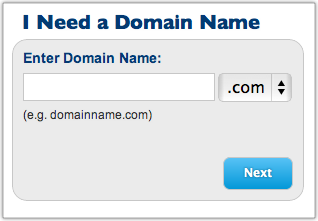
Fill in your account information and then scroll down to select your package. As you can see, the prices range from $4.95 to $6.95 per month. It all depends on the length of your commitment.
Note: Bluehost is now offering a special for my readers for $3.95 a month. This is honestly a steal. Get it while you can. But be sure to use one of the links in this post to get this special offer.
Keep in mind, you will be required to pay the annual rate in advance. That’s how Bluehost is able to offer these super low prices. Here’s the math, based on using my affiliate link.
12 months at $5.95 per month is $71.40 per year and $71.40 upfront.
24 months at $4.95 per month is $59.40 per year and $118.80 upfront.
36 months at $3.95 per month is $47.4 per year and $142.20 upfront.
I would not sign up for any of the other services listed on this screen, but that’s up to you.
Now enter your billing information. Confirm that you have read and agree with Bluehost’s Terms of Service, and then click on the Next button. The system will now verify your credit card information.
Bluehost will next ask you to “Select the Upgrades that Best Suit Your Needs.” I would skip all of these. Click the Complete button at the bottom of the page.
Now you need to choose a password for your account. Click on the Create your password link:
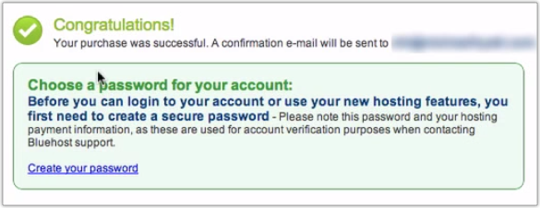
Use the Password Generator option to create a strong, difficult-to-hack password. Copy this to the clipboard by pressing Command-C if you are on a Mac or Control-C if you are on a PC. Now click the Paste button to paste the password into the appropriate fields. The click the Create button. This creates your new Bluehost account.
Warning: You might get an error message here. It is simply because it sometimes takes a few minutes for the Bluehost robots to create your account. Don’t panic. Worst case scenario, call BlueHost Support at 1-888-401-4678.
Then you will be asked to login to your domain. Your domain should be automatically inserted for you. If it is not, type it into the field provided. Now use the password you just selected. Since you previously copied it to the clipboard, you can paste it with Command-V on the Mac or Control-V on the PC. Now click on Login.
You may have to click through another upgrade offer. Feel free to decline by kicking on the “No thanks” link and proceed to the next screen.
You should be at the Welcome screen. Now click on cPanel (short for ”Control Panel”). You should now see a page with a lot of buttons.
Step 3: Install WordPress. Don’t be intimidated by the number of buttons in this step—it’s amazingly simple. The process used to be complicated, and you had to be a semi-geek to pull it off. But Bluehost now makes it super-simple. Trust me, anyone can do this.
Scroll down the page to ”Website Builders.” Click on the WordPress logo and wait for the new page to load. You should now be looking at a page full of ”scripts.” Again, don’t get overwhelmed. Simply click on the ”WordPress” logo under “Blogs.”
This will tell you it’s loading up your Mojo account. Mojo is simply a system for managing automated scripts. Don’t let this confuse or overwhelm you. This is what you should be seeing.
A new ”Install WordPress” screen appears. Simply click on the “Start” button. Now select the domain on which you want to install WordPress. It should default to the correct one. Click on “Check Domain.”
You should get a new screen with an error message. This is normal. Check “Oops. Looks like something already exists there. I understand that continuing will overwrite the files.” Since this is a brand new blog, you do. So select the checkbox that says, “Directory Exists! I understand that continuing will overwrite files.”
If we were running this on a website that we already had up and running, we would not want to do this. But it is not an issue here. Now click again on “Check Domain.”
The next screen will say “You are almost there.” You don’t need the “Advanced Options,” so leave that unchecked. Click on the item that says, “I have read the terms and conditions.” Now click on the “Install Now” button. The installation process should begin and will keep you updated on the process. Be patient, this will take a minute or two.
When it is done, you will get a screen with your Blog URL, Login URL, username, and password. Bluehost will also e-mail this information to you, but I like to have a backup. I would write it down or take a screenshot. Also, copy the password to the clipboard (again, using Command-c on a Mac or Control-C on a PC).
You’re making great progress! Now things will speed up considerably.
Step 4: Load your new blog. Simply click on the blog URL address. Your new blog should load in a new browser tab.
As you can see, there’s nothing very fancy here. WordPress uses a very generic theme by default. But that’s the beauty of WordPress. There are thousands of themes available. I will recommend one in a minute.
Step 5: Log into WordPress. While you’re still on your blog’s home page, scroll down to the Login link in the lower right-hand side of the sidebar. Click on the link.
You should now be looking at your WordPress login page.
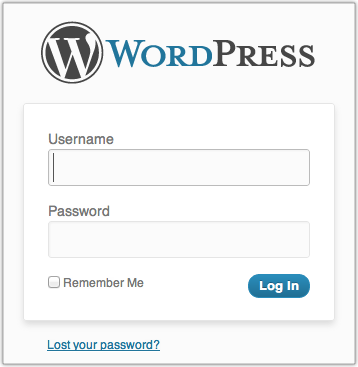
Now enter your username and password. (Remember, you wrote these down in Step 3. You also copied the password to the clipboard.)
You are now looking at the WordPress “Dashboard.” Sometimes, bloggers refer to this as the WordPress back-end. The front-end is what your readers see—your normal blog site. The back-end is what you see—how you control what appears on the front-end.
Step 6: Write your first post. Click on the Posts | Add New option in the left-hand side menu. You should now see the New Post screen.
Enter the title of your post, perhaps something like, “Welcome to My WordPress Blog!” (I know, clever, right?)
Now write your first post in the field directly below the title. Perhaps you could explain why you are starting your blog, the topics you plan to write about, and how often you intend to post. (Tip: under-promise and over-deliver.)
Now click the Publish button. This literally publishes your post for the world to see. You can click on the Preview Changes button to see it.
Congratulations! You have just published your first post on your very own self-hosted WordPress blog.
Step 7: Bookmark your blog. You’ll want to come back to your blog on a regular basis, so it’s a good idea to bookmark the two main pages: the front-end and the WordPress back-end.
In case, you have already closed the page to the back-end, you can re-open it by going to: http://[the name of your blog]/wp-admin.
If you have followed my instructions, you now have your very own self-hosted WordPress blog. Pretty exciting, huh?
The next step is to install a theme. There are literally thousands of free ones available. Personally, I suggest spending a little money and buying a premium theme, like the Get Noticed! Theme for WordPress. This is the theme that I personally designed and built with my friend, Andrew Buckman.
Get Noticed! Theme for WordPress has features that no other WordPress theme has. It is particularly helpful for anyone wanting to build a personal brand—authors, speakers, comedians, musicians, real estate agents, mortgage brokers, entrepreneurs, and so forth.
Note: If you need to move an existing blog from WordPress.com to your new self-hosted WordPress blog, I recommend you read this article: “How to Properly Move Your Blog from WordPress.com to WordPress.org.”
If you want to learn more about WordPress, I recommend WP101.com. This is a tutorial site with hundreds of videos on every aspect of WordPress.
If you know someone else who could benefit from this information, please pass along the link to this post. If you would like to embed the screencast in your own blog, please feel free to do so. You can find the video on both Vimeo and YouTube.
Optional: What if you have already registered your domain name on another service? No big deal. The first thing you will need to do is to point your domain name to the Bluehost servers. This will vary depending on where you registered it. Bluehost describes the process .
For example, at GoDaddy, where I have some domains registered, you log in, then go to Domains | Domain Management screen:
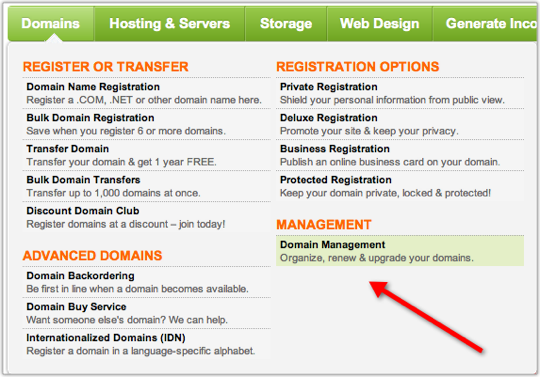
Now click on the domain name you want to point to Bluehost. You should now be looking at the “Domain Details” page. Scroll down to the bottom, left-hand side of the page. You should see a section called “Nameservers”:
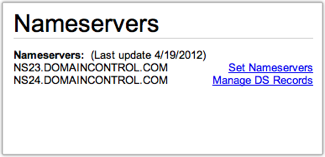
Click on Set Nameservers. A new screen should pop-up.
Enter ns1.Bluehost.com in the field for Nameserver 1.
Enter ns2.Bluehost.com in the field for Nameserver 2.
Click OK. That’s it. Now log out. It typically takes 24–48 hours for these changes to take effect. You might get lucky, and it will start working in an hour or two.
Please note: Bluehost or your Registrar (the company from whom you bought your domain) may change their procedures from time to time. If you have any problems, please check with them. I do not provide technical support for this process.
Once you have done this, you can begin the process of setting up your WordPress blog. In Step #2, after you click Sign Up Now, you will need to enter your domain name in the right-most box that says, “I Have a Domain Name.”
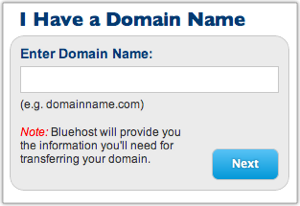
Now click the next button. Everything else should be the same. If you get stuck, you may need to wait for the change in your Nameservers to take effect before proceeding. Be patient.
Question: What questions do you have about the process of setting up your blog? I’m here to help! You can leave a comment by clicking here.