Michael Hyatt's Blog, page 162
July 29, 2013
10 Software Tools for Collaborating with Virtual Assistants
Currently, about fourteen people work with me in some capacity or another. Interestingly, none of them are employees. All of them are virtual assistants.

Only a few of them live in my community. Most of them live hundreds of miles away. But that doesn’t keep us from working together effectively. Thanks to some really cool software, we are able to communicate and stay totally in sync.
I thought I’d share these tools with you, in case you are working in a virtual environment and want to explore a few of these with your team. Currently, we use the following nine apps:
Basecamp. This is a web-based, project management tool. It is super simple to use. It enables us to store all the files, tasks, due dates, and discussions with the appropriate project. We use it for everything from ongoing, open-ended projects (e.g., accounting) to one-time, fixed-date projects (e.g., speaking engagements, new books, and video shoots). I have found that most virtual assistants and remote workers are familiar with it and use it with their other clients.
Dropbox. We use this popular tool to share files with one another. It just keeps getting better and better. Once you sync a file from your computer to Dropbox, you can then share a link to that file with your co-workers or invite them to a shared folder. It’s simple and easy to use. In fact, I have all my documents synced with Dropbox, so I can share any file at any time without having to move it to a special folder. It also serves as a great backup system should I need it.
Google Calendar. This is a web-based application that makes it easy to share my calendar with my teammates on a need-to-know basis. I break my calendar into various sub-calendars (e.g., speaking engagements, project deadlines, appointments, media interviews, etc.) and then share the relevant categories with the appropriate co-worker. This insures that everyone is aware of my commitments and I don’t end up double-booked.
GroupMe. This is a web-based application and is also a terrific iPhone app. It is designed specifically for group chat. We use this for talking among ourselves when we do live teleseminars and live events. It ensures that everyone is able to communicate to everyone else in real-time. It is less cumbersome than using simple text messaging, particularly with larger groups. You can also send direct messages to individuals within the group, but we tend to use Messages for that (see below).
LastPass. This is a password management program that allows me to share my passwords and login credentials with co-workers while reducing my security risk. I can communicate this information in one of two ways. If I give them a password, they can see it and use it. If I share it, they can’t see it (it remains masked), but they can use it. If you have qualms about sharing sensitive financial data—and you should—this program helps. It is not 100% secure—a dedicated programmer can still get your passwords—but it will protect you from non-techie, unethical assistants.
Messages. We use this for normal, one-on-one text communication and small, ad hoc groups. (If it involves a more permanent group or is larger than three people, we use GroupMe.) We used this initially on our iPhones and iPads. However, when we discovered the Mac desktop app, we started using it even more. (It replaced iChat.) I prefer discussions within Basecamp or regular e-mail, but for quick questions and short exchanges of information, text-messaging is fine.
Rhino Support. I have a private email account that my family and teammates use. Everything else comes to my public email account, which gets hundreds of messages a day. To manage it, we use Rhino Support. Though it is technically a help desk application, it is the perfect solution for this use. My assistants can assign messages to specific members of my team, attach notes to individual messages or senders, ask how we want to handle the message, and use email templates to respond to frequently asked questions.
Skype. While nothing beats a face-to-face meeting, Skype comes close. The best part is you avoid the hassle of travel. We use this application for individual and small group meetings. For example, we have a weekly management meeting with my managers, Brian and Joy, and my assistant, Trivinia. With Skype, it’s almost like being in the same room together. We can see one another, share screens, and exchange text links or other relevant information. We can even record the session if necessary.
SnagIt. I use this application for sharing screenshots and brief screencasts with my team. It makes it possible to quickly and easily share what I see rather than trying to describe it via email. It has numerous annotation tools, so I can highlight details and focus attention on specific items. I can also upload a screencast with a click. It automatically copies the link to the screencast to the clipboard. I can then paste it into an email and send it to my colleagues.
SweetProcess. This is a web-based tool for documenting recurring procedures. It enables me to provide step-by-step instructions for my teammates, so they can replicate the process and accomplish specific tasks. I can even embed screenshots and screencasts. Here’s an example of a procedure we use with experts I plan to interview via Skype for one of my shows.
The tools are constantly improving. I am always discovering and experimenting with different ones. But the current crop is making possible what people could only imagine just a few short years ago. I can’t wait to see what the future holds.
By the way, the virtual assistant company I use and recommend is eaHELP. If you want a pre-screened, highly trained assistant, you can’t do better.
Question: What tools do you use for collaboration? You can leave a comment by clicking here.









July 26, 2013
5 Unique Social Media and Blogging Tips that Helped Us Reach $1 Million in Revenue
A little over two years ago, I jumped into an epic adventure while still in college. My friend, Joel, had just launched a small app to help him post better on Twitter. Joel had called it “Bfffr.” He quickly changed the name to “Buffer” a few weeks later, after he realized, that was much easier to spell.

Fast forward two years into today. We were incredibly lucky to see Buffer thrive. Just this month, we crossed 650,000 users and $100,000 in monthly recurring revenues.
When we published our latest numbers, I got an influx of emails from people all around the world. They asked, “How do you go about marketing, especially social media? What is your strategy for getting new users?”
I often replied with a few bullets and tried to jump on a few Skype calls to help budding business owners with their marketing strategies. And yet, nothing seemed to quite paint the full picture.
So I thought, What if I could share my best tips on here?
So, without further ado, here are the five most important blogging and social media marketing tactics we used to help grow Buffer to more than one million dollars in revenue over the past two years.
Make use of smart images and scientific studies (blogging). Around one year ago, we significantly changed our approach to blogging. We started to publish and share articles that were a lot more science-driven. Any argument we would mention was backed up by actual, reputable academic research.
Derek Halpern, one of the most famous conversion gurus out there first encouraged me to do this. He uncovers how adding the right images to any claim add credibility and make sharing an article or other piece of content easier:

Since then, we’ve started to find the right images for each article we’ve written. Here are some examples, where adding the right images was immensely powerful:
Talking about body language: showing the actual poses to perform:

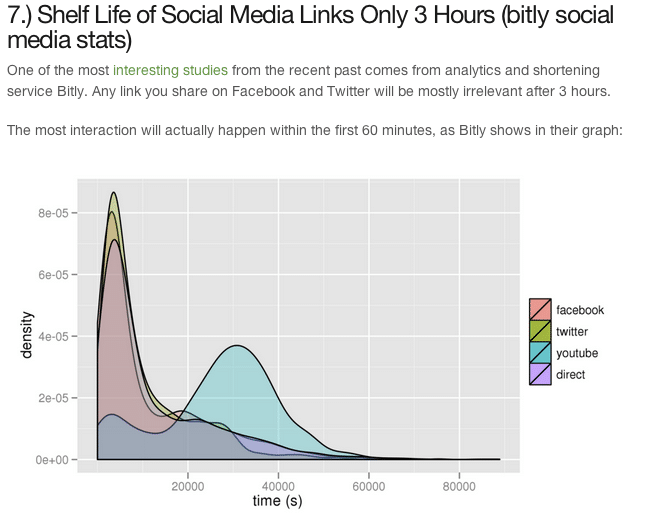
Talking about social media studies: Featuring the actual graphs:
Talking about neuro-science: Featuring brain scans:

Now, of course, the key question that comes in next is, where do you find all these studies? Here are my top three ways to find relevant studies for any type of article I write:
The Reddit Science section: They have a huge amount of well-curated, high-quality scientific insights you won’t find anywhere else.
Add “brain,” “study” or “research” to your Google searches: This is the most obvious, but seems to have helped the most people that asked me. Whatever it is, simply adding those terms helps to get to the right content fast.
For Social Media content: The best sites I’ve found with great studies and research are AdWeek, Dan Zarrella’s blog and Brian Solis’ blog.
The result for us was that we tripled the average social share amount per article from 250 to 1,000.
Adding better images and backing up your arguments with real science, makes a huge difference to how content gets spread.
Recycle Facebook posts in different formats: links, images or just text (social media)
The general idea about posting to Facebook is that you can post a link only once. And I think that’s generally true.
What we’ve found and what helped us to significantly increase our Facebook engagement on articles is to use different formats on the same type of content.
Especially since the shelf-life of a link being posted to Facebook is only three hours, there is no way that all your fans will see it. In fact, only a small fraction of them—around 10%—will ever see your post.
The way we go about this is to tear up the article into different, smaller stories and post them individually to Facebook:
First, we post the actual link:

Then we go and post only one image to explain part of the post:

This way you can get double or even triple the amount of engagement by highlighting different elements of the post with each picture.
Utilize the power of guest posting: quantity over quality (blogging)
This is probably my most controversial piece of advice that has helped us the most to grow and scale Buffer.
Especially when you are getting started, there is nothing better than going for quantity over quality.
This quote from Ira Glass puts it best:
The most important, possible thing you could do is to do a lot of work. Do a huge volume of work. Because it’s only by actually going through a volume of work that you are actually going to catch up and close that gap
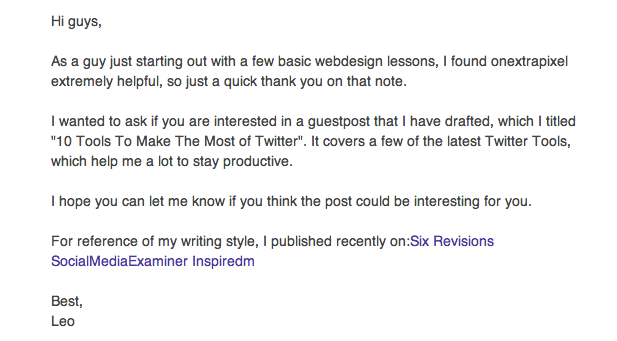
In order to scale your guest blogging, there is one key lesson I’ve learned. You need to send more pitches than you will have accepted for posts. In my case, I arrived at a 30–40% ratio. Out of ten emails for guest posts I had sent, around three to four would get accepted.
In terms of outline of the pitch, there are three important elements:
Opening: Make it clear to the blog owner that you know their blog and audience (first two lines)
Pitch: Have a clear pitch for a post that you’ve already thought out and drafted (second two lines)
Social proof: Show them articles that received lots of traction before (last two lines)
Here is an example of a real pitch I’ve used in the past:
Leverage the power of social reading services (social media)
Here is something very new and recent that I’ve seen emerging. Most of the articles you write won’t be read on your blog. Instead, most of them will be read by the emergence of new social reading services.
Here are some examples where the Buffer blog received most traffic from in terms of social readers:
Feedly
Pulse
Prismatic
This means that no matter how well your blog is optimized for conversion, there is no way for any of your visitors to convert.
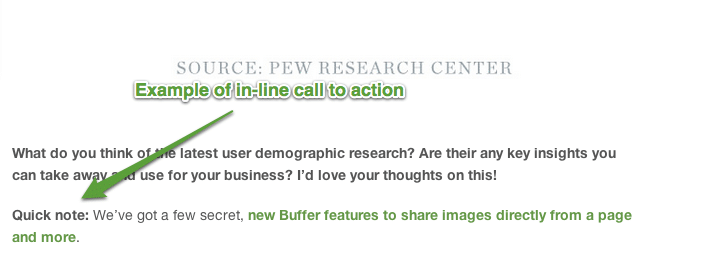
To solve this, we’ve recently started to experiment with in-text calls to action to capture more readers who aren’t reading directly on your blog.
Here is an example of this from our recent article:
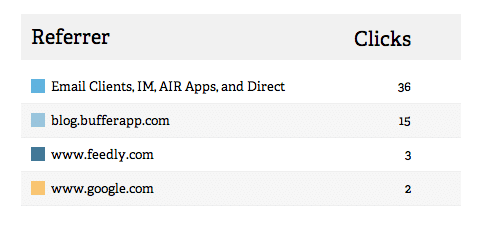
Most importantly, track each of these links with services like bitly.com, so you can have quick experiments letting you know if it worked. In our case, we confirmed exactly what we thought would happen. People clicked on the link who weren’t reading articles on the actual blog:
Feedly and email make up the biggest chunk:
Study how to write great headlines—the techniques we use (blogging)
Here is the last tip I have for you. This is something I learned from one of the best bloggers I know, Andrew Chen.
His strategy for writing the best headline and for even validating whether an idea will work out is simple:
Tweet an insight, idea, or quote.
See how many people retweet it (or engage with it).
If it catches, then write a blog post elaborating on the topic.
I found that this is the best way to validate an idea, before you spend hours producing a post that no one wants to read. Here is a graphic from Andrew Chen how he used this technique to validate one of his most popular articles:
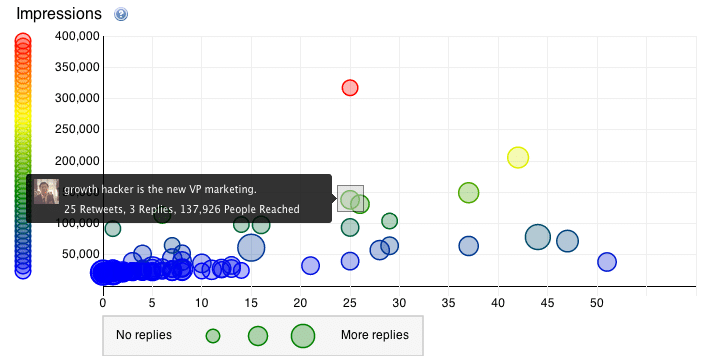
On top of this, even after an article is live, you can still test the headline using Twitter. Here is how:
Tweet out the article three times throughout a day with a different title each time.
Measure the engagement and reactions.
Change the title of the actual post to the one that spread the farthest.
I really love this technique! It’s a great way to combat writer’s block where you might be paralyzed of what they should title the post. Just go with your gut and then test out a few different ideas.
For a recent article we wrote, this was absolute gold and helped us turn the post into the most popular on the Buffer blog. This was the headline after testing multiple ones that worked the best:
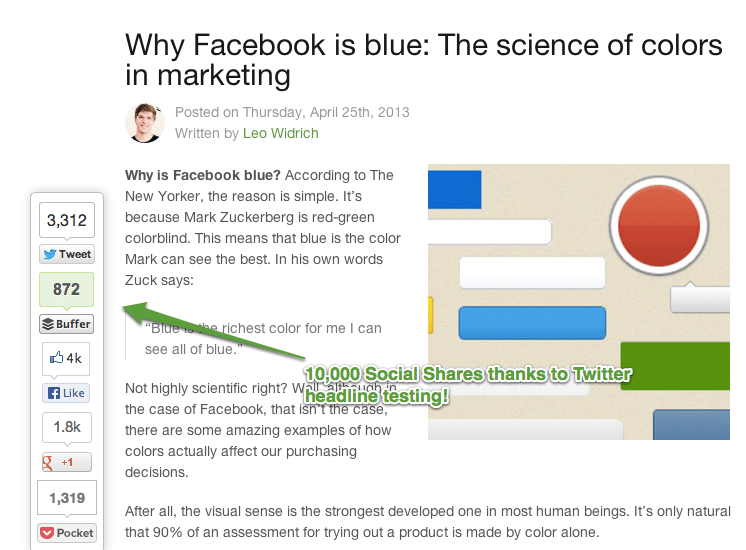
For this article, I wanted to really dig out some of the lesser known tips and tricks for you to make your blogging and social media strategy work. After all, these are the key tactics that really moved the needle for us at Buffer.
Question: Over to you now! What are your best, little-known tools, tips and tricks that you like to use every day? I’d love your thoughts on this. You can leave a comment by clicking here.




July 25, 2013
Live Aggressively [Quote]


There’s always something to write about. If there’s not then you need to live life more aggressively.

Min Kim



July 24, 2013
Encore Episode: Change Your Story, Change Your Life [Podcast]
Inside your head and mine, there is a narrator. He or she is constantly telling us stories. These stories shape how we perceive reality.

In fact, if we don’t intervene, these stories can shape our destiny for the worse. Or, if we are intentional and take control of the narrative, these stories can shape our destiny for good.
Click to Listen
Podcast: Subscribe in iTunes | Play in browser | Download
You can change your life by changing your story. There are five ways you can take control of the narrative in your head.Recognize the voice in your head.
Jot down what the voice is saying.
Evaluate whether this story is empowering.
Write down a different story.
Start telling yourself the new story.
Listener Questions
Jana Botkin asked, “How can I tell the difference between telling myself a story of delusional optimism and the truth?”
Julie Sunne asked, “My inner narrator often take me in a million different directions. Can you offer some pointers for focusing our inner stories?”
Mary DeMuth asked, “When you are living your story and continue to do the same thing over and over again, getting the same crummy result, how do you encourage yourself to think differently and stop doing that thing that’s not working?”
Noah Coley asked, “What is your best advice for helping someone understand that they can be the authors of their own story rather than simply reacting to a story that’s been given to them?”
Russ Hess asked, “Is there a practical way to refocus the meaning we associate with the various events of our lives to lead us to a greater sense of fulfillment?”
Rob Ketterling asked “Why do you think we work so hard to avoid the change rather than make the change?”
Bobby Warren asked, “How important is faith in changing your story?”
Special Announcements
If you are considering launching your own platform—or just getting serious about it—you need to start with a self-hosted WordPress blog.
This is not as complicated as it sounds. In fact, I have put together a step-by-step screencast on exactly how to do it. You don’t need any technical knowledge. I walk you through the entire process in exactly 20 minutes.
The Launch Conference for this fall is filling up fast. In case you don’t know, this is the conference for professional speakers or those who want to be. It’s all about the business of public speaking.
Specifically, we teach you a powerful, four-part framework designed to help you:
Discover your assets.
Design your products.
Develop your market.
Determine your value.
This is the conference that launched me into my professional speaking career. We will be holding the conference on September 16–19, 2013 in beautiful Vail, Colorado.
This is one conference that will pay for itself almost immediately. I paid for mine in the first month after I attended.
Episode Resources
In this episode I mentioned several resources, including:
Post: “Change Your Story, Change Your Life”
Conference: The Platform Conference
Book: Platform: Get Noticed in a Noisy World
Website: Platform University
Show Transcript
You can download a complete, word-for-word transcript of this episode here, courtesy of Ginger Schell, a professional transcriptionist, who handles all my transcription needs.
Subscription Links
If you have enjoyed this podcast, please subscribe:

iTunes

Zune

RSS
Your Feedback
If you have an idea for a podcast you would like to see or a question about an upcoming episode, e-mail me.
Also, if you enjoyed the show, please rate it on iTunes and write a brief review. That would help tremendously in getting the word out! Thanks.
Question: What story do you want to change? How might this change your behavior and your outcome? You can leave a comment by clicking here.



July 23, 2013
What’s Your Favorite Book on Leadership, and Why? [Question]

What’s Your Favorite Book on Leadership, and Why?
Answer this question on my blog and join the discussion →



July 22, 2013
5 Unselfish Reasons to Charge for Your Content
Nearly ten years ago, I made my first sale online for a $7.95 ebook. You would have thought I had just won the lottery. Dancing, high fives, pictures and a huge ego boost—all from one measly sale of $7.95.

Now I’d like to tell you that from that day forward I became this “sales machine,” but that wouldn’t be true. Anytime you make something available for sale, self-doubt will kick in no matter how much experience you have.
Is it good enough? Will people like it? Is it worth what I’m charging? Will anyone actually pay for it?
Sound familiar?
Because of this, most people never put a price tag on their content.
Subconsciously, we “hope” that by making everything free, we will somehow be rewarded. The reality is, we’re just avoiding the possibility of failure.
However, if you’re serious about spreading your message to more people, and having a greater impact, here are five reasons why you should begin charging for your content (at least some of the time):
Your content will be better. When you have a business model that is designed to generate revenue from what you produce, you can then invest money back into producing a better product.
Platform University is a prime example. Every month thousands of dollars are invested into producing high quality content, a smooth and reliable learning environment, as well as having the team to support the community.
Because the revenue is there, Michael can produce more in-depth material (beyond a regular blog post or podcast episode) which inevitably helps his audience progress at a quicker rate (something he is tremendously passionate about).
You can go deeper with your audience. Are you trying to help your audience?
Then know this…
Money that is invested wisely can help your audience get results faster.
I experienced this first hand when I attended the SCORRE conference.
One of the things that makes this event so unique is the structure. You learn the core content with all the attendees, and then you practice what you just learned with a small group and presentation coach (my coach was Stacey Foster and he totally rocked!) Every day we were learning and practicing. It’s a different experience than having conference notes that usually collect dust as soon as you leave, right?
After all was said and done, this turned into one of most impactful professional experiences I’ve ever had.
But here’s the key…
With over twenty-four-plus coaches, plus all the event and production staff, it just wouldn’t be possible to create that kind of transformational environment if they didn’t charge people for it.
You will have more focus. Reality is that free content doesn’t pay the bills.
So where does the money come from?
For most, it’s through a job and for others it could be through their business.
But if you really want to “Go Pro” as Jeff Goins shared, then you need time to focus on your craft.
When you have revenue coming in from your content, it mentally frees you up to focus on producing better content. Your mind isn’t focused on quickly cranking out a post because you only have thirty minutes on your lunch hour. Rather, it’s focused on producing the best possible content for your audience—no matter how long that takes.
Fun Fact #1: Did you know that Michael reserves an entire day to produce two blog posts?
Fun Fact #2: He also has an entire day blocked off each week to produce one podcast episode.
The reason Michael’s content is world class, is because he has the time to focus on making it world class. That’s only possible because he generates revenue from content that he produces.
You can reach more people.
If you have something worth saying (which I know you do), then wouldn’t you want more people to hear it?
Advertising can help you do that. Thanks to Facebook ads and Google Adwords, this is easier than ever before.
Consider this…
Great content will spread, but we have to hope people will spread it for us. Advertising just speeds things up. [Tweet This]
Here’s the rub…
Advertising costs money (which is why most people shy away from it).
But if you have revenue coming in, you can afford to invest some of that additional income into reaching more people.
You will have more impact.
Several years ago, my wife and I formed our own charity called World Teacher Aid with the goal of bringing education to rural communities throughout Africa.
Truthfully, my initial involvement was to support my wife. But that soon changed after our first trip to Africa where I learned the real value of a dollar.
For most of us, $2 might buy a cup of coffee.
But in Africa, $2 will feed a child every day for an entire month! Roughly $100 per month will pay the salary of a full-time teacher—who then impacts the lives of the 50–75 kids that he or she teaches that year.
This experience redefined my definition of an entrepreneur.
Here’s what I mean…
Fundamentally, business is a transaction of value. The more value you create, the more money you make. Simple, right?
Well, if you really want to take this a step further and have real impact on this world, then understand this…
The more money you make, the more impact you can have. [Tweet This]
Money provides leverage.
A volunteer is limited by the number of hours they can give.
I would love to stay in Africa full-time and help build the schools, but my life, family and business are here in North America—plus, the school would likely fall down because my “brick work” really isn’t that great!
However, because of an amazing group of donors who are able to give, we can transform entire communities by building a school—in just a matter of months. As soon as a school opens, hundreds and hundreds of kids (over six hundred plus at our last one) immediately have the gift of education.
This would not be possible without the money that was donated.
Today I look to people like Chuck Feeney (co-founder of the Duty Free Shoppers Group) who used his entrepreneurial skills to build tremendous wealth. He then has made it his life mission to give away every penny of his billion dollar fortune to causes and projects he’s passionate about. By making more money, he has transformed more lives.
Another favorite is Paul Newman (the actor) who created a “side company” called Newman’s Own (the salad dressing). Amazingly, 100% of the proceeds from the company, after taxes, has been donated to causes and organizations that he was passionate about. That figure is now over $370 million and he has positively impacted hundreds of thousands of children.
You and I might not be Chuck Feeney or Paul Newman, and those numbers may seem overwhelming, but think about the difference you could have right now with those close to you.
What kind of impact could you have with friends or family? Your local community? Favorite cause or charity?
My goal is eventually to flip the “tithing model” upside down. Instead of giving 10% and living on 90%, I’d much rather be in a position to give 90% and live on 10%.
To do that, I need to make more money. It wouldn’t be possible if I gave everything away for free.
More Money = More Impact
Next time you feel a sense of anxiety about charging for your content, try refocusing on the benefits to those involved: a better product for your audience, a greater focus for you, and more impact for the causes you’re most passionate about.
Question: Do you get nervous about charging for your content? What’s holding you back? You can leave a comment by clicking here.



July 20, 2013
Michael Hyatt Songified [Video]

If you can’t see this video in your RSS reader or email, then click here.
While I’ve veen away working on my new book, my team thought it would be funny to put together some outtakes from Platform University and create this little video. They are so fired!



July 19, 2013
3 People You Need to Ignore Online
Haters only get loud when you do things that matter.

People who don’t stand up never get rocks thrown at them.
The average and ordinary don’t get bothered by haters.
But if you’re reading Michael Hyatt’s blog then chances are you’re not shooting for ordinary. Chances are you’re not aiming for the status quo.
There will be haters.
When that happens, especially online, how do you know who you should ignore?
Here are 3 people to stay away from:
The Spectator
Do you know who the football coach never invites into the locker room for some advice during halftime? The spectators. The wide receiver never runs into the stand and asks for feedback from someone sitting in the 10th row.
Why? Because spectators aren’t on the field. They aren’t playing. They’re watching other people do it.
What does that mean for you? It means you need to ignore the person who hates your blog but doesn’t have their own. They’re just a spectator. Their hands aren’t dirty. Their knowledge has not been paid for with experience. Ignore them. Instead, get feedback from other bloggers, other people who are in the trenches where you are.
The Hater
It’s time to require the “squeaky wheel gets the oil” theory. For years it caused many of us to ignore the people who liked our dream in order to focus our energy on the people who hated it. (I call this theory, “Critic’s Math,” which is “1 insult + 1,000 compliments = 1 insult.” We have the ability to receive 1,000 compliments and ignore them in the face of 1 insult.)
The truth is, you should never waste time trying to turn someone who hates you into someone who likes you. Instead focus on turning people who like your dream into people who love your dream.
So how do you know who a hater is? Simple, someone who hates on something without a solution to make it better is a hater. If they don’t have a fix, an idea, a spark of improvement, they’re just there to hate. That’s one of the main differences between hate and feedback.
Feedback’s goal is to cause improvements. Hate’s goal is to cause wounds. Let them go.
The Complainer
A complainer is someone who won’t respond when you attempt to fix a problem. For example, let’s say you strongly disagree with something I wrote on my blog and I ask you a clarifying question. If you don’t respond, you’re a complainer.
If you respond, you’re a conversationalist and we can talk. That’s completely different. We can debate. We can go back and forth until we might even reach a resolution. That’s the beauty of the Internet, a simple question can clarify so many of the nuances that can be misinterpreted.
There are going to be a thousand people you can’t ignore as you chase a dream. Friends, family, supporters, helpful critics, you will never run out of people you need to make time for. And a lot of them will have great feedback for you.
But cut yourself some slack and ignore the three we talked about today. Nothing good will come of giving them your time.
Question: Have you encountered these three types of people online? If so, how have you handled it? You can leave a comment by clicking here.




July 18, 2013
Longer Letter [Quote]
I have made this [letter] longer, because I have not had the time to make it shorter.
Blaise Pascal
Provincial Letters: Letter XVI



July 17, 2013
Encore Episode: The 7 Benefits of Keeping a Journal [Podcast]
In this episode, I talk about the benefits of keeping a journal. I also share my own practice and offer a few tips. Whether you have never journaled, need a little motivation to keep going, or are just curious about what others do, I think you will find this episode helpful.

Click to Listen
Podcast: Subscribe in iTunes | Play in browser | Download
Between blog posts, podcast show prep, courses, speeches, and books, I typically write several thousand words a week. However, I have never been a consistent journaler. I tried. I had friends who swore by it. It just never worked for me, until recently.
On our vacation last summer, my wife, Gail, challenged me to give it another try. I reluctantly agreed and fell in love with it. I have now journaled daily for more than six months.
If I had to sum it up, I would say journaling has afforded me seven benefits.
Process previous events
Clarify my thinking
Understand the context
Notice my feelings
Connect with my heart
Record significant lessons
Ask important questions
When I started journaling, I did it the old fashioned way. I kept my journal in a physical notebook. I happen to use an EcoSystems Journal. However, I am not the best at writing lots of text by hand. The legibility of my writing deteriorates quickly.
On day three of my journaling experience, I stumbled upon a software program called DayOne. This is a beautiful minimalist writing tool that reminds me a lot of ByWord, the program I use to do much of my blog writing.
About a month ago, I started using Evernote for my journaling. Several people had suggested this from the beginning, and I finally saw the wisdom of it. It makes all my journal entries readily available when I search for a topic, making my notes available for blog posts, speeches, books, etc.
Regardless, there are a thousand different ways to keep a journal. Don’t get hung up on the method or the software. The most important thing to do is just to start.
Listener Questions
Aaron Johnson asked, “Some people just can’t seem to journal. Are there other ways people can engage in the process of self-reflection?”
Bud Brown asked, “How do you flag pages in your journal, so you can get back to the important stuff?”
Christopher Scott asked, “How do you catalog or keep track of previous journal entries?”
Lynn Morrissey asked, “Is journaling scriptural or should Christians be wary of it as a New Age practice for self-exploration?”
Jackie Ulmer asked, “Is your journal more of a Cliff Notes summary of the events of your life or is it super-detailed?”
Jason Jones asked, “Is there a benefit to paper journaling?”
Kwin Peterson asked, “For whom do you Journal? Who is the audience you envision?”
Linda Kuhar asked, “When you are journaling, how do you keep yourself from lapsing into performance-mode and writing for an audience?”
Sam Lytle asked, “What are the benefits of keeping a private journal as compared to a public one, like writing a blog or engaging in social media?”
Special Announcements
If you are considering launching your own platform—or just getting serious about it—you need to start with a self-hosted WordPress blog.
This is not as complicated as it sounds. In fact, I have put together a step-by-step screencast on exactly how to do it. You don’t need any technical knowledge. I walk you through the entire process in exactly 20 minutes.
The Launch Conference for this fall is filling up fast. In case you don’t know, this is the conference for professional speakers or those who want to be. It’s all about the business of public speaking.
Specifically, we teach you a powerful, four-part framework designed to help you:
Discover your assets.
Design your products.
Develop your market.
Determine your value.
This is the conference that launched me into my professional speaking career. We will be holding the conference on September 16–19, 2013 in beautiful Vail, Colorado.
This is one conference that will pay for itself almost immediately. I paid for mine in the first month after I attended.
Episode Resources
In this episode I mentioned several resources, including:
Book: The One Year Bible
Book: The War of Art by Steven Pressfield
Conference: The Platform Conference
Journal: EcoSystem Journal
Podcast: “Become More Productive by Reengineering Your Morning Ritual”
Post: “The Difference Between Trying and Doing”
Post: “Why Should I Journal?” by Don Whitney
Software: Evernote
Software: DayOne
Template: My Evernote Journal Template
Website: Easy Journaling
Website: Platform University
Show Transcript
You can download a complete, word-for-word transcript of this episode here, courtesy of Ginger Schell, a professional transcriptionist, who handles all my transcription needs.
Subscription Links
If you have enjoyed this podcast, please subscribe:
iTunes
Zune
RSS
Your Feedback
If you have an idea for a podcast you would like to see or a question about an upcoming episode, e-mail me.
Also, if you enjoyed the show, please rate it on iTunes and write a brief review. That would help tremendously in getting the word out! Thanks.
Question: Do you journal? If so, what has been the primary benefit? You can leave a comment by clicking here.