
 Sign in with Facebook

Introducing the All-New, Faster Goodreads Android App—Includes Rereads, Deals, and More
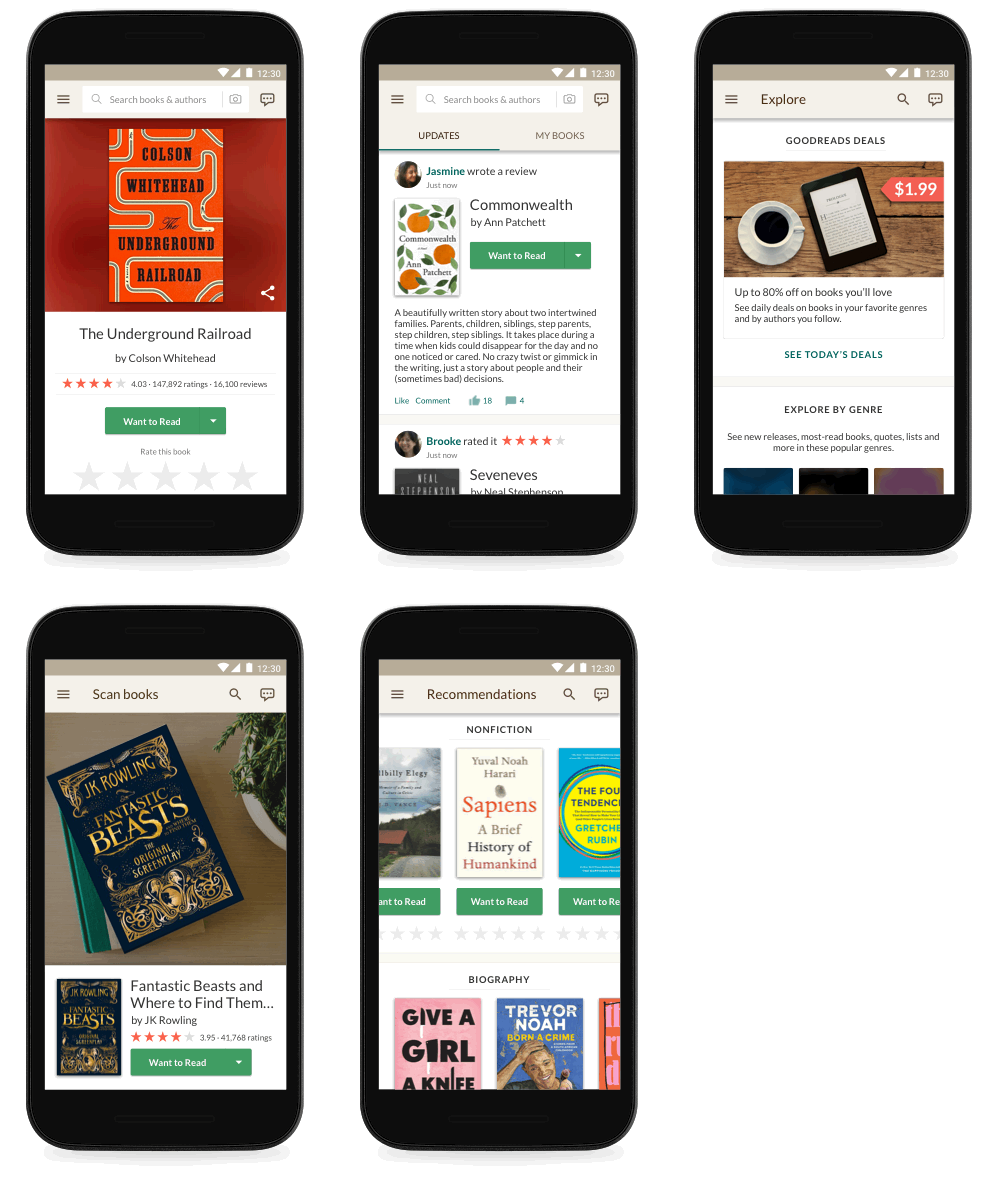
Calling all Android phone and tablet users! Our completely redesigned Android app is rolling out now and will be available to everyone within a few weeks. Every experience in the all-new app is faster and easier to use. Designed by readers for readers, it also includes new features to help you find even more books you’ll love.
Whether you want to scan covers in order to find a book quickly on Goodreads, browse personalized recommendations, or add a book you just finished reading (or rereading!) to your Reading Challenge, using Goodreads from your Android device has never been so simple, fast, or fun. The app’s fresh, new look and feel works great on tablets, too.
Whether you want to scan covers in order to find a book quickly on Goodreads, browse personalized recommendations, or add a book you just finished reading (or rereading!) to your Reading Challenge, using Goodreads from your Android device has never been so simple, fast, or fun. The app’s fresh, new look and feel works great on tablets, too.
Emily, a Goodreads member and BookTuber, was part of our Android beta app program and loved several improvements. "I have fairly long work hours and a very long commute, so the new and improved Goodreads app is very much appreciated!” she said. "The look is cleaner, brighter, and significantly easier to navigate. Little design details, like including a progress bar for your Reading Challenge in the Quick menu and adding book covers to the Update Progress menu, pack small but mighty punches. And the speed! Improvements in speed alone have me giddy."
More Ways to Find Books...and Score a Great Deal!
Try the new Explore page, where you can browse books trending on Goodreads, new releases hot off the presses, and community-created reading lists across every genre. You can also find ebooks at up to 80 percent off—just subscribe to our Deals program to get personalized deals from your Want to Read list, favorite genres, and authors you follow.
Looking for some inspiration for your next book? Our editorial team has got you covered with articles, author essays and interviews, and roundups of the buzziest books on Goodreads.
More Ways to Find Books...and Score a Great Deal!
Try the new Explore page, where you can browse books trending on Goodreads, new releases hot off the presses, and community-created reading lists across every genre. You can also find ebooks at up to 80 percent off—just subscribe to our Deals program to get personalized deals from your Want to Read list, favorite genres, and authors you follow.
Looking for some inspiration for your next book? Our editorial team has got you covered with articles, author essays and interviews, and roundups of the buzziest books on Goodreads.

Create a More Personalized View of Your Reading in "My Books"
We’ve improved the My Books section in several ways, including:
We’ve improved the My Books section in several ways, including:
- When you add a book to a shelf, you can organize it based on genre or other names (such as "adventure" or "favorites" or "book club ideas") to help you find it later.
- From the new My Books, you can also find all of your Kindle Notes & Highlights, so you can revisit what you loved about each book and easily share some or all of your favorite highlights with friends.

Reread That Favorite Book as Many Times as You Want—Every Read Counts
Who loves reexperiencing a favorite book? We do, too, so we’ve added the ability to track your rereads in the Android app. Go to the book page to set start and end dates for books you’ve enjoyed over and over again.
Who loves reexperiencing a favorite book? We do, too, so we’ve added the ability to track your rereads in the Android app. Go to the book page to set start and end dates for books you’ve enjoyed over and over again.

Let’s Talk About Books, Baby
We believe books are even better when you talk about them with friends. Participate in the conversation, thanks to a new design that makes it easy to share your thoughts in messages, group discussions, and reviews. Now you can read all the previous messages in a thread while drafting your reply.
We believe books are even better when you talk about them with friends. Participate in the conversation, thanks to a new design that makes it easy to share your thoughts in messages, group discussions, and reviews. Now you can read all the previous messages in a thread while drafting your reply.

More Features Coming Soon!
The best part of this update is that there’s a lot more to come. We’ll keep updating and improving the app for our Android members.
The best part of this update is that there’s a lot more to come. We’ll keep updating and improving the app for our Android members.
I Want to Use It Now! How Do I Get It?
The app is rolling out now and will be available to everyone within a few weeks.
The app is rolling out now and will be available to everyone within a few weeks.

Check out more recent blogs:
The Best Books of the Year (So Far)
The 24 All-Time-Favorite Book Club Picks on Goodreads
Hot Reading Challenge Tips from Pros Who Read More Than 100 Books a Year
Comments Showing 151-200 of 205 (205 new)

 Lynsey A wrote: "This is good news. Will we now be able to see all of our bookshelves when using this app? That was always my complaint. I can only see the first like 20 books on the old app. If you've updated the ..."
Sadly, I can see FEWER of my shelves in the new app. Not happy.
 Liking the new additions to the app a lot so far.
Only thing I'm really missing is no longer getting book recs on the front page/updates page. Since I'm not using goodreads as a social tool my front page looks very bare now.
 It's nice - as all GR design is lovely - and faster, but my main complaint is the lack of NOTES. I was looking for them on every screen. They are very basic for me. There's the I reason I still use GR in smarthphone browser along with the app - and that's not a peak of usability... Is there a chance to get any view of the notes in the app?
 I don't understand why I have to remember to do an extra click on the shelves page after I've done my shelving. You go through the process of selecting the shelves but you have to remember to click the checkmark at the top to lock those in. I forget to do the extra click half the time now and have to do it again. Irritating.
 So why can't group topics be in order of most recent? Because they are not. I swear they shuffle every time I go to my groups on the new app. Not cool. And I liked the "unread topics" feature, most of the time I would just go to that on the app and get caught up. Now I don't even bother on the new app. Too much work.
 Also, can we make Notifications bold and "new" until you've clicked on it? I hate clicking Notifications on the website and the app when I have over 10 and then they all fade as read or seen after you click on the first one. Be more like Facebook!
Does this mean just am apdate from the original
 I just deleted Goodreads from my phone because when I followed your link the store said it was already installed. When I tried to install your new app it said 'install soon'. What does that mean? It's been saying that for a month so when do I get it? Now that I've tried to install it will it install automatically? And why are you sending emails saying 've our new app' when it's not available? This is very frustrating! Grrr.
 Is there a way to add unfinished books? Sometimes a book isn't for me and I would like a way to record that I tried it and chose not to finish it.
Also, how about a feature for recording books that you've lent out and to who? It's hard keeping track of precious books and it would be good to have a "loan" system.
 Major problems w/the app on my tablet. It worked for a couple of days and not it won't load the notifications. Might have to uninstall and do it again. Anyone else have this problem?
Will this work on Apple IPad! I already have GR application on my Apple IPad? Should I uninstall and install again?
Angie wrote: "Is there a way to add unfinished books? Sometimes a book isn't for me and I would like a way to record that I tried it and chose not to finish it.
Major problems w/the app on my tablet. It worked for a couple of days and not it won't load the notifications. Might have to uninstall and do it again. Anyone else have this problem?
Will this work on Apple IPad! I already have GR application on my Apple IPad? Should I uninstall and install again?
Angie wrote: "Is there a way to add unfinished books? Sometimes a book isn't for me and I would like a way to record that I tried it and chose not to finish it.Also, how about a feature for recording books tha..."
You can create an 'exclusive' shelf and as long as you don't put a end read date, it won't count on your Read shelf or your GR Challenge. I went to My Books, Edit Books at the top, then added a Did Not Finish shelf and clicked Exclusive.
Tony wrote: "Is barcode scanning available again?"Yes!
Vickie wrote: "Will this work on Apple IPad! I already have GR application on my Apple IPad? Should I uninstall and install again?"This is an Android update only. There is no update for iPad. There was one a few months ago and there will probably be another one soon.
Glad they fixed the comments in groups and such but fix the comments on blogs! Every time someone comments on this one specifically, I can't get to the most recent comments I have to "Load More Comments." There isn't even pages to just go to. Either get to the most recent comments or give us the page numbers of the comments so we can just go to the last page.
 Michael wrote: "What the interface still seems to lack is any way to respond directly to existing posts with quotes, and the ability to embed the author and title links in your posts."
I've forwarded your feedback on to the team!
Anthony wrote: "Still no "Not Interested" on recommendations page. This is missing from app and mobile site."
I've reminded the team of this previous request!
Alex wrote: "The new app is a big improvement and I'm happy about that but all my shelves are not available (only seeing about 100). So if I'm tagging a book on my phone I can't add it to the needed shelves ...."
We're looking to add these improvements, so please keep an eye out for updates.
Michał wrote: "It's nice - as all GR design is lovely - and faster, but my main complaint is the lack of NOTES."
We don't have plans to add notes at the moment, but I'll let the team know how important these are to you when using the site.
Elyse wrote: "So why can't group topics be in order of most recent? Because they are not. I swear they shuffle every time I go to my groups on the new app. Not cool. And I liked the "unread topics" feature, most..."
Thanks for the feedback – we are looking to improve groups on the app in the future.
Vickie wrote: "Does this mean just am apdate from the original"Yes, this is an updated version of our previous Android app.
 So now, the ability to see our reading progress percentage, first made more difficult to see, is now gone entirely? I'm very close to uninstalling and using the website exclusively. How do you make an app worse?
In response to Jamay, I did contact you support. Turns out there is a 100 shelf limit that has never been stated! I suggest adding that information somewhere we can read it.
Jaclyn wrote: "We don't have plans to add notes at the moment, but I'll let the team know how important these are to you when using the site."
So now, the ability to see our reading progress percentage, first made more difficult to see, is now gone entirely? I'm very close to uninstalling and using the website exclusively. How do you make an app worse?
In response to Jamay, I did contact you support. Turns out there is a 100 shelf limit that has never been stated! I suggest adding that information somewhere we can read it.
Jaclyn wrote: "We don't have plans to add notes at the moment, but I'll let the team know how important these are to you when using the site."I use notes to put links to libraries catalogues and then I can order book by only 2-3 clicks just before go to library. Very comfortable on PC, but quite difficult on mobile. It would be great to have it on the app.
Angie wrote: "Also, how about a feature for recording books that you've lent out and to who? It's hard keeping track of precious books and it would be good to have a "loan" system."For loans I created for myself my own shelves, with unmarked "exclusive". You know - "lent-to-peter", lent-to-mom" etc. The same for borrowed ("borrowed-from-library-x", "borowed-from-library-y"). When I use the same scheme, they are even ordered together in shelves list.
 Azrah wrote: "thank goodness, the app used to suck."
What "used to"? This appears to be another typical GR software update. Good for GR, but doesn't actually fix any of the reported bugs! It's still absolutely useless for commenting on threads. You can't add book/author links, and you can't quote previous messages.
Kathy wrote: "Did you fix groups so that it would take you to the last read post in a thread?"Nope.
Derek wrote: "Kathy wrote: "Did you fix groups so that it would take you to the last read post in a thread?"Nope."
Groups do take you to the most recent comment, if you're clicking from a Notification that is... But blog posts do not.
Elyse wrote: "Groups do take you to the most recent comment, if you're clicking from a Notification ..."Didn't when I tried it just now--on the notification for your post! I got comment #1 in the thread.
Of course, there's no way to know if you actually have the latest version of the app. I have never seen another app in the Play Store that tells you "Current Version: Varies with device""Current version" does not vary with device. It's entirely possible that some devices can't update to the "current" version, but that doesn't change what the current version is. If a number of my important apps were ones that my device couldn't update to the latest version, it would be a strong indicator that it's time for a new device!
So what is the current version?
Derek wrote: "Elyse wrote: "Groups do take you to the most recent comment, if you're clicking from a Notification ..."Didn't when I tried it just now--on the notification for your post! I got comment #1 in the..."
This is a blog post. Like I said, it doesn't work with blog posts.
Elyse wrote: "Derek wrote: "Elyse wrote: "Groups do take you to the most recent comment, if you're clicking from a Notification ..."Didn't when I tried it just now--on the notification for your post! I got comment ..."Of course you're right, but I had already tried it on a discussion post, and again since. I only get comment #1.
 Some problems I've noticed with the latest update:
1. Whenever I launch the app the title page has 'Sorry, something went wrong' and a 'Reload' button.
2. The search box now auto corrects - it never did before which was a huge plus.
3. Clicking the 'buy on Amazon' button now launches Chrome - it didn't before.
4. The scanner is still the horrible starry one - can't the line barcode scanner be bought back? That was about 99% accurate - this starry one has been about 30% since it came out and I no longer use it.
5. The suggestions when searching have lost the thumbnail and rating info
Is there anyway to use old versions??
 How can I see new group messages in the new app? I cannot figure it out, and I now have to enter all the discussions one by one to see if someone posted something.
Elyse wrote: "Derek wrote: "Kathy wrote: "Did you fix groups so that it would take you to the last read post in a thread?"
How can I see new group messages in the new app? I cannot figure it out, and I now have to enter all the discussions one by one to see if someone posted something.
Elyse wrote: "Derek wrote: "Kathy wrote: "Did you fix groups so that it would take you to the last read post in a thread?"Nope."
Groups do take you to the most recent comment, if you're clicking from a Notifi..."
I don't receive notifications for new posts (I want as few notifications as possible). I always looked at the "New" thread. How can I find the "New" thread?
Mariangel wrote: "I don't receive notifications for new posts (I want as few notifications as possible). I always looked at the "New" thread. How can I find the "New" thread?..."They have gotten rid of it...grrr. I'm not happy about that either! And then from what it seems, if you've read the new discussions on the app, it still says 'New' on the website! So annoying!
Annoying indeed. Thank you for the reply.New discussion posts was the only reason I used the app, since adding books was much easier on the website. So I will ditch the app till this is fixed.
 Just tried the reinstalled app. Looks much better and it's faster. The read dates on my book though have been all changed to 2018! 😱
Laura wrote: "Just tried the reinstalled app. Looks much better and it's faster. The read dates on my book though have been all changed to 2018! 😱"
Just tried the reinstalled app. Looks much better and it's faster. The read dates on my book though have been all changed to 2018! 😱
Laura wrote: "Just tried the reinstalled app. Looks much better and it's faster. The read dates on my book though have been all changed to 2018! 😱"Hi Laura! Please look at the top of your shelf and make sure you've selected "Date started" or "Date finished" next to "Sorted by". If it says "Date updated" you can tap that wording to choose another option.
 jo wrote: "I'd like to add my vote for some filtering options in "Updates." I now see every update, but I preferred it when I could just see updates from "Top Friends."
The rest of the app looks great, thoug..."
This is driving me insane also, i like the top friends only option.
I see updates for a lot of people i dont know or follow now. Also, in the groups tab the new messages are difficult to find. Is there any fix planned for this?
Laura wrote: "I see updates for a lot of people i dont know or follow now. Also, in the groups tab the new messages are difficult to find. Is there any fix planned for this?"Hi Laura! Yes, we do have plans to improve both of these features.
Elyse wrote: "It looks to me like you can see the whole spoiler now. Which is equally terrible!! So before you couldn't click on the spoiler tag and view the spoiler if you wanted and now you have no choice but to see the spoiler!!"Elyse, so far we've been unable to replicate this spoiler behavior. The next time you see it, would you mind sending us a screenshot, as well as your device information (including current OS) and app version to us at support (at) goodreads (dot) com?
Jaclyn wrote: "Elyse, so far we've been unable to replicate this spoiler behavior. The next time you see it, would you mind sending us a screenshot, as well as your device information (including current OS) and app version to us at support@goodreads.com?..."I just emailed some screenshots of when I was talking about it before and one I just tested right now. Forgot to add that I use an Android phone and Goodreads app Version 2.0.2
 Franziska wrote: "Can I edit a comment or review?"
Unfortunately this functionality is not yet available on the app – we'll make sure the team hears your request!
 Why am I not able to share my reviews like I used to?
 Crystal wrote: "Why am I not able to share my reviews like I used to?"
We'd be happy to look into this further. Please send an email to support (at) goodreads (dot) com.
Thank you for adding the option to switch the app interface language in the settings menu.For me that makes using the app way more enjoyable. :)
Rose wrote: "What about the creative writing?"Thanks for the suggestion! We don't have any plans to bring Creative Writing to the app right now, but we'll be sure to share an update if that changes.
I would love to see giveaways on my Android tablet but that seems not be the case with this update. Is there a chance this may happen in the future?
 I would like an app that allows me to read comments on posts. I reported this issue to GR numerous times and nothing was done.
 After a year can I ask what about iOS? Cause this update seems fantastic and the iOS app needs a refresh

Also, please consider adding (if you aren't already) the following which I use frequently on the browser version:
1. The option to sort/filter reviews by a specific rating
2. Author profile having their series which is really needed for prolific authors
3. When looking at someone's review I want to see what shelves they added it to because that often reveals just as much or more than the review.
Thanks for the consideration!