
 Sign in with Facebook

Introducing the All-New, Faster Goodreads Android App—Includes Rereads, Deals, and More
Calling all Android phone and tablet users! Our completely redesigned Android app is rolling out now and will be available to everyone within a few weeks. Every experience in the all-new app is faster and easier to use. Designed by readers for readers, it also includes new features to help you find even more books you’ll love.
Whether you want to scan covers in order to find a book quickly on Goodreads, browse personalized recommendations, or add a book you just finished reading (or rereading!) to your Reading Challenge, using Goodreads from your Android device has never been so simple, fast, or fun. The app’s fresh, new look and feel works great on tablets, too.
Whether you want to scan covers in order to find a book quickly on Goodreads, browse personalized recommendations, or add a book you just finished reading (or rereading!) to your Reading Challenge, using Goodreads from your Android device has never been so simple, fast, or fun. The app’s fresh, new look and feel works great on tablets, too.
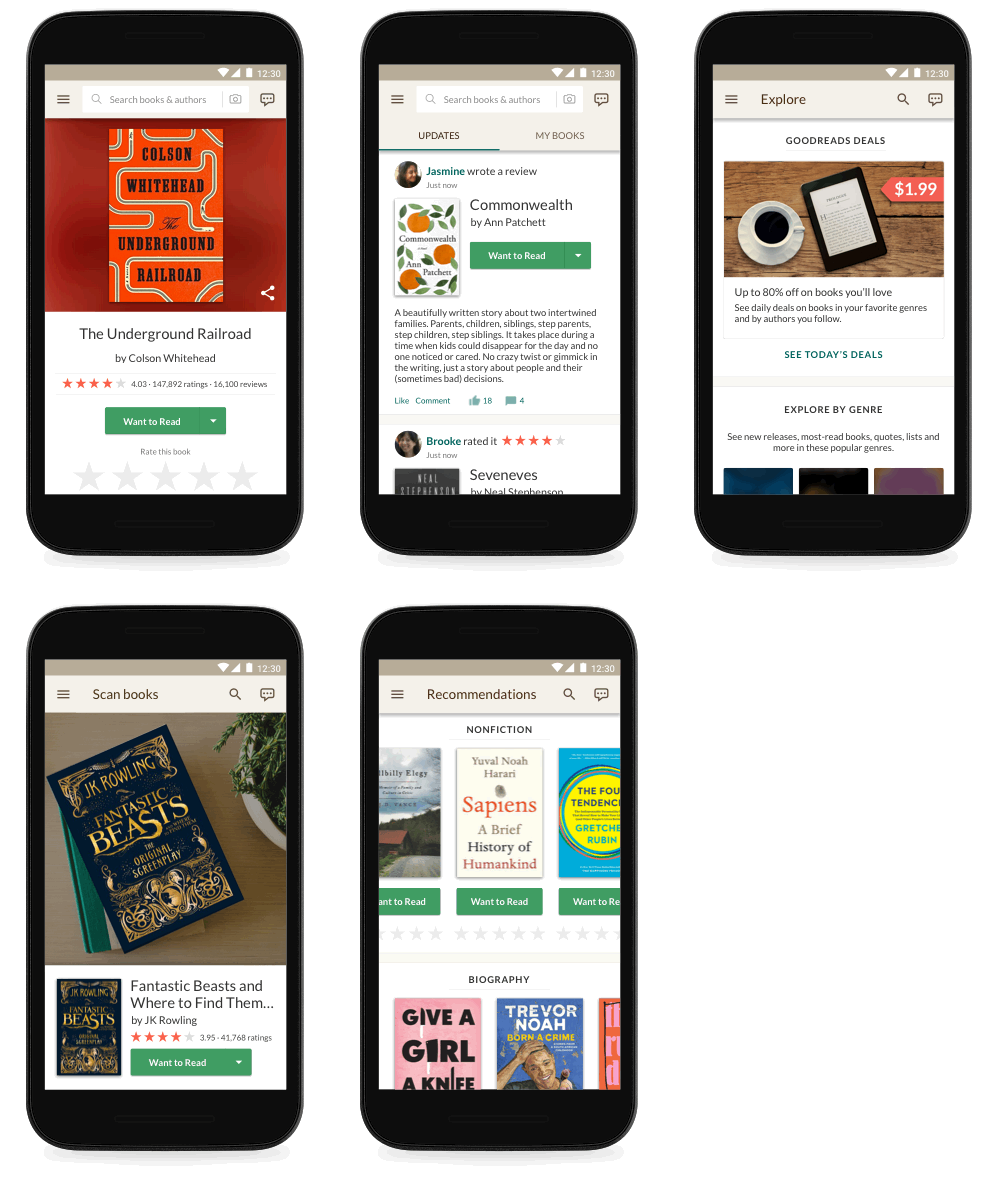
Emily, a Goodreads member and BookTuber, was part of our Android beta app program and loved several improvements. "I have fairly long work hours and a very long commute, so the new and improved Goodreads app is very much appreciated!” she said. "The look is cleaner, brighter, and significantly easier to navigate. Little design details, like including a progress bar for your Reading Challenge in the Quick menu and adding book covers to the Update Progress menu, pack small but mighty punches. And the speed! Improvements in speed alone have me giddy."
More Ways to Find Books...and Score a Great Deal!
Try the new Explore page, where you can browse books trending on Goodreads, new releases hot off the presses, and community-created reading lists across every genre. You can also find ebooks at up to 80 percent off—just subscribe to our Deals program to get personalized deals from your Want to Read list, favorite genres, and authors you follow.
Looking for some inspiration for your next book? Our editorial team has got you covered with articles, author essays and interviews, and roundups of the buzziest books on Goodreads.
More Ways to Find Books...and Score a Great Deal!
Try the new Explore page, where you can browse books trending on Goodreads, new releases hot off the presses, and community-created reading lists across every genre. You can also find ebooks at up to 80 percent off—just subscribe to our Deals program to get personalized deals from your Want to Read list, favorite genres, and authors you follow.
Looking for some inspiration for your next book? Our editorial team has got you covered with articles, author essays and interviews, and roundups of the buzziest books on Goodreads.

Create a More Personalized View of Your Reading in "My Books"
We’ve improved the My Books section in several ways, including:
We’ve improved the My Books section in several ways, including:
- When you add a book to a shelf, you can organize it based on genre or other names (such as "adventure" or "favorites" or "book club ideas") to help you find it later.
- From the new My Books, you can also find all of your Kindle Notes & Highlights, so you can revisit what you loved about each book and easily share some or all of your favorite highlights with friends.

Reread That Favorite Book as Many Times as You Want—Every Read Counts
Who loves reexperiencing a favorite book? We do, too, so we’ve added the ability to track your rereads in the Android app. Go to the book page to set start and end dates for books you’ve enjoyed over and over again.
Who loves reexperiencing a favorite book? We do, too, so we’ve added the ability to track your rereads in the Android app. Go to the book page to set start and end dates for books you’ve enjoyed over and over again.

Let’s Talk About Books, Baby
We believe books are even better when you talk about them with friends. Participate in the conversation, thanks to a new design that makes it easy to share your thoughts in messages, group discussions, and reviews. Now you can read all the previous messages in a thread while drafting your reply.
We believe books are even better when you talk about them with friends. Participate in the conversation, thanks to a new design that makes it easy to share your thoughts in messages, group discussions, and reviews. Now you can read all the previous messages in a thread while drafting your reply.

More Features Coming Soon!
The best part of this update is that there’s a lot more to come. We’ll keep updating and improving the app for our Android members.
The best part of this update is that there’s a lot more to come. We’ll keep updating and improving the app for our Android members.
I Want to Use It Now! How Do I Get It?
The app is rolling out now and will be available to everyone within a few weeks.
The app is rolling out now and will be available to everyone within a few weeks.

Check out more recent blogs:
The Best Books of the Year (So Far)
The 24 All-Time-Favorite Book Club Picks on Goodreads
Hot Reading Challenge Tips from Pros Who Read More Than 100 Books a Year
Comments Showing 101-150 of 205 (205 new)

message 101:
by
Warren
(new)
Jun 27, 2018 03:49PM
 I'm thrilled to find out that Android users are about to get a decent app. The existing one has been my major gripe after switching from an iPhone to a Samsung Galaxy. The existing Android app is vastly inferior to its iOS counterpart, missing so many features, and frequently quite useless. I can't wait for this new one to roll out!
flag
Vera wrote: "what about your apple members?"Apple users already have a pretty good app. It's the Android one that's totally sucked for a long time.
 OMG YAY!!! the current app never seems to recognise books or allow me to enter details easily *also the no cover change thing is irritating!* so i cannot wait for the update!! thank you!
 Some edit features seem buggy on my phone, e.g. the edit read date. Every time I try to edit, the app crashes and is not responding.
 Though I like the interface, I don't like that the publication date has been reduced to just the year. I'm going to revert to the website.
 My app update page is now broken.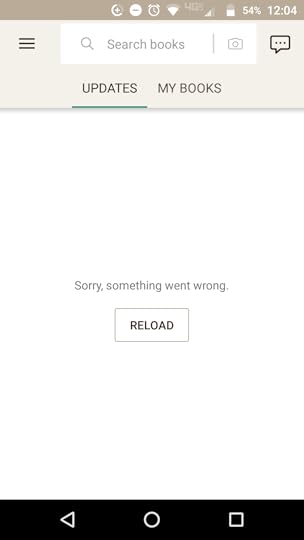
This is all it shows.
 Vera wrote: "what about your apple members?"
You guys have had an awesome app for a long time. It's our turn!
 Melanie wrote: "Will the ability to switch editions be implemented into the app at some point? I tend to shy away from searching for/adding books to my shelves via the app because it chooses/defaults to a specific edition and I then have to edit it via the website anyways."
I too do hope that they will implement this feature since I have the same problem. Until then there might be a workaround, though. I used the app's book scanner yesterday to scan the bar code of a new paperback I purchased and it was recognized and shelved as the right edition. The one I actually own.
Laura wrote: "Will deals only be available for the US or also for international customers?"
Currently it seems to be U.S. only unfortunately. But maybe this will change in the future. One should never give up hope. :D
And speaking of never giving up hope: Dear goodreads-team, please, please add the option to change the app's language. I'm pretty sure by now that I'm forced to use the German version due to my current place of residence or phone settings or whatever. But I really want to use it in English.
The app is fine so far and way better than the old one but the language problem somehow destroys everything. ;)
 Mymymble wrote: "I don't want Goodreads to track my re-reads. Often I just look up a quote or something. Can I turn it off?
Not to mention all the books I've allegedly read twice even if DNF @ 20%. Have you solved ..."
Are you opening up on Kindle and getting the reread started that way? If so, open a new book and slide the "Currently Reading" to off. It'll remember this setting and it won't autoupdate any more.
 Thanks for all the comments – we're reading and carefully considering all of your feedback!
For those of you wanting to see the Goodreads app in English, the app uses the preferred language on your device to set the language for navigation links, buttons, labels, and updates throughout the app. You can find some easy instructions to set your device language here.
If anyone is still experiencing crashing of the app or inability to load certain areas, can you please try deleting the app, restarting your phone, and reinstalling the app. If that doesn't fix your issue, please email us at support (at) goodreads (dot) com with your device and app version details – we'd love to try some further troubleshooting with you!
 Do you have any ideas to update your public API to give us poosibility to create mobile clients for other mobile os?
 Catie wrote: "When I look at my notifications feed in the app, it shows updates from ALL of my friends, not just my "top friends." This makes it incredibly difficult to wade through. Any way to fix this?"
They said not at the moment. :/

 "Kathy, this issue should be fixed in the latest app but please contact us if you’re still experiencing issues."
I will try it and see. I uninstalled the app more than a year ago because in addition to the groups issue there were a number of other things that made the app basically useless. It doesn't make any sense why you can't create a decent android app.
 Melanie wrote: "Will the ability to switch editions be implemented into the app at some point? I tend to shy away from searching for/adding books to my shelves via the app because it chooses/defaults to a specific edition and I then have to edit it via the website anyways."
Luke wrote: I too do hope that they will implement this feature since I have the same problem. Until then there might be a workaround, though. I used the app's book scanner yesterday to scan the bar code of a new paperback I purchased and it was recognized and shelved as the right edition. The one I actually own.
Thanks for the suggestion of a possible workaround Luke, however, the majority of my reading is via e-books, so I am unsure if scanning and getting the correct edition would work for me.

 Jaclyn wrote: "For those of you wanting to see the Goodreads app in English, the app uses the preferred language on your device..."
Thank you for the answer!
It would be really nice, though, if you could somehow implement the option to switch languages. Like here, on the website.
I don't know anything about creating an app, so I don't know if that would be an easy task or not but it would be a huge improvement and I'm sure that many of your members would be grateful for it.
Otherwise the new app is way better than the old one and using it is more comfortable than before. It's more fun, too. One can see that you really put a lot of thought into it.
 The new app can't seem to handle upcoming release dates. So, like if a book is coming out in July and says so on the website version, it will either be vaguely wrong (and say something like it was published in 2018, despite it NOT being published yet) or omit the data entirely (no release date). This is very vexing to me.
 Can I simply ask to anyone who's updated to the new app, I've been reading the comments and people have had quite a lot of glitches, is the app overall worth an update or at the moment is the previous version better, until the new update is fixed??
Can people who use it not workers at Goodreads respond pls.
Is there any way to do General Status Updates like on the website version?
El wrote: "Can I simply ask to anyone who's updated to the new app, I've been reading the comments and people have had quite a lot of glitches, is the app overall worth an update or at the moment is the previ..."You should wait.
Lyra wrote: "The new app can't seem to handle upcoming release dates. So, like if a book is coming out in July and says so on the website version, it will either be vaguely wrong (and say something like it was ..."We're looking into this issue – thanks for reporting!
Lyra wrote: "Is there any way to do General Status Updates like on the website version?"
Not yet, though we do plan to add further features in the future.
 Thank goodness! I've used iOS for many years now, but have been thinking of getting an android phone. For fun, I downloaded the Goodreads app on my husband's android phone a while back and literally had trouble believing how bad it was compared to my iphone. I couldn't believe that clicking a notification didn't take you to the latest post in the thread, or that you couldn't search your own shelves. And profile pages were both way uglier and way less functional than I was used to on iOS. Haven't seen the new app yet, but glad to hear changes are here/on the way at least.
 I have messages on the new app that I can't delete from 2016 and 2017. Is there a way to do so?
Jane wrote: "I have messages on the new app that I can't delete from 2016 and 2017. Is there a way to do so?"
I have messages on the new app that I can't delete from 2016 and 2017. Is there a way to do so?
Jane wrote: "I have messages on the new app that I can't delete from 2016 and 2017. Is there a way to do so?"Messages are pretty wonky. I'm a moderator for a group and sent out a message to all members and the outgoing is showing up in my inbox. All 250+ of them. Ugh.
Wow. I don't feel so bad now having only 10 maybe from 2016 & 2017 and 2018. I'm glad I deleted them on my desktop and only have that many on my tablet.
Jane wrote: "Wow. I don't feel so bad now having only 10 maybe from 2016 & 2017 and 2018. I'm glad I deleted them on my desktop and only have that many on my tablet."It's dumb because I can't even see them on the website! They don't even appear in the Sent folder! And you can't see folders on the new app so I can't do anything except not use Messages in the app.
Exactly. I know I don't have any from 2016 or 2017 on there and some from 2018 that I'm not saving. I wish there was a way to enter giveaways on my tablet when I'm away from home. Frustrated w/that!
Elyse wrote: "Jane wrote: "I have messages on the new app that I can't delete from 2016 and 2017. Is there a way to do so?"Messages are pretty wonky. I'm a moderator for a group and sent out a message to all m..."
Can you please email us some more information to support (at) goodreads (dot) com – in particular, screenshots and a link to the group – I'll ask someone on our side to look into this!
Jaclyn wrote: "Can you please email us some more information to support (at) goodreads (dot) com – in particular, screenshots and a link to the group – I'll ask someone on our side to look into this! ..."Will do!
 With this update, my app shows ALL my friends updates in the update feed, and not just Top Friends. How can I change that to show only Top Friends in the update feed? I've resorted to using the Desktop version on my phone to avoid scrolling forever just to see Top Friends' updates.
If it's not fixed soon (and I mean really soon), I will no doubt abandon the app altogether (and probably forget to reinstall later).
Ruthie wrote: "With this update, my app shows ALL my friends updates in the update feed, and not just Top Friends. How can I change that to show only Top Friends in the update feed? I've resorted to using the Des..."At this point in time, they cannot fix it. It's something they're going to be working on. :/
 Joanne wrote: "Thank goodness! I've used iOS for many years now....I couldn't believe that clicking a notification didn't take you to the latest post in the thread"
I have an iPhone, and when I use the app, I am not taken to the last post in the thread. Thus I cannot read blog posts on the app, as I have to load all the comments to get to the bottom...
 This refresh was long overdue and the new interface is a pleasure to use but I have a couple of suggestions
 1. Please streamline the "update your progress" tab like in iOS. In iOS all the actively read books are displayed on "my books " page and we simply have to press "update the progress" once.
2. Allow us to sort the reviews based on ratings/recent etc on the book page.
3. On the book page, allow us to add book to other shelves also, we have just "want to read" as of present.
4. In iOS when you press the search bar, you get book recommendations and other info like new books etc. Please bring this to android as well.
 I just started using the new app and the major problem I have with it is that now I see every single "like" or comment that my friends put on other reviews. This means that I'm seeing reviews from people who are not my friends, just because a friend liked those reviews. I have tried but can't find a way to adjust my feed settings through the app. This clogs up my feed terribly! Is there a way to change this? If not, I can't use this app and will uninstall.
Liz wrote: "I just started using the new app and the major problem I have with it is that now I see every single "like" or comment that my friends put on other reviews. This means that I'm seeing reviews from ..."
I just started using the new app and the major problem I have with it is that now I see every single "like" or comment that my friends put on other reviews. This means that I'm seeing reviews from people who are not my friends, just because a friend liked those reviews. I have tried but can't find a way to adjust my feed settings through the app. This clogs up my feed terribly! Is there a way to change this? If not, I can't use this app and will uninstall.
Liz wrote: "I just started using the new app and the major problem I have with it is that now I see every single "like" or comment that my friends put on other reviews. This means that I'm seeing reviews from ..."Not yet. They're working on it. :/
Elyse wrote: "Not yet. They're working on it. :/"Thanks, Elyse! That's a bummer.
Jasmine wrote: "I have an iPhone, and when I use the app, I am not taken to the last post in the thread. Thus I cannot read blog posts on the app, as I have to load all the comments to get to the bottom..."Please feel welcome to email us about this to support (at) goodreads (dot) com!
Ankur, thanks for the feedback! 1. Please streamline the "update your progress" tab like in iOS. In iOS all the actively read books are displayed on "my books " page and we simply have to press "update the progress" once.
2. Allow us to sort the reviews based on ratings/recent etc on the book page.
I'll let the team know your above feedback!
3. On the book page, allow us to add book to other shelves also, we have just "want to read" as of present.
I'd be happy to pass this on – for now, you can tap on the down arrow next to the Want to Read button in order to see further shelving options.
4. In iOS when you press the search bar, you get book recommendations and other info like new books etc. Please bring this to android as well.
This is something we would like to include in an upcoming update.
Jaclyn wrote: "Jasmine wrote: "I have an iPhone, and when I use the app, I am not taken to the last post in the thread. Thus I cannot read blog posts on the app, as I have to load all the comments to get to the b..."Thank you, will do!
 My major gripe about the old app was the poor quality of the user interface for taking part in discussions and at first glance it appears little was done to fix that problem.
 The text box you write you comment in is now expandable, which is a huge help when trying to write more than a sentence or two. What the interface still seems to lack is any way to respond directly to existing posts with quotes, and the ability to embed the author and title links in your posts. Some of the groups I belong to require those links when recommending a book which means I can't do it while on the app. :-(
 Still no "Not Interested" on recommendations page. This is missing from app and mobile site. It is only present on full web site. In my opinion, without this, the Recommendations feature is unusable.
I notified you of this issue earlier this year: Email:
Re: [#572114] goodreads_apps: Recommendations: Not Interested not present on mobile site.
 YAY! I love the new app!!!!! Great job, Goodreads!
 Glad there will be an update soon as I've noticed the search feature is on the fritz this summer. I've had a hard time finding books I am reading. Checked for an update and couldn't find one. Assuming the software needs update. Can't wait
Great idea. Will Apple users have the same opportunity
Glad there will be an update soon as I've noticed the search feature is on the fritz this summer. I've had a hard time finding books I am reading. Checked for an update and couldn't find one. Assuming the software needs update. Can't wait
Great idea. Will Apple users have the same opportunity
 I'd like to add my vote for some filtering options in "Updates." I now see every update, but I preferred it when I could just see updates from "Top Friends."
The rest of the app looks great, though. Very clean and easy to use.
 Wish it still had the function to post on Facebook with progress updates and reviews when completed, but holding out hope that it will come in one of the next few updates to the app. Otherwise, it has some great features over the old app!
