
 Sign in with Facebook

Introducing the All-New, Faster Goodreads Android App—Includes Rereads, Deals, and More
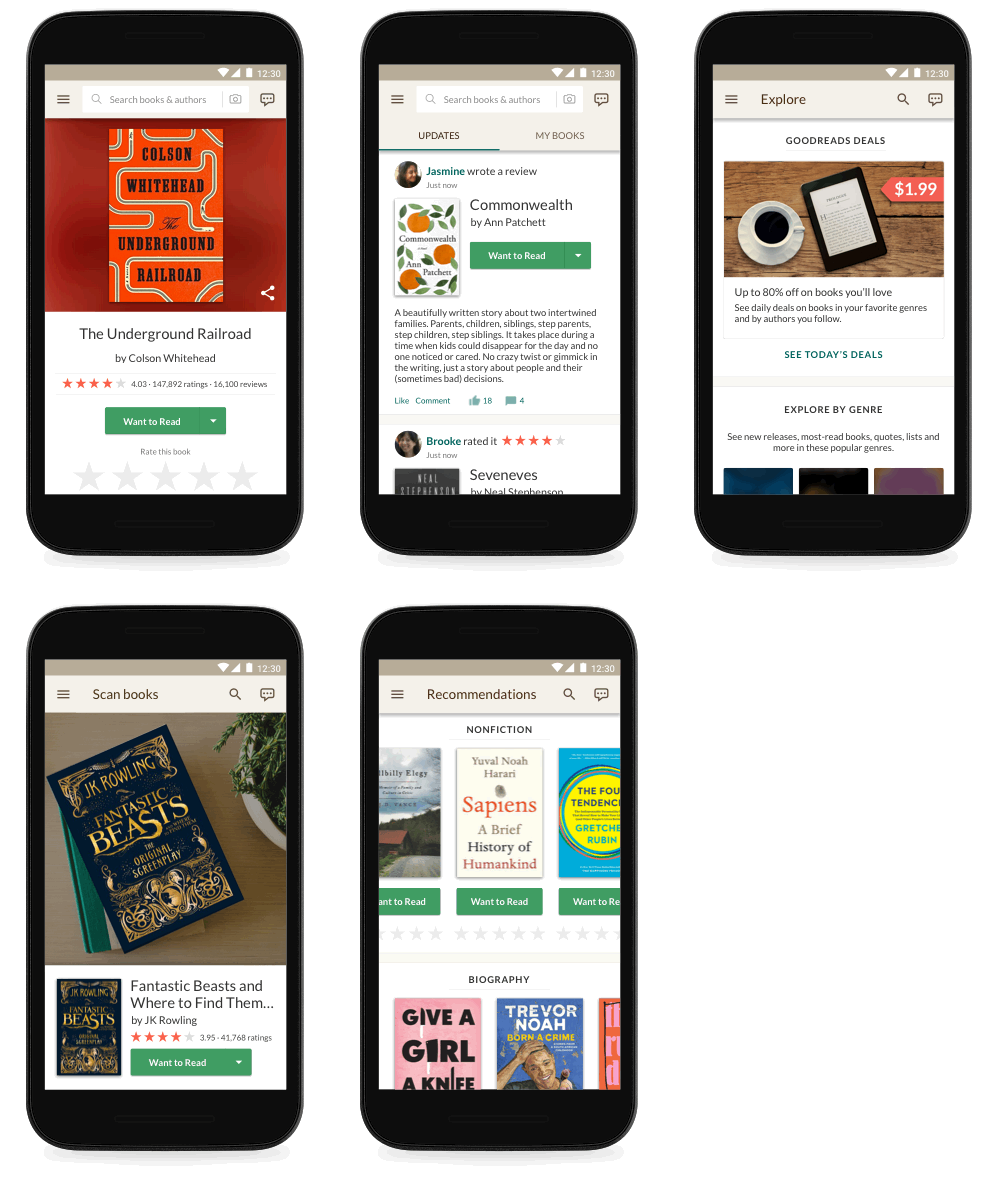
Calling all Android phone and tablet users! Our completely redesigned Android app is rolling out now and will be available to everyone within a few weeks. Every experience in the all-new app is faster and easier to use. Designed by readers for readers, it also includes new features to help you find even more books you’ll love.
Whether you want to scan covers in order to find a book quickly on Goodreads, browse personalized recommendations, or add a book you just finished reading (or rereading!) to your Reading Challenge, using Goodreads from your Android device has never been so simple, fast, or fun. The app’s fresh, new look and feel works great on tablets, too.
Whether you want to scan covers in order to find a book quickly on Goodreads, browse personalized recommendations, or add a book you just finished reading (or rereading!) to your Reading Challenge, using Goodreads from your Android device has never been so simple, fast, or fun. The app’s fresh, new look and feel works great on tablets, too.
Emily, a Goodreads member and BookTuber, was part of our Android beta app program and loved several improvements. "I have fairly long work hours and a very long commute, so the new and improved Goodreads app is very much appreciated!” she said. "The look is cleaner, brighter, and significantly easier to navigate. Little design details, like including a progress bar for your Reading Challenge in the Quick menu and adding book covers to the Update Progress menu, pack small but mighty punches. And the speed! Improvements in speed alone have me giddy."
More Ways to Find Books...and Score a Great Deal!
Try the new Explore page, where you can browse books trending on Goodreads, new releases hot off the presses, and community-created reading lists across every genre. You can also find ebooks at up to 80 percent off—just subscribe to our Deals program to get personalized deals from your Want to Read list, favorite genres, and authors you follow.
Looking for some inspiration for your next book? Our editorial team has got you covered with articles, author essays and interviews, and roundups of the buzziest books on Goodreads.
More Ways to Find Books...and Score a Great Deal!
Try the new Explore page, where you can browse books trending on Goodreads, new releases hot off the presses, and community-created reading lists across every genre. You can also find ebooks at up to 80 percent off—just subscribe to our Deals program to get personalized deals from your Want to Read list, favorite genres, and authors you follow.
Looking for some inspiration for your next book? Our editorial team has got you covered with articles, author essays and interviews, and roundups of the buzziest books on Goodreads.

Create a More Personalized View of Your Reading in "My Books"
We’ve improved the My Books section in several ways, including:
We’ve improved the My Books section in several ways, including:
- When you add a book to a shelf, you can organize it based on genre or other names (such as "adventure" or "favorites" or "book club ideas") to help you find it later.
- From the new My Books, you can also find all of your Kindle Notes & Highlights, so you can revisit what you loved about each book and easily share some or all of your favorite highlights with friends.

Reread That Favorite Book as Many Times as You Want—Every Read Counts
Who loves reexperiencing a favorite book? We do, too, so we’ve added the ability to track your rereads in the Android app. Go to the book page to set start and end dates for books you’ve enjoyed over and over again.
Who loves reexperiencing a favorite book? We do, too, so we’ve added the ability to track your rereads in the Android app. Go to the book page to set start and end dates for books you’ve enjoyed over and over again.

Let’s Talk About Books, Baby
We believe books are even better when you talk about them with friends. Participate in the conversation, thanks to a new design that makes it easy to share your thoughts in messages, group discussions, and reviews. Now you can read all the previous messages in a thread while drafting your reply.
We believe books are even better when you talk about them with friends. Participate in the conversation, thanks to a new design that makes it easy to share your thoughts in messages, group discussions, and reviews. Now you can read all the previous messages in a thread while drafting your reply.

More Features Coming Soon!
The best part of this update is that there’s a lot more to come. We’ll keep updating and improving the app for our Android members.
The best part of this update is that there’s a lot more to come. We’ll keep updating and improving the app for our Android members.
I Want to Use It Now! How Do I Get It?
The app is rolling out now and will be available to everyone within a few weeks.
The app is rolling out now and will be available to everyone within a few weeks.

Check out more recent blogs:
The Best Books of the Year (So Far)
The 24 All-Time-Favorite Book Club Picks on Goodreads
Hot Reading Challenge Tips from Pros Who Read More Than 100 Books a Year
Comments Showing 51-100 of 205 (205 new)

message 51:
by
Artemis
(new)
Jun 26, 2018 08:08AM
 Jaclyn wrote: "Gemma ♕ BunksMcCoy wrote: "I reinstalled the app on my phone and to be honest, it doesn't seem any better than before. When I open my notifications and try and click on the link to my review to see..." Thanks!
flag
 I seem to have been updated to the new app. First thing I notice is the updates are full of reviews by people I don't know. I think it's showing reviews from people liked by someone I follow (not a friend). I'd expect the app to default to the same preferences as I've set on the web. I guess I'll try to set these, but if I can't, I won't be using the app.
EDIT: Seems like I have no choice that I can find to limit notifications on the update feed. So I'm forced to see all the likes of people I follow, and the reviews of the people they like. This really, really sucks, as I have pages and pages of reviews from people I don't want to see before I even see one that I do want to see. The whole reason I follow rather than friend people is so I can see their reviews without all the other comments and likes.
Works fine on the web version.
 Mymymble wrote: "Felicia (Little Prairie Library) wrote: "Mymymble wrote: "I don't want Goodreads to track my re-reads. Often I just look up a quote or something. Can I turn it off?
Not to mention all the books I'v..."
When you open a book on Kindle, turn off the Goodreads app when the information about the book pops up. I don't have my Kindle hooked to my Goodreads that way because I don't want to track everything I read on it.
Gemma ♕ BunksMcCoy wrote: "I reinstalled the app on my phone and to be honest, it doesn't seem any better than before. When I open my notifications and try and click on the link to my review to see people's comments I still ..."They said that it's not completely rolled out yet. It's taking place over a period of a few weeks.
 Is the app going to include Giveaways too? That would be nice.
 I'm glad to hear that there will be an update. I used the app very rarely because the website had always been way better.
But now I'm curious and looking forward to giving the app a new chance. ;)
Luke wrote: "I'm glad to hear that there will be an update. I used the app very rarely because the website had always been way better.But now I'm curious and looking forward to giving the app a new chance. ;)"
Totally agree w/you there Luke.
 What you need to update is the Kindle app. That is the most useless, primitive app I've ever seen.
 Did you fix groups so that it would take you to the last read post in a thread? I stopped using the app for groups because it always took me to the first post in a thread rather than the last one I read. In a thread with pages and pages of posts, it was too annoying to navigate to the end. If that hasn't changed then I still have no interest in using the app.

 Still, I can't update the progress I make in my currently-reading books as I can via a browser and this is (and has been) a completely frustrating flaw in the app.
 Louise wrote: "Since my goodreads app have been updated, I can no longer open the app. It crashes every single time I try to open it :/"
Louise, sorry you've been having trouble! Can you share more info about your crash please? What device and OS are you on? Does deleting the app, restarting your phone, and reinstalling the app fix your issue? What are you using to log in - Amazon, Facebook, or email? Are you using fingerprint authentication on your device? Please contact us - we appreciate any info you can provide to help us fix the problem.
CM wrote: "Good to know but does it mean I should uninstall the beta and get the official one?"
CM, the official app has the latest fixes and improvements. We’ll be telling all beta users to switch over after the app is fully rolled out.
Kelly wrote: ":O I don't think I've seen the tag feature before! Is that something that's currently on the site? I'm wondering how using that will affect my books from the desktop view. "
Kelly, we’re trying out the label “tags” only on the Android app for now. Once you tap in, everything works exactly the same—you can view and sort the books under a specific tag just as you can view and sort books on a shelf. This change doesn’t affect your books in the desktop view; on desktop, you’ll still see the current “exclusive” and “non-exclusive shelves” language.
We’re excited to experiment with this naming change because we think it might better communicate how the Goodreads system works: a book can only be on one of your shelves at a time (just like in the real world), but it can have many tags. We’d love to hear your feedback on tags; please contact us if you’d like to share.
Lynsey A wrote: "Jamay, thanks. I've always been able to see all my shelves when I go to My Books. The issue is when I am adding a new book, I can't see all of my shelves when I am shelving a new book. "
Lynsey, you should be able to see all your shelves when you add a new book; it’s a bug if you can’t. Please contact us if you experience this issue with the latest app.
Marty wrote: "I seem to have been updated to the new app. First thing I notice is the updates are full of reviews by people I don't know. I think it's showing reviews from people liked by someone I follow (not a friend). I'd expect the app to default to the same preferences as I've set on the web. "
Marty, unfortunately the app shows an unfiltered updates feed right now. We hope to add filtering functionality in the future.
Jane wrote: "Is the app going to include Giveaways too? That would be nice."
Jane, we hope to add Giveaways in the future. The best part of this update is it enables us to release improvements to the app more regularly!
Kathy wrote: "Did you fix groups so that it would take you to the last read post in a thread? I stopped using the app for groups because it always took me to the first post in a thread rather than the last one I read. In a thread with pages and pages of posts, it was too annoying to navigate to the end. If that hasn't changed then I still have no interest in using the app. "
Kathy, this issue should be fixed in the latest app but please contact us if you’re still experiencing issues.
Hiba wrote: "Still, I can't update the progress I make in my currently-reading books as I can via a browser and this is (and has been) a completely frustrating flaw in the app."
Hiba, you can update progress by going to My Books and tapping the “Update Your Reading Progress”, or by tapping the “Update Your Progress” button on the book page.
 Wondering still about the ability to edit comments and insert book links? These are really important features on the desktop.
 My app has been loading slowly (or not at all) and crashing, maybe this is why.
 I've tried it and it is much much better than the last version. It is much easier to use, intuitive and it looks slicker and beautiful.
 This new app should have been done much earlier because there are users not from the USA and not using IOs, but I'm sure there are who use Android like the rest of the world ...
Friends section need a lot more rebranding in the web and app part. Hopefully, it will be in your next plans.
Keep up the good work.
 I hate the current goodreads app (there are so many things that I can do on the website that I can't do on the app!) so I hope the updated app is better.
 Marty wrote: "I seem to have been updated to the new app. First thing I notice is the updates are full of reviews by people I don't know. I think it's showing reviews from people liked by someone I follow (not a..."
Thank you for the warning! I couldn't bear such a mess in my updates feed, so I won't be updating the app.
 Kathy wrote: "Did you fix groups so that it would take you to the last read post in a thread? I stopped using the app for groups because it always took me to the first post in a thread rather than the last one I..."
I have an iPhone, so this post is not relevant to me. However, on my iPhone, I am taken to the last post in a group thread. But not for blog posts. Thus, I can't read comments to blog posts on my phone :/
 I use an Amazon Fire. Being technologically deficient, I don't know if it's also an Android. Can someone tell me if I can use the new book app on it. It would help me with organizing my books.
 I donot want to see all my friends activity. At my web wall i donot see all and i want it to be the same at the app
 Jake wrote: "Excited to use this to update my progress on the go!"
IKR!
So, finally the update arrived and it looks quite good so far. There's just one major issue. Mine came in German, which is a little bit annoying. Does anyone know where you can change language settings?
 Luke wrote: "So, finally the update arrived and it looks quite good so far. There's just one major issue. Mine came in German, which is a little bit annoying. Does anyone know where you can change language sett..."
I have the same question. I didn't find any option to change that.

 I might have to download it again because the previous version forced my hand towards the DELETE button. I hope this one has more functionality than its predecessor.
 I have been trying the new version for android, and there are still problems with the dates of the books that I have read, the last ones that I have read do not show the date in which I read them, even though in the website it appears with no problems.
And, by the way, how can I changed the language in the app? I have been trying to do it but I can't.
Appart from that, the app is great, I really like the way you have improved the recommendation section and the fact that you can find books but just taking a picture of the cover.
Great job!
 Currently reading is very nice if it comes to the feature of updating in percentage (%) page by page in update section.
 deleted it and downloaded it again - it didn't change.... :(
 Could someone tell me if it is possible to read spoilers and link books to comments with this new version? Thanks!
 Finally! Won't miss the blogs anymore!! (not that I did)

 I have been using beta for a while. I love it. Huge success. Well done.
 I take it back! Now I have the new app and it is sooooo much better! I'm so excited. I can actually look at my notifications.
 The one and only thing I don't like is I can't see anywhere where I can put a general update on using the app. Am I missing something or is still not able to be done without going on the main site? Thanks.
 What about the feed? I normally have set only top friends to show up in my feed but on app now everybody is showing up
Paula wrote: "deleted it and downloaded it again - it didn't change.... :("
What about the feed? I normally have set only top friends to show up in my feed but on app now everybody is showing up
Paula wrote: "deleted it and downloaded it again - it didn't change.... :("It hasn't rolled out for everyone. It should in the next couple of weeks
 Sam wrote: "Finally! The Android community has been waiting for an update for a long time. Thank you!!"
Could not agree more!!
 Vera wrote: "what about your apple members?"
The Apple improved app rolled out much earlier.
 Jamay - thanks. I cannot see all of my shelves when shelving a book or even just trying to see all of my books. I did contact you all via the link you shared and included a screenshot. Thanks.
 Why are the topics in groups not in latest date posted order? That's irritating.
 Can we switch editions in the new app?
Can we 'Reply' to comments in groups on the new app?
My biggest peeve, when you get a notification of a comment on a thread, does it go down to THAT comment or do you still have to sift through every 50 comments until you reach the end and most current?
 Will the ability to switch editions be implemented into the app at some point? I tend to shy away from searching for/adding books to my shelves via the app because it chooses/defaults to a specific edition and I then have to edit it via the website anyways. So I tend to only use the app to update my reading progress when I am away from my computer. I would be much more inclined to use the app for more than reading progress updates were this feature to be included.
Melanie wrote: "Will the ability to switch editions be implemented into the app at some point? I tend to shy away from searching for/adding books to my shelves via the app because it chooses/defaults to a specific..."
Will the ability to switch editions be implemented into the app at some point? I tend to shy away from searching for/adding books to my shelves via the app because it chooses/defaults to a specific edition and I then have to edit it via the website anyways. So I tend to only use the app to update my reading progress when I am away from my computer. I would be much more inclined to use the app for more than reading progress updates were this feature to be included.
Melanie wrote: "Will the ability to switch editions be implemented into the app at some point? I tend to shy away from searching for/adding books to my shelves via the app because it chooses/defaults to a specific..."Ditto!
Paula wrote: "deleted it and downloaded it again - it didn't change.... :("Try going into the settings for apps, find the app and click on it, then storage, then clear cache. If that doesn't do it, you can try again, but also clear data (which will delete all saved data, including login, and make it truly like new.
Simply reinstalling will use the old data and settings.
Mymymble wrote: "I don't want Goodreads to track my re-reads. Often I just look up a quote or something. Can I turn it off?Not to mention all the books I've allegedly read twice even if DNF @ 20%. Have you solved ..."
You can remove the 'date finished' on the website. Leave it blank and it will not "count" towards your 'Read' books or your GR Challenge.
 Will deals only be available for the US or also for international customers?
 So... I got the update. And now I can't open the app anymore...
Paula Letterman wrote: "I use an Amazon Fire. Being technologically deficient, I don't know if it's also an Android. Can someone tell me if I can use the new book app on it. It would help me with organizing my books."
So... I got the update. And now I can't open the app anymore...
Paula Letterman wrote: "I use an Amazon Fire. Being technologically deficient, I don't know if it's also an Android. Can someone tell me if I can use the new book app on it. It would help me with organizing my books."Since it's not an Apple product, it is Android. iOS is only for Apple products, like if you had an iPad tablet instead of Kindle Fire tablet.
Sandra wrote: "Could someone tell me if it is possible to read spoilers and link books to comments with this new version? Thanks!"It looks to me like you can see the whole spoiler now. Which is equally terrible!! So before you couldn't click on the spoiler tag and view the spoiler if you wanted and now you have no choice but to see the spoiler!! It says 'view spoiler' and 'hide spoiler' but you cannot hide and unhide it. The spoiler is right there in plain view between the tags.
And you still cannot link book titles or covers on the app. :/
 Thanks for rolling out an Android update, but unfortunately this one has the same "fatal flaw" for me that the other one did. On the website I write in the private notes section on most books that I shelve. I can't find any way to view those notes on the app, so I'd rather wade through the mobile desktop version (or just wait until I'm at my computer) than use the app. I hope that will be added in a future update!
Marjolein wrote: "So... I got the update. And now I can't open the app anymore..."
Thanks for rolling out an Android update, but unfortunately this one has the same "fatal flaw" for me that the other one did. On the website I write in the private notes section on most books that I shelve. I can't find any way to view those notes on the app, so I'd rather wade through the mobile desktop version (or just wait until I'm at my computer) than use the app. I hope that will be added in a future update!
Marjolein wrote: "So... I got the update. And now I can't open the app anymore..."Do you know how to clear the cache and/or delete the data? That usually works. It's in the settings for apps, and you click on the app, then storage. I think the exact section depends on the phone.
 Rach3975 wrote: "Thanks for rolling out an Android update, but unfortunately this one has the same "fatal flaw" for me that the other one did. On the website I write in the private notes section on most books that ..."
I totally agree with you
