The Best Tools for AI Research: 4 Tools We Use to Transform Our Work
Research used to eat up hours of your day. Scrolling through endless articles. Taking notes. Trying to remember where you saw that one crucial stat.
Not anymore.
If you’re looking for the best tools for AI research, you’re in the right place. These platforms have changed everything. These platforms can scan thousands of sources in seconds. They summarize complex information. They even cite their work so you don’t have to double-check everything.
Whether you’re a student grinding through a thesis, a business owner analyzing market trends, or a content creator hunting for data, AI research tools will make your life easier. Let me show you exactly which ones deliver real results.
What Is AI Research and Why You Need the Best Tools for AI ResearchAI research means using artificial intelligence to find, analyze, and synthesize information faster than any human could manually.
Here’s something that’ll surprise you: 73.6% of students now use AI in their research work. That’s not just a college thing either.
Businesses use AI research for market analysis. Content teams use it to gather data for articles. Medical professionals use it to stay current on treatments. Product developers use it to scout competitors.
The applications go way beyond academic papers. AI research tools excel at data analysis, generate insights from multiple sources, and compile information for content creation. They process information at speeds that would take humans days or weeks to match.
Think of AI research as having a brilliant assistant who never sleeps, never gets tired, and can read hundreds of documents simultaneously while highlighting exactly what you need.
The Benefits of Using the Best Tools for AI ResearchLet’s talk about why AI research tools have become essential in 2025.
1. Speed and Efficiency That Changes EverythingAI processes massive amounts of data in seconds. How fast? Well, 10,000 times faster than bilogical synapses.
What used to take hours now takes minutes. You’re not manually combing through dozens of articles anymore. The best tools for AI research handle that grunt work while you focus on actually using the information.
This speed boost isn’t just convenient. It’s transformative. When you can research faster, you can test more ideas, explore more angles, and produce better work in less time.
2. Real-Time Data and InsightsOld research methods meant working with outdated information. By the time you found it, processed it, and used it, the data was already stale.
The best tools for AI research give you instant access to current information. Market trends shift daily. These tools keep you updated without requiring constant manual searches. You see patterns as they emerge, not weeks later when everyone else has already moved on.
3. Automation Frees Up Your BrainRepetitive tasks drain mental energy. Data entry, initial analysis, organizing sources. These tasks are necessary but mind-numbing.
AI automation handles this busywork. You spend your energy on high-level thinking, strategy, and creative problem-solving instead of tedious data management. Your productivity increases without requiring more hours.
4. Accuracy That Reduces Costly MistakesHuman error happens when you’re tired, rushed, or handling too much information at once. AI systems process data consistently. They catch details you might miss. They reduce the likelihood of errors that could derail your entire project.
This precision matters most when stakes are high. Business decisions backed by accurate research save money and prevent disasters.
5. Text Analysis That Actually Makes SenseNatural Language Processing has revolutionized how we handle written information. AI can analyze complex text, identify themes, extract key points, and even detect sentiment across thousands of documents.
This capability simplifies literature reviews, competitive analysis, and market research. You understand the big picture without getting lost in details.
6. Cost Efficiency That Impacts Your Bottom LineGood research used to require extensive resources. Large teams, expensive subscriptions, countless hours of labor. Today’s best tools for AI research deliver professional-grade results at a fraction of traditional costs.
Smaller teams accomplish what previously required entire departments. Solo entrepreneurs access research capabilities that once belonged only to Fortune 500 companies.
The 4 Best Tools for AI Research You Need to KnowLet’s get into the tools that actually deliver. I’ve tested these. They work.
1. Perplexity: The Answer Engine That Cites Everything
Perplexity changed the research game in 2025. This isn’t just another search tool. It’s an AI-powered answer engine that pulls from credible sources in real-time and shows you exactly where the information came from.
What makes Perplexity special? Citations. Every answer includes linked sources. You’re not wondering if the AI made something up. You can verify everything instantly.
The tool launched its Sonar model in February 2025, built on Meta’s Llama 3.3 70B. It handles up to 128,000 tokens, meaning you can feed it massive documents and get detailed analysis back.
Perplexity now processes over 1.4 billion search queries monthly. It currently has over 16 million daily active users.
New features in 2025 include Deep Research mode, which performs extended multi-step analysis. The Comet browser integration lets you research while you browse. Academic filter mode zeroes in on peer-reviewed sources when you need scholarly credibility.
Perplexity also rolled out flashcards, quizzes, and video overviews. You’re not just getting raw data. You’re getting learning tools built right in.
When to use it: Quick fact-checking, competitive research, gathering sources for content, staying updated on industry trends. Perplexity excels when you need fast, reliable answers with verifiable sources.
Is it expensive?
Not at all.
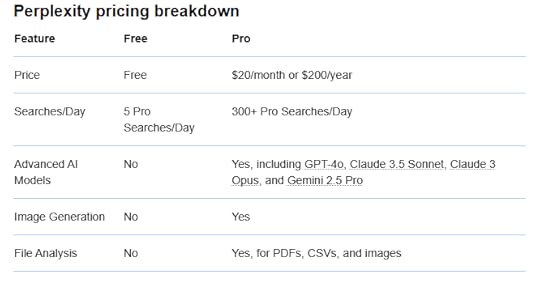
In fact, here’s a look at Perplexity’s price breakdown:
 2. Google Gemini: The Multimodal Research Powerhouse
Google Gemini (previously called Bard) is Google’s answer to ChatGPT, and it’s gotten seriously powerful in 2025.
Gemini runs on Google’s latest AI models, including Gemini 2.5 Flash and Gemini 2.5 Pro. The Pro version includes Deep Think mode, which takes extra time on complex reasoning tasks. This helps when you’re working through difficult analytical problems.
Here’s what sets Gemini apart: multimodal capabilities. Upload images, PDFs, or videos, and Gemini processes them all. Got a complex diagram in a research paper? Gemini can explain it. Need to analyze data from a spreadsheet image? Gemini handles it.
The tool integrates directly with Google’s ecosystem. Gmail, Calendar, Drive, Maps. Gemini can pull information from your own files and emails to give personalized, contextual answers. That’s huge for research that requires combining multiple sources.
Recent 2025 updates include Canvas for creating interactive content, improved LaTeX rendering for mathematical formulas, and better image understanding for notes and diagrams. The Deep Research feature generates comprehensive reports from multiple sources, breaking down complex topics into digestible sections.
Gemini also added temporary chat mode for private questions that won’t be saved to your history. Sometimes your research requires confidentiality.
When to use it: Complex research requiring multiple formats, projects needing integration with Google apps, mathematical or scientific analysis, creating presentations from research findings. Gemini shines when you need a multi-purpose tool that handles everything.
The pricing?
Not bad as well.
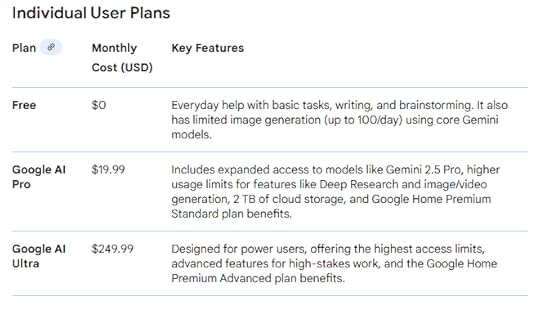
Take a look at Gemini’s Individual User Plans (it also has developer and education plans).
 3. ChatGPT: The Versatile Research Assistant

ChatGPT remains one of the most popular best tools for AI research for good reason. It’s versatile, constantly improving, and handles an impressive range of research tasks.
OpenAI launched GPT-5 in August 2025. This latest model delivers better reasoning, improved memory retention, and more natural voice interaction. ChatGPT now has over 400 million monthly active users, doubling from 200 million in just six months.
What makes ChatGPT stand out? Flexibility. It writes, codes, analyzes, summarizes, and researches across virtually any topic. The model now includes Advanced Voice Mode, which lets you have spoken conversations instead of typing everything.
The Projects feature lets you upload up to 40 files and organize research by topic. ChatGPT remembers context across conversations in the same project. This is perfect for long-term research that builds over weeks or months.
New in 2025: ChatGPT can now edit code directly in developer tools. It offers shopping assistance through PayPal integration. The deep research feature with Dropbox lets you analyze stored documents without manual uploads. Memory improvements reference your recent conversations to deliver more relevant responses.
ChatGPT also rolled out custom GPTs, which are specialized versions trained for specific tasks. You can create a research assistant GPT tailored to your exact needs.
The GPT-5 model reduced hallucinations by 45% compared to GPT-4o. When you enable web search, factual errors drop by 80%. That’s massive for research accuracy.
When to use it: Broad research across multiple topics, content creation requiring AI assistance, coding and technical documentation, brainstorming and idea generation. ChatGPT excels as an all-purpose research companion that adapts to whatever you throw at it.
ChatGPT has a free plan, but if you want access to real-time deep research, you can get their $20/month Plus plan.
4. NotebookLM by Google: The Ultimate Research Organizer
NotebookLM flew under many people’s radar until 2025, when Google rolled out features that transformed it into a research powerhouse.
This tool specializes in organizing and synthesizing information from your sources. Upload research papers, documents, PDFs, or even YouTube videos. NotebookLM analyzes everything and helps you extract exactly what you need.
The standout feature? Audio Overviews. NotebookLM converts your research into podcast-style audio summaries. Two AI hosts discuss your sources, debate key points, and explain complex concepts in conversational language. It’s like having a study group that never gets tired.
New 2025 features include flashcards and quizzes generated from your sources. Mind maps that visualize connections between concepts. Video overviews with narrated slides using Google’s Nano Banana image generation model. Multiple overview formats including Brief, Critique, and Debate modes.
The chat feature got a massive upgrade with an 8x larger context window and 6x longer conversation memory. Conversations now persist across sessions. You can ask follow-up questions that build on previous discussions.
NotebookLM also added the ability to discover sources from the web based on topics you’re researching. It understands multimodal PDFs with text, images, and graphs. The tool integrates with Canvas and PowerSchool for educators.
You can customize the difficulty level of generated study materials. Create content in over 80 languages. Set specific goals for each notebook to steer responses toward your exact needs.
When to use it: Academic research requiring deep source analysis, studying for exams or certifications, creating educational content from multiple sources, organizing complex research projects with many documents. NotebookLM excels when you need to deeply understand and synthesize information rather than just find quick answers.
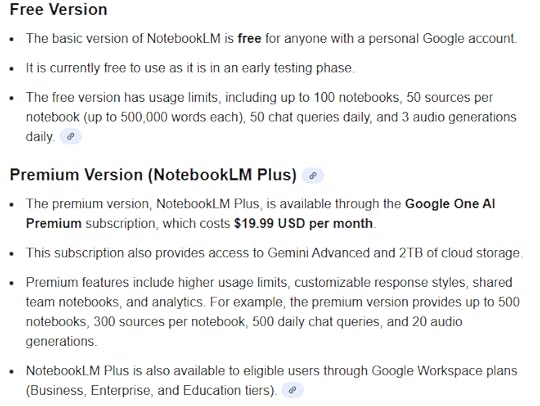
NotebookLM has both a free and a paid version.
Check out the differences here:
 The Next Step: Choosing Your Best Tool for AI Research
You’ve got four powerful options. Each excels at different research tasks.
Start with one. Pick the tool that matches your most common research need. Test it for a week. See how it changes your workflow.
Most people find they use multiple tools for different purposes. Perplexity for quick sourcing. ChatGPT for brainstorming. NotebookLM for deep document analysis. Gemini for multimodal projects.
The key is actually using them. AI research tools only help if you incorporate them into your daily work.
First Movers: Your Custom AI Solution
These best tools for AI research are powerful on their own. But what if you need something more?
First Movers builds custom AI solutions for businesses struggling with implementation. Generic tools work great for basic tasks. When you need AI tailored to your specific workflow, your unique data, and your particular challenges, you need custom development.
We’ve helped companies integrate AI research tools into their operations, automate data gathering processes, and build AI systems that actually fit how they work. Not cookie-cutter solutions that force you to change everything. Real custom work that multiplies your team’s capabilities.
Interested in exploring how AI could transform your research processes? Let’s talk about what’s possible for your specific situation.
FAQs About Best Tools for AI ResearchWhat are the best tools for AI research in 2025?The best tools for AI research include Perplexity for cited answers, Google Gemini for multimodal research, ChatGPT for versatile analysis, and NotebookLM for deep document synthesis. Each tool excels at different research tasks, so many professionals use multiple tools depending on their specific needs.
Can AI research tools replace traditional research methods?AI research tools enhance traditional methods but don’t completely replace them. These tools for AI research accelerate data gathering and initial analysis, but human judgment remains essential for evaluating sources, identifying biases, and drawing meaningful conclusions. The best approach combines AI efficiency with human expertise.
Are AI research tools accurate?The best tools for AI research have improved significantly in accuracy. ChatGPT’s GPT-5 reduced factual errors by 45% compared to earlier models. However, no AI is perfect. Always verify important information from cited sources, especially for high-stakes decisions. Tools like Perplexity provide direct citations specifically to enable verification.
How much do AI research tools cost?Many best tools for AI research offer free tiers. Perplexity is free with limited queries. ChatGPT offers a free version, with paid plans at $20/month for Plus and $250/month for Ultra. Google Gemini has a free tier, with Pro at $19.99/month. NotebookLM is free for basic use, with Plus available through Google Workspace subscriptions.
Can students use AI research tools for schoolwork?Yes, 73.6% of students use AI for research. However, policies vary by institution. Some schools encourage AI for research and learning. Others restrict its use for assessments. Always check your school’s specific guidelines before using these best tools for AI research for graded work.
What’s the difference between Perplexity and ChatGPT for research?Perplexity specializes in providing cited, source-backed answers from current web content. It’s built specifically for research with automatic citations. ChatGPT offers broader capabilities including content creation, coding, and analysis, but requires enabling web search for current information. Both rank among the best tools for AI research, but serve different primary purposes.
How do I choose which AI research tool to use?Choose based on your specific needs. Use Perplexity when you need quick, cited answers. Choose Google Gemini for projects requiring image analysis or Google app integration. Pick ChatGPT for versatile research across many topics or when you need content generation. Select NotebookLM for organizing and deeply analyzing multiple documents. The best tools for AI research depend on your particular research goals.
Are AI research tools secure for confidential work?Security varies by tool. Most major platforms don’t train their models on paid user data. Google Gemini offers temporary chat mode for private queries. ChatGPT has enterprise plans with enhanced security. NotebookLM operates within Google’s security framework. For highly sensitive research, review each tool’s privacy policy and consider enterprise versions of these best tools for AI research.
Can AI research tools analyze uploaded documents?Yes. ChatGPT accepts up to 40 file uploads per project (this is for the Pro plan – ChatGPT accepts 5 file uploads for the free plan, and 25 for Plus). NotebookLM specializes in analyzing multiple documents simultaneously. Google Gemini handles PDFs, images, and videos. These capabilities make them powerful best tools for AI research when working with existing documentation rather than just web sources.
Will AI research tools help me work faster?Absolutely. Users report research tasks that took hours now take minutes using the best tools for AI research. AI handles the time-consuming work of gathering sources, initial analysis, and organization. This speed boost lets you focus on higher-level thinking, strategy, and applying insights rather than spending hours on manual research tasks.