What Is AI Automation and How It Can Help Your Business (+5 Steps to AI Automation)
AI automation is the fusion of artificial intelligence with automated workflows to handle tasks that traditionally required human thinking—like analyzing data, making decisions, and learning from patterns. It’s not just about automating repetitive clicks anymore. It’s about teaching machines to think, adapt, and improve how your business runs.
Here’s what nobody tells you about AI automation: it’s already everywhere, and you’ve probably used it today without realizing it. That spam filter in your inbox? AI automation. The chatbot that actually understood your question on a website? AI automation. The fraud alert on your credit card? You guessed it.
The real opportunity isn’t just in knowing what AI automation is—it’s in understanding how to leverage it before your competitors do. Because while 78% of organizations are now using generative AI, most businesses are still fumbling in the dark when it comes to strategic implementation.
Let’s break down what makes AI automation tick, why it matters for your bottom line, and how you can actually put it to work.
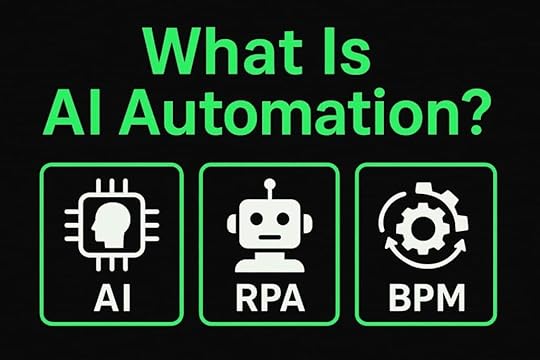
What Is AI Automation Made Of? The Core ComponentsAI automation isn’t just one technology—it’s three powerful components working together. Understanding what AI automation actually consists of helps you see how these pieces combine to transform your business operations.
1. AI (Artificial Intelligence)Think of AI as the brain behind the operation. It’s the technology that enables machines to learn from experience, recognize patterns, and make decisions without being explicitly programmed for every scenario. This is what separates AI automation from basic automation—the intelligence to adapt. Instead of following rigid “if-this-then-that” rules, AI adapts and improves over time.
Modern AI can understand language, analyze images, predict outcomes, and even generate content. It’s what transforms a dumb robot into a smart assistant that actually gets better at its job.
2. Robotic Process Automation (RPA)RPA is the muscle—it’s software that mimics human actions on computers. It clicks buttons, fills out forms, copies data between systems, and performs repetitive digital tasks. The key word here is “repetitive.”
RPA excels at following rules and doing the same thing over and over without getting tired or making typos. But on its own, it’s not smart. That’s where AI comes in to create true AI automation.
3. Business Process Management (BPM)BPM is the skeleton—the framework that maps out how work flows through your organization. It defines who does what, when things happen, and how different tasks connect. Think of it as the blueprint for how your business operates.
When you combine BPM with AI and RPA, you get workflows that not only run automatically but also optimize themselves based on real-world results. That’s when AI automation reaches its full potential.
 Why AI Automation Matters: The Real Benefits
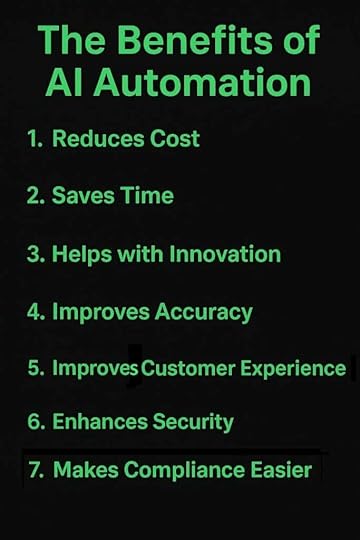
The advantages of AI automation go far beyond simple efficiency gains. Here are seven concrete ways it transforms your business from the ground up.
1. AI Automation Reduces CostAI automation slashes expenses by replacing time-consuming manual work with smart systems that run 24/7. You’re not just saving on labor costs—you’re eliminating the hidden expenses of human error, like duplicate data entry or missed invoices.
The ROI is tangible. Companies implementing AI automation typically see cost reductions of 25-50% in automated processes within the first year.
2. AI Automation Saves TimeTime is the one resource you can’t buy more of. AI automation gives it back to you. Tasks that took hours now take minutes, freeing your team to focus on strategy, creativity, and growth instead of mundane busywork.
Your employees stop being data-entry specialists and start being problem-solvers. Understanding what AI automation can do for your time management is a game-changer.
3. AI Automation Helps with InnovationWhen your team isn’t drowning in repetitive tasks, they have mental space for innovation. AI automation handles the routine so humans can tackle the revolutionary. It also provides insights from data that humans might miss, sparking new ideas and opportunities.
Think of it as removing the ceiling on what your team can accomplish. The grunt work is handled by AI automation, so creativity can flourish.
4. AI Automation Improves AccuracyHumans make mistakes—especially when doing the same task for the hundredth time today. AI automation doesn’t get tired, distracted, or have a bad day. It processes information with consistent precision, reducing errors that cost time and money to fix.
In industries like healthcare and finance where accuracy is critical, AI automation can be the difference between compliance and catastrophe. The error rate drops to near zero.
5. AI Automation Improves Customer ExperienceCustomers expect instant responses and personalized service. AI automation delivers both. It can handle customer inquiries 24/7, provide personalized recommendations based on behavior, and route complex issues to the right human expert.
The result? Faster response times, more relevant interactions, and customers who actually feel heard. What is AI automation’s impact on customer satisfaction? It translates directly to loyalty and revenue.
6. AI Automation Enhances SecurityAI automation actively monitors for threats, detects unusual patterns, and responds to security incidents faster than any human team could. It can analyze millions of data points in seconds to identify potential breaches or fraud.
Plus, automated systems reduce human access to sensitive data, minimizing insider threats. Your security becomes proactive instead of reactive when you implement AI automation.
7. AI Automation Lets You Address Compliance with ConfidenceStaying compliant with regulations is exhausting when done manually. AI automation ensures every process follows the exact rules, creates automatic audit trails, and flags potential compliance issues before they become problems.
It’s like having a compliance officer that never sleeps and never misses a detail. When regulations change, you update the system once and AI automation applies it everywhere instantly.
 How to Implement AI Automation
Ready to put AI automation to work? Here’s your step-by-step roadmap from identifying opportunities to ongoing optimization.
1. Find Clunky Processes That Can Be AutomatedStart by asking your team: “What task makes you want to pull your hair out?” Those repetitive, time-consuming processes are your prime candidates for AI automation. Look for tasks with clear rules, high volume, and lots of manual data handling.
Common culprits include data entry, invoice processing, customer onboarding, and report generation. If someone says “I hate doing this every day,” that’s your signal that AI automation could help.
2. Review Your Process Under a MicroscopeDon’t automate a broken process—you’ll just break things faster. Map out every step, identify bottlenecks, and understand where errors happen. Talk to the people actually doing the work—they know where the pain points are that AI automation can solve.
Document everything. Where does information come from? Where does it go? What decisions get made along the way? This clarity is essential before AI automation begins.
3. Create New Workflows That Integrate AIDesign workflows that leverage AI’s strengths: pattern recognition, prediction, and decision-making. Maybe AI analyzes incoming emails and routes them to the right department. Or it predicts which leads are most likely to convert and prioritizes them automatically.
Think beyond just copying the old process. Ask: “If we were designing this from scratch with AI automation available, how would it work?” That’s where innovation happens.
4. Go Live! Automate Your Workflows and See the DifferenceStart with a pilot program. Choose one process, automate it with AI, and test thoroughly before rolling it out company-wide. Monitor everything—time saved, errors reduced, user feedback.
Expect some hiccups. That’s normal. The key is having a plan to address issues quickly and iterate. Once your AI automation is working smoothly, expand to other processes.
5. Update Consistently to Stay AheadAI automation isn’t “set it and forget it.” Technology evolves, business needs change, and new opportunities emerge. Schedule regular reviews of your automated processes—quarterly is a good cadence.
Ask: Is this still serving our needs? Can we optimize further? What new tasks can we automate? The businesses that win are those that treat AI automation as an ongoing strategy, not a one-time project.
Real-World AI Automation ExamplesTheory is great, but let’s look at real-world applications. Here are three powerful ways businesses are using AI automation right now.
1. Email Management That Actually WorksAI automation transforms your inbox from overwhelming to manageable. Smart systems can automatically categorize incoming emails, draft responses to common questions, and flag urgent messages that need immediate attention.
Advanced implementations can analyze email sentiment to identify frustrated customers, create support tickets automatically, and even schedule meetings by understanding natural language requests. Your email becomes a well-oiled machine instead of a black hole when you apply AI automation.
2. Customer Service That Never SleepsAI-powered chatbots and virtual assistants handle the majority of customer inquiries without human intervention. They understand context, access customer history, and provide personalized answers instantly. When they encounter something complex, they seamlessly hand off to a human agent with full context.
The result? Customers get help immediately, your support team focuses on challenging issues, and satisfaction scores climb. Some companies report handling 80% of inquiries through AI automation while actually improving customer satisfaction.
3. Financial Operations on AutopilotInvoice processing, expense approvals, and financial reconciliation are tedious but critical. AI automation can extract data from invoices (regardless of format), match them to purchase orders, route them for approval, and flag discrepancies—all without human touch.
It can predict cash flow, identify unusual transactions that might indicate fraud, and even generate financial reports with insights. Finance teams shift from data processing to strategic analysis, and the books are always accurate thanks to AI automation.
What Is AI Automation: FAQsWhat’s the difference between AI automation and RPA?RPA is like a robot following instructions—it does exactly what you tell it, every time, without deviation. AI automation adds intelligence to that robot, enabling it to learn, adapt, and make decisions based on data.
Think of RPA as cruise control and AI automation as a self-driving car. One maintains speed; the other navigates the entire journey. The real power comes from combining both—that’s what true AI automation delivers.
Do I need technical expertise to implement AI automation?No. Modern AI automation platforms are designed for business users, not just developers. Many tools offer drag-and-drop interfaces, pre-built templates, and guided setup processes.
That said, having someone with technical knowledge helps optimize implementations and troubleshoot issues. Many businesses start with vendor support or consultants, then build internal expertise over time. The key is understanding what AI automation can do, not necessarily how to do it yourself.
Will AI automation replace my employees?AI automation replaces tasks, not people. It handles repetitive, rule-based work so humans can focus on creativity, strategy, and complex problem-solving. Most companies find their employees are happier because they’re doing more meaningful work.
The real question isn’t whether jobs will change—they will. The question is whether you’ll upskill your team to work alongside AI automation or watch competitors do it first. Smart businesses invest in both technology and training.
How long does it take to see ROI from AI automation?Most businesses see measurable returns within 3-6 months for straightforward AI automation projects. Complex implementations might take 6-12 months. The timeline depends on process complexity, data quality, and how well you’ve planned the implementation.
Quick wins come from automating high-volume, repetitive tasks first. Start there, prove the value of AI automation, then expand to more sophisticated use cases. The key is starting now—because every day you wait is a day competitors get further ahead.
What Is AI Automation and How Can I Impelement It Easier?Let’s get this straight.
You need AI automation to stay in the game, especially in the changing world of business today.
But it’s not always easy.
When you go online for advice, that advice is usally generic, regurgitated, and not created for your specific, unique business with its specific, unique problems.
That’s where we come in.
At First Movers R&D AI Labs, we make sure you get the customized advice, gudiance, and strategy you need to succeed in half the time your competitors do.
We walk you through all the steps of impelementation.
We help you with your biggest problems and issues.
We give you every course, guide, and blueprint you need to get out of sticky situtations and into the success you’ve been dreaming of.
And guess what?
It won’t cost you thousands of dollars.
It won’t even cost you $500.
Hear this: you can get into our community for only $250.
That’s a way smaller amount than you’ll invest hiring experts, buying training programs, and wasting time on failed automation attempts.
Interested?