
Barb Drozdowich's Blog, page 34
July 24, 2016
Back up your blog…or lose it forever

I like this graphic! Although in my house the phrase is “stuff happens” because there are tender ears 


July 17, 2016
Comments – what are they? 3 easy tips to conquer them
Today’s topic is comments.

Comments are a hot topic. Whether the point at which a reader accesses the ability to leave comments on your blog is at the beginning of your post or at the end, it should be obvious, and leaving comments should be easy to do. Let’s talk about both of those features.
There are probably several hundred different ways to control the look of comments, from fancy plugins to captcha, to the ability to leave cute smiley faces with the comment. In reality, experts tell us that on average only a small percentage of people who read our blog posts actually leave comments. Shouldn’t we make it as easy as possible for these brave souls? Many bloggers go to ridiculous lengths to supposedly avoid spam, that they create an unfriendly environment for their readers to share their thoughts.
Spam happens. It’s fairly simple to ensure that spam is held in moderation or segregated into a spam folder. Most WordPress blogs (and other platforms) can be enabled with AKISMET or another anti-spam plugin and, once configured, these plugins do a decent job of dealing with spam without making readers hand over their first-born simply to leave a comment.
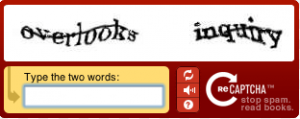
Whether the prompt to leave a comment is at the top or bottom of your post, make it visible. Use a brighter color if necessary, and don’t make people search for the comment field. Once people find the right spot to click on, don’t make the reader enter those captcha letters.
OR
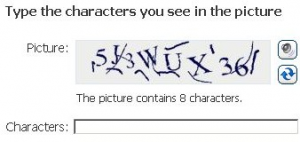
I’ve been known to give up without even trying when faced with those blessed letters!
However you decide to combat spam, ensure that your method doesn’t result in spam appearing to the readers visiting your blog. Not only is it not professional to let people read comments about Viagra on your blog, it’s an indication that your blog isn’t set up properly. Ask for help if you don’t know how to put spam protection in place.
How to make commenting on blogs easy
With an eye on making commenting easy, you need to understand what you are working with. Let’s talk about the commenting systems starting with Blogger.
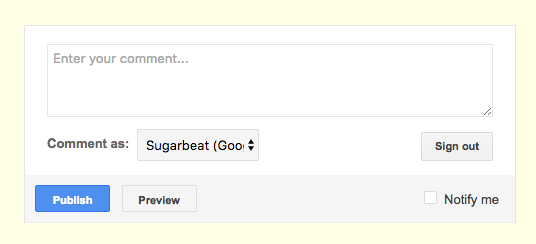
What you see above is the typical Blogger commenting system. People shouldn’t be allowed to leave anonymous comments in my opinion – it defeats the whole point of commenting as being a social/networking activity. Also a certain amount of accountability makes people think before they are overtly nasty.
In the graphic above, you are prompted to enter your comment and then choose a persona to comment with – you’ll notice that in the example, since I’m logged in with my Gmail persona, it automatically assumes that I will comment as my Google me. This version also allows for subscribing to comments – notice the “Notify Me” box in the lower right – this will allow you to be notified of followup comments. (Hint: This functionality will allow you to keep up to date with a blog conversion without constantly checking back on the blog)
The more extended version of this commenting system looks like:
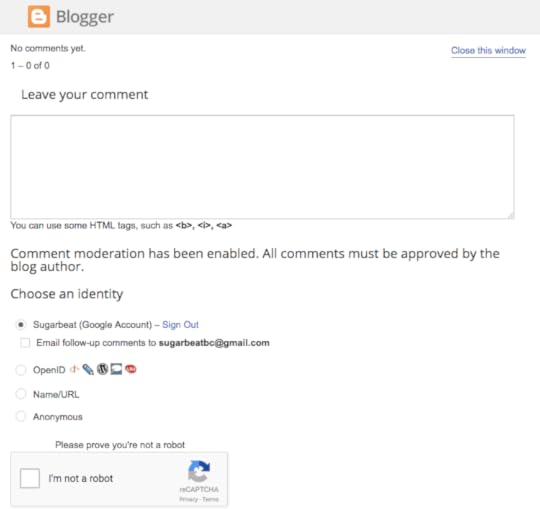
In the above view you can see the choices for identity that the Blogger commenting system will allow – and in this example, it allows for anonymous commenting. In terms of a Captcha system it asks the commenter to check the ‘I’m not a Robot’ box. If you are looking at this on a desktop or laptop computer, you might see this as not a big deal. Try tapping on that tiny box if you are on a phone however!
Moving on to the choices on a WordPress blog…
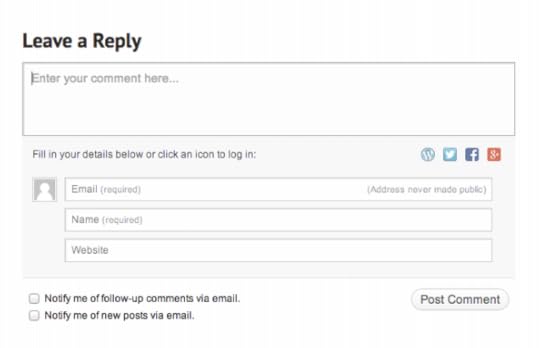
The above graphic shows what the usual commenting system looks like on a WordPress.com blog or a blog that is using the Jetpack commenting system. You will notice that you can directly enter your name, email address and possibly your website URL. You also have the option of being notified about comments or new posts (aka subscribe to the blog). If you look carefully, you’ll notice that you can also log in to leave a comment using your WordPress.com credentials, your Twitter credentials, Facebook or Google+ credentials.
Potentially dangerous waters! We’ll talk more about this in a sec.
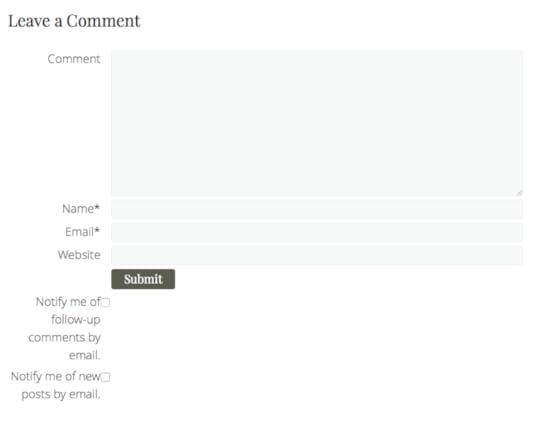
This is another type of WordPress commenting – what I would call non-Jetpack, non-wordPress.com commenting. You’ll notice that you don’t have options to use other social media to log in with. You are just required to leave a name and email address and that’s it. This is my favorite as it is straight forward!
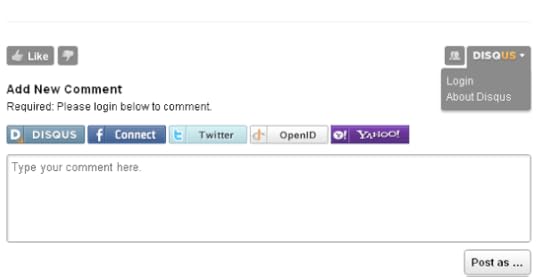
In the graphic above, you are looking at one example of a specialized commenting system called Disqus. Disqus has been around a long time and is available for WordPress and Blogger blogs. The idea behind it is to move the blog comments to be a community discussion. As you can see, the commenter is encouraged to create a Disqus identity, but can also log in using Facebook, Twitter, etc.
All of the commenting systems are set up to be connected to the type of blog they are attached to. If the commenting system is on a Blogger blog, it will prefer a Google identity. If the commenting system is on a WordPress blog it will prefer a WordPress.com identity.
When I was talking to an author this past week, I described a WordPress.com identity as a weed. It infests everything. The same thing is true of a Google identity. When people with a WordPress.com blog leave their blog, they don’t generally log out, they just shut the window – which leaves them logged on to WordPress.com. If they then try to leave a comment using a different email address, they run into problems because WordPress.com thinks it knows who they are….
Remember – WordPress.com credentials are NOT WordPress.org credentials.
In other words – if you are asked to log into WordPress – you are being asked for your WordPress.com credentials – NOT the login credentials to your blog necessarily. If you don’t have/don’t know/can’t remember your WordPress.com credentials – choose a different way to leave a comment.
Here are your 3 handy tips to help you master all comment systems:
If the blog is a Blogger blog (you can tell by the comment system and the favicon on the browser tab) leave a comment using your Google identity (name and email address). If you don’t have a Google identity then choose Name/URL or Anonymous
If the blog is a WordPress blog, leave a comment using your WordPress.com identity. If you don’t have a WordPress.com identity, and can’t just leave email/name/website info – choose to log in using one of your social medias
Don’t fight with the commenting system- just take a deep breath and go back to #1 or #2
*****
For the latest news – I have added several new videos to my YouTube channel around setting up a social media profile properly. If you need a quick tutorial, drop by and see what you can learn. I’m in the final stages of finishing off the analysis of the Book Blogger Survey 2016. I sent it off to be edited just this morning so it should be available for purchase in a week or so. Lastly, I finished the formatting for the first box set that I’m creating. You should see something available this coming week. As I mentioned last week, Box sets are always a cheaper way of getting books than purchasing each one – and I’m all about educating as efficiently as possible!
Until next time – if you are looking for some free books to help jumpstart your understanding of technical stuff, click HERE to join.
If you think this post would help someone you know, feel free to use those little share buttons below to share it with them!
The post Comments – what are they? 3 easy tips to conquer them appeared first on Bakerview Consulting.
July 13, 2016
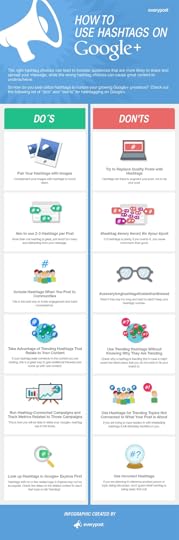
How to Use Hashtags on Google+ (Infographic)
Today’s little gem from Infographic land is one on using hashtags on Google+ that I originally found here. I’ve just finished putting together a short guide on social media and am in the process of updating some information on a couple of other books. I’m feeling torn about G+. Although it is part of the Google monstrosity – and therefore should be paid attention to – most say that it is a ghost town.
Since I have a healthy regard for the power of Google, I’m leaning toward giving Google+ a nod at the very least. This is a great how-to infographic on the hashtag do’s and don’ts for the platform.
Enjoy!
The post How to Use Hashtags on Google+ (Infographic) appeared first on Bakerview Consulting.
July 10, 2016
Do file formats leave you puzzled? Mobi, ePub, PDF, Docx, Doc…
How was your week? Mine was quite busy – summer holidays have started. My family are competitive swimmers – so guess where I spend my summer?

Today we are going to talk about a few things. Firstly I gave a talk on Self-publishing last weekend and realized that there is a lot of confusion about the various types of file formats that we as authors deal with. I thought I’m create a primer to help you start to understand. I’m sure there will be more on this topic in the future!
Secondly, I’m visiting the blog of my friends Anne R. Allen and Ruth Harris today. Please drop over and say hi! I’m talking about book bloggers over there.
When you read a book, do you read a book?

Do you read on an ereader?

Or do you listen to books?

So many choices!
As authors we need to figure out how to create the various file formats that are used for various parts of the writing process and in fact, the various file formats that are used or uploaded to the various retail outlets so readers can buy a copy. Although I do most of my own formatting, this isn’t something I suggest for everyone. However, whether you want to do your own formatting or hire someone, you should be knowledgeable and be able to ask intelligent questions.

.DOC vs .DOCX
Starting at the very beginning, our story is likely created on a computer using either Word (or something similar) or if you have a Mac maybe you prefer Pages. Generally the industry standard is a file that was created from Word (or something similar).
The newer versions of Word produce a .docx file as the default, older versions produce a .doc file as the default. As you can read on this post on The Book Designer, the .docx file is actually an advantage for authors – it is smaller in size, more reliable, more secure and it’s future proof. If you want more details, click on the link and read more. The Book Designer is a blog that is a great source of accurate information!
For anyone who has had their work edited, the process likely occurred via a Word doc complete with track changes to help follow the process and thoughts of our editor.
The .docx file that you have when you finish the editing process is the basis for all the other files that you will need. Keep a secure copy on your computer and maybe a back up on a hard drive (if you are paranoid like me).
As mentioned above, our readers will read our work in various ways. We need to create a file to be used to create those various reading formats. This process is frequently referred to as ‘formatting.’ Although, the word ‘formatting’ can refer to many things.
Today we are going to talk about the file formats that lead to reading versions – the audio versions are another post in the future. The 3 major file formats we will need are: Mobi, ePub and PDF. Let’s talk about each one.

Mobi
A Mobi file is a proprietary file type that was created by Amazon to be read by their ereader – the Kindle. It isn’t a file type that is use by any other ereader – only the Kindle. Generally a Mobi is created using a .docx as a starting point. There are many, many different ways to create a Mobi. There are websites that offer to do the conversion, many of the retailers (KDP, Draft2Digital, etc) will do it for you, there are programs like Calibre, Vellum, Sigil – the list is endless. In actual fact, you can upload a .doc or .docx directly to Amazon via your KDP dashboard and they can create the Mobi for you. Choose carefully, though as not all formatting processes create an identical product. The last thing you want readers to complain about is random odd characters appearing in the text of your story – and yes this does happen!
I do my own formatting so that I will have my own copy of the Mobi file to email out to reviewers directly rather than go though Amazon for a copy.

ePub
An ePub file is the file type that is read by every other ereader in existence. The Nook, the Kobo reader, The Sony ereader, Adobe Digital Editions and many reading apps – they all read the ePub format. Like the Mobi, there are many different ways to create an ePub file – from website based services, to programs to actually many of the retailers. The starting point is generally a .doc or .docx and as above, all formatting is not created equal. Make sure that whatever process you choose results in a flawless reading experience for your readers.
Like above, I do my own formatting so that I will have my own copy of the ePub file to email out to reviewers directly.
The PDF is the basis for a print copy of a book. It’s often said that the Mobi and ePub file create moveable type that is suitable for an ereader, but a PDF produces a more rigid type of file. Typically the PDF is created directly from the .doc or .docx once other formatting has been done to the file. The page size is set, the margins are chosen and headers/footers and page numbers are created. This file can then be ‘saved’ to a PDF. Note that a PDF can’t be converted back into a .doc or .docx – all sorts of formatting issues are introduced if that is attempted.
There are two common ways of creating a PDF – as above, by ‘saving’ from Word or by using InDesign – an Adobe program. Interestingly, the two PDFs are not the same. CreateSpace will accept a Word to PDF type of PDF but not Ingram Sparks. Ingram requires a PDF generated by InDesign.
Do you feel like this now?

No worries – more on this in the future!
*****
For the latest news – I have added several new videos to my YouTube channel around setting up a social media profile properly. If you need a quick tutorial, drop by and see what you can learn. I’m in the final stages of finishing off the analysis of the Book Blogger Survey 2016. I sent it off to be edited just this morning so it should be available for purchase in a week or so. Lastly, a box set should be out this coming week also. Box sets are always a cheaper way of getting books than purchasing each one – and I’m all about educating as efficiently as possible!
Until next time – if you are looking for some free books to help jumpstart your understanding of technical stuff, click HERE to join. If you think this post would help someone you know, feel free to use those little share buttons below to share it with them!
The post Do file formats leave you puzzled? Mobi, ePub, PDF, Docx, Doc… appeared first on Bakerview Consulting.
July 3, 2016
Make your password UGLY and check your security.
How was your week?
Mine was scary!
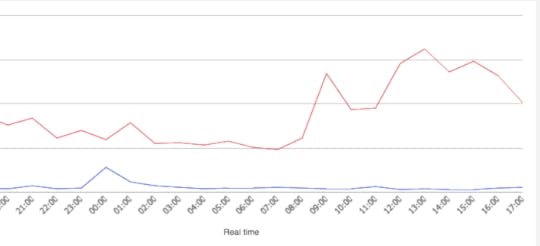
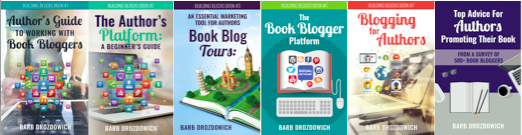
What this graphic tells you is that a bunch of sites that I look after were under attack. The blue line indicates my normal activity and the red indicates the reality.
Essentially all I could do is watch…and hope that the bots that were attacking my sites didn’t gain entry.
As I posted about last week, this kind of attack is called a brute force attack and the bad guys use computer programs or bots to rapidly try a variety of usernames and passwords to try to gain entry into a site.
This isn’t really targeted – your site isn’t more special than others. The bots are just looking for a point of weakness to take advantage of.

As the sign says…PLEASE go to your site and make your password ugly RIGHT NOW!
While you are there, make sure that all your plugins are up to date, your theme is up to date, and you have taken advantage of the latest WordPress update. Everywhere there is a number in a circle pay attention to it.
When WordPress does ‘sudden’ updates like happened a week ago, there is a reason for it – please pay attention.
The other thing that you can do is make sure that your hosting company has your back. I’ve recently moved a collection of sites to SiteGround. Although their reviews are very good, I must say that my expectations have been exceeded. They are very hands on. Their chat functionality for technical help is prompt and efficient. And honestly, the true test was the past two weeks with all the hacking attempts. I felt like they were behind me helping me protect the sites.
Although there are many good hosting companies and I have sites with several, SiteGround got a virtual hug from me this week! I also have sites on InMotionHosting and they are equally good if you are looking for some hosting recommendation.
I’ve been working on some new YouTube videos. More news on that next week!
*****
To keep you up to date on what’s going on, subscribe to the blog, or perhaps you are wanting to take the next step in your learning.

Do you want 2 FREE books filled with helpful hints about finding some powerful book bloggers to help you get the word out about your book and setting up your social media accounts properly, and some videos that lead you through trouble spots of understanding for most authors. Click here to start.
Lastly, all my books are 99 cents for one more day. If you were thinking about getting a copy, now is a good time. They are all on Amazon.
The post Make your password UGLY and check your security. appeared first on Bakerview Consulting.
June 22, 2016
How to Improve WordPress Security (Infographic)
Welcome back to Bakerview Consulting!
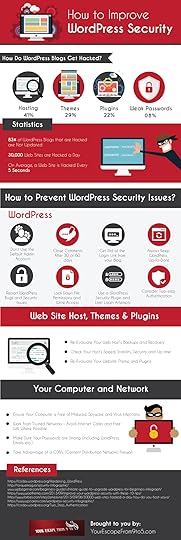
We seem to be on a roll here! Security is the topic of the week or maybe several weeks now…after I finished writing last Sunday’s posts, I was going through the blogs that I read and I found this little gem.
You know how fond I am of Infographics….
The point that is brought up on this infographic that I didn’t mention prior was that you should be choosy about the hosting company that you choose. Not all are created equally. When you are choosing a hosting company for your site, read the reviews – see what the authorities say. In many cases bigger is better – there are some exceptions. If you are looking for a larger company, Siteground.com and InMotionHosting.com are both very highly rated by the people in the know. (I use both companies but the links are not affiliate links) If you are looking for a smaller quality company, look up Jay Donovan at Tech Surgeons and tell him that Barb sent you.
Hope you enjoy the new info on this infographic!
Find the original post HERE.
The post How to Improve WordPress Security (Infographic) appeared first on Bakerview Consulting.
June 19, 2016
8 simple steps to keep your WordPress site safe

Welcome back to Bakerview Consulting!
Earlier in the week I shared an infographic on passwords – with the title of “Is your password pathetic?” May seem a bit harsh, but as we’ll find out today, creating a “non-pathetic” password is a wonderful step you can take towards making your website (or anything else, frankly) more secure.
Today we are going to talk about a list of simple things you can do to keep your WordPress site secure. As many of you know, I like to use a plugin called Wordfence to keep my sites secure and to let me know when something or someone is attacking. Wordfence has an informative blog that I read on a regular basis. They do a great job sharing about security issues in easy to understand language. One of their latest posts talks about how sites are hacked. How does the hacker get into a site or how does malware find it’s way into a site?
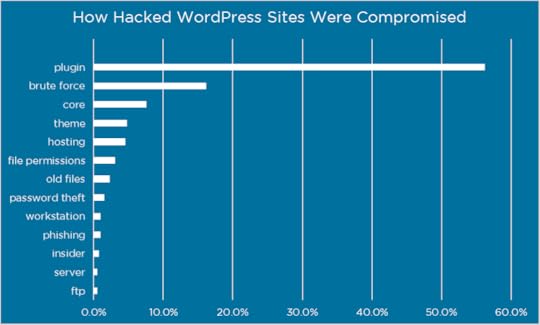
In order to figure out how to keep your site secure, you need to know how sites are hacked. Wordfence did a survey of 1032 blog owners that had been hacked and asked them if they knew, how they were hacked. As they point out, most site owners don’t know, but of the ones that do, here are the results:
 credit: Wordfence blog
As you can see above, the two primary ways a site is hacked – plugins and brute force.
Most of you who use a WordPress site are aware of what Plugins are, but let’s explain “Brute Force.” A brute force attack is either a person or more likely a computer program trying to get into your site. They try a variety of usernames and passwords attempting to find one that will work. As I’m sure you can appreciate, a computer program can try thousands of possible combinations of usernames and passwords in a short period of time, hoping that one will allow entry. Hence the name ‘Brute Force.’
Unless you are a specific target – like a large company, your site being a target is usually what’s known as a target of opportunity. Just like if you leave money visible within your car when you are parked at the mall, you become a target of opportunity. Thieves aren’t hunting you down, they walk by your car and see money visible and decide to break in. Same principle with your site – if you have an obvious vulnerability, hackers may happen by and take advantage of it.
To make your site less likely a site of opportunity, you want to look at making it more difficult for a crime of opportunity. Just like you don’t leave valuables visible in your car, you take actions to make it harder for hackers to get into your site.
Think about it – by paying attention to two aspects of your site (plugins and passwords) you will reduce the likelihood of being hacked by almost 80%.
Let’s come up with a list of 8 simple actions that you can take to protect your site.
Don’t use the default “Admin” username for your site. The is often the first choice of hackers. Make your usernames a bit less obvious.
Choose a strong password – as I often say – make it ugly! Use a combination of small letters, capital letters, numbers and symbols. As you saw in the previous post, an large number of people use ‘password’ or ‘12345’. Don’t be one of those people
Consider using other security features for your site. Wordfence is my go-to plugin for security on my sites. It allows you to lock out certain usernames and problematic IP addresses. I find it works just fine in the default settings – no need fuss usually. WordPress also allows for what it calls two factor login on your site. It’s an easy choice to add to your site.
Keep your version of WordPress up to date. Every time WordPress offers an update, click on the update button
Keep all your plugins up to date. Every time an update is offered, click on the update button
Set a calendar entry to remind you to check your plugins every 4 to 6 months. Any that are not being kept up to date, replace with another plugin that is.
Choose plugins carefully for your site. Don’t be tempted to pop any old plugin in onto your site just because it is popular. Choose a limited number of plugins (I generally suggest in the 8 to 10 range) that provide important functionality that have a track record of being kept up to date and are actively supported by their designers.
Limit the number of people who have Administrator access to your site to people who can be trusted and know what they are doing.
I hope this list helps you take some important steps to keeping your website safe. As always, don’t hesitate to ask questions!
*****
To keep you up to date on what’s going on, subscribe to the blog, or perhaps you are wanting to take the next step in your learning. Do you want a free PDF of helpful hints about finding some powerful book bloggers to help you get the word out about your book, and some videos that lead you through trouble spots of understanding for most authors. Click here to start. Lastly, all my books are 99 cents for the next week. If you were thinking about getting a copy, now is a good time. They are all on Amazon.
The post 8 simple steps to keep your WordPress site safe appeared first on Bakerview Consulting.
June 15, 2016
Password Security – Is your password pathetic?
Today’s handy infographic comes from Statista. Regular readers of this blog will realize that stats are my friend – I love chatting about stats
June 12, 2016
Books on Sale and Helpful Hints announcements
The month of May and June were busy months in my world!
The first exciting thing that happened was that my publisher, BookTrope, announced that they were closing their doors on May 31st. Luckily they were giving everyone back their rights and not tying them up in bankruptcy proceedings!
This news was met with a combination of panic, anger and cheers. Although I was frustrated at the huge amount of work ahead of me to get my books republished, I welcomed this.
I had missed the control that comes with self-publishing – I have self-published all of my books so that I can have the control back!
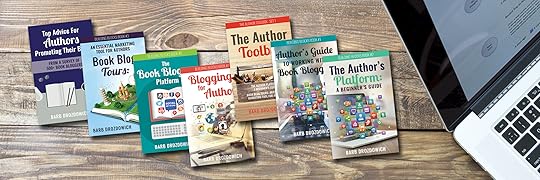
Now that the books are republished, you’ll notice that I have a couple of new covers.
I like the lightness of the new covers and I think they better represent the subject matter of the books.
Speaking of books – to start this re-publishing thing off right, all my books are priced at 99 cents on all platforms for the next week. If you have been thinking about picking up a copy, now is the time to do it. To find the books on Amazon, click here.
For those of you with sharp eyes, you will notice the new cover in the header above. Yes, there is a box set that is in the process of being formatted and will be released soon. This is also another box set in the process of being put together and it will be next to be released!
***
On to other news.
As I was redoing all my books, I had time to look through what I’ve created and think about how I can be more helpful. This set off a whole bunch of activities. You’ll see the results of these activities coming out over the next few weeks.
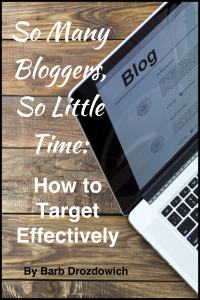 I looked at my ability to get some specialized help to authors who could make use of it. Separate from what I share on my blog.
I started looking at the topics that I answer questions on most frequently. As I’m sure you know, I have several websites and work to help authors on a daily basis. I pulled some material from various different directions. What I decided to do is to put together a series of help documents and videos to send out to anyone who is interested.
I’ve called my helpful hints “So Many Bloggers, So Little Time: How to Target Effectively.” Click HERE to get your copy today. The videos will follow in the days after.
Look for more announcements in the days to come. Hope you are all keeping well and we’ll chat again next week!
Cheers!
The post Books on Sale and Helpful Hints announcements appeared first on Bakerview Consulting.
June 1, 2016
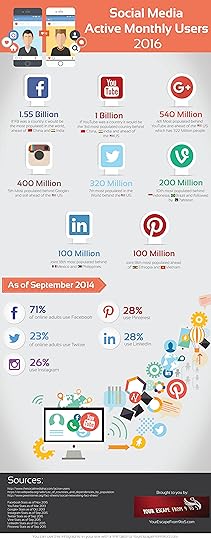
Social Media Active Monthly Users 2016 (Infographic)
I think it’s always interesting to take a report card of how popular the various social media are. The infographic below I found has current numbers on it. Just imaging 1.55 Billion with a B people on Facebook. Amazing! I hope you enjoy looking at the numbers. I found this infographic here and here
The post Social Media Active Monthly Users 2016 (Infographic) appeared first on Bakerview Consulting.


