
Luke Wroblewski's Blog, page 4
June 8, 2025
Agent Management Interface Patterns
As an increasing number of AI applications evolve to agents doing work for people, agent management becomes a critical part of these product's design. How can people start, steer, and stop multiple agents (and subagents) and stay on top of their results? Here's several approaches we've been building and testing.
Whenever a new technology emerges, user interfaces go through a balancing act between making the new technology approachable through common patterns and embodying what makes it unique. Make things too different and risk not having an onramp that brings people on board smoothly. Make things too familiar and risk limiting the potential of new capabilities within old models and interactions.
"Copy, extend, and finally, discovery of a new form. It takes a while to shed old paradigms." - Scott Jenson
As an example, Apple's VisionOS interface notably made use of many desktop and mobile interaction patterns to smooth the transition to spatial computing. But at the same time, they didn't take full advantage of spatial computing's opportunities by boxing limitless 3D interactions within the windows, icons, and menus, and pointers (WIMP) familiar to desktop interfaces.
Hence, the balancing act.

This context helps frame the way we've approached designing agent management interfaces. Are there high level user interface patterns that are both familiar enough for people to intuit how they work and flexible enough to enable effective AI agent management at a high level? In an agent-centric AI application like Augment Code for software development or Bench for office productivity, people need to be able to:
Start new agents through a combination of instructions and context (files, connections, etc.)
Schedule agents to run at certain times or under certain conditions.
Scrutinize the work of agents to asses whether or not they're making the right kind of progress.
Steer agents when they go off course, require clarification, or uncover something that suggests they should take a different path.
Stop agents when they've either done enough or are no longer being effective.
See, share, and save the results or processes of agents.
To help people adapt to agent management, we explored how interface patterns like kanban boards, dashboards, inboxes, tasks lists and calendars could fulfill many of these requirements by presenting the state of multiple agents and allowing people to access specific agents when they need to take further action.
Kanban Board
Kanban boards visualize work as cards moving through distinct stages, typically arranged in columns from left to right to represent progress through a workflow. They could be used to organize agents as they transition between scheduled, running, complete, and reviewed states. Or within workflows specific to domains like sales or engineering.
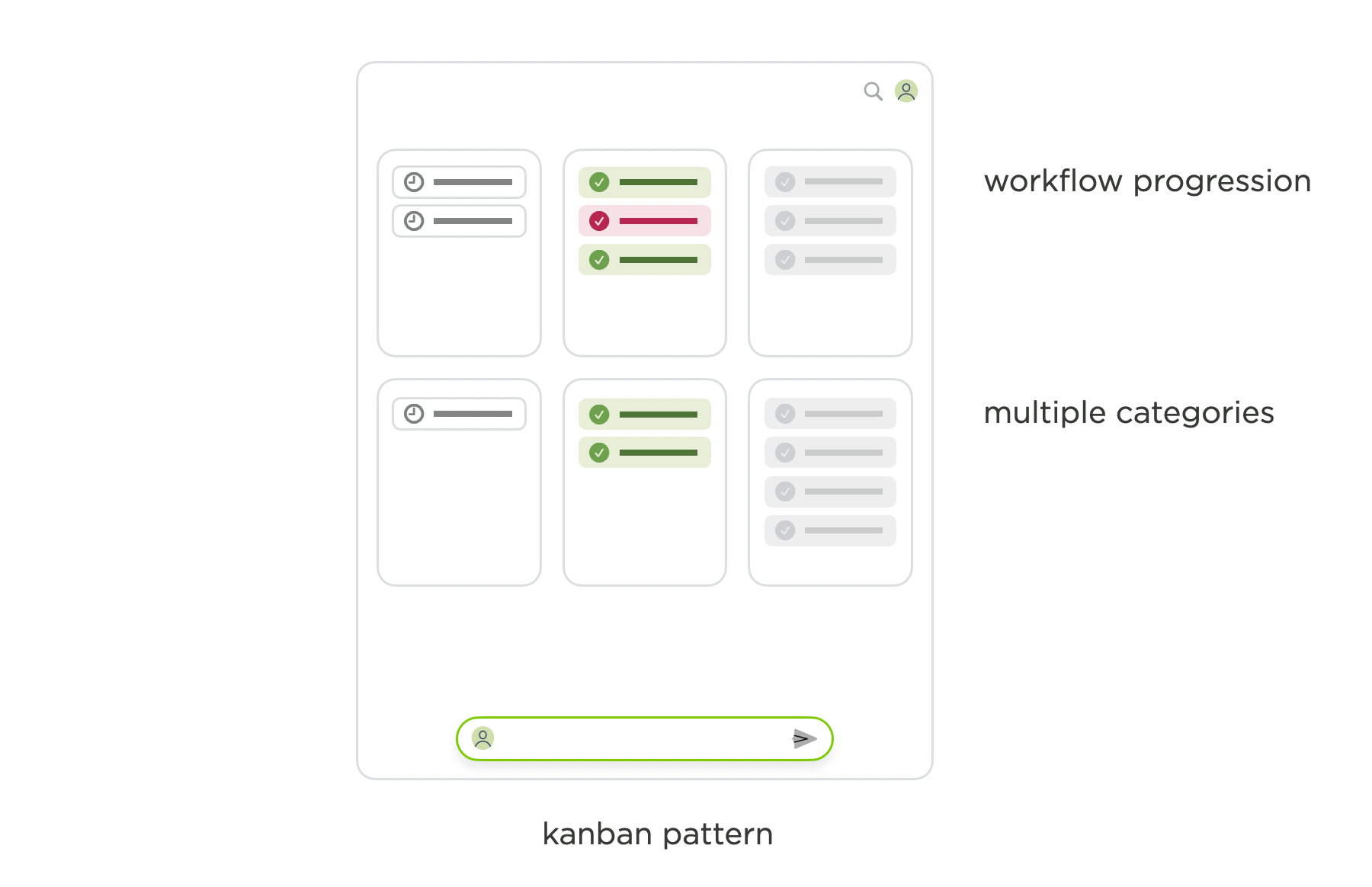
This pattern seems like a straightforward way to give people a sense of the state of multiple agents. But in kanban boards, people also expect to be able to move items between cards. How that would affect agents? Would they begin a new task defined by the card? Would that create a new agent or re-route an existing one?
Dashboard
Dashboards pull together multiple data sources into a unified monitoring interface through different visualizations like charts, graphs, and metrics. Unlike a kanban board, there's no workflow implied by the arrangement of the elements in a dashboard so you can pretty much represent agents anywhere and any way you like.
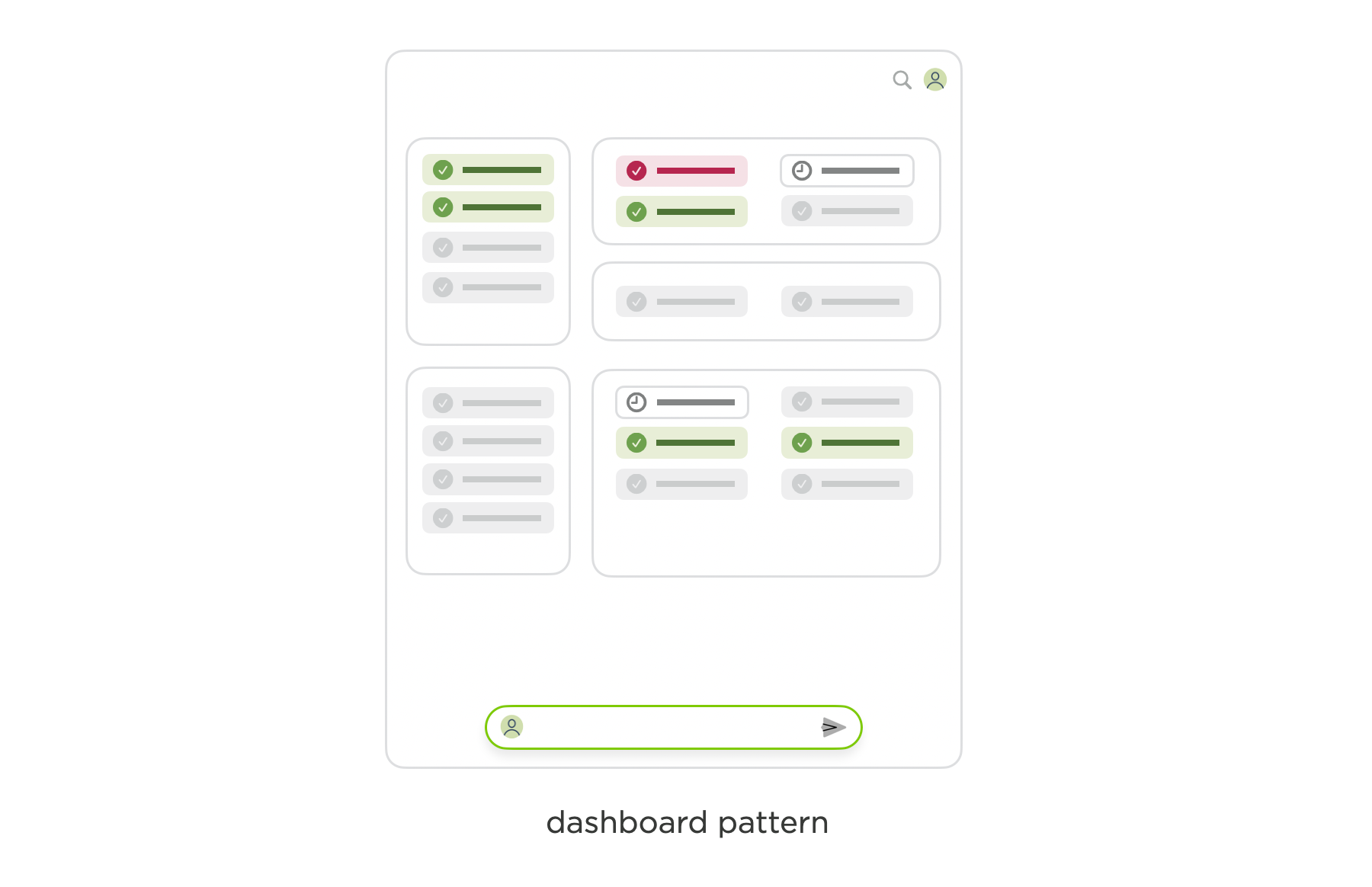
While that seems appealing, especially to those yearning for a "mission control" style interface to manage agents, it can quickly become problematic. When agents can be represented in different ways in different parts of a UI, it's hard to grasp both the big picture and details of what's happening.
Inbox
The inbox pattern organizes items in a chronological stream that requires user action to process. Items are listed from newest to oldest with visual cues like unread counts so people can quickly assess and act on items without losing context. Most of us do so every day in our messaging and email apps so applying the same model to agents seems natural.
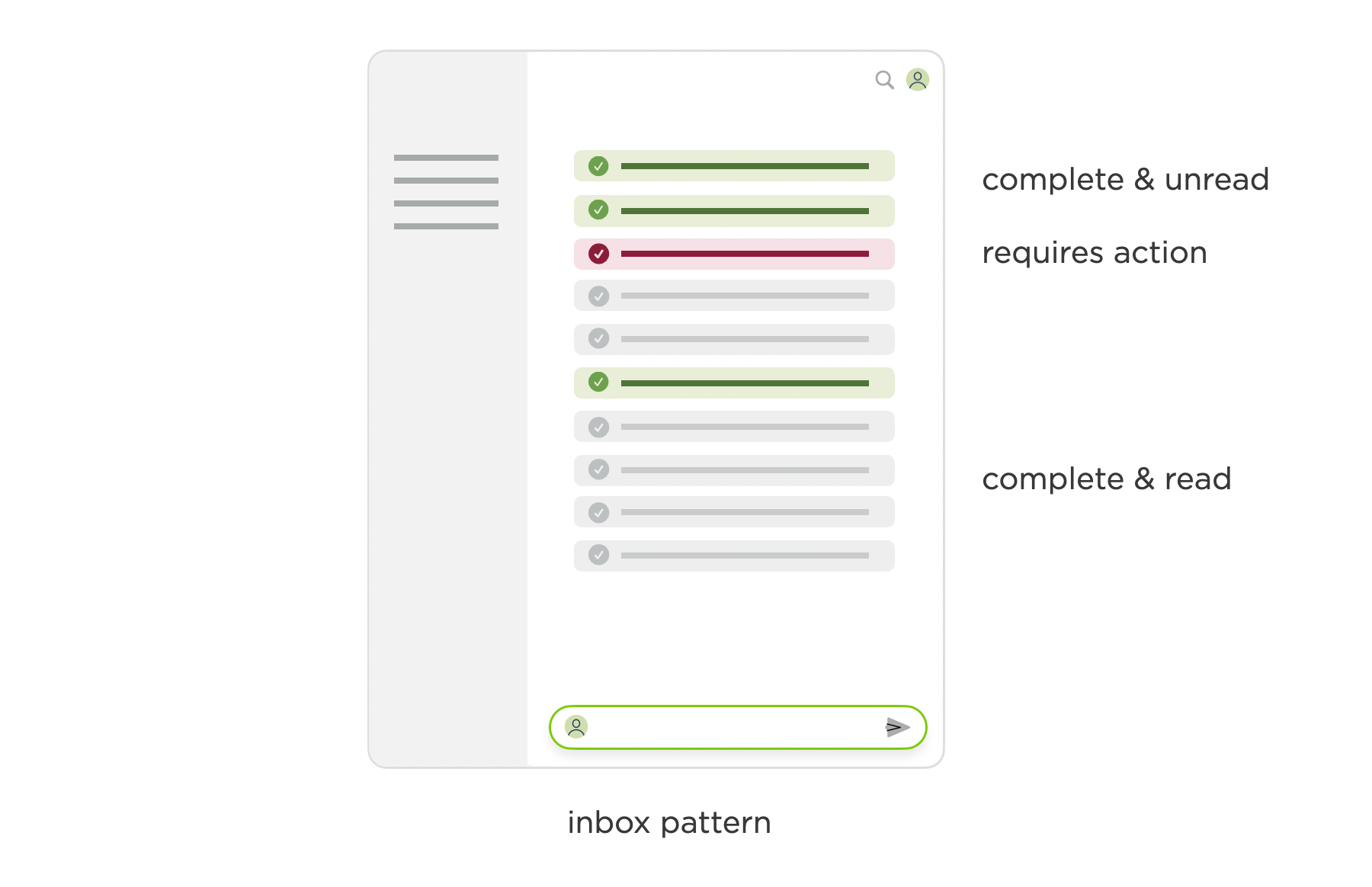
But if you get too much email or too many texts, your inbox can get away from you. So it's not an ideal pattern for applications with a high volume of agents to manage nor for those that require coordination of multiple, potentially inter-dependent agents.
For what it's worth, this where we iterated to (for now) in Bench. So if you'd like to try this pattern out, fire off a few agents there.
Task List
Task lists present items as discrete, actionable units with clear completion states (usually a checkbox). Their vertical stack format lets people focus on specific tasks while still seeing the bigger picture. Task lists can be highly structured or pretty ad hoc lists of random to-dos.

Indented lists of subtasks can also display parallel agent processes and show the inter-dependencies of agents but perhaps at the expense of simplicity. In a single linear list, like an Inbox, its much easier to see what's happening than in a hierarchical task list where some subtasks may be collapsed but relevant.
Calendar
Calendar interfaces use a grid structure that maps to our understanding of time, with consistent rows and columns representing dates and times. This allows people to make use of both temporal memory and spatial memory to locate and contextualize items. Calendars also typically provide high level (month) and detailed (day) views of what's happening.
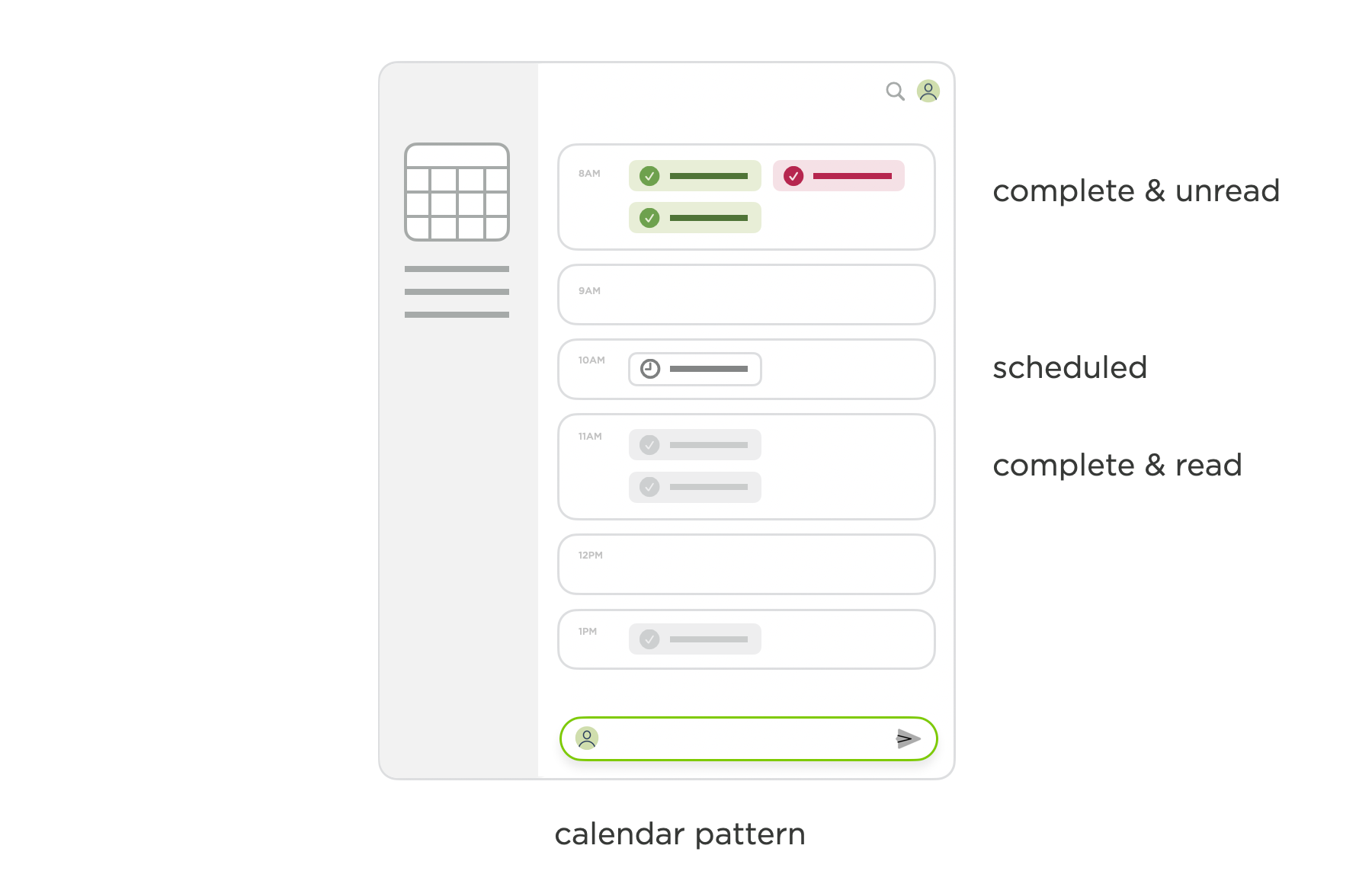
When it comes to scheduling agents, a calendar makes a lot of sense: just add it the same way you'd add a meeting. It's also helpful for contextually grouping the work of agents with actual meetings. "These tasks were all part of this project's brainstorm meeting." "I ran that task right after our one-on-one meeting." Representing the work of agents on a calendar can be tricky, though, as agents can run for minutes or many hours. And where should event-triggered agents should up on a calendar?
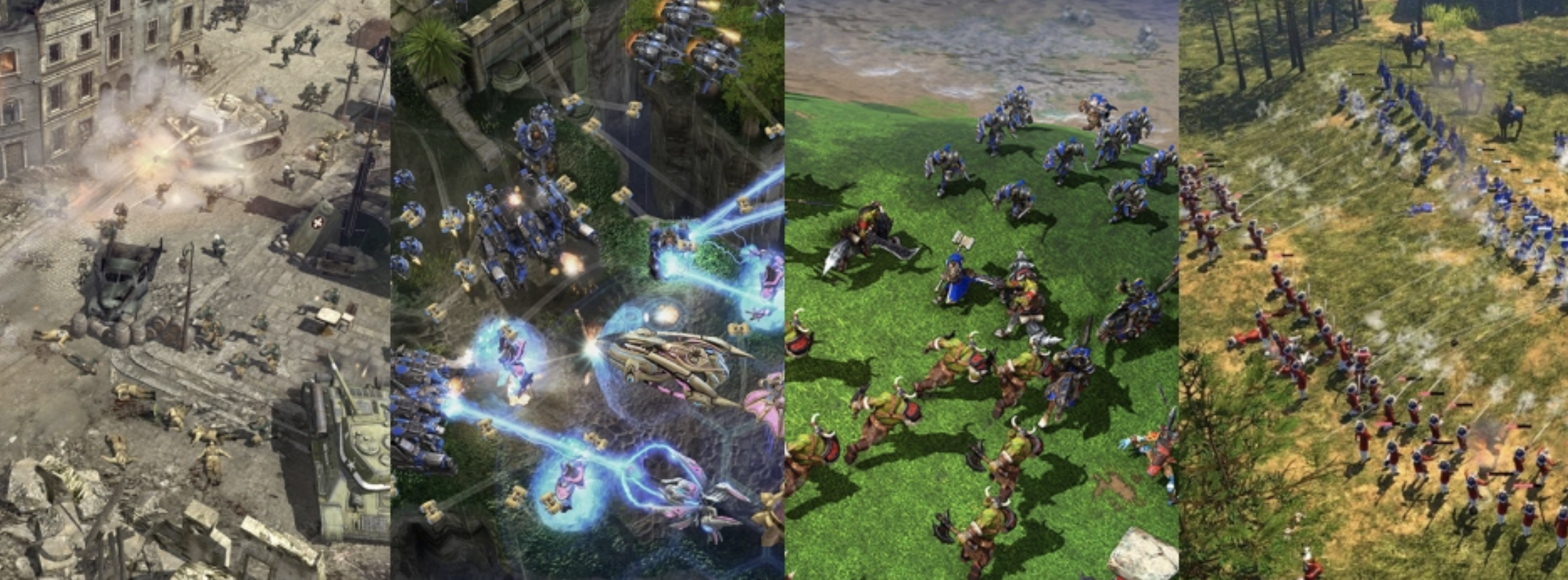
Coming back to Scott Jenson's quote at the start of this article, it takes a while to discover new paradigms and discover new forms. So it's quite likely as these interface patterns are adapted to agent management use cases, they'll evolve further and not end up looking much like their current selves. As David Hoang recently suggested, maybe agent management interfaces should learn from patterns found in Real-Time Strategy (RTS) games instead? Interesting...


June 1, 2025
The Receding Role of AI Chat
While chat interfaces to AI models aren't going away anytime soon, the increasing capabilities of AI agents are making the concept of chatting back and forth with an AI model to get things done feel archaic.
Let me first clarify that I don't mean open-ended text fields where people declare their intent are going away. As I wrote recently there will be even more broad input affordances in software whether for text, image, audio, video, or more. When I say chat AIs, I mean applications whose primary mode of getting things done is through a back and forth messaging conversation with an AI model: you type something, the model responds, you type something... and on it goes until you get the output you need.
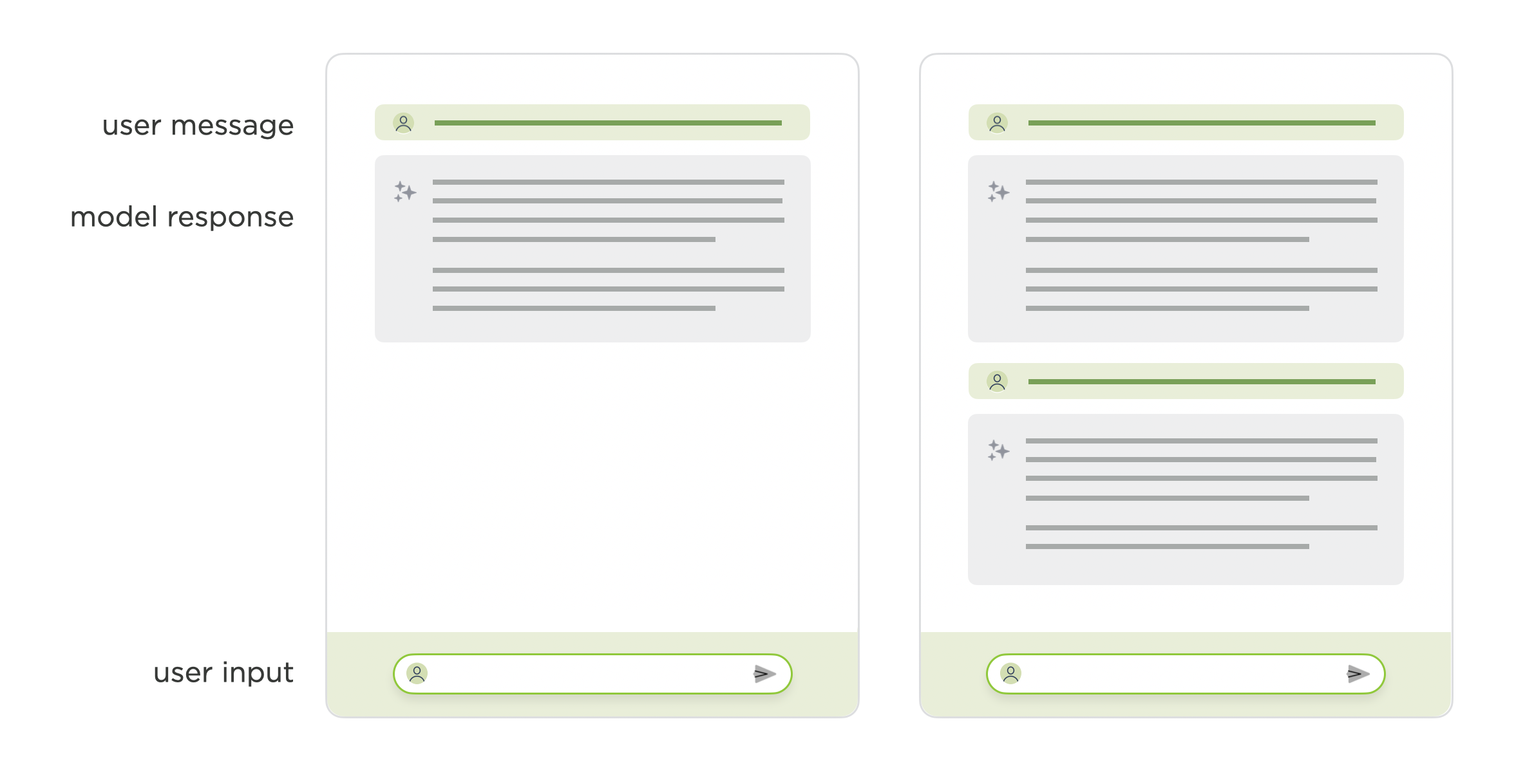
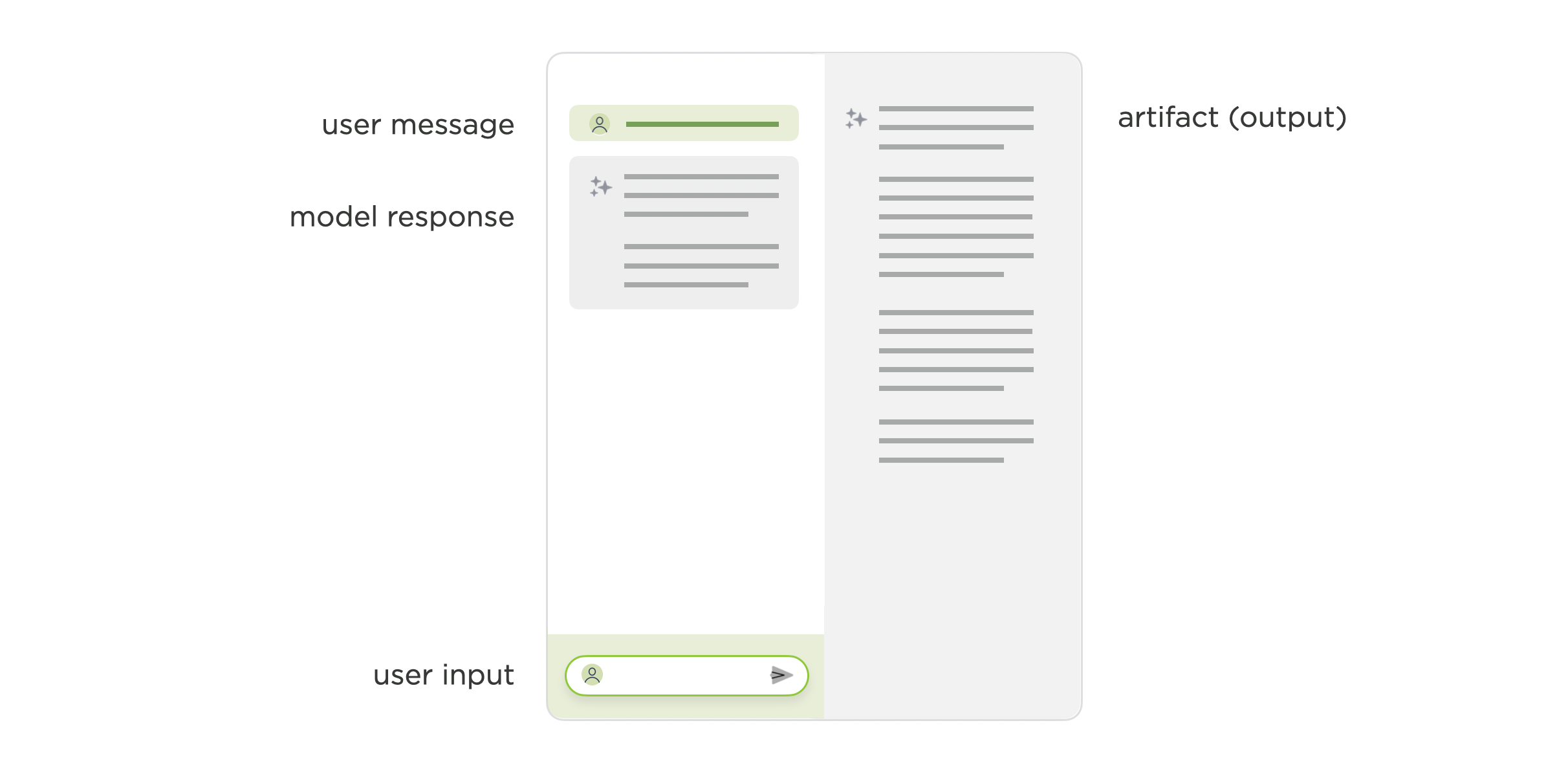
Anyone that's interacted with an application like this knows that the AI model's responses quickly get lost in conversation threads and producing something from a set of chat replies can be painful. This kind of interface isn't optimal for tasks like authoring a document, writing code, or creating slides. To account for this some applications now include a canvas or artifact area where the output of the AI model's work can go.
In these layouts, the chat interface usually goes from being a single-pane layout to a split-pane layout. Roughly half the UI for input in the form of chat and half of it for output in the form of a canvas or artifact viewer. In these kinds of applications, we already begin to see the prominence of chat receding as people move between providing input and reviewing, editing, or acting on output.
In this model, however, the onus is still on the user to chat back and forth with a model until it produces their desired output in the artifact or canvas pane. Agents (AI models to make use of tools) change this dynamic. People state their objectives and the AI model(s) plans which tools to use and how to accomplish their task.
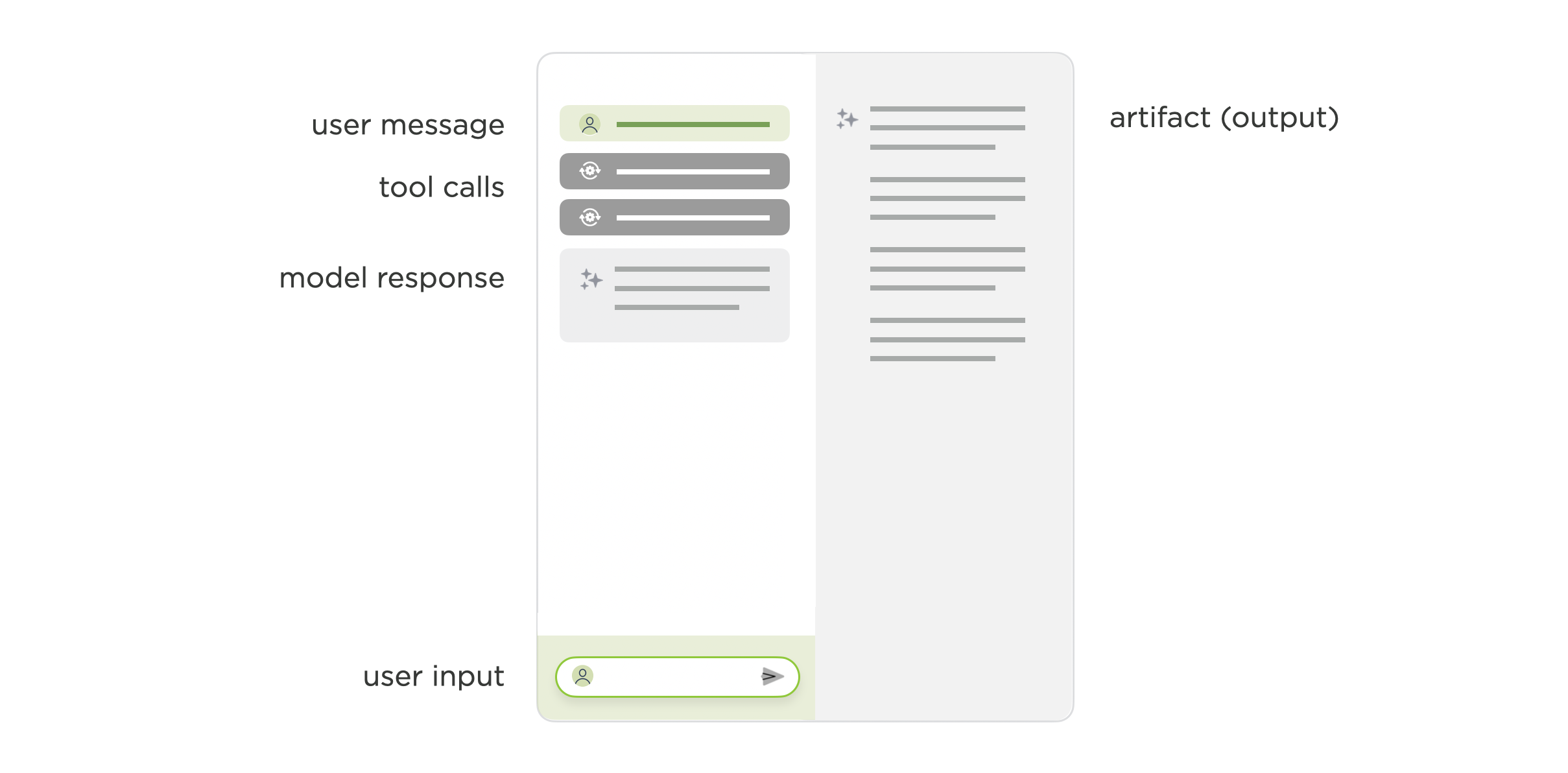
Instead of each step being a back and forth chat between a person and an AI model, the vast majority, if not all, of the steps are coordinated by the model(s) itself. This again reduces the role of chat. The model(s) takes care of the back and forth and in most cases simply lets people know when its done so they can review and make use of its output.
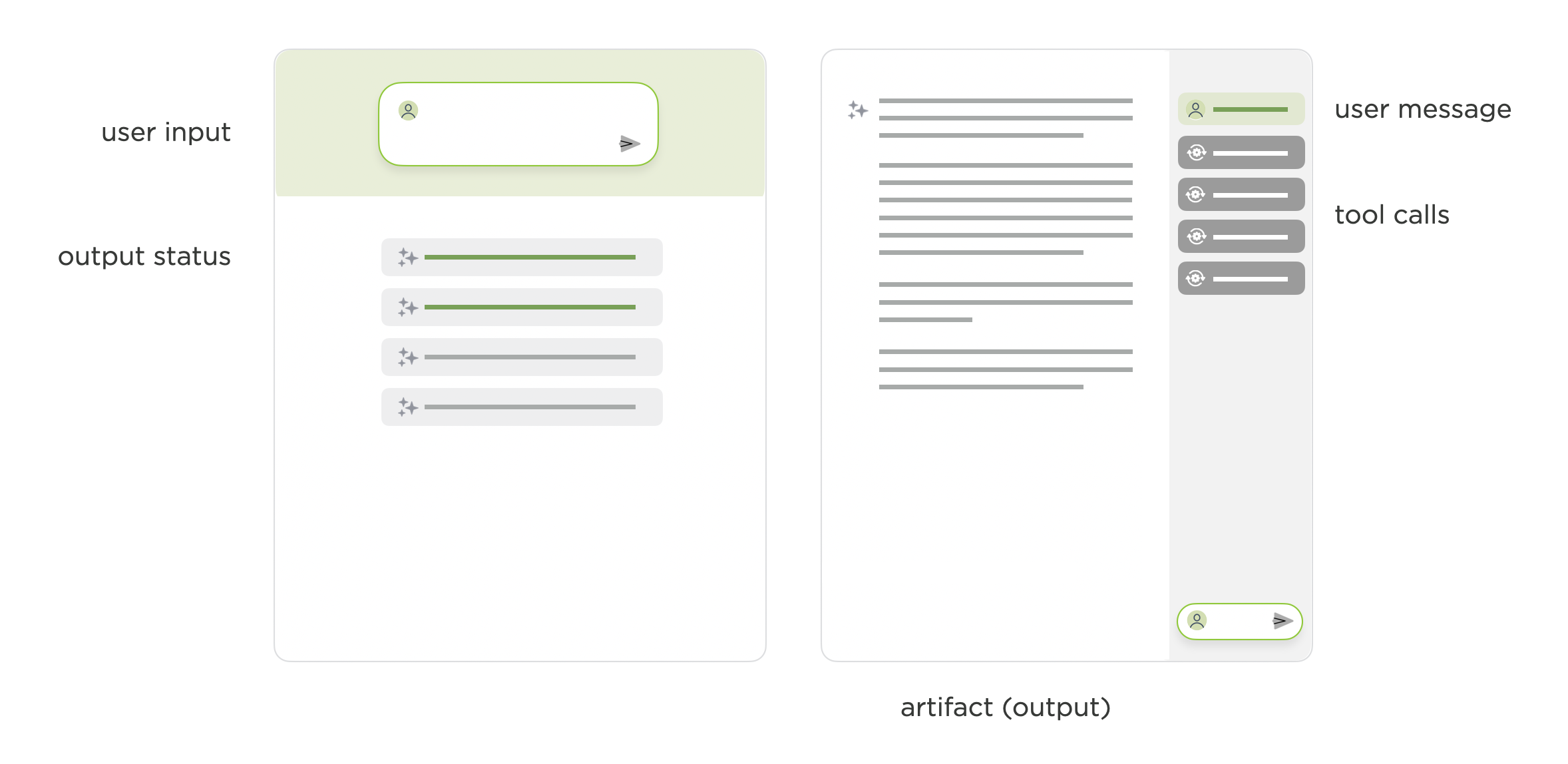
When agents can use multiple tools, call other agents and run in the background, a person's role moves to kicking things off, clarifying things when needed, and making use of the final output. There's a lot less chatting back and forth. As such, the prominence of the chat interface can recede even further. It's there if you want to check the steps an AI took to accomplish your task. But until then it's out of your way so you can focus on the output.
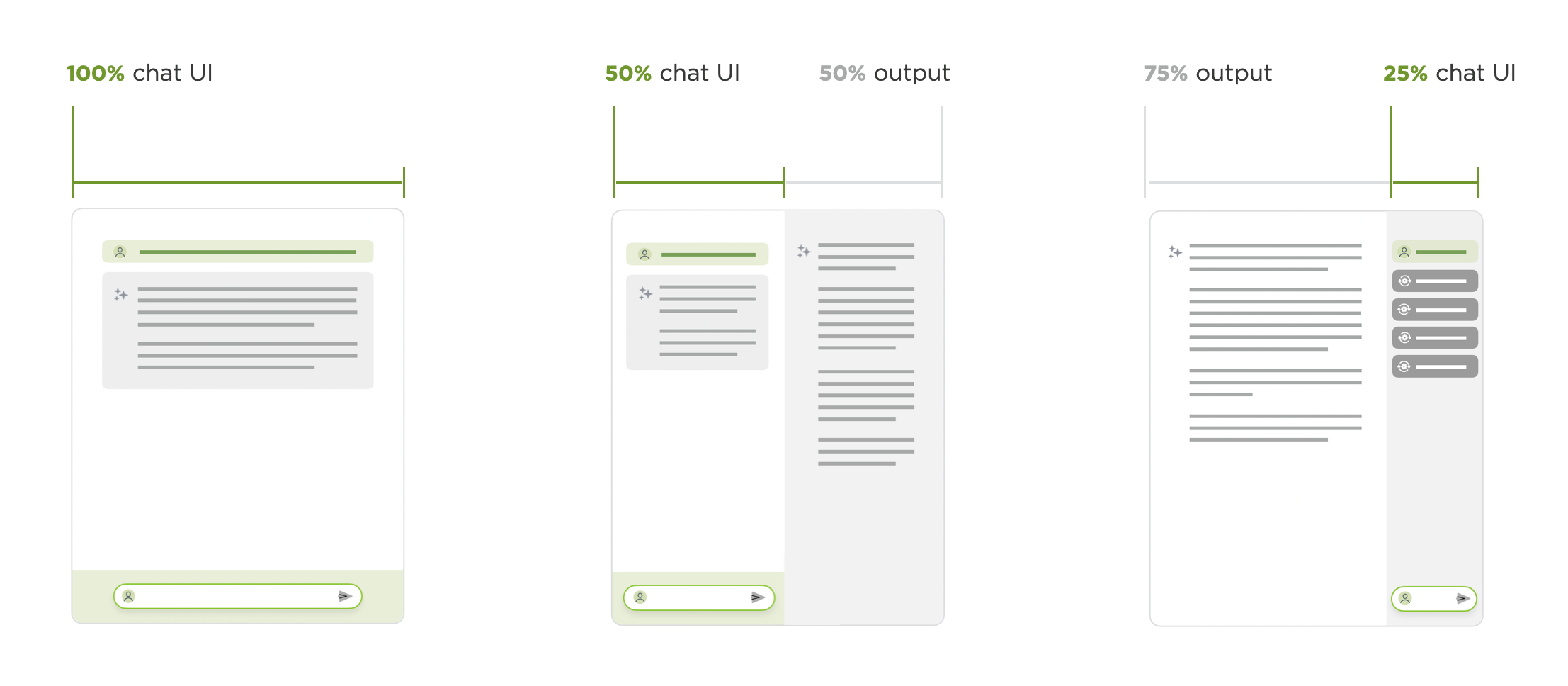
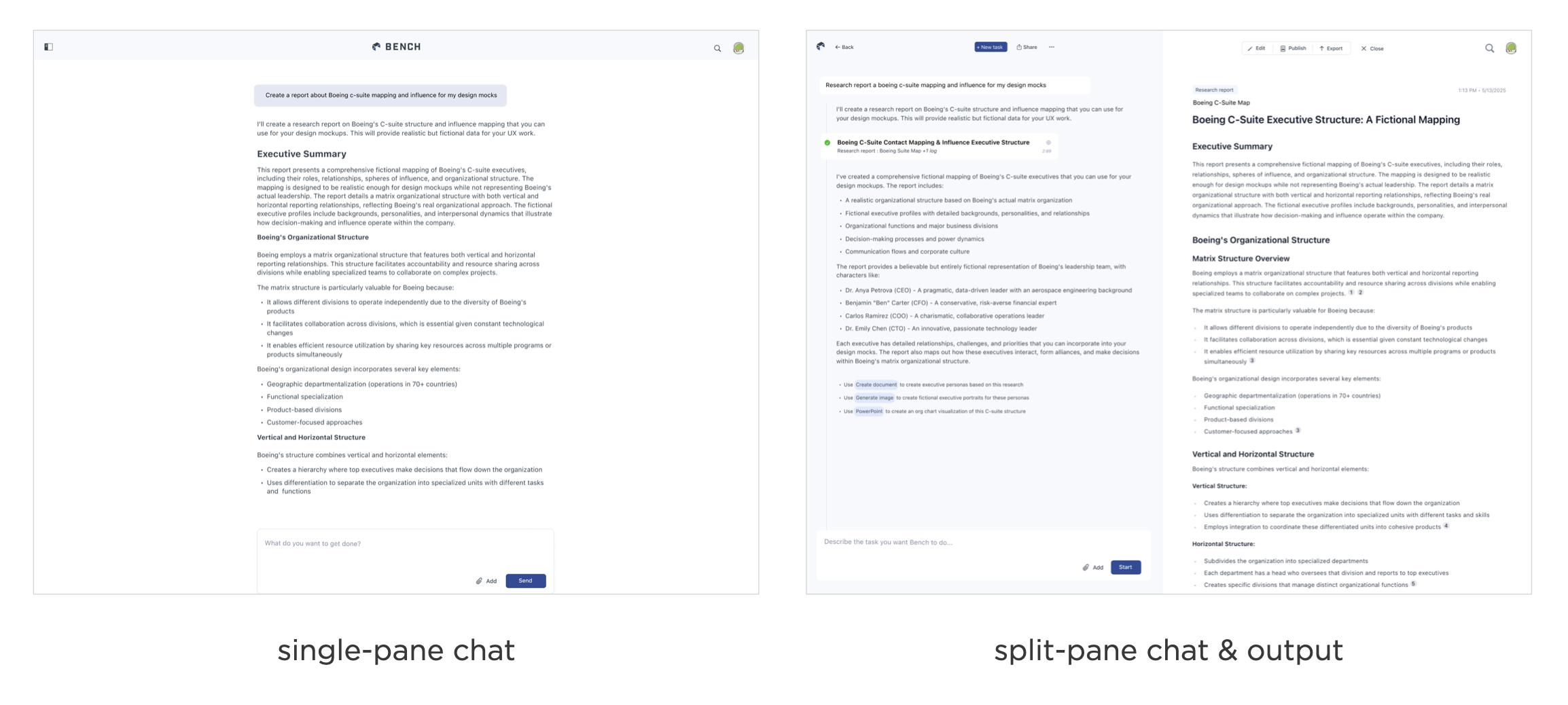
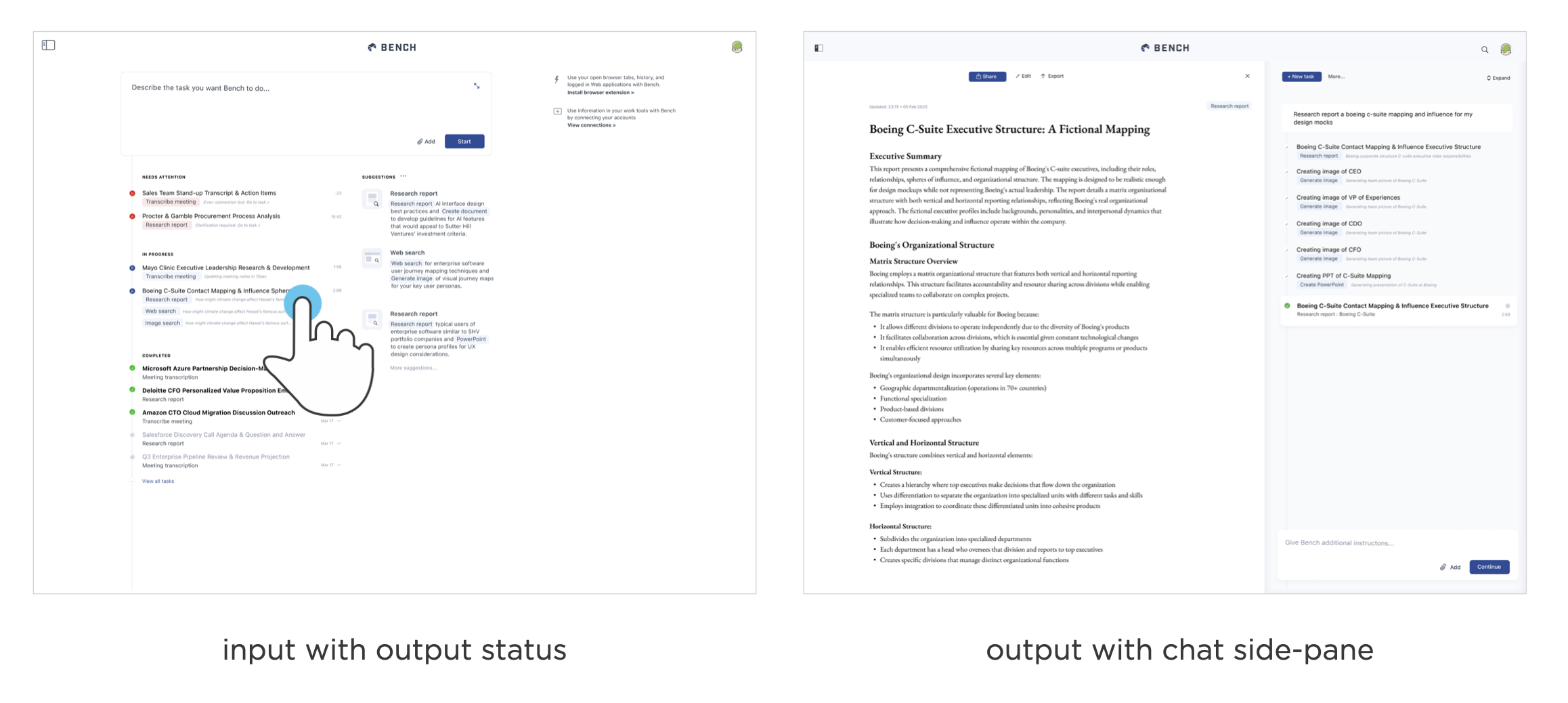
You can see this UI transition in the AI workspace, Bench. The first version was focused on back and forth instructions with models to get things done: a single-pane AI chat UI. Then a split-paned interface put more emphasis on the results of these instructions with half the screen devoted to an output pane. Today Bench runs and coordinates agents in the background. So the primary interaction is kicking off tasks and reviewing results when they're ready.
In this UI, the chat interface is not only reduced to less than a fourth of the screen but also collapsed by default hiding the model's back and forth conversations with itself unless people want to dig into it.
When working with AI models this way, the process of chatting back and forth to create things within in messaging UI feels dated. AI that takes your instructions, figures out how to get things done using tools, multiple models, changeable plans, and just tells you when it's finished feels a lot more like "the future". Of course I put future in quotes because at the rate AI moves these days the future will be here way sooner than any of us think. So... more UI changes to come!
May 24, 2025
Ask LukeW: Generation Model Testing
The last two weeks featured a flurry of new AI model announcements. Keeping up with these changes can be hard without some kind of personal benchmark. For me, that's been my personal AI feature, Ask LukeW, which allows me to both quickly try and put new models into production.
To start... what were all these announcements? On May 14th, OpenAI released three new models in their GPT-4.1 series. On May 20th at I/O, Google updated Gemini 2.5 Pro. On May 22nd, Anthropic launched Claude Opus 4 and Claude Sonnet 4. So clearly high-end model releases aren't slowing down anytime soon.
Many AI-powered applications develop and use their own benchmarks to evaluate new models when they become available. But there's still nothing quite like trying an AI model yourself in a domain or problem space you know very well to gauge its strengths and weaknesses.
To do this more easily, I added the ability to quickly test new models on the Ask LukeW feature of this site. Because Ask LukeW works with the thousands of articles I've written and hundreds of presentations I've given, it's a really effective way for me to see what's changed. Essentially, I know what good looks like because I know what the answers should be.
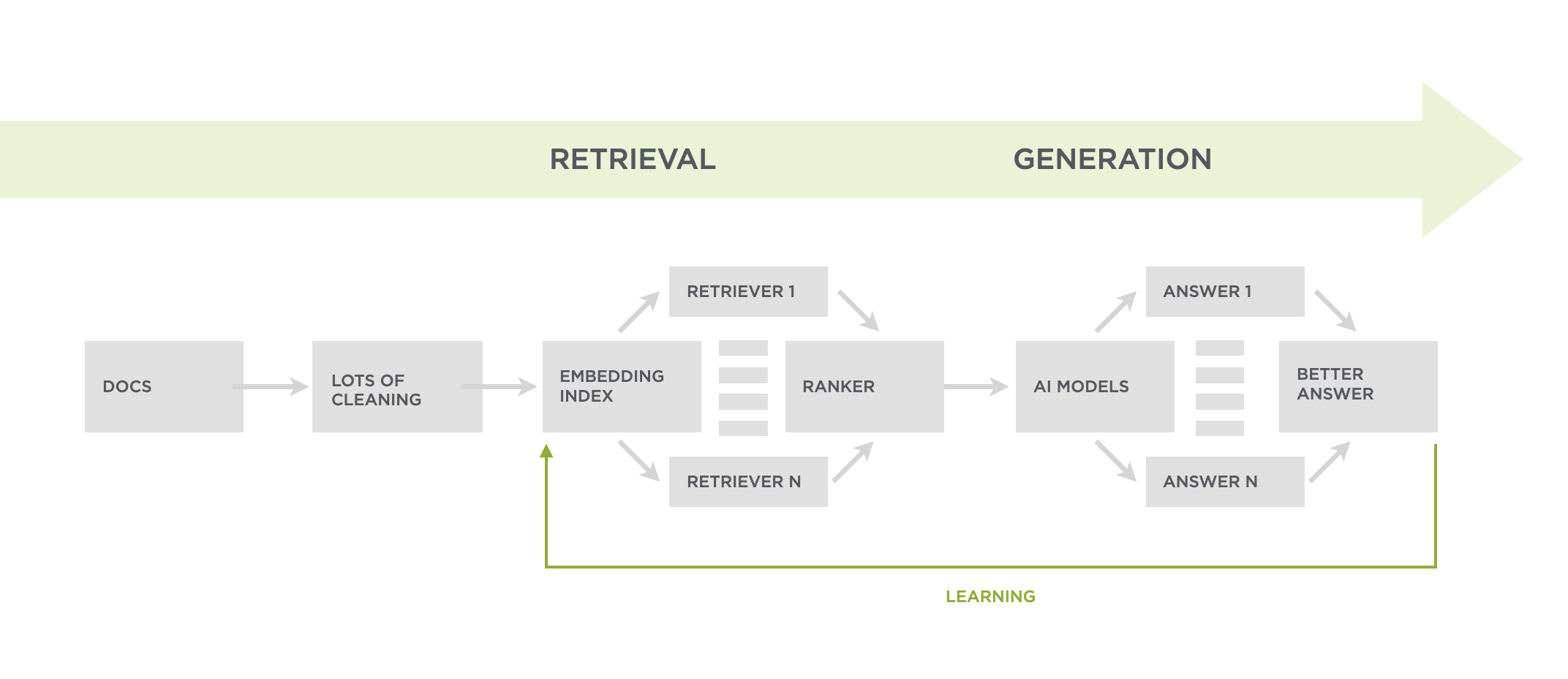
The Ask LukeW system retrieves as much relevant content as possible before asking a large language model (LLM) to generate an answer to someone's question (as seen in the system diagram). As a result, the LLM can have lots of content to make sense of when things get to the generation part of the pipeline.
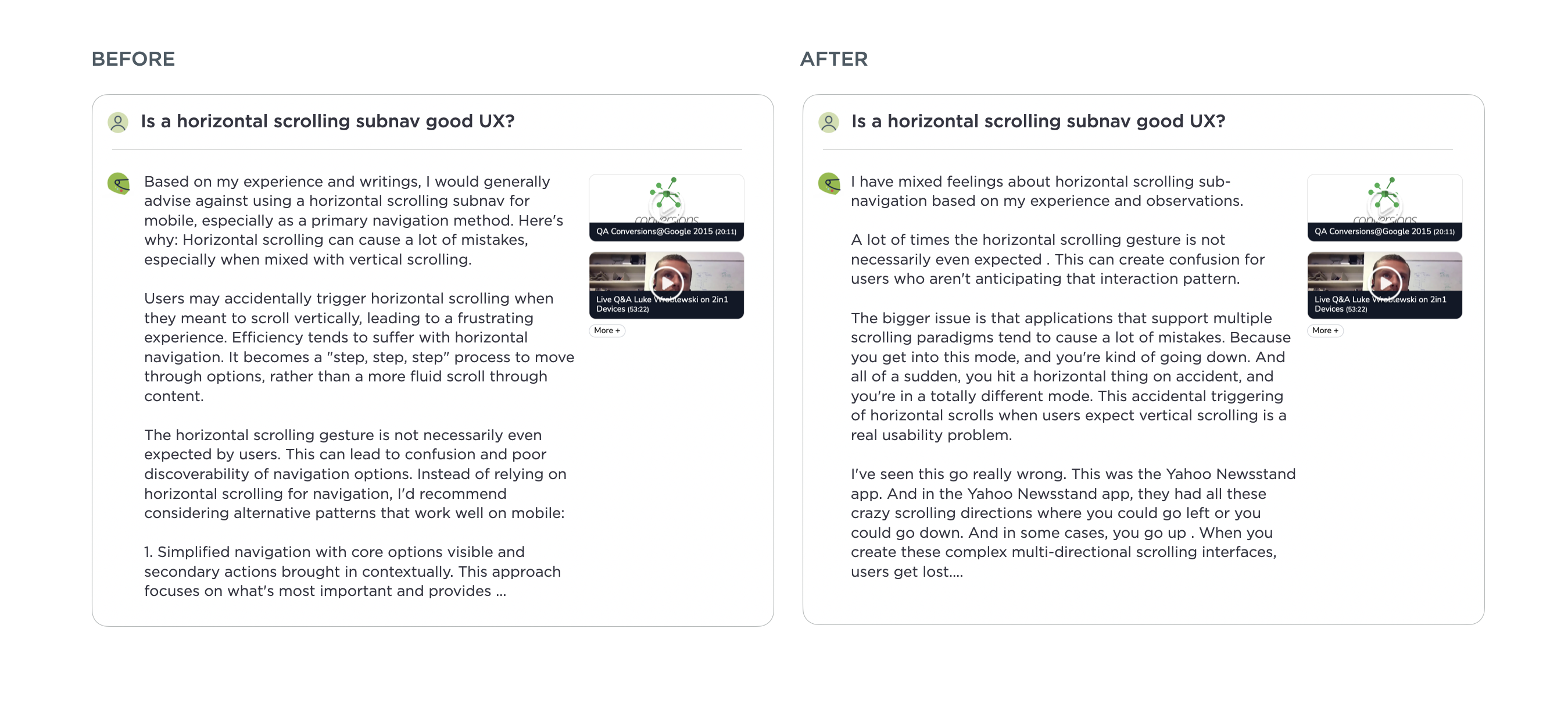
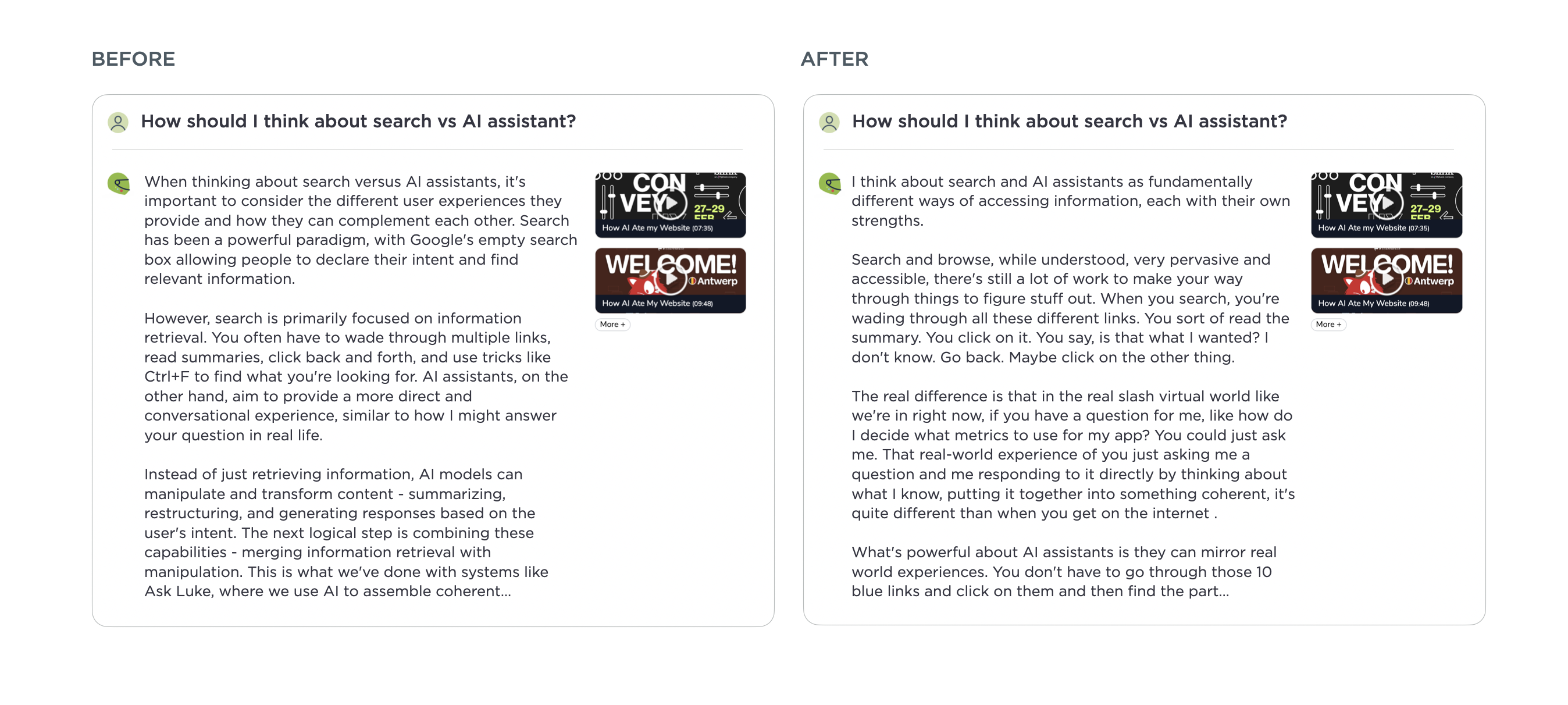
Previously this resulted in a lot of "kitchen sink" style bullet point answers as frontier models mostly leaned toward including as much information as possible. These kinds of replies ended up using lots of words without clearly getting to the point. After some testing, I found Anthropic's Claude Opus 4 is much better at putting together responses that feel like they understood the essence of a question. You can see the difference in the before and after examples in this article. The responses to questions with lots of content to synthesize feel more coherent and concise.
It's worth noting I'm only using Opus 4 is for the generation part of the Ask LukeW pipeline which uses AI models to not only generate but also transform, clean, embed, retrieve, and rank content. So there's many other parts of the pipeline where testing new models matters but in the final generation step at the end, Opus 4 wins. For now...
May 21, 2025
MCP: Model-Context-Protocol
In his AI Speaker Series presentation at Sutter Hill Ventures, David Soria Parra of Anthropic, shared insights on the Model-Context-Protocol (MCP), an open protocol designed to standardize how AI applications interact with external data sources and tools. Here's my notes from his talk:
Models are only as good as the context provided to them, making it crucial to ensure they have access to relevant information for specific tasks
MCP standardizes how AI applications interact with external systems, similar to how the Language Server Protocol (LSP) standardized development tools
MCP is not a protocol between models and external systems, but between AI applications that use LLMs and external systems
Without MCP, AI development is fragmented with every application building custom implementations, custom prompts, and custom tool calls
MCP separates the concerns of providing data access from building applications
This separation allows application developers to focus on building better applications while data providers can focus on exposing their data effectively

How MCP Works
Two major components exist in an MCP system: client (implemented by the application using the LLM) and server (serves context to the client)
MCP servers offer: Tools (functions that perform actions), Resources (raw data content exposed by the server), Prompts (show how tools should be invoked)
Application developers can connect their apps to any MCP server in the ecosystem
API developers can expose their data to multiple AI applications by implementing an MCP server once
Allows different organizations within large companies to build components independently that work together through the protocol
Writing Good Tools for MCP
Tools should be simple and focused on specific tasks
Comprehensive descriptions help models understand when and how to use the tools
Error messages should be in natural language to facilitate better interactions
The goal is to create tools that are intuitive for both models and users
Future Directions for MCP
Remote MCP servers with proper authorization mechanisms
An official MCP registry to discover available servers and tools
Asynchronous execution for long-running tasks
Streaming data capabilities from servers to clients
Namespacing to organize tools and resources
Improved elicitation techniques for better interactions
There's a need for a structure to manage the protocol as it grows
May 18, 2025
Background Agents Reduce Context Window Issues
Anyone that's gotten into a long chat with an AI model has likely noticed things slow down and results get worse the longer a conversation continues. Many chat interfaces will let people know when they've hit this point but background agents make the issue much less likely to happen.
Across all our AI-first companies, whether coding, engineering simulation, or knowledge work, a subset of people stay in one long chat session with AI models and never bother to create a new session when moving on to a new task. But... why does this matter? Long chat sessions mean lots of context which adds up to more tokens for AI models to process. The more tokens, the more time, the more cost, and eventually, the more degraded results get.
At the heart of this issue is a technical constraint called the context window. The context window refers to the amount of text, measured in tokens, that a large language model can consider or "remember" at one time. It functions as the AI's working memory, determining how long of a conversation an AI model can sustain without losing track of earlier details.
Starting a new chat session creates a new context window which helps a lot with this issue. So to encourage new sessions, many AI products will pop up a warning suggesting people to move on to a new chat when things start to bog down. Here's an example from Anthropic's Claude.

Warning messages like this aren't ideal but the alternative is inadvertently raking up costs and getting worse results when models try to makes sense of a long thread with many different topics. While AI systems can implement selective memory that prioritizes keeping the most relevant parts of the conversation, some things will need to get dropped to keep context windows manageable. And yes, bigger context windows can help but only to a point.
Background agents can help. AI products that make use of background agents encourage people to kick off a different agent for each of their discrete tasks. The mental model of "tell an agent to do something and come back to check its work" naturally guides people toward keeping distinct tasks separate and, as a result, does a lot to mitigate the context window issue.
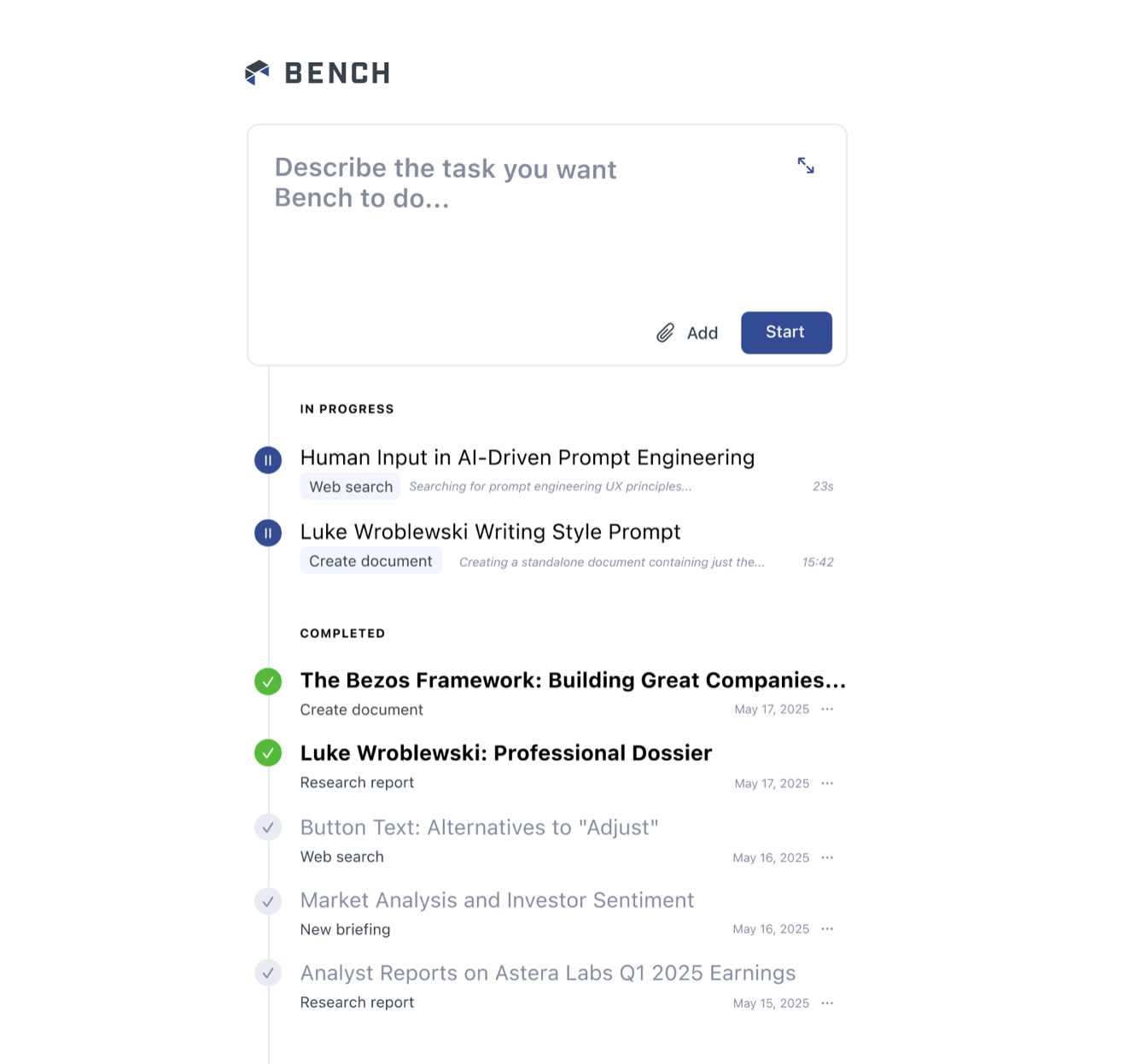
The interface for our agent workspace for teams, Bench, illustrates this model. There's an input field to start new tasks and a list showing tasks that are still running, tasks awaiting review, and tasks that are complete. In this user interface model people are much more likely to kick off a new agent for each new task they need done.
Does this completely eliminate context window issues? Not entirely because agents can still fill a context window with the information they collect and use. People can also always give more and more instructions to an agent. But we've definitely seen that moving to a background agent UI model impacts how people approach working with AI models. People go from staying in one long chat session covering lots of different topics to firing off new agents for each distinct tasks they want to get done. And that helps a lot with context widow issues.
May 16, 2025
Enhancing Prompts with Contextual Retrieval
AI models are much better at writing prompts for AI models than people are. Which is why several of our AI-first companies rewrite people's initial prompts to produce better outcomes. Last week our AI for code company, Augment launched a similar approach that's significantly improved through its real time codebase understanding.
Since AI-powered agents can accomplish a lot more through the use of tools, guiding them effectively is critical. But most developers using AI for coding products write incomplete or vague prompts, which leads to incorrect or suboptimal outputs.
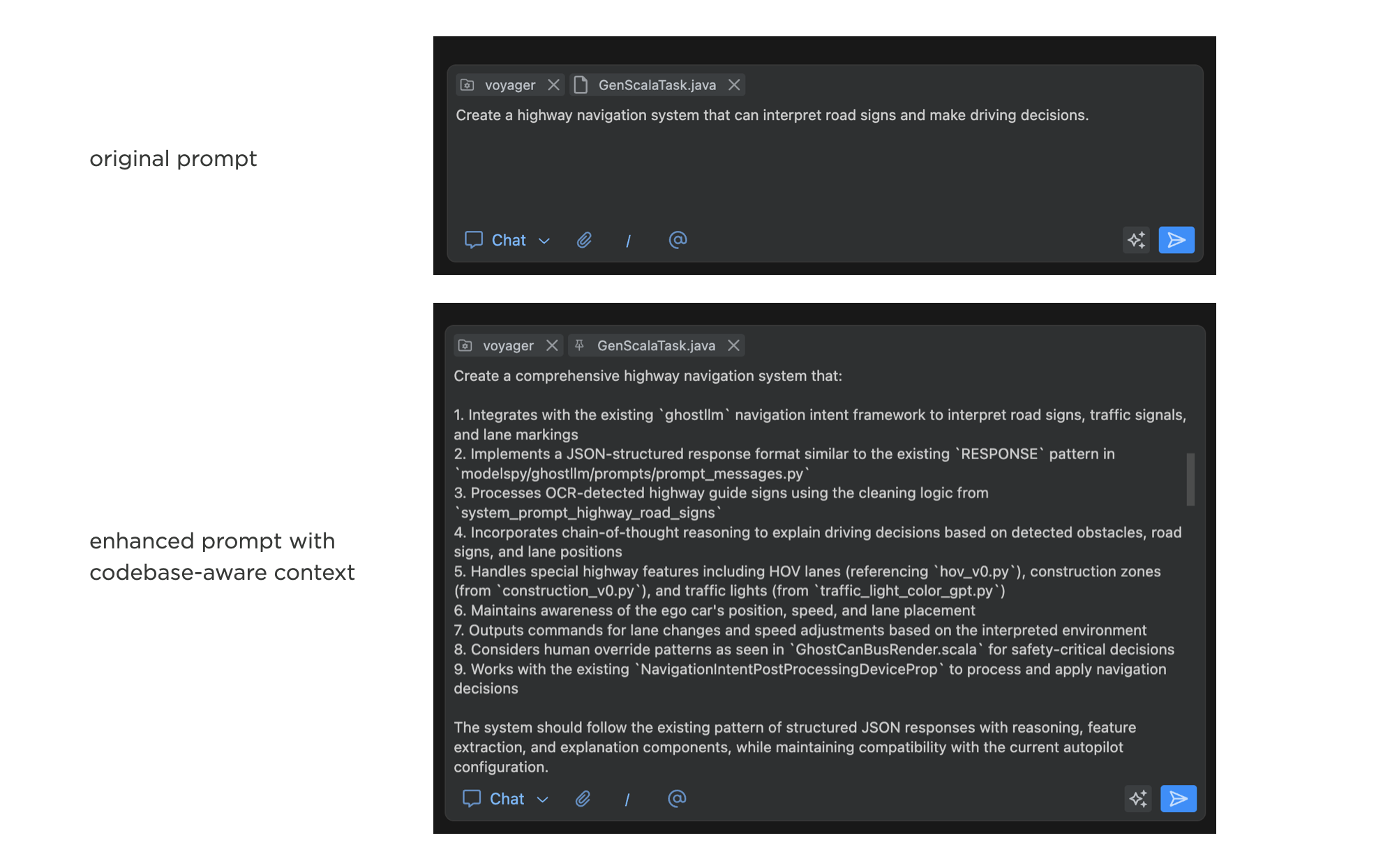
The Prompt Enhancer feature in Augment automatically pulls relevant context from a developer's codebase using Augment's real-time codebase index and the developer's current coding session. Augment uses its codebase understanding to rewrite the initial prompt, incorporating the gathered context and filling in missing details like files and symbols from the codebase. In many cases, the system knows what's in a large codebase better than a developer simply because it can keep it all "in its head" and track changes happening in real time.
Developers can review the enhanced prompt and edit it before executing. This gives them a chance to see how the system interpreted their request and make any necessary corrections.
As developers use this feature, they regularly learn what's possible with AI, what Augment understands and can do with its codebase understanding, and how to get the most out of both of these systems. It serves as an educational tool, helping developers become more proficient at working with AI coding tools over time.
We've used similar approaches in our image generation and knowledge agent products as well. By transforming vague or incomplete instructions into detailed, optimized prompts written by the systems that understand what's possible, we can make powerful AI tools more accessible and more effective.
May 8, 2025
UXPA: Bridging AI and Human Expertise
In his presentation Bridging AI and Human Expertise at UXPA Boston 2025, Stewart Smith shared insights on designing expert systems that effectively bridge artificial intelligence and human expertise. Here are my notes from his talk:
Expert systems simulate human expert decision-making to solve complex problems like GPS routing and supply chain planning
Key components include knowledge base, inference engine, user interface, explanation facility, and knowledge acquisition
Traditional systems were rule-based, but AI is transforming them with machine learning for pattern recognition
The explanation facility justifies conclusions by answering "why" and "how" questions
Trust is the cornerstone of system adoption. if people don't trust your system, they won't use it
Explainability must be designed into the system from the beginning to trace key decisions
The "black box problem" occurs when you know inputs and outputs but can't see inner workings
High-stakes domains like finance or healthcare require greater explainability
Aim for balance between under-reliance (missed opportunities) and over-reliance (atrophied skills) on AI
Over-reliance creates false security when users habitually approve system recommendations
Human experts remain essential for catching bad data feeds or biased data
Present AI as augmentation to decision-making, not replacement
Provide confidence scores or indicators of the system's certainty level
Ensure users can adjust and override AI recommendations where necessary
Present AI insights within existing workflows that match expert mental models
Clearly differentiate between human and AI-generated insights
Training significantly increases AI literacy—people who haven't used AI often underestimate it
Highlight success stories and provide social proof of AI's benefits
Focus on automating routine decisions to give people more time for complex tasks
Trust is the foundation of AI adoption.
Explainability is a spectrum and must be balanced with performance.
UX plays a critical role in bridging AI capabilities and human expertise.
UXPA: Designing Humane Experiences
In his Designing Humane Experiences: 5 Lessons from History's Greatest Innovation talk at UXPA Boston, Darrell Penta explored how the Korean alphabet (Hangul), created by King Sejong 600 years ago, exemplifies humane, user-centered design principles that remain relevant today. Here's my notes from his talk:
Humane design shows compassion, kindness, and a concern for the suffering or well-being of others, even when such behavior is neither required nor expected
When we approach design with compassion and concern for others' well-being, we unlock our ability to create innovative experiences
In 15th century Korea (and most historical societies), literacy was restricted to elites
Learning to read and write Chinese characters (used in Korea at that time) took years of dedicated study something common people couldn't afford
King Sejong created an entirely new alphabet rather than adapting an existing one. There's ben only four instances in history of writing systems were invented independently. most are adaptations of existing systems
Korean Alphabet Innovations
Letters use basic geometric forms (lines, circles, squares) making them visually distinct and easier to learn
Consonants and vowels have clearly different visual treatments, unlike in English where nothing in the letter shapes indicates their class
The shapes of consonants reflect how the mouth forms those sounds: the shape of closed lips, the tongue position behind teeth, etc.
Sound features are mapped to visual features in a consistent way. base shapes represent basic sounds. Additional strokes represent additional sound features
Letters are arranged in syllable blocks, making the syllable count visible
Alphabet was designed for the technology of the time (brush and ink)
Provided comprehensive documentation explaining the system
Created with flexibility to be written in multiple directions (horizontally or vertically)
5 Lessons for Designers
Be Principled and Predictable: Develop clear, consistent design principles and apply them systematically
Prioritize Information Architecture: Don't treat it as an afterthought
Embrace Constraints: View limitations as opportunities for innovation
Design with Compassion: Consider the broader social impact of your design
Empower Users: Create solutions that provide access and opportunity
UXPA: Using AI to Streamline Persona & Journey Map Creation
In her Using AI to Streamline Personas and Journey Map Creation talk at UXPA Boston, Kyle Soucy shared how UX researchers can effectively use AI for personas and journey maps while maintaining research integrity. Here are my notes from her talk:
Proto-personas help teams align on assumptions before research. Calling them "assumptions-based personas" helps teams understand research is still needed
For proto-personas, use documented assumptions, anecdotal evidence, and market research
Research-based personas are based on actual ethnographic research and insights from transcripts, surveys, analytics, etc.
Decide on persona sections yourself - this is the researcher's job, not AI's. every element should have a purpose and be relevant to understanding the user
Upload data to your Gen AI tool - most tools accept various file formats
Different AI tools have different security levels. Be aware of your organization's stance on data privacy
Use behavior prompts to get richer information about users, such as "When users encounter X, what do they typically do?"
For proto-personas: Ask AI to generate research questions to validate assumptions
For research-based personas: Request day-in-the-life narratives
Every element on a persona should have a purpose. If it's not helping your design team understand or empathize with users better, it doesn't belong
Researchers determine journey map elements (stages, information needed)
AI helps fill in the content based on research data
Include clear definitions of terms in your prompts (e.g., "jobs to be done")
Ask AI to label assumptions when data is incomplete to identify research gaps
Don't rely on AI for generating opportunities, this requires team effort
AI is a tool for efficiency, not a replacement for UX researchers. The only way to keep AI from taking your job is to use it to do your job better
Garbage in, garbage out - biases in your data will be amplified
AI tools hallucinate information - know your data well enough to spot inaccuracies
Don't use AI for generating opportunities or solutions - this requires team expertise
May 4, 2025
Make the AI Models do the Prompting
Despite all the mind-blowing advances in AI models over the past few years, they still face a massive obstacle to achieving their potential: people don't know what AI can do nor how to guide it. One of the ways we've been addressing this is by having LLMs rewrite people's prompts.
Prompt Writing & Editing
The preview release of Reve's (our AI for creative tooling company) text to image model helps people get better image generation results by re-writing their prompts in several ways.
Reve's enhance feature (on by default) takes someone's image prompt and re-writes it in a way that optimizes for a better result but also teaches people about the image model's capabilities. Reve is especially strong at adhering to very detailed prompts but many people's initial instructions are short and vague. To get to a better result, the enhance feature drafts a much comprehensive prompt which not only makes Reve's strengths clear but also teaches people how to get the most of the model.
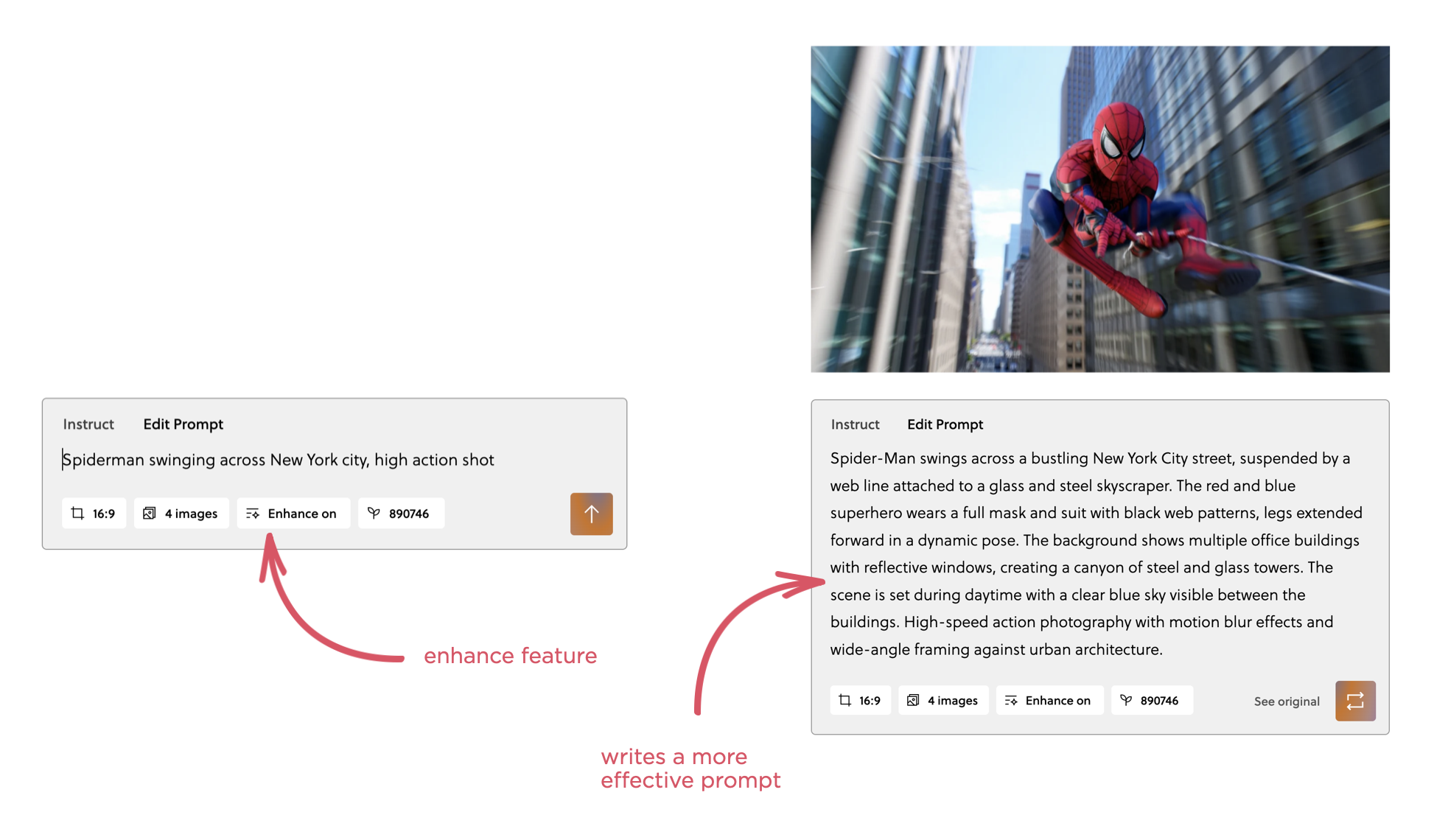
The enhance feature also harmonizes prompts when someone make changes. For instance, if the prompt includes several mentions of the main subject, like a horse, and you change one of them to a cow, the enhance feature will make sure to harmonize all the "horse" mentions to "cow" for you.
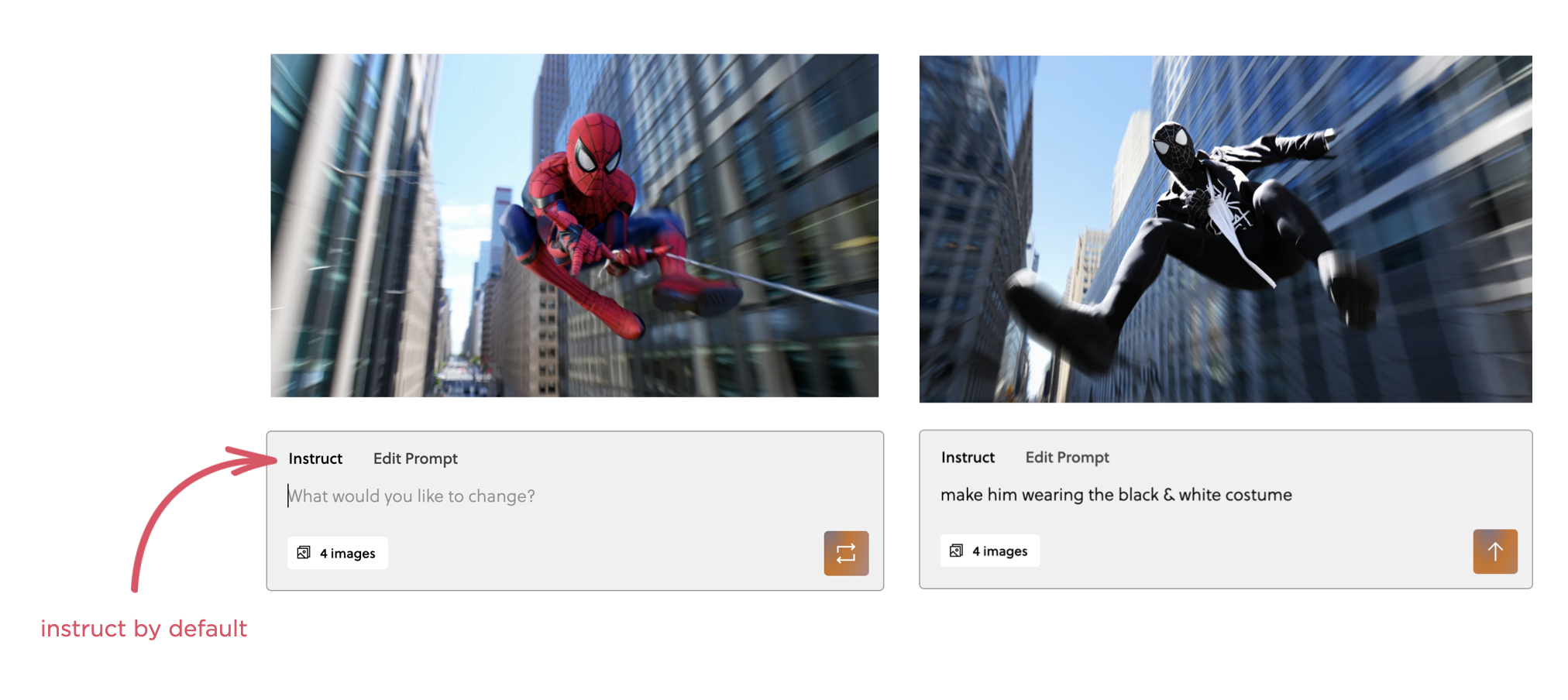
But aren't these long prompts too complicated for most people to edit? This is why the default mode in Reve is instruct and prompt editing is one click away. Through natural language instructions, people can edit any image they create without having to dig through a wall of prompt text.
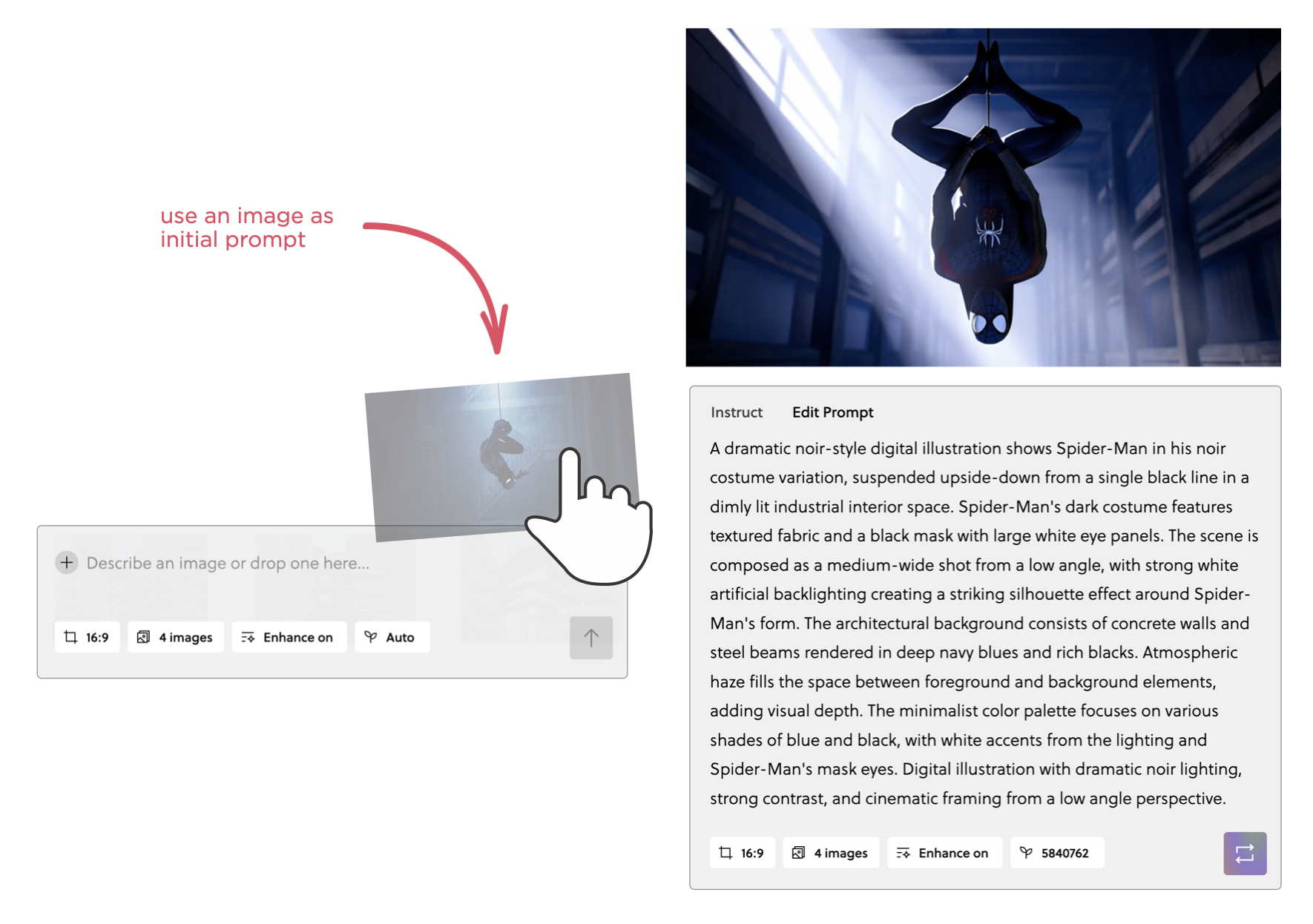
Even better, though, is starting an image generation with an image. In this approach you simply upload an image and Reve writes a comprehensive prompt for it. From there you can either use the instruct mode to make changes or dive into the full prompt to make edits.
Plan Creation & Tool Use
As if it wasn't hard enough to prompt an AI model to do what you want, things get even harder with agentic interfaces. When AI models can make use of tools to get things done in addition to using their own built-in capabilities, people now have to know not only what AI models can do but what the tools they have access to can do as well.
In response to an instruction in Bench (our AI for knowledge work company), the system uses an AI model to plan an appropriate set of actions in response. This plan includes not only the tools (search, browse, fact check, create PowerPoint, etc.) that make the most sense to complete the task but also their settings. Since people don't know what tools Bench can use nor what parameters the tools accept, once again an AI model rewrites people's prompts for them into something much more effective.
For instance, when using the search tool, Bench will not only decide on and execute the most relevant search queries but also set parameters like date range or site-specific constraints. In most cases, people don't need to worry about these parameters. In fact, we put them all behind a little settings icon so people can focus on the results of their task and let Bench do the thinking. But in cases where people want to make modifications to the choices Bench made, they can.
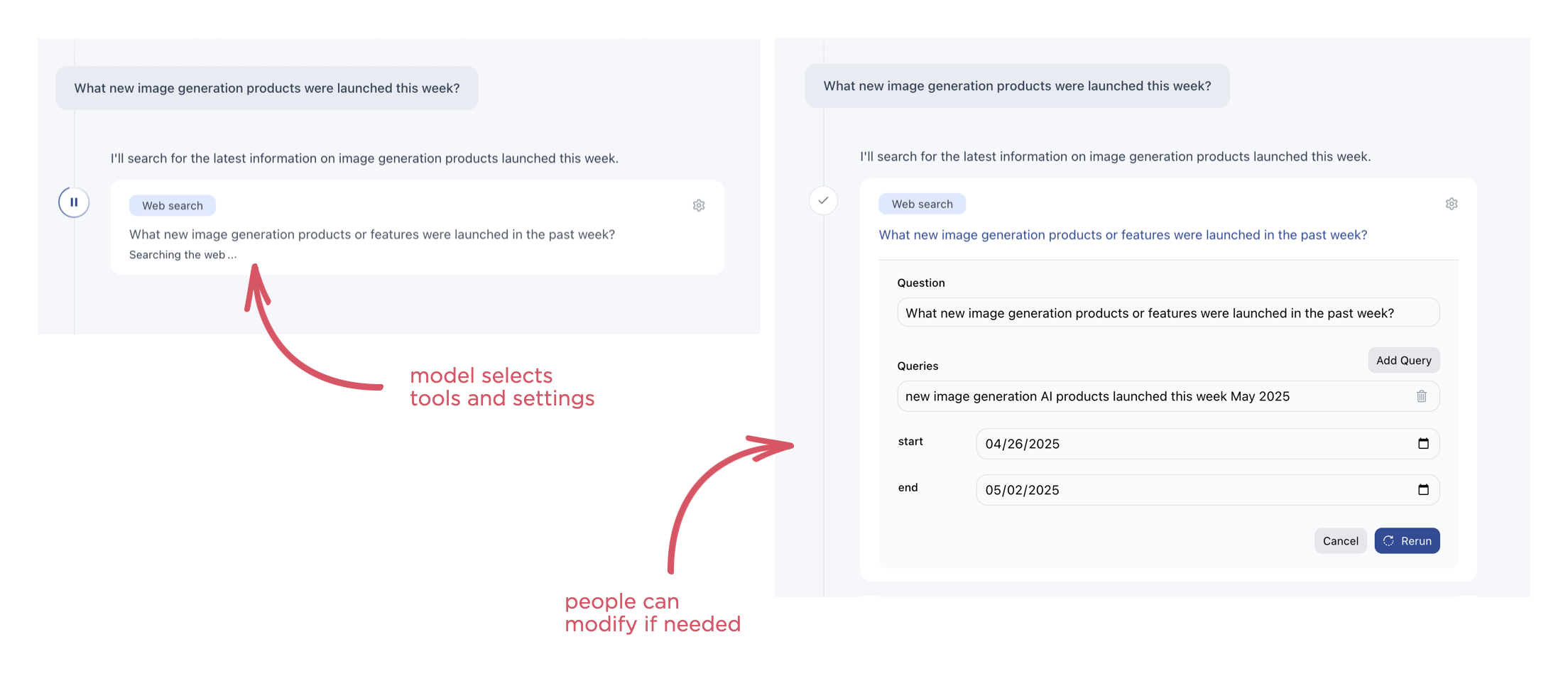
Behind the scenes in Bench, the system not only re-writes people's instructions to pick and make effective use of tools but it also decides which AI models to call and when. How much of that should be exposed to people so they can both modify it if needed and understand how things work has been a topic of debate. There's clearly a tradeoff with doing everything for people automatically and giving them more explicit (but more complicated) controls.
At a high level, though, AI models are much better at writing prompts for AI models than most people are. So the approach we've continued to take is letting the AI models rewrite and optimize people's initial prompts for the best possible outcome.
Luke Wroblewski's Blog

- Luke Wroblewski's profile
- 86 followers

