Phil Simon's Blog, page 6
October 27, 2024
Now Available: Two New Notion Templates
 As a frequent traveler, I’d sometimes forget to pack something for a personal or business trip. And by sometimes, I mean almost always. Late-night journeys to pharmacies weren’t uncommon. Sounds like a solvable problem, eh?
Over the last few months, I created a system in Notion to ensure that I never forget to do or pack anything again. Ever. Here’s one of the screenshots from the system:

Yeah, I bring a fanny pack to the gym to store my workout bands, Purell, and a few other items. TMI? Hey, at least it’s not a change purse.
The system includes some cool database views.
Of course, you can customize the hell out of it, create new templates for different types of trips, and all that jazz.
Today, I’m launching my little system as a new Notion template. It includes some cool database views, like this timeline:

Click the button below to learn more about it and buy it on Gumroad for $24.99 (USD).
BUY THE TRIP PLANNER TEMPLATE Next-Level NotificationsAs much as I love Notion, I’ve found its default task notifications a smidge lacking from the get-go. My biggest issue: Notion sends notifications on completed tasks. When you complete a task, you have to remember to uncheck the Remind box.
Several attempts to solve this problem bore no fruit, but I’m stubborn.
After last week’s Make With Notion conference that included a video testimonial from yours truly, I saw an opportunity to do something about it. I was right. This simple template enhances Notion’s default notifications in several useful ways. Specifically, it:
Eliminates superfluous notifications on completed tasks. You no longer have to worry about whether or not you remembered to uncheck the task’s Remind box. (If I had a nickel for every false positive I received, I’d have more than a few bucks, but I digress.) In fact, with this template, you may no longer find a need for the Remind box at all.Alerts the task owner if the task remains uncompleted seven days past its due date.Alerts the task owner if the task remains uncompleted a month past its due date.Of course, you can easily customize the template as needed. Anyone with a modicum of Notion skill can replicate this functionality in an existing Notion task or project database.
The price for the Enhanced Notifications template is $9.95 (USD).
LEVEL UP YOUR NOTION ALERTSThe post Now Available: Two New Notion Templates appeared first on Phil Simon.


October 22, 2024
October Tech Tips
Way back in the 80s and 90s, we used to buy software. Starting in the early aughts, though, Salesforce and other software vendors realized that they could make more money by renting us the same applications. Now, software as a service (SaaS) is standard.
Today, try and buy a program. It’s not easy. Once.com from the folks at 37signals is swimming against the stream.
Bucking the TrendA few days ago, GoDaddy sent me a note that it was time to renew Microsoft 365 (formerly Office 365). Paying $25/month for Word, Excel, and PowerPoint seemed excessive, so I started digging. I found cheaper monthly alternatives, but the pièce de résistance was a lifetime M365 subscription for $249. Sold.
iPhone Spam PreventionIt’s easy to fall down the automation rabbit hole.
iPhone, iPad, and Mac users often neglect to use Apple’s default automations. Big mistake. The Shortcuts app is insanely powerful. You can create mini apps sans any coding experience. In the first few minutes of the video below, rock star Stephen Robles explains how to auto-unsubscribe from spam.
As I write in The Nine: The Tectonic Forces Reshaping the Workplace, it’s easy to fall down the automation rabbit hole. Here is a shortcut I tweaked that automatically sends people in your Contacts app birthday notifications. (Maybe it’s a bit impersonal, but we live in an era in which AI is breaking up with humans.)
Also, I’ve got a crazy shortcut that shoots a iPad screenshot of Wordle, Connections, and other NY Times games to my friends. All told, shortcuts save me about five minutes per day or 30 hours per year. #geek
I’d be shocked if there weren’t Android equivalents.
Cross-posted on my Substack.
The post October Tech Tips appeared first on Phil Simon.
October 7, 2024
Thank You for Spamming Me, Nobull
In September, I started poking around for a new gym bag. I considered one from Nobull, an athletics company that seems to be gaining traction. Before deciding against buying the bag, I created an account using one of my actual e-mail addresses.
It didn’t take me long to realize I had made a grievous mistake.
Over the next few weeks, Nobull’s marketing department harassed me with dozens of automated and unsolicited messages—sometimes two per day. I immediately attempted to unsubscribe from its overzealous list to no avail. I then contacted customer service to see if I could change my account’s e-mail address, but the rep told me that no one could. That’s downright absurd. (I had planned on using a burner one to deflect Nobull’s deluge to a zombie account.)
It didn’t take me long to realize I had made a grievous mistake.
Game on.
I again contacted Nobull support, urging the company to remove me from its spammy list. Its response, “Sure thing, but it takes 24 hours.” Days later, the messages kept coming. In the interim, I wrote a Microsoft Outlook rule deleting all Nobull communications. It worked, but the fact that they now appeared in my Deleted Messages folder still annoyed me. #stubbornness
Eventually, the messages ceased, but the process should have taken ten seconds and a single interaction.
ReflectionsToday, I want to thank Nobull for the inconvenience. Because of its incessant e-mails, I finally decided to explore different e-mail applications. I landed on Apple Mail. It sports an impressive array of features that play nice with other native Mac apps. I’m especially stoked about my from the future Nobulls of the world. I’m digging the tabs on the desktop app. (Check out some more of them here.)
I had been using Gmail and Outlook for years but hesitated to jump ship. After all, e-mail isn’t my killer app. It’s not like I send and receive all that many in any given day. As readers of my blog know, I eschew e-mail for better communication tools, such as Slack.
The Necessary Kick in the Ass
Back in July, I argued for regularly auditing your software. In this case, I needed a kick in the ass. Ultimately, Nobull’s shocking lack of basic netiquette provided the impetus to make this much-needed change.
What You Need to KnowWhen it comes to your personal tech, try to find ways to turn chicken shit into chicken salad.
The post Thank You for Spamming Me, Nobull appeared first on Phil Simon.
September 27, 2024
Can AI Write in My Voice?
It is a simple but fascinating question.
To answer it, I spent some time yesterday messing around with the new Notion AI features. I was particularly interested in this newly added nugget:

 I imported a few excerpts from several writers with distinct styles, including yours truly. Before delving into my results, a quick legal note is in order.
In doing these experiments, I wasn’t worried about violating fair use or engaging in self-plagiarism à la John Fogerty. (Yeah, that really happened.) My own blog posts are fair game. If you upload anyone’s entire book whose copyright belongs to a traditional publisher, you may need a lawyer one day.
Example #1: Impenetrable Academic WritingI fed Notion AI a four-paragraph excerpt from the horribly written book I describe in this post. (Thank you, Shottr.) I then prompted it to write a 400-word post about careers emulating that author.
Here’s the result. (I’m including it as an image because I didn’t do the writing.)

Click to embiggen.
As instructed (and that’s the operative phrase), Notion accurately mimics Author X’s clunky prose and overly complex sentence construction in its AI-generated post.
Pro TipYou should never write in such a soporific manner.
As an aside, you should never write in such a soporific manner. Notion’s excerpt is rife with passive voice, long sentences, use of leverage and synergistic, and other literary crimes against humanity. But I digress …
Example #2: Writing Like MeWhen it comes to writing, one size has never fit all—not even close. To that end, consider the following questions:
What would happen if I fed Notion AI a very different (read: actually coherent) chunk of my words?Could it capture the essence of my writing from that block?If not, could it at least come close?With generative AI, outputs should reflect the inputs. Even with a single blog post as an input, I should see a markedly different result than the morass of text in the first example. After all, the two writing styles are night and day.
Feeding the BeastI fed Notion this 464-word post of mine from August:
I then prompted it to generate some career-related written advice based on this input. Below is the first part of its output—again, as an image:

Click to embiggen.
AI Pretending to Write Like Me: Initial ThoughtsMy immediate reaction: Meh.
Notion AI kept its promise above. It again generated author-specific text output. My AI doppelganger doesn’t sound like an academic blowhard. Point: Notion.
Next, I immediately noticed the heavy use of the word curiosity and blatant references to some of the specific words I used in my original, human-generated post. The date-related headers above aren’t coincidences, either. AI sensed a pattern from my post on curiosity and, for better or worse, replicated it.
See the Scott Adams’s reference? Its inclusion led me to believe that AI seemingly picked up on my quasi-unhealthy quotation fetish. Maybe it even knew that I wrote a blog post about Dilbert a decade ago. (I can’t get under the hood of large language models, but that’s a post for another day.)
Notion AI didn’t bat 1.000, though. In its attempt to ape me, it put way too many words in quotes. Experienced scribes use them sparingly, opting instead for italics when accentuating specific words. Not surprisingly, Notion AI also hallucinated in some of the tests I conducted in separate experiments.
Wrapping UpNotion AI’s attempt to write like me was synthetic.here." data-wpel-link="internal">1 It reminds me of the scene from the 1986 remake of The Fly. In it, Jeff Goldblum’s character teleports a steak across the room and asks Geena Davis’s character to taste it.
Finally, I’d bet that Notion AI would have earned higher marks if I fed it 500 or so of the 1,500 posts on my site. I just didn’t feel like putting the time in.
What You Need to KnowGo play with genAI writing tools beyond Notion’s Clippy-inspired effort. I suspect that your reaction will resemble mine. Yeah, you could eat the teleported meat, but it’s nowhere near as good, clean, original, accurate, and compelling as the real thing. As I wrote in The Nine, there are plenty of ways for all sorts of people to use AI. Experiment away, but I don’t rely on its as-is output for blog posts, never mind books.
What say you?
The post Can AI Write in My Voice? appeared first on Phil Simon.
September 1, 2024
Now Available: New Speaking Gig Task Database
Over the last two decades, I’ve done hundreds of speaking gigs. A few have gone off without a hitch. Probably half of them have posed thorny A/V issues. At different times, the following have also proved difficult:
Ordering and shipping books.Getting paid.Getting quality video of the talk for my website and social media.I could go on, but you get the point.
No checklist will solve every conceivable speaking-related problem. If someone says otherwise, run. Still, relying on memory is bound to increase the risk that something breaks bad. Ditto when a key member of the team leaves and critical information lies in her inbox.
New Speaking Gig Task DatabaseNo checklist will solve every conceivable speaking-related problem.
Today, I’m pleased to announce my latest Notion template. It’s a simple task database that speakers can share with their clients, speaker bureaus, support staff, partners, and publishers. Oh, and it’s simple to customize as you see fit. You can easily replicate it for each gig, or you can turn it into a Notion template in proper CRM like this one.
If that’s not your jam, you can hire me to tweak it for you.
Here’s a simple screenshot:

Overdue tasks in New Speaking Gig Task Database. Click to embiggen.
The price is $14.95 (USD).
Go nuts.
BUY ON GUMROADThe post Now Available: New Speaking Gig Task Database appeared first on Phil Simon.
August 28, 2024
The Curiosity Dividend
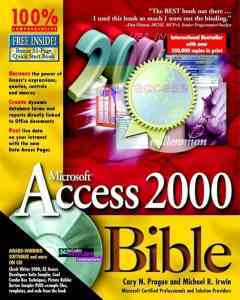 A little over 25 years ago in my HR days, I started teaching myself a new software application. No one forced me to buy John Walkenbach’s massive Microsoft Access Bible and read about relational databases, but I was curious about more powerful applications. I wanted to know more about the differences among data types. On many levels, Excel can only get you so far. Plus, my day job left ample time for me to add new arrows to my quiver.
As it turned out, that knowledge and experience would help me a great deal in my next gig: ERP implementations. Rare was the HR systems consultant—much less payroll or benefits analyst on the client side—who could quickly query and manipulate massive datasets or write SQL statements. As it turned out, knowing the table structures of different systems and applications would pay dividends down the road. A few times, clients asked me to work with people in finance, supply chain, sales, and marketing. They had to make sense of their overlapping systems, and I had built a rep as a strong data guy.
Beyond Databases
I haven’t touched Access in years, but the months I spent learning its ins and outs proved immensely helpful—and not just during the aughts.
2016Remove that technical knowledge, and I don’t wind up as a college professor in 2016. I used to joke that I had the weirdest pedigree of all of my former colleagues in the Information Systems Department.
2023Fast-forward two decades later. Basic database concepts transcend applications. My recent stints doing Notion development have only reinforced this reality. (As an aside, many Notion formulas closely resemble their Access and Excel equivalents.) It’s fair to say that I couldn’t have built a full-fledged Notion product independently and so quickly without extensive database development experience.1
Embracing CuriosityThe same mindset benefitted me when I began writing books.
To be fair, learning a new application or system wasn’t always my choice. Sometimes I had to use my employers’ clunky, proprietary legacy systems. (Yes, I would die a little inside when I had to tolerate manual data entry and gross inefficiencies.) I will never use those tools again, but I don’t consider the experience a waste of time. I learned quite a bit about IT departments, executives’ resistance to change, and internal politics. The experiences informed my approach to consulting.
The same miscellaneous mindset would ultimately—and unknowingly—benefit me when I began writing books. That was never the plan. Today my publishing knowledge allows me to effectively help aspiring non-fiction authors. It also gives me a unique perspective compared to old-school publishing veterans. Potential clients know that I approach books differently.
FeedbackProfessionally speaking, what are you curious about? How has that curiosity helped you down the road?
The post The Curiosity Dividend appeared first on Phil Simon.
July 31, 2024
Now Available: Custom Notion Development
Readers of Low-Code/No-Code and my blog know how much I’ve time I’ve been spending in the increasingly popular magnet app Notion. A little while ago, I even launched my magnum opus: a full-fledged system for authors, book coaches, publishers, and ghostwriters called Racket Hub. (My current ghostwriting client is digging it.)
I’ve recently released a few simple templates, but this area is fertile ground. If the popularity of hybrid and remote work has taught us anything, it’s that companies and teams need new, user-friendly tools to work more efficiently. And then there are old standbys. One of my clients—a startup—simply doesn’t need the bloatware that comes with a proper Salesforce subscription. There. I said it.
A New Offering
Based on the work I’ve started doing for a few clients, it’s obvious that there’s a need for this valuable service. To this end, today I’m pleased to announce a new offering: Notion system and application development.
Click the button below for more information and an FAQ.
LEARN MOREThe post Now Available: Custom Notion Development appeared first on Phil Simon.
July 26, 2024
Now Available: Simple Notion CRM & Project Tracker
I like to think that I’ve spent the past quarter-century-plus helping people improve their use of tech. Why stop now?
Readers of my site know that I’ve become a smidge obsessed with the magnet app Notion. (It’s all over Low-Code/No-Code: Citizen Developers and the Surprising Future of Business Applications.)
A few months ago, I launched RacketHub—a Notion-based, full-fledged book-management system that I’m currently using with Racket Publishing clients. It vastly simplifies the process of writing a quality non-fiction book.
Creating powerful tools in Notion is just plain fun. To this end, I’ve decided to build and sell some simple Notion templates. The first one is now live. I’ll be dropping others over the coming months.
DrumrollThe Simple Notion CRM & Project Tracker allows freelancers to track clients, projects, tasks, meetings, and invoices in Notion. These five interconnected databases work seamlessly together and serve as a one-stop shop of sorts. I’ve thrown in some cool formulas and database views designed to make life as easy as possible for users. Of course, you can customize the databases, add formulas and views, and much more. The world is your oyster.
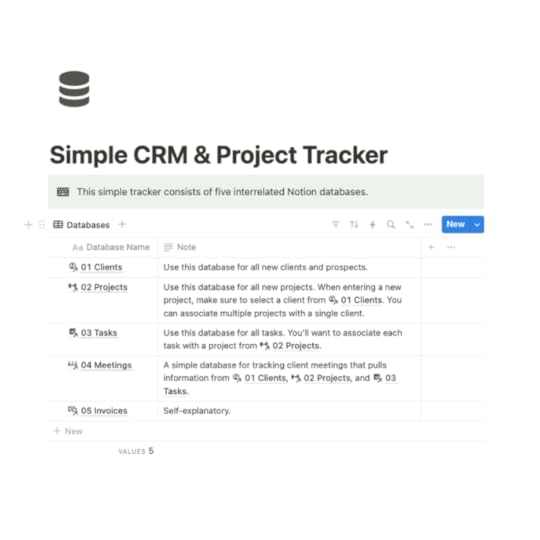
A talented designer friend of mine demoed it last and found it intuitive and useful.
The price is $19.99 (USD).
Go nuts.
BUY NOW
The post Now Available: Simple Notion CRM & Project Tracker appeared first on Phil Simon.
July 25, 2024
CrowdStrike Goes All Onion
Updated: 11:10 am, July 25, 2024
People of a certain age remember the popular 90s newspaper The Onion. For my money, it served up the smartest satire out there. A few of my faves included:
Christ Returns to NBAMicrosoft Patents Ones, ZeroesClinton Deploys Vowels to BosniaOften, the paper fooled folks into believing obviously ridiculous stories. Today, it still lives on as a scathing website and one hell of a book.
CrowdStrike’s recent decision to offer clients $10 gift cards is nothing if not Onion-worthy.
Correction: Looks like this offer only went to “affected partners.”
The post CrowdStrike Goes All Onion appeared first on Phil Simon.
July 22, 2024
The Case for a Regular Tech Audit
After more than a year of chasing my tail, I finally determined the cause of several intermittent and vexing Mac Continuity problems. No, AI didn’t solve the issue, although that would have been nice. Instead, I had to go old school:
Conduct lots of research.Solicit advice on Reddit and from tech-savvy friends.Make trips to the local Apple store. Tweak VPN settings.Call different support reps.Fire up screen-sharing sessions.Send oodles of e-mails. (My personal hell.)Go through a time-consuming process of elimination. As it turned out, the highly recommended third-party app CleanMyMac was the culprit. (I feel like Chazz Palminteri’s Dave Kujan at the end of The Usual Suspects. The clues were there all the time, but they ultimately eluded me.1)
I’ve since removed CleanMyMac from my Mac Power Hour. I also notified my existing clients about its potential to cause conflicts. The Latest app replicates its update functionality.
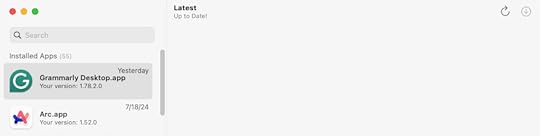
What can I learn from a year and a half of sporadically banging my head against the wall and questioning my sanity?
Rather than just assume that my current tools are working for me, I can regularly audit my wares. Specific questions include:
Which programs and services am I no longer using?Which ones do I use so infrequently that paying for them no longer makes sense?Which apps have excessively raised their prices when nearly identical, cheaper ones exist? (I moved to Hiya for call screening after Robokiller’s cost jumped.)Which ones have Apple and Microsoft sherlocked?Which ones have magnet apps such as Notion effectively obviated? Maybe an affordable template replaces my simple accounting software next year?Which apps are better than the current arrows in my quiver?Which manual processes can I automate through generative AI tools? I’m just getting started.Which developers or companies have let their apps abandonware? (Ahem, Stay and PDFPen.)These are all valid questions—and not just for members of the independent writer and speaker community. In an era of SaaS, bloatware, and shelfware, it behooves all groups and organizations to carefully examine what they really need and use. I’ve seen this movie before. As it turns out, a decent percentage of outfits suffer from tool overload. They could—and should—put some legacy tech out to pasture.
Average number of business applications used per customer.
Source: Okta 2021 Businesses at Work Report The AuditEvery month, I will take five minutes and run through a simple Notion checklist of my tech. I already know which apps are on the potential chopping block. I could eventually see weaning myself off of Todoist, my current password manager, certain Zapier Zaps, Dropbox, and Google Drive.
The goals? Ideally, I’ll use fewer apps and services in a year than I currently do. What’s more, if everything goes according to plan, I’ll spend less time on necessary but boring manual tasks. That means more on ghostwriting and book ideation.
Searching for the Next Time-SaverI’ll be the first to admit that, in this regard, we freelancers have it easy. Unilaterally making changes to individual systems, programs, and services is facile for independents like me. To state the obvious, it’s far more challenging for hidebound organizations to junk legacy systems and applications. As I wrote in Why New Systems Fail, that reality doesn’t absolve CIOs of large firms from routinely performing this critical task. (Cue supposed Darwin quote.)
Ideally, I’ll use fewer apps and services next year—and minimize boring work.
On a different level, I’d rather waste a few minutes each month searching for new tchotckes than remain complacent with my current setup. Stasis sucks. Curious geeks like me know that there is plenty of exciting, time-saving tech out there. How else would one find the next PopClip, OnlySwitch, and useful WordPress plug-in?
FeedbackWhat say you?
Icon above from FlatIcon.
The post The Case for a Regular Tech Audit appeared first on Phil Simon.