Brian Meert's Blog, page 51
July 2, 2023
The Beginners Guide to Completing a TikTok Download
Are you looking for a way to save or download videos from TikTok?
You’ve come to the right place! This “Tiktok download” guide will discuss downloading your favorite videos for offline viewing or sharing.
Whether discovering content from up-and-coming creators, participating in viral trends and challenges, or finding endless comedic relief, there’s something for everyone on the platform.
Now, downloading TikTok clips has become easier and more convenient.
Read on as we cover the following:
Copyright Infringement on TikTok VideosHow to Download TikTok VideosFinal Thoughts on TikTok DownloadFrequently Asked Questions on TikTok DownloadCopyright Infringement on TikTok VideosIt is important to consider the possibility of copyright infringement when downloading a TikTok video.
Posting or sharing content on TikTok that violates other people’s copyrights, trademarks, or intellectual property rights is not allowed under TikTok’s Community Guidelines.
One of the most frequent copyright issues is when someone shares another user’s content and claims it as their own.
TikTok attempts to prevent this by adding a watermark that displays its logo and the username of the person who first posted the video.
Other factors to know about video downloads.When downloading videos, here are some reminders:
If you let people on TikTok download your videos, they can save them to their devices.If your account is private or you’re under 16, the download setting will be off, and you cannot turn it on.If you change your account to public, you can decide if this setting is on or off.If you switch off the video downloads setting on TikTok, no one else can download the videos you post.Once you turn the download setting off, people can’t download videos you posted and your future videos.If the download setting is on and you turn it off, anyone who downloaded your videos will still have a copy on their phones.If you turn off the video download setting on TikTok, other people can’t make your videos into live photos or GIFs or share them with other apps like Instagram, Facebook, Snapchat, or WhatsApp.People on TikTok cannot share your video directly to other websites. However, they can share a link that will take people to watch your video.You can change the privacy settings to decide who can watch your video.Download TikTok VideosSave Video is a feature on TikTok that lets you save your favorite videos. If someone deletes the video or the app takes it down, you can still watch it because you kept it.
Moreover, you can also share the video with people who don’t have the app.
Open your TikTok app. Tap the Share button.
 Tap the Save Video button.
TikTok will save the video in hq quality to your phone’s gallery, but it doesn’t remove the watermark of the video.
Final Thoughts on TikTok DownloadNow you know how to download videos from TikTok for offline viewing. It’s an easy and convenient way to create a library of your favorite content.
The process takes a few taps, whether you’re saving fun videos for entertainment or educational clips to review.
Partner with our top-notch TikTok advertising agency to achieve your company goals and elevate your brand to the next level!
Is your company seeking to enhance its marketing strategies? AdvertiseMint, the premier social advertising agency, can assist you.
Check out AdvertiseMint’s user-friendly marketing guides and the related articles section of this blog post.
Frequently Asked Questions on TikTok DownloadIs it possible to download TikTok videos without a watermark?To save videos without a watermark, use a TikTok video downloader online. However, the downloaded videos are strictly for personal use.
How can I download TikTok videos without the app?Using an online TikTok downloader, you can download a video without the app on desktop and mobile devices. All you have to do is to copy and paste the link to the online TikTok downloader.
Do I have to pay to use a TikTok downloader?You don’t have to pay for anything because some TikTok video download tools are free for all users online.
Related ArticlesTikTok Advertising: Here’s What the Self-Serve Ad Platform Looks Like
{"@context":"https://schema.org","@type&... it possible to download TikTok videos without a watermark?","acceptedAnswer":{"@type":"Answer","text":"To save videos without a watermark, use a TikTok video downloader online. However, the downloaded videos are strictly for personal use."}},{"@type":"Question","name":"How can I download TikTok videos without the app?","acceptedAnswer":{"@type":"Answer","text":"Using an online TikTok downloader, you can download a video without the app on desktop and mobile devices. All you have to do is to copy and paste the link to the online TikTok downloader."}},{"@type":"Question","name":"Do I have to pay to use a TikTok downloader?","acceptedAnswer":{"@type":"Answer","text":"You don't have to pay for anything because some TikTok video download tools are free for all users online."}}]}

Everything You Need to Learn: How to Repost on TikTok
Do you want to increase your reach and visibility on TikTok?
If so, then reposting videos is an effective and easy tactic. With just a few taps, you can find interesting content created by other users or brands within the app and post it onto your profile!
Reposting allows not only for easier sharing of viral videos but also for giving credit to original creators.
Whether you want to engage with new audiences or join in trending conversations, learn how to repost on TikTok using this guide.
What Is the TikTok Repost FeatureReposting TikTok ContentAdvantage of Reposting TikTok ContentReasons You’re Unable to Repost on TikTokTikTok Marketing Strategy: What to Include when Reposting Final Thoughts on How to Repost on TikTokFrequently Asked Questions on How to Repost on TikTokWhat Is the TikTok Repost Feature?TikTok’s repost feature allows you to repost videos from other users, allowing you to share the video with your followers.
However, the original creator’s username will appear on the video. Consequently, users can click on it to watch the material and visit the creator’s TikTok account.
Note: Reposting someone else’s TikTok video without their permission can be considered copyright infringement, and TikTok will suspend your account.
So, asking the original creator for permission before reposting their content is always a good idea.
Reposting TikTok ContentTo repost a content on TikTok, follow the steps below:
Open your TikTok app. Tap the “For You” page.
 Select a TikTok content and tap the share button.
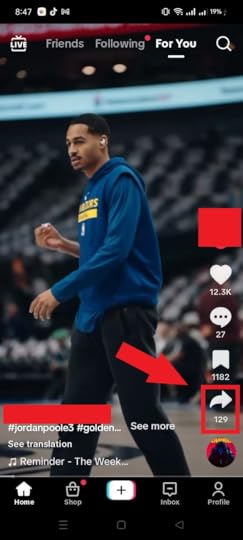 Click the TikTok repost button.
 Write a permission message to accompany the reposted video.
Your followers and those you follow can watch the video on their “For You” page.
Advantage of Reposting TikTok ContentWhy do brands go for reposting sometimes, even when it does not get more engagement on your TikTok account? Let’s explore the advantage of reposting content on this app.
Show activity on your page.Have you heard the phrase “variety is the spice of life?” It means that it’s good to have many different things.
The phrase is true for TikTok too! Reposting lets you show lots of different content, making your page interesting and exciting.
More viewers on your page.Imagine reaching new followers just by sharing someone else’s creativity. Reposting videos on TikTok lets you bring fresh content to your page that will attract a new audience.
Encourage collaboration.TikTok is a way to meet people and make friends. Reposting other people’s videos can help your videos get more popular on the platform. It might even lead to working together with someone else.
Algorithm-approved content.TikTok likes to show videos that many people have seen. If you post videos that other people have liked, then more users will see your video too, which can help get your account noticed by new users.
Boost engagement on your page.Reposting can help people like your page more. When users like something they see, they can let others know by liking it, commenting on it, or sharing it. Reposting helps more people to find out about your page.
Reasons for Being Unable to Repost on TikTokYou may not be able to repost on TikTok for various reasons. Below are a few common ones:
Account restrictions: If your TikTok account is restricted or banned for violating TikTok’s community guidelines, TikTok won’t let you repost any content.Private account: If the TikTok account you are trying to repost from is on private mode, you cannot repost their content without their permission.App issues: Sometimes, TikTok experiences technical issues that prevent users from reposting content. In this case, you can try opening the app again or reinstalling it.Reposting disabled: Some users turn off the reposting feature on their videos. In this case, you will not be able to repost their content.Copyright infringement: If you attempt to repost content that infringes on someone else’s copyright, TikTok may block your attempt to repost the content.TikTok Marketing Strategy: What to Include when RepostingReposting can be beneficial for taking your TikTok page to new improvement. Here’s our take on what to include in reposting your marketing strategy.
Repost users’ success stories.One way to improve your TikTok campaigns is through user-generated content (UGC).
You can get valuable and unique material by encouraging happy customers to create and share content that celebrates your brand and provides value to other users.
Reposting UGC on TikTok can be a great way to showcase your brand and engage with your audience.
Keep track of what people say about your brand using tags, mentions, and hashtags.To start reposting videos on TikTok, watch any mention of your brand.
The tracking and monitoring approach has two benefits: you can get great content and tastefully showcase your products and services.
Share community members’ content.It’s great to feel safe, welcome, and part of a community that shares your values. When brands foster such an environment, they naturally draw in more people.
You could encourage your fans to generate content. This way, it is easier to find new material and transform buyers into supporters quickly!
Consider including reposting in your TikTok marketing plan to boost your brand and connect with new audiences creatively and effectively.
Make sure the content aligns with your brand.To strengthen your brand’s identity and consistency in marketing strategy, consider reposting content that matches your brand’s values, message, and tone.
Remember to credit the original content owner when sharing their content on TikTok.
You can tag them in the caption or use TikTok’s built-in “repost” feature. You’ll have a link to the original video, which gives credit to the original creator.
Be selective.To make sure your followers engage with your TikTok reposts, select only high-quality, relevant, and engaging content that fits your brand. Avoid reposting just any content you find.
Final Thoughts on How to Repost on TikTokAs long as you stay mindful when we repost, you can continue to engage in the exciting conversations happening all over TikTok. All the while, you won’t infringe upon another’s intellectual property.
Partner with our top-notch TikTok advertising agency to achieve your company goals and take your brand to the next level.
Is your company seeking to enhance its marketing strategies? AdvertiseMint, the premier social advertising agency, can assist you.
Check out AdvertiseMint’s user-friendly marketing guides and the related articles section of this blog post.
Frequently Asked Questions on How to Repost on TikTokHow to remove the reposted content?Follow these steps to remove a repost on TikTok:
Login to TikTok, and head to the Repost tab inside your profile.Find the video you want to un-repost and click on the arrow icon in the bottom-right corner.The Share menu will appear, and here you will see a yellow button-Remove Repost.Does TikTok pay for reposting videos?No, TikTok does not pay users to repost videos. Reposting someone else’s video on the app is a way to share content that you find compelling or entertaining with your followers.
Are there any rules or guidelines I should follow when reposting on TikTok?It is always best to credit the original creator when reposting on TikTok. You can do this by tagging their username in the caption or video or adding a text overlay that credits them.
Related ArticlesYou Can Now Share Stories That Mention You
8 B2B Instagram Marketing Strategies
23 Ways to Increase Organic Reach on Facebook
{"@context":"https://schema.org","@type&... to remove the reposted content?","acceptedAnswer":{"@type":"Answer","text":"Follow these steps to remove a repost on TikTok:\n\nLogin to TikTok, and head to the Repost tab inside your profile.\nFind the video you want to un-repost and click on the arrow icon in the bottom-right corner.\nThe Share menu will appear, and here you will see a yellow button-Remove Repost."}},{"@type":"Question","name":"Does TikTok pay for reposting videos?","acceptedAnswer":{"@type":"Answer","text":"No, TikTok does not pay users to repost videos. Reposting someone else's video on the app is a way to share content that you find compelling or entertaining with your followers."}},{"@type":"Question","name":"Are there any rules or guidelines I should follow when reposting on TikTok?","acceptedAnswer":{"@type":"Answer","text":"It is always best to credit the original creator when reposting on TikTok. You can do this by tagging their username in the caption or video or adding a text overlay that credits them."}}]}Beginners Guide to TikTok Ads Manager Account
Do you want to create an impactful social media presence for your business?
TikTok is an increasingly popular platform, and it has the potential to generate quick results if used in the right way.
Running a professional advertising account with TikTok Ads Manager effectively reaches potential customers and monetizes data-driven campaigns.
In this blog post, we’ll explore how you can set up your ads manager account and take advantage of TikTok’s ad network offers.
Read on as we cover the following:
Create a TikTok Ads Manager AccountModifying Ads Manager: Simplified ModeModifying Ads Manager: Custom ModeFinal Thoughts on How to Create a TikTok Ads Manager AccountFrequently Asked Questions on How to Create a TikTok Ads Manager AccountCreate a TikTok Ads Manager AccountCreate your TikTok Ads Manager account by following the steps below:
Go to the TikTok for Business page. Fill in the email and password boxes, and select the TikTok Commercial Terms of Service box. Lastly, click the sign-up button.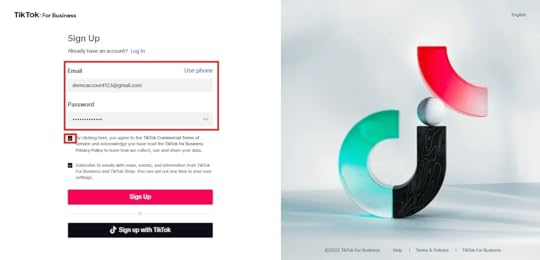 Fill in the following boxes. Once done, click the Continue button.
 Country or Region – TikTok will show you the best things to do that follow your local rules and laws.Industry – TikTok advises you on how to advertise that is more helpful and useful.Legal Business Name – TikTok needs your business’s legal name to ensure it is a real company and you can pay for services and features.Time Zone – TikTok adjusts your campaign reports and dates to match your time zone.Phone Number – TikTok will contact you on this phone number to give tips on making your advertisements more successful.Currency – TikTok will charge you a fee and show you how much money is available to spend.Select Automatic or Manual payment types.
Note: After you’ve completed the first three steps, TikTok will send in your ad account for approval. Your ad campaign will start running once it is approved.
It usually takes less than a day to review an account. You can check on the status of your account by going into Account Settings and looking at Account Info.
Choose a mode that works best for your campaign creation needs.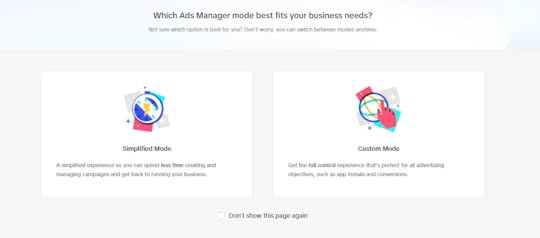 Submit your first ad and accomplish the payment.

Congratulations on setting up your TikTok Ads Manager account and running your first paid campaign!
Modifying Ads Manager in Simplified ModeSimplified Mode may be a good fit for advertisers new to running online ads or who need to create and manage campaigns quickly.
Set Goal. Select Audience.
 Set Budget.
 Create an ad and click the Submit button.
 Modifying Ads Manager in Custom Mode
Advertisers looking for greater control and more advanced options when creating campaigns may discover that Custom Mode is suitable.
Choose an advertising objective. Configure Settings.
 Set Audience Targeting.
 Set Contextual Targeting.
 Set up Content Exclusions.
 Choose a Budget and Schedule.
 Set up Bidding and Optimization.
 Create an Ad Name.
 Create an Identity.
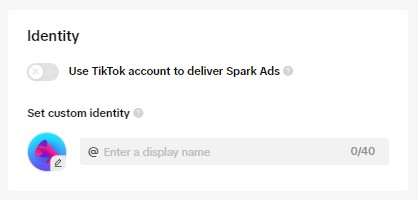 Set the ad details.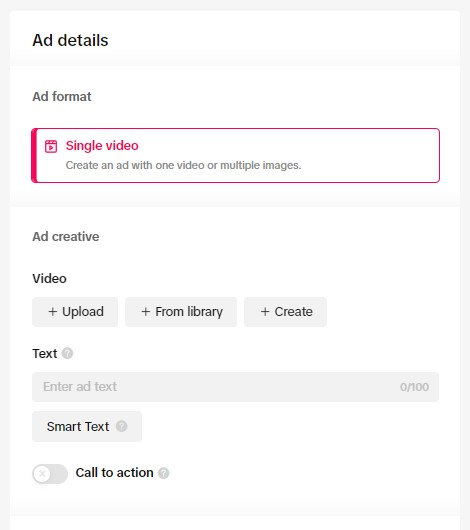
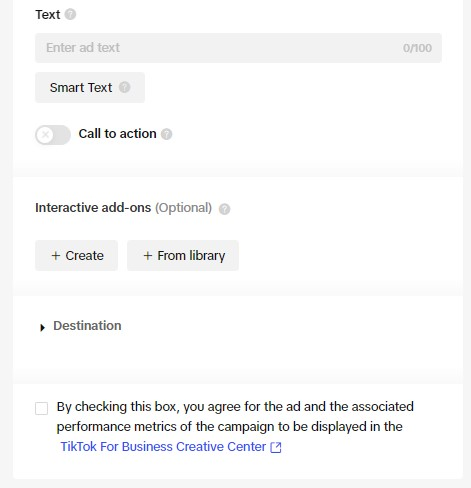 Set up Ad Tracking and click the Submit button.
 Final Thoughts on How to Create a TikTok Ads Manager Account
Creating a TikTok Ads Manager account is easy and can help you reach new audiences with its great features and successful ad campaigns.
With the help of this blog post, you can now create your own TikTok Ads Manager Account in no time.
Partner with our top-notch TikTok advertising agency to achieve your company goals and elevate your brand to the next level!
Is your company seeking to enhance its marketing strategies? AdvertiseMint, the premier social advertising agency, can assist you.
Check out AdvertiseMint’s user-friendly marketing guides and the related articles section of this blog post.
Frequently Asked Questions on How to Create TikTok Ads Manager AccountCan I create and manage TikTok ads directly from the TikTok app?You cannot create and manage ads directly from the TikTok app. TikTok Ads Manager is a separate platform that allows you to create and manage ads.
Can I run TikTok ads without a business account?You’ll need a business account for the platform to use the TikTok Ads Manager.
Are there differences between TikTok personal and TikTok business accounts?A personal account grants you access to both Sounds and Commercial Sounds libraries. Business Accounts only provides the Commercial Sounds library designed for commercial use.
Related ArticlesHow to Create Multiple Ad Sets
{"@context":"https://schema.org","@type&... I create and manage TikTok ads directly from the TikTok app?","acceptedAnswer":{"@type":"Answer","text":"You cannot create and manage ads directly from the TikTok app. TikTok Ads Manager is a separate platform that allows you to create and manage ads."}},{"@type":"Question","name":"Can I run TikTok ads without a business account?","acceptedAnswer":{"@type":"Answer","text":"You'll need a business account for the platform to use the TikTok Ads Manager."}},{"@type":"Question","name":"Are there differences between TikTok personal and TikTok business accounts?","acceptedAnswer":{"@type":"Answer","text":"A personal account grants you access to both Sounds and Commercial Sounds libraries. Business Accounts only provides the Commercial Sounds library designed for commercial use."}}]}Learn About TikTok Ads and Common Scams
Are you interested in using TikTok for advertising?
You’re not alone. This app has grown quickly as a platform for influencers, businesses, and even government units. Sadly, it can also be an easy target for scammers looking to make a quick buck.
In this blog post, we’ll discuss TikTok’s appeal to legitimate and malicious advertisers. Moreover, we’ll provide tips to avoid common scams on the platform.
Read on as we cover the following:
What Are TikTok Ads?Different Types of TikTok AdvertisingTikTok Ad specsHow Much Do TikTok Ads Cost?Common TikTok ScamsFinal Thoughts on TikTok Ads and Common TikTok ScamsFrequently Asked Questions on TikTok Ads and Common TikTok ScamsWhat Are TikTok Ads?TikTok ads refer to promotional content, generally full-screen videos that a brand or creator pays to showcase to a targeted audience.
These ads on TikTok are a social media marketing method typically used to raise awareness about a product or service. Ultimately, the goal is to sell to a target audience.
You can organize TikTok ads in three different ways:
TikTok Ad: A single advertisement with a video that shows how great a product or service is.TikTok Ad Group: A group of advertisements on TikTok.TikTok Campaign: A group of TikTok ad groups.Different Types of TikTok AdvertisingHere are various advertising options on TikTok:
Note: Not all TikTok ads may be available in your country, so confirm their availability in your local area.
TikTok In-feed adsUse the Ads Manager feature on TikTok to create the following in-feed ads:
Video AdsOne of TikTok’s most common forms of advertising is using TikTok Video Ads. Brands or creators create and post ads using a TikTok Ads Manager account.
TikTok Video Ads appear like regular TikTok videos, but any interaction with them will directly lead to either a landing page or an app installation page. So, they enable users to directly access posted TikTok ads.
Example: A video ad for a product – The product appears just like your average TikTok. But when you tap the account name (or the custom CTA button), you’re taken to a landing page for the product details.
The video ads will appear in a user’s feed if the advertiser has paid for them. These ads are not permanent posts that do not allow duetting or stitching.
Spark AdsSpark Ads differ from typical video ads as they boost organic content from any TikTok account.
They appear on your profile just like your other TikTok posts and persist even after you stop paying to advertise them.
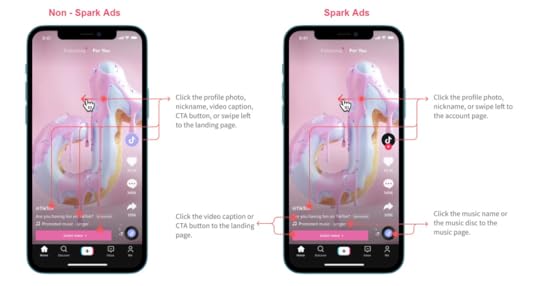
You can duet or stitch spark ads, giving your audience more opportunities to positively or negatively engage with them.
Spark ads can positively impact your brand’s overall metrics since they will not disappear once you stop paying for them.
You can use content from your business profile or other content creators’ profiles in Spark ads.
Image AdsImage ads refer to static images featuring the name of a brand or app along with ad text.
Moreover, you can access image ads via the Global App Bundle and Pangle Placements. However, these features may not be accessible in all regions.
Playable AdsPlayable ads are like mini-games and are perfect for engaging TikTok users who enjoy playing games. However, this feature is only available in certain countries.
Shopping AdsIn Spring 2023, TikTok phased out “Dynamic Showcase Ads” and “Collection Ads.”
Consequently, you can integrate the main function of these features into Video Shopping Ads. As of this writing, these features are currently being tested and only accessible to chosen advertisers.
These are three types of advertisements for shopping:
Video Shopping Ads: Videos that allow viewers to shop for products directly from the content. These videos target specific audiences and appear on their For You Page (FYP).Catalog Listing Ads: Advertisements that promote collections of shippable productsLive Shopping Ads: TikTok Live lets viewers know where to find a particular product while watching the live stream.Carousel AdsCarousel Ads are available only in the series of apps within TikTok’s news feed, BuzzVideo. Advertisers can post up to ten images in a single ad, each with its caption.
Pangle AdsYou can view Pangle ads from TikTok Audience Network.
TikTok Ad Formats Available to Managed BrandsBrands that get together with a TikTok sales representative are managed brands. These brands can use different ad formats, which include:
TopView AdsWhen you open the TikTok app, video ads take up the whole screen for 5 to 60 seconds.
Branded Hashtag ChallengeThe hashtag challenge page features user-generated content in a three- to six-day ad campaign format to promote engagement.
Branded EffectsOffer branded stickers, filters, and special effects to encourage people to engage with your brand on TikTok.
TikTok Ad specsEnsure your TikTok ad meets the correct size, shape, and format requirements to achieve social media success. These are the optimal specifications:
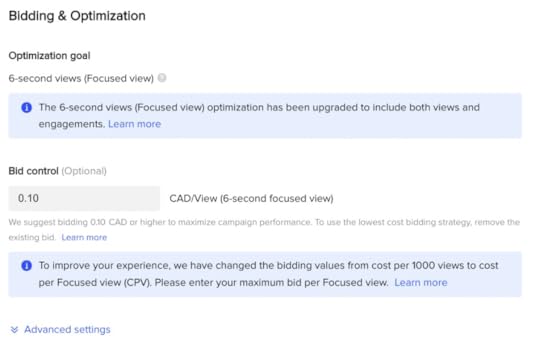
Aspect ratio: 1:1, 16:9, or 9:16.Minimum resolution: 540x960px, 640x640px, or 960x540px.Video file type: .mp4, .mov, .mpeg, .3gp, or .aviVideo length: 5 to 60 seconds (TikTok recommends 9 to 15 seconds for best results)Video file size: 500MB maximumHow Much Do TikTok Ads Cost?TikTok uses an auction and bidding model for ads. So, you can decide how much to pay per video view, click, or impression.
There is no set limit on how much you can spend, but note that there is a minimum spend for campaigns and ad groups.
Moreover, your campaign must have a daily budget of at least $50, meaning you will be spending a minimum of $50 each day yours is active.
Every day, your ad group is active, you must spend at least $20 as the minimum budget at the ad group level.
According to TikTok, the amount you bid is one factor that determines how competitive you will be in the auction to achieve your desired results.
TikTok has over a billion users, which can be a great place to promote your business, but also dangerous. Be careful when using TikTok, and watch out for people trying to scam you.
Many people have shared stories of being scammed on social media platforms because of TikTok.
Our guide will help you recognize and avoid common scams found on TikTok:
Credit Repair ScamsLike most scams, this one operates by making false promises. The person will claim the ability to eliminate valid negative information from your credit report. However, this is impossible.
Unfortunately, many people fall for this and pay the scammer to try to raise their credit score. However, they lose their money with no improvement in their credit score.
It’s important to remember that fixing damaged credit is a process that takes time. Be cautious of anyone who promises fast results, as they may be scamming you.
So, concentrate on practical and legal methods to improve your credit score.
Easy Money-Guarantee ScamsAs the name implies, this easy-money scam uses cash as bait to trap its victims.
Scammers can deceive you in several ways, such as implementing pyramid schemes, offering fast cash opportunities, or promoting fake apps that require payment.
Falling for their tactics can be easy if you’re not cautious.
Watch out for these signs that you may be dealing with an easy money scam:
Clickbait headlines: Be careful of headlines that promise to help you earn a lot of money by working part-time from home or making a certain amount per hour in a short amount of time. These could be online scams that offer high profits for minimal work.
Requires payment or investment upfront: Don’t be fooled by TikTok scammers who ask you to pay for job applications. Legitimate work offers never require an upfront cost, even if they claim it’s for training or certification. Remember, you shouldn’t be giving the employer money. Instead, they should pay you for working.
A sense of urgency to hire: The scammer may pressure you to apply quickly by claiming that the job or offer won’t be available for long to create a sense of urgency. Be cautious since quick decisions can be risky. Stay alert, and avoid falling prey to their tactics. Usually, genuine opportunities don’t come with a sense of urgency or desperation.
TikTok Online Shopping ScamsScam artists on TikTok are advertising fake products in large numbers. They may pretend to represent legitimate brands, tricking users with tempting offers.
We advise you to:
Always inspect the URL of retailer websites.Use the Citizens Advice scam checking tool.Watch out for the contact information.Only pay for products using a secure payment service.Look for spelling and grammar errors on the ad or retailer landing page.Research the retailer.Free “Offers” with a Price TagScammers may trick you into sharing your credit card details by offering “free goods,” but TikTok scammers will charge you. Still, they won’t tell you recurring subscription fees and additional unauthorized costs.
It’s a deceptive scheme.
You don’t have to give your card information if something is free. Keep your card details safe and only share them with people you trust.
PhishingBe careful if someone sends you website links or tells you to buy a product.
Some people try to trick you into giving them money or personal information. So, be careful when someone is trying to get your information on TikTok, email, or any other platform. Moreover, review the URLs and names of the people you are talking to.
The message may come from a scammer if there are grammatical errors or misspellings in the content.
Donation ScamsPeople who want donations will ask for them directly or through a website. They will also use TikTok Live to get money from people in real-time.
After the earthquake in Syria, some scammers tried to trick people. They shared a video on TikTok and asked for money for a fake cause that did not bring real help to affected Syrians.
Final Thoughts on TikTok Ads and Common TikTok ScamsIndeed, TikTok is becoming increasingly popular for both entertainment and advertising. Awareness of possible scams can help you remain safe while maximizing the platform’s potential for business promotion.
Partner with a credible TikTok advertising agency to achieve your company goals and elevate your brand to the next level.
Is your company seeking to enhance its marketing strategies? AdvertiseMint, the premier social advertising agency, can assist you.
Check out AdvertiseMint’s user-friendly marketing guides and the related articles section of this blog post.
Frequently Asked Questions on TikTok Ads and Common TikTok ScamsAre TikTok-sponsored ads safe?TikTok has implemented strict guidelines and regulations for sponsored content to ensure that all ads meet the platform’s user safety and privacy standards.
Is it safe to buy from ads on TikTok?It’s important to do your research before making any purchases. Look for reviews and background checks on the company before entering personal or financial information.
Do ads do well on TikTok?Research shows that TikTok advertisements receive higher engagement rates than other social media platforms like Instagram and Twitter. After all, the platform has high activity and engagement from users who spend hours scrolling through their feeds.
Related ArticlesWhat Are TikTok’s Advertising Objectives?
The TikTok Hook Ideas No One Will Give You
3 Foolproof Ways to Promote Your Music on TikTok
{"@context":"https://schema.org","@type&... TikTok-sponsored ads safe?","acceptedAnswer":{"@type":"Answer","text":"TikTok has implemented strict guidelines and regulations for sponsored content to ensure that all ads meet the platform's user safety and privacy standards."}},{"@type":"Question","name":"Is it safe to buy from ads on TikTok?","acceptedAnswer":{"@type":"Answer","text":"It's important to do your research before making any purchases. Look for reviews and background checks on the company before entering personal or financial information."}},{"@type":"Question","name":"Do ads do well on TikTok?","acceptedAnswer":{"@type":"Answer","text":"Research shows that TikTok advertisements receive higher engagement rates than other social media platforms like Instagram and Twitter. After all, the platform has high activity and engagement from users who spend hours scrolling through their feeds."}}]}June 28, 2023
Definitive Guide: Why Is My Advertising Access Restricted on Facebook?
Do you need help with your restricted advertising account on Facebook?
If you’ve had your Facebook account restricted, don’t fret. This is quite a common issue that can be resolved easily.
In this post, we’ll go through why Facebook restricts ad accounts. We’ll show you what you can do to solve it and how you can prevent it from reoccurring.
Read on as we cover the following:
Facebook RestrictionsWhy Is My Facebook Advertising Account Restricted?Solutions to a Restricted Facebook AccountFinal Thoughts on “Why Is My Advertising Access Restricted on Facebook?”Frequently Asked Questions Related to “Why Is My Advertising Access Restricted on Facebook?”Facebook RestrictionsTo resolve the problem, it’s important to know which elements Facebook can restrict:
Your ad accountYour personal Facebook profileYour Business Manager accountYour Facebook pageEach of the following restrictions above has its unique consequences as well:
If your ad account has been deactivated (restricted from advertising), you can’t make new ads with this account. Any ads you have running will stop working.If Facebook has restricted your profile from advertising, you cannot create new accounts or publish and manage new ads. The platform will send you a similar message:“Your advertising access is restricted. You’re no longer granted to use Facebook Products to advertise. You can’t run ads, manage advertising assets or create new ad or business accounts.”
You can inspect your account dashboard to see the message:
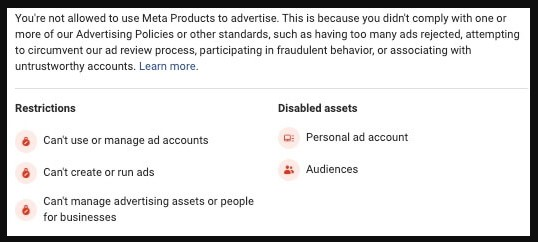
We learned about different things that Facebook can restrict. Let’s discuss why it might happen and how to improve it.
Why Is My Facebook Advertising Account Restricted?It’s easier to enumerate the number of stars in the sky than to accurately count how many ways Facebook can restrict your account from advertising.
We always see many common reasons, so let’s start with those.
Facebook doesn’t approve your advertisements due to violating Facebook’s advertising policies.While these aren’t technically ‘account restrictions,’ as you’ll see soon, they are a huge part of the process.
Nobody likes to read legalese (and most people don’t). However, this can cause bigger problems than an hour or two of lost time in the Facebook ad world.
Facebook policy violations can base on their ads policies, terms of use, or community standards offenses.
The most usual ones we see are related to Facebook advertising policies. Here are some usual Facebook policy offenses to be on the lookout for:
Sexually explicit content. It is not permitted to advertise anything related to sex on Facebook. Sometimes, even if the advertisement is not for something sexual, it might have words that make it look like it is.For example, spa services might contain sexual innuendo, which Facebook’s automated system can flag.Prohibited categories. Facebook does not allow ads for drugs, tobacco, weapons, and money products like loans or auctions. If those items are not against the law, Facebook still does not want them advertised.Misinformation. Do not share false news on Facebook.Sensational content. Do not use content that tries to make people click it because it is exciting or shocking.Bad grammar or punctuation. There are better ways to advertise than using the wrong grammar or punctuation. It can make people think something is wrong with your product.Inflammatory content. Inflammatory content includes abusive words. It might contain hate speech about a certain race, religion, or gender.Unacceptable business practices. This term describes deceptive ads. They tell people to buy things that do not work or have someone famous use something when they don’t. They also try to make products look deceiving better than they are.Low-quality or deceptive content. Do not use ads that make people click to see the whole picture or are too sexy or shocking. Facebook will also check where the ad is going and ensure it is related to it.Personal attributes. Knowing what you should say when talking to people can take time and effort.
Don’t make any guesses or assumptions about medical conditions, where people live, or if they like someone of the same gender. Don’t say, “Do you still have asthma?” or “You must be from New York.”
If you have trouble with your ad, change it to follow the rules. If you think it follows the conditions, but Facebook still rejects it, ask someone to look at it again.
Note: If you don’t see ‘rejected’ next to your ad but don’t notice any ad spent more than 24 hours after review, you could have delivery issues instead.
Your Facebook ad account was restricted because Facebook did not accept too many ads you put up.Facebook will restrict your account if you repeatedly violate Facebook’s policies because of too many rejected ads. Moreover, violating Facebook’s policies can be difficult to manage.
The only option is to appeal and wait for Facebook to decide.
Your Facebook restricts your advertising account for security reasons.Facebook may ban your account if they think something strange is happening.
Facebook restricts your account because someone could be hacking into your account, spending much money on ads too quickly, or using a fake Facebook profile for ads.
If you think this has happened to you, use the tool Facebook provides to help fix it.
Your ads have received a significant amount of negative feedback.Do you know that people can leave comments about your ads?
When looking at an ad on Facebook, click the three dots on the top right corner of the ad. Then, you will see some choices:
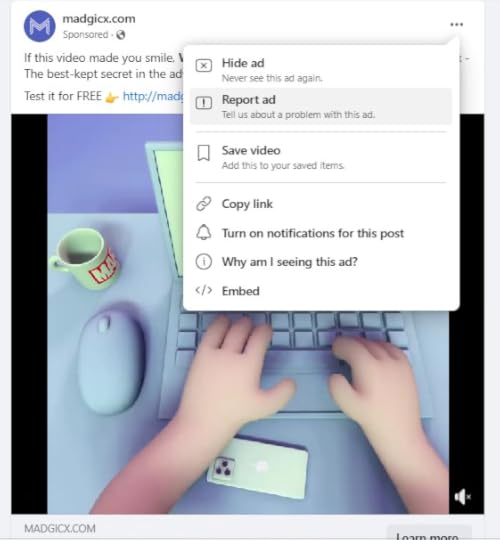
The first two options could give bad reactions.
Facebook might also send a notification to ask you what you think about the brand.
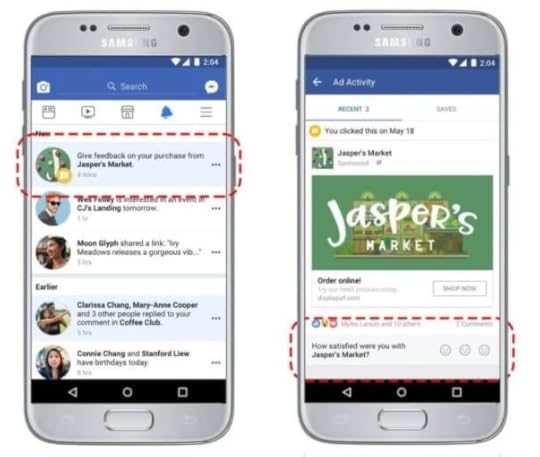
One or two people saying something bad about your ads won’t cause harm. However, if many people leave negative feedback, Facebook will stop your ads. Consequently, you won’t be able to use them anymore.
Always ensure customers have a good experience with your brand so they don’t leave bad comments about you.
Solutions to Restricted Facebook AccountIf Facebook stops you from using your account, it might be for different reasons. The best action is to contact the support and ask why this happened. They will help you reactivate your account so you can use it again.
Facebook has made it easier to review your account with the Account Quality page. You can check for any problems with your Facebook account or Business Manager on this page.
If something is wrong, you’ll see a box on the right side of the page telling you what to do.
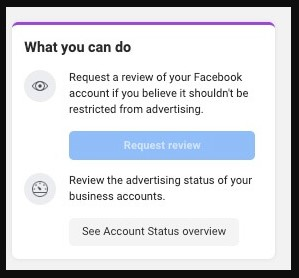
The steps you need to take will differ depending on why you were banned.
If your ad account or Facebook Business Manager were banned, there would be a button to review the account. However, if your Facebook profile was banned, you must do an identity verification first.
According to Facebook, the decision may take up to 48 hours to complete. However, there have been forum threads on sites like Reddit where users report waiting times of a few weeks.
Once you’ve decided, there are two possible results. You will either get one of these outcomes:
Facebook accepted your appeal.Facebook rejected your appeal.If Facebook rejects your appeal, you can use the same appeal method to reject the decision again in certain cases. You can also contact support directly by clicking on the link in the help center.
You can set up a new one if your ad account or Business Manager doesn’t work out.
However, remember that using the same credit card for your new account may cause problems on Facebook. If the platform bans your account, you cannot do much. Facebook is usually good at finding out if a new profile is yours.
So, it will be a short time before they know you made another one.
Some people ask their colleagues or friends for their Facebook profile access for advertising purposes. However, this can be risky.
If Facebook detects fraudulent activity, it may limit the profile’s advertising abilities. It may be better to ask a coworker or agency to make and manage your ads instead.
Final Thoughts on “Why Is my Advertising Access Restricted on Facebook?”The article explores the potential reasons behind the Facebook profile restrictions and offers solutions for resolving and preventing them in the future.
It emphasizes the importance of staying updated on Facebook policies to avoid the risk of getting permanently banned for a single error.
Is your company seeking to enhance its marketing strategies? AdvertiseMint, the premier social advertising agency specializing in Facebook and Instagram ads, can assist you.
Check out AdvertiseMint’s user-friendly marketing guides and the related articles section of this blog post.
Frequently Asked Questions on Why is my Advertising Access Restricted on FacebookHow long does Facebook ad account restriction last?If you break Facebook’s Community Standards or Terms of Service, your account may be blocked for up to 30 days, preventing you from accessing it.
How to check if Facebook has restricted your page from advertising?Go to a page you are an admin of and boost a post. If you can’t boost and the button turns gray, Facebook has restricted your account.
What does it mean to have a restricted Facebook account?If you have a restricted Facebook personal account, you can use only a few features on Facebook, including ads, Meta Pixel, catalogs, and more.
Your restrictions will connect to any linked business page or ad account.
Related ArticlesHow to Create a Facebook Pixel
How to Find Your Facebook Ad Account ID
19 Ways to Make Your Video Go Viral with Tony Adkins, “Dancing Doctor”
{"@context":"https://schema.org","@type&... long does Facebook ad account restriction last?","acceptedAnswer":{"@type":"Answer","text":"If you break Facebook's Community Standards or Terms of Service, your account may be blocked for up to 30 days, preventing you from accessing it."}},{"@type":"Question","name":"How to check if Facebook has restricted your page from advertising?","acceptedAnswer":{"@type":"Answer","text":"Go to a page you are an admin of and boost a post. If you can't boost and the button turns gray, Facebook has restricted your account."}},{"@type":"Question","name":"What does it mean to have a restricted Facebook account?","acceptedAnswer":{"@type":"Answer","text":"What does it mean to have a restricted Facebook account?\n\nIf you have a restricted Facebook personal account, you can use only a few features on Facebook, including ads, Meta Pixel, catalogs, and more.\n\nYour restrictions will connect to any linked business page or ad account."}}]}The TikTok Hook Ideas No One Will Give You
Do you want your TikTok posts to get hoards of views, likes, and shares?
If so, this article is what you need. We have great tips to help you create the perfect TikTik hook to attract viewers and keep them invested.
We’ll show you how to make your TikTok posts stand out with the right audio, visuals, and message.
Read on as we cover the following:
How Important Is the Hook in TikTok?5 Best TikTok Hook Ideas for Stop-Scrolling Ad Creatives5 Tips for Top TikTok Ad CreativesFinal Thoughts on TikTok HookFrequently Asked Questions on TikTok HookHow Important Is the Hook in TikTok?Use a hook at the video’s start to make your TikTok post engaging. It can be on-screen text, a clip, or spoken words.
The concept piques people’s interest, similar to retailers enticing people with exciting offers.
Let’s say you’re browsing leisurely online and see an ad for a product with a BOGO deal. That gets your attention immediately, even if you weren’t planning to buy it.
That’s how powerful a hook can be.
The goal is to make it captivating and leave a lasting impression.
So, on social media platforms like TikTok, where users can’t run out of viral videos to watch, you need something to make your content unique and scroll-stopping. This is where hooks come in.
Ensure your content is engaging enough to capture people’s attention. If you succeed, users will stop scrolling to examine your post or brand closely.
However, if you fail to do so, they will move on. So, providing high-quality content that leaves a positive impression is crucial.
5 Best TikTok Hook Ideas for Stop-scrolling Ad CreativesAccording to reports, TikTok was the most installed social media app in the first quarter of 2023. These stats are not surprising, especially since users enjoy using the platform, which offers an endless stream of videos.
A 2023 study found that the average US TikTok user spent 55.8 minutes per day on the app on their mobile device, highlighting the high level of competition.
Here are some of the most popular TikTok viral hooks to help your brand stand out and generate interest in your content:
1. Start with an issue.To grab people’s attention with your ad, start by addressing a common problem.
Everyone experiences difficulties they want to overcome, so highlighting their pain points is an effective way to generate interest.
Moreover, doing so makes them more likely to continue watching your ad to learn more.
Starting your TikTok video with something relatable is a great way to grab your audience’s attention. You create a sense of connection that people love by telling them a story they can see themselves in.
Brands often think they need to do something extra to create unique content. However, simplicity can be just as effective.
Additionally, beginning with a relatable issue can help keep your TikTok video short and to the point, improving its completion rate.
2. Ask a question about an issue.To improve your message’s clarity, you can begin by addressing an issue your audience is experiencing. Additionally, you can use a question as your hook to spark their curiosity.
For instance, if your target audience struggles with acne, you could ask, “Did you know that this simple diet change can cure your acne?”
However, ensuring that your video contains a solution to the problem is crucial.
Using your video as clickbait may lead to a negative impression, thus discouraging viewers from watching subsequent content.
Asking questions sparks people’s curiosity and resonates with them emotionally.
Additionally, many individuals might wonder why they have a particular issue, such as acne. However, only a select few will ask whether they want to find a solution to the problem.
If you choose to be among those who ask questions to provide solutions, it can significantly impact both your cause and the individual.
3. Make a list.You can use a list as the next hook for your TikTok ad creative. Although lists are typically associated with blog posts, you can also make a list for video content.
By providing your target audience with numbered ideas, solutions, tools, or products, you can showcase how you can help them.
Starting the video with a clear focus will help viewers decide whether to keep watching. For instance, you could show hot Amazon products that users can sell.
Feature the product.Touching people’s fear of missing out (FOMO) is a great way to grab their attention and talk about your product. As humans, we are naturally curious about what others know or do.
To apply this hook, consider saying, “Don’t miss out on this natural acne removal method that influencers are gatekeeping!”
Using hooks like this makes your ad appear less like a typical TikTok marketing ad and more like a peer recommendation, which 83% of people trust.
People who see regular people using your product are more likely to become interested in your offer.

One effective TikTok ad creative hook is to solve your audience’s problem, which you can use with other social media marketing campaigns.
You can achieve the desired results by offering a solution to a problem. After all, people always seek answers and will be interested in hearing them.
Let’s say your hook is a single product that can cover roof leaks.
Imagine someone with no budget to hire a contractor coming across your post.
Will they scroll past your post? No, they will likely watch through your video.
5 Ideas for Top TikTok Ad CreativesIs a curiosity hook enough to make your ads go viral? Well, there are additional factors to consider.
The hook may lure people in, but that’s only the beginning.
Your ad creative, which is the main content, must match the hook’s quality.
So, if you’ve captured your target audience’s attention with the hook, the creative must be as engaging.
Here are five social media tips for your content marketing campaign:
1. Use the right format for your TikTok videos.Optimizing your TikTok content is essential to ensure you have the best experience on this video-sharing platform. Moreover, viewers can watch your videos how you intended them to see your perspective.
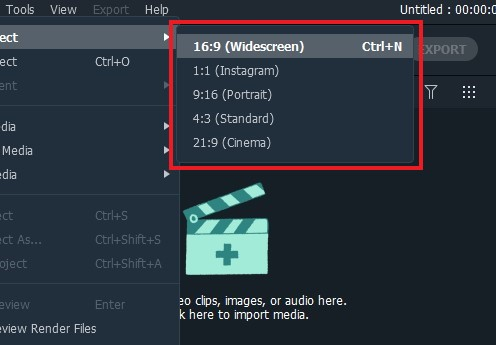
To ensure a full-screen vertical video experience on TikTok, the aspect ratio of your video should be 9:16.
All types of TikTok ads use this ratio. While 1:1 is possible, it won’t fill the entire screen.
TikTok is a platform that extremely relies on videos and sound. The audio tracks you hear in a TikTok video are just as crucial as the visuals. Without sound, a TikTok video can be boring.
That’s why the platform has a vast collection of songs that creators can incorporate into their videos.
All you have to do is choose a sound that complements your video.
By partnering with TikTok creators, you can rely on them to develop content ideas for you.
You can use either a popular sound on the platform (which TikTok tends to favor) or your unique audio that best matches the message you want to convey.
3. Keep important visuals in the center of your ad creatives.To make your ad effective, consider choosing a center of attention your audience can focus on.
However, consider your target audience and the type of ad you want to make.
One good example would be TikTok creators who keep their visuals in the center, which is a good example. Users must see the product in the center and a hook that keeps them interested in an in-depth product review.
4. Create TikTok native experiences.To ensure a better experience for your audience when creating TikTok videos, refrain from using native content from other social media platforms.
The platform has its distinctive style, transitions, and filters, which you should use to ensure your videos have that unique TikTok feel.
If you need help achieving this, consider visiting a creator marketplace to find people who can help you.
One helpful tip is to keep your videos brief, captivating, and interactive. Viral TikTok videos are typically 5 to 60 seconds long. However, aiming for videos at most 9-15 seconds is best.
Moreover, the approach will give your followers something to anticipate with each new post.
After all, a study by Microsoft Corp shares that the typical attention span lasts less than nine seconds for most people.
Videos longer than 15 seconds are good for businesses. Moreover, materials up to a minute long can be effective if they are interesting.
Final Thoughts on TikTok HookIt’s clear that to engage and draw more views to your TikTok videos, a strong hook is essential.
Combining music, visuals, and a unique concept can attract people and lead to the viral fame you seek.
Is your company seeking to enhance its marketing strategies? AdvertiseMint, the premier social advertising agency specializing in Facebook and Instagram ads, can assist you.
Partner with our top-notch TikTok advertising agency to achieve your company goals and bring your brand to the next level!
Check out AdvertiseMint’s user-friendly marketing guides and examples and the related articles section of this blog post.
Frequently Asked Questions on TikTok HookHow frequently should I update my TikTok hooks to keep them new and relevant?Updating your hooks every few months is recommended to maintain fresh and relevant content. Doing so will give you an advantage over competitors and ensure your content remains up-to-date.
Are there any tools that can help me make better TikTok hooks?Consider using online platforms like Canva, Descript, CapCut, or Adobe Spark to make your hooks more attractive and captivating. These platforms offer templates and design elements that you can use to create visually appealing content.
Are there any tips to help me create better videos for my business on TikTok?Yes, there are several tips to help you create more innovative and unique videos for your business on TikTok:
First, staying up-to-date with the latest trends and using them in your content is important.Second, experiment with different types of content, such as challenges and tutorials.Finally, use your personality and have fun with your content.Related Articles3 Foolproof Ways to Promote Your Music on TikTok
The Best Time to Post on TikTok, According to Data
{"@context":"https://schema.org","@type&... frequently should I update my TikTok hooks to keep them new and relevant?","acceptedAnswer":{"@type":"Answer","text":"Updating your hooks every few months is recommended to maintain fresh and relevant content. Doing so will give you an advantage over competitors and ensure your content remains up-to-date."}},{"@type":"Question","name":"Are there any tools that can help me make better TikTok hooks?","acceptedAnswer":{"@type":"Answer","text":"Consider using online platforms like Canva, Descript, CapCut, or Adobe Spark to make your hooks more attractive and captivating. These platforms offer templates and design elements that you can use to create visually appealing content."}},{"@type":"Question","name":"Are there any tips to help me create better videos for my business on TikTok?","acceptedAnswer":{"@type":"Answer","text":"Yes, there are several tips to help you create more innovative and unique videos for your business on TikTok:\n\nFirst, staying up-to-date with the latest trends and using them in your content is important.\nSecond, experiment with different types of content, such as challenges and tutorials.\nFinally, use your personality and have fun with your content."}}]}June 27, 2023
The Ultimate Guide: How to Run Facebook Ads
Is your target market accurate? Have you considered buying a suitable bidding system? Do you need the correct advertising format?
We’ve simplified the process of creating Facebook Ad campaigns for you. We’ll teach you how to improve results, check the accuracy of your target market, consider using a suitable bidding system, and use the correct advertising format.
Moreover, we’ve prepared a checklist to help you through the steps. Here’s what you can expect from this blog post:
Create Your Meta Business SuiteMake Facebook AudiencesSet up Meta PixelThe Three Main Sources of E-commerce BusinessesSearching for Potential New CustomersCreate a Facebook Ads CampaignSelecting Your Creative and ScheduleImprove Your Facebook CampaignsDifferent Kinds of Facebook AdsFinal Thoughts on Facebook AdsFrequently Asked Questions on Facebook AdsCreate Your Meta Business SuiteMost of the time, people who give up on Facebook advertising do so because they set up their accounts incorrectly. Perhaps, they were so overwhelmed by the platform’s massive ad options that they never reached the point of running a campaign.
So, before anything else, set up your Meta Business Suite account correctly.
Meta Business Suite is the section that houses your Facebook ad account, business pages, and other tools you’ll need to run your ads.
To create your Meta Business Suite account, follow the steps below:
Open your browser.
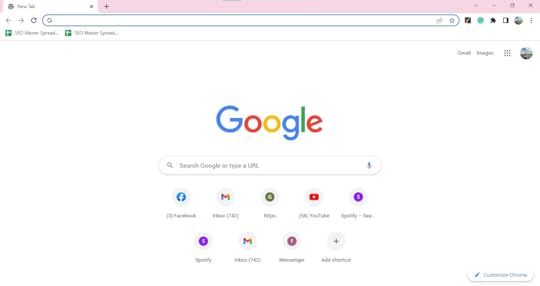
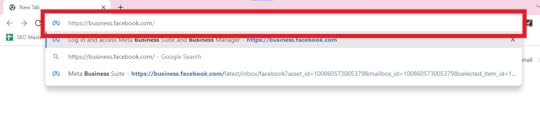
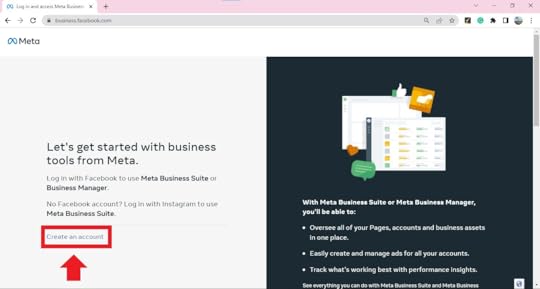
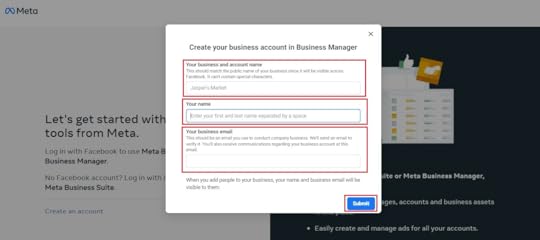
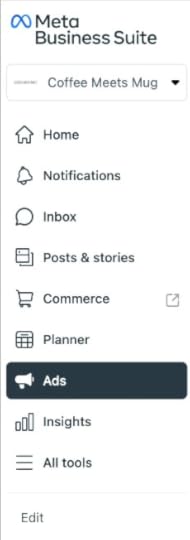
Having an ads account is your advertising hub, where you can go to all the different areas of your business on Facebook.
Set up Meta PixelNew Facebook advertisers often need help determining if their ads are effective.
You can boost a post or create an advertising campaign in Ads Manager. However, you will only know if an ad resulted in sales on their website if you install the Meta Pixel.
Meta Pixel functions as a bridge that connects your Facebook ads with your website. You must make a tracking code in your Meta Business Suite account and add it to your website before paying for ads.
Moreover, it will tell you what people who see your Facebook ad do when they visit your website. Meta Pixel helps you understand which type of audience and creative content works best for getting results from ads.
Make Facebook AudiencesTo succeed in Facebook advertising, targeting the appropriate audience for your ads is crucial.
With billions of users worldwide, using Facebook’s Audience Insights is necessary to discover individuals likely to be interested in your product or service.
In Meta Business Suite, the audience refers to a section where you can list people to aim your advertisements.
You can use various features in the audience section to create these lists, which you can categorize into retargeting and prospecting.

Visitors who added items to their cart or followed you on Instagram are more inclined to purchase but might require some incentive.
Retargeting is a Facebook advertising strategy where ads follow you on Facebook and Instagram after you’ve visited a brand’s website. It is a highly effective marketing technique.
To create Facebook retargeting audiences:
Go to the Audiences section of Meta Business Suite.
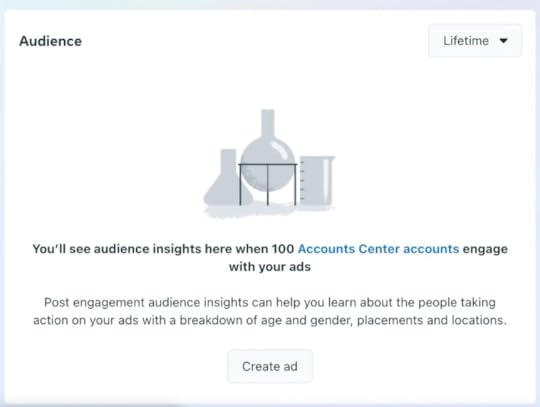
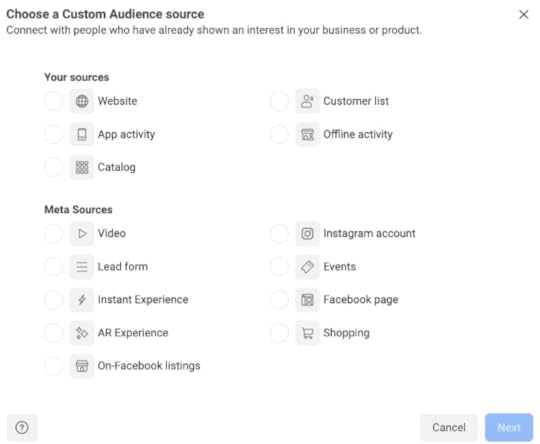
When making a Custom Audience, you can select from several sources. For e-commerce businesses, the three primary sources to consider are customer lists, websites, and catalogs.
Customer list sourceYou can use a customer list to upload contact information from customers or leads. Facebook then matches this information with its users, allowing you to target them directly with your ads.
Making a list of customers is good for getting existing customers to buy new products or for people who are subscribed to emails but haven’t purchased anything yet.
Website sourceTo effectively target your website visitors, you can use traffic insights to create retargeting lists. These lists can vary in size depending on the actions or pages visited on your website.
Popular lists with higher conversion rates include visitors from the past 30 days or those who have added items to their cart in the past seven days.
Catalog sourceUsing this custom audience will help you connect with individuals who have engaged with items in your catalog.
Searching for Potential CustomersCompared to retargeting and converting website visitors, finding new customers can bring better results for your Facebook ads.
If you want to find new customers, consider “prospecting.” This process involves advertising to individuals who have not purchased from a business or interacted with it online.
For small to medium-sized businesses, this means targeting a significant portion of Facebook’s active user base, which amounts to billions.
However, narrowing this vast pool of potential customers can present a significant challenge.
Creating lookalike audiences.Another way Facebook finds better prospects for your business is by having a list of customers or leads you’ve collected.
Lookalike audiences must use your custom audiences’ data to create a new audience with Facebook users who share likenesses with your existing customers.
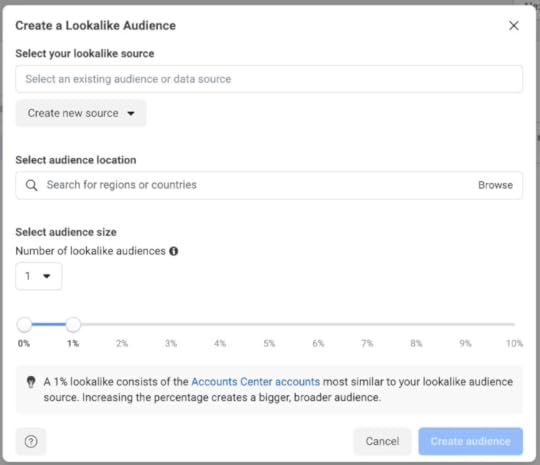
You can make lookalike audiences based on any of your custom audiences, with size and similarity varying from 1% to 10% of the chosen country’s population.
A 1% lookalike audience represents people who closely resemble your custom audience source, making them a great starting point for your prospecting campaigns.
To gain more potential customers while staying within the profile of your target audience, consider gradually switching to 3% or 5%. Finally, a 10% lookalike audience as you increase your advertising budget.
Use Facebook’s interests, behaviors, and demographic data.Suppose you need a list of previous customers or website visitors to generate a lookalike audience.
In that case, you can use Facebook’s interests, behaviors, and demographics data to craft prospecting audiences while creating an ad.
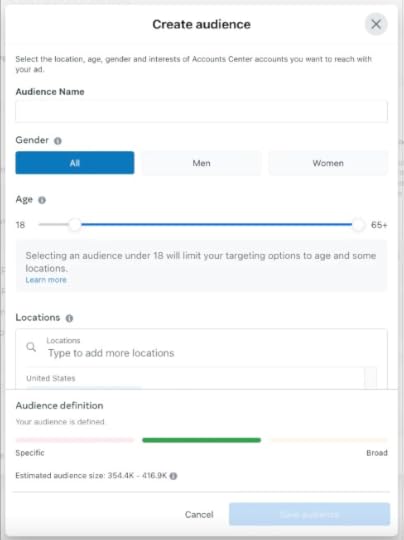
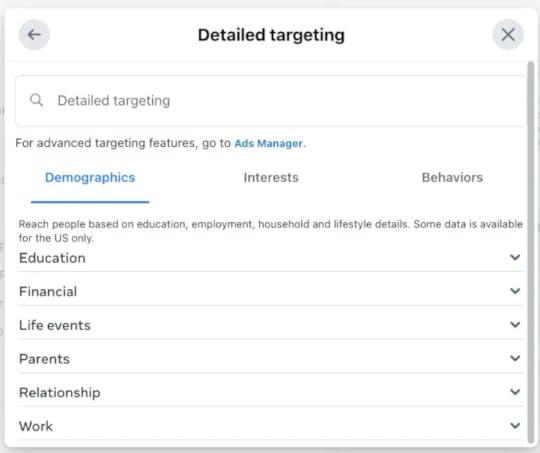
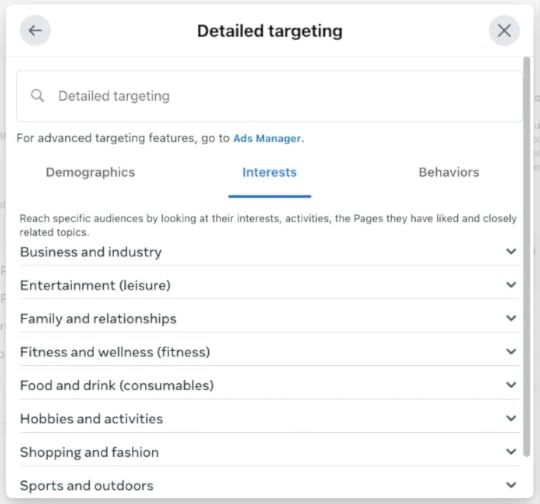
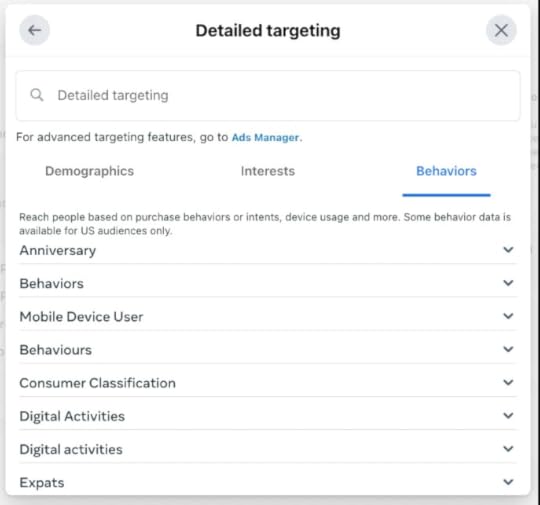
To increase your chances of success, you must test different audiences based on interests, behaviors, and demographics separately.
These audiences are usually broad and can include a large number of users. You can determine the most effective for your goals by testing them individually.
After identifying the audience most likely to respond to your ads, you can add more layers to your prospecting campaigns and expand your reach.
Create a Facebook Ads CampaignTo start making your initial campaign, access the Ads section of your Meta Business Suite account. Click the “Create ad” button. Then, choose a goal.
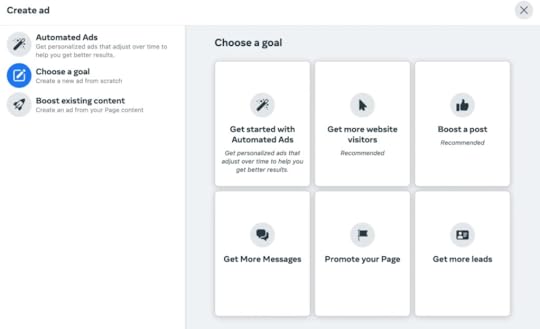
Varieties of categories of goals within Facebook ads:
Get more website visitors: when you want more website traffic.Boost a post: in cases where you need to nurture an organic post.Get more messages: the aim of using click-to-Messenger ads.Promote your page: simple ads that develop your Facebook business page.Promote your business locally: if you owned an in-person business or event.Get more leads: collecting contact info from people on Facebook.Automated ads: Facebook will test different ad versions to see which performs best.Think about what you want to do with your Facebook ads. The platform will charge you for the number of people who see your ad.
Tell Facebook about the specific results you want. So, if you want people to buy products from your website, you shouldn’t choose “grow traffic” as your goal.
Selecting Your Schedule and BudgetThe next step in making a Facebook ad is to find a creative way to get people to buy what you’re selling.
For instance, selecting your ad schedule can help more people know about your brand. They may follow your social media accounts even if other campaign goals exist.
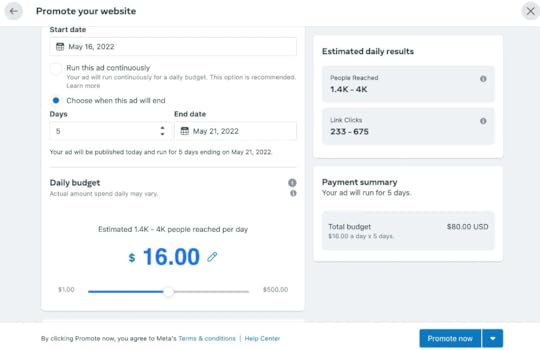
You can pick and improve a list of people to target. Moreover, you can choose their location, age, gender, and language, which will help you find the right people for your ad.
Click “Create new” to create your audience.
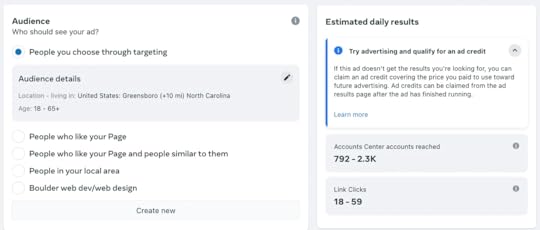
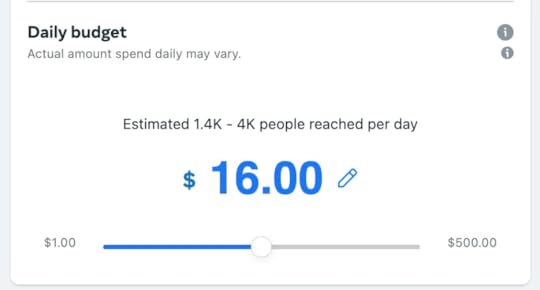
Select how much you want to spend on Facebook ads. Then, decide if you want the money to last a day or forever. There are a few things that will help determine how much to spend:
Think about how much money you can spend on marketing.If the product costs more, you must have a bigger budget for advertising.You could be trying to get people to buy something or know about it.If you have tried paid advertising before, consider how much it costs. Use that same amount here.When you try Facebook ads, make sure to set a sufficient budget for reaching your goal. The algorithm will take some time to figure out what works best.
You can use campaign budget optimization from Facebook to help manage how much money you spend on different ads.
With ad sets, you can decide where your advertisement will show. Moreover, you can pick Facebook, Instagram, or Messenger for your ad.
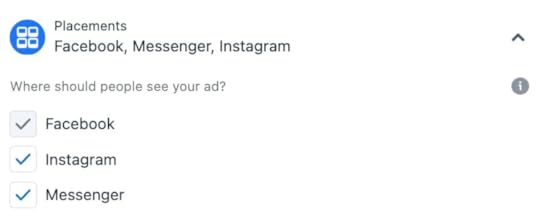
When you are done making the ad, click “Promote now.” Facebook will check it and ensure that your ad’s good to go. Once approved, your ad will be live!
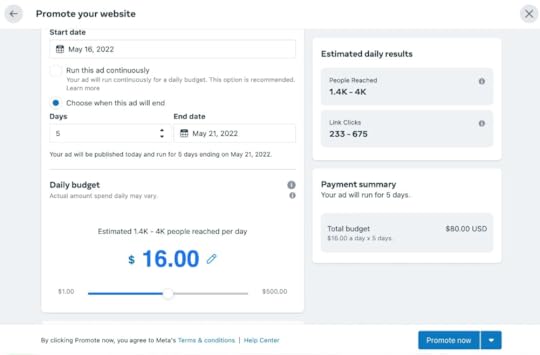
Dynamic product ads are the most common Facebook ad formats in e-commerce. If you’ve ever browsed a store online and seen repurposed ads with the exact products you viewed, you’ve seen a dynamic ad in action.
These ads pair your Meta Pixel data and your Facebook product catalog, so visitors to your website appear products they looked at or added to their cart.
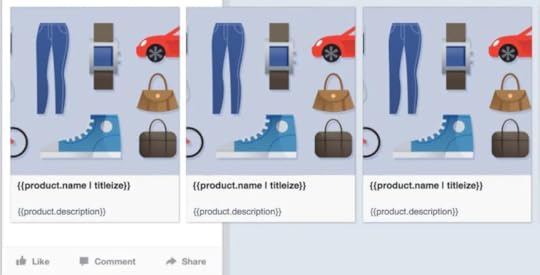
You can use the “Assets” menu in the Meta Business Suite to connect your business website and ad account.
Moreover, you can make a catalog with Meta Pixel. Meanwhile, if you have Shopify, add the Facebook sales channel to sync products easily with your ad account.
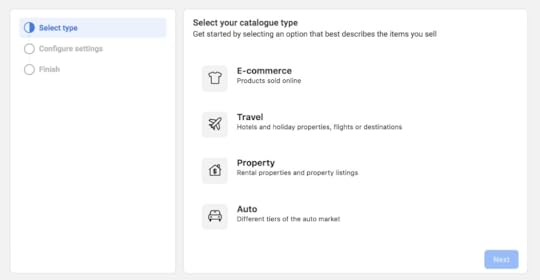
Go to the Ad Manager to create a product ad. Then, pick Product Catalog Sales as the goal. Finally, choose your product catalog and who to show it to.
You can use dynamic product ads to show items in your store that interest people, even if this is their first time on your website. Facebook will decide which products to use based on their profile data.
Improve Your Facebook CampaignsCreating a campaign and learning how to monitor and optimize its performance over time is crucial to succeed on Facebook.
So, you must check your Facebook ads at least once daily and even more frequently as your spending increases.
It can be tempting to change your ad if you do not get any purchases after one day. However, it is important to wait. Facebook ads need time for the algorithm to learn who might buy your product.
Wait until you have 1,000 people looking at your ad before deciding to turn it off or spend more money on it.
Different Kinds of Facebook AdsWhen advertising on Facebook, it matters what you want to do and what type of ad you use. It can be hard for people new to this because there are many types of ads.
However, we have made it easier by giving four different types of ads that you can use on Facebook.
Image Facebook adsSingle-image ads are the usual type of ad for Facebook pages. They are simple to make and look nice. Besides, image posts get the highest engagement at 0.12%.
Photo ads work best when you have little time or money. You can make an image ad from your page or use Facebook Ads Manager for more options.

Video ads help show people your product or brand. You can make video ads on Facebook Ads Manager or boost a post with a video from your page. The video will show up on Facebook, Instagram, and Messenger.
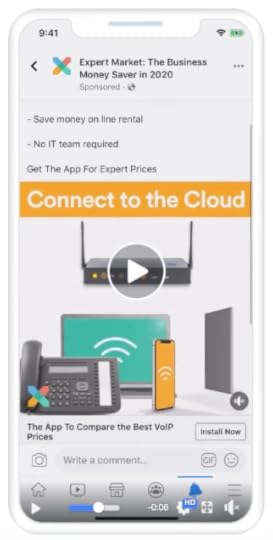
Moreover, you can use Facebook videos to show people special things about your brand.
The videos should be 15 seconds or less and have an ending that tells people what to do, like buying a product or going to a website.
Carousel Facebook adsCarousel ads let you show up to ten pictures or videos in one ad. People can move through the images by swiping left or right on their phones or clicking the computer’s arrows.

Carousel ads can help you show different products. They can also offer different views of one product. Moreover, you can use them to explain how something works or give a tutorial.
Besides, you can make one big picture across multiple frames for a better experience.
Collection Facebook adsUsing the collection ad format can help you show your products to people. This type of ad has a big picture or video at the top. It also shows multiple products below it.

Collection ads are a good way to show people what you are selling.
You can publish them on Facebook, Instagram, and IG Stories. It will help people review and purchase your products.
Final Thoughts on Facebook AdsFacebook advertising is easy to use, even if you know little about digital marketing. So, it is perfect for entrepreneurs with no budget to hire an agency.
Learning about Facebook advertising and setting up a campaign can help your business grow.
Are you looking for a way to boost your marketing strategies? AdvertiseMint, the premier social advertising agency specializing in Facebook & Instagram ads, can assist you.
Check out AdvertiseMint’s user-friendly marketing guides and examples and the related articles section of this blog post.
Frequently Asked Questions on Facebook AdsWhat are Facebook ad specs for?When running Facebook ads, consider the character counts, image sizes, and campaign objectives. You must ensure all these parameters are right so your ads will succeed.
How much do Facebook ads cost?Facebook advertising usually costs about $0.94 for each person who clicks on the ad. For every 1,000 people who see it, you might have to pay about $12.07.
How important is it to create Facebook ads?Creating Facebook ads can be extremely valuable for businesses and individuals who want to promote products, services, or brands to a large audience.
Related Articles8 Books for Industry-Leading Facebook Advertisers
Essential Guide: How to Choose Facebook Advertising Agency
Are you ready to grow your business through Facebook advertising but don’t know where to start?
Well, you could begin by finding the right agency to run your business ads. However, we won’t neglect the fact that this can be a challenging process. After all, there are over 10 million active advertisers on Facebook.
This blog post will help you find a good agency for Facebook advertising. We’ll show you what questions to ask to ensure that you’re choosing one that’s reliable and trustworthy.
Read on as we cover the following:
What Is a Facebook Advertising Agency?10 Steps on Choosing a Facebook Advertising AgencyFacebook Advertising Agencies Workflow5 Reasons to Hire a Facebook Advertising AgencyWhy Choose AdvertiseMint?Final Thoughts on How to Choose Facebook Advertising AgencyFrequently Asked Questions on How to Choose Facebook Advertising AgencyWhat Is a Facebook Advertising Agency?A Facebook ad agency is a group of people with the skills and tools necessary to run ads on the platform.
They choose the right words and strategies to get people to take action. They review Facebook data to ensure that the right people see their ads. Their goal is to help businesses get more customers and make more money.
Facebook advertising agency roleBusinesses need help managing their own Facebook ads. Even if they create a few ads and posts, the results may need improvement.
It is better to hire someone who knows how to run a Facebook ad campaign instead of trying to do it yourself. A Facebook advertising agency can save you time and money in the end.
10 Steps on Choosing a Facebook Advertising AgencyIt can take time to pick the right Facebook advertising agency or consultant for your business.
Before deciding, you have to consider certain factors, including the agency’s service costs, experience with Facebook marketing, and industry track record.
Here are some tips that will help you make the best choice:
Think about what you want to achieve. Think about the goals of the project. Will it only be done once, or will it need to keep happening?
 Look for a company that can help you advertise on Facebook.
 Find out how much it will cost to hire a company that can create ads for you on Facebook.
 Go through the Facebook advertising agency’s website to get more details about them.
 Listen carefully to the questions the Facebook advertising agency asks. Make sure you understand them and answer them correctly.
 Ask the Facebook ad agency for ideas or suggestions.
 Ask to see things they have done before. Ask to see the results of their work.
 Look for their social media pages to find reviews and comments.
 Ask the Facebook ad agency how long they have been in business.
 Facebook Advertising Agencies Workflow
What do Facebook ad agencies do? Do they use big words and phrases to try to get people to buy their services, or is there more to it than that?
Here’s a Facebook advertising agency’s workflow:
Finding clients on Facebook.Facebook advertising agencies generally specialize in helping eCommerce brands grow their business.
Remember that acquiring new clients goes beyond running ads, cold calling, or sending numerous emails to a list.
So, FB ad agencies identify suitable brands that align with their preferred budget, logistics, and specializations.
This process also requires the potential client to put in some effort upfront to ensure a smooth operation.
Creating compelling ads on Facebook.The initial step in creating an ad is determining the client’s objectives. Usually, these include the following goals:
Improve your target audience’s level of familiarity with your brandEnsure return on investment (ROI)Generate more leads and convert them into customersIntroduce a new product to the marketThe second step in creating ads is research, which is important for establishing the right structure and strategy for the Facebook marketing campaign. Research topics typically cover areas:
Target audienceAge rangeDemographicsGenderInterestsCompetitorsMost popular ads and formatsType of offersStyle and tonality of the ad strategyPain pointsBenefitsReviews/feedbackAn ad agency runs A/B tests on offers and ad copies. The team analyzes results and makes strategic changes based on data.
In the third phase, the Facebook advertising agency focuses on technical tasks such as:
Establishing a Facebook business pageCreating custom audiencesDeveloping dynamic product adsEnsuring compliance with the Facebook ad accountEvery Facebook advertising agency aims to become the top digital marketing agency for e-commerce brands by investing significant resources, time, and money.
5 Reasons to Hire a Facebook Advertising AgencyAttempting to manage your Facebook and Instagram ads may not be worth your time and money. We suggest working with a professional Facebook ads manager to increase your ROI.
Consider working with the best Facebook ad agencies to improve your revenue from social media marketing campaigns.
With the right team, tools, tactics, and strategies, you can reach a larger audience and boost your sales.
Here are five reasons why you should consider working with an agency that specializes in Facebook ads:
1. Handling the task personally can be time-consuming.

Because a Facebook advertising agency has the right tools and expertise, it can efficiently run ads. In contrast, learning strategies and technical skills will take up much of your time. Besides, you need to monitor the ad analytics regularly.
A Facebook advertising agency is ideal for businesses big and small. So you won’t need to use your time or resources to manage your ads.
2. The task requires specialized skills and knowledge.

If you are good at marketing but not so good at Facebook ads, it can take a long time to get the results you want.
Hiring an agency can improve your Facebook advertising strategy and help you get more money from your ads.
An agency that knows what they are doing can help you grow quickly without wasting money.
3. Running Facebook ads requires the right tools.

Managing Facebook ads can be tricky. You have to ensure they are doing well, people like them, and the ads get sent out on time.
Hiring an agency with special tools and software will make things easier, and you can focus on other parts of your business.
4. You want to avoid wasting your marketing budget.

Working with an agency for digital advertising can help you save money and make more money.
It is important to know how people use your page. A professional can give you the tools and training to be successful online.
5. You aim to outperform your competitors.

Social media should be part of your plan if you have an online business. Many people use Facebook ads to make more money, which usually works!
With the right help, you can use Facebook ads to make twice as much money. You can use social media to reach more people and earn more.
Why Choose AdvertiseMint?AdvertiseMint helps businesses advertise on Facebook and Instagram. They do this by giving advice, buying ads for you, and running ads that catch people’s attention.
If you need help with advertising online, AdvertiseMint is your partner.
Final Thoughts on How to Choose Facebook Advertising AgencyIt is important to pick the best agency for your Facebook advertising. After all, you will work with them and give them access to your data.
Make sure to perform your due diligence before you choose one. Quality should be the most important factor when selecting a partner for social media marketing.
Do you want to take a results-driven approach to your marketing strategies? AdvertiseMint, the premier social advertising agency specializing in Facebook & Instagram ads, can help.
Check out AdvertiseMint’s user-friendly marketing guides and examples and the related articles section of this blog post.
Frequently Asked Questions on How to Choose Facebook Advertising AgencyAm I capable of managing Facebook ads on my own?You can use Meta ads to manage your Facebook campaigns yourself. However, it is better to hire a professional Facebook ad agency. While they cost more money upfront, you will get back what you invest and more.
What is the number of companies that advertise on Facebook?Three million businesses use Facebook to advertise. That means you have lots of competition, but don’t worry. More people use Facebook, which means your brand has more users to reach.
How much is the cost of advertising on Facebook?Facebook has an inexpensive way to advertise. It is called pay-per-click (PPC). You only need to spend money when someone clicks on the ad. It costs around $1.86 every time someone clicks on the ad.
Related ArticlesHow to Use the Exclusion Marketing Method to Improve Facebook Ad ROI
The Remarkable Facebook Advertising Strategies That No One Knows
Are you looking for a way to boost your social media presence and reach more potential customers?
Well, search no further! Using the right techniques of Facebook advertising can significantly impact your business.
To take your business to the next level, you should know strategies beyond creating ads and targeting certain demographics.
This blog post shares some of the best-kept secrets that could greatly enhance how others perceive your brand.
Read on as we cover the following:
Creating a Conversion FunnelMake Realistic Buyer PersonasPortion Your Audience to Create Applicable OffersUse Facebook Meta PixelUse Facebook Ads and Content MarketingBuild New Marketing Lists with Lead AdsBuild Multi-Product Ads for E-CommerceImprove Your News Feed Strategy by Using Video AdsBuilding AdsFinal Thoughts on Facebook Advertising StrategiesFrequently Asked Questions on Facebook Advertising StrategiesCreating a Conversion FunnelA conversion funnel recognizes your relationships with your target audience and chunks those connections into stacked tiers.
Some people are ready to purchase from you right now (at the bottom), while others still need proof that your product is good (at the top).
Unsurprisingly, various Facebook ad strategies and campaigns are more effective for different stages of your sales funnel.
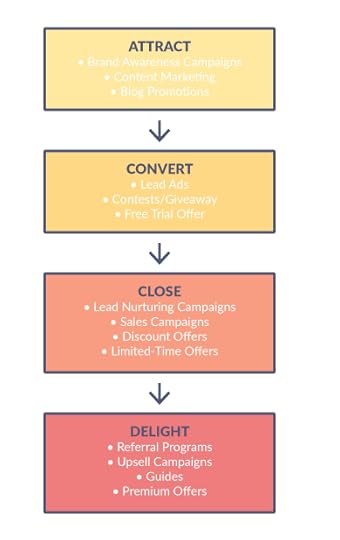
For example, a person who owns your eBooks and attended webinars are likelier to purchase your product than someone who is encountering your advertisement for the first time.
Here are tips for creating a clearly defined conversion funnel for effective campaign management:
Know your Facebook audiences.Optimize offers and campaigns suited to each funnel (target) stage.Optimize cross-channel marketing commissions to move people through your conversion funnel.Adjust your Facebook ad campaign objectives based on how familiar your audience is with your brand.Make Realistic Buyer PersonasYou need to establish buyer personas before you figure out the unique value proposition (UVP) for your Facebook ad campaigns.
Explore demographic data:
What do they look like?How old are they?Are they married?Do they own a home or rent an apartment?Do they commute via public transit or drive a car?Is their vehicle a Ford or a Tesla?What’s their income bracket?Do they like dogs or cats?If you need help answering the questions above, look at Facebook ads to determine who your buyer is. Learn about a real person’s story and what they are looking for.
Match your ad to their expectations. Speak in a way that resonates with them.
To know your target Facebook users, consider their interests, where they live, and how they shop. One extra tip is to find out how the buyer personas identify themselves.
It can take time to figure out who will want the items you are selling. To ensure that the right people see your ads on Facebook, take time to learn what your target needs and wants.
Consider who your customer is, when is a good time to show them the ad, and what enticing offer you can give them. Doing so will set your ads up for success.
Portion Your Audience to Create Applicable OffersUnderstand your target audience and recognize that the conversion process varies based on their familiarity with your product or service.
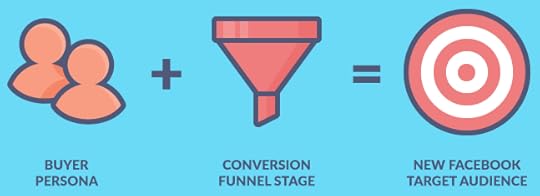
Prospects in the conversion funnel stage are considered new leads and are your ideal customers who demonstrate an interest in your product.
Retargeting your Facebook audience.Retargeting is a type of Facebook ad that has brought success to many businesses. For example, Aurum Brothers made 13 times more money from their ads by retargeting people who had already visited their website.
A comScore, Inc. study showed that retargeting could help people remember a brand better, and they will search for it 1046% more often.
Kinds of audience segments for Facebook ad sets.Here are a couple more customer segments we’ve seen work wonders on Facebook and other ad platforms:
Lukewarm leads – individuals who visited your website but did not interact with any content or promotions offered.Past blog readers – users who visited your blog page and found your link through search engine results or social media but left after reading only a few articles.Engaged blog readers – people who keep visiting your blog for more insight.Landing page visitors – individuals who visit certain landing pages are probably interested in specific products or features.Shopping cart abandoners – those who added items to a cart can be sent a trigger email to encourage them to finalize their order.Repeat customers – customers who repeatedly show interest in your brand and have the potential to become advocates for it.Use Facebook Meta PixelHave you heard of the Facebook Meta Pixel? It’s a small piece of code you can add to your website to track visitors’ actions when they arrive.
Using Facebook Meta Pixel helps make your ads more relevant, as you can see visitors’ actions.
Tracking conversions is essential for keeping your Facebook campaign on course. However, there was a hiccup at the start of 2021, and the industry still determines its impact.
Nonetheless, installing the Meta Pixel is crucial to avoid flying blind with your Facebook ad account campaigns.
Use Facebook Ads and Content MarketingSome companies try to get customers by using Facebook ads, but they sometimes try to target people who are not interested.
When there are not enough people interested, marketers use direct sales offers. It is better to get people interested before trying to sell them something. Here’s how:
To improve Facebook ads efficiency, try content marketing. Content is the words and phrases you use to help people find your ad.
Ensure it is valuable and helpful for the people you want to reach. Moreover, use clear words that are easy to understand and interesting.
Share your content with your Facebook audience before asking them to take action.
Moz gets new customers by making good content about Search Engine Optimization (SEO). They generate valuable content showing people they’re experts in the field.
People who only know them learn more and more once they become customers.

After a person has read a few of your content, you can promote more sales-oriented Facebook ads to move them further down the funnel.
Steps to promote your content.An article from the Content Marketing Institute outlines the best publishing plan for promoting blog content on Facebook:
Share your post on Facebook.Ask your members to like and share the post.Boost your Facebook post to reach an extra audience.Tip: A single Facebook page post can be used for multiple ad campaigns, displaying all social proof (likes and shares) for that post under one ad.
Create New Marketing Lists with Lead AdsLead ads are convenient because you can provide your contact details without leaving Facebook.
When you see a lead ad in your newsfeed, you can easily exchange your email address for an eBook or another offer in a hassle-free way.
Let’s give it a try with this Facebook ads strategy:
Create a Facebook Custom Audience for blog readers and website visitors who have not converted on any offer in the past 30 days.Set up a lead ads campaign to get their emails and move them into your marketing funnel.Build Multi-Product Ads for E-CommerceFacebook multi-product ads let you showcase multiple products within a single advertisement.
That works for the following reasons:
Multi-Product Ads allow your customers to choose from multiple options.You pay for one ad and receive the bonus of promoting multiple products.It is possible to demonstrate the advantages of one product.The multi-advertiser case study conducted by Adobe revealed that the utilization of multi-product ads could result in certain benefits:
The click-through rate (CTR) has improved significantly, with an increase ranging from 50% to 300%.Click engagement has decreased costs by up to 35%, leading to lower CPC.In some cases, there was an improvement of more than 250% in the cost per acquisition.There is more to carousel-type Facebook ads. B2B and SaaS companies, as well as subscription services, can use this ad type.
Improve Your News Feed Strategy by Using Video AdsIf images can speak a thousand words, it’s hard to quantify how much moving images can express. Viewers prefer videos because they provide information in an easy-to-digest manner.
There’s plenty of evidence that incorporating videos into your Facebook advertising strategy can significantly improve your results.
Kinetic Social says that video ads are the least expensive type of ad. They cost $0.18 per click on average, which is cheaper than buying impressions or conversions.
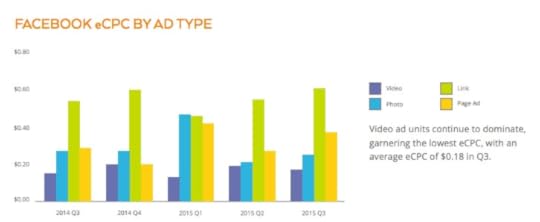
Meanwhile, Adobe reports that viewers who watch videos are 1.81 times more likely to make purchases than those who don’t watch videos.
Using video ads can increase by almost 85% in advertising return on investment (ROI). To maximize the chances of success, make sure your videos are of high quality and tailored to your target audience.
While many Facebook video posts have been successful, others have yet to be. The success of a video largely depends on its quality and relevance.
Using video ads is an effective method to showcase your product in action and grab viewers’ attention:
Do you have a subscription service? If so, consider making an unboxing video to showcase the excitement of receiving your product.If you sell SaaS, you should create a short video demonstrating how your product works.Do you want to come across as an expert? Invite people to your upcoming webinar. Offer personalized consultations and use a Facebook video ad to share further details.Building AdsWhen you make ads, it is important to make them interesting. Thankfully, Facebook’s Ads Manager lets you try different versions of your ads. This way, you can determine the one that people like best.
Setting up testing in the Facebook Ads Manager:
Go to the Ads Manager.Select the Campaigns tab.Choose A/B Testing.Select the variable you want to test (audience, creative, placements, etc.).Perform your test.Choose how long to run your test.Before conducting the test, it is important to be aware of the following:
Ad FormatsFacebook offers various advertisements for its platforms, including Facebook, Instagram, and Messenger. These ad formats include:
Facebook image adsFacebook video adsFacebook carousel adsFacebook collection adsAd CreativesAs a creative, you design the ads and where they go. Try different variants and see what people like best. Don’t be scared to try something new!
Ad CopyCreate two versions of your Facebook ad copy and test to see which generates more clicks.
CTACall to Action (CTA) can be the button you want people to press. Try two different buttons and see which one people like better.
Facebook has limits on your choices, but it helps you make decisions faster.
Final Thoughts on Facebook Advertising StrategiesUse the Facebook ad strategies we discussed to create your campaigns. A well-defined marketing technique is essential for the success of Facebook ads.
In addition to the technical aspects, including emotion, urgency, and creativity in your Facebook advertising strategy is important.
Doing so lets you develop fresh ideas to get you ahead of your competitors.
Is your company seeking to enhance its marketing strategies? AdvertiseMint, a premier social advertising agency specializing in Facebook and Instagram ads, can assist you.
Check out AdvertiseMint’s user-friendly marketing guides and examples and the related articles section of this blog post.
Frequently Asked Questions on Facebook Advertising StrategiesAre there any differences between desktop ads and mobile ads?Desktop ads prioritize the headline, so you should make a strong headline. Meanwhile, mobile ads focus more on the main text, so you should perfect the body text.
How are carousel ads different from other Facebook ad types?Carousel ads are a good way to tell a story with pictures or videos. They cost less than other ads, which you notice in many places on Facebook.
How important is it to use Facebook mobile ads?Try using Facebook Mobile ads, which might help you sell products or services to businesses. It is helpful because many people use Facebook on their phones.
Related ArticlesMake a Call to Action that Sells: Best CTA Words, Phrases, Examples
June 16, 2023
Learn Why is my Advertising Access Restricted on Facebook
Do you need help with your restricted advertising account on Facebook?
If you’ve had your Facebook account restricted, don’t fret. You’re in the same boat as many Facebook advertisers have been in the past.
In this post, we’ll go through why Facebook restricts your ad account in the first place, what you can do to solve it, and how to prevent it in the future.
Read on as we cover the following:
Facebook RestrictionsWhy is my Facebook Advertising Account Restricted?Solutions to Restricted Facebook AccountFinal Thoughts on Why is my Advertising Access Restricted on FacebookFrequently Asked Questions on Why is my Advertising Access Restricted on FacebookFacebook RestrictionsBefore we go through why your account might be restricted, it’s important to know which thing has restrictions put upon it.
Each of the following Facebook can restrict:
Your ad accountYour personal Facebook profileYour Business Manager accountYour Facebook pageEach of the following restrictions above has its unique consequences as well.
If your ad account has been deactivated (restricted from advertising), you can’t make new ads with this account. Any ads you have running will stop working.If Facebook has restricted your profile from advertising, you cannot make new ads, manage them, or create new ad accounts. Facebook will send you a message confirming the same notice.”Your Advertising Access is Restricted. You’re no longer granted to use Facebook Products to advertise. You can’t run ads, manage advertising assets or create new ad or business accounts.”You can inspect your account dashboard to see the same thing written differently:
We learned about different things that Facebook can restrict. Let’s discuss why it might happen and how to improve it.
Why is my Facebook Advertising Account Restricted?It’s easier to enumerate the number of stars in the sky than to accurately count how many ways Facebook can restrict your account from advertising.
We always see many common reasons, so let’s start with those.
Facebook doesn’t approve your advertisements due to violating Facebook’s advertising policies.While these aren’t technically ‘account restrictions,’ as you’ll see soon, they are a huge part of the process.
Nobody indeed likes to read legalese (and most people don’t). However, this can cause bigger problems than an hour or two lost time in the Facebook ad world.
Facebook policy violations can base on their ads policies, , or community standards offenses.
The most usual ones we see are related to Facebook advertising policies. Here are some usual Facebook policy offenses to be on the lookout for:
Sexually Explicit Content. It is not okay to advertise anything related to sex on Facebook. Sometimes, even if the advertisement is not for something sexual, it might have words that make it look like it is.For example, spa services might have words that sound like they are about sex, and this can get flagged by Facebook’s automated system.Prohibited categories. Facebook does not allow ads for drugs, tobacco, weapons, and money products like loans or auctions. If those items are not against the law, Facebook still does not want them advertised.Misinformation. Do not share false news on Facebook.Sensational content. Do not use content that tries to make people click it because it is exciting or shocking.Bad grammar or punctuation. There are better ways to advertise than using the wrong grammar or punctuation. It can make people think something is wrong with your product.Inflammatory content. Inflammatory content is bad words or mean things said about people. It might be about their race, religion, or other things.Unacceptable Business Practices. This term describes ads that are not honest. They tell people to buy things that do not work or have someone famous use something when they don’t. They also try to make products look better than they are.Low-quality or deceptive content. Do not use ads that make people click to see the whole picture or are too sexy or shocking. Facebook will also check where the ad is going and ensure it is related to it.Personal attributes. Knowing what you should say when talking to people can take time and effort.
Don’t make any guesses or assumptions about medical conditions, where people live, or if they like someone of the same gender. Don’t say, “Do you still have asthma?” or “You must be from New York.”
If you have trouble with your ad, change it to follow the rules. If you think it follows the rules, but Facebook rejects it, ask someone to look at it again.
Note: If you don’t see ‘rejected’ next to your ad but don’t notice any ad spent more than 24 hours after review, you could have delivery issues instead.
Your Facebook ad account was restricted because Facebook did not accept too many ads you put up.Facebook will restrict your account if you repeatedly violate Facebook’s policies because of too many rejected ads. Furthermore, violating Facebook’s policies can be difficult to manage.
The only option is to appeal and wait for Facebook to decide.
Your Facebook restricts your advertising account for security reasons.Facebook may ban your account if they think something strange is happening.
Facebook restricts your account because there could be someone hacking into your account, spending much money on ads too quickly, or using a fake Facebook profile for ads.
If you think this has happened to you, use the tool Facebook provides to help fix it.
Your ads have received a significant amount of negative feedback.Do you know that people can give comments about your ads?
When looking at an ad on Facebook, click the three dots on the top right corner of the ad. Then, you will see some choices:
The first two options could give bad reactions.
Facebook might also send a notification to ask you what you think about the brand.
If one or two people say something bad about your ads, it’s okay. But if many people say bad things, Facebook will stop your ads, and you won’t be able to use them anymore.
Always ensure customers have a good experience with your brand so they don’t say bad things about you.
Solutions to Restricted Facebook AccountIf Facebook stops you from using your account, it might be for different reasons. The best thing to do is to contact Facebook and ask them why. They will help you get back on so you can use it again.
Facebook made it easier to review your account with the Account Quality page. You can check for any problems with your Facebook account or Business Manager on this page.
If something is wrong, you’ll see a box on the right side of the page telling you what to do.
The steps you need to take will differ depending on why you were banned.
If your ad account or Facebook business manager were banned, there would be a button to review the account. But if your Facebook profile was banned, you must do an identity verification first.
According to Facebook, the decision may take up to 48 hours to complete. However, there have been forum threads on sites like Reddit where users report waiting times of a few weeks.
When you make your decision, there are two possibilities. You will either get one of these outcomes:
Facebook accepted your appeal.Facebook rejected your appeal.If Facebook rejects your appeal, you can use the same appeal method to reject the decision again in certain cases. You can also contact Facebook support directly by clicking on the link in the help center.
You can set up a new one if your ad account or Business Manager doesn’t work out.
However, remember that using the same credit card for your new account may cause Facebook. If Facebook bans your account, you cannot do much. Facebook is usually good at finding out if a new profile is yours.
So it will be a short time before they know you made another one.
I have read that some people ask their colleagues or friends to access their Facebook profiles for advertising purposes, but this can be risky.
If Facebook detects this as fraud, it may limit the profile’s advertising abilities. It may be better to ask a coworker or agency to make and manage your ads instead.
Final Thoughts on Why is my Advertising Access Restricted on FacebookThe article explores the potential reasons behind the Facebook profile restrictions and offers solutions for resolving and preventing them in the future.
It emphasizes the importance of staying updated on Facebook policies to avoid the risk of getting permanently banned for a single error.
Is your company seeking to enhance its marketing strategies? AdvertiseMint, the premier social advertising agency specializing in Facebook & Instagram ads, can assist you.
Check out AdvertiseMint’s user-friendly guides and examples and the related articles section of this blog post.
Frequently Asked Questions on Why is my Advertising Access Restricted on FacebookHow long does Facebook ad account restriction last?If you break Facebook’s Community Standards or Terms of Service, your account may be blocked for up to 30 days, preventing you from accessing it.
How to check if Facebook restricted your page from advertising?Go to a page you are an admin of and boost a post. If you can’t boost and the boost button turns gray, Facebook restricts your account.
What does it mean to have a restricted Facebook account?If you have a restricted Facebook personal account, you can use only a few features on Facebook, including ads, pixels, catalogs, and more.
Your restrictions will connect to any linked business page or ad account.
Related ArticlesHow to Create a Facebook Pixel
How to Find Your Facebook Ad Account ID
19 Ways to Make Your Video Go Viral with Tony Adkins, “Dancing Doctor”